
BAAM AI Blog
What You Actually Get With A GoDaddy Email Marketing Plan
A GoDaddy email marketing plan is built for people who want email campaigns inside the same place they manage their website, domain, store, and basic online presence. That is the main appeal. You are not buying a...
Affiliate disclosure: this article may include compensated links. Recommendations should still be evaluated against your use case, budget, and current provider terms.
Should you choose GoDaddy?
GoDaddy is worth considering when the use case, budget, and implementation effort match what you actually need to do next.
teams that want a practical tool decision without reading another generic feature list
Check GoDaddyWhat You Actually Get With A GoDaddy Email Marketing Plan
A GoDaddy email marketing plan is built for people who want email campaigns inside the same place they manage their website, domain, store, and basic online presence. That is the main appeal. You are not buying a deep marketing automation platform first; you are buying convenience, speed, and a familiar dashboard.
Inside GoDaddy, email marketing is tied closely to its Websites + Marketing and Digital Marketing tools. GoDaddy’s own help docs show users creating campaigns from the dashboard, choosing a template, adding content, and sending newsletters, coupons, announcements, or product updates to subscribers through its marketing email workflow. That makes it useful for small businesses that do not want five separate tools before sending one simple campaign.
The basic workflow is straightforward:
That sounds simple because it is meant to be simple. GoDaddy is not trying to feel like an enterprise CRM. It is trying to help a local business, freelancer, creator, service provider, or small ecommerce owner send professional-looking email without needing a technical setup.
The Real Advantage Is Convenience
The biggest reason to consider the GoDaddy email marketing plan is not that it has the most advanced features. It does not. The real advantage is that it keeps your email marketing close to the rest of your small business setup.
If your website is already on GoDaddy, your customer list, product information, branded design assets, and marketing tools may already live in the same ecosystem. GoDaddy’s help documentation shows contacts being managed from the dashboard under Customers, where users can add contacts and mark them as subscribers when they have permission to send marketing emails through the subscriber setup process. That matters because the hardest part of email marketing for many beginners is not writing the email. It is getting everything connected.
This is where GoDaddy makes sense. A restaurant can announce a seasonal menu. A local contractor can send a maintenance reminder. A small online shop can promote a sale. A consultant can send a monthly update. None of those businesses necessarily need complex automation trees on day one.
Where GoDaddy Email Marketing Fits Best
GoDaddy fits best when your email marketing needs are practical and lightweight. You want to stay in touch with existing customers. You want to send occasional promotions. You want to announce updates without learning a specialist platform.
That is a valid use case. Email still performs because it gives you a direct line to people who already showed interest. Litmus reports that 35% of companies see email ROI of 36:1 or more, which is exactly why even small businesses should avoid treating email as an afterthought.
GoDaddy is especially useful for:
The key phrase there is simple product promotions. If you want advanced segmentation, behavioral triggers, multi-step nurturing, lead scoring, or serious funnel tracking, you will probably outgrow GoDaddy faster. But if you want a clean way to send credible emails from the same place you manage your site, it can be enough.
Where It Starts To Feel Limited
The GoDaddy email marketing plan becomes less attractive when email becomes a major revenue channel instead of a simple communication channel. Once you need advanced automations, deeper customer journeys, A/B testing discipline, CRM pipelines, SMS follow-up, landing page testing, and detailed segmentation, you may feel boxed in. That is not a criticism as much as a positioning issue.
A beginner tool should not be judged like a full marketing automation suite. But you should be honest about where you are going. If your plan is to build a serious sales funnel with opt-ins, tripwires, webinars, follow-up sequences, and sales calls, a broader platform like GoHighLevel may fit better because it combines CRM, pipelines, automation, landing pages, and messaging in one system.
If you mainly want dedicated email marketing with stronger campaign features, platforms like Brevo or Moosend can make more sense. The difference is intent. GoDaddy is convenient for basic business communication, while dedicated email tools usually give you more room to optimize.
Email Templates And Campaign Creation
Templates are one of the stronger beginner-friendly parts of GoDaddy’s email marketing setup. You can start with a blank design or use a pre-designed layout, then add your message and adjust the content for your audience. GoDaddy’s composer documentation describes the first step as opening the marketing email composer and choosing a blank or pre-designed template through its campaign creation flow.
That is useful because most small businesses do not need to reinvent email design. They need a readable layout, a clear offer, a strong call to action, and a message that feels relevant. Design matters, but clarity matters more.
A good GoDaddy email should usually do one job:
Do not cram five promotions into one email just because the template has space. That is how emails become noise. The best small business emails usually feel like a timely, helpful note from a real business owner, not a digital flyer with every possible offer stuffed inside.
Contact Management And Permission
Contact management is where beginners need to slow down. Just because someone gave you an email address does not always mean you should add them to every marketing campaign. GoDaddy’s own help content repeatedly frames subscriber additions around permission, including its guide for adding existing contacts as email subscribers only when you have consent through the existing contact subscription process.
That is not just a nice ethical detail. It affects deliverability, compliance, and trust. The FTC’s CAN-SPAM guidance makes clear that commercial email rules apply broadly, including business-to-business messages, and recipients must have a way to stop receiving emails through the CAN-SPAM compliance guide.
In plain English: do not upload random scraped lists. Do not buy cheap contact databases. Do not assume every business card is permission for weekly promotions. A smaller list of people who actually want to hear from you is worth more than a bloated list that ignores, deletes, or reports your emails.
Deliverability Matters More Than The Tool
A GoDaddy email marketing plan can help you send campaigns, but the tool alone cannot save weak sending habits. Deliverability depends on your domain reputation, authentication, list quality, email content, sending frequency, and engagement. This became even more important after Gmail tightened requirements for bulk senders in February 2024, including authentication, avoiding unwanted email, and making unsubscribe easy for anyone sending 5,000 or more messages per day to Gmail accounts through its email sender guidelines.
Even if you are nowhere near that volume, the direction is obvious. Inbox providers want authenticated, wanted, easy-to-unsubscribe email. That means small businesses should act professionally from the start.
Before sending regular campaigns, check these basics:
MailerLite’s 2025 benchmark data shows an average email open rate of 43.46% and an average click rate of 2.09%, but benchmarks are only useful if you understand what drives them. A relevant email to a clean list can outperform a fancy campaign sent to the wrong people. A weak offer sent too often will struggle no matter which platform you use.
How To Think About The Cost
The smart way to judge the GoDaddy email marketing plan is not only by monthly price. Price matters, but it is not the whole decision. You should judge it by how quickly it lets you send useful campaigns, whether it fits your current workflow, and whether you will outgrow it soon.
For a very small business, paying for a simple tool that actually gets used can be better than paying for an advanced platform that sits untouched. The most expensive email platform is the one you never implement. GoDaddy’s value is strongest when the simple setup helps you send consistently.
Ask yourself these questions before choosing:
That last question matters. Convenience is a real benefit, but it should not become a trap. If your marketing strategy is growing beyond basic emails, choose a platform that matches the next stage, not just the current dashboard.
How To Set Up A GoDaddy Email Marketing Plan Without Overcomplicating It
The best way to implement a GoDaddy email marketing plan is to treat it like a simple customer communication system, not a giant automation project. Start with the people who already know your business, then build from there. You do not need a complicated funnel before you send your first useful campaign.
The goal is to get the basics right first. That means your sender details, business address, subscriber permissions, email list, campaign message, and tracking routine should all be clean before you think about advanced tactics. If those foundations are messy, better templates will not fix the problem.
A practical setup should move in this order:
That sequence keeps you from doing what many small businesses do: jumping straight into design before they know who they are emailing or why. Email marketing works best when the message, audience, and next step are all obvious.
Step 1: Set Up The Sender Details Properly
Before you create a campaign, make sure the email looks like it is coming from a real business. Your sender name should be recognizable, your reply email should be monitored, and your business details should match what customers already know. This is not cosmetic; it affects trust.
Use a sender name that people can instantly connect to your brand. For many small businesses, that means using the business name rather than a personal name alone. If your customers know you personally, a hybrid format can work well, such as “Filip from Brand Name” or “Sarah at Studio Name.”
The reply address matters too. Do not send from an address nobody checks if you actually want customer replies, bookings, quote requests, or questions. A good campaign often starts conversations, and those conversations are where the money usually is.
Step 2: Build Your List From Permission-Based Sources
Your list should start with people who clearly agreed to hear from you. That can include website subscribers, customers who opted in during checkout, people who joined through a contact form, event attendees who consented to updates, or existing clients who gave permission. It should not include scraped emails, purchased lists, or random contacts from old spreadsheets.
This is where discipline matters. A small list of real subscribers is more valuable than a large list of people who never asked for your emails. Bad list quality leads to low engagement, more spam complaints, and weaker long-term deliverability.
GoDaddy gives you several practical ways to add contacts, including manual entry, importing a file, and collecting subscribers from your website. The important part is not just how you add them. It is whether they should be added in the first place.
Step 3: Organize Contacts Before You Send
Do not dump every contact into one general list and hope for the best. Even a simple GoDaddy email marketing plan becomes more useful when your contacts are grouped by intent. You do not need complex segmentation, but you do need enough structure to avoid sending irrelevant messages.
Start with a few practical groups. Customers, leads, past buyers, appointment clients, local subscribers, and event contacts are all simple segments that can make your campaigns more relevant. If you sell products, you might also separate recent buyers from people who have only subscribed but not purchased.
Keep the structure simple enough that you will actually use it. A messy tagging system is worse than no tagging system because it creates hesitation every time you send. The point is to make campaign decisions easier, not to create another admin job.
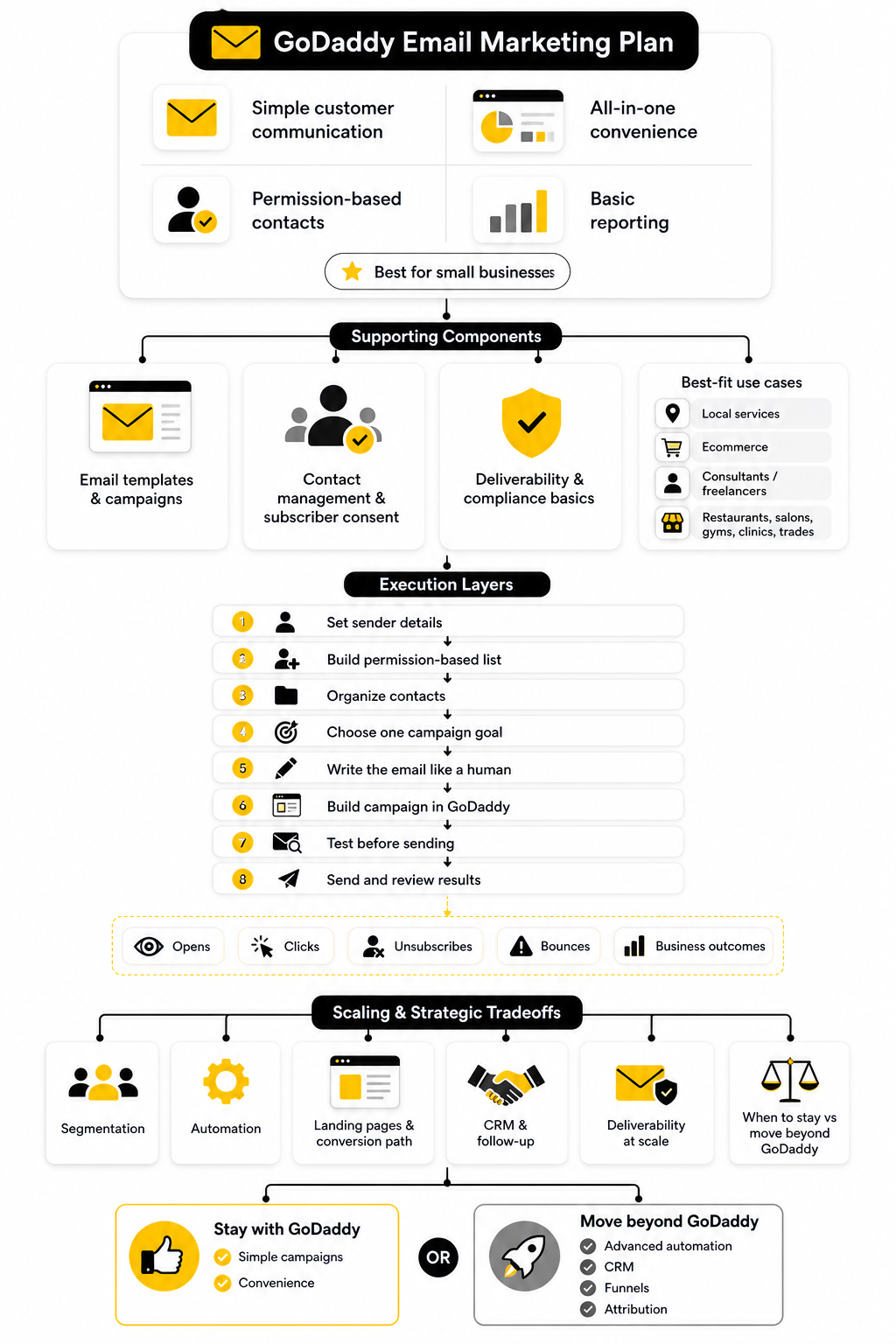
Step 4: Choose One Campaign Goal
Every email should have one job. This is where many businesses go wrong. They try to announce a sale, explain a new service, promote three products, ask for reviews, share a blog post, and remind people about appointments in the same message.
That kind of email feels busy because it is busy. A better campaign starts with one clear goal before you write a single line. Are you trying to get bookings, sell a product, drive traffic to a page, bring customers back, collect replies, or announce something important?
Once the goal is clear, the rest of the email becomes easier. The subject line points to the goal. The body explains the value. The call to action tells the reader what to do next. Simple wins.
Step 5: Write The Email Like A Human
A good small business email does not need to sound like a corporate newsletter. It should sound like a helpful, confident message from a business the reader recognizes. That means clear language, a specific reason for emailing, and no fake urgency.
Start with the reason the email matters now. Then explain what is useful, new, limited, helpful, or relevant about the message. End with a direct call to action that matches the campaign goal.
For example, a service business should not write five vague paragraphs about “exciting updates.” It should say what changed, who it helps, and what the reader should do next. If the reader has to work hard to understand the point, the email is not ready.
Step 6: Build The Campaign In GoDaddy
Once the message is clear, building the campaign becomes much easier. Open the email composer, choose a template that fits the purpose, and add only the content needed to support the campaign goal. The template should serve the message, not compete with it.
Use a clean layout. Put the strongest point near the top. Keep paragraphs short enough to scan, but not so short that the email feels robotic. Add a button or link where the next step makes sense, and make sure the call to action is specific.
If you are promoting a product, the email should make the offer easy to understand. If you are promoting a service, it should make the benefit and booking path clear. If you are sharing an announcement, it should explain why the reader should care.
Step 7: Test Before You Send
Testing is boring until it saves you from an embarrassing mistake. Before you send any campaign, send yourself a test email and read it like a customer. Open it on desktop and mobile because most layout problems show up when the screen gets smaller.
Check the basics first. Make sure the subject line is clear, the sender name looks right, the links work, the images load, and the call to action goes to the correct page. Also check whether the email still makes sense if someone only skims the headline, first paragraph, and button.
Read the email out loud if the campaign is important. Clunky sentences are easier to catch when you hear them. If the message sounds forced, rewrite it until it feels like something a real person would send.
Step 8: Send At A Sensible Time
Scheduling matters, but do not obsess over mythical perfect send times. Your audience, industry, and offer matter more than generic advice. A restaurant, a consultant, a local gym, and an ecommerce store may all see different behavior.
Choose a time when your audience is likely to be able to act. For local services, that may be during working hours. For consumer offers, evenings or weekends might work better. For B2B messages, weekday mornings can be a practical starting point.
The real advantage comes from consistency and review. Send, measure, learn, and adjust. Over time, your own audience data becomes more useful than generic best practices.
Step 9: Review Campaign Performance Without Getting Lost In Metrics
After the campaign sends, look at the numbers that help you make a better decision next time. Do not stare at every metric like each one has equal importance. For most small businesses, the first questions are simple: did people open it, did they click, did they reply, and did the campaign create the result you wanted?
Open rate can show whether your sender name and subject line earned attention. Clicks can show whether the offer and call to action were strong enough. Replies, bookings, purchases, calls, and form submissions show whether the campaign actually moved the business forward.
This is where you should be practical. If opens were low, improve the subject line and list quality. If clicks were low, improve the offer, layout, and call to action. If clicks were strong but sales were weak, the problem may be the landing page, price, timing, or offer fit.
A Simple First Campaign You Can Actually Send
Your first campaign should not be a massive brand announcement. Keep it focused, useful, and easy to act on. A simple “welcome back,” seasonal offer, new availability notice, or customer update is often enough to start.
Here is a clean structure you can use:
That structure works because it respects the reader’s time. It does not try to be clever for the sake of being clever. It gets to the point, gives enough context, and makes the next step obvious.
When To Add More Tools Around GoDaddy
A GoDaddy email marketing plan can handle simple campaign execution, but you may eventually need more than basic emails. If you start needing funnels, CRM follow-up, sales pipelines, SMS, booking workflows, or multi-step automation, you should look at a broader system before your setup becomes patched together. That is especially true if email is connected to sales calls, quotes, onboarding, or repeat follow-up.
For an all-in-one sales and marketing setup, GoHighLevel is a more serious option because it is built around CRM, automation, landing pages, pipeline management, and follow-up. If your business model depends on turning leads into booked calls or clients, that kind of system can make more sense than trying to stretch a lightweight email tool beyond its purpose.
If you only need stronger email campaigns, Brevo or Moosend may be a cleaner step up. The right move depends on what is limiting you: email depth, automation, sales tracking, or the lack of one connected marketing system.
Statistics And Data
Data is where a GoDaddy email marketing plan becomes either useful or misleading. The numbers can help you improve, but only if you understand what each metric is actually telling you. Too many small businesses look at open rate, feel good or bad for ten seconds, and then send the next campaign without changing anything.
That is not measurement. That is checking a scoreboard without watching the game. Good email analytics should help you answer three practical questions: did the email reach people, did the message get attention, and did the campaign create a business result?
GoDaddy’s reporting setup is built around that kind of simple review. Its email marketing reports include campaign summary data, engagement, growth, bounces, and spam-marked emails through the email marketing reports dashboard. That gives you enough to make better decisions, as long as you do not treat every metric as equally important.
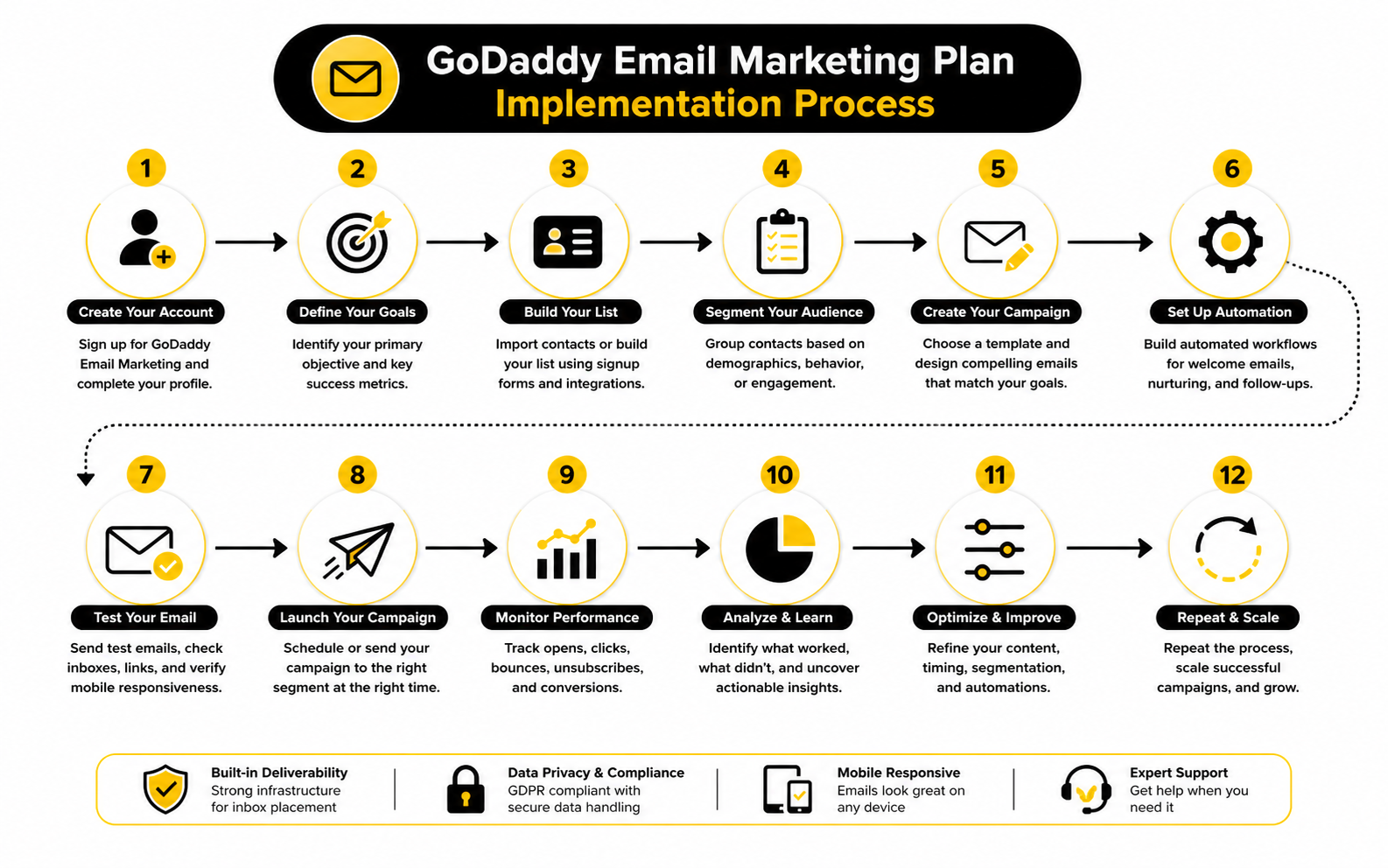
The Metrics That Actually Matter
The first metric to watch is deliverability-related performance. If emails bounce, get marked as spam, or fail to reach people, your campaign cannot work no matter how good the offer is. This is the foundation layer, and it should be checked before you obsess over copy, design, or send time.
The second layer is attention. Opens can help you understand whether your sender name and subject line are doing their job, but open rates are not perfect. Privacy features, image loading behavior, and inbox changes can make open data less precise, so use it as a signal rather than absolute truth.
The third layer is action. Clicks, replies, bookings, form fills, purchases, calls, and quote requests tell you whether the email moved someone forward. For most businesses, this is where the real value is.
A simple measurement stack looks like this:
Open Rate Is A Signal, Not The Final Answer
Open rate is useful, but it is not the whole story. A strong open rate means your email got attention in the inbox, but it does not automatically mean the campaign was profitable. People can open an email and still ignore the offer.
That is why you should compare open rate against the campaign goal. If opens are low, the issue may be your sender name, subject line, list quality, or timing. If opens are high but clicks are weak, the problem is probably inside the email itself.
Recent benchmark reports show why context matters. MailerLite’s 2025 benchmark report, based on over 3.6 million campaigns from 181,000 approved accounts, shows median benchmarks across open rate, click rate, click-to-open rate, and unsubscribe rate in its email marketing benchmarks report. Those numbers are useful, but your own trend over time is usually more important than chasing a generic industry average.
Click Rate Shows Whether The Message Worked
Click rate is often more useful than open rate because it shows action. If someone clicks, they did more than glance at your subject line. They found the message relevant enough to take the next step.
A low click rate usually points to one of three problems. The offer was not compelling, the call to action was not clear, or the audience was not the right fit. Sometimes the issue is also layout: the email may technically contain a link, but the reader does not notice it quickly enough.
For a GoDaddy email marketing plan, this matters because many users are sending practical campaigns: promotions, announcements, coupons, newsletters, and updates. If the campaign goal is to get bookings, clicks should lead to the booking page. If the goal is product sales, clicks should lead directly to the product or offer page. Do not send people to a generic homepage and make them hunt.
Click-To-Open Rate Helps Diagnose The Email Body
Click-to-open rate is one of the cleaner ways to judge whether the email content matched the promise of the subject line. It looks at the people who opened and asks how many of them clicked. That makes it useful when open rates look fine but the campaign still does not drive action.
If many people open but few click, the subject line did its job and the body did not. Maybe the offer was unclear. Maybe the email had too many competing links. Maybe the call to action was buried too low.
This is where practical editing helps. Remove distractions, sharpen the offer, and make the next step obvious. The reader should not need to think, “What am I supposed to do now?”
Unsubscribes Are Not Always Bad
Unsubscribes feel personal, but they are not always a problem. Some people no longer need your service, moved away, changed interests, or joined for a one-time reason. A small number of unsubscribes after a campaign is normal.
What matters is the pattern. If unsubscribes suddenly spike after one email, review the message, frequency, audience, and promise that originally got people onto the list. Something likely felt irrelevant, too aggressive, or different from what subscribers expected.
A clean unsubscribe process is also part of healthy email marketing. Gmail’s bulk sender rules require senders at higher volumes to make unsubscribing easy and avoid unwanted email through its sender guidelines. Even if your business is smaller, the same principle applies: make it easy for the wrong people to leave so the right people remain engaged.
Bounces Tell You About List Quality
Bounces are not glamorous, but they are important. A bounced email means your message did not successfully reach that address. This can happen because an address is invalid, inactive, mistyped, full, or temporarily unavailable.
Hard bounces should be cleaned up quickly. Keeping bad addresses on your list hurts list quality and can create deliverability problems over time. Soft bounces deserve monitoring, especially if the same contacts keep failing repeatedly.
This is one reason permission-based list building matters so much. A list grown through real subscribers, customers, and opt-ins will usually be healthier than a list built from scraped contacts or old imports. Better list quality gives every campaign a stronger chance before the email is even written.
Spam Complaints Are The Warning Light
Spam complaints are one of the most serious signals in email marketing. When someone marks your email as spam, they are not just ignoring it. They are telling the inbox provider that your message was unwanted.
This is why you should be careful with aggressive sending. More emails do not automatically mean more sales. If frequency goes up while relevance goes down, complaints can rise and inbox placement can suffer.
Google has pushed senders to keep spam complaints very low, and its updated sender requirements focus on authentication, unwanted email, and easy unsubscribe options through the Gmail sender guidelines. For small businesses, the lesson is simple: send emails people expect, recognize, and can easily opt out of.
Revenue And Leads Matter More Than Vanity Metrics
A campaign with a beautiful open rate can still fail if nobody buys, books, replies, or requests a quote. This is the part many small businesses miss. Email is not just a publishing channel; it should support a business outcome.
For ecommerce, that outcome may be product revenue. For a local service business, it may be appointment bookings. For a consultant, it may be replies or calls scheduled. For a restaurant, it may be reservations, online orders, or repeat visits.
So do not stop inside GoDaddy’s email report. Match campaign performance with what happened after the click. Did the booking calendar fill up? Did the offer page convert? Did the phone ring? Did people reply with buying questions?
How To Read Campaign Performance Like A Business Owner
The easiest way to review campaign data is to diagnose one layer at a time. Do not change everything after one campaign. Change the thing the data points to most clearly.
If delivery health is weak, clean the list and review sending practices. If opens are weak, improve the sender name, subject line, timing, and audience fit. If clicks are weak, improve the offer, email body, layout, and call to action. If clicks are strong but sales are weak, the problem may be the landing page, pricing, checkout, booking flow, or offer itself.
Use this simple interpretation model:
That framework keeps you from guessing. It also stops you from blaming the tool when the real issue is the audience, offer, or follow-up path.
Benchmarks Are Helpful, But Your Trend Matters More
Benchmarks give you context, not commandments. Mailchimp’s benchmark guidance explains that comparing KPIs like open rates, click-through rates, and conversions against industry averages can help businesses identify strengths and weaknesses through email marketing benchmarks. That is useful, but it should not replace your own data.
Your audience may behave differently from the average. A small list of loyal local customers can beat a huge generic list. A niche B2B service can have fewer clicks but higher-value conversions. A seasonal business may see sharp performance swings depending on timing.
The better question is not, “Did I beat the internet average?” The better question is, “Is this campaign better than our last relevant campaign, and do we know why?” That mindset leads to real improvement.
A Practical Reporting Routine
You do not need a complicated analytics dashboard to use a GoDaddy email marketing plan well. You need a repeatable reporting habit. After each campaign, record the goal, audience, subject line, send time, opens, clicks, unsubscribes, bounces, spam complaints, and business result.
Then write one short lesson. Not ten lessons. One. Maybe the subject line was too vague. Maybe the offer was strong but the landing page was weak. Maybe the list segment was too broad.
A simple post-send review could look like this:
That final question is where the value is. Data should drive action, not just reporting. If you are not changing anything based on the numbers, you are not really measuring.
Advanced Considerations Before You Scale
Once your GoDaddy email marketing plan is working at a basic level, the next question is not “How do I send more emails?” The better question is “What should happen before and after each email?” That shift matters because scaling email without a strategy usually creates more noise, not more revenue.
At the beginner stage, a newsletter or promotion can be enough. At the next stage, your email marketing has to connect with your offer, customer journey, sales process, website, booking flow, and retention plan. If those pieces are disconnected, your campaigns may look active while the business impact stays weak.
This is where GoDaddy can still play a useful role, but you need to understand its limits. It is strongest when you want simple campaigns, customer updates, basic automations, and a convenient dashboard. It becomes less ideal when email needs to act as the center of a more advanced acquisition and conversion system.
The Tradeoff Between Simplicity And Control
GoDaddy’s biggest strength is also its biggest tradeoff. It keeps email marketing simple, which is great when you want to move quickly. But simplicity usually means less control over segmentation, automation logic, testing depth, attribution, and advanced personalization.
That is not automatically bad. Plenty of small businesses do not need complicated automation. A local business sending a monthly offer, appointment reminder, seasonal announcement, or customer update can get real value from a straightforward setup.
The problem starts when your strategy becomes more sophisticated than the tool. If you want to score leads, trigger different follow-ups based on behavior, connect email to SMS, track pipeline stages, and attribute revenue by campaign, you are no longer just sending marketing emails. You are building a marketing system.
When Segmentation Becomes Non-Negotiable
Basic list organization is enough in the beginning, but segmentation becomes more important as your audience grows. A new subscriber, repeat buyer, cold lead, past customer, and high-intent quote request should not always receive the same message. The more varied your list becomes, the more dangerous one-size-fits-all campaigns become.
Segmentation does not need to be clever. It needs to be useful. You might separate people by customer status, service interest, purchase history, location, lead source, or recent engagement. The point is to avoid sending irrelevant offers to people who are not ready for them.
This matters because relevance protects your list. A smaller, better-matched campaign can outperform a larger blast because it feels more personal and timely. When people consistently receive emails that match their needs, they are more likely to stay subscribed, click, reply, and buy.
Automation Should Support The Customer Journey
Automation is powerful when it helps the customer at the right moment. It is annoying when it exists just because the software can send it. The difference is intent.
GoDaddy’s Websites + Marketing email automations can support practical customer moments such as order updates, appointment details, shipment information, and subscriber welcomes through its email automation setup. That kind of automation is valuable because it reduces manual work and improves customer communication.
But advanced automation goes further. It can nurture leads after a form submission, follow up after a missed booking, re-engage inactive subscribers, recover abandoned carts, or move prospects through a sales pipeline. If those workflows become central to your business, a platform like GoHighLevel may be a better fit because it is built around automation, CRM stages, landing pages, and follow-up across multiple channels.
Watch The Hidden Cost Of Tool Sprawl
One common mistake is trying to patch together too many tools too early. A website builder here, an email tool there, a calendar app somewhere else, a CRM spreadsheet, a form plugin, a payment page, a chatbot, and a separate automation tool can look flexible at first. Then one day nobody knows where the real customer record lives.
That is the hidden cost of tool sprawl. You spend more time connecting, checking, exporting, importing, and fixing than actually marketing. Worse, your customer experience becomes inconsistent because each tool has only part of the story.
This is why the GoDaddy email marketing plan can be appealing for simple businesses. Keeping the core setup in one place reduces friction. But if your business depends on serious lead management, the better answer is not always “add another plugin.” Sometimes the better answer is to move into a more complete system before the mess gets expensive.
Deliverability Gets Harder As Volume Grows
Small lists can hide bad habits for a while. Larger lists expose them. As volume increases, your sending reputation, list hygiene, authentication, complaint rate, bounce rate, and engagement patterns become more important.
Mailbox providers have become stricter about sender behavior. Gmail’s sender rules emphasize authentication, low spam complaints, easy unsubscribing, and wanted email through its bulk sender guidelines. That does not mean every small business should panic, but it does mean email marketing has become less forgiving.
If you plan to scale, treat deliverability as part of the strategy, not a technical afterthought. Clean inactive contacts. Avoid purchased lists. Make unsubscribing easy. Send relevant campaigns. Use a recognizable sender name. Respect the promise people accepted when they joined your list.
Why More Emails Can Lower Revenue
Sending more often can increase revenue when the emails are relevant and the offer is strong. It can also train people to ignore you. Frequency is not the problem by itself; low relevance at high frequency is the problem.
If every email feels like a promotion, subscribers stop paying attention. If every subject line tries to create urgency, urgency loses meaning. If every campaign asks for a purchase without giving value, the relationship becomes one-sided.
A stronger approach is to balance commercial intent with usefulness. Send offers when there is a real reason. Send updates when they matter. Send reminders when they help the customer act. The goal is not to become louder in the inbox; the goal is to become more worth opening.
The Landing Page Problem
Sometimes the email is not the weak link. The click happens, but the page fails. This is one of the most common problems when businesses judge their email marketing plan too quickly.
If people click and do not convert, look at the destination. Is the offer obvious? Does the page match the email? Is the form too long? Is the checkout confusing? Is the booking path easy on mobile? Is the page fast enough?
For businesses that rely heavily on campaign-specific pages, a dedicated landing page builder can be useful. ClickFunnels is better suited when the goal is building sales funnels, offer pages, and conversion paths around campaigns. If you are using Shopify and need more polished ecommerce landing pages, Replo can make more sense for store-specific page building.
The CRM Gap
Email marketing gets much more valuable when it connects to a clear customer record. You want to know who subscribed, what they clicked, what they bought, what they asked about, when they last engaged, and what should happen next. Without that, every campaign starts to feel disconnected.
GoDaddy can help with basic customer communication, but it is not always the best long-term CRM for businesses with complex sales processes. If leads need follow-up across calls, emails, appointments, proposals, and pipeline stages, you need more structure. Otherwise, good leads slip through the cracks.
A CRM-first approach becomes especially important for agencies, consultants, home services, medical practices, real estate businesses, and B2B service providers. These businesses often do not win revenue from one email click. They win revenue from organized follow-up after that click.
AI Can Help, But It Can Also Make Your Emails Worse
AI can help you draft subject lines, summarize campaign ideas, repurpose content, and create first drafts faster. Used well, it saves time. Used lazily, it makes your emails sound like everyone else.
The inbox is already full of generic marketing language. If AI helps you write faster but removes your point of view, the email may become more polished and less effective. That is a bad trade.
Use AI for structure, not personality replacement. Feed it the offer, audience, objections, customer language, and business context. Then edit the draft until it sounds like a real brand talking to real customers. The more human your final email feels, the better chance it has of standing out.
When To Stay With GoDaddy
Staying with GoDaddy makes sense when your needs are still simple and the convenience is helping you execute. If you are sending occasional campaigns, keeping subscribers organized, using basic automations, and tracking results without friction, there may be no urgent reason to move. Do not switch tools just because advanced marketers talk about advanced features.
A GoDaddy email marketing plan can be the right fit when your business values speed over complexity. It is especially reasonable if your website, contacts, store, appointments, and marketing already live in the GoDaddy ecosystem. Less friction often means more consistent sending, and consistency matters.
Stay if the tool helps you send useful emails without creating operational drag. The best platform is not the one with the longest feature list. It is the one that supports the strategy you can actually execute.
When To Move Beyond GoDaddy
You should consider moving beyond GoDaddy when your strategy clearly needs more than simple campaigns. The signs are usually obvious. You want more advanced automation, deeper segmentation, stronger testing, CRM-driven follow-up, better attribution, more landing page control, or multichannel messaging.
At that point, the question becomes what kind of system you need next. If you want email-first functionality, Brevo or Moosend may be the cleaner upgrade. If you want a full business growth system with CRM, automation, funnels, and follow-up, GoHighLevel is the more strategic jump.
Do not migrate just because you are bored with the interface. Migrate when the current setup is limiting revenue, speed, visibility, or customer experience. Tool changes are only worth it when they remove a real bottleneck.
The Expert Rule: Match The Tool To The Revenue Model
The most useful way to choose is to match the tool to how your business actually makes money. A local bakery, a freelance designer, a roofing company, a coaching business, and an ecommerce store do not need the same email setup. Their customer journeys are different, so their systems should be different too.
If revenue comes from repeat local customers, simple campaigns and timely offers may be enough. If revenue comes from high-ticket leads, you need CRM follow-up and pipeline visibility. If revenue comes from ecommerce, you need product segmentation, landing page quality, and purchase behavior. If revenue comes from appointments, booking automation and reminders become essential.
That is the real strategic lens. Do not ask, “Is GoDaddy good or bad?” Ask, “Does this GoDaddy email marketing plan match the way my business turns attention into revenue?” If the answer is yes, keep it simple and execute well. If the answer is no, upgrade before your marketing system starts holding the business back.
Final Decision Framework
By this point, the decision should be much clearer. A GoDaddy email marketing plan is best when you want simple campaigns, a familiar dashboard, and a practical way to stay in touch with customers without building a complicated marketing machine. It is not the best fit when your business depends on advanced automation, deep segmentation, CRM-driven sales follow-up, or detailed funnel attribution.
That does not make it weak. It makes it specific. The mistake is expecting one tool to serve every stage of the business forever.
Use GoDaddy when the goal is to send useful emails quickly and manage basic customer communication from the same place as your website. Move beyond it when email becomes part of a bigger revenue system that needs CRM, automation, landing pages, booking logic, SMS, and more complete customer tracking.
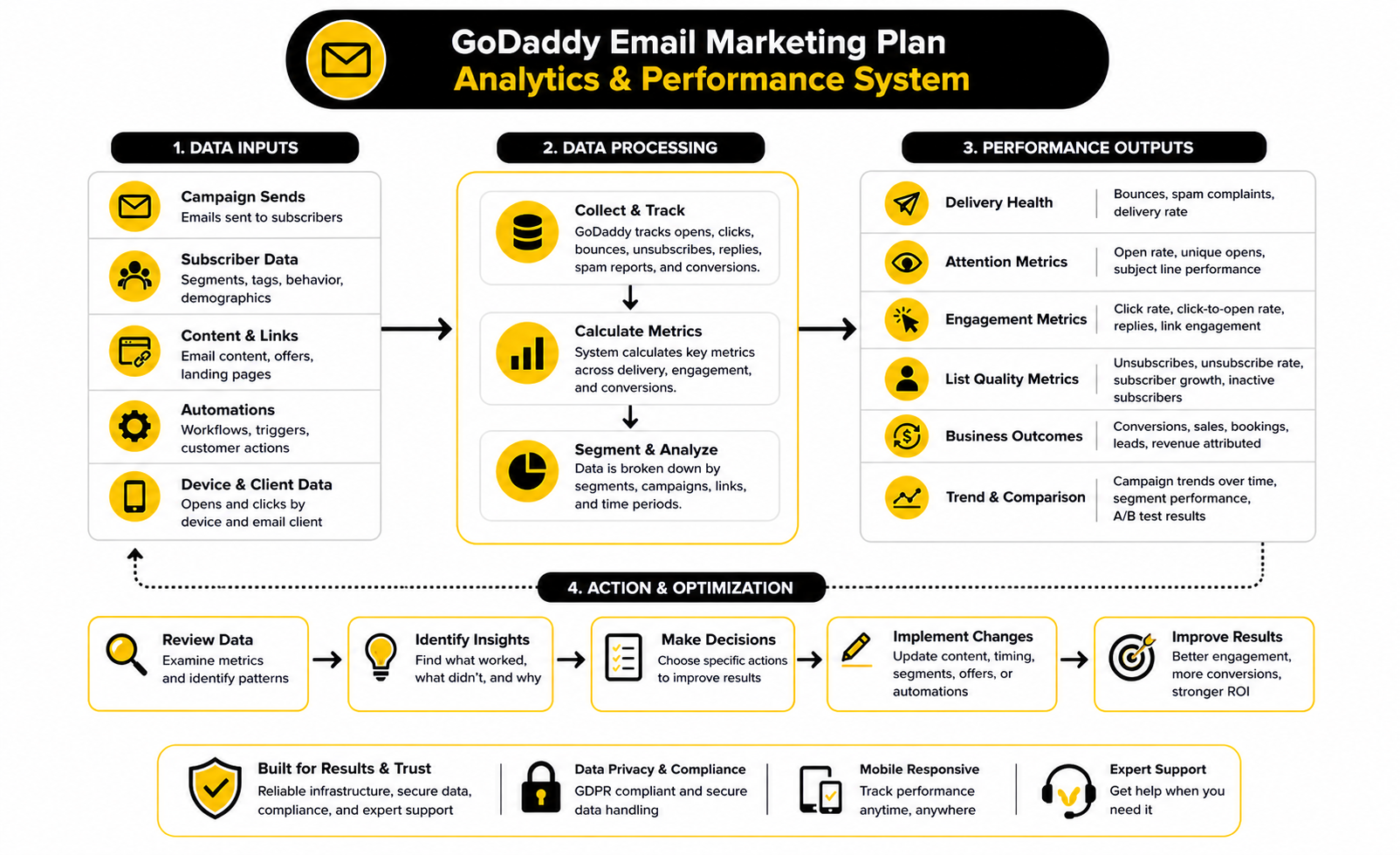
The Email Marketing Ecosystem You Actually Need
A good email system is not just the email tool. It is the full path from subscriber to action. Someone joins your list, receives a useful message, clicks a relevant offer, lands on a page that matches the email, and then takes the next step without friction.
That final system usually includes:
This is why the tool decision should come after the customer journey decision. If your customer journey is simple, a GoDaddy email marketing plan may be enough. If your customer journey is more complex, the platform has to support that complexity without creating more manual work.
The Bottom Line
The GoDaddy email marketing plan is a practical choice for small businesses that want to send newsletters, promotions, announcements, and basic automated emails without learning a specialist platform. It works best when convenience matters more than advanced control. For many local businesses and beginners, that is a completely reasonable tradeoff.
The key is to use it with discipline. Build your list through real permission, keep your messages focused, review performance after every campaign, and avoid sending just because the tool makes it easy. Better email marketing usually comes from better thinking, not more buttons.
If your needs grow, do not force GoDaddy to become something it is not. Upgrade when your business needs stronger segmentation, deeper automation, CRM follow-up, sales funnels, or more serious attribution. The right platform is the one that matches how your business turns attention into revenue.
Is A GoDaddy Email Marketing Plan Good For Beginners?
Yes, a GoDaddy email marketing plan can be good for beginners because it keeps the workflow simple. You can manage campaigns, contacts, templates, and basic sending without starting from a highly technical platform. That makes it useful for small businesses that want to send real campaigns instead of getting stuck in setup.
What Is GoDaddy Email Marketing Best Used For?
GoDaddy email marketing is best used for newsletters, promotions, customer updates, coupons, announcements, and simple follow-up messages. It works especially well when your website or store is already connected to GoDaddy. The strongest use case is straightforward customer communication, not complex marketing automation.
Can I Use GoDaddy Email Marketing For Ecommerce?
Yes, you can use it for ecommerce campaigns if your needs are simple. It can help you promote products, announce offers, and send customer updates. If your store needs advanced product segmentation, abandoned cart logic, upsell flows, or highly customized landing pages, you may eventually need a more specialized ecommerce or automation setup.
Does GoDaddy Email Marketing Include Automation?
GoDaddy offers email automation inside its Websites + Marketing ecosystem for practical customer moments like order updates, shipment details, appointment confirmations, and subscriber welcomes. These automations are useful for basic operational communication. They are not the same as the advanced multi-step automation systems you would expect from a full CRM or funnel platform.
How Often Should I Send Emails With GoDaddy?
The right sending frequency depends on your audience, offer, and business model. A monthly newsletter may be enough for a local service business, while an ecommerce store may send more often during promotions or seasonal campaigns. The rule is simple: send when you have something useful, relevant, or timely to say.
What Metrics Should I Track First?
Start with delivery health, opens, clicks, unsubscribes, bounces, and the actual business result. Opens tell you whether the email earned attention, while clicks show whether the message motivated action. The business result matters most because a campaign is only truly successful if it supports bookings, sales, replies, calls, leads, or repeat visits.
Is Open Rate Still Reliable?
Open rate is useful, but it should not be treated as perfect. Privacy features and image-loading behavior can affect how opens are tracked. Use open rate as a directional signal, then combine it with clicks, replies, conversions, unsubscribes, and revenue to understand what really happened.
Why Are My GoDaddy Email Campaigns Getting Low Clicks?
Low clicks usually mean the offer, audience, email body, or call to action needs work. If people open but do not click, the subject line probably did its job, but the message did not create enough interest. Make the offer clearer, remove distractions, and send people to a specific page instead of a generic homepage.
Should I Use GoDaddy Or A Dedicated Email Platform?
Use GoDaddy if you want convenience and simple campaign management. Use a dedicated email platform if you need stronger segmentation, testing, automation, or email-specific reporting. The best choice depends less on brand name and more on how much control your marketing strategy requires.
When Should I Move Beyond GoDaddy?
You should move beyond GoDaddy when your email marketing becomes part of a larger sales system. That usually means you need CRM tracking, lead pipelines, multi-step automations, SMS follow-up, advanced landing pages, or more detailed attribution. If the current setup is slowing down revenue, visibility, or follow-up, it is time to consider a more complete platform.
Can GoDaddy Replace A CRM?
GoDaddy can help with basic customer communication, but it should not be treated as a full CRM for complex sales processes. A real CRM tracks lead status, conversations, deal stages, follow-up tasks, and customer history in a structured way. If your business sells through calls, quotes, consultations, or long decision cycles, CRM functionality becomes much more important.
Is GoDaddy Email Marketing Good For Agencies?
It can work for very simple agency communication, but it is usually not enough for agencies managing serious lead generation or client funnels. Agencies often need campaign tracking, pipelines, automation, appointment workflows, reporting, and multi-client systems. For that kind of work, a more complete marketing and CRM platform is usually a better fit.
Can I Import My Existing Contacts Into GoDaddy?
Yes, you can import contacts into GoDaddy, but you should only add people who gave permission to receive marketing emails. This matters for trust, deliverability, and compliance. A smaller clean list is much better than a large imported list full of people who never asked to hear from you.
What Is The Biggest Mistake With GoDaddy Email Marketing?
The biggest mistake is treating email like a broadcast tool instead of a customer relationship tool. Sending more campaigns will not help if the emails are irrelevant, the list is weak, or the offer is unclear. Use the GoDaddy email marketing plan to send focused, useful messages that lead to a specific next step.
Is A GoDaddy Email Marketing Plan Worth It?
A GoDaddy email marketing plan is worth it if you already use GoDaddy and need a simple way to send campaigns without adding another tool. It is especially useful for small businesses that value speed, convenience, and basic customer communication. It is less worth it if you already know you need advanced automation, detailed segmentation, or a full sales and marketing system.
Build a stronger local presence with BAAM AI
Turn your website, Google profile, social channels, and AI visibility into one growth engine
Most businesses do not need more random marketing activity. They need a consistent presence system that helps the right people find them, trust them, and take action. BAAM AI brings strategy, local SEO, website updates, Google Maps visibility, social content, AI-search readiness, media production, and reporting into one practical monthly engine.
If you want your marketing to keep working after the campaign ends, start with a free BAAM AI presence audit. See how your business shows up today and where the fastest visibility wins are at BAAM AI.