
BAAM AI Blog
What a Mailing Platform Actually Does After the First Send
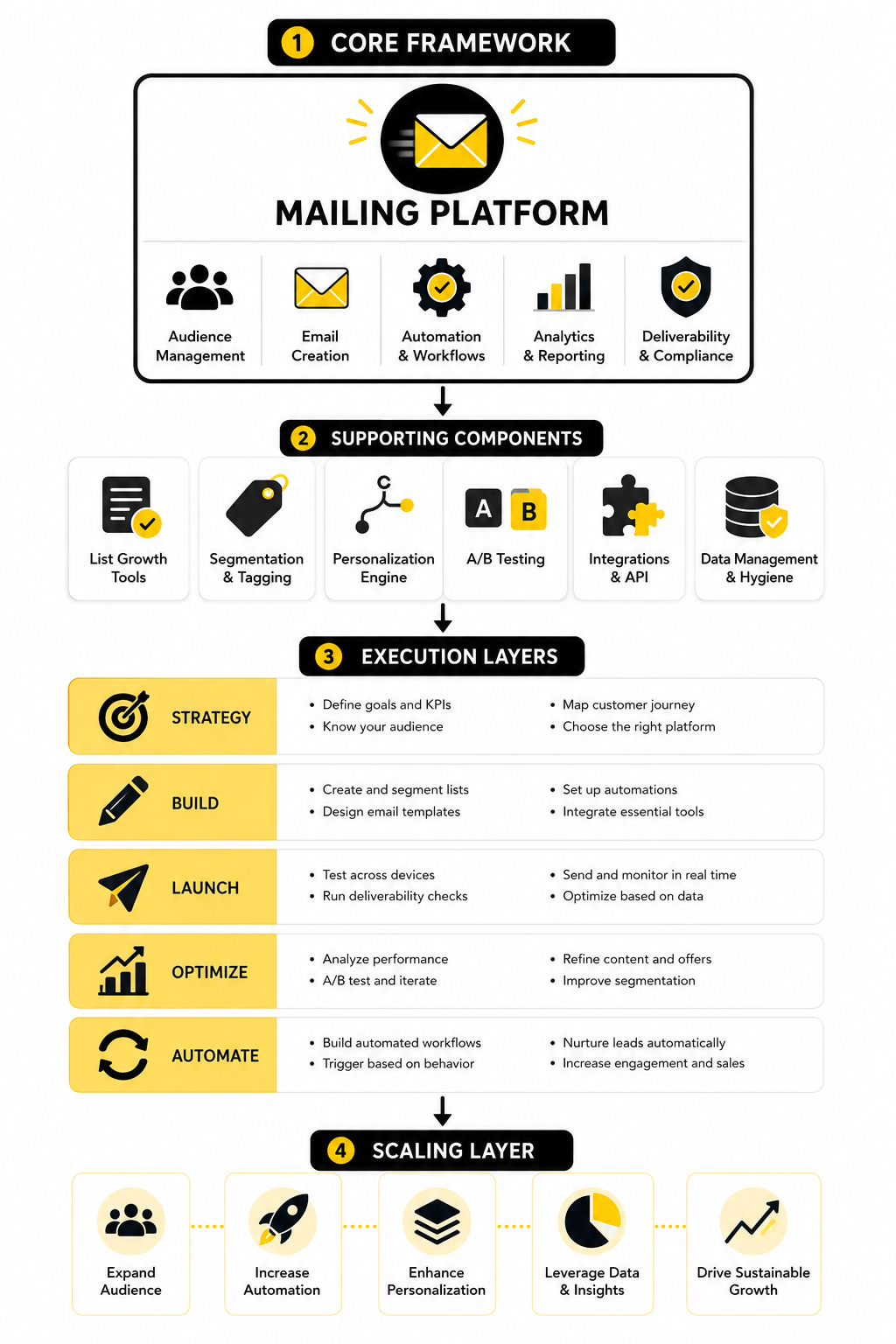
A mailing platform is not just a place to write a newsletter and press send. Once your list starts growing, the platform becomes the system that stores subscriber data, tracks engagement, manages consent, segments...
What a Mailing Platform Actually Does After the First Send
A mailing platform is not just a place to write a newsletter and press send. Once your list starts growing, the platform becomes the system that stores subscriber data, tracks engagement, manages consent, segments people by behavior, and helps you send the right message without manually rebuilding every campaign. That is the real difference between “sending emails” and running an email channel.
This matters because email performance is no longer judged by one simple metric. Open rates still have a place, but privacy changes have made them less reliable, especially since Apple Mail Privacy Protection can inflate opens and make open-time data harder to trust, which is why clicks, conversions, replies, and revenue now matter more than vanity engagement. Litmus notes that Apple Mail Privacy Protection affects a major share of email opens, so a serious setup needs better tracking than “people opened it.”
A good mailing platform should help you see the whole journey. Someone joins your list, receives a welcome sequence, clicks a product page, ignores two emails, buys later, and then enters a customer-only flow. Without a platform that can connect those steps, you are guessing.
The Core Features That Separate a Real Mailing Platform From a Basic Email Tool
The first feature to look for is segmentation. You need to separate new subscribers from buyers, active readers from cold contacts, leads from customers, and high-intent visitors from people who only downloaded one free resource months ago. Segmentation is where your emails start feeling relevant instead of generic.
The second feature is automation. A platform should let you build welcome sequences, abandoned checkout flows, reactivation campaigns, post-purchase follow-ups, lead nurturing, and simple internal notifications. This is why tools like Brevo and Moosend are usually more useful than a plain inbox-style sender when you want repeatable campaigns instead of one-off blasts.
The third feature is deliverability support. Gmail requires senders to authenticate mail, keep spam complaints low, and support easy unsubscribe options for bulk sending, with Google defining bulk senders as those sending close to 5,000 messages or more to personal Gmail accounts in a 24-hour period. Google’s sender guidelines make this very clear, and Yahoo’s sender best practices follow the same direction with authentication, low complaints, and proper unsubscribe handling.
Why Deliverability Should Be Treated as a Revenue Feature
Deliverability is not a technical side issue. If your emails land in spam, promotions, or get throttled, your copy, offer, and automation strategy barely get a chance to work. A mailing platform that helps with authentication, suppression lists, bounce handling, complaint tracking, and list hygiene protects your revenue before the campaign even starts.
This is especially important now because inbox providers have raised the standard. Gmail’s requirements for all senders began on February 1, 2024, and bulk senders face stricter expectations around SPF or DKIM, DMARC, one-click unsubscribe, and spam complaint control. Google’s FAQ also confirms that messages from the same primary domain count toward the 5,000-message bulk sender threshold, which means volume can add up faster than many small teams expect. Google explains the bulk sender definition in its official FAQ.
The practical takeaway is simple. Do not choose a mailing platform only because the editor looks nice. Choose one that helps you send cleanly, track problems, remove risky contacts, and build trust with mailbox providers over time.
Automation Is Where the Money Usually Hides
Most businesses do not lose because they send too few newsletters. They lose because they have no structured follow-up after someone shows interest. A mailing platform with automation lets you turn one subscriber action into a useful next step without depending on memory, spreadsheets, or manual reminders.
For example, a new lead should not receive the same email as someone who has already bought. A customer who clicked a pricing page three times should not be treated like a passive reader. A cold subscriber who has not clicked in months should not keep receiving high-frequency sales emails forever.
Automation fixes that by creating branches based on behavior. If someone joins from a lead magnet, they can receive educational content first. If someone clicks a demo, pricing, or checkout link, they can move into a higher-intent sequence. If someone stops engaging, they can enter a reactivation flow before being suppressed.
The Best Mailing Platform Depends on Your Business Model
There is no single best mailing platform for everyone. A creator with a weekly newsletter needs different features than an ecommerce brand, a local service business, a SaaS company, or an agency managing campaigns for clients. The right choice depends on how you capture leads, how you sell, how long your sales cycle is, and how much automation you need.
For ecommerce, the priority is usually product behavior. You want abandoned cart emails, browse abandonment, post-purchase flows, product recommendations, customer segments, and revenue attribution. For service businesses, the priority is usually lead capture, appointment booking, CRM visibility, follow-up reminders, and pipeline movement.
For agencies and local businesses, an all-in-one CRM-style setup can make more sense than a standalone newsletter tool. GoHighLevel is built more around funnels, CRM, automation, appointment workflows, and client management, so it fits teams that want email to connect with sales follow-up instead of sitting alone. That does not make it the right choice for every newsletter publisher, but it can be a strong option when email is part of a bigger lead-to-sale system.
Email Benchmarks Are Useful, But They Can Mislead You
Benchmarks help you understand the market, but they should not become your strategy. MailerLite’s 2025 benchmark data showed a global average open rate of 42.35%, click rate of 2%, click-to-open rate of 5.63%, and unsubscribe rate of 0.08% across millions of campaigns. MailerLite’s benchmark summary is useful context, but your own list quality, offer, audience, and sending behavior matter more than any global average.
International benchmark data also shows why you should not obsess over one number. The GDMA International Email Benchmark 2025 analyzed 521 billion emails from 54,000 companies across 63 countries and found that open rates were trending upward while click rates were declining. Spotler’s summary of the GDMA benchmark reinforces an important point: opens can look healthy while actual action becomes harder to earn.
So treat benchmarks as a diagnostic tool, not a scoreboard. If your open rate is below average but your revenue per subscriber is strong, you may not have a crisis. If your open rate looks great but clicks and sales are weak, your subject lines may be doing their job while the offer, segmentation, or email body is not.
How to Set Up a Mailing Platform Without Creating a Mess
The cleanest way to implement a mailing platform is to start with the customer journey, not the software menu. Most people do the opposite. They open the tool, see automations, tags, lists, templates, forms, landing pages, and analytics, then build random pieces that do not connect.
Start by mapping the path someone takes from stranger to subscriber to buyer to repeat customer. That journey tells you what data you need, what forms you need, what emails should send automatically, and what should happen when someone clicks, buys, books, ignores, or unsubscribes. Once you know that, the platform becomes much easier to configure.
A simple implementation should answer five questions before you build anything:
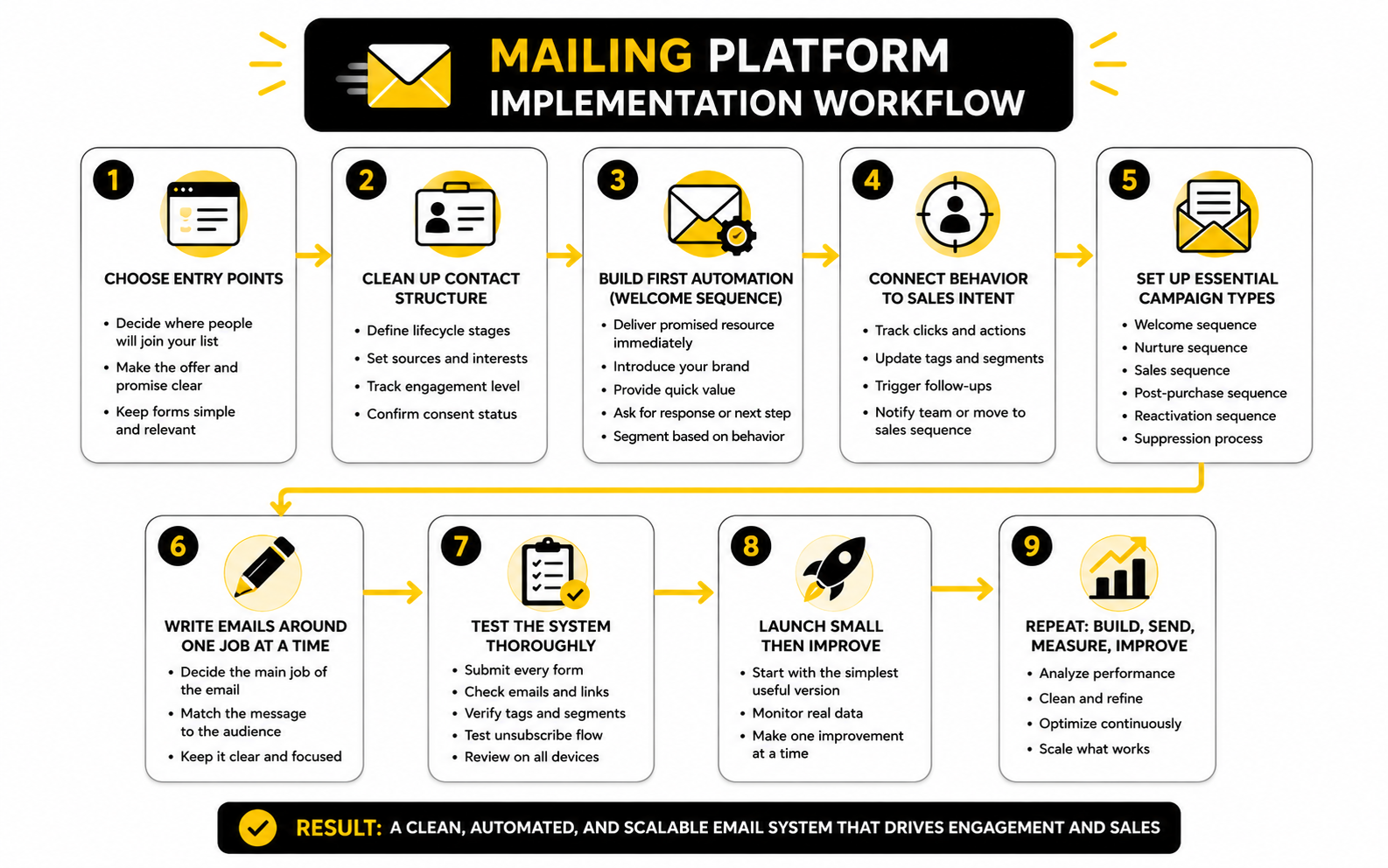
Step 1: Choose the Main Entry Points
Your first job is to decide where people will join your list. This could be a newsletter form, a lead magnet, a checkout page, a webinar registration, a quiz, a booking page, or a simple contact form. Do not create ten entry points before one of them works properly.
Each entry point should have a clear reason to exist. A newsletter signup should tell people what they will get. A lead magnet should solve a specific problem. A booking form should collect enough context to make follow-up useful without making the form feel like paperwork.
If you are building landing pages and funnels around the opt-in, tools like ClickFunnels or Systeme.io can fit naturally into the front end of the process. If you already have traffic but your pages feel slow to update, a landing page builder like Replo can help ecommerce teams move faster without waiting on developers for every campaign.
Step 2: Clean Up Your Contact Structure
Before sending campaigns, decide how your mailing platform will organize people. This sounds boring, but it saves you from months of confusion later. If you let every form, import, and automation create random tags, your list becomes difficult to understand and even harder to use.
Use a simple structure first. Separate contacts by lifecycle stage, source, interest, customer status, and engagement level. You do not need 200 tags to run effective email marketing, but you do need enough structure to avoid sending the same message to everyone.
A practical starting setup could look like this:
Step 3: Build the First Automation Before the First Newsletter
Your first automation should usually be a welcome sequence. Not a 20-email monster. Just a useful, clear sequence that confirms the signup, delivers the promised asset or value, explains what the reader can expect, and points them toward the next logical action.
This is where the mailing platform starts doing real work. Instead of hoping every new subscriber sees your best content at the right time, the automation handles the first few days consistently. That matters because the moment after signup is usually when attention is highest.
For a basic welcome flow, keep it tight:
Step 4: Connect Email Behavior to Sales Intent
Once the welcome flow is working, connect behavior to intent. Someone who opens one email is not automatically ready to buy. Someone who clicks a pricing page, product comparison, booking link, demo page, or checkout link is showing a much stronger signal.
This is where your mailing platform should update tags, trigger follow-ups, notify your team, or move a lead into a sales-focused sequence. The goal is not to stalk people. The goal is to stop treating every subscriber like they are in the same place.
For service businesses and agencies, this is where GoHighLevel can make sense because email can sit next to CRM pipelines, booking workflows, forms, SMS, and follow-up tasks. For simpler email-first setups, Brevo and Moosend are easier fits when the main priority is campaigns, segments, and automation.
Step 5: Set Up the Essential Campaign Types
After your welcome sequence and contact structure are in place, build the campaign types that support the business. This is where a lot of teams overcomplicate things. You do not need every possible automation on day one.
Start with the flows that match real moments in the customer journey. A new subscriber needs orientation. A buyer needs confirmation and support. A hesitant lead needs education and proof. An inactive contact needs a reason to stay or a clean exit from your list.
The essential campaign types are usually:
Step 6: Write Emails Around One Job at a Time
A strong email usually has one job. It might get a click, start a reply, deliver a resource, explain an idea, handle an objection, or move someone to a booking page. When one email tries to educate, sell, announce, survey, and promote three things at once, performance usually suffers.
This is where the human side matters. A mailing platform can automate the timing, targeting, and delivery, but it cannot fix a confusing message. The email still needs a clear reason to exist.
Before writing, decide what the reader already knows, what they need to understand next, and what action would genuinely help them. Then write like a person. Clear beats clever, especially when people are reading between meetings, errands, and a crowded inbox.
Step 7: Test the System Before Sending Traffic Into It
Before you publish forms, promote a lead magnet, or launch a campaign, test the full path yourself. Sign up like a real subscriber. Click every link. Check every tag. Confirm every email sends in the right order.
This step catches the embarrassing mistakes. Broken download links, missing unsubscribe links, wrong sender names, duplicated emails, bad personalization fields, and contacts landing in the wrong segment are all easier to fix before traffic arrives. Do not skip this just because the automation looks clean on the screen.
A basic test should include:
Step 8: Launch Small, Then Improve With Real Data
A mailing platform works best when you treat implementation as version one, not the final masterpiece. Launch the simplest useful system first. Then improve it based on clicks, replies, conversions, unsubscribes, complaints, and actual sales conversations.
Do not rebuild the entire setup every week. Make one meaningful change at a time so you can tell what worked. Change the offer, the subject line, the call to action, the segment, or the timing, but avoid changing everything at once.
This is the practical rhythm: build, send, measure, clean, improve. The teams that win with email are rarely the ones with the most complicated automation map. They are the ones that keep the system clean, relevant, and tied to real business outcomes.
Statistics and Data
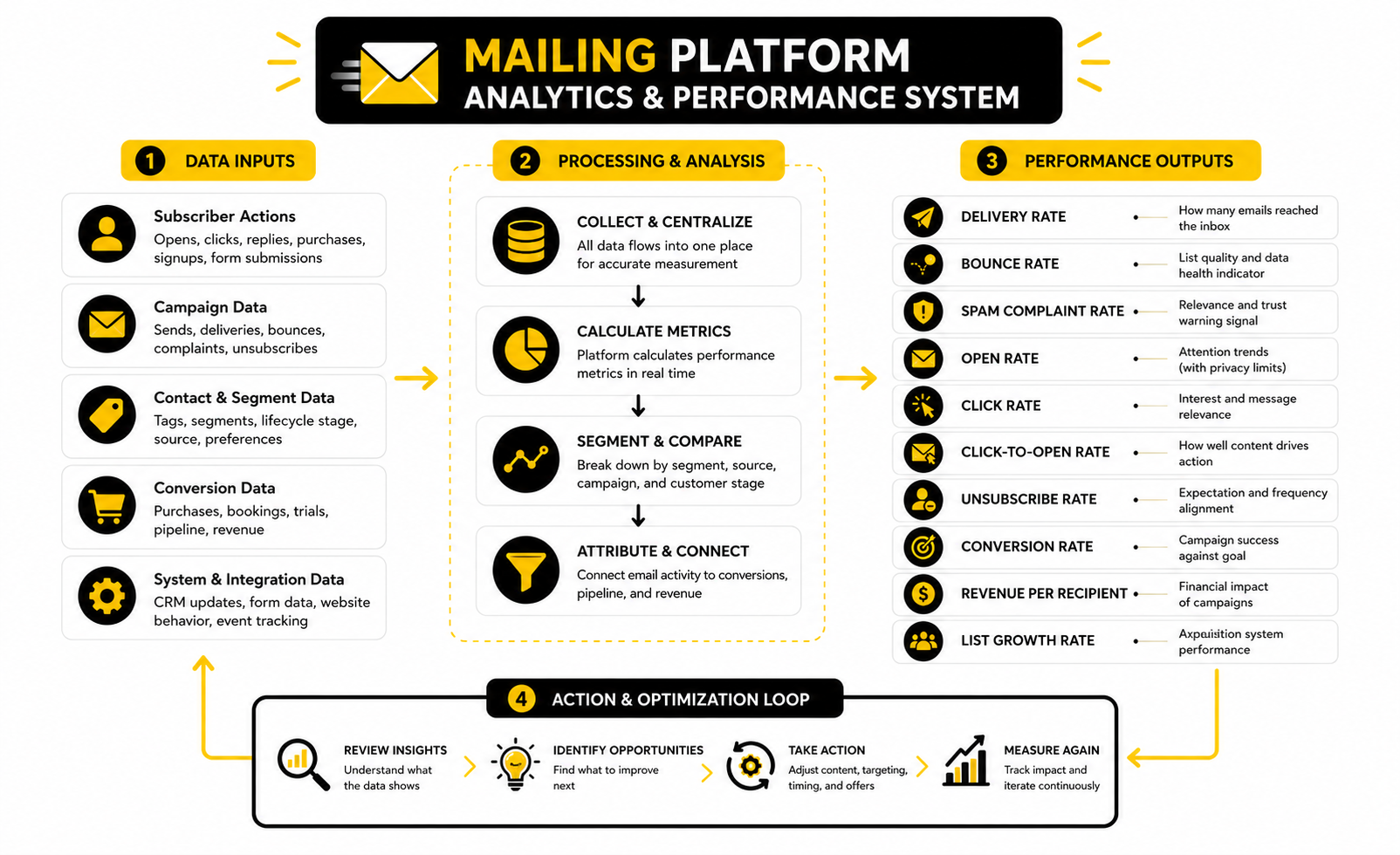
The numbers inside a mailing platform are only useful when they help you make better decisions. A dashboard can show opens, clicks, unsubscribes, bounces, spam complaints, revenue, conversions, and list growth, but those metrics do not all carry the same weight. Some tell you whether people noticed the email, some tell you whether they cared, and some tell you whether the campaign actually moved the business forward.
This is where a lot of teams get email analytics wrong. They celebrate a high open rate while ignoring weak clicks. They panic over unsubscribes even when the campaign generated qualified sales. They compare one newsletter to a global benchmark without asking whether the audience, offer, list source, and campaign goal are even comparable.
The better approach is simple: measure the signal that matches the job of the email. A welcome email should be judged by delivery, clicks, replies, and early engagement. A sales email should be judged by clicks, conversions, booked calls, checkout starts, and revenue. A reactivation email should be judged by who re-engages and who should be removed from regular sends.
Open Rates Are Useful, But They Are Not the Truth
Open rates can still help you spot broad trends, but they should not be treated as perfect measurement. Apple Mail Privacy Protection can inflate opens, hide accurate open timing, and make location data less reliable, with Litmus reporting that more than 50% of email opens happen on devices with Apple Mail Privacy Protection activated. That does not mean open rates are worthless, but it does mean they need context.
Use open rates to compare similar emails sent to similar segments over time. If your weekly newsletter normally sits around one range and suddenly drops hard, that may point to a subject line issue, deliverability problem, audience fatigue, or a poor send time. If one promotional campaign gets an unusually high open rate but weak clicks, the subject line may have created curiosity without matching the actual offer.
The mistake is using opens as the final score. A mailing platform should help you look past the first signal and ask what happened next. Did people click, reply, buy, book, unsubscribe, complain, or ignore the email completely?
Clicks Show Intent More Clearly Than Opens
Clicks are usually a stronger signal because they require action. A subscriber who clicks a pricing page, booking link, product page, webinar registration, or comparison article is giving you more useful information than someone who simply loaded an email. That is why click behavior should shape your segmentation and follow-up logic.
Benchmarks can help you sanity-check performance, but they should not become a fixed target. MailerLite’s benchmark data showed an average email click rate around 2% in 2024 and slightly above that in 2025, while unsubscribe rates also moved upward in its 2025 dataset. The useful lesson from MailerLite’s benchmark report is not “everyone must hit the same number,” but that clicks are often much harder to earn than opens.
A low click rate can mean several different things. The offer might not match the segment. The email might have too many competing links. The call to action might be buried. Or the audience may not be ready for that step yet, which means the next move is better education, not louder selling.
Revenue and Conversion Tracking Matter Most When Email Supports Sales
If your mailing platform can connect campaigns to revenue, booked calls, trials, demos, purchases, or pipeline movement, use that data. This is where email becomes much more than a content channel. It becomes a measurable part of the sales system.
Return on investment is often where email looks strongest, but only when tracking is actually set up. A 2026 Sinch Mailgun report covered more than 400 billion emails sent in 2025 and found that fewer than half of organizations could reliably track email ROI, even though 60% of those measuring it reported returns above $10 for every $1 spent. The practical message from Sinch Mailgun’s Email Impact Report coverage is blunt: email can perform well while the business still has poor visibility.
That is why you should define conversion events before you judge a campaign. For ecommerce, that might be product purchases, repeat orders, cart recoveries, or revenue per recipient. For service businesses, it might be booked consultations, qualified replies, completed forms, or closed deals influenced by email.
The Metrics That Deserve a Place on Your Dashboard
A useful mailing platform dashboard should not be packed with every possible number. Too much data makes the system harder to manage, not easier. You want the few metrics that show whether the list is healthy, whether campaigns are relevant, and whether email is producing business outcomes.
Track these consistently:
The point is not to stare at numbers every day. The point is to build a feedback loop. If the same segment clicks repeatedly, give them a more relevant next step. If a source produces subscribers who never engage, fix the source or stop promoting it. If complaints rise, reduce frequency, tighten targeting, and check whether the email promise matches what people signed up for.
Spam Complaints Are a Warning Signal You Cannot Ignore
Spam complaints deserve special attention because they can damage deliverability fast. Gmail’s sender FAQ lists a spam rate greater than 0.3% as a reason delivery support or mitigation may be unavailable, while Yahoo’s sender best practices also tell senders to keep spam complaints below 0.3%. Those thresholds in Google’s sender FAQ and Yahoo’s sender guidance should make one thing obvious: complaints are not just a “marketing metric.”
If complaints rise, do not blame the audience first. Check the source of the subscribers. Check whether people clearly agreed to receive marketing. Check whether your subject line overpromised. Check whether you are sending too often or pushing offers to people who have not shown enough intent.
A good mailing platform should make this visible before the damage spreads. It should show bounces, unsubscribes, complaints, and engagement by campaign and segment. That way, you can isolate the problem instead of punishing the whole list with random changes.
Benchmarks Should Guide Questions, Not Decisions
Benchmarks are most useful when they help you ask better questions. If your click rate is far below your industry average, investigate the offer, segment, and email structure. If unsubscribes are high after a specific campaign, check whether the promise, frequency, or targeting felt off.
But benchmarks should not override your own business model. A niche B2B list with 2,000 qualified contacts can be more valuable than a broad consumer list with 200,000 passive subscribers. A campaign with a modest click rate can still be profitable if the offer is high value and the audience is well matched.
Use benchmark data as a reference point, then make decisions from your own numbers. Your mailing platform should help you compare campaigns against previous campaigns, segments against other segments, and sources against actual revenue. That is much more useful than chasing a generic average.
How to Turn Email Data Into Action
Data only matters when it changes what you do next. If the numbers sit in a dashboard and nobody acts on them, the mailing platform is just reporting activity. The goal is to use analytics to improve targeting, timing, messaging, and list quality.
A simple review process works best:
This process keeps you from making emotional decisions. One campaign underperforming does not mean your strategy is broken. One strong open rate does not mean the email worked. The real question is whether each send teaches you something that makes the next one sharper.
Advanced Tradeoffs Before You Scale
Once the basics are working, the next challenge is not sending more email. It is deciding what should become more sophisticated and what should stay simple. A mailing platform can support advanced automation, scoring, personalization, CRM syncing, multi-channel follow-up, and revenue attribution, but every extra layer adds maintenance.
The mistake is assuming complexity equals maturity. A small, clean system that sends relevant emails will usually outperform a giant automation map nobody understands. Scaling email well means adding sophistication only when it improves the customer journey or gives the business better decision-making.
Before adding a new automation, tag, segment, or integration, ask one question: will this help us send a more relevant message, reduce manual work, protect deliverability, or measure revenue more clearly? If the answer is no, it is probably clutter.
Segmentation Can Help or Hurt You
Segmentation is powerful, but over-segmentation creates its own problems. If you split your list into too many tiny groups, you may not have enough data to learn anything useful. You may also create campaigns that are so specific they become impossible to maintain.
The best segmentation is practical. It separates people based on meaningful differences: what they want, where they came from, what they have done, what they bought, and how recently they engaged. That gives your mailing platform enough context to send better emails without turning your account into a messy tag library.
A healthy segmentation system usually has a few durable categories:
Personalization Should Feel Helpful, Not Creepy
Personalization is not just adding a first name to the subject line. Real personalization changes what someone receives based on what they actually need. That could mean showing a different offer, changing the timing, skipping irrelevant promotions, or sending customer education instead of another pitch.
But there is a line. If an email makes the reader feel watched, you lose trust. A mailing platform can track clicks, pages, purchases, forms, and behavior, but you do not need to announce every signal back to the subscriber.
Keep personalization subtle and useful. Instead of saying, “We saw you clicked our pricing page three times,” say, “If you are comparing options, here is the simplest way to choose.” Same intent, better experience.
Data Quality Becomes a Scaling Problem
Bad data is annoying at the beginning. At scale, it becomes expensive. Duplicate contacts, outdated fields, inconsistent tags, imported lists, broken source tracking, and unclear consent can all make your mailing platform harder to trust.
This matters because automation depends on clean inputs. If a customer is still tagged as a lead, they may keep getting sales emails after buying. If an inactive contact is never suppressed, they may drag down engagement. If source tracking is missing, you cannot tell which lead magnet, funnel, or campaign is bringing in quality subscribers.
Set rules before the list gets large:
Compliance Is Not Optional
Email compliance is not the fun part, but ignoring it is a bad strategy. In the U.S., the FTC’s CAN-SPAM guidance requires commercial emails to avoid deceptive headers and subject lines, identify the message honestly, include a valid physical postal address, and provide a clear way to opt out. In the EU and UK context, privacy and direct marketing rules also require careful handling of consent, lawful basis, transparency, and the right to object to direct marketing.
This is why your mailing platform should make consent and unsubscribe handling easy. You need to know who opted in, what they opted in for, when they joined, where they came from, and how to stop marketing messages when they ask. That is not just legal hygiene; it is also good list quality.
Mailbox providers are also enforcing better sender behavior. Gmail’s sender FAQ says bulk senders can become ineligible for mitigation when user-reported spam rates are above 0.3%, and Yahoo’s sender best practices also point bulk senders toward complaint rates below 0.3%. That means compliance, permission, and deliverability are connected in practice, not just in theory.
Integrations Should Reduce Friction, Not Create It
A mailing platform rarely works alone forever. As the business grows, email may need to connect with landing pages, checkout tools, forms, appointment booking, CRM records, customer support, analytics, ads, and internal reporting. Integrations are useful when they remove manual work or make the customer journey smoother.
The danger is connecting everything just because it is possible. Every integration can create failure points: duplicate records, mismatched fields, delayed syncs, broken triggers, or conflicting automations. If nobody owns the system, the stack gets fragile.
Use integrations with a clear purpose. Fillout can make sense when forms are central to lead capture. Cal.com can fit when booked calls are a core conversion event. Copper can help teams that want CRM visibility around relationships, deals, and follow-up.
Multi-Channel Follow-Up Needs Restraint
Email is strong, but it is not the only channel. Some businesses also use SMS, chat, social messages, retargeting, phone calls, direct mail, or appointment reminders. A good mailing platform strategy can support that wider system, especially when the customer journey includes several touchpoints.
The risk is overdoing it. Just because someone joins your list does not mean they want to be hit from five directions. More channels can improve follow-up, but only when timing, permission, and relevance are handled carefully.
Use multi-channel follow-up for moments where speed or context matters. A booked call reminder may justify email plus calendar plus SMS. A high-intent lead may justify a CRM task for a human follow-up. A general newsletter signup does not need an aggressive sales sequence across every channel immediately.
AI Can Speed Up Email Work, But It Should Not Own the Strategy
AI tools can help with drafting subject lines, summarizing customer segments, turning long content into campaign ideas, and speeding up routine email production. That can be useful, especially for teams that publish often. But AI should not decide your positioning, offer, audience priorities, or customer promise without human judgment.
The biggest risk is generic output. If your emails sound like every other AI-written campaign, your mailing platform may send faster, but the message will still feel empty. Speed only helps when the strategy is sharp.
Use AI as a production assistant, not the driver. Let it help create first drafts, variations, summaries, and testing ideas. Then bring the human layer back in: specific experience, real customer language, a clear point of view, and an offer that actually matters.
When to Change Mailing Platforms
Switching platforms can be the right move, but it should not be the first move. Many email problems are strategy problems, not software problems. A weak offer, messy list, poor segmentation, or unclear customer journey will follow you into the next tool.
Change your mailing platform when the current one creates a real bottleneck. That could mean poor deliverability controls, missing automation logic, weak CRM integration, bad reporting, limited ecommerce features, painful list management, or pricing that no longer matches the value you get. Do not switch just because a new platform looks cleaner in screenshots.
Before migrating, document the current system. Export contacts, tags, segments, automations, templates, forms, suppression lists, unsubscribe records, and performance history where possible. Then rebuild only what still earns its place. Migration is a perfect chance to clean the system instead of dragging old clutter into a new account.
The Scaling Mindset That Actually Works
Scaling email is not about blasting more people more often. It is about making the system more relevant, more measurable, and more resilient as the audience grows. That means protecting permission, cleaning data, improving segmentation, and connecting campaigns to business outcomes.
At a certain point, the mailing platform becomes operational infrastructure. It affects marketing, sales, support, onboarding, retention, and customer trust. Treat it casually and it becomes a mess. Treat it like a real system and it becomes one of the most valuable assets in the business.
The best operators keep the setup boring in the right places and sharp where it counts. Simple structure. Clear ownership. Clean data. Useful automation. Honest measurement. That is how email scales without turning into chaos.
Choosing the Final System
By this point, the mailing platform should not feel like a random tool anymore. It should feel like the center of a working customer communication system. Leads come in from clear entry points, contacts are organized properly, automations follow the customer journey, analytics show what is happening, and the business knows what to improve next.
The final decision is not only which platform looks best. It is which setup can support your actual workflow without creating unnecessary friction. If your business depends on booked calls, CRM visibility, and follow-up tasks, the platform needs to connect email with sales activity. If your business depends on newsletters, ecommerce, or content-led nurturing, the platform needs stronger campaign tools, segmentation, and revenue tracking.
Think of the mailing platform as the operating layer between attention and revenue. It should help you capture demand, build trust, respond to behavior, and keep the list healthy over time. When it does that well, email stops being a campaign channel and becomes a business asset.
Final Checklist Before You Commit
Before choosing or rebuilding a mailing platform, slow down and check the basics. Most bad email systems are not broken because the tool is terrible. They are broken because the business never defined the journey, the data structure, the campaign goals, or the rules for keeping the system clean.
A strong setup should pass a simple test. A new subscriber should enter the right segment, receive the right first message, trigger the right follow-up based on behavior, and leave the system cleanly if they unsubscribe. If that path is unclear, fix the process before adding more tools.
Use this checklist before you scale:
What is a mailing platform?
A mailing platform is software that helps you collect subscribers, organize contacts, send email campaigns, automate follow-up, and measure performance. It is more advanced than sending emails manually because it manages subscriber data, consent, segmentation, delivery, and reporting in one place. The real value is not just sending messages; it is sending the right message to the right group at the right moment.
How is a mailing platform different from a regular email inbox?
A regular inbox is built for one-to-one communication. A mailing platform is built for one-to-many communication, automation, list management, and performance tracking. It also gives you tools like unsubscribe handling, bounce tracking, segmentation, templates, and campaign analytics that a normal inbox cannot manage properly at scale.
What should I look for in a mailing platform first?
Start with deliverability, list management, automation, segmentation, and reporting. A beautiful editor is nice, but it will not save a weak system if contacts are messy, emails are landing poorly, or reports do not show meaningful results. The best platform is the one that fits your business model, not the one with the longest feature list.
Do small businesses really need a mailing platform?
Yes, if they plan to grow beyond occasional manual emails. A small business can start with a simple setup, but it still needs clean opt-ins, a welcome sequence, contact organization, and basic tracking. Waiting too long often creates a messy list that becomes harder to fix later.
Which mailing platform is best for agencies?
Agencies usually need more than newsletters. They often need client accounts, CRM workflows, lead capture, booking, pipelines, automation, and reporting across multiple businesses. A platform like GoHighLevel can make sense when email is part of a broader client acquisition and follow-up system.
Which mailing platform is best for simple email marketing?
For straightforward newsletters, nurture sequences, and campaign automation, simpler tools are often better. Brevo and Moosend can be practical options when the priority is sending campaigns, building automations, and managing subscribers without turning the whole business into a complex CRM project.
How many emails should I send to my list?
There is no universal number because frequency depends on audience expectations, content quality, offer type, and engagement. A daily email can work for one audience and destroy trust with another. The safer rule is to send consistently, monitor clicks and complaints, and reduce frequency for people who stop engaging.
What is the most important metric in a mailing platform?
The most important metric depends on the goal of the campaign. For a newsletter, clicks and replies may matter most. For a sales campaign, conversions, booked calls, checkout starts, revenue per recipient, and qualified replies are usually more useful than opens.
Are open rates still reliable?
Open rates are less reliable than they used to be because privacy tools can inflate or obscure open tracking. They are still useful as a rough trend when comparing similar emails to similar audiences. They should not be treated as the final proof that a campaign worked.
What is a good click rate for email campaigns?
A good click rate depends on the industry, list quality, campaign goal, and offer. A small list of qualified buyers can outperform a huge passive list even with fewer total clicks. Instead of chasing one generic benchmark, compare your click rates by segment, source, campaign type, and conversion outcome.
How do I improve deliverability?
Start with permission, authentication, list quality, and relevance. Make sure your domain is authenticated, your unsubscribe process works, your spam complaints stay low, and your emails match what people signed up to receive. A mailing platform can help with the mechanics, but your sending behavior determines a lot of the long-term result.
Should I clean my email list?
Yes, list cleaning is part of a healthy email system. This does not mean deleting everyone who misses one campaign. It means identifying inactive, invalid, risky, or unengaged contacts and using reactivation or suppression rules before they weaken your deliverability.
Should I use one list or multiple lists?
Most businesses are better off using one clean contact database with segments, tags, fields, and suppression rules instead of creating many disconnected lists. Multiple lists can create duplicates, inconsistent consent records, and reporting confusion. The exception is when the platform’s structure requires separate lists for very different brands, audiences, or compliance needs.
Can I use a mailing platform for cold email?
A mailing platform built for permission-based marketing is usually not the best place for cold outreach. Cold email has different deliverability, compliance, targeting, and infrastructure requirements. If you mix cold contacts with opted-in subscribers, you can damage the reputation of the same system that sends your newsletters and customer emails.
When should I upgrade to a more advanced platform?
Upgrade when your current system creates a real bottleneck. That might be missing automation logic, weak reporting, poor CRM integration, limited segmentation, hard-to-manage deliverability, or pricing that no longer matches the value. Do not upgrade just because a more advanced platform looks exciting; upgrade because the business has outgrown the current workflow.
Build a stronger local presence with BAAM AI
Turn your website, Google profile, social channels, and AI visibility into one growth engine
Most businesses do not need more random marketing activity. They need a consistent presence system that helps the right people find them, trust them, and take action. BAAM AI brings strategy, local SEO, website updates, Google Maps visibility, social content, AI-search readiness, media production, and reporting into one practical monthly engine.
If you want your marketing to keep working after the campaign ends, start with a free BAAM AI presence audit. See how your business shows up today and where the fastest visibility wins are at BAAM AI.