
BAAM AI Blog
What a Mailchimp Consultant Actually Does
A Mailchimp consultant is not just someone who “knows where the buttons are.” That is the lowest-value version of the role. A useful consultant connects your email strategy, customer data, automations...
Affiliate disclosure: this article may include compensated links. Recommendations should still be evaluated against your use case, budget, and current provider terms.
Should you choose this tool?
this tool is worth considering when the use case, budget, and implementation effort match what you actually need to do next.
teams that want a practical tool decision without reading another generic feature list
Check this toolWhat a Mailchimp Consultant Actually Does
A Mailchimp consultant is not just someone who “knows where the buttons are.” That is the lowest-value version of the role. A useful consultant connects your email strategy, customer data, automations, deliverability, reporting, and revenue goals so Mailchimp stops being a newsletter tool and starts acting like a real marketing system.
This matters because Mailchimp can look simple from the outside. You can create a campaign, drag in a few blocks, choose a list, and press send. But once you want better segmentation, cleaner automations, more reliable deliverability, better attribution, and campaigns that actually support sales, the work gets more technical and strategic.
The best Mailchimp consultant usually works across five areas:
That mix is important. A designer may make emails look better, and a copywriter may improve the message, but a consultant should understand how the entire system works. If your forms collect the wrong data, your tags are messy, your domain authentication is incomplete, and your automations send the same offer to everyone, better email copy alone will not fix the problem.
Why Businesses Hire a Mailchimp Consultant
Most businesses do not hire a Mailchimp consultant because everything is broken. They hire one because Mailchimp has become too important to keep guessing. The company may have a growing list, several lead magnets, ecommerce data, multiple customer segments, and a few automations that were created quickly years ago.
At that point, the risk is not only “bad emails.” The bigger risk is that the business is sitting on customer data but not using it properly. Email remains one of the strongest owned marketing channels, with many marketers still reporting strong returns from email programs in recent research from Litmus on email marketing ROI. But that return usually comes from relevance, timing, list quality, and measurement, not from blasting the same message to everyone.
A Mailchimp consultant helps you move from random sending to intentional sending. That can mean setting up a welcome sequence for new subscribers, a nurture path for leads who are not ready to buy, a re-engagement campaign for inactive contacts, or post-purchase emails that turn first-time buyers into repeat buyers. The point is simple: the right message should go to the right person for a clear business reason.
Businesses also hire consultants when the internal team is too close to the problem. This happens all the time. The founder knows the product, the marketing manager knows the calendar, the sales team knows the objections, and customer support knows the complaints. But nobody has turned all of that knowledge into a clean email system.
The Real Work Starts With the Audit
A serious consultant should start with an audit before touching campaigns. If someone jumps straight into “let’s design a new template,” be careful. The template might need work, but the account structure underneath it usually matters more.
A proper Mailchimp audit should look at the audience setup first. That includes lists, tags, groups, segments, signup sources, merge fields, consent status, and duplicate or inactive contacts. Mailchimp’s own pricing and plan structure is tied closely to contact counts and sending limits, with the current free marketing plan including up to 250 contacts and 500 monthly sends on the official Mailchimp pricing plan documentation. So messy contact management is not just an organization problem; it can become a cost problem too.
The audit should also review deliverability basics. A consultant should check whether domain authentication is set up, whether the sending domain has the right DNS records, and whether the account follows modern sender requirements. Google’s sender guidelines explain that messages need proper authentication through SPF or DKIM, with DMARC alignment becoming especially important for bulk senders in Google Workspace email sender requirements. Yahoo’s sender guidance also emphasizes authentication and keeping spam complaint rates low in its sender best practices.
Then comes campaign and automation performance. The consultant should review open rates, click rates, unsubscribe rates, spam complaints, conversion tracking, subject lines, send frequency, content structure, and where subscribers drop off. None of these numbers should be judged in isolation. A low open rate can signal poor subject lines, weak list quality, deliverability issues, bad timing, or an audience that no longer cares.
Audience Structure Is Where Many Accounts Go Wrong
Mailchimp accounts often get messy because people treat audiences, tags, groups, and segments like they are interchangeable. They are not. A consultant’s job is to make the structure simple enough for the team to use and precise enough for campaigns to perform.
One common mistake is creating too many audiences. That can split data unnecessarily and make reporting harder. In many cases, one clean master audience with thoughtful tags, groups, and segments is easier to manage than several disconnected audiences. The exact setup depends on the business model, but the principle stays the same: structure should support decisions, not create confusion.
A second mistake is using tags without a naming system. After a few months, you get tags like “lead,” “Lead,” “website lead,” “webinar lead,” “old lead,” and “hot lead.” That may look harmless at first, but it breaks segmentation later. A Mailchimp consultant should create a naming convention so every tag has a purpose and every team member understands what it means.
A third mistake is segmenting only by demographics. Good segmentation usually goes deeper than who someone is. It also considers what they did, what they bought, what they clicked, how recently they engaged, where they came from, and what stage of the buying journey they are in. Mailchimp promotes segmentation as a way to create more relevant customer experiences, and its own segmentation feature page notes that segmented campaigns can generate higher engagement than non-segmented campaigns on Mailchimp’s customer segmentation tools page.
Automation Is Usually the Biggest Opportunity
For many businesses, automations are where a Mailchimp consultant creates the most leverage. Campaigns are temporary. Automations keep working after they are built, improved, and monitored.
The first automation most businesses need is a welcome flow. This should not be a lazy “thanks for subscribing” email and nothing else. A strong welcome flow sets expectations, introduces the brand, delivers the promised resource, explains the next step, and uses subscriber behavior to guide future messages.
From there, the consultant may build lead nurture flows, abandoned cart emails, post-purchase sequences, review requests, win-back campaigns, event reminders, or customer onboarding emails. Mailchimp’s automation tools are designed for triggered workflows that can add tags, send targeted emails, and move contacts through different paths, as described in its guide to creating marketing automation flows. The strategic question is not “can Mailchimp automate this?” The better question is “should this journey exist, and what business outcome should it support?”
This is where many businesses overcomplicate things. They build complex automations before fixing the offer, the timing, or the segmentation. A good Mailchimp consultant keeps the system practical. One clean automation that drives qualified leads or repeat purchases is worth more than ten clever flows nobody understands.
A Consultant Should Challenge the Tool Choice Too
A Mailchimp consultant should understand Mailchimp deeply, but they should not be blindly loyal to it. Sometimes Mailchimp is the right tool. Sometimes the business has outgrown it, needs a stronger CRM, wants different automation logic, or needs tighter ecommerce and sales pipeline integration.
That does not mean switching platforms should be the first answer. Migration is work. You have to move contacts, rebuild forms, preserve consent data, recreate automations, reconnect integrations, and check deliverability. A consultant should only recommend switching when the business case is clear.
For example, a business that wants email plus CRM pipelines, appointment booking, SMS, funnels, and client management in one place may compare Mailchimp with GoHighLevel. A creator or small business that wants a simpler email platform may compare it with Moosend or Brevo. The consultant’s job is to help the business choose based on workflow, cost, data needs, and growth plans, not hype.
This is also where honesty matters. A weak consultant sells whatever they know. A strong consultant tells you when Mailchimp is enough, when it needs cleanup, and when it may be time to build on something else. That kind of advice can save months of frustration.
How the Implementation Process Should Work
Once the audit is done, the work should move into implementation. This is where a Mailchimp consultant turns the strategy into something your team can actually use. The goal is not to build a complicated machine that only the consultant understands; the goal is to build a clean system that supports campaigns, automations, reporting, and future growth.
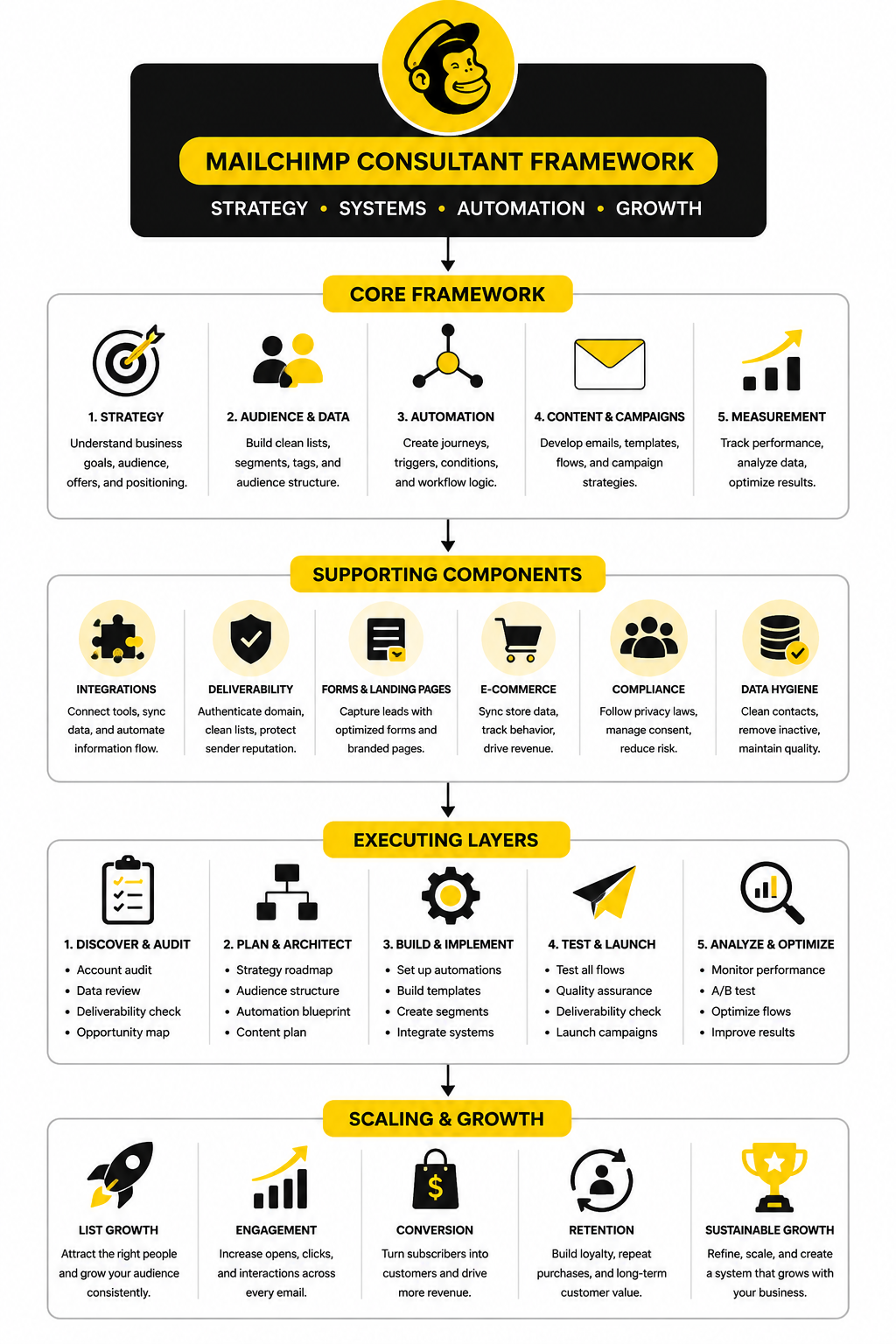
A good implementation process is usually phased. First, the consultant fixes the account foundation. Then they rebuild the audience structure, create or improve automations, clean up templates, connect key tools, test everything, and document the system so your team is not dependent on one person forever.
That order matters. If you build automations before cleaning up your audience, the wrong people may enter the wrong journeys. If you design templates before fixing tracking, you may get nicer emails but still have weak insight into what is working. If you launch campaigns before authentication is handled, you may be optimizing creative while inbox providers are quietly filtering your messages.
Step 1: Clean Up the Account Foundation
The first practical step is account cleanup. This includes checking users and permissions, removing unnecessary access, reviewing billing, confirming the active plan, and making sure the account setup matches the way the business actually operates. It is basic work, but skipping it creates problems later.
A Mailchimp consultant should also review the sending domain and authentication setup early. Mailchimp’s own deliverability guidance explains that SPF, DKIM, and DMARC help receiving inboxes verify that messages are legitimate through email authentication records. This is no longer a technical nice-to-have. Google’s sender guidelines require DMARC alignment for many senders, and Google also treats user-reported spam rates above 0.3% as a serious threshold in its bulk sender guidance.
This is where implementation becomes practical, not theoretical. The consultant should identify who controls DNS, what domain will be used for sending, whether the business uses subdomains, and whether other platforms are already sending from the same domain. Without that clarity, deliverability work turns into guesswork.
Step 2: Rebuild the Audience Structure
After the foundation is stable, the next step is audience structure. This is where the consultant turns scattered contact data into something useful. The work may include consolidating audiences, standardizing tags, cleaning merge fields, removing broken segments, and creating rules for how new subscribers should be labeled.
The consultant should also define how contacts enter the system. A website form, lead magnet, checkout, webinar registration, sales call, and imported customer list should not all look identical inside Mailchimp. Each source should carry enough context to help the business understand where the contact came from and what should happen next.
This does not mean tagging everything. Over-tagging creates a different kind of mess. The better approach is to create a small, durable taxonomy that answers useful questions: source, lifecycle stage, interest, customer status, product category, and engagement level.
A practical tag system might separate:
The key is consistency. If your team cannot understand the tag structure without asking the consultant, it is too clever. A clean system should be boring in the best possible way.
Step 3: Map the Customer Journey Before Building Automations
Before building automations, the consultant should map the customer journey. This means identifying the major moments where email can help someone move forward. The point is not to automate every possible interaction; the point is to support the moments where timing and relevance actually matter.
Mailchimp’s Customer Journey tools are built around triggers, rules, actions, and branching logic, which can support more personalized workflows through the Customer Journey Builder. But the tool should follow the strategy, not lead it. A messy journey map inside a visual builder is still a messy journey.
A simple journey map should answer a few direct questions. What starts the automation? What does the contact need at that moment? What action should they take next? What happens if they engage, and what happens if they ignore the emails?
For many businesses, the first journeys to map are:
This is where a Mailchimp consultant earns their fee. They should help the business decide which journeys matter now and which can wait. Building everything at once usually creates more noise than revenue.
Step 4: Build the Core Automations
Once the journeys are mapped, the consultant can build the automations. Each automation should have a clear trigger, a clear audience, a clear goal, and a clear exit condition. If those four things are vague, the automation is not ready to build.
A welcome automation, for example, should not only introduce the brand. It should confirm the subscriber’s interest, deliver the promised value, create trust, and guide the next step. A lead nurture automation should not randomly send educational content forever. It should move the reader from awareness to consideration with useful proof, objection handling, and a relevant call to action.
The consultant should also decide where branching logic is useful. Branching based on clicks, purchases, lead source, or engagement can make emails more relevant, but too many branches can make the system hard to maintain. The best automations are usually simple enough to manage and specific enough to perform.
Testing is non-negotiable here. Every path should be checked before launch. That means testing form submissions, tags, segment rules, delays, email rendering, links, unsubscribe behavior, tracking, and exit criteria.
Step 5: Create Templates That Are Easy to Reuse
Email templates should make the team faster, not trap them inside rigid layouts. A consultant should create templates that are consistent with the brand, easy to edit, mobile-friendly, and built around real campaign needs. The business should not need a designer every time it wants to send a useful email.
This usually means creating a small set of reusable templates. One template may work for newsletters, another for promotions, another for plain-text style updates, and another for automated lifecycle emails. Each one should have a clear purpose.
The consultant should also simplify the design system. Headings, buttons, spacing, footer content, product blocks, social links, and legal details should be consistent. When templates are inconsistent, every campaign becomes a small design debate, and that slows the team down.
A good Mailchimp template is not the one with the most blocks. It is the one your team can use correctly under pressure. That is the standard.
Step 6: Connect the Right Tools
Mailchimp rarely works alone. It may need to connect with a website, ecommerce store, CRM, booking tool, form builder, landing page platform, or customer support system. A Mailchimp consultant should review the full stack and decide which integrations are essential.
This is where many accounts become fragile. A business connects too many tools, then nobody knows which platform creates the contact, which one updates the tag, and which one triggers the automation. One broken integration can quietly damage segmentation for months.
For lead capture, a simple form tool like Fillout can be useful when the business needs flexible forms before sending data into Mailchimp. For booking-led businesses, Cal.com can help structure appointment scheduling before the follow-up sequence begins. For businesses that need a heavier CRM and pipeline layer, GoHighLevel may be worth comparing before adding more disconnected tools around Mailchimp.
The important thing is not having more integrations. The important thing is having the right data move reliably between the right systems. A consultant should document every connection so the business knows what happens when someone fills out a form, books a call, buys a product, or unsubscribes.
Step 7: Set Up Reporting That Leads to Decisions
Implementation is incomplete without reporting. Mailchimp already provides campaign and automation reporting, but the consultant should help the business decide which metrics matter. Otherwise, the team ends up staring at open rates without knowing what to change.
Open rates can still be useful as a directional signal, but privacy changes have made them less reliable as a standalone measure. Clicks, conversions, revenue, unsubscribes, spam complaints, list growth, engagement by segment, and automation completion rates usually tell a more useful story. For ecommerce brands, benchmarks from platforms like Klaviyo show how open rate, click rate, revenue per recipient, and order rate vary widely by industry in current email marketing benchmark data.
A consultant should create a reporting rhythm. That may be a monthly campaign review, a quarterly automation review, or a simple dashboard that compares the same metrics over time. The goal is not reporting for the sake of reporting. The goal is to know what to improve next.
Step 8: Document the System and Train the Team
The final implementation step is documentation and training. This is the part many consultants skip, and it is a mistake. If the business cannot maintain the system after the project, the implementation is not really finished.
Documentation should explain the audience structure, tag rules, segment logic, automation triggers, template usage, integration map, reporting process, and basic troubleshooting steps. It should also define who is allowed to create tags, import contacts, edit automations, and send campaigns. Without ownership rules, the account slowly becomes messy again.
Training should be practical. The team should know how to create a campaign, choose the right segment, use the right template, read the report, and avoid common mistakes. A Mailchimp consultant should not make the team feel dependent. They should leave the team sharper than they found it.
Statistics and Data
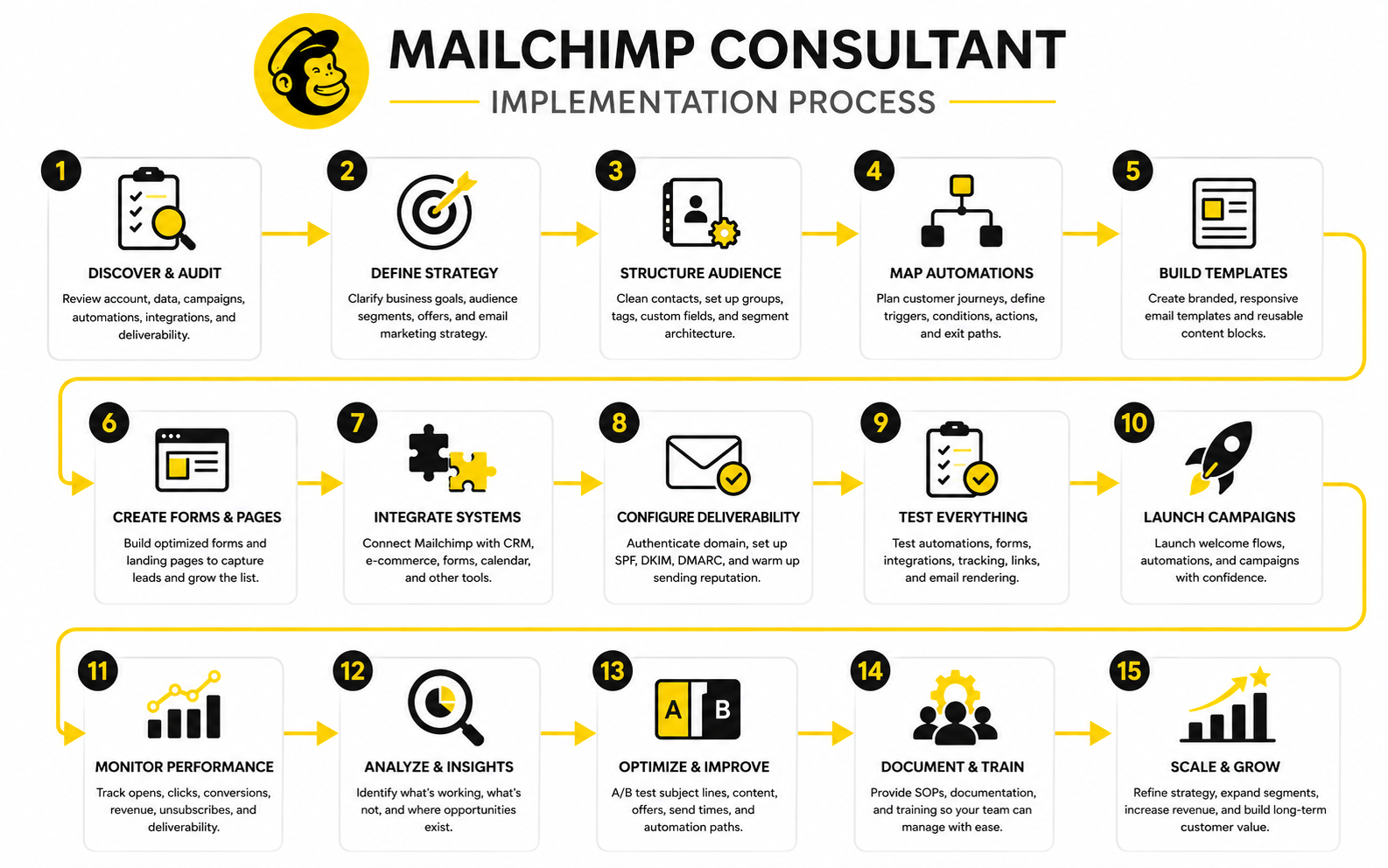
Numbers matter in email marketing, but only when they lead to decisions. A Mailchimp consultant should not throw open rates, click rates, unsubscribe rates, and revenue numbers into a report just to make the work look serious. The real value is knowing what the numbers mean, what they do not mean, and what should change because of them.
This is where many businesses get stuck. They check the campaign report, celebrate a high open rate, worry about a low click rate, and then send the next email with almost no change. That is not analytics. That is score-watching.
A better approach is to treat email data like a diagnostic system. Each metric is a signal. Some signals show audience interest, some show message quality, some show list health, and some show whether email is actually helping the business make money.
Open Rate Is a Signal, Not the Whole Story
Open rate still has value, but it should not be treated like the main scoreboard. Mailchimp explains open rate as a way to measure how many recipients opened a tracked campaign, while also noting that tracking depends on images loading and other technical conditions in its guide to open and click rates. That means open rate can help you spot direction, but it cannot prove business impact on its own.
This became even more important after privacy changes made opens less precise. A campaign with a strong open rate may still produce weak sales if the offer is unclear, the audience is wrong, or the email does not motivate action. On the other hand, a lower open rate with a highly qualified segment may still generate strong revenue.
A Mailchimp consultant should use open rate to diagnose three things: subject line relevance, sender recognition, and audience warmth. If open rates drop across several sends, the issue may be list fatigue, weak positioning, poor timing, or deliverability. If open rates are strong but clicks are weak, the subject line may be creating curiosity that the email body fails to satisfy.
Click Rate Shows Whether the Email Created Action
Click rate is usually more useful than open rate because it shows whether people did something. A click means the subscriber found enough value, urgency, or curiosity to leave the inbox and take the next step. That makes it one of the clearest indicators of message-market fit inside email.
Mailchimp’s benchmark data shows that click rates vary heavily by industry in its email marketing benchmarks. That matters because a nonprofit newsletter, ecommerce promotion, B2B software nurture email, and local service reminder should not be judged against the same standard. The benchmark is context, not a verdict.
A consultant should look at click rate by segment, not only by campaign. If customers click more than leads, the message may be better suited to existing buyers. If one acquisition source clicks more than another, the business may need to adjust lead quality expectations. If the same offer gets clicks from one segment but not another, the issue may not be the offer; it may be targeting.
Conversion Rate Connects Email to Revenue
Clicks are useful, but conversions are where the business impact becomes clearer. A conversion may be a purchase, booking, demo request, form submission, consultation call, trial signup, or reply. The exact definition depends on the business model, but the rule is the same: email should move people toward an outcome that matters.
This is where a Mailchimp consultant needs to connect Mailchimp with the rest of the stack. Campaign reports inside Mailchimp can show engagement, but ecommerce stores, CRMs, booking tools, and analytics platforms often complete the picture. If those systems are not connected properly, the business may underestimate email’s role or give credit to the wrong channel.
Conversion tracking should also separate direct and assisted value. Some emails create immediate sales. Others warm up the lead, answer objections, or bring someone back later through branded search, a sales call, or a retargeting ad. If you only measure last-click revenue, you may cut emails that quietly support the whole funnel.
Revenue per Recipient Helps Compare Campaign Quality
Revenue per recipient is one of the most practical email metrics for ecommerce and offer-driven businesses. It tells you how much revenue a campaign generated relative to how many people received it. That makes it more useful than total revenue when comparing campaigns sent to different list sizes.
For example, a campaign sent to 80,000 people may produce more total revenue than a campaign sent to 8,000 people. But if the smaller campaign generates more revenue per recipient, it may be the better campaign. That insight can push the business toward sharper segmentation instead of bigger blasts.
Klaviyo’s benchmark data breaks email performance down by industry and includes revenue-focused metrics such as revenue per recipient in its email marketing benchmarks. Even if a business uses Mailchimp, the lesson still applies. Revenue quality often matters more than send volume.
Unsubscribes Are Not Always Bad
Unsubscribes can feel negative, but they are not automatically a problem. Some people should leave your list. If they are not interested, not qualified, or never going to buy, keeping them only makes your metrics weaker and your costs higher.
The issue is the pattern. A small number of unsubscribes after a clear promotional email may be normal. A sudden spike after a campaign can signal poor targeting, misleading expectations, too much frequency, or a message that does not match why people subscribed.
A Mailchimp consultant should review unsubscribe rate alongside the campaign topic, segment, source, and send frequency. If a segment consistently unsubscribes at a higher rate, the business may be sending the wrong content to that group. If unsubscribes rise after list imports, the issue may be consent quality or list age rather than the campaign itself.
Spam Complaints Are a Serious Warning Sign
Spam complaints deserve more attention than most teams give them. A complaint is not just someone leaving the list; it is someone telling an inbox provider that the email should not have arrived. That can damage sender reputation and reduce inbox placement over time.
Google’s sender requirements say senders should keep spam rates below 0.1% and avoid reaching 0.3% or higher in its email sender guidelines FAQ. That number is small for a reason. At scale, even a tiny complaint rate can become a deliverability problem.
A consultant should treat complaints as an urgent quality signal. The first checks should be consent source, list age, expectation mismatch, email frequency, and whether the unsubscribe link is easy to find. If people cannot easily unsubscribe, some will hit spam instead, and that is much worse.
Deliverability Metrics Show Whether the System Is Healthy
Deliverability is not one metric. It is a group of signals that show whether emails are being accepted, placed, and engaged with in a healthy way. Bounce rate, spam complaints, inbox placement, authentication status, blocklist issues, domain reputation, and engagement all matter.
A Mailchimp consultant should not only look at whether a campaign was “sent.” Sent does not mean delivered, delivered does not mean inboxed, and inboxed does not mean read. That distinction is critical because a business can have good-looking campaign reports while silently losing reach.
The strongest deliverability work usually happens before there is a crisis. Clean lists, authenticated sending domains, easy unsubscribes, consistent sending behavior, and relevant campaigns all support better inbox placement. If deliverability is ignored until revenue drops, the fix is usually slower and more painful.
Benchmarks Are Useful, but Your Own Baseline Matters More
Benchmarks are helpful because they give context. They can show whether a campaign is wildly underperforming or roughly in line with similar senders. But they should never replace your own baseline.
A business with a small, highly qualified list may outperform general benchmarks by a wide margin. A business with a large, mixed list may sit below average but still generate strong revenue. A seasonal business may also see major swings that have more to do with buying cycles than email quality.
A Mailchimp consultant should compare performance in three ways:
That third point is often missed. A re-engagement email should not be judged the same way as a product launch email. A customer onboarding email should not be judged the same way as a holiday promotion. Each email needs a job before the numbers can be interpreted properly.
The Best Reports Lead to Action
A useful report should not end with “open rate was up” or “click rate was down.” It should explain what happened, why it likely happened, and what the team should do next. That is the difference between reporting and consulting.
For example, if clicks are low but opens are strong, the next action may be improving the offer, tightening the email body, making the call to action clearer, or aligning the subject line with the content. If revenue is low but clicks are strong, the landing page, checkout, pricing, or sales process may be the real issue. If unsubscribes are high, the team may need to revisit segmentation, frequency, or subscriber expectations.
This is why a Mailchimp consultant should build a reporting rhythm, not just a dashboard. A monthly review can identify campaign lessons. A quarterly review can evaluate automation performance. A deeper annual review can show whether the email program is becoming more profitable, more efficient, and more connected to the rest of the business.
What a Simple Mailchimp KPI Dashboard Should Include
A practical dashboard should be simple enough to use and complete enough to guide decisions. It does not need twenty charts. It needs the right signals, grouped in a way that helps the team understand list health, engagement, conversion, and revenue.
A strong Mailchimp KPI dashboard should usually include:
The consultant should also define what action each metric triggers. If bounce rate rises, clean the list and review acquisition sources. If click rate falls, test offer clarity and call-to-action placement. If revenue per recipient improves in one segment, build more campaigns for that segment instead of sending broader emails.
The Data Should Make the Email Program Calmer
Good measurement should reduce panic. Without a clear analytics system, every campaign feels personal. A bad send creates stress, a good send creates overconfidence, and the team keeps reacting emotionally.
With a clear system, the business can think more calmly. One weak campaign becomes a data point. Three weak campaigns become a pattern. A pattern becomes a decision.
That is the real value of measurement. A Mailchimp consultant should help the business stop asking, “Was that email good?” and start asking, “What did this email teach us, and what should we improve next?”
Advanced Considerations Before You Scale
Once the account is clean, automations are working, and reporting is in place, the next question is scale. This is where email marketing becomes more strategic. It is no longer about whether Mailchimp can send the email; it is about whether the whole system can support more contacts, more campaigns, more data, more offers, and more complexity without falling apart.
A Mailchimp consultant should help you make those tradeoffs before they become expensive. More segmentation can improve relevance, but too many segments can slow execution. More automations can improve timing, but too many flows can overlap and confuse subscribers. More integrations can improve data quality, but too many disconnected tools can create a fragile stack.
Scaling email is not about adding more. It is about adding only what the business can maintain.
When More Personalization Becomes Too Much
Personalization can improve performance, but it has a point where it stops helping and starts creating operational debt. Adding someone’s first name is easy. Building dozens of content variations by behavior, product interest, geography, lifecycle stage, and purchase history is much harder to maintain.
The danger is that teams confuse personalization with complexity. A simple email that speaks clearly to one segment can outperform a complicated campaign with too many dynamic blocks. If nobody on the team can confidently check the logic before sending, the campaign is probably too complex.
A Mailchimp consultant should define where personalization actually matters. For example, customer status, product interest, purchase history, and lead source often matter more than surface-level demographic details. The goal is not to prove that the system can personalize; the goal is to make the message feel more relevant without making the workflow chaotic.
The Hidden Risk of Over-Automation
Automation is powerful, but it can become a problem when every small behavior triggers another message. A subscriber downloads a guide, views a product, joins a webinar, abandons a cart, books a call, and suddenly they are inside several workflows at once. That is how “smart marketing” turns into inbox noise.
A strong Mailchimp consultant should create rules for automation priority. Some journeys should pause other journeys. Some contacts should be excluded from promotional sends while they are inside a high-intent sales flow. Some automations should stop immediately after a purchase, booking, or reply.
This is especially important for businesses with both marketing and sales teams. If sales is already talking to a lead, an aggressive automated sequence can feel tone-deaf. The consultant should make sure automation supports the relationship instead of interrupting it.
Contact Quality Matters More Than List Size
A large email list feels impressive, but it can be a liability if the contacts are cold, unqualified, or poorly permissioned. Bigger lists cost more, distort reporting, and can hurt deliverability when engagement is weak. A smaller list of people who actually want to hear from you is usually more valuable.
This is where a consultant should challenge vanity metrics. List growth is not automatically good. Growth from low-intent giveaways, old imports, unclear consent forms, or broad lead magnets can make the database bigger while making performance worse.
A healthy list has clear acquisition sources, valid consent, active engagement, and meaningful segmentation. If a contact has not opened, clicked, bought, replied, or shown interest for a long time, keeping them forever is not strategy. It is clutter.
Compliance Should Be Built Into the Workflow
Compliance is not the exciting part of email marketing, but ignoring it is reckless. A Mailchimp consultant should help the business think through consent, unsubscribe behavior, privacy expectations, data retention, and how contacts are imported. This matters even more when the business operates across regions with different privacy and marketing rules.
The practical issue is simple. If the team does not know where a contact came from, what they agreed to receive, and when they gave permission, the business is exposed. That does not mean every email program needs to become slow and legalistic. It means the system should make compliant behavior easy by default.
Good implementation includes clear signup language, properly configured forms, preference options where useful, clean unsubscribe handling, and disciplined imports. A consultant should also make sure the business does not casually upload old spreadsheets just because “they might be useful.” That is how list quality and trust get damaged.
The Platform Decision Gets Harder as You Grow
Mailchimp can be a strong platform for many businesses, but growth changes the evaluation. A company with one list, a few campaigns, and basic automations has different needs from a company with multiple offers, sales pipelines, ecommerce behavior, events, and customer lifecycle programs. The question is not whether Mailchimp is good or bad. The question is whether it still fits the business model.
A Mailchimp consultant should look at the total cost of the system, not just the monthly software price. That includes contact-based pricing, add-ons, integrations, manual work, reporting gaps, and the cost of workarounds. A cheaper platform can become expensive if the team needs three extra tools to make it usable.
This is where comparisons become useful. If the business needs funnels and checkout pages around email, ClickFunnels may enter the conversation. If the business wants an all-in-one marketing, CRM, pipeline, booking, and automation platform, GoHighLevel may be worth reviewing. If the business wants a simpler email-first alternative, Brevo or Moosend may make sense depending on the workflow.
Migration Should Be a Business Decision, Not a Frustration Reaction
Many teams consider leaving Mailchimp after one painful moment. Maybe pricing increased, a feature felt limiting, an automation became hard to manage, or reporting did not show the full picture. Those frustrations may be valid, but they are not enough by themselves to justify migration.
Migration has real cost. Contacts need to be exported, cleaned, and re-imported. Consent fields need to be preserved. Forms, tags, segments, templates, automations, integrations, landing pages, and tracking need to be rebuilt. The business also needs to protect deliverability while sending patterns change.
A good Mailchimp consultant should help compare the cost of fixing the current setup against the cost of moving. Sometimes cleanup is enough. Sometimes moving is the more carefully long-term decision. The wrong move is switching platforms without fixing the strategic problems that made the old account messy.
AI Can Help, but It Should Not Drive the Strategy
AI tools can speed up email work. They can help draft subject lines, generate content variations, summarize campaign results, suggest segments, and support testing ideas. Used well, AI can remove some of the blank-page friction that slows marketing teams down.
But AI does not understand your customers better than your actual customer data, sales conversations, support tickets, product usage, and buyer objections. A consultant should use AI as a support layer, not as the strategy. The emails still need positioning, proof, timing, and a reason to exist.
This matters because generic AI output can make every brand sound the same. If the consultant is only using AI to produce more emails faster, the business may end up with more volume and less connection. The better use is to combine AI speed with human judgment, customer insight, and performance data.
Sales and Email Need a Shared Definition of a Good Lead
Email performance often suffers because marketing and sales are working from different definitions. Marketing may treat a lead as qualified because they downloaded a guide. Sales may only care if the person has budget, urgency, authority, and a real problem. If those definitions are not aligned, email automations can push the wrong people too hard or ignore the right people too long.
A Mailchimp consultant should help define lead stages in a practical way. A new subscriber, engaged lead, sales-qualified lead, active opportunity, customer, repeat customer, and inactive customer should not all receive the same messages. Each stage has a different job.
This is where CRM integration becomes important. If the sales team uses a separate CRM, Mailchimp needs to receive enough information to avoid awkward timing. A contact who just became a customer should not keep receiving beginner lead nurture emails. A contact who has an open deal should not be pushed into a discount sequence without sales knowing.
Ecommerce Brands Need Different Rules
Ecommerce email has its own logic. Product interest, purchase frequency, average order value, category behavior, discount sensitivity, and post-purchase timing matter a lot. A general newsletter strategy is usually not enough.
For ecommerce, a Mailchimp consultant should pay close attention to lifecycle flows. Welcome emails, abandoned cart emails, browse abandonment, post-purchase education, replenishment reminders, review requests, loyalty campaigns, and win-back sequences each have a distinct role. If those flows overlap or compete, the customer experience gets messy.
The strategic tradeoff is discounting. Discounts can drive short-term revenue, but they can also train customers to wait. A consultant should help decide where discounts belong, where value-based messaging is stronger, and where segmentation can protect margins.
Service Businesses Need Trust-Building, Not Constant Promotion
Service businesses often need a different rhythm. The buyer may take longer to decide, compare options, talk to a partner, request a proposal, or book a call before buying. That means the email program should build trust, reduce uncertainty, and make the next step feel easy.
A Mailchimp consultant working with service businesses should focus on education, objection handling, proof, and timing. The emails should answer the questions a serious buyer is already thinking about. They should not feel like random promotions dropped into the inbox.
Booking and follow-up systems matter here. If the goal is consultation calls, the path from email to calendar should be simple. Tools like Cal.com can help keep scheduling clean when email is pushing people toward a call.
Content Businesses Need Consistency and Segmentation
Content-led businesses often depend on trust built over time. Newsletters, educational sequences, creator updates, and community emails can create strong relationships, but they need consistency. A random email every few months is not a real content engine.
The challenge is balancing frequency with relevance. Sending often can work if the content is genuinely useful. Sending often with weak content only trains people to ignore you faster.
A Mailchimp consultant should help turn content into a structured system. That may include topic-based segments, reader preference options, evergreen nurture sequences, and campaigns tied to product launches or affiliate offers. The point is to make the content program predictable without making it boring.
The Biggest Scaling Risk Is Losing Clarity
The more advanced the email program becomes, the easier it is to lose clarity. More segments, more offers, more tags, more automations, more dashboards, and more tools can create the illusion of sophistication. But if the team cannot explain who gets what email and why, the system is not sophisticated. It is messy.
A consultant should protect clarity aggressively. Every automation should have a purpose. Every segment should be usable. Every report should support a decision. Every integration should move necessary data.
This is the expert-level standard: the system should become more powerful without becoming harder to understand. That is not easy, but it is the difference between a Mailchimp setup that scales and one that slowly collapses under its own weight.
How to Work With a Mailchimp Consultant Without Wasting Money
Hiring a Mailchimp consultant is not magic. The outcome depends on the consultant’s skill, but it also depends on how prepared the business is. If the team cannot explain the offer, customer journey, sales process, or current problems, the consultant will spend more time untangling basics.
Before hiring, gather the important context. That includes campaign history, current automations, customer segments, lead sources, ecommerce or CRM data, content calendar, brand guidelines, and business goals. The more context the consultant has, the faster they can identify what actually matters.
You should also decide what success looks like before the project starts. “Improve Mailchimp” is too vague. Better goals include cleaning the account, improving deliverability, launching a welcome sequence, increasing repeat purchases, improving lead follow-up, reducing manual work, or creating a reporting system the team can use.
Ask Better Questions Before You Hire
The best way to evaluate a consultant is to ask how they think. You do not need someone who only says yes to every request. You need someone who can explain tradeoffs, challenge weak assumptions, and turn messy goals into a practical plan.
Good questions include:
The answers should be specific. If the consultant only talks about templates and newsletters, they may be too tactical for a strategic project. If they only talk about strategy and cannot explain implementation, they may not be hands-on enough.
Define Ownership Early
One of the most overlooked parts of a Mailchimp project is ownership. Who approves campaigns? Who can import contacts? Who can create tags? Who monitors reports? Who fixes broken forms? Who decides when a segment should be changed?
Without ownership, the account slowly drifts. People create one-off tags, duplicate templates, import contacts without context, and edit automations without understanding the consequences. Six months later, the business needs another cleanup.
A consultant should help create simple governance. It does not need to be corporate or complicated. It just needs to be clear enough that the system stays clean after the project ends.
Final Checks Before You Hire or Optimize
At this stage, the question is no longer whether email marketing matters. It does. The real question is whether your Mailchimp setup is simple, profitable, measurable, and maintainable enough to keep supporting the business as it grows.
A Mailchimp consultant can help with that, but only if the work goes beyond campaigns. The right consultant should understand strategy, data, automations, deliverability, integrations, reporting, and team workflows. The wrong consultant will make the account prettier while leaving the real problems untouched.
Before you hire, rebuild, or scale, look at the whole ecosystem. Your email program is not just Mailchimp. It is your forms, website, landing pages, CRM, ecommerce store, calendar, sales process, reporting, and customer experience all working together.
The Healthy Mailchimp Ecosystem
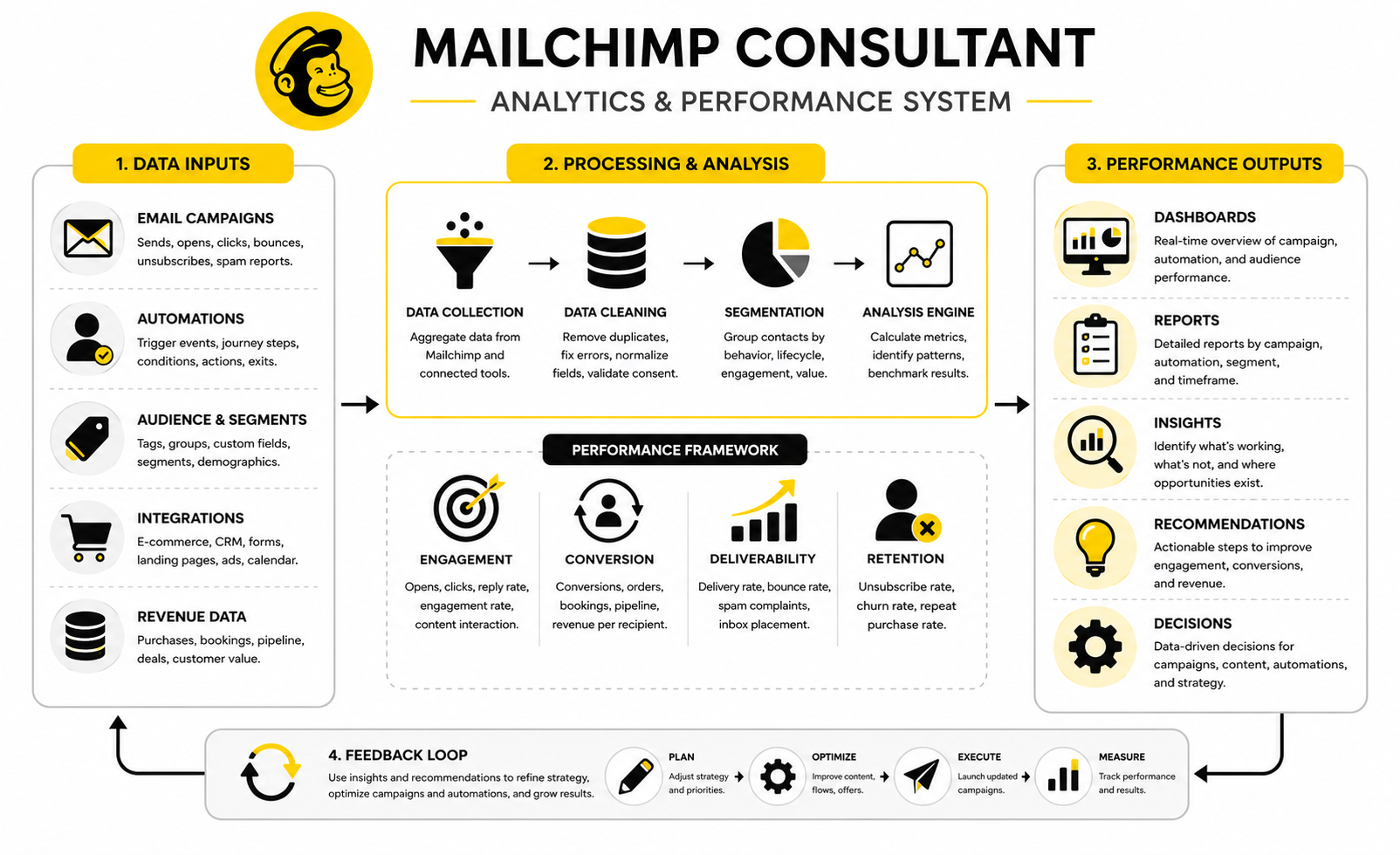
A strong Mailchimp ecosystem has clear inputs and clear outputs. Contacts enter through trustworthy sources, receive relevant messages, move through journeys based on behavior, and create measurable outcomes. That may sound obvious, but most messy accounts fail because one part of that chain is unclear.
The inputs are your acquisition channels. These may include website forms, checkout flows, lead magnets, webinars, paid ads, events, referrals, booking pages, or imported customer data. Each source should tell Mailchimp enough about the contact to trigger the right next step.
The outputs are the outcomes you care about. That could be purchases, booked calls, repeat orders, product demos, event registrations, replies, reviews, referrals, or account upgrades. If the system does not connect campaigns to real business outcomes, the team ends up optimizing vanity metrics.
When to Keep Mailchimp
You should usually keep Mailchimp when the platform fits your current workflow and the biggest problems are caused by setup, not software. If your audience structure is messy, automations are unfinished, templates are inconsistent, and reporting is unclear, changing platforms may only move the mess somewhere else.
Mailchimp can still be a practical choice for businesses that need email campaigns, forms, landing pages, segmentation, automations, and reporting in one familiar platform. Its marketing automation flows can use triggers, rules, actions, and tags to build automated workflows through Mailchimp marketing automation flows. That is enough for many small and mid-sized teams when the strategy is clear.
The better move is often to clean up the account first. Then you can judge the platform fairly. A clean Mailchimp account gives you better data, better campaigns, and a clearer view of whether the tool is still the right fit.
When to Consider Moving Away
You should consider moving away from Mailchimp when the business model consistently fights the platform. That might happen when you need deeper CRM functionality, advanced sales pipelines, complex ecommerce lifecycle logic, multi-channel automation, or stronger internal workflow control. It can also happen when costs rise faster than value because the contact database is large but poorly monetized.
The official Mailchimp pricing model is tied to contact tiers and monthly send limits, with the Free plan listed at up to 250 contacts and 500 monthly sends in Mailchimp pricing plan documentation. That does not make Mailchimp expensive for every business, but it does mean list quality and database hygiene matter. Paying for contacts who do not engage, buy, or support the funnel is not smart.
A migration should be based on evidence. If the business needs funnels and checkout around campaigns, ClickFunnels may be worth comparing. If the business needs CRM, booking, pipelines, SMS, and automation in one system, GoHighLevel may be a better fit. If the business wants a simpler email-first tool, Brevo or Moosend may be enough.
What a Finished Project Should Leave Behind
A finished Mailchimp project should leave your business with more than a few launched emails. It should leave behind a cleaner account, clearer rules, better automations, stronger reporting, and a team that understands how to maintain the system. That is the difference between a real consulting engagement and a one-off task.
You should have documentation that explains the audience structure, tag naming logic, automation triggers, segment rules, template usage, reporting cadence, and integration flow. You should also know who owns each part of the system internally. Without ownership, even a clean account will drift back into disorder.
The best result is confidence. You know what campaigns are running, why they exist, who receives them, what they are supposed to do, and how performance is judged. That is what a good Mailchimp consultant should help you build.
What does a Mailchimp consultant do?
A Mailchimp consultant helps businesses plan, build, clean up, and improve their Mailchimp email marketing system. That can include account audits, segmentation, automations, templates, integrations, deliverability checks, reporting, and campaign strategy. The best consultants connect Mailchimp to business outcomes instead of only focusing on email design.
When should I hire a Mailchimp consultant?
You should hire a Mailchimp consultant when your account is messy, your automations are weak, your emails are not converting, or your team is unsure how to use the platform properly. It also makes sense when you are preparing for a launch, migration, ecommerce growth, or a more advanced lifecycle marketing setup. If Mailchimp has become important to revenue, guessing is expensive.
Is Mailchimp still worth using?
Mailchimp is still worth using when it fits your workflow, budget, and automation needs. It works well for many small and mid-sized businesses that want email campaigns, segmentation, automations, forms, and reporting in one familiar platform. The key is making sure the account is set up cleanly, because even a strong tool performs poorly when the structure is messy.
How much does a Mailchimp consultant cost?
Pricing depends on the consultant’s experience, project scope, and level of strategy required. A small cleanup or template project may cost much less than a full audit, automation rebuild, integration setup, and reporting system. The more carefully way to judge cost is to compare the fee against the value of better deliverability, stronger conversion, saved team time, and fewer mistakes.
Can a Mailchimp consultant improve deliverability?
Yes, a Mailchimp consultant can help improve deliverability by reviewing authentication, list quality, bounce behavior, spam complaints, consent sources, engagement patterns, and sending practices. Mailchimp explains that authentication records like SPF, DKIM, and DMARC help inbox providers verify legitimate email through Mailchimp’s authentication guidance. A consultant cannot magically force inbox placement, but they can fix many of the issues that damage sender reputation.
What metrics should a Mailchimp consultant track?
A consultant should track open rate, click rate, conversion rate, unsubscribe rate, spam complaint rate, bounce rate, revenue per recipient, list growth, inactive contacts, automation completion, and segment-level performance. The exact dashboard depends on the business model. The important thing is that every metric should support a decision, not just fill a report.
Should I use one audience or multiple audiences in Mailchimp?
Many businesses are better served by one clean master audience with thoughtful tags, groups, and segments. Multiple audiences can make sense in specific cases, but they often create duplicate contacts, fragmented data, and harder reporting. A consultant should review your business model before deciding, rather than applying one rule to every account.
What automations should I build first?
Most businesses should start with the automations closest to revenue or trust. That usually means a welcome sequence, lead nurture sequence, abandoned cart flow, post-purchase sequence, booking follow-up, or re-engagement campaign. A Mailchimp consultant should prioritize automations based on business impact, not because a workflow sounds impressive.
Can Mailchimp replace a CRM?
Mailchimp can manage contacts, segments, tags, and marketing journeys, but it is not always a full CRM replacement. If your business needs sales pipelines, detailed deal tracking, task management, call notes, account ownership, and sales forecasting, you may need a dedicated CRM or an all-in-one system. The decision depends on how your sales process works.
What is the biggest mistake businesses make in Mailchimp?
The biggest mistake is building campaigns and automations on top of messy data. If tags are inconsistent, consent is unclear, segments are broken, and contacts enter from unknown sources, every campaign becomes less reliable. A good Mailchimp consultant fixes the foundation before trying to optimize performance.
How long does a Mailchimp consulting project take?
A small project can be completed quickly, while a full account rebuild may involve audit, cleanup, strategy, implementation, testing, reporting, and training. The timeline depends on account complexity, number of automations, integrations, content needs, and how quickly the business can provide access and feedback. The more organized the business is at the start, the smoother the project usually becomes.
Should I move from Mailchimp to another platform?
You should move only when the business case is clear. If the real problem is poor strategy, messy data, weak offers, or inconsistent execution, switching platforms will not fix it. If the issue is platform fit, such as needing stronger CRM, ecommerce logic, funnels, SMS, or pipeline automation, then comparing alternatives makes sense.
What should I prepare before hiring a consultant?
Prepare your current Mailchimp access, campaign history, automation list, audience structure, customer journey, lead sources, sales process, brand guidelines, and business goals. You should also explain what is not working right now. A consultant can move faster when they understand both the technical setup and the commercial reality behind it.
Can a consultant help with Mailchimp templates?
Yes, but templates should be part of a broader system. A useful template is not just attractive; it is easy to reuse, mobile-friendly, on-brand, and built around the types of campaigns the team actually sends. If the consultant only improves visuals but ignores targeting, tracking, and automation, the project is incomplete.
How do I know if a Mailchimp consultant is good?
A good consultant asks about business goals, customer journey, segmentation, deliverability, data quality, integrations, and reporting before making recommendations. They explain tradeoffs clearly and do not push complexity for its own sake. They should leave you with a cleaner system, better decisions, and documentation your team can use.
Build a stronger local presence with BAAM AI
Turn your website, Google profile, social channels, and AI visibility into one growth engine
Most businesses do not need more random marketing activity. They need a consistent presence system that helps the right people find them, trust them, and take action. BAAM AI brings strategy, local SEO, website updates, Google Maps visibility, social content, AI-search readiness, media production, and reporting into one practical monthly engine.
If you want your marketing to keep working after the campaign ends, start with a free BAAM AI presence audit. See how your business shows up today and where the fastest visibility wins are at BAAM AI.