
BAAM AI Blog
Triggered Email Campaigns: The Practical Framework for Sending the Right Message at the Right Moment
Triggered email campaigns are automated emails sent when someone does something meaningful: joins a list, abandons a cart, views a product, downloads a lead magnet, misses a renewal, becomes inactive, or reaches a...
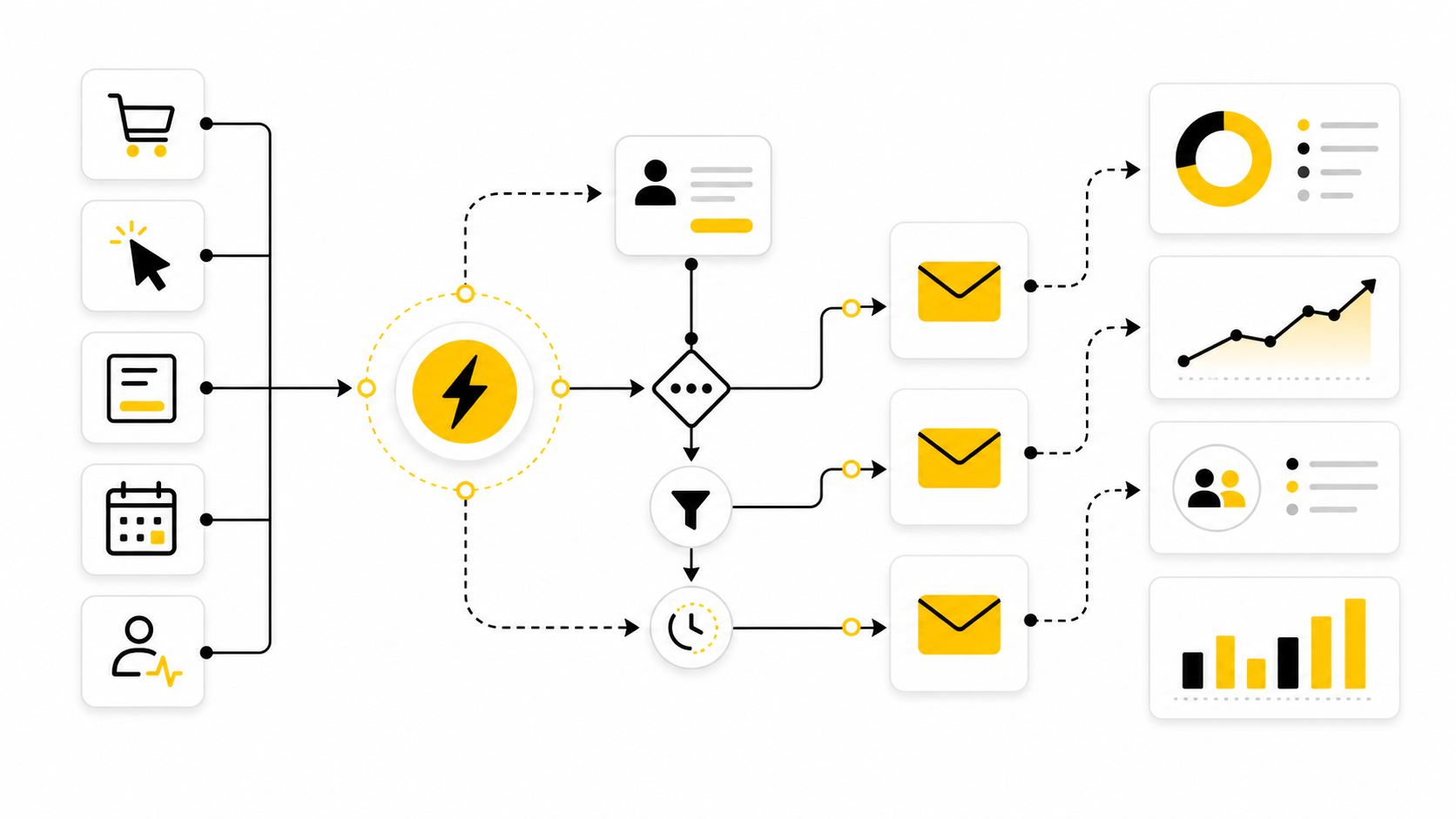
Triggered email campaigns are automated emails sent when someone does something meaningful: joins a list, abandons a cart, views a product, downloads a lead magnet, misses a renewal, becomes inactive, or reaches a lifecycle milestone. The point is not to “send more email.” The point is to respond to behavior while the intent is still fresh.
That is why triggered campaigns usually outperform one-off newsletters. A regular campaign starts with the marketer’s calendar. A triggered campaign starts with the customer’s action, which makes the message more relevant by default. In ecommerce, Klaviyo’s benchmark data shows that automated flows can outperform standard campaigns on revenue efficiency, especially in high-intent flows like welcome, abandoned cart, and browse abandonment emails in its email marketing benchmarks.
this guide will break triggered email campaigns into a practical system you can actually build. We will cover the strategy, the core triggers, the data you need, the campaign architecture, implementation standards, optimization, and the mistakes that make automated emails feel robotic instead of useful.
Why Triggered Email Campaigns Matter
Triggered email campaigns matter because timing changes everything. A subscriber who just requested a guide, started checkout, or clicked a pricing page is in a different state of mind than someone passively sitting on a list. When the message responds to that moment, email stops feeling like a broadcast and starts feeling like service.
This is also where automation becomes genuinely useful instead of lazy. The best triggered campaigns do not just “fire an email.” They connect behavior, intent, segmentation, offer, and follow-up into a sequence that moves the person forward. That is why lifecycle email has become a serious retention channel, not just a promotional channel, with Litmus reporting that email teams continue to focus heavily on ROI, engagement, personalization, and lifecycle strategy in its State of Email reports.
The business case is simple: most customers do not convert in one step. They hesitate, compare, get distracted, forget, or need one more reason to trust you. Triggered email campaigns give you a structured way to continue the conversation without manually chasing every lead or customer.
The Triggered Email Campaign Framework
A strong triggered email campaign starts with one question: what behavior should change what the customer receives next? That behavior can be explicit, like filling out a form, or implicit, like visiting the same product category several times. The trigger is only useful when it reveals intent that deserves a different message.
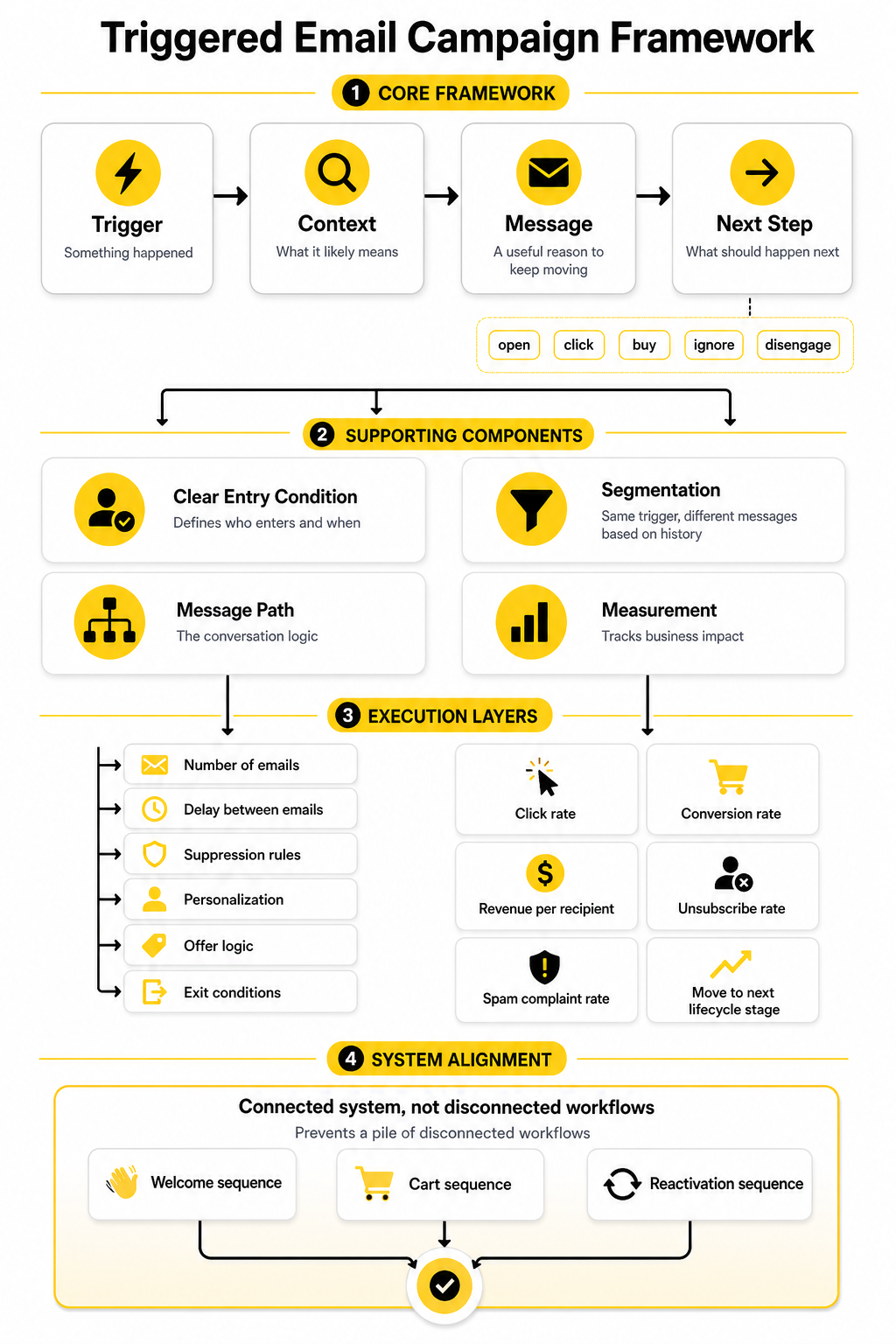
From there, the framework has four layers: trigger, context, message, and next step. The trigger tells you something happened. The context tells you what it likely means. The message gives the customer a useful reason to keep moving. The next step defines what should happen after they open, click, buy, ignore, or disengage.
This framework keeps automation from becoming a pile of disconnected workflows. It also helps you avoid the classic mistake of building a welcome sequence, cart sequence, and reactivation sequence that all talk over each other. If you use an automation platform such as Brevo, Moosend, or GoHighLevel, the strategy still matters more than the tool.
Core Components of a Triggered Campaign
Every triggered email campaign needs a clear entry condition. This defines who enters the campaign and when. Without a precise entry condition, your automation will either miss important opportunities or send messages to people who are not ready for them.
The second component is segmentation. Two people can trigger the same event but need different messages because their history is different. A first-time visitor abandoning a cart, a repeat customer abandoning a cart, and a wholesale lead abandoning a quote request should not all receive the same follow-up.
The third component is the message path. This includes the number of emails, delay between emails, suppression rules, personalization, offer logic, and exit conditions. Professional triggered email campaigns are not just sequences; they are decision trees that respect what the recipient does next.
The fourth component is measurement. Open rate alone is not enough because opens are affected by privacy changes and do not always show business impact. Better metrics include click rate, conversion rate, revenue per recipient, unsubscribe rate, spam complaint rate, and the percentage of people who move to the next lifecycle stage. Benchmark reports from the Data & Marketing Association are useful for understanding broader channel performance because the DMA’s Email Benchmarking Report is based on anonymized data from multiple email service providers.
Where Part 1 Fits Into the Full Strategy
Part 1 sets the foundation: what triggered email campaigns are, why they matter, and how to think about them as a framework instead of a random set of automations. That foundation is important because most weak automation programs fail before the copy is written. They fail because the triggers are vague, the data is messy, the segments are too broad, and the next step is not defined.
The next parts will get more tactical. We will move from the framework into specific triggered email types, then into implementation standards, testing, scaling, and common mistakes. By the end, the goal is not just to understand triggered email campaigns but to know how to build them without making them feel cold, spammy, or overcomplicated.
High-Impact Triggered Email Types
The best triggered email campaigns usually start with a few core automations. You do not need twenty flows on day one. You need the right flows tied to the moments where intent is clear and the customer needs a useful next step.
This is where most businesses overcomplicate things. They build advanced branches before they have a clean welcome sequence, abandoned cart sequence, post-purchase sequence, and reactivation path. Start with the moments closest to revenue, trust, retention, and customer progress.
Welcome Emails
A welcome email is triggered when someone joins your list, creates an account, downloads a resource, submits a form, or starts a relationship with your brand in some other clear way. This is one of the highest-leverage moments because the person has just raised their hand. They may not be ready to buy yet, but they are paying attention.
The first email should confirm the action and set expectations. That could mean delivering the lead magnet, explaining what happens next, introducing your best resources, or pointing the subscriber toward the most useful first step. Do not waste this moment with a generic “thanks for subscribing” message that says nothing.
A strong welcome sequence usually answers three questions. Why should the reader trust you? What should they do next? What kind of emails will they receive from you going forward? If you are building a simple funnel around this, tools like ClickFunnels, Systeme.io, or GoHighLevel can connect the opt-in page, form, email sequence, and follow-up pipeline in one place.
Lead Magnet Follow-Up Emails
A lead magnet follow-up is different from a normal welcome email because the trigger reveals a specific interest. Someone who downloads a checklist, calculator, guide, or template is not just “new.” They are telling you what problem they are trying to solve.
The mistake is to deliver the asset and disappear. The better approach is to use the next few emails to help the reader apply what they downloaded. That might mean explaining the first step, showing common mistakes, giving a decision checklist, or connecting the resource to a product or service when the timing makes sense.
This is where triggered email campaigns become more than automation. They become guided momentum. A useful follow-up sequence can turn a passive download into a sales conversation, a booked call, a product trial, or a deeper relationship with the brand.
Abandoned Cart Emails
An abandoned cart email is triggered when someone adds a product to cart but leaves before completing the purchase. This is one of the most obvious triggered email campaigns because the intent is visible. The customer was close enough to act, but something stopped them.
The first email should usually be helpful, not desperate. Remind them what they left behind, make it easy to return, and remove friction where possible. If shipping, returns, payment options, or trust concerns commonly block buyers, address those points before reaching for a discount.
Later emails can add urgency, proof, or an incentive, but the sequence should not train customers to abandon carts just to get a coupon. That is a real risk. Use discounts carefully, especially if your brand depends on margin, premium positioning, or repeat purchasing behavior.
Browse Abandonment Emails
Browse abandonment emails are triggered when someone views a product, category, pricing page, or important offer page but does not take the next action. These emails are softer than abandoned cart emails because the buying intent is weaker. The person looked, but they did not commit.
That means the message should feel lighter. Instead of acting like the customer almost bought, frame the email around helping them continue their research. You can recommend related products, answer common questions, explain use cases, or point them to a comparison page.
Browse abandonment works best when your tracking and segmentation are clean. A visitor who views one product once should not receive the same message as someone who returns to the same category three times in a week. Triggered email campaigns are powerful because of timing, but they only stay useful when the signal is strong enough to justify the send.
Post-Purchase Emails
Post-purchase emails are triggered after someone buys. This is not just a receipt moment. It is the beginning of the customer experience, and it can influence refunds, repeat purchases, reviews, referrals, and long-term trust.
The first post-purchase messages should reduce anxiety. Confirm the order, explain what happens next, set delivery expectations, and give the customer a clear path if they need help. For digital products or services, this might also include login details, onboarding steps, or a simple “start here” email.
After that, the sequence can shift toward product education, usage tips, review requests, replenishment reminders, cross-sells, or loyalty-building content. The key is pacing. A customer who just bought does not need to be hammered with more offers immediately; they need to feel smart for buying.
Onboarding Emails
Onboarding emails are triggered when someone starts using a product, service, course, app, membership, or client portal. The goal is not just to welcome them. The goal is to help them reach the first meaningful outcome as quickly as possible.
Good onboarding focuses on activation. What action proves the customer is moving in the right direction? That could be completing a profile, connecting an integration, watching the first lesson, booking a kickoff call, importing contacts, or creating the first campaign.
The sequence should remove confusion one step at a time. Do not dump every feature into the first email. Show the next useful action, explain why it matters, and make the click feel easy.
Re-Engagement Emails
A re-engagement email is triggered when someone becomes inactive. That could mean they stopped opening, stopped clicking, stopped buying, stopped logging in, or stopped moving through the lifecycle. The trigger depends on what inactivity means for your business.
The goal is not to guilt people into paying attention. The goal is to find out whether they still want the relationship. A good re-engagement campaign can offer a preference update, highlight what they missed, provide a relevant reason to return, or give them a clean way to opt out.
This matters because list quality affects performance. Keeping disengaged contacts forever can drag down deliverability and make your metrics harder to trust. A practical re-engagement flow helps you win back the right people and remove the ones who no longer want to hear from you.
Renewal and Replenishment Emails
Renewal and replenishment emails are triggered by time-based buying cycles. They work well for subscriptions, memberships, retainers, software contracts, consumable products, skincare, supplements, pet products, office supplies, and anything else where the next purchase can be predicted. The trigger is not just behavior; it is expected timing.
The message should be genuinely useful. Remind the customer before they run out, before their plan renews, or before an important deadline arrives. This is especially important when the purchase affects continuity, convenience, or access.
These campaigns should be transparent. If a subscription is renewing, say so clearly. If a replenishment reminder is based on estimated usage, make that feel helpful instead of invasive.
Event and Appointment Emails
Event and appointment emails are triggered when someone books, registers, reschedules, misses, or completes a scheduled interaction. These campaigns are especially useful for service businesses, webinars, demos, consultations, clinics, agencies, coaches, and local businesses. The value comes from reducing no-shows and improving preparation.
A strong appointment sequence does more than send a calendar reminder. It confirms the booking, explains how to prepare, shares the meeting link or location, and gives the person a way to reschedule if needed. That creates a smoother experience for both sides.
For businesses that rely on calls or appointments, this is one of the simplest places to improve revenue without increasing traffic. A platform such as Cal.com can handle scheduling, while a CRM and automation tool such as GoHighLevel can manage the follow-up around the booking.
Choosing the Right Trigger First
Choosing the right trigger matters more than choosing the cleverest subject line. A weak trigger produces weak automation because the email is based on a vague assumption. A strong trigger gives you a clear reason to send and a clear reason for the reader to care.
Start by mapping triggers to moments of intent. Joining a list shows curiosity. Adding to cart shows purchase intent. Buying shows commitment. Going inactive shows risk. Each trigger should have a different message because each moment has a different emotional context.
Then decide what the campaign should achieve. Do you want the person to complete checkout, book a call, use a feature, leave a review, reorder, upgrade, or simply confirm that they still want your emails? Triggered email campaigns work best when every sequence has one primary job.
Professional Implementation Standards
Triggered email campaigns become much easier to build when you stop starting with the email copy. Copy matters, but it comes after the system is clear. The real implementation work is deciding what should trigger, who should qualify, what should happen next, and when the campaign should stop.
A professional setup has clean logic behind it. It avoids overlapping workflows, duplicate sends, broken personalization, and awkward messages that arrive after the customer already took action. That sounds obvious, but this is where many campaigns fall apart.
The goal is simple: build automations that feel timely, useful, and controlled. The customer should never feel like they are trapped inside your software logic. They should feel like your brand is paying attention.
Step 1: Map the Customer Journey
Start by mapping the journey from first contact to repeat purchase or long-term retention. Do not begin with tools, templates, or subject lines. Begin with the real path people take before they trust you, buy from you, use what they bought, and decide whether to come back.
For most businesses, the journey includes awareness, lead capture, consideration, conversion, onboarding, retention, and reactivation. Ecommerce brands may add cart activity, product views, replenishment windows, and loyalty stages. Service businesses may add appointment booking, proposal follow-up, client onboarding, review requests, and renewal reminders.
Once the journey is visible, the best triggered email campaigns become obvious. You are not guessing anymore. You are looking for moments where the customer’s behavior shows intent, friction, risk, or opportunity.
Step 2: Define the Trigger Event
The trigger event is the action or condition that starts the automation. It could be a form submission, purchase, abandoned checkout, product view, booking, tag update, subscription renewal date, inactivity window, or lead score change. The more specific the trigger, the more relevant the email can be.
Avoid triggers that are too broad. “Joined list” is fine for a general welcome email, but it is not enough for a personalized sales sequence. “Downloaded pricing checklist” or “requested demo from agency landing page” gives you much better context.
You should also define what does not count as a trigger. A random page visit may not be strong enough. A bot click should not start a sales workflow. A customer who already purchased should not enter an abandoned cart recovery sequence for the same product.
Step 3: Set Entry Conditions
Entry conditions decide who is allowed into the campaign. This is where segmentation protects the customer experience. Without entry rules, your automation may send the right email to the wrong person.
For example, an abandoned cart flow may exclude people who completed a purchase within the last few hours. A reactivation flow may exclude active customers, current trial users, and people who recently contacted support. A lead nurture flow may exclude existing clients or people already booked for a call.
This is not overengineering. It is basic respect. Triggered email campaigns work because they feel relevant, and relevance depends on who receives them as much as when they receive them.
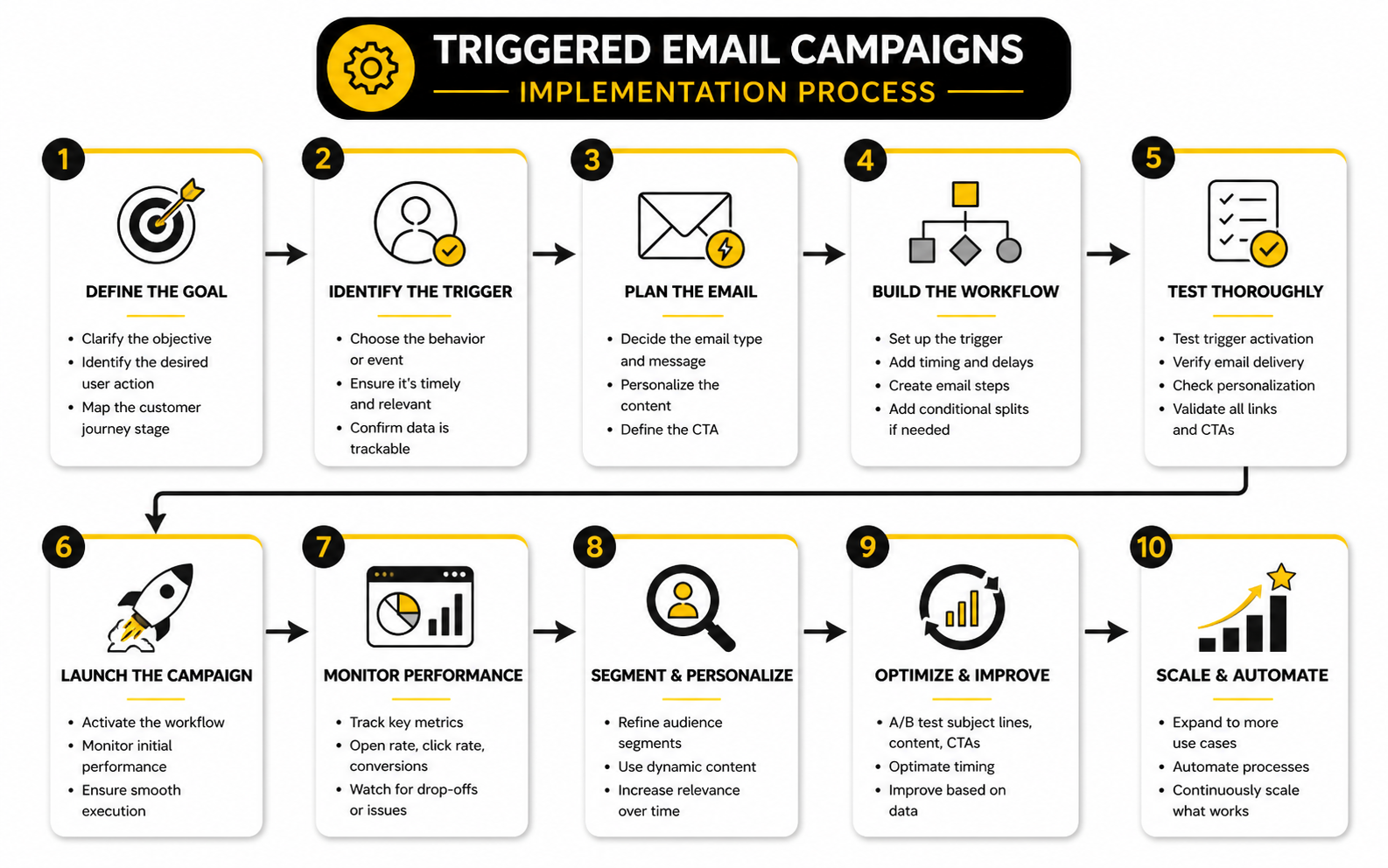
Step 4: Write the Message Path
Once the trigger and entry conditions are clear, build the message path. This includes the number of emails, timing between emails, decision branches, exit rules, and the purpose of each message. A good path feels like a conversation, not a pile of reminders.
The first message should usually respond directly to the trigger. If someone abandoned a cart, talk about the product they left behind. If someone booked a consultation, confirm the booking and help them prepare. If someone downloaded a resource, help them use it.
The later messages should move the relationship forward without repeating the same point. One email can reduce friction. Another can answer objections. Another can show social proof, explain the next step, or introduce a stronger call to action. Repetition is not strategy.
Step 5: Build the Workflow Logic
Workflow logic controls what happens after each action. This is where your campaign becomes dynamic. Someone who clicks should not always receive the same next email as someone who ignores everything.
At minimum, your workflow should include delays, conditional branches, conversion exits, suppression rules, and internal notifications where needed. If a lead books a call, they should leave the booking campaign. If a customer buys, they should leave the cart flow and enter the post-purchase flow.
This is where platforms matter. If you need CRM stages, appointment reminders, pipelines, forms, email, SMS, and internal tasks in one system, GoHighLevel is built for that kind of implementation. If your setup is simpler and focused on email marketing, Brevo or Moosend can be a practical fit.
Step 6: Add Personalization Carefully
Personalization is powerful when it helps the reader. It becomes creepy or useless when it only proves you collected data. Use personalization to make the email clearer, faster, and more relevant.
Basic personalization includes first name, product name, category interest, location, appointment time, plan type, purchase history, or lead source. More advanced personalization can change the offer, timing, content block, or call to action based on customer behavior. The key is to personalize around intent, not vanity.
Always test fallback fields. Nothing makes an automated email feel broken faster than “Hi ,” or “You viewed undefined.” Before a campaign goes live, check what happens when data is missing, delayed, duplicated, or formatted incorrectly.
Step 7: Create Exit Rules
Exit rules are what stop a person from receiving emails that no longer make sense. This is one of the most important parts of triggered email campaigns, and it is often ignored. Without exit rules, automation becomes annoying.
A cart abandonment campaign should stop when the person buys. A demo follow-up should stop when the person books. A reactivation campaign should stop when the person clicks, replies, purchases, or updates their preferences. A renewal sequence should change once the renewal is complete.
Exit rules also protect your brand from looking careless. If someone converts and still receives “Don’t forget to finish your order,” they immediately know your system is not paying attention. That small mistake can weaken trust.
Step 8: Test Before Launch
Testing should happen before any triggered campaign goes live. Do not just preview the email. Walk through the actual trigger, timing, segmentation, links, tracking, mobile layout, unsubscribe link, and exit behavior.
Use test contacts that represent different customer types. Test a new lead, an existing customer, a person with missing data, a person who clicks, a person who does not click, and a person who converts halfway through the flow. This is how you catch workflow problems before real subscribers experience them.
Also check the operational side. Make sure internal notifications go to the right person, CRM stages update correctly, tags are applied cleanly, and reporting is readable. A campaign that sends correctly but creates messy data will cause problems later.
Data and Tracking Requirements
Triggered email campaigns depend on reliable data. If the trigger data is wrong, the email will be wrong. If customer status is outdated, the automation will send messages that feel disconnected from reality.
At minimum, you need clean contact records, consent status, source tracking, event tracking, purchase or conversion data, and suppression rules. Ecommerce brands usually need product, cart, checkout, order, refund, and customer lifetime value data. Service businesses usually need form source, pipeline stage, appointment status, deal value, and sales owner data.
Do not collect data just because you can. Collect the data that helps you send a more useful message or make a better business decision. More fields do not automatically mean better automation; clean fields do.
Consent and Preference Management
Consent is not just a legal checkbox. It is part of trust. People should understand what they are signing up for, and they should have a simple way to unsubscribe or change preferences.
Triggered emails can include both marketing and transactional messages, but those categories should not be treated casually. A receipt, password reset, shipping update, or appointment confirmation has a different purpose from a promotion. Mixing those too aggressively can create compliance and trust problems.
A preference center can help you keep the right subscribers instead of forcing a full unsubscribe. Let people choose topics, frequency, product interests, or communication types when it makes sense. This gives your triggered email campaigns better data and gives your audience more control.
Deliverability Basics
Deliverability is the foundation underneath every automation. If your emails do not reach the inbox, the workflow does not matter. This is especially important for triggered email campaigns because many of them are tied to high-value moments.
Set up proper authentication before scaling. That means SPF, DKIM, and DMARC should be configured correctly for the sending domain. You should also monitor spam complaints, bounces, unsubscribes, engagement, and inbox placement trends.
List quality matters too. Sending triggered emails to people who did not ask for them, no longer engage, or regularly bounce will hurt performance over time. Automation does not protect bad sending habits; it often exposes them faster.
Building a Simple Triggered Campaign From Scratch
A practical build starts with one campaign, not a giant automation map. Choose one high-intent moment and build it properly. For many businesses, that means a welcome sequence, abandoned cart sequence, booked-call sequence, or post-purchase sequence.
Here is a simple process:
This process keeps the campaign focused. It also makes troubleshooting easier because every part has a job. When triggered email campaigns are built this way, they become assets instead of fragile workflows that nobody wants to touch.
Statistics and Data
Triggered email campaigns should be measured differently from regular newsletters. A newsletter is usually judged by broad engagement across a list. A triggered campaign should be judged by whether it moves a person from one specific behavior to the next specific outcome.
That distinction matters because triggered emails are closer to intent. A cart recovery flow, demo follow-up, onboarding sequence, or renewal reminder is not just trying to “get engagement.” It is trying to recover revenue, reduce friction, activate a customer, protect retention, or move a lead into the next stage.
Benchmarks are useful, but only when they create better decisions. Do not collect numbers so a dashboard looks impressive. Collect numbers so you know what to fix.
The Metrics That Actually Matter
Open rate can still be useful as a loose signal, but it should not be treated as the main performance metric. Apple Mail Privacy Protection can inflate opens because images may be downloaded when an email is received rather than when a person actually reads it, which makes open-based analysis less reliable for serious optimization. Campaign Monitor explains this clearly in its Apple Mail Privacy Protection guidance.
For triggered email campaigns, clicks, conversions, revenue, replies, bookings, upgrades, renewals, and retention signals usually matter more. These actions prove the email moved someone forward. A campaign with a pretty open rate and weak conversion rate is not winning; it is just being noticed.
You should also watch negative signals. Unsubscribes, spam complaints, bounces, refund behavior, and support tickets can show that a triggered sequence is too aggressive, badly timed, or poorly targeted. Performance is not only about how much money a campaign makes; it is also about whether it damages trust while making it.
How to Read Benchmarks Without Fooling Yourself
Benchmarks give you context, not commands. Klaviyo’s benchmark reporting is useful because it compares email performance by industry and includes metrics like open rate, click rate, order rate, and revenue per recipient in its email marketing benchmark data. That kind of comparison helps you see whether a flow is underperforming your category, not just whether it “feels fine.”
But you need to interpret benchmarks carefully. A skincare brand, a B2B agency, a SaaS product, and a local clinic will not have the same buying cycle, average order value, list quality, or conversion path. Even inside ecommerce, an abandoned cart email for a low-cost impulse product will behave differently from one for a high-ticket product that requires more consideration.
The right question is not “Are we above the average?” The right question is “What does this number tell us about the next constraint?” If clicks are low, your offer, subject, audience match, or call to action may be weak. If clicks are strong but conversions are weak, the issue may be the landing page, checkout, pricing, trust, or timing.
Revenue Per Recipient
Revenue per recipient is one of the cleanest metrics for triggered email campaigns because it connects the send to business value. It helps you compare flows that send to different list sizes. A small post-purchase upsell flow may generate less total revenue than a huge newsletter, but it may produce much more value per person.
This metric is especially useful when prioritizing improvements. If an abandoned cart flow has high traffic and weak revenue per recipient, fixing it can create immediate upside. If a niche onboarding sequence sends to fewer people but strongly improves activation or retention, it may still deserve attention because the downstream value is bigger than the first-click revenue.
Do not use revenue per recipient alone, though. It can hide margin, refund rates, discount dependency, and long-term customer quality. A flow that drives cheap one-time purchases but attracts bad-fit customers may look good in a short reporting window and still hurt the business.
Conversion Rate
Conversion rate tells you whether the email achieved its intended outcome. For triggered email campaigns, that outcome should be defined before launch. A cart email may aim for completed purchases, while a demo follow-up may aim for booked calls, and an onboarding sequence may aim for first meaningful product use.
This is why every triggered campaign needs one primary conversion event. If you track everything equally, you will not know what the campaign is truly responsible for. A welcome sequence can have secondary goals like clicks and replies, but its main goal may be starting a trial, booking a call, or making the first purchase.
When conversion rate is weak, resist the lazy answer of “write better copy.” Sometimes copy is the problem. But the bigger issue may be weak intent, poor segmentation, an offer mismatch, bad timing, slow pages, checkout friction, or lack of trust before the email is sent.
Click Rate
Click rate is one of the most practical engagement metrics because it shows active interest. Someone clicked because the message, offer, or next step was relevant enough to act on. That makes click rate more useful than open rate when judging whether the email content is doing its job.
Look at click rate by email and by link. If the first email in a sequence gets clicks but later emails collapse, the sequence may be repeating itself or pushing too hard. If people click educational links but ignore the sales call to action, they may need more trust before buying.
Click rate should also influence segmentation. If a lead repeatedly clicks pricing, comparison, demo, or product-specific links, that behavior can trigger a more sales-focused path. If they only click educational content, they may need more nurturing before a direct offer makes sense.
The Analytics System
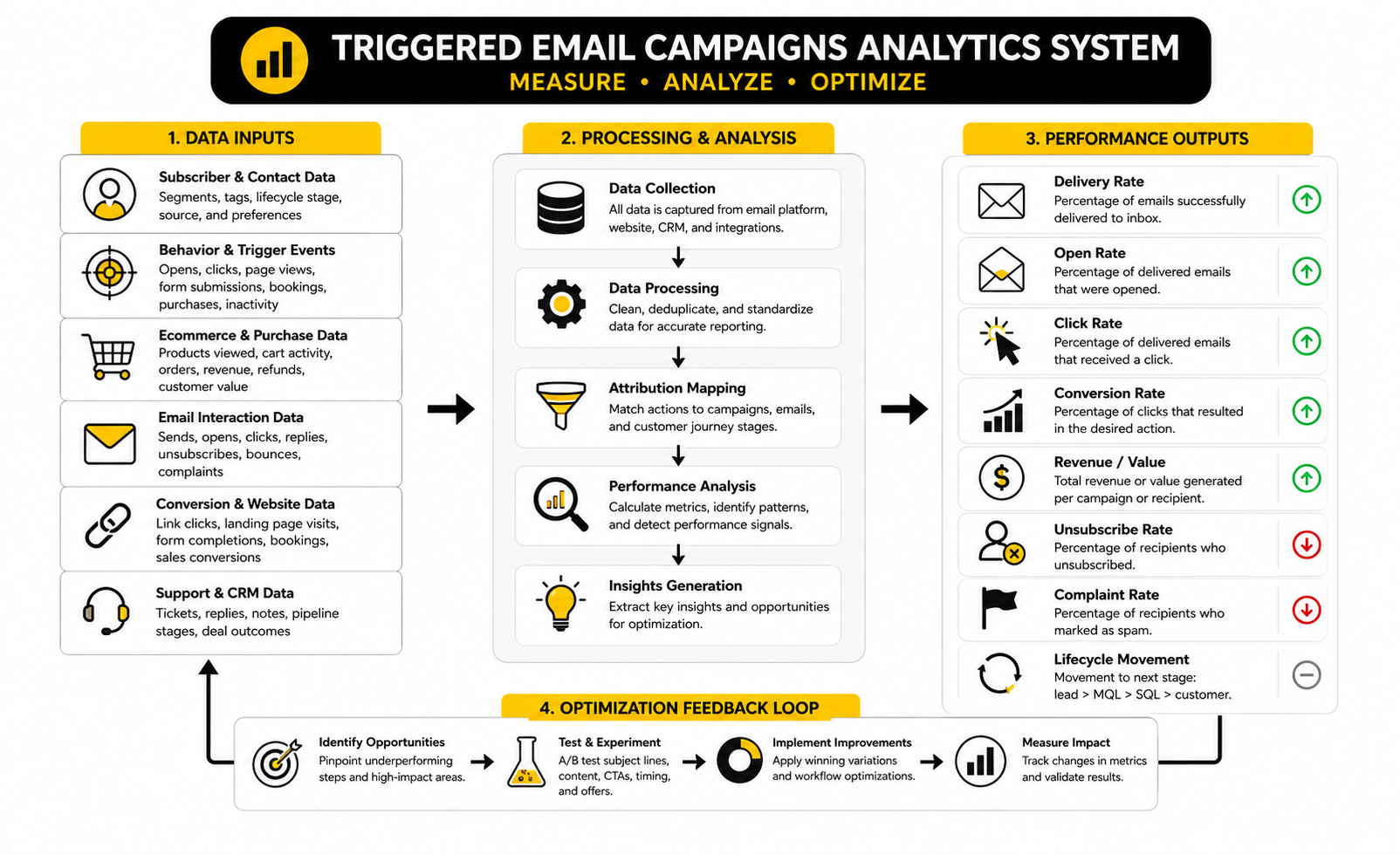
A clean analytics system connects four layers: delivery, engagement, conversion, and business impact. Delivery tells you whether the email reached the inbox. Engagement tells you whether people interacted. Conversion tells you whether they took the intended action. Business impact tells you whether that action created profitable value.
This is the simple version:
Most teams stop too early. They look at opens and clicks, then make creative changes. Better teams connect those actions to revenue, retention, and customer progress, then decide whether the problem is the email, the offer, the segment, the timing, or the page after the click.
Deliverability Signals
Deliverability is not a boring technical detail. It is the gatekeeper. If your emails do not land, your triggered email campaigns cannot perform no matter how good the copy is.
Spam complaints deserve special attention. Google’s sender guidance says bulk senders should keep user-reported spam below 0.1% and avoid reaching 0.3% or higher in its email sender guidelines FAQ. That is a serious operational benchmark because complaint rate is not just a metric; it is a warning that your targeting, consent, content, or frequency may be wrong.
Bounces also need attention. A rising bounce rate may point to poor lead sources, old lists, fake signups, weak validation, or broken integrations. If you ignore this, you are not just losing sends; you are weakening sender reputation over time.
Attribution Windows
Attribution windows decide how long after an email click or send you will give the campaign credit for a conversion. This matters because triggered campaigns often influence decisions over time. A customer may click a cart reminder today and buy tomorrow, or read an onboarding email this week and upgrade next week.
Short windows are cleaner but may undercount influence. Long windows capture more impact but can over-credit email for purchases that would have happened anyway. You need a window that fits the buying cycle and the type of campaign.
For low-cost ecommerce purchases, a shorter window may make sense. For B2B services, software trials, high-ticket offers, and renewals, a longer window may be more realistic. The key is consistency: do not change attribution rules every time you want the numbers to look better.
Performance Signals by Campaign Type
Different triggered email campaigns need different success signals. A welcome sequence should be judged by early trust and first conversion, not just opens. A cart recovery flow should be judged by recovered revenue, order rate, margin, and discount impact.
An onboarding sequence should be judged by activation, usage, support reduction, and retention. A re-engagement sequence should be judged by meaningful return activity and clean list reduction, not by how many inactive contacts you keep emailing. A renewal sequence should be judged by renewal completion, churn reduction, and customer satisfaction signals.
This is where dashboards need context. If every workflow is measured with the same generic email metrics, you will make shallow decisions. The measurement should match the job of the campaign.
What the Data Should Make You Do
Data is only valuable when it changes your next action. If the numbers do not lead to a decision, they are decoration. A triggered campaign dashboard should make it obvious what needs to be fixed first.
Use this logic:
This keeps optimization grounded. You are not randomly tweaking buttons. You are diagnosing the bottleneck in the system.
Reporting Cadence
Triggered email campaigns should not be judged too quickly. Some flows need enough volume before the data means anything. A welcome sequence may produce readable signals faster than a renewal sequence that only fires once a year.
Review high-volume revenue flows weekly, especially after launch. Review lower-volume lifecycle campaigns monthly or quarterly, depending on volume. For strategic decisions, compare trends over time rather than reacting to one strange week.
The best reporting cadence balances speed and patience. Move quickly when something is clearly broken, like a bad link, broken merge field, or rising complaint rate. Be slower when testing deeper changes that need enough data to prove they actually worked.
Testing, Optimization, and Scaling
Once triggered email campaigns are live and measurable, the next question is not “How many more automations can we build?” The better question is “Which part of the system has the most leverage?” Scaling too early creates complexity, and complexity without discipline becomes expensive noise.
Optimization should start where the numbers show friction. If people are not clicking, the message or offer may be weak. If people click but do not convert, the problem is likely after the email. If people convert but complain, unsubscribe, refund, or churn, the campaign may be creating the wrong expectation.
This is where mature email marketing looks less like copywriting and more like systems thinking. You are not just testing subject lines. You are improving timing, segmentation, intent matching, offer logic, lifecycle flow, and the customer experience after the click.
Test One Constraint at a Time
Testing works best when you know what you are trying to learn. A random subject line test may give you a winner, but it may not tell you why the campaign performs better. Good tests isolate one constraint so the result can actually guide the next decision.
For triggered email campaigns, useful test areas include timing, subject line, preview text, email length, call to action, offer angle, sequence length, personalization, and exit logic. Timing tests can be especially valuable because triggered emails are built around moments of intent. A cart reminder sent too soon can feel pushy, while one sent too late may miss the buying window.
Do not test everything at once. If you change the subject line, offer, delay, design, and landing page in the same test, you may improve performance but learn very little. A better approach is slower, cleaner, and much easier to trust.
Segment Before You Personalize Deeply
Personalization gets more attention than segmentation, but segmentation usually creates the bigger win first. A personalized subject line cannot fix a message sent to the wrong person. A simple email sent to the right segment at the right moment will usually beat a clever personalized email sent too broadly.
Start with obvious segments: new leads, first-time buyers, repeat customers, inactive subscribers, high-value customers, trial users, booked leads, and customers by product category. Then add behavioral segments based on clicks, viewed pages, cart value, purchase history, or stage in the sales pipeline. Keep the segments useful, not decorative.
Deep personalization should come after the core segments are working. Product recommendations, dynamic content, AI-assisted copy, and predictive sending can all help, but they should support the strategy instead of replacing it. If your foundation is weak, advanced personalization just makes the mess look more sophisticated.
Manage Frequency Across Automations
One of the biggest scaling risks is automation collision. A person joins your list, views a product, abandons a cart, books a call, downloads a guide, and receives a newsletter in the same week. Each message may make sense on its own, but together they can feel overwhelming.
This is why frequency management matters. You need rules that control how many marketing emails someone can receive in a specific period, which campaigns have priority, and which campaigns should pause when a higher-intent sequence begins. A cart recovery email may outrank a general newsletter. A booked-call reminder may outrank a promotional campaign.
The customer does not care that your messages came from separate workflows. They experience one brand. If that brand feels chaotic, automation is not helping.
Prioritize Campaigns by Business Impact
Not every triggered campaign deserves the same attention. Some workflows are nice to have. Others directly protect revenue, improve customer success, or reduce churn. Treat them differently.
A practical priority order usually starts with high-intent and high-impact flows. Welcome, abandoned cart, booked-call follow-up, post-purchase onboarding, renewal, and reactivation campaigns often deserve attention before niche branches. These are the moments where a better email can change behavior quickly.
Use impact and volume together. A campaign with massive volume but low value may be worth improving. A campaign with lower volume but high revenue per conversion may also be worth improving. The best priorities sit where customer intent, business value, and fixable friction overlap.
Watch the Risk of Discount Dependency
Discounts can make triggered email campaigns look successful in the short term. They can also train customers to wait. This is especially dangerous in abandoned cart, browse abandonment, win-back, and renewal campaigns.
Before adding a discount, ask what problem you are solving. If the real issue is unclear shipping, weak proof, poor product education, confusing pricing, or a broken checkout experience, a discount may hide the problem instead of fixing it. You may recover revenue while quietly weakening margin and brand positioning.
Use incentives carefully. Test non-discount alternatives first, such as clearer benefits, stronger guarantees, faster checkout links, better FAQs, bundles, bonuses, or support access. When you do use discounts, control them with rules around margin, customer type, order value, and timing.
Balance Automation and Human Follow-Up
Not every triggered email should stay purely automated. Some moments deserve a human handoff. A high-value lead clicking a pricing page five times, a customer replying with a concern, or a churn-risk account showing warning signs may need a sales or support task, not another generic email.
This is especially important for agencies, consultants, B2B services, high-ticket offers, and local service businesses. Email can warm up the conversation, answer common questions, and create momentum, but a human follow-up may close the gap. The workflow should make that handoff easy.
For this kind of setup, a CRM matters as much as the email tool. A platform like GoHighLevel can connect triggered emails with pipeline stages, tasks, forms, appointment reminders, and sales follow-up. If you only need the email side, a focused platform like Brevo or Moosend can still handle practical automation well.
Triggered Email Campaign Mistakes to Avoid
Triggered email campaigns fail when they are built around the sender’s convenience instead of the customer’s situation. Automation makes it easy to send messages at scale, but scale magnifies mistakes. A weak manual email is annoying once; a weak automation annoys people every day.
The good news is that most mistakes are preventable. They usually come from vague triggers, poor segmentation, missing exit rules, bad timing, messy data, or a lack of testing. Fix those basics and the campaign immediately feels more professional.
Avoiding mistakes is not about being cautious forever. It is about earning the right to scale. When the foundation is clean, you can build more advanced branches with confidence.
Sending Too Soon or Too Often
Timing is one of the hardest parts to get right. A fast follow-up can feel helpful when the customer expects it, like after a form submission or appointment booking. The same speed can feel aggressive after a casual product view.
Frequency problems get worse as you add more workflows. A customer can enter several automations without anyone noticing unless you build suppression and priority rules. That is how brands accidentally send five emails in two days and then wonder why unsubscribe rates climb.
The fix is to define campaign priority and sending limits. Decide which triggered campaigns override others. Decide when to pause promotional sends. Decide how long someone should rest after a purchase, complaint, unsubscribe, or support interaction.
Treating Every Trigger as Equal
Not all actions deserve the same response. A product view is not the same as a cart abandonment. A blog click is not the same as a demo request. A lead magnet download is not the same as a pricing page visit.
When you treat every trigger as high intent, your emails become too forceful. When you treat every trigger as low intent, you miss serious opportunities. The message should match the strength of the signal.
Build a rough intent hierarchy. Low-intent behaviors may deserve educational content. Mid-intent behaviors may deserve comparison help or product guidance. High-intent behaviors may deserve direct calls to action, booking prompts, cart recovery, or sales follow-up.
Ignoring the Page After the Click
Email does not convert alone. It creates the click, but the page after the click usually creates the conversion. If that page is slow, confusing, generic, or disconnected from the email promise, your campaign will leak performance.
This is common in triggered email campaigns. The email talks about one product, offer, appointment, or resource, but the click sends the person to a broad homepage or a page that makes them search again. That breaks momentum.
Match the landing page to the trigger. If someone abandoned a cart, return them to the cart. If someone clicked a product education email, send them to the relevant product or guide. If someone booked a call, send them to a preparation page or calendar details, not a generic sales page.
Scaling Before the Data Is Clean
Automation depends on data. Bad data creates bad timing, broken personalization, duplicate sends, and wrong segmentation. If your contact records, tags, product events, purchase data, or CRM stages are messy, scaling triggered email campaigns will multiply the mess.
This is why cleanup is not optional. Before adding advanced branches, check whether your key fields are accurate. Confirm that purchases remove people from pre-purchase sequences. Confirm that lead stages update correctly. Confirm that inactive contacts are actually inactive, not just tracked incorrectly.
A smaller clean system beats a larger fragile one. It is better to run five reliable workflows than twenty automations that nobody trusts.
Overusing AI Without Strategy
AI can speed up email production, but it cannot decide your business logic for you. It can help draft subject lines, summarize customer segments, generate variations, and analyze patterns. It should not replace the strategy behind triggered email campaigns.
The risk is volume. AI makes it easier to create more emails, more branches, and more copy variations than the customer actually needs. More output does not equal more relevance.
Use AI where it removes friction, not where it removes thinking. Let it help with drafts, research synthesis, QA checklists, and variation ideas. Keep the trigger logic, customer promise, segmentation, and offer strategy under human control.
Forgetting the Unsubscribe Experience
The unsubscribe experience is part of the customer experience. If it is hidden, confusing, slow, or manipulative, people may mark the email as spam instead. That hurts deliverability far more than a clean unsubscribe.
Modern inbox providers are strict about this. Google’s sender guidance says bulk senders should keep spam rates below 0.1% and avoid reaching 0.3% or higher in its email sender guidelines FAQ. That threshold should make every marketer take consent, relevance, and unsubscribe clarity seriously.
A clean unsubscribe is not a failure. It is a pressure release valve. The wrong person leaving your list is better than the wrong person staying, ignoring everything, and eventually damaging your sender reputation.
Advanced Scaling Considerations
Advanced triggered email campaigns require governance. That sounds corporate, but it simply means someone owns the system. Without ownership, automations become a pile of old logic, outdated offers, broken links, and forgotten branches.
Governance includes naming conventions, documentation, campaign audits, owner assignments, approval rules, and reporting standards. It also includes a clear process for retiring old flows. An automation that made sense two years ago may be irrelevant today if the offer, pricing, product, positioning, or customer journey has changed.
This becomes more important as teams grow. Marketing, sales, support, product, and operations may all want automated messages. Without coordination, the customer gets the chaos.
Create a Campaign Map
A campaign map shows every triggered email campaign, what starts it, who receives it, what it sends, and what stops it. This does not need to be fancy. A simple spreadsheet or workflow document is enough.
The map should include the campaign name, trigger, entry rules, exclusions, email count, delays, conversion goal, exit rules, owner, and last review date. This gives the team one place to understand the system. It also makes audits much faster.
Without a map, every change becomes risky. You edit one flow and accidentally affect another. You add a new campaign and forget it overlaps with an existing one. Documentation prevents that.
Audit Automations Regularly
Triggered email campaigns should be audited on a schedule. Offers change, links break, product names update, lead magnets get replaced, compliance rules evolve, and customer behavior shifts. A campaign can be technically live and strategically outdated at the same time.
Review high-value automations at least quarterly. Check links, merge fields, timing, performance, complaints, unsubscribes, exit rules, and conversion tracking. For lower-volume flows, a semiannual review may be enough, but they should still be checked.
Audits also reveal dead weight. Some automations no longer earn their place. If a flow has low volume, weak impact, and no clear strategic purpose, simplify it or remove it.
Build Around Lifecycle Stages
The most advanced systems do not think in isolated campaigns. They think in lifecycle stages. A person should move from unknown visitor to subscriber, lead, buyer, active customer, repeat customer, advocate, or reactivation target based on behavior.
This stage-based approach makes triggered email campaigns easier to control. Instead of asking “Which flow should send next?” you ask “What stage is this person in, and what is the next useful action?” That creates cleaner messaging and fewer collisions.
Lifecycle stages also improve reporting. You can see where people get stuck, not just which emails got clicks. That makes optimization more strategic because you are improving the customer journey, not just individual campaigns.
Know When to Stop Automating
Automation is not always the answer. Some situations require judgment, empathy, negotiation, or context that a workflow does not have. This is especially true for complaints, cancellations, refunds, high-value deals, and sensitive customer issues.
A good system knows when to stop and hand off. That might mean creating a sales task, notifying support, pausing marketing emails, or routing the customer to a person. This protects the relationship.
The best triggered email campaigns do not try to automate every conversation. They automate the repeatable parts so humans can focus on the moments where humans matter most.
Bringing the System Together
At this stage, triggered email campaigns should no longer feel like isolated automations. They should feel like one connected communication system that reacts to customer behavior, protects attention, and moves people through the journey with less friction. That is the real goal.
The best systems are not the biggest systems. They are the clearest ones. Every trigger has a reason, every message has a job, every branch has a purpose, and every exit rule protects the customer from receiving something irrelevant.
This is where the full strategy comes together: journey mapping, trigger logic, segmentation, message paths, workflow rules, measurement, optimization, and governance. When those pieces work together, automation stops feeling like a shortcut. It becomes infrastructure.
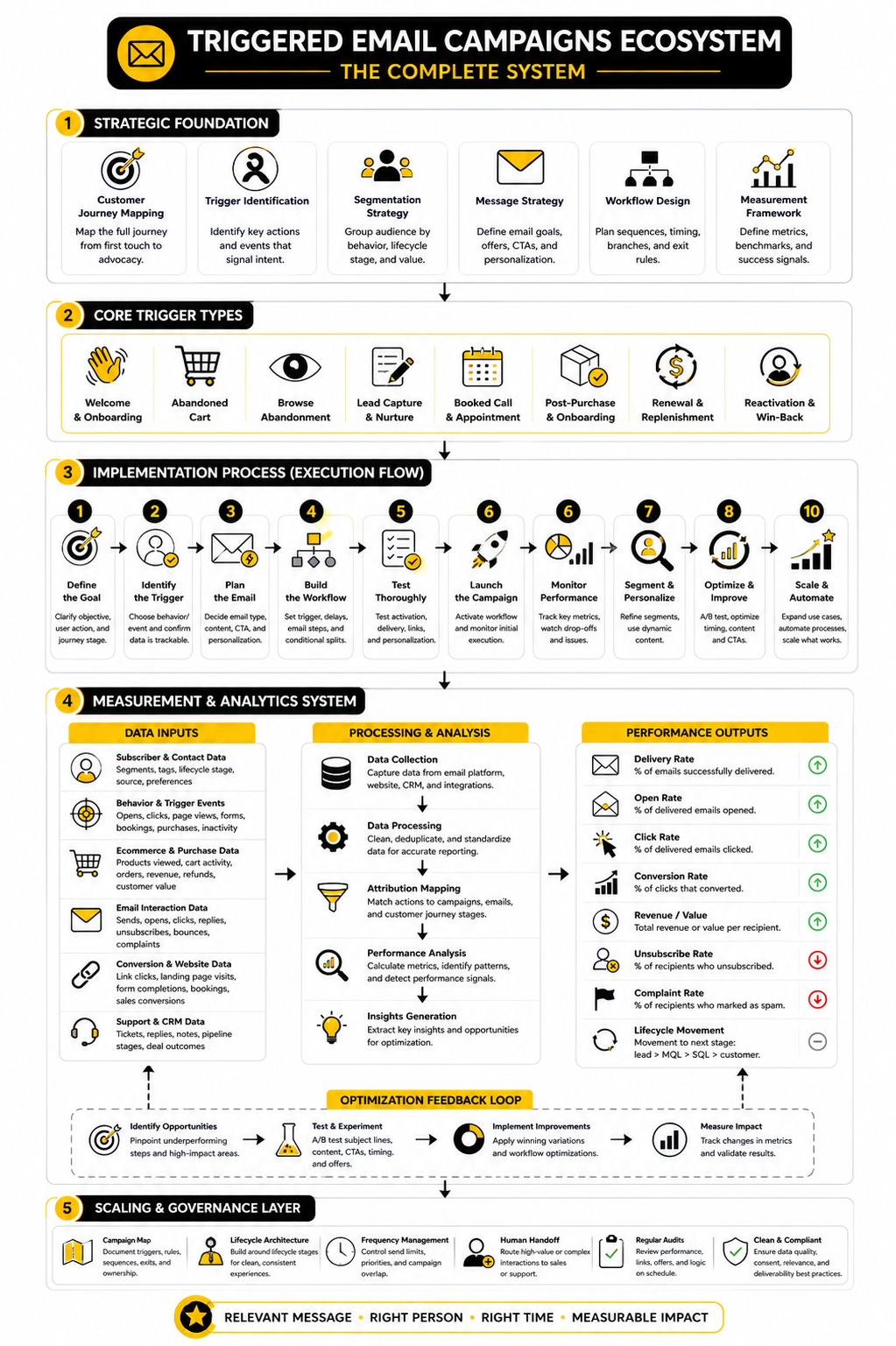
Building Your Triggered Email Ecosystem
A triggered email ecosystem is the complete network of automations around your business. It includes lead capture, nurture, sales follow-up, cart recovery, onboarding, post-purchase education, retention, renewal, reactivation, and customer feedback. Each campaign has its own purpose, but the customer should experience one consistent brand.
The easiest way to build that ecosystem is to move in layers. Start with the highest-intent moments first, then add lifecycle campaigns, then refine with segmentation and deeper personalization. Do not build complexity just because your platform allows it.
Your ecosystem should also include a simple ownership process. Someone needs to review performance, update offers, check links, watch deliverability, and remove campaigns that no longer make sense. Triggered email campaigns are not “set it and forget it.” They are “build it, monitor it, improve it.”
The Practical Build Order
The first layer should focus on obvious conversion and trust moments. That usually means a welcome sequence, abandoned cart or lead follow-up sequence, post-purchase sequence, and appointment or demo reminder flow if your business uses bookings. These campaigns are close enough to revenue or customer experience that small improvements can matter quickly.
The second layer should focus on retention and lifecycle movement. Add onboarding, reactivation, renewal, replenishment, review requests, referral prompts, and customer education. These campaigns may not always create instant revenue, but they can improve long-term value and reduce customer drop-off.
The third layer should focus on refinement. Add behavioral branches, priority rules, deeper segmentation, better reporting, and more carefully handoffs to sales or support. This is where tools like GoHighLevel, Brevo, Moosend, ClickFunnels, or Systeme.io can help, depending on whether your setup is more CRM-heavy, ecommerce-focused, funnel-based, or email-first.
What are triggered email campaigns?
Triggered email campaigns are automated emails sent after a specific action, event, or condition. The trigger could be a form submission, abandoned cart, purchase, product view, booking, renewal date, or period of inactivity. The purpose is to send a relevant message at the moment when the customer’s behavior gives you useful context.
How are triggered email campaigns different from newsletters?
Newsletters are usually sent to a list based on the marketer’s schedule. Triggered email campaigns are sent because the customer did something or reached a specific lifecycle point. That makes triggered emails more behavior-based, while newsletters are usually broader and more editorial or promotional.
What is the best triggered email campaign to build first?
The best first campaign depends on your business model, but start with the clearest revenue or trust moment. Ecommerce brands often start with abandoned cart, welcome, and post-purchase campaigns. Service businesses often start with lead follow-up, booked-call reminders, proposal follow-up, and reactivation campaigns.
How many emails should be in a triggered campaign?
There is no universal number because the sequence should match the customer’s situation. A booking confirmation may need one or two practical reminders, while a welcome sequence may need three to five emails to build trust and guide the next step. The right number is the fewest emails needed to create clarity, remove friction, and move the person forward.
How fast should the first triggered email send?
The first email should send quickly when the customer expects confirmation or next steps. That includes form submissions, downloads, purchases, bookings, and account creation. For softer triggers like browsing a product or becoming inactive, a delay can feel more natural and less aggressive.
Do triggered email campaigns need personalization?
They do not need heavy personalization to work, but they do need relevance. Basic personalization like product name, appointment time, lead source, plan type, or purchase history can make the message more useful. Deep personalization should only be added when the data is reliable and it improves the customer experience.
What metrics should I track for triggered email campaigns?
Track metrics that match the job of the campaign. For most triggered email campaigns, that means click rate, conversion rate, revenue per recipient, booking rate, activation rate, renewal rate, unsubscribe rate, complaint rate, and exit behavior. Open rate can still provide directional context, but it should not be the main metric for serious decisions.
Why are my triggered emails getting clicks but not conversions?
If people click but do not convert, the email may not be the main problem. The issue could be the landing page, checkout flow, booking form, offer clarity, pricing, trust signals, page speed, or timing. The click proves interest, so your next job is to inspect what happens after the click.
Can triggered email campaigns hurt deliverability?
Yes, they can hurt deliverability if they are sent to the wrong people, too often, or without clear consent. Poor list quality, high complaints, irrelevant messages, broken unsubscribe experiences, and excessive frequency can all damage performance. Automation does not protect you from bad sending behavior; it scales it.
Should I use discounts in abandoned cart emails?
Discounts can work, but they should not be the default. Before offering a discount, fix clearer problems like shipping uncertainty, weak product explanation, lack of reviews, confusing checkout, or missing guarantees. If you do use discounts, control them by order value, customer type, margin, and timing so you do not train people to abandon carts on purpose.
How often should triggered email campaigns be reviewed?
High-value campaigns should be reviewed regularly because offers, customer behavior, links, products, and tracking can change. A monthly review works well for active revenue flows, while lower-volume lifecycle campaigns may be reviewed quarterly. The key is to check performance, logic, links, merge fields, exit rules, and whether the campaign still matches the customer journey.
What tools are best for triggered email campaigns?
The best tool depends on what you need the campaign to do. If you need CRM pipelines, appointment reminders, tasks, email, SMS, and client follow-up in one place, GoHighLevel can make sense. If you mainly need practical email automation, Brevo and Moosend are worth considering, while ClickFunnels and Systeme.io are more natural fits when the campaign is connected to funnels and offer pages.
Can AI help with triggered email campaigns?
AI can help draft email variations, summarize customer behavior, suggest subject lines, and speed up campaign production. It can also help create QA checklists or identify weak points in a sequence. But it should not replace human judgment on strategy, customer promise, trigger logic, segmentation, compliance, or offer positioning.
What makes a triggered email campaign feel human?
A human-feeling campaign respects timing, context, and customer intent. It does not overreact to weak signals, repeat the same message, or keep sending after the person already took action. The best triggered email campaigns feel like helpful follow-up, not like software shouting through a megaphone.
Build a stronger local presence with BAAM AI
Turn your website, Google profile, social channels, and AI visibility into one growth engine
Most businesses do not need more random marketing activity. They need a consistent presence system that helps the right people find them, trust them, and take action. BAAM AI brings strategy, local SEO, website updates, Google Maps visibility, social content, AI-search readiness, media production, and reporting into one practical monthly engine.
If you want your marketing to keep working after the campaign ends, start with a free BAAM AI presence audit. See how your business shows up today and where the fastest visibility wins are at BAAM AI.