
BAAM AI Blog
The HubSpot Email Automation Framework
The easiest way to ruin HubSpot automated emails is to start inside the workflow builder too early. The tool is flexible, but flexibility can become chaos when the strategy is not clear. Before building anything...
Affiliate disclosure: this article may include compensated links. Recommendations should still be evaluated against your use case, budget, and current provider terms.
Should you choose HubSpot?
HubSpot is worth considering when the use case, budget, and implementation effort match what you actually need to do next.
teams that want a practical tool decision without reading another generic feature list
Check HubSpotThe easiest way to ruin HubSpot automated emails is to start inside the workflow builder too early. The tool is flexible, but flexibility can become chaos when the strategy is not clear. Before building anything, define the journey moment, the audience, the promised outcome, and the exact behavior that should move someone forward.
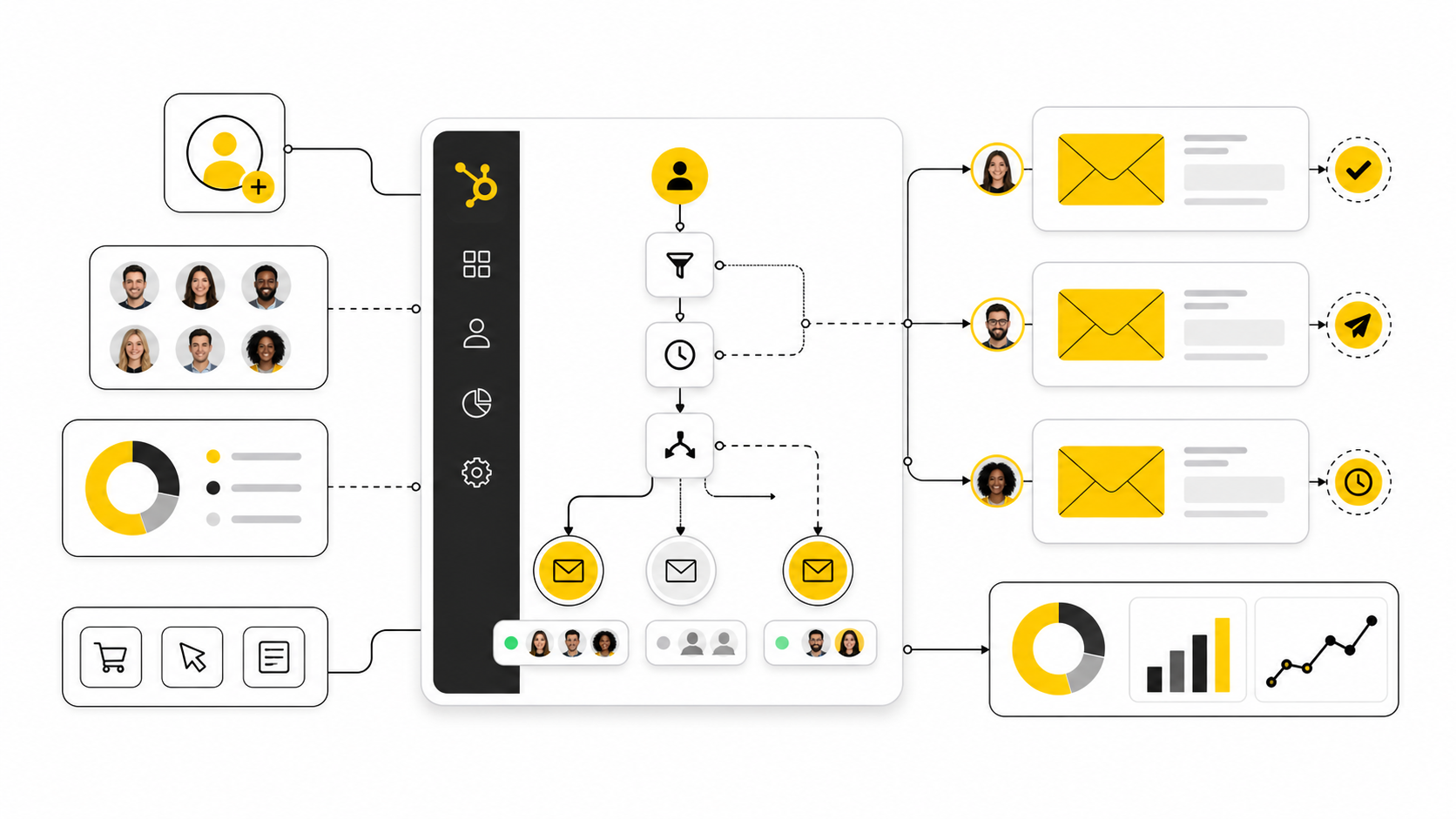
Think of the framework as a simple operating model: trigger, qualify, message, route, measure, and improve. The trigger starts the workflow, qualification checks whether the contact should really be there, the message helps them take the next useful step, routing moves them to the right owner or path, measurement shows what worked, and improvement turns the workflow into a living system. HubSpot’s workflow enrollment settings support this kind of control because teams can manage triggers, re-enrollment, unenrollment, suppression, and advanced enrollment logic from the start.
A framework also protects the customer experience. Without one, teams often stack automated emails on top of each other until contacts receive overlapping messages from marketing, sales, onboarding, and events. That is not automation. That is organized noise.
Start With The Journey Moment
Every workflow should begin with one clear question: what just happened? A contact submitted a form, downloaded a resource, viewed a product page, joined a list, hit a score threshold, became a customer, opened a ticket, or entered a deal stage. That moment gives the automated email its reason to exist.
This is where teams need to be honest about intent. A newsletter signup is not the same as a demo request, and a webinar registration is not the same as a pricing-page visit. If the trigger does not tell you enough about what the contact wants, the first email should gather context or offer a soft next step instead of pushing too hard.
HubSpot supports both simple automation from the email editor and more advanced automation through workflows, but the principle stays the same. The trigger should be specific enough to justify the message. If the workflow exists only because “we should nurture these people somehow,” it is probably too vague.
Define The Audience Before You Write The Email
Audience logic is where good automation separates itself from lazy automation. Before writing the email, decide who should receive it, who should be excluded, and what data must be present for the message to make sense. This includes lifecycle stage, list membership, consent status, country, language, lead source, customer status, sales ownership, recent engagement, and any property that changes the context.
This step matters because automation should protect people from irrelevant messages. A customer should not receive a new-lead sequence. An active sales opportunity should not be pushed into a low-intent educational drip. A contact who has already completed the desired action should not keep receiving reminders.
The best implementation usually includes suppression lists from the beginning. Suppression is not a technical afterthought. It is how you prevent HubSpot automated emails from competing with active sales conversations, onboarding journeys, compliance rules, and other campaigns already running in the account.
Map The Workflow Before Building It
A workflow map does not need to be fancy. It can be a plain document, a whiteboard, or a simple list of steps. What matters is that the team can see the full journey before anything is turned on.
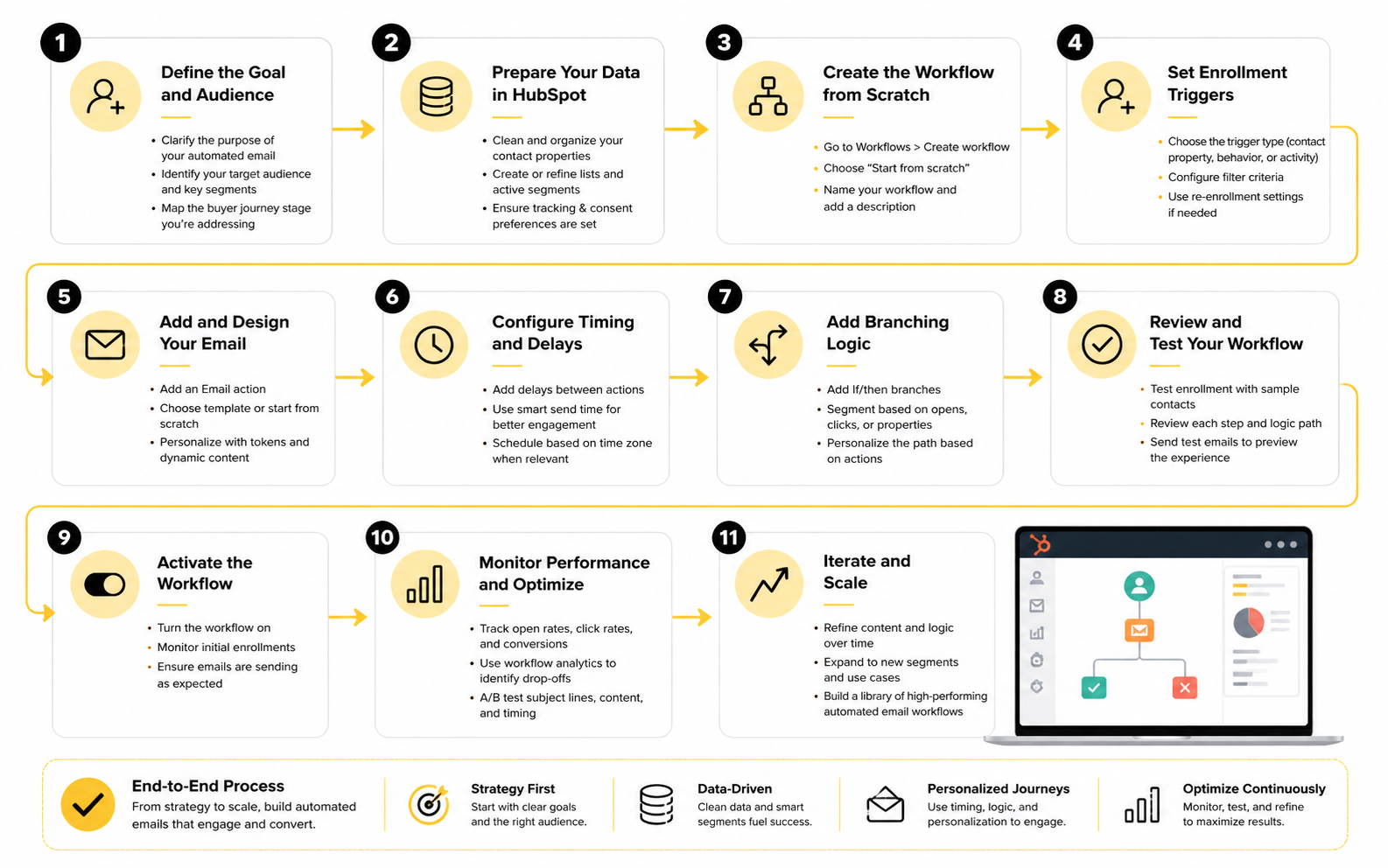
A practical workflow map should include:
This mapping stage is where you catch problems cheaply. You may realize that the sales team needs a task after a high-intent click, that a lifecycle stage should update before the second email, or that a suppression rule is missing for existing customers. Fixing those decisions on paper is much easier than cleaning up a broken workflow after thousands of contacts have gone through it.
Build The Automated Email As A Workflow Asset
In HubSpot, an email that will be used inside automation needs to be prepared for workflow delivery. HubSpot’s documentation on automated emails in workflows makes the distinction clear: the email must be created, configured, reviewed, and published so it can be selected as an automated email inside a workflow. That sounds simple, but it is an important operational habit.
The email itself should have one primary job. It can educate, confirm, remind, invite, qualify, route, or re-engage, but it should not try to do everything at once. Clear intent makes the copy sharper and makes reporting easier because you know what action the email was supposed to drive.
Use personalization carefully. Merge fields, smart content, and CRM-based logic can make HubSpot automated emails feel more relevant, but only when the data is reliable. If a property is often blank, outdated, or inconsistently formatted, do not build the whole message around it.
Set Enrollment And Re-Enrollment Carefully
Enrollment rules decide who enters the workflow, but re-enrollment rules decide whether someone can enter again later. This is one of the most important controls in HubSpot because a small mistake can create repeated sends, duplicate tasks, and confusing customer experiences. HubSpot’s guidance on workflow enrollment settings is worth reviewing before turning on any workflow that could run more than once.
For a one-time nurture sequence, re-enrollment may be unnecessary. For recurring behavior, like returning to a high-intent page or submitting different forms over time, re-enrollment may be useful if the timing and exclusions are tight. The key is to decide intentionally instead of accepting default behavior without thinking.
You should also define unenrollment rules before launch. If someone books a meeting, becomes a customer, enters an active deal, unsubscribes, or reaches the workflow goal, they may need to leave the sequence immediately. This is how automation stays helpful instead of becoming awkward.
Add Internal Actions That Keep The CRM Clean
A workflow should not only send emails. It should also update the system so the next person or process has better context. That can mean setting lifecycle stages, updating lead status, adding list membership, assigning ownership, creating tasks, notifying sales, setting campaign properties, or marking a contact as having completed a specific journey.
This is where HubSpot automated emails become more than marketing communication. They become part of CRM hygiene. When the workflow updates records consistently, sales reps see cleaner context and reporting becomes much easier to trust.
Be careful not to over-update properties. Too many automatic changes can make it hard to understand what actually happened. Each internal action should have a clear reason, and important fields should have ownership rules so marketing, sales, and operations do not overwrite each other accidentally.
Test The Workflow Before Launch
Testing is non-negotiable. Review the email content, links, personalization tokens, unsubscribe behavior, timing delays, branch logic, suppression lists, sender settings, and internal actions before activating the workflow. A workflow can look correct at a glance and still fail because one property, list, or delay was configured incorrectly.
Deliverability also deserves attention during testing. The Validity 2025 Email Deliverability Benchmark Report emphasizes that delivered mail does not always mean inbox placement, which is a useful reminder for any automated email program. If the workflow depends on email performance, sender setup and list quality are part of the implementation process, not separate technical chores.
Finally, test the experience as a recipient. Read the sequence in order and ask whether the timing feels natural, whether each email has a clear next step, and whether the journey still makes sense if someone ignores the first message. If it feels annoying during testing, it will feel worse in a real inbox.
Statistics And Data
Measurement is where HubSpot automated emails become either a real growth system or just another set of scheduled messages. The goal is not to collect every possible metric. The goal is to understand what the workflow is doing, where contacts are dropping off, and which changes will actually improve revenue, pipeline, activation, retention, or customer experience.
This is important because email benchmarks can be useful, but they can also be misleading when they are treated like universal targets. A high open rate does not prove the workflow is profitable. A low click rate does not automatically mean the email is bad. The numbers only become useful when they are tied to the purpose of the automation.
Start With The Workflow Goal
Every automated email workflow should have one primary goal before you judge its performance. A demo follow-up sequence may be measured by booked meetings, while a lead nurture sequence may be measured by sales-qualified leads. A customer onboarding sequence may be measured by product activation, completed setup steps, support deflection, or renewal risk reduction.
This keeps the reporting honest. If a workflow exists to move contacts toward a sales conversation, then clicks are only useful if they help explain why meetings increased or failed to increase. If a workflow exists to educate new leads, then engagement depth and progression to the next lifecycle stage matter more than one flashy email metric.
HubSpot supports this kind of analysis because marketing email performance can be reviewed through sends, deliveries, opens, clicks, bounces, unsubscribes, and recipient-level activity in its marketing email reporting tools. For automated emails, those numbers should be connected back to the workflow goal, not reviewed in isolation.
Use Benchmarks As Context, Not As The Strategy
Benchmarks are helpful because they show whether your performance is unusually weak, roughly normal, or clearly strong for your category. They are not helpful when teams copy them into a dashboard and stop thinking. Your audience, offer, list quality, sender reputation, buying cycle, industry, and relationship with contacts all affect the numbers.
Recent benchmark research shows why context matters. The MoEngage 2025 email benchmark report found that emails inside automated customer flows can perform strongly, especially when personalization is based on offers and recommendations rather than generic name tokens. That does not mean every business should send more automation. It means automated emails tend to work better when they are triggered by real customer context.
The practical move is simple: compare your HubSpot automated emails against your own baseline first, then use industry data as a second layer. If your onboarding workflow improves activation month over month, that matters more than whether it matches a generic industry click-rate average. External data tells you what is possible; internal data tells you what is actually changing.
Measure The Full Funnel, Not Just The Email
Email reporting usually starts with delivery, opens, clicks, bounces, unsubscribes, and spam complaints. Those are useful health signals, but they do not tell the full story. For HubSpot automated emails, the more valuable question is what happened after the email interaction.
A complete measurement system should connect email metrics to CRM outcomes. That means looking at lifecycle stage movement, deal creation, meeting bookings, form submissions, sales replies, product actions, ticket creation, renewals, and revenue influence where the data is available. This is where HubSpot’s CRM connection becomes more valuable than a standalone email platform.
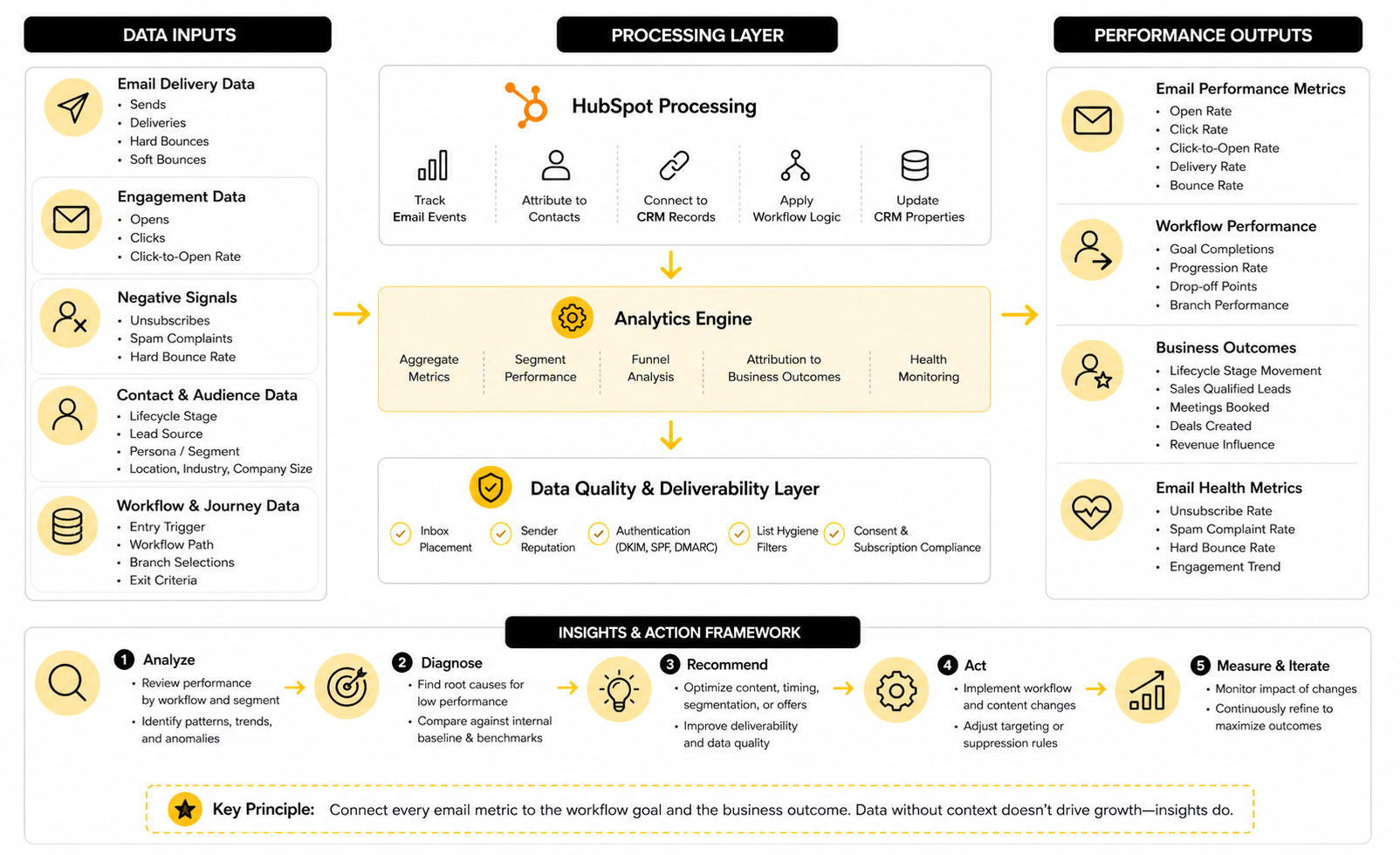
A clean analytics view should answer five questions:
That final question matters more than most teams admit. A workflow can create short-term clicks while quietly damaging trust. If unsubscribes rise, spam complaints increase, or sales reps report confused prospects, the automation is not healthy even if one metric looks good.
Understand What Each Metric Really Means
Delivery rate tells you whether HubSpot was able to hand the email to receiving mail servers, but it does not prove that the email landed in the inbox. Inbox placement is a deeper deliverability signal because it separates emails that reach the inbox from emails that land in spam or other low-visibility areas. The Validity 2025 Email Deliverability Benchmark Report makes this distinction clearly, which is why deliverability should be reviewed alongside engagement.
Open rate can show broad interest, but it is no longer a clean measure of human attention. Privacy features, image loading behavior, bots, and inbox filtering can distort opens. Treat opens as a directional signal, not as proof that the message worked.
Click rate is usually more useful because it shows that someone took a visible action. Still, clicks need interpretation. A high click rate on a vague button may not mean much, while a smaller number of clicks on a high-intent offer, pricing page, booking link, or onboarding step can be much more valuable.
Watch Negative Signals Closely
Negative signals tell you when automation is creating friction. Hard bounces suggest list quality or data capture problems. Unsubscribes suggest message mismatch, over-sending, poor expectation setting, or weak audience fit. Spam complaints are more serious because they can affect sender reputation and inbox placement.
HubSpot’s email health tool is useful here because it brings together open rate, click-through rate, unsubscribe rate, spam reports, hard bounce rate, and performance recommendations. This is the kind of view teams should review before scaling an automated email program. If health is slipping, adding more workflows will usually make the problem worse.
The right action depends on the signal. High bounces usually point to list hygiene and acquisition quality. High unsubscribes usually point to expectation mismatch or weak segmentation. High spam complaints should trigger a deeper review of consent, frequency, sender identity, subject lines, and whether contacts actually recognize the brand.
Segment Reporting By Journey And Audience
Average performance can hide the truth. A workflow may perform well for demo leads and poorly for content subscribers. Another may work for small businesses but fail with enterprise buyers because the call to action is too aggressive too early.
Segmenting reports by audience helps you avoid bad conclusions. Review HubSpot automated emails by lifecycle stage, lead source, persona, country, language, industry, company size, sales owner, and entry trigger when those properties are reliable. The goal is not to create a dashboard with endless filters. The goal is to find the audience differences that actually change what you should do next.
For example, if a nurture sequence drives strong meeting bookings from webinar attendees but weak performance from checklist downloads, the problem may not be the email copy. It may be that those audiences have different intent levels. The fix could be a separate workflow, a softer call to action, a longer education path, or a different handoff point to sales.
Turn Reporting Into Action
Reporting is only useful when it changes decisions. If an email has strong opens and weak clicks, the subject line may be doing its job while the offer, body copy, or call to action needs work. If clicks are strong but meetings are weak, the landing page, booking experience, offer fit, or sales availability may be the bottleneck.
If unsubscribes spike after a specific email, review the promise that brought contacts into the workflow and compare it with the message they received. If engagement drops across the whole sequence, the timing may be too tight, the content may be too repetitive, or the workflow may be continuing after the contact’s intent has changed. Small changes can matter, but only when they are tied to a clear diagnosis.
A good review rhythm is simple. Check deliverability and negative signals first, then email engagement, then workflow progression, then business outcomes. That order prevents teams from celebrating clicks while ignoring the fact that the workflow is hurting list quality or failing to move contacts toward the result it was built to create.
Common Automation Mistakes And How To Fix Them
As HubSpot automated emails scale, the biggest risk is not usually one bad subject line or one weak call to action. The bigger risk is system drift. Workflows multiply, teams change, properties get repurposed, old campaigns stay active, and nobody is fully sure which automation is responsible for which part of the customer journey.
That is why advanced email automation needs governance, not just creativity. Governance sounds boring until the wrong contacts enter the wrong workflow, sales gets duplicate alerts, customers receive lead-nurture emails, or deliverability starts slipping because old automations keep sending to weak segments. At that point, structure becomes very practical.
Workflow Sprawl Creates Hidden Risk
Workflow sprawl happens when every campaign, funnel, lead magnet, webinar, sales process, and customer journey gets its own automation without a shared naming system or review process. At first, this feels fast. Later, it becomes hard to know which workflows are still needed, which ones overlap, and which ones quietly update important CRM properties.
HubSpot’s workflow settings include controls for enrollment, unenrollment, suppression, action timing, and workflow-level behavior, which means the platform gives teams the tools to stay organized if they use them deliberately. The problem is rarely the feature set. The problem is that teams keep building without pausing to audit what already exists.
A practical fix is to create a simple workflow governance standard. Name every workflow by business area, journey stage, and purpose. Document the owner, goal, entry trigger, suppression logic, primary email assets, and success metric. Then review active workflows on a predictable schedule so old automation does not keep running just because nobody wants to touch it.
Consent And Subscription Logic Need Real Ownership
Consent is not a checkbox you set once and forget. It affects who can receive marketing email, which subscription type applies, and whether a contact should be suppressed from specific automation. HubSpot’s guidance on email subscription types and opt-in consent makes this clear: teams need a defined system for how contacts give permission and what kind of communication they are agreeing to receive.
This matters more as automated emails become more targeted. A contact may want product updates but not event invitations. Another may have consented to a newsletter but not a sales nurture sequence. If subscription types are too broad, HubSpot automated emails can become technically easy to send but strategically risky.
The fix is to map subscription types to real communication categories. Keep the language clear on forms, make preference management easy, and avoid using one permission moment to justify every future send. When in doubt, protect trust first. A smaller, cleaner list is usually more valuable than a bigger list that does not want to hear from you.
Over-Personalization Can Backfire
Personalization is powerful when it reduces friction. It becomes uncomfortable when it feels like surveillance or when the message exposes how much data the company has collected. Just because HubSpot can use a property, list, behavior, or segment does not mean every automated email should show that information directly to the recipient.
The better approach is to personalize the path more than the sentence. Use CRM context to decide which workflow someone enters, which offer they see, which sales rep gets notified, or which branch they follow. The email itself can still sound natural, simple, and human.
This is especially important when using behavioral triggers. A message that says “we noticed you looked at our pricing page three times” may feel sharp internally, but awkward externally. A softer version can offer help at the right time without making the contact feel watched.
Scaling Requires Clear Ownership Between Teams
HubSpot automated emails often touch marketing, sales, RevOps, customer success, and support. That is useful, but it also creates ownership problems. Marketing may own the email content, RevOps may own workflow logic, sales may own follow-up tasks, and customer success may own post-purchase communication.
If nobody owns the complete journey, contacts feel the gaps. They receive emails that contradict sales conversations, get routed to the wrong owner, or remain in a nurture sequence after becoming customers. These are not copywriting problems. They are operating problems.
A strong scaling model assigns ownership at two levels. One person or team owns the workflow architecture, including triggers, suppression, data updates, and reporting. Another owns the message strategy and customer-facing content. Both need to review changes before important workflows go live.
AI Should Support Automation, Not Replace Judgment
AI can help with segmentation ideas, first-draft copy, testing angles, workflow documentation, and reporting summaries. HubSpot has been expanding AI across its platform, and many teams are now using AI-assisted tools to move faster. That speed is useful, but it can also create more low-quality automation if nobody checks the strategy.
The risk is simple: AI can produce more email faster than the customer actually wants to receive. The Validity 2025 deliverability benchmark shows why this matters, with global inbox placement under pressure and spam placement rising through 2024. In that environment, more volume is not automatically better.
Use AI for leverage, not autopilot. Let it help draft variants, summarize workflow performance, or identify possible audience splits. But keep humans responsible for consent, offer quality, tone, timing, suppression logic, and whether the email deserves to exist at all.
Tool Choice Becomes A Strategic Tradeoff
HubSpot is strongest when automated emails need to connect tightly with CRM data, lifecycle stages, sales activity, lead scoring, deals, forms, lists, and reporting. That makes it a strong fit for B2B companies, service businesses, SaaS teams, and organizations where marketing and sales need one shared customer record. The tradeoff is that it requires disciplined setup to get the full value.
Other platforms can make sense when the business model is different. A funnel-heavy offer may fit naturally into ClickFunnels, while an agency or local-service stack may justify looking at GoHighLevel. A team focused mainly on email and SMS campaigns may compare HubSpot with Brevo or Moosend, depending on budget, complexity, and channel needs.
The important point is not that one tool wins every situation. The important point is fit. If your automated emails depend on CRM truth, sales handoffs, and lifecycle reporting, HubSpot is usually a serious contender. If your automation is mostly lightweight broadcasting, the extra CRM depth may not be necessary.
Advanced Automation Should Reduce Complexity, Not Add It
The best advanced workflows often look simpler from the outside. They have cleaner triggers, better exclusions, fewer unnecessary emails, stronger branching, clearer reporting, and more useful handoffs. They do not try to impress the team with complexity.
A good test is whether a new teammate can understand the workflow without needing a full history lesson. If the logic requires five people to explain why it exists, it is probably too fragile. Complexity may be necessary in some enterprise journeys, but it should always serve the customer experience and the business goal.
Before scaling, ask three hard questions. Does this workflow still match the current customer journey? Does it protect deliverability and consent? Does it create a measurable outcome that justifies the automation? If the answer is no, simplify before you build more.
Build a stronger local presence with BAAM AI
Turn your website, Google profile, social channels, and AI visibility into one growth engine
Most businesses do not need more random marketing activity. They need a consistent presence system that helps the right people find them, trust them, and take action. BAAM AI brings strategy, local SEO, website updates, Google Maps visibility, social content, AI-search readiness, media production, and reporting into one practical monthly engine.
If you want your marketing to keep working after the campaign ends, start with a free BAAM AI presence audit. See how your business shows up today and where the fastest visibility wins are at BAAM AI.