
BAAM AI Blog
Start With the Email Marketing Tasks That Create Revenue
Something went wrong. If this issue persists please contact us through our help center at help.openai.com.
Something went wrong. If this issue persists please contact us through our help center at help.openai.com.
Start With the Email Marketing Tasks That Create Revenue
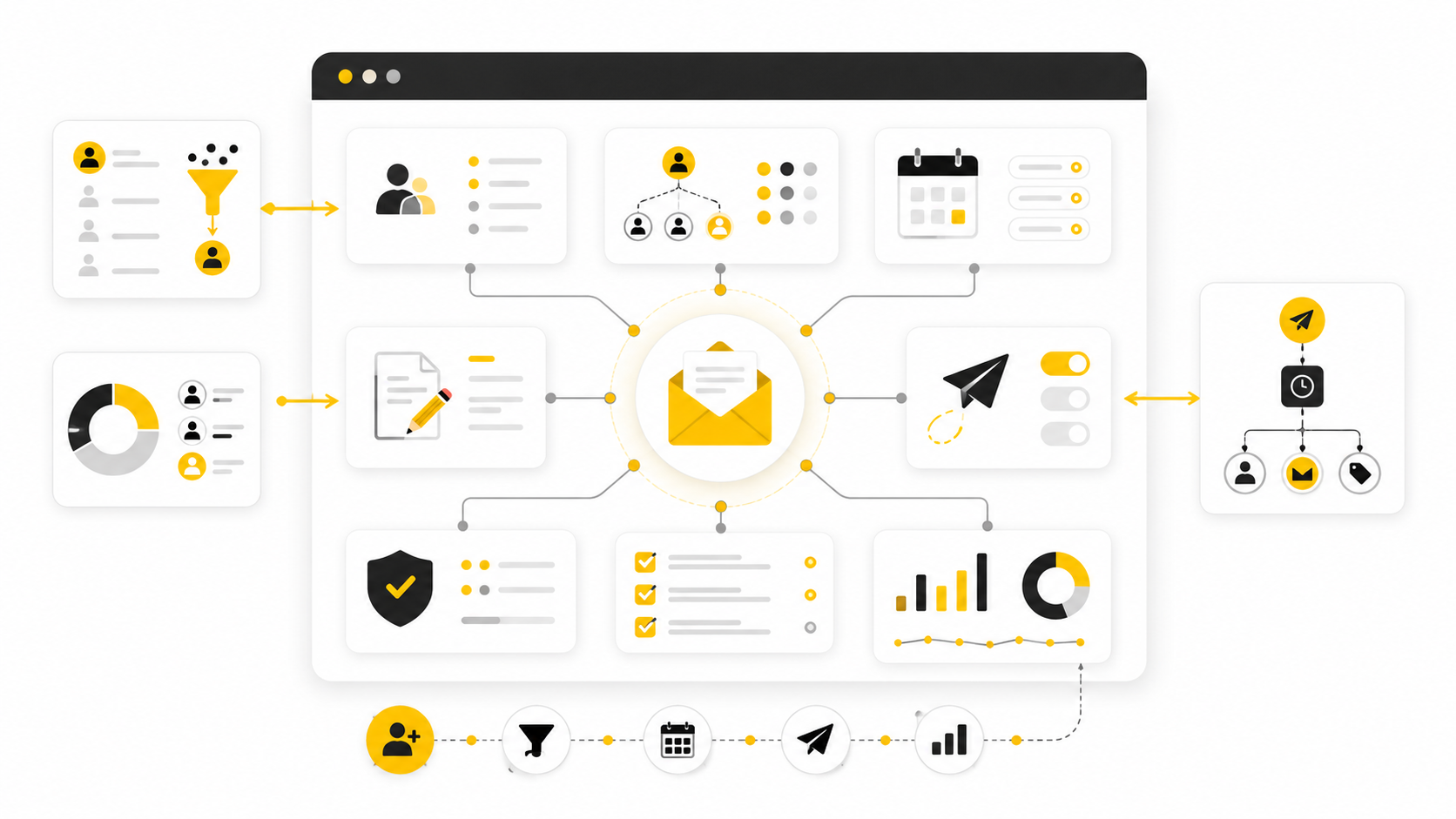
The easiest way to make email feel complicated is to start with tools. The better move is to start with the email marketing tasks that actually move a contact from stranger to subscriber, from subscriber to buyer, and from buyer to repeat customer.
That matters because email is not one task. It is a system of small tasks that compound. Research from the DMA email benchmarking work keeps showing why brands still take the channel seriously: email remains one of the most measurable, relationship-driven marketing channels when the work is structured properly.
So before you worry about subject line formulas or fancy automation, get the operating system right. Your email program should have clear tasks for list growth, segmentation, campaign planning, automation, deliverability, testing, reporting, and cleanup. Miss one of those, and the whole thing starts leaking.
Build and Maintain the Email List
List growth is the first email marketing task because without qualified subscribers, everything else is theory. But list growth does not mean collecting as many addresses as possible. It means attracting people who have a real reason to hear from you again.
A good list-building system usually starts with a clear offer. That could be a discount, checklist, quiz, webinar, free trial, waitlist, calculator, buyer guide, or content upgrade. The offer should match the next step your audience already wants to take, not just bribe them into joining a list they will ignore later.
This is where form quality matters. If the form asks for too much too early, people bounce. If it asks for too little, you may not collect enough context to send useful emails. A simple tool like Fillout can be useful when your signup flow needs more than a basic email field, especially for quizzes, onboarding forms, lead qualification, or preference collection.
Your list-building tasks should include:
Do not skip the consent part. Gmail and Yahoo’s sender requirements have made proper authentication, easy unsubscribes, and low complaint rates more important for serious senders, and Google’s own email sender guidelines make it clear that bulk senders need to treat trust as infrastructure. You are not just building a list. You are building a reputation.
Segment Subscribers Before You Send More Email
Segmentation is one of the most practical email marketing tasks because it stops you from treating everyone like the same person. A new subscriber, a recent buyer, a dormant customer, and a sales-qualified lead should not all receive the same message. That is how email starts to feel lazy.
At minimum, segment by lifecycle stage, interest, purchase behavior, engagement level, and lead source. You do not need a hundred segments on day one. You need enough structure to avoid sending irrelevant emails.
For example, a software company might separate trial users from demo requests. An ecommerce brand might separate first-time buyers from repeat customers. A service business might separate cold leads, booked calls, no-shows, clients, and past clients.
The point is not to make your CRM look impressive. The point is to make every send more relevant. Research from Mailchimp’s benchmark data shows that performance varies heavily by industry, which is a useful reminder that your own segments and audience behavior matter more than generic averages.
Good segmentation tasks include:
If you are running a local service, agency, coaching, SaaS, or client-based business, this is also where an all-in-one CRM can help. GoHighLevel is built around pipelines, forms, email, SMS, automations, and client follow-up, so it fits teams that want email tied closely to sales activity rather than managed as a separate island.
Plan Campaigns Around the Reader’s Next Decision
Campaign planning is where many teams go wrong. They ask, “What should we send this week?” instead of asking, “What decision does the reader need help making next?” That small shift changes everything.
A campaign should have a job. It might educate, sell, activate, retain, win back, announce, invite, or re-engage. If you cannot name the job, the email will probably become filler.
This is especially important because inbox attention is not guaranteed. The Mailjet 2024 Email Engagement Report surveyed more than 2,000 consumers across five countries, which is a useful reminder that subscribers are not sitting around waiting for brand emails. They are filtering fast, ignoring what feels irrelevant, and rewarding messages that respect their time.
Strong campaign planning tasks include:
The calendar should not be a prison. It should be a decision-making tool. You can still react to launches, product updates, seasonal demand, or market changes, but you should not be inventing the entire email strategy every Monday morning.
Create Repeatable Email Briefs
Before anyone writes the email, create a brief. This sounds boring, but it prevents vague, bloated, unfocused campaigns. A strong brief turns email marketing tasks into a repeatable workflow instead of a guessing game.
The brief does not need to be long. It should explain who the email is for, what they already know, what they need to understand, what action they should take, and why that action matters now. That is enough to keep the email grounded.
A practical email brief includes:
This also makes collaboration easier. Designers know what the email needs to support. Copywriters know what they are trying to move. Managers can review the strategy before arguing about individual words.
If you are building funnels around your email campaigns, the landing page matters as much as the send. For ecommerce teams that need fast campaign-specific pages, Replo can help create Shopify landing pages without waiting on a full development cycle. For broader funnel builds, ClickFunnels is often a better fit when the campaign needs opt-ins, sales pages, upsells, and follow-up paths connected in one flow.
Write Emails With One Clear Job
Writing is the visible part of email marketing, so people overfocus on it. Yes, copy matters. But copy works best when the task before it was done properly: the audience is clear, the offer is relevant, and the next step makes sense.
Every email should have one main idea. Not five updates, three offers, two announcements, and a vague “learn more” button at the end. One reader, one problem, one promise, one next action.
That does not mean every email must be short. Some emails need depth, especially for high-ticket, complex, or trust-heavy offers. But even a long email should feel like one focused argument, not a pile of disconnected marketing thoughts.
Useful writing tasks include:
Do not write like a brochure. Write like a useful person who knows what the reader is trying to do. That tone usually beats cleverness.
Match the Email Type to the Goal
Different email marketing tasks require different types of emails. A newsletter is not a launch sequence. A welcome email is not a win-back campaign. A cart recovery email is not a customer education email.
This is where many teams create confusion. They use one generic template for everything, then wonder why performance drops. The structure of the email should match the reader’s context.
Common email types include:
For ecommerce, platforms like Moosend and Brevo can support the basics: campaigns, automations, segmentation, and customer messaging. The right choice depends less on the logo and more on whether the tool supports the tasks your business actually repeats every week.
Build the Core Automations First
Automation is not about removing humans from marketing. It is about making sure important follow-up happens every time, without relying on someone remembering to send it manually. That is why automation sits near the center of serious email marketing tasks.
Start with the flows that support the customer journey. Do not build twenty clever automations before you have the basics. A clean welcome sequence will usually do more than a complex automation map nobody understands.
The core automations usually include:
Automation should feel timely, not robotic. The subscriber should think, “This is exactly what I needed next,” not “I have been dumped into a machine.” That difference comes from good segmentation, useful timing, and copy that respects the reader.
For businesses that want email automations connected to funnels, CRM stages, appointment booking, and pipeline follow-up, GoHighLevel’s automation tools can be useful. For creators or lean businesses that want simpler funnel and email infrastructure, Systeme.io can be a practical starting point.
Use Email With Other Channels Instead of Treating It Alone
Email works better when it is not isolated. A subscriber may discover you on social, join through a landing page, reply to an email, book a call, receive SMS reminders, and later buy after seeing another email. The customer does not care which channel gets credit.
That means some email marketing tasks should connect email with forms, chat, SMS, social, sales calls, and customer support. The more considered the purchase, the more important this becomes. Email can educate and follow up, but other channels may help capture intent at the right moment.
For example, a lead who clicks three emails but never books a call may need a different follow-up than someone who has not opened anything in 90 days. A customer who replies with a question should not be treated like a passive subscriber. A webinar attendee should not receive the same sequence as someone who downloaded a basic checklist.
Tools like ManyChat can support messaging flows outside the inbox, especially when your audience engages through social channels. The key is not to add channels for the sake of it. The key is to make follow-up feel connected.
Turn the Strategy Into a Weekly Email Workflow
Once the main email marketing tasks are clear, the next step is execution. This is where the work becomes less theoretical and more operational. You need a repeatable workflow that takes an idea from planning to writing, building, testing, sending, and reviewing without chaos every time.
A simple weekly workflow is enough for most teams. The goal is not to make email production slow or corporate. The goal is to stop relying on memory, last-minute decisions, and messy approvals.
Start with one owner for each stage. One person can own multiple stages in a small business, but the responsibility still needs to be clear. If nobody owns the brief, the email starts vague. If nobody owns QA, broken links and bad segments slip through. If nobody owns reporting, the same mistakes keep repeating.
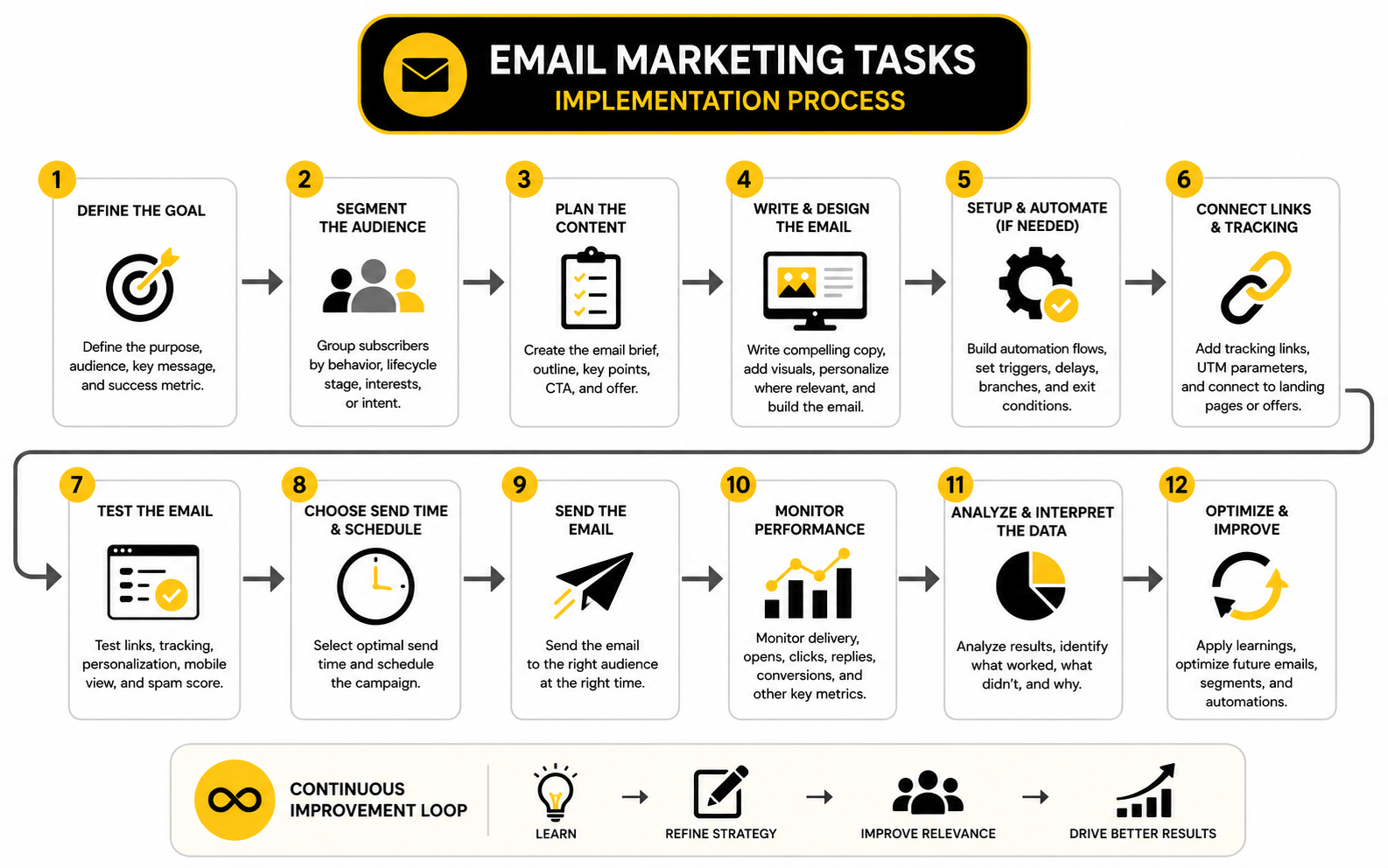
A practical weekly email workflow looks like this:
This kind of workflow makes email faster because decisions happen in the right order. You are not writing before you know the audience. You are not designing before you know the offer. You are not sending before you know what success should look like.
Create a Simple Email Production Checklist
A checklist is one of the least exciting email marketing tasks, but it is also one of the most useful. Email has too many small failure points to trust your brain every time. One missed merge tag, one wrong link, or one bad segment can make an otherwise good campaign look careless.
The checklist should cover strategy, copy, design, technical setup, compliance, and tracking. Keep it short enough that people actually use it. If it becomes a 90-point monster, the team will ignore it when things get busy.
A strong pre-send checklist includes:
Do not overcomplicate this. The point is to catch the obvious mistakes before the audience does. The best checklist is the one your team will actually follow on a normal Tuesday.
Build Campaigns Inside the Tool Only After the Message Is Clear
A common mistake is opening the email platform too early. The moment you start dragging blocks around, you start thinking about layout before you have nailed the message. That usually leads to pretty emails with weak logic.
Write the message first. Decide the promise, proof, offer, and call to action before you build anything. Once the structure is clear, then you can turn it into a campaign inside your email tool.
This is also where tool choice should support the process instead of driving it. If you need email, forms, CRM stages, appointment follow-up, and automation in one place, GoHighLevel makes sense for service businesses, agencies, and local lead generation. If you need simpler email campaigns and automation without building a large CRM setup, Brevo or Moosend may be easier to operate.
The platform should make execution cleaner. It should not force you into a workflow that your team cannot maintain. A basic setup that gets used every week beats a complex setup that only one person understands.
Map Every Automation Before You Build It
Automation gets messy when teams build directly inside the software without mapping the journey first. You add one trigger, then another delay, then a condition, then a branch, and suddenly nobody can explain what happens when a subscriber clicks, buys, replies, or goes inactive. That is how automations become fragile.
Before building, write the automation in plain language. Define the trigger, the goal, the audience, the messages, the timing, the exit rules, and the handoff points. If the automation touches sales, support, or onboarding, include those handoffs in the map.
A simple automation map should answer:
This step is not busywork. It prevents your email marketing tasks from turning into a pile of disconnected triggers. When the logic is clear on paper, the build becomes much easier.
Use Naming Conventions So the System Stays Clean
Naming conventions sound like an internal detail until your email account has 400 campaigns named “Newsletter final,” “Promo new,” “Test 2,” and “Updated version.” At that point, reporting becomes painful. Nobody knows what anything means.
Use naming conventions for campaigns, automations, forms, tags, segments, and landing pages. The names should tell you what the asset is, who it targets, and where it belongs in the customer journey. This makes future cleanup, reporting, and optimization much easier.
A practical naming format could look like this:
You do not need to copy that exact format. You just need a format that stays consistent. The real win is being able to search your account six months later and understand what you are looking at.
Connect Email Campaigns to Landing Pages
An email does not finish the job by itself. It usually sends the reader somewhere else: a product page, booking page, checkout, webinar registration, lead form, case study, or sales page. That destination has to match the promise made in the email.
If the email says “book a consultation,” the landing page should make booking obvious. If the email promotes a product, the page should support the same offer and remove buying friction. If the email promises a guide or checklist, the next page should deliver it without making the user hunt.
For funnel-heavy campaigns, ClickFunnels is useful when you want opt-in pages, sales pages, order forms, upsells, and follow-up paths working together. For Shopify campaigns, Replo can be a better fit when the main need is building ecommerce landing pages faster.
This is one of the most overlooked email marketing tasks because teams often treat the email as the whole campaign. It is not. The email creates the click, but the page has to convert the intent.
Set Up Tracking Before the Campaign Goes Live
Tracking should not be added after the campaign is already sent. By then, the data is already incomplete. Every campaign needs basic tracking before it goes live so you can tell what happened and what to improve next.
At minimum, track the campaign name, traffic source, medium, offer, audience segment, and destination page. This makes it easier to compare campaigns later. Without that structure, reporting turns into guesswork.
Your tracking setup should include:
Do not track everything just because you can. Track the decisions you will actually make. If a metric will not change your next campaign, it probably does not deserve much attention.
Create a Review Loop After Every Send
The email is not done when it goes out. The review loop is where you turn one campaign into better future campaigns. This is where the email marketing tasks become a learning system.
Review performance after the campaign has had enough time to collect useful data. For many newsletters or promotions, that may mean checking early engagement after 24 hours and final results a few days later. For longer sales cycles, you may need to review influenced pipeline, booked calls, replies, or purchases over a longer window.
A good post-send review asks:
Keep the review practical. You do not need a giant report for every send. You need a few clear notes that help the next campaign get sharper.
Document What Works So You Can Reuse It
One of the biggest hidden costs in email marketing is rediscovering the same lessons over and over. A subject line angle works, then nobody saves it. A segment responds well to a specific offer, then the insight disappears in a meeting. A landing page converts better, but the reason never makes it into the next brief.
Create a simple email learning log. It can live in a spreadsheet, project management tool, CRM note, or shared document. The format matters less than the habit.
Track things like:
This gives your team memory. Over time, your email marketing tasks become easier because you are not starting from zero. You are building from proof.
Keep the Process Lean Enough to Repeat
The best implementation process is not the most impressive one. It is the one you can repeat when things are busy, launches are moving, clients are waiting, and nobody has extra time. A process that only works during a quiet week is not a real process.
Start with the minimum workflow that protects quality. Brief the campaign, write the message, build it, QA it, send it, review it, and document the lesson. That is enough to create consistency without slowing everything down.
Then improve the process only when the work demands it. Add more approvals when mistakes become expensive. Add more segmentation when the audience becomes meaningfully different. Add more automation when manual follow-up becomes the bottleneck. That is how you build a system that stays useful instead of becoming another thing the team has to manage.
Statistics and Data
Email data is useful only when it changes what you do next. Open rates, click rates, unsubscribe rates, bounce rates, replies, spam complaints, and revenue can all look important on a dashboard. But if you do not know what decision each number should drive, reporting becomes decoration.
This is why measurement belongs inside your email marketing tasks, not after them. The goal is not to stare at benchmarks and feel good or bad. The goal is to understand where the system is working, where it is leaking, and what to improve before the next campaign goes out.
Benchmarks are helpful for context, but your own trend line matters more. A SaaS onboarding sequence, a local service follow-up campaign, an ecommerce promo, and a nonprofit donor newsletter should not be judged by the same expectations. The smartest teams use outside benchmarks to set realistic ranges, then use their own historical data to make decisions.
Track the Metrics That Match the Job of the Email
Every email should be measured against its purpose. A newsletter may be judged by clicks, replies, and repeat engagement. A sales email should be judged by qualified clicks, conversions, revenue, or booked calls. A re-engagement campaign should be judged by recovered subscribers and healthy list cleanup, not just opens.
That is why one generic dashboard is not enough. The email marketing tasks behind a campaign should tell you which metrics matter before the send happens. If the goal is to get demo bookings, a high open rate with no bookings is not a win. If the goal is to clean the list, a smaller but more engaged audience can be a very good outcome.
A practical measurement setup looks at metrics in layers:
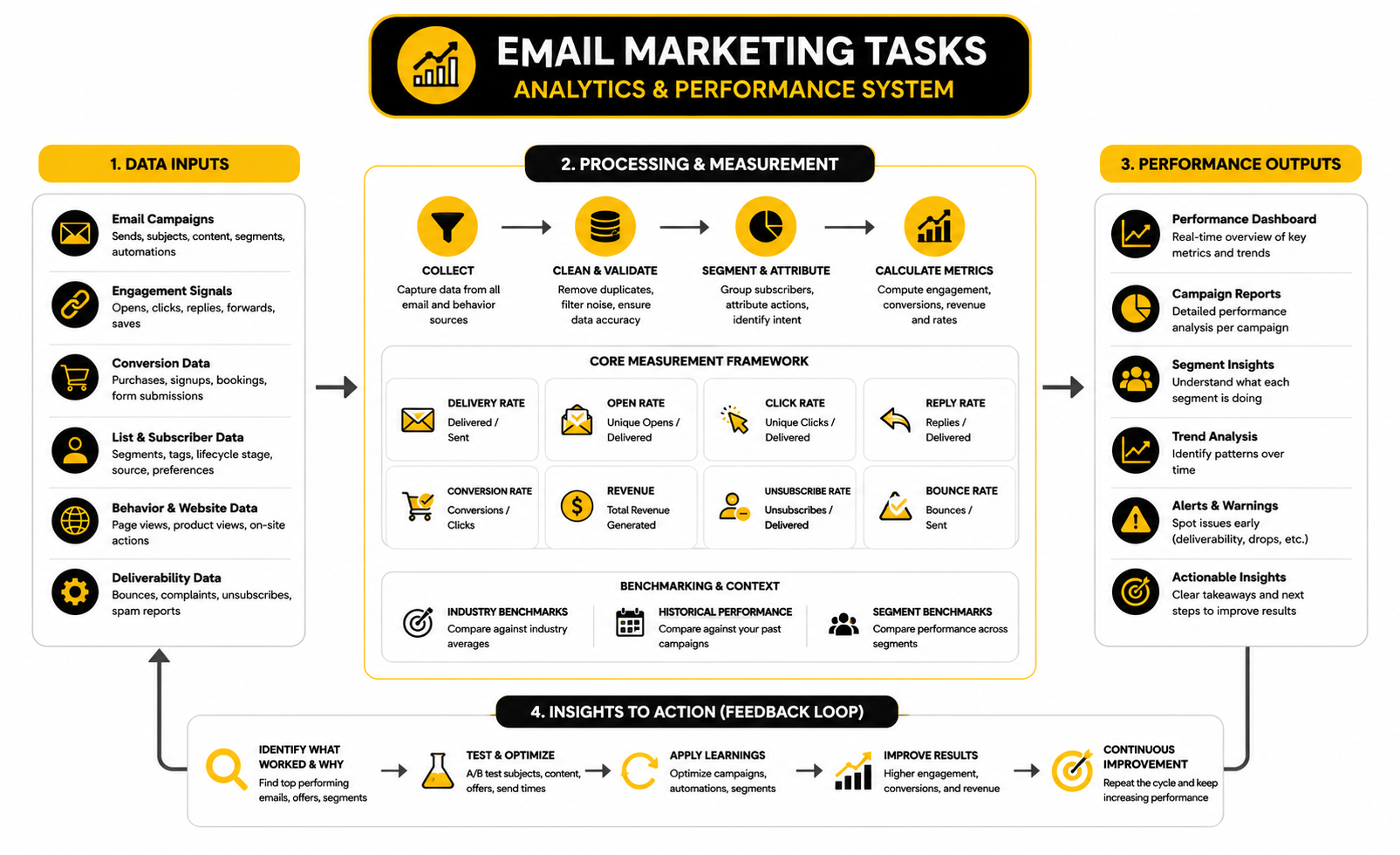
This layered view matters because email performance is not one number. A campaign can have strong opens and weak clicks, which usually means the subject line worked but the message or offer did not. A campaign can have weak opens and strong click-to-open rate, which may mean the email was relevant to the people who noticed it but the subject line, timing, or deliverability needs work. A campaign can have great clicks and weak conversions, which usually points to a landing page, offer, pricing, checkout, or trust problem.
Open Rate Is a Signal, Not the Scoreboard
Open rate still has value, but it is not as clean as it used to be. Privacy features can inflate or distort opens, and different platforms measure engagement differently. That does not make open rate useless. It just means you should treat it as a directional signal, not a final verdict.
Use open rate to diagnose the top of the email. Sender name, subject line, preview text, timing, audience trust, and inbox placement all influence whether someone opens. If open rate drops suddenly across multiple segments, look at deliverability, list quality, send frequency, and whether your audience still recognizes the sender.
Industry benchmark pages from platforms like Mailchimp and MailerLite are useful for understanding general ranges, but they should not become your strategy. Your own engaged audience may behave very differently. Compare like with like: same segment, same email type, similar offer, similar send frequency.
Click Rate Shows Whether the Message Created Action
Click rate is usually more useful than open rate because it shows whether the email created enough interest for someone to act. It is still not perfect, because bot clicks and security scanners can muddy the data. But as a practical signal, clicks get you closer to real intent.
A low click rate can mean several things. The offer may be weak. The email may be too vague. The call to action may be buried. The audience may be wrong. Or the email may be trying to do too many things at once.
Click-to-open rate can help you separate attention from persuasion. If opens are healthy but click-to-open rate is poor, the email got attention but failed to move readers. If opens are lower but click-to-open rate is strong, the message may be relevant to a smaller group, and your next task is improving targeting or the subject line rather than rewriting the whole offer.
Conversion Rate Tells You Whether the Campaign Continued After the Click
Clicks are not the finish line. They are a handoff. Once someone clicks, the landing page, checkout, booking page, form, product page, or sales flow has to continue the same promise.
This is where email teams often misread the data. They blame the email when the landing page is slow, confusing, generic, or disconnected from the message. They rewrite subject lines when the real problem is that the offer page does not answer the buyer’s objections.
Track conversion rate by destination and segment. A campaign that sends traffic to a booking page should track booked calls. A product email should track purchases or add-to-cart behavior. A webinar email should track registrations and attendance. If you use dedicated pages for campaigns, tools like ClickFunnels, Replo, or Systeme.io are most useful when they make that full path easier to measure, not just easier to design.
Revenue Matters, But Attribution Needs Common Sense
Revenue is the metric everyone wants, and fair enough. If email does not help create revenue, retention, pipeline, or customer value, the program needs work. But attribution can get messy fast.
Last-click attribution often undervalues nurture emails, newsletters, onboarding sequences, and retention campaigns. First-click attribution can overvalue acquisition and ignore the follow-up that actually convinced the buyer. Platform-reported revenue can also vary based on cookie windows, tracking rules, privacy settings, and integrations.
A better approach is to track revenue in three practical ways:
This is especially important for long buying cycles. A B2B lead may read five emails, attend a webinar, book a call, and close weeks later. A local service lead may click today and call tomorrow. An ecommerce customer may buy immediately from a sale email. The reporting model should match the buying behavior.
Deliverability Data Protects the Whole Program
Deliverability is not glamorous, but it decides whether the rest of your email marketing tasks even have a chance. If your messages do not reach the inbox, your copy, segmentation, and offer quality cannot do much. The invisible work matters.
Google’s sender guidance makes the basics clear: authenticate your domain, make unsubscribing easy, and keep spam complaints low through relevant sending and healthy list practices. Gmail’s bulk sender guidance also puts pressure on marketers to stop treating deliverability as a technical afterthought. This is now part of the core marketing process.
Watch these signals closely:
The action is simple but not always comfortable. Remove bad addresses. Stop emailing people who never engage. Avoid purchased lists. Segment colder subscribers differently. Make unsubscribing easier than complaining. That last point matters a lot.
Unsubscribes Are Not Always Bad
A lot of marketers panic when people unsubscribe. That is understandable, but it is not always the right reaction. Some unsubscribes are healthy because they remove people who were never going to buy, reply, book, or engage.
The problem is not unsubscribes by themselves. The problem is the pattern behind them. If unsubscribe rates rise after one campaign, check message fit, frequency, offer relevance, and whether the subject line overpromised. If unsubscribes stay low but spam complaints rise, your unsubscribe path may be too hard to find or your targeting may be off.
This is why unsubscribe rate should be read with complaints, clicks, and conversions. A campaign that generates strong revenue and a normal unsubscribe rate may be doing its job. A campaign that generates weak clicks and high unsubscribes is telling you the audience did not see enough value.
Benchmarks Should Guide Expectations, Not Replace Thinking
Benchmarks are useful when they stop you from guessing. They can help you see whether your numbers are wildly outside a normal range. They can also help set expectations with clients, managers, and teams who think every campaign should perform like a launch.
But benchmarks become dangerous when people use them as universal truth. A 2% click rate might be strong for one campaign and weak for another. A 40% open rate might be normal for a warm relationship-driven list and unrealistic for a cold, broad, low-intent audience. A small list of buyers can outperform a huge list of freebie seekers even if the big list makes the dashboard look more impressive.
Use benchmark reports from sources like GetResponse, MailerLite, and Mailchimp as context. Then build your own baseline by email type, segment, and offer. That internal baseline is what should guide your next move.
Measure Automations Differently From Broadcast Campaigns
Automations should not be judged exactly like one-off campaigns. A broadcast email is usually tied to a specific send date and campaign goal. An automation runs continuously, which means its performance depends on triggers, timing, audience quality, and lifecycle stage.
For automations, look at the whole journey. A welcome sequence should be measured by engagement across the sequence, not only the first email. An abandoned checkout sequence should be measured by recovered revenue and unsubscribe pressure. A reactivation sequence should be judged by how many people re-engage and how cleanly it removes the rest.
Automation reporting should include:
If an automation has one strong email and four weak ones, do not celebrate the average. Fix the weak steps. The sequence is only as strong as the journey it creates.
Turn the Numbers Into Decisions
Reporting should end with a decision, not a screenshot. If a campaign performed well, decide what to repeat. If it underperformed, decide what to diagnose. If the data is inconclusive, decide what to test next.
A useful reporting note can be very simple:
That final question is the whole point. If your reporting does not change the next brief, the next segment, the next offer, the next landing page, or the next automation, it is not doing its job. The best email teams are not the ones with the prettiest dashboards. They are the ones that learn faster from every send.
Advanced Email Marketing Tasks That Separate Good From Great
Once the basics are working, the next level is not “send more email.” That is usually the lazy answer. The better move is to make sharper decisions about quality, timing, audience pressure, lifecycle value, and operational risk.
This is where email marketing tasks become more strategic. You are no longer just asking whether the campaign was sent correctly. You are asking whether the email program is helping the business grow without damaging trust, deliverability, or customer experience.
The advanced layer is less about tactics and more about judgment. More segmentation can improve relevance, but it can also create operational mess. More automation can increase follow-up, but it can also make the brand feel mechanical. More personalization can lift performance, but only if the data behind it is accurate.
Balance Personalization With Data Quality
Personalization sounds great until the data is wrong. A broken first name field, outdated interest tag, old lifecycle status, or incorrect purchase history can make an email feel worse than generic. The more personal the message feels, the more obvious the mistake becomes.
The task is not to personalize everything. The task is to personalize where the data is reliable enough to improve the reader’s experience. A buyer/non-buyer split is usually safer than a complicated prediction based on messy behavior data. A simple product category preference can be more useful than ten vague interest tags nobody trusts.
Use personalization in layers. Start with lifecycle stage, purchase status, source, and stated preferences. Then add behavior-based personalization only when you can maintain clean tracking and sensible fallback rules.
Good advanced personalization tasks include:
This matters even more as AI-generated campaigns become easier to produce. Tools can help you move faster, but speed does not fix bad inputs. If the data is messy, automation simply scales the mess.
Manage Frequency Before the Audience Gets Tired
Email fatigue rarely appears all at once. It creeps in. Opens soften, clicks drop, unsubscribes increase, replies become colder, and the audience slowly stops caring.
That is why frequency management is one of the most important advanced email marketing tasks. You need to know how many messages a subscriber receives across campaigns, automations, sales follow-up, transactional emails, and other channels. The subscriber does not care that your newsletter, promo sequence, webinar reminder, and onboarding flow are technically separate. To them, it is all your brand.
Frequency should depend on relationship and intent. A recent buyer may welcome onboarding, delivery updates, and product education. A cold subscriber who has not clicked in months probably should not receive every promotion. A hot lead who booked a call may need reminders and useful prep, not more generic nurture content.
A practical frequency system includes:
Do not treat frequency as a fixed number for everyone. Treat it as pressure. The more trust, intent, and relevance you have, the more email the relationship can handle. The less of those you have, the more careful you need to be.
Decide When to Suppress, Re-Engage, or Remove Subscribers
List size can become a vanity metric. A big list looks impressive, but if too many subscribers ignore every email, your reporting gets noisy and your deliverability can suffer. Sometimes growth means removing people who no longer belong on the list.
This is uncomfortable because nobody likes deleting leads. But a dead subscriber is not an asset just because they still sit inside your email platform. They are only useful if there is a realistic path back to engagement or revenue.
Create clear rules for inactive contacts. For example, you might define inactivity based on no clicks, no replies, no purchases, no bookings, and no meaningful site activity over a specific period. Opens alone are too unreliable to carry this decision by themselves, especially with privacy and bot activity affecting tracking.
A healthy suppression process can look like this:
The last step is important. If one lead source keeps producing subscribers who never engage, the problem is not your win-back sequence. The problem is acquisition quality.
Treat Deliverability as a Strategic Risk
Deliverability is not just an IT task. It is a business risk. When inbox placement drops, launches underperform, sales follow-up weakens, customers miss important updates, and reporting becomes harder to trust.
Google’s bulk sender guidance requires authentication, easy unsubscribing, and low user-reported spam rates for senders reaching personal Gmail accounts. The same shift is visible across the broader inbox ecosystem: mailbox providers are rewarding trusted senders and filtering aggressively against unwanted mail. That means deliverability has to be managed before there is a crisis.
Advanced deliverability work includes:
The hard truth is simple: you cannot out-copy a damaged sending reputation. Great subject lines do not help much if the email never reaches the inbox. Protecting deliverability is protecting the entire email program.
Be Careful With AI in Email Production
AI can absolutely help with email marketing tasks. It can speed up first drafts, summarize customer research, generate subject line angles, turn briefs into outlines, repurpose campaign notes, and help build testing ideas. Used well, it removes blank-page friction.
But AI also creates a new risk: sending more average email faster. That is not progress. If everyone can create passable campaigns instantly, the advantage shifts back to strategy, audience insight, offer quality, and human editing.
Use AI for leverage, not autopilot. The final email still needs a real point of view, accurate claims, brand judgment, and a clear reason to exist. It also needs fact-checking, because invented stats, unsupported claims, and generic advice can damage trust fast.
Useful AI-assisted tasks include:
Do not let AI decide the promise, the proof, or the audience without human review. Those are strategic choices. Treating them like content-production chores is how brands end up sounding like everyone else.
Scale With Templates Without Making Every Email Feel the Same
Templates are useful because they reduce production time. They keep emails on-brand, make QA easier, and help teams move faster. But templates become a problem when every message feels identical.
The advanced task is to standardize the parts that should be standardized while leaving room for strategy and voice. Header structure, footer compliance, mobile spacing, button styles, and recurring content blocks can be templated. The angle, opening, proof, objection handling, and call to action still need thought.
A good template system includes:
Templates should be reviewed regularly. If a layout no longer supports the message, change it. If a design pattern creates weak clicks, fix it. The template exists to serve the campaign, not the other way around.
Know When More Segmentation Is Not Worth It
Segmentation improves relevance, but every segment adds work. More versions mean more copy, more QA, more reporting, more chances for mistakes, and more complexity inside the platform. At some point, the lift may not justify the cost.
Before creating a new segment, ask whether it will change the email in a meaningful way. If the message, offer, timing, and call to action stay the same, the segment may not be useful yet. Segmentation should support a real decision, not just make the dashboard look sophisticated.
A segment is worth creating when it changes at least one of these:
This is especially important for small teams. A lean email program with five useful segments will usually outperform a bloated one with fifty segments nobody maintains. Complexity has a cost, and that cost is paid every time someone builds, checks, reports, or updates a campaign.
Align Email With Sales and Customer Success
Email does not live only in marketing. It affects sales, support, onboarding, retention, and customer success. When those teams are disconnected, subscribers get mixed messages.
A lead might receive a promotional email after already booking a sales call. A customer might receive a discount offer right after paying full price. A churn-risk account might receive a generic newsletter instead of a relevant retention message. These are not small mistakes. They tell people your business is not paying attention.
Advanced email marketing tasks should include cross-functional rules:
This is where CRM-connected email systems become valuable. A platform like GoHighLevel can make sense when email needs to work with pipelines, appointments, SMS, and follow-up tasks. For sales-heavy teams that want customer relationship data connected to outreach and follow-up, Copper may also fit the workflow better than a standalone email tool.
Build Governance Before the Program Gets Messy
Governance sounds heavy, but it does not need to be. It simply means there are rules for how email assets are created, approved, sent, measured, and retired. Without governance, accounts become cluttered and risky.
This matters more as the team grows. When several people can create lists, tags, automations, templates, and campaigns, the account can get messy fast. Duplicate fields appear. Old automations keep running. Segments overlap. Nobody knows whether a workflow is still active for a good reason.
Good governance covers:
This is not bureaucracy for the sake of it. It is how you prevent small mistakes from becoming expensive. The more revenue your email program touches, the more governance it needs.
Choose Tools Based on Workflow, Not Feature Lists
Most email tools look similar when you compare feature pages. They all talk about automation, segmentation, templates, reporting, and personalization. The real difference is how well the tool fits your actual workflow.
A creator selling digital products may need simple funnels, checkout, and email in one place. A Shopify brand may need campaign landing pages and ecommerce integrations. A service business may need CRM stages, appointment reminders, and sales follow-up. A content-heavy brand may need strong newsletter production and list management.
That is why tool selection should start with your recurring email marketing tasks. What do you do every week? What breaks most often? Where does the team waste time? Which handoffs create mistakes? Which reports do you actually use?
Use that answer to choose the stack. Systeme.io can be practical for lean funnel-and-email setups. ClickFunnels fits teams that need sales funnels and offers built around conversion paths. Brevo and Moosend can fit teams that want email campaigns and automations without turning everything into a large CRM project.
The best tool is not the one with the longest feature list. It is the one your team can use consistently without creating extra operational drag.
Protect Trust as the Program Scales
The more successful your email program becomes, the more tempting it is to push harder. More promos. More automations. More cross-sells. More urgency. More audience extraction.
That can work for a while, but it has a ceiling. When readers stop trusting the sender, every metric becomes harder to improve. Opens get softer, clicks become less qualified, unsubscribes rise, and the brand slowly trains people to ignore it.
Trust is protected by doing the basics well over time. Send relevant emails. Make honest promises. Respect frequency. Use real urgency, not fake pressure. Give people useful choices. Make it easy to leave. Keep your data clean.
This is the expert-level part that does not show up neatly in a dashboard. The best email marketing tasks are not just about getting the next click. They are about building a channel that still works six months, twelve months, and three years from now.
Bring the Whole Email System Together
At this point, the job is not to collect more random email marketing tasks. The job is to connect the tasks into one system that can keep improving. List growth, segmentation, campaigns, automations, deliverability, reporting, governance, and optimization should all feed each other.
A good email system has rhythm. New subscribers enter through clear forms and offers. Segments decide what they receive next. Campaigns and automations move them forward. Analytics show what worked, what failed, and what should change.
That is the real advantage. You stop treating every email like a separate project and start treating the whole channel like an asset. The system gets cleaner, more carefully, and more profitable because every send teaches you something useful.
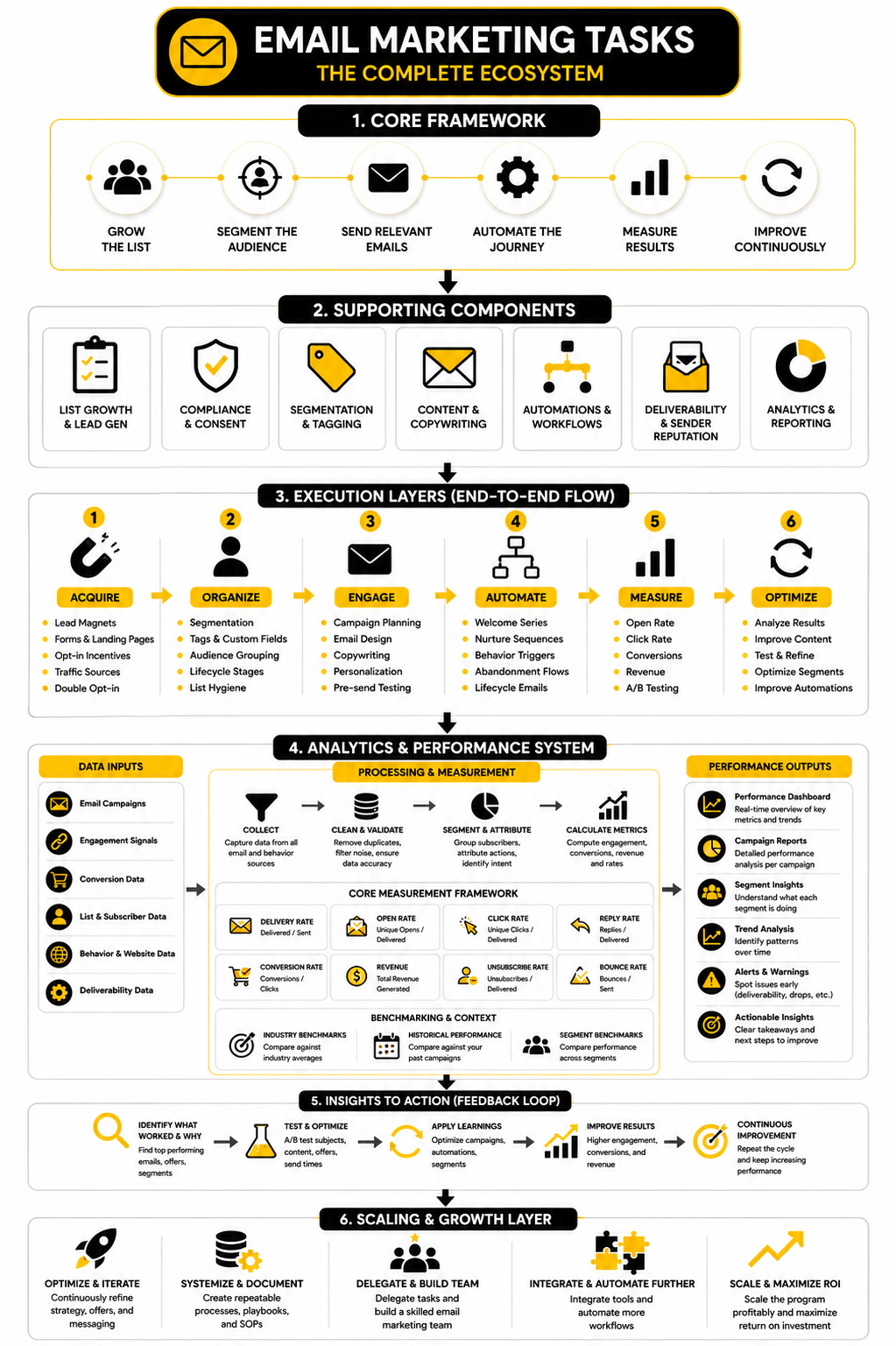
The Final Email Marketing Task List
The most practical way to manage email is to group the work by outcome. Some tasks create audience growth. Some create relevance. Some protect deliverability. Some drive revenue. Some make the process easier to repeat.
When you look at email this way, it becomes easier to see what is missing. If your campaigns are good but your list quality is weak, fix acquisition. If your automations are active but your reporting is vague, fix measurement. If your open rates look fine but sales are flat, inspect the offer, landing page, and conversion path.
A complete email marketing task list includes:
This is not a one-time setup. It is a recurring operating system. The more consistently you run it, the less chaotic email becomes.
What to Prioritize First
If your email program feels messy, do not try to fix everything at once. Start with the bottleneck that creates the biggest drag. Most teams do not need more complexity. They need a cleaner sequence of decisions.
For many businesses, the first priority is list quality. A weak list makes every campaign harder to judge because the audience was never strong to begin with. Once list growth and consent are solid, move into segmentation, core automations, campaign planning, and reporting.
A sensible order looks like this:
This order works because it starts with the foundation. There is no point building advanced automation on top of weak data, unclear offers, and broken tracking. Fix the base first, then scale.
Email marketing gets confusing because people mix strategy, software, copywriting, analytics, automation, and compliance into one big topic. That is why the best answers are usually practical rather than theoretical. The questions below focus on what actually helps you manage email marketing tasks with more confidence.
What Are Email Marketing Tasks?
Email marketing tasks are the recurring actions needed to grow, manage, send to, and improve an email list. They include list building, segmentation, campaign planning, copywriting, automation, testing, deliverability, reporting, and list cleanup. The point is not to “do email” randomly, but to create a repeatable system that turns subscribers into customers and customers into repeat buyers.
Which Email Marketing Tasks Should Beginners Start With?
Beginners should start with list growth, consent, a welcome sequence, basic segmentation, and a simple campaign calendar. Those tasks create the foundation for everything else. Advanced testing, personalization, and complex automation should come later, because they only work when the basic system is already clean.
How Often Should I Send Marketing Emails?
Send frequency depends on audience intent, relationship strength, and the type of emails you send. A highly engaged buyer list can usually handle more email than a cold lead list that rarely clicks. The practical answer is to watch engagement, complaints, unsubscribes, and revenue together, then adjust frequency based on what the audience is telling you.
What Is the Most Important Email Marketing Metric?
There is no single metric that tells the whole story. Open rate helps diagnose attention, click rate shows action, conversion rate shows whether the campaign continued after the click, and revenue shows business impact. The most important metric is the one tied to the goal of that specific email.
Are Open Rates Still Useful?
Open rates are still useful, but they should not be treated as the final scoreboard. Privacy features, image loading behavior, and platform differences can make opens less reliable than clicks or conversions. Use open rate as a directional signal for subject lines, sender trust, and inbox visibility, then validate performance with deeper actions.
What Is the Difference Between a Campaign and an Automation?
A campaign is usually a one-time or scheduled email sent to a defined audience. An automation is triggered by behavior, timing, lifecycle stage, or data changes, and it runs repeatedly in the background. Both matter, but they need different planning, testing, and reporting habits.
How Many Segments Should an Email List Have?
You need enough segments to make messages more relevant, but not so many that the system becomes hard to manage. A useful segment should change the offer, timing, message, call to action, suppression rule, or success metric. If a segment does not change what you send or how you measure it, it may not be worth maintaining.
What Email Automations Should Every Business Have?
Most businesses should start with a welcome sequence, lead magnet delivery, abandoned checkout or abandoned form follow-up, post-purchase emails, review requests, re-engagement emails, and customer onboarding. Service businesses may also need appointment reminders, no-show follow-up, and sales pipeline follow-up. The right automations depend on the customer journey, not on what looks impressive inside the software.
How Do I Know If My Email List Is Healthy?
A healthy list has real engagement, low complaints, manageable unsubscribes, clean acquisition sources, and clear consent. It also produces meaningful actions such as clicks, replies, bookings, purchases, or retention. If the list is growing but engagement is falling, you may be collecting contacts faster than you are attracting the right people.
Should I Remove Inactive Subscribers?
Yes, in many cases inactive subscribers should be suppressed or removed after a fair re-engagement attempt. Keeping people who never click, reply, buy, book, or show meaningful interest can make reporting less useful and may hurt deliverability over time. The key is to protect valuable customers and active opportunities while cleaning contacts that no longer show realistic intent.
What Tools Help With Email Marketing Tasks?
The right tool depends on your workflow. GoHighLevel can work well when email needs to connect with CRM pipelines, forms, bookings, SMS, and sales follow-up. Brevo, Moosend, Systeme.io, and ClickFunnels can also make sense depending on whether you need campaigns, funnels, checkout flows, automations, or a leaner setup.
How Do I Improve Email Deliverability?
Start with authentication, clean list practices, clear unsubscribe options, and relevant sending. Gmail’s email sender guidelines and sender FAQ make it clear that authentication, low spam complaints, and easy unsubscribing are no longer optional details for serious senders. After the technical setup is clean, deliverability depends heavily on sending wanted email to people who actually expect to hear from you.
How Should I Use Benchmarks?
Use benchmarks as context, not as a commandment. Reports like the DMA Email Benchmarking Report, Mailchimp email benchmarks, and GetResponse benchmark data can help you understand broad ranges, but they cannot replace your own trend line. The best comparison is usually your current performance against past campaigns with similar audiences, offers, and goals.
Can AI Handle Email Marketing Tasks?
AI can help with drafting, summarizing research, generating subject line ideas, outlining campaigns, and reviewing copy for clarity. It should not fully replace strategy, offer judgment, customer insight, compliance review, or final editing. AI is useful when it speeds up smart work, but dangerous when it helps you send more generic email faster.
What Is the Biggest Mistake in Email Marketing?
The biggest mistake is treating email as a series of random sends instead of a system. That leads to weak segmentation, messy automations, poor tracking, inconsistent follow-up, and campaigns that do not build on previous learning. Email works best when every task has a purpose and every result improves the next decision.
Build a stronger local presence with BAAM AI
Turn your website, Google profile, social channels, and AI visibility into one growth engine
Most businesses do not need more random marketing activity. They need a consistent presence system that helps the right people find them, trust them, and take action. BAAM AI brings strategy, local SEO, website updates, Google Maps visibility, social content, AI-search readiness, media production, and reporting into one practical monthly engine.
If you want your marketing to keep working after the campaign ends, start with a free BAAM AI presence audit. See how your business shows up today and where the fastest visibility wins are at BAAM AI.