
BAAM AI Blog
Squarespace Email Campaign Guide For Building Campaigns That Actually Sell
Squarespace Email Campaigns is built for people who want email marketing to feel connected to the website they already run. Instead of designing a site in one place, managing products in another, and sending emails...
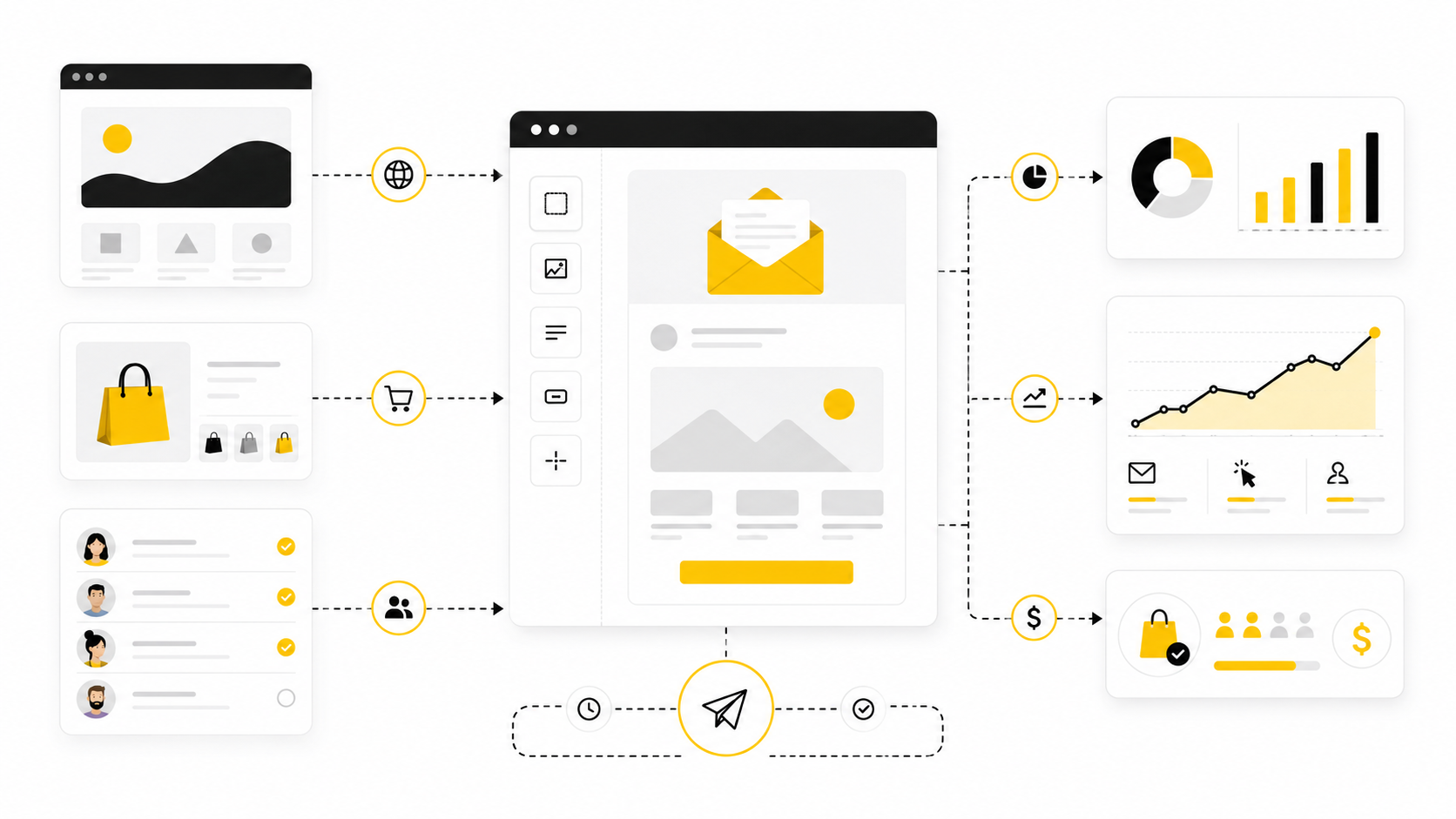
Squarespace Email Campaigns is built for people who want email marketing to feel connected to the website they already run. Instead of designing a site in one place, managing products in another, and sending emails from a completely separate platform, Squarespace lets you keep the basics under one roof. That matters when your business is small enough that every extra tool creates more work, more tabs, and more chances to let follow-up slip.
But “easy to send” is not the same as “effective to send.” A good Squarespace email campaign still needs a clear audience, a useful message, a strong reason to click, and a follow-up plan that does not depend on you remembering everything manually. The tool can help you send newsletters, promotions, product updates, and automations, but the strategy decides whether those emails become revenue or just another broadcast.
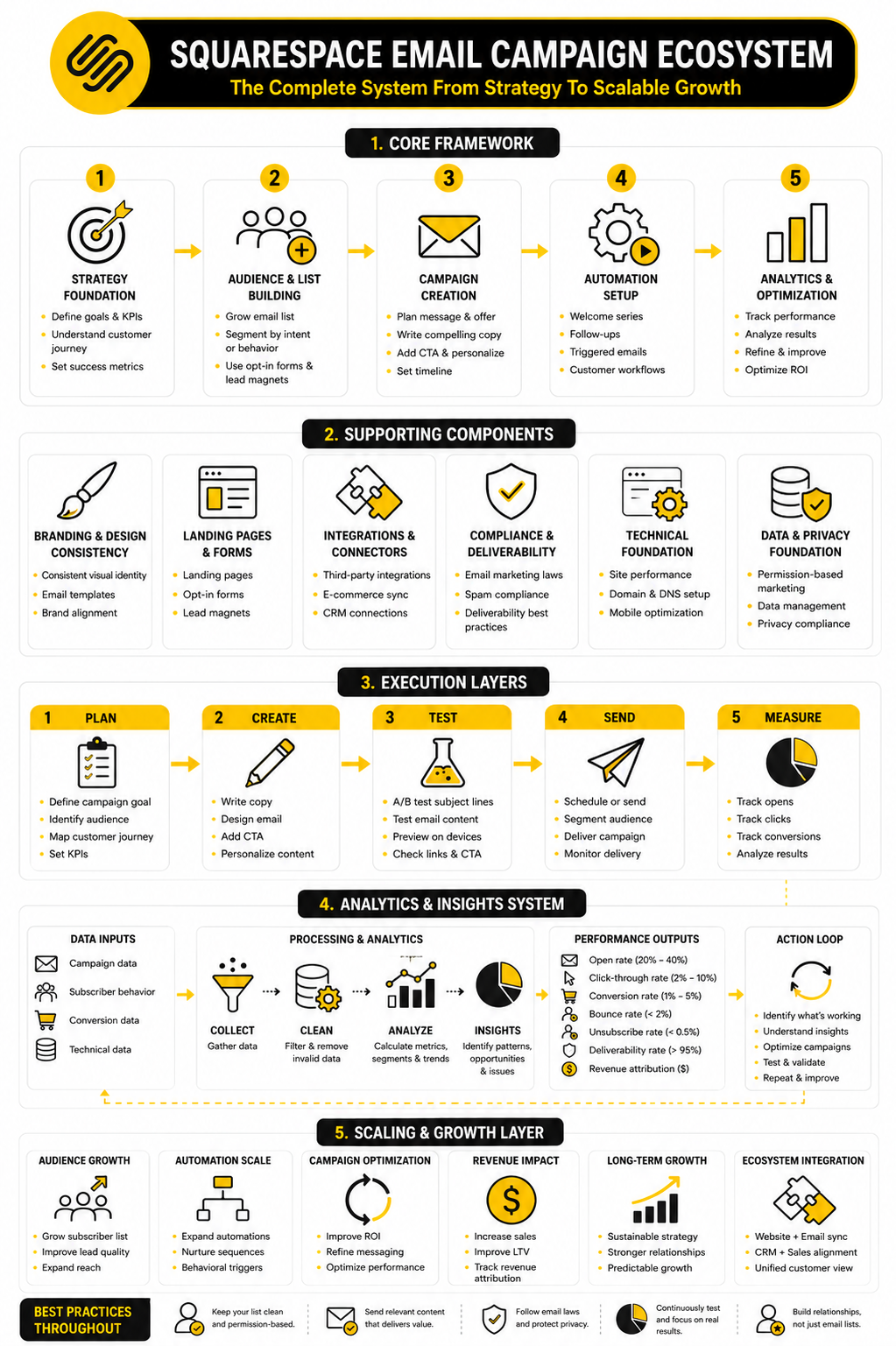
This guide treats Squarespace Email Campaigns as a practical growth system, not a design toy. We will look at when it makes sense, how to structure campaigns, where automation fits, what to measure, and when you may need a more advanced platform alongside or instead of Squarespace. The goal is simple: help you build email campaigns that look on-brand, feel personal, and move people toward the next action.
this guide is split into six parts so each stage gets enough room without turning the guide into a messy feature dump. The structure follows the way a real campaign should be built: start with the business case, define the system, build the assets, launch professionally, measure performance, and then decide how far Squarespace can take you. Each section continues from the previous one, so the full article reads like one practical workflow.
Why Squarespace Email Campaigns Matters
Email is still one of the few marketing channels where you are not completely dependent on an algorithm deciding whether your audience sees your message. Social platforms can help people discover you, search can bring in intent, and paid ads can create speed, but your email list is where repeat attention becomes easier to manage. For a Squarespace user, that is especially important because many sites are built around trust-heavy businesses like services, portfolios, memberships, local brands, creators, and small ecommerce stores.
Squarespace Email Campaigns matters because it reduces the distance between website activity and follow-up. A visitor can subscribe through a form, a customer can buy from your store, and your brand can continue the conversation through emails that visually match the site they just visited. That continuity is not just cosmetic; it helps the experience feel intentional instead of patched together.
The mistake is assuming that built-in email marketing automatically means simple email marketing. The interface may be easier than a full marketing automation platform, but you still need to think carefully about list growth, consent, segmentation, timing, subject lines, offers, and campaign goals. Squarespace gives you a clean starting point, but the businesses that win with it are the ones that treat every campaign as part of a larger customer journey.
The Squarespace Email Campaign Framework
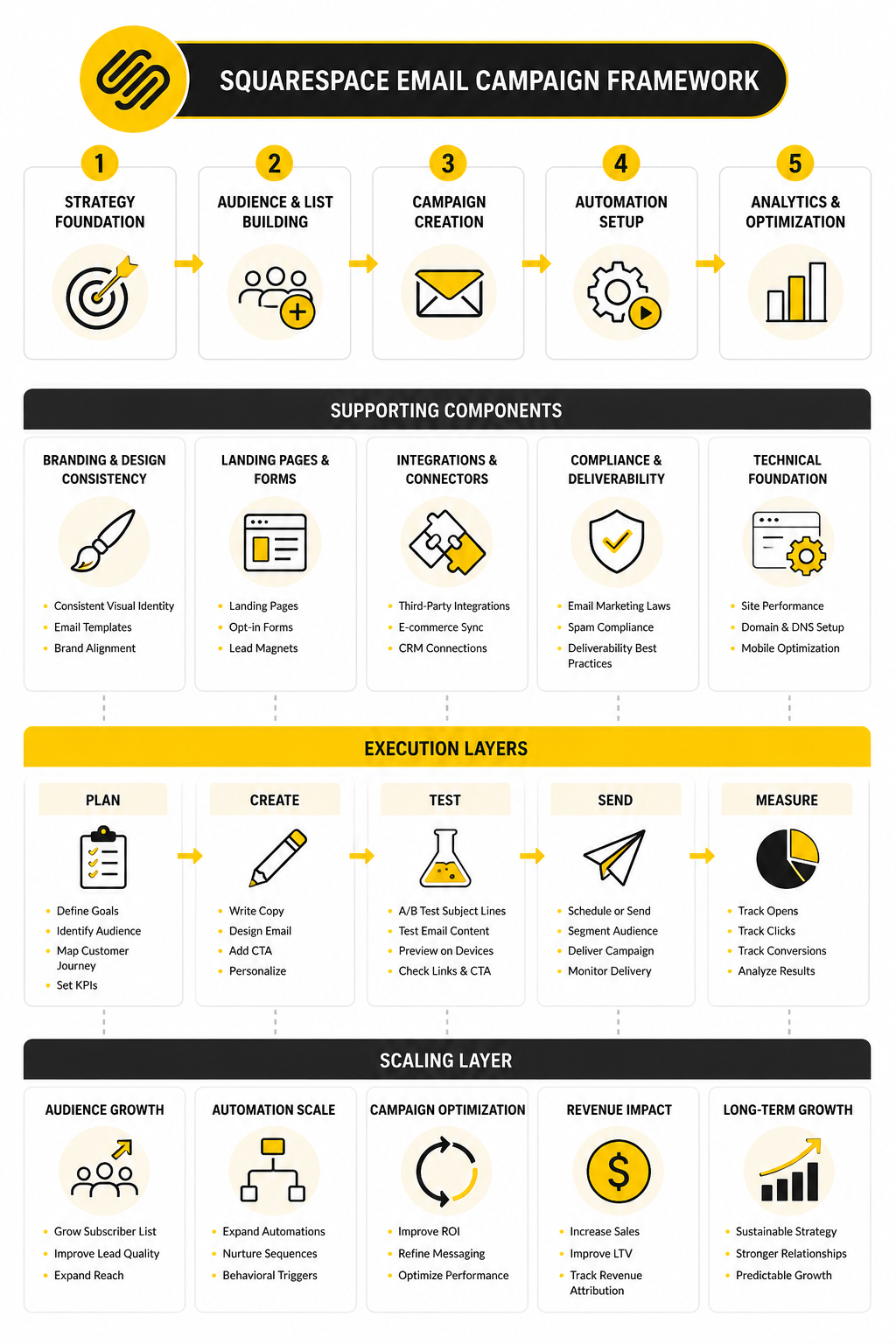
A strong Squarespace email campaign has four layers: audience, message, design, and follow-up. The audience layer answers who should receive the email and why they are likely to care. The message layer turns that audience insight into a clear promise, a useful update, or a timely offer.
The design layer is where Squarespace naturally feels strong because campaigns can match the style of your website without needing custom code. That is useful, but design should support the message rather than compete with it. A beautiful email that does not make the next step obvious is still a weak campaign.
The follow-up layer is where most small businesses either make money or lose momentum. One newsletter can help, but a planned sequence can welcome new subscribers, introduce your offer, recover attention, and bring people back when they are ready. If your needs grow beyond the native Squarespace setup, this is also where tools like GoHighLevel, Brevo, or Moosend may become relevant, depending on how much automation and segmentation you need.
Core Components Of A Strong Campaign
A strong Squarespace email campaign starts before you write the email. The real work is deciding what the campaign is supposed to do, who should receive it, and what action should feel obvious after reading it. Without those decisions, you end up with a pretty email that looks finished but does not have a job.
Most small businesses skip this part because Squarespace makes the design process feel approachable. That is useful, but it can also tempt you into building from the template first and the strategy second. The better approach is to define the campaign’s role, then use the template to make that role clear.
Think of every campaign as one piece of a simple system. Your website captures attention, your email list keeps that attention warm, and your campaign moves the reader toward a next step. That next step might be buying a product, booking a call, reading a new article, claiming a discount, joining an event, or simply trusting you enough to stay subscribed.
The Audience
Your audience is not just “everyone on the list.” That is the fastest way to make a Squarespace email campaign feel generic. Even if your list is small, you should still ask why someone joined, what they already know, and what they probably need next.
Squarespace supports mailing lists and segmentation features, which makes it easier to avoid sending every message to every contact. A new subscriber may need a welcome sequence, while a past customer may need a product education email or a seasonal offer. Those are different situations, and they deserve different messages.
This is where many businesses make their first real improvement. They stop thinking of email as an announcement channel and start treating it as a relationship channel. The more specific the audience, the easier it becomes to write an email that sounds like it was meant for the person reading it.
The Campaign Goal
Every campaign needs one primary goal. Not five goals, not a vague “drive engagement” goal, and not a desperate attempt to promote everything at once. One email should usually create one main action.
For a Squarespace store, the goal might be to sell a featured product, promote a limited-time discount, or bring people back to an abandoned checkout flow. For a service business, the goal might be to get people to book a consultation, view a portfolio, or reply with a specific question. For a creator or publisher, the goal might be to bring readers back to a new post, video, podcast episode, or paid membership page.
This matters because the goal controls the structure of the entire email. The subject line sets up the goal, the opening creates context, the body builds desire or trust, and the call to action gives the reader one clean path forward. When the goal is blurry, the email becomes noisy.
The Offer
The offer is the reason someone should care right now. It does not always have to be a discount. In fact, constantly training your list to wait for discounts can weaken your brand over time.
A good offer can be a useful insight, a new product, a seasonal collection, a limited booking window, a helpful guide, an exclusive preview, or a clear solution to a painful problem. The point is that the reader should understand what is in it for them within seconds. If they have to work too hard to find the value, they will probably move on.
For ecommerce campaigns, the offer often connects directly to product value. For service businesses, it often connects to clarity, trust, and timing. For educational brands, it usually connects to transformation: helping the reader understand something, solve something, or make a better decision.
The Message
The message is where your Squarespace email campaign becomes human. This is not the place to dump every feature, every announcement, and every reason your business exists. It is the place to connect one reader problem with one useful next step.
A simple structure works best. Start with the situation your reader recognizes, explain why it matters, introduce the useful idea or offer, then show them what to do next. That flow feels natural because it follows how people actually make decisions.
The writing should sound like a person who understands the customer, not like a brand trying to impress itself. Short paragraphs help, but clarity matters more than sentence length. If the reader can quickly answer “why am I getting this?” and “what should I do now?” the message is doing its job.
The Design
Squarespace gives you an advantage here because your email design can stay close to your website style. That consistency helps your campaign feel familiar when someone moves from inbox to site. It also saves time because you are not rebuilding your visual identity inside a separate tool from scratch.
Still, design should not carry the whole campaign. A clean header, readable text, strong spacing, product or content blocks, and a clear button are usually more effective than an overdesigned email that buries the point. The more important the action is, the less clutter you want around it.
Mobile readability deserves special attention. Many people will open your campaign on a phone, skim the first few lines, and decide almost immediately whether to continue. If your email only looks good on a desktop preview, it is not ready.
The Call To Action
The call to action is where the campaign either focuses or falls apart. A weak CTA asks the reader to “learn more” without making the value clear. A strong CTA tells the reader exactly what they are getting by clicking.
You do not need clever button text. You need specific button text. “Shop the new collection,” “Book your consultation,” “Read the guide,” “Claim the discount,” and “See available dates” are all simple because they reduce uncertainty.
The CTA should also match the landing page. If the email promises a specific product, send people to that product or collection, not the homepage. If the email promotes a booking offer, send people directly to the booking page or a focused service page so the momentum does not leak.
The Follow-Up
One email can create a spike, but follow-up creates consistency. This is where automation becomes important, especially for welcome sequences, purchase follow-ups, discounts, and re-engagement campaigns. Squarespace’s own help documentation notes that automated campaigns can be triggered by visitor or customer actions, including subscribing to a mailing list or buying a product through the site.
A simple follow-up sequence often beats a single broadcast because it meets people at different stages of readiness. The first email can welcome them, the second can build trust, the third can explain the offer, and the fourth can remove objections. That does not need to feel aggressive when each email has a clear purpose.
If you eventually need deeper automation, pipeline tracking, SMS, lead scoring, or CRM workflows, a broader platform like GoHighLevel can make sense. If your main need is email campaigns with more advanced newsletter-style sending and segmentation, tools like Brevo or Moosend may fit better. The key is not to switch tools because they look exciting; switch when your campaign logic has genuinely outgrown the simpler setup.
Professional Implementation In Squarespace
Professional implementation means turning the strategy into a repeatable workflow. You do not want every email to feel like a one-off project that drains your week. You want a simple process you can run again without reinventing everything.
Start by separating campaign types. A newsletter, product launch, sale announcement, welcome automation, and post-purchase follow-up should not all be treated the same way. They have different audiences, different timing, different emotional context, and different conversion goals.
Once you define those campaign types, Squarespace becomes easier to manage. You can create reusable layouts, keep your brand styling consistent, and focus your effort on the parts that actually change: the message, the offer, and the timing. That is how email becomes a business asset instead of another task on your marketing checklist.
Build The List With Intent
A healthy list starts with the right promise. “Subscribe to our newsletter” is usually too weak because it describes the action, not the benefit. People want to know what they will receive and why it is worth giving you access to their inbox.
For a Squarespace site, list growth often comes from newsletter blocks, forms, checkout opt-ins, blog content, announcement bars, and dedicated landing pages. Each signup point should match the page it appears on. A product page might offer early access or care tips, while a blog post might offer a related checklist or guide.
Do not chase subscribers who have no reason to care about your business. A smaller list of people who understand the value is better than a larger list that ignores everything. Email performance is built on relevance before volume.
Create A Reusable Campaign Template
A reusable template saves time, but it also protects consistency. Your audience should recognize your brand quickly without every email needing a new design concept. That means your logo, typography, spacing, button style, and image treatment should feel steady from one campaign to the next.
The template should also support different content blocks. You may need a short announcement version, a product-focused version, a story-led version, and a newsletter version. These can share the same visual foundation while giving you enough flexibility to avoid making every campaign look identical.
The best template is not the most decorated one. It is the one that makes writing, scanning, clicking, and measuring easier. If a design choice does not help the reader move forward, it probably does not belong in the campaign.
Match Timing To Reader Behavior
Timing is not just about choosing Tuesday morning and hoping for the best. It is about matching the message to what the reader just did or what they are likely thinking about next. A new subscriber is in a different mindset from a customer who bought last week, and both are different from someone who has ignored your last five campaigns.
Squarespace automations can help by sending emails after specific actions, which is much better than relying only on manual broadcasts. A welcome email should arrive while the subscriber still remembers signing up. A post-purchase email should arrive when the customer is ready for reassurance, education, or a useful next step.
For manual campaigns, use a simple rhythm your business can sustain. Weekly can work if you have something genuinely useful to say. Monthly can work if your offer cycle is slower. Random bursts followed by silence usually train your audience not to expect much from you.
Keep Compliance And Trust Built In
Email marketing depends on permission. That means people should understand what they are signing up for, and every campaign should make it easy to unsubscribe. This is not just a legal checkbox; it is part of keeping the relationship clean.
Trust also shows up in the way you write. Avoid fake urgency, misleading subject lines, and overpromising results your product or service cannot honestly deliver. Those tactics may create short-term clicks, but they damage the long-term value of the list.
A professional Squarespace email campaign should feel like it came from a business that respects the reader. Clear identity, honest offers, simple unsubscribe access, and consistent expectations all support deliverability and brand reputation. That is not glamorous, but it is critical.
Build The Campaign From The Outcome Backward
The cleanest way to build a Squarespace email campaign is to start with the outcome and work backward. Decide what the reader should do after clicking, then build the email around that action. This prevents the classic mistake of writing a long campaign first, then trying to attach a CTA at the end like an afterthought.
For example, if the goal is a product purchase, the landing page should already be ready before the campaign is written. If the goal is a booking, the scheduling page should be clear, available, and friction-free. If the goal is content engagement, the article or resource should deliver exactly what the subject line promised.
This process keeps the campaign honest. The email does not need to exaggerate because the destination page is strong enough to support the click. That is the difference between a campaign that generates curiosity and a campaign that creates momentum.
Step 1: Choose The Campaign Type
Start by naming the campaign type before touching the editor. A launch email, newsletter, sale email, event reminder, welcome email, and post-purchase email all have different jobs. When you know the type, the structure becomes much easier to build.
A newsletter should make the reader feel informed and connected. A launch campaign should create clarity around what is new, why it matters, and who it is for. A welcome campaign should reduce distance between a new subscriber and the brand, especially while their interest is still fresh.
This is also where you decide whether the campaign should be a one-time blast or an automated sequence. Squarespace Email Campaigns supports regular campaigns as well as automated campaigns, including automations triggered when someone subscribes to a mailing list or interacts with customer activity on the site. Use a blast when timing matters to everyone at once, and use automation when the timing should depend on the reader’s behavior.
Step 2: Define The Reader Segment
After choosing the campaign type, define the segment that should receive it. This can be simple at first: new subscribers, past buyers, non-buyers, local customers, members, leads from a specific form, or people interested in a specific topic. The point is not to create a complex data machine; the point is to avoid treating everyone the same.
A good segment makes the email easier to write because the reader’s context is clearer. You can speak to what they likely know, what they may be considering, and what kind of next step would feel reasonable. That creates a better experience than sending broad messages that try to cover every possible customer at once.
If your list is still small, segmentation can still be useful. You may not need ten lists, but you should at least separate people who joined for different reasons. Someone who subscribed from a service page is not always in the same mindset as someone who subscribed after reading a blog post.
Step 3: Prepare The Landing Page
The landing page is part of the campaign, not a separate task. If the email creates desire but the page creates confusion, the campaign loses. Before writing the email, open the page you plan to link to and ask whether the next step is obvious.
The page should match the promise of the email. If the subject line promotes a seasonal offer, the page should show that offer clearly. If the email introduces a service, the page should explain who it is for, what happens next, and how to take action.
This is where many Squarespace users have an advantage because the site and email can be managed in the same ecosystem. You can adjust product pages, service pages, blog posts, and signup pages without jumping between a dozen tools. That makes it easier to keep the campaign message and destination aligned.
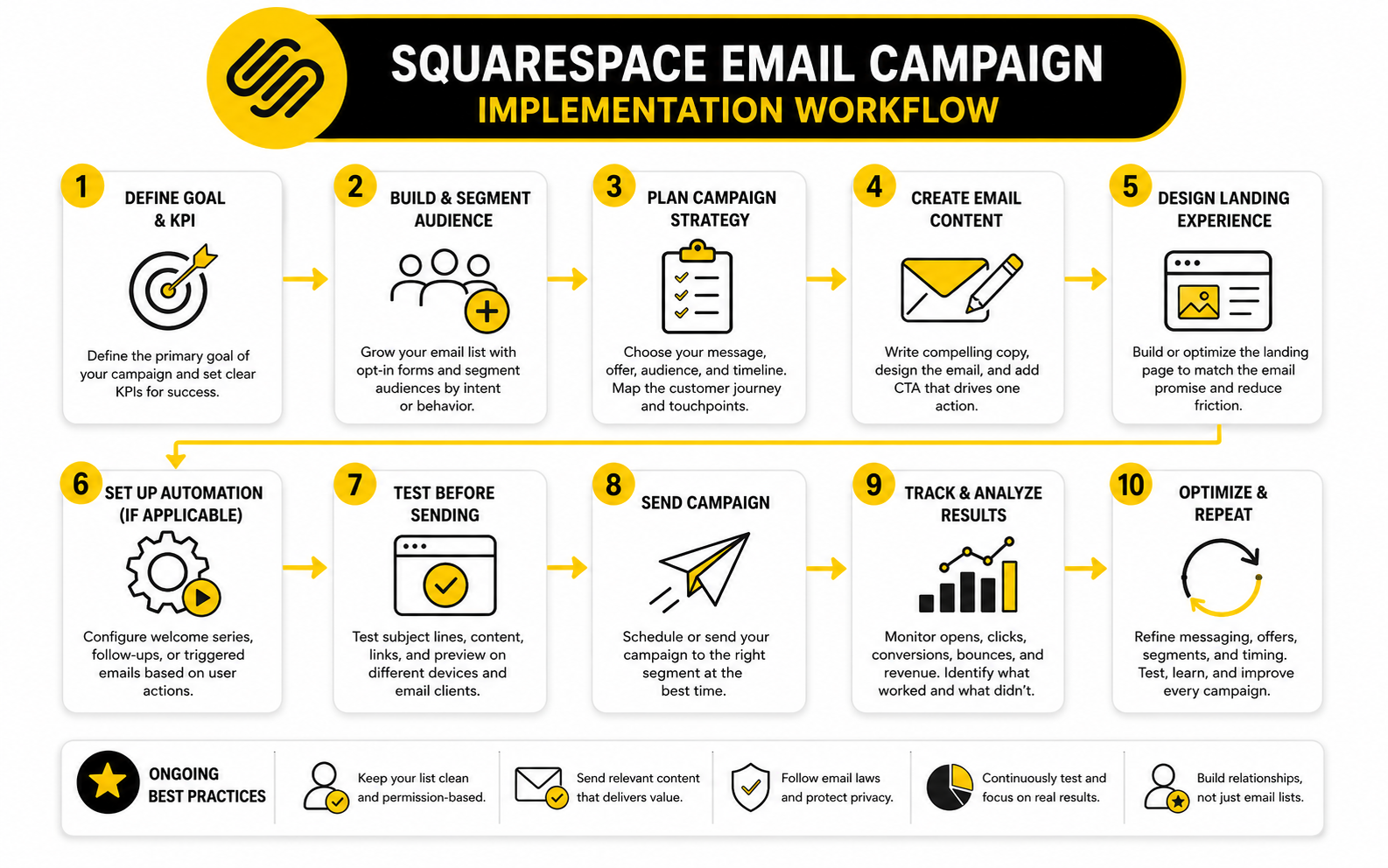
Step 4: Write The Campaign Brief
Before drafting the email, write a short campaign brief. This does not need to be formal, but it should force clarity. A campaign brief keeps you from drifting into generic copy and helps anyone reviewing the email understand what it is supposed to accomplish.
Use these questions:
This small step saves more time than it seems. It gives you a filter for every sentence, image, and button. If something does not support the brief, remove it or move it to another campaign.
Step 5: Draft The Subject Line And Preview Text
The subject line earns the open, but the preview text often gives the reader the real reason to care. Treat them as a pair. The subject line can create curiosity or clarity, while the preview text adds context and lowers uncertainty.
Avoid subject lines that feel clever but vague. “Big news” is weaker than a specific reason to open. “Our spring booking window is open” or “New pieces just landed for the weekend” tells the reader what kind of value is inside.
Do not use fake urgency. If there is a real deadline, say so clearly. If there is no real deadline, focus on relevance, benefit, or timing instead. Trust is harder to win back than attention.
Step 6: Build The Email Body
The body should move quickly from context to value. Start with why the email exists, then make the offer or idea clear, then give the reader a natural path to act. A Squarespace email campaign does not need to be long to be effective; it needs to be easy to understand.
Use short paragraphs, clear section breaks, and one main CTA. If you include images, make sure they support the decision rather than simply decorating the email. Product photos, portfolio visuals, event graphics, or screenshots can work well when they help the reader understand what they will get.
The best test is simple: if someone skims the email in ten seconds, do they understand the point? If the answer is no, simplify. A campaign should not require deep concentration to make sense.
Step 7: Add The CTA And Supporting Links
Your main CTA should appear after the reader understands the value. In many campaigns, that means one button near the middle or lower part of the email, with a supporting text link if needed. The button should be specific enough that the reader knows what happens after clicking.
Avoid stacking too many competing links. If you are promoting a product collection, link to that collection. If you are promoting a booking page, link to the booking page. If you are sharing a new article, link to the article and let that page handle the next step.
There are exceptions, especially for newsletters with multiple curated links. But even then, the email should have a hierarchy. Make it clear which item is the main feature and which links are secondary.
Step 8: Check Mobile, Links, And Tracking
Before sending, preview the campaign on mobile. This is not optional. If the headline breaks awkwardly, the image dominates the screen, or the CTA is buried, fix it before the campaign goes out.
Then check every link. Open the destination pages, confirm they load properly, and make sure the CTA path is clean. A broken or mismatched link can waste the best campaign you have written.
Finally, review how you will measure performance. Squarespace includes campaign analytics, and that is enough for many simple campaigns. For more advanced tracking across forms, CRM stages, booked calls, and multi-step sales flows, a platform like GoHighLevel may be more practical because the email is connected to the broader pipeline.
Step 9: Send, Watch, And Document
After the campaign is sent, do not just check the open rate and move on. Look at clicks, unsubscribes, sales, bookings, replies, and the behavior on the destination page. The campaign is only successful if it supports the business outcome you chose at the beginning.
Document what you sent, who received it, when it went out, what the offer was, and what happened afterward. This gives you a simple campaign history you can learn from. Without that record, you are guessing every time.
Over time, this documentation becomes a serious advantage. You will see which offers create action, which subject lines attract the right attention, and which audience segments are most responsive. That is how a Squarespace email campaign program gets sharper without becoming more complicated.
Create Campaigns For The Main Customer Moments
Once your process is clear, the next step is building campaigns around customer moments. These are the points where a reader is most likely to need guidance, reassurance, or a reason to act. When your campaigns match those moments, email feels helpful instead of random.
The exact moments depend on your business, but most Squarespace users can start with a few reliable categories. New subscribers need orientation. Interested leads need trust. Customers need support and follow-up. Inactive contacts need a reason to reconnect or a clean way to leave.
This is where email becomes more than promotion. A good campaign can answer questions before they are asked, reduce buying hesitation, and make the customer experience feel smoother. That is practical, measurable, and much more valuable than sending emails only when you need a quick sales bump.
Welcome New Subscribers
A welcome campaign should confirm that subscribing was a good decision. The first email should arrive quickly, introduce the brand clearly, and set expectations for what the reader will receive. This is not the time to overwhelm them with your full history.
Keep the first welcome email simple. Thank them, deliver the promised value if there was one, and point them toward one useful next step. That might be your best guide, a popular product category, a service overview, or a booking page.
A short welcome sequence can then build trust over several emails. One email can explain your approach, another can highlight a useful resource, and another can invite the reader to take the next step. Done well, this feels like onboarding rather than selling.
Promote Products Without Sounding Desperate
Product emails work best when they connect the product to a situation the reader understands. Instead of simply saying something is new, explain why it exists, when to use it, or what problem it solves. That gives the campaign more substance than a basic product announcement.
For a Squarespace store, product blocks and visual layouts can make this easier. Show the product clearly, but do not rely on visuals alone. The copy should still explain the value, the difference, and the reason to click now.
Discounts can work, but they should not be the only lever. You can also promote limited availability, seasonal relevance, bundles, gift guides, product education, or customer use cases when they are real and supportable. The more thoughtful the angle, the less your campaign depends on cutting price.
Turn Service Interest Into Booked Calls
For service businesses, a Squarespace email campaign should often move people from curiosity to conversation. The email does not need to close the whole sale. It needs to make the next step feel low-friction and worthwhile.
That means the campaign should clarify who the service is for, what problem it helps with, and what happens after someone books or enquires. People hesitate when the next step feels vague. Remove that hesitation with direct language.
A scheduling tool can help if booking is part of your sales process. If you want a simple booking path that connects well with modern workflows, Cal.com can be useful for turning campaign interest into available times. The important thing is that the email, booking page, and follow-up all feel connected.
Re-Engage Quiet Subscribers
Not everyone who goes quiet is uninterested forever. Some people missed your emails, got busy, changed priorities, or need a different reason to come back. A re-engagement campaign gives them that chance before you keep sending indefinitely.
The tone should be respectful, not needy. A useful re-engagement email might ask whether they still want updates, highlight what has changed, or offer one strong reason to return. If they do not respond after a reasonable sequence, it may be healthier to stop mailing them.
This protects both performance and trust. Sending forever to people who never engage can drag down the quality of your list and make your reporting less useful. A smaller, more responsive list is easier to serve and easier to sell to.
Optimization, Reporting, And Scaling
Once a Squarespace email campaign is live, the real work shifts from creation to interpretation. Sending the email is only one step. The better question is what the campaign tells you about your audience, your offer, and the path from inbox to action.
This is where many businesses get distracted by surface-level numbers. Open rates feel exciting because they are easy to understand, but they do not prove the campaign worked. Clicks, conversions, unsubscribes, replies, sales, bookings, and post-click behavior usually tell a more useful story.
A good measurement system does not need to be complicated. It needs to connect campaign performance to business decisions. If the data does not help you improve the next email, the next landing page, or the next offer, it is just noise.
Statistics And Data
Email benchmarks are useful, but only when you treat them as context rather than commandments. A benchmark can tell you whether your performance is roughly healthy, but it cannot tell you whether your specific audience trusted the offer, needed the timing, or liked the landing page. That is why you should compare your Squarespace email campaign against both external benchmarks and your own past campaigns.
Recent industry benchmark data shows why context matters. MailerLite’s 2025 benchmark data reported an average open rate of 43.46% and an average click rate of 2.09%, while DMA’s 2025 email benchmarking report noted that open rates reached 35.9% after the industry adjusted to post-Apple Mail Privacy Protection measurement. Those numbers are not identical because datasets, industries, list quality, and measurement methods differ.
That difference is the lesson. Do not panic because your campaign is below one public benchmark, and do not celebrate too hard because it is above another. Use benchmark data to ask better questions, then use your own campaign history to make decisions.
What Squarespace Email Campaign Analytics Can Tell You
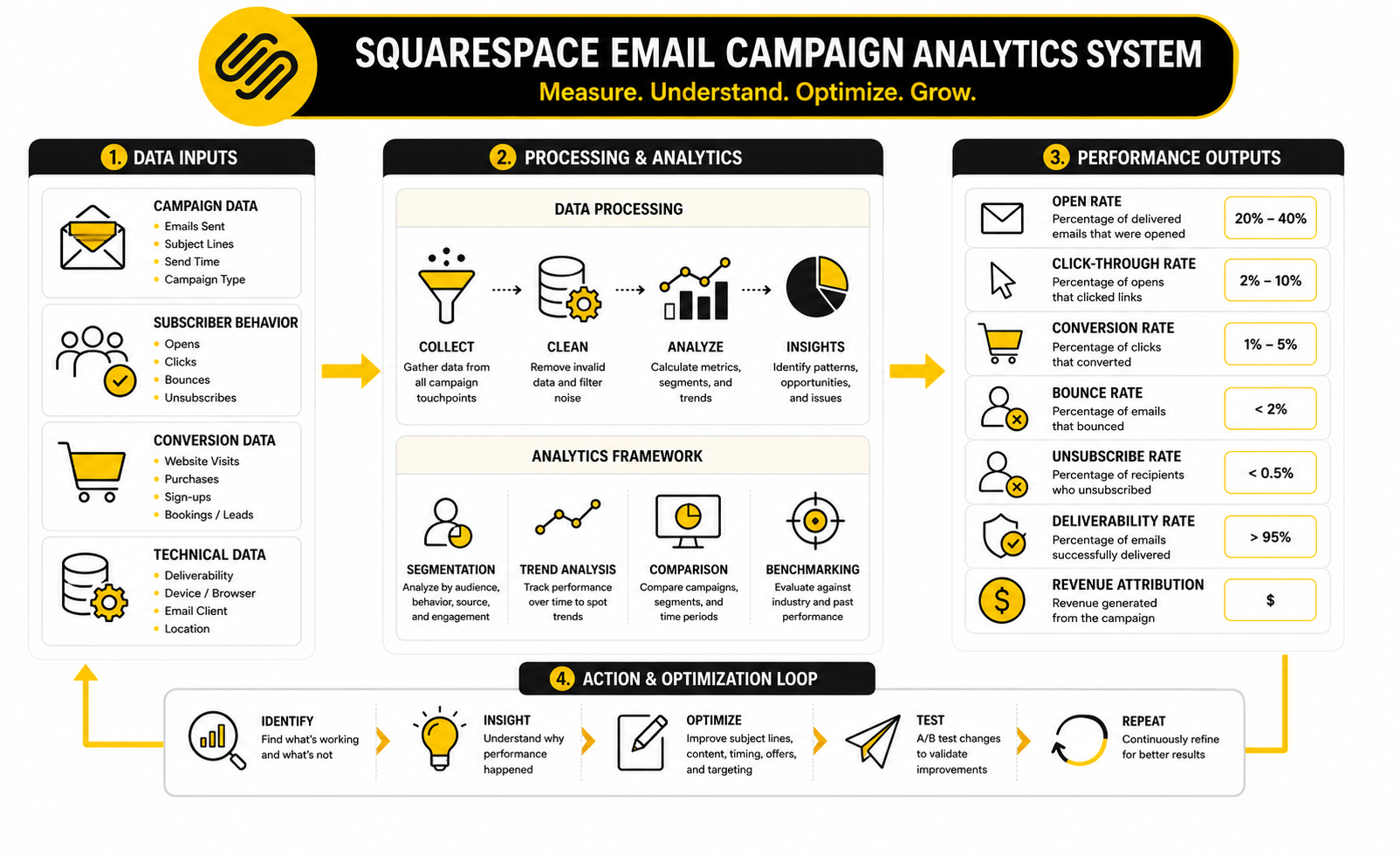
Squarespace Email Campaigns gives you a practical view of campaign performance through metrics such as opens, clicks, subscribes, bounces, and unsubscribes. That is enough to spot the main problems in most small-business campaigns. You can see whether people noticed the email, whether they clicked, and whether the message caused negative reactions.
The most useful part is not the metric by itself. It is the relationship between metrics. A strong open rate with weak clicks usually means the subject line worked but the message, offer, or CTA did not create enough action. Weak opens with strong clicks can mean the email was valuable to the people who opened it, but the subject line or audience targeting limited reach.
You should also compare campaign types separately. A welcome email, product launch, newsletter, sale email, and re-engagement email should not all be judged by the same standard. Each campaign has a different job, so each one needs a slightly different definition of success.
The Metrics That Actually Matter
Open rate tells you whether the email earned attention, but it is no longer a clean measure of human interest. Privacy changes, image loading, inbox behavior, and email client differences can distort opens. Treat open rate as a directional signal, not as proof that your audience deeply engaged.
Click rate is usually more useful because it shows whether the email created enough interest for someone to take action. A low click rate can mean the offer was weak, the CTA was unclear, the audience was wrong, or the email gave away too much without a reason to continue. A high click rate means the campaign created momentum, but you still need to check what happened after the click.
Conversion rate is where the business truth appears. If people click but do not buy, book, enquire, register, or read, the problem may be the landing page rather than the email. This is why your Squarespace email campaign should always be measured together with the destination page, not in isolation.
How To Read Open Rates Without Overreacting
Open rates are helpful when you compare similar campaigns sent to similar audiences. They are much less helpful when you compare a warm welcome email to a cold re-engagement email or a niche customer segment to your entire list. The context changes the meaning.
If opens are consistently low, start with the basics. Review the sender name, subject line, preview text, send timing, list quality, and whether subscribers still remember why they joined. A subject line problem is possible, but it is not always the only issue.
If opens are high but clicks are poor, do not waste time obsessing over the subject line. The email already got attention. The problem is probably the promise, content, CTA, offer, or match between the email and the reader’s current need.
How To Read Clicks And CTAs
Clicks show whether your campaign created enough motivation for the reader to leave the inbox. That is a bigger signal than an open because it requires intent. People do not click unless the next step feels relevant, useful, or timely.
When clicks are low, examine the email from the reader’s point of view. Is the CTA specific? Is the benefit clear before the button appears? Does the campaign try to promote too many things at once? Does the design make the button easy to find on mobile?
When clicks are strong, look at which links attracted attention. If one product, article, or offer consistently gets more clicks, that is not random. It may reveal what your audience actually wants more of, and that should influence your next campaign, your site content, and possibly your product or service positioning.
How To Read Unsubscribes
Unsubscribes are not automatically bad. Some people should leave your list because they are no longer interested, no longer a fit, or never should have subscribed in the first place. A clean list is healthier than a bloated list full of people who ignore every email.
What matters is the pattern. A small number of unsubscribes after a normal campaign is expected. A sudden spike after one campaign is a signal that the topic, tone, frequency, or offer may have been misaligned with what subscribers expected.
This is especially important if you changed your content direction. If people joined for design tips and suddenly receive aggressive sales emails every week, unsubscribes are feedback. The fix is not to hide the unsubscribe link or send less confidently; the fix is to realign the promise, content, and cadence.
How To Read Bounces And Deliverability Signals
Bounces show that some emails did not reach the intended inbox. A hard bounce usually means the address is invalid or unavailable, while a soft bounce can happen for temporary reasons. Either way, bounce patterns help you understand list quality.
A high bounce rate often points to poor signup quality, old contacts, imported lists, or forms attracting bad addresses. This is not just a reporting issue. Poor list quality can affect deliverability and make future campaigns less effective.
The practical move is simple: keep your list clean. Do not upload random contacts, do not keep sending to addresses that clearly fail, and do not chase list size at the expense of permission. Email works best when people actually asked to hear from you.
How To Connect Email Metrics To Website Behavior
A Squarespace email campaign should not be judged only inside the email dashboard. The campaign exists to move people somewhere, so you need to examine what happens on the site after the click. This is where website analytics become part of the email system.
If people click through and leave quickly, the landing page may not match the email. The headline may be unclear, the offer may be buried, the page may load slowly, or the next step may feel risky. The email created enough interest to earn the visit, but the page failed to continue the conversation.
If people click and continue to browse, save products, submit forms, or buy, the campaign is doing more than getting engagement. It is creating useful traffic. That is the difference between an email that looks good in a report and an email that supports the business.
A Simple Campaign Scorecard
The easiest way to avoid random analysis is to use a small scorecard after every campaign. Keep it simple enough that you will actually use it. The goal is to turn each send into a learning loop.
Track these points after each campaign:
This scorecard gives you a real memory. Without it, you are relying on vibes. With it, you can see which topics, offers, formats, and audiences keep producing results.
What Good Performance Really Looks Like
Good performance is not always the highest open rate. A smaller segment with lower opens but stronger sales may be more valuable than a broad campaign with impressive attention and weak revenue. This is why campaign goals from the earlier implementation process matter so much.
A good campaign usually has alignment across four points. The right people received it, the subject line matched the content, the email made the value clear, and the landing page continued the same promise. When those pieces line up, the numbers tend to make sense.
Bad performance is also easier to diagnose when the system is clear. Low opens point to inbox attention and targeting. Low clicks point to message and CTA strength. Low conversions point to landing page, offer, price, timing, or trust. That clarity keeps you from changing everything at once.
When To Scale Beyond Basic Reporting
Squarespace reporting is enough for many creators, service providers, and small stores. You can see core campaign performance, compare sends, and make more carefully decisions without adding unnecessary software. That is exactly where you should stay if your campaigns are simple and the data answers your main questions.
You may need a broader setup when your sales process becomes more complex. If you need to connect email behavior to CRM stages, sales pipelines, SMS follow-ups, lead scoring, appointment outcomes, or multi-step funnels, native campaign reporting may start to feel limited. At that point, a platform like GoHighLevel can be useful because the email campaign becomes one part of a larger customer journey.
For email-focused teams that mainly need stronger segmentation, campaign testing, and newsletter-style reporting, Brevo or Moosend may make more sense. The decision should be based on the workflow you need, not on tool hype. Stay simple until simplicity starts blocking growth.
Advanced Strategy For Scaling Squarespace Email Campaigns
Scaling a Squarespace email campaign program is not about sending more emails just because the list is bigger. It is about making each send more intentional as the audience becomes less uniform. What worked when you had a small list of early supporters may not work when your list includes new leads, loyal customers, inactive subscribers, one-time buyers, and people who joined from completely different pages.
The danger is that growth makes your email marketing look healthier than it really is. A bigger list can produce more total opens and clicks while the percentage of meaningful action quietly drops. That is why scaling should focus on sharper segmentation, cleaner offers, better follow-up, and stronger measurement rather than simply increasing frequency.
A mature Squarespace email campaign system should answer one practical question before every send: who needs this message right now? If you cannot answer that clearly, the campaign is probably not ready. Scale rewards precision.
Segment By Intent, Not Just Identity
Basic segmentation often starts with identity: customer, subscriber, member, lead, or past buyer. That is useful, but advanced email strategy goes further by segmenting based on intent. Intent tells you what someone is likely trying to do next.
A visitor who joined from a product page may be closer to buying than someone who joined from a general blog post. A customer who bought a beginner product may need education before seeing a premium offer. A lead who opened several service-related emails but never booked may need reassurance, proof, or a simpler next step.
This is where you need to be honest about the limits of your current setup. Squarespace can handle straightforward email campaigns and automations well for many small businesses, but deeper behavior-based segmentation may require a more advanced email or CRM system. If your business depends on sales pipelines, appointment follow-up, lead nurturing, and multi-channel automation, GoHighLevel becomes worth considering because it is built around the full customer journey, not just the email send.
Protect Deliverability Before It Becomes A Problem
Deliverability is one of those things people ignore until the numbers suddenly look wrong. The campaign goes out, opens drop, clicks fall, and the first instinct is to blame the subject line. Sometimes the real issue is that your emails are not reliably reaching the inbox.
The boring fundamentals matter. Use permission-based list growth, avoid purchased contacts, remove invalid addresses, keep complaint rates low, and do not surprise people with content they never signed up to receive. Email benchmark research repeatedly points to bounce rate and permission quality as deliverability signals, and the practical takeaway is simple: bad list quality eventually becomes a business problem.
As your list grows, list hygiene becomes part of the strategy. Remove or suppress contacts who repeatedly bounce, create re-engagement flows for quiet subscribers, and stop treating list size as the main success metric. A smaller list that gets delivered, opened, clicked, and acted on is more valuable than a bloated list that quietly damages performance.
Balance Automation With Human Timing
Automation is powerful because it sends the right message without waiting for you to remember. A welcome sequence, post-purchase follow-up, abandoned interest flow, or booking reminder can improve the customer experience and reduce manual work. That is exactly where automation earns its place.
But automation can also become lazy. If every message feels like a generic workflow, the reader starts to feel processed rather than helped. The best automated emails still sound like they were written by a person who understands the moment the reader is in.
Use automation for predictable moments and manual campaigns for timely judgment. A welcome sequence can run in the background, but a seasonal launch, major update, or market-specific message may need a fresh campaign. The balance is important: automate the repeatable parts, but do not automate away your point of view.
Know When Squarespace Is Enough
Squarespace is enough when your email needs are simple, visual, and closely tied to your website. If you run a portfolio site, local service business, creator brand, small shop, restaurant, newsletter, or lightweight ecommerce store, keeping campaigns close to your site can be a real advantage. Fewer tools means fewer things to maintain.
It is also enough when your reporting questions are straightforward. If you mainly need to know who opened, who clicked, which campaign performed best, and whether a campaign drove traffic or sales, you may not need a more complex stack. Complexity should be earned.
The mistake is upgrading tools because you feel like a “serious” business should have more software. Serious businesses use the simplest system that reliably supports the outcome. If Squarespace gets the campaign built, sent, measured, and improved without slowing you down, stay there.
Know When To Add A Dedicated Email Platform
A dedicated email platform starts to make sense when you need more control over segmentation, testing, personalization, and lifecycle campaigns. This is especially true when your email list becomes a major revenue channel rather than a supporting channel. At that point, better targeting can be worth more than the convenience of keeping everything native.
For email-first marketing, tools like Brevo and Moosend can be useful when you want stronger campaign workflows without jumping straight into a full CRM. They can fit businesses that care about newsletters, automations, contact management, and more detailed campaign control. The right choice depends on whether your bottleneck is email performance or the entire sales process.
For funnel-heavy businesses, ClickFunnels or Systeme.io may be relevant when the campaign is part of a funnel with landing pages, offers, checkout steps, and upsells. That does not mean every Squarespace user should move there. It means the tool should match the sales motion, not the other way around.
Avoid Tool Stacking Without A Clear Job
Tool stacking is one of the easiest ways to make email marketing harder than it needs to be. A business starts with Squarespace, adds another email platform, then adds a funnel builder, then adds a CRM, then adds a booking tool, and suddenly nobody knows where the real customer record lives. That is not scale. That is clutter.
Every tool should have a job. Squarespace may be the website and brand hub. A dedicated email platform may handle advanced campaigns. A CRM may manage sales follow-up. A scheduling tool like Cal.com may handle bookings when the campaign goal is consultation calls or appointments.
The key is to define ownership before adding software. Where do contacts enter? Where are they tagged? Where does consent live? Where are conversions measured? If you cannot answer those questions, adding another tool will probably create more confusion than growth.
Build A Campaign Calendar That Reflects Buyer Readiness
A campaign calendar should not be a random list of dates you need to fill. It should reflect the way your audience makes decisions. Some people need education, some need proof, some need an offer, and some need time.
A balanced calendar mixes value, trust, and conversion. Value emails teach or clarify. Trust emails show process, positioning, product detail, or useful context. Conversion emails ask for the sale, booking, registration, or reply. If every email asks for action without giving enough value, the list gets tired.
This is where pacing matters. A weekly newsletter can work if the content is genuinely useful. A launch sequence can work if the offer has a real reason for urgency. A quiet period can also be healthy if you use it to improve the next campaign instead of filling inboxes with weak messages.
Use Testing Carefully
Testing is useful, but only when you know what you are testing and why. Changing five things at once does not teach you much. If the subject line, offer, CTA, layout, and audience all change, you cannot tell what caused the result.
Start with tests that connect to real decisions. Test a clear subject line against a curiosity-driven subject line. Test one CTA angle against another. Test a product-focused email against an education-focused email for the same offer. Then use the result to decide what to repeat.
Do not overreact to tiny samples. If your list is small, a few clicks can swing the numbers dramatically. In that case, treat tests as directional learning, not scientific proof. The smaller the audience, the more you should combine data with common sense.
Plan For Privacy, Consent, And Measurement Changes
Email measurement has changed, and it will keep changing. Apple Mail Privacy Protection made open rates less reliable by allowing emails and images to be preloaded in ways that can inflate opens, which is why serious marketers now treat opens as a softer signal. Clicks, conversions, replies, purchases, and bookings give you a clearer view of real engagement.
Privacy expectations are also higher. People are more sensitive to how they joined a list, how often they hear from a brand, and whether the content matches what they expected. That means consent and relevance are not just compliance issues; they are conversion issues.
Build your Squarespace email campaign strategy around signals that are harder to fake. Did people click? Did they buy? Did they book? Did they reply? Did they stay subscribed after several sends? Those signals will matter even as tracking rules and inbox behavior continue to shift.
Create A Scaling Decision Checklist
Before you scale your email program, run through a simple decision checklist. This keeps growth practical and stops you from adding complexity too early. The point is to identify the real bottleneck before choosing the next move.
Ask these questions:
That last question matters most. If the strategy is unclear, a new platform will not fix it. If the strategy is clear but the tool is limiting execution, then upgrading becomes a smart move.
Strategic Tradeoffs To Make Before You Scale
Every email setup has tradeoffs. Squarespace gives you convenience and brand consistency, but it may not give you the deepest automation or CRM control. Advanced tools give you more power, but they also create more decisions, more setup, and more maintenance.
The right answer depends on the business model. A visual brand selling a few products may benefit from staying simple. A service business with a longer sales cycle may need stronger follow-up. A creator with a growing list may need more segmentation and newsletter control. A funnel-based offer may need landing pages, checkout logic, upsells, and post-purchase sequences that go beyond a basic campaign setup.
The expert move is not choosing the most powerful tool. The expert move is choosing the least complicated system that can still support the buyer journey. That is how your Squarespace email campaign strategy stays profitable instead of becoming another operational mess.
Tool Comparisons, Use Cases, And FAQ
At this point, the decision is not whether a Squarespace email campaign can work. It can. The real decision is whether Squarespace should remain the main email system for your business or become one part of a broader marketing stack.
That choice depends on how your customers move from interest to action. A simple store, portfolio, local business, creator site, or service brand can often do very well with Squarespace Email Campaigns because the website, forms, products, and emails stay close together. A business with longer sales cycles, multiple offers, sales reps, SMS follow-up, or complex automation may eventually need more than the native setup.
The best setup is the one that keeps the customer journey clear. If a visitor subscribes, receives a useful email, clicks the right page, and takes the next step without friction, the system is doing its job. If leads are leaking, data is scattered, and follow-up depends on memory, the system needs work.
Squarespace Email Campaigns vs Dedicated Email Platforms
Squarespace Email Campaigns is strongest when your email marketing is tightly connected to your Squarespace site. You can grow mailing lists through site forms, create campaigns that match your brand, send broadcasts, set up automations, and measure performance without leaving the platform. For many small businesses, that simplicity is the win.
Dedicated email platforms become more attractive when the email program needs deeper segmentation, more flexible automation, stronger testing, or more detailed contact management. If your main bottleneck is email sophistication, Brevo or Moosend may be a better fit than forcing Squarespace to do everything. If your bottleneck is the full sales process, GoHighLevel may fit better because it connects email with CRM, pipelines, appointments, and multi-step follow-up.
Do not choose the tool with the longest feature list. Choose the tool that removes the biggest constraint in your current system. That is how you avoid paying for complexity you are not ready to use.
Best Use Cases For Squarespace Email Campaigns
Squarespace Email Campaigns works especially well when your website is already the center of your customer experience. If people discover your brand, read your content, view your services, buy products, or join your list through Squarespace, keeping email inside the same ecosystem can reduce friction. That makes the process easier to manage and easier to keep visually consistent.
It is a strong fit for newsletters, product announcements, seasonal promotions, event updates, welcome emails, and simple customer follow-ups. It can also work well for creators and solo operators who need professional-looking emails without building a complicated marketing operations stack. The less complex your buyer journey is, the more attractive the native setup becomes.
The key is to use it intentionally. A Squarespace email campaign should not exist just because you have something to announce. It should support a customer moment, a clear offer, or a useful next step.
When A Funnel Tool Makes More Sense
A funnel tool makes more sense when the email is only one piece of a larger conversion path. If you need custom landing pages, order bumps, upsells, downsells, webinar funnels, lead magnets, checkout flows, or offer testing, a funnel platform can become more practical. That does not make Squarespace weak; it means the job has changed.
For funnel-heavy businesses, ClickFunnels may be useful when the main goal is building sales paths around specific offers. Systeme.io can also make sense for leaner funnel setups where email, pages, and simple automation need to live together. The right choice depends on whether you are building a brand-centered website experience or a conversion-centered offer flow.
The practical test is simple. If most of your revenue comes from people browsing, trusting, and returning through your site, Squarespace can stay central. If most of your revenue comes from campaign-specific funnels with tight conversion paths, a funnel tool may deserve a role.
How To Choose Your Final Email System
Your final email system should be based on workflow, not ego. Start with your customer journey and map the steps from first visit to final conversion. Then identify where the current process breaks.
If the problem is unclear messaging, fix the campaign strategy before changing tools. If the problem is poor landing pages, improve the destination before buying another platform. If the problem is missed follow-up, disconnected contacts, or limited automation, then a more advanced tool may be justified.
A smart system usually has one clear source of truth. Decide where contacts live, where consent is managed, where campaigns are sent, where sales activity is tracked, and where performance is reviewed. The more scattered those answers become, the harder scaling gets.
What Is A Squarespace Email Campaign?
A Squarespace email campaign is a marketing email created and sent through Squarespace’s built-in Email Campaigns tool. It can be used for newsletters, product announcements, promotions, event updates, welcome emails, and other customer communication. The main advantage is that it connects closely with a Squarespace website, which helps keep design, audience growth, and campaign management in one place.
Is Squarespace Email Campaigns Good For Beginners?
Yes, Squarespace Email Campaigns is good for beginners because it keeps the interface visual and relatively simple. You do not need to build a complex email stack before sending useful campaigns. The important thing is to start with a clear goal, a specific audience, and one strong call to action instead of trying to use every feature at once.
Can I Automate Emails In Squarespace?
Yes, Squarespace supports automated campaigns for specific customer and subscriber actions. That can include subscriber activity, customer activity, and form response emails. These automations are useful for welcome messages, simple follow-ups, and timely responses that should not depend on manual sending.
What Should I Send In My First Squarespace Email Campaign?
Your first Squarespace email campaign should have a simple purpose. Send a welcome message, a useful resource, a product highlight, a service explanation, or a clear announcement that matches why people joined your list. Do not try to introduce your entire business, sell every offer, and explain every detail in one email.
How Often Should I Send Squarespace Email Campaigns?
The right frequency depends on the value of your emails and the expectations you set when people subscribed. Weekly can work if you consistently send useful content, timely offers, or meaningful updates. Monthly can work if your business moves more slowly, but random bursts followed by long silence usually make email harder to turn into a dependable channel.
What Metrics Should I Track First?
Start with opens, clicks, unsubscribes, bounces, and the actual business outcome. Opens show attention, clicks show intent, unsubscribes show expectation mismatch, and bounces show list quality. The business outcome matters most because a campaign is not successful just because people opened it.
Why Are My Open Rates High But Clicks Low?
High opens with low clicks usually means the subject line created attention but the email did not create enough action. The offer may be unclear, the CTA may be weak, the email may contain too many competing links, or the audience may not be ready for that message. In that case, improve the body copy, CTA clarity, offer relevance, and landing page match.
Why Are My Clicks Good But Sales Or Bookings Low?
Good clicks with weak conversions usually points to the landing page or offer. The email created enough interest for people to leave the inbox, but the page did not continue the same promise strongly enough. Review the headline, page speed, offer clarity, proof, pricing, booking flow, checkout experience, and whether the next step feels safe.
Can I Use Squarespace Email Campaigns For Ecommerce?
Yes, Squarespace Email Campaigns can work well for ecommerce stores, especially when the store is already built on Squarespace. You can promote products, announce collections, send seasonal campaigns, and follow up with customers. The key is to connect each product campaign to a clear shopping path instead of sending people to a vague homepage.
Is Squarespace Email Campaigns Enough For Service Businesses?
Squarespace Email Campaigns can be enough for service businesses with a simple sales process. It can help you educate leads, promote services, send updates, and guide people toward a booking or enquiry page. If the sales process involves pipelines, multiple follow-ups, lead scoring, SMS, or sales reps, a CRM-centered platform like GoHighLevel may be a better long-term fit.
Should I Use Squarespace Or A Dedicated Email Tool?
Use Squarespace if you want a clean, site-connected email setup and your campaign needs are straightforward. Use a dedicated email tool if you need deeper segmentation, more advanced automation, stronger testing, or more detailed reporting. The decision should come from your workflow, not from the idea that more software automatically means better marketing.
Can I Connect Squarespace With Other Marketing Tools?
Yes, many businesses use Squarespace as the website hub while using other tools for email, CRM, scheduling, funnels, or automation. This can work well when each tool has a clear job. Problems start when contacts, consent, campaign history, and conversion data become scattered across tools without a clear system.
How Do I Improve A Weak Squarespace Email Campaign?
Improve one layer at a time. First check whether the audience was right, then review the subject line, message, CTA, offer, landing page, and follow-up. Do not change everything at once because you will not know what actually fixed the problem.
What Is The Biggest Mistake With Squarespace Email Campaigns?
The biggest mistake is treating email as a design task instead of a customer journey task. A beautiful campaign can still fail if it is sent to the wrong people, makes a vague offer, links to a weak page, or has no follow-up. Start with the outcome, then build the email around that outcome.
When Should I Upgrade Beyond Squarespace Email Campaigns?
Upgrade when your strategy is clear but the tool is limiting execution. That might mean you need advanced segmentation, multi-step automation, CRM workflows, deeper reporting, funnel logic, or stronger sales follow-up. Do not upgrade just because the business is growing; upgrade when the current setup blocks the next stage of growth.
Build a stronger local presence with BAAM AI
Turn your website, Google profile, social channels, and AI visibility into one growth engine
Most businesses do not need more random marketing activity. They need a consistent presence system that helps the right people find them, trust them, and take action. BAAM AI brings strategy, local SEO, website updates, Google Maps visibility, social content, AI-search readiness, media production, and reporting into one practical monthly engine.
If you want your marketing to keep working after the campaign ends, start with a free BAAM AI presence audit. See how your business shows up today and where the fastest visibility wins are at BAAM AI.