
BAAM AI Blog
Sendinblue WooCommerce: A Practical Guide To Brevo Email Marketing For Online Stores
Sendinblue WooCommerce is still a phrase many store owners search for, even though Sendinblue is now Brevo. That matters because the practical goal has not changed: connect your WooCommerce store to an email and...
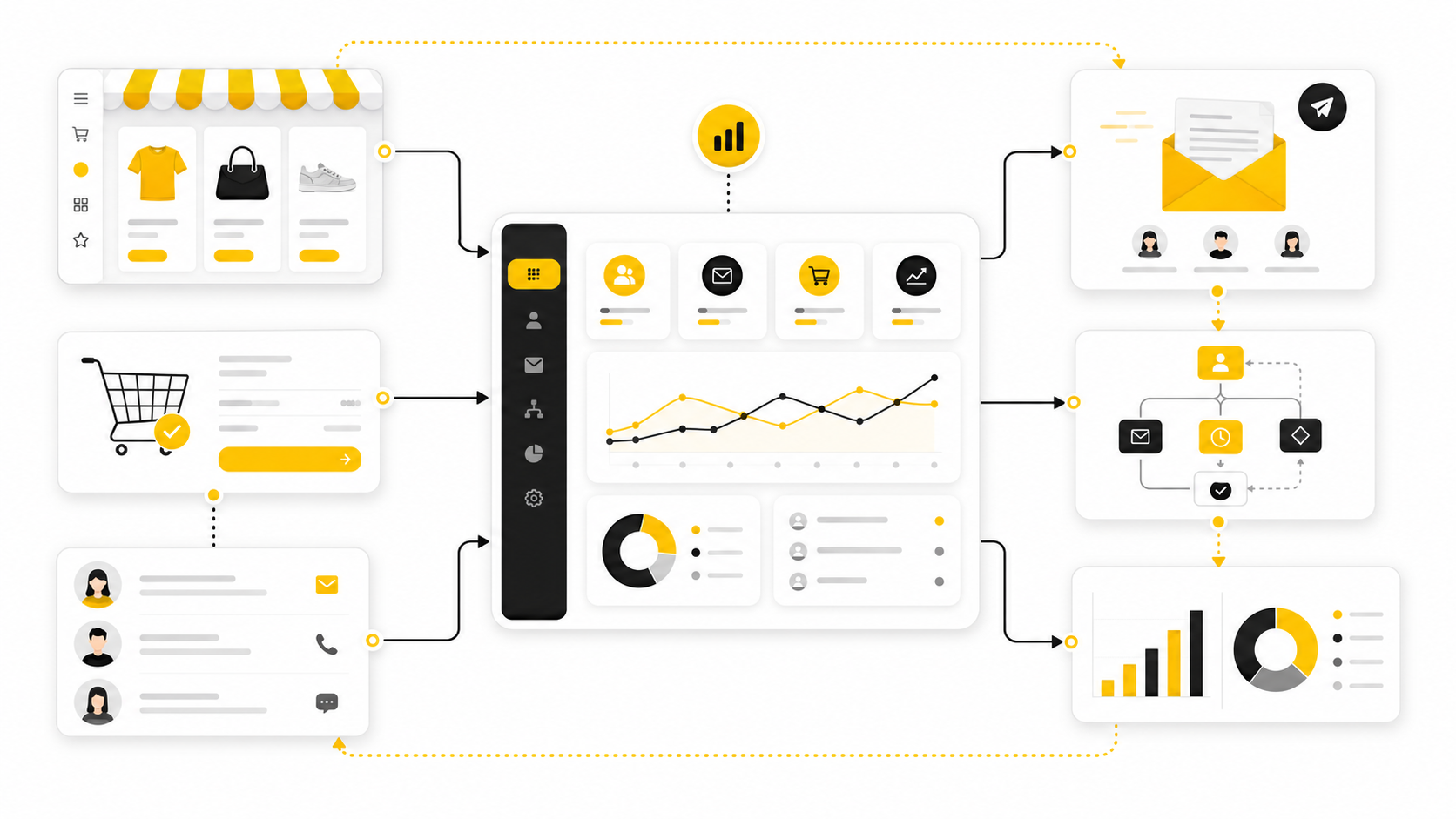
Sendinblue WooCommerce is still a phrase many store owners search for, even though Sendinblue is now Brevo. That matters because the practical goal has not changed: connect your WooCommerce store to an email and automation platform that can help you sync customers, segment buyers, send campaigns, recover carts, and follow up after purchases without manually exporting spreadsheets every week.
For most WooCommerce stores, the real problem is not “email marketing” in the abstract. The real problem is that customer data, order history, abandoned carts, product interest, and post-purchase follow-up often live in separate places. A proper Brevo and WooCommerce setup turns that scattered data into a cleaner customer communication system, especially when you use the official Brevo WooCommerce integration as the foundation.
This guide is written for store owners, marketers, and operators who want the setup to actually make money, not just “connect another plugin.” We will treat Sendinblue WooCommerce as the search term people still use, but the article will use Brevo where it makes sense because that is the current product name. The point is simple: build a reliable WooCommerce email marketing system that supports revenue, retention, and cleaner customer journeys.
this guide is split into six parts so each piece can go deep without turning into a messy checklist. The structure follows the order a professional implementation should follow: first understand the role of Brevo in a WooCommerce business, then map the system, then install, configure, automate, optimize, and troubleshoot. Each section name below is the real section name that the rest of the article will continue using.
The important thing is that this is not just a plugin tutorial. A WooCommerce store can technically connect Brevo in a few minutes, but a useful setup needs better thinking than that. The sections ahead build toward a system where data flows correctly, messages are triggered at the right time, and customers receive communication that feels relevant instead of random.
Why Sendinblue WooCommerce Still Matters
The phrase Sendinblue WooCommerce still matters because many store owners remember the old brand name, but the platform has moved forward under Brevo. That rebrand is not just cosmetic for ecommerce users, because Brevo now positions itself around broader customer relationship tools rather than only newsletter sending. For WooCommerce stores, that shift matters because email, SMS, customer profiles, automation, and CRM-style follow-up increasingly need to work together.
WooCommerce is flexible, but flexibility can become chaos when marketing tools are bolted on without a plan. A store might have one plugin for forms, another for SMTP, another for abandoned carts, another for popups, and another for newsletters. Brevo can simplify part of that stack by giving the store a central place for contacts, campaigns, transactional messaging, automation workflows, and customer communication.
The practical value is strongest when you stop thinking of Brevo as “where newsletters go.” In a good WooCommerce setup, Brevo becomes the layer that translates customer behavior into timely follow-up. That includes welcome sequences, cart reminders, post-purchase education, product announcements, win-back campaigns, and customer segmentation based on real buying behavior.
The Real Role Of Brevo In A WooCommerce Store
Brevo should not replace WooCommerce as the store’s source of truth for products, orders, taxes, shipping, or payments. WooCommerce still owns the commerce layer, and that separation is healthy. Brevo’s job is to receive useful customer and order signals, then turn those signals into communication that supports the customer journey.
That distinction prevents a lot of implementation mistakes. You do not want to build fragile workflows that assume your marketing platform is your ecommerce backend. You want WooCommerce to handle transactions and Brevo to handle customer messaging, segmentation, and automation logic around those transactions.
This is also why the integration quality matters. If contact sync is unreliable, your segments become unreliable. If order data is missing, your automation becomes generic. If consent is handled casually, your campaigns can create compliance and deliverability problems that are much harder to fix later.
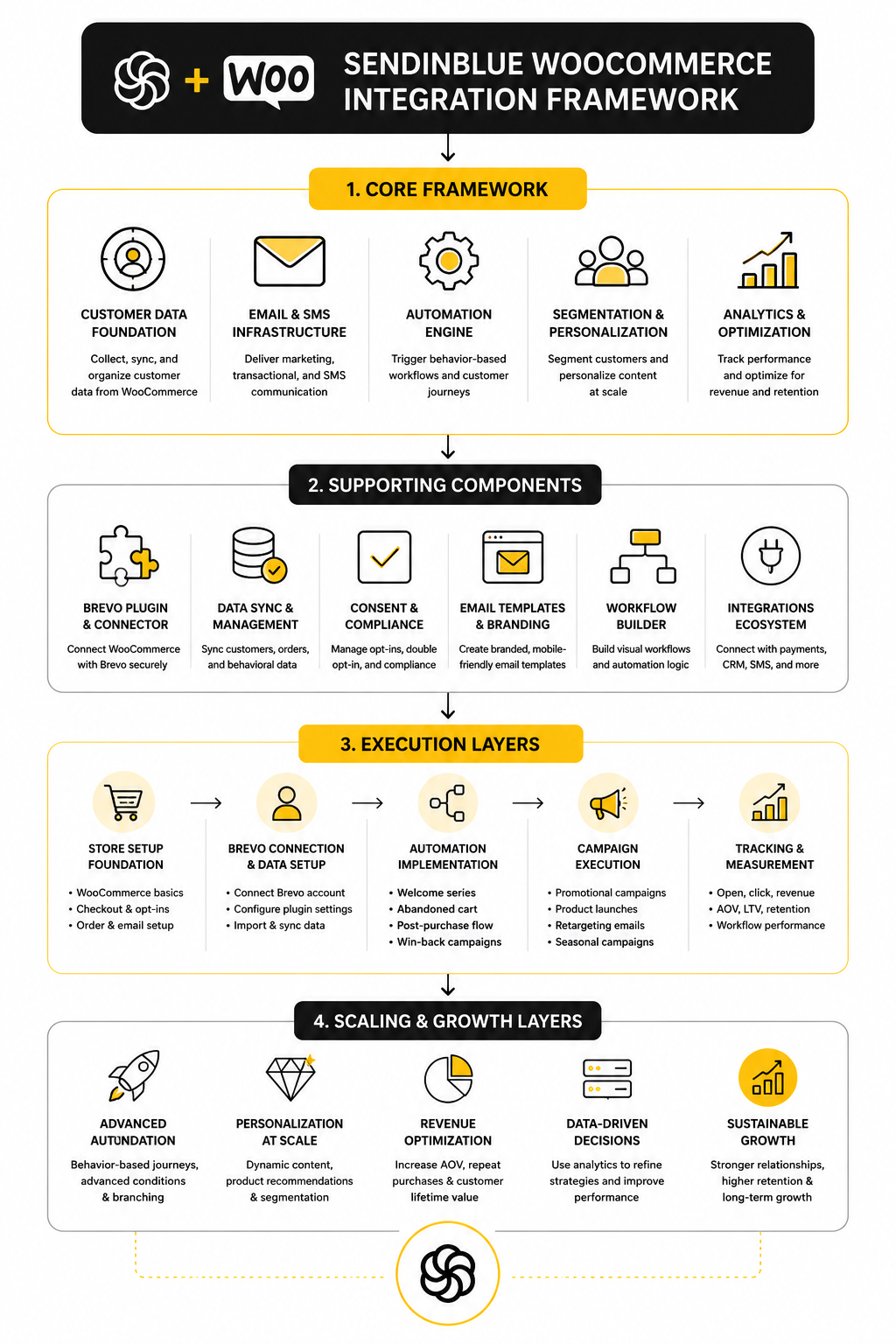
Framework Overview
The easiest way to understand a Sendinblue WooCommerce setup is to think in four layers: data, consent, messaging, and measurement. Data is the customer and order information moving from WooCommerce into Brevo. Consent defines who can receive which type of communication, especially newsletters and promotional campaigns.
Messaging is where most people focus first, but it should come after the first two layers. Once data and consent are clean, you can build campaigns, automations, transactional emails, SMS flows, and lifecycle messages with more confidence. Measurement then closes the loop by showing what is working, what is creating revenue, and where customers are dropping off.
This framework keeps the setup practical. It helps you avoid the common trap of installing the plugin, sending one campaign, and calling the job done. A professional setup is more like a revenue system: customer behavior enters, segmentation organizes it, automation responds to it, and reporting tells you what to improve next.
The Brevo And WooCommerce Framework
A good Sendinblue WooCommerce setup starts with a simple principle: WooCommerce should manage the transaction, while Brevo should manage the relationship around that transaction. That sounds obvious, but it changes how you plan the integration. You are not just “sending emails from WooCommerce”; you are building a system where customer activity becomes useful marketing data.
Brevo’s WooCommerce plugin is designed to sync store data, contacts, order activity, and customer events into Brevo so the marketing side has something real to work with. The official plugin uses Brevo’s API to synchronize contacts, send emails, and return performance statistics inside the connected system. That is the foundation, because automation without clean data is just guesswork with better-looking templates.
The framework is easiest to understand as a flow. A visitor browses products, joins a list, adds an item to cart, places an order, or disappears before checkout. WooCommerce captures the commerce event, and Brevo turns that event into a communication opportunity.
The Four Layers Of The Setup
The first layer is store data. This includes customer details, order history, product purchase behavior, and ecommerce attributes that help Brevo understand what someone has actually done in the store. When this layer is weak, every campaign starts to feel generic because the system cannot tell the difference between a new subscriber, a repeat buyer, and someone who only abandoned a cart.
The second layer is tracking. Brevo’s WooCommerce setup can install tracking so customer activity such as product views, cart updates, and purchases can be sent into Brevo in real time. This matters because the best ecommerce messages are usually triggered by behavior, not by a random date on a marketing calendar.
The third layer is consent and list management. This is where you separate customers, subscribers, newsletter opt-ins, and transactional email recipients. You need this separation because a person who bought from your store is not automatically the same as a person who agreed to receive promotional campaigns.
The fourth layer is automation and reporting. Once the first three layers are working, Brevo can support welcome flows, cart recovery, post-purchase messaging, product follow-ups, SMS campaigns, and performance tracking. This is where the integration starts feeling less like a plugin and more like a real customer communication engine.
How Data Should Move Between WooCommerce And Brevo
The cleanest version of the setup is directional but connected. WooCommerce remains the place where products, checkout, payments, shipping, taxes, and order records live. Brevo receives the customer and behavioral data it needs to communicate intelligently without taking over the store’s operational backbone.
This means your Brevo contact records should become more useful over time. A first-time buyer should not sit in the same mental bucket as someone who has ordered five times. A customer who bought a product yesterday should not receive the same message as someone who has not engaged for six months.
That is why syncing historical and new WooCommerce data matters. Historical data gives Brevo context immediately, while new data keeps the system fresh as buyers continue interacting with the store. Without both, the setup can look connected on the surface while still producing shallow segmentation underneath.
What Brevo Should Handle
Brevo should handle the communication layer that happens before, during, and after the sale. That includes email campaigns, automation workflows, SMS messaging when appropriate, signup forms, segmentation, and transactional email delivery if you choose to route those emails through Brevo. The goal is not to use every feature at once; the goal is to use the right features in the right order.
For many WooCommerce stores, the first practical use case is list growth. You can use forms and opt-in points to bring subscribers into Brevo, then separate those subscribers from ordinary customer records. That gives you a cleaner base for newsletters, launches, seasonal campaigns, and product education.
The next practical use case is behavior-based automation. Brevo supports workflows that can react to list joins, ecommerce events, website activity, purchases, and transactional activity. In plain English, that means your store can respond when someone does something meaningful instead of waiting for you to manually create another broadcast.
What WooCommerce Should Continue Handling
WooCommerce should continue handling the parts of the business that require direct store control. Product pages, cart rules, checkout fields, payment gateways, tax logic, shipping methods, stock status, refunds, and order management should stay inside WooCommerce and its trusted ecommerce stack. Brevo can support the customer experience around those actions, but it should not be treated as the operational source of truth.
This matters even more when the store grows. A small store can sometimes get away with messy workflows because the owner knows every order personally. A larger store needs cleaner boundaries because support, fulfillment, marketing, and finance all depend on the order record being accurate.
The right mindset is simple: WooCommerce records what happened, and Brevo helps you decide what to say next. When that boundary is clear, the integration becomes easier to maintain. When that boundary is blurred, troubleshooting becomes painful because you no longer know whether a problem belongs to the store, the plugin, the email system, or the automation logic.
The Customer Journey Map
A Sendinblue WooCommerce framework should follow the customer journey instead of starting with tool features. The journey usually begins with discovery, then moves into signup, product browsing, cart activity, purchase, delivery, post-purchase support, repeat purchase, and long-term retention. Each stage has a different communication job.
At the signup stage, the job is trust. A welcome email should confirm the value of joining, set expectations, and guide the person toward the next useful action. It should not immediately overwhelm them with every product and promotion in the store.
At the cart and checkout stage, the job is clarity. If someone abandons a cart, the follow-up should remove friction and remind them what they were considering. If someone completes an order, the next message should reinforce confidence, explain what happens next, and reduce support questions.
At the post-purchase stage, the job is momentum. This is where many stores leave money on the table because they stop communicating once the payment clears. A stronger setup uses Brevo to send product education, review requests, replenishment reminders, cross-sell suggestions, loyalty messages, and win-back campaigns when the timing makes sense.
The Implementation Logic
The correct order is not campaign first. The correct order is connection, data, consent, segmentation, automation, testing, and then scaling. This is the part people skip, and it is usually why their Sendinblue WooCommerce setup feels underwhelming.
Start by connecting the official Brevo WooCommerce integration and confirming that the sync is actually moving the right data. Then check whether contacts, customer attributes, order data, and behavioral events are arriving in a way your team can understand. Do not build five automations before you know whether the trigger data is reliable.
After that, define the segments you truly need. Most stores do not need a hundred segments on day one. They need a small set of useful groups such as new subscribers, first-time buyers, repeat buyers, high-value customers, abandoned cart contacts, inactive customers, and product-specific buyers.
Once those segments are clear, automation becomes much easier. You can build workflows around real customer states instead of vague assumptions. That is the point of the framework: make the system simple enough to operate, but structured enough to grow.
Core Components Of A Reliable Setup
A reliable Sendinblue WooCommerce setup is not built from one plugin setting. It is built from several components working together without creating friction for the customer or confusion for your team. The goal is to make sure the right data moves into Brevo, the right people enter the right lists, and the right messages fire only when they should.
This is where the setup becomes practical. You are no longer thinking about Brevo as a dashboard or WooCommerce as a store plugin. You are thinking about the connection between customer behavior, consent, order activity, segmentation, and communication.
The best implementation is boring in the right way. It syncs cleanly, triggers consistently, and gives you enough visibility to fix problems before they become expensive. That is what you want.
The Brevo Account Foundation
Before touching WooCommerce, your Brevo account needs a clean foundation. That means your sender identity, company profile, authentication settings, lists, attributes, and basic campaign defaults should be organized before store data starts flowing in. If the account is messy before the integration, the integration usually makes the mess bigger.
Start with the sender details because they affect trust. Customers need to recognize who the email is from, especially when emails relate to orders, shipping, billing, or abandoned carts. A confusing sender name can make a legitimate message feel suspicious, which is the last thing you want near checkout.
Then define the basic structure inside Brevo. You do not need a complicated system at this stage, but you do need a home for WooCommerce contacts, newsletter subscribers, customers, and automation-specific groups. This gives the integration somewhere logical to place people once the sync begins.
The WooCommerce Store Foundation
Your WooCommerce store also needs to be ready before you connect it to Brevo. Check that WooCommerce is updated, the checkout works properly, order emails are functioning, and customer account behavior matches how your store actually sells. A marketing integration cannot rescue a broken checkout.
This is especially important if your store uses a heavy plugin stack. Checkout plugins, cart plugins, subscription plugins, membership tools, caching systems, and custom checkout fields can all affect how data is captured or passed. Before adding Brevo into the system, you want to know that the store’s core flow is stable.
You should also review the customer fields you collect. If you ask for unnecessary information, you create friction. If you collect too little, your segmentation and personalization will be limited. The right balance depends on the store, but the principle is the same: collect what you will actually use.
Contact Sync
Contact sync is the backbone of the setup. The official Brevo WooCommerce plugin can sync WooCommerce leads and customers into Brevo, which gives your email system a customer base to work with. This is the part that turns WooCommerce activity into contact records instead of isolated transactions.
The important detail is not just whether contacts sync. It is whether they sync into a structure you can actually use. New subscribers, buyers, guest checkout customers, and existing customers should not all be treated the same in your planning, even if some of them start in the same broad contact database.
You also need to think about historical data. Syncing only new contacts can work for a brand-new store, but established stores usually need old customers brought into the system too. That gives Brevo immediate context for segmentation, retention campaigns, and post-purchase communication.
Order And Event Data
Order data is what makes ecommerce automation useful. Without it, Brevo can send newsletters, but it cannot properly understand what someone bought, when they bought it, or how their relationship with the store is changing. For a WooCommerce store, that is the difference between generic email marketing and customer-aware marketing.
Event data adds another layer. Brevo’s WooCommerce integration can support automation triggers around customer behavior such as abandoned carts, page visits, and product purchases. These events help the system react when the customer is active, not days later when the moment has already passed.
This is where many stores find the real value. A customer who viewed a product, added it to cart, and left is in a different state than someone who joined a newsletter but never browsed. A buyer who purchased a consumable product is in a different state than a buyer who purchased a one-time digital download. Order and event data let your marketing respect those differences.
Consent And Subscription Handling
Consent handling needs to be clean from the beginning. A customer can place an order without necessarily agreeing to receive promotional emails. That distinction matters for deliverability, customer trust, and compliance.
Your WooCommerce checkout should make the subscription choice clear. If you use a newsletter opt-in, the wording should explain what the person is signing up for without hiding the intent. This is not just a legal checkbox issue; it is a trust issue.
Inside Brevo, consent should influence how you segment and message people. Transactional emails can serve the order relationship, while promotional campaigns should go to people who have opted in appropriately. Keep that boundary clean, because sloppy consent management can damage the whole channel.
Transactional Email Decisions
Transactional emails deserve special attention because they are not the same as newsletters. Order confirmations, account updates, password resets, and shipping-related emails are expected by the customer and tied directly to the transaction. They need to arrive reliably and look professional.
Brevo allows WooCommerce stores to use Brevo-designed templates for order-related emails, or keep WooCommerce’s default transactional email behavior depending on the setup. That flexibility is useful, but it also means you need to decide what Brevo should own and what WooCommerce should keep handling. Do not change transactional email routing casually.
The practical approach is to test before you switch anything important. Place test orders, check the email content, review the sender details, confirm links work, and make sure the message still reflects the order accurately. Transactional emails are not where you want surprises.
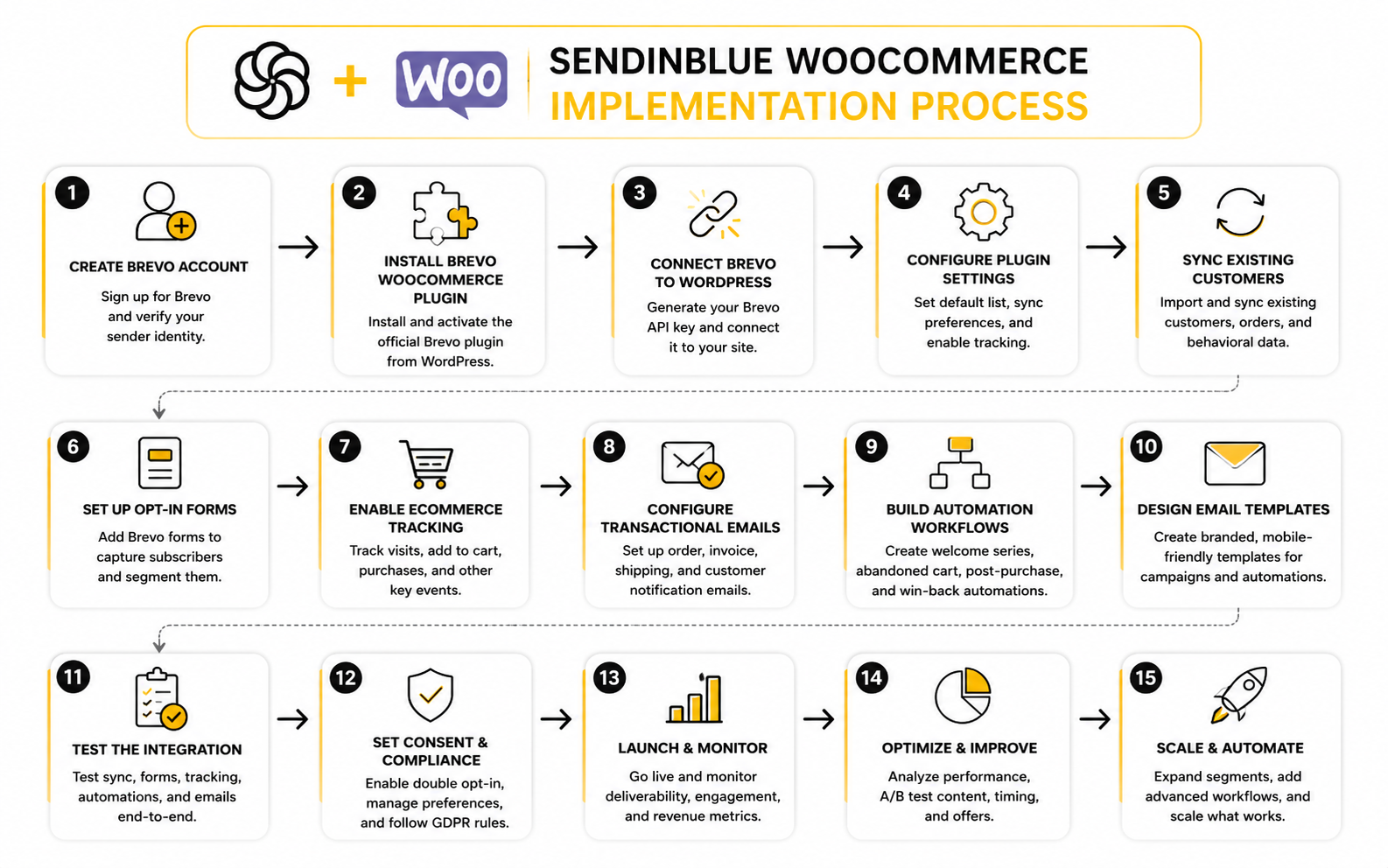
Professional Implementation Workflow
The implementation should follow a clear order. When people rush this, they usually build automations on top of incomplete data, then spend weeks wondering why triggers misfire or segments look wrong. A clean process saves time because each step confirms the previous one.
Here is the practical workflow:
This order matters. You want to validate the data before you rely on it. You want to validate consent before you send promotions. You want to validate transactional messages before customers depend on them.
Step 1: Prepare Brevo Before Connecting WooCommerce
Create the core lists and attributes first. At minimum, you should know where WooCommerce contacts will go, how newsletter subscribers will be identified, and which attributes matter for segmentation. Common useful attributes include customer status, last order date, total order value, product interest, and opt-in source.
Do not overbuild this. Too many lists can become harder to manage than too few. The starting goal is a structure your team can understand at a glance.
Once the structure is ready, check sender authentication and branding. Your email templates should look like your store, not like a disconnected third-party system. Brand consistency matters because ecommerce emails often arrive at high-intent moments.
Step 2: Install The Brevo WooCommerce Plugin
Install the official Brevo plugin from the WordPress plugin directory or through your WordPress admin area. The plugin is designed to connect WooCommerce with Brevo, sync store data, and support marketing automation directly from the ecommerce environment. Use the official plugin rather than random third-party connectors unless you have a specific technical reason not to.
After activation, connect the plugin to your Brevo account. Make sure you are using the right account if you manage multiple brands, stores, or client projects. Connecting the wrong account is an easy mistake, and it can create a messy contact database fast.
Once connected, review each setting instead of clicking through quickly. The settings control what syncs, how subscribers are handled, and which communication features become active. Treat this like infrastructure, not like a cosmetic plugin.
Step 3: Sync Contacts And Customers Carefully
Start the contact sync with intention. If your store has an existing customer base, decide whether you want to sync historical customers immediately or test with a smaller group first. For a large store, a staged approach can make troubleshooting much easier.
After the sync, check sample records in Brevo. Look at a new subscriber, a past customer, a guest checkout customer, and a recent buyer. The goal is to confirm that the data makes sense inside Brevo, not just that a sync completed.
Pay attention to duplicates and missing fields. Duplicates can weaken segmentation, and missing fields can break automation logic. It is better to catch those issues now than after a campaign has already gone out.
Step 4: Validate Ecommerce Events
Once contacts are syncing, test ecommerce behavior. Visit a product, add it to cart, abandon the cart, complete a checkout, and review what appears in Brevo. This confirms whether the Sendinblue WooCommerce connection is capturing the events your automations will depend on.
Do not assume every event is working because one event worked. Product views, cart activity, checkout activity, and purchases can behave differently depending on caching, checkout customization, consent settings, and theme behavior. Each important event deserves its own test.
Keep the testing practical. You do not need a giant QA spreadsheet to start, but you do need proof that the journey works. A few controlled test orders can reveal problems that would otherwise stay hidden until real customers are affected.
Step 5: Configure Newsletter Opt-In Points
Your opt-in points should match the way people actually enter your store’s world. That may include checkout opt-ins, footer forms, popup forms, embedded signup forms, or dedicated landing pages. The key is that each opt-in should create a clean and understandable contact state in Brevo.
Be careful with aggressive signup tactics. A bigger list is not automatically better if the wrong people join for the wrong reason. You want subscribers who understand what they are getting and are likely to engage.
This is also where tools beyond Brevo may fit the stack, but only when they serve a clear purpose. If your store needs dedicated landing pages or funnels outside the normal WooCommerce flow, a tool like ClickFunnels can be useful for campaign-specific acquisition. If the priority is keeping email, automations, and forms inside the same ecosystem, Brevo should stay the center.
Step 6: Build The First Essential Automations
Start with the automations that match the highest-intent moments. For most WooCommerce stores, that means a welcome flow, abandoned cart reminders, post-purchase follow-up, and a simple win-back sequence. These are practical because they map to real customer behavior.
Do not build advanced branches before the basic flows are proven. A complicated automation can look impressive while quietly underperforming because the offer, timing, or trigger is wrong. Simple flows are easier to test, easier to improve, and easier to trust.
The best first version is usually direct. Welcome new subscribers, remind cart abandoners, support new buyers, and re-engage inactive customers. Once those flows are working, you can add segmentation, product-specific logic, SMS, and deeper personalization.
Step 7: Test The Journey Like A Customer
Testing should feel like walking through the store as a real person. Join the list, browse products, add something to cart, abandon, return, purchase, and wait for the expected messages. Then read every email from the customer’s point of view.
Check the boring details too. Are the links correct? Does the discount code work? Does the order confirmation match the order? Does the unsubscribe link appear where it should? Does the sender name feel trustworthy?
This step is not optional. A Sendinblue WooCommerce setup can be technically connected and still feel broken to the customer. The only way to know is to experience the journey yourself before pushing more traffic into it.
Statistics And Data
Measurement is where a Sendinblue WooCommerce setup becomes honest. It is easy to feel productive because campaigns are going out, automations are running, and dashboards are filling up with numbers. The real question is whether those numbers are helping you make better decisions.
The goal is not to chase every metric. The goal is to understand which signals show deliverability health, which signals show customer interest, and which signals show revenue impact. Once you separate those categories, the data becomes useful instead of noisy.
This matters because WooCommerce stores often misread email performance. A campaign can have a strong open rate and weak sales. An abandoned cart flow can have fewer sends than a newsletter but still produce more valuable revenue. A low unsubscribe rate can look comforting while the list quietly goes inactive.
The Metrics That Actually Matter
Start with deliverability metrics because nothing else matters if emails are not reaching inboxes. Delivery rate, bounce rate, spam complaints, and unsubscribe rate tell you whether your sending foundation is healthy. These are not glamorous numbers, but they protect the channel.
Then look at engagement metrics. Opens can still be useful as a directional signal, but privacy changes and automatic image loading mean they should not be treated as perfect truth. Click rate and click-to-open rate usually tell you more about whether the message, offer, and audience matched.
Finally, focus on commercial metrics. For ecommerce, the most important numbers are revenue per email, conversion rate, recovered cart revenue, repeat purchase rate, average order value, and customer lifetime value. These are the numbers that connect Brevo activity back to WooCommerce performance.
Why Benchmarks Are Useful But Dangerous
Benchmarks are helpful when they give you a rough sense of reality. They become dangerous when you treat them like universal targets. A luxury furniture store, a supplement brand, and a digital download store should not expect the same email behavior just because they all use WooCommerce.
For example, broad email benchmark data from MailerLite’s 2025 benchmark report shows average open rates, click rates, and unsubscribe rates across industries. That is useful context, but it is not a direct diagnosis of your store. Your list source, product category, price point, buying cycle, offer strength, and email frequency all change the meaning of those numbers.
Cart abandonment benchmarks need the same caution. Baymard’s long-running checkout research places the average cart abandonment rate around 70% across ecommerce studies, which explains why abandoned cart automation is usually one of the first workflows worth building. But your own abandonment rate is more important than the global average, because it reflects your checkout friction, shipping transparency, payment options, and customer trust.
How To Read Open Rates
Open rate is best treated as a directional health signal. If opens drop sharply across multiple campaigns, something may be wrong with sender reputation, subject lines, audience quality, timing, or list fatigue. If opens rise, it may mean your targeting and positioning are improving.
But open rate should not be the main scoreboard. Apple Mail Privacy Protection and other inbox behavior can inflate or distort open tracking, so a high open rate does not automatically mean high buyer intent. This is why you should never optimize a Sendinblue WooCommerce system around opens alone.
Use opens to identify patterns, not to declare victory. Compare similar campaigns against each other, such as product launch emails against past product launch emails. That gives you a more realistic view than comparing one random campaign against a generic industry benchmark.
How To Read Click Rates
Click rate is a stronger signal because it shows active intent. Someone clicked because the email gave them a reason to move toward the store, a product page, a cart, or a piece of content. In ecommerce, that movement matters.
A low click rate can mean the email was sent to the wrong segment, the offer was unclear, the product was not relevant, or the call to action was weak. It can also mean the email tried to do too much. When a campaign has five competing messages, the reader often chooses none of them.
For WooCommerce stores, clicks should be evaluated by destination. A click to a product page, cart recovery link, reorder page, or category page carries different intent than a click to a generic blog post. Brevo can help you see campaign-level engagement, but the real interpretation comes from connecting that behavior back to WooCommerce sales activity.
How To Read Conversion And Revenue
Conversion rate is where the setup gets serious. A click without a purchase can still be useful, but a purchase proves the message moved someone through the buying path. That is why revenue tracking should sit close to your email reporting, not in a separate mental bucket.
The key is to avoid judging every email by immediate sales. A welcome email may build trust. A post-purchase email may reduce support tickets. A replenishment reminder may drive revenue later. A review request may improve conversion on future product pages.
Still, ecommerce email should eventually connect to money. Track revenue per campaign, revenue per automation, revenue per recipient, and recovered revenue from cart flows. Those numbers show whether your Sendinblue WooCommerce system is creating business value instead of only producing activity.
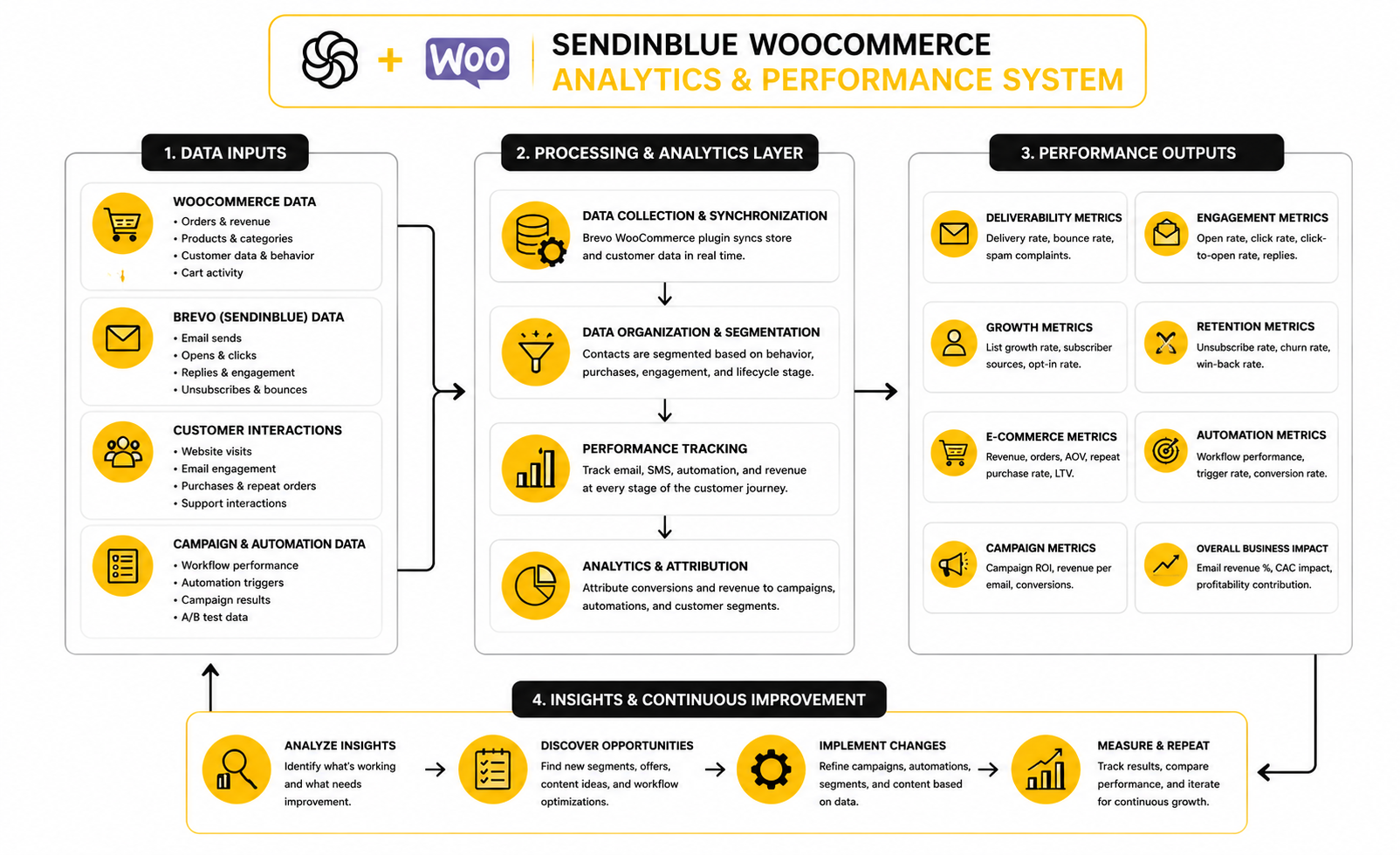
The Analytics System To Build
A clean analytics system should follow the customer journey. That means you measure list growth first, then engagement, then buying behavior, then retention. Each stage answers a different question.
At the list growth stage, ask whether the right people are entering Brevo. Track opt-in source, signup rate, form performance, and subscriber quality. A popup that adds many subscribers but produces poor engagement may not be as valuable as a checkout opt-in that adds fewer but better contacts.
At the engagement stage, ask whether subscribers are responding. Track opens directionally, clicks carefully, and unsubscribes seriously. If engagement falls, do not simply send more emails; improve the match between audience, message, offer, and timing.
At the buying stage, ask whether email is helping customers purchase. Track campaign revenue, automation revenue, cart recovery, product clicks, and purchase timing. This is where WooCommerce data and Brevo activity need to be interpreted together.
At the retention stage, ask whether email is helping customers come back. Track repeat purchase rate, time between orders, win-back performance, review generation, and customer lifetime value. Retention is where a good email system often becomes much more profitable than a constant hunt for new traffic.
Campaign Performance Signals
Campaigns are best measured against their purpose. A flash sale email should be judged by clicks, conversions, revenue, and urgency. A product education email should be judged by engagement, assisted sales, and follow-up behavior.
This is why one campaign report never tells the whole story. If a product education email has modest direct revenue but improves conversion for people who later receive a sales email, it still did useful work. If a discount email creates revenue but trains customers to wait for discounts, the short-term win may create a long-term problem.
For Brevo campaigns, build a habit of tagging or naming campaigns clearly. Use names that show the audience, offer, and purpose. Six months later, you should be able to compare campaigns without guessing what each one was supposed to do.
Automation Performance Signals
Automations need a different lens because they run continuously. A newsletter is a one-time push, but a welcome flow, cart recovery sequence, or post-purchase flow becomes part of the store’s operating system. That means small improvements can compound over time.
For each automation, track entry volume, completion rate, email engagement, conversion rate, revenue, unsubscribes, and drop-off points. If many people enter the flow but few click, the message may not match their stage. If many people click but few buy, the issue may be the offer, product page, checkout, shipping cost, or trust signals.
Abandoned cart automation deserves special attention. Since ecommerce abandonment is structurally high, cart flows often recover revenue that would otherwise disappear. But the point is not to spam people back to checkout; the point is to remove doubt, remind them of the product, and make the next step easier.
Segmentation Performance Signals
Segmentation should improve relevance. If segmented campaigns do not outperform broad campaigns over time, the segments may be poorly defined or the messaging may not be different enough. A segment is only useful if it changes what you say, when you say it, or what you offer.
Useful WooCommerce segments usually come from behavior. First-time buyers, repeat buyers, VIP customers, category buyers, inactive customers, recent cart abandoners, and product-specific buyers all give you more meaningful context than a generic master list. These segments help you avoid treating every customer like they are in the same buying moment.
Measure each segment against itself over time. Compare repeat buyer campaigns to past repeat buyer campaigns. Compare win-back campaigns to past win-back campaigns. That gives you a cleaner read than comparing a warm VIP segment against a cold newsletter audience.
Deliverability Performance Signals
Deliverability is the quiet constraint behind every email result. If your emails are landing poorly, every campaign looks weaker than it really is. If your list quality is poor, sending more often can make the problem worse.
Watch bounce rate, complaint rate, unsubscribes, inactive subscribers, and sudden engagement drops. These signals tell you whether your list is healthy and whether your sending behavior is creating risk. A healthy Sendinblue WooCommerce setup should not just send more; it should send better.
List hygiene matters here. Remove or suppress people who never engage, avoid importing questionable contacts, and be careful with old customer lists that have not heard from you in years. Revenue from email depends on trust, and deliverability is one of the ways inbox providers measure that trust.
What The Data Should Make You Do
Data should lead to action. If cart emails get clicks but not purchases, inspect the checkout, shipping costs, discount logic, and product page. If welcome emails get opens but no clicks, sharpen the promise and give the reader one clear next step.
If post-purchase emails are ignored, check whether they arrive at the right time and whether they actually help the customer. A generic “thanks for your order” message is fine, but a useful setup can do more. It can explain product use, answer common questions, introduce complementary products, or ask for a review after the customer has had enough time to experience the product.
If campaigns create unsubscribes, do not panic after one email. Look for patterns. If unsubscribes rise when you email too often, reduce frequency. If they rise when you promote unrelated products, tighten segmentation. If they rise after aggressive discounts, rethink the relationship you are building with the list.
The Reporting Rhythm
You do not need to analyze everything every day. Daily checking often creates anxiety and reactionary decisions. A better rhythm is to review operational issues weekly, campaign performance after each send, and strategic trends monthly.
Weekly, look for problems: sync issues, deliverability drops, broken automations, failed transactional emails, and abnormal unsubscribe spikes. Monthly, look for direction: list growth, revenue from email, automation contribution, segment performance, and repeat purchase behavior. Quarterly, decide what to rebuild, simplify, or scale.
This rhythm keeps your Sendinblue WooCommerce setup practical. You are not drowning in dashboards. You are using measurement to make the store more carefully, one decision at a time.
Automation, Segmentation, And Revenue Use Cases
Once the foundation is stable and the numbers are readable, the next question is how far you should take the system. This is where a Sendinblue WooCommerce setup can become much more valuable, but also much easier to overcomplicate. More workflows do not automatically mean better marketing.
The better move is to build around customer states. A subscriber, a first-time buyer, a repeat buyer, a cart abandoner, a dormant customer, and a VIP customer are not in the same relationship with your store. Your automation should respect that instead of pushing everyone through the same generic funnel.
This part is where strategy matters more than settings. Brevo gives you the tools to send emails, SMS messages, transactional updates, and automated workflows, but the tool cannot decide your customer experience for you. That part is on the operator.
Start With Lifecycle Automation
Lifecycle automation is the cleanest way to organize the system. Instead of thinking in random campaigns, you think in stages: first contact, first purchase, repeat purchase, loyalty, inactivity, and reactivation. Each stage should have a clear business purpose and a clear customer benefit.
A welcome flow should help new subscribers understand what your store sells, why it is different, and what action to take next. A first-purchase flow should reinforce confidence, answer common questions, and reduce buyer hesitation after checkout. A repeat-purchase flow should make the next purchase feel natural rather than forced.
This keeps your Sendinblue WooCommerce automation grounded in the customer journey. You are not sending because the calendar says Tuesday. You are sending because the customer’s behavior created a useful moment.
Build Around The Highest-Intent Moments
The highest-intent moments deserve the most attention because they are closest to revenue. Cart abandonment, checkout abandonment, product interest, repeat purchase timing, and replenishment windows are all stronger signals than a cold newsletter open. These moments show that the customer is already moving.
For abandoned carts, the goal is not to shout “finish your order” three times. The goal is to remove friction. That might mean reminding them what they left behind, clarifying shipping, answering a common objection, or making the return path to checkout simple.
For post-purchase flows, the goal is not to instantly upsell every buyer. The goal is to help the customer succeed with the product they already bought. When the first experience is good, repeat purchases and referrals become much easier to earn.
Use Segmentation To Change The Message
Segmentation only matters when it changes what you send. If every segment receives the same copy, same offer, and same timing, the segmentation is mostly decoration. The point is to make the message more relevant.
A first-time buyer may need reassurance, onboarding, and proof that they made a good choice. A repeat buyer may respond better to early access, loyalty messaging, bundles, or product recommendations tied to past purchases. A high-value customer should not be treated like a random discount hunter.
Product-specific segments can be especially useful in WooCommerce. If someone bought a skincare product, coffee subscription, replacement part, digital course, or seasonal item, the next logical message should reflect that context. This is where Brevo’s contact attributes and ecommerce data become more powerful than a simple email list.
Avoid The Discount Trap
Discounts can work, but they are not a strategy by themselves. If every abandoned cart email, win-back email, and holiday campaign depends on a coupon, customers learn to wait. That can damage margin and train the list to ignore anything that is not a deal.
A better approach is to use discounts intentionally. Give them to the right segment, for the right reason, with a clear business case. A first-time subscriber incentive is different from a VIP reward, and both are different from a desperate win-back offer.
You should also test non-discount levers. Free shipping thresholds, product education, guarantees, bundles, social proof, limited availability, and better checkout clarity can all improve performance without immediately cutting price. Protecting margin is part of good marketing.
Coordinate Campaigns With Automations
Campaigns and automations should not fight each other. A customer who just bought should not immediately receive a generic “come back and buy now” campaign that ignores the order they placed yesterday. A customer in a cart recovery flow should not be bombarded with unrelated promotions at the same time.
This is where suppression logic becomes important. Exclude recent buyers from certain sales emails. Pause promotional pressure during sensitive post-purchase windows. Avoid sending win-back messages to customers who have already returned.
Good coordination makes the brand feel more carefully. Bad coordination makes the brand feel noisy. The customer may not know which workflow caused the problem, but they will feel the disconnect.
Decide When SMS Belongs In The Mix
SMS can be powerful because it is immediate, but that is exactly why it should be used carefully. A text message feels more personal and more intrusive than an email. If you use it for weak reasons, customers will opt out fast.
SMS is usually best for high-urgency or high-utility moments. Order-related updates, time-sensitive offers, back-in-stock alerts, appointment-style reminders, and limited launch windows can make sense when consent is clear. Generic promotional blasts are much riskier.
If you use Brevo for SMS alongside WooCommerce, keep frequency tight and value obvious. The customer should instantly understand why the message deserved a place on their phone. If you cannot justify that, send an email instead.
Plan For Product Recommendations Carefully
Product recommendations can lift performance, but only when they make sense. Random recommendations feel lazy. Relevant recommendations feel helpful.
Start with simple logic before chasing advanced personalization. Recommend accessories for products that naturally need accessories. Suggest refills or replacements when the buying cycle supports it. Promote category-adjacent products only when past purchase behavior shows a reasonable connection.
As the store grows, recommendation logic can become more sophisticated. But the same rule still applies: the recommendation should feel like a natural next step for the customer, not just a way to push inventory. That is the difference between useful personalization and noise.
Watch The Cost Of Complexity
Every new segment, workflow, condition, and branch creates maintenance cost. At first, that cost is invisible. Later, it shows up as broken logic, outdated offers, conflicting emails, and reporting that nobody trusts.
This is why mature operators simplify aggressively. They keep the flows that drive revenue, remove the ones that do not, and document the logic that matters. A lean system that everyone understands will usually outperform a complicated system nobody wants to touch.
Before adding a new workflow, ask three questions:
If you cannot answer those questions clearly, the automation is not ready.
Prepare For Scaling Issues
A small WooCommerce store can run on simple rules. A growing store needs better governance. As order volume, traffic, list size, and campaign frequency increase, small mistakes become more expensive.
Scaling introduces practical issues. Contact data may become harder to keep clean. More products create more segmentation paths. More campaigns increase the chance of overlapping messages. More revenue from email makes deliverability more important because an inbox problem can directly affect cash flow.
This is also when team roles matter. Someone needs to own the Brevo account structure, someone needs to review campaign quality, someone needs to monitor deliverability, and someone needs to connect marketing performance back to WooCommerce sales. Without ownership, the system slowly decays.
Know When Brevo Is Enough And When You Need More
For many WooCommerce stores, Brevo is enough for email marketing, automation, SMS, transactional messaging, forms, and basic customer communication. That is a strong stack when the store needs practical execution without enterprise-level complexity. It is especially useful when you want email volume-based pricing and a unified communication platform.
But some businesses eventually need additional tools around the edges. A store that needs advanced landing page testing may use a dedicated funnel builder like ClickFunnels. A service-heavy business with pipelines, calls, bookings, and sales teams may need a broader CRM and automation platform like GoHighLevel.
The point is not to stack tools for the sake of it. The point is to keep Brevo focused on what it does well in the WooCommerce system and add another platform only when there is a clear operational gap. Tool sprawl is expensive, even when the subscription looks cheap.
Protect Customer Trust As You Grow
The biggest risk in advanced automation is losing the human feel. When every click creates a trigger and every segment gets a campaign, the customer can start feeling managed instead of served. That is a bad trade.
Customer trust is built through relevance, timing, honesty, and restraint. Send useful messages. Make offers clear. Respect consent. Give customers control over unsubscribing or changing preferences. Do not pretend an automation is personal if it obviously is not.
This matters because email revenue is not just extracted from a list. It is earned from a relationship. The better your Sendinblue WooCommerce setup respects that relationship, the longer the channel stays profitable.
Optimization, Troubleshooting, And FAQ
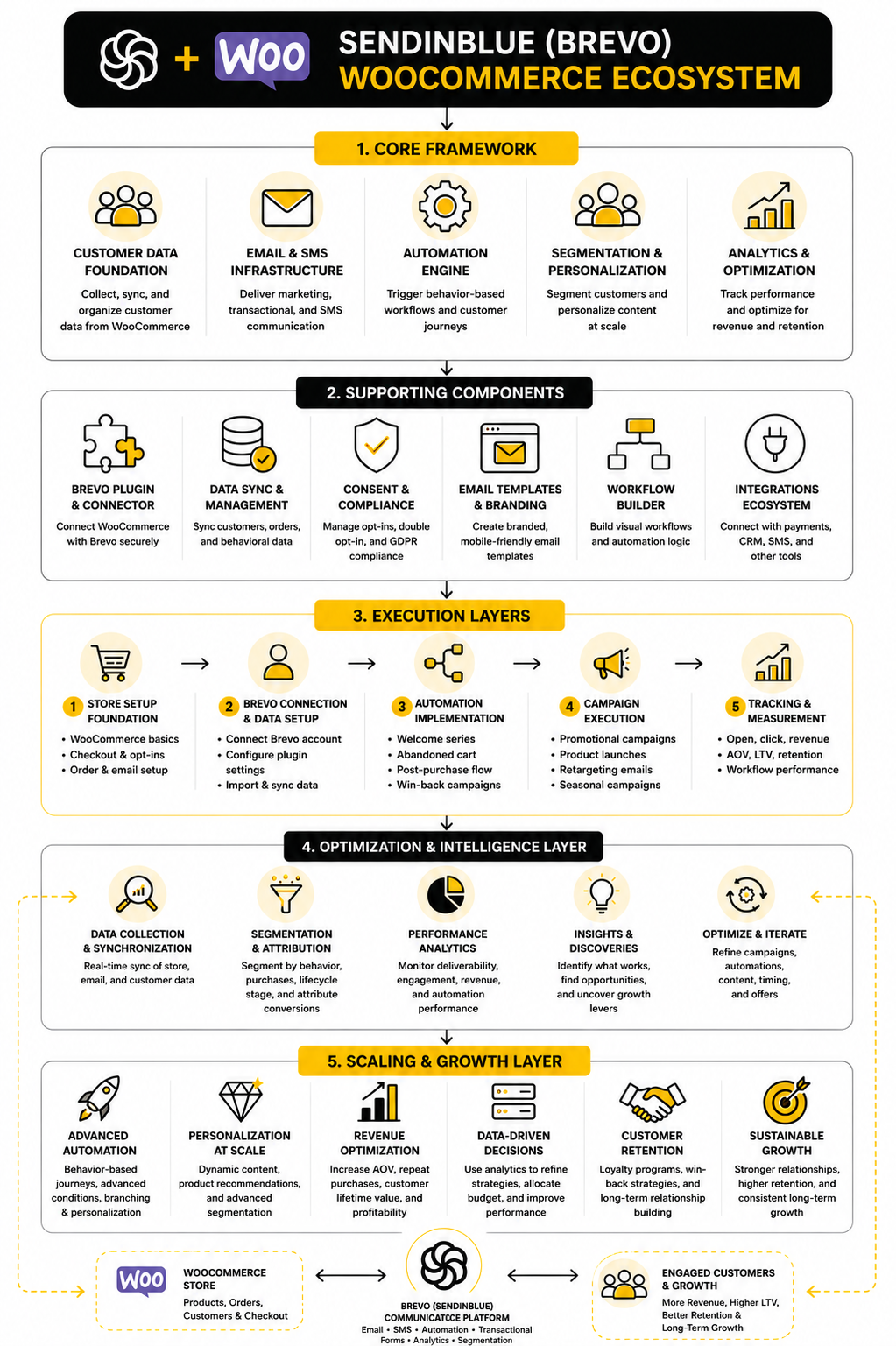
At this stage, the Sendinblue WooCommerce setup should no longer feel like a plugin installation. It should feel like a customer communication system that connects store behavior, email, automation, reporting, and retention. The final work is to keep that system healthy.
Optimization is not about changing everything every week. It is about watching the right signals, fixing weak points, and improving the customer journey without creating unnecessary complexity. The stores that win with Brevo are usually not the ones with the fanciest automation map; they are the ones with the cleanest logic and the most consistent follow-through.
The final system should be easy to understand. WooCommerce captures the sale, Brevo manages the relationship, automations respond to behavior, campaigns support timely promotions, and reporting tells you what to improve next. That is the ecosystem.
Common Issues To Fix First
The most common problem is incomplete syncing. If contacts appear in Brevo but key customer details are missing, segmentation becomes weak and automation triggers can behave unpredictably. Start by checking the plugin connection, API access, sync settings, customer attributes, and whether WooCommerce data is being passed correctly.
The second common problem is automation overlap. A customer might receive a welcome email, a cart email, and a promotional campaign too close together if exclusions are not set properly. That feels messy to the buyer, even if each individual message is technically correct.
The third common problem is poor consent structure. If subscribers, customers, and transactional recipients are not clearly separated, your marketing can become risky and confusing. A clean Sendinblue WooCommerce setup should make it obvious who opted into promotions, who bought something, and who only needs transactional communication.
The Final System Checklist
Before calling the setup finished, run through the whole system like a professional operator. Do not only check whether the plugin is active. Check whether the customer experience makes sense from signup to repeat purchase.
Use this checklist as the final review:
This checklist is intentionally practical. It is not about building the most complicated system possible. It is about making sure the parts that matter actually work together.
Is Sendinblue The Same As Brevo?
Yes. Sendinblue rebranded as Brevo in 2023, so many older searches, tutorials, and plugin references still use the Sendinblue name. When people search for Sendinblue WooCommerce today, they are usually looking for the current Brevo WooCommerce integration.
The important thing is to use the current Brevo platform and official plugin where possible. Old Sendinblue terminology may still appear in URLs, plugin slugs, or older documentation, but the product you are setting up is Brevo. That is the name you should use when managing the account and planning the system.
What Does The Brevo WooCommerce Plugin Do?
The Brevo WooCommerce plugin connects your WooCommerce store with Brevo so store and customer data can support marketing, automation, SMS, transactional email, and reporting. It can help sync contacts, track customer activity, and make WooCommerce behavior available inside Brevo. That gives you a stronger base for lifecycle communication than a simple newsletter list.
The plugin is not a replacement for WooCommerce. WooCommerce still handles products, checkout, payments, orders, taxes, shipping, and store operations. Brevo handles the communication layer around those events.
Is Brevo Good For WooCommerce Email Marketing?
Brevo can be a good fit for WooCommerce stores that want email campaigns, automation, SMS, transactional messaging, contact management, and reporting in one practical platform. It is especially useful when you want to connect customer behavior to marketing actions without building a custom system from scratch. For many small and mid-sized stores, that is enough to create a serious retention engine.
The fit depends on your needs. If your store requires extremely advanced ecommerce personalization, deep enterprise analytics, or a large custom data warehouse, you may eventually need additional tools. But for a clean and commercially useful Sendinblue WooCommerce setup, Brevo is a strong starting point.
Do I Need Both The Brevo WordPress Plugin And The Brevo WooCommerce Plugin?
Usually, the WooCommerce-specific plugin is the better place to start for ecommerce use cases because it is built around store data and customer behavior. The general WordPress plugin focuses more on WordPress email, forms, SMTP, and contact synchronization. Some setups may use both, but you should avoid adding duplicate functionality without a clear reason.
The main risk is overlap. If two plugins try to control similar email, tracking, or contact behavior, troubleshooting gets harder. Start with the plugin that matches the job, then add another only if you know exactly what gap it fills.
Can Brevo Send WooCommerce Transactional Emails?
Yes, Brevo can be used for transactional emails depending on how you configure the system. Transactional emails include order confirmations, password resets, account updates, and other messages customers expect as part of the store experience. These emails need to be reliable because they are directly tied to trust and support.
Do not switch transactional email handling casually. Test order confirmations, sender details, template content, links, and deliverability before relying on Brevo for live customer communication. Transactional email is infrastructure, not decoration.
Can Brevo Recover Abandoned WooCommerce Carts?
Yes, Brevo can support abandoned cart recovery when customer and cart activity are tracked correctly. The practical value comes from sending a relevant follow-up when someone shows purchase intent but leaves before completing checkout. This is one of the most logical first automations for many WooCommerce stores.
A good cart recovery flow should not only push a discount. It should remind the customer what they left behind, reduce uncertainty, and make returning to checkout easy. If the cart flow gets clicks but not purchases, inspect shipping costs, checkout friction, payment options, and trust signals.
How Should I Segment WooCommerce Customers In Brevo?
Start with segments that change the message. Useful starting segments include new subscribers, first-time buyers, repeat buyers, high-value customers, cart abandoners, inactive customers, and product-specific buyers. These groups reflect real differences in customer behavior.
Avoid creating segments you will never use. A segment is only valuable if it changes timing, copy, offer, or follow-up. Too many unused segments make the account harder to manage and easier to break.
What Automations Should I Build First?
Build the automations closest to customer intent first. A welcome flow, abandoned cart flow, post-purchase flow, and win-back flow are usually the strongest starting set. These cover the moments where customers are entering, considering, buying, and drifting away.
Keep the first version simple. It is better to have four clear automations that work than fifteen complex workflows nobody understands. Once the basics are measured and stable, you can add product-specific branches, loyalty logic, SMS, and deeper personalization.
How Often Should A WooCommerce Store Email Its List?
There is no universal frequency that works for every store. The right cadence depends on product type, buying cycle, list quality, campaign value, and customer expectations. A store selling daily-use consumables can usually communicate differently than a store selling expensive one-time purchases.
The better question is whether each email has a clear reason to exist. If every campaign teaches, helps, launches, reminds, or offers something relevant, frequency becomes easier to sustain. If emails are filler, even a low frequency can feel annoying.
What Should I Measure First In Brevo?
Start with deliverability, engagement, and revenue. Delivery rate, bounces, spam complaints, unsubscribes, clicks, conversions, and automation revenue tell you whether the channel is healthy. Open rates can still be useful directionally, but they should not be the main decision-maker.
For ecommerce, always connect email data back to WooCommerce behavior. A campaign that gets clicks but no purchases is telling you something. The issue could be the offer, the audience, the product page, checkout friction, shipping cost, or customer trust.
Why Are My Brevo Automations Not Triggering?
Automation problems usually come from missing data, incorrect triggers, tracking issues, contact eligibility, or workflow logic. Start by confirming that the contact exists in Brevo, the relevant WooCommerce event was captured, and the person meets the automation conditions. Then check exclusions, wait steps, list membership, and whether the workflow is active.
Do not diagnose automation only from the workflow screen. Walk through the customer journey with a test contact and test order. That gives you a much clearer picture of where the breakdown happens.
Why Are Contacts Duplicated Or Missing In Brevo?
Duplicated or missing contacts usually point to sync configuration, email address handling, guest checkout behavior, imports, or multiple tools writing to the same contact database. The first step is to identify where the contact originated. Then compare the WooCommerce customer record, Brevo contact record, and any form or checkout tool involved.
Do not fix duplicates by randomly deleting contacts. You may remove useful order history or consent context. Clean the source of the problem first, then merge, suppress, or reorganize records carefully.
Should I Use Brevo SMS With WooCommerce?
Brevo SMS can make sense when the message is timely and valuable. Order-related updates, limited-time launches, back-in-stock alerts, and high-urgency reminders can work well when consent is clear. SMS should feel useful because it interrupts the customer more directly than email.
Avoid using SMS as a louder version of your newsletter. If the message is not important enough to justify a text, it should probably stay in email. Respecting that boundary protects trust and reduces opt-outs.
Is Brevo Enough For A Growing WooCommerce Store?
Brevo can be enough for many growing WooCommerce stores, especially when the main needs are email campaigns, automation, SMS, transactional messaging, and customer segmentation. The platform gives you a practical way to centralize communication without building a heavy custom stack. For a large number of ecommerce businesses, that is exactly what is needed.
At some point, the store may need additional tooling for advanced analytics, landing pages, sales pipelines, customer support, or data warehousing. That does not mean Brevo failed. It means the business matured and the stack needs clearer roles.
What Is The Biggest Mistake With Sendinblue WooCommerce?
The biggest mistake is treating the setup like a one-time plugin installation. The plugin matters, but the system depends on data structure, consent, automation logic, testing, reporting, and ongoing maintenance. Without those pieces, the store may be connected but not strategically improved.
The second biggest mistake is overbuilding too early. Complex workflows feel impressive, but they create maintenance problems when the basics are not proven. Start simple, measure honestly, and scale what works.
Build a stronger local presence with BAAM AI
Turn your website, Google profile, social channels, and AI visibility into one growth engine
Most businesses do not need more random marketing activity. They need a consistent presence system that helps the right people find them, trust them, and take action. BAAM AI brings strategy, local SEO, website updates, Google Maps visibility, social content, AI-search readiness, media production, and reporting into one practical monthly engine.
If you want your marketing to keep working after the campaign ends, start with a free BAAM AI presence audit. See how your business shows up today and where the fastest visibility wins are at BAAM AI.