
BAAM AI Blog
Sendinblue Transactional Emails: The Practical Guide To Reliable Customer Messages
Sendinblue transactional emails are now part of Brevo, but plenty of teams still search for the older Sendinblue name because that is what they originally used for SMTP, order confirmations, password resets...
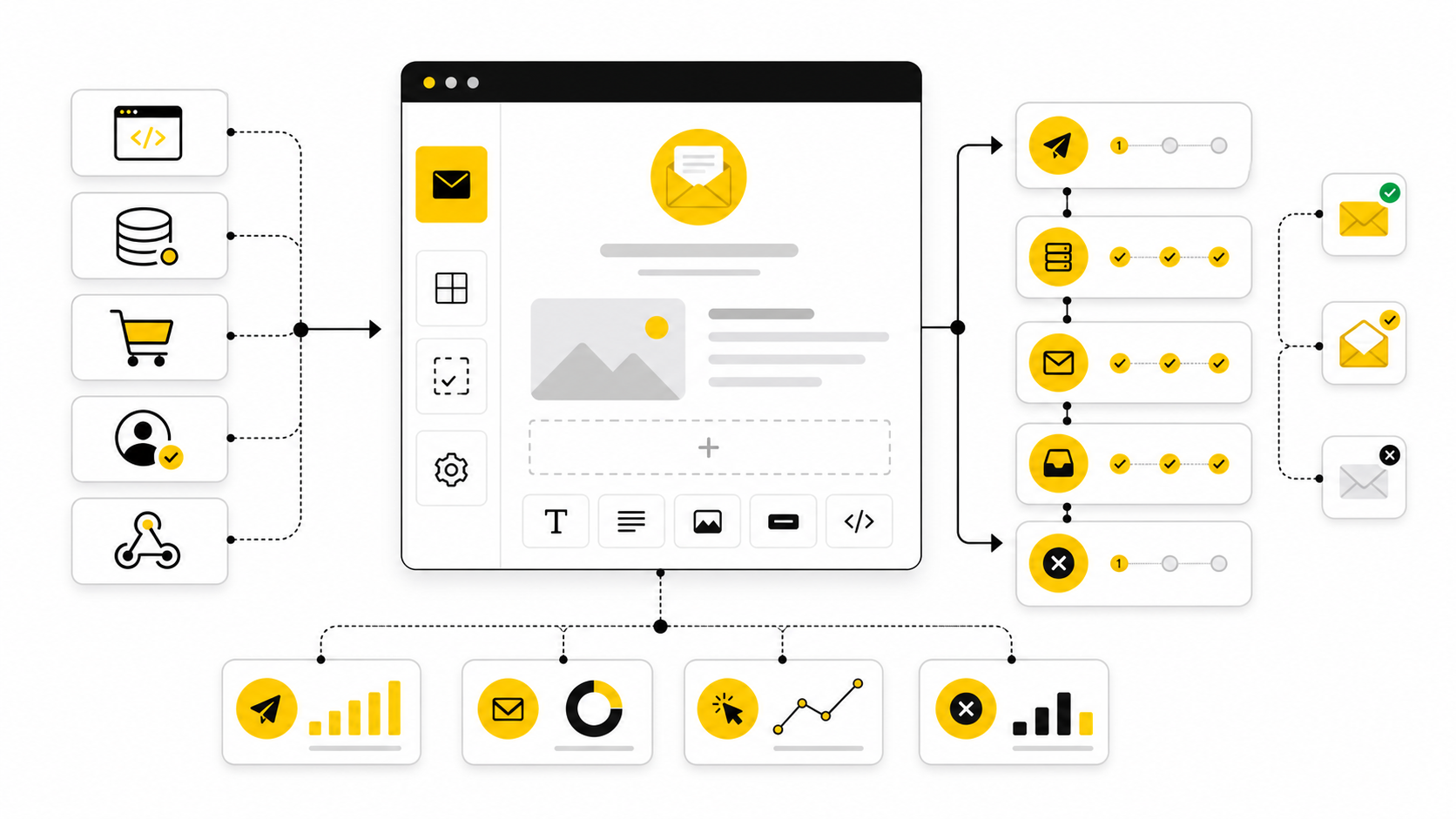
Sendinblue transactional emails are now part of Brevo, but plenty of teams still search for the older Sendinblue name because that is what they originally used for SMTP, order confirmations, password resets, invoices, and account notifications. The product has evolved, yet the core job has not changed: send important one-to-one emails quickly, reliably, and with enough visibility that your team can fix problems before customers complain.
That matters because transactional email is not “just email marketing with a different label.” A delayed newsletter is annoying. A delayed password reset, failed receipt, missing login code, or broken shipping confirmation can stop a customer from completing the exact action they came to do. Brevo positions its transactional email product around API and SMTP sending, templates, webhooks, inbound parsing, CMS integrations, and delivery infrastructure, which makes it relevant for ecommerce stores, SaaS products, marketplaces, agencies, and service businesses that need dependable automated messages from the app layer rather than campaign broadcasts through a marketing calendar.
This guide will use the current Brevo name where accuracy matters, while still referring naturally to Sendinblue transactional emails because that is the keyword many operators, developers, and business owners still use. The goal is not to hype the platform. The goal is to help you understand where transactional email fits, how the system should be structured, what to configure first, and how to avoid the common mistakes that quietly damage deliverability, customer trust, and support workload.
Why Sendinblue Transactional Emails Still Matter
Transactional email sits at the point where customer experience, product operations, and revenue all overlap. When someone creates an account, resets a password, places an order, requests a magic link, books an appointment, or receives a billing notification, they are not browsing casually. They are waiting for a specific message that confirms something happened or lets them take the next step.
That is why a transactional email provider should be judged differently from a general newsletter tool. You are not only looking for a nice editor or a big template library. You need fast sending, clean authentication, event tracking, logs, suppression handling, API reliability, and enough reporting to see whether a message was sent, delivered, opened, clicked, bounced, blocked, or deferred.
Brevo’s current transactional email product covers the main pieces most teams expect: SMTP relay, email API, templates, webhooks, CMS plugins, inbound parsing, and message logs. Its official transactional email page also highlights a claimed 99% delivery rate, simple setup through developer guides and API libraries, and integrations with major CMS tools through SMTP, webhooks, and plugins through Brevo’s transactional email product page. That combination makes it especially useful when a business wants transactional sending without stitching together too many separate tools too early.
The Framework For Reliable Transactional Email
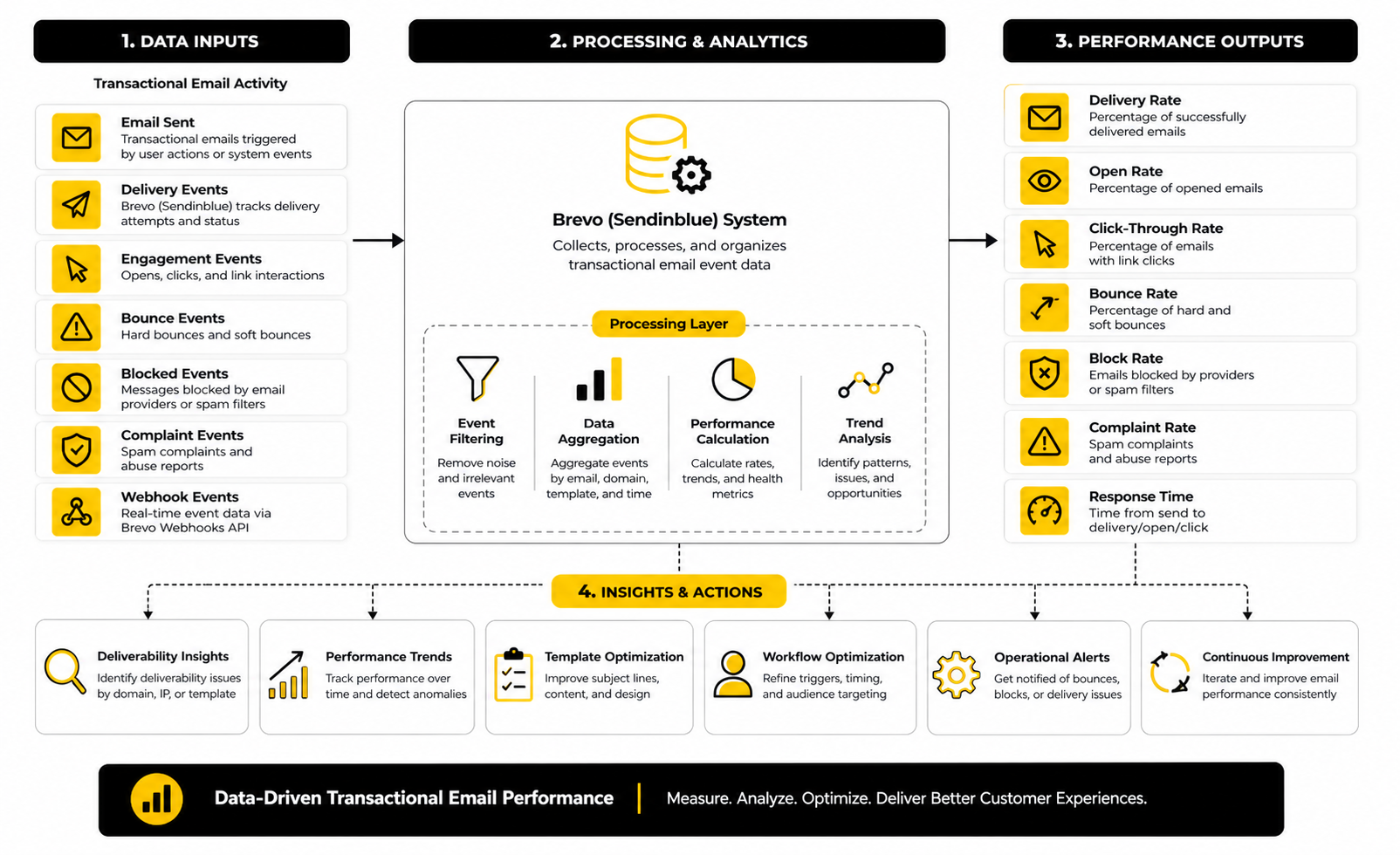
A reliable transactional email system has four layers: the sending trigger, the message content, the delivery infrastructure, and the feedback loop. The trigger is the event inside your product or store. The content is the email template and dynamic data. The infrastructure is the authenticated domain, SMTP or API connection, sender identity, and sending reputation. The feedback loop is made of webhooks, logs, alerts, and internal processes for fixing failures.
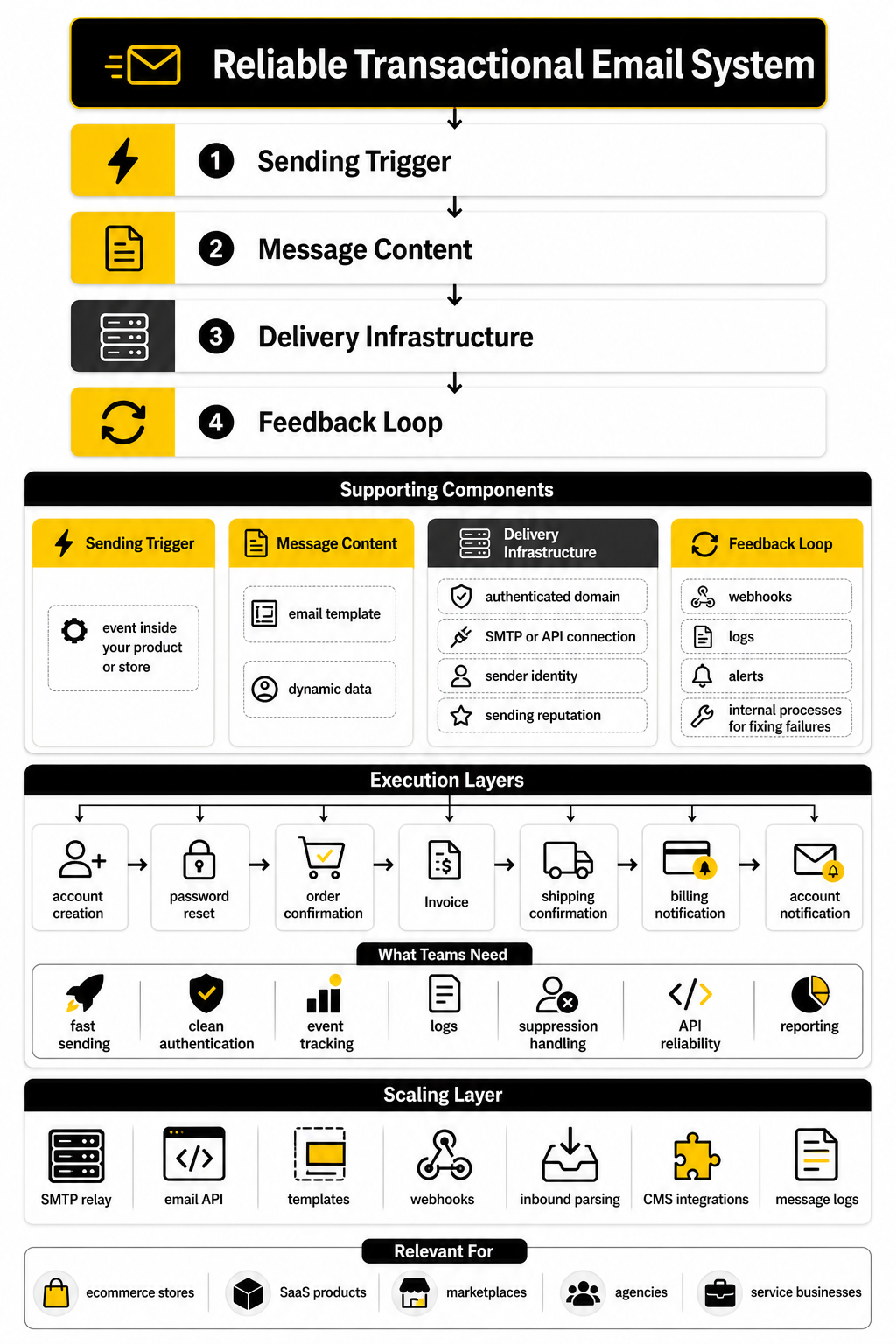
This framework is useful because most transactional email problems are not caused by one dramatic failure. They usually come from small gaps between layers. A password reset email may be triggered correctly but use a template variable that fails. An order email may render perfectly but land in spam because domain authentication is incomplete. A billing notification may be delivered, but nobody notices that click tracking is broken or that a webhook stopped syncing events back into the product.
Brevo’s API documentation shows the practical shape of this workflow: a transactional email request can include sender details, recipients, template IDs, message content, and dynamic parameters passed into the request for personalization through Brevo’s transactional email API documentation. That is the right mental model. Transactional email should not be treated as a loose collection of automations. It should be treated as a product system with inputs, rules, outputs, and monitoring.
Core Components Of A Brevo Transactional Email Setup
Once the framework is clear, the next step is turning it into a real setup. Sendinblue transactional emails work best when you separate the system into practical components instead of treating everything as one big “email integration.” That makes the setup easier to test, easier to troubleshoot, and much easier to scale later.
The core components are the sending method, authenticated sender domain, templates, dynamic data, event tracking, suppression logic, and operational ownership. Each one has a clear job. When one is weak, the whole system becomes less reliable, even if the email provider itself is working properly.
Sending Method
The first decision is whether to send through SMTP or the API. SMTP is usually the fastest path when you are connecting a website, CMS, plugin, ecommerce store, or existing application that already supports SMTP settings. Brevo’s SMTP relay is built for automated messages such as order confirmations, password resets, account notifications, and shipping updates through Brevo SMTP.
The API is usually the better choice when your product needs more control. If you are passing structured data, choosing templates programmatically, logging message IDs, or reacting to delivery events inside your own app, the API gives developers a cleaner workflow. Brevo’s API supports sending transactional emails with static content or pre-built templates, and it can pass dynamic variables directly in the request through Brevo’s transactional email API.
For most small teams, the practical answer is simple. Start with SMTP if you need reliable website or store emails quickly. Move to the API when transactional email becomes part of your product logic, customer lifecycle, billing system, or internal analytics.
Sender Domain And Authentication
Your sender domain is not a cosmetic detail. It tells mailbox providers whether the message really appears to come from the domain shown in the email. If your domain authentication is incomplete, even well-written Sendinblue transactional emails can run into avoidable delivery problems.
Brevo supports domain authentication with DKIM and DMARC, and its help documentation explains that users can authenticate a domain manually or, in some cases, automatically through the domain provider connection in Brevo’s domain authentication guide. This is one of the first tasks to complete before you send real customer messages. Do not leave it for later because the first wave of sending can influence reputation signals.
The cleanest setup is to use a dedicated sending subdomain for transactional email. For example, a company might use its main domain for the website, a marketing subdomain for campaigns, and a separate transactional subdomain for product or account emails. That separation helps keep systems organized and makes it easier to diagnose issues without mixing marketing behavior with critical operational messages.
Templates And Message Content
Templates are where transactional email becomes visible to the customer. A good template is clear, short, branded enough to feel trustworthy, and focused on the action the customer needs to take. This is not the place for heavy promotion, crowded layouts, or five competing calls to action.
Brevo supports transactional templates and dynamic content, which means the app can send structured values into the email instead of hard-coding every message variation. Its template language can use variables, contact attributes, and event-specific data to personalize messages through Brevo’s dynamic content documentation. That matters because most transactional emails are not static; they usually include names, order numbers, booking times, invoice details, reset links, tracking numbers, or account-specific instructions.
The best implementation pattern is to keep business logic in your application and presentation logic in the template. Your app should decide what happened, who should receive the message, and which data belongs in it. The email template should handle the wording, layout, variables, and conditional content without forcing developers to rewrite HTML every time the customer-facing message needs a small update.
Dynamic Data And Personalization
Dynamic data is powerful, but it needs rules. A password reset email needs a secure reset link, expiration language, and support guidance if the user did not request it. An order confirmation needs the correct order details, payment status, shipping address, and next-step expectations. A booking confirmation needs the date, time, timezone, location, cancellation rules, and calendar details.
This is where sloppy implementation creates real problems. If a variable is missing, the customer may see a blank field or broken sentence. If the wrong attribute is passed, the email can feel careless or, worse, expose information that should not be shown.
A professional setup treats dynamic fields as a contract between the app and the email template. Every required variable should be documented, tested, and validated before production sending. Optional fields should have fallback text so the message still reads naturally when a value is missing.
Logs, Events, And Webhooks
Logs are what separate guessing from knowing. Without logs, your team only discovers email problems when customers open tickets or abandon the process. With logs, you can see whether an email was sent, delivered, opened, clicked, bounced, blocked, or delayed.
Brevo’s transactional logs track events for emails sent through API, SMTP, and automation workflows through Brevo’s transactional logs documentation. This is especially useful for support teams because they can check what happened instead of asking developers to dig through raw application logs. It also helps product and operations teams spot patterns, such as one template bouncing more often than others or one workflow creating unusual delays.
Webhooks take this further by sending event data back into your own system. Brevo documents transactional webhook events that can be used to track delivery activity and build downstream workflows through Brevo transactional webhooks. In a mature setup, those events can update user records, alert support, pause risky workflows, or trigger internal checks when an important message fails.
Suppression And Failure Handling
Not every failed email should be retried forever. Some failures are temporary, such as a mailbox provider delaying acceptance. Others are permanent, such as an invalid address or hard bounce. A good transactional email system knows the difference and reacts accordingly.
This matters because transactional emails are often tied to user identity and account access. If an email address is invalid, your product should not quietly keep sending important notices into the void. If a customer typo causes an account verification email to bounce, the user experience should give them a way to correct the address.
Suppression handling should be part of the operating model from the start. Decide who reviews bounces, how support handles “I never got the email” tickets, and when your product should ask a user to confirm or update their address. The provider can send the message, but your business still owns the customer journey around that message.
Professional Implementation: From SMTP To API Workflows
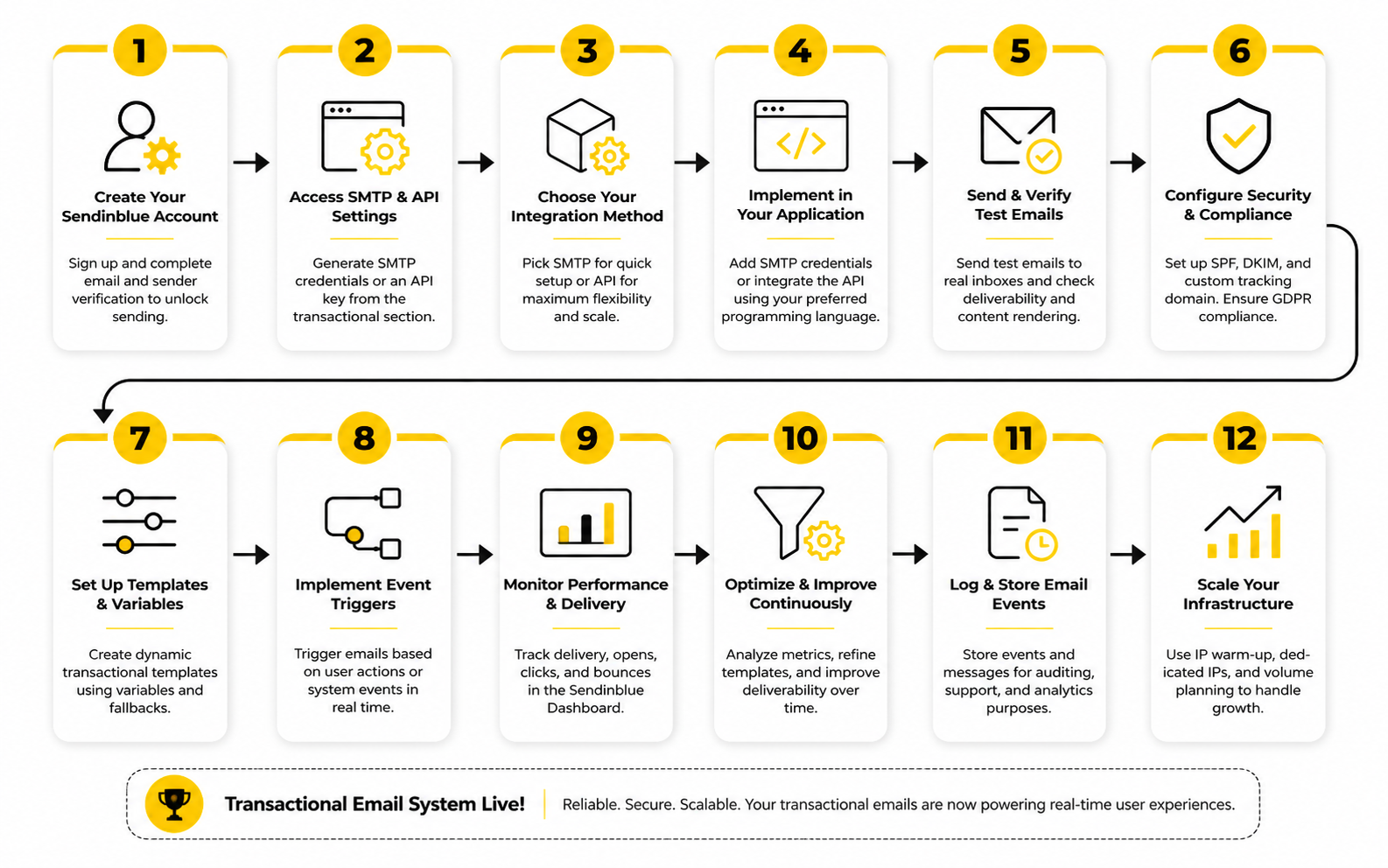
A professional implementation starts with one boring question: what exactly needs to happen when the customer takes an action? That question keeps the setup grounded. It stops the team from jumping straight into templates, plugins, or code before they understand the actual business process behind each message.
For Sendinblue transactional emails, the process should be mapped around events, not around email ideas. “Send a welcome email” is too vague. “Send an account verification email after signup, only if the address has not already been verified, and expire the link after a defined period” is much better. The clearer the event, the easier it becomes to choose SMTP or API, design the template, pass the right data, and monitor the outcome.
Step 1: List The Transactional Events
Start by listing the events that truly need transactional email. These are usually account, billing, security, order, booking, and product-status messages. They should be messages the customer expects because they took an action or because the business needs to notify them about something directly tied to their account.
A practical first list might include account verification, password reset, login code, order confirmation, shipping update, invoice receipt, payment failure, booking confirmation, cancellation notice, and support ticket confirmation. Do not mix these with newsletters, launches, discounts, or nurture sequences. Those belong in marketing automation, not the transactional layer.
This distinction matters because transactional messages carry a different level of trust. Brevo describes transactional emails as automated, non-promotional emails triggered by user actions such as account creation, order confirmations, and password resets through Brevo’s transactional email API documentation. Keep that line clean and your system will be easier to manage.
Step 2: Choose SMTP Or API For Each Use Case
The next step is choosing the sending path for each event. SMTP is usually the cleanest choice when the email is coming from a website, plugin, CMS, ecommerce platform, or tool that already has SMTP fields available. Brevo’s SMTP setup can be configured directly or through plugins that override default website email settings and send transactional messages through Brevo SMTP via Brevo’s SMTP setup guide.
The API is better when the application needs tighter control. Use it when you want to pass dynamic data, select a template programmatically, store the returned message ID, or connect email activity back into your product database. Brevo’s API endpoint can send to one or more recipients using inline HTML content or a pre-built template ID through Brevo’s transactional email endpoint reference.
Do not turn this into a religious debate. SMTP is not “less professional” if it solves the job cleanly. API is not automatically better if the team does not need the extra control. Pick the method that fits the workflow, then document why that method was chosen.
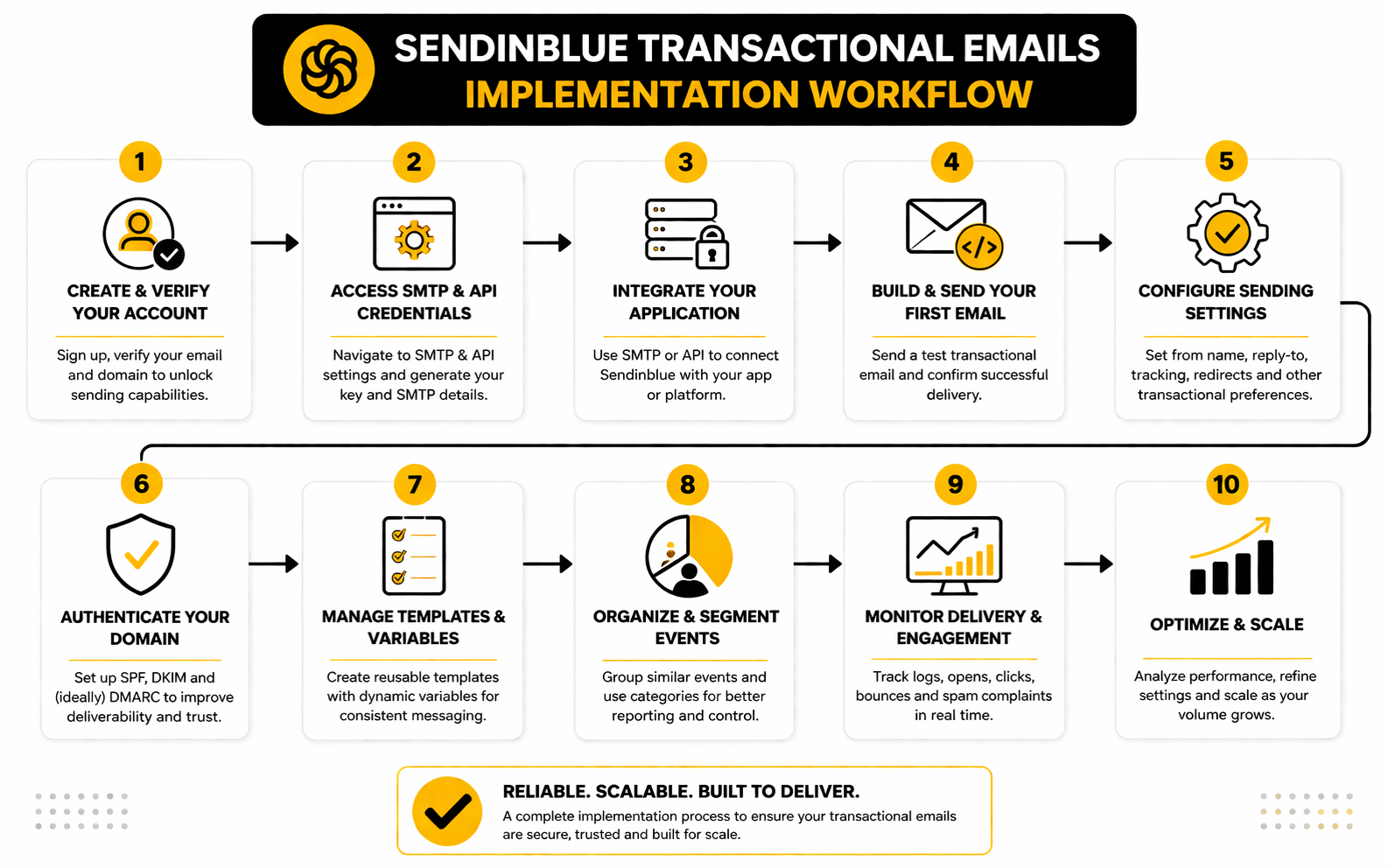
Step 3: Authenticate The Sending Domain
Domain authentication should happen before real customer sending begins. This is not a finishing touch. It is the foundation that helps mailbox providers understand whether your messages are legitimate and whether they align with the sender identity your customers see.
Inside Brevo, this means setting up the required DNS records for your sending domain. Brevo’s domain authentication process covers DKIM and DMARC, and its help documentation explains how to authenticate a domain from the Brevo interface through Brevo’s domain authentication guide. The exact DNS screen depends on your domain host, but the operating principle is the same: add the records, verify them, and do not send production traffic until authentication is confirmed.
This is also the moment to decide whether you want a dedicated transactional subdomain. For many teams, something like mail.yourdomain.com or notifications.yourdomain.com is cleaner than sending everything from the root domain. It creates better separation between product emails, marketing campaigns, internal tools, and future systems.
Step 4: Build Templates Around Real Customer Moments
Templates should be built around the customer’s state of mind. A password reset email should make the next action obvious. An invoice email should make the payment status, amount, and document access clear. A booking confirmation should remove uncertainty around time, timezone, location, and cancellation rules.
The mistake is trying to make transactional emails “beautiful” before making them useful. Design matters, but clarity matters more. Customers open these messages because they need something, so the first screen should answer the obvious questions: what happened, what do I need to do, and what should I expect next?
Brevo supports pre-built templates and dynamic parameters, which means your app can send structured values into a reusable template instead of creating a separate email for every variation. That is the right way to scale Sendinblue transactional emails without creating a maintenance mess. Keep the template readable, keep variables predictable, and avoid turning operational messages into hidden sales pitches.
Step 5: Connect Dynamic Data Carefully
Dynamic data is where implementation quality shows. Each transactional template should have a clear list of required variables and optional variables. Required variables might include the recipient name, verification link, order number, invoice amount, booking time, or reset link. Optional variables might include a delivery estimate, customer note, support contact, or secondary instruction.
Every variable needs a fallback plan. If a first name is missing, the email should still read naturally. If a tracking number is not available yet, the shipping email should not display an empty field. If a timezone is involved, the system should show the timezone instead of assuming the customer understands the business location.
This is one of those details that separates a patched-together setup from a professional one. Broken variables make customers question the reliability of the business, even when the product itself is working. Before launching, test each template with normal data, missing data, long data, special characters, and edge cases that could break the layout.
Step 6: Add Logs And Webhooks Before You Need Them
Logs and webhooks should not be an afterthought. They are the operating layer that tells the team what actually happened after the app attempted to send the message. Without them, support has to guess, developers have to dig, and customers get frustrated.
Brevo’s transactional logs show actions such as sent, opened, and clicked events, and the logs can be filtered by recipient, recipient domain, message ID, subject line, or keyword through Brevo’s transactional logs documentation. That gives your team a direct way to check individual customer issues without treating every email problem as a mystery.
Webhooks make the setup more powerful because they push event data back to your own endpoint. Brevo’s webhook documentation explains that you need to define a notification URL where Brevo can send event data when selected events are triggered through Brevo’s webhook setup documentation. For a serious setup, use webhooks to record delivery status, surface failures, and keep your customer-facing systems in sync.
Step 7: Test The Full Path, Not Just The Email
Testing should cover the full customer path, not only the email preview. A good-looking template does not prove the workflow works. You need to test the trigger, data payload, template rendering, sending method, delivery event, webhook response, logs, and customer-facing recovery path.
For example, a password reset flow should be tested from the login screen all the way through the email link and successful password change. An order confirmation should be tested from checkout completion through the delivered email and the order record inside the admin system. A payment failure email should be tested with realistic billing states so the customer is not sent confusing or outdated instructions.
The final test is operational. Ask whether support can answer a customer who says, “I did not receive the email.” If the answer requires a developer every time, the implementation is not finished. A professional transactional email setup gives the right people enough visibility to solve common problems quickly without touching production code.
Statistics And Data: What The Numbers Actually Tell You
Measurement is where Sendinblue transactional emails become manageable instead of mysterious. The point is not to stare at dashboards all day. The point is to understand whether critical customer messages are being sent, delivered, opened, clicked, bounced, blocked, deferred, or ignored in a way that requires action.
Transactional email data should be interpreted differently from marketing campaign data. A low click rate on a newsletter might suggest weak copy or poor segmentation. A low click rate on a password reset email could mean customers are not receiving the message, the reset link is unclear, the request was accidental, or the user solved the issue another way. Same metric, completely different meaning.
Brevo gives teams several ways to read this data. The transactional statistics view can be filtered by time period, sender, and tag, which makes it easier to separate password resets from invoices, order updates, workflow emails, or product notifications through Brevo’s transactional email statistics documentation. That filtering matters because blended email data is usually misleading. You need to know which workflow is healthy and which workflow is quietly leaking trust.
The Metrics That Matter Most
The first metric to watch is sent volume. A sudden drop in sent volume can mean your application stopped triggering emails, an integration broke, an API key changed, or a workflow was paused by mistake. A sudden spike can mean a product issue, bot activity, billing retry loop, duplicate automation, or unexpected customer behavior.
The second metric is delivery status. Delivered does not always mean the customer noticed the email, but it does tell you that the provider accepted the message flow far enough to confirm delivery activity. Brevo’s webhook documentation lists transactional events such as sent, delivered, opened, clicked, soft bounce, hard bounce, invalid email, deferred, complaint, unsubscribed, blocked, and error through Brevo’s transactional webhook event documentation. Those event types are the language your system uses to explain what happened after the send attempt.
The third metric is bounce behavior. A soft bounce may be temporary, so the action is usually monitoring and retry logic. A hard bounce or invalid email should trigger a cleaner operational response because repeatedly sending important account emails to a bad address does not help the customer or your sender reputation.
Why Opens And Clicks Need Context
Open rate is useful, but it is not the king metric for transactional email. Privacy changes, image loading behavior, mailbox clients, and security scanners can all affect open tracking. Treat opens as a directional signal, not courtroom evidence.
Clicks are usually more meaningful because they show that the recipient interacted with the action inside the message. Still, a click needs context. A password reset click, invoice download click, booking confirmation click, and shipping tracking click all represent different customer intents.
The right move is to measure clicks by template and workflow, not only at the account level. If a password reset email has strong delivery but weak link activity, review the subject line, sender name, button clarity, link expiration rules, and whether the email arrives quickly enough for the customer to still care. If an invoice email gets delivered but produces support tickets anyway, the issue may be the invoice wording, payment status, or the customer’s next step rather than the sending infrastructure.
What Bounce And Blocked Data Should Trigger
Bounces are not just technical events. They are customer experience warnings. A user who cannot receive verification, login, or payment emails may be locked out of the product even if your application technically did everything it was asked to do.
Hard bounces should trigger address hygiene and customer correction flows. That might mean prompting the user to update their email address, flagging the account for support review, or preventing repeated sends until the issue is resolved. Soft bounces should be monitored for patterns, especially if they cluster around a specific mailbox provider, template, sender domain, or time window.
Blocked and error events deserve faster attention. A blocked message can point to content, reputation, authentication, or policy issues. An error event can point to configuration problems, invalid payloads, missing variables, or API-side failures. The action is simple: do not leave these events buried in a log nobody checks.
How Long To Keep Transactional Email Data
Retention matters because email problems are often discovered after the original send. A customer might open a support ticket days later. A finance team might need to confirm whether an invoice notification was sent. A developer might need to investigate why a specific template failed during a release window.
Brevo states that if an account has fewer than 10 million events, transactional logs and previews are stored with no time limit unless the user chooses a specific retention period, while accounts with more than 10 million events have events older than 24 months deleted by default unless reports are downloaded regularly through Brevo’s transactional logs documentation. That is not just a storage detail. It affects support history, compliance review, financial operations, and long-term troubleshooting.
For smaller teams, the practical move is to keep enough data to answer common support and billing questions without overcomplicating the system. For higher-volume teams, export routines become more important. If transactional email is part of billing, security, or account access, do not wait until data ages out before deciding what history your business needs.
How To Build A Useful Measurement System
A useful measurement system starts with tags. Tag templates by workflow type so password resets, account verification, invoices, order confirmations, booking messages, and system alerts can be reviewed separately. Without tags or sender separation, your dashboard becomes a pile of averages, and averages hide the exact problems you need to fix.
Next, decide which events need alerts. A single soft bounce may not matter. A sudden rise in hard bounces, blocked messages, deferred events, or API errors absolutely matters. For critical flows, your team should know when failures cross a threshold instead of discovering the issue from angry customers.
Finally, connect transactional email metrics to the business outcome. For password resets, the outcome is successful account recovery. For invoices, it is payment clarity and fewer billing tickets. For ecommerce, it is customer confidence after purchase. Sendinblue transactional emails should not be measured only by email activity; they should be measured by whether the customer can complete the job the email was supposed to support.
Benchmarks Should Guide, Not Distract
Benchmarks are useful only when they create better decisions. A generic open rate benchmark does not tell you whether your specific order confirmation email is doing its job. A click benchmark does not tell you whether customers understand your billing policy. A delivery benchmark does not prove that your account recovery flow is healthy.
For transactional email, your strongest benchmark is your own baseline over time. Measure each template, each sender, and each workflow against its normal range. When something moves sharply outside that range, investigate. That is how you catch broken templates, failed integrations, domain reputation issues, webhook problems, and confusing customer journeys before they become bigger business problems.
This is also why the measurement layer should be designed before scale. Once transactional volume grows, messy reporting becomes expensive to untangle. Build clean tags, clean events, clean ownership, and clean review habits early, and the data will actually help the team make decisions.
Deliverability, Monitoring, And Troubleshooting
At this stage, the setup is no longer only about sending messages. It is about keeping critical messages reliable as volume grows, workflows multiply, and different teams start depending on the same email infrastructure. This is where sendinblue transactional emails need real operational discipline.
The advanced work is not glamorous. It is sender reputation, routing decisions, API limits, fallback behavior, compliance boundaries, and ownership. But this is the layer that protects password resets, order receipts, payment notices, and account alerts from being dragged down by avoidable mistakes.
Separate Transactional And Marketing Traffic
Transactional and marketing emails should not be treated as the same traffic stream. Marketing emails are often promotional, seasonal, segmented, and campaign-driven. Transactional emails are triggered by user actions and are usually tied to security, billing, account access, purchases, or product usage.
Brevo explains that when marketing and transactional emails share the same IP, marketing-related issues can affect transactional inbox placement, and it recommends separating routing with dedicated IP pools when a business has enough scale through Brevo’s routing separation guide. That is the strategic reason to keep these systems apart. A weak promotional campaign should not make a password reset email harder to receive.
For smaller teams, this may start with separate sender addresses, separate templates, separate tags, and a clean distinction between campaign and transactional workflows. For higher-volume teams, the conversation becomes more technical: dedicated IPs, IP pools, domain alignment, traffic segmentation, and warm-up strategy. The point is not to over-engineer early. The point is to avoid building a messy sender reputation problem that becomes expensive to unwind later.
Understand Shared IPs Versus Dedicated IPs
A shared IP can be perfectly fine when a business is starting out or sending moderate volume. The provider manages the pool, and the sender does not need to carry the full burden of reputation from day one. That is useful when email volume is still inconsistent or the team does not have enough sending history to support a dedicated IP strategy.
A dedicated IP gives more control, but it also gives more responsibility. Brevo notes that dedicated IPs are intended for high-volume senders who want greater control over their email-sending reputation through Brevo’s dedicated IP setup documentation. That control is only helpful if the business can send consistently, monitor performance, and warm the IP properly.
The tradeoff is simple. Shared infrastructure reduces operational burden but gives less isolation. Dedicated infrastructure gives more isolation but requires more discipline. If a business sends critical transactional emails at meaningful scale, dedicated routing can make sense, but only when the team is ready to own the process.
Plan For Rate Limits And Retries
Scaling transactional email is not only about sending more volume. It is about handling bursts correctly. A sale, product launch, billing run, security event, or platform migration can create sudden spikes that stress both the application and the email provider.
Brevo’s API documentation says its responses include rate limit headers, and when limits are exceeded the API can return a 429 Too Many Requests response through Brevo’s rate limit header documentation. That means the application should not assume every send request will succeed immediately. It should read responses, handle throttling, retry safely, and avoid duplicate customer messages.
This is especially important for security and billing workflows. If a login code fails because the app hit a limit, the user sees a broken product, not a technical nuance. If a retry sends the same invoice reminder three times, the customer sees confusion or pressure. Good retry logic should be controlled, idempotent, and visible in logs.
Build Fallbacks For Critical Workflows
Not every transactional email deserves the same backup plan. A low-priority product notification can wait. A password reset, login code, payment failure notice, account verification, or legal billing notice may need stronger recovery options.
Fallbacks can include retry queues, secondary notification channels, support alerts, customer-facing resend buttons, and internal escalation rules. The right fallback depends on the risk. If a user cannot access their account without an email, the product needs a safe way to handle that failure without weakening security.
This is where teams often underbuild. They assume the email provider will always work, the DNS records will always stay valid, the API key will never rotate unexpectedly, and every mailbox provider will accept every message instantly. That is not a serious operating model. Critical email flows need a recovery path before the first high-pressure incident.
Keep Compliance Boundaries Clean
Transactional email and marketing email have different purposes, but that does not mean transactional emails are a loophole for promotion. A receipt can include helpful next steps. An account alert can include support links. But the core purpose should stay tied to the customer’s transaction, account, security, billing, or service relationship.
Brevo describes transactional emails as automated, non-promotional messages triggered by user actions such as account creation, order confirmations, and password resets through Brevo’s transactional email API guide. That definition should guide the content. If the message mainly exists to sell, it belongs in marketing infrastructure with the right consent, preferences, and unsubscribe handling.
Brevo also documents list-unsubscribe behavior and notes that it automatically includes a list-unsubscribe header in campaigns and transactional emails through Brevo’s list-unsubscribe documentation. That does not remove the need for careful policy decisions inside your own business. You still need to decide which messages are essential, which are optional, and how customer preferences should be respected without breaking account operations.
Protect API Keys And Sending Permissions
Transactional email credentials should be treated like production infrastructure credentials. If an API key or SMTP credential is exposed, an attacker may be able to send through your account, damage your reputation, trigger abuse controls, or create a support mess. This is not theoretical enough to ignore.
Use separate keys or credentials where possible, limit access to the people and systems that truly need it, and rotate credentials when team members leave or systems change. Store secrets in a proper secret manager instead of hard-coding them into repositories, plugins, scripts, or shared documents. If your sending setup is connected to a CMS, make sure admin access to that CMS is also protected because plugin settings can expose operational risk.
The same applies to templates and sender identities. Not everyone who can edit a marketing email should be able to edit password reset, billing, or legal notification templates. Critical templates deserve review rules because a small wording or link mistake can create a large customer support issue.
Design For Multi-Team Ownership
As sendinblue transactional emails become more important, ownership can get blurry. Developers control the API or SMTP integration. Marketing may control brand voice and templates. Support needs logs to answer customers. Operations cares about billing and receipts. Security cares about verification and account access.
That is why each workflow needs a named owner. The owner does not have to do every task, but they are responsible for knowing whether the workflow is healthy. A password reset flow may be owned by product or engineering. Invoice emails may be owned by finance or operations. Booking confirmations may be owned by customer success or the service delivery team.
The simple operating model is to define who owns the trigger, who owns the template, who owns the data, who owns monitoring, and who handles customer issues. Without that, every problem turns into a Slack thread where nobody is quite sure who should fix it. That is slow, and critical customer messages do not reward slow.
Know When Brevo Is Enough And When To Add More Systems
Brevo can cover a lot: SMTP relay, transactional API, templates, webhooks, logs, inbound parsing, and multichannel messaging across email, SMS, and WhatsApp through Brevo’s API overview. For many businesses, that is more than enough to run a clean transactional email system. The best move is often to implement it properly before adding extra tools.
There are cases where additional systems make sense. A SaaS product might push webhook events into a data warehouse. An ecommerce brand might connect email status to support tooling. An agency might manage client workflows inside a broader CRM or automation platform such as GoHighLevel while keeping transactional email delivery handled separately.
The strategic rule is this: do not add tools to compensate for a messy foundation. Add tools only when the workflow is clear and the extra system has a defined job. Reliable transactional email is not about having the largest stack. It is about making sure the right message reaches the right customer at the right moment, and that your team can prove it happened.
Are Sendinblue transactional emails the same as Brevo transactional emails?
Yes. Sendinblue rebranded to Brevo, so the current product name is Brevo transactional email. Many people still search for Sendinblue transactional emails because that was the original brand name they used when setting up SMTP, API sending, or transactional templates.
The important thing is that you should use the current Brevo documentation and interface when configuring a real setup. Older Sendinblue articles can still explain the concept, but product screens, naming, endpoints, and help docs may have changed. For the most accurate setup path, use Brevo’s transactional email product page and the current developer documentation.
What are Sendinblue transactional emails used for?
Sendinblue transactional emails are used for automated, non-promotional messages triggered by a customer action or account event. Common examples include password resets, account verification, order confirmations, shipping notifications, invoice receipts, payment alerts, booking confirmations, and login codes.
These emails are different from newsletters because the customer is usually waiting for them. A delayed campaign may reduce engagement, but a delayed transactional email can block login, payment, purchase confirmation, or support resolution. That is why transactional sending needs stronger monitoring, cleaner authentication, and more careful workflow design.
Should I use SMTP or the Brevo API?
Use SMTP when you need the quickest setup for a website, CMS, plugin, ecommerce store, or app that already supports SMTP credentials. It is practical, simple, and often enough for teams that mainly need to replace unreliable default website email sending. Brevo explains that its SMTP setup can be configured directly or through plugins in its SMTP help documentation.
Use the API when the email workflow is part of your product logic. The API is better for passing dynamic data, selecting templates programmatically, storing message IDs, and connecting email events back to your own system. If the business depends on advanced customer flows, the API usually gives you more control than SMTP.
Do I need to authenticate my domain before sending?
Yes, domain authentication should be handled before sending real customer emails. It helps mailbox providers understand that your business is allowed to send from the domain shown in the message. Without authentication, even legitimate transactional emails may face avoidable delivery problems.
Brevo supports domain authentication with DKIM and DMARC, and its help center explains that only domains owned and controlled by the business can be authenticated through Brevo’s domain authentication guide. Do this early. It is one of the few setup tasks that directly affects trust, deliverability, and sender identity.
Can I use Sendinblue transactional emails for marketing?
Transactional emails should not be treated as a workaround for marketing consent. They are meant for messages tied to user actions, account activity, billing, security, purchases, bookings, or service delivery. If the main purpose of the message is promotion, it belongs in your marketing email system with the proper consent and unsubscribe handling.
This line matters because transactional emails often receive more trust from customers. Abusing that trust with hidden promotions can damage your brand and create compliance problems. Keep transactional messages useful, clear, and directly related to the event that triggered them.
What should I track in transactional email analytics?
Track sent volume, delivered events, bounces, blocked messages, deferred events, errors, opens, clicks, and complaints. But do not treat all metrics equally. For transactional email, the most important question is whether the customer successfully completed the job the email was meant to support.
For example, a password reset email should be measured against successful account recovery. An invoice email should be measured against billing clarity and fewer support questions. Brevo’s webhook documentation lists the key transactional events that can be tracked through Brevo transactional webhooks, which makes it easier to build the right feedback loop.
How should I handle bounced transactional emails?
Hard bounces and invalid emails should trigger a correction process. If a user cannot receive account verification, password reset, billing, or order emails, the product experience is broken even if the send request worked technically. The customer needs a way to update their address, retry the process, or contact support.
Soft bounces should be monitored for patterns. A single temporary issue may not require much action, but repeated soft bounces around a specific domain, workflow, or sender identity should be investigated. Treat bounce data as a customer access signal, not just an email statistic.
Do I need a dedicated IP for transactional email?
Not always. A shared IP can work well for lower or moderate volume, especially when the provider manages the shared reputation pool and the business does not yet have consistent sending volume. For many smaller teams, the more carefully move is to authenticate the domain, clean up templates, monitor logs, and build good sending habits first.
A dedicated IP can make sense when sending volume is high enough and the business wants more control over reputation. Brevo describes dedicated IPs as useful for high-volume senders who want greater control through its dedicated IP documentation. The tradeoff is that dedicated infrastructure requires more monitoring, warm-up discipline, and operational ownership.
How do webhooks improve transactional email workflows?
Webhooks push delivery and engagement events back to your own system. Instead of manually checking logs, your app can receive updates when an email is sent, delivered, opened, clicked, bounced, blocked, or fails. That turns transactional email from a one-way send into a trackable workflow.
This is valuable for customer support, product analytics, billing operations, and security flows. A support agent can see whether the reset email was delivered. A product team can understand where account activation is breaking. A billing team can confirm whether invoice notifications were sent before escalating a payment issue.
What is the biggest mistake teams make with transactional email?
The biggest mistake is treating transactional email as a plug-in task instead of a business-critical system. Teams connect SMTP, send a few test messages, and assume the job is done. That works until a password reset flow breaks, an invoice template sends wrong data, a domain authentication issue appears, or support starts getting “I never received it” tickets.
A stronger approach is to design the whole system: triggers, templates, data, authentication, logs, webhooks, retries, ownership, and customer recovery paths. That sounds heavier, but it saves time later. When email is tied to access, payment, security, and trust, the details matter.
Is Brevo a good fit for small businesses?
Brevo can be a strong fit for small businesses that want transactional email without building a complex email infrastructure from scratch. SMTP setup, templates, logs, API access, webhooks, and CMS integrations make it practical for ecommerce stores, SaaS products, service businesses, agencies, and membership sites. The key is to implement it cleanly instead of relying on default settings forever.
Small businesses should start simple. Authenticate the domain, send through SMTP or API depending on the workflow, tag templates clearly, and review logs regularly. Once volume grows, the business can decide whether it needs dedicated IPs, deeper webhook automation, or more advanced routing.
How do Sendinblue transactional emails fit with other marketing tools?
Transactional email should sit beside your marketing stack, not get mixed into it carelessly. Your CRM, funnel builder, automation platform, social tools, and customer support systems can all benefit from reliable transactional data. But the critical operational messages should still be protected from promotional clutter.
For example, a business might use Brevo for transactional delivery, GoHighLevel for CRM and client automation, ClickFunnels for funnel workflows, or ManyChat for conversational follow-up. The cleanest stack gives each tool a clear job. Brevo can handle the message delivery layer while other tools manage acquisition, CRM, funnels, and customer communication.
What should I do before launching a transactional email setup?
Before launch, test every critical workflow from the customer’s point of view. Do not stop at sending a preview email. Test the trigger, data payload, template rendering, link behavior, delivery status, webhook response, logs, support visibility, and recovery path.
You should also confirm that authentication is complete, sender names are clear, templates use safe fallback text, and support knows how to check logs. If the email is tied to account access, billing, security, or purchases, test failure cases too. A launch-ready setup is not the one that works once; it is the one your team can monitor, explain, and fix when something goes wrong.
Build a stronger local presence with BAAM AI
Turn your website, Google profile, social channels, and AI visibility into one growth engine
Most businesses do not need more random marketing activity. They need a consistent presence system that helps the right people find them, trust them, and take action. BAAM AI brings strategy, local SEO, website updates, Google Maps visibility, social content, AI-search readiness, media production, and reporting into one practical monthly engine.
If you want your marketing to keep working after the campaign ends, start with a free BAAM AI presence audit. See how your business shows up today and where the fastest visibility wins are at BAAM AI.