
BAAM AI Blog
Sendinblue SMTP Server: The Practical Guide to Sending Transactional Email With Brevo
The phrase sendinblue smtp server still shows up everywhere because a lot of tutorials, WordPress plugins, CRMs, and older setup screens were written before Sendinblue became Brevo. The product name changed, but the...
Affiliate disclosure: this article may include compensated links. Recommendations should still be evaluated against your use case, budget, and current provider terms.
Should you choose WordPress.com?
WordPress.com is worth considering when the use case, budget, and implementation effort match what you actually need to do next.
teams that want a practical tool decision without reading another generic feature list
Check WordPress.comThe phrase sendinblue smtp server still shows up everywhere because a lot of tutorials, WordPress plugins, CRMs, and older setup screens were written before Sendinblue became Brevo. The product name changed, but the job people are trying to do has not changed: send reliable transactional email from a website, app, store, CRM, or automation tool without running their own mail server.
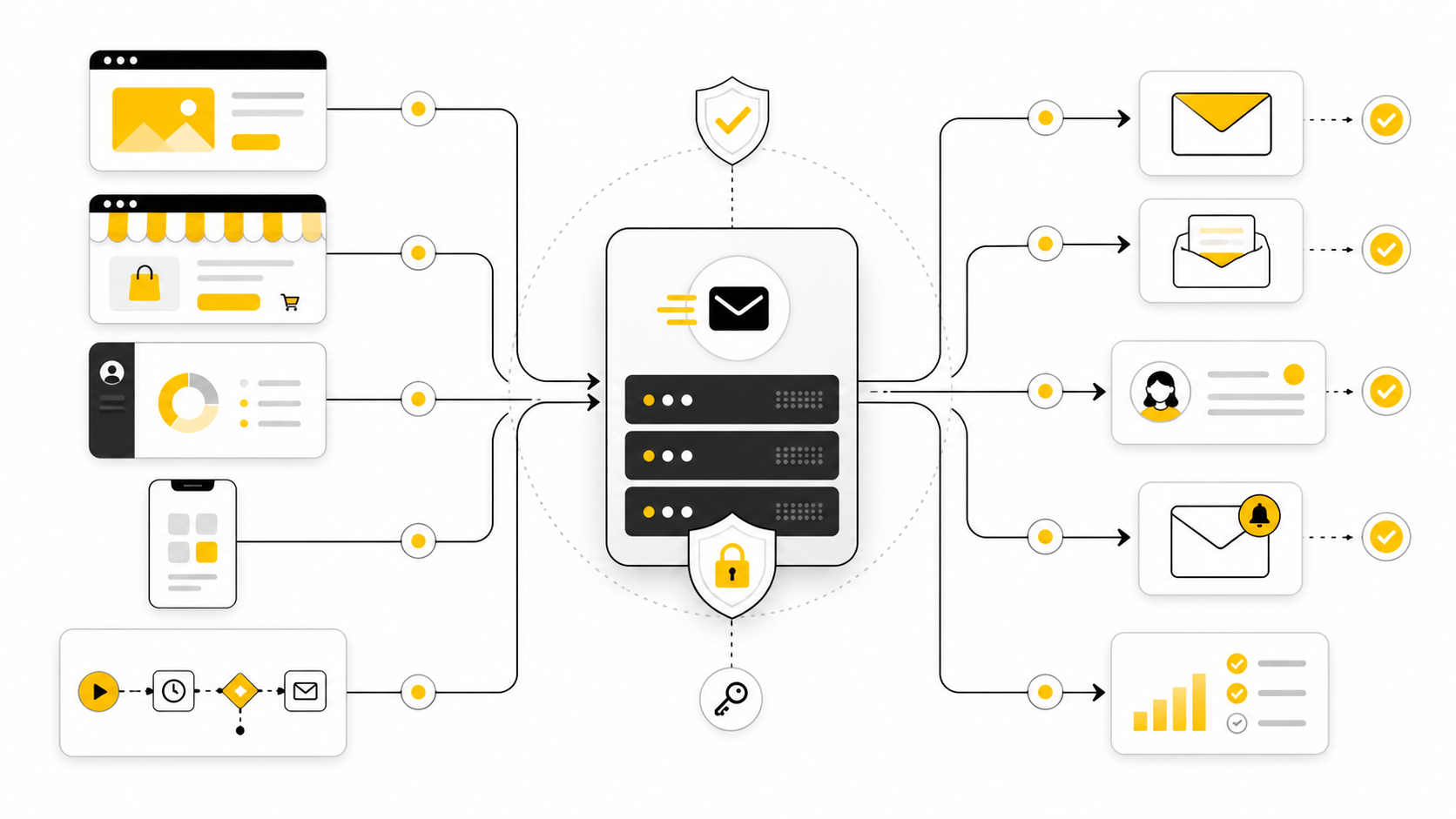
Today, the Brevo SMTP relay is usually the cleanest answer for that job. It gives you SMTP credentials, a relay host, secure ports, logs, and transactional email reporting, so your contact forms, password resets, invoices, order confirmations, and automation emails can leave your system through a dedicated email infrastructure instead of a random hosting server.
The important part is not just copying smtp-relay.brevo.com into a settings box. You need to understand what the SMTP server does, how authentication works, which ports make sense, how DNS affects deliverability, and when SMTP is the right choice compared with an API. That is what this six-part guide will walk through, using the old Sendinblue wording where it helps and the current Brevo setup where it matters.
this guide is structured as one practical guide, split into six parts so each section can go deep without turning into a wall of setup notes. The goal is to move from the basic concept to a professional implementation that can be trusted in real business workflows. Each section builds on the previous one, so the later technical steps make more sense once the framework is clear.
Why the Sendinblue SMTP Server Still Matters
The old Sendinblue name still matters because many users search for the setup by memory, not by the current brand. Sendinblue officially became Brevo in 2023, but a large amount of software documentation, YouTube tutorials, plugin labels, and forum answers still use “Sendinblue SMTP” as the reference point. In practical terms, when someone asks for the sendinblue smtp server, they usually mean the current Brevo SMTP relay and the settings needed to connect it.
This matters because transactional email is not the same as casual inbox email. A password reset, checkout receipt, booking confirmation, or lead notification has to arrive quickly and consistently, because the user is usually waiting for it. Sending those messages through weak hosting mail, free mailbox SMTP, or a misconfigured domain creates unnecessary risk at the exact moment when trust matters most.
Brevo is useful here because it combines SMTP relay access with transactional logs and sender authentication tools in one platform. You can start from the current Brevo SMTP relay documentation, then connect that setup to the tool that actually sends your emails. For many small businesses, agencies, ecommerce stores, and SaaS projects, that is a much more realistic path than maintaining a private SMTP server.
How the Brevo SMTP Framework Works
The framework is simple once you stop treating SMTP as a mysterious technical setting. Your website, app, CRM, or automation platform creates the email, then hands it to Brevo through an authenticated SMTP connection. Brevo accepts the message, applies the sending rules for your account and sender domain, and attempts delivery to the recipient’s mailbox provider.
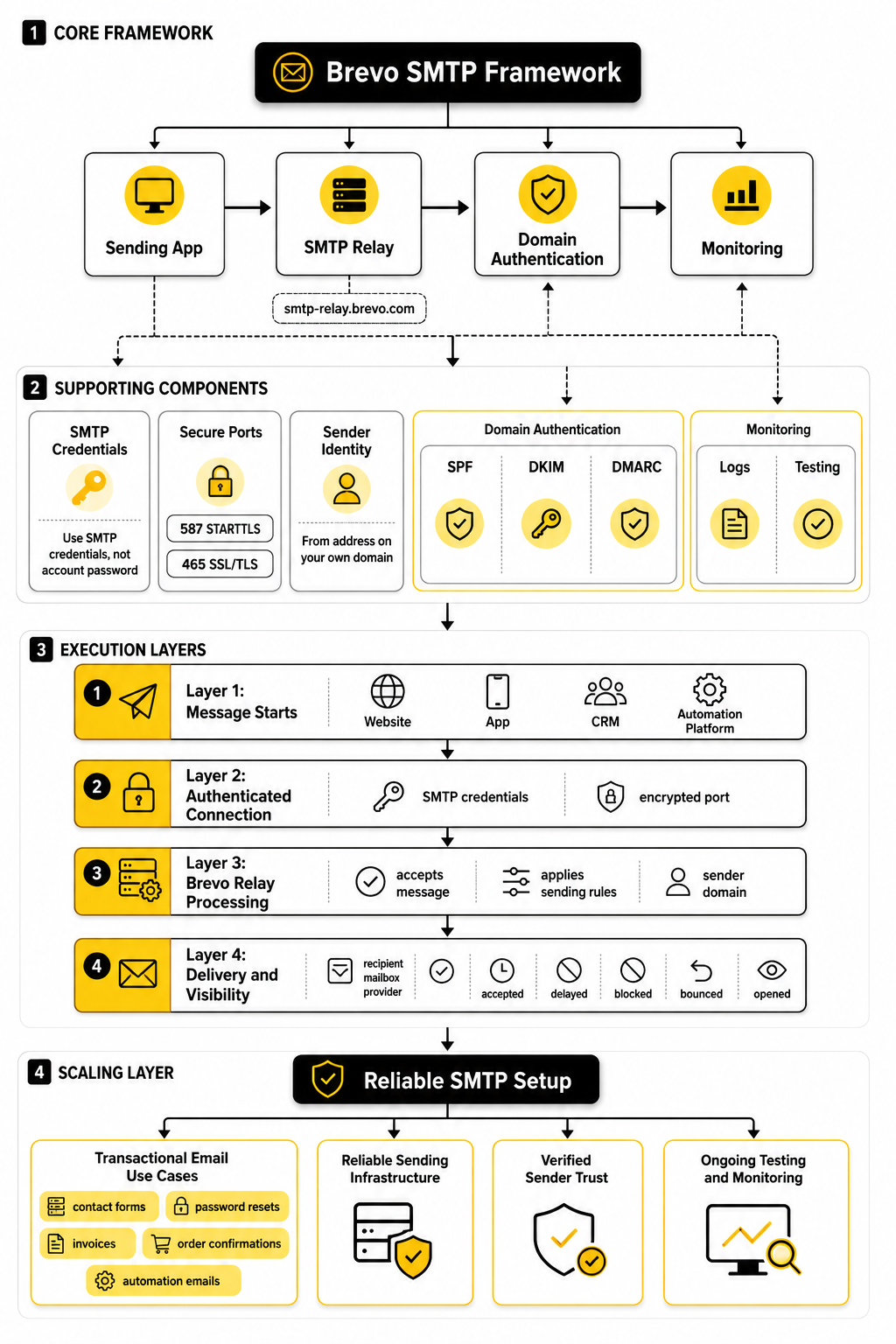
The main SMTP server value you will see is smtp-relay.brevo.com. The typical secure setup uses authentication with your Brevo SMTP credentials, not your normal account password, and sends through an encrypted port such as 587 with STARTTLS or 465 with SSL/TLS depending on what your tool supports. That detail matters because email credentials are sensitive, and a professional setup should never rely on plain, unsecured sending.
The bigger framework has four layers: the sending app, the SMTP relay, domain authentication, and monitoring. The sending app is where the message starts. The SMTP relay is the infrastructure that moves it. Domain authentication helps mailbox providers understand that your domain is allowed to send through Brevo. Monitoring shows whether messages are being accepted, delayed, blocked, bounced, or opened.
Core Components of a Reliable SMTP Setup
A reliable setup starts with the correct SMTP credentials. In Brevo, SMTP access is managed separately from normal login access, which is exactly how it should be. That gives you a safer way to connect third-party tools, rotate credentials when needed, and avoid putting your main account password inside a WordPress plugin, checkout platform, or custom application.
The second core component is sender identity. Your “From” address should use a domain you own and control, because modern inbox providers care heavily about whether the visible sender domain matches the authentication behind the message. This is where SPF, DKIM, and DMARC become part of the real setup rather than optional technical decoration.
The third component is logs and testing. A working SMTP connection only proves that the first door opened; it does not prove that every email will land well. You still need to send test messages, check Brevo’s transactional logs, confirm the message headers, and watch for bounces or authentication failures before trusting the setup with customer-facing workflows.
Step-by-Step Brevo SMTP Configuration
Once the framework is clear, the actual setup becomes much easier. You are not trying to “make email work” in a vague way. You are connecting a sending source to Brevo, proving that the sender is legitimate, and checking that the emails move through the system cleanly.
Start by opening the SMTP and API settings inside Brevo and generating SMTP credentials. Use the SMTP login and SMTP key provided there, not your normal Brevo account password. That separation is important because the credentials may end up inside a website plugin, CRM, ecommerce platform, or app environment, and those places should never store your main login password.
The core settings are usually straightforward:
The official Brevo SMTP relay setup is the place to confirm the current connection details before you deploy anything important. Settings screens change over time, and small wording differences between platforms can make people second-guess themselves. The principle stays the same: your tool authenticates with Brevo, then Brevo relays the email.
Choose the Right Sending Source
Before pasting the sendinblue smtp server into a settings box, decide exactly which system should be responsible for sending. A WordPress site, a Shopify app, a custom SaaS product, a CRM, and a checkout funnel can all send email, but they should not all send the same message independently. Duplicate notifications create confusion fast, especially when customers receive two receipts or two password reset messages with different formatting.
For a simple website, SMTP is usually enough. A contact form plugin, membership plugin, or booking tool can hand the message to Brevo through SMTP without needing custom development. For a more advanced product, the Brevo API may be cleaner because it gives developers more control over templates, events, and structured responses.
This is where agencies and operators need to be practical. If the sending tool already supports SMTP well, use SMTP and keep the setup simple. If you are building a deeper transactional system with custom logic, use the Brevo developer documentation and consider API-based sending instead.
Authenticate Your Domain Before Scaling
SMTP credentials let your system connect to Brevo, but domain authentication helps inbox providers trust the message. That distinction matters. A message can be technically sent and still perform badly if the sender domain is not authenticated properly.
At minimum, your sending domain should be checked for SPF, DKIM, and DMARC alignment. Gmail’s sender guidelines recommend SPF, DKIM, and DMARC for stronger delivery, and Yahoo also pushes senders toward authenticated mail because unauthenticated messages are easier to spoof. This is not just a bulk-email issue anymore; it is the baseline for looking like a serious sender.
Brevo’s domain setup will guide you through the DNS records needed for authentication. In practice, that usually means adding records at your domain host, waiting for DNS propagation, then verifying the domain inside Brevo. Do this before relying on the setup for customer-facing workflows, because fixing authentication after emails start failing is more painful than doing it properly upfront.
Match the From Address to the Job
The “From” address should make sense to the person receiving the email. A receipt should come from a billing or orders address. A password reset should come from a support or account address. A sales notification should not come from a random personal inbox unless that is genuinely how the business wants to communicate.
Avoid using free mailbox domains as the sender for business-critical email. Sending transactional messages from a domain you own gives you better control over authentication, reputation, routing, and brand consistency. It also makes troubleshooting easier because you can inspect DNS records, verify alignment, and keep the sender identity stable across tools.
For many businesses, a simple structure works best:
This is not about making the setup look fancy. It is about reducing friction for the recipient and keeping your sending system organized. When the sender identity matches the message type, people understand what they received and why it matters.
Test the Connection Before Real Users Depend on It
After adding the SMTP server, credentials, port, and encryption method, send a small test from the actual tool that will be used in production. Do not only test from Brevo. The real question is whether your website, CRM, checkout, app, or automation platform can create the message and pass it through Brevo correctly.
Check three things after the test email arrives. First, confirm that the message lands in the inbox you expected, not only in a test mailbox you control. Second, review the sender name, sender email, reply-to address, subject line, and formatting. Third, inspect the transactional logs in Brevo so you can see whether the message was accepted, delivered, bounced, or blocked.
This is also the moment to test failure paths. Try a form submission, password reset, order confirmation, internal admin alert, and any other critical workflow that depends on email. One successful test does not prove the whole system is ready; it only proves that one path worked once.
Professional Implementation, Testing, and Troubleshooting
A basic SMTP setup is useful, but a professional implementation is what keeps customer-facing email from becoming a recurring fire drill. The sendinblue smtp server should not be treated as a one-time plugin setting that nobody checks again. It should be part of a controlled sending process with clear ownership, documented credentials, verified DNS, and real monitoring.
The difference shows up when something breaks. A casual setup leaves people guessing whether the problem is the form, the website host, Brevo, DNS, the recipient mailbox, or the message content. A professional setup narrows the problem quickly because every layer has already been tested and documented.
This is the point where the work becomes less about copying server settings and more about building a reliable process. You want a setup that a developer, marketer, founder, or support person can understand without digging through old Slack threads or abandoned plugin notes. That saves time, but more importantly, it protects revenue, trust, and customer experience.
Build the Implementation Checklist
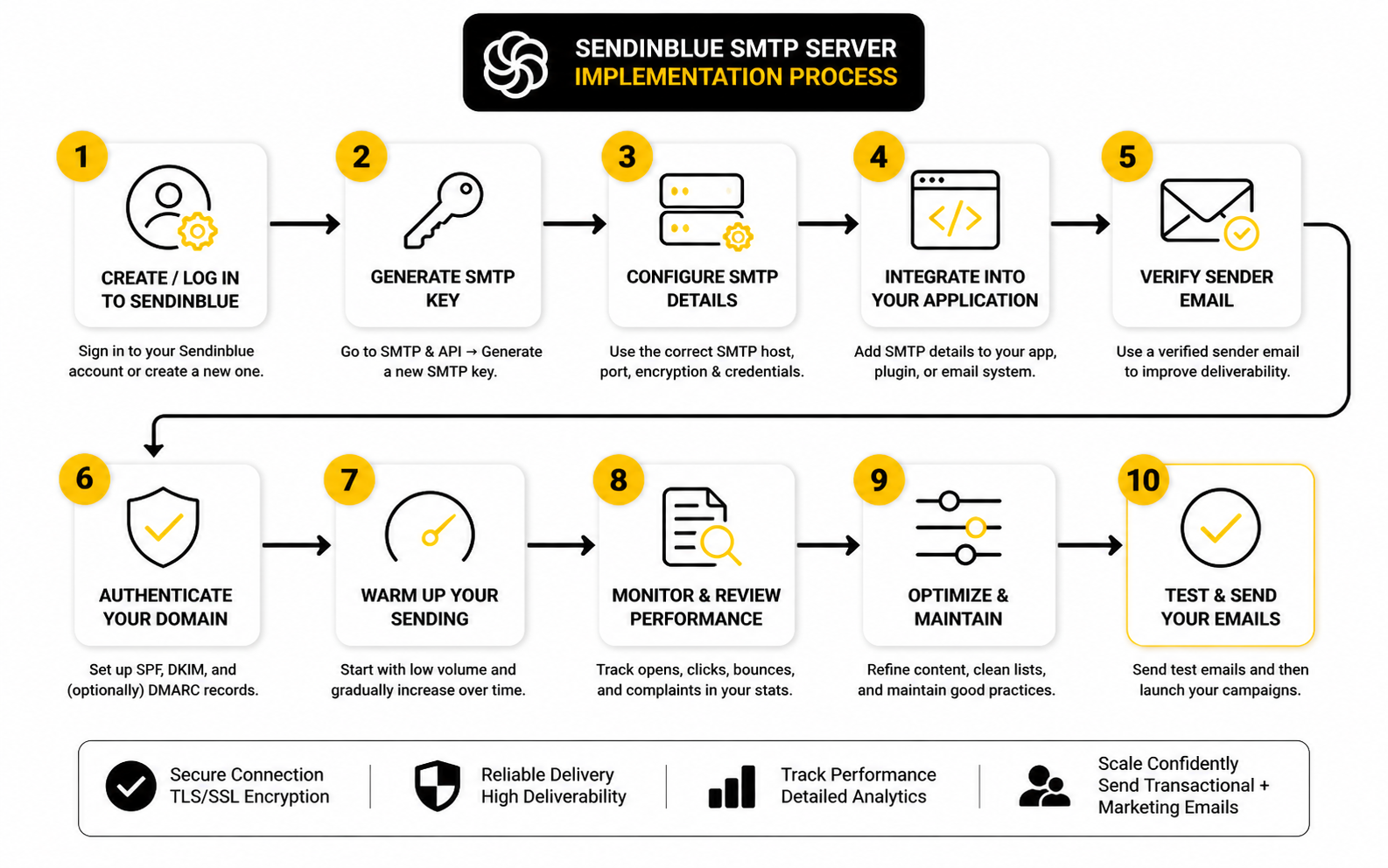
The cleanest way to implement Brevo SMTP is to move through the setup in a fixed order. Do not start by testing random emails from five different tools. Start with the sending domain, then the SMTP credentials, then the sending app, then the business-critical workflows.
A practical implementation checklist looks like this:
That order matters because each step depends on the previous one. If the sender domain is not authenticated, the test results can be misleading. If the SMTP credentials are shared across too many tools, troubleshooting becomes messy. If the production workflow is not tested directly, you may only prove that Brevo works, not that your actual business process works.
Separate Transactional and Marketing Sending
Transactional email and marketing email should not be mixed casually. Transactional emails are triggered by user actions or account activity, while marketing emails are promotional, educational, or campaign-based. A receipt and a newsletter may both be “email,” but mailbox providers, customers, and compliance rules do not treat them the same way.
Brevo supports both marketing and transactional use cases, but the implementation should still keep them logically separate. Use clear sender addresses, clean templates, and separate operational thinking for each email type. A password reset should be fast, plain, and useful; a campaign email can be more designed, more persuasive, and more segmented.
This separation also protects your most important messages. If a marketing campaign performs badly or generates complaints, you do not want that confusion spilling into the workflows people depend on to log in, pay, book, reset passwords, or receive confirmations. For businesses using automation-heavy platforms such as GoHighLevel, this distinction is especially important because one account can contain funnels, forms, pipelines, reminders, campaigns, and client notifications at the same time.
Test the Real Workflows, Not Just the SMTP Box
The test button inside a plugin is useful, but it is not enough. A test button usually proves that the tool can connect to the SMTP server and send a basic message. It does not prove that your checkout confirmation, appointment notification, abandoned form alert, course login email, or CRM task notification is formatted correctly and triggered at the right time.
Test the actual workflows one by one. Submit a form as a real visitor would. Place a test order if the store allows it. Request a password reset from the front end. Create a booking, cancel it, reschedule it, and check every email that should fire during that sequence.
This is where small mistakes show up. The SMTP connection may work, but the reply-to address may be wrong. The customer may receive the right email while the internal admin notification fails. The subject line may still mention an old brand name, or the footer may contain outdated legal information. None of those problems are Brevo’s fault, but Brevo’s logs make them easier to inspect once the emails are actually sent.
Use Logs Like an Operator
Brevo transactional logs are not just there for emergencies. They should be part of your normal launch and troubleshooting process. After each critical test, check whether the message was accepted, delivered, deferred, bounced, blocked, or opened where tracking applies.
A professional troubleshooting flow starts with evidence. If the message never appears in Brevo, the sending app probably did not hand it off correctly. If it appears in Brevo but bounces, the recipient address, mailbox provider, or sending reputation may be involved. If it is delivered but the user cannot find it, you may need to check spam placement, filtering, forwarding, or the recipient’s mailbox rules.
This is why the sendinblue smtp server setup should always include access to logs for the person responsible for support. When a customer says “I never got the email,” the worst answer is guessing. The better answer is checking the transactional log, confirming the event, and then deciding what to fix based on what actually happened.
Lock Down Credentials and Access
SMTP credentials are powerful because they allow a system to send email through your account. Treat them like production secrets, not like harmless plugin settings. They should be stored only where needed, shared with as few people as possible, and rotated when a contractor, old tool, staging site, or compromised plugin no longer needs access.
For custom apps, credentials belong in environment variables or a secure secret manager rather than hardcoded files. For no-code tools, CRMs, and CMS plugins, access should be limited to trusted admins. If you are managing client accounts, document which tool uses which credential so you can revoke access without breaking the wrong workflow.
This is also a good moment to avoid credential sprawl. Do not reuse one SMTP key across every website, app, staging area, and client project if you can avoid it. Separate credentials make incidents easier to contain, and containment is the whole point of professional implementation.
Statistics and Data
Email data is only useful when it tells you what to do next. A dashboard full of delivery events, opens, clicks, bounces, and blocks can look impressive, but the real value is diagnosis. When you use the sendinblue smtp server through Brevo, the measurement system should help you answer one practical question: are the right emails reaching the right people at the right time?
For transactional email, the most important number is not the open rate. It is whether the message was accepted, processed, and delivered without friction. A password reset that gets delivered quickly but never clicked may still be working perfectly, while a promotional email with a low click rate may need better targeting, timing, or copy.
That is why SMTP analytics should be read in context. A receipt, login link, lead alert, invoice, booking confirmation, and onboarding email all have different jobs. Treating them as one generic email category creates bad decisions because each message should be measured against the action it was designed to support.
The Metrics That Actually Matter
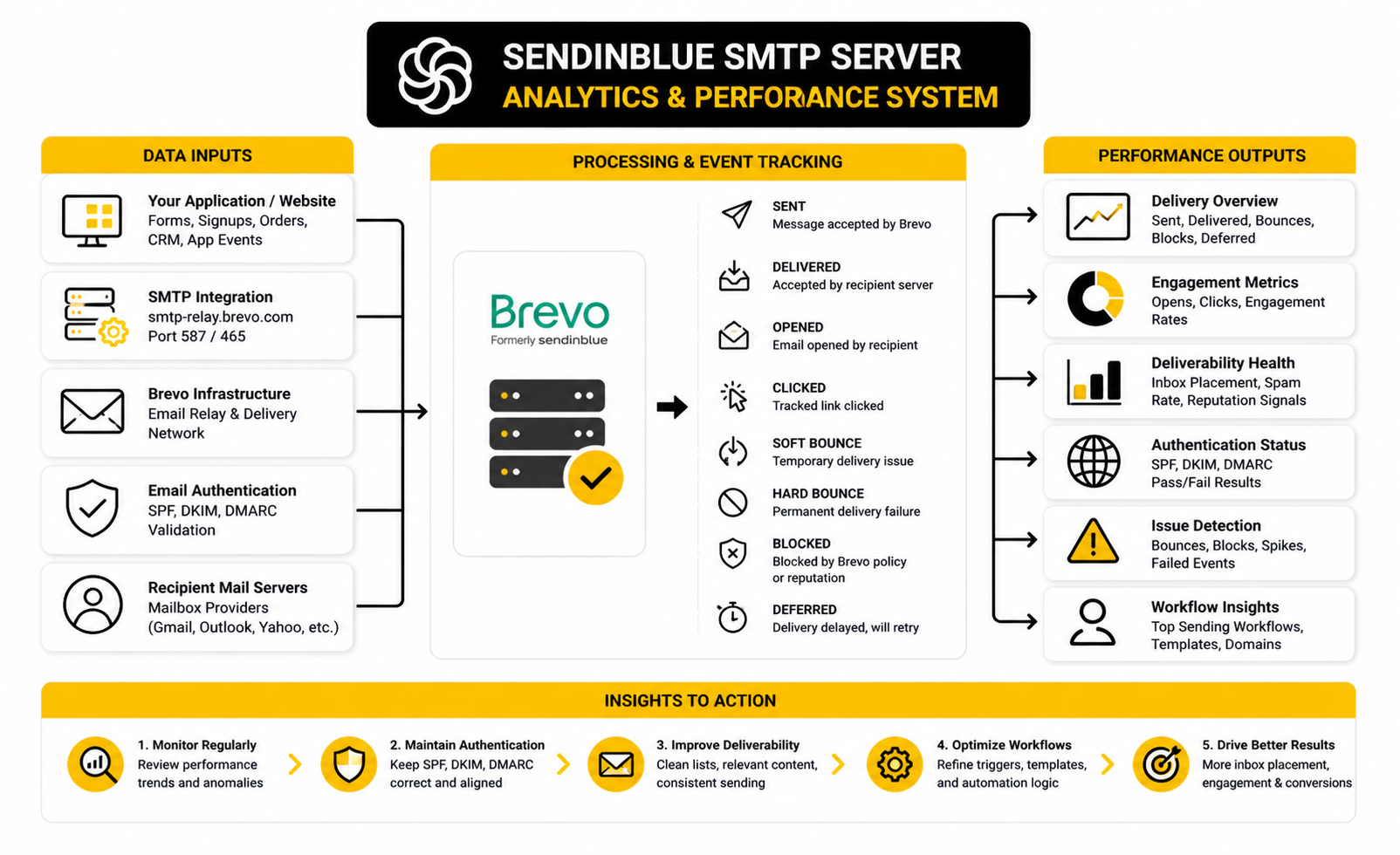
Brevo’s transactional logs track events for emails sent through SMTP, API, and automation workflows, including when messages are sent, delivered, opened, clicked, bounced, or blocked. That gives you a proper operating view instead of a vague “email sent” message inside a plugin. The practical move is to use those logs as your first source of truth whenever a customer, client, or team member says an email did not arrive.
The most useful SMTP performance signals are:
Do not overreact to one event in isolation. One hard bounce may simply be a bad address. A sudden cluster of bounces from one form may point to spam submissions, fake signups, or a broken validation rule. A drop in delivered messages after a DNS change may point to authentication, not copywriting.
How to Read Delivery Data Without Guessing
Delivery data works best when you follow the path of the email. First, confirm whether the sending tool created the message. Then check whether Brevo received it. Then check whether the recipient’s mail server accepted it. Only after that should you worry about inbox placement, spam folders, or user behavior.
This sequence prevents the most common troubleshooting mistake: blaming deliverability before proving the message was actually sent. If the email never appears in Brevo, your SMTP settings, plugin trigger, app logic, or credentials are the likely problem. If the email appears in Brevo but is bounced or blocked, the issue moves closer to sender reputation, authentication, recipient validity, or policy.
For teams using CRM and funnel systems, this matters even more. A missed lead notification can look like an email problem when the real issue is a broken form action, duplicated automation, or a disabled workflow. Platforms such as GoHighLevel can run many automations from one account, so the measurement process needs to separate trigger problems from SMTP delivery problems.
Benchmarks Are Directional, Not Absolute
Benchmarks can be useful, but they should not run your business. Brevo’s benchmark data shows that email performance varies heavily by industry, audience, message type, and intent. That is exactly why comparing a transactional password reset to a newsletter average is not just unhelpful; it is misleading.
Marketing email benchmarks are mainly useful for campaign-level expectations. They can help you sense whether your newsletter, launch sequence, or nurture campaign is broadly underperforming. They should not be used to judge whether the sendinblue smtp server is configured correctly, because SMTP configuration is mostly about connection, authentication, acceptance, and reliable event tracking.
For transactional emails, your better benchmark is your own baseline. Measure normal delivery volume, normal bounce patterns, normal support complaints, and normal timing. Then watch for changes. A sudden shift from your own baseline is more actionable than a generic industry average.
Authentication Data Matters More Than Vanity Metrics
Inbox providers have become much stricter about sender identity. Gmail recommends SPF, DKIM, and DMARC for domains, while Yahoo’s sender requirements also push proper authentication and responsible sending practices. That means your measurement system should include authentication checks, not just opens and clicks.
The action step is simple: check the headers of real test emails and confirm that authentication passes. Look for SPF, DKIM, and DMARC results, and make sure they align with the domain you are using as the visible sender. If those results are failing, weak, or inconsistent, fix that before obsessing over subject lines or template design.
This is especially important when multiple systems send from the same domain. Your website, CRM, ecommerce platform, helpdesk, newsletter tool, and billing system may all touch email. If one tool is authenticated and another is not, your reporting can look inconsistent because the recipient mailbox providers are not seeing one clean sender identity.
Turn Data Into a Weekly Operating Habit
The best teams do not wait for complaints before checking email performance. They review transactional email data on a simple rhythm, especially after launches, DNS changes, plugin updates, domain migrations, new automations, or traffic spikes. This does not need to become a giant reporting ritual; it just needs to be consistent.
A practical weekly review can be simple:
The point is not to chase perfect numbers. The point is to notice problems early enough that they stay small. If your customer emails support before your team notices failed password resets, the monitoring process is too passive.
What Good Performance Looks Like
Good SMTP performance is boring in the best possible way. Critical emails appear in Brevo logs. Delivery events are consistent. Bounces are explainable. Blocks are rare. Authentication passes. Support complaints about missing email stay low.
That is the standard you want. Not flashy dashboards. Not inflated open rates. Not one perfect test email sent to your own inbox.
A healthy Brevo SMTP setup creates confidence because the data is clear. When a message works, you can prove it. When something fails, you can isolate the layer that failed. That is what turns the sendinblue smtp server from a copied setting into a reliable part of your business infrastructure.
Advanced Considerations Before You Scale
Once the sendinblue smtp server is working, the next mistake is assuming the job is finished. It is not. SMTP setup is the starting point; scaling reliable email means thinking about volume, reputation, architecture, compliance, and failure recovery before those topics become urgent.
This is where beginners and professionals separate. Beginners ask, “Did the test email arrive?” Professionals ask, “What happens when volume doubles, a DNS record changes, a plugin update breaks the trigger, or a mailbox provider starts rejecting a specific pattern?” That mindset is less exciting, but it is what keeps systems stable.
The good news is that you do not need an overbuilt enterprise email stack from day one. You just need to make the right tradeoffs at the right stage. A small site, an agency funnel, an ecommerce store, and a SaaS product do not need the same architecture, but they all need a deliberate one.
SMTP vs API Is a Strategic Choice
SMTP is usually the fastest way to connect an existing tool to Brevo. Most CMS plugins, checkout tools, CRMs, and form builders understand SMTP because it has been the standard sending method for decades. If your goal is to replace weak hosting email with a proper relay, SMTP is often the practical answer.
The API becomes more attractive when your product needs deeper control. Developers can handle structured errors, template variables, event logic, retries, tagging, and application-level decisions more cleanly through an API than through a generic SMTP connection. Brevo’s developer platform supports both approaches, so the choice should follow the job instead of personal preference.
A simple rule works well: use SMTP when the sending tool already exists and only needs a reliable relay. Use the API when email is part of your product logic. If the message must react to application state, user behavior, billing events, or internal rules, API-based sending will usually give you a cleaner long-term foundation.
Shared IP or Dedicated IP
Most businesses should not rush into a dedicated IP. A shared IP can work well when the provider manages reputation across many senders and your volume is not high enough to justify your own sending infrastructure. Dedicated IPs sound more professional, but they also require consistent volume, warmup discipline, and reputation management.
A dedicated IP can make sense when you send a large, steady volume of important email and want more control over reputation. It can also be useful when your sending profile is clearly separate from typical shared pool traffic. But control cuts both ways: if your own list quality, sending rhythm, or authentication is poor, a dedicated IP does not magically protect you.
For most teams using Brevo SMTP for forms, receipts, notifications, and account emails, the better move is to start simple. Use a well-authenticated sender domain, keep volume predictable, monitor bounces, and only consider dedicated infrastructure when the data shows a real need. Paying for more control before you have the operational discipline to manage it is not strategy; it is just complexity.
Plan for Rate Limits and Sending Spikes
Email systems need to handle normal traffic and unusual traffic differently. A normal day might include a predictable flow of password resets, order confirmations, and lead notifications. A launch day, flash sale, viral post, webinar reminder, or product migration can create a sending spike that exposes weak assumptions.
The risk is not just that emails fail. The bigger risk is that your system behaves unpredictably under pressure. Some messages may send late, some may retry too aggressively, and some may trigger support tickets because users are waiting for a link or confirmation that matters right now.
For higher-volume systems, build sending behavior with queues, retries, and clear priority. A password reset should not wait behind a low-priority internal notification. A billing receipt should not be treated the same as a promotional follow-up. When volume rises, prioritization becomes part of the customer experience.
Watch Reputation at the Domain Level
Your sending reputation is not only about the SMTP provider. It is also about your domain, your audience, your complaint patterns, your bounce rate, your authentication, and the consistency of your sending behavior. That is why changing the SMTP server alone does not fix every deliverability issue.
If your domain sends unwanted email, has poor list hygiene, or mixes too many unrelated use cases, mailbox providers may still react negatively. Brevo can provide the infrastructure, but it cannot make bad sending practices look trustworthy forever. Strong infrastructure helps honest senders perform better; it does not erase poor behavior.
This is especially important when one domain is used across many tools. A business might send newsletters from one platform, receipts from Brevo, sales messages from a CRM, and support replies from a helpdesk. If all of those systems use the same domain, the domain’s reputation becomes a shared asset, and every tool has to respect it.
Use Subdomains When the Sending Mix Gets Messy
A subdomain can help separate different sending streams. For example, transactional emails can come from one authenticated subdomain, while marketing campaigns use another. This does not remove the need for quality sending, but it can make reputation, troubleshooting, and reporting cleaner.
The common mistake is creating subdomains without a reason. Do not split everything just because it looks advanced. Use subdomains when they solve a real problem: different message types, different platforms, different risk levels, or different operational owners.
A practical structure could look like this:
Keep the structure readable. If nobody on the team can explain what each subdomain does, the architecture is too clever. Email systems should be boring, understandable, and easy to maintain.
Design for Failure Before It Happens
Every serious email system needs a failure plan. Credentials can be revoked. DNS can be edited incorrectly. A plugin can stop firing. A form can get spammed. A domain can hit a temporary reputation issue. None of that is rare enough to ignore.
The failure plan does not need to be complicated, but it does need to exist. Decide who checks the Brevo logs, who can update SMTP credentials, who controls DNS, who can pause a broken automation, and who communicates with customers if a critical email flow fails. That clarity is worth more than another dashboard nobody checks.
For business-critical workflows, consider backup communication paths. If an appointment confirmation fails, maybe the CRM can still show the booking internally. If a password reset email is delayed, support should know how to verify the event and guide the user. If an invoice email bounces, billing should have a process for follow-up instead of assuming the customer ignored it.
Avoid Tool Sprawl Around Email
A lot of email problems are really tool sprawl problems. One platform sends the form notification, another sends the CRM alert, another sends the nurture sequence, and another sends the receipt. At first, that feels flexible. Later, it becomes hard to know which system owns which message.
This is why the sendinblue smtp server setup should be mapped as part of the wider stack. If Brevo handles transactional email, document which tools use it and which messages they send. If another platform handles marketing automation, keep that boundary clear. If a funnel tool such as ClickFunnels or an all-in-one platform such as Systeme.io is part of the stack, decide whether it sends directly or hands off specific email types elsewhere.
The goal is not to use fewer tools for the sake of it. The goal is to remove ambiguity. When each email has one owner, one trigger, one sender identity, and one measurement path, troubleshooting becomes dramatically easier.
Know When Brevo Is the Right Fit
Brevo is a strong fit when you want a practical SMTP relay, transactional logs, templates, and marketing tools in one accessible platform. It is especially useful for websites, agencies, ecommerce operations, and smaller SaaS teams that need reliable sending without building a full internal email infrastructure. The current Brevo transactional email product is built around that exact mix of SMTP relay, API access, webhooks, plugins, and logs.
It may not be the only tool you ever need. High-volume products, complex compliance environments, multi-region systems, or deeply customized event pipelines may eventually require more specialized architecture. That does not make Brevo weak; it just means your email system should evolve with the business.
The smart approach is to match the tool to the stage. Start with a clean SMTP implementation. Add better monitoring as volume grows. Move specific flows to API when product logic demands it. Separate sending streams when reputation management becomes more important. That path keeps the system useful without turning it into a technical monster.
Best Practices, Tool Choices, and FAQ
The strongest setup is not just Brevo plus SMTP credentials. It is an email ecosystem where the sender domain, SMTP relay, workflows, analytics, support process, and marketing stack all have a clear role. When that ecosystem is clean, the sendinblue smtp server becomes one dependable layer inside a larger business system instead of a fragile setting hidden inside a plugin.
That final-system view matters because email touches almost every part of the customer journey. A lead form can trigger an internal alert. A checkout can trigger a receipt. A CRM can trigger a sales follow-up. A product can trigger onboarding, password resets, security alerts, and lifecycle messages. If those systems are not mapped, the business eventually loses track of which tool sends what.
The practical goal is simple: every important email should have one owner, one sender identity, one sending route, and one place to inspect performance. That does not mean every message has to use the same tool. It means the architecture has to be intentional enough that the team can maintain it without guessing.
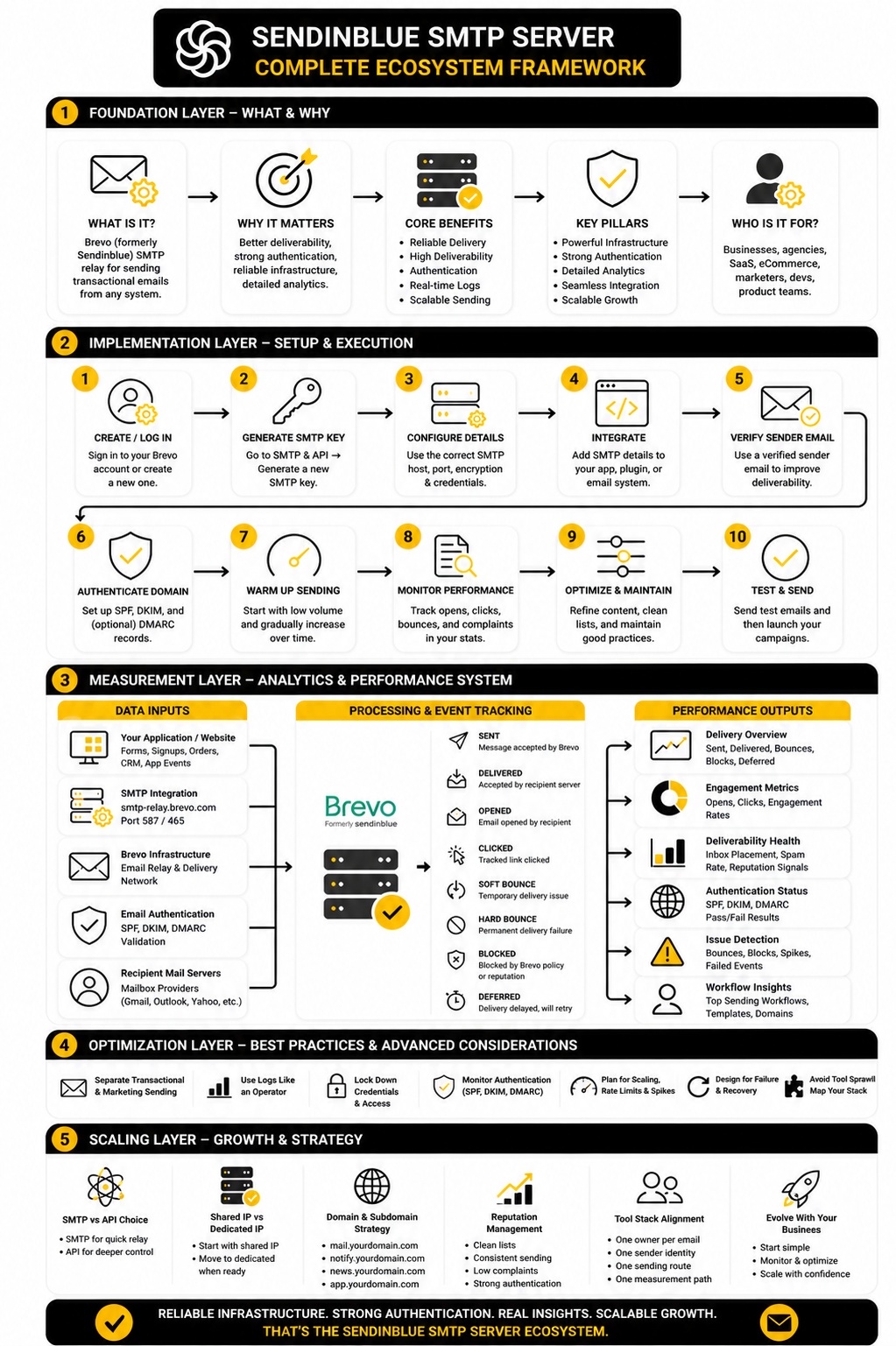
Build a Clean Email Ecosystem
A clean ecosystem starts with ownership. Decide which platform sends transactional emails, which platform sends marketing campaigns, which platform manages CRM automation, and which platform owns customer support replies. This prevents overlapping automations and makes troubleshooting much faster when something breaks.
Brevo can sit at the center of transactional sending because it supports SMTP relay, API-based sending, logs, templates, and performance tracking. A funnel builder, CRM, or automation platform can still handle the customer journey, but the actual sending path should be documented. If you use a platform such as GoHighLevel, make sure every form, pipeline, reminder, and campaign has a clear sending rule.
The same thinking applies to marketing operations. A landing page platform, form builder, chatbot, scheduler, and CRM can all collect leads, but they should not all send overlapping follow-ups. If your stack includes tools such as ManyChat, Fillout, Cal.com, or ClickFunnels, map where the email responsibility starts and stops before scaling traffic.
Keep the Stack Practical
The best email stack is not always the biggest one. A simple business may only need Brevo SMTP, a verified sending domain, a reliable contact form, and a weekly log review. A larger operation may need a CRM, funnel system, helpdesk, product email API, analytics layer, and stricter access controls.
Do not add tools just because they look advanced. Add tools when they remove manual work, improve reliability, or give you better visibility. If a new platform creates another hidden sending path, another sender identity, and another place to check logs, it may create more risk than value.
This is especially true for agencies and client work. A client rarely cares which SMTP port you used; they care that leads arrive, customers get confirmations, and support is not buried under “I did not receive the email” messages. Keep the architecture understandable enough that another competent operator could maintain it after you.
What is the sendinblue smtp server?
The sendinblue smtp server usually refers to Brevo’s current SMTP relay, because Sendinblue rebranded to Brevo. The main SMTP host is smtp-relay.brevo.com, and it is used to send transactional emails from websites, apps, CRMs, ecommerce platforms, and automation tools. The name “Sendinblue” still appears in many searches and older tutorials, but the active product is Brevo.
What is the Brevo SMTP server address?
The common Brevo SMTP server address is smtp-relay.brevo.com. You connect to it with the SMTP login and SMTP key generated inside your Brevo account. You should confirm the current setup inside the official Brevo SMTP relay documentation before configuring a production system.
Which port should I use for Brevo SMTP?
Port 587 with STARTTLS is the usual practical choice for modern SMTP tools. Some platforms may use port 465 with SSL/TLS instead, especially when their settings screen separates SSL and TLS options differently. The right choice is the secure option your sending tool supports reliably.
Is Sendinblue the same as Brevo?
Yes, for this topic, Sendinblue and Brevo refer to the same company’s email platform under different brand names. Sendinblue became Brevo, but many people still search for the older name because older plugins, tutorials, and setup guides used it. When you are configuring SMTP today, use the current Brevo account settings and documentation.
Can I use Brevo SMTP for WordPress?
Yes, Brevo SMTP can be used with WordPress through an SMTP plugin or a compatible mail integration. The plugin connects WordPress to Brevo using the SMTP server, port, username, password, and encryption method. After setup, test real WordPress workflows such as contact forms, password resets, order confirmations, and admin notifications.
Can I use Brevo SMTP for ecommerce emails?
Yes, Brevo SMTP is commonly used for ecommerce transactional emails such as order confirmations, shipping updates, account messages, and payment-related notifications. The key is to test the actual ecommerce workflow, not only the SMTP test button. Receipts and customer confirmations are business-critical, so sender authentication, logs, and formatting all matter.
Why are my Brevo SMTP emails not arriving?
Start by checking whether the message appears in Brevo’s transactional logs. If it does not appear there, the sending tool may not be triggering correctly, or the SMTP credentials may be wrong. If it appears but is bounced, blocked, or deferred, inspect the recipient address, domain authentication, message content, sender reputation, and mailbox provider response.
Do I need SPF, DKIM, and DMARC for Brevo SMTP?
Yes, you should treat SPF, DKIM, and DMARC as standard requirements for serious sending. Gmail recommends all three authentication methods for better delivery, and Yahoo’s sender standards also make authentication part of responsible sending. Even if your volume is small, proper authentication makes your sender identity stronger and troubleshooting easier.
Is SMTP better than the Brevo API?
SMTP is better when you need a fast, compatible way to connect an existing tool. The Brevo API is better when developers need more control over templates, logic, events, structured errors, and application behavior. Use SMTP for straightforward relay setups and consider the API when email becomes part of your product infrastructure.
Can I send marketing emails through the same SMTP setup?
You should be careful. Transactional and marketing emails have different purposes, different user expectations, and different risk profiles. Brevo can support both types of email, but your implementation should keep the logic, sender identity, templates, and reporting cleanly separated.
Should I use a dedicated IP with Brevo?
Most smaller senders do not need a dedicated IP at the beginning. A dedicated IP can help when you have large, consistent volume and the discipline to manage warmup and reputation properly. If your volume is inconsistent or your list hygiene is weak, a dedicated IP can expose problems faster rather than solve them.
What should I monitor after setting up Brevo SMTP?
Monitor sent, delivered, bounced, blocked, deferred, opened, and clicked events where relevant. More importantly, watch changes over time instead of obsessing over one isolated number. A healthy setup has consistent delivery, explainable bounces, rare blocks, passing authentication, and few support complaints about missing emails.
Can Brevo replace my business mailbox?
No, Brevo SMTP is not a normal inbox replacement. It is designed for sending email from systems such as websites, applications, and automation tools. You still need a business mailbox provider if you want team inboxes, personal email, replies, internal communication, and normal mailbox management.
What is the biggest mistake people make with Brevo SMTP?
The biggest mistake is stopping after one successful test email. A single test proves very little. A proper setup tests real workflows, verifies DNS authentication, checks logs, confirms headers, documents credentials, and creates a support process for failed or missing messages.
Build a stronger local presence with BAAM AI
Turn your website, Google profile, social channels, and AI visibility into one growth engine
Most businesses do not need more random marketing activity. They need a consistent presence system that helps the right people find them, trust them, and take action. BAAM AI brings strategy, local SEO, website updates, Google Maps visibility, social content, AI-search readiness, media production, and reporting into one practical monthly engine.
If you want your marketing to keep working after the campaign ends, start with a free BAAM AI presence audit. See how your business shows up today and where the fastest visibility wins are at BAAM AI.