
BAAM AI Blog
Send In Blue CRM: A Practical Guide To Turning Contacts Into Revenue
Send in blue CRM is usually what people mean when they are looking for the CRM inside Sendinblue, now called Brevo. The name changed, but the core intent stayed the same: manage contacts, track conversations, send...
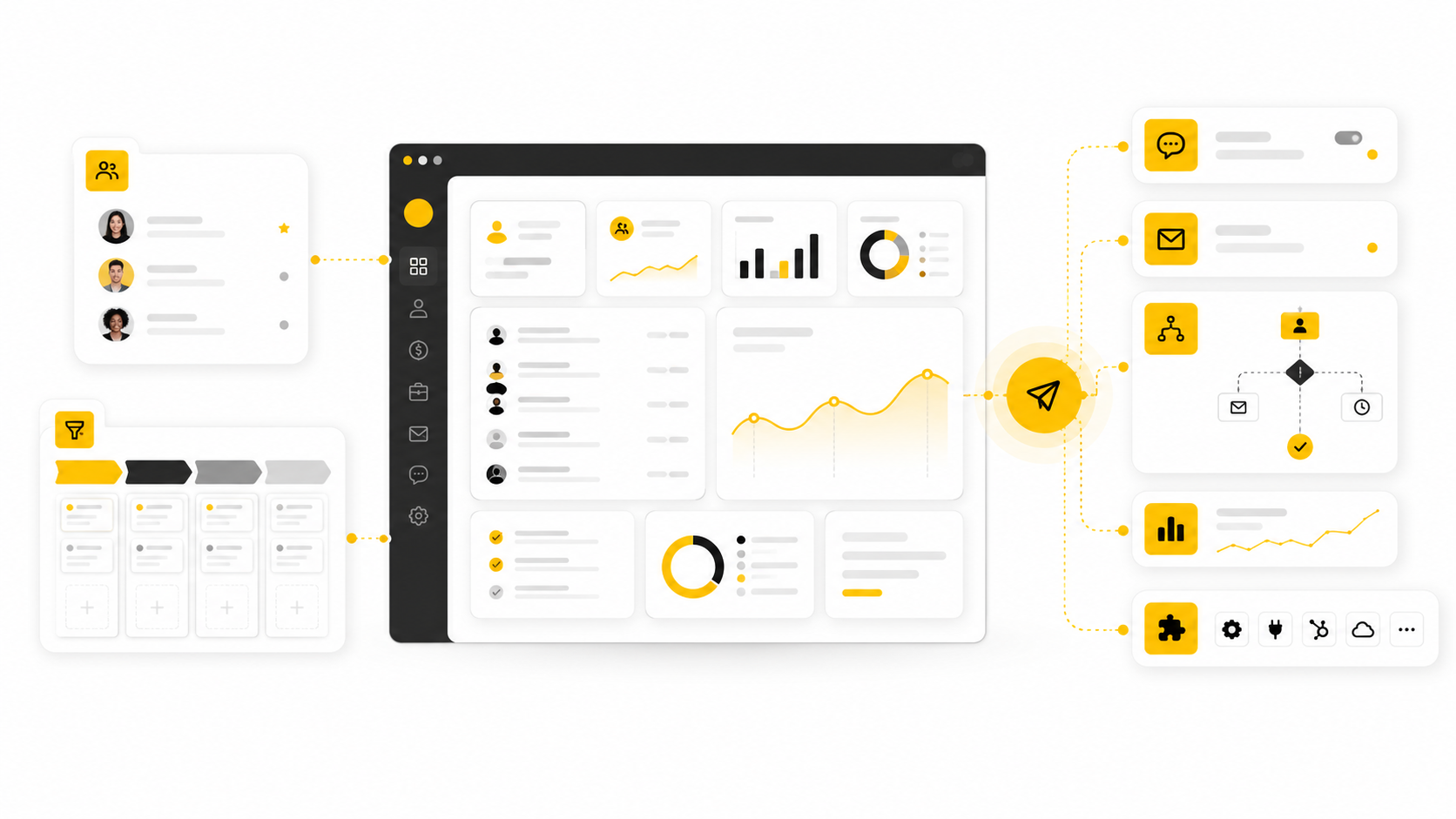
Send in blue CRM is usually what people mean when they are looking for the CRM inside Sendinblue, now called Brevo. The name changed, but the core intent stayed the same: manage contacts, track conversations, send campaigns, automate follow-ups, and keep sales activity connected to marketing.
That matters because most businesses do not lose revenue only because they lack leads. They lose revenue because leads sit in spreadsheets, email tools, inboxes, forms, calendars, and sales notes that never quite talk to each other. A CRM becomes useful when it stops being a storage box and starts acting like the operating system for your customer relationships.
Brevo positions itself as an all-in-one customer engagement platform for email, SMS, WhatsApp, live chat, automation, transactional messaging, and sales CRM, which makes it especially relevant for smaller teams that want fewer disconnected tools. You can explore the platform through Brevo’s marketing and CRM suite if you are comparing it against heavier sales platforms.
The bigger shift is not just “CRM software is growing.” It is that CRM, marketing automation, and customer messaging are merging into one workflow. The global CRM market is estimated at $87.96 billion in 2026 and projected to reach $128.86 billion by 2031, which reflects how central customer data has become to sales and retention systems. Marketing automation is also becoming harder to ignore, with the DMA reporting that automation can deliver a +50% effectiveness boost in performance marketing effects and a +32% increase in marketing ROI.
Why Send In Blue CRM Matters
A CRM is not valuable because it has contact fields, deal stages, or dashboards. Those things are useful, but they are not the point. The point is to help a team remember the right context, send the right message, follow up at the right time, and make better decisions without relying on memory.
This is where send in blue CRM becomes interesting for practical operators. Brevo started with email marketing and customer messaging, so its CRM is naturally close to campaigns, segments, forms, and automation. That makes it different from traditional sales-first CRMs where marketing often feels bolted on later.
For a small business, agency, ecommerce brand, consultant, or local service provider, that closeness can be a serious advantage. You are not just tracking leads after they appear. You are connecting the way they entered your world, what they clicked, what they received, what they booked, and where they sit in the pipeline.
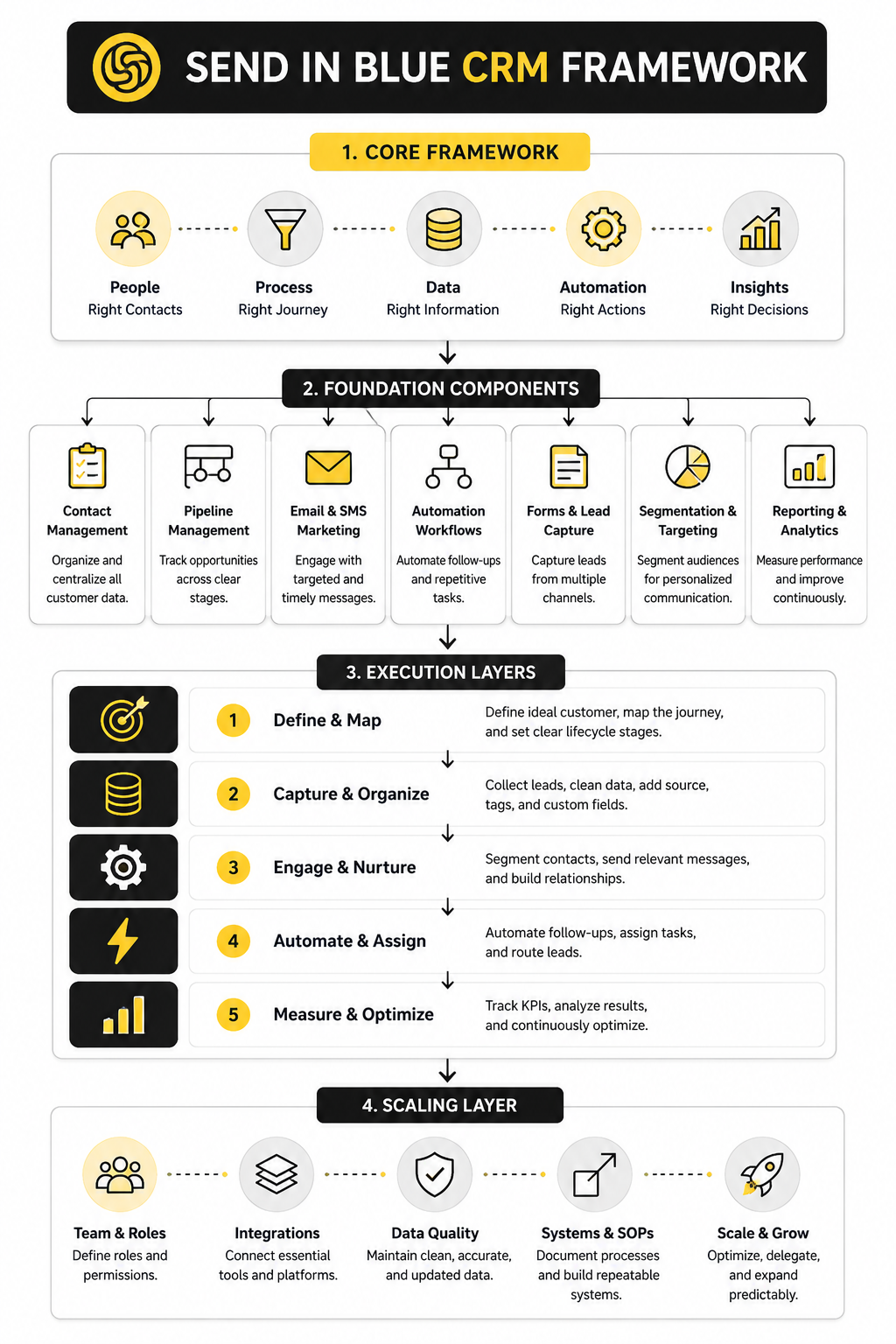
The Send In Blue CRM Framework
A strong CRM setup has a simple logic: capture, organize, communicate, follow up, and measure. If one of those steps is weak, the whole system feels unreliable. Leads get missed, automations fire at the wrong time, salespeople stop trusting the pipeline, and reporting becomes decorative instead of useful.
The send in blue CRM framework should begin with contact clarity. Every new contact needs a source, a lifecycle stage, permission status, and enough context to make the next action obvious. Without that foundation, even the best automation becomes a faster way to create confusion.
From there, the framework moves into action. Contacts should flow into segments, deals, tasks, and campaigns based on what they did, not based on someone manually remembering to update a field. That is the difference between a CRM that stores data and a CRM that actually supports revenue work.
Core Components Of A Working CRM Setup
A useful send in blue CRM setup starts with the parts your team will actually use every day. That sounds obvious, but it is where most CRM projects go wrong. People build too many fields, too many lists, too many labels, and then nobody trusts the system enough to keep it updated.
The better approach is to build around decisions. What does the sales team need to know before following up? What does marketing need to know before sending a campaign? What does support need to know before answering a customer who has already spoken to sales?
Once those questions are clear, the CRM becomes much easier to design. You are no longer collecting data because “it might be useful someday.” You are collecting data because it helps someone take the next best action.
Contact Records
The contact record is the center of the whole system. Every email address, phone number, company name, permission status, lifecycle stage, and interaction history should make the person easier to understand. If a contact record does not help your team communicate better, it is probably clutter.
In Brevo, contacts can connect directly with email campaigns, automation workflows, SMS, WhatsApp, and sales activity. That is important because a lead is rarely just a sales object or just a marketing subscriber. The same person might download a lead magnet, open three emails, book a call, go silent, and then reply two months later.
A clean send in blue CRM contact record should make that journey visible without forcing the team to dig. The goal is not to turn every profile into a data warehouse. The goal is to give enough context that the next message feels relevant, timely, and human.
Lists, Segments, And Tags
Lists and segments are where the CRM starts becoming operational. A list is usually a broader container, while a segment should be more dynamic and behavior-driven. Tags can add extra context, but they should be used carefully because messy tagging becomes messy targeting.
For example, a business might separate newsletter subscribers, booked-call leads, trial users, past customers, and inactive contacts. That structure is useful because each group needs a different message. Someone who just booked a consultation should not receive the same nurture sequence as someone who has not engaged in six months.
This is where teams need discipline. Do not create five different tags that all mean almost the same thing. Pick naming rules early, document them, and keep the system simple enough that a new team member can understand it without asking three people for help.
Deals And Pipelines
Deals are where contact management turns into sales management. A contact tells you who the person is, but a deal tells you what opportunity is on the table. That distinction matters because one contact can have different sales conversations over time.
Brevo’s sales platform supports pipelines, deal stages, tasks, companies, and activity tracking, which makes it practical for teams that want CRM and communication tools in the same ecosystem. You can review the platform through Brevo’s sales CRM tools if you are deciding whether it fits your sales process. The key is not whether the pipeline looks pretty; it is whether it reflects how buyers actually move from interest to decision.
A simple pipeline usually works better than a clever one. Stages should represent real buyer progress, not internal wishes. “Interested” is vague, but “Demo scheduled” or “Proposal sent” tells the team what has happened and what should happen next.
Tasks And Follow-Ups
A CRM without follow-up discipline is just a digital address book. Tasks give the system its rhythm because they turn customer context into action. When a lead asks for pricing, books a call, replies to a campaign, or goes quiet after a proposal, someone needs a clear next step.
This is especially important for smaller teams where everyone is busy and nobody has time to manually remember every lead. A good send in blue CRM workflow should make follow-up feel obvious. The team should know who to contact, why they are contacting them, and what outcome they are trying to move toward.
Tasks also protect revenue from timing gaps. Many deals are not lost because the buyer said no. They are lost because nobody followed up when the buyer was still warm.
Email, SMS, And Conversation History
The biggest advantage of keeping CRM close to communication is continuity. When sales and marketing live in separate tools, context gets lost. One person sees campaign engagement, another sees pipeline notes, and the customer experiences the company as if nobody is talking internally.
Brevo’s platform combines email marketing, SMS, WhatsApp, conversations, automation, and CRM features, which makes it useful for teams that care about coordinated communication. That does not mean every business should use every channel. It means the channels you do use should connect back to the customer record.
The practical rule is simple: never make the customer repeat information your system should already know. If someone filled out a form, clicked a product email, or asked a question in chat, that context should shape the next interaction. That is how a CRM moves from admin tool to customer experience tool.
Forms And Lead Capture
Lead capture is where the quality of your CRM data begins. If your forms are sloppy, your CRM will be sloppy. If your forms ask for too much too early, conversion drops before the relationship even starts.
A better approach is progressive. Ask for the information you need at that moment, then enrich the profile as the relationship develops. A newsletter signup does not need the same fields as a demo request, and a demo request does not need the same workflow as a support inquiry.
Tools like Fillout can help when you need more flexible forms, qualification logic, or clean intake flows before sending data into your CRM. The important part is making sure every form has a purpose. Every field should help with segmentation, routing, qualification, or follow-up.
Booking And Scheduling
Scheduling is often treated as a separate admin problem, but it belongs inside the customer journey. When someone is ready to talk, the booking experience should be smooth. If they have to wait for three back-and-forth emails, momentum starts fading.
A CRM-connected scheduling process helps teams move faster because the meeting is not just an event on a calendar. It becomes a signal. The contact can move to a new stage, receive a confirmation sequence, trigger internal preparation tasks, and enter a post-call follow-up flow.
For teams that need flexible scheduling, Cal.com can fit well alongside a CRM stack. The tool is not the strategy, though. The strategy is making sure booked meetings automatically create clarity for both the buyer and the team.
Reporting And Attribution
Reporting should answer practical questions, not just decorate dashboards. Which sources create qualified leads? Which campaigns create sales conversations? Which pipeline stages slow down? Which follow-ups actually move deals forward?
This is where many businesses realize they have been measuring activity instead of progress. Email opens, form submissions, and website visits are useful signals, but they do not matter equally. A send in blue CRM setup becomes more valuable when it connects those signals to pipeline movement and customer outcomes.
Start with a small reporting layer. Track lead source, conversion points, deal stage movement, lost reasons, and revenue outcomes. Once those basics are reliable, more advanced reporting becomes easier and far more trustworthy.
Professional Implementation For Sales And Marketing Teams
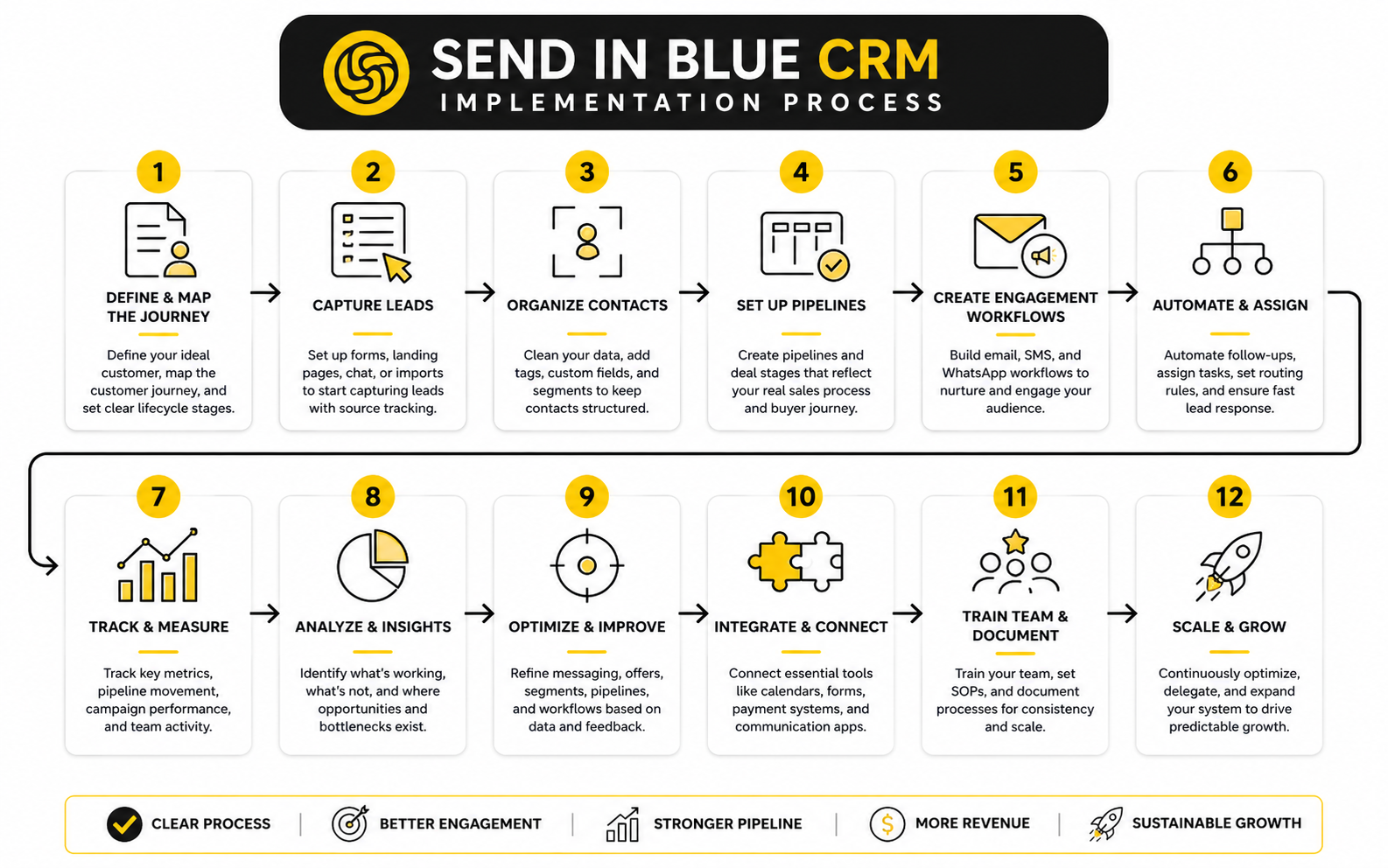
Implementation is where a CRM either becomes a working system or another tool people avoid. The software can be strong, the features can be useful, and the pricing can make sense, but none of that matters if the rollout is vague. A send in blue CRM setup needs a clear process, clear ownership, and a realistic version of what the team can maintain.
The best implementation starts smaller than most people expect. You do not need every automation, field, pipeline, and report built on day one. You need the first working version of the system that captures leads properly, routes them correctly, supports follow-up, and gives the team enough visibility to make decisions.
That is the practical mindset. Build the CRM around the real customer journey first, then improve the details once the basics are stable. Overbuilding too early creates confusion, and confusion kills adoption.
Step 1: Map The Customer Journey Before Touching Settings
Start with the journey, not the tool. Write down how someone first discovers the business, what they do before becoming a lead, what makes them qualified, what happens before a sales conversation, and what happens after the sale. This should be specific enough that the CRM structure reflects reality instead of wishful thinking.
For send in blue CRM, this journey usually connects marketing forms, email campaigns, SMS or WhatsApp follow-ups, sales pipeline movement, and post-sale communication. That means implementation should not be handled as a sales-only project. Marketing, sales, and operations all need input because each team owns a different part of the customer experience.
Keep the map simple at first. A messy whiteboard that shows real behavior is more useful than a polished diagram that nobody uses. The goal is to identify the moments where the CRM needs to capture data, trigger an action, or alert a human.
Step 2: Define Lifecycle Stages
Lifecycle stages tell the team where a person sits in the relationship. They are different from pipeline stages because not every contact is an active deal. Someone can be a subscriber, a lead, a qualified lead, an opportunity, a customer, or an inactive customer.
This distinction matters because it controls messaging. A subscriber might need education, a qualified lead might need urgency, and a customer might need onboarding or retention communication. When those stages are unclear, teams send generic messages and wonder why performance feels flat.
Use plain language for lifecycle stages. Do not invent clever internal terms that make sense only to the person who built the CRM. The stage name should immediately tell the team what type of relationship exists and what kind of action is appropriate.
Step 3: Build The Pipeline Around Buyer Progress
Pipeline stages should describe what the buyer has actually done. A good stage is based on evidence, not optimism. “Proposal sent” is evidence, while “hot lead” is usually a feeling.
A practical send in blue CRM pipeline might include new opportunity, contacted, meeting booked, meeting completed, proposal sent, negotiation, won, and lost. That is not the perfect pipeline for every business, but it shows the right logic. Each stage should represent a meaningful shift in the sales conversation.
The pipeline also needs exit rules. If a lead is unqualified, mark it clearly. If a proposal is rejected, record the reason. If a deal is won, trigger the next customer workflow instead of letting the record sit in the sales pipeline forever.
Step 4: Clean And Import Contact Data
Importing bad data into a new CRM is like moving into a new house and bringing every broken item from the old garage. It feels faster in the moment, but it creates problems immediately. Before importing, clean duplicates, remove outdated records, standardize fields, and confirm that permission status is accurate.
For send in blue CRM, contact cleanliness is especially important because CRM data can influence campaigns and automation. A wrong lifecycle stage can send the wrong email. A missing source field can weaken reporting. A duplicate contact can split activity history and make follow-up messy.
Use the import as a forcing function. Decide which fields are truly necessary, which fields should be standardized, and which old data should not come over at all. Less clean data beats more unreliable data every time.
Step 5: Create The Minimum Useful Automation
Automation should remove repetitive work, not hide a broken process. Start with the automations that protect speed and consistency. A new lead should get routed, a booked meeting should trigger preparation, a completed call should create a follow-up task, and a won deal should start onboarding.
Brevo supports automation for sales activities like deals and tasks, which is useful when repetitive CRM updates slow the team down. You can start from Brevo’s CRM and automation platform when you want the CRM, email, messaging, and workflow pieces closer together. The real win is not automation for its own sake; it is reducing the number of moments where a lead depends on someone remembering a manual step.
Keep the first automation layer boring. Boring is good here. Reliable lead routing, task creation, stage updates, reminders, and basic nurture sequences will usually create more impact than a complicated workflow nobody can debug.
Step 6: Connect Forms, Calendars, And Sales Actions
The CRM should not wait for manual entry whenever someone takes a meaningful action. Form submissions, calendar bookings, replies, purchases, and sales updates should move the relationship forward automatically where possible. That is how the system starts feeling alive.
For intake and qualification, a form builder like Fillout can help create structured entry points before the contact reaches the CRM. For scheduling, Cal.com can support a cleaner booking flow when meetings are central to the sales process. These tools are most useful when they are connected to clear CRM actions, not when they operate as isolated add-ons.
Think in signals. A form submission signals interest. A booked call signals intent. A missed meeting signals risk. A proposal view signals timing. The implementation should translate those signals into CRM updates, tasks, or messages.
Step 7: Train The Team On The Workflow, Not The Features
Most CRM training fails because it teaches buttons instead of behavior. People do not need a tour of every feature first. They need to know exactly what they should do when a new lead appears, a call ends, a deal stalls, or a customer replies.
Training should be role-specific. Sales needs to understand pipeline discipline, task handling, notes, and follow-up expectations. Marketing needs to understand segmentation, campaign triggers, consent, and source tracking. Operations needs to understand data hygiene, naming rules, and reporting logic.
Make the rules visible. A simple internal playbook with screenshots, field definitions, pipeline stage rules, and common scenarios will prevent endless confusion later. When people know what “good usage” looks like, adoption becomes much easier.
Step 8: Launch With A Review Loop
The first version of a CRM is never perfect. That is normal. What matters is whether the team reviews usage quickly enough to fix weak spots before they become habits.
After launch, review the system every week at first. Look for missing fields, skipped stages, overdue tasks, duplicate contacts, confusing automations, and reports nobody trusts. These are not failures; they are feedback from the real workflow.
A strong send in blue CRM implementation improves through use. The team will notice which fields matter, which automations save time, and which pipeline stages need tightening. Treat the first month as calibration, not final judgment.
Statistics And Data
Measurement inside a send in blue CRM setup should never feel like a pile of random numbers. The point is not to track everything. The point is to know which signals show healthy growth, which signals expose friction, and which signals tell the team exactly what to fix next.
CRM data becomes useful when it connects marketing activity to sales progress. An email open means very little on its own. A lead source means very little on its own. A pipeline stage means very little on its own. The value appears when those signals are connected into one view of how people move from first contact to booked conversation, proposal, purchase, and retention.
That is why analytics should be designed around decisions. If a metric does not help the team improve targeting, follow-up, messaging, sales speed, or customer experience, it should not dominate the dashboard. Clean measurement is not about having more charts. It is about seeing the few numbers that actually explain what is happening.
The CRM Metrics That Actually Matter
The most useful CRM metrics usually sit in four groups: acquisition, engagement, pipeline, and revenue. Acquisition tells you where contacts come from. Engagement tells you whether people are responding to your communication. Pipeline tells you whether leads are moving through the sales process. Revenue tells you whether the whole system is creating business outcomes.
For send in blue CRM, this is especially important because the CRM can sit close to email marketing, automation, SMS, WhatsApp, forms, and sales activity. That creates a better measurement environment, but only if the team avoids vanity reporting. More contacts are not always better if the new contacts do not qualify, engage, or convert.
A practical dashboard should answer these questions clearly:
These questions keep measurement grounded. They force the CRM to support decisions instead of becoming a reporting museum.
Email Benchmarks Need Context
Email benchmarks are useful, but they are not universal laws. Brevo’s 2025 benchmark, based on analysis of more than 44 billion emails, shows an overall 31.22% open rate, 3.64% click-through rate, 0.4% unsubscribe rate, 3.6% soft bounce rate, and 0.19% hard bounce rate across industries in its dataset. Those numbers are helpful because they give teams a starting point, not because every business should expect the same result from every campaign.
A send in blue CRM user should interpret email metrics by segment and intent. A customer onboarding email should not be judged the same way as a cold newsletter. A pricing follow-up should not be judged the same way as a broad content update. The audience, timing, offer, and lifecycle stage all change what “good” performance means.
The real action is segmentation. If one segment opens but does not click, the offer or call to action may be weak. If another segment clicks but does not book, the landing page or sales handoff may be the problem. If unsubscribes climb after a campaign, the issue may be frequency, relevance, consent quality, or a mismatch between what people expected and what they received.
Sales Activity Should Reveal Friction
Sales reports should show where deals slow down, not just how much activity the team completed. Calls, emails, notes, and tasks are useful only when they help opportunities move forward. Activity without movement is noise.
This matters because sales teams still spend a huge amount of time away from direct selling. Salesforce’s sales research has reported that reps typically spend only 28% of their week actually selling, with the rest going to admin and other tasks. That is exactly why CRM measurement should highlight wasted motion, not reward it.
In practice, your send in blue CRM dashboard should make friction obvious. If deals sit too long after a discovery call, the follow-up process needs work. If proposals go out but do not close, the offer, pricing, urgency, or qualification process may need attention. If tasks are overdue across the team, the workflow is probably too manual or the ownership rules are unclear.
Speed To Lead Is A Performance Signal
Lead response time is one of the most important operational metrics because buyer intent fades quickly. The classic Harvard Business Review lead response research found that firms trying to contact potential customers within an hour were nearly seven times as likely to qualify the lead as firms that waited longer. The exact benchmark will vary by industry, but the pattern is clear: delay creates leakage.
For send in blue CRM, this should drive a very practical setup. New inquiries should create an immediate task, notification, automation, or routing rule. High-intent forms should not sit in a shared inbox. Booked calls should not depend on someone manually copying details into a pipeline.
Speed does not mean blasting people with robotic messages. It means responding while the context is fresh. The best version feels helpful: confirmation, next step, useful resource, calendar link, or a direct human follow-up when the lead is qualified.
A Practical Analytics System
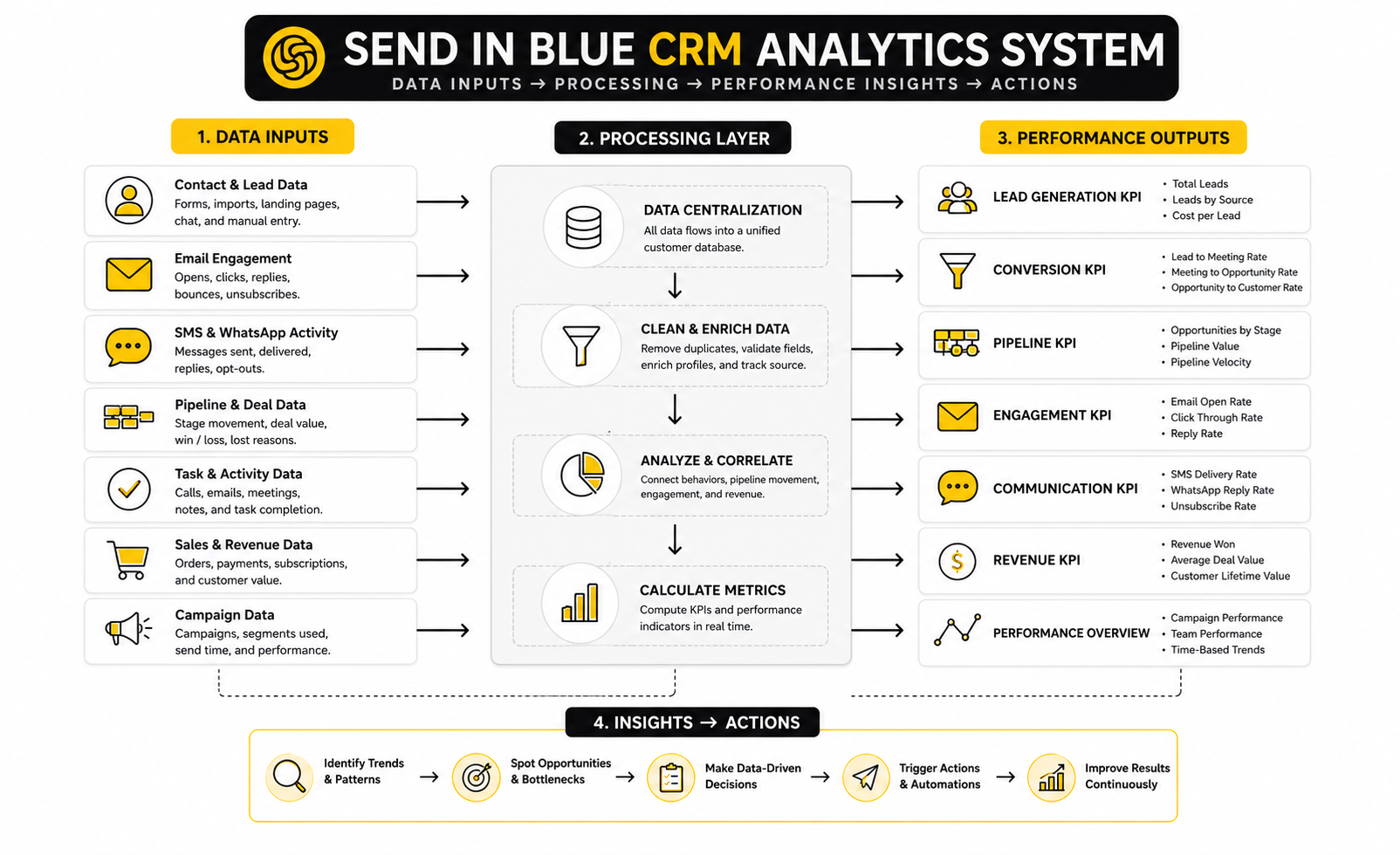
A simple analytics system should follow the journey from source to outcome. Start with source tracking, then connect it to contact quality, engagement, pipeline movement, close rate, and revenue. This gives the team a clean view of what is working and where the system leaks.
The structure can be simple:
This is where CRM reporting becomes powerful. Instead of asking whether an email campaign “performed well,” you can ask whether it created qualified pipeline. Instead of asking whether a lead source created volume, you can ask whether it created profitable customers. That shift changes how the team invests time and budget.
Benchmarks Are A Starting Point, Not A Strategy
Benchmarks can protect you from flying blind, but they can also create lazy thinking. A campaign can beat an industry average and still fail commercially. A campaign can underperform a benchmark and still be valuable if it reaches a small, high-intent segment that creates revenue.
This is why send in blue CRM reporting should compare performance against your own historical baseline. Your best benchmark is usually last month, last quarter, or the last campaign sent to the same type of audience. Industry numbers help you spot major problems, but internal trends show whether your actual system is improving.
Use benchmarks to ask better questions. If click-through rate is low, test the offer and call to action. If bounce rate is high, clean the list and fix acquisition sources. If open rate drops across engaged segments, review subject lines, sender reputation, and message relevance. If pipeline conversion drops, inspect sales handoff and qualification quality.
What To Measure Weekly
Weekly reporting should focus on movement. A weekly CRM review is not the place for deep strategy theater. It should show whether leads are being handled, whether deals are moving, and whether the team is keeping the system clean.
The weekly review should cover:
This review works best when it creates action immediately. If a source creates many unqualified leads, change the form, targeting, or offer. If a stage has too many stalled deals, tighten follow-up rules. If overdue tasks keep stacking up, simplify the process or change ownership.
What To Measure Monthly
Monthly reporting should focus on patterns. Weekly data can be noisy, especially for smaller teams. Monthly data gives you a better view of which campaigns, segments, sources, and workflows are actually contributing to growth.
A good monthly send in blue CRM report should connect marketing and sales performance in one narrative. It should show where demand came from, how leads behaved, how sales handled them, what converted, what stalled, and what should change next. That is much more useful than separate marketing and sales reports that never meet.
The monthly review should lead to decisions about budget, messaging, automation, pipeline rules, and customer lifecycle campaigns. If one segment consistently converts well, create more content and offers for that segment. If one channel creates leads but no revenue, stop celebrating the lead count and fix the economics.
What The Data Should Drive
Data should drive behavior. If the CRM shows slow follow-up, the answer is not another dashboard. The answer is a clearer routing rule, a faster notification, a better task workflow, or fewer manual handoffs.
If the data shows weak engagement, the answer is not simply sending more emails. The team should improve segmentation, sharpen the offer, adjust timing, clean inactive contacts, and make messages more relevant to the person’s stage. More volume rarely fixes poor relevance.
If the data shows pipeline leakage, the answer is to inspect the sales process. Look at qualification, discovery, proposal timing, objection handling, and next-step clarity. A CRM can show the leak, but the team still has to fix the process behind it.
Automation, Reporting, And Optimization
Once the basic send in blue CRM implementation is working, the next question is scale. Not “how do we add more features?” That is the wrong question. The better question is: how do we make the system more reliable, more useful, and harder to break as volume increases?
This is where advanced CRM work begins. You are no longer just creating contact records and moving deals through stages. You are deciding how much automation is safe, which data deserves trust, where human judgment belongs, and when the platform is enough versus when the stack needs specialist tools around it.
That is a different level of thinking. It is less exciting than launching automations, but it is what separates a CRM that helps the business grow from a CRM that quietly becomes a mess.
The Tradeoff Between Simplicity And Control
Brevo’s strength is that it brings email, SMS, WhatsApp, automation, conversations, and CRM into one customer engagement platform. That is attractive because fewer tools usually means fewer integration headaches. For many small and mid-sized teams, that simplicity is the whole point.
The tradeoff is control. As teams mature, they may want deeper attribution, more advanced pipeline customization, complex reporting, custom objects, or tighter sales enablement workflows. At that point, the team has to decide whether send in blue CRM should remain the main operating system or become one part of a broader revenue stack.
There is no universal answer. A consultant, local service business, ecommerce brand, or lean agency may benefit from keeping everything in one place. A more complex sales organization may need a dedicated CRM, data warehouse, or attribution layer. The right choice is the one your team can maintain without creating blind spots.
Data Quality Becomes A Scaling Problem
Bad CRM data does not feel dangerous at the beginning. A few duplicate contacts, missing sources, vague tags, and outdated statuses seem harmless when the list is small. Then the team grows, campaigns multiply, automations depend on fields, and suddenly small data problems start creating real operational damage.
That is not theoretical. In Validity’s 2025 CRM data management research, 37% of CRM users reported revenue loss from poor data quality, and 76% said less than half of their CRM data was accurate and complete. Those numbers matter because they show the hidden cost of messy systems: bad targeting, bad reporting, bad follow-up, and bad decisions.
A scaling send in blue CRM setup needs data rules before it needs more automation. Define required fields, naming conventions, duplicate management, source tracking, lifecycle updates, and ownership rules. Then review them regularly. Data quality is not a cleanup project you do once. It is a habit.
Automation Needs Guardrails
Automation is powerful because it removes manual work. It is risky because it can also multiply mistakes. One bad segment, wrong field, broken condition, or outdated workflow can send the wrong message to thousands of people faster than a human ever could.
This is why every serious CRM automation should have guardrails. Use clear entry conditions, exclusion rules, suppression lists, ownership checks, and stop conditions. Test with internal contacts first, then small segments, then larger audiences once the workflow behaves correctly.
The same logic applies when AI enters the workflow. AI can help draft messages, summarize interactions, suggest segments, or speed up admin work, but it should not quietly make irreversible customer decisions without oversight. The practical rule is simple: automate the repeatable parts, keep humans close to judgment-heavy moments, and make every critical workflow reversible.
Consent And Compliance Are Not Optional
A CRM stores personal data, communication history, preferences, and sometimes sales notes that customers never directly see. That makes consent, permission, and privacy handling part of the implementation, not a legal afterthought. If the CRM powers email, SMS, WhatsApp, and automation, permission status must be accurate.
This is especially important for teams working with EU contacts under GDPR. Recent academic research on consent mechanisms found large-scale issues across web forms, reinforcing a practical point every marketer should take seriously: consent language, purpose disclosure, and withdrawal options need to be clear. Do not rely on vague checkboxes, unclear opt-ins, or hidden unsubscribe paths.
A send in blue CRM system should separate consent by channel where needed. Someone might consent to email but not SMS. Someone might be a customer but not a marketing subscriber. Someone might ask to unsubscribe from promotions while still needing transactional messages. Treat those distinctions carefully because they affect both trust and compliance.
Deliverability Depends On CRM Hygiene
Email performance is not only about subject lines and design. Deliverability depends heavily on list quality, permission, engagement, bounce management, sender reputation, and message relevance. Your CRM directly influences all of that.
If inactive contacts keep receiving campaigns, engagement drops. If old imported contacts bounce, sender reputation suffers. If segmentation is lazy, people receive irrelevant messages and unsubscribe. The CRM becomes the source of deliverability problems because it controls who receives what.
This is why send in blue CRM optimization should include regular suppression and re-engagement rules. Segment active contacts separately from inactive ones. Remove or suppress invalid emails. Avoid blasting every contact with every campaign. A smaller, cleaner audience usually beats a larger, weaker list.
When To Add Specialist Tools
A simple stack is good until it starts limiting the business. The mistake is adding tools because they look impressive. The more carefully move is adding tools only when they solve a specific bottleneck the CRM cannot handle well enough on its own.
For example, a business might use Brevo as the customer engagement base, then add focused tools around it for specific jobs. A landing page-heavy funnel might justify ClickFunnels. A service business that wants deeper agency-style pipelines, client accounts, and white-label SaaS options might compare GoHighLevel. A team that needs a more traditional sales CRM experience may also look at Copper.
The key is to avoid overlap chaos. Every tool should have a clear job. One tool should own the contact source of truth, one system should define pipeline status, and every integration should have a reason. If two tools disagree about the same customer, the team will eventually stop trusting both.
Scaling Segmentation Without Creating Chaos
Basic segmentation starts with simple groups like subscribers, leads, customers, and inactive contacts. Advanced segmentation goes deeper into behavior, timing, value, product interest, source, lifecycle stage, and sales readiness. That can be powerful, but only if the logic remains understandable.
A good segmentation system should be easy to explain. If a team member cannot tell why someone entered a segment, the segment is too obscure or poorly documented. Complex logic is fine when it drives a clear action, but complexity for its own sake creates fragile campaigns.
For send in blue CRM, start with segments that change communication meaningfully. Do not create a segment unless it will affect the message, timing, offer, channel, or sales action. That rule keeps the system clean and prevents segmentation from becoming a vanity exercise.
The Risk Of Over-Automating Relationships
The more automated a system becomes, the easier it is to forget that customers can feel the difference between helpful timing and robotic pressure. Automation should make communication more relevant, not more aggressive. This matters a lot when CRM data triggers multiple channels.
A lead who fills out a form may appreciate a fast confirmation email. They may not appreciate an instant email, SMS, WhatsApp message, retargeting push, sales call, and five-message sequence before they have had time to breathe. Speed matters, but restraint matters too.
The expert move is to use automation to improve timing and context, then use human judgment where the relationship is valuable. High-intent leads, enterprise opportunities, upset customers, and complex sales conversations deserve care. A CRM should support that care, not replace it.
Building A CRM Operating Rhythm
A mature CRM has a rhythm. Daily, the team handles tasks, replies, and deal movement. Weekly, managers review pipeline friction, overdue actions, and campaign signals. Monthly, leadership reviews source quality, conversion, revenue impact, and strategic changes.
This rhythm matters because CRM quality declines when nobody owns the system. Automations drift. Fields become inconsistent. Reports lose meaning. Campaigns pile up. The system does not fail all at once; it gets slightly less trustworthy every week until people work around it.
Assign ownership clearly. Someone should own data hygiene, someone should own campaign logic, someone should own pipeline discipline, and someone should own reporting quality. In a small team, one person may wear multiple hats. That is fine, but the responsibilities still need names.
The Expert Standard
The expert standard for send in blue CRM is not a giant, complicated setup. It is a clean system where the right contacts enter the right workflows, the right people see the right tasks, the right messages go to the right segments, and the right numbers guide decisions. That is it.
A CRM is doing its job when the team feels calmer, not busier. Sales knows who to follow up with. Marketing knows which segments are responding. Operations knows where data is breaking. Leadership knows what is creating revenue.
That is the level to aim for. Not more dashboards. Not more tags. Not more automation for the sake of automation. A CRM should make growth easier to manage, and every advanced decision should be judged by that standard.
Final Checklist, Tool Comparisons, And FAQ
At this stage, the question is not whether a CRM is useful. It is whether the system you build is clear enough to use, flexible enough to scale, and disciplined enough to protect customer trust. That is the standard.
A strong send in blue CRM setup should now have a clear customer journey, clean contact structure, useful segments, realistic pipelines, reliable follow-up tasks, practical automations, and reporting that points to action. If any of those pieces are missing, do not panic. Fix the weakest link first because one broken part can distort the entire customer journey.
The final layer is ecosystem thinking. Your CRM should not sit alone as a disconnected database. It should work with forms, calendars, landing pages, messaging tools, sales workflows, and reporting habits in a way the team can understand and maintain.
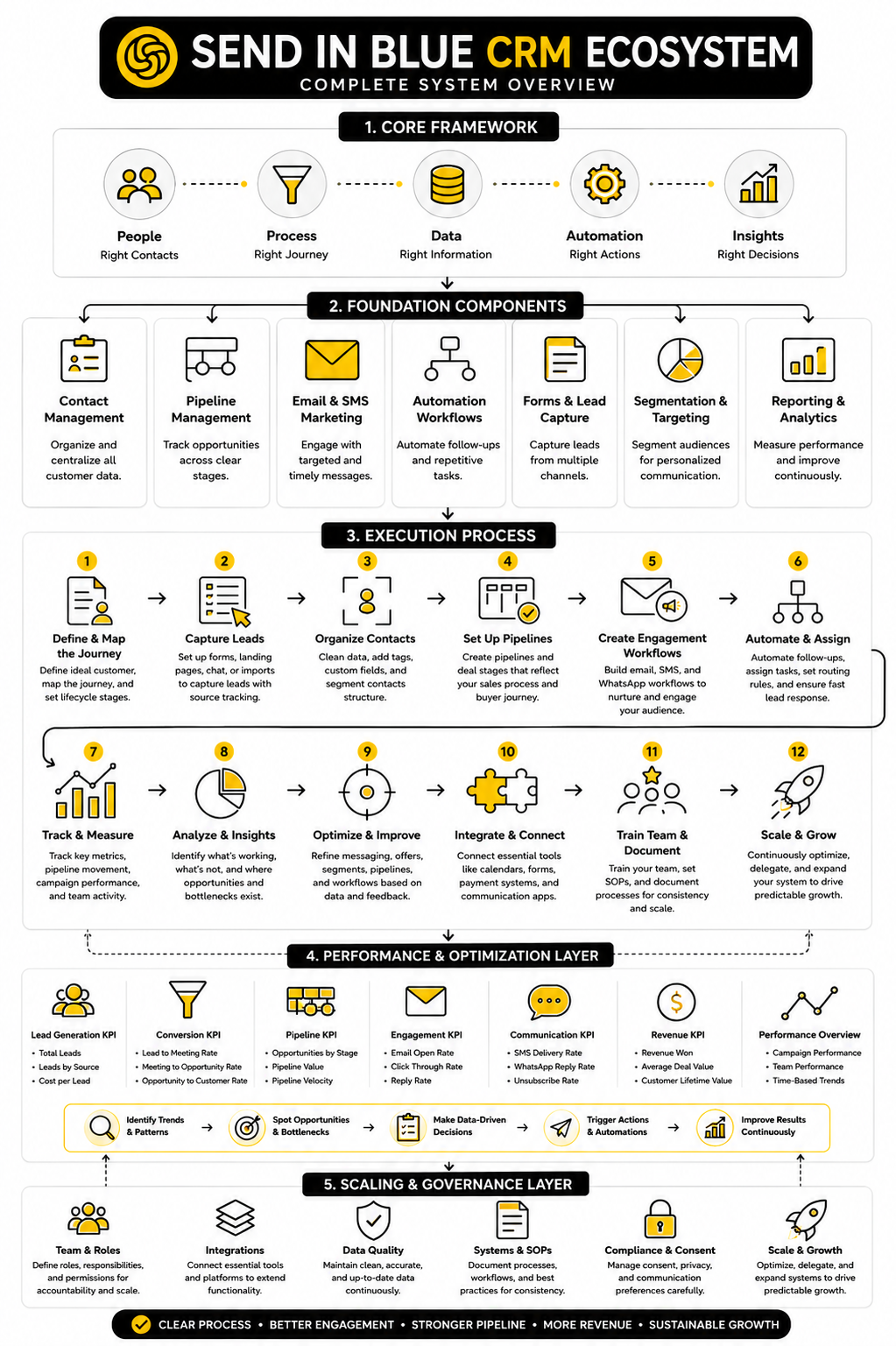
Choosing The Right Stack Around Send In Blue CRM
Brevo can be a strong base when you want CRM, email, SMS, WhatsApp, live chat, transactional email, and automation close together. That makes sense for teams that value simplicity and want one central customer engagement platform rather than a patchwork of tools. The cleaner the stack, the easier it is to train people and keep customer data consistent.
But there are cases where adding specialist tools makes sense. If your business depends heavily on funnels, landing pages, upsells, and conversion paths, ClickFunnels may support the front-end sales experience better. If your agency needs deeper client account management, white-label SaaS, and multi-client automation workflows, GoHighLevel may be worth comparing.
The key is ownership. Decide which system owns contacts, which system owns pipeline status, which system owns landing pages, and which system owns reporting. A tool stack becomes dangerous when every platform has a different version of the same customer.
The Final CRM Health Checklist
Use this checklist before treating your setup as finished. It is not glamorous, but it will catch most problems before they become expensive. A CRM should make the business calmer, faster, and more consistent.
This checklist also gives you a practical audit rhythm. Review it monthly, not yearly. Small fixes made regularly beat one painful cleanup after the system has already become messy.
What Is Send In Blue CRM?
Send in blue CRM refers to the CRM tools inside Sendinblue, which is now known as Brevo. The platform helps businesses manage contacts, track deals, organize sales pipelines, and connect customer communication with marketing channels. The main appeal is that CRM data can sit close to email marketing, automation, SMS, WhatsApp, chat, and transactional messaging.
Is Send In Blue CRM The Same As Brevo CRM?
Yes, in practical terms, send in blue CRM usually means Brevo CRM because Sendinblue rebranded to Brevo. People still search for the old name because it was widely used for years. The product direction now sits under the Brevo brand, so current pricing, features, and platform updates should be checked through Brevo.
Who Is Send In Blue CRM Best For?
It is best for small businesses, agencies, consultants, service providers, and lean teams that want CRM and customer communication in one place. It works especially well when email marketing and follow-up automation are central to the sales process. Teams with very complex enterprise sales operations may need a more specialized CRM or additional reporting infrastructure.
Can Send In Blue CRM Replace A Traditional CRM?
It can replace a traditional CRM for many simple and mid-level sales processes. If you need contact management, deals, tasks, pipeline tracking, and connected campaigns, it can cover a lot of ground. If you need advanced forecasting, highly customized objects, complex permissions, or enterprise sales operations, you should compare it carefully against dedicated CRM platforms.
Does Send In Blue CRM Include Email Marketing?
Yes, email marketing is one of Brevo’s core strengths. That is one reason the CRM can be useful for teams that want marketing and sales activity connected. The practical benefit is that contact behavior, segmentation, campaigns, and sales follow-up can support each other instead of living in separate tools.
Can I Use Send In Blue CRM For Automation?
Yes, automation is one of the main reasons to consider it. You can build workflows around contact actions, campaign engagement, lifecycle changes, and follow-up needs. The best approach is to start with simple automations first, such as lead routing, task creation, welcome sequences, and post-meeting follow-ups.
What Metrics Should I Track First?
Start with lead source, qualified leads, meetings booked, deal stage movement, conversion rate, lost reasons, campaign engagement, bounces, unsubscribes, and revenue outcomes. Do not overload the dashboard too early. The first goal is to understand whether your CRM is helping people move from interest to action.
How Often Should I Clean CRM Data?
You should review CRM data every month if the system is active. Duplicates, outdated lifecycle stages, missing sources, and inactive contacts can quietly damage reporting and automation. A light monthly cleanup is much easier than a major rebuild after the data becomes unreliable.
What Is The Biggest Mistake People Make With Send In Blue CRM?
The biggest mistake is building the tool before defining the process. Teams create fields, tags, automations, and pipelines without agreeing on what the customer journey actually looks like. The result is a CRM that looks busy but does not help anyone take better action.
How Should I Structure Pipeline Stages?
Pipeline stages should describe real buyer progress. Use stages like new opportunity, contacted, meeting booked, meeting completed, proposal sent, negotiation, won, and lost only if they match your actual sales process. Avoid vague stages like warm, hot, or interested unless the team has a precise definition for each one.
Can Send In Blue CRM Work With Landing Pages And Funnels?
Yes, but the right setup depends on your funnel complexity. Brevo can support forms, campaigns, and customer communication, while a dedicated funnel tool like ClickFunnels may be useful when landing pages, upsells, and conversion flows are the center of the business. The important part is making sure leads flow cleanly into the CRM with source and intent data attached.
Is Send In Blue CRM Good For Agencies?
It can be good for agencies that need a straightforward customer engagement and CRM platform. Agencies that manage many client accounts, white-label services, or more advanced automation systems may also compare GoHighLevel. The right choice depends on whether the agency needs a simple internal CRM or a broader client delivery platform.
How Do I Know If My CRM Setup Is Working?
Your CRM is working when the team knows what to do next without digging, guessing, or asking around. Leads are captured cleanly, follow-ups happen on time, campaigns reach the right segments, and reports show where revenue is coming from. If the team still relies on memory, spreadsheets, and private inboxes, the CRM is not fully doing its job yet.
Should I Automate Everything?
No. Automate repetitive, rules-based work, but keep human judgment close to high-value moments. Lead routing, reminders, confirmations, and simple nurture flows are great automation candidates. Complex objections, sensitive customer issues, enterprise deals, and relationship-heavy conversations still need human care.
What Is The Best First Step?
Map the customer journey before changing settings. Write down how people become leads, how they qualify, how they book calls, how deals move forward, and how customers are onboarded. Once that journey is clear, the send in blue CRM setup becomes much easier to build correctly.
Build a stronger local presence with BAAM AI
Turn your website, Google profile, social channels, and AI visibility into one growth engine
Most businesses do not need more random marketing activity. They need a consistent presence system that helps the right people find them, trust them, and take action. BAAM AI brings strategy, local SEO, website updates, Google Maps visibility, social content, AI-search readiness, media production, and reporting into one practical monthly engine.
If you want your marketing to keep working after the campaign ends, start with a free BAAM AI presence audit. See how your business shows up today and where the fastest visibility wins are at BAAM AI.