
BAAM AI Blog
Personalized Email Marketing Examples That Actually Teach You How To Sell Better
Most lists of personalized email marketing examples are not very useful. They show a screenshot, praise the subject line, and move on before explaining why the email worked, what data made it possible, or how you...
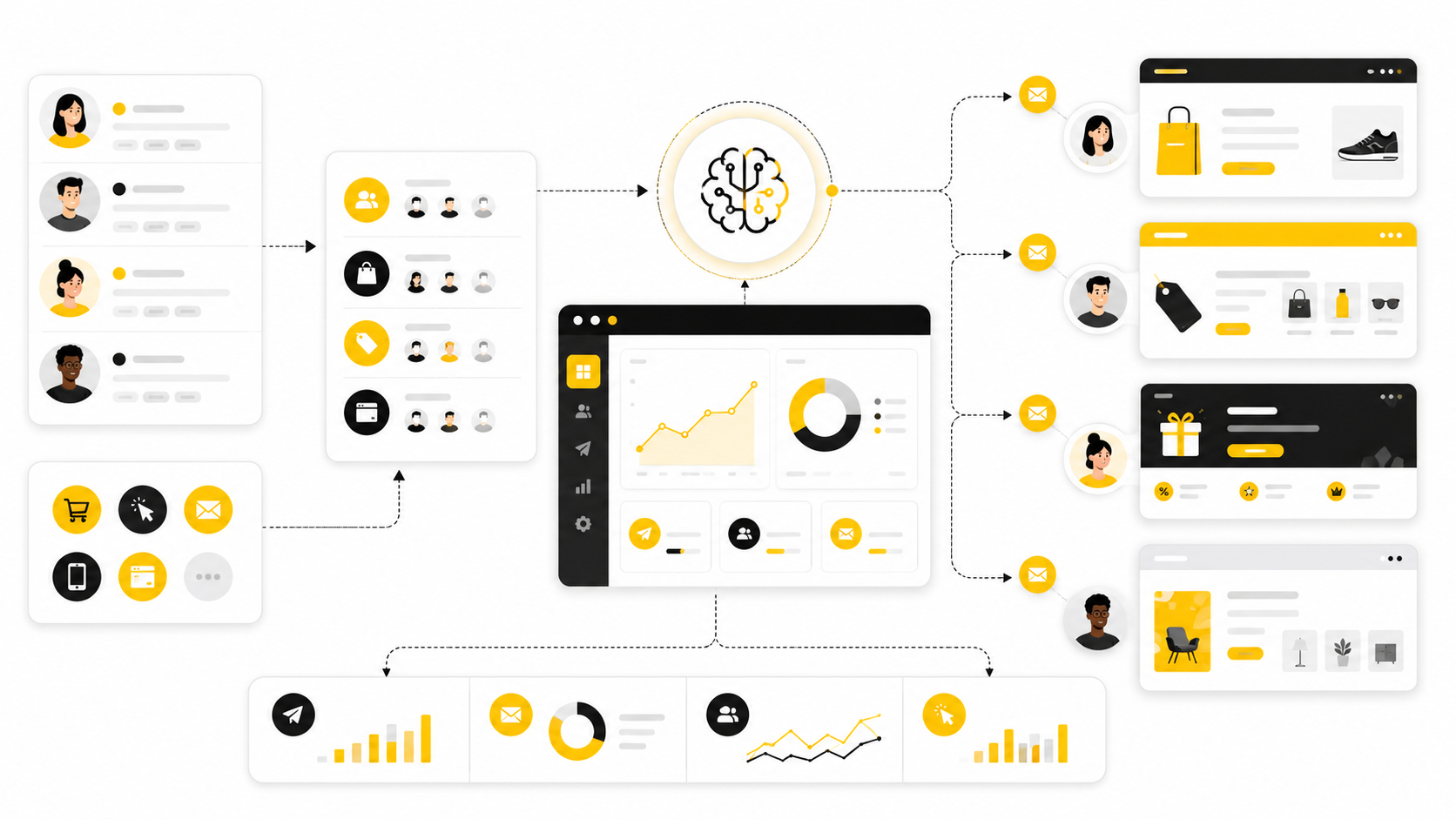
Most lists of personalized email marketing examples are not very useful. They show a screenshot, praise the subject line, and move on before explaining why the email worked, what data made it possible, or how you could adapt the idea without copying it.
That is the real problem. Personalization is not adding a first name to a subject line. It is using what someone has done, shown interest in, purchased, abandoned, ignored, requested, or needed to make the next email feel more relevant than the last one.
Good personalized email marketing examples teach you three things at once: what triggered the message, what customer context shaped the content, and what action the email was designed to create. When those pieces line up, email stops feeling like a broadcast channel and starts working like a guided customer journey.
Why Personalized Email Marketing Examples Matter
Personalized email marketing examples matter because most brands are not struggling with email volume. They are struggling with relevance. Customers already receive more campaigns than they can reasonably read, so the emails that win attention are usually the ones that connect with timing, intent, or context.
The best examples also make strategy easier to see. A welcome email is not just a welcome email when it changes based on the signup source. A product recommendation is not just a recommendation when it reflects the customer’s size, category interest, price range, or last purchase. A reactivation email is not just a discount when it responds to why someone likely stopped engaging.
This is why personalization needs to be judged by usefulness, not cleverness. Research from Twilio Segment’s State of Personalization shows that business leaders increasingly see personalization as central to growth, while customer experience research from Deloitte Digital shows that consumers often notice the gap between what brands think is personalized and what actually feels personal. That gap is where better email strategy lives.
The Personalization Framework Behind Better Emails
Before looking at examples, you need a simple framework. Every strong personalized email has four parts: a signal, a segment, a message, and a next step. If one of those parts is weak, the email usually feels generic even when the software is technically “personalizing” it.
The signal is the customer behavior or data point that tells you something useful. That could be a viewed product, abandoned checkout, webinar registration, lead form answer, email click, purchase category, renewal date, location, lifecycle stage, or inactivity window. The segment is how you group that signal into a meaningful audience, so you are not sending the same message to people with very different intent.
The message turns that context into copy, offer, timing, and creative. The next step makes the email commercially useful by guiding the reader toward a clear action. If you are building this inside a platform like Brevo or Moosend, this framework helps you avoid random automation and build flows around actual customer moments.
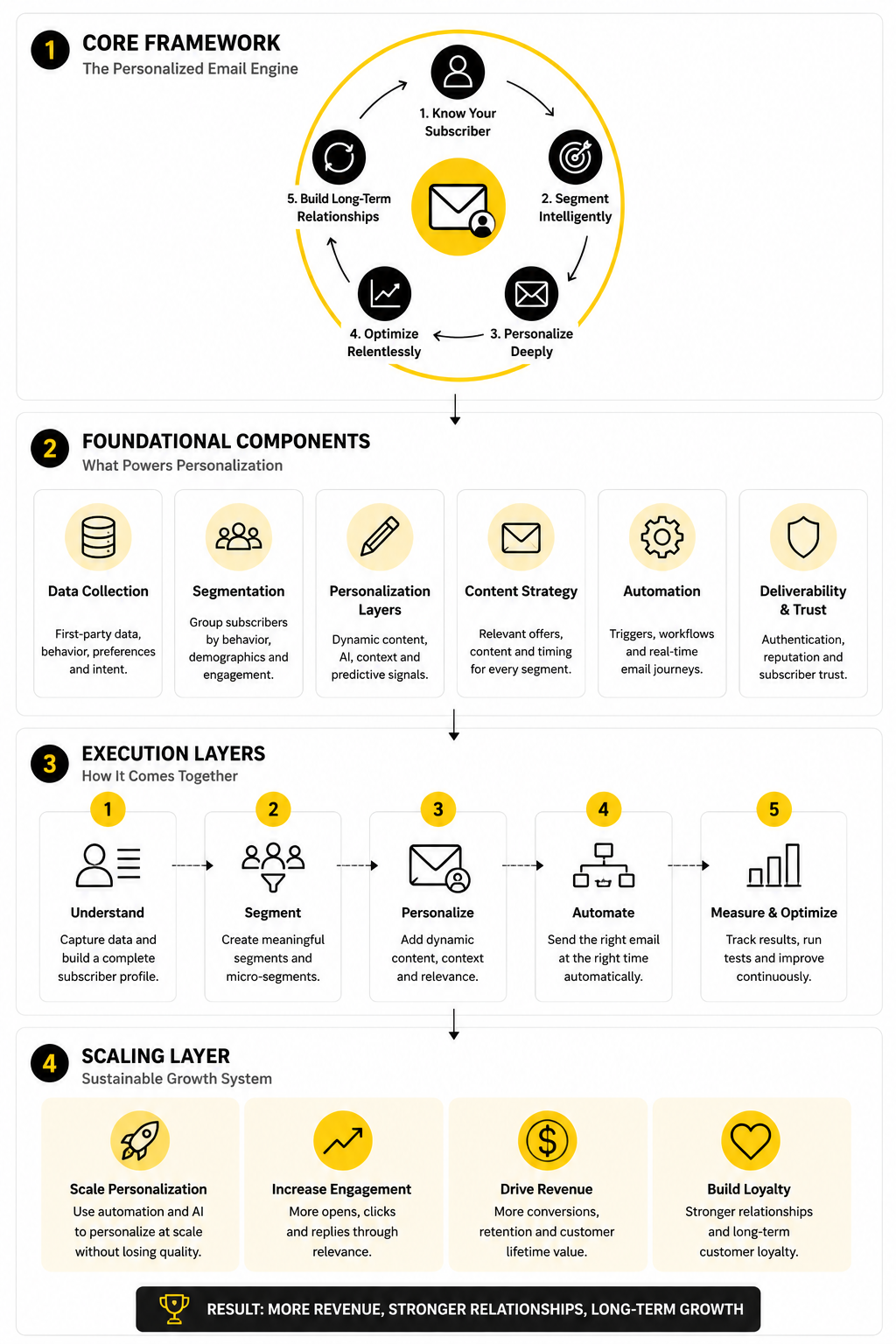
Core Components Of A Personalized Email
A personalized email starts with data, but it does not end there. Data only tells you what might be relevant. The job of the email is to turn that relevance into a message that feels helpful, timely, and easy to act on.
The first core component is context. This includes what the subscriber did, where they are in the journey, what they may need next, and what would be inappropriate to send right now. For example, a customer who bought yesterday should not receive the same “first purchase” discount as a cold lead who has never ordered.
The second component is the offer or content match. This is where many campaigns fall apart. A personalized subject line cannot save an email that recommends the wrong product, sends the wrong educational content, or pushes a demo before the reader understands the problem.
The third component is timing. Personalization gets much stronger when it responds quickly to meaningful behavior, but not every trigger should fire instantly. A cart reminder may need speed, while a replenishment email needs product usage timing, and a B2B nurture email may need space between decision-making steps.
The fourth component is measurement. Open rate can still be useful in context, but privacy changes and inbox behavior make clicks, conversions, replies, revenue, retention, and unsubscribe patterns more important for judging whether the personalization is actually working. Benchmarks from platforms like Mailchimp can give you a rough reference point, but your best benchmark is always performance by segment and lifecycle stage.
Personalized Email Marketing Examples By Use Case
The easiest way to understand personalization is to look at customer situations, not email templates. A template only shows the surface. The use case shows the reason the email exists, the data behind it, and the decision the reader is being asked to make.
That is why the following personalized email marketing examples are grouped by intent. A welcome email, cart reminder, product recommendation, renewal notice, and win-back campaign all need different logic. They may use the same email platform, but they should not use the same thinking.
The goal is not to copy these examples word for word. The goal is to understand the pattern, then adapt it to your audience, your offer, and your customer journey. That is how personalization becomes a system instead of a collection of random “smart” emails.
Welcome Emails Based On Signup Source
A generic welcome email says, “Thanks for subscribing.” A personalized welcome email says, “I know why you came here, and here is the next useful step.” That difference matters because the signup source usually tells you what the person wants first.
Someone who joined through a discount popup is probably closer to buying than someone who downloaded an educational guide. Someone who signed up after a webinar may need proof, comparison content, or a booking link. Someone who joined from a product waitlist may need expectation-setting and a clear timeline.
A practical version of this could use three welcome paths:
This is one of the simplest personalized email marketing examples to implement because the trigger is clean. The subscriber came from a specific form, page, ad, or campaign. Tools like Brevo and Moosend are useful here because you can connect forms, segments, and automation without overbuilding the first version.
Browse Abandonment Emails That Respect Intent
Browse abandonment emails can work well, but only when they are handled carefully. Viewing a product once is not the same as wanting to buy it. The mistake is treating every page view like a high-intent buying signal.
A better browse abandonment email uses behavior depth. If someone viewed one product for a few seconds, you may simply send helpful category content later. If they viewed the same product multiple times, compared similar items, or checked sizing and shipping details, the email can be more direct.
A strong browse abandonment email usually includes the item or category viewed, one clear reason to reconsider it, and a helpful fallback. The fallback matters because the visitor may not be rejecting your brand. They may just be unsure about fit, price, features, delivery, or whether the product solves the right problem.
For ecommerce, that could mean recommending similar products in the same category. For software, it could mean sending a short comparison, a use-case guide, or a customer-facing feature page. For service businesses, it could mean inviting the lead to answer one question so the next email can be more relevant.
Cart Abandonment Emails With Specific Friction Removal
Cart abandonment is one of the most obvious personalized email marketing examples, but it is also one of the most abused. Too many brands send the same “You forgot something” message three times and call it a strategy. That is not personalization; that is repetition.
A better cart abandonment sequence identifies the likely friction. If shipping costs appear late in checkout, the email should address delivery, returns, or total cost clarity. If the product is technical, the email should reduce uncertainty with specifications, reviews, comparisons, or support access.
The sequence should also change based on cart value and customer type. A first-time customer with a low-value cart may need trust signals and reassurance. A returning customer with a high-value cart may need urgency, saved cart convenience, or a stronger reason to complete the order now.
Here is a simple structure that works without getting pushy:
The key is restraint. Discounts can recover sales, but they can also train customers to abandon carts on purpose. Personalization should help you choose when an incentive is justified instead of using one as the default answer.
Product Recommendation Emails Based On Real Behavior
Product recommendations are only useful when they feel connected to what the customer actually wants. “You may also like” is weak when the suggestions are random. It becomes powerful when the recommendations reflect browsing patterns, purchase history, price preference, category interest, or replenishment timing.
For a fashion brand, that might mean recommending items in the right size, style, and season. For a skincare brand, it might mean building a routine around the customer’s skin concern and previous purchase. For a B2B software company, it might mean recommending the next feature, template, or integration based on what the user has already activated.
The best version of this email does not just list products. It explains the reason behind the recommendation in a natural way. A line like “Because you looked at lightweight running shoes” is more useful than a vague recommendation block with no context.
This is where your data quality matters. Bad product data creates bad personalization. If your catalog, tags, customer events, or purchase records are messy, the email will expose that mess directly to the customer.
Post-Purchase Emails That Build The Next Step
The post-purchase email is one of the most underrated personalization opportunities. Many brands stop thinking after the transaction, but the moment after purchase is when the customer is most open to guidance. They want to know whether they made the right choice and what to do next.
A personalized post-purchase email should depend on what the customer bought. A first-time buyer may need onboarding, usage tips, delivery expectations, and reassurance. A repeat buyer may need loyalty benefits, cross-sell recommendations, or a faster path to replenishment.
The strongest post-purchase emails usually do one of four things:
For digital products, funnels, and online offers, this can also connect to onboarding pages or customer education. If the business sells through landing pages or offer flows, tools like ClickFunnels or systeme.io can make the post-purchase path easier to control because the email, page, and next offer can be planned together.
Re-Engagement Emails Based On Inactivity Type
A re-engagement email should not treat every inactive subscriber the same. Someone who stopped opening emails is different from someone who opens but never clicks. Someone who clicked product emails six months ago is different from someone who only engaged with educational content.
This is where inactivity type becomes useful. You can create different re-engagement paths for silent subscribers, window shoppers, lapsed customers, expired trial users, and former high-value buyers. Each group needs a different reason to pay attention again.
A good re-engagement email is direct but not desperate. It can ask whether the subscriber still wants updates, offer a better preference choice, highlight what changed, or make a relevant comeback offer. The main thing is to avoid sending a generic “We miss you” email that gives the reader no reason to care.
This type of personalization also protects deliverability. If disengaged contacts keep receiving irrelevant campaigns, they are more likely to ignore, delete, or complain. A cleaner re-engagement strategy helps you learn who is still worth emailing and who should be suppressed.
Professional Implementation: From Idea To Campaign
Once you understand the examples, the next step is building them without making your email system messy. This is where most teams overcomplicate personalization. They jump straight into advanced automation before they have clean segments, clear triggers, and a reason for each message to exist.
A professional implementation starts with customer moments, not software features. You are not building “an automation.” You are building a response to a specific behavior or lifecycle stage. That small mindset shift keeps the work practical and stops you from creating flows nobody can maintain.
This section turns the personalized email marketing examples from earlier into a process you can actually use. The goal is simple: choose one meaningful customer moment, define what should happen next, build the minimum useful version, measure it, and improve from real behavior.
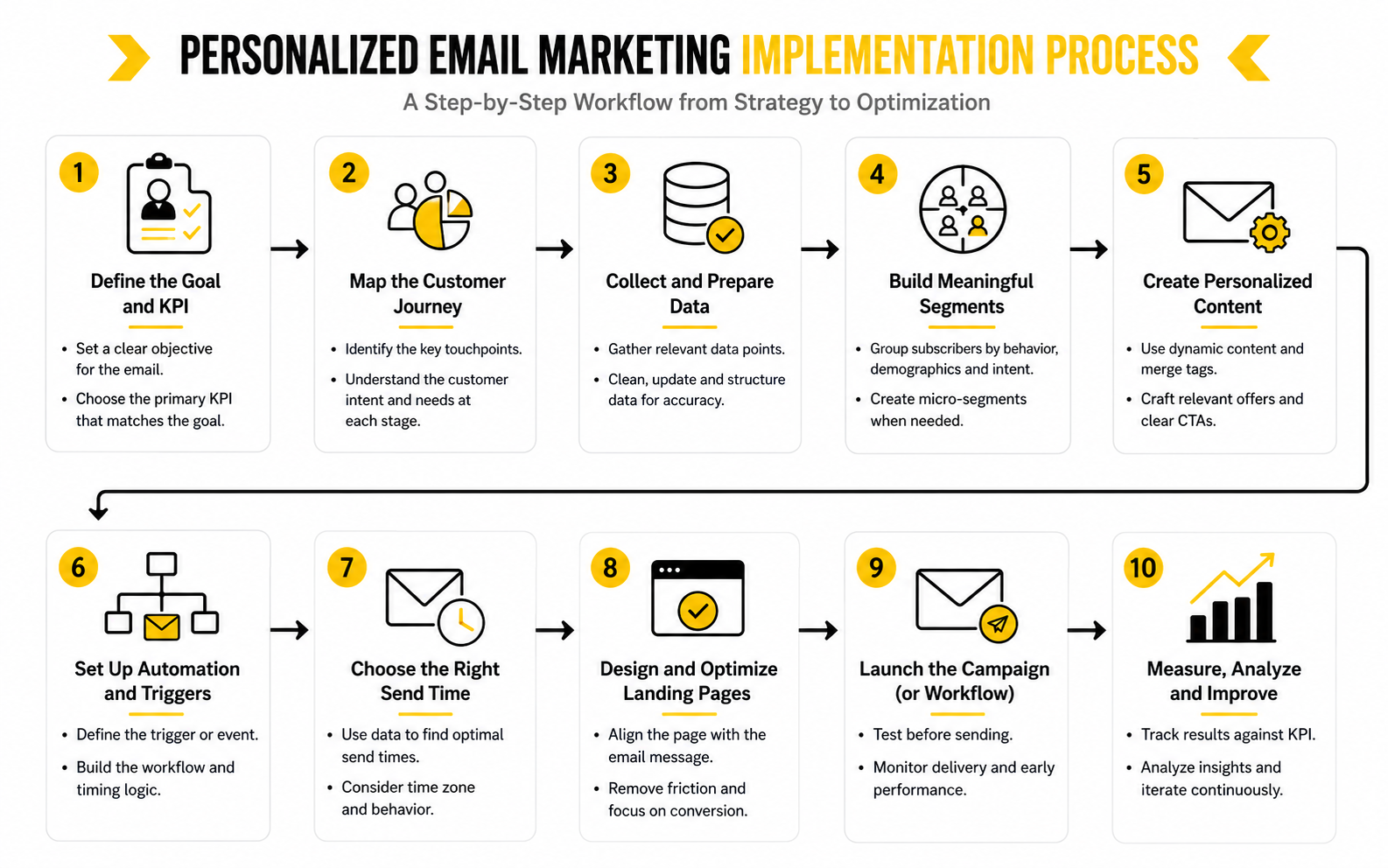
Step 1: Choose One Customer Moment
Do not start by personalizing everything. Start with one customer moment where better timing or relevance can clearly improve the result. Good options include a new subscriber joining from a specific form, a shopper abandoning checkout, a buyer completing their first order, or a lead visiting an important sales page.
The best first campaign is usually close to revenue or retention. Cart abandonment, first-purchase onboarding, post-purchase education, and trial activation are strong because the customer intent is already visible. You are not trying to manufacture interest from nothing.
Pick the moment by asking one practical question: “Where are people showing intent but failing to take the next step?” If many people view a product but do not add it to cart, start there. If many leads book calls but do not show up prepared, build a pre-call nurture sequence. If customers buy once but rarely return, fix the post-purchase path before chasing colder traffic.
Step 2: Define The Trigger And Exit Rules
A trigger tells the system when someone should enter the campaign. An exit rule tells the system when they should stop receiving it. You need both, because personalization gets annoying fast when people keep receiving messages after they have already acted.
For example, a cart abandonment flow might trigger when a logged-in shopper adds an item to cart but does not purchase within a set window. The exit rule should remove them as soon as they buy, empty the cart, or become ineligible for the offer. Without that rule, the customer may receive a reminder for something they already purchased, which damages trust.
The same logic applies to lead nurturing. If someone books a demo, they should stop receiving emails that push them to book a demo. If someone upgrades, they should stop receiving trial conversion emails. This sounds obvious, but it is one of the most common reasons automated personalization feels broken.
Step 3: Build Segments That Change The Message
Segmentation should change what the reader receives, not just where they sit in your database. A segment is useful only when it helps you make a better decision about message, offer, timing, or call to action. If it does not change the email, it probably does not need to exist yet.
Start with simple segments that are easy to explain. First-time buyers and repeat buyers should usually receive different post-purchase emails. High-intent product viewers and casual blog readers should not receive the same sales message. Active leads and long-inactive subscribers should not be pushed through the same sequence.
Behavior-based segmentation is especially powerful because it responds to what people actually do. Research from MoEngage’s email marketing benchmarks shows that behavior-personalized emails can outperform non-personalized messages by a wide range depending on industry and use case, which reinforces the practical point: behavior usually tells you more than static labels alone.
Step 4: Map The Message Before Writing Copy
Before writing the email, define the job of the message. Is it meant to reassure, educate, remind, compare, upsell, reactivate, or remove friction? If you cannot answer that clearly, the copy will probably drift.
A simple message map includes five pieces:
This is where many personalized email marketing examples become easier to adapt. You are not copying the copy. You are copying the logic behind the copy. That is much more valuable.
Step 5: Write Like A Helpful Human
Personalized email should sound like it came from a brand that is paying attention, not from a machine showing off what it knows. Use the customer’s behavior only when it helps the message feel more useful. Do not overstate tracking details or make the reader feel watched.
For example, “Still comparing options?” usually feels better than “We saw you viewed this product three times yesterday.” The first line speaks to the customer’s likely mindset. The second line may be technically accurate, but it can feel invasive.
The copy should be direct, specific, and calm. Mention the relevant product, category, goal, or next step. Then make the action easy. The more personalized the email is, the less it needs to shout.
Step 6: Connect The Email To The Right Destination
The email is only half the experience. If the message is personalized but the landing page is generic, the journey breaks. A cart email should return the person to the cart, a product recommendation should land on the recommended product or collection, and a lead nurture email should send the reader to the exact next resource or booking step.
This is especially important for ecommerce and funnel-based businesses. If the email promises a specific offer, the page needs to reflect that offer immediately. If the email is based on a use case, the landing page should continue that use case instead of forcing the reader to hunt for relevance.
For campaigns where the page experience matters as much as the email, a landing page builder like Replo can help ecommerce teams create more targeted post-click experiences. For service businesses and agencies that want email, CRM, pipeline, and follow-up in one place, GoHighLevel can make the operational side easier to manage.
Step 7: Test The Campaign With Real Edge Cases
Before turning the campaign loose, test the weird scenarios. What happens if someone buys right after entering the flow? What happens if they qualify for two campaigns at once? What happens if the product is out of stock, the coupon expires, or the lead changes lifecycle stage?
This is not glamorous work, but it matters. Most bad personalization is not caused by a lack of creativity. It is caused by broken logic, stale data, unclear suppression rules, and campaigns that were never tested from the customer’s point of view.
Create a short pre-launch checklist and run through it every time. Check the trigger, exit rules, segment conditions, merge fields, links, mobile layout, unsubscribe link, sending delay, and destination page. One hour of testing can prevent weeks of awkward customer experiences.
Step 8: Measure By The Action The Email Was Built To Create
Do not judge every personalized campaign by the same metric. A cart reminder should be measured by recovered revenue and conversion rate. A post-purchase onboarding email should be measured by product usage, repeat purchase, support reduction, or review generation. A re-engagement campaign should be measured by renewed activity and clean suppression, not just opens.
Open rates can help spot obvious problems with subject lines or deliverability, but they are not enough. Clicks, purchases, replies, booked calls, upgrades, repeat orders, and unsubscribes tell you more about whether the email actually helped. Benchmarks from Acoustic’s 2025 marketing benchmark report and similar industry reports can be useful for context, but they should not replace your own lifecycle-level reporting.
The right question is not “Did this email perform well in general?” The better question is “Did this email move this specific audience to the next logical step?” That is how personalization becomes measurable instead of vague.
Statistics And Data That Actually Matter
Data is useful only when it changes what you do next. A benchmark should not make you feel good or bad by itself. It should help you diagnose whether your personalized email marketing examples are reaching the right people, creating enough interest, and moving readers toward the next step.
The trap is comparing every campaign to one broad average. A welcome email, a browse abandonment email, and a re-engagement email should not be judged by the same expectations. They are sent to different audiences, at different moments, with different levels of intent.
That is why measurement needs to follow the customer journey. Start with the moment that triggered the email, then measure the action that proves the email helped. If the email exists to recover a cart, revenue matters more than open rate. If the email exists to educate a new lead, click quality and later conversion matter more than immediate purchase.
Why Benchmarks Are Directional, Not Absolute
Email benchmarks are helpful, but they are not the scoreboard. Industry, list quality, sending frequency, offer type, customer intent, and deliverability all change what “good” looks like. A small, clean list of recent buyers can outperform a huge list of cold subscribers even when the emails are written by the same team.
Recent benchmark reports make one thing clear: generic broadcast email usually performs worse than behavior-based or journey-based email. MoEngage’s 2025 benchmark analysis of 17.3 billion B2C emails found that broadcast emails consistently produced weaker results across major engagement metrics, while behavior-based and journey-based personalization tended to perform better. That does not mean every personalized email wins automatically, but it does show why intent-based sending deserves priority.
Older benchmark pages can still provide context, but they should be treated carefully. Mailchimp’s public email marketing benchmarks page notes that its listed benchmark data was last updated in December 2023, which makes it useful as a reference point rather than a live standard. For current strategy, your own segment-level performance is usually more valuable than a broad public average.
The Metrics To Track By Campaign Type
The best way to measure personalization is to match the metric to the job. If a campaign is built around a clear customer moment, the primary metric should reflect that moment. Otherwise, you end up optimizing the wrong thing.
For welcome emails, look at activation signals. That may include first click, first purchase, account setup, profile completion, booked call, or content consumption. A high open rate is nice, but it means very little if new subscribers do not take the next useful step.
For cart abandonment, track recovered carts, recovered revenue, conversion rate, average order value, and incentive cost. A discount-heavy cart flow may look good on gross revenue while quietly hurting margin. That is why you need to measure the recovery rate and the economics of the recovery.
For product recommendations, measure click-through rate, product page engagement, conversion rate, revenue per recipient, and repeat purchase behavior. A recommendation email that gets clicks but no purchases may be creating curiosity without enough fit. A lower-click email that drives higher revenue per recipient may be doing the better job.
For re-engagement, measure renewed clicks, renewed purchases, replies, preference updates, unsubscribes, spam complaints, and suppressions. The goal is not to keep everyone forever. The goal is to identify who still wants to hear from you and stop forcing emails onto people who clearly do not.
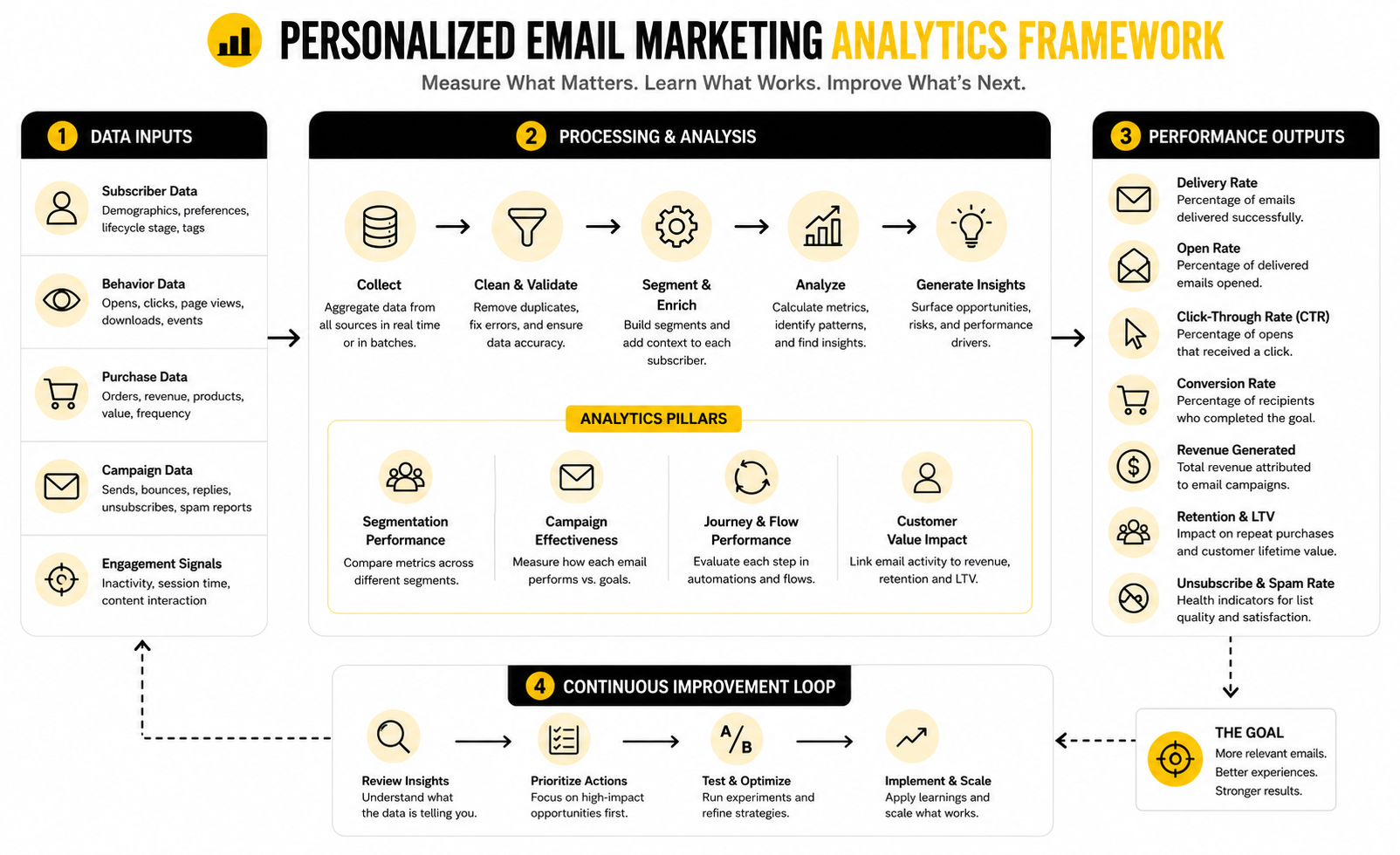
How To Build A Useful Email Analytics System
A useful analytics system does not need to be complicated. It needs to connect each campaign to a customer stage, a goal, and a decision. When those three pieces are visible, your data becomes easier to act on.
Start by grouping reports by lifecycle stage. Separate new subscribers, first-time buyers, repeat buyers, inactive customers, trial users, sales leads, and high-intent prospects. This prevents one strong segment from hiding problems in another.
Then track each campaign with four layers:
This structure keeps you honest. A personalized campaign is not successful just because people opened it. It is successful when the right audience received it, engaged with it, and moved toward a valuable next action without hurting trust.
What Open Rate Can And Cannot Tell You
Open rate is still useful, but it is weaker than many marketers think. Privacy changes, image loading behavior, inbox filtering, and Apple Mail Privacy Protection can distort opens. That means open rate should be treated as a directional signal, not a final truth.
Use open rate to spot big issues. If a usually strong segment suddenly drops, check subject lines, sender reputation, list quality, and deliverability. If a new automation has unusually low opens, the trigger timing or audience may be wrong.
Do not use open rate alone to decide whether personalization is working. A subject line can earn curiosity without creating action. The better question is whether opens are turning into clicks, conversions, replies, or other meaningful behavior.
What Clicks Reveal About Relevance
Clicks are usually a stronger signal than opens because they show active interest. When someone clicks, they are not just noticing the email. They are choosing to continue the journey.
But clicks still need context. A high click rate on a vague “learn more” button may not tell you much. A click on a specific product, comparison guide, pricing page, booking link, or replenishment offer gives you more useful intent data.
This is why personalized emails should use clear links. If every CTA goes to the same homepage, you lose the ability to understand what the reader wanted. If each link reflects a specific next step, the click becomes a cleaner signal for future segmentation.
What Conversion Rate Reveals About Fit
Conversion rate tells you whether the promise in the email matched the destination and the offer. If clicks are strong but conversions are weak, the issue may not be the email. It may be the landing page, pricing, product fit, checkout process, sales page, or offer clarity.
This is especially important for ecommerce and funnel campaigns. A personalized email can create the right intent, but a slow page, confusing offer, weak product detail page, or mismatched landing page can waste that intent. The email gets blamed even though the break happens after the click.
For offer-driven campaigns, connect email reporting to page and revenue reporting. If you are building campaign pages for specific segments, platforms like ClickFunnels or systeme.io can help keep the message and destination aligned. The key is to measure the full path, not just the email step.
How To Interpret Unsubscribes And Complaints
Unsubscribes are not always bad. Sometimes they remove people who were never going to buy, which can improve list health. The problem is when unsubscribes spike in a specific segment or after a specific type of campaign.
A spike usually means the message was mistimed, irrelevant, too frequent, or too aggressive. It may also mean your segmentation is too broad. If a re-engagement campaign has higher unsubscribes but low complaints and clean suppression, that can be acceptable. If a sales campaign creates both unsubscribes and spam complaints, you have a trust problem.
Spam complaints matter more than unsubscribes because they can hurt deliverability. Treat complaint spikes as urgent feedback. Review the source of the list, the promise made at signup, the relevance of the email, and whether subscribers had a clear way to manage preferences before they felt forced to complain.
The Personalization Scorecard
A scorecard helps you avoid emotional decisions. Instead of asking whether you “like” an email, you judge whether it is doing the job it was built to do. This keeps the conversation practical.
Use a simple scorecard after each campaign or automation review:
This is how the best personalized email marketing examples should be evaluated. Not by how clever they sound. Not by how many merge fields they use. By whether they help the right person take the right next step with less friction.
Advanced Personalization: Strategy, Tradeoffs, And Scaling
Once the basics are working, the hard part is not finding more personalized email marketing examples. The hard part is deciding which ones are worth building. Every new segment, rule, branch, and trigger adds power, but it also adds maintenance.
This is where advanced personalization becomes a strategy problem. You need to know when more relevance creates more revenue, and when it only creates complexity. A campaign that is impossible to audit, explain, or improve is not sophisticated. It is fragile.
The best teams scale personalization by keeping the logic simple underneath the surface. They use customer behavior to make emails more relevant, but they do not create hundreds of tiny journeys that nobody can manage. That balance matters more as your list, catalog, offer stack, and customer data grow.
Personalization Depth: Light, Medium, And Advanced
Not every campaign needs deep personalization. Sometimes the right move is a simple segment and a better message. Other times, a high-value customer moment deserves dynamic content, conditional logic, and multiple paths.
Light personalization uses basic data like first name, location, signup source, customer type, or interest tag. It works well for welcome emails, newsletter segmentation, and simple lead nurture. It is easy to manage, but it has limits because it does not always reflect current intent.
Medium personalization uses recent behavior. This includes viewed products, clicked categories, abandoned carts, downloaded resources, past purchases, trial activity, or booking status. This is usually where brands get the biggest practical lift because the emails respond to something real and recent.
Advanced personalization uses multiple signals at once. It may combine customer lifetime value, predicted next purchase, category affinity, product usage, churn risk, lead score, or lifecycle stage. This can be powerful, but only when the data is clean and the business has enough volume to learn from the results.
The Risk Of Over-Personalization
There is a line between helpful and creepy. Helpful personalization says, “This fits what you seem to need.” Creepy personalization says, “We know too much, and we are going to make that obvious.”
That line is not only about privacy laws. It is about customer trust. A 2025 study on the personalization backfire effect found that personalization can improve responses, but privacy concern changes how people react to it, which means the same tactic can help in one context and hurt in another.
The practical rule is simple: use customer data to improve relevance, not to show off surveillance. You do not need to mention every behavior that triggered the email. You just need to make the message feel timely, useful, and appropriate.
Consent And Preference Management
Personalization gets stronger when people willingly tell you what they want. That is why preference centers are underrated. They turn personalization from a guessing game into a cleaner exchange between the brand and the subscriber.
A good preference center lets people choose topics, frequency, product interests, location-based updates, content type, or lifecycle-specific emails. It should not be a confusing wall of options. It should help the customer shape the inbox experience without needing to unsubscribe completely.
This also gives you better first-party data. Instead of relying only on inferred behavior, you can combine observed actions with stated preferences. That combination is often more trustworthy than either one alone.
Data Quality Is The Hidden Constraint
Most personalization problems are data problems wearing a copywriting costume. The email sounds wrong because the product tags are wrong. The segment misfires because the CRM status is stale. The recommendation fails because purchase history and browsing data are not connected properly.
Before scaling advanced campaigns, audit the fields that drive your decisions. Check whether lifecycle stages are updated correctly, whether product categories are consistent, whether consent status is respected, and whether event tracking is firing reliably. If the foundation is weak, advanced automation will only make the mistakes happen faster.
This is especially important when multiple tools share the customer journey. Your form builder, email platform, CRM, ecommerce store, checkout system, landing page builder, and analytics stack all need to pass clean signals. If you are collecting lead data with forms, tools like Fillout can help structure intake questions more cleanly before that data reaches your email system.
Frequency Control And Message Priority
As personalization expands, subscribers can qualify for too many campaigns at once. A customer might enter a browse abandonment flow, a sale campaign, a post-purchase sequence, and a newsletter segment in the same week. If you do not control priority, the inbox experience becomes chaotic.
Frequency control protects the relationship. It decides how often someone can receive marketing emails, which messages outrank others, and when lower-priority campaigns should be suppressed. This is not a small detail. It is one of the biggest differences between a polished lifecycle program and a noisy automation mess.
Build a simple priority order. Transactional and service emails come first. High-intent lifecycle emails come next. Time-sensitive commercial campaigns follow. General newsletters and broad promotions should usually give way when a more relevant customer-specific email is active.
AI Can Help, But It Needs Guardrails
AI can make personalization easier to scale, especially for drafting variants, summarizing customer context, generating product copy, creating segment ideas, and turning campaign data into insights. That is useful, but it does not remove the need for strategy. AI can produce more email content very quickly, which is only good if the underlying logic is sound.
The danger is volume without judgment. More variants do not automatically mean better personalization. If the segments are weak, the offer is unclear, or the trigger is wrong, AI will just help you create more polished irrelevant emails.
Use AI for acceleration, not authority. Let it help with drafts, testing ideas, and analysis, but keep human control over customer promises, sensitive data use, compliance, brand voice, and final campaign logic. For businesses already using broader automation and CRM workflows, GoHighLevel’s AI tools can be useful when they are connected to clear lifecycle rules rather than random content generation.
Multi-Channel Personalization Without Losing The Plot
Email rarely works alone. A customer may see a social post, click an ad, visit a landing page, start a chat, receive an email, and then book a call or buy later. Personalization gets stronger when these touchpoints support each other instead of acting like separate campaigns.
The risk is message fragmentation. If email says one thing, the landing page says another, and chat support has no context, the experience feels disconnected. The customer does not care which tool caused the problem. They only feel the friction.
This is why advanced personalization should be planned around the customer journey, not the channel. Email can carry the follow-up, chat can answer the question, SMS can handle urgent reminders where appropriate, and landing pages can continue the promise. Tools like ManyChat can help when messaging channels need to support the same journey instead of competing with it.
When To Stop Personalizing
This is the part marketers do not say enough: not every email needs to be deeply personalized. Some messages are broad by nature. A major announcement, brand story, editorial newsletter, or seasonal campaign can still work well without complex segmentation.
The question is whether personalization will improve the reader’s decision. If the answer is yes, use it. If the answer is unclear, keep the email simple and test a focused version against a broader one.
Personalization should earn its place. It should make the email more relevant, more useful, or more profitable. If it only makes the workflow more complicated, it is not strategy. It is decoration.
The Scaling Rule That Keeps Everything Manageable
The safest way to scale is to build a small number of high-value lifecycle systems before adding clever variations. Welcome, cart recovery, post-purchase, re-engagement, lead nurture, and renewal or replenishment flows usually matter more than niche one-off campaigns. Get those right first.
Then improve one layer at a time. Add better segments, stronger triggers, cleaner suppression rules, sharper offers, and more relevant landing pages. Do not rebuild the whole system every time you learn something new.
The best personalized email marketing examples are not isolated tricks. They are visible pieces of a larger system that respects timing, intent, data quality, and customer trust. That is what makes them scalable.
Tools, Testing, Mistakes, And FAQs
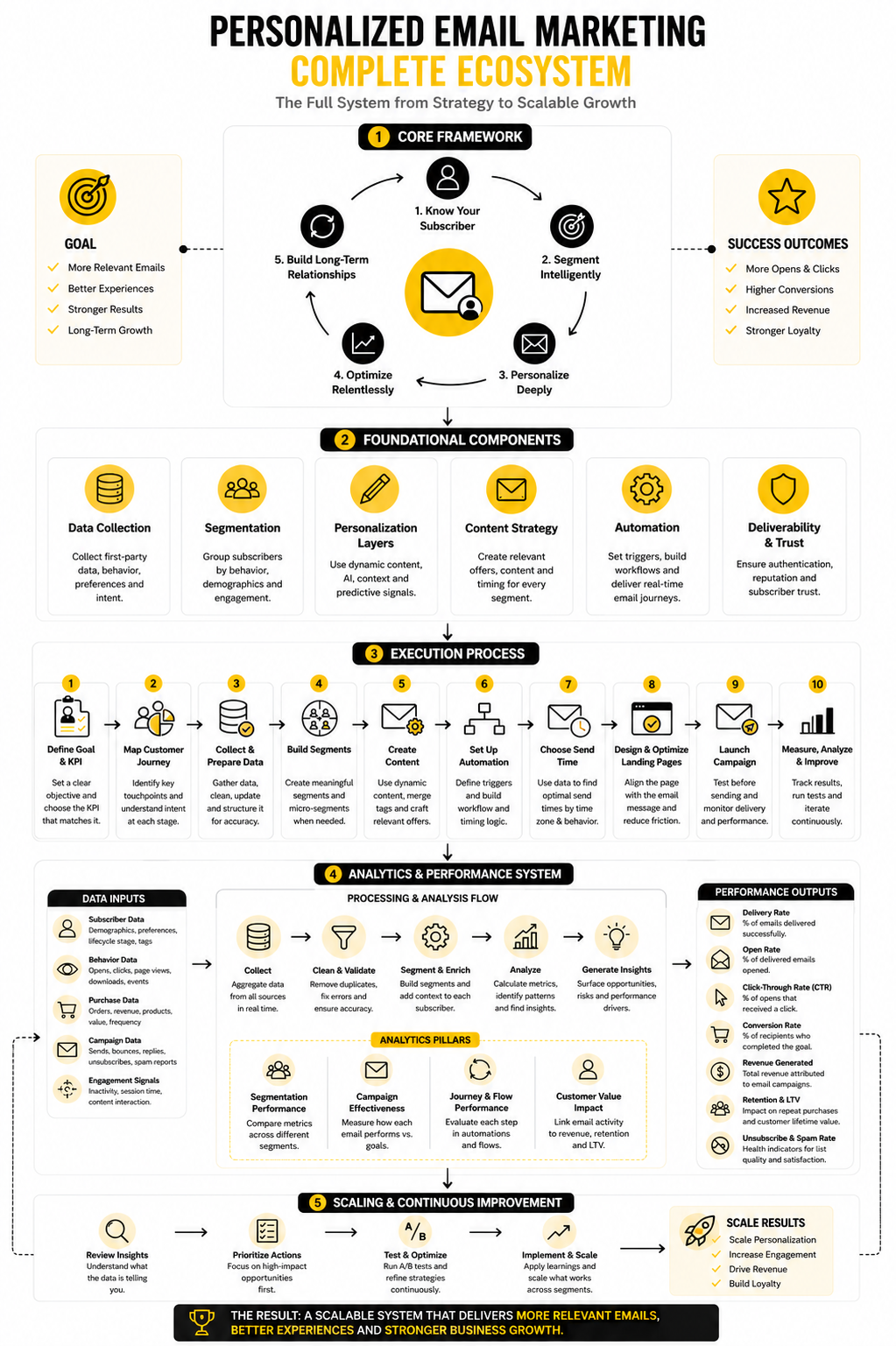
At this point, the full system should be clear. You start with the customer moment, use the right data, write the right message, connect it to the right destination, and measure the action that proves the email did its job. That is the practical core behind the best personalized email marketing examples.
The final layer is operational discipline. Your tools should support the strategy, not become the strategy. Your testing should improve customer understanding, not just chase tiny subject-line wins. Your mistakes should become cleaner rules, stronger segments, and better customer experiences.
This is where email marketing becomes a real growth system. Not because every message is complex. Because every message has a job.
Choose Tools Around The Customer Journey
The right email tool depends on what you are trying to personalize. If you mostly need forms, newsletters, segments, and simple automation, a platform like Brevo or Moosend can be enough. If you need CRM, pipelines, call booking, SMS, email, and sales follow-up in one system, GoHighLevel may fit better.
For funnel-based businesses, the email is only one piece of the conversion path. The page, offer, checkout, upsell, and follow-up all need to connect. That is where tools like ClickFunnels, systeme.io, and Replo can support the post-click experience.
The main rule is simple: do not buy complexity before you have a clear journey. A basic tool with clean data and strong campaign logic will usually beat an advanced platform used badly. Personalization is only as good as the decisions behind it.
Test Bigger Things Before Smaller Things
Most email testing starts too small. Subject lines matter, but they are rarely the biggest lever. Before testing tiny wording changes, test the offer, audience, timing, trigger, CTA, and landing page alignment.
A useful testing order looks like this:
This keeps your testing meaningful. A subject-line win is nice, but a better trigger can change the economics of the whole campaign. A stronger segment can make the same email feel dramatically more relevant.
Avoid The Mistakes That Make Personalization Feel Broken
Most personalization mistakes are avoidable. They usually happen when marketers move too fast, trust messy data, or forget what the subscriber experience feels like. The result is an email that looks automated in the worst possible way.
Watch for these problems:
Fixing these mistakes does not require magic. It requires better triggers, cleaner exits, tighter suppression rules, and a habit of reviewing the journey from the customer’s side. That is the unsexy work that makes personalization feel polished.
What Are Personalized Email Marketing Examples?
Personalized email marketing examples are campaigns that use customer data or behavior to make the message more relevant. This can include welcome emails based on signup source, cart reminders based on abandoned products, product recommendations based on browsing or purchase history, and re-engagement emails based on inactivity. The best examples show not just what the email says, but why it was sent.
What Is The Simplest Personalized Email To Start With?
The simplest place to start is usually a welcome email based on signup source. The trigger is easy to identify, the audience is fresh, and the message can be tailored without complicated data. For example, someone who joins through a discount popup should receive a different first email than someone who downloads an educational guide.
Does Personalization Always Increase Email Performance?
No, personalization does not automatically improve performance. It helps when the data is accurate, the timing is right, and the message reflects something the customer actually cares about. Bad personalization can hurt trust if it feels irrelevant, invasive, or obviously wrong.
What Data Do You Need For Personalized Email Marketing?
You can start with simple data like signup source, purchase history, clicked links, viewed products, form answers, lifecycle stage, and inactivity. As the system matures, you can add customer value, product affinity, renewal dates, replenishment timing, and lead score. The important part is using data that changes the email in a meaningful way.
How Many Segments Should An Email List Have?
There is no perfect number. A small business might only need a few high-value segments, such as new subscribers, first-time buyers, repeat buyers, inactive subscribers, and high-intent leads. The right number is the number you can actually use, measure, and maintain.
What Is The Difference Between Segmentation And Personalization?
Segmentation groups people based on shared traits or behavior. Personalization uses that context to change the message, offer, timing, or destination. Segmentation is the structure, while personalization is the customer-facing experience.
Are First-Name Subject Lines Still Worth Using?
First-name subject lines can still work in some cases, but they are not real personalization by themselves. They are a surface-level tactic. A more valuable approach is to personalize around intent, timing, product interest, lifecycle stage, or the next action the customer should take.
How Do You Personalize Emails Without Being Creepy?
Use data to be helpful, not invasive. You do not need to say exactly what someone did or when they did it. Instead of saying, “We saw you looked at this product three times,” say something more natural like, “Still comparing options?” The email should feel useful, not like surveillance.
What Metrics Matter Most For Personalized Email Campaigns?
The best metric depends on the campaign goal. Cart abandonment emails should be measured by recovered revenue and conversion rate. Welcome emails should be measured by activation, first click, first purchase, or account setup. Re-engagement emails should be measured by renewed activity, unsubscribes, complaints, and list cleanup.
How Often Should Personalized Email Flows Be Reviewed?
Review high-value flows at least monthly, especially cart recovery, welcome, post-purchase, lead nurture, and re-engagement campaigns. Lower-volume flows can be reviewed less often, but they should still be checked for broken links, outdated offers, incorrect merge fields, and stale logic. Any major product, pricing, offer, or funnel change should trigger an immediate review.
Can AI Write Personalized Marketing Emails?
AI can help draft variants, summarize customer context, brainstorm segments, and speed up testing. It should not replace strategy, consent rules, offer decisions, or human review. The strongest use of AI is helping a marketer execute a clear plan faster, not inventing a campaign from weak data.
What Makes A Personalized Email Marketing Example Good?
A good example has a clear trigger, a relevant audience, a useful message, and a measurable next step. It should be obvious why the person received the email and what action the email is designed to create. If the email could be sent to everyone with no change, it is probably not a strong personalization example.
What Is The Biggest Mistake In Personalized Email Marketing?
The biggest mistake is treating personalization as a software feature instead of a customer strategy. Tools can insert names, recommend products, and trigger automations, but they cannot fix weak thinking. You still need to understand the customer moment, the likely friction, and the next useful action.
How Do You Know When To Stop Personalizing?
Stop personalizing when the extra complexity does not improve relevance, trust, or business results. Some emails work better as broad announcements or editorial updates. Personalization should make the experience clearer and more useful, not harder to manage.
Build a stronger local presence with BAAM AI
Turn your website, Google profile, social channels, and AI visibility into one growth engine
Most businesses do not need more random marketing activity. They need a consistent presence system that helps the right people find them, trust them, and take action. BAAM AI brings strategy, local SEO, website updates, Google Maps visibility, social content, AI-search readiness, media production, and reporting into one practical monthly engine.
If you want your marketing to keep working after the campaign ends, start with a free BAAM AI presence audit. See how your business shows up today and where the fastest visibility wins are at BAAM AI.