
BAAM AI Blog
Pardot Email: A Practical Guide To Building B2B Email Campaigns That Actually Move Pipeline
Pardot email is not just “email marketing inside Salesforce.” It is the email side of Salesforce Marketing Cloud Account Engagement, the B2B marketing automation platform many teams still call Pardot because that...
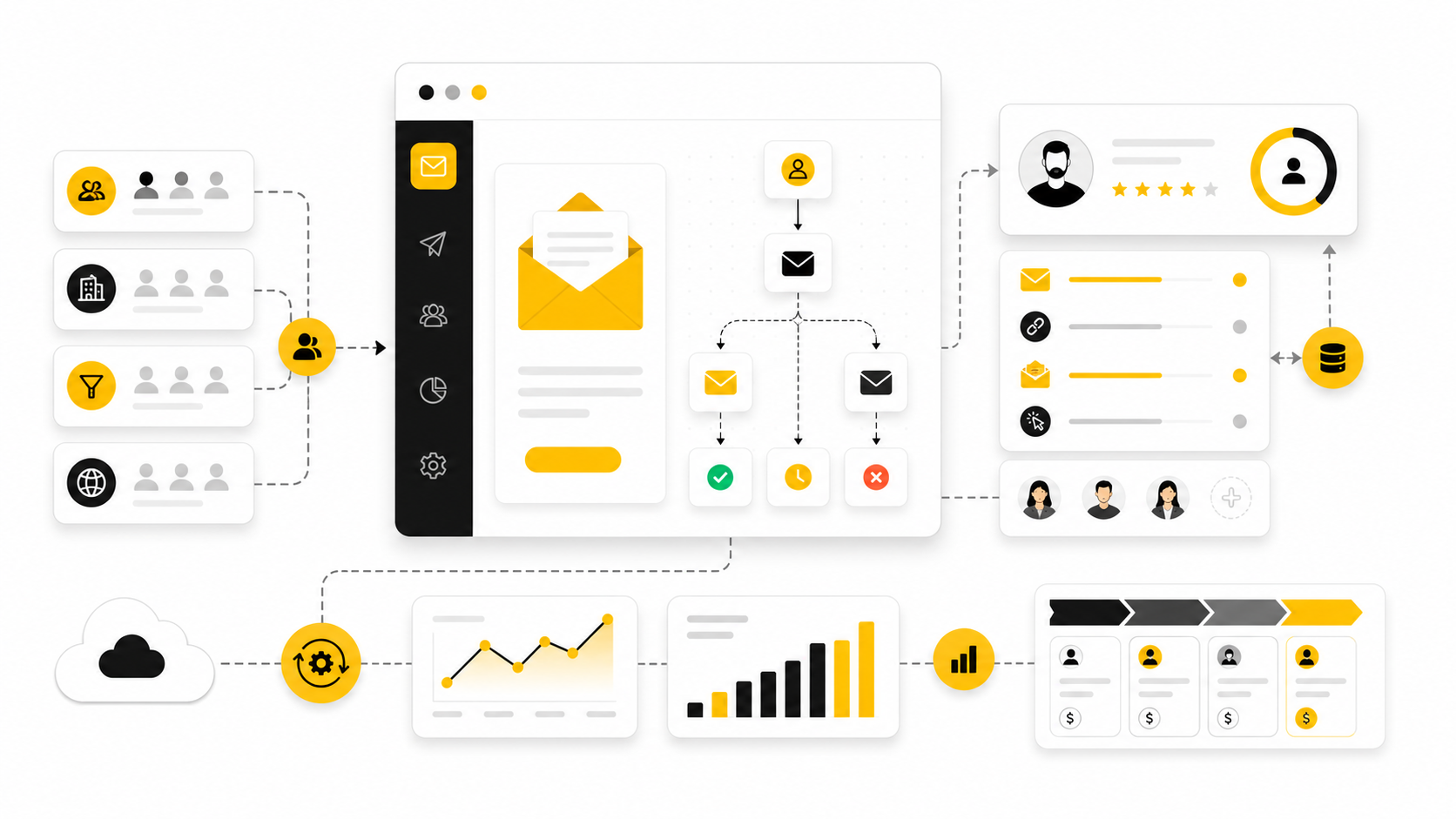
Pardot email is not just “email marketing inside Salesforce.” It is the email side of Salesforce Marketing Cloud Account Engagement, the B2B marketing automation platform many teams still call Pardot because that name stuck for years. Used well, it connects email campaigns, lead nurturing, scoring, segmentation, forms, landing pages, Salesforce campaigns, and sales follow-up into one measurable revenue system.
That matters because B2B email is rarely about one big promotional blast. It is usually about timing, relevance, trust, and handoff. A prospect downloads a guide, attends a webinar, visits a pricing page, ignores three nurture emails, then suddenly replies to a sales rep because the right message landed at the right stage.
The problem is that many teams treat Pardot email like a prettier Mailchimp. They build templates, send newsletters, look at opens, and wonder why the pipeline impact is hard to prove. The real value appears when Pardot email is built around buyer intent, clean data, automation logic, and Salesforce visibility.
this guide breaks Pardot email into a practical operating system. We will look at what it is, why it matters, how the framework works, which components need attention, and how professional teams implement it without creating a messy automation machine nobody trusts.
Pardot Email: What It Is And Why It Matters
Pardot email refers to the email marketing and automation capabilities inside Salesforce Marketing Cloud Account Engagement, the product formerly known as Pardot. Salesforce describes Account Engagement as a B2B marketing automation platform built to help teams align marketing activity with sales goals, create pipeline, and support buyer engagement across the customer journey through Marketing Cloud Account Engagement. In plain English, it helps marketing teams send more carefully emails and gives sales teams better context about what prospects are doing.
The keyword there is context. A normal email tool can send a campaign, but Pardot email can connect that send to a prospect record, a score, a grade, a list membership, a Salesforce campaign, an Engagement Studio path, and a sales activity. That is why Pardot email becomes more powerful when it is treated as part of a revenue workflow instead of a standalone communication channel.
This is especially important in B2B, where buying committees are larger, deal cycles are longer, and one person’s click rarely tells the whole story. The email itself may be simple, but the system behind it needs to know who should receive it, what should happen after engagement, when sales should be alerted, and how campaign influence should be measured. Without that structure, even a beautifully written email can disappear into a reporting fog.
Why It Matters For B2B Teams
Email still matters because it remains one of the few owned channels where a company can reach known prospects directly. Social reach changes, ad costs move, and third-party cookies keep getting weaker, but a qualified email list tied to CRM data is still a durable asset. Recent email industry research continues to show that marketers are investing in email because it supports retention, nurturing, and measurable revenue activity, with Litmus tracking ongoing shifts in personalization, deliverability, and workflow maturity through its State of Email reports.
For B2B teams, Pardot email matters most when it reduces the gap between marketing engagement and sales action. A webinar follow-up email is useful, but a webinar follow-up email that updates campaign status, scores the prospect, routes high-intent leads, and gives the sales rep a clean history is much more useful. That is where Account Engagement earns its place in the stack.
The risk is assuming the software will create the strategy for you. Pardot email can automate a lot, but automation only scales what you design. If your lists are messy, your scoring model is random, your templates are inconsistent, or your Salesforce campaign structure is unclear, Pardot will not fix that automatically.
The Pardot Email Framework
A strong Pardot email program starts with a simple framework: audience, message, automation, handoff, and measurement. Each part needs to be clear before the campaign goes live. When one part is weak, the entire system becomes harder to trust.
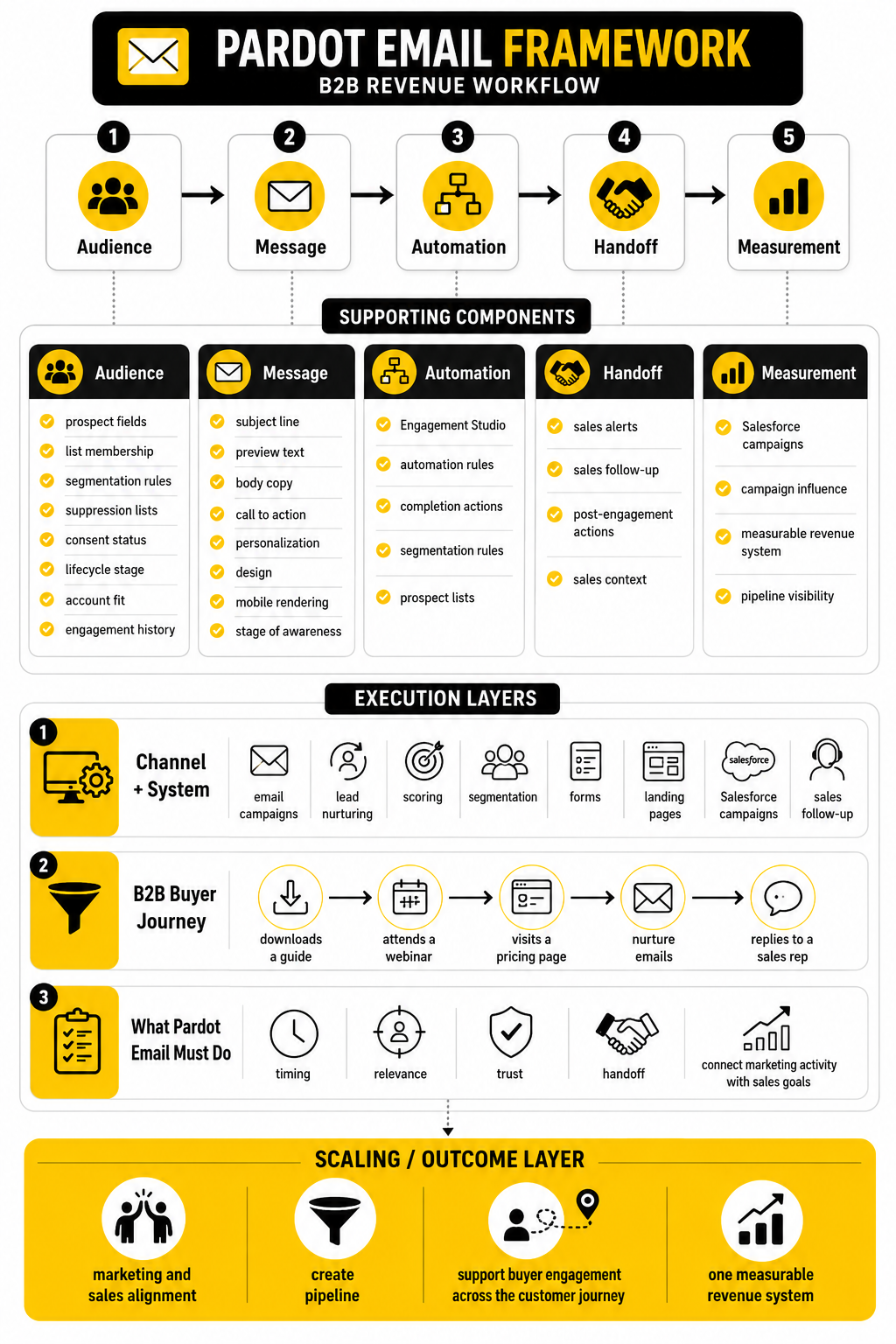
The audience layer decides who should receive the email and why. This includes prospect fields, list membership, segmentation rules, suppression lists, consent status, lifecycle stage, account fit, and engagement history. In Pardot, targeting is not just a marketing preference; it affects deliverability, relevance, compliance, and sales confidence.
The message layer covers the email content itself. That includes the subject line, preview text, body copy, call to action, personalization, design, mobile rendering, and whether the message matches the prospect’s stage of awareness. Good Pardot email copy does not try to say everything; it moves the reader to the next useful action.
The automation layer defines what happens before and after the email. Salesforce documentation highlights tools such as Engagement Studio, automation rules, completion actions, segmentation rules, and prospect lists as core ways to automate targeting and engagement in Account Engagement through marketing automation features. This is where Pardot email becomes a system rather than a send button.
How The Six-Part Guide Will Build The System
Part 1 gives the foundation, so the rest of the guide has a clear structure. We are not starting with button-click instructions because that usually creates shallow implementation. First, you need to understand what Pardot email is supposed to accomplish inside a B2B revenue process.
Part 2 will map the full Pardot email framework in more detail. It will explain how audience logic, campaign purpose, buyer stage, and automation rules fit together before you build anything. This is the planning layer that prevents random newsletters from becoming your entire strategy.
Part 3 will cover the core components of a strong Pardot email system. That includes lists, templates, dynamic content, personalization, completion actions, Engagement Studio, sender authentication, consent, scoring, grading, and Salesforce campaign alignment. Each component has a job, and the goal is to make those jobs work together.
Part 4 will focus on professional implementation. This is where setup decisions become operational reality, including naming conventions, folder structure, QA workflows, user permissions, sales alerts, testing, and launch governance. It will also cover when a team should keep Pardot as the main B2B engine and when adjacent tools may make sense for specific needs, such as using GoHighLevel for agency-style funnel operations or ClickFunnels for standalone funnel builds outside a Salesforce-first environment.
Part 5 will move into optimization and reporting. Opens and clicks are not enough, especially after privacy changes made open tracking less reliable across the email industry. The better questions are whether the campaign reached the right segment, created useful engagement, influenced opportunities, improved sales timing, and produced learnings that can be reused.
Part 6 will close with the FAQ and final checklist. That section will answer the practical questions teams usually ask once they start building: how often to email, how to avoid spam issues, how to structure nurture campaigns, how Pardot email differs from Marketing Cloud Engagement, and how to know when the system is mature enough to scale. The checklist will pull the full guide into a simple review process before your next campaign goes live.
The Pardot Email Framework
The Pardot email framework starts before anyone writes a subject line. The first question is not “What should we send?” It is “What job does this email need to do in the buyer journey?” That small shift changes everything because it forces the campaign to connect with intent, timing, data, and the next action.
A useful framework has five layers: audience, purpose, message, automation, and measurement. Each layer needs to be clear enough that another person on your team could open the campaign and understand why it exists. If the campaign only makes sense to the person who built it, it is not a system yet; it is a one-off project hiding inside automation software.
Pardot email works best when those five layers are planned together. Salesforce positions Marketing Cloud Account Engagement as a B2B automation platform for marketing and sales alignment through Account Engagement, and that alignment is the real point here. The email is only one visible part of the machine; the structure behind it determines whether the campaign creates momentum or noise.
Start With The Audience
Audience selection is the first serious decision in any Pardot email campaign. A list is not just a group of people; it is a strategic choice about who is ready, eligible, and relevant for a specific message. That means your segmentation should consider lifecycle stage, account fit, product interest, consent, geography, engagement history, and sales ownership.
This is where many teams get sloppy. They use broad lists because broad lists feel safer, but broad targeting often creates weaker engagement and lower trust. A smaller, sharper audience usually gives you cleaner learning because the campaign is built around a real reason to communicate.
In Pardot, the audience layer can use static lists, dynamic lists, segmentation rules, automation rules, prospect fields, and suppression lists. Salesforce’s documentation explains that automation rules can match prospects by criteria and apply actions automatically through Account Engagement automation rules. That capability is powerful, but it also means your criteria need discipline because poor logic can quietly scale poor decisions.
A practical audience check looks like this:
Those questions sound basic, but they prevent a lot of damage. The worst Pardot email campaigns usually do not fail because the copy is terrible. They fail because the wrong people receive a message that was not built for their current context.
Define The Campaign Purpose
Every Pardot email needs one clear purpose. Not five purposes. Not a hidden secondary objective that only appears in the reporting meeting. One primary job.
That job might be to confirm registration, drive webinar attendance, nurture early-stage interest, re-engage dormant prospects, promote a product update, invite a sales conversation, or move a known buyer toward a high-intent action. The campaign purpose should be specific enough to shape the audience, CTA, automation logic, and success metric. If the purpose is vague, everything downstream becomes vague too.
This is especially important because Pardot email often sits between marketing and sales. Marketing may think the campaign is educational, while sales may expect it to produce hand-raisers. If those expectations are not aligned before launch, the same campaign can look successful to one team and disappointing to another.
A simple purpose statement can fix this. For example, “This campaign is designed to move product-aware manufacturing prospects who attended the compliance webinar toward a consultation request.” That one sentence gives you the audience, the intent, the offer, and the likely sales follow-up.
Match The Message To Buyer Intent
Once the audience and purpose are clear, the message becomes much easier to write. You are no longer trying to create a generic email that pleases everyone. You are writing a specific message for a specific group of people at a specific stage.
Early-stage prospects usually need clarity, education, and a reason to keep paying attention. Middle-stage prospects need comparison, proof, use cases, and help making sense of their options. Late-stage prospects need confidence, urgency, stakeholder support, and a clean path to action.
This is why one email template cannot carry your whole Pardot email strategy. The structure may be reusable, but the angle needs to match the buyer’s context. A cold educational nurture email should not sound like a last-call sales push, and a high-intent follow-up should not hide behind vague thought leadership.
Personalization also needs to be useful, not decorative. Dropping a first name into the subject line is not a strategy. Better personalization comes from using relevant interest, industry, lifecycle stage, account type, product fit, or previous behavior to make the email feel timely and helpful.
Recent email research continues to point toward personalization, data quality, and workflow maturity as central email challenges, with Litmus highlighting personalization efficiency and data analysis as key obstacles in its email personalization research. That fits what most B2B teams experience in practice. The hard part is not knowing that personalization matters; the hard part is having clean enough data and strong enough content operations to do it well.
Build Automation Around The Next Action
Automation should support the buyer journey, not turn it into a maze. In Pardot email, the most important automation question is simple: what should happen next if the person engages, ignores, or disqualifies themselves? If you cannot answer that clearly, the automation is not ready.
For a basic campaign, the next action might be a completion action that adds a prospect to a list, updates a field, notifies a user, adjusts a score, or changes a Salesforce campaign status. For a more advanced nurture, the next action might happen inside Engagement Studio, where prospects move through different paths based on behavior and timing. Salesforce describes Engagement Studio as a tool for building automated programs that guide prospects through steps and actions in Account Engagement.
The key is to avoid automation for automation’s sake. More branches do not automatically mean a more carefully journey. Sometimes the best Pardot email flow is a tight three-email sequence with clear suppression rules, clean sales alerts, and one strong conversion point.
Automation should also protect the prospect experience. If someone has already booked a demo, they should not keep receiving top-of-funnel nurture emails asking if they have heard of the problem. If someone is owned by an active sales rep, the email logic should respect that relationship. If someone has unsubscribed or lacks proper consent, the system should keep them out of promotional sends entirely.
Connect Email Activity To Salesforce Campaigns
Pardot email becomes much more valuable when activity is connected to Salesforce campaigns. Without campaign structure, you may still see opens, clicks, and form submissions, but it becomes harder to understand how marketing activity relates to pipeline. That is where many teams lose the revenue story.
Salesforce campaigns create a shared language between marketing and sales. They help organize activity around webinars, content offers, events, product launches, nurture programs, and demand generation motions. When Pardot email engagement updates campaign membership or status correctly, the team can see not just who received a message but how that person moved through the campaign.
This does not mean every email needs a complicated campaign hierarchy. It means the important campaigns need enough structure to answer practical questions later. Which audience was targeted? Who engaged? Who converted? Which opportunities were influenced? Which campaign types deserve more investment?
The mistake is waiting until reporting time to think about reporting structure. By then, it is usually too late. Campaign alignment should be part of the build process, not a cleanup task after the send.
Use Scoring And Grading Carefully
Scoring and grading are useful when they help marketing and sales prioritize. They become dangerous when they create false confidence. A prospect with a high score is not always sales-ready, and a prospect with a low score is not always unimportant.
Scoring usually reflects engagement behavior, such as email clicks, form submissions, page visits, or content downloads. Grading usually reflects fit, such as job title, company size, industry, location, or account type. Together, they can help separate “interested but poor fit” from “good fit but not engaged yet.”
The trap is treating every action as equal. A click on a newsletter link should not carry the same weight as a demo request. A visit to a pricing page may signal more intent than a download of a broad educational checklist. Your scoring model should reflect real buyer behavior, not internal wishful thinking.
Pardot email should feed scoring, but it should not dominate scoring. Email engagement is one signal among many. A clean model combines email behavior with website activity, form intent, Salesforce data, lifecycle stage, and sales feedback.
Protect Deliverability From The Beginning
Deliverability is not a technical cleanup item at the end of a campaign. It is part of the framework from day one. If your emails do not reach the inbox, the rest of the strategy does not matter.
Salesforce’s deliverability guidance emphasizes that no email service provider can guarantee inbox placement because sender behavior, data quality, authentication, engagement, and list practices all affect outcomes through Account Engagement deliverability best practices. That is the part many teams ignore. They assume the platform is responsible for deliverability, when the sender’s habits carry much of the weight.
A healthy Pardot email framework includes permission-based lists, bounce management, suppression rules, authenticated sending domains, consistent sending patterns, and content that people actually want. It also avoids sudden volume spikes, purchased lists, unclear opt-ins, and repeated sends to people who never engage. Those shortcuts may create short-term reach, but they damage the long-term asset.
Deliverability also connects back to audience strategy. Better segmentation usually means better relevance, and better relevance usually supports better engagement. This is why list quality is not just an operations issue; it is a growth issue.
Decide What Success Means Before Launch
Measurement should be defined before the campaign goes live. Otherwise, teams cherry-pick whatever number looks best after the fact. That is how you end up celebrating clicks that never become pipeline.
The right success metric depends on the campaign purpose. A registration campaign may care about sign-ups. A webinar reminder may care about attendance. A nurture campaign may care about progression to a later-stage list. A sales-assist campaign may care about meetings, opportunity creation, or influenced pipeline.
Opens and clicks still have some diagnostic value, but they should not be the whole story. Privacy changes, bot activity, image loading behavior, and inbox filtering have made surface-level engagement metrics less reliable than many dashboards suggest. Salesforce has continued adding tools across its marketing products to help teams interpret engagement more carefully, including bot-related email engagement scoring in recent Marketing Cloud release notes for Einstein Metrics Guard Bot Scoring.
For Pardot email, the better reporting question is usually this: did the campaign help the right people take the right next step? That keeps the team focused on movement, not vanity. A campaign with fewer clicks but more qualified sales conversations can be far more valuable than a broad blast with impressive surface metrics.
Keep The Framework Simple Enough To Use
A framework only works if the team can actually use it. If every Pardot email requires a huge planning document, people will avoid the process or rush through it. The goal is to create a repeatable standard, not a bureaucratic monster.
A practical pre-launch framework can be summarized in seven checks:
That is enough to prevent most avoidable mistakes. It gives marketers a clear build path, gives sales a clearer expectation, and gives leadership cleaner reporting. More importantly, it turns Pardot email from a collection of sends into a system that can improve over time.
The next step is to look at the pieces inside that system. Lists, templates, dynamic content, completion actions, Engagement Studio, authentication, consent, scoring, grading, and campaign alignment all have their own role. When those components are built properly, Pardot email becomes much easier to manage, measure, and scale.
Core Components Of A Strong Pardot Email System
Once the framework is clear, the next step is building the pieces that make it work in the real world. Pardot email depends on connected components, not isolated assets. Lists, templates, forms, landing pages, completion actions, Engagement Studio programs, scoring, grading, field sync, and campaign reporting all need to support the same journey.
This is where implementation becomes practical. You are no longer talking about “better nurture” in theory. You are deciding which records qualify, what content they receive, what action gets logged, what sales sees, and what happens when the prospect moves forward.
The goal is not to make the most complicated setup possible. The goal is to make a system your team can trust. Simple, documented, and consistent beats clever every time.
Lists And Segmentation
Lists are the foundation of Pardot email targeting. Static lists are useful when membership should be manually controlled or tied to a fixed campaign audience. Dynamic lists are better when prospects should automatically qualify or disqualify based on rules, and Salesforce describes dynamic lists as rule-based lists that add and remove prospects as their criteria change in the Account Engagement glossary.
A strong segmentation setup usually includes both. Static lists can support event uploads, sales-nominated audiences, partner campaigns, or one-time campaign groups. Dynamic lists can support lifecycle stages, active customers, competitors, unengaged prospects, product interest, webinar attendees, and exclusion logic that should stay current without manual cleanup.
The most important rule is to build lists around decisions, not vanity categories. A list called “Newsletter” is fine, but it does not tell you much. A list called “Manufacturing Prospects With Compliance Interest And No Open Opportunity” is more useful because it tells the team exactly why those people belong there.
Prospect Fields And Salesforce Sync
Pardot email targeting is only as good as the data behind it. Prospect fields decide what you can segment, personalize, score, route, suppress, and report. If the field architecture is messy, your campaign logic becomes fragile.
Salesforce notes that default prospect fields are mapped to lead or contact records when the Salesforce connector is verified, and that Salesforce is usually the primary system in the default prospect field mapping documentation. That matters because teams often forget that Pardot and Salesforce are not separate worlds. They are sharing data, and field conflicts can create real operational problems.
Before building complex email automation, review the fields that will drive your campaigns. Check whether lifecycle stage, product interest, consent, country, account type, industry, owner, customer status, and key qualification fields are mapped correctly. Then decide which system should win when values conflict, because unclear sync behavior can quietly break segmentation and reporting.
Email Templates And Email Content
Templates keep Pardot email consistent. They protect brand standards, reduce production time, and make campaigns easier to review. Salesforce explains that in the enhanced email experience, marketers can select an email template before building email content through email templates and email content.
The practical distinction is simple. Templates should handle reusable structure, while email content should handle the specific message. If every campaign requires someone to rebuild layout, spacing, header treatment, footer logic, and CTA styling, your process is too manual.
Good templates also reduce approval friction. Sales, legal, brand, and leadership should not need to review the same structural decisions every time. They should be able to focus on the offer, audience, claims, CTA, and follow-up path.
Dynamic Content And Personalization
Dynamic content lets you show different variations to prospects based on selected criteria. Salesforce’s documentation describes dynamic content as a way to display variations based on prospect criteria, with availability depending on edition and add-ons in Create Dynamic Content. Used well, it can make one Pardot email feel more relevant without forcing the team to build too many separate campaigns.
This is useful when the core email is the same, but one section should change by industry, region, product interest, customer status, or lifecycle stage. For example, the CTA block might differ for current customers versus prospects, while the main announcement stays consistent. That keeps production manageable while making the message more useful.
Do not overdo it. Dynamic content creates hidden complexity because different people may see different versions of the same send. Document the logic, test every variation, and avoid using dynamic content when a separate campaign would be clearer.
Forms, Landing Pages, And Conversion Points
A Pardot email needs somewhere useful to send people. That might be a Pardot form, landing page, file, webinar registration page, demo request page, or external booking flow. The conversion point should match the intent of the email.
If the email promises a practical checklist, the landing experience should deliver that checklist without friction. If the email invites a sales conversation, the page should make scheduling easy and set clear expectations. If the email promotes a webinar, the registration flow should be short enough that interested people do not abandon it halfway through.
This is also where some teams use tools outside Salesforce when the job calls for faster page or funnel execution. A Salesforce-first B2B team may keep Pardot as the core nurture and CRM alignment engine, while using a dedicated funnel builder like ClickFunnels for standalone campaign funnels or systeme.io for simpler funnel and email operations. The key is not the tool itself; the key is whether the conversion data gets captured cleanly and supports the sales process.
Completion Actions
Completion actions are one of the most practical parts of Pardot email implementation. They let you trigger follow-up behavior when a prospect completes an action, such as submitting a form, clicking a custom redirect, downloading a file, or interacting with a marketing asset. Salesforce describes completion actions as a way to automate basic marketing tasks, including actions like adjusting a prospect’s score after file access, in Completion Actions.
This is where the campaign becomes operational. A form submission can add the person to a list, notify the owner, update a campaign member status, assign a prospect, adjust scoring, or send an autoresponder. Those small actions are what turn a click into a visible next step.
The mistake is stacking too many actions without a clear reason. Every completion action should answer one question: what needs to happen now because this prospect took this action? If there is no strong answer, leave it out.
Engagement Studio Programs
Engagement Studio is where Pardot email nurturing becomes more structured. Instead of sending isolated emails, you can build a program that evaluates whether a prospect opened, clicked, submitted a form, joined a list, or met certain conditions. Salesforce’s Engagement Studio documentation describes automated programs that guide prospects through steps and actions in Account Engagement.
A good Engagement Studio program is not just a drip sequence. It is a decision path. It should react differently when someone shows intent, becomes disqualified, enters an opportunity, converts, or stops engaging.
Keep the first version focused. Start with a clean entry list, a clear exit condition, a few meaningful decision points, and one conversion goal. You can always add sophistication later, but if the first version is too complex, it becomes hard to troubleshoot and even harder to improve.
A Practical Build Process
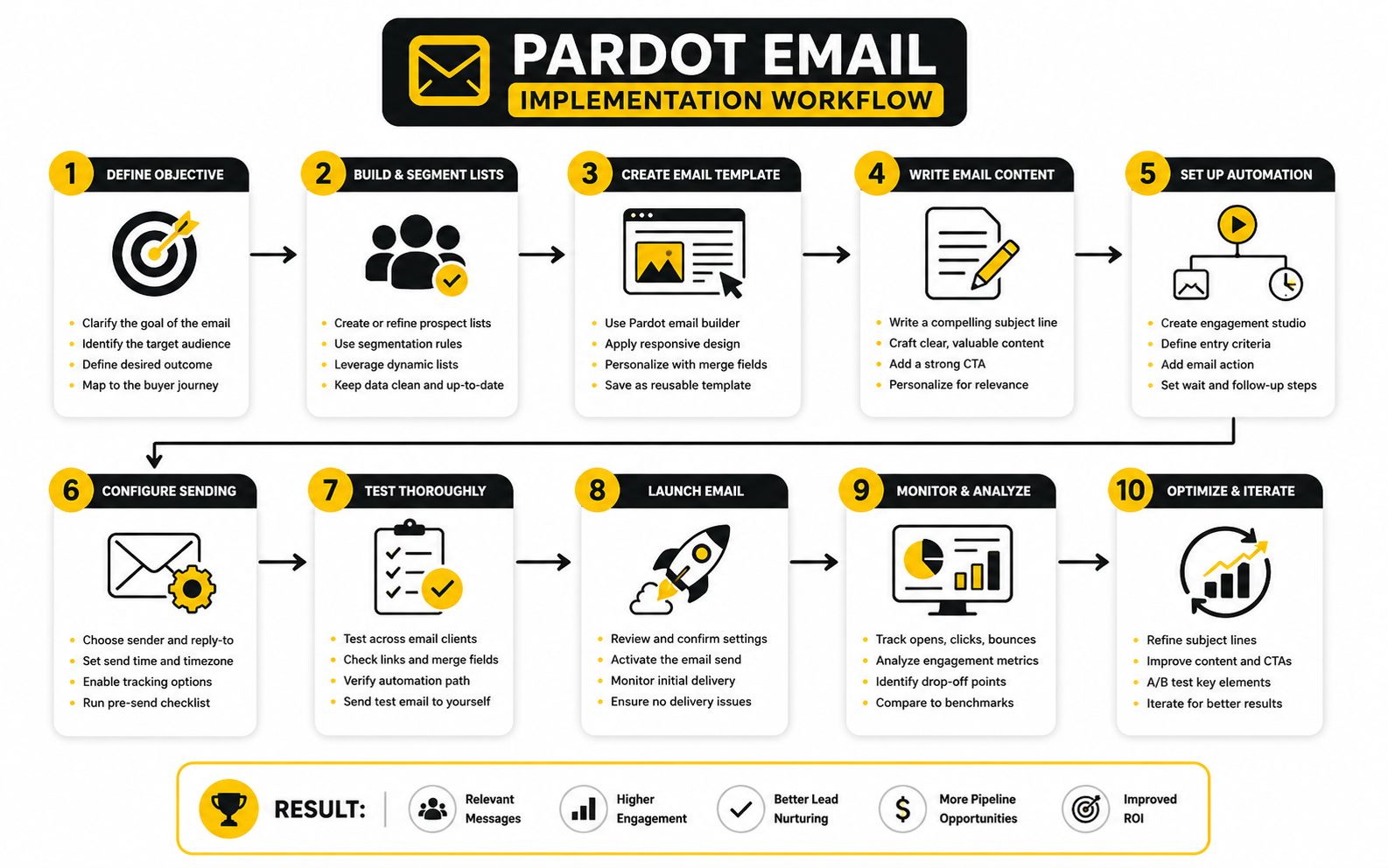
Implementation should follow a repeatable process. Without a process, every Pardot email becomes a custom build, and custom builds create inconsistency. A simple process keeps campaigns fast without making them careless.
Start with the campaign brief. Define the audience, purpose, offer, CTA, exclusions, Salesforce campaign, owner, timeline, approval path, and success metric. This brief does not need to be long, but it needs to be clear enough that campaign operations can build without guessing.
Then build in sequence:
That sequence is boring in the best possible way. It removes guesswork, catches mistakes early, and gives the team a shared operating rhythm. In Pardot email, consistency is not a nice-to-have; it is what keeps your automation from becoming chaotic.
Sender Authentication And Deliverability Setup
Technical setup matters because mailbox providers need to trust the sender. Salesforce’s deliverability guidance explains authentication concepts such as SPF, DKIM, and DMARC, with DMARC building on SPF and DKIM in email deliverability best practices. These are not optional details for a serious email program.
Salesforce has also documented email-sending domain verification requirements, including the need for an active DKIM key or verified authorized email domain in the Email-Sending Domain Verification FAQ. That means your Pardot email implementation should include DNS coordination early, not the day before launch. If IT, marketing ops, and sales ops are not aligned on domain setup, campaigns can be delayed or damaged.
Deliverability also depends on behavior. Clean opt-ins, low bounce rates, engagement-aware segmentation, clear unsubscribe options, and consistent sending patterns all support inbox placement. Authentication gets you trusted at the domain level, but sender habits decide whether that trust lasts.
Consent, Suppression, And Compliance Logic
Consent logic should be designed before campaign volume increases. This is especially important for teams sending across different regions, product lines, brands, or business units. A simple unsubscribe field is not always enough for a modern B2B database.
Your suppression structure should include unsubscribed prospects, hard bounces, competitors, employees, customers when relevant, active opportunities when relevant, recently contacted sales-owned accounts, and any region-specific consent exclusions. The exact setup depends on your business, but the principle is universal. The system should prevent bad sends before a human has to remember every exception.
This is also where naming conventions matter. If suppression lists are confusing, people will skip them or choose the wrong one. Clear names like “SUPPRESS Competitors,” “SUPPRESS Customers,” and “SUPPRESS No Marketing Consent” make the right behavior easier.
Scoring, Grading, And Qualification Signals
Scoring and grading should be implemented as part of the email system, not bolted on later. Salesforce’s Trailhead materials explain scoring and grading as ways to evaluate and prioritize leads in Lead Scoring and Grading in Account Engagement. The point is to help the team understand both engagement and fit.
For Pardot email, scoring should reflect meaningful behavior. A casual click should not be treated like a pricing-page visit or demo request. A webinar attendance signal should not carry the same weight as a newsletter open. The model should reflect what your sales team has learned from real deals.
Grading should help identify fit. A prospect might be highly engaged but outside your ideal customer profile, or a perfect-fit account might still be early in the research process. When scoring and grading work together, sales gets a better signal than raw activity alone.
Sales Alerts And Handoff Rules
The handoff from marketing to sales is where Pardot email either proves its value or creates noise. Sales alerts should be specific, timely, and tied to behavior that actually matters. If reps receive alerts for every minor click, they will stop trusting the system.
A strong handoff rule defines what qualifies as sales-worthy engagement. That might be a demo request, contact-us form submission, high-intent content download, repeat engagement from a target account, or a score threshold combined with a strong grade. The alert should tell the rep what happened, why it matters, and what action makes sense next.
Do not assume sales will interpret Pardot activity correctly without context. Give them clean campaign naming, meaningful status updates, and enough activity history to act confidently. The whole point of Pardot email is not just to send better messages; it is to help the revenue team respond at the right moment.
QA Before Every Send
Quality assurance is the unglamorous part that saves campaigns. Every Pardot email should be checked before launch, even when it uses a proven template. Small mistakes can affect personalization, tracking, compliance, deliverability, and credibility.
A practical QA checklist includes sender name, reply-to address, subject line, preview text, unsubscribe link, personalization tokens, dynamic content, mobile rendering, link tracking, UTM parameters, form behavior, completion actions, Salesforce campaign status updates, suppression lists, and test records. This is not overkill. It is the cost of sending email from a system that touches CRM, sales workflow, and reporting.
The best teams make QA routine instead of heroic. They do not rely on one tired marketer catching everything at 6 p.m. They use a shared checklist, internal proofs, test prospects, and a clear approval path. That discipline makes Pardot email faster over time because fewer launches need emergency cleanup.
Statistics And Data
Measurement is where Pardot email becomes more than a marketing activity. A campaign can look polished, launch on time, and still fail if the numbers do not connect to a useful decision. The point of analytics is not to admire a dashboard; it is to decide what to improve, what to stop, and what to scale.
The cleanest way to read Pardot email performance is to separate activity metrics from business metrics. Activity metrics tell you what happened inside the email experience. Business metrics tell you whether that activity helped create qualified engagement, sales conversations, pipeline, or revenue.
That distinction matters because not every positive-looking email number is actually valuable. A high open rate with weak clicks may show curiosity, but not intent. A strong click rate with poor conversions may show message-market fit, but a broken landing page or offer mismatch. A small campaign with fewer clicks but several qualified sales conversations may be more valuable than a huge send that produces surface-level engagement and no movement.
What Pardot Email Reports Actually Show
Pardot list email reporting gives you the first layer of performance data. Salesforce’s documentation explains that the List Email report includes key send data such as emails sent, unique clicks, unique click rate, total clicks, and total click rate through the List Email Report. This is useful, but it is only the starting point.
The report helps you understand how the email performed as an email. It can show whether people clicked, which links attracted attention, and whether the campaign had obvious engagement problems. That is important for diagnosing copy, audience fit, CTA clarity, and offer strength.
But a Pardot email report does not answer every revenue question by itself. To understand pipeline impact, you need campaign reporting, Salesforce campaign member status, opportunity influence, and sometimes B2B Marketing Analytics. That is where the conversation moves from “Did people click?” to “Did the right people move forward?”
The Metrics That Matter Most
The most useful Pardot email metrics depend on the purpose of the campaign. A registration email, a nurture email, a re-engagement email, and a sales-assist email should not all be judged by the same number. That is why every campaign needs a primary metric before launch.
For most B2B campaigns, these metrics deserve attention:
Do not treat this as a list of numbers to dump into a report. Treat it as a diagnostic path. First, check whether the email reached the audience. Then check whether it earned attention. Then check whether it created action. Then check whether that action meant anything for sales or pipeline.
Why Opens Are Directional, Not Definitive
Open rates are still visible in many email dashboards, but they are not as clean as they used to be. Apple’s Mail Privacy Protection changed open tracking by loading remote email content in ways that can inflate or obscure opens, and Apple describes the feature as a privacy protection that hides IP address and prevents senders from learning about Mail activity through its Mail Privacy Protection explanation. That means an open is no longer a reliable proof that a real person actively read the email.
This does not mean open rates are useless. They can still help compare subject lines, sender names, timing, and list fatigue when you interpret them carefully. But they should be treated as directional, not definitive.
For Pardot email, this matters because automation decisions based only on opens can create false signals. If a nurture program treats an open as strong buying intent, the system may push people forward too aggressively. Clicks, form submissions, page visits, campaign status changes, and sales actions are usually better indicators of actual intent.
Benchmarks Are Useful, But Only In Context
Benchmarks can help you spot whether something is obviously wrong. If your click-through rate is far below what you normally see, that deserves investigation. If bounce rates suddenly rise, that may point to list decay, import quality, domain issues, or sender reputation problems.
But benchmarks can also mislead you. Different industries, list sources, countries, buyer stages, email types, and send frequencies produce different numbers. A customer education email, a cold re-engagement campaign, and a late-stage demo follow-up should not be expected to perform the same way.
Recent benchmark reports still show wide variation by audience and campaign type. For example, MailerLite’s email benchmark research notes that privacy changes affect opens and click-to-open rates while still making benchmarks useful for comparison across similar conditions in its email performance benchmarks. The practical takeaway is simple: compare your campaigns against the right peer set, then compare them against your own historical performance.
Your internal benchmark is often more useful than a global average. Track performance by campaign type, segment, funnel stage, region, and offer. Over time, your own data will tell you what “good” looks like for your market.
The Analytics System
A strong Pardot email analytics system has four layers: email performance, conversion performance, campaign performance, and revenue performance. Each layer answers a different question. If you only look at the first layer, you will optimize emails without knowing whether they help the business.
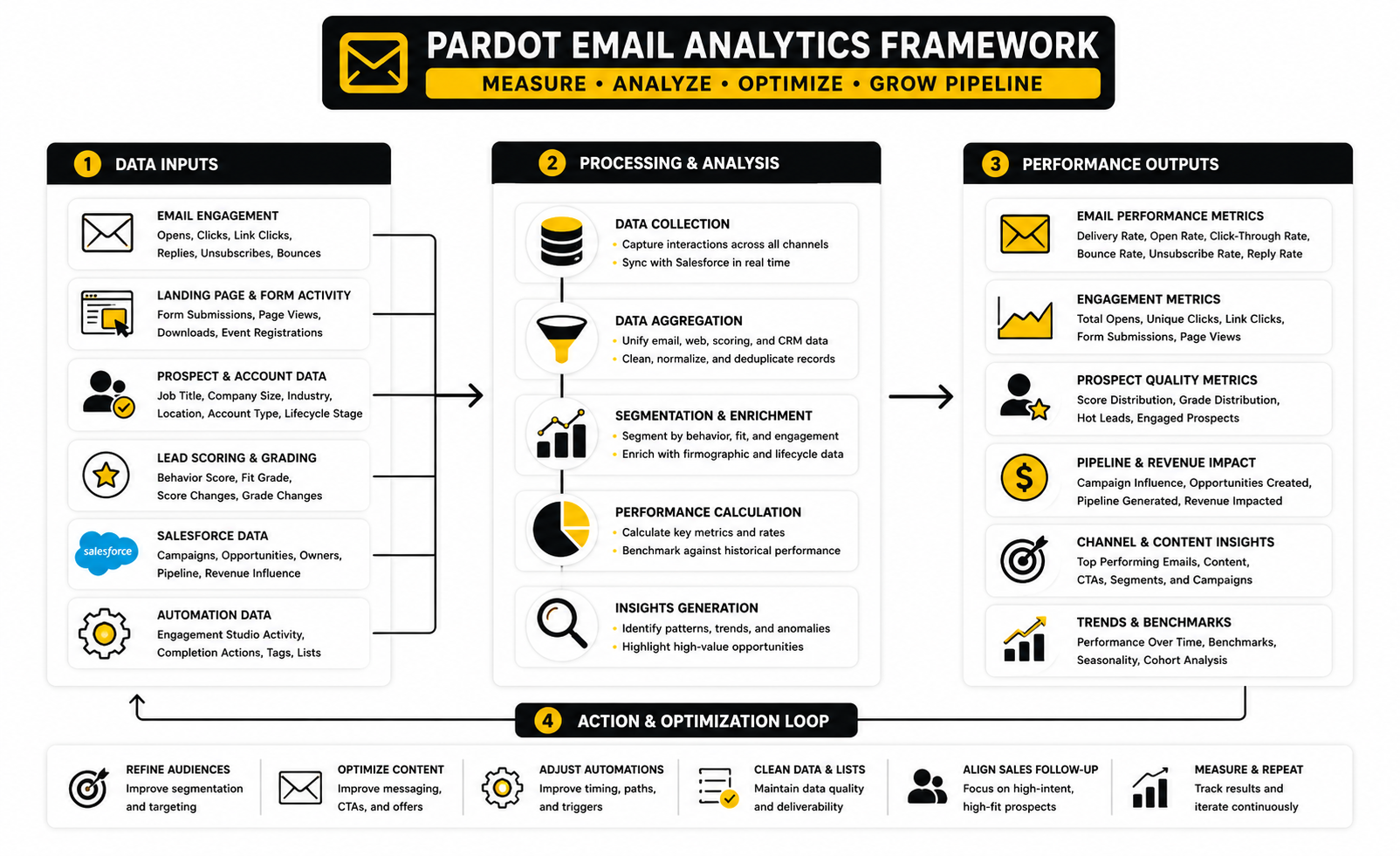
Email performance answers, “Did the email itself create engagement?” This includes delivery, bounces, opens, clicks, unsubscribes, and spam complaints. These numbers help improve targeting, subject lines, CTAs, offer framing, and deliverability habits.
Conversion performance answers, “Did the post-click experience work?” This includes form submissions, landing page conversion, webinar registrations, demo requests, content downloads, meeting bookings, and other defined actions. If clicks are strong but conversions are weak, the problem may not be the email. It may be the page, form, offer, load speed, friction, or expectation mismatch.
Campaign performance answers, “Did this campaign move people through meaningful stages?” Salesforce describes Account Engagement campaign reporting as a way to compare campaign health, ROI, cost per opportunity, and related performance in Account Engagement Campaign Reporting. This layer depends heavily on clean campaign member statuses and consistent campaign structure.
Revenue performance answers, “Did this activity help create or influence opportunities?” Salesforce’s analytics documentation describes Account Engagement analytics as a way to explore the connection between marketing efforts and sales outcomes through Analytics for Account Engagement. This is the layer leadership usually cares about most, but it only works when the earlier layers are built properly.
How To Interpret Click Data
Clicks are usually more meaningful than opens because they require a clearer action. A click shows that the subject, sender, timing, message, and CTA created enough interest for the reader to move. That does not make every click valuable, but it makes clicks worth studying.
Start by separating total clicks from unique clicks. Total clicks can show repeated activity, but unique clicks usually give a cleaner view of how many people engaged. Salesforce’s list email metric documentation separates unique click measures from total click measures in List Email Report Metrics, which is useful when you are trying to avoid overstating engagement.
Then look at which links earned the clicks. If the main CTA gets weak engagement but a secondary educational link gets strong engagement, the audience may not be ready for the primary ask. If a footer link receives unusual activity, bots or compliance scanning may be distorting the data. If one segment clicks at a much higher rate than another, that may reveal where the offer is strongest.
The action is not always “write better copy.” Sometimes the correct action is to narrow the audience, change the offer, move the email earlier or later in the journey, improve the landing page, or create a separate path for a more engaged segment.
How To Read Conversion Data
Conversion data tells you whether the email promise matched the landing experience. A healthy click rate followed by weak conversion usually means the reader had enough interest to leave the inbox but not enough confidence to complete the action. That is a valuable signal.
Look at the full path. Did the link go to the right page? Did the page headline match the email promise? Was the form too long for the value of the offer? Did the page load properly on mobile? Did the thank-you action fire correctly? Did the completion action update the prospect as expected?
For Pardot email, conversion tracking should also check whether the system recorded the right downstream events. A form submission that does not update campaign status is a reporting problem. A demo request that does not notify the owner is a sales problem. A high-intent action that does not affect scoring or routing is a process problem.
Measuring Engagement Studio Performance
Engagement Studio reporting needs a different mindset from one-off email reporting. You are not just measuring one send. You are measuring movement through a journey.
Salesforce explains that Engagement Studio program reporting helps teams review metrics in the Report tab of a running or paused program through Engagement Program Reporting. That makes it useful for identifying where people pause, exit, engage, or fail to progress. The goal is to understand the journey, not just the individual email.
Look for drop-off points. If the first email gets clicks but the second email gets ignored, the second message may not match the expectation set by the first. If many prospects never reach a decision step, the wait time, criteria, or entry logic may need adjustment. If the program produces engagement but no meaningful conversion, the nurture may be interesting but not commercially useful.
The best action is usually focused iteration. Do not rebuild the whole program because one email underperformed. Identify the weakest decision point, message, timing gap, or conversion path, then improve that part first.
Reporting To Sales And Leadership
Sales and leadership do not need every Pardot email metric. They need the numbers that explain business movement. If your report is packed with opens, clicks, and screenshots but does not explain pipeline relevance, it will not build confidence.
A useful leadership report usually answers five questions:
That final question matters. Reporting should drive decisions. If the only output is a dashboard, the team has not finished the measurement process.
For sales, the report should be more tactical. Which accounts engaged? Which prospects showed high intent? Which follow-ups are worth prioritizing? Which messaging angles seem to be working? Sales does not need a lecture on click-to-open rate; they need a reason to act.
When The Data Looks Good But The Campaign Is Weak
Sometimes the dashboard looks good and the campaign still fails. This happens when the metrics are too shallow. A campaign can produce opens and clicks without attracting the right people, moving qualified prospects, or supporting sales conversations.
The first thing to check is audience quality. If the wrong segment receives the email, engagement does not mean much. You may have entertained the database without advancing the buying process.
The second thing to check is intent quality. A broad educational click is not the same as a pricing-page visit, consultation request, or product-specific demo action. Treating all clicks equally will make the campaign look stronger than it really is.
The third thing to check is Salesforce follow-through. If campaign statuses, ownership, alerts, and opportunity influence are not set up cleanly, marketing may create real interest that never appears in the revenue story. That is a measurement failure, not necessarily a marketing failure.
When The Data Looks Bad But The Campaign Is Useful
The opposite can also happen. A campaign may look weak at the surface level but still produce valuable signals. This is common with small, targeted B2B audiences where the goal is quality, not volume.
A low-volume executive campaign may not generate many clicks, but one qualified reply from the right account can matter. A late-stage sales-assist email may not need a huge click-through rate if it helps unblock a buying committee. A customer expansion email may create pipeline through sales conversations that are not fully visible in email metrics.
This is why campaign purpose must come before reporting. You cannot judge a strategic account campaign with the same expectations as a broad newsletter. The question is always whether the campaign created the right action from the right people at the right stage.
Turning Data Into The Next Test
The best Pardot email teams turn every campaign into a learning loop. They do not just ask whether the campaign was good or bad. They ask what the data says about audience, offer, timing, message, automation, and sales follow-up.
If delivery is weak, work on data quality, authentication, sender reputation, and list hygiene. If opens are weak, review subject lines, sender trust, timing, and audience relevance. If clicks are weak, review the offer, CTA, email body, and segmentation. If conversions are weak, review the landing page, form, value exchange, and follow-up path. If pipeline impact is weak, review campaign alignment, sales handoff, scoring, and opportunity influence.
That is the practical value of measurement. It gives you the next move. A Pardot email program becomes more profitable when each send teaches the team something specific enough to improve the next one.
Optimization, Reporting, And Common Mistakes
By this point, the basic Pardot email system is in place. The framework is clear, the build process is repeatable, and the analytics layer shows what is happening after each send. Now the challenge changes from implementation to maturity.
Mature teams do not ask, “Can we send this?” They ask, “Should we send this, to whom, through which path, and what will we learn?” That is the difference between using Pardot as an email tool and using it as a revenue operating system.
This is also where the tradeoffs become more serious. More segmentation can improve relevance, but it can also increase operational complexity. More automation can improve speed, but it can also create hidden logic nobody understands. More reporting can improve accountability, but it can also bury the team in numbers that do not change decisions.
Segmentation Depth Versus Operational Simplicity
Segmentation is one of the fastest ways to improve Pardot email relevance. A message written for a specific industry, funnel stage, product interest, or account type will usually feel sharper than a generic broadcast. The challenge is that every new segment adds maintenance.
A team can quickly end up with dozens of lists that look useful on the surface but overlap, conflict, or become outdated. That creates risk because the wrong audience can enter the wrong nurture, receive the wrong offer, or get excluded from a campaign that should have included them. The problem is not segmentation itself; the problem is segmentation without governance.
The practical answer is to segment around decisions. If a segment changes the message, CTA, automation path, reporting view, or sales follow-up, it probably deserves to exist. If it does not change anything meaningful, it may just be clutter.
Automation Complexity Versus Human Control
Pardot email automation can save huge amounts of time, but it can also hide bad assumptions. A rule that looked reasonable six months ago may keep running after the strategy changes. An Engagement Studio program that made sense for one product line may create confusion when new products, regions, or sales motions are added.
This is why mature teams audit automation regularly. They review active Engagement Studio programs, automation rules, completion actions, dynamic lists, scoring rules, grading rules, and assignment logic. Salesforce’s Account Engagement settings give admins control over business-unit-level configuration in Business Unit Settings for Account Engagement, but governance still depends on the team’s operating discipline.
A useful rule is simple: if nobody can explain what an automation does and why it exists, it should be reviewed before it keeps affecting prospects. Automation should reduce manual work, not reduce accountability. The system still needs owners.
Lead Scoring Drift
Lead scoring often starts with good intentions. The team assigns points to email clicks, page visits, form submissions, webinar attendance, and other behaviors. Then campaigns multiply, offers change, sales feedback evolves, and the model slowly drifts away from reality.
The result is predictable. Prospects with high scores may not be ready for sales, while genuinely strong opportunities may stay hidden because their behavior does not match the old model. When sales stops trusting the score, the score becomes decoration.
Scoring needs a review rhythm. Compare high-scoring prospects against actual opportunity creation, sales acceptance, disqualification reasons, and closed-won patterns. If the actions that add points do not correlate with meaningful sales movement, adjust the model.
Grading And Fit Require Clean Data
Grading is only useful when the underlying fit data is reliable. Job title, company size, industry, country, account type, and customer status need consistent values. If those fields are incomplete or messy, grading becomes guesswork with a professional-looking label.
This is especially important for B2B teams that sell into narrow markets. A highly engaged prospect outside the ideal customer profile may not deserve the same sales urgency as a quieter prospect from a perfect-fit target account. Pardot email engagement should be read alongside fit, not instead of it.
Clean grading also helps protect sales capacity. Reps should not waste time chasing every click from every contact. They should prioritize people who show both enough interest and enough fit to justify follow-up.
Frequency Management And List Fatigue
Email fatigue is not always obvious at first. A team may keep sending because unsubscribes are low, while engagement slowly declines and sales notices weaker response quality. By the time the dashboard clearly shows the issue, the audience may already be less responsive.
Frequency should be managed across the full contact experience, not just one campaign. A prospect might receive a newsletter, event invitation, product announcement, sales sequence, and nurture email in the same week if teams do not coordinate. That feels careless, even when each individual send was approved.
Salesforce offers Einstein Engagement Frequency for Account Engagement, which can help predict whether prospects are under-saturated, on target, or saturated based on engagement behavior in Einstein Engagement Frequency. Even without using that feature, the principle is worth applying. Send cadence should be based on audience behavior, buyer stage, and message value, not internal pressure to promote everything.
Consent And Operational Email Tradeoffs
Consent is not just a legal checkbox. It affects trust, deliverability, segmentation, and brand reputation. Pardot email programs need clear separation between marketing communication and genuinely operational communication.
Salesforce’s Account Engagement Email Compliance FAQ is direct: simply including an unsubscribe link does not satisfy policy because permission is required before using Account Engagement for marketing email in Account Engagement Email Compliance FAQ. That should shape how teams collect consent, import records, define opt-in language, and use suppression logic.
Operational emails are different because they are non-marketing messages tied to a transaction, service, or required information. Salesforce has added the ability to send operational emails to opted-out prospects from Engagement Studio in Account Engagement release notes. Use that carefully. Calling a promotional message “operational” because you want to bypass opt-out is a fast way to damage trust.
Multi-Business-Unit Decisions
Larger companies may need multiple Account Engagement business units. This can make sense when brands, regions, product lines, or regulatory environments need separate databases and controls. But it is not a decision to make casually.
Salesforce’s multiple business units implementation guide explains that multiple business units connect to a single Salesforce org while remaining partitioned Account Engagement databases in the Multiple Business Units Implementation Guide. That separation can be useful, but it also creates planning work around data architecture, campaign reporting, user access, field strategy, and governance.
The tradeoff is control versus complexity. One business unit may be simpler, but it can become messy if teams have truly different data, consent, and campaign needs. Multiple business units can create cleaner separation, but they require stronger operations and more careful coordination.
Salesforce-First Versus Tool-Stack Expansion
Pardot email is strongest when Salesforce is the center of the B2B revenue process. If your CRM, campaigns, ownership, opportunity reporting, and sales workflows live in Salesforce, Account Engagement gives marketing a direct path into that system. That is a major advantage.
But not every marketing job belongs inside Pardot. Some teams need faster funnel pages, lightweight checkout flows, social automation, conversational marketing, or agency-style client management. In those cases, tools like GoHighLevel, ClickFunnels, ManyChat, or Brevo may support specific workflows outside the core Salesforce motion.
The mistake is adding tools because the team is frustrated with process problems. A new platform will not fix unclear segmentation, weak offers, poor data quality, or missing sales alignment. Expand the stack only when the use case is clear, the integration path is understood, and the reporting impact is acceptable.
Data Unification And The Next Layer Of Personalization
The future of Pardot email is less about sending more messages and more about using better context. Salesforce’s pricing and product pages now position Account Engagement+ with access to Marketing Cloud Next capabilities, including Data 360, native SMS and WhatsApp, Agentforce-powered campaign creation, and advanced personalization in Marketing Cloud Account Engagement pricing. That signals where the platform is moving.
For marketers, the strategic question is not “Can AI write more emails?” That is the shallow version. The better question is whether unified data can help the team choose better audiences, personalize more intelligently, coordinate channels, and reduce irrelevant communication.
This only works if the foundation is clean. AI and data unification will not magically repair broken fields, inconsistent campaign structure, bad consent logic, or unclear lifecycle stages. The more advanced the system becomes, the more important the basics become.
Naming Conventions And Documentation
Naming conventions sound boring until something breaks. Then they become priceless. Clear naming helps people understand campaigns, assets, lists, automations, templates, folders, and reports without needing tribal knowledge.
A practical naming structure should show the campaign type, date or quarter, region, audience, offer, and asset purpose where relevant. It should also separate drafts, tests, active assets, evergreen assets, and archived assets. The point is not to create a beautiful naming system for its own sake; the point is to make work findable and auditable.
Documentation should be light but real. Maintain a simple record of key automations, scoring logic, grading criteria, suppression rules, consent rules, campaign member statuses, and reporting definitions. If one person leaves and the system becomes impossible to manage, the implementation was not mature enough.
Governance Without Slowing Everything Down
Governance does not mean every email needs a committee. It means the right checks happen at the right time. Good governance protects speed because teams do not have to reinvent the approval process for every campaign.
For Pardot email, governance usually covers access, naming, QA, compliance, template usage, campaign structure, reporting standards, suppression rules, and automation reviews. The goal is to prevent mistakes that create cleanup work later. Fast teams are not fast because they skip structure; they are fast because their structure is repeatable.
A lightweight governance rhythm can work well:
This keeps the system healthy without turning marketing operations into a bottleneck. The team gets guardrails, not handcuffs.
Common Mistakes That Hurt Pardot Email Performance
Most Pardot email problems are not mysterious. They usually come from rushed planning, weak data, unclear ownership, or overconfidence in automation. The good news is that these mistakes are fixable when you know what to look for.
One common mistake is sending to broad audiences because segmentation feels inconvenient. That creates generic messaging and weak learning. A sharper audience almost always gives you better insight, even when the send volume is smaller.
Another mistake is building nurture programs without clear exit rules. If someone becomes a customer, opens an opportunity, books a demo, or disqualifies themselves, the program should respond. Otherwise, the automation keeps talking as if nothing changed.
A third mistake is using clicks as the only handoff trigger. Clicks can indicate interest, but not all clicks deserve sales attention. Strong handoff logic usually combines behavior, fit, campaign context, and sales ownership.
A fourth mistake is reporting activity without interpretation. A dashboard full of numbers is not the same as analysis. Every report should explain what happened, why it likely happened, and what the team should do next.
Scaling Without Creating A Mess
Scaling Pardot email is not about sending more campaigns. It is about increasing output while keeping quality, relevance, and reporting intact. That requires process maturity.
Before scaling, check whether your team has stable templates, clean lists, reliable suppression logic, working campaign structure, documented automations, consistent QA, and clear reporting. If those basics are weak, more volume will expose the cracks. Scaling a messy system just creates a bigger mess.
The smartest teams scale in layers. First, they stabilize campaign execution. Then they improve segmentation and reporting. Then they add more advanced personalization, multi-step journeys, account-based motions, AI assistance, or cross-channel orchestration. That order matters.
Pardot email can absolutely support serious B2B growth, but only when the operating system is strong enough to carry the weight. The final part will pull the full guide together with practical answers to the questions teams ask most often and a checklist you can use before your next campaign goes live.
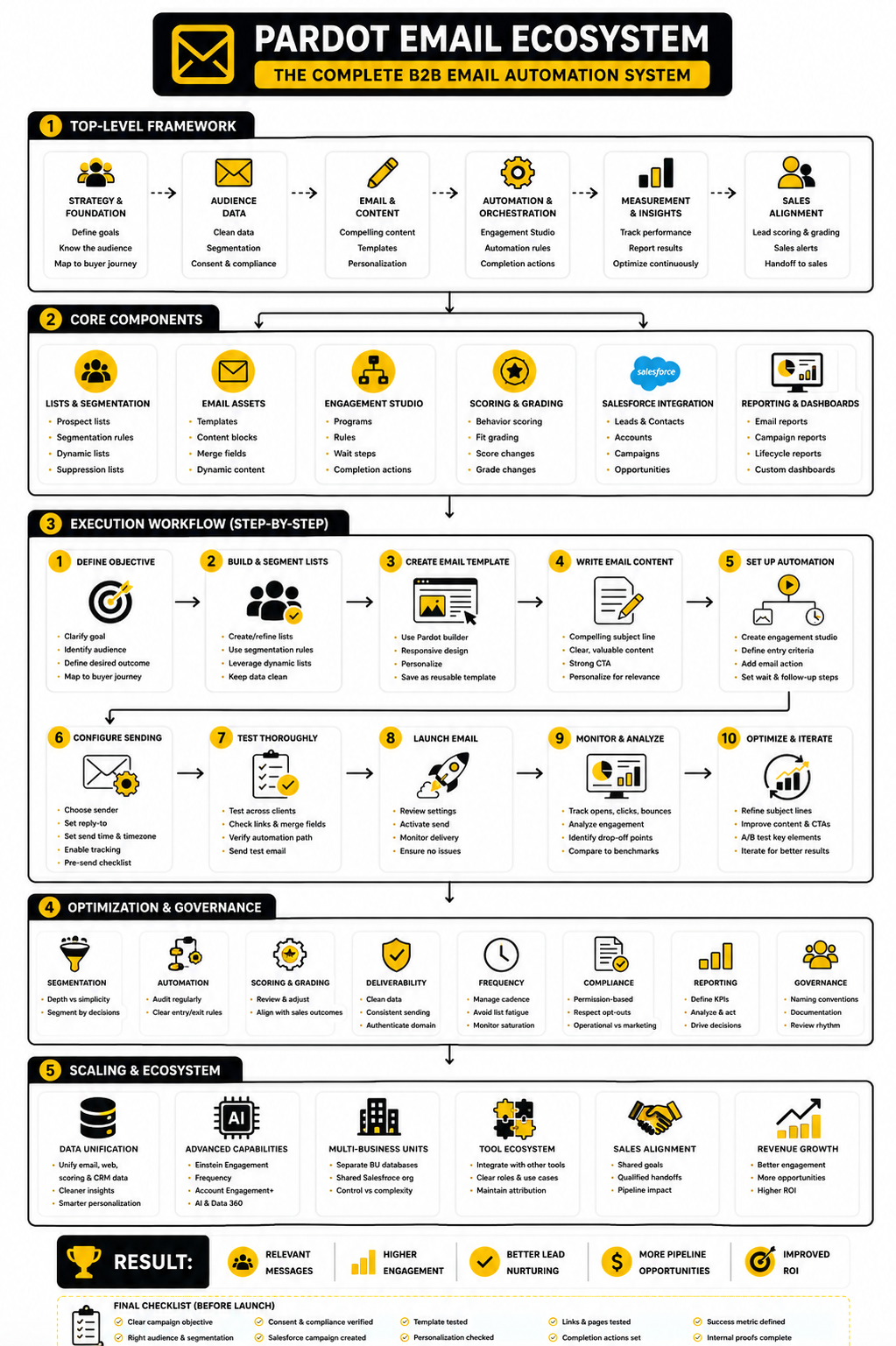
Pardot Email FAQ And Final Checklist
Pardot email works best when the whole ecosystem is clear. The email is not the strategy by itself. It is one channel inside a connected system of audience data, buyer intent, automation, sales visibility, campaign reporting, and continuous optimization.
At this stage, the biggest wins usually come from tightening the system rather than adding more complexity. Cleaner lists, clearer campaign purpose, better suppression logic, sharper CTAs, and stronger sales handoff will usually outperform another clever automation branch. The fundamentals are still the advantage.
Use this final section as a practical closeout. The questions below cover the decisions teams usually face when they move from basic Pardot email sends into a mature B2B marketing automation program.
What Is Pardot Email?
Pardot email is the email marketing and automation capability inside Salesforce Marketing Cloud Account Engagement, which many teams still call Pardot. It lets B2B marketers send list emails, build automated nurture programs, personalize messages, trigger completion actions, and connect email engagement to Salesforce records. The real value is not just sending email; it is connecting email behavior to CRM context and sales action.
Is Pardot The Same As Salesforce Marketing Cloud?
No, Pardot is not the same as Salesforce Marketing Cloud Engagement. Pardot, now called Marketing Cloud Account Engagement, is designed mainly for B2B marketing automation and sales alignment. Marketing Cloud Engagement is typically used for broader B2C or high-volume cross-channel customer engagement, although Salesforce product packaging and naming can overlap depending on the edition and setup.
Is Pardot Email Good For B2B Marketing?
Yes, Pardot email can be very strong for B2B marketing when Salesforce is the center of the sales process. It is especially useful for lead nurturing, webinar follow-up, content campaigns, account-based marketing support, lifecycle messaging, and sales alerts. It becomes less effective when teams use it like a generic newsletter tool without segmentation, campaign structure, or sales follow-up.
How Is Pardot Email Different From A Regular Email Marketing Tool?
A regular email tool usually focuses on list management, templates, sends, and engagement metrics. Pardot email goes deeper because it can connect activity to Salesforce leads, contacts, campaigns, opportunities, owners, scores, grades, and automation rules. That CRM connection is the main reason B2B teams use it.
What Makes A Pardot Email Campaign Successful?
A successful Pardot email campaign reaches the right audience, delivers a relevant message, creates a useful action, and records that action in a way sales and marketing can use. The best campaigns are built around a clear purpose before the email is written. If the campaign does not define the audience, CTA, automation, suppression logic, and success metric upfront, the reporting will usually be weak later.
How Often Should You Send Pardot Emails?
There is no universal perfect frequency for Pardot email. The right cadence depends on buyer stage, list quality, audience expectations, campaign type, sales activity, and engagement history. A high-intent nurture sequence may justify more frequent communication, while a broad newsletter or low-intent database segment may need a lighter rhythm.
Should Pardot Email Automation Be Simple Or Advanced?
Start simple, then make it advanced only where the buyer journey actually needs it. A clean three-email nurture with strong exit rules can outperform a complicated Engagement Studio program full of unnecessary branches. Advanced automation is valuable when it improves relevance, routing, timing, or measurement, not when it exists to impress the team.
What Metrics Matter Most For Pardot Email?
The most important metrics depend on the campaign goal. Delivery rate, bounce rate, click-through rate, conversion rate, unsubscribe rate, campaign member progression, and opportunity influence are usually more useful than open rate alone. Opens can still provide directional insight, but they should not be treated as a perfect measure of human attention.
Why Are Pardot Email Open Rates Sometimes Misleading?
Open rates can be affected by privacy features, image loading behavior, bots, security scanners, and mailbox provider behavior. That means an open does not always prove that a real person read the message. Pardot email performance should be judged with stronger signals such as clicks, conversions, form submissions, campaign status movement, and sales follow-up outcomes.
How Do You Improve Pardot Email Click-Through Rate?
Improve click-through rate by tightening the audience, making the email purpose clearer, using one strong CTA, matching the message to buyer intent, and removing unnecessary distractions. Weak clicks often mean the offer is not compelling enough for that segment. It can also mean the email is trying to serve too many goals at once.
How Do You Keep Pardot Email Out Of Spam?
Strong deliverability starts with permission-based lists, clean data, proper sender authentication, consistent sending behavior, relevant content, and healthy engagement. Avoid purchased lists, sudden volume spikes, misleading subject lines, and repeated sends to people who never engage. Deliverability is not a one-time setup task; it is an ongoing trust signal.
What Is The Role Of Salesforce Campaigns In Pardot Email?
Salesforce campaigns help connect Pardot email activity to broader marketing and sales performance. They make it easier to track who was targeted, who engaged, who converted, and how campaign activity may relate to pipeline. Without campaign structure, Pardot email reporting often gets stuck at the email dashboard level.
When Should Sales Be Alerted From Pardot Email Activity?
Sales should be alerted when the action suggests real buying intent or meaningful account engagement. A demo request, contact form submission, pricing-page interaction, high-intent content download, or strong engagement from a target account can justify follow-up. A casual click on a low-intent newsletter link usually should not trigger urgent sales action by itself.
What Is The Biggest Pardot Email Mistake?
The biggest mistake is treating Pardot email as a send button instead of a system. Teams build emails, launch campaigns, and review surface metrics without connecting audience logic, automation, CRM reporting, and sales action. That creates activity, but not necessarily pipeline.
Can Pardot Email Work With Other Marketing Tools?
Yes, Pardot email can work alongside other tools when each tool has a clear role. A Salesforce-first team may use Pardot for B2B automation and CRM alignment while using other platforms for landing pages, chat, social scheduling, or funnel experiments. The tradeoff is that every additional tool creates integration, attribution, and governance questions, so the use case needs to be worth it.
Final Pardot Email Checklist
Before launching your next Pardot email campaign, review the system from end to end. Do not only proofread the copy. Check whether the campaign is built to create a useful business outcome.
Use this checklist before launch:
A strong Pardot email program is not built in one campaign. It is built through repeatable decisions. Every send should make the system cleaner, more carefully, and easier to trust.
Build a stronger local presence with BAAM AI
Turn your website, Google profile, social channels, and AI visibility into one growth engine
Most businesses do not need more random marketing activity. They need a consistent presence system that helps the right people find them, trust them, and take action. BAAM AI brings strategy, local SEO, website updates, Google Maps visibility, social content, AI-search readiness, media production, and reporting into one practical monthly engine.
If you want your marketing to keep working after the campaign ends, start with a free BAAM AI presence audit. See how your business shows up today and where the fastest visibility wins are at BAAM AI.