
BAAM AI Blog
Monday.com Email Marketing: A Practical Framework For Turning Campaign Work Into Revenue Work
Monday.com email marketing is not just about sending emails from a project board. The real value is using monday.com as the operating system around your email program: planning campaigns, managing CRM data, assigning...
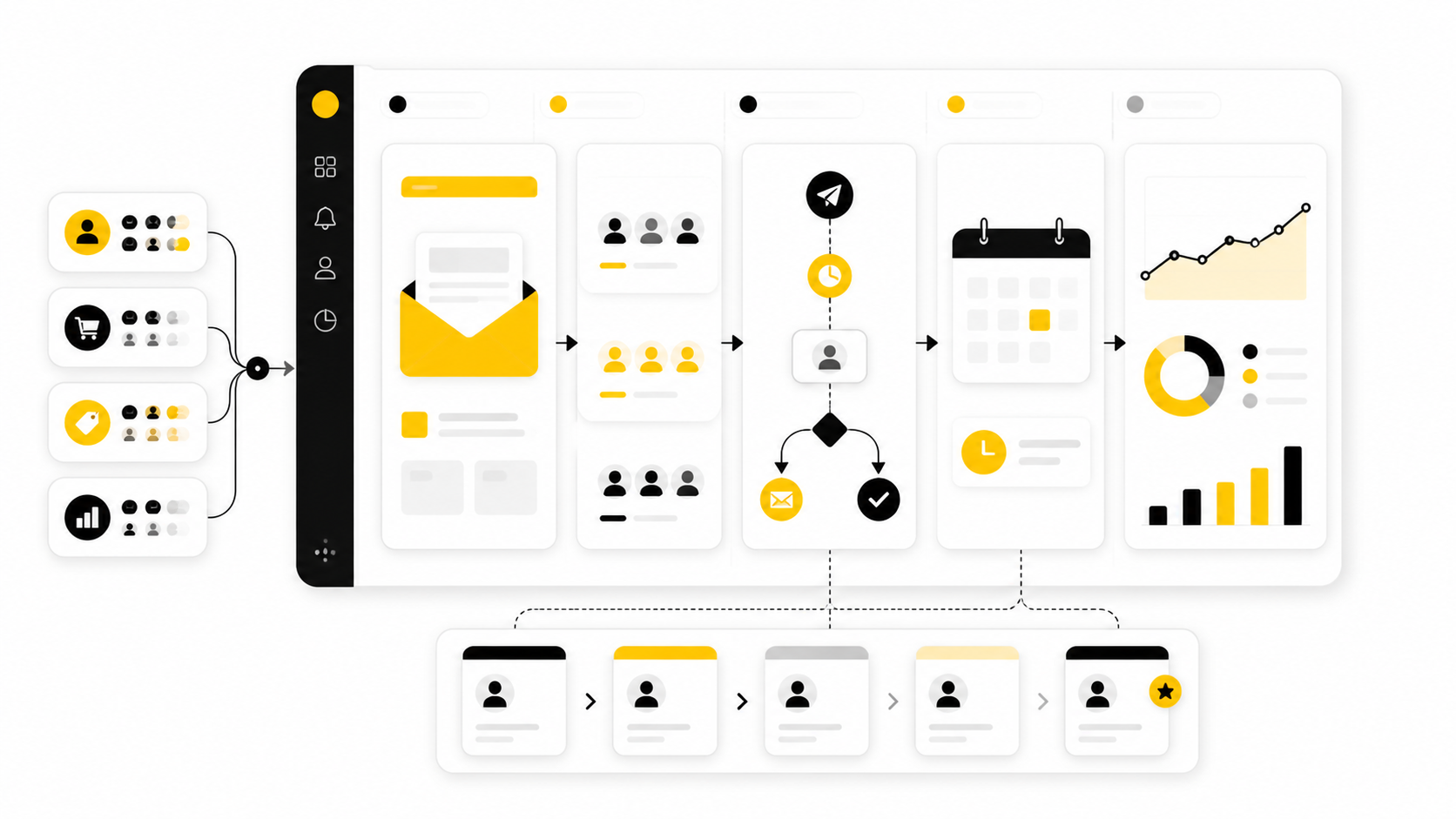
Monday.com email marketing is not just about sending emails from a project board. The real value is using monday.com as the operating system around your email program: planning campaigns, managing CRM data, assigning creative work, tracking approvals, coordinating launches, and connecting results back to pipeline or customer activity.
That distinction matters because most email problems are not “email tool” problems. They are handoff problems, visibility problems, data problems, and follow-up problems. A campaign can have a strong subject line and still underperform if the audience is messy, the offer is unclear, the approval process is slow, or sales never follows up on warm engagement.
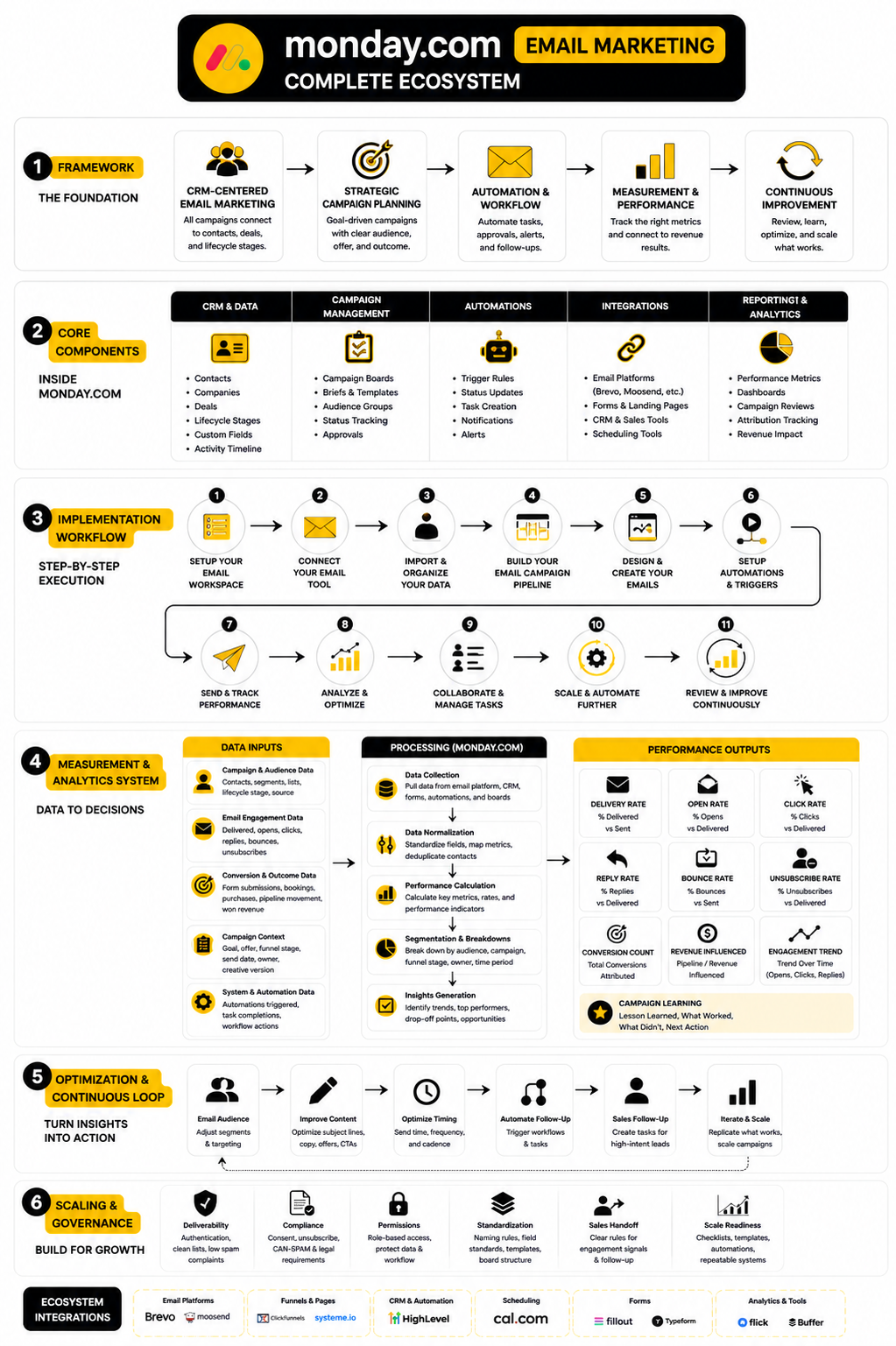
The full article will follow this structure from start to finish. Each section builds on the previous one, so the goal is not to treat monday.com as a magic email platform. The goal is to show how to use it properly inside a real marketing and revenue workflow.
Why Monday.com Email Marketing Matters
Email marketing is still one of the few channels where a business can speak directly to leads, customers, and accounts without depending completely on algorithms. But the channel has become more operationally demanding. Teams now need cleaner segmentation, stronger compliance habits, faster creative workflows, better handoffs, and clearer reporting.
That is where monday.com becomes useful. It gives marketing, sales, operations, and client-facing teams one place to manage the work around the email, not just the email itself. For teams already using monday CRM or monday work management, email campaigns can sit closer to the customer data, campaign briefs, creative assets, approval steps, and follow-up tasks that determine whether a campaign actually produces results.
This is especially important for growing teams that are stuck between simple newsletter tools and heavyweight marketing automation suites. A founder, agency, or lean marketing team may not need a complex enterprise stack yet. They may need a structured campaign command center, with the option to connect specialist tools like Brevo, ManyChat, or GoHighLevel when the customer journey requires more than monday.com should handle alone.
The Monday.com Email Marketing Framework
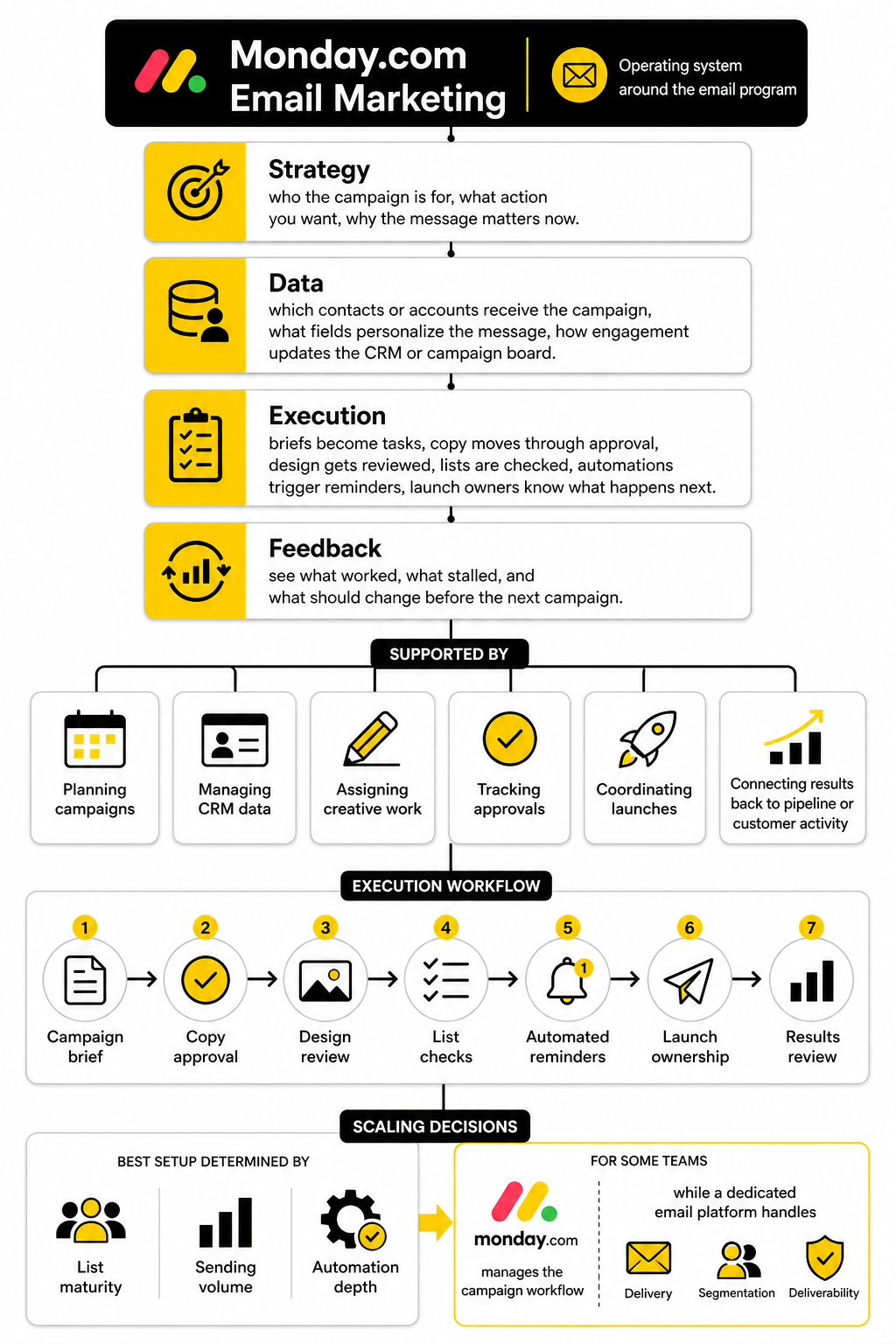
A useful monday.com email marketing setup has four layers: strategy, data, execution, and feedback. Strategy defines who the campaign is for, what action you want, and why the message matters now. Data determines which contacts or accounts should receive the campaign, what fields personalize the message, and how engagement should update the CRM or campaign board.
Execution is where monday.com usually shines. This is where briefs become tasks, copy moves through approval, design gets reviewed, lists are checked, automations trigger reminders, and launch owners know exactly what must happen next. Feedback closes the loop by helping the team see what worked, what stalled, and what should change before the next campaign.
The mistake is trying to force monday.com to do every single job. It can support email templates, activity tracking, campaign planning, CRM workflows, and integrations, but your best setup depends on the maturity of your list, your sending volume, and your need for automation depth. For some teams, monday.com can manage the campaign workflow while a dedicated email platform handles delivery, segmentation, and deliverability.
The rest of the article will treat monday.com as a practical system, not a buzzword. We will look at what belongs inside monday.com, what should stay inside your email service provider, and how to connect the two without creating a messy stack. That matters because a clean workflow is often more profitable than a flashy one.
Part 2 will go into the core components of a proper monday.com email marketing setup. That includes campaign boards, CRM fields, audience views, content stages, approvals, automations, and reporting basics. The focus will be on building something a real team can use every week without needing a developer for every small change.
Part 3 will move into campaign workflows and show how the pieces fit together from idea to launch. Part 4 will cover integrations and how to decide when tools like Moosend, Fillout, or Chatbase make sense around your email system. Parts 5 and 6 will then handle professional implementation, mistakes to avoid, FAQs, and the best starting point based on your team size and email marketing goals.
Core Components Of A Strong Setup
A strong monday.com email marketing setup starts with a simple decision: what should live in monday.com, and what should live in your email sending tool. Monday.com can manage campaign planning, CRM fields, lead movement, approvals, reminders, task ownership, and reporting workflows. Your dedicated email platform should usually handle sending infrastructure, unsubscribe logic, deliverability controls, and deeper campaign analytics when you need them.
This separation keeps the system clean. If you try to turn every monday.com board into a full email platform, the workflow gets clunky fast. If you only use monday.com as a task list, you miss the bigger opportunity: connecting campaign work to customer data, revenue activity, and team accountability.
Email is worth this level of structure because it still performs when the fundamentals are right. Recent industry reporting puts typical email marketing ROI in the range of 10:1 to 36:1 for many organizations, while Litmus reported that many companies see between $10 and $36 returned for every $1 spent. The catch is that those returns do not come from random newsletters. They come from better data, better timing, better workflows, and better follow-up.
Campaign Boards
Your campaign board is the operational center of the setup. It should show every planned, active, and completed campaign in one place, with columns for owner, audience, goal, status, send date, offer, channel, approval stage, and performance notes. This gives the team one shared view of what is happening instead of forcing everyone to chase updates across Slack, inboxes, spreadsheets, and separate marketing tools.
A good board should not be overloaded. The purpose is not to track every tiny creative preference or every sentence revision. The purpose is to make campaign progress visible, reduce missed steps, and help the team understand what is ready, blocked, approved, scheduled, and finished.
For monday.com email marketing, the campaign board becomes especially useful when it connects planning to CRM activity. If a campaign targets active opportunities, reactivation leads, trial users, or old customers, the board should make that audience clear. That way the team is not just sending “an email”; it is running a campaign tied to a business objective.
CRM Fields And Contact Data
The quality of your contact data decides how useful your email workflow can become. At minimum, your monday.com CRM setup should include fields for lifecycle stage, lead source, company type, deal status, owner, last interaction, consent status, and relevant campaign tags. Without clean fields, segmentation becomes guesswork.
This is where many teams make the first serious mistake. They create beautiful campaign boards but keep messy contact records. Then every send requires manual filtering, last-minute list checks, and awkward conversations about whether a contact should be included.
A practical setup treats CRM fields as campaign infrastructure. Monday.com highlights CRM-connected email workflows in its own guidance on automated email campaigns, especially when campaigns need to use customer data and automated workflows together. The more reliable your fields are, the easier it becomes to trigger the right message, assign the right follow-up, and avoid sending irrelevant emails.
Audience Views
Audience views help you turn CRM data into usable campaign segments. Instead of rebuilding the same filters every time, create saved views for the groups your team contacts often. These might include new leads, open opportunities, inactive customers, event registrants, onboarding users, past buyers, high-intent contacts, or accounts with no recent activity.
The point is not to create dozens of segments just because you can. The point is to give the team repeatable views they can trust. If a campaign owner can open a saved view and immediately understand who is included, why they are included, and what action they should receive, the system is doing its job.
For more advanced sending, you may still want a dedicated email platform such as Brevo or Moosend. In that case, monday.com can act as the planning and CRM layer while the sending tool handles subscriber lists, templates, deliverability, and campaign-level email reporting. That is usually cleaner than forcing one tool to do everything.
Content Stages And Approval Flow
Email production needs a visible approval flow because delays usually happen before the email ever reaches the sending tool. A campaign may wait on the offer, the copy, the design, the legal review, the landing page, the segment, or the final launch approval. If those steps are not visible, the team only notices the problem when the send date is already at risk.
Inside monday.com, a simple content stage flow can solve this. Use statuses such as brief ready, copy in progress, design in progress, review needed, changes requested, approved, scheduled, sent, and reviewed. Each status should have a clear owner, because vague ownership creates slow campaigns.
This is one of the most underrated parts of monday com email marketing. The software is not just helping you organize emails. It is helping you protect the campaign from the messy middle where good ideas often get stuck.
Automations And Reminders
Automations should remove predictable manual work, not create a confusing machine nobody understands. Useful automations include assigning a copywriter when a campaign moves to copy, notifying a manager when approval is needed, creating a review task after the send date, or alerting sales when a campaign targets active opportunities. These small automations can save hours because they prevent routine follow-up from depending on memory.
Monday.com’s own Mailchimp integration page says teams can sync leads and subscribers, manage campaigns, and receive campaign stats inside monday.com. Its support documentation also describes how the Mailchimp integration can update mailing lists and bring campaign statistics into boards. That kind of connection is useful when the team wants monday.com to stay as the operational view while email data comes from the sending platform.
The key is to automate the handoffs that happen every time. Do not automate exceptions too early. Start with the repetitive steps your team already understands, then expand when the workflow has proven itself.
Reporting Fields
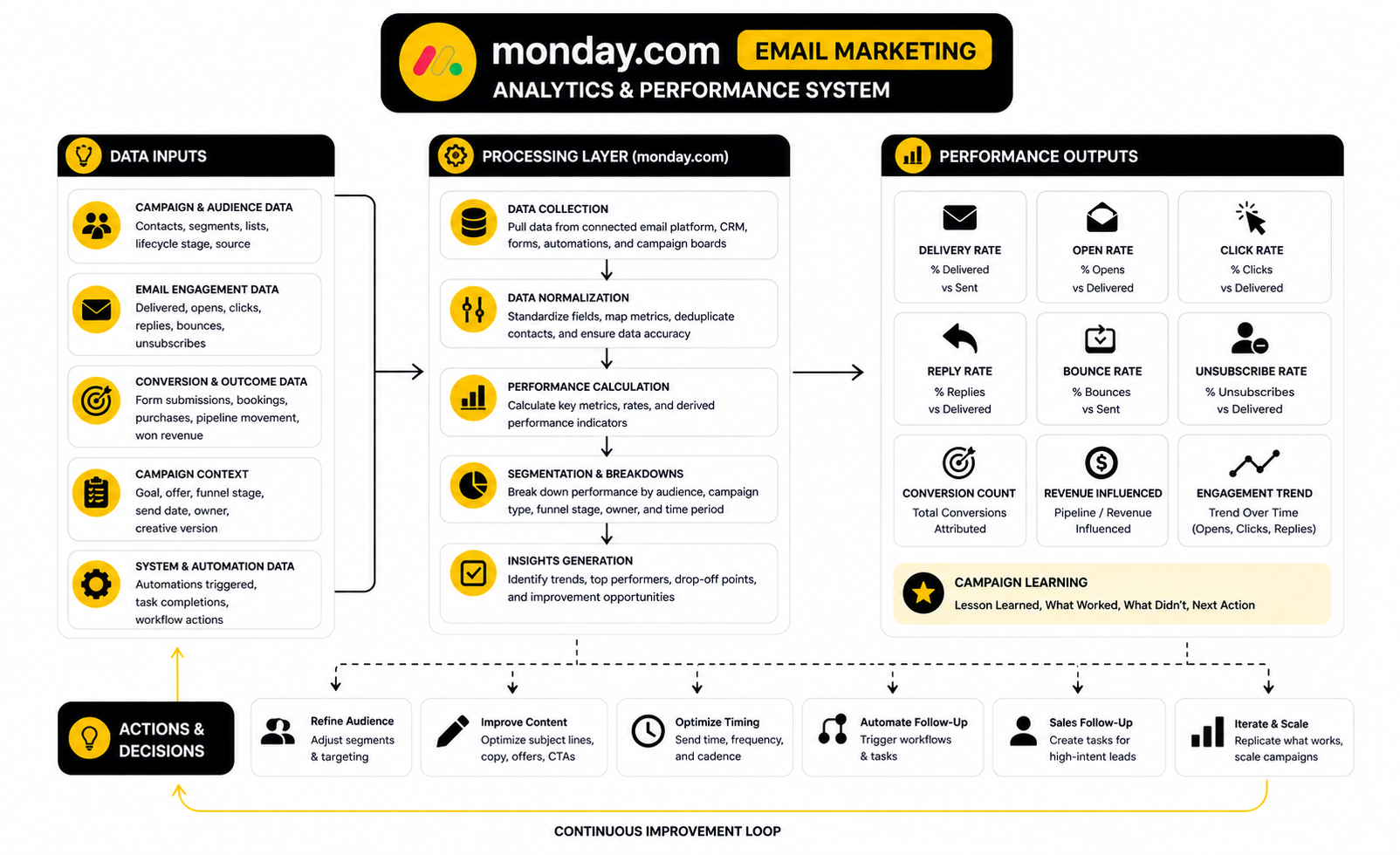
Reporting fields should help the team learn, not just decorate the board. Useful fields include campaign goal, sent date, audience size, open rate, click rate, reply rate, conversion action, revenue influence, unsubscribes, and next-step notes. You do not need every metric in monday.com, but you do need enough to compare campaigns and make better decisions.
Email reporting also needs context. A low open rate may be a subject line issue, but it may also be a list quality issue. A high click rate may look good, but it matters less if nobody books, buys, replies, or moves forward.
This is why monday.com should connect performance back to the original campaign objective. If the campaign was meant to reactivate old leads, the review should focus on reactivation. If the campaign was meant to support sales conversations, the review should include sales follow-up and pipeline movement. Vanity metrics are not the finish line.
Integrations With The Rest Of The Stack
Your integration strategy should depend on how your business captures leads, nurtures them, and converts them. If monday.com is already your CRM, then email marketing should connect to the boards and pipelines your team uses every day. If another tool handles CRM or funnel pages, monday.com can still manage production, approvals, and campaign operations.
For funnel-heavy businesses, tools like ClickFunnels or Systeme.io may sit closer to the opt-in and offer journey. For agencies and service businesses that need CRM, pipelines, automations, and client communication in one place, GoHighLevel can make sense around the broader revenue system. Monday.com can still be valuable in either setup if it gives the team a reliable campaign workflow and a clean view of responsibilities.
The point is not to collect tools. The point is to define the role of each tool before the stack becomes expensive and confusing. Monday.com works best when it is the coordination layer that keeps campaign work, CRM context, ownership, and follow-up visible.
Building Campaign Workflows Inside Monday.com
Once the core components are in place, the next step is turning them into a repeatable campaign workflow. This is where monday.com email marketing becomes practical. You are no longer just storing campaign ideas in a board; you are creating a process that moves a campaign from strategy to launch to review without relying on memory.
The workflow should be simple enough for the team to use every week. If it needs a long explanation every time someone opens the board, it is too complicated. The best setup makes the next action obvious, shows who owns it, and gives managers enough visibility to unblock work before deadlines slip.
Monday.com’s own campaign material focuses heavily on connecting campaign creation, CRM data, automation, and performance visibility. That is the right direction, but the real win comes from how you translate those features into daily execution. A clean process beats a clever setup that nobody actually follows.
Step 1: Start With The Campaign Brief
Every campaign should begin with a brief, not a blank email draft. The brief explains the audience, goal, offer, message angle, deadline, owner, sending tool, landing page, and success metric. This keeps the campaign grounded before anyone starts writing subject lines or building automations.
A useful brief should answer one basic question: what should happen because this email exists? If the answer is vague, the campaign will usually become vague too. “Promote the offer” is not enough; “drive booked demos from warm leads who engaged with the webinar” is much stronger because it defines audience, intent, and action.
Inside monday.com, this brief can live as an item update, a connected doc, or a dedicated board field structure. Keep it practical. The goal is not to create corporate theater; the goal is to stop the team from building campaigns around half-formed ideas.
Step 2: Define The Audience Before The Message
Audience selection should happen before copywriting. The audience determines the promise, the level of context, the call to action, and the follow-up path. A cold lead, an active opportunity, a trial user, and a past customer should not receive the same email just because they all exist in the database.
This is where your CRM fields and saved views become useful. You can filter contacts by lifecycle stage, source, deal status, customer type, activity level, or campaign tag. When the audience is clear, the copy becomes easier because the message can speak to a real situation instead of a generic list.
Do not skip consent and suppression checks. Even if your email platform handles unsubscribe logic, your monday.com workflow should still make list hygiene visible before launch. Inbox trust is hard to build and easy to damage, so this step deserves more respect than most teams give it.
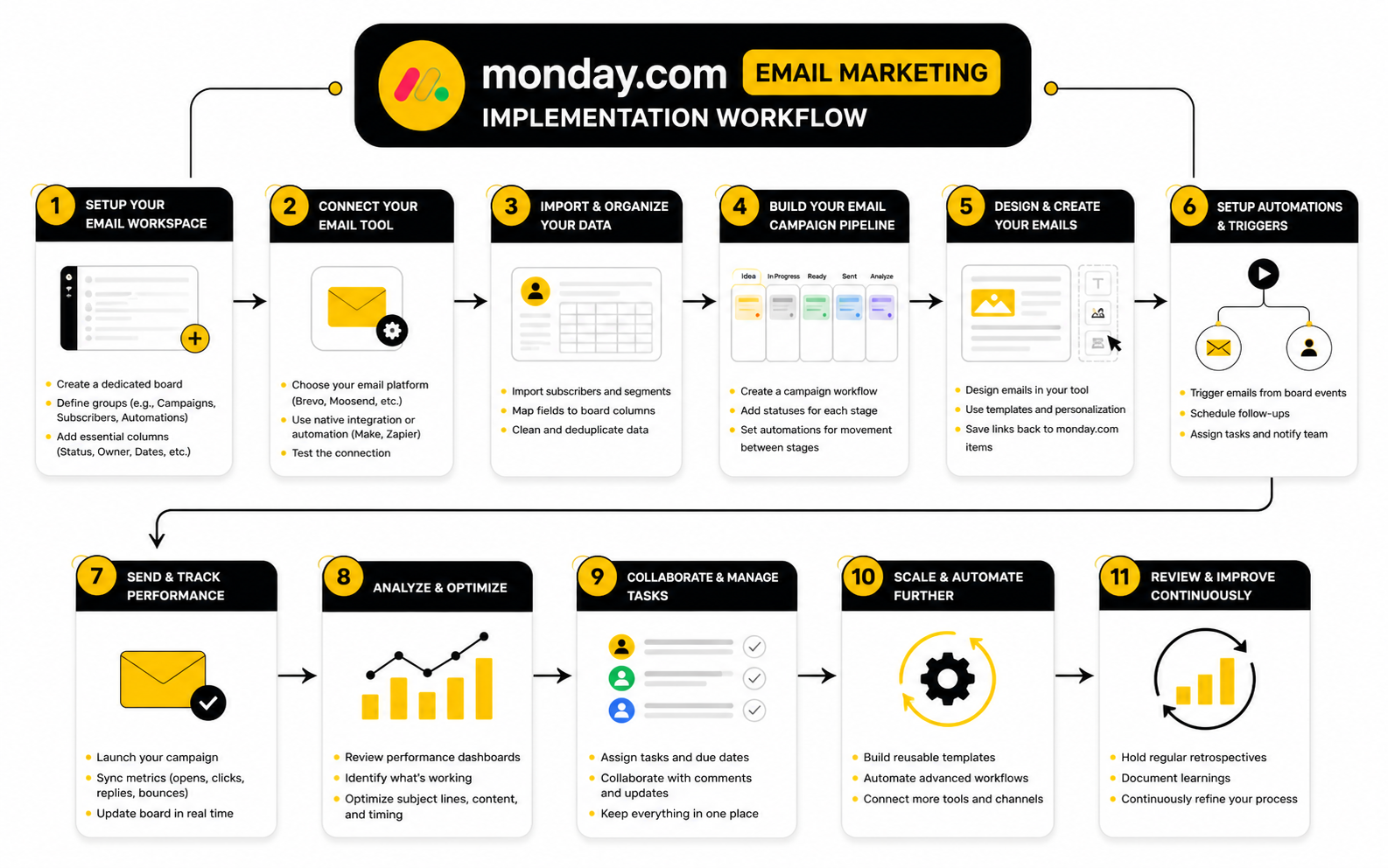
Step 3: Build The Production Timeline
Once the brief and audience are clear, the campaign needs a production timeline. This timeline should include copy, design, landing page checks, list review, technical setup, internal approval, scheduling, launch, and post-send review. Each step needs an owner and a deadline.
The timeline should be based on the real complexity of the campaign. A simple newsletter may only need a short approval path. A revenue campaign with segmentation, personalization, landing pages, sales follow-up, and reporting needs more space because more things can break.
Monday.com works well here because timeline, Kanban, calendar, and workload views can show the same campaign from different angles. A marketer may care about the content stage, a manager may care about launch risk, and an operations person may care about dependencies. One workflow can support all three without forcing everyone into the same view.
Step 4: Create The Email Assets
Email assets usually include the subject line, preview text, body copy, CTA, design, links, tracking parameters, landing page, and fallback copy for follow-up. These should not live only in someone’s private doc or inbox. The campaign board should make it easy to find the latest approved version.
This is also where the team should decide whether the email is being written and sent inside monday.com campaigns, built in a dedicated email platform, or coordinated through another marketing tool. If your sending needs are basic and closely tied to CRM activity, monday.com may be enough. If you need advanced segmentation, deliverability tooling, ecommerce triggers, or complex lifecycle automation, a tool like Brevo or Moosend may be the better sending layer.
Keep the asset process focused. Too many review loops make campaigns slow, but no review process creates brand risk. The sweet spot is a clear owner, one meaningful review, one final approval, and a visible scheduled status.
Step 5: Connect The Follow-Up Workflow
This is the part many teams miss. A campaign does not end when the email is sent. If a prospect clicks, replies, books, downloads, purchases, or shows intent, the next action should be clear.
For sales-led businesses, that may mean creating a follow-up task for the contact owner. For customer success teams, it may mean flagging accounts that engaged with an onboarding or renewal email. For agencies, it may mean notifying the client team that a campaign went live and reporting will be ready after a defined window.
This is why monday.com can be powerful around email marketing even when another platform sends the emails. It helps turn engagement into work. And work is where revenue usually happens.
Step 6: Launch With A Final Checklist
Before launch, use a final checklist that covers the practical things that break campaigns. Check the audience, suppression list, sender name, reply-to address, subject line, preview text, personalization fields, links, landing page, mobile display, tracking, unsubscribe handling, and scheduled time. This is not exciting, but it is important.
A checklist protects the team from avoidable mistakes. The more people involved in the campaign, the more valuable the checklist becomes. Nobody wants to discover after launch that a CTA points to the wrong page or a personalization field failed because a column was incomplete.
Inside monday.com, the checklist can be a subitem template, a duplicated item group, or a standard launch status with required owners. Do not over-engineer it. Make it easy to complete, easy to audit, and hard to ignore.
Step 7: Review Results And Capture Learning
The post-send review should happen after the campaign has had enough time to collect useful data. For a newsletter, that may be a few days. For a sales or revenue campaign, it may require enough time for replies, meetings, pipeline movement, or purchases to appear.
The review should compare the result to the original goal. If the goal was clicks, evaluate clicks. If the goal was demo bookings, evaluate demo bookings. If the goal was reactivation, evaluate reactivated contacts instead of pretending open rate tells the whole story.
This is where reporting fields from Part 2 become useful. Capture what happened, what likely caused it, what the next test should be, and whether the campaign should be repeated, improved, or retired. A team that documents learning gets more carefully over time; a team that only ships and forgets keeps paying for the same mistakes.
A Practical Workflow Template
A simple monday.com email marketing workflow can follow this structure. Use it as a starting point, then adjust it based on your team size, approval needs, and campaign complexity. The process should feel clear, not heavy.
This workflow gives you the backbone. It does not force every campaign into the same level of complexity, but it does make sure the important steps are not skipped. That is exactly what a good operating system should do.
When To Keep The Process Lightweight
Not every campaign needs a full production machine. A short customer update, internal announcement, or simple monthly newsletter may only need a brief, copy review, scheduling check, and post-send note. The danger is treating small campaigns like enterprise launches.
The opposite danger is worse, though. Some teams treat serious revenue campaigns like casual updates, then wonder why the results are inconsistent. When the campaign affects pipeline, customer revenue, or brand trust, the process should be more disciplined.
Use campaign risk to decide how much workflow you need. Low-risk emails can move quickly. High-impact campaigns need clearer ownership, better review, and stronger follow-up. That balance keeps the system practical instead of bureaucratic.
When To Add More Automation
Add automation when the same handoff happens repeatedly and the rule is clear. If every campaign needs manager approval after copy is marked ready, automate that notification. If every sent campaign needs a review task three days later, automate that too.
Avoid automating messy decisions too early. If the team does not agree on when a lead should be assigned, what counts as high intent, or who owns follow-up, automation will only make the confusion move faster. Fix the rule before you automate the rule.
For businesses that want deeper lifecycle messaging, monday.com can sit beside a more specialized automation platform. A funnel business may connect opt-ins from ClickFunnels or Systeme.io into campaign workflows. A service business may use GoHighLevel for CRM-heavy automation while monday.com keeps campaign production and team accountability visible.
Statistics And Data That Actually Matter
Measurement is where monday.com email marketing either becomes a revenue system or stays a nice-looking task board. The difference is not how many numbers you collect. The difference is whether the numbers help you make a better decision before the next campaign goes out.
Most teams track email metrics too shallowly. They look at open rate, feel good or bad for five minutes, then move on. That is not analysis. Real measurement connects campaign performance to the original goal, the audience quality, the offer, the follow-up process, and the revenue outcome.
Email still deserves serious attention because the channel can perform extremely well when the system is built properly. Litmus reported that many marketing leaders see returns between $10 and $36 for every $1 spent on email marketing, while Shopify’s email marketing data also references an average return of $36 for every $1 spent. Those numbers are not a guarantee. They are a reminder that email is worth measuring properly because small improvements can compound fast.
Start With The Campaign Goal
Every campaign should have one primary goal before it has a metric dashboard. If the campaign is built to generate demo bookings, then demo bookings matter more than opens. If the campaign is built to reactivate old leads, then reactivated conversations matter more than clicks.
This is where monday.com helps because the goal can live directly on the campaign item. The team can see the audience, owner, offer, launch date, and success metric in the same place. That prevents the common mistake of judging every email by the same generic benchmarks.
A campaign goal should be specific enough to guide action. “Increase engagement” is weak because it does not tell the team what to fix. “Get dormant trial users to book an onboarding call” is better because it tells you what audience, message, CTA, and follow-up path need to be measured.
Open Rate Is A Signal, Not The Truth
Open rate can still be useful, but it should not be treated as the final truth. Privacy changes, inbox behavior, image loading, and automated systems can make open data less precise than it looks. A rising open rate may suggest that your subject line, sender name, audience trust, or timing improved, but it does not prove that the campaign created business value.
MailerLite’s 2025 benchmark data reported an average email open rate of 43.46%, while the DMA’s 2025 benchmarking report placed open rates at 35.9%. The gap itself is the lesson. Benchmarks vary by source, audience, geography, industry, methodology, and list quality.
Use open rate to diagnose the top of the campaign, not the whole campaign. If open rate is low, test sender trust, subject clarity, audience relevance, and send timing. If open rate is high but clicks are weak, the problem is probably not the subject line; it is likely the message, offer, or call to action.
Click Rate Shows Intent More Clearly
Click rate is usually a stronger signal than open rate because it shows that someone took action inside the email. It does not prove conversion, but it tells you the message created enough interest for the reader to move. That makes it a useful bridge between attention and outcome.
MailerLite reported an average email click rate of 2.09% in 2025, while the DMA reported unique click rates of 2.3%. Those numbers give you a rough reference point, but they should not become your ceiling. A highly targeted campaign to a warm segment can outperform a broad newsletter because the audience has stronger context.
In monday.com, click performance should be connected to campaign notes and follow-up tasks. If a contact clicks a pricing page, booking page, proposal, or renewal offer, that action may deserve a sales or customer success follow-up. This is where performance data becomes operational instead of decorative.
Conversion Rate Tells You Whether The Campaign Worked
Conversion rate is where the campaign faces reality. A conversion might be a purchase, form submission, booked call, reply, renewal action, content download, webinar registration, or pipeline movement. The right conversion depends on the campaign goal.
This matters because many campaigns look successful until you inspect the next step. A campaign can get strong clicks but poor conversions if the landing page is weak, the offer is unclear, the form is too demanding, or the audience is curious but not ready. That does not mean the email failed completely, but it does mean the journey needs work.
Your monday.com board should capture the intended conversion before launch and the actual conversion after launch. That one habit keeps the review honest. It also helps your team separate message problems from landing page problems, offer problems, and follow-up problems.
Unsubscribes And Complaints Protect The List
Unsubscribes are not always bad. Some people should leave your list because they are no longer relevant, interested, or qualified. A healthy unsubscribe process can improve future engagement because your remaining audience is cleaner.
But sudden unsubscribe spikes are worth investigating. They may signal poor segmentation, too much frequency, irrelevant offers, weak expectations, or a campaign that reached the wrong audience. MailerLite’s 2025 benchmark data reported an average unsubscribe rate of 0.22%, which gives teams a basic reference point for spotting unusual movement.
Complaints matter even more because they affect sender reputation. If people mark your emails as spam, the issue is not only that one campaign performed poorly. The issue is that future campaigns may have a harder time reaching the inbox.
Revenue Attribution Needs A Practical Model
Revenue attribution does not need to be perfect to be useful. It needs to be consistent enough that the team can compare campaigns and make better investment decisions. For many businesses, that means tracking email-assisted pipeline, booked calls, purchases, renewals, or deal movement after campaign engagement.
Monday.com’s campaign product positioning emphasizes connecting campaigns directly to sales results and tracking leads from first touch to closed-won through real-time analytics. That is the direction most teams should move toward. The point is not to worship a dashboard; the point is to see whether campaign work is influencing real business outcomes.
Use simple attribution rules at first. For example, if a lead clicks a campaign and books within seven days, record that as campaign-influenced. If a customer receives a renewal campaign and renews in the same cycle, record that influence clearly. You can always get more sophisticated later, but do not wait for a perfect attribution model before tracking anything.
Benchmarks Are A Starting Point, Not A Strategy
Benchmarks help you understand whether your numbers are wildly out of range. They do not tell you what your audience wants, what your offer is worth, or how well your sales team follows up. That is why copying generic benchmarks without context leads to bad decisions.
A B2B campaign to 500 warm opportunities should not be judged the same way as a consumer newsletter to 50,000 subscribers. A reactivation email, product launch, renewal sequence, event reminder, and cold nurture campaign all behave differently. The numbers only make sense when you compare them against the right campaign type and audience.
Inside monday.com, create simple campaign categories so results can be compared fairly. Compare newsletters with newsletters, sales campaigns with sales campaigns, onboarding emails with onboarding emails, and win-back campaigns with win-back campaigns. This turns reporting into learning instead of noise.
The Measurement Fields To Track In Monday.com
Your reporting setup should stay focused. Too many fields make the board heavy, while too few fields make the review useless. The right balance depends on your team, but most campaign boards should track a small group of decision-making metrics.
Useful fields include:
These fields give the team enough context to understand what happened without turning monday.com into a bloated analytics warehouse. Your dedicated email platform can hold deeper engagement data. Monday.com should hold the performance signals that help the team decide what to do next.
How To Read A Campaign Review
A campaign review should answer four questions. Did we reach the right people? Did the message earn attention? Did the offer create action? Did the follow-up turn action into business value?
If the audience was wrong, fix segmentation before rewriting copy. If opens were weak, work on sender trust, subject clarity, and timing. If clicks were weak, improve the message, offer, CTA, and email structure. If clicks were strong but conversions were weak, inspect the landing page, form, pricing friction, sales process, or follow-up speed.
This is why the monday.com workflow matters. The review should not be a disconnected analytics meeting. It should create actual work: update the segment, improve the brief, test a new CTA, adjust the landing page, assign sales follow-up, or repeat the campaign with a stronger angle.
When To Use A Dedicated Analytics Or Automation Tool
Monday.com can help you organize and interpret performance, but it should not always be your deepest analytics layer. If your email program is simple, monday.com plus your email platform may be enough. If you are running multi-step funnels, lifecycle campaigns, paid traffic, webinars, sales pipelines, and retargeting, you need a more connected measurement setup.
A platform like GoHighLevel can make sense when CRM, automations, appointment booking, funnels, and client communication need to work together. A tool like ClickFunnels may fit when the conversion path is built around opt-in pages, offers, and funnel steps. For email-first sending and campaign delivery, tools like Brevo or Moosend can handle more of the delivery and subscriber analytics.
The cleanest setup is usually not one tool doing everything. It is a clear division of responsibilities. Monday.com should help the team plan campaigns, coordinate execution, assign follow-up, and capture learning. Your analytics and sending tools should provide the raw performance data that makes those decisions more carefully.
Professional Implementation And Scaling Decisions
At this stage, monday.com email marketing is no longer just a board setup. It is a business system with owners, rules, data, reporting, and consequences. That is good, but it also means the setup needs stronger decisions as the team grows.
The early version can be lightweight. A few campaign boards, saved audience views, simple automations, and review fields may be enough. But once you have multiple campaigns running at the same time, several people touching customer data, and revenue teams depending on follow-up, the system needs governance.
That word sounds boring, but it matters. Governance simply means the team agrees on how the system should work before chaos becomes normal. Without it, monday.com becomes another messy workspace full of duplicated boards, inconsistent fields, unclear owners, and campaign data nobody trusts.
Decide What Monday.com Should Own
The first scaling decision is ownership. Monday.com should own campaign coordination, CRM visibility, production status, team accountability, follow-up tasks, and campaign learning. It should not automatically own every subscriber rule, deliverability setting, suppression list, or complex lifecycle automation.
This distinction protects the workflow. If monday.com is the coordination layer, the team knows where to plan, assign, approve, and review campaign work. If a dedicated email platform is the sending layer, the team knows where subscriber consent, unsubscribe handling, deliverability, and deeper email performance live.
Monday.com now positions its campaigns product around connecting campaigns to CRM data and sales results, with campaign activity flowing into the customer timeline when contacts exist in monday CRM. That is useful because sales can see whether a contact received, opened, or clicked a campaign without leaving the CRM. But even then, the team should define the boundary clearly so the system stays understandable.
Protect Deliverability Before You Scale Volume
Scaling email volume without deliverability discipline is asking for trouble. Before a team sends more campaigns, it needs to confirm the basics: authenticated sending, clean lists, low complaint rates, clear unsubscribe paths, and relevant segmentation. These are not technical details you “deal with later.” They are the foundation.
Google’s sender guidelines require bulk senders to follow authentication practices and meet requirements for sending to personal Gmail accounts, while Yahoo’s sender guidance tells senders to authenticate mail and keep spam complaint rates below 0.3%. Those are operational rules, not marketing opinions. If your workflow makes it easy to send to the wrong audience, your deliverability can suffer even if the email looks polished.
Monday.com can help by making deliverability checks part of the launch workflow. Add checklist items for domain authentication status, audience source, suppression review, unsubscribe path, sender identity, and recent complaint issues. You do not need every technical detail in the campaign board, but you do need a visible gate before high-volume sends.
Treat Compliance As A Workflow, Not A Legal Afterthought
Compliance should be built into the process, not pasted onto the end. Commercial email rules vary by market, but the operational habit is the same: be clear, be honest, respect consent, and make opting out simple. The FTC’s CAN-SPAM guidance tells businesses not to use false or misleading header information, not to use deceptive subject lines, to identify ads when required, include a valid physical postal address, and give recipients a clear way to opt out.
That affects how you design monday.com workflows. A campaign item should make it clear who the audience is, why they are receiving the email, what suppression rules apply, and who approved the send. If nobody can answer those questions before launch, the campaign is not ready.
This is especially important when multiple teams use the same CRM. Sales may want to contact warm leads, marketing may want to nurture them, and customer success may want to send product updates. Without clear rules, contacts can receive too many messages from too many angles, and the brand starts to feel disorganized.
Avoid Board Sprawl
Board sprawl is one of the most common scaling problems in monday.com. A team starts with one clean campaign board, then every department creates its own version. Six months later, nobody knows which board is the source of truth.
The fix is not to ban new boards. The fix is to define board roles. You might use one master campaign calendar, one campaign production board, one CRM pipeline, and separate specialist boards only when the workflow truly requires them.
Use connected boards when information needs to travel between teams. Use mirrored fields when a campaign owner needs visibility without duplicating data. Use templates when the same campaign structure repeats. The goal is simple: fewer sources of truth, better information flow, and less manual copying.
Build A Permission Model Before Mistakes Happen
As more people work inside the system, permissions become more important. Not everyone should be able to change CRM fields, edit audience views, modify automations, or approve sends. Access should match responsibility.
This is not about slowing people down. It is about protecting the data and workflow that everyone relies on. A junior team member can own production tasks without being able to change lifecycle definitions or campaign reporting fields.
Create clear roles for campaign owners, reviewers, CRM admins, automation owners, and leadership viewers. Once those roles are clear, permissions become easier to manage. The system becomes safer without becoming restrictive.
Standardize Naming And Field Rules
Naming sounds small until reporting breaks. If one person tags a campaign as “Webinar,” another uses “webinar,” and another uses “Lead Gen Event,” the team eventually loses clean reporting. The same problem happens with audience names, campaign types, lifecycle stages, owners, and outcome fields.
Use dropdown fields wherever consistency matters. Free-text fields are useful for notes and learning, but they are weak for reporting. Campaign type, segment, funnel stage, status, and outcome should usually be standardized.
This also makes monday.com email marketing easier to teach to new team members. When the system uses consistent names, people understand it faster. When every board has its own logic, onboarding becomes a guessing game.
Know When Monday.com Is Not Enough
There is a point where monday.com alone is not the right email marketing engine. If you need advanced subscriber lifecycle journeys, ecommerce triggers, predictive segmentation, deliverability tooling, complex A/B testing, or deep revenue attribution, you will probably need a dedicated email or automation platform alongside it. That is not a failure. That is a mature stack decision.
For simple campaigns tied closely to CRM activity, monday.com campaigns may be enough. For email-first marketing teams, Brevo or Moosend can handle more of the sending and subscriber-management work. For agencies, local businesses, and service teams that need pipelines, appointments, follow-up, and automation in one revenue system, GoHighLevel may be a better fit around the full customer journey.
The expert move is not choosing the tool with the longest feature list. The expert move is choosing the simplest stack that can reliably support your real workflow. If monday.com makes execution visible and another platform handles specialized sending, that can be a very strong setup.
Plan For Handoffs Between Marketing And Sales
Email marketing often fails at the handoff. Marketing generates interest, but sales does not know who engaged, what they clicked, or what follow-up should happen next. Then the campaign gets judged unfairly because the last mile was never managed.
This is where monday.com can create real leverage. Engagement can become a task, a CRM update, a pipeline movement, or a sales notification. The important thing is deciding what level of engagement deserves action.
Not every open deserves a follow-up. Not every click deserves a call. But a pricing click from an active opportunity, a reply from a dormant lead, or a renewal email engagement from a key account should not disappear into a report nobody reads.
Use AI Carefully
AI can help with campaign briefs, first-draft copy, subject line variations, segmentation ideas, summary notes, and post-campaign analysis. That can save time, especially when the workflow is clear and the human reviewer knows what good looks like. But AI should not become the strategist, compliance officer, and brand voice all at once.
The risk is not that AI writes a bad sentence. The bigger risk is that it makes weak assumptions sound confident. It may suggest an audience, promise, or claim that the business cannot support.
Use AI inside a controlled process. Feed it the campaign brief, audience context, offer details, tone guidance, and constraints. Then make a human owner responsible for accuracy, brand fit, compliance, and final approval.
Create A Scaling Checklist
Before scaling from occasional campaigns to a serious email operation, run a simple readiness check. This protects the team from growing a messy system faster than it can handle. It also shows where monday.com should be improved before volume increases.
Use this checklist before scaling:
If several of these are missing, do not scale volume yet. Fix the operating system first. More campaigns will not solve a weak process; they will expose it.
Keep The System Human
The best monday.com setup is not the most automated one. It is the one your team actually uses because it makes their work clearer. That means the system should reduce confusion, not create extra admin.
Ask users what slows them down. Watch where campaign items get stuck. Review which fields are ignored, which automations are helpful, and which reports actually drive decisions.
This is the practical reality: your workflow is never finished. As your audience, offer, team, and stack evolve, your monday.com email marketing setup should evolve too. Keep it clear, keep it accountable, and keep it tied to the business outcome.
Final Checks Before You Build The System
Before you commit to a full monday.com email marketing setup, check whether the system supports the way your business actually sells. A newsletter-driven business, a sales-led B2B company, a local service agency, and an ecommerce brand all need different workflows. The tool should follow the customer journey, not the other way around.
The final system should connect five things: audience data, campaign planning, email execution, performance tracking, and follow-up ownership. If one of those pieces is missing, the setup will feel useful at first but weak under pressure. A clean system makes it obvious who receives the campaign, why they receive it, what happens next, and how the team learns from the result.
This is also where you should decide whether monday.com is enough by itself or whether it should sit beside a dedicated email and automation platform. If the campaign work is mostly CRM-driven and operational, monday.com can carry a lot of the process. If you need deeper subscriber journeys, funnel logic, and advanced sending controls, pair it with a specialist platform and keep the roles clean.
What is monday.com email marketing?
Monday.com email marketing means using monday.com to plan, manage, automate, track, and coordinate email campaigns. It can involve monday CRM, monday campaigns, campaign boards, integrations, automations, and connected follow-up workflows. The strongest use case is not just sending emails; it is connecting email activity to CRM data, team execution, and revenue follow-up.
Can monday.com send marketing emails?
Monday.com can support email campaign workflows, and monday campaigns is designed to build and optimize email campaigns from the CRM. Monday CRM also has mass emailing for sales-style outreach, while integrations like Mailchimp inside monday.com can connect campaign activity and subscriber data. The right setup depends on whether you need basic CRM-based emails, campaign coordination, or a dedicated sending platform.
Is monday.com a replacement for Mailchimp?
Monday.com is not always a direct replacement for Mailchimp. If your main need is campaign planning, CRM visibility, approvals, and follow-up, monday.com can become the center of the workflow. If your main need is subscriber management, deliverability tools, templates, list growth, and advanced email analytics, you may still want a dedicated platform alongside monday.com.
When should I use monday.com with another email platform?
Use another email platform when your email program needs advanced segmentation, deliverability controls, lifecycle journeys, ecommerce triggers, or deeper subscriber analytics. In that setup, monday.com becomes the operating layer for planning, ownership, approvals, and reporting decisions. Tools like Brevo or Moosend can then handle more of the sending and subscriber-management work.
What should a monday.com email marketing board include?
A good board should include campaign name, audience, owner, goal, status, send date, offer, creative stage, approval status, sending platform, performance fields, and follow-up owner. It should also include fields that help the team understand what happened after launch. The board should be useful enough to guide work, but not so crowded that people stop maintaining it.
What metrics should I track in monday.com?
Track the metrics that drive decisions. Useful fields include audience size, open rate, click rate, conversion count, unsubscribe rate, booked calls, replies, revenue influenced, lesson learned, and next action. Your email platform can hold deeper analytics, but monday.com should hold the performance signals your team actually reviews and acts on.
Is open rate still useful?
Open rate is useful as a directional signal, but it should not be treated as the final truth. Privacy changes and inbox behavior can make open data less precise than it looks. Use it to diagnose subject lines, sender trust, and timing, then look at clicks, conversions, replies, and revenue activity to judge real performance.
How do I connect email marketing to sales follow-up in monday.com?
Start by defining which engagement signals deserve action. A simple open may not matter, but a click on a pricing page, a reply, a booked call, or a renewal-related action can trigger a task for the contact owner. Monday.com is useful here because engagement can become visible work instead of staying trapped inside an email report.
What is the biggest mistake teams make with monday.com email marketing?
The biggest mistake is treating monday.com like a prettier spreadsheet instead of a workflow system. A board with campaign names and dates is helpful, but it is not enough. The real value comes when campaign briefs, audience data, approvals, automations, launch checks, performance reviews, and follow-up ownership all work together.
How should agencies use monday.com for email marketing?
Agencies can use monday.com to manage campaign calendars, client approvals, asset production, reporting notes, and team workload. It is especially useful when several people touch the same campaign and the client needs visibility without getting buried in internal details. For agencies that also need CRM, funnels, appointments, and automation, GoHighLevel can sit beside monday.com as the broader client revenue system.
Can monday.com help with email compliance?
Monday.com can help operationalize compliance, but it does not replace legal judgment or proper sending infrastructure. You can build checklist steps for consent, suppression review, sender identity, unsubscribe path, audience source, and approval history. That makes compliance part of the workflow instead of something people remember at the last minute.
How do I prevent monday.com from becoming too complicated?
Keep one clear source of truth for campaigns, standardize fields, use templates for repeatable workflows, and avoid automating unclear rules. Every field should earn its place. Every automation should reduce confusion, not hide responsibility.
What is the best starting point for a small team?
Start with one campaign board, one simple brief template, a few audience views, a basic approval flow, and a post-send review field. Do not build a huge system before your team has proven the workflow. Start small, use it consistently, then expand only where the process clearly needs more structure.
What tools pair well with monday.com for email marketing?
The best tool depends on the job. For email sending and subscriber management, Brevo and Moosend are practical options. For funnels, ClickFunnels or Systeme.io may fit better. For sales-led automation, pipelines, appointments, and agency workflows, GoHighLevel can be the stronger surrounding system.
Is monday.com email marketing worth it?
It is worth it when your email performance depends on coordination, CRM context, approvals, campaign visibility, and follow-up. It is less useful if you only need a simple newsletter tool with no connection to sales or operations. The best answer is practical: use monday.com when the campaign work around the email matters as much as the email itself.
Build a stronger local presence with BAAM AI
Turn your website, Google profile, social channels, and AI visibility into one growth engine
Most businesses do not need more random marketing activity. They need a consistent presence system that helps the right people find them, trust them, and take action. BAAM AI brings strategy, local SEO, website updates, Google Maps visibility, social content, AI-search readiness, media production, and reporting into one practical monthly engine.
If you want your marketing to keep working after the campaign ends, start with a free BAAM AI presence audit. See how your business shows up today and where the fastest visibility wins are at BAAM AI.