
BAAM AI Blog
Measuring Newsletter Performance In HubSpot
Measurement is where the newsletter becomes a serious business asset. Without it, you are guessing which topics matter, which segments are engaged, and which calls to action actually create momentum. With it, your...
Affiliate disclosure: this article may include compensated links. Recommendations should still be evaluated against your use case, budget, and current provider terms.
Should you choose HubSpot?
HubSpot is worth considering when the use case, budget, and implementation effort match what you actually need to do next.
teams that want a practical tool decision without reading another generic feature list
Check HubSpotMeasurement is where the newsletter becomes a serious business asset. Without it, you are guessing which topics matter, which segments are engaged, and which calls to action actually create momentum. With it, your newsletter HubSpot system becomes a feedback loop that improves every issue.
The mistake is looking at one number and calling the send good or bad. Opens, clicks, unsubscribes, bounces, replies, conversions, and downstream CRM activity all tell different parts of the story. A healthy measurement system does not worship one metric; it reads the pattern.
This is especially important because email benchmarks can be useful and misleading at the same time. The DMA’s 2025 benchmarking report showed 98% delivery rates, 35.9% open rates, and 2.3% unique click rates, but those numbers are not universal targets for every audience. They are reference points, not excuses to ignore your own list behavior.
Statistics And Data That Actually Matter
The first number to watch is not the open rate. Open rate is useful for directional trends, but privacy changes and inbox behavior make it too soft to treat as the final answer. A higher open rate can mean a stronger subject line, a more loyal audience, a smaller and cleaner segment, or simply measurement noise.
Clicks are usually more useful because they show active intent. A subscriber who clicks a guide, pricing page, webinar link, product update, or reply prompt is doing something observable. That action gives HubSpot stronger data to use in lists, workflows, lead scoring, and sales context.
Unsubscribes and spam complaints are the guardrails. MailerLite’s 2026 benchmark summary reported an average 2025 unsubscribe rate of 0.22%, while ActiveCampaign frames rates below 0.5% as generally healthy. If your newsletter regularly moves above that range, do not just blame frequency; review expectations, audience quality, segmentation, and content relevance.
The HubSpot Newsletter Analytics Stack
A clean analytics stack starts with the email performance report, but it should not end there. HubSpot lets you review sent email performance, compare engagement across emails, and analyze trends across marketing emails through its marketing email performance tools. That gives you the surface-level view of how the newsletter performed after each send.
The next layer is contact-level behavior. When someone clicks repeatedly, ignores multiple sends, or engages with one topic category more than another, HubSpot can turn that behavior into segmentation. This is where the newsletter stops being a broadcast and starts becoming a signal engine.
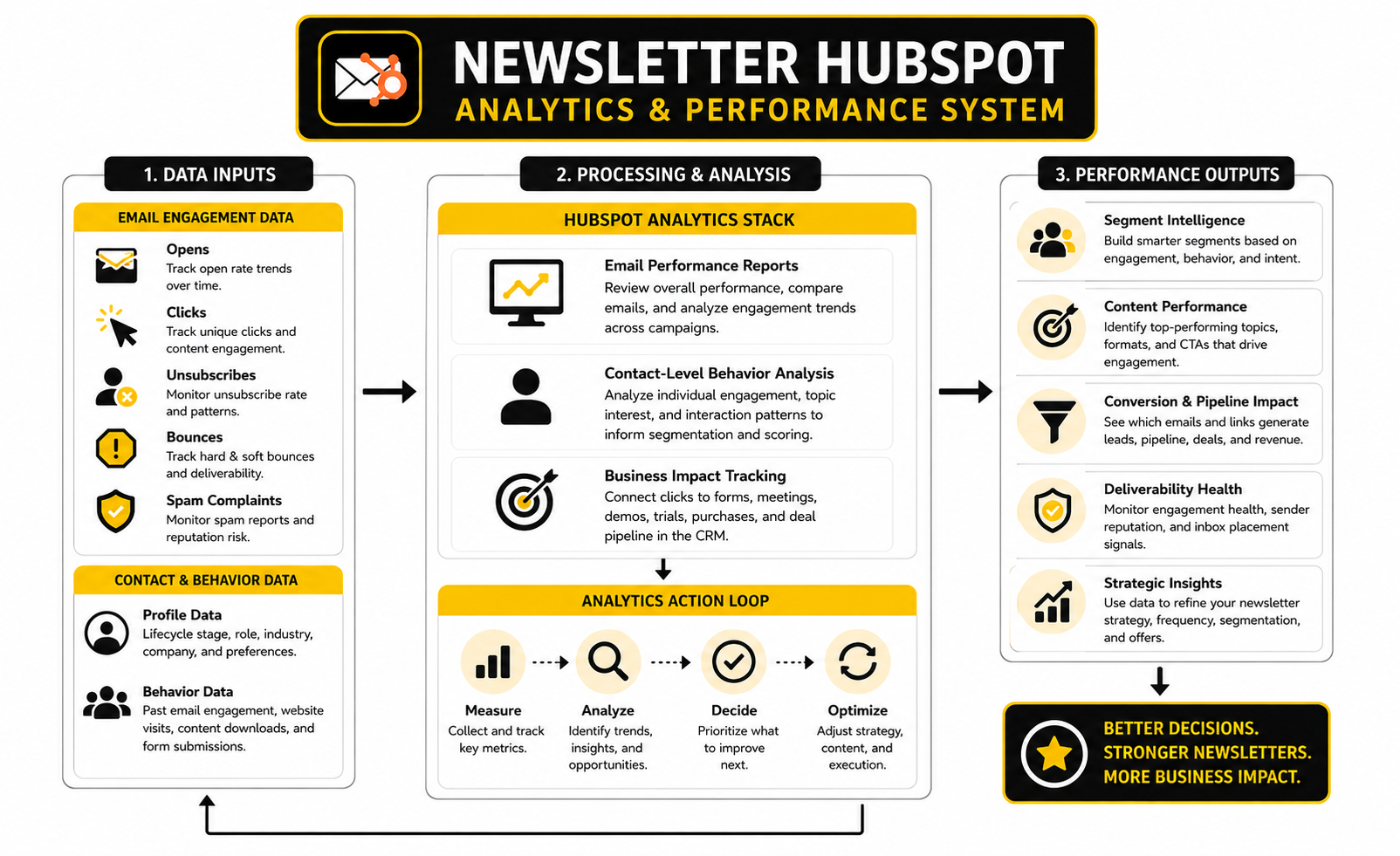
The final layer is business impact. Track which newsletter clicks lead to form submissions, meeting bookings, demo requests, trial starts, purchases, or sales conversations. If your newsletter gets clicks but never creates meaningful next steps, the content may be interesting without being commercially useful.
How To Read Open Rates Without Overreacting
Open rates are best used as a trend line. If your normal range is 34% to 38% and one issue drops to 21%, something probably changed. The subject line may have been weak, the sender name may have looked unfamiliar, the list may have been too broad, or deliverability may have taken a hit.
Do not optimize your entire newsletter around opens alone. That creates clickbait subject lines, vague curiosity hooks, and disappointed readers. You might win the open and lose the relationship, which is a bad trade.
A better approach is to compare open rate with click rate and unsubscribe rate. High opens with low clicks can mean the topic sounded interesting but the content or CTA did not deliver. Lower opens with stronger clicks can mean the issue reached a smaller but more motivated group, which may be exactly what you want.
How To Interpret Clicks And CTAs
Clicks tell you what people are willing to act on. In a newsletter HubSpot setup, that action should be mapped to intent. A click on a tactical blog post is different from a click on a pricing page, and a click on a customer story is different from a click on a product setup guide.
This is why every issue needs one primary CTA. Multiple links are fine, but the main action should be obvious. If you cannot tell which click matters most, your reporting will be messy before the email even goes out.
Use HubSpot lists or workflows to respond to the most meaningful clicks. Someone who clicks three product-related links over a month may deserve a different follow-up than someone who only clicks thought leadership. That does not mean hard-selling everyone who engages; it means reading intent with more respect.
What Deliverability Signals Are Telling You
Deliverability is not just a technical score. It is the result of list quality, authentication, sending behavior, content relevance, complaint rates, and recipient engagement. Validity’s 2025 benchmark research showed global inbox placement pressure, including Europe as the strongest region at 89.1% inbox placement, which is a useful reminder that “sent” and “seen” are not the same thing.
In HubSpot, watch hard bounces, soft bounces, unsubscribes, spam reports, and sudden engagement drops. One bad issue is not a disaster, but repeated negative signals are a warning. Inbox providers pay attention to how recipients react, so your reporting should treat poor engagement as a deliverability risk, not just a content problem.
The fix is usually not one magic tactic. Clean your list, remove dead weight, authenticate the domain, send to engaged segments first, and stop forcing broad sends when the audience signal is weak. Boring maintenance is often what protects the revenue channel.
Turning Newsletter Data Into Better Decisions
Good reporting should change what you do next. If product education links keep winning, build more practical product-led issues. If customer-only segments click advanced content but prospects ignore it, separate those streams instead of watering everything down.
Monthly review is enough for most teams. Look at list growth, engagement by segment, top clicked topics, unsubscribe patterns, conversion actions, and performance by send type. The goal is not to produce a pretty dashboard; the goal is to make the next editorial decision sharper.
This is where HubSpot’s CRM connection really pays off. You can compare newsletter behavior against lifecycle stage, deal creation, customer status, and sales activity. Once you see which content helps people move forward, the newsletter becomes easier to defend, improve, and scale.
Build a stronger local presence with BAAM AI
Turn your website, Google profile, social channels, and AI visibility into one growth engine
Most businesses do not need more random marketing activity. They need a consistent presence system that helps the right people find them, trust them, and take action. BAAM AI brings strategy, local SEO, website updates, Google Maps visibility, social content, AI-search readiness, media production, and reporting into one practical monthly engine.
If you want your marketing to keep working after the campaign ends, start with a free BAAM AI presence audit. See how your business shows up today and where the fastest visibility wins are at BAAM AI.