
BAAM AI Blog
Marketing Cloud Email: A Practical Guide to Smarter Customer Journeys
Marketing cloud email is not just “sending newsletters from a bigger platform.” It is the system behind segmented campaigns, lifecycle automation, customer data, deliverability, testing, reporting, and revenue...
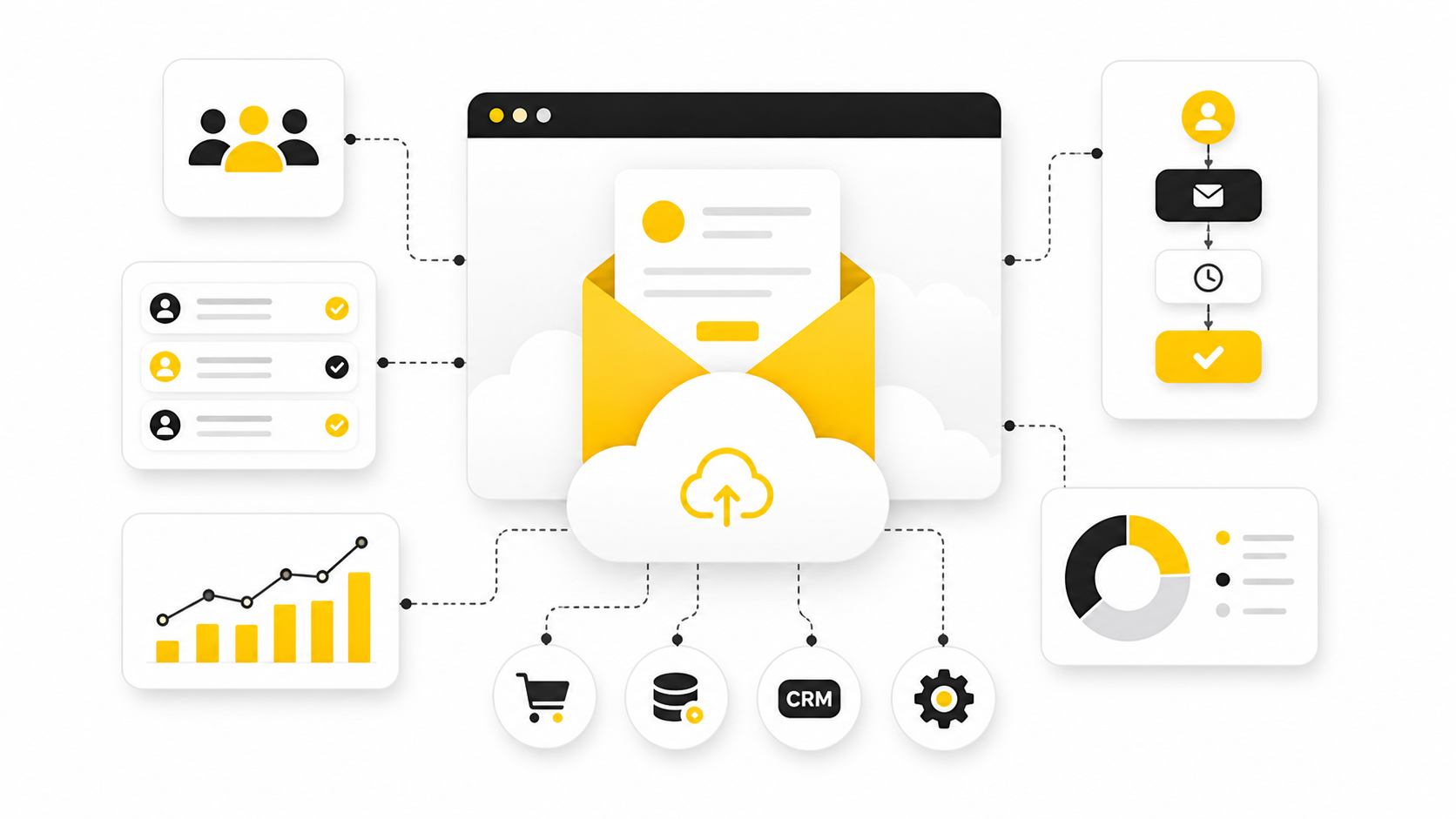
Marketing cloud email is not just “sending newsletters from a bigger platform.” It is the system behind segmented campaigns, lifecycle automation, customer data, deliverability, testing, reporting, and revenue attribution.
That matters because email still performs. Recent benchmarks show email can return roughly $36 for every $1 spent, while Salesforce’s latest marketing research highlights AI, unified data, and personalization as core priorities for modern teams.
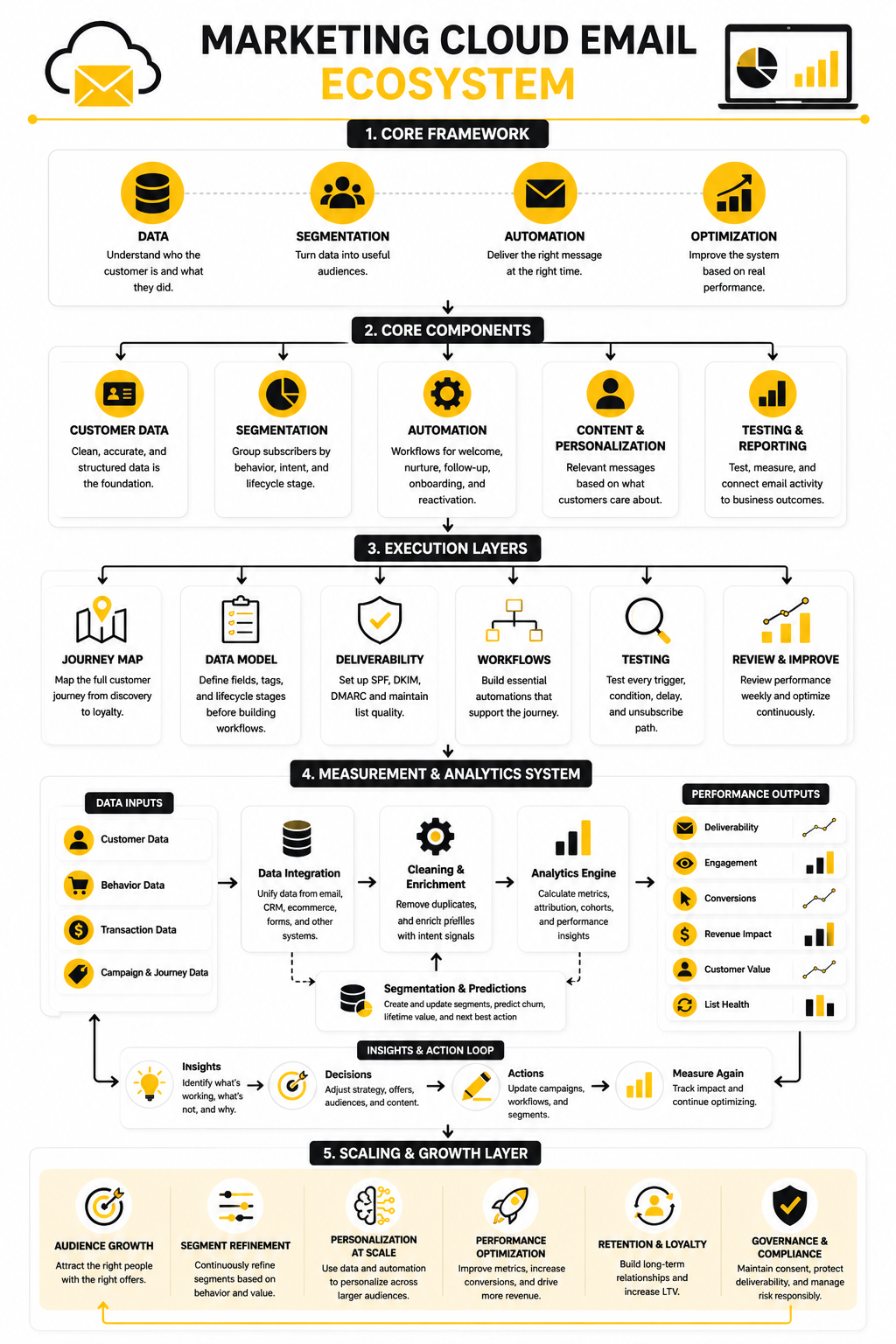
This guide will break the topic into six connected parts:
Why Marketing Cloud Email Matters
The big shift is simple: customers no longer respond well to generic blasts. They expect useful timing, relevant content, and a message that fits where they are in the buying journey. A marketing cloud email setup helps teams move from one-off campaigns to connected customer journeys.
That does not mean every business needs an enterprise platform from day one. A lean team may start with tools like Brevo, Moosend, or GoHighLevel before building more advanced orchestration. The point is not buying the biggest tool; the point is building a system that sends better emails because it understands the customer better.
The Marketing Cloud Email Framework
A strong marketing cloud email framework has four layers: data, segmentation, automation, and optimization. Data tells you who the customer is and what they did. Segmentation turns that data into useful audiences, automation delivers the right message at the right time, and optimization improves the system based on real performance.
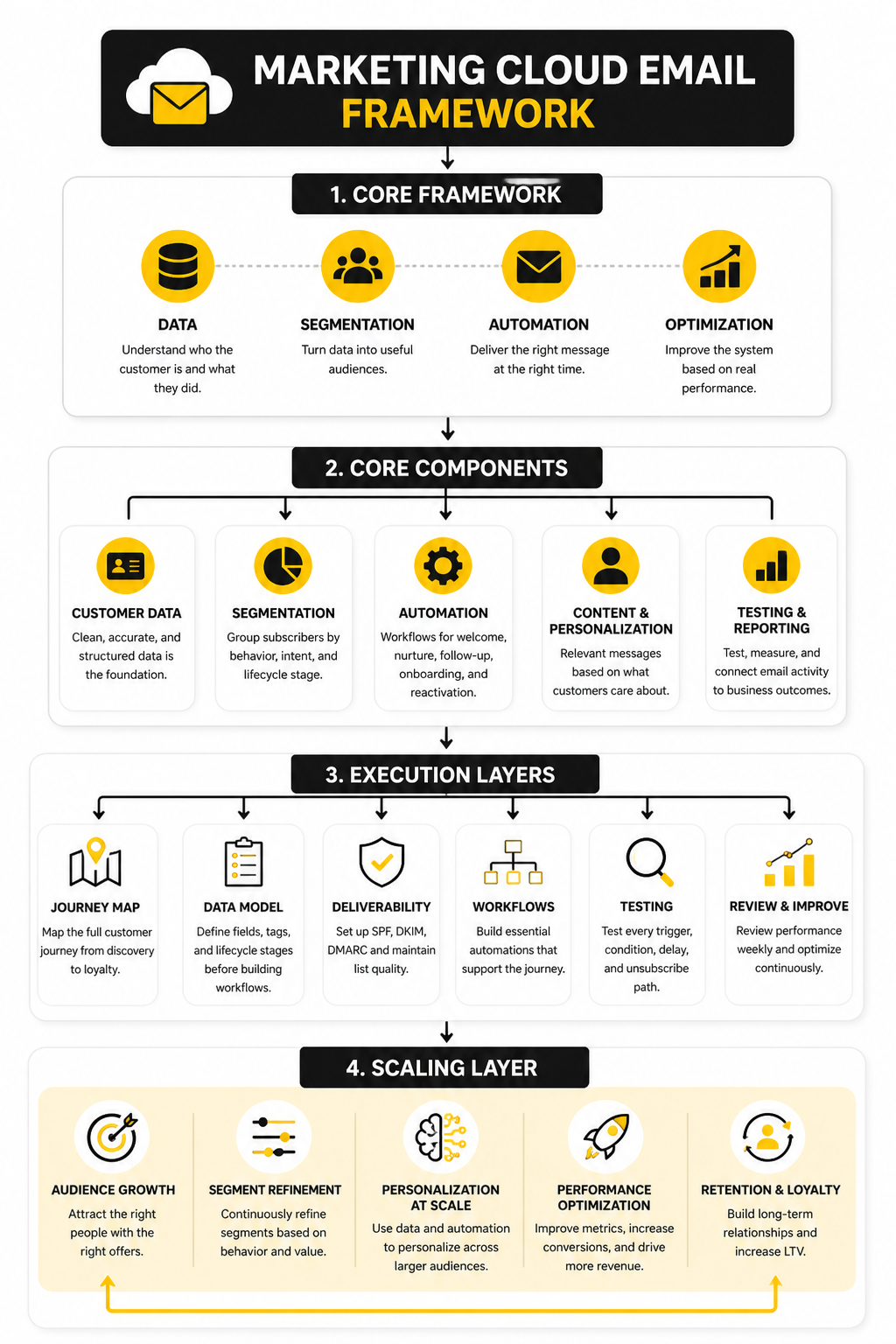
This framework keeps email from becoming random activity. Instead of asking, “What campaign should we send this week?” the better question becomes, “What does this customer need next?” That is where marketing cloud email becomes a growth system rather than another content calendar.
Core Components of a Strong Email System
A good marketing cloud email system starts with clean customer data. That means your contacts, tags, purchase history, form submissions, preferences, and engagement signals need to be organized before you automate anything. Bad data creates bad personalization, and bad personalization quietly kills trust.
The next layer is segmentation. You should not treat a first-time lead, repeat buyer, inactive subscriber, and high-value customer the same way. Each group needs a different message because each group has a different problem, level of trust, and next step.
Then comes automation. This is where tools like GoHighLevel, Brevo, and Moosend become useful. The goal is not to automate more emails; the goal is to automate better timing, better routing, and better follow-up.
Customer Data
Customer data is the foundation because every email decision depends on it. If your platform cannot see where someone came from, what they clicked, what they bought, or what they ignored, your messaging becomes guesswork. That is why a marketing cloud email strategy should begin with data hygiene before campaign creation.
Useful data is not always complicated. A source tag, lifecycle stage, product interest, lead score, and last engagement date can already improve your campaigns dramatically. The key is keeping the data simple enough to manage but detailed enough to guide decisions.
Segmentation
Segmentation turns raw data into meaningful groups. Instead of sending the same campaign to everyone, you can separate subscribers by behavior, intent, purchase stage, or relationship depth. This is where your emails start to feel relevant instead of random.
Strong segmentation also protects your deliverability. When people receive emails that match their interests, they are more likely to open, click, and stay subscribed. When they receive irrelevant campaigns, they ignore them, delete them, or mark them as spam.
Automation
Automation is the engine of marketing cloud email. It handles welcome sequences, abandoned cart follow-ups, lead nurturing, onboarding, reactivation, and post-purchase education. Done well, it makes the customer journey feel smoother without making the brand feel robotic.
The mistake is building automation before understanding the journey. A workflow should exist because a customer needs help moving from one step to the next. If the automation only exists because the software can do it, it will usually create noise instead of revenue.
Content and Personalization
Personalization is more than adding a first name to the subject line. Real personalization changes the message based on what the subscriber cares about, what they have done, and what they are likely to need next. That is where marketing cloud email becomes much more powerful than basic email broadcasting.
Content should still sound human. Even with AI and automation involved, the best emails are clear, useful, and easy to act on. The reader should feel like the message was written for their situation, not assembled from a generic template.
Testing and Reporting
Testing keeps the system honest. Subject lines, offers, send times, segments, layouts, and calls to action should be improved based on evidence, not opinions. Small improvements compound when they are applied across automated journeys and high-volume campaigns.
Reporting should connect email activity to business outcomes. Opens and clicks are useful signals, but they are not the final goal. A professional marketing cloud email setup should track leads, booked calls, purchases, retention, and revenue wherever possible.
Professional Implementation and Workflow Design
Implementation is where marketing cloud email gets real. It is easy to talk about personalization, automation, and customer journeys in strategy meetings. It is much harder to build a clean system that your team can actually run every week without breaking data, duplicating contacts, or sending the wrong message to the wrong person.
The process should start with the customer journey, not the software dashboard. Map how someone discovers you, joins your list, becomes qualified, buys, gets onboarded, and comes back again. Once that path is clear, the platform setup becomes much easier because every field, tag, segment, and automation has a job.
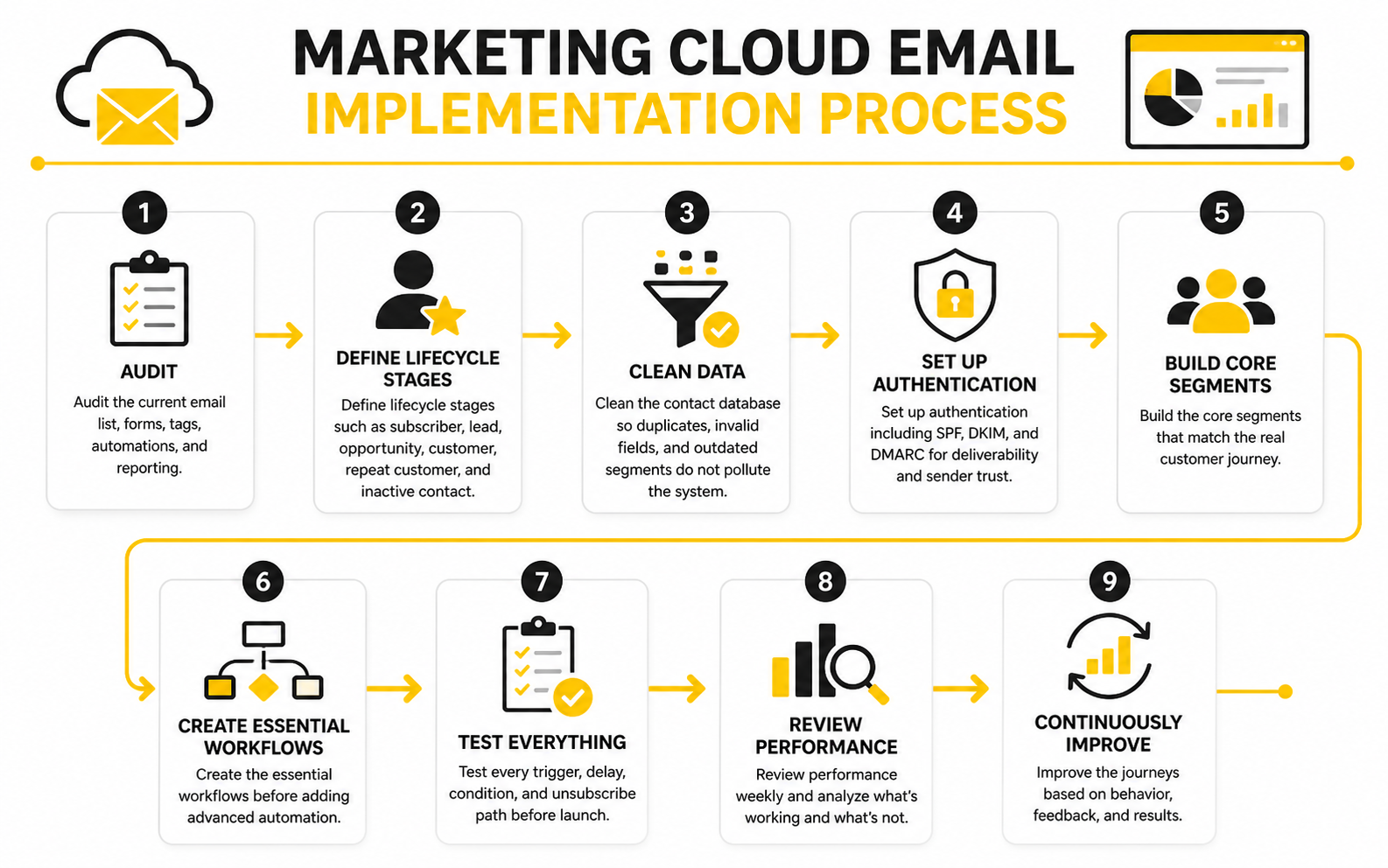
A practical implementation process usually looks like this:
Start With the Journey Map
A journey map makes the hidden parts of your funnel visible. You can see where people enter, where they hesitate, what they need to understand, and where the handoff to sales or checkout should happen. Without that map, your marketing cloud email setup becomes a collection of disconnected workflows.
This is especially important for businesses with multiple offers or long buying cycles. A new lead who downloaded a guide should not receive the same sequence as someone who requested a demo or abandoned a checkout page. The journey map keeps your messaging aligned with intent.
Build the Data Model Before the Campaigns
Your data model decides what the platform can understand. At minimum, you need clear fields for source, lifecycle stage, offer interest, consent status, purchase status, and recent engagement. These fields help the system decide who should receive a message, who should be excluded, and what should happen next.
This step is not glamorous, but it matters. If lifecycle stages are vague or tags are messy, automation becomes fragile. Clean data gives your team confidence that the right people are entering the right workflows for the right reasons.
Set Up Deliverability Foundations
Deliverability is not something you fix after everything else is finished. It belongs near the beginning of implementation because your campaigns cannot perform if inbox providers do not trust your domain. Gmail’s sender rules require SPF or DKIM for all senders, and bulk senders need SPF, DKIM, and DMARC, so authentication is now basic infrastructure rather than an optional technical detail.
Unsubscribes also need to be easy. Yahoo’s sender guidance focuses on authenticated mail, simple unsubscribe, and low complaint rates, which lines up with the direction the whole inbox ecosystem is moving. A professional marketing cloud email setup respects those rules because trust is part of performance.
Build the Essential Workflows First
Do not start with complex branching logic. Start with the workflows that protect revenue and improve the customer experience immediately. That usually means a welcome sequence, lead nurture sequence, abandoned checkout or booking follow-up, post-purchase onboarding, review request, and reactivation campaign.
For funnel-heavy businesses, tools like ClickFunnels, Systeme.io, and GoHighLevel can connect landing pages, forms, CRM activity, and email follow-up in one practical workflow. That connection matters because email rarely works alone. It performs best when the page, offer, CRM, and follow-up all support the same next step.
Test Before You Scale
Testing is not just proofreading. You need to test form submissions, contact updates, trigger rules, wait steps, suppression logic, unsubscribe links, mobile rendering, and conversion tracking. One broken condition can quietly send hundreds or thousands of contacts into the wrong path.
A simple test plan saves a lot of pain later. Create test contacts for each major customer type, run them through the workflows, and check what happens at every step. When the journey works in testing, then you can scale traffic with much more confidence.
Optimization, Measurement, and Scaling
A marketing cloud email system is only valuable if you can understand what is working. The mistake is treating reporting like a screenshot of campaign results. Real measurement should tell you what to keep, what to fix, what to stop, and what to scale.
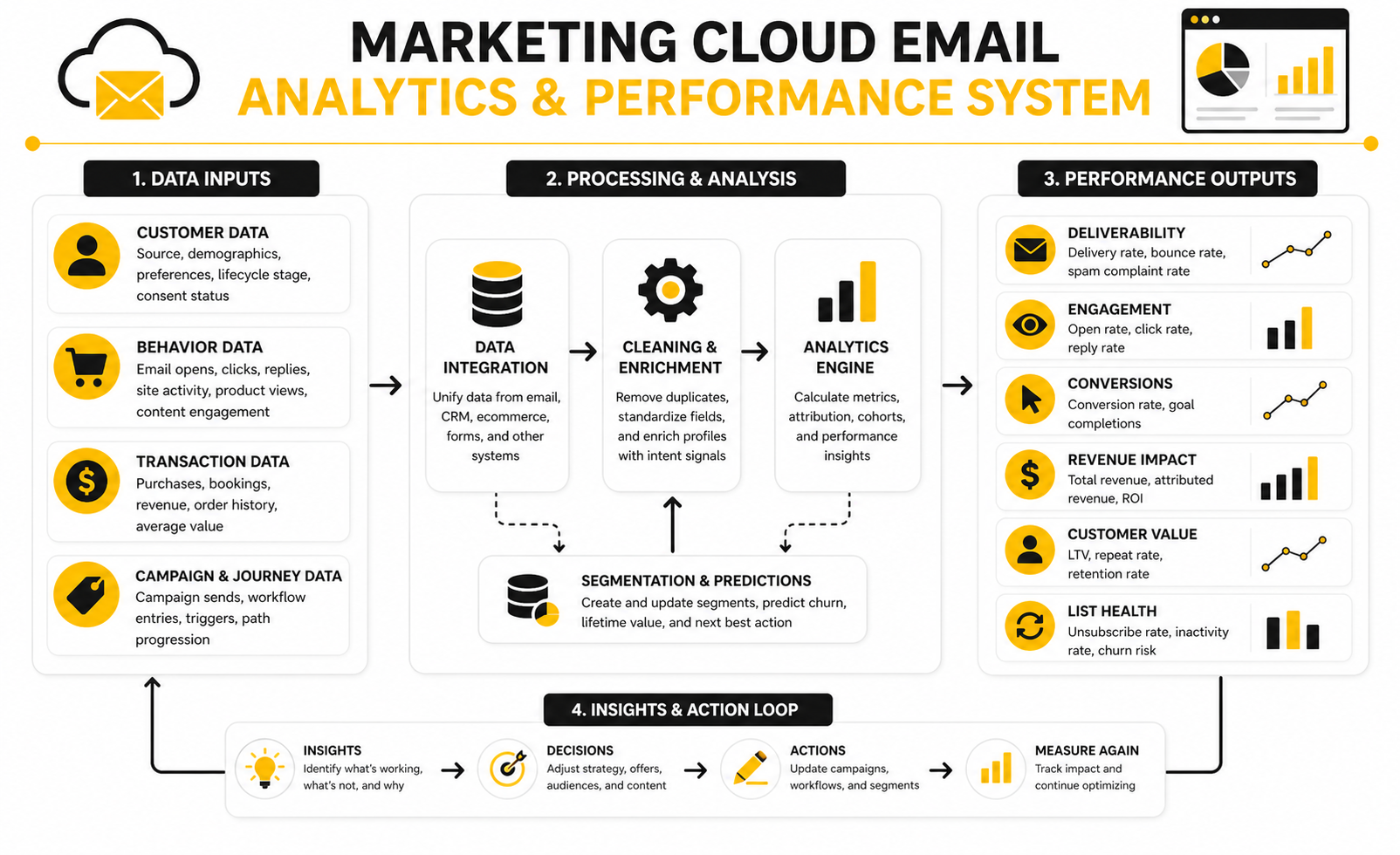
The most useful analytics view connects the full path: delivered emails, opens, clicks, conversions, revenue, retention, and unsubscribe behavior. Opens alone are too weak to guide serious decisions because privacy features and inbox changes can distort them. Clicks, replies, purchases, booked calls, and repeat engagement give you a much clearer picture of actual customer intent.
Statistics and Data
Email still earns attention because the economics are strong. A commonly cited benchmark puts email marketing at about $36 returned for every $1 spent, while Litmus’ 2025 email ROI research shows many teams reporting returns between $10 and $50 per dollar spent. That does not mean every campaign will print money, but it does explain why email remains central inside a marketing cloud strategy.
Benchmarks are useful, but only when you interpret them correctly. MailerLite’s 2025 benchmark data shows an average open rate of 43.46% and click rate of 2.09%, but your own numbers may look very different depending on industry, list quality, offer type, and send frequency. A small expert list with strong intent can outperform a huge list that was built through weak lead magnets.
Unsubscribes also need context. ActiveCampaign’s benchmark guidance treats unsubscribe rates below 0.5% as generally healthy, but a small spike after a reactivation campaign is not always bad. Sometimes unsubscribes clean the list, reduce future complaints, and help your best subscribers receive better-targeted messages.
The Metrics That Actually Matter
Start with deliverability because nothing else matters if emails do not reach the inbox. Watch bounce rate, spam complaints, authentication status, inbox placement, and engagement by segment. If these signals weaken, fix list quality and sending behavior before blaming the copy.
Then look at engagement. Opens can show directional interest, but clicks show stronger intent because the subscriber took action. Click-to-open rate can help you separate subject line performance from content performance, which is useful when diagnosing where a campaign is failing.
Finally, measure conversion. For ecommerce, that may mean revenue per recipient, abandoned cart recovery, repeat purchase rate, or average order value. For service businesses, it may mean booked calls, quote requests, demo requests, pipeline value, or closed deals.
How to Read Performance Signals
Low opens usually point to weak subject lines, poor sender reputation, bad timing, or the wrong audience. Before rewriting everything, check whether the problem appears across the whole list or only inside one segment. A broad drop suggests deliverability or sender trust, while a segment-specific drop suggests relevance.
Low clicks with decent opens usually mean the email did not create enough desire or clarity. The subscriber was interested enough to open, but the message did not make the next step feel useful. That is a copy, offer, layout, or audience-match problem.
Low conversions with strong clicks often means the issue is after the email. The landing page may be slow, the offer may be unclear, the form may ask for too much, or the sales handoff may be weak. This is why marketing cloud email measurement should connect email data with website, CRM, and revenue data.
What to Optimize First
Do not optimize everything at once. Start with the biggest bottleneck in the journey. If deliverability is weak, fix authentication, list hygiene, and engagement quality before testing subject lines.
If engagement is healthy but conversions are low, improve the offer and landing page. Tools like ClickFunnels, Systeme.io, and Replo can help when the email is doing its job but the page is not converting well enough. The email gets attention, but the page has to finish the job.
If revenue is strong but unsubscribes are rising, review frequency and segmentation. More email is not automatically better. The goal is to increase relevance, not just volume.
Scaling Without Damaging the List
Scaling marketing cloud email should feel controlled. Add volume gradually, protect engaged segments, and avoid blasting cold or inactive contacts just because the platform can handle it. A bigger send is only useful when it reaches the right people with the right reason to act.
As the system grows, reporting should become more specific. Track performance by lifecycle stage, traffic source, offer, customer type, and automation path. That is how you find the few journeys that create most of the revenue and the weak points that quietly drain results.
The best teams do not treat analytics as a monthly report nobody reads. They use it as a decision system. Every number should lead to a practical question: should we improve the audience, the message, the offer, the timing, the page, or the follow-up?
Advanced Considerations Before You Scale
Once the core system works, the next challenge is control. A growing marketing cloud email program can become messy fast if every campaign, workflow, and segment is added without a clear operating model. More automation does not always mean better marketing, and this is where experienced teams slow down before they speed up.
The real question is not whether your platform can support advanced journeys. Most modern platforms can. The better question is whether your team has the data discipline, content process, approval flow, and measurement structure to run those journeys without creating confusion.
Platform Depth vs. Operational Simplicity
Enterprise tools can be powerful, but complexity has a cost. A platform with deep segmentation, AI recommendations, multi-channel orchestration, and revenue reporting can still fail if the team does not have the time or skill to manage it properly. In that case, a simpler setup with cleaner execution will usually outperform a complicated system nobody fully owns.
This is why tool choice should follow operational reality. A small agency or service business may get more practical value from GoHighLevel because CRM, pipelines, forms, booking, and email can sit close together. A creator or lean digital business may prefer Systeme.io because the funnel and email workflow are easier to keep under control.
The tradeoff is depth versus speed. Bigger platforms may offer more advanced data modeling, governance, and integrations. Lighter platforms may help you launch faster, test faster, and avoid months of implementation drag.
AI Should Assist, Not Replace Strategy
AI can help with subject lines, draft variations, segmentation ideas, send-time suggestions, and campaign analysis. That is useful. But AI should not become the strategist if the underlying offer, audience, and customer journey are unclear.
The best use of AI in marketing cloud email is leverage. Use it to speed up research, generate creative angles, summarize performance, and identify patterns you might miss manually. Then make the final decision with human judgment because brand trust, timing, and commercial context still matter.
This matters even more as inboxes fill with automated messages. If your emails sound like every other AI-assisted campaign, you lose the advantage. The winning move is not “more AI content”; it is sharper insight, cleaner segmentation, and more useful communication.
Compliance and Consent Are Growth Issues
Compliance is not just a legal checkbox. It directly affects deliverability, reputation, and long-term list value. If subscribers did not clearly opt in, or if they cannot easily unsubscribe, your marketing cloud email system is building risk into the asset you are trying to grow.
Consent also shapes the quality of your audience. A smaller list of people who actually asked to hear from you is usually more valuable than a large list full of weak, unclear, or outdated permission. This is especially important when Gmail and Yahoo continue pushing senders toward authentication, lower complaint rates, and cleaner unsubscribe experiences.
Treat compliance as part of the customer experience. Make preferences clear, respect unsubscribes quickly, and avoid hiding behind technical loopholes. Trust compounds, but so does irritation.
Attribution Can Mislead You
Attribution is helpful, but it is not perfect. A subscriber may read three emails, click a retargeting ad, search your brand, and then buy through a direct visit. If your system only gives credit to the final click, email may look weaker than it really is.
The opposite can also happen. Email may get too much credit if it simply captures demand created by another channel. That is why mature teams look at multiple views: last-click revenue, assisted conversions, holdout tests, customer cohorts, and overall revenue movement.
Do not let attribution turn into false certainty. Use it to make better decisions, not to pretend you know every cause perfectly. The goal is practical confidence, not mathematical theater.
Governance Prevents Automation Chaos
As the system grows, someone needs to own rules. Who can create a segment? Who can launch a workflow? Who approves copy? Who checks suppression lists? Who reviews deliverability before major sends?
Without governance, marketing cloud email becomes risky. Teams accidentally overlap campaigns, customers receive conflicting messages, and old automations keep running long after the offer has changed. This is how good software turns into a bad customer experience.
A simple governance system is enough for most teams. Keep a campaign calendar, document naming conventions, review active automations monthly, and assign ownership for every major journey. Boring? Yes. Necessary? Absolutely.
When to Add More Channels
Email does not need to carry the whole customer journey alone. SMS, chat, social retargeting, sales calls, direct mail, and customer support messages can all support the same lifecycle. The danger is adding channels before the core message is clear.
A smart expansion starts with intent. Use email for education, trust-building, nurture, and structured follow-up. Use tools like ManyChat when conversational follow-up makes sense, and use booking tools like Cal.com when the conversion path depends on scheduling.
The principle stays the same across every channel. Do not add touchpoints just because you can. Add them when they reduce friction, improve timing, or help the customer take the next useful step.
Common Questions About Marketing Cloud Email
A complete marketing cloud email system is not one tool, one sequence, or one dashboard. It is the connected ecosystem of data, audience logic, automation, content, analytics, governance, and human decision-making. When those pieces work together, email becomes a serious growth channel instead of a random send button.
What is marketing cloud email?
Marketing cloud email is the email marketing layer inside a broader marketing automation or customer engagement platform. It usually combines contact data, segmentation, automation, personalization, testing, reporting, and sometimes CRM or ecommerce integrations. The goal is to send more relevant emails based on customer behavior instead of sending the same message to everyone.
How is marketing cloud email different from regular email marketing?
Regular email marketing often focuses on newsletters and basic campaigns. Marketing cloud email is more connected because it uses customer data, lifecycle stages, triggers, and multi-step journeys. That makes it better suited for businesses that need automated nurture, sales follow-up, onboarding, retention, and revenue tracking.
Do small businesses need marketing cloud email?
Small businesses do not always need an enterprise marketing cloud. They do need the thinking behind it: clean data, clear segments, useful automation, and measurable follow-up. A simpler tool can work well if it helps the business send timely, relevant emails without creating operational chaos.
What should be built first?
Start with the customer journey and the data model. Then build the essential workflows: welcome, nurture, abandoned checkout or booking follow-up, post-purchase onboarding, and reactivation. Advanced personalization should come later, once the basics are working reliably.
What data matters most?
The most useful data usually includes source, lifecycle stage, offer interest, consent status, purchase history, engagement level, and last meaningful action. You do not need hundreds of custom fields to start. You need enough clean data to decide what message someone should receive next.
How often should businesses send emails?
There is no universal sending frequency that works for every list. The right cadence depends on audience expectations, offer type, content quality, and engagement signals. If unsubscribes, complaints, and inactivity rise, the issue is often relevance rather than frequency alone.
Which metrics should be tracked first?
Start with deliverability, engagement, and conversion. That means bounce rate, complaint rate, opens, clicks, unsubscribe rate, booked calls, purchases, revenue, or whatever conversion matters most to the business. Do not obsess over one metric in isolation because the full journey tells the real story.
Is AI useful for marketing cloud email?
AI is useful when it supports strategy instead of replacing it. It can help draft variations, analyze patterns, summarize results, and suggest test ideas. But the human team still needs to define the audience, offer, positioning, approval rules, and customer experience.
What are the biggest risks?
The biggest risks are messy data, weak consent, poor deliverability, over-automation, unclear ownership, and campaigns that conflict with each other. These problems usually grow quietly. That is why governance, documentation, and regular workflow reviews matter.
When should a business upgrade its email platform?
Upgrade when the current system blocks growth, not just because another platform looks more advanced. Good reasons include poor integration with CRM or ecommerce data, limited automation logic, weak reporting, deliverability problems, or manual work that slows the team down. If the real issue is messy strategy, switching platforms will not fix it.
Can marketing cloud email replace sales follow-up?
No, and it should not try to. Email can educate, qualify, remind, nurture, and route people toward the next step. For higher-value offers, human sales follow-up still matters because prospects often need context, reassurance, and direct answers before they buy.
What makes a marketing cloud email system successful?
A successful system sends useful messages to the right people at the right time and proves its impact through data. It protects deliverability, respects consent, and improves based on real customer behavior. Most importantly, it supports the business model instead of becoming a complicated technical project with no clear commercial outcome.
Build a stronger local presence with BAAM AI
Turn your website, Google profile, social channels, and AI visibility into one growth engine
Most businesses do not need more random marketing activity. They need a consistent presence system that helps the right people find them, trust them, and take action. BAAM AI brings strategy, local SEO, website updates, Google Maps visibility, social content, AI-search readiness, media production, and reporting into one practical monthly engine.
If you want your marketing to keep working after the campaign ends, start with a free BAAM AI presence audit. See how your business shows up today and where the fastest visibility wins are at BAAM AI.