
BAAM AI Blog
MailWizz Email Marketing Application: A Practical Guide To Self-Hosted Email Marketing
The MailWizz email marketing application is built for marketers, agencies, SaaS owners, and technical teams that want more control over their email marketing infrastructure than a typical hosted platform gives them...
Affiliate disclosure: this article may include compensated links. Recommendations should still be evaluated against your use case, budget, and current provider terms.
Should you choose this tool?
this tool is worth considering when the use case, budget, and implementation effort match what you actually need to do next.
teams that want a practical tool decision without reading another generic feature list
Check this toolThe MailWizz email marketing application is built for marketers, agencies, SaaS owners, and technical teams that want more control over their email marketing infrastructure than a typical hosted platform gives them. Instead of renting access to a locked-down email service where pricing often grows with every subscriber or sending tier, MailWizz runs on your own hosting environment and connects to the delivery services you choose.
That control is the main reason people look at MailWizz in the first place. You can manage lists, campaigns, templates, delivery servers, bounce handling, customer accounts, tracking, and automation from one system, while still deciding how your sending setup should work behind the scenes. That makes it powerful, but it also means it is not a “click one button and forget it” tool.
This guide breaks down MailWizz as a real email marketing system, not just a software listing. We will look at where it fits, why self-hosted email marketing matters, how the framework works, what components you need to understand, and how to implement it professionally without turning your sending setup into a deliverability mess.
Why MailWizz Matters For Serious Email Marketing
MailWizz matters because email marketing is no longer just about writing a newsletter and pressing send. Modern email programs need segmentation, authentication, unsubscribe handling, bounce management, campaign tracking, compliance, and a delivery setup that does not collapse the moment volume increases. A self-hosted platform gives you more room to design that system around your business instead of forcing every workflow into a hosted provider’s default structure.
That does not mean MailWizz is automatically better than every hosted platform. A tool like Brevo or Moosend can be easier when you want hosting, sending infrastructure, dashboards, and support bundled together. MailWizz becomes more interesting when you want ownership, flexibility, and the ability to connect your own SMTP, API-based sending services, customer accounts, and list structures.
The important thing is to see MailWizz as infrastructure, not magic. If your list is weak, your offers are poor, or your sending domain has no reputation, MailWizz will not fix that by itself. But if you already understand the basics of permission-based email marketing and want a more customizable operating system for campaigns, it can become a strong foundation.
Framework Overview
A professional MailWizz setup usually has four layers. The first layer is the application itself, where users, lists, templates, campaigns, customers, and tracking live. The second layer is the sending infrastructure, which includes SMTP servers, email service APIs, domains, DNS records, bounce mailboxes, complaint handling, and delivery limits.
The third layer is the marketing workflow. This is where segmentation, opt-in forms, campaign planning, autoresponders, tagging logic, and reporting decisions happen. The fourth layer is governance, which covers permissions, compliance, list hygiene, suppression rules, monitoring, and how you prevent one bad campaign from damaging the entire sending environment.
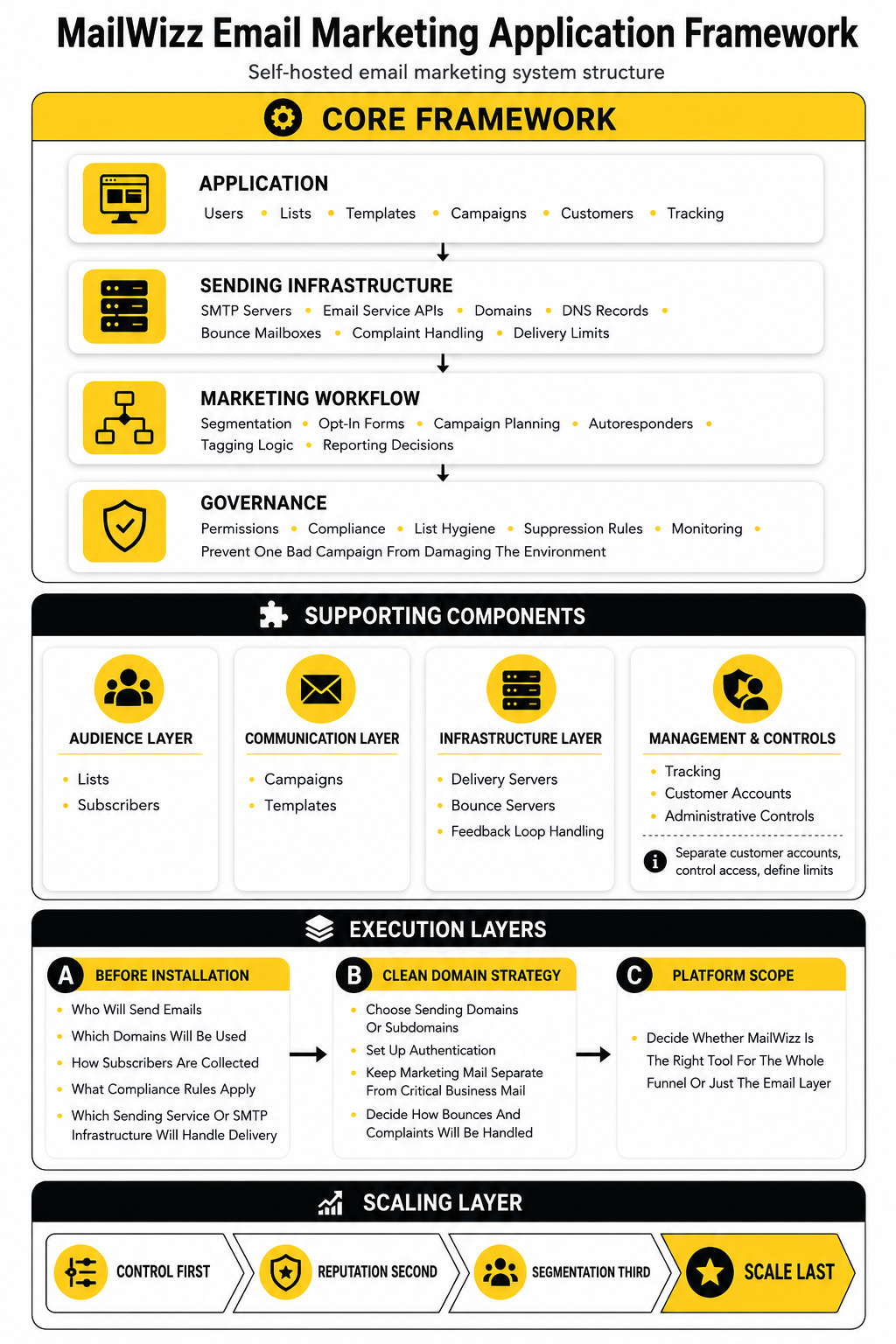
This framework matters because many beginners install MailWizz and immediately focus on volume. That is the wrong order. The better order is control first, reputation second, segmentation third, and scale last.
Core Components Of The MailWizz Email Marketing Application
The MailWizz email marketing application is built around lists, subscribers, campaigns, templates, delivery servers, bounce servers, feedback loop handling, tracking, customer accounts, and administrative controls. Each component has a clear job, and the system works best when those jobs are separated properly. When everything is configured loosely, MailWizz can quickly become messy because the platform gives you enough freedom to make both good and bad decisions.
Lists and subscribers are the audience layer. Campaigns and templates are the communication layer. Delivery servers, bounce servers, and feedback loop handling are the infrastructure layer that decides whether your emails are sent, monitored, and cleaned up responsibly.
For agencies and multi-brand operators, the customer management side is especially important. You can structure separate customer accounts, control access, and define limits so different users or brands do not all operate from one chaotic admin setup. That is also why some teams compare MailWizz with broader business platforms like GoHighLevel, although the two tools are not direct replacements for each other.
Professional Implementation Starts Before Installation
A good MailWizz implementation starts before the software is installed. You need to know who will send emails, which domains will be used, how subscribers are collected, what compliance rules apply, and which sending service or SMTP infrastructure will handle delivery. Skipping those decisions creates problems later because MailWizz can only organize the system you design.
The practical setup should begin with a clean domain strategy. That includes choosing sending domains or subdomains, setting up authentication, keeping marketing mail separate from critical business mail, and deciding how bounces and complaints will be handled. This is not the exciting part, but it is the part that protects everything else.
You should also decide whether MailWizz is the right tool for the whole funnel or just the email layer. For landing pages and funnel flows, some teams may pair email infrastructure with a dedicated builder like ClickFunnels or systeme.io. That kind of split can work well when MailWizz handles the email marketing engine and another tool handles page building, checkout flows, or front-end campaign assets.
Why MailWizz Matters For Serious Email Marketing
MailWizz matters because email marketing has become more technical, more regulated, and more expensive to run casually. A few years ago, many teams could get away with uploading a list, writing a broadcast, and watching basic open rates. Today, the same workflow needs proper authentication, consent, unsubscribe handling, reputation monitoring, segmentation, and a clear plan for how campaigns connect to revenue.
That is where the mailwizz email marketing application becomes interesting. It gives you a self-hosted control layer for email marketing instead of forcing your entire strategy into one hosted platform’s pricing model, sending rules, and interface limitations. That control is useful when you understand what you are doing, but dangerous when you treat it like a shortcut around good email practices.
The point is not that every business should self-host email marketing. Many businesses are better served by managed tools like Brevo or Moosend, especially if they want deliverability, templates, support, and reporting bundled together. MailWizz makes more sense when you want a configurable system that can sit at the center of a more custom email operation.
Control Becomes More Valuable As Email Gets More Complex
The strongest reason to consider MailWizz is control. You control the application, the hosting environment, the sending services, the customer accounts, the lists, and the structure of your campaigns. That is very different from renting a hosted email account where your growth often depends on plan limits, platform policies, and pricing tiers.
Control matters most when your business has multiple brands, client accounts, regions, languages, or campaign types. A simple newsletter tool can feel fine when you send one weekly email to one audience. It starts to feel limiting when you need different sender identities, different list rules, separate customer permissions, different delivery servers, and a more deliberate workflow for each business unit.
MailWizz gives you the foundation to design that setup, but it does not remove the responsibility. You still need clean subscriber acquisition, proper DNS records, tested templates, suppression logic, and responsible sending behavior. In other words, MailWizz gives you the steering wheel; it does not drive the car for you.
Deliverability Is Now A System Problem
Deliverability is no longer something you can think about after the campaign is written. Google’s sender guidance recommends SPF, DKIM, and DMARC for sending domains, while bulk senders must also pay attention to authentication, spam rates, and unsubscribe expectations through Google’s current sender guidelines. Yahoo also moved bulk senders toward stronger authentication and easier unsubscribe handling through its sender requirements and best practices.
This matters because MailWizz is often used by people who want flexibility in how they send. Flexibility is useful, but mailbox providers care about trust, identity, engagement, complaints, and consistency. If your domain setup is weak or your list quality is poor, the software interface will not save the campaign.
A professional MailWizz setup treats deliverability as part of the architecture. That means you plan sending domains, configure authentication, warm up carefully, monitor bounces, process complaints, and avoid treating every subscriber like they belong in every campaign. The more control you take over your email stack, the more disciplined you need to be.
Cost Control Is A Real Advantage, But It Is Not The Whole Story
The cost argument is one of the biggest reasons people search for MailWizz. Hosted email platforms often charge based on contacts, send volume, features, or account seats, and those costs can climb as the list grows. MailWizz is positioned as a self-hosted application with a one-time license model and no platform-level monthly fees based on lists or subscribers on its official product page.
That sounds attractive, and in the right setup it can be. If you already have technical support, a reliable server environment, and a separate sending provider, MailWizz can help you avoid paying more just because your list is larger. For agencies, list owners, and technical marketers, that difference can become meaningful over time.
But lower software cost does not mean free email marketing. You may still pay for hosting, SMTP or API-based sending, monitoring tools, technical help, backups, security, and maintenance. The more carefully way to view MailWizz is not “cheap email,” but more control over where the money goes.
Ownership Matters When Email Is A Core Asset
If email is just a small side channel, ownership may not feel important. If email drives leads, sales, client communication, retention, or renewals, ownership becomes a strategic issue. Your list structure, historical campaign data, engagement patterns, suppression rules, templates, and customer records all become part of the business.
Self-hosting gives you more direct control over that environment. You are not completely dependent on one hosted platform’s account status, interface changes, pricing updates, or feature decisions. That can be valuable when email is central to how the business operates.
Still, ownership comes with a tradeoff. You are responsible for keeping the system healthy, secure, updated, and properly configured. That is why MailWizz fits best when you want control and are willing to manage the operational side that comes with it.
MailWizz Fits Teams That Think In Systems
The mailwizz email marketing application is not just for sending newsletters. It fits teams that think in systems: list growth, segmentation, campaign calendars, delivery routing, tracking, cleanup, customer permissions, and reporting. If you only want the simplest possible editor, MailWizz may feel like too much.
This is why agencies, technical marketers, SaaS operators, and high-volume publishers often find the concept appealing. They are not only asking, “Can I send an email?” They are asking, “Can I manage multiple email programs with control, structure, and predictable operating rules?”
That mindset changes how you evaluate the platform. You stop judging it only by the campaign editor and start looking at the whole environment. Can it support your list model, your sending infrastructure, your customer structure, your compliance needs, and your reporting workflow?
Email Still Deserves Serious Attention
Email remains worth taking seriously because it is one of the few marketing channels where the audience relationship can be owned more directly. Social reach can change overnight, ad costs can rise, and search visibility can shift with an algorithm update. Email is not immune to platform rules, but a strong permission-based list still gives businesses a direct communication channel that is difficult to replace.
Recent industry research continues to show why email gets attention from serious marketers. Litmus reports that 35% of companies see email ROI of 36:1 or more in its State of Email research hub. That does not mean every business will achieve that return, but it does show why teams keep investing in better email systems instead of treating email as an outdated channel.
MailWizz enters the conversation when a business wants more control over that channel. It is not the only option, and it is not always the easiest option. But for the right team, it can become the operating layer that turns email from scattered campaigns into a managed marketing system.
The Real Reason MailWizz Matters
MailWizz matters because it forces a more grown-up conversation about email marketing. You cannot hide behind a pretty hosted dashboard and pretend the infrastructure does not matter. You have to think about domains, sending sources, list quality, bounce processing, permissions, customer access, campaign logic, and the long-term health of the system.
That is exactly why beginners should approach it carefully. The same flexibility that makes MailWizz powerful can create problems if the setup is rushed. Poor configuration, weak list hygiene, and careless sending can hurt deliverability quickly.
For serious operators, though, that responsibility is not a downside. It is the reason to use the platform. MailWizz gives you room to build email marketing around your actual business model, and that is the foundation for the framework we will break down next.
The MailWizz Framework: How The System Works
The best way to understand MailWizz is to stop thinking of it as one isolated email tool. The mailwizz email marketing application works more like a control center that connects your audience data, campaign logic, sending infrastructure, tracking, and account permissions. When those pieces are planned properly, the platform can support a serious email operation instead of becoming just another dashboard full of lists and campaigns.
This framework has to be built in the right order. You do not start with a campaign blast. You start with the system that decides who can send, what they can send, where the email comes from, how bounces are handled, and how performance is measured after the send.
MailWizz is flexible because it lets you connect different delivery options, including SMTP servers and known email providers, while also supporting list imports, customer accounts, templates, campaign tracking, and extensions through its official MailWizz feature set. That flexibility is the advantage. It is also the reason the setup needs structure from day one.
Start With The Application Layer
The application layer is the MailWizz installation itself. This is where the admin area, customer accounts, lists, subscribers, campaigns, templates, custom fields, suppression logic, and tracking features live. It is the visible part of the system, but it should never be treated as the whole system.
At this stage, the main question is simple: who will use the platform, and what should each user be allowed to do? A solo marketer may only need one admin account and one sending setup. An agency or multi-brand business may need separate customer accounts, sending limits, permissions, and boundaries so one user’s campaign does not create problems for everyone else.
This is also where the first operational rules should be created. Decide how lists will be named, how custom fields will be structured, how templates will be approved, and how inactive subscribers will be handled. These details sound boring, but they prevent chaos later.
Build The Sending Layer Carefully
The sending layer is where most MailWizz setups either become powerful or fragile. MailWizz can connect to SMTP servers and major sending providers, but the platform does not magically create sender reputation for you. The quality of your delivery setup still depends on authentication, sending history, domain reputation, bounce handling, complaint management, and list quality.
This layer should include the sending domain or subdomain, SPF, DKIM, DMARC, return path handling, bounce mailbox configuration, and feedback loop handling where available. Google recommends SPF, DKIM, and DMARC for sending domains in its email sender guidelines, and Yahoo’s sender guidance also emphasizes authentication, DMARC, and complaint-aware sending through its sender best practices. These are not optional details for anyone who wants email to be taken seriously.
MailWizz supports delivery servers, bounce servers, and feedback loop servers, which matters because sending is only one part of email operations. The system also has to understand what comes back after the send. A bounce server in MailWizz is used to catch returned emails and take action against them, and the MailWizz documentation is clear that bounce servers must be associated with delivery servers for processing to work through its bounce server guidance.
Design The Audience Layer Before Importing Contacts
The audience layer is where lists, segments, tags, custom fields, suppression rules, and subscriber status decisions come together. This is the part many people rush because importing contacts feels productive. In reality, importing a messy list into a clean MailWizz install is how you make the clean system messy.
Before importing subscribers, decide what each list represents. A list can represent a brand, a product line, a lead source, a customer group, or a permission category. The wrong structure creates duplicate subscribers, confusing segmentation, and campaigns that are harder to control.
A stronger approach is to map the audience first. Define where contacts came from, what they agreed to receive, which fields matter, what should exclude someone from a campaign, and how unsubscribes should be respected across related lists. That planning makes segmentation easier and protects the sender reputation you are trying to build.
Turn Campaigns Into A Repeatable Workflow
Campaigns should not be random one-off sends. A professional MailWizz workflow gives every campaign a path from idea to review, testing, sending, reporting, and cleanup. That process matters because email mistakes are public the moment the send begins.
The workflow usually starts with the campaign goal. Are you trying to promote an offer, activate leads, educate subscribers, announce a launch, recover inactive users, or move people into another funnel? Once the goal is clear, the audience, message, subject line, template, sending schedule, and tracking setup become much easier to define.
This is also where MailWizz can work beside other tools instead of replacing everything. For example, a funnel builder like ClickFunnels or systeme.io can handle landing pages and opt-in flows, while MailWizz handles the list structure and campaign sending. That split keeps each tool focused on the job it is best suited to do.
The Practical MailWizz Execution Process
A workable MailWizz process should move from infrastructure to audience to campaign execution. This order protects deliverability and makes troubleshooting much easier. If something breaks, you can isolate whether the issue is in the server setup, the delivery server, the list, the template, the campaign settings, or the sending pattern.
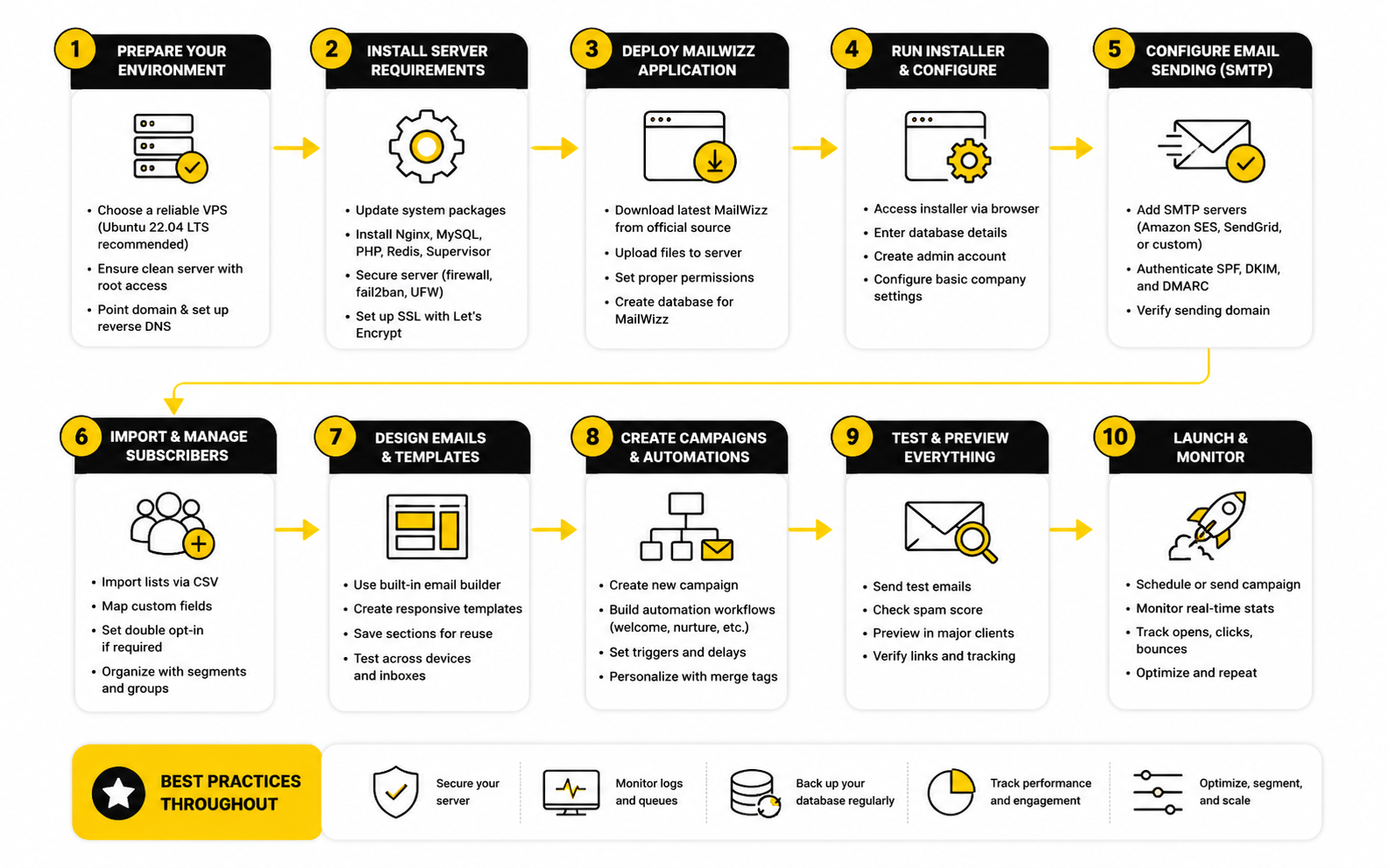
The process can be simple, but it should be followed consistently:
This process is not complicated, but it is disciplined. The biggest mistake is treating the setup as a one-time technical task. A MailWizz system should be reviewed regularly because domains, lists, engagement, sender rules, and campaign goals change over time.
Connect The Tracking Layer To Real Decisions
Tracking is only useful when it changes what you do next. MailWizz can help track campaign activity, but the real value comes from turning that activity into decisions about segmentation, offers, list hygiene, and campaign timing. Opens, clicks, bounces, unsubscribes, and complaints should not sit in reports untouched.
The key is to decide which numbers actually matter before the campaign goes out. A content newsletter may care about click depth and repeat engagement. A sales campaign may care more about landing page conversions, replies, booked calls, or purchases that happen after the click.
This is where MailWizz should connect to the rest of the marketing system. If a campaign sends traffic to a landing page, that page needs to be measured too. If leads move into a CRM or booking flow, the email report should not be the final source of truth because the real outcome happens after the click.
Put Governance Around The System
Governance is the layer that keeps MailWizz from becoming risky as more people use it. This includes user permissions, customer limits, approved sending domains, campaign review rules, unsubscribe standards, suppression lists, and policies for imported contacts. Without governance, a flexible email platform can quickly become a liability.
This is especially important for agencies and operators managing multiple clients or brands. One careless list import, one aggressive campaign, or one poorly authenticated sending setup can create issues that affect the wider system. Good governance protects the platform, the sender reputation, and the people receiving the emails.
Governance does not have to be heavy or corporate. It can be as simple as a clear checklist, restricted admin access, approved templates, list import rules, and a sending review process. The point is to make good behavior the default instead of relying on everyone to remember best practices under pressure.
Make The Framework Repeatable
The real power of the mailwizz email marketing application appears when the framework becomes repeatable. You can add a new brand, client, list, or campaign without rebuilding the whole system from scratch. That is when MailWizz starts feeling less like software and more like infrastructure.
A repeatable framework also makes training easier. New users can understand the order: application setup, delivery setup, audience structure, campaign workflow, tracking, and governance. When everyone follows the same model, the system becomes easier to scale and easier to protect.
This is the bridge into the next part of the article. Once the framework is clear, the next step is understanding the core components inside MailWizz and how each one contributes to the full email marketing system.
Statistics And Data
Measurement is where a MailWizz setup becomes real. Strategy sounds good in planning documents, but the numbers show whether subscribers actually want the emails, mailbox providers are accepting them, and campaigns are creating business outcomes. The mailwizz email marketing application gives you the operating layer, but the value comes from knowing what the signals mean and what action each signal should trigger.
Do not treat analytics as a scoreboard for vanity metrics. Opens, clicks, bounces, unsubscribes, complaints, delivery rates, and conversions all answer different questions. A strong MailWizz operator knows which number matters at each stage and avoids making lazy decisions from one metric alone.
The goal is not to chase perfect benchmarks. The goal is to build a measurement system that tells you what to fix next. That is the difference between “we sent a campaign” and “we are improving an email marketing machine.”
Start With Deliverability Signals First
The first numbers to watch are not opens or clicks. They are delivery, bounces, blocks, complaints, and spam signals. If the email does not reach the inbox, every other metric becomes weaker or misleading.
Google’s sender guidance says senders should keep user-reported spam rates below 0.1% and prevent them from reaching 0.3% or higher in its email sender guidelines FAQ. That matters because complaint rate is not just another report column. It is a reputation signal that can affect whether future campaigns land in the inbox, promotions tab, spam folder, or nowhere useful at all.
In MailWizz, this is why bounce handling and complaint handling cannot be treated as optional setup tasks. A high bounce rate tells you the list quality is weak, old, risky, or poorly collected. A high complaint rate tells you the audience did not expect the email, did not value it, or no longer trusts the sender.
Understand What Opens Can And Cannot Tell You
Open rates are useful, but they are not as clean as they used to be. Apple’s Mail Privacy Protection changed open tracking by preloading email content in ways that can inflate or distort opens, and Apple describes this privacy behavior in its Mail Privacy Protection overview. That means an open is no longer a perfect signal that a human read your campaign.
This does not make open rates useless. They can still help you compare subject lines, sender names, timing, and broad engagement trends inside your own account. But they should not be the final proof that a campaign worked.
The practical move is to use opens as a directional signal, not a revenue signal. If opens collapse suddenly, check sender reputation, deliverability, list fatigue, subject line quality, and sending frequency. If opens rise but clicks and conversions stay flat, the campaign may be getting attention without creating intent.
Clicks Show Stronger Intent Than Opens
Clicks are usually more useful than opens because they show that someone took action beyond loading the email. A click tells you the message, offer, CTA, or content was interesting enough to move the subscriber forward. That is why click-through rate and click-to-open rate deserve more attention in serious MailWizz reporting.
Email benchmark data varies heavily by industry, audience type, and campaign purpose. Brevo’s 2025 benchmark research shows that performance can differ widely across sectors, with public administration and nonprofits appearing among stronger categories for engagement in its email marketing benchmarks. That is why copying a generic “good CTR” target without context is a bad idea.
In practice, clicks should drive segmentation decisions. People who repeatedly click buying-intent links should not be treated the same as subscribers who only read educational content. MailWizz reporting can help you separate curiosity from intent, and that is where better follow-up campaigns begin.
Bounces Tell You About List Quality
Bounces are one of the clearest quality signals in email marketing. A hard bounce usually means the address is invalid, unavailable, or not deliverable. A soft bounce can mean temporary issues like a full inbox, server problem, or message size issue, but repeated soft bounces still need attention.
MailWizz supports bounce servers so the platform can process returned emails and update subscriber status instead of letting bad addresses stay active. The official MailWizz knowledge base explains that bounce servers are connected with delivery servers so MailWizz can process bounced messages through its bounce server documentation. This is not just a technical detail; it is list hygiene in action.
A rising bounce rate should trigger a list review before the next campaign. Check the source of the subscribers, the age of the list, import quality, typo patterns, and whether old inactive contacts are being pushed too aggressively. If a list keeps bouncing, the problem is usually upstream from the campaign.
Unsubscribes Are Not Always Bad
Unsubscribes can feel negative, but they are often healthier than complaints. If someone no longer wants your emails, a clean unsubscribe is the best possible exit. It protects the subscriber experience and helps keep the list more accurate.
The mistake is treating every unsubscribe as a disaster. Some churn is normal, especially after promotional campaigns, reactivation campaigns, or major positioning changes. The real concern is when unsubscribes spike after a specific message, segment, sender identity, or frequency change.
When that happens, do not panic. Look at the audience, offer, timing, subject line, and expectation gap. A subscriber who joined for a technical tutorial may unsubscribe if the next three emails are aggressive sales pushes, and the data is telling you the positioning is off.
Complaints Need Immediate Attention
Complaints are different from unsubscribes. A complaint means someone marked the email as spam, and that is a much stronger negative signal. In a self-hosted MailWizz environment, complaints should be watched closely because sender reputation is part of the infrastructure you are responsible for.
A complaint spike should trigger an immediate pause and review. Check whether the list was imported, whether consent was clear, whether the sender name was recognizable, whether the content matched the opt-in promise, and whether the unsubscribe link was obvious. Do not keep sending into a complaint problem and hope it fixes itself.
This is where professional discipline matters. A managed platform may limit or suspend risky sending for you. With MailWizz, you need your own rules, because the freedom to send also means the responsibility to stop.
Build A Practical Analytics System
A good analytics system should connect MailWizz campaign metrics to business outcomes. MailWizz can show what happened inside the email environment, but revenue, bookings, purchases, demos, replies, and lead quality often live outside the email platform. That means the report is incomplete unless clicks are connected to the next step.
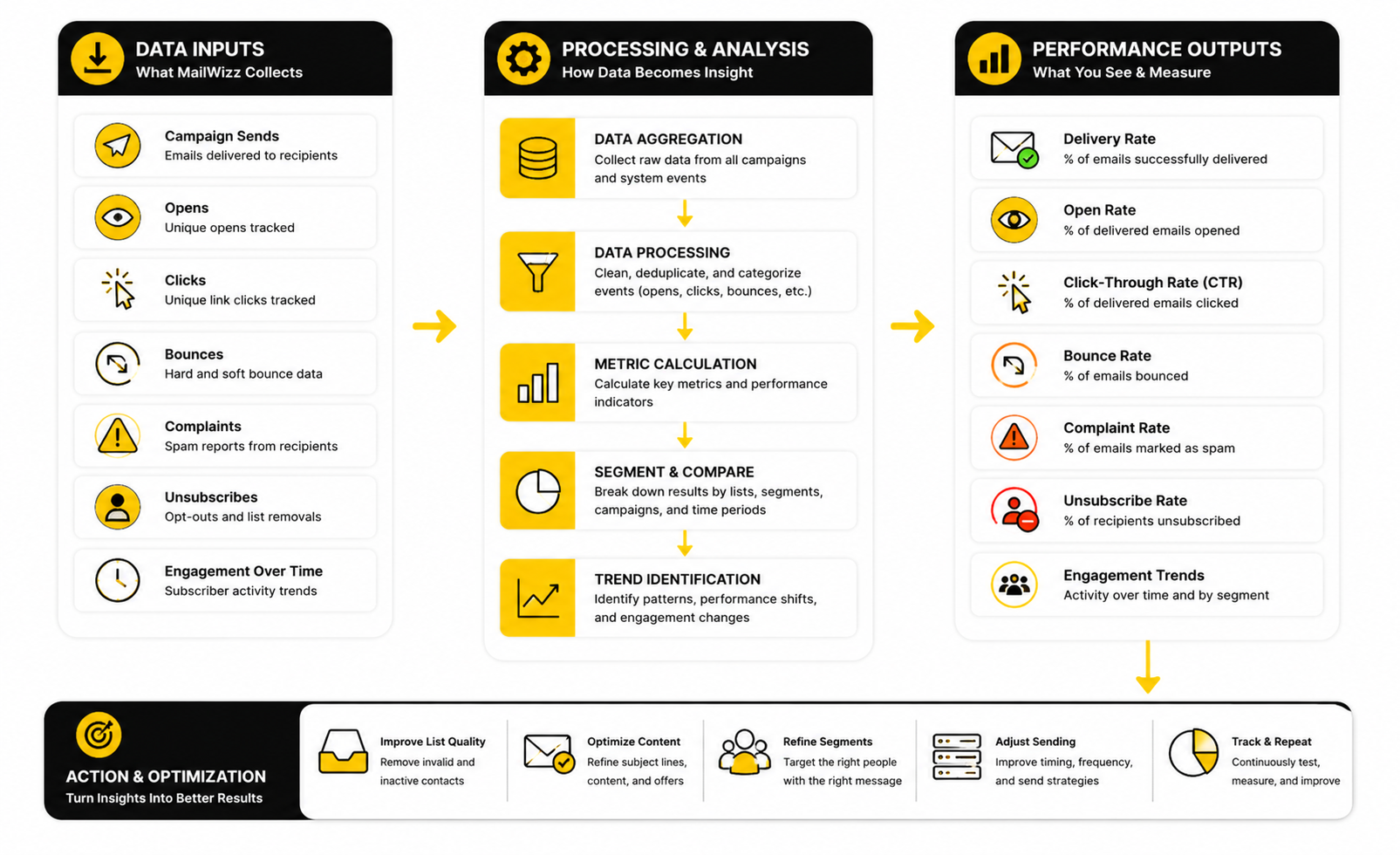
A practical measurement system should separate the data into four layers:
This structure prevents bad decision-making. A campaign with a high open rate but low clicks may have a strong subject line and weak offer. A campaign with low opens but strong conversions from clickers may need better positioning, not a new product.
Benchmarks Are Useful Only When They Create Better Decisions
Benchmarks are useful when they help you ask better questions. They are dangerous when they become a substitute for understanding your own audience. A newsletter for a warm buyer list, a cold reactivation campaign, a SaaS onboarding sequence, and an agency promo email should not be judged by one universal standard.
Litmus reports that 35% of companies see email ROI of 36:1 or more in its State of Email research. That number is useful because it reminds teams that email can be a serious revenue channel. But it does not mean a MailWizz user should expect that return automatically after installing the application.
The right benchmark is your own trend line. Are complaints going down? Are clicks improving among the right segments? Are fewer bad contacts entering the database? Are campaigns creating measurable outcomes after the click? Those answers are more valuable than comparing one campaign to an industry average that may not match your business.
Segment-Level Data Beats Account-Wide Averages
Account-wide averages hide important problems. A campaign may look fine overall while one segment performs badly, complains more, or stops engaging. Another segment may be small but highly profitable, and that signal can disappear inside the total average.
MailWizz becomes more useful when you read performance by list, segment, source, campaign type, and customer account. A subscriber who joined through a high-intent lead magnet should not be measured the same way as someone imported from an old general newsletter. Different sources create different expectations.
This is where segmentation turns from a marketing buzzword into a measurement tool. If one lead source produces low clicks and high complaints, you have a source-quality problem. If another produces modest opens but strong conversions, you may have a small but valuable segment that deserves better follow-up.
Use Data To Decide What Happens Next
Every important metric should have a next action attached to it. A high hard-bounce rate should trigger list cleaning or import review. A complaint spike should trigger a sending pause and consent review. Low clicks should trigger offer, CTA, segmentation, or message testing.
This is simple, but most teams do not do it. They look at reports, nod, and send the next campaign with the same assumptions. That is how email programs become noisy instead of profitable.
A stronger MailWizz workflow turns campaign data into rules. Engaged subscribers can receive deeper offers. Inactive subscribers can move into reactivation or suppression paths. High-intent clickers can be routed into sales follow-up, CRM activity, or a more focused funnel using tools like GoHighLevel when the email program needs to connect with pipeline management.
The Numbers Should Make The System Safer
The best analytics setup does not just help you make more money. It also helps you avoid damage. Email marketing has downside risk, and the data should warn you before small problems become reputation problems.
That means watching complaint rates, bounce patterns, inactive growth, sudden engagement drops, and source-level quality. It also means not celebrating volume for its own sake. Sending more email to a weaker list is not growth; it is pressure on the system.
The mailwizz email marketing application gives you the flexibility to run a serious self-hosted email operation. Measurement is what keeps that flexibility under control. When the data is read correctly, it tells you when to scale, when to segment, when to clean, when to pause, and when to rethink the offer before the next send.
Professional MailWizz Implementation
Professional implementation is where the MailWizz conversation becomes more serious. Earlier parts covered the framework, the process, and the measurement layer. Now the question is whether the system can stay reliable when volume grows, more users get access, more campaigns go out, and the cost of mistakes becomes higher.
The mailwizz email marketing application can support a serious email operation, but it should be treated like business infrastructure. That means it needs maintenance, governance, security, documentation, and clear operating rules. A rushed setup can send emails; a professional setup can keep sending responsibly over time.
This is the difference that matters. Anyone can install software and connect a delivery server. The real skill is building a setup that protects deliverability, keeps data clean, gives users the right level of access, and still supports growth without turning into a technical headache.
Decide What MailWizz Should Own
The first advanced decision is scope. MailWizz can manage lists, campaigns, templates, delivery servers, bounce processing, tracking, customer accounts, and parts of the email workflow. That does not mean it should own every part of your marketing stack.
A clean setup defines what MailWizz is responsible for and what should live somewhere else. MailWizz may handle campaign sending and list structure, while a CRM handles pipeline, a funnel builder handles pages, and a booking tool handles appointments. This keeps the system focused and avoids forcing one application to do jobs it was not meant to do.
For example, if your business needs landing pages, checkout flows, and campaign funnels, a tool like ClickFunnels or systeme.io may sit in front of MailWizz. If your business needs sales follow-up, pipeline visibility, appointment reminders, and agency-style client management, GoHighLevel may be a better place for that part of the workflow. The mistake is not using multiple tools; the mistake is letting their responsibilities overlap until no one knows where the truth lives.
Plan For Scaling Before You Need It
Scaling MailWizz is not just about sending more emails. It is about handling more data, more scheduled tasks, more reports, more users, more delivery rules, and more operational risk. If the first version of the setup is messy, scaling will amplify the mess.
MailWizz relies on scheduled tasks for important operations, and the official documentation points users to the cron job list inside the backend through its cron jobs setup guidance. That matters because cron reliability affects sending, processing, imports, automation, and system housekeeping. If cron jobs fail silently, the platform may look fine on the surface while important background work stops happening.
Scaling should be gradual. Increase volume only after the infrastructure, engagement, bounce handling, and complaint signals are stable. Pushing from small sends to aggressive volume too quickly is one of the easiest ways to create reputation problems that take much longer to repair than they took to cause.
Separate Sending Risk By Brand, Client, Or Use Case
One advanced principle is isolation. If one brand, client, or campaign type carries more risk, it should not be allowed to contaminate the rest of the sending system. This is especially important for agencies, newsletter operators, affiliate campaigns, and businesses with multiple audience sources.
Separation can happen through customer accounts, sending domains, delivery servers, permission rules, and list policies. A high-trust customer newsletter should not share the same risk profile as an experimental cold reactivation campaign. A client account with unknown list quality should not have the same freedom as a proven internal list.
This is not about being paranoid. It is about protecting the system. Mailbox providers evaluate sender behavior, and one weak sending stream can create problems that affect future campaigns if everything is blended together.
Treat Security As Part Of Email Marketing
Security is not separate from marketing when the platform stores subscriber data, campaign history, account access, and sending credentials. A self-hosted application gives you control, but it also gives you responsibility for protecting the environment. That means access control, updates, backups, server hardening, and careful handling of credentials.
The broader web security world has a simple lesson here: applications are exposed to recurring risks like broken access control, injection, misconfiguration, vulnerable components, and authentication failures. The OWASP Top 10 exists because those risks are common enough that every web application owner should take them seriously. A MailWizz install is not exempt just because it is a marketing tool.
At minimum, a professional setup should use strong admin credentials, limited user permissions, secure hosting, HTTPS, regular backups, update planning, and restricted access for people who do not need admin rights. If multiple clients or team members use the platform, permissions matter even more. The wrong person with too much access can create technical, legal, and deliverability problems very quickly.
Create A Backup And Update Routine
Backups are not exciting until the day you need them. A MailWizz system can include subscriber data, templates, campaign records, customer accounts, suppression rules, sending configuration, and business-critical reporting. Losing that data or breaking the application during an update can disrupt more than email.
A professional routine should include database backups, file backups, update testing where possible, and a rollback plan. The routine should also include a simple check after updates: can users log in, can cron jobs run, can campaigns queue, can tracking links work, can bounces process, and can reports load? Those checks are basic, but they catch problems before they become campaign-day emergencies.
Do not wait until the platform is large to create this process. The larger the system gets, the harder it becomes to retrofit discipline. A small MailWizz setup with a clean maintenance routine is easier to scale than a large setup built on luck.
Use Permissions To Reduce Human Error
Human error is one of the biggest risks in any email platform. Someone imports the wrong file, sends to the wrong list, deletes a segment, changes a template, or launches a campaign without checking links. In a self-hosted system, you need to reduce the chance of those mistakes through permissions and process.
MailWizz customer accounts and administrative controls should be used deliberately. Not every user needs backend access. Not every client should be able to change sending infrastructure. Not every campaign creator should be able to import unlimited subscribers or change suppression rules.
The practical approach is simple. Give people the access they need to do their job and no more. This protects the system without slowing everyone down with unnecessary bureaucracy.
Build A List Quality Standard
Advanced email marketing is not about bigger lists. It is about better lists. A smaller engaged list with clear permission is usually more valuable than a large database full of stale, risky, or confused contacts.
Your list quality standard should define what can be imported, what should be rejected, what fields are required, how consent is documented, when inactive contacts are suppressed, and how reactivation is handled. This is especially important when MailWizz is used by multiple customers or teams. Without a standard, every user brings their own definition of “good enough,” and the platform absorbs the risk.
This standard should also apply to lead sources. Contacts from a clear opt-in form are different from old exports, scraped contacts, purchased lists, or vague partner uploads. If the source cannot be defended, it should not become part of the sending system.
Design Campaign Governance For Real Workflows
Campaign governance sounds corporate, but it can be very practical. It simply means every campaign has a basic review path before it goes out. That review should check the audience, sender identity, subject line, offer, links, unsubscribe visibility, tracking, and schedule.
The more risk a campaign carries, the more review it needs. A weekly newsletter to engaged subscribers may only need a light check. A large promotional send, reactivation campaign, or client campaign should get more attention because the downside is bigger.
This is where many MailWizz users need to be honest. The tool gives you freedom to send, but freedom without review creates avoidable mistakes. A simple campaign checklist can protect revenue, reputation, and trust.
Know When A Managed Platform Is The Better Choice
MailWizz is not the right answer for everyone. If a team has no technical support, no interest in server maintenance, no deliverability knowledge, and no need for custom infrastructure, a managed email platform may be more carefully. Convenience has value.
Managed tools like Brevo or Moosend can be a better fit when the priority is simplicity, support, built-in sending infrastructure, and a faster path to launching campaigns. That does not make them better in every case. It means the tradeoff is different.
The smart decision is based on capability, not ego. If your team can manage infrastructure and wants control, MailWizz can be a strong fit. If your team wants the platform to absorb more operational complexity, managed software may save time and reduce risk.
Prepare For Compliance Before It Becomes A Problem
Email compliance should not be treated as a legal footnote at the end of the workflow. It affects opt-in forms, unsubscribe handling, sender identity, suppression lists, privacy expectations, customer data, and how campaigns are documented. The more lists, users, and regions you manage, the more deliberate the system needs to be.
This does not mean every marketer needs to become a lawyer. It means the platform should support responsible behavior by default. Use clear sender information, visible unsubscribe links, honest subject lines, permission-based acquisition, and suppression rules that are respected across future campaigns.
Compliance also affects trust. A subscriber who can easily understand why they received an email and how to opt out is less likely to complain. That is good for the reader, good for deliverability, and good for the long-term health of the email program.
Make The System Easier To Operate Over Time
A mature MailWizz setup should become easier to run, not harder. That happens when naming conventions are clear, templates are organized, lists are structured properly, reporting is reviewed consistently, and routine maintenance is documented. Without that discipline, every campaign becomes a small rescue mission.
Documentation does not need to be complicated. A practical operator manual can include login roles, list rules, sending limits, delivery server notes, bounce handling steps, campaign checklist items, backup routines, and escalation steps when something looks wrong. That document can save hours when a team member leaves, a client asks questions, or a campaign fails a pre-send check.
This is the expert-level mindset. You are not just building campaigns. You are building a repeatable email operating system that someone else could understand, audit, maintain, and improve.
The Strategic Tradeoff Is Control Versus Convenience
The core tradeoff has been the same throughout the article: control versus convenience. MailWizz gives you more control over the email marketing environment, but it also asks more from you. Hosted platforms reduce some of that burden, but they also place more of your workflow inside their pricing, policies, and product decisions.
There is no universal winner. The right choice depends on your technical ability, list quality, sending volume, client structure, budget, compliance needs, and appetite for responsibility. MailWizz is powerful when the business actually benefits from self-hosted control.
The next and final part will bring the decision together with alternatives, use cases, and FAQ. That is where the practical question becomes simple: should you use MailWizz, pair it with other tools, or choose a managed email marketing platform instead?
MailWizz Alternatives, Use Cases, And FAQ
At this point, the decision becomes practical. The mailwizz email marketing application makes sense when you want self-hosted control, flexible sending infrastructure, customer-level management, and a more customizable email marketing system. It makes less sense when your team wants everything handled by a managed provider with minimal technical responsibility.
The real question is not whether MailWizz is “good” or “bad.” The real question is whether your business is ready for the responsibility that comes with owning more of the email stack. If you want control, MailWizz can be a strong fit. If you want convenience, a hosted platform may be the more carefully move.
When MailWizz Is A Strong Fit
MailWizz is a strong fit for agencies, publishers, technical marketers, SaaS teams, affiliate operators, and businesses that manage multiple lists or brands. These users often need more control over customer accounts, delivery servers, list structure, campaign permissions, and sending logic than a simple newsletter platform provides. MailWizz gives them room to build that system around their actual business model.
It is also a good fit when you already have technical support available. A self-hosted email marketing application needs hosting, updates, security, backups, cron jobs, sending configuration, and bounce handling. If you have someone who can manage those pieces properly, MailWizz becomes much easier to justify.
The platform is especially interesting when the business wants to separate email infrastructure from funnel, CRM, or landing page tools. MailWizz can handle campaign sending and audience management, while other tools handle the front-end marketing experience. That modular setup can be cleaner than forcing one platform to do everything.
When A Hosted Platform May Be Better
A hosted email platform may be better when speed and simplicity matter more than control. If you do not want to manage hosting, cron jobs, bounce servers, technical updates, or server-level troubleshooting, a managed service can reduce friction. That is not weakness; it is a smart tradeoff when the business does not benefit from self-hosting.
Tools like Brevo and Moosend can make more sense for teams that want email marketing features, managed sending infrastructure, templates, reporting, and platform support in one place. They may cost more as lists or usage grow, but they also remove a lot of operational work.
A broader platform like GoHighLevel may be better when email is only one part of a larger client-management, CRM, automation, and funnel system. If the main need is pipeline management, appointments, conversations, workflows, and client accounts, MailWizz may be too narrow by itself. In that case, MailWizz can still be useful, but it should not be mistaken for a full business operating platform.
The Best Setup May Be A Hybrid Stack
The best setup is often not one tool. It is a clean stack where every tool has a clear job. MailWizz can sit at the email marketing layer while landing pages, forms, CRM, checkout, analytics, and scheduling are handled elsewhere.
For example, a business might use ClickFunnels or systeme.io for funnels and opt-in pages, then use MailWizz for list management and campaign sending. Another team might use Fillout for forms, Cal.com for bookings, and MailWizz for email broadcasts and follow-up.
The key is avoiding overlap. If two tools both claim to be the source of truth for subscribers, tags, opt-ins, and campaign logic, your system will eventually become confusing. Choose one place for each responsibility and document how data moves between tools.
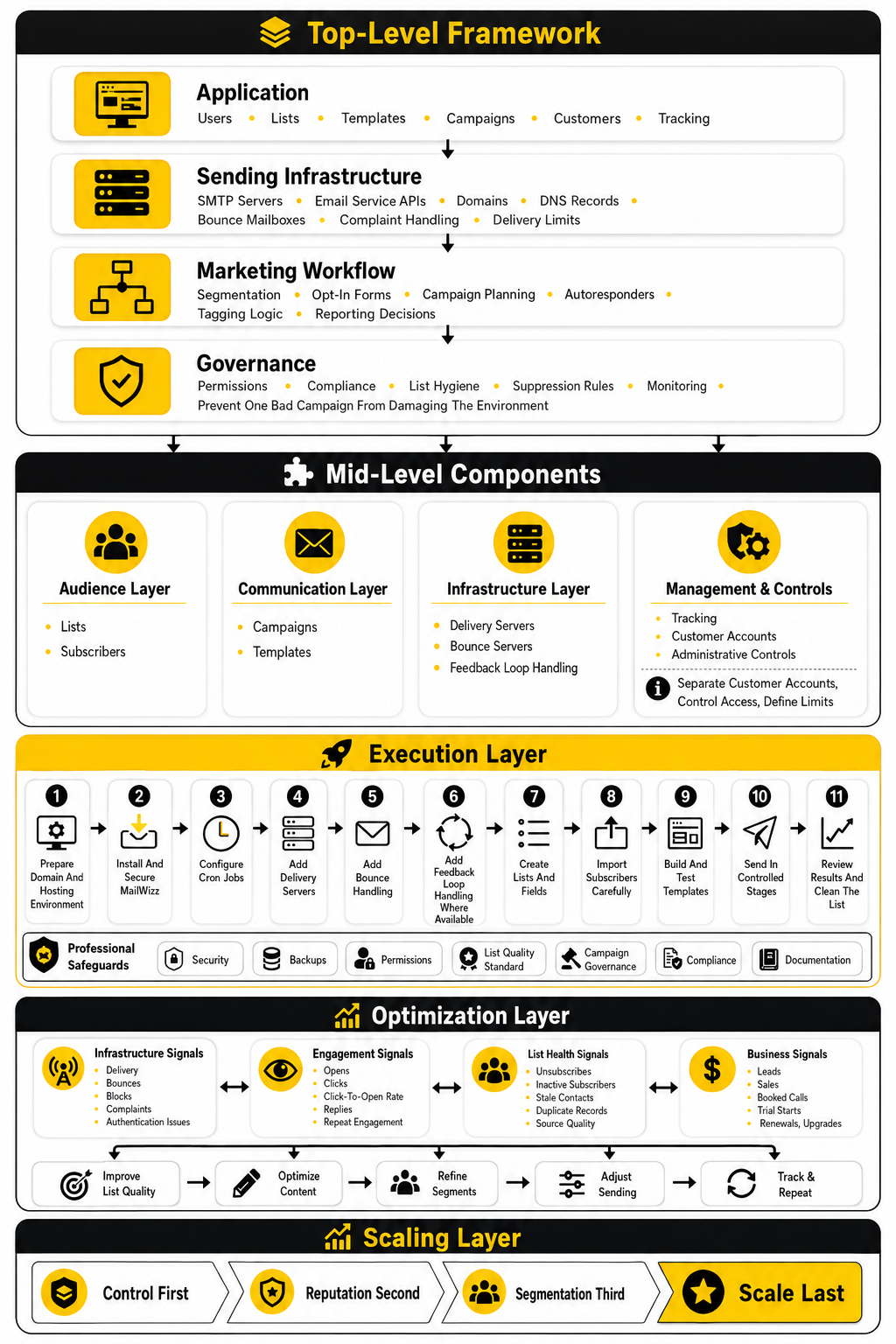
Final Decision Framework
The decision should be based on capability, not hype. MailWizz is a serious option if your team wants control, understands email infrastructure, and is prepared to maintain the system. It is not the best option if you want every technical detail handled for you.
Use MailWizz when you need self-hosted flexibility, multi-customer structure, custom delivery configuration, and long-term ownership of your email marketing environment. Use a hosted email provider when you value speed, support, and simplicity more than infrastructure control. Use a broader CRM or funnel platform when email is only one piece of a bigger sales and marketing workflow.
This is the practical takeaway: the mailwizz email marketing application is not a shortcut. It is a platform for people who want to build and operate email marketing with more control. If that fits your business, it can be powerful. If it does not, forcing it into your stack will only create work you did not need.
What Is The MailWizz Email Marketing Application?
The mailwizz email marketing application is a self-hosted email marketing platform that you install on your own server. It helps manage email lists, subscribers, templates, campaigns, autoresponders, delivery servers, bounce handling, customer accounts, and reporting. Its main appeal is control because you are not locked into a hosted platform’s subscriber-based pricing or default infrastructure.
Is MailWizz Good For Beginners?
MailWizz can work for beginners, but it is not the easiest starting point for someone who has never managed email infrastructure. A beginner can learn it, but they also need to understand hosting, cron jobs, sending services, DNS records, bounces, complaints, and basic deliverability. If you want the simplest possible setup, a hosted email provider is usually easier.
Is MailWizz A Hosted Email Marketing Platform?
No, MailWizz is self-hosted. That means you install it on your own hosting environment and connect it to delivery servers or email sending providers. This gives you more control, but it also means you are responsible for maintenance, updates, security, backups, and configuration.
Does MailWizz Send Emails By Itself?
MailWizz manages campaigns, lists, and delivery logic, but the actual sending usually happens through configured delivery servers or external SMTP and API-based email services. This distinction matters because MailWizz is the control layer, not automatically the full sending infrastructure. You still need a reliable delivery setup behind it.
What Are Delivery Servers In MailWizz?
Delivery servers are the sending connections MailWizz uses to send campaigns. They can be SMTP servers or supported email service integrations depending on your setup. A professional MailWizz system may use different delivery servers for different brands, clients, campaign types, or sending limits.
Why Are Bounce Servers Important In MailWizz?
Bounce servers help MailWizz process returned emails when messages fail. This protects list quality by identifying addresses that should not continue receiving campaigns. Without bounce processing, bad addresses can remain active and damage deliverability over time.
Is MailWizz Good For Agencies?
MailWizz can be a strong fit for agencies because it supports customer accounts, permissions, sending limits, list management, and campaign control. Agencies often need separation between clients, campaigns, and sending infrastructure. That said, agencies must be strict about list quality and user permissions because one careless client can create risk for the wider system.
Can MailWizz Replace A CRM?
MailWizz should not be treated as a full CRM replacement. It can manage subscribers, lists, segments, and campaign activity, but a CRM is usually better for pipeline, sales activity, deal tracking, calls, appointments, and customer relationship history. If you need CRM depth, pair MailWizz with a CRM or consider a broader platform like GoHighLevel.
Can MailWizz Be Used With Funnels?
Yes, MailWizz can be used with funnels when the roles are clear. A funnel builder can handle landing pages, lead capture, checkout flows, or front-end campaign assets, while MailWizz handles email list management and campaign sending. Tools like ClickFunnels and systeme.io can fit this kind of stack.
Is MailWizz Cheaper Than Hosted Email Platforms?
MailWizz can be cheaper from a software-pricing perspective because it is self-hosted and commonly positioned around a one-time license model rather than monthly subscriber-based fees on the MailWizz website. But the real cost also includes hosting, sending services, setup, technical maintenance, backups, security, and deliverability work. It is better to think of MailWizz as cost control, not free email marketing.
What Is The Biggest Risk With MailWizz?
The biggest risk is poor operation. A bad list, weak authentication, ignored bounces, careless imports, missing backups, weak security, or aggressive sending can create serious problems. MailWizz gives you control, but control only helps when the system is managed responsibly.
Does MailWizz Improve Deliverability Automatically?
No tool improves deliverability automatically in isolation. MailWizz can support better deliverability practices through list management, bounce processing, segmentation, and delivery configuration. Actual deliverability depends on authentication, sender reputation, list quality, engagement, complaints, content, sending consistency, and mailbox provider rules.
What Metrics Should MailWizz Users Watch First?
The first metrics to watch are delivery problems, hard bounces, complaint rates, unsubscribes, and engagement trends. Opens and clicks matter, but they should be interpreted carefully because open tracking is less reliable than it used to be. A healthy MailWizz setup watches infrastructure signals first, then engagement, list quality, and business outcomes.
How Often Should A MailWizz Setup Be Reviewed?
A serious MailWizz setup should be reviewed regularly, especially before large sends or after configuration changes. Check cron jobs, delivery servers, bounce processing, complaints, list imports, templates, tracking, and backups. The more volume or clients the system supports, the more disciplined the review process should be.
Who Should Not Use MailWizz?
MailWizz is not ideal for teams that do not want technical responsibility. If you have no one to manage hosting, security, updates, DNS, sending setup, and troubleshooting, a managed platform is safer. The tool is powerful, but it expects the operator to care about the infrastructure behind the campaigns.
Build a stronger local presence with BAAM AI
Turn your website, Google profile, social channels, and AI visibility into one growth engine
Most businesses do not need more random marketing activity. They need a consistent presence system that helps the right people find them, trust them, and take action. BAAM AI brings strategy, local SEO, website updates, Google Maps visibility, social content, AI-search readiness, media production, and reporting into one practical monthly engine.
If you want your marketing to keep working after the campaign ends, start with a free BAAM AI presence audit. See how your business shows up today and where the fastest visibility wins are at BAAM AI.