
BAAM AI Blog
MailerLite WordPress: A Practical Guide To Turning Your Website Into An Email Growth System
MailerLite WordPress integration is not just about dropping a signup form into a sidebar and hoping people subscribe. Used properly, it connects your site traffic, lead magnets, blog content, WooCommerce activity...

Affiliate disclosure: this article may include compensated links. Recommendations should still be evaluated against your use case, budget, and current provider terms.
Should you choose MailerLite?
MailerLite is worth considering when the use case, budget, and implementation effort match what you actually need to do next.
teams that want a practical tool decision without reading another generic feature list
Check MailerLiteMailerLite WordPress integration is not just about dropping a signup form into a sidebar and hoping people subscribe. Used properly, it connects your site traffic, lead magnets, blog content, WooCommerce activity, popup forms, embedded forms, and welcome automations into one simple system. That matters because WordPress still powers a massive part of the web, with W3Techs showing WordPress used by 42.2% of all websites and 59.6% of sites with a known CMS.
The real advantage is control. Your WordPress site is where people read, compare, buy, download, contact you, and decide whether they trust you. MailerLite gives you the email layer around that behavior, including signup forms, email campaigns, automations, landing pages, popups, and subscriber management through its own platform and its official WordPress integration.
This guide is written for site owners, bloggers, creators, agencies, and WooCommerce store owners who want the setup to work cleanly from the start. We will not treat MailerLite as a magic button, because it is not. The goal is to build a practical system where WordPress captures the right subscribers, MailerLite organizes them properly, and your emails do useful work after the signup happens.
Why MailerLite WordPress Integration Matters
A WordPress site without an email capture system is usually leaving value on the table. People visit once, skim a page, maybe read a useful article, and then disappear unless you give them a good reason to stay connected. Email gives you a direct channel that is not fully dependent on search rankings, social algorithms, or paid traffic costs.
The channel is still worth taking seriously. Litmus’ State of Email data shows that 35% of companies see email ROI of 36:1 or more, which is exactly why email keeps surviving every “email is dead” prediction. The catch is that ROI does not come from simply installing a plugin; it comes from relevant forms, clean segmentation, useful automations, and consistent follow-up.
MailerLite fits WordPress especially well because many WordPress users do not need enterprise complexity. They need forms that work, a clean editor, welcome sequences, landing pages, popups, and a subscriber database they can actually understand. MailerLite’s own WordPress help guide shows the basic integration path through an API token, the official plugin, and embedded forms created inside MailerLite before being placed on the WordPress site through the plugin workflow described in its setup documentation.
The MailerLite WordPress Framework
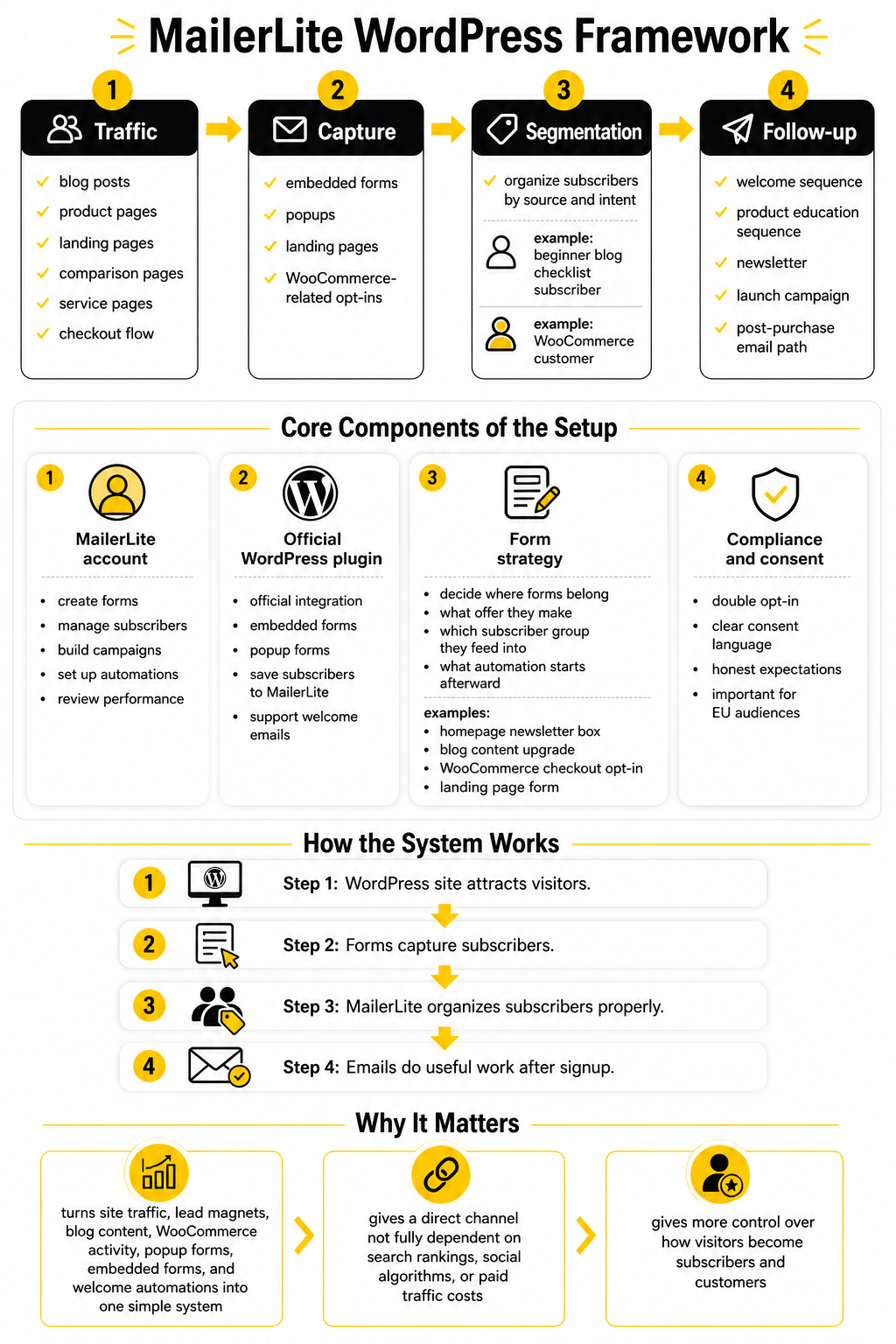
A strong MailerLite WordPress setup has four layers: traffic, capture, segmentation, and follow-up. Traffic comes from your blog posts, product pages, landing pages, comparison pages, service pages, and checkout flow. Capture happens through embedded forms, popups, landing pages, and WooCommerce-related opt-ins when they are relevant.
Segmentation is where many beginners get lazy, and that is where the system starts to break. A subscriber who joins from a beginner blog checklist is not the same as a customer who buys from your WooCommerce store. MailerLite supports the subscriber and automation side, while WordPress gives you the context that should determine what the person receives next.
Follow-up is the part that turns a subscriber into a relationship. That can be a welcome sequence, a product education sequence, a newsletter, a launch campaign, or a post-purchase email path. The official MailerLite plugin page describes the integration as a way to save subscribers directly into MailerLite, place forms with widgets or shortcodes, support double opt-in, and automate welcome emails from the MailerLite account through the connected setup listed on WordPress.org.
Core Components Of The Setup
The first core component is the MailerLite account itself. This is where you create forms, manage subscribers, build campaigns, set up automations, and review performance. The WordPress plugin is useful, but the strategic work still happens inside MailerLite because that is where the email logic lives.
The second component is the official WordPress plugin. MailerLite’s integration page explains that embedded forms created in MailerLite can be added to WordPress, while popup forms are shown automatically after the plugin has been activated through the WordPress integration. That distinction matters because you should plan which forms are embedded into content and which popups appear based on visitor behavior.
The third component is your form strategy. You need to decide where forms belong, what offer they make, which subscriber group they feed into, and what automation starts afterward. A homepage newsletter box, a blog content upgrade, a WooCommerce checkout opt-in, and a landing page form may all collect emails, but they should not all be treated as the same intent.
The fourth component is compliance and consent. Double opt-in is available through the official plugin features listed on WordPress.org, and it can be useful when list quality matters more than raw subscriber count as shown in the plugin feature summary. For many businesses, especially those serving EU audiences, clear consent language and honest expectations are not optional details; they are part of a professional setup.
Professional Implementation Workflow
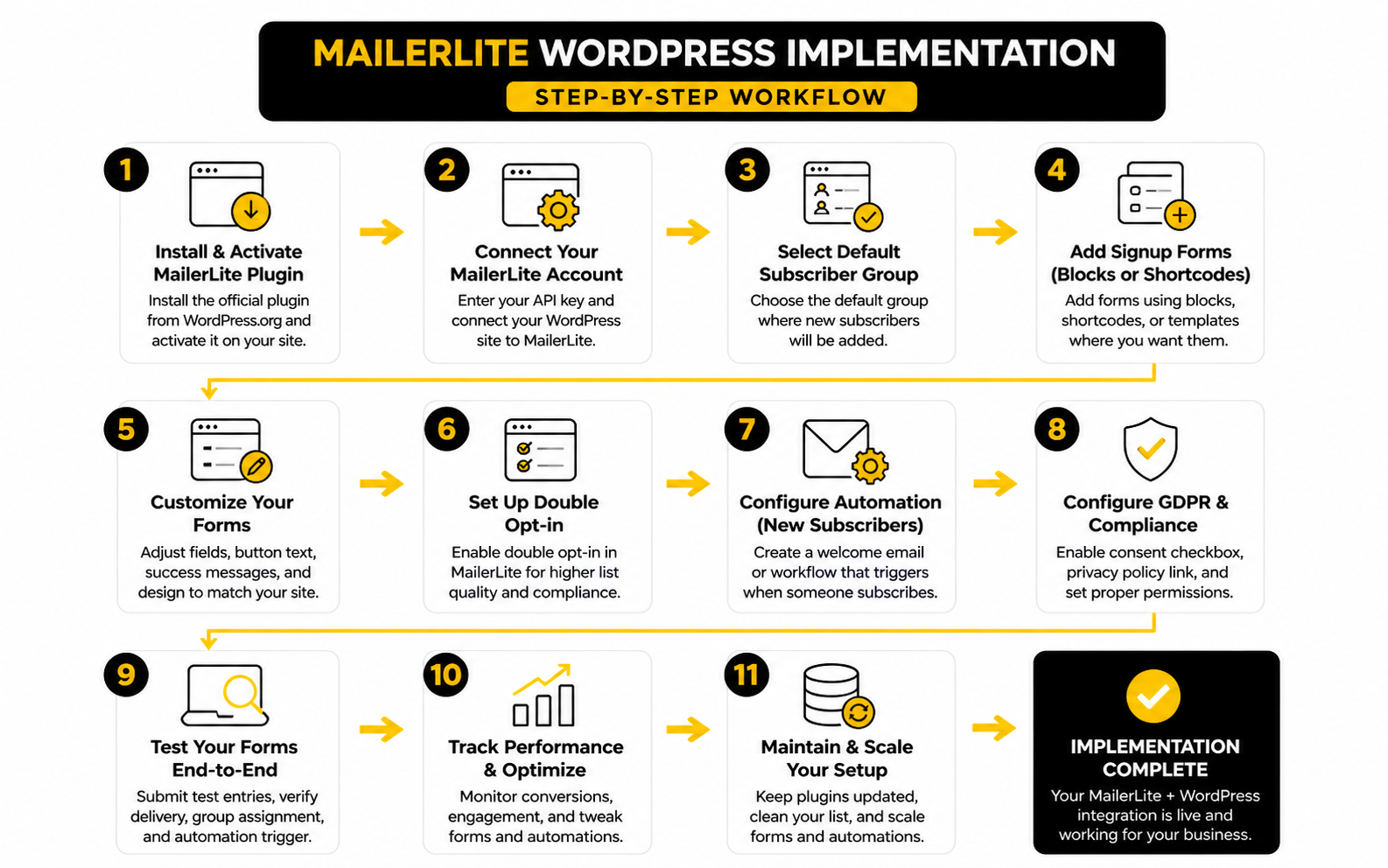
A good MailerLite WordPress setup starts before you install anything. First, decide what role email should play on the site: newsletter growth, lead generation, customer retention, abandoned cart recovery, product education, or all of the above. That decision shapes the forms you create, the groups you use, and the automations you build later.
The cleanest workflow is simple. Create the structure inside MailerLite first, then connect WordPress, then place forms where they match visitor intent. MailerLite’s WordPress setup process supports embedded forms created in MailerLite, while popup forms can appear automatically on the WordPress site after the plugin is activated through the WordPress integration.
Do not start by adding forms everywhere. That usually creates clutter, weak conversion intent, and messy subscriber data. Start with the highest-value locations first, then expand once you can see what is working.
Step 1: Define The Subscriber Groups
Subscriber groups are not decoration. They tell MailerLite why someone joined your list, which is far more useful than only knowing that they subscribed. A person who signs up from a blog post, a product page, a free guide, or a checkout form may need a different next email.
For a basic MailerLite WordPress setup, you might create groups around intent rather than random labels. A blog subscriber group can receive editorial updates, a lead magnet group can receive a short nurture sequence, and a customer group can receive product-specific follow-up. MailerLite’s embedded form workflow includes selecting the group where subscribers should be added, which makes this decision part of the form creation process in its embedded form documentation.
Keep the group structure lean at the beginning. Too many groups make the account harder to manage, especially if you are the same person writing emails, updating WordPress, and checking performance. Start with the minimum structure that helps you send more relevant emails.
Step 2: Install And Connect The WordPress Plugin
The official plugin is the normal starting point for most WordPress users. The WordPress.org listing says it can save subscribers automatically to your MailerLite account, place webforms with a widget or shortcode, support double opt-in, and automate welcome emails from inside MailerLite through the connected account plugin feature list. That is enough for most blogs, service sites, creator sites, and simple lead capture setups.
The connection usually works through an API token from MailerLite. Once WordPress can communicate with MailerLite, your forms and groups become usable inside the WordPress dashboard. MailerLite’s help guide also shows that users can create a simple custom signup form directly inside WordPress by going to MailerLite, then Signup forms, then adding a new custom signup form in the WordPress plugin workflow.
This is where you should test carefully. Submit the form yourself, confirm the subscriber lands in the right MailerLite group, check whether double opt-in behaves as expected, and make sure the welcome automation triggers correctly. A form that looks good but sends people to the wrong group is not a small issue; it breaks the logic of the whole system.
Step 3: Place Forms Based On Intent
Form placement should follow the reader’s mindset. A blog sidebar form is broad, so the offer can be broad. An in-content form inside a specific tutorial should be more specific, because the reader has already shown interest in that exact topic.
For example, a MailerLite WordPress form on a homepage might invite people to join a weekly newsletter. A form inside a detailed guide should offer something closer to the topic, such as a checklist, template, or deeper resource. A form near the end of an article should respect the fact that the reader has already invested time, so it can ask for a more committed next step.
Popups need even more restraint. MailerLite’s popup builder lets you create a popup form, select a subscriber group, and control the form inside MailerLite’s popup workflow shown in its help documentation. Use that power carefully, because aggressive popups can damage the reading experience on content-heavy WordPress sites.
Step 4: Connect WooCommerce Only When Ecommerce Data Matters
If your WordPress site uses WooCommerce, the MailerLite WooCommerce integration becomes a different layer from a normal newsletter form. The integration can sync WooCommerce customers with MailerLite subscribers, import products into email campaigns, support abandoned cart emails, and track campaign purchases through the WooCommerce integration. That is useful when email is part of the store’s revenue system, not just a newsletter channel.
The important point is consent. Customers and marketing subscribers are not always the same thing, and your setup should respect that difference. The WooCommerce integration can add new subscribers who accept marketing to your MailerLite subscriber list, which is the right mindset for building a list you can actually use.
Abandoned cart automation is where ecommerce users usually see the clearest business case. MailerLite’s abandoned cart workflow uses ecommerce triggers, lets you choose the delay after cart abandonment, and adds an email step inside the automation builder through its abandoned cart setup guide. For stores, that turns MailerLite WordPress from a simple signup tool into a revenue recovery system.
Step 5: Build The First Automation Before You Drive Traffic
Traffic without follow-up is wasteful. Once someone joins your list, the first few emails should confirm they made a good decision. That does not mean blasting them with sales messages immediately; it means sending a useful welcome, setting expectations, and guiding them toward the next logical action.
For a content site, the first automation can introduce your best resources. For a service business, it can explain your process and invite the subscriber to book a call. For an ecommerce store, it can educate new subscribers about product categories, bestsellers, guarantees, or customer support.
Do not overbuild the first automation. Three to five emails are often enough to create momentum without making the system hard to maintain. The point is not to create a giant funnel on day one; the point is to make sure every new subscriber gets a clear, helpful path after joining.
Step 6: Test The Full Path Like A Real Visitor
Testing is not glamorous, but it is where professional setups separate themselves from amateur ones. Open the WordPress page in a private browser window, submit the form, confirm the opt-in flow, check the MailerLite group, read the confirmation email, and verify the automation. Then repeat the same process on mobile.
This matters because most mistakes are not obvious inside the dashboard. The form may appear too late, the popup may cover the wrong content, the success message may be vague, or the automation may send an email that no longer matches the signup promise. These are small details, but they affect trust.
A practical test should answer five questions:
When the answer is yes, you have more than a plugin connection. You have a working MailerLite WordPress system that can be improved with real data instead of guesswork.
Optimization, Tracking, And Common Mistakes
Once the basic MailerLite WordPress connection is working, the next job is not adding more tools. The next job is tightening the system so every form, group, automation, and email has a clear reason to exist. This is where a simple setup becomes a serious growth asset.
The mistake most people make is treating optimization as a design exercise. They change button colors, rewrite tiny form labels, or move a popup by a few seconds before they understand the bigger problem. The bigger problem is usually weaker than that: the offer is vague, the form is in the wrong place, the automation does not match the signup promise, or the tracking is too messy to trust.
This part is about execution. You already have the framework, the components, and the implementation workflow. Now you need the practical process that lets you improve the system without guessing.
Start With One Conversion Goal Per Page
Every important WordPress page should have one primary email goal. A blog post might ask readers to join a topic-specific newsletter. A service page might push toward a consultation or a lead magnet. A WooCommerce product page might support a discount signup, back-in-stock interest, or post-purchase education path.
This matters because competing calls to action weaken the page. When a visitor sees a newsletter popup, a sidebar form, a footer form, a lead magnet, and a booking prompt all at once, the page starts to feel desperate. A cleaner MailerLite WordPress setup gives each page a job and lets the email capture method support that job.
Use the page intent to decide the form. Embedded forms work well inside content because they feel connected to the reading experience. Popups can work when the offer is strong, but MailerLite’s own WordPress integration notes that embedded forms are added from forms created in MailerLite, while popup forms can show automatically after the plugin is active through the MailerLite WordPress integration.
Build A Simple Tracking Map
Before you optimize, write down what you are tracking. Not in a complicated dashboard. Just a clear map that shows which form sends people to which group and which automation starts afterward.
A useful tracking map can be as simple as this:
This map prevents silent chaos. If a subscriber enters the wrong group, the wrong email follows. If the wrong email follows, the promise is broken. If the promise is broken, the subscriber may not complain, but they will stop paying attention.
Match Automations To Subscriber Intent
Automation should feel like a natural continuation of the signup moment. If someone joins from a beginner guide, the first emails should help them take the next beginner-level step. If someone joins from a pricing or product page, the follow-up can be more direct because the visitor has shown stronger buying intent.
MailerLite’s automation builder supports ecommerce-specific triggers when connected to WooCommerce, Shopify, BigCommerce, or PrestaShop, including abandoned cart workflows through its abandoned cart automation guide. That is useful, but the trigger is only the beginning. The email still needs to answer the customer’s real hesitation.
For content-driven WordPress sites, the same principle applies without ecommerce triggers. A blog subscriber should not immediately receive a hard sales sequence unless the signup promise made that clear. A better path is usually education first, trust second, offer third.
Use Double Opt-In When List Quality Matters
Double opt-in is not always the fastest way to grow a list, but it can be the cleanest way to protect list quality. MailerLite defines double opt-in as a two-step process where the subscriber enters an email address and then confirms the subscription through email in its double opt-in documentation. That extra confirmation can reduce junk signups and make the list more intentional.
For many WordPress sites, double opt-in is especially useful when traffic comes from broad content, giveaways, or high-volume forms. Those sources can attract people who want the free thing but do not really want future emails. A confirmation step filters some of that out before it pollutes your list.
The practical rule is simple. Use double opt-in when trust, deliverability, and subscriber quality matter more than raw list speed. Use single opt-in only when you understand the tradeoff and have a strong reason to reduce friction.
Check The Mobile Experience First
A MailerLite WordPress form that looks fine on desktop can feel awful on mobile. The popup may cover too much of the screen. The button may sit below the fold. The success message may be hard to notice. The form may load after the reader has already moved on.
Mobile testing should happen before you judge conversion rates. Open the page on a real phone, not just a responsive preview. Scroll like a real reader, submit the form, check the confirmation flow, and make sure the next email looks good on mobile too.
This is not a minor detail. Email signup is often a small moment of trust, and bad mobile execution adds friction at exactly the wrong time. If the visitor has to pinch, zoom, close overlays, or guess what happens next, the system is not polished yet.
Keep The Plugin Layer Lean
WordPress makes it easy to install plugins, but every plugin adds another moving part. For MailerLite, start with the official signup forms plugin for standard forms, and add the WooCommerce integration only when the site actually uses WooCommerce email marketing features. The official signup forms plugin can save subscribers to MailerLite, place forms using a widget or shortcode, support double opt-in, and automate welcome emails from the connected account through the WordPress.org plugin listing.
For WooCommerce stores, the separate MailerLite WooCommerce plugin has ecommerce-specific features like checkout integration, product importing, sales tracking, campaign ROI, double opt-in controls, and forwarding order data to MailerLite through the WooCommerce plugin listing. That makes sense when revenue tracking and ecommerce automation are part of the plan. It does not make sense to install it just because it exists.
The professional move is to use the smallest plugin stack that gets the job done. Fewer plugins mean fewer conflicts, fewer updates to worry about, and fewer places where tracking can break. Simple is not basic when the system is intentional.
Review Performance In Layers
Do not judge the entire system by one number. A low subscriber count might mean the offer is weak, but it might also mean the form is buried too low, the page has low traffic, or the popup timing is wrong. A high signup rate might look good until you realize those subscribers never open or click.
Review performance in layers:
This layered view keeps you from making lazy conclusions. You do not fix a traffic problem by rewriting an automation. You do not fix a weak offer by changing a button. You fix the specific layer that is underperforming.
Avoid The Most Common MailerLite WordPress Mistakes
Most MailerLite WordPress problems are not technical disasters. They are small strategy mistakes repeated across the site. The setup works, but the system does not persuade anyone because the pieces do not connect cleanly.
The biggest mistake is using the same generic newsletter form everywhere. A generic form might be fine for a footer, but it is weak inside a high-intent page. If the reader is already interested in a specific topic, the signup offer should reflect that topic.
Another common mistake is sending everyone into one general group. That makes email easier today and harder tomorrow. Once your list grows, you will want to know why people subscribed, what they care about, and what they should receive next.
The third mistake is launching without testing the full subscriber journey. People test the form design, but not the confirmation email, group assignment, automation trigger, mobile view, and unsubscribe footer. That is not enough. The real product is the whole experience from first click to first useful email.
Statistics And Data
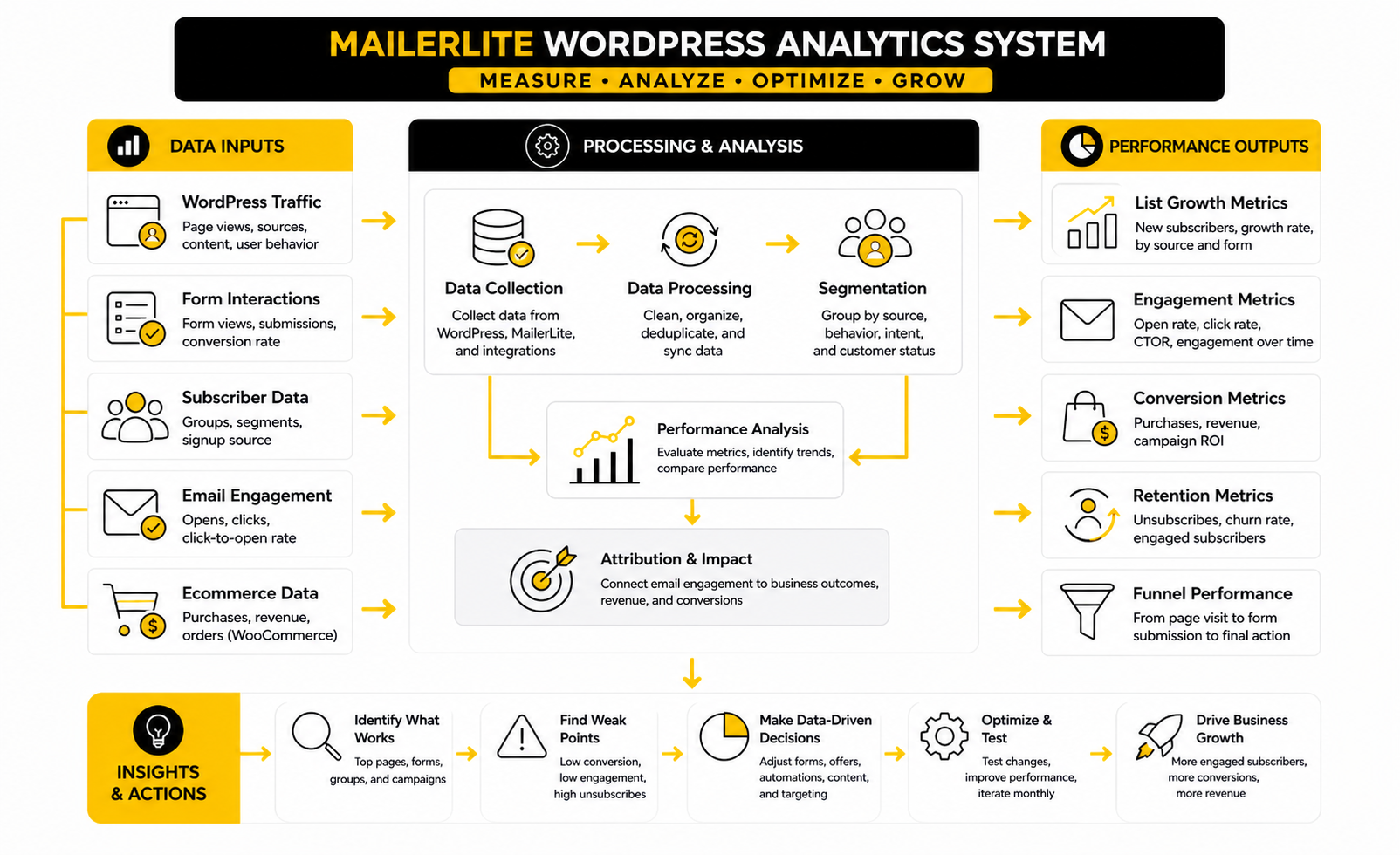
Data should not make your MailerLite WordPress setup more complicated. It should make the next decision clearer. The point is not to stare at dashboards all day; the point is to understand whether your site is attracting the right people, whether your forms are converting them, and whether your emails are moving them toward the next action.
Email benchmarks are useful, but only when you treat them as context instead of commandments. MailerLite’s 2026 benchmark report shows that the average open rate in 2025 was 43.46%, with an average click rate of 2.09% and an unsubscribe rate of 0.22%. Those numbers give you a rough reference point, but your own audience, offer, industry, sending frequency, and list quality will matter more than a global average.
That is why measurement should start with your own funnel. A MailerLite WordPress system has several measurable steps: page visit, form view, form submission, confirmation, first email open, first email click, and final business action. When you separate those steps, you can fix the real weak point instead of guessing.
The Metrics That Actually Matter
The first metric is page traffic. If a form is only seen by 40 people a month, the problem may not be the form. You may need better internal linking, stronger content distribution, improved search visibility, or a clearer offer on a higher-traffic page.
The second metric is form conversion rate. This tells you whether the signup offer and placement make sense for the visitor’s intent. If a blog post gets traffic but the form does not convert, the offer may be too generic, the form may appear too late, or the promise may not match the reason the person came to the page.
The third metric is confirmation rate if you use double opt-in. MailerLite describes double opt-in as a two-step subscription process where people submit an email address and then confirm through an email link in its double opt-in guide. A weak confirmation rate can mean the confirmation email is unclear, delayed, landing in spam, or not connected strongly enough to the value promised on the WordPress form.
The fourth metric is click behavior. Open rates are useful, but clicks show stronger intent because the subscriber took another action after reading. MailerLite’s email metrics guidance explains click-to-open rate as the percentage of openers who clicked a link, with its 2025 median CTOR at 6.81% across campaigns.
How To Read Open Rates Without Fooling Yourself
Open rates are helpful, but they are not perfect. Privacy changes, inbox behavior, image loading, and audience habits can all affect the number. Use open rate as a directional signal, not as proof that your email made money or built trust.
A strong open rate usually means the sender name, subject line, timing, and audience expectation are working together. A weak open rate may mean the list is cold, the promise is unclear, or subscribers do not remember why they joined. In a MailerLite WordPress setup, that often traces back to the signup source: people who joined from a relevant content upgrade usually understand the relationship better than people who joined from a vague footer form.
The useful action is not “write cleverer subject lines” by default. First, check whether the signup promise matches the email content. Then check whether the group is accurate. Then test subject lines once the basic relationship makes sense.
How To Read Click Rates
Click rate is often more honest than open rate. It tells you whether people cared enough to move from the email back to your WordPress site, product page, landing page, booking page, or checkout. For many businesses, this is where the real value begins.
A low click rate can mean the email content is weak, but it can also mean the call to action is buried or the link does not match the reader’s stage. If a new subscriber receives a long newsletter with five different links, you may not learn much from the result. If the email has one clear next step, the click rate becomes easier to interpret.
This is why each automation email should have a job. One email can invite a subscriber to read the best beginner resource. Another can explain a product category. Another can invite a sales conversation. When each email has one main action, your MailerLite analytics become much more useful.
How To Read Unsubscribes
Unsubscribes are not always bad. Some people should leave your list because they were never a good fit. A clean list is usually better than a bloated list full of people who never open, click, buy, reply, or care.
The warning sign is not one unsubscribe. The warning sign is a pattern. If unsubscribes spike after a specific automation email, campaign, or signup source, something about the expectation is broken.
For a MailerLite WordPress setup, compare unsubscribes by source when possible. If subscribers from one WordPress form leave quickly, the offer may be attracting the wrong people. If subscribers from another form stay engaged, that form is probably closer to real intent.
How To Measure List Growth Properly
List growth should be measured against quality, not ego. A bigger list looks good, but it does not help if the new subscribers never engage. The goal is not simply more emails in MailerLite; the goal is more of the right people entering the right follow-up path.
Track list growth by source. Blog forms, popups, landing pages, checkout opt-ins, and lead magnets should be reviewed separately because they attract different intent. If you combine everything into one total subscriber number, you lose the story behind the growth.
A practical monthly review should ask three questions. Which WordPress pages generated the most subscribers? Which forms generated the most engaged subscribers? Which subscriber source produced the most valuable downstream action, such as clicks, purchases, bookings, replies, or retained customers?
How To Connect Email Data To Business Results
Email analytics are only useful if they connect to the business model. A creator may care about repeat readership, product sales, course launches, or community growth. A service business may care about booked calls, consultation requests, proposal submissions, or qualified leads.
For ecommerce stores, the measurement layer can be more direct. The MailerLite WooCommerce integration supports features like sales tracking, campaign ROI, product importing, checkout integration, and order data forwarding through the official WooCommerce plugin listing. That makes it easier to see whether campaigns and automations are helping revenue, not just generating clicks.
For non-ecommerce WordPress sites, you need to define the valuable action yourself. That might be a contact form submission, a demo request, a calendar booking, a resource download, or a visit to a pricing page. The key is to stop treating email metrics as the finish line when they are often just the middle of the journey.
Benchmarks Should Guide, Not Control
Benchmarks are useful when they stop you from panicking. If your click rate looks lower than your open rate, that is normal because opening is easier than clicking. If unsubscribes happen after campaigns, that is normal too, as long as the rate is not unusually high or tied to a specific problem.
Benchmarks are dangerous when they make you ignore your own context. A niche B2B list of 900 highly qualified subscribers can be more valuable than a broad creator list of 25,000 passive readers. A small WooCommerce store with strong repeat purchase behavior may not need massive list growth to make email worthwhile.
Use benchmarks as a mirror, not a steering wheel. Compare your numbers with wider data, then make decisions based on subscriber intent, page context, list quality, and business outcomes. That is how measurement stays practical.
A Simple Monthly Review Process
You do not need a complicated analytics ritual. Once a month, review the pages, forms, groups, automations, and campaigns that matter most. The goal is to find one or two changes that can improve the system without rebuilding everything.
Use this simple review:
That last step matters. Do not review data and then change ten things at once. Make one focused improvement, let it run long enough to learn something, and then repeat the process.
What Good Performance Really Looks Like
Good performance is not one magic number. It is alignment. The right visitor sees the right offer, joins the right group, receives the right follow-up, and takes the next logical action.
In practice, that means a MailerLite WordPress setup can be successful even if one metric looks average. A modest form conversion rate may be fine if the subscribers are highly qualified. A lower open rate may still work if the people who do open are buyers. A smaller list may outperform a larger one if the segmentation is cleaner.
This is the mindset that keeps your email system sane. Measure the journey, not just the dashboard. Then use the numbers to make the next practical decision.
Advanced Considerations Before You Scale
A MailerLite WordPress setup can stay simple for a long time, but it should not stay shallow. Once the basic forms, groups, automations, and reporting are in place, the next question is whether the system can handle more traffic, more offers, more subscriber sources, and more commercial pressure without turning into a mess. Scaling email is not about adding complexity for the sake of it; it is about adding structure before growth exposes the weak spots.
The biggest shift is moving from “collect subscribers” to “manage subscriber intent.” At the beginning, one newsletter form and one welcome email may be enough. Later, you need to know which page created the subscriber, what they expected, what they clicked, whether they bought, and which messages they should not receive.
That is where discipline matters. MailerLite gives you useful tools, and WordPress gives you flexible placement, but neither one can save a sloppy strategy. If the system is not organized, growth only makes the confusion louder.
Segmentation Should Stay Useful, Not Decorative
Segmentation is powerful when it changes what you send. It is pointless when it only makes the account look organized. Before you create a new group, ask whether that group will actually receive different emails, different timing, different offers, or different exclusions.
For most MailerLite WordPress sites, segmentation should start with source and intent. A subscriber from an educational blog post may need a slower nurture path. A subscriber from a service page may be closer to a decision. A WooCommerce buyer has already crossed a trust barrier, so their emails should not feel like cold prospecting.
The risk is over-segmentation. Too many groups create maintenance drag, and eventually nobody remembers why half of them exist. A cleaner approach is to use only the groups that help you send better emails, build better automations, or understand performance more clearly.
Deliverability Starts Before The First Campaign
Deliverability is not just a MailerLite issue. It is also a domain, content, permission, and subscriber behavior issue. If people did not clearly ask for your emails, ignore your messages, or mark them as spam, your technical setup can only help so much.
Still, the technical foundation matters. MailerLite’s domain authentication process starts in account settings, uses the Domains tab, and guides users through adding a sending domain for authentication in its domain authentication documentation. This is one of those boring setup steps that becomes very important once your list and sending volume grow.
Do not wait until a launch week to fix authentication, sender identity, or list quality. Do it before you need perfect performance. When revenue depends on people receiving your emails, deliverability is no longer a technical side quest.
Consent Needs To Be Designed, Not Hidden
Consent should be obvious to the subscriber. That means the form should clearly explain what someone is signing up for, what they will receive, and how their information will be used. This is especially important if your WordPress site serves visitors in regions with stricter privacy expectations.
MailerLite’s GDPR form guidance explains that GDPR fields can be added from signup form settings, including marketing permission fields and privacy policy options in the GDPR sign-up form guide. That does not mean every site should copy the same form structure blindly. It means consent should be treated as part of the user experience, not as tiny legal text nobody reads.
There is a strategic upside here too. Clear consent creates better subscribers. People who understand the value of the list are more likely to open, click, reply, buy, and stay.
Automations Need Exit Logic
Beginner automations usually focus on what starts the sequence. Advanced automations also focus on what should stop, skip, or change the sequence. That matters because a subscriber’s behavior can change quickly after they join.
For example, someone may join from a lead magnet and then book a call two days later. If your automation keeps sending beginner education emails as if nothing happened, the experience feels disconnected. A WooCommerce customer may buy the product that your nurture sequence is still promoting, which makes the follow-up look lazy.
You do not need a giant automation map to solve this. You need basic rules that respect major actions. When someone buys, books, requests a quote, or moves into a higher-intent group, the email path should reflect that change.
WooCommerce Scaling Requires Cleaner Boundaries
WooCommerce changes the role of MailerLite WordPress because subscriber behavior becomes tied to revenue. The WooCommerce integration can sync customers with MailerLite subscribers, import products into emails, support abandoned cart emails, and track campaign purchases through the MailerLite WooCommerce integration. That opens useful doors, but it also raises the cost of messy data.
Customer emails and prospect emails should not feel identical. A customer who already bought deserves onboarding, usage education, replenishment reminders, review requests, loyalty messaging, or product-specific follow-up. A prospect may need comparison content, objection handling, social proof, or a first-purchase incentive.
The tradeoff is frequency. Ecommerce brands can send more often than many service businesses, but only when the emails stay relevant. If every campaign becomes a discount blast, subscribers learn to wait for coupons or stop paying attention altogether.
When To Use Native Forms, Custom Forms, Or Extra Tools
The official MailerLite WordPress plugin is usually enough for standard email capture. It can add MailerLite forms to a WordPress site, save subscribers to MailerLite, support widget or shortcode placement, and use double opt-in through the official plugin listing. For many sites, that is the right level of simplicity.
Custom forms become useful when your site needs more control over design, placement, conditional logic, or a multi-step experience. At that point, the question is not “Can I make it prettier?” The question is whether the custom setup improves conversion, data quality, or user experience enough to justify the extra maintenance.
Extra tools should earn their place. A funnel builder, form builder, CRM, booking tool, or automation layer can be useful, but only if it solves a real constraint. If your WordPress and MailerLite setup already captures, segments, follows up, and measures properly, adding another platform may create more work than leverage.
Agencies And Multi-Site Owners Need Naming Rules
If you manage multiple WordPress sites, client projects, or brands, naming rules are not optional. Forms, groups, automations, landing pages, and campaigns should be named in a way that makes sense six months later. This sounds small until you are staring at a list of forms called “Homepage,” “New form,” “Popup 2,” and “Lead magnet final final.”
Use names that include the site, placement, offer, and purpose. A clear name might identify the blog category, lead magnet, customer journey stage, or WooCommerce flow. The goal is simple: anyone with access should understand what the asset does without opening every setting.
This also protects reporting. If names are vague, analytics become harder to interpret. If names are consistent, you can review performance faster and make decisions with more confidence.
Migration Needs A Cleanup Plan
Many people do not start fresh with MailerLite. They come from another email platform, an old WordPress plugin, a WooCommerce customer list, a spreadsheet, or a messy legacy setup. Migration is the perfect time to clean the list instead of dragging every old problem into the new system.
Do not import contacts blindly. Check permission, source, engagement, relevance, and current business value. A smaller list of people who actually expect your emails is more useful than a larger list full of dead addresses and unclear consent.
You should also rebuild the signup paths after migration. Old forms, old lead magnets, old popups, and old automations may not match the new structure. Moving to MailerLite is not just a technical transfer; it is a chance to simplify the whole email system.
The Real Scaling Rule
The real scaling rule is this: every new layer should make the system clearer or more profitable. If a new form, automation, segment, plugin, or integration does not improve relevance, measurement, revenue, or user experience, it probably does not belong yet. Growth rewards clean systems and punishes cluttered ones.
This is especially true with MailerLite WordPress because both platforms make it easy to add things quickly. You can create another form, publish another popup, build another automation, or install another plugin without much friction. Easy does not always mean smart.
Scale the system like a professional. Keep the subscriber journey understandable, protect list quality, authenticate your sending domain, respect consent, and connect every major email path to a real business outcome. That is how the setup stays useful after the first few hundred subscribers and still holds up when the list becomes a real asset.
Final Setup Checklist
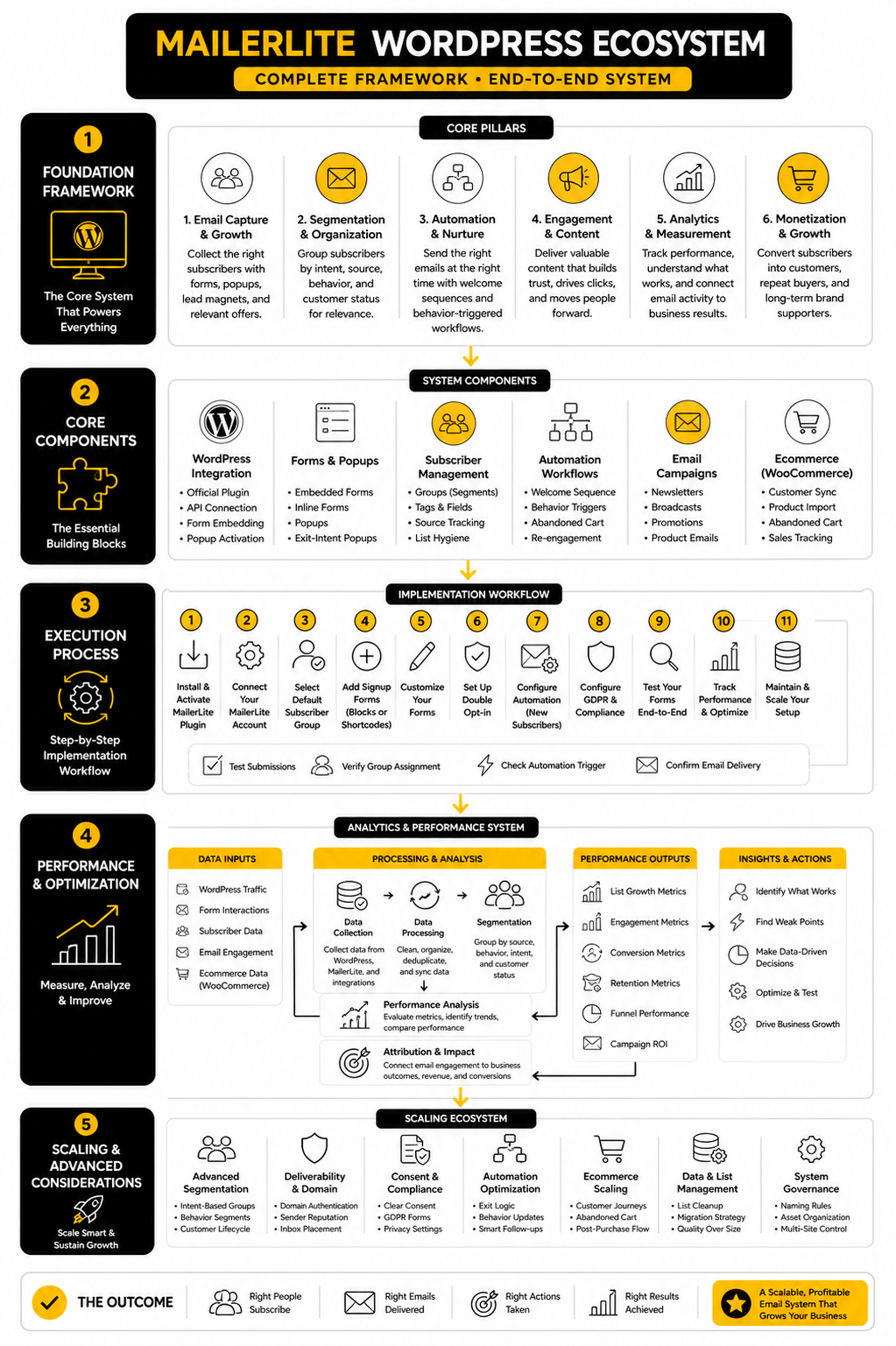
A strong MailerLite WordPress system should feel boring in the best possible way. The forms appear where they should, the subscriber goes into the right group, the first email makes sense, the automation continues naturally, and the numbers tell you what to improve next. That is the outcome you want before you add more plugins, more popups, more funnels, or more campaigns.
Use this checklist before you call the setup complete:
This is the point where the system becomes easier to manage. You are no longer just collecting emails from WordPress. You are building a subscriber journey that starts on your website and continues through useful, timely email.
Is MailerLite Good For WordPress?
Yes, MailerLite is a strong choice for WordPress users who want email capture, newsletter sending, automations, popups, landing pages, and subscriber management without a heavy enterprise platform. The official MailerLite WordPress integration is built specifically to connect signup forms on a WordPress site with a MailerLite account. It works especially well for blogs, creator sites, service businesses, and smaller ecommerce stores that need a clean email marketing system.
How Do I Connect MailerLite To WordPress?
The usual method is to install the official MailerLite signup forms plugin, connect it with your MailerLite account, and then place forms on your WordPress site. MailerLite’s WordPress integration supports embedded forms created in your MailerLite account, while popup forms can appear automatically after the plugin is activated through the official WordPress integration. After connecting, test the full path by submitting the form yourself and checking whether the subscriber lands in the correct group.
Can I Add MailerLite Forms To WordPress Posts And Pages?
Yes, MailerLite forms can be added to WordPress posts, pages, widgets, and other supported areas depending on your setup. The official plugin listing says it can place webforms using a widget or shortcode, which makes it practical for blog posts, sidebars, and dedicated landing pages through the MailerLite signup forms plugin. The more carefully question is not only whether you can add a form, but whether that form matches the page intent.
Does MailerLite Work With WooCommerce?
Yes, MailerLite has a WooCommerce integration for ecommerce email marketing. It can sync WooCommerce customers with MailerLite subscribers, add customers to a selected group, import products into campaigns, support abandoned cart emails, and track campaign purchases through the WooCommerce integration. This is most useful when your WordPress site is not just collecting subscribers but actively selling products.
Can MailerLite Recover Abandoned Carts In WooCommerce?
Yes, abandoned cart automation is available when MailerLite is connected to WooCommerce and the ecommerce triggers are available in the workflow builder. MailerLite’s abandoned cart automation guide explains that WooCommerce-connected accounts can use the abandoned cart trigger, set a delay, and send automated reminder emails through the abandoned cart workflow. The key is to test the workflow before counting on it for revenue recovery.
Should I Use Double Opt-In With MailerLite WordPress Forms?
Use double opt-in when subscriber quality, consent clarity, and list hygiene matter more than maximum signup speed. MailerLite defines double opt-in as a two-step process where someone submits an email address and then confirms the subscription through a confirmation email in its double opt-in guide. For broad WordPress traffic, lead magnets, giveaways, and EU-facing sites, double opt-in can help keep the list cleaner.
Why Are My MailerLite WordPress Forms Not Showing?
The most common causes are plugin connection issues, cached pages, form placement mistakes, popup settings, theme conflicts, or forms that were not created properly inside MailerLite. Embedded forms need to be created in MailerLite before being added through the WordPress integration, while popup forms are handled differently once the plugin is activated. Start by clearing cache, checking the plugin connection, testing in a private browser window, and confirming the form exists in the right MailerLite account.
Do I Need A Separate Form Plugin With MailerLite?
Not always. The official MailerLite plugin is enough for many sites because it handles basic signup form placement and connection to MailerLite. A separate form plugin may make sense if you need complex conditional logic, multi-step forms, custom design control, or advanced routing before someone enters MailerLite.
How Should I Segment Subscribers From WordPress?
Segment subscribers by intent, not by random labels. A blog subscriber, lead magnet subscriber, service page lead, WooCommerce buyer, and abandoned cart contact should not always receive the same follow-up. The best MailerLite WordPress segmentation keeps the structure simple enough to manage while still giving you enough context to send relevant emails.
What Is The Best First Automation To Build?
The best first automation is usually a welcome sequence that matches the signup promise. If someone joins from a newsletter form, welcome them and explain what they will receive. If they join from a lead magnet, deliver the resource and help them take the next useful step.
How Often Should I Review MailerLite WordPress Performance?
Review the system monthly if email is important to your business. Look at which WordPress pages generate subscribers, which forms convert, which groups engage, which automations drive clicks, and which email paths create business outcomes. Do not change everything at once; choose one improvement, test it, and keep the system stable enough to learn from the results.
Should I Authenticate My Domain Before Sending Emails?
Yes, domain authentication should be handled before you rely on email for launches, sales, newsletters, or abandoned cart revenue. MailerLite’s domain authentication guide shows the process inside account settings, where you add a sending domain and authenticate it through DNS records in the domain authentication workflow. This is not exciting work, but it is part of building a serious email setup.
Can I Use MailerLite WordPress For A Service Business?
Yes, and it can work very well when the forms and automations match the sales process. A service business can use WordPress pages to capture leads, MailerLite groups to separate intent, and email automations to educate prospects before they book a call or request a quote. The mistake is treating every subscriber like a newsletter reader when some are clearly closer to becoming clients.
Can I Use MailerLite WordPress For A Blog?
Yes, MailerLite is a natural fit for blogs because it lets you turn readers into subscribers. The strongest blog setup usually includes topic-relevant forms, a useful welcome sequence, and regular emails that bring people back to your best content. A generic “subscribe for updates” form can work, but a specific promise usually performs better.
What Is The Biggest MailerLite WordPress Mistake?
The biggest mistake is connecting the tools without designing the journey. People install the plugin, add a form, and then wonder why the list does not grow or convert. The better approach is to define the visitor intent, create the right form, send subscribers to the right group, trigger the right automation, and measure the next action.
Build a stronger local presence with BAAM AI
Turn your website, Google profile, social channels, and AI visibility into one growth engine
Most businesses do not need more random marketing activity. They need a consistent presence system that helps the right people find them, trust them, and take action. BAAM AI brings strategy, local SEO, website updates, Google Maps visibility, social content, AI-search readiness, media production, and reporting into one practical monthly engine.
If you want your marketing to keep working after the campaign ends, start with a free BAAM AI presence audit. See how your business shows up today and where the fastest visibility wins are at BAAM AI.