
BAAM AI Blog
MailerLite WooCommerce: The Practical Guide To Turning Store Data Into Better Email Revenue
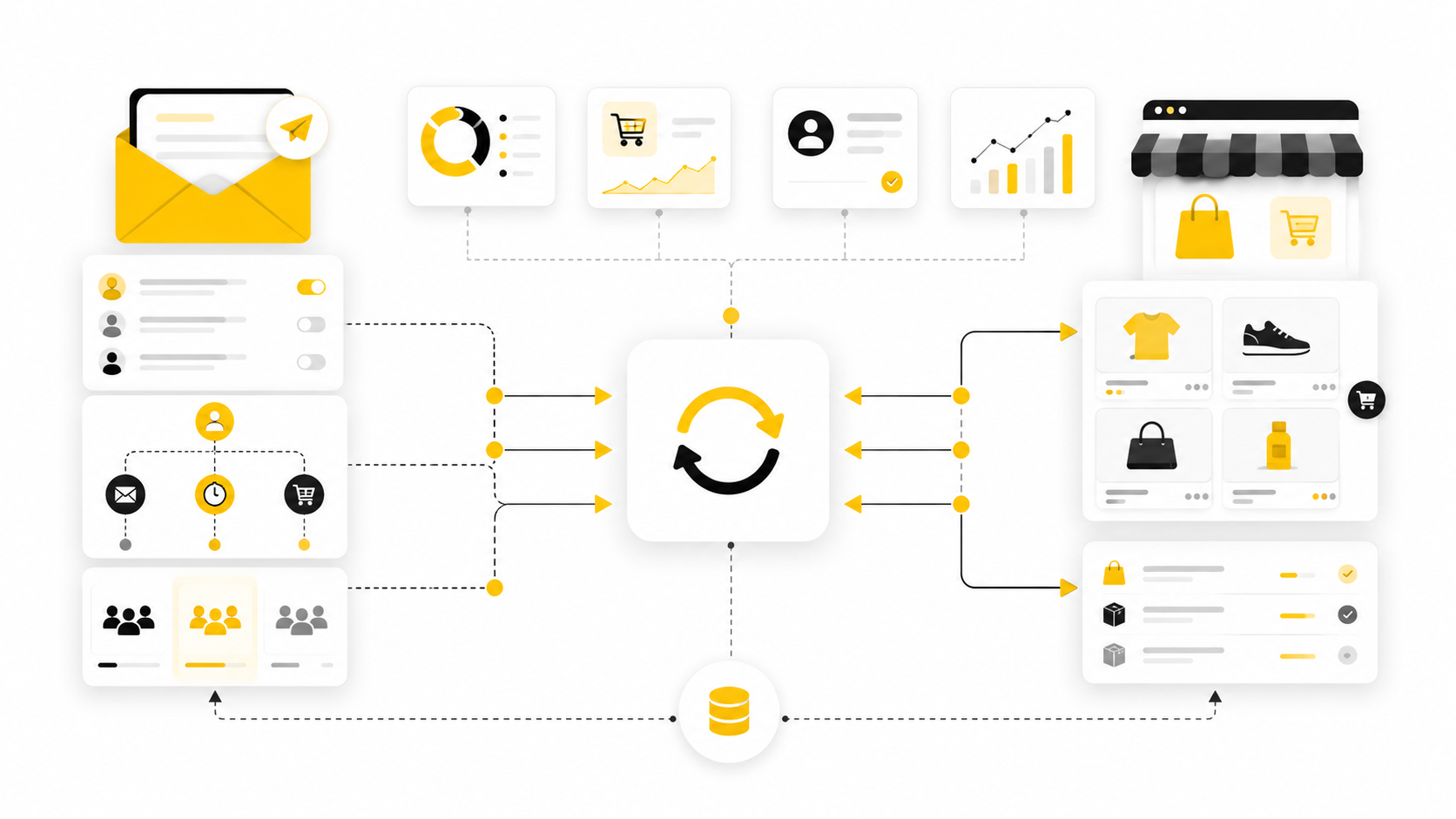
MailerLite WooCommerce is the connection between your online store and your email marketing system. When it is set up properly, WooCommerce does more than process orders, and MailerLite does more than send...
Affiliate disclosure: this article may include compensated links. Recommendations should still be evaluated against your use case, budget, and current provider terms.
Should you choose MailerLite?
MailerLite is worth considering when the use case, budget, and implementation effort match what you actually need to do next.
teams that want a practical tool decision without reading another generic feature list
Check MailerLiteMailerLite WooCommerce is the connection between your online store and your email marketing system. When it is set up properly, WooCommerce does more than process orders, and MailerLite does more than send newsletters. Together, they let you use real customer behavior to send better-timed emails, recover abandoned carts, segment buyers, and understand which campaigns actually lead to purchases.
That matters because ecommerce email should not be random. A customer who viewed products, added something to cart, bought once, or bought three times should not receive the same message as someone who only joined your list for a discount code. The native MailerLite WooCommerce integration is built to sync customers, products, purchases, abandoned carts, and campaign sales data so your email marketing can respond to what shoppers actually do inside your store.
This first part sets the foundation. Before getting into setup steps, automations, segmentation, and optimization, you need a clear map of how the system works and what each part is supposed to do. Otherwise, it is easy to install the plugin, connect an API key, and still end up with a list that is technically synced but commercially underused.
Why MailerLite WooCommerce Matters For Store Owners
The real value of MailerLite WooCommerce is not that it “connects email to ecommerce.” That is too vague to be useful. The value is that it connects your store’s commercial signals with your email strategy, so campaigns can be based on products, orders, customer behavior, and purchase timing rather than guesswork.
Cart abandonment alone makes this worth taking seriously. Baymard’s long-running checkout research places the average documented online cart abandonment rate at about 70% across dozens of studies, which means most stores have meaningful revenue sitting between “added to cart” and “completed checkout.” MailerLite’s WooCommerce integration supports abandoned cart automations, so you can follow up with shoppers based on that exact behavior instead of manually chasing lost sales.
Email also remains one of the few channels where store owners can build a direct relationship with customers instead of renting attention from ads or social feeds. That does not mean you should blast your list harder. It means you should use WooCommerce data to send fewer, more carefully, more relevant messages that match where each customer is in the buying journey.
The MailerLite WooCommerce Framework
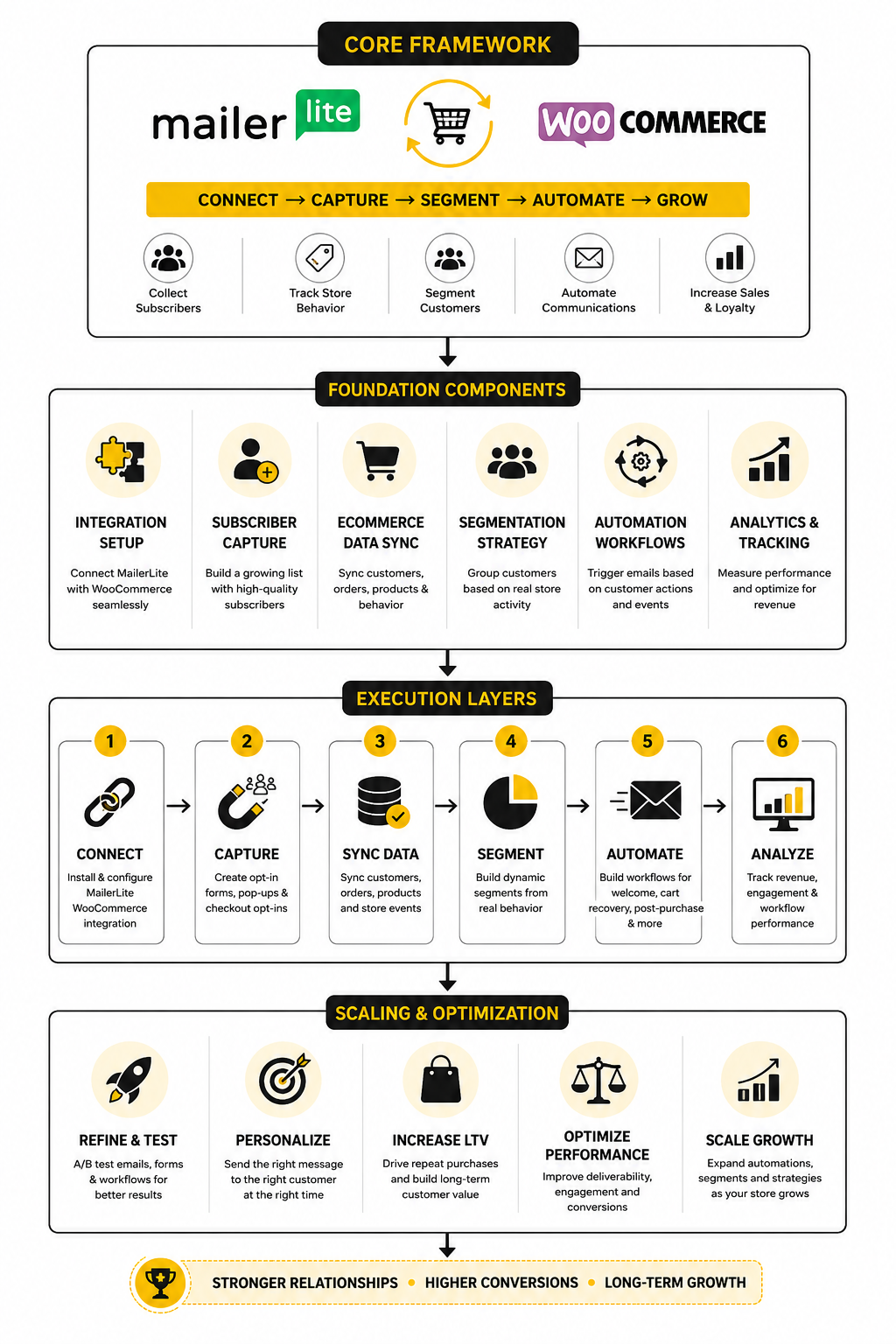
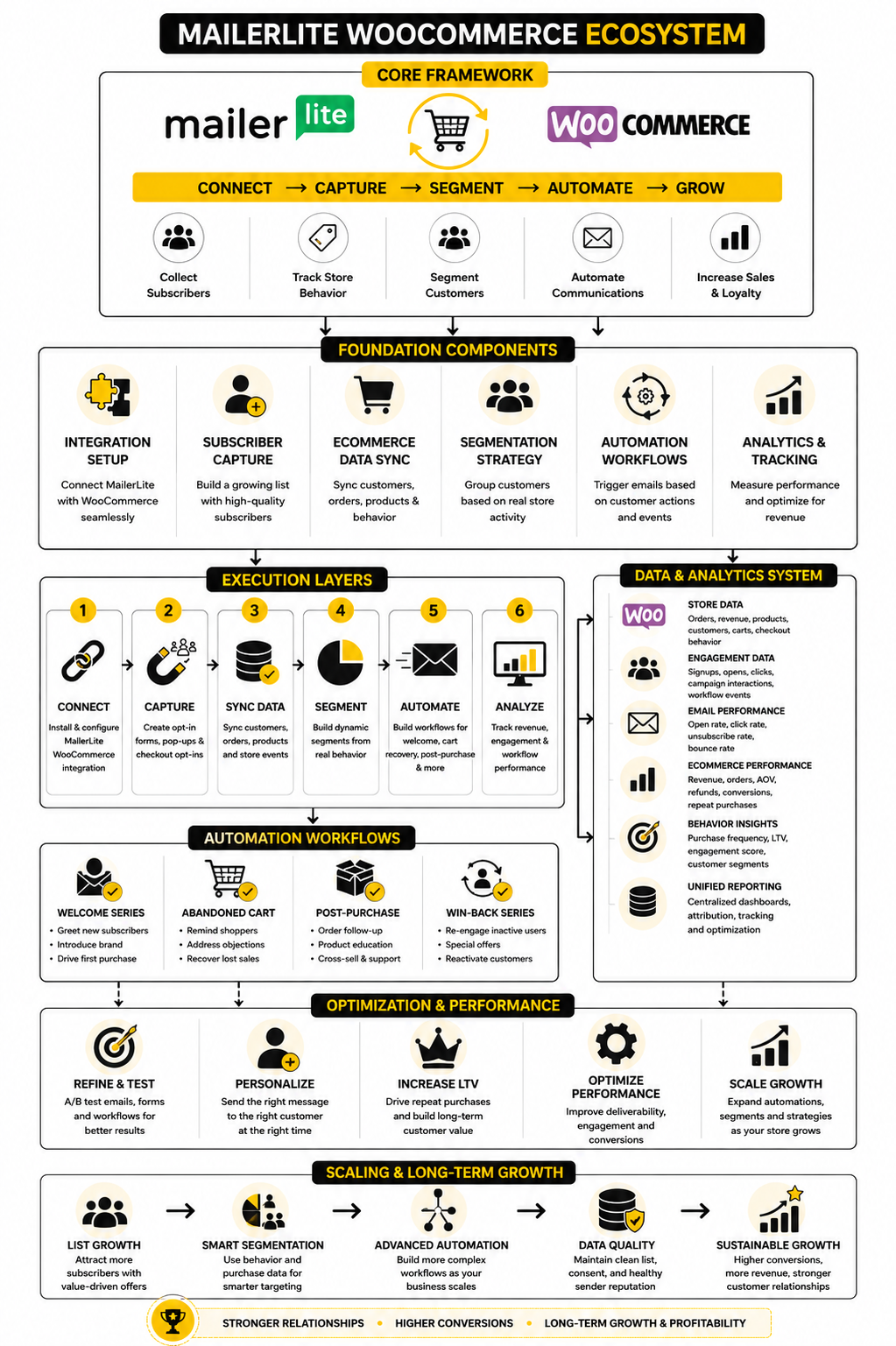
A clean MailerLite WooCommerce setup has four layers: data capture, synchronization, automation, and measurement. Data capture starts when a shopper interacts with your WooCommerce store through forms, checkout consent, cart activity, or purchases. Synchronization moves the useful parts of that behavior into MailerLite, where subscribers, groups, products, orders, and ecommerce events can support better campaigns.
Automation is where the setup starts producing leverage. MailerLite’s own WooCommerce integration page explains that the plugin can sync WooCommerce customers with MailerLite subscribers, import WooCommerce products into campaigns, and enable ecommerce features such as abandoned cart emails and campaign purchase tracking. That gives you the foundation for welcome flows, cart recovery, post-purchase follow-ups, product-specific messages, and win-back campaigns.
Measurement closes the loop. MailerLite’s ecommerce tracking is designed to show when a subscriber clicks from an email and later makes a purchase, so campaign reporting can connect email activity to sales rather than stopping at opens and clicks. That matters because professional ecommerce email is not judged by whether it looks nice; it is judged by whether it moves the right customers toward the next useful action.
Core Components Of The Integration
The first core component is the WooCommerce plugin itself. The official WordPress plugin describes MailerLite WooCommerce as a way to grow a store with automated emails, pop-ups, product blocks, sales tracking, and ecommerce email marketing tools through the MailerLite WooCommerce integration plugin. This is the practical bridge between your WordPress store and your MailerLite account.
The second component is subscriber consent and list quality. In ecommerce, the temptation is to treat every customer email as a marketing contact, but that is risky and usually bad for engagement. For European customers, GDPR rules require clear standards for collecting, storing, and managing personal data, and the EU explains that GDPR applies to organizations handling personal data of people in the EU, even when the organization itself is outside the EU if it targets EU residents through goods or services.
The third component is ecommerce automation triggers. MailerLite supports ecommerce workflow triggers such as abandoned cart and purchase-based automations when an account is integrated with platforms including WooCommerce. These triggers are what turn the integration from a passive sync into an active revenue system.
The fourth component is product and purchase data. When your products can be pulled into email campaigns, your messages become easier to build and more relevant to the shopper. Instead of writing generic promotions, you can create campaigns around actual products, categories, and customer behavior from your store.
Professional Implementation Plan
A professional MailerLite WooCommerce implementation starts with the store goal, not the tool. Before you touch the plugin, decide what the first business outcome should be: list growth, cart recovery, post-purchase retention, repeat orders, product education, or campaign revenue tracking. This keeps the setup focused and prevents you from creating five half-finished automations that never get properly measured.
Next, map the customer journey. A new subscriber, first-time buyer, repeat customer, abandoned cart shopper, and inactive customer all need different messages. MailerLite WooCommerce gives you the data foundation, but you still need to design the journey in a way that respects timing, intent, and buying context.
Then build in stages. Start with the integration, checkout consent, one clean welcome flow, one abandoned cart flow, and purchase tracking. Once those are working, expand into product-specific follow-ups, category-based segmentation, replenishment reminders, VIP customer messaging, and win-back campaigns.
Finally, review the numbers before adding complexity. If abandoned cart emails are getting clicks but not purchases, the issue may be the offer, timing, checkout friction, or product-market fit. If campaigns drive sales but unsubscribes spike, the issue may be frequency or relevance. The best MailerLite WooCommerce systems are not the ones with the most automations; they are the ones where every automation has a clear job.
Automation Workflows That Actually Fit WooCommerce
Once the MailerLite WooCommerce connection is in place, the next step is not to build every automation you can think of. That is how stores end up with messy workflows, overlapping emails, and customers receiving messages that feel disconnected from what they just did. A better approach is to build around the moments where intent is already visible.
The most useful WooCommerce automation moments usually fall into a simple sequence: someone joins the list, someone starts buying, someone almost buys, someone completes a purchase, someone comes back, or someone goes quiet. MailerLite supports ecommerce triggers for stores connected through WooCommerce, including abandoned cart and purchase-based workflows, so you can build automations around real shopping behavior rather than broad assumptions. That is the difference between email marketing that feels timely and email marketing that feels like noise.
Start with the workflows that protect revenue and improve the customer experience. A welcome flow helps new subscribers understand your brand before they are asked to buy. An abandoned cart flow follows up when someone shows clear buying intent but does not complete checkout. A post-purchase flow reassures the customer, answers common questions, and creates the next step without immediately pushing another sale.
The Welcome Flow
The welcome flow is where many WooCommerce stores make their first impression, so it should not be treated like a throwaway confirmation email. A good welcome flow explains why the customer joined, what they can expect from your store, and what makes your products worth trusting. It should feel like a helpful entry point, not a coupon machine.
For MailerLite WooCommerce, the welcome flow usually starts when a subscriber is added to a specific group through a form, checkout opt-in, popup, or embedded signup. Keep this clean from the beginning. If every signup source dumps people into one generic group with no context, your segmentation will become harder later.
The first email should deliver the promised incentive or context quickly. The second email can introduce your best-selling product categories, your brand promise, or your buying guide. The third email can create a clear conversion path, such as visiting a collection, choosing a starter product, or reading a practical product comparison.
The Abandoned Cart Flow
The abandoned cart flow is usually the first revenue workflow to build because it responds to a shopper who already showed intent. MailerLite’s abandoned cart automation uses ecommerce triggers available for integrated stores, including WooCommerce, and lets you choose how long after cart abandonment the workflow should begin. That timing matters because a reminder sent too soon can feel pushy, while a reminder sent too late can miss the buying window.
A simple abandoned cart flow can work with two or three emails. The first email should be a helpful reminder that brings the shopper back to the cart. The second email can handle friction, such as shipping concerns, sizing doubts, product questions, or trust signals. The third email should only use urgency or an incentive when it makes business sense, because discounting every abandoned cart trains customers to wait.
The key is to avoid making the abandoned cart flow sound desperate. The shopper may have been interrupted, comparing options, checking shipping, or simply not ready yet. Your job is to make the return path easy, answer the obvious buying objections, and give them a reason to complete the order without damaging your margins.
The First Purchase Flow
The first purchase flow is not just a thank-you sequence. It is the moment where a subscriber becomes a customer, and the relationship changes. They have trusted your store with money, so the next emails should reduce anxiety, set expectations, and make the customer feel like they made a smart decision.
This flow should begin with reassurance. Confirm what happens next, remind them where to find support, and give them any useful care, setup, usage, or delivery information. If your products require education, this is where that education belongs.
The second part of the flow can introduce complementary products, but only after the first purchase feels supported. For example, a store selling skincare should not instantly push another product before explaining how to use the one the customer just bought. A store selling digital products should make sure the customer can access and use the product before asking for a review or upsell.
The Product-Specific Follow-Up
Product-specific follow-ups are where MailerLite WooCommerce starts to feel much more strategic. MailerLite offers ecommerce workflow templates for customers who purchase a specific product, which means you can move beyond generic post-purchase emails and create messages that match what someone actually bought. That opens the door to better education, better cross-sells, and better retention.
This does not mean every product needs its own automation. That becomes unmanageable fast. Instead, focus on products that need explanation, have strong complementary items, create repeat-purchase opportunities, or represent a key customer segment.
A product-specific flow should answer one practical question: what does this customer need next because they bought this item? Sometimes the answer is a usage guide. Sometimes it is a warranty reminder, a refill reminder, a setup checklist, or a recommendation for a matching product. The workflow should feel like service first and selling second.
The Repeat Purchase Flow
A repeat purchase flow is useful when your products have a natural buying cycle. This could apply to consumables, refills, subscriptions, accessories, seasonal items, or products that are often purchased in sets. The timing should be based on the customer’s likely need, not on your desire to send another campaign.
With MailerLite WooCommerce, you can use purchase behavior and groups to identify buyers who should receive a repeat-purchase message. The stronger your product logic, the stronger this automation becomes. A customer who bought one item once should not always be treated the same as someone who buys the same category every month.
The best repeat purchase emails are practical. They remind the customer before the need becomes urgent, make reordering easy, and reduce the thinking required to buy again. This is where ecommerce email becomes useful instead of annoying.
The Win-Back Flow
The win-back flow is for customers or subscribers who have stopped engaging after showing previous interest. It should not be the first automation you build, but it becomes important once your list has enough history. A growing list is not automatically a healthy list, and inactive subscribers can quietly weaken performance over time.
A good win-back flow starts by defining what inactive actually means for your store. For a fashion store, 90 days without a purchase might be meaningful. For a furniture store, that same window may be completely normal because the buying cycle is longer. The definition needs to match the product category.
The message should be direct and useful. Remind the customer what is new, offer a reason to come back, and give them a clear path to update preferences or leave if they are no longer interested. That sounds counterintuitive, but keeping uninterested people on your list is not a growth strategy.
Segmentation, Tracking, And Optimization
Segmentation is where MailerLite WooCommerce becomes more than a basic email setup. Without segmentation, every subscriber receives the same campaigns regardless of what they bought, what they browsed, or how recently they engaged. With segmentation, your emails can match customer intent much more closely.
The simplest segmentation model starts with buyer status. Separate subscribers who have never purchased, first-time buyers, repeat buyers, high-value customers, and inactive customers. These groups do not need to be complicated to be useful. Even basic buyer segmentation can improve how relevant your campaigns feel.
From there, add product and category behavior. MailerLite supports ecommerce triggers such as buying from a category, so you can build workflows and groups around the type of product a customer actually purchased. That gives you a cleaner way to promote related products without sending every campaign to everyone.
Segments Worth Building First
Do not overbuild your segments on day one. Too many store owners create a complex tagging system before they have enough traffic, orders, or campaigns to justify it. Start with segments that clearly affect what you send.
Useful starter segments include:
Each segment should have a job. If you cannot explain how a segment will change the email someone receives, you probably do not need it yet. Segmentation is not about looking sophisticated inside your email platform; it is about making better decisions.
Tracking What Actually Matters
Tracking should focus on business outcomes, not vanity metrics. Opens can be useful as a rough signal, but they are not enough to judge ecommerce email performance. Clicks, orders, revenue, conversion rate, unsubscribe rate, spam complaints, and revenue per recipient are more useful when deciding what to improve.
MailerLite’s ecommerce tracking is designed to connect campaign clicks with purchases, so WooCommerce store owners can see more than engagement. That is important because a campaign with fewer clicks can still be more valuable if those clicks come from the right buyers. The goal is not always more traffic; it is better qualified traffic.
Look at performance by workflow, not only by individual email. An abandoned cart flow should be judged by recovered orders and revenue, not just the subject line of email one. A post-purchase flow should be judged by customer support reduction, repeat purchases, review collection, or product education outcomes, depending on its purpose.
Optimization Without Overcomplicating Everything
Optimization should be boring in the best way. You identify one weak point, make one change, and measure the result. Changing subject lines, timing, offers, copy, design, and segmentation all at once only makes it harder to know what worked.
Start with timing. If an abandoned cart email is underperforming, test when it sends before rewriting the entire sequence. If a post-purchase email gets clicks but no action, check whether the call to action is clear and whether the customer is being asked to do the right thing at the right moment.
Then look at message fit. A subscriber who joined for education may need a buying guide before a promotion. A repeat customer may not need brand trust proof anymore, but they may respond well to early access, bundles, or category recommendations. Good optimization is not about clever tricks; it is about removing friction between customer intent and the next useful action.
Professional Implementation Plan
A solid MailerLite WooCommerce setup should feel boring at first. That is a good thing. The goal is not to create a complicated machine on day one; the goal is to connect the store, sync the right data, protect consent, and build a clean foundation that you can trust before adding more automations.
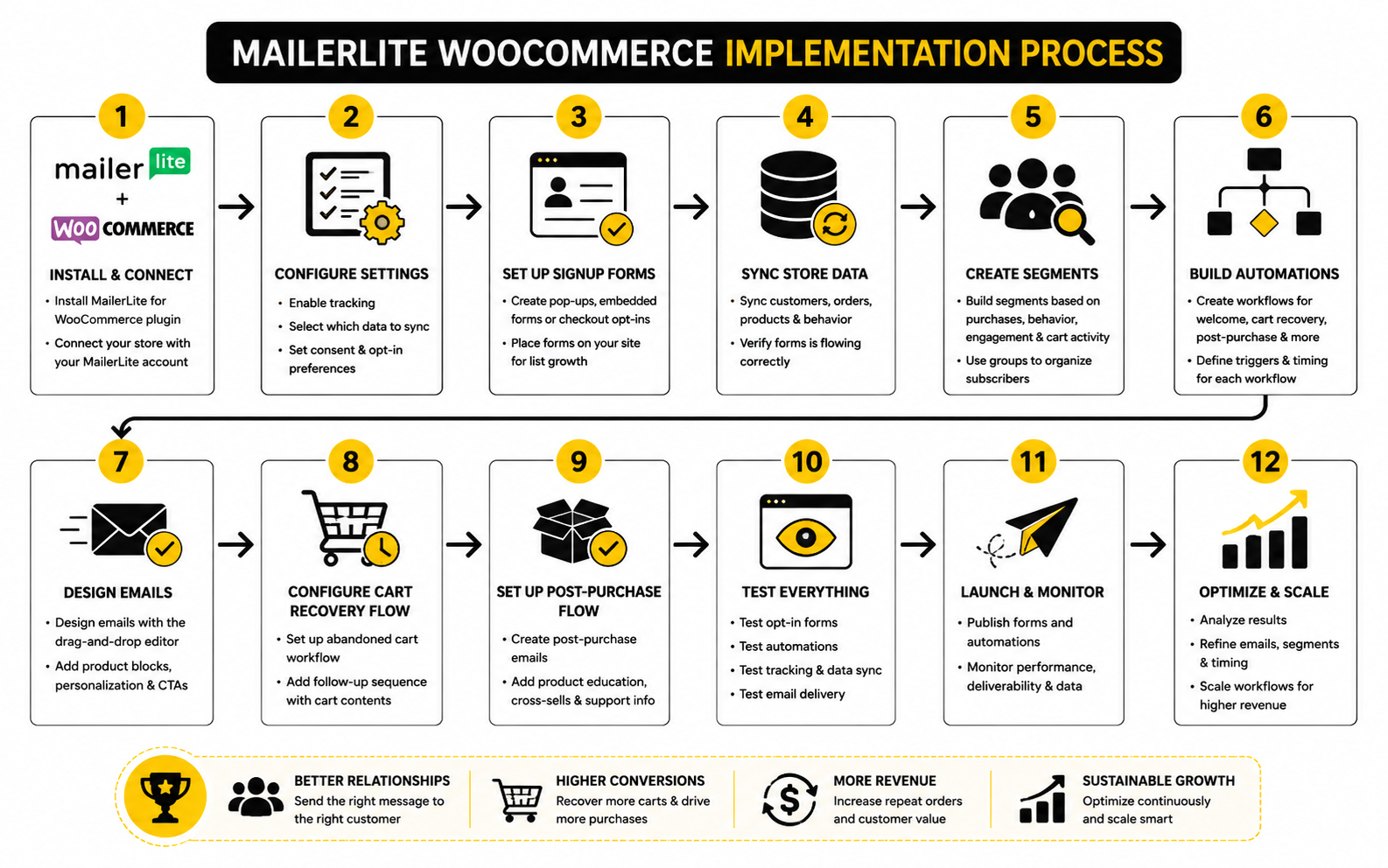
The process below keeps the implementation practical. It follows the way the integration is designed to work: install the plugin, connect MailerLite with an API token, choose the right subscriber group, import existing data, confirm consent behavior, then build automations from real ecommerce triggers. If you skip the early checks, you can still make emails look good, but the system underneath will be shaky.
Step 1: Prepare Your WooCommerce Store
Before connecting anything, make sure WooCommerce itself is clean. Your products, categories, checkout settings, transactional emails, and customer data should be in reasonable shape before you start syncing that data into MailerLite. If your product categories are messy, your segmentation will be messy too.
WooCommerce has its own built-in email settings for operational messages like new orders, cancelled orders, failed orders, customer invoices, completed orders, refunds, and account emails. Those transactional emails live inside WooCommerce, while MailerLite is better used for marketing emails, automations, newsletters, cart recovery, and purchase-based follow-ups. Keeping that distinction clear prevents you from accidentally trying to replace essential store notifications with marketing campaigns.
Also check your checkout experience before adding an email marketing layer. The MailerLite WooCommerce integration depends on shoppers entering an email address and giving marketing permission where required. If the checkout page is confusing, slow, or unclear about consent, the automation setup will not fix that problem.
Step 2: Install The MailerLite WooCommerce Plugin
The official MailerLite setup process starts inside WordPress. Go to your WordPress dashboard, open Plugins, choose Add Plugin, search for the WooCommerce MailerLite plugin, then install and activate it. MailerLite’s setup guide explains that after activation, you can find the integration settings from the WooCommerce area in your WordPress dashboard.
Use the official plugin rather than a random connector unless you have a very specific reason not to. The official MailerLite WooCommerce plugin is built for the core use case: syncing WooCommerce customers with MailerLite subscribers and enabling ecommerce email features. That gives you a cleaner starting point than trying to stitch everything together manually.
After activation, do not rush straight into automations. First, confirm that the plugin is visible, the store is healthy, and no caching, security, or WordPress permission issue is blocking the integration settings. It is much easier to fix connection problems now than after you have already built workflows around bad assumptions.
Step 3: Create And Connect Your API Token
MailerLite connects to WooCommerce through an API token. In MailerLite, go to Integrations, find the MailerLite API section, generate a new token, give it a clear name such as WooCommerce, then copy it into the MailerLite settings inside WooCommerce. MailerLite’s own WooCommerce setup guide describes this token-based connection as the step that links your store to your MailerLite account.
Use a specific token name so you can manage access later. “WooCommerce” is better than a vague label like “API key” because it tells you exactly what the token is for. This becomes useful if you ever need to rotate access, troubleshoot the integration, or disconnect a store.
Once the token is pasted into WooCommerce, connect the account and confirm the connection before moving forward. Do not assume it worked because the page saved successfully. The practical test is whether WooCommerce can communicate with MailerLite, display the available group options, and start the import process without errors.
Step 4: Choose The Right MailerLite Group
MailerLite asks you to select the group where WooCommerce customers will be added after they make a purchase and subscribe to your newsletter. This is not a throwaway setting. The group you choose becomes one of the main starting points for your ecommerce segmentation.
Create a dedicated group for WooCommerce subscribers instead of mixing them with every other lead source. A clean name such as WooCommerce Customers, Store Subscribers, or WooCommerce Marketing Opt-ins makes the account easier to manage. You can still build additional groups and segments later, but the first sync should be obvious.
Be careful with existing customers. MailerLite notes that existing MailerLite subscribers can have purchase data synced, while WooCommerce customers who are not already MailerLite subscribers will not be synced unless they accept marketing emails. That is exactly why consent and group planning matter before you press import.
Step 5: Import And Verify Customer Data
After choosing the group, start the import and give the system time to sync. The point of this step is not just to move names and emails across. The point is to confirm that MailerLite can understand the ecommerce relationship between subscribers, products, orders, and purchase behavior.
Check a few real customer records after the import. Look for whether subscribers appear in the expected group, whether purchase data is visible, and whether the ecommerce connection is reflected in MailerLite’s subscriber or segment views. If the data looks wrong here, do not build automations yet.
This is also where you should check for duplicates and old list hygiene problems. If your WooCommerce customer list includes outdated emails, test orders, admin purchases, or imported records from years ago, you may need to clean the list before using it for campaigns. A messy import can turn into messy targeting very quickly.
Step 6: Confirm Marketing Consent At Checkout
Consent is one of the most important implementation details because it affects who can enter marketing workflows. MailerLite’s abandoned cart guidance is clear that shoppers need to give permission to receive marketing communications for abandoned cart emails, and that an Accept Marketing checkbox should be visible during checkout. If the checkbox is missing or left unchecked, the shopper cannot be added to that abandoned cart workflow.
This is not just a technical checkbox. It is a trust point. The customer should understand what they are signing up for, and the language should be clear enough that consent is meaningful rather than hidden inside vague checkout copy.
For stores selling into regions with strict privacy rules, review your checkout wording, privacy policy, and email consent process with proper legal guidance. The operational rule is simple: do not build your email revenue system on unclear permission. It may create short-term list growth, but it creates long-term risk and weaker engagement.
Step 7: Enable Ecommerce Tracking And Product Usage
Once the connection is working, confirm that ecommerce features are available in MailerLite. The WooCommerce integration supports campaign sales tracking, product importing into the drag-and-drop email builder, and purchase-based automation. These are the features that make the integration more valuable than a basic newsletter signup form.
Product importing is especially useful for campaign creation. Instead of manually copying product names, images, prices, and links into every email, you can use store product data directly inside MailerLite campaigns. That reduces manual work and helps keep campaigns aligned with the actual store catalog.
Campaign sales tracking is equally important because it connects email activity to ecommerce outcomes. MailerLite’s WooCommerce feature overview explains that ecommerce performance, orders, revenue, and conversions can be reviewed inside the ecommerce side of automation reporting. That means your decisions can be based on sales behavior, not only clicks.
Step 8: Build Your First Workflow Carefully
Your first workflow should prove that the system works. Do not start with a complex branching journey. Start with one automation that has a clear trigger, a clear audience, and a clear outcome.
For most stores, the best first workflow is either an abandoned cart email or a post-purchase email. MailerLite’s abandoned cart setup uses the ecommerce trigger inside the workflow editor, lets you choose the delay after cart abandonment, and automatically includes an abandoned cart block in the drag-and-drop editor. That gives you a practical test of both the integration and the customer experience.
A simple first workflow might look like this:
That last review step matters. MailerLite checks cart status before each step in an abandoned cart sequence, and shoppers should not keep receiving recovery emails after the cart is recovered. This is the kind of operational detail that keeps your automation from annoying customers.
Step 9: Add Purchase-Based Workflows
After the first workflow is stable, move into purchase-based automation. MailerLite supports ecommerce triggers for buying any product, buying a specific product, and buying from a category. That gives you enough flexibility to create useful follow-ups without overcomplicating your account.
Use “buys any product” for broad post-purchase support. Use “buys specific product” when a product needs dedicated onboarding, usage instructions, review requests, or a matching offer. Use “buys from category” when the category tells you something meaningful about the customer’s interest.
This is where MailerLite WooCommerce becomes more strategic. You are no longer sending emails based only on signup source. You are responding to what the customer actually bought, which makes the message naturally more relevant.
Step 10: Test Before You Scale
Testing is not optional. Place a test order, abandon a test cart, subscribe through checkout, unsubscribe, and check what happens inside both WooCommerce and MailerLite. You want to see the whole path with your own eyes before real customers move through it at scale.
Test the basics first:
Once those checks pass, you can expand. Add more emails, introduce conditions, split customers by product category, or create separate paths for first-time and repeat buyers. But earn that complexity by proving the foundation first.
Statistics And Data
MailerLite WooCommerce data is only useful when it helps you make better decisions. Random numbers do not improve a store. The point of measurement is to understand where customers are paying attention, where they are hesitating, where revenue is being created, and where your email system is quietly leaking opportunity.
The first rule is simple: do not judge ecommerce email by one metric. Opens, clicks, carts, orders, revenue, unsubscribes, and repeat purchases all tell different parts of the story. A campaign with a high open rate can still be weak if nobody buys, and a campaign with a modest click rate can still be valuable if the people clicking are serious buyers.
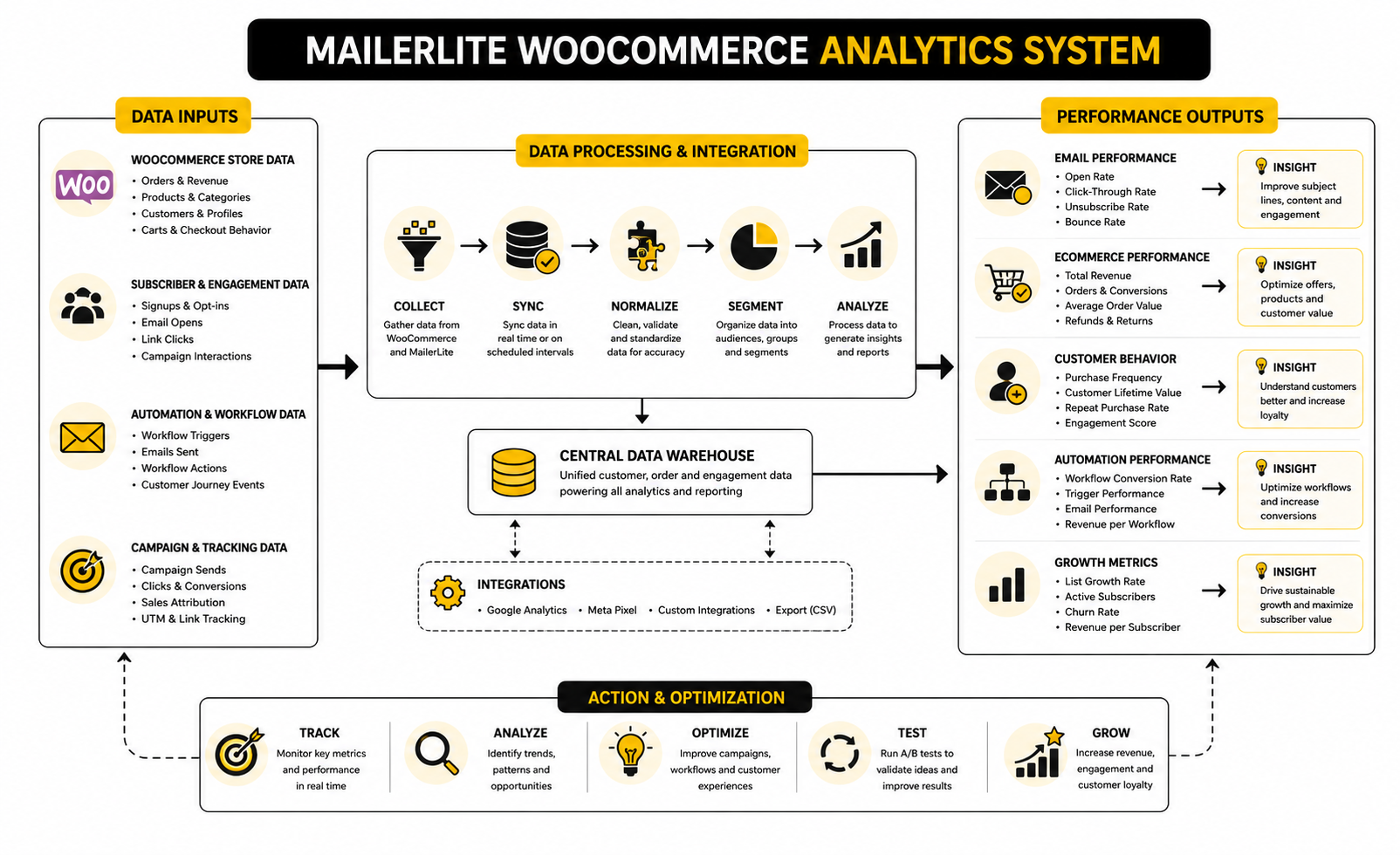
For MailerLite WooCommerce, the cleanest measurement approach is to compare email performance against store behavior. MailerLite can track purchases from campaigns when a subscriber clicks through and buys, while WooCommerce Analytics gives you store-level reports for revenue, orders, products, categories, coupons, taxes, downloads, stock, and customers through its analytics and sales reporting tools. When both sides are reviewed together, you stop treating email as a separate channel and start seeing how it influences the store.
The Metrics That Actually Matter
Open rate is useful, but it should not be the main success metric for a WooCommerce store. MailerLite’s 2025 email statistics report lists a global average open rate of 42.35% across analyzed campaigns, but open tracking can be affected by privacy features, image loading, inbox behavior, and subscriber habits. Treat opens as a visibility signal, not proof that your email made money.
Click rate is more useful because it shows that a subscriber took action. MailerLite’s same benchmark report lists a global average click rate of 2% across analyzed campaigns, while its 2026 benchmark data places ecommerce specifically at a 32.67% open rate and 1.07% click rate. Those numbers are helpful as a reference point, but they are not your target forever.
Revenue is the metric that keeps the conversation honest. If a campaign drives clicks but no purchases, the issue might be the offer, landing page, product page, price, shipping, or checkout. If a campaign drives purchases but also causes high unsubscribes, the issue might be pressure, frequency, list quality, or a mismatch between the promise and the product.
How To Read MailerLite Ecommerce Tracking
MailerLite ecommerce tracking exists to connect email activity to purchase behavior. When a subscriber opens or clicks an email, visits your store, and completes a purchase, that purchase can be recorded in the campaign report through MailerLite ecommerce tracking. This is what turns campaign reporting from “people clicked” into “people clicked and bought.”
That distinction matters because clicks alone can be misleading. A product announcement may get many curious clicks from people who never intended to buy. A smaller segmented campaign may get fewer clicks but produce stronger revenue because it reaches customers with higher purchase intent.
Use ecommerce tracking to answer practical questions. Which campaigns generate orders? Which automations recover revenue? Which products convert after email clicks? Which segments buy, and which only browse? Those answers should shape your next campaign more than personal preference or design taste.
How To Read WooCommerce Analytics Alongside Email Data
WooCommerce Analytics gives you the store-side view that MailerLite cannot fully replace. Revenue, orders, refunds, product performance, category performance, coupon usage, customer behavior, and stock movement all matter when judging email results. If your email report looks strong but WooCommerce revenue is flat, you need to look deeper before celebrating.
The Revenue Report in WooCommerce can compare date ranges against a previous period or previous year, which helps you avoid overreacting to one good or bad send. A strong campaign during a naturally busy sales week is not the same as a campaign that lifts revenue during a slow period. Context matters.
The Orders Report is also important because it shows what actually happened after customers bought. A campaign that generates many small orders may be useful for clearing inventory, but a campaign that increases average order value may be more valuable for profit. Do not only ask, “Did this email make sales?” Ask, “What kind of sales did it create?”
Benchmarks Are Starting Points, Not Strategy
Benchmarks are useful when you need orientation, but dangerous when you treat them like universal rules. Ecommerce email performance varies by product type, price point, purchase cycle, customer trust, discount strategy, deliverability, and list quality. A store selling low-cost consumables should not measure itself the same way as a store selling expensive furniture.
Cart abandonment is a good example. Baymard’s research places the average documented online shopping cart abandonment rate at 70.22% across 50 studies, which confirms that cart recovery is a major opportunity for most stores. But the number does not tell you why your shoppers abandon.
For one store, the problem may be unexpected shipping costs. For another, it may be slow checkout, lack of payment options, weak product information, poor mobile experience, or simple comparison shopping. The benchmark tells you the issue is common. Your own MailerLite WooCommerce data tells you where to act.
The Abandoned Cart Numbers To Watch
An abandoned cart flow should be measured differently from a newsletter. The goal is not broad engagement. The goal is to recover shoppers who already showed buying intent.
Track these signals:
The strongest signal is recovered revenue, but the supporting metrics explain why revenue is high or low. If many people enter the workflow but few click, the email may not be compelling enough. If many click but few buy, the problem is probably not the email; it may be the cart, checkout, price, shipping, product page, or trust layer.
The Campaign Numbers To Watch
Campaigns need a slightly different measurement lens because they often reach broader audiences. A product launch, seasonal offer, educational newsletter, or category promotion can all have different goals. Do not judge them with one generic success formula.
For promotional campaigns, measure revenue per recipient, click-to-purchase behavior, average order value, and unsubscribe rate. For educational campaigns, measure clicks to key content, later purchase behavior, and engagement from non-buyers. For retention campaigns, measure repeat purchases, category expansion, and customer value over time.
This is where segmentation pays off. A campaign sent to 1,000 highly relevant subscribers can outperform a campaign sent to 20,000 poorly matched subscribers. Bigger is not always better. More relevant usually is.
The Automation Numbers To Watch
Automations should be measured as systems, not isolated emails. A welcome flow might have three emails, but the real question is whether new subscribers move closer to purchase. A post-purchase flow might not produce immediate revenue, but it can reduce confusion, support tickets, refund risk, or buyer hesitation before the next order.
Track automation performance by workflow objective. For a welcome flow, look at first purchase rate, time to first purchase, and subscriber engagement. For a post-purchase flow, look at repeat purchase rate, review clicks, support-related clicks, and product education engagement. For a win-back flow, look at reactivation, unsubscribes, and whether inactive contacts should be cleaned from the list.
MailerLite WooCommerce workflows are not meant to be decorative. Every automation should have a job, and every job should have a measurement point. If you cannot name the metric that proves a workflow is working, the workflow is probably not defined clearly enough.
What Good Data Should Make You Do
Good measurement should lead to action. If click rates are weak, improve the offer, subject-to-content match, segmentation, or call to action. If clicks are strong but purchases are weak, inspect the product page, checkout, shipping, trust signals, and mobile experience.
If unsubscribes spike after promotional campaigns, reduce frequency or improve targeting. If abandoned cart emails recover orders but only when discounts are included, test value-based messaging before training customers to wait for coupons. If post-purchase emails get strong engagement, use that attention to educate, cross-sell carefully, or invite customers into a loyalty path.
The best analytics habit is to review results on a simple rhythm. Weekly, check active automations and obvious problems. Monthly, compare campaigns, segments, and revenue trends. Quarterly, clean up weak workflows, inactive segments, and assumptions that no longer match how customers actually buy.
Advanced Considerations Before You Scale
Once the basic MailerLite WooCommerce setup is working, the next challenge is control. More subscribers, more orders, more automations, and more campaigns create more opportunities, but they also create more ways to confuse customers or pollute your data. Scaling email is not just about sending more; it is about sending with cleaner logic.
This is where many store owners get careless. They install the integration, launch a welcome flow, add abandoned cart emails, create a few product follow-ups, and then keep stacking workflows without asking whether the system still makes sense. That is how a customer can receive a cart reminder, a newsletter, a post-purchase message, and a discount campaign in the same short window.
A mature MailerLite WooCommerce system needs rules. Not heavy corporate rules, but practical operating rules that protect customer experience, deliverability, margin, and reporting quality. The more your store grows, the more these rules matter.
Build Suppression Logic Before You Add More Emails
Suppression logic decides who should not receive a message. It is not as exciting as a clever subject line, but it is one of the most important parts of ecommerce email. Without suppression, your automations can accidentally compete with each other.
A customer who just purchased should usually be protected from immediate abandoned cart messaging, aggressive promos, or irrelevant first-buyer campaigns. A subscriber already inside a win-back sequence may not need the same broad newsletter cadence as an active buyer. A customer who recently complained, refunded, or unsubscribed should not be treated like a standard campaign recipient.
MailerLite WooCommerce gives you purchase and group data that can support this logic, but you still need to design it intentionally. Use groups and segments to exclude recent buyers from certain campaigns, separate active customers from inactive subscribers, and prevent product-specific automations from overlapping with unrelated messages. The goal is simple: make the email experience feel coordinated, not chaotic.
Protect Your Sending Reputation
Deliverability becomes more important as your list grows. Google’s sender guidelines require bulk senders to authenticate email, support easy unsubscribe, and keep complaint rates low, with Google specifically noting that senders should keep spam rates reported in Postmaster Tools below 0.10% and avoid reaching 0.30% or higher. Yahoo’s sender guidance also emphasizes authentication, low complaint rates, and easy unsubscribe as core requirements for reaching inboxes.
This matters because ecommerce brands often become too promotional too quickly. They see email revenue, increase frequency, and then wonder why engagement drops. The inbox is not a free billboard; it is a trust channel.
Set up domain authentication properly, keep your list clean, and remove people who consistently ignore your emails. You do not need to panic-clean the list every week, but you do need a process. A smaller engaged list is usually more valuable than a bloated list that slowly damages your sender reputation.
Be Careful With Discounts
Discounts work, but they also teach behavior. If every abandoned cart flow ends with a discount, some customers will learn to abandon carts on purpose. If every campaign is a sale, your full-price positioning gets weaker.
The more carefully approach is to use discounts selectively. Start abandoned cart recovery with helpful reminders, product reassurance, shipping clarity, reviews, or support access before reaching for a coupon. If a discount is needed, decide whether it should apply to all shoppers, first-time buyers only, high-margin products only, or carts above a certain value.
This is especially important for WooCommerce stores with tight margins. Revenue can look strong while profit quietly suffers. MailerLite WooCommerce tracking can show campaign sales, but you still need to judge those sales against product margin, fulfillment cost, refunds, and customer quality.
Segment By Buying Intent, Not Just Demographics
Basic demographic segmentation can be useful, but ecommerce email usually gets stronger when it follows buying intent. Someone who repeatedly clicks a product category is showing more useful behavior than someone who simply fits a broad profile. Someone who purchased twice in the same category is more valuable than someone who opened five newsletters but never bought.
Start with behavior-based segments. Group subscribers by purchase status, product category, order frequency, average order value, campaign clicks, and recency of engagement. WooCommerce Analytics includes customer-level reporting that helps you understand customer location, registration timing, and spending behavior through its Customers Report, while MailerLite can use ecommerce activity to support campaign and workflow decisions.
The practical question is always the same: what does this behavior tell you about what the customer needs next? If a segment does not change the next message, offer, or timing, it is probably not worth maintaining. Good segmentation makes action clearer.
Use Store Data To Improve The Offer, Not Just The Email
A weak campaign is not always an email problem. Sometimes the product page is unclear. Sometimes shipping costs appear too late. Sometimes the offer is not strong enough. Sometimes mobile checkout is doing the damage.
This is why MailerLite and WooCommerce analytics need to be read together. WooCommerce’s analytics tools include reports for revenue, orders, products, variations, categories, coupons, taxes, downloads, stock, and customers, with filtering, segmentation, CSV downloads, and a customizable dashboard through WooCommerce Analytics. That store-side context helps you avoid blaming email for problems that happen after the click.
If email clicks are healthy but purchases are weak, inspect the landing page, product detail page, payment options, checkout speed, and shipping presentation. If purchases happen but refunds rise, inspect product expectations and post-purchase education. If repeat purchases are weak, inspect product lifecycle, follow-up timing, replenishment logic, and customer satisfaction.
Plan For Plugin And Platform Changes
WooCommerce stores are living systems. WordPress, WooCommerce, themes, checkout extensions, payment gateways, caching plugins, privacy tools, and email integrations all change over time. A MailerLite WooCommerce setup that works today still needs periodic checks after updates.
This is especially true when stores use advanced WooCommerce features or custom checkout flows. The official MailerLite WooCommerce plugin is listed on WordPress.org as supporting ecommerce email marketing features like automated emails, pop-ups, product blocks, sales tracking, and more through the MailerLite WooCommerce integration. But your specific stack may include custom code or plugins that affect checkout behavior, opt-in placement, cart tracking, or order status handling.
Create a simple post-update test routine. After major WordPress, WooCommerce, theme, checkout, or plugin updates, test a signup, a cart abandonment, a purchase, a subscription status change, and an unsubscribe. That one habit can save you from silently broken automations.
Avoid Automation Sprawl
Automation sprawl happens when every new idea becomes a new workflow. At first, it feels productive. Later, it becomes hard to know which email a customer receives, why they receive it, and whether it still performs.
A cleaner approach is to review automations by purpose. Keep workflows that clearly support acquisition, conversion, retention, replenishment, reactivation, or customer education. Merge workflows that overlap. Retire workflows that no longer match the product catalog, customer journey, or current offer strategy.
Every automation should have an owner, a goal, and a review rhythm. That may sound excessive for a small store, but it is not. If an automation is sending messages to customers, it is part of the customer experience and deserves maintenance.
Know When MailerLite Is Enough And When You Need More
MailerLite WooCommerce is a strong fit for many stores that need clean email marketing, automations, product blocks, ecommerce tracking, abandoned cart workflows, and practical segmentation without unnecessary complexity. For a lean ecommerce business, that can be exactly the right level of power. Simple systems often get executed better than bloated ones.
But there are tradeoffs. If your store needs highly complex multi-channel attribution, deep predictive modeling, advanced SMS orchestration, custom warehouse logic, or enterprise-level lifecycle analytics, you may eventually need additional tools around the core email setup. That does not mean you should jump to a heavier platform too early.
The right question is not “what is the most advanced tool?” The right question is “what is the simplest system that lets us act on the data we already have?” For many WooCommerce stores, MailerLite is enough until the strategy becomes more complex than the tool can reasonably support.
Keep The Customer Experience Human
Advanced email marketing can become strangely robotic. More triggers, more branches, more conditions, more tags, and suddenly the customer feels like they are being processed by a machine. That is the opposite of what good ecommerce email should do.
Use automation to be more relevant, not more intrusive. Use segmentation to reduce noise, not to manipulate every click. Use purchase data to help customers choose better, reorder faster, and feel more confident after buying.
This is the standard that keeps the whole system grounded. If the MailerLite WooCommerce integration helps you send messages that feel timely, useful, and commercially clear, it is doing its job. If it helps you send more emails that customers did not ask for and do not need, the system needs tightening.
Final System Checklist
At this point, MailerLite WooCommerce should not feel like a plugin anymore. It should feel like a customer communication system connected to your store data. The technical setup matters, but the bigger win is having a structure that helps the right shopper receive the right message at the right moment.
Before you treat the system as finished, review it from the customer’s point of view. A new subscriber should understand why they joined. A cart abandoner should get a useful reminder, not pressure. A new buyer should feel supported, and a repeat customer should not be treated like a stranger.
The final version should be simple enough to manage and strong enough to grow. That means clear groups, clean consent, tested workflows, ecommerce tracking, useful reporting, and a regular review rhythm. If those pieces are in place, the integration can support serious email revenue without turning your WooCommerce store into a messy automation maze.
The Practical MailerLite WooCommerce Closeout
A strong setup has five moving parts working together. WooCommerce captures the store behavior. MailerLite organizes the subscriber and campaign layer. Automations respond to customer actions. Analytics show what is working. Your review process keeps the system clean over time.
The mistake is thinking the work ends when the plugin connects. That is only the start. The real advantage comes from improving the system every month based on customer behavior, not guesses.
Keep the system focused on business outcomes. Recover carts. Convert new subscribers. Support first-time buyers. Increase repeat purchases. Clean up inactive contacts. Those are the jobs that matter.
What Is MailerLite WooCommerce?
MailerLite WooCommerce is the integration between a WooCommerce store and a MailerLite email marketing account. It lets store owners connect customer, product, purchase, and cart behavior to email campaigns and automations. The goal is to make email marketing more relevant by using real store activity instead of sending the same message to everyone.
Is MailerLite Good For WooCommerce Stores?
MailerLite can be a good fit for WooCommerce stores that want email campaigns, ecommerce automations, abandoned cart emails, product blocks, and sales tracking without building an overly complex marketing stack. It is especially useful for small and mid-sized ecommerce businesses that want practical automation without enterprise-level complexity. The best fit is a store that values clean execution over having every advanced feature possible.
Does MailerLite Work With Abandoned Carts In WooCommerce?
Yes, MailerLite supports abandoned cart workflows for WooCommerce when the ecommerce integration is connected correctly. The workflow can trigger after a shopper abandons a cart and can include a cart block that pulls in the abandoned items. The important detail is consent, because shoppers generally need to accept marketing communications before they can receive marketing-based cart recovery emails.
Can MailerLite Track WooCommerce Sales From Email Campaigns?
Yes, MailerLite can track ecommerce purchases connected to email campaign activity when the integration and tracking are set up properly. This helps store owners see which campaigns and automations contribute to orders and revenue. It is still smart to compare MailerLite reporting with WooCommerce Analytics so you understand both email performance and store-level performance.
Do I Need A Separate Transactional Email Tool?
Not always. WooCommerce already handles core transactional emails such as order confirmations, completed order notices, refunds, and account-related emails. MailerLite should usually handle marketing emails, newsletters, automated lifecycle messages, cart recovery, and product follow-ups rather than replacing essential WooCommerce transaction notifications.
What Should I Build First After Connecting MailerLite To WooCommerce?
Start with the essentials. Build a clean welcome flow, an abandoned cart flow, and a basic post-purchase flow before adding advanced segmentation or complex branching. These workflows cover the most important customer moments: joining, almost buying, and buying.
How Many Emails Should An Abandoned Cart Flow Have?
A simple abandoned cart flow usually works best with two or three emails. The first email should remind the shopper and make returning to the cart easy. The second can address friction such as shipping, trust, product details, or questions. A third email can add urgency or an incentive, but only when it protects your margins and does not train shoppers to wait for discounts.
Should Every WooCommerce Product Have Its Own Email Automation?
No. That becomes difficult to manage and usually creates automation sprawl. Create product-specific automations only for products that need education, have strong complementary items, create repeat purchase opportunities, or represent a major customer segment. For everything else, category-based or purchase-status workflows are often cleaner.
How Should I Segment WooCommerce Customers In MailerLite?
Start with simple commercial segments. Separate new subscribers, non-buyers, first-time buyers, repeat customers, category buyers, cart abandoners, inactive customers, and engaged subscribers who have not purchased. The key is not the number of segments; the key is whether each segment changes what you send.
What Metrics Matter Most For MailerLite WooCommerce?
The most useful metrics are clicks, recovered carts, orders, revenue, revenue per recipient, repeat purchase behavior, unsubscribes, complaints, and workflow conversion. Open rates can still be useful, but they should not be the main measure of success. Ecommerce email should be judged by the quality of action it creates, not only by how many people saw the subject line.
Why Are My MailerLite WooCommerce Emails Getting Clicks But Not Sales?
That usually means the email created interest, but something after the click created friction. Check the product page, checkout flow, mobile experience, shipping costs, payment options, delivery expectations, trust signals, and offer clarity. Do not rewrite the whole email sequence before checking whether the store experience is blocking the sale.
How Often Should I Review My MailerLite WooCommerce Setup?
Review active automations weekly for obvious problems and review campaign and revenue performance monthly. A deeper quarterly review is useful for cleaning segments, retiring weak workflows, checking deliverability, and updating automations based on new products or customer behavior. The system should evolve as the store changes.
Can MailerLite WooCommerce Replace A Full CRM?
For many WooCommerce stores, MailerLite can cover the email marketing and lifecycle automation layer well. It is not always a full replacement for a CRM, especially if you need sales pipeline management, complex account histories, custom sales processes, or multi-channel customer support workflows. Use MailerLite for email-driven ecommerce communication, and only add a CRM when the business process actually requires it.
Is MailerLite WooCommerce Enough For Scaling Stores?
It can be enough for many growing stores, especially when the strategy is clear and the workflows are well maintained. The limits usually appear when a business needs deeper attribution, advanced predictive analytics, complex multi-channel orchestration, or highly customized customer logic. Do not upgrade tools just to feel advanced; upgrade when the current system clearly blocks the next stage of growth.
What Is The Biggest Mistake With MailerLite WooCommerce?
The biggest mistake is connecting the plugin and assuming the strategy is done. The integration gives you the data path, but it does not decide your customer journey, consent rules, segmentation, message timing, offer strategy, or review process. The stores that win are the ones that treat MailerLite WooCommerce as a living system, not a one-time setup.
Build a stronger local presence with BAAM AI
Turn your website, Google profile, social channels, and AI visibility into one growth engine
Most businesses do not need more random marketing activity. They need a consistent presence system that helps the right people find them, trust them, and take action. BAAM AI brings strategy, local SEO, website updates, Google Maps visibility, social content, AI-search readiness, media production, and reporting into one practical monthly engine.
If you want your marketing to keep working after the campaign ends, start with a free BAAM AI presence audit. See how your business shows up today and where the fastest visibility wins are at BAAM AI.