
BAAM AI Blog
MailerLite Plans: How To Pick The Right Tier Without Overpaying
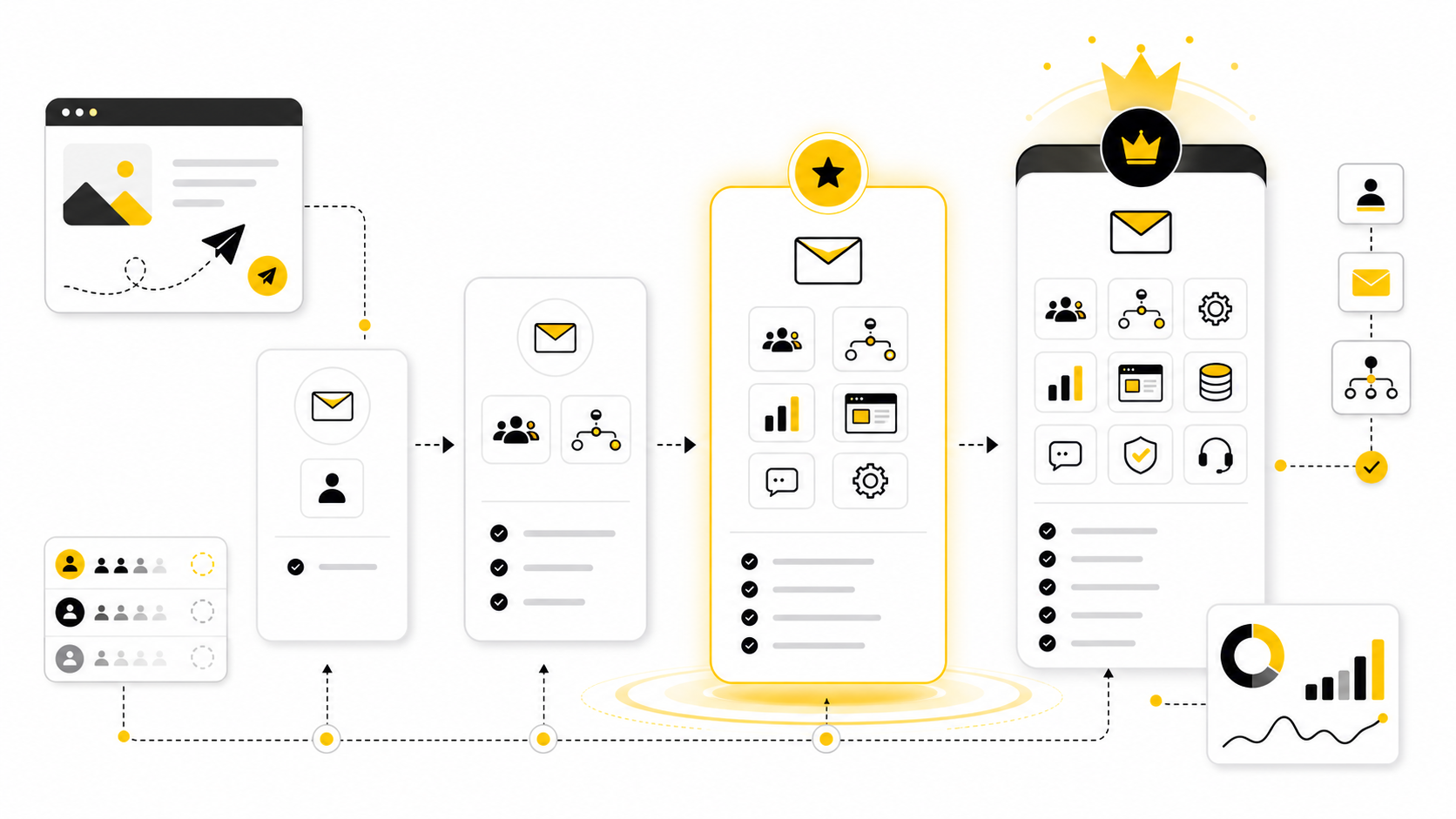
MailerLite plans look simple at first: Free, Growing Business, Advanced, and Enterprise. That simplicity is useful, but it can also make people choose too quickly. The real decision is not just “which plan is...
Affiliate disclosure: this article may include compensated links. Recommendations should still be evaluated against your use case, budget, and current provider terms.
Should you choose MailerLite?
MailerLite is worth considering when the use case, budget, and implementation effort match what you actually need to do next.
teams that want a practical tool decision without reading another generic feature list
Check MailerLiteMailerLite plans look simple at first: Free, Growing Business, Advanced, and Enterprise. That simplicity is useful, but it can also make people choose too quickly. The real decision is not just “which plan is cheapest?” It is whether your list size, sending needs, automation setup, team workflow, and revenue goals actually match the limits inside each tier.
The current MailerLite pricing page shows a Free plan for up to 500 subscribers and 12,000 monthly emails, while paid plans scale by active subscribers. Growing Business adds unlimited monthly emails, more seats, unlimited templates, dynamic emails, auto-resend, multivariate testing, unlimited landing pages, and more. Advanced is where MailerLite starts to feel more like a serious operating system for email, with unlimited users, live chat support, smart sending, promotion pop-ups, enhanced automations, a preference center, and AI writing features.
This matters because email is usually not a “nice to have” channel. It becomes the place where leads are warmed up, customers are educated, launches are announced, products are sold, and repeat purchases are created. MailerLite’s own 2025 email benchmark report reviewed more than 3.6 million campaigns from 181,000 approved accounts, which is a good reminder that email performance is still measurable, comparable, and worth optimizing.
MailerLite Plans At A Glance
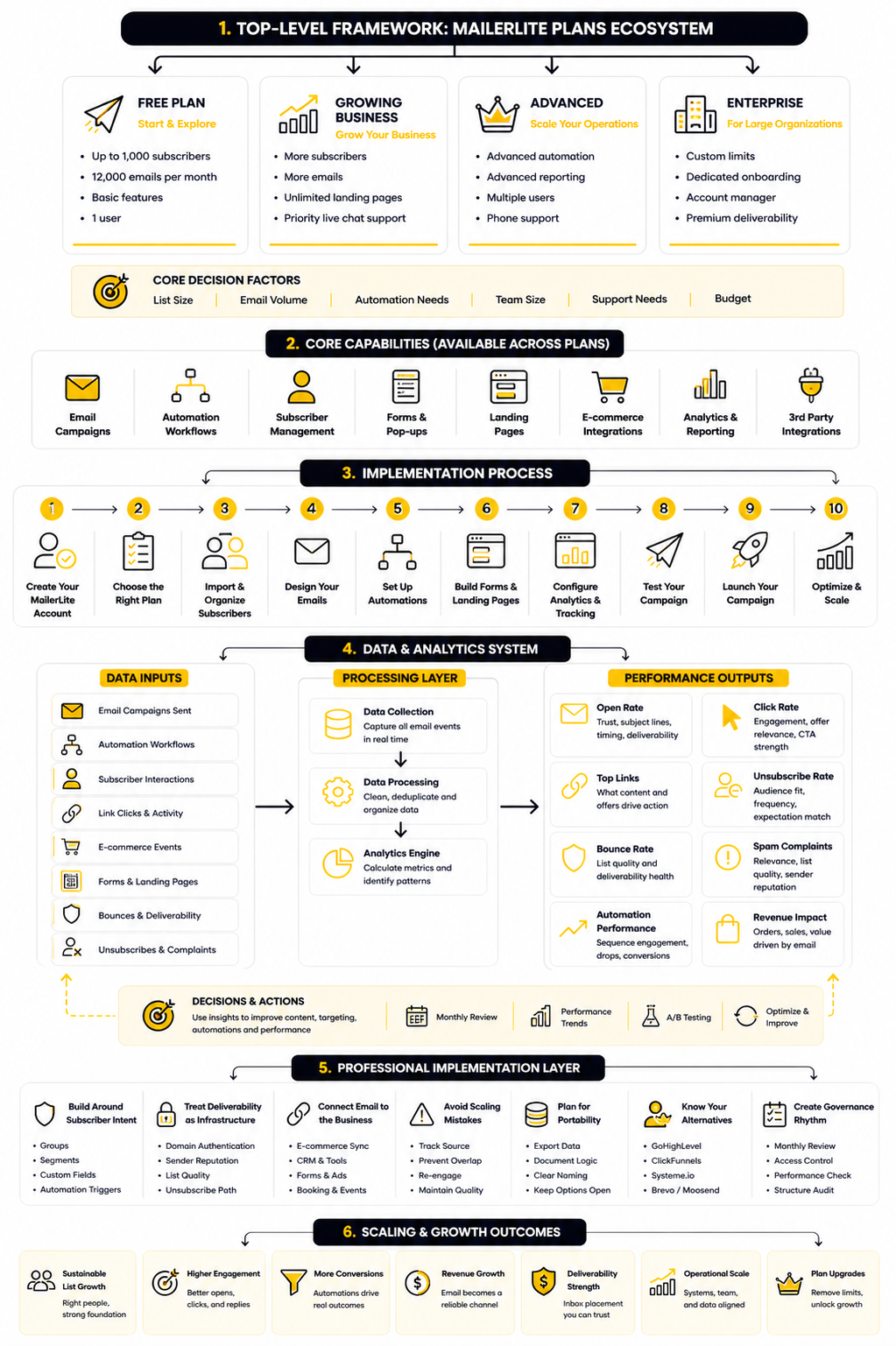
MailerLite has four main email marketing plans: Free, Growing Business, Advanced, and Enterprise. Free is best for testing the platform or running a very small list, but it has a hard ceiling at 500 active subscribers and 12,000 monthly emails. Growing Business is the practical starting point for most serious users because it removes the monthly send limit and opens up more campaign, website, landing page, and testing features.
Advanced is for people who need more control, better support access, and a stronger automation environment. It adds features that matter once email becomes part of your operating rhythm instead of an occasional newsletter. Enterprise is for larger lists, especially businesses over 100,000 subscribers that need custom pricing, onboarding help, deliverability consultation, and a dedicated success manager.
The important detail is how MailerLite counts subscribers. Billing is based on active subscribers, and MailerLite says active subscribers who existed at any point during a billing cycle can still count toward that cycle even if they are deleted before renewal. That means list hygiene is not just a deliverability task; it is also a cost-control habit.
Why The Right Plan Matters
Choosing between MailerLite plans is really a decision about how much friction you want in your marketing system. A tiny newsletter can survive with basic sending, simple forms, and one user seat. A business with lead magnets, onboarding sequences, launches, paid products, and multiple collaborators needs more than a cheap monthly bill.
The wrong plan usually shows up in annoying ways. You hit a subscriber cap right before a campaign, discover that a feature you planned to use is locked behind a higher tier, or realize your team needs more access than the plan allows. None of those problems are dramatic on paper, but they slow down execution when timing matters.
This is why the plan comparison should start with your workflow, not the price table. Ask how often you send, how many automations you need, how many people will work inside the account, whether you sell digital products or bookings, and how much support you want available. Once those answers are clear, the right MailerLite plan becomes much easier to spot.
A Simple Framework For Choosing A MailerLite Plan
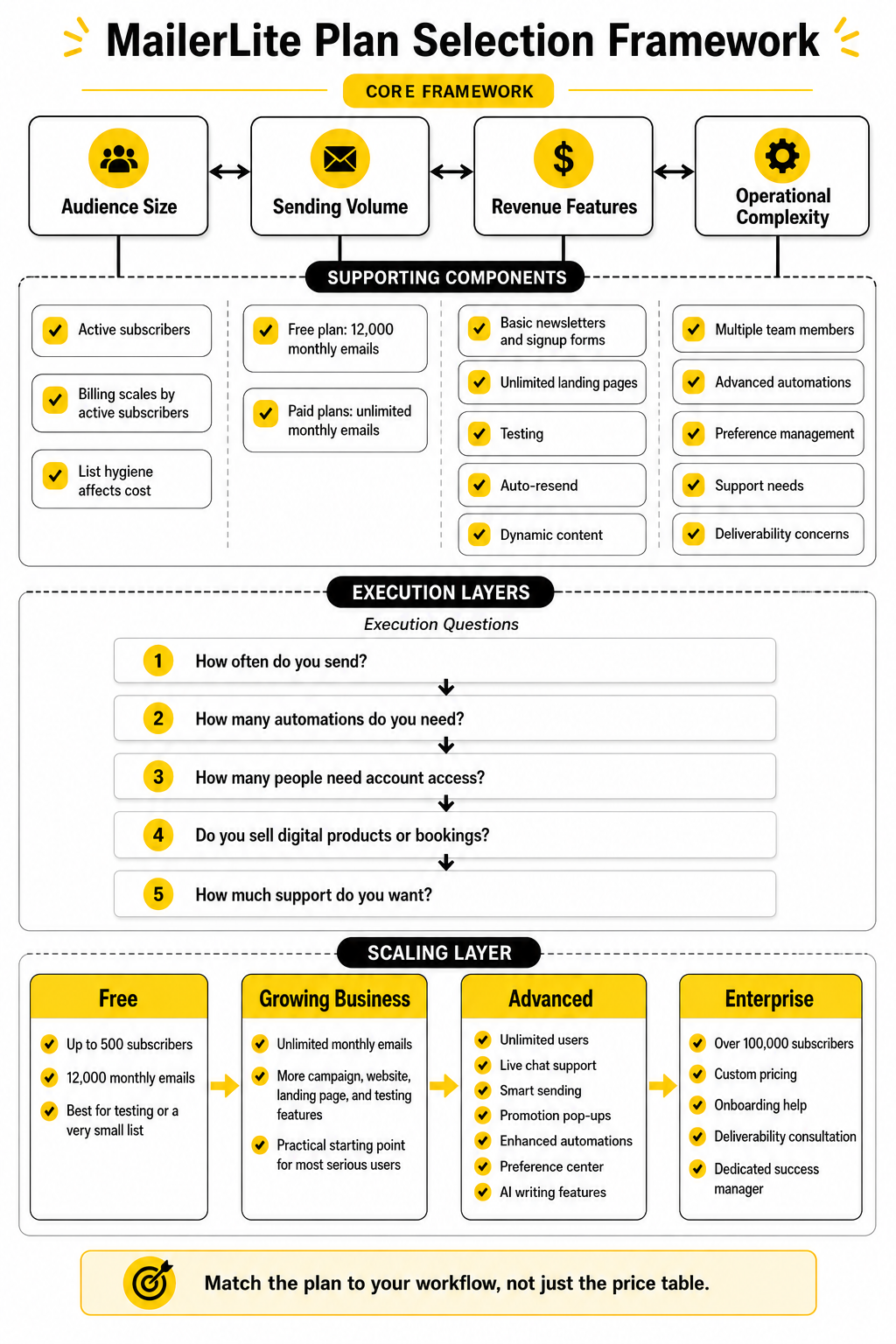
The cleanest way to compare MailerLite plans is to look at four layers: audience size, sending volume, revenue features, and operational complexity. Audience size affects billing first, because the platform scales around active subscribers. Sending volume matters next, because Free has a fixed monthly email allowance while paid plans are built for more consistent communication.
Revenue features are the next filter. If you only need basic newsletters and signup forms, Free may be enough for a while. If you want unlimited landing pages, more testing, auto-resend, dynamic content, and more room to build campaigns properly, Growing Business starts to make more sense.
Operational complexity is the final filter. Once you have multiple team members, more advanced automations, preference management, live chat support needs, custom HTML requirements, or deliverability concerns, Advanced and Enterprise become easier to justify. The point is not to buy the biggest plan. The point is to avoid underbuying when email is already responsible for serious revenue.
Why MailerLite Pricing Matters More Than The Monthly Fee
The cheapest email platform is not always the cheapest system to run. A low monthly price can still become expensive if it limits the campaigns you need, blocks a key automation, slows down your team, or forces you to rebuild later. That is why comparing MailerLite plans only by sticker price misses the bigger question: what does your email marketing actually need to do?
MailerLite is attractive because it keeps the plan structure relatively clean. The Free plan gives small senders a real place to start, while Growing Business and Advanced add more room for serious email work. But once your list, content cadence, and revenue goals start growing, the plan decision becomes less about saving a few dollars and more about removing bottlenecks.
Email is one of those channels where small limits can create real friction. If you send occasionally, basic features may be enough. If you use email to onboard leads, nurture prospects, launch products, recover attention, or drive repeat purchases, your plan needs to support the workflow behind those outcomes.
The Real Cost Is Usually Execution
The monthly fee is visible, but execution cost is harder to see. Execution cost shows up when a campaign takes longer than it should, when the team has to work around missing features, or when a subscriber journey stays basic because the plan does not support the setup you actually wanted. This is where many people underbuy software and then pay for it with time.
MailerLite’s Free plan is useful for testing the platform, building a small list, and sending simple campaigns. But it is still a starter plan, not a full growth system. If you are already using lead magnets, segmented offers, landing pages, and scheduled promotions, you should look carefully at whether the Free plan is helping you move faster or quietly holding the system back.
The same logic applies when comparing Growing Business and Advanced. Growing Business covers the needs of many small businesses, creators, and lean teams. Advanced starts to make more sense when support access, more carefully sending, richer automations, team collaboration, and more control become worth more than the price difference.
Subscriber Count Changes The Math Quickly
MailerLite plans scale around active subscribers, so list size is one of the first pricing variables to understand. That sounds obvious, but it has a practical consequence: your cost is tied to the people you keep in your account, not just the emails you feel like sending this week. If your list grows fast, your pricing tier can change before your email strategy is fully mature.
MailerLite’s billing documentation also notes that deleted subscribers who were active during the billing period can still count toward the plan limit for that period. That means cleaning your list after you hit a threshold may not immediately reduce the current billing impact. It is better to manage inactive subscribers before list quality becomes a pricing problem.
This is one reason list hygiene matters so much. A bloated list can make any email platform more expensive while also weakening performance. The best setup is not the biggest list possible; it is a clean, permission-based list where subscribers actually want the emails you send.
Sending Volume Is Only Part Of The Decision
It is easy to compare plans by monthly email limits, but volume is only one part of the decision. A business that sends four strategic campaigns per month may need better segmentation and testing more than it needs raw email volume. Another business may send frequently but keep the workflow simple enough that a mid-tier plan is still fine.
MailerLite’s 2025 benchmark report reviewed more than 3.6 million campaigns from 181,000 approved accounts across a full year of sending data. That scale reinforces a simple point: email performance depends on more than pressing send. Opens, clicks, click-to-open rate, and unsubscribes are shaped by targeting, content, cadence, and the quality of the audience.
So when you compare MailerLite plans, do not only ask whether you can send enough emails. Ask whether the plan gives you enough control to send the right emails. The better your segmentation, automation logic, and testing process, the more likely your sends become intentional instead of noisy.
Support Can Be A Revenue Feature
Support is easy to ignore until something breaks right before a launch. At that point, fast help is not a convenience feature. It can protect revenue, deadlines, and trust with your audience.
This is especially important if email is tied to sales windows, paid newsletters, course launches, ecommerce promotions, or client campaigns. A small issue with forms, automations, imports, or sending access can slow down the entire funnel. If email is business-critical, the support differences between MailerLite plans deserve real attention.
Advanced and Enterprise become more attractive when delays are expensive. You are not only paying for more features; you are paying for a safer operating environment. That does not mean everyone needs the highest tier, but it does mean support should be part of the plan comparison, not an afterthought.
Automation Depth Determines How Far You Can Grow
Basic email campaigns are easy to run on almost any modern platform. The harder part is building a system that reacts to subscriber behavior, sends the right follow-up, and keeps people moving through a journey without manual work. This is where automation depth starts to separate casual email sending from professional implementation.
MailerLite can handle simple automations even at lower levels, which is one reason it appeals to smaller teams. But as your business matures, you may want more nuanced journeys, better triggers, cleaner audience paths, and stronger personalization. At that stage, the best MailerLite plan is the one that lets your strategy stay simple for the subscriber while becoming more sophisticated behind the scenes.
This is also where you should be honest about your future workflow. If you only need a welcome sequence and occasional newsletters, you probably do not need to overcomplicate the decision. If email is connected to sales calls, product funnels, customer onboarding, and multi-step nurturing, your plan should leave room for that system to grow.
Team Workflow Matters Earlier Than Most People Think
Many users start alone, so team access feels irrelevant at first. Then a designer, assistant, copywriter, client, partner, or operations person needs access, and the plan suddenly matters. The moment more than one person touches email, permissions, collaboration, and account structure become part of the buying decision.
This is not just about convenience. Email accounts contain customer data, brand assets, campaign history, forms, landing pages, and revenue-driving automations. Giving the wrong level of access to the wrong person creates avoidable risk.
Growing Business can be enough for lean setups, but Advanced becomes more compelling when several people need to work inside the account regularly. If you are running email as a real business function, not a side task, your plan should match the way your team actually operates.
The Upgrade Question Should Be Practical
The best way to think about MailerLite plans is not “Which plan can I get away with?” A better question is “Which plan removes the next constraint?” That keeps the decision grounded in actual business needs instead of software comparison anxiety.
Start with the constraint that is most likely to affect you in the next few months. It may be subscriber count, monthly sending, landing page needs, team access, automation complexity, testing, support, or deliverability guidance. Once you identify the real constraint, the plan choice becomes much more straightforward.
This approach also prevents overbuying. You do not need Enterprise because it sounds serious, and you do not need Advanced just because it has more features. You need the plan that supports the work you are actually doing now, with enough headroom for the next stage.
Free Vs Growing Business Vs Advanced Vs Enterprise
Now that the pricing logic is clear, the next step is matching each plan to a real operating stage. This is where many people make the wrong call because they compare MailerLite plans like a feature checklist instead of a workflow decision. A plan is only “better” if its extra features remove a real constraint in your business.
The four-plan structure is useful because each tier has a fairly clear job. Free helps you validate the platform and start building an audience. Growing Business supports consistent marketing. Advanced gives you more control, support, and automation depth. Enterprise is for larger operations where deliverability, onboarding, and account management matter at scale.
Free Is For Testing, Not Scaling
The Free plan is best when your email marketing is still early and your needs are simple. If you are collecting subscribers, sending occasional newsletters, testing forms, or learning how MailerLite works, Free can be enough. It gives you a low-risk way to understand the interface before committing to a paid setup.
The limitation is that Free should not be treated like a long-term growth plan. The 500-subscriber cap and monthly email limit mean you can outgrow it quickly if your audience starts moving. That is a good problem, but it still means you need to plan your upgrade before your list or launch calendar forces the decision.
Free is a smart choice when email is not yet a revenue channel. Once you depend on email for launches, onboarding, lead nurturing, customer education, or repeat sales, the plan starts to feel tight. At that point, staying free can cost more in missed execution than the paid plan would cost in cash.
Growing Business Is The Practical Starting Point
Growing Business is the first serious MailerLite plan for most small businesses, creators, and solo operators. It removes the monthly email limit, adds more campaign flexibility, and gives you more room to build landing pages, templates, and repeatable marketing assets. If your list is active and your email calendar is becoming consistent, this is usually where MailerLite starts to make sense as a real marketing tool.
The biggest advantage is that Growing Business supports momentum. You can send regularly without worrying about a hard monthly email ceiling, build more polished campaigns, and test more of what your audience responds to. That matters because email improves through iteration, not one perfect campaign.
This plan is a good fit when you know email matters but do not need the full operational layer yet. You may still be working alone or with a small team. You may have a few automations, a lead magnet, a newsletter, and maybe a product or service funnel. Growing Business gives you enough room to execute without turning the setup into a complicated machine.
Advanced Is For More Control And Less Friction
Advanced is where MailerLite becomes more attractive for teams and businesses that need stronger execution support. The plan adds features such as live chat support, more advanced automation options, custom HTML access, promotion pop-ups, preference center tools, and smart sending capabilities. These are not always exciting on day one, but they become valuable when email touches more parts of the business.
The main reason to choose Advanced is not because you want “more features.” Choose it because your email system needs fewer bottlenecks. If your team needs more access, your automations need more flexibility, or your campaigns need better support coverage, Advanced can be the cleaner choice.
This plan is also easier to justify when timing matters. If a campaign issue could delay a launch, affect customer onboarding, or slow down a sales push, faster support and stronger controls have real value. That is when the gap between Growing Business and Advanced becomes practical, not theoretical.
Enterprise Is For Scale, Support, And Risk Reduction
Enterprise is not the plan most people need, and that is fine. It is designed for larger businesses, high-volume senders, and teams that need custom pricing, dedicated support, onboarding help, and stronger deliverability guidance. If you are managing a very large list, the cost of mistakes becomes much higher.
At that level, the conversation changes. You are no longer asking whether the email editor is easy to use. You are asking whether the platform can support a larger operation with the right help, stability, and strategic guidance.
Enterprise makes sense when email is a major business asset. A large list can drive meaningful revenue, but it also carries more risk if segmentation is messy, deliverability drops, or migrations are handled poorly. The value of Enterprise is not just access to a bigger plan; it is the extra support around a bigger system.
The Plan Selection Process
Before choosing between MailerLite plans, map your current email workflow from subscriber entry to business outcome. This sounds obvious, but most bad software decisions happen because people skip this step. They buy based on features, then discover later that the actual process does not fit the plan.
Use a simple process:
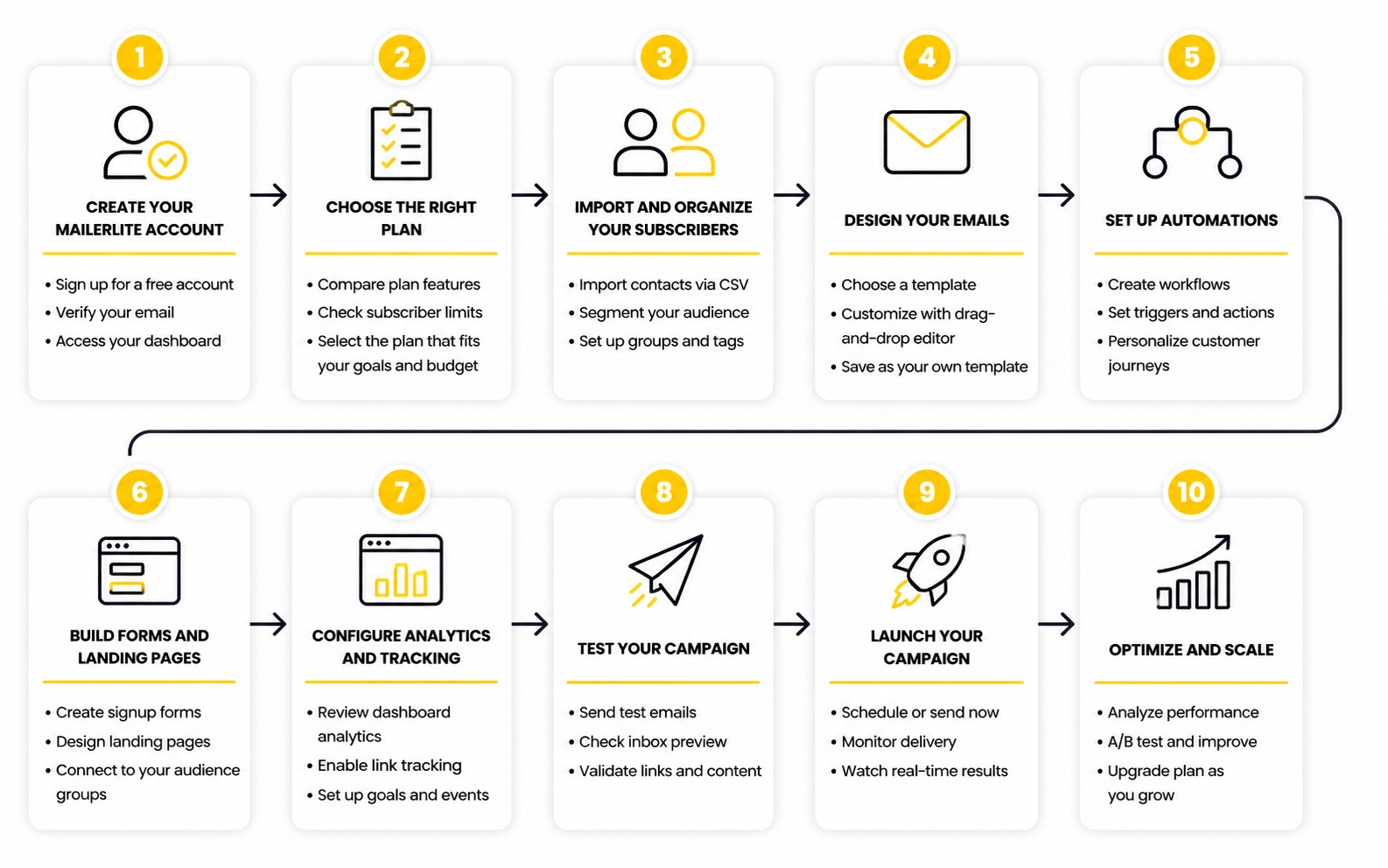
This process keeps the decision honest. You are not trying to predict every future need, and you are not buying features just because they look impressive. You are matching the plan to the next version of your business.
The key is to think in systems, not isolated emails. A newsletter, lead magnet, welcome sequence, product launch, and customer onboarding flow may all live inside the same platform. If those pieces connect well, your MailerLite plan is doing its job.
How To Match The Plan To Your Stage
If you are pre-revenue or still validating your audience, start with Free and keep the setup simple. Build one good signup form, one useful lead magnet if you need it, and one welcome email that sets expectations. Do not overbuild before you know people want to hear from you.
If you already have an audience and send consistently, Growing Business is usually the safer starting point. It gives you more freedom to publish, test, and build without running into the most obvious Free plan constraints. This is the tier where many creators, consultants, small ecommerce stores, and service businesses can operate comfortably.
If email is already connected to sales, support, onboarding, or a team workflow, Advanced deserves a serious look. The plan is better suited for businesses where delays, manual work, and limited control become expensive. You are paying for a smoother system, not just a longer feature list.
When To Upgrade Without Overthinking It
Upgrade when a plan limit starts changing your behavior in a bad way. If you are sending less than you should because of limits, avoiding useful automations because setup feels constrained, or delaying campaigns because support access is too slow, the plan is no longer serving the business. That is the cleanest upgrade signal.
You should also upgrade before a major campaign if you already know the current plan will be tight. Waiting until the week of a launch is how small software issues become stressful. A better move is to review your subscriber count, campaign volume, automation needs, and team access before the pressure is high.
Do not upgrade because of vanity. Upgrade because the next tier removes a real obstacle. That mindset keeps MailerLite plans practical and prevents both overpaying and underbuilding.
When To Stay On Your Current Plan
Staying on your current plan is smart when your workflow is simple and nothing important is being blocked. If Free covers your current audience and you are not sending enough to hit the monthly limit, there is no need to rush. If Growing Business gives you the tools you need and your team is still lean, Advanced may be unnecessary for now.
The mistake is confusing simplicity with weakness. A simple email system can perform extremely well if the offer, audience, and content are strong. More features will not fix weak positioning, unclear messaging, or inconsistent sending.
So keep the plan lean while the workflow is lean. Review it regularly, especially when your list grows, your team changes, or email starts carrying more revenue responsibility. The best MailerLite plan is the one that supports the work without adding friction or unnecessary cost.
Statistics And Data
The data side of MailerLite plans matters because the right plan should help you make better decisions, not just send more emails. Open rates, click rates, unsubscribes, bounces, link activity, and automation performance are not vanity numbers when you read them correctly. They tell you whether your list trusts you, whether your message is relevant, and whether your email system is creating movement toward a real business outcome.
MailerLite’s 2025 benchmark report analyzed more than 3.6 million campaigns from 181,000 approved accounts across December 2024 to November 2025. That kind of dataset is useful because it gives you context instead of letting you judge one campaign in isolation. A campaign can look weak on the surface, but if your industry usually has lower click rates, the real issue may be offer clarity rather than platform performance.
Benchmarks should never become excuses, though. They are reference points, not ceilings. If your numbers are below your industry range, you need to investigate. If they are above average, you still need to understand why, because the goal is repeatable performance, not one lucky send.
What The Main Metrics Actually Mean
Open rate tells you whether people are noticing and trusting your emails enough to open them. It is influenced by subject lines, sender name, timing, list quality, and inbox placement. But open tracking is less perfect than many people think, so it should be treated as a directional signal rather than absolute truth.
Click rate is usually more useful because it shows whether people are taking action after opening. A strong open rate with a weak click rate often means the subject line created interest but the email body did not create enough desire or clarity. A lower open rate with a strong click rate can mean your topic reached a smaller but more motivated segment.
Unsubscribe rate is not always bad by itself. Some unsubscribes are healthy because they remove people who were never going to buy, reply, book, read, or engage. The warning sign is when unsubscribes rise after specific types of campaigns, because that usually points to poor targeting, too much frequency, weak expectation-setting, or a mismatch between signup promise and email content.
Why Benchmarks Need Context
Averages can be misleading when you use them without context. A local service business, a creator newsletter, a SaaS company, an ecommerce store, and a nonprofit can all have very different email behavior. Comparing all of them with one generic number can push you toward the wrong conclusion.
MailerLite’s benchmark report breaks performance down by industry and region, which is more useful than a single universal average. A click rate that looks disappointing in one category may be normal in another. The better question is not “Is this number good?” but “Is this number improving for my audience, my offer, and my sending pattern?”
You also need to separate campaign types. A product launch email, a weekly newsletter, a password reset, a webinar reminder, and a welcome email should not be judged the same way. Each one has a different job, so each one needs a different performance expectation.
The Measurement System That Actually Helps
A useful analytics system starts with one simple habit: connect every metric to a decision. If a number does not change what you do next, it is just dashboard decoration. MailerLite’s reporting features can show campaign performance, automation reports, link activity, subscriber activity, opens, clicks, orders, bounces, unsubscribes, and spam complaints through its reporting tools.
The practical setup is to review performance at three levels. First, look at campaign-level performance to see which individual emails worked. Second, look at subscriber behavior to understand who is opening, clicking, ignoring, unsubscribing, or bouncing. Third, look at automation performance to see whether your sequences are doing their job over time.
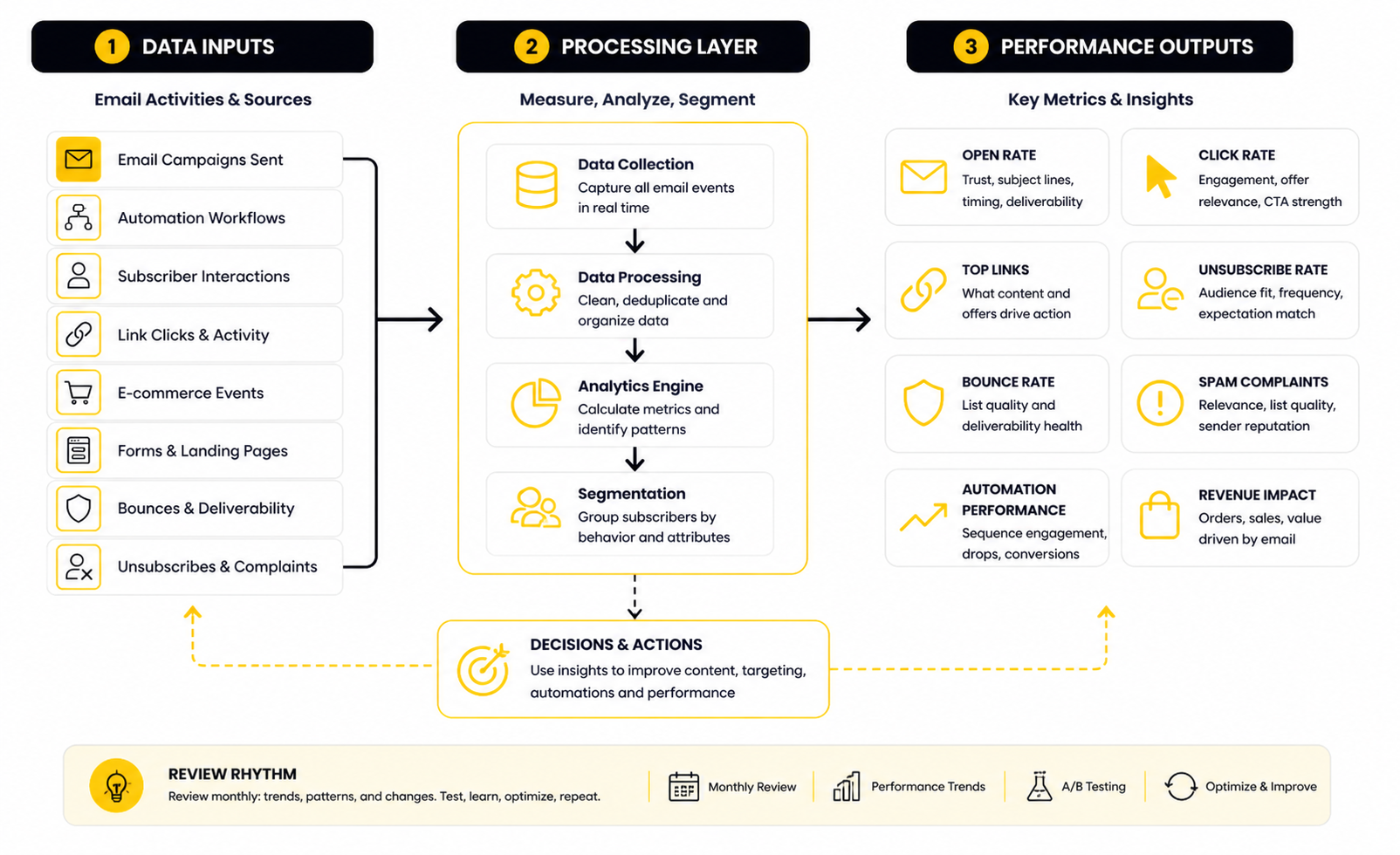
This is where your choice between MailerLite plans becomes more strategic. If your email setup is simple, basic reporting may be enough. If you are running multiple funnels, landing pages, products, segments, and automations, deeper reporting and custom dashboards can save serious time because they help you see patterns faster.
How To Read Opens Without Overreacting
Open rate is useful, but it should not control every decision. Privacy changes, image loading behavior, and device differences can make open data less exact than it looks. That does not make opens useless; it just means you should not treat them as the final score.
Use open rate to spot broad patterns. If several campaigns in a row underperform, review your subject lines, sender name, audience segment, and sending frequency. If one campaign has unusually high opens but weak clicks, the subject line may have created curiosity without enough payoff in the email.
The best use of open rate is comparison inside your own account. Compare similar campaigns to similar audiences over time. That gives you cleaner insight than chasing random industry averages.
How To Read Clicks Like A Marketer
Clicks are where the conversation gets more serious. A click means the subscriber saw something valuable enough to take a small action. That does not guarantee revenue, but it is a much stronger buying-intent signal than an open.
When click rates are weak, do not immediately blame the platform. Review the offer, the call to action, the placement of links, the clarity of the email, and whether the segment was right. A beautifully designed email can still underperform if the reason to click is vague.
Link activity is especially useful because it shows which parts of the email created action. If one link gets most of the clicks, that tells you what the audience cared about. If links are spread thin or barely clicked, the email may have had too many competing ideas.
How To Use Unsubscribes And Complaints
Unsubscribes tell you when people are opting out of the relationship. That can happen because they are no longer interested, but it can also happen because your emails are too frequent, too broad, too sales-heavy, or different from what people expected when they joined. You should not panic over every unsubscribe, but you should watch patterns closely.
Spam complaints are more serious. They can affect sender reputation and deliverability, especially if they repeat across campaigns. If complaints appear after a specific campaign type, pause and review the source of those subscribers, the promise made at signup, and the relevance of the message.
A healthy email system makes it easy for the wrong people to leave while keeping the right people engaged. That means clear signup promises, useful content, relevant offers, and a visible unsubscribe option. Trying to trap people on a list is not clever; it is bad email marketing.
What Data Should Drive Your Plan Choice
The plan you choose should match the complexity of the data you need to act on. If you only send a simple newsletter, you may not need advanced reporting from day one. But if email is tied to revenue, launches, customer journeys, or client reporting, analytics becomes part of the product you are buying.
Growing Business can work well when you need solid campaign execution and basic performance feedback. Advanced becomes more attractive when you need stronger automation insight, better reporting workflows, more team access, and faster support when something looks off. Enterprise makes sense when the stakes are high enough that deliverability, onboarding, and strategic guidance become part of the risk-management layer.
This is the clean way to think about MailerLite plans: do not pay for analytics you will ignore, but do not operate blindly when email drives revenue. The moment you need to explain performance, improve conversion paths, or make decisions across several campaigns and automations, measurement is no longer optional.
The Metrics To Review Every Month
A monthly email review does not need to be complicated. In fact, the simpler it is, the more likely you are to actually do it. The goal is to turn data into decisions without drowning in reports.
Review these signals every month:
This monthly rhythm helps you catch problems before they become expensive. It also makes upgrades easier to justify because you can connect plan features to actual constraints. That is much better than upgrading because a pricing table made one tier look more impressive.
The Right Numbers Lead To Better Actions
The point of analytics is not to admire charts. The point is to decide what to change next. If opens are weak, test positioning and subject lines. If clicks are weak, improve the offer and call to action. If unsubscribes spike, review audience fit and frequency. If automations fade after the first email, tighten the sequence.
This is why performance signals should sit at the center of your plan decision. MailerLite plans give you different levels of room to build, measure, and improve. The right plan is the one that gives you enough visibility to make better decisions without adding unnecessary complexity.
Data does not replace judgment. It sharpens it. When you combine clean reporting with a practical sending strategy, MailerLite becomes more than an email tool; it becomes a feedback loop for understanding what your audience actually wants.
Professional Implementation
A professional MailerLite setup is not just a list, a form, and a newsletter template. It is a working system where subscriber data, signup sources, automations, campaigns, reporting, and compliance all support the same business goal. This is where MailerLite plans need to be judged by how well they handle the full operating environment, not only by how many subscribers they allow.
The deeper your email system gets, the more expensive messy setup becomes. Bad segments create irrelevant campaigns. Weak authentication hurts deliverability. Poor naming conventions make reporting confusing. Unclear automation logic creates duplicate emails, missed follow-ups, and subscriber journeys that feel random.
This is why implementation should happen before aggressive scaling. You want the account structure to be clean while the list is still manageable. Fixing a messy setup after thousands of subscribers, dozens of forms, and multiple automations is much harder than building it correctly from the start.
Build Around Subscriber Intent
The most important advanced decision is how you organize subscribers. Do not only think in terms of “newsletter subscribers” or “customers.” Think about why each person joined, what they were promised, what they need next, and what action would make sense for them.
This is where groups, segments, fields, and automation triggers need a clear role. A lead who joins through a downloadable checklist should not automatically be treated the same as someone who buys a product, books a call, or signs up for a webinar. They may all belong on the same list, but they do not have the same intent.
MailerLite’s subscriber management features are useful when you keep this logic simple. Use custom fields for stable information, groups for meaningful categorization, and segments for behavior-based targeting. The mistake is creating too many labels too early and then forgetting what they mean.
Treat Deliverability As Infrastructure
Deliverability is not a feature you fix after campaigns start failing. It is infrastructure. If people cannot reliably receive your emails, every subject line test, automation, launch sequence, and newsletter strategy becomes less useful.
MailerLite’s domain authentication guide explains how to authenticate a sending domain so your emails are properly connected to your brand. That matters even more because Gmail and Yahoo tightened bulk sender requirements around authentication, one-click unsubscribe, and complaint thresholds. The Google and Yahoo authentication changes made this a baseline requirement for serious senders, not a technical bonus.
If you are comparing MailerLite plans for a real business, build deliverability checks into the setup process. Authenticate the domain, monitor bounces, remove bad addresses, avoid purchased lists, and make the unsubscribe path obvious. A clean sender reputation is easier to protect than rebuild.
Understand The Scaling Tradeoff
MailerLite is strong when you want a clean, practical email platform without the complexity of enterprise marketing suites. That is exactly why many creators, service businesses, ecommerce teams, and small companies like it. But the same simplicity that makes it easy to use can become a constraint if your marketing operation becomes very complex.
This does not mean you should avoid MailerLite. It means you should be honest about where the platform fits. If your main needs are newsletters, landing pages, forms, automations, simple ecommerce flows, and clear reporting, MailerLite plans can be a strong fit. If you need extremely advanced branching logic, heavy CRM customization, multi-brand permission systems, or complex revenue attribution across many channels, you should evaluate the tradeoff carefully before building everything inside one account.
The smart move is to choose for the next stage, not for an imaginary future company. Overbuilding too early creates drag. Underbuilding when email already drives revenue creates risk. The right balance is a setup that handles today’s needs cleanly and can survive the next growth step without a painful rebuild.
Connect Email To The Rest Of The Business
MailerLite should not sit in isolation. It should connect to the places where subscribers are created, purchases happen, appointments are booked, forms are submitted, and customer activity is tracked. The stronger those connections are, the more useful your email marketing becomes.
MailerLite’s developer documentation notes that ecommerce integrations can sync products, categories, orders, and customers, which allows users to build ecommerce automations and track ecommerce campaign activity through the platform. The MailerLite integrations documentation also covers common connections such as Shopify, WooCommerce, WordPress, Squarespace, BigCommerce, Zapier, Facebook Lead Ads, Typeform, Calendly, Eventbrite, and more.
This is where plan choice becomes strategic again. A simple newsletter does not need a complicated integration stack. A sales-driven email system does. If your subscribers come from paid ads, checkout pages, booking forms, ecommerce purchases, or webinars, your MailerLite implementation should preserve that context so campaigns can be targeted instead of generic.
Avoid The Most Common Scaling Mistakes
Most MailerLite problems are not caused by the platform. They come from unclear structure. The business adds forms, automations, tags, fields, segments, pop-ups, landing pages, and campaigns without a naming system or a clear lifecycle map.
The first mistake is creating too many entry points without tracking subscriber source. If you do not know where people came from, it becomes harder to judge lead quality and campaign performance later. Every major form, landing page, checkout, and integration should make the source clear enough to inform future decisions.
The second mistake is letting automations overlap. A subscriber should not receive three different nurture sequences just because they clicked around and joined from multiple places. Before scaling campaigns, review your automation triggers and exclusion rules so the journey feels intentional.
The third mistake is ignoring inactive subscribers. Bigger lists are not automatically better. If inactive contacts stay untouched for too long, they can distort reporting, increase costs, and weaken deliverability signals over time.
Build A Migration Plan Before You Need One
Even if you plan to stay with MailerLite for years, you should still keep your data portable. That does not mean you are planning to leave. It means you are treating subscriber data, consent records, custom fields, and campaign assets like business infrastructure.
Keep your naming conventions clear. Document what each group, segment, and custom field means. Export important data periodically if your business depends heavily on email. Store the logic behind important automations somewhere your team can understand, not only inside the platform builder.
This matters because switching tools is rarely painful because of email templates. It is painful because the account logic is unclear. A clean MailerLite setup gives you leverage whether you stay, upgrade, or eventually migrate to a different system.
Know When MailerLite Is Not Enough
MailerLite is a good fit for many practical email marketing systems, but it is not the perfect answer for every business. If you need a broader sales CRM, pipeline management, two-way SMS, call tracking, reputation management, or agency client sub-accounts, an all-in-one platform like GoHighLevel may fit the business model better. That is especially true for agencies or service businesses that want email to sit inside a larger sales and client-management system.
If your main challenge is sales funnels rather than email newsletters, ClickFunnels may be a more natural fit. If you want a leaner all-in-one setup with email, funnels, courses, and simple automation in one place, Systeme.io is worth comparing. These are not automatic replacements for MailerLite, but they can be better choices when the main job is bigger than email marketing.
The key is to avoid tool loyalty for its own sake. Pick the system that matches the business model. MailerLite plans make sense when email marketing is the central job; broader platforms make sense when email is only one piece of a larger sales operation.
Create A Governance Rhythm
Once email becomes important, someone needs to own the system. That does not mean creating corporate bureaucracy. It means having a simple rhythm for reviewing structure, access, performance, compliance, and upcoming campaigns.
A monthly governance review can stay lightweight:
This rhythm prevents small issues from becoming expensive. It also makes plan upgrades easier to evaluate because you can see the actual constraints in the account. Instead of guessing whether Advanced or Enterprise is worth it, you can point to specific needs around support, access, automation, reporting, or deliverability.
Keep The System Boring On Purpose
The best email systems are usually boring behind the scenes. They have clear names, clean segments, reliable automations, authenticated domains, simple reporting, and a regular review process. That is not flashy, but it works.
This is the expert-level lens for comparing MailerLite plans. Do not buy features because they sound advanced. Buy the plan that helps you keep the system clean as the business grows.
A good implementation should feel calm. Subscribers know what they signed up for, campaigns go to the right people, reports are easy to read, and the team knows how the pieces fit together. When that happens, MailerLite becomes more than a sending tool. It becomes a stable part of the growth engine.
Final Recommendation
The best MailerLite plan is the one that matches your current operating reality without trapping you in unnecessary limits. If you are testing an idea, building your first list, or sending simple emails to a small audience, Free is a sensible starting point. If you are already publishing consistently and want email to support real growth, Growing Business is usually the most practical first paid tier.
Advanced is the stronger choice when email becomes part of your revenue system. That means more automations, more team involvement, more support needs, better audience control, and less tolerance for messy execution. Enterprise only makes sense when your list size, deliverability risk, onboarding needs, or internal workflow justify a custom relationship with the platform.
The mistake is treating MailerLite plans like a permanent identity. Your plan should change when your workflow changes. Start lean, build clean, measure honestly, and upgrade when the next tier removes a real constraint.
How To Think About Alternatives
MailerLite is a strong fit when you want email marketing, landing pages, forms, automations, and reporting without turning your stack into a technical project. It is especially useful for creators, newsletters, consultants, lean ecommerce brands, small service businesses, and teams that want practical tools without enterprise complexity. If your main job is building and improving an email marketing system, it deserves a serious look.
But not every business should choose an email-first platform. If you need a broader CRM, sales pipeline, SMS, client accounts, reputation tools, or agency workflows, GoHighLevel may fit better. If your business is built around funnels, checkout flows, upsells, and sales pages, ClickFunnels may be the more natural system.
There are also leaner all-in-one alternatives. Systeme.io can make sense if you want email, funnels, courses, and simple automation in one place. Brevo is worth comparing if you care more about multichannel communication and contact-based CRM features. Moosend can also be useful if you want another email marketing option with automation and campaign tools.
The Final Decision Framework
The final decision comes down to one question: what job does your email platform need to do over the next six to twelve months? Not someday. Not in the fantasy version of the business. The real next stage.
Choose Free if you are proving the channel. Choose Growing Business if you are ready to send consistently and build a cleaner growth system. Choose Advanced if email already affects revenue, support, customer journeys, or team execution. Choose Enterprise if scale and risk management are now bigger issues than simple feature access.
That is the cleanest way to evaluate MailerLite plans. Do not buy based on fear of missing features. Do not stay on a lower tier out of habit when the plan is clearly slowing you down. Pick the tier that lets you execute calmly, measure clearly, and grow without creating avoidable friction.
What are the main MailerLite plans?
MailerLite offers Free, Growing Business, Advanced, and Enterprise plans. The Free plan is built for small lists and basic sending, while Growing Business is the first serious paid tier for most users. Advanced adds more control, stronger support access, and deeper functionality, while Enterprise is designed for larger lists and custom business needs.
Is the MailerLite Free plan enough?
The Free plan can be enough if you are just starting, testing a newsletter, or building a small audience. It is not ideal if email already supports sales, onboarding, launches, or client communication. Once email becomes part of your business engine, a paid plan usually gives you more room to execute properly.
When should I upgrade from Free to Growing Business?
Upgrade when the Free plan starts shaping your behavior in a bad way. If you are avoiding sends, delaying campaigns, limiting landing pages, or working around plan restrictions, it is time to consider Growing Business. The upgrade makes the most sense when you already know you will use email consistently.
Is Growing Business the best MailerLite plan for small businesses?
Growing Business is usually the best starting point for small businesses that are serious about email marketing. It gives you more flexibility than Free without jumping straight into the higher operational cost of Advanced. For many creators, consultants, local businesses, and small ecommerce brands, it offers the cleanest balance between price and practical capability.
Who should choose MailerLite Advanced?
Advanced is best for users who need more control, better support, and stronger email operations. It makes sense when multiple people work in the account, automations are more important, or campaigns are tied to revenue. If delays, limited access, or missing features could cost money, Advanced deserves a closer look.
Is MailerLite Enterprise worth it?
Enterprise is worth considering when the business has a large list, complex needs, or higher risk around deliverability and support. It is not the right choice for most early-stage users. It becomes relevant when custom onboarding, dedicated guidance, and account-level support are more valuable than simply saving on the monthly fee.
How does subscriber count affect MailerLite pricing?
MailerLite pricing scales mainly around active subscribers. That means your cost can rise as your list grows, even if your sending frequency stays the same. This is why list quality matters: keeping inactive or low-intent subscribers can increase costs while weakening performance signals.
What is the biggest mistake people make when comparing MailerLite plans?
The biggest mistake is comparing plans only by price. A cheaper plan is not really cheaper if it slows down campaigns, limits automations, creates reporting gaps, or forces manual work. The more carefully comparison is based on workflow, list size, team needs, support expectations, and the role email plays in revenue.
Are MailerLite plans good for automation?
MailerLite is good for practical email automation, especially for users who want clean workflows without heavy technical complexity. It can handle common sequences like welcome emails, lead nurturing, product follow-ups, and subscriber journeys. If you need highly complex automation logic across multiple sales channels, you may want to compare it with broader platforms before committing.
Can MailerLite replace a CRM?
MailerLite can manage subscribers, segments, custom fields, and email journeys, but it is not a full sales CRM for every business model. If your needs are mostly email marketing, it may be enough. If you need pipelines, sales tasks, call tracking, SMS, or client account management, a CRM-first platform like GoHighLevel may be a better fit.
How should I measure whether my MailerLite plan is working?
A good plan should help you send consistently, segment clearly, automate important follow-ups, and understand performance without confusion. Review list growth, opens, clicks, unsubscribes, bounces, complaints, and automation performance every month. If your plan gives you enough visibility and control to improve those numbers, it is doing its job.
Do I need Advanced if I only send newsletters?
Probably not. If your newsletter workflow is simple, your team is small, and your reporting needs are basic, Growing Business may be enough. Advanced becomes more useful when the newsletter is part of a bigger system with automations, revenue campaigns, team collaboration, preference management, or higher support needs.
Which MailerLite plan should creators start with?
Creators can start with Free if they are still validating the audience. Once the list becomes active and the newsletter starts supporting products, sponsorships, communities, courses, or services, Growing Business is usually the cleaner option. Advanced makes sense later if the creator business becomes more operationally complex.
Which MailerLite plan is best for ecommerce?
Small ecommerce stores can often start with Growing Business if they need regular campaigns, landing pages, and basic automation. Advanced becomes more relevant when ecommerce email is tied to segmentation, behavior-based flows, promotion pop-ups, stronger reporting, and support needs. The right choice depends less on store size and more on how much revenue email is expected to drive.
Should I choose MailerLite or another tool?
Choose MailerLite if email marketing is the main job and you want a clean, practical system. Choose a broader platform if the business needs funnels, CRM, SMS, sales pipelines, appointment workflows, or agency tools in the same place. The best tool is the one that fits the business model, not the one with the longest feature list.
Build a stronger local presence with BAAM AI
Turn your website, Google profile, social channels, and AI visibility into one growth engine
Most businesses do not need more random marketing activity. They need a consistent presence system that helps the right people find them, trust them, and take action. BAAM AI brings strategy, local SEO, website updates, Google Maps visibility, social content, AI-search readiness, media production, and reporting into one practical monthly engine.
If you want your marketing to keep working after the campaign ends, start with a free BAAM AI presence audit. See how your business shows up today and where the fastest visibility wins are at BAAM AI.