
BAAM AI Blog
MailerLite Customer Service: The Practical Guide To Getting Faster, Better Support
MailerLite customer service is not just about finding a contact button when something breaks. It is about knowing which support route to use, what information to prepare, and when your issue needs a different level...
Affiliate disclosure: this article may include compensated links. Recommendations should still be evaluated against your use case, budget, and current provider terms.
Should you choose MailerLite?
MailerLite is worth considering when the use case, budget, and implementation effort match what you actually need to do next.
teams that want a practical tool decision without reading another generic feature list
Check MailerLiteMailerLite customer service is not just about finding a contact button when something breaks. It is about knowing which support route to use, what information to prepare, and when your issue needs a different level of urgency. That matters because email marketing problems are rarely isolated: one blocked campaign, domain issue, automation error, or billing question can slow down a launch, damage trust, or interrupt revenue.
MailerLite keeps its support model fairly simple, but the details matter. Its own support pages show that paid users can access direct support, the Advanced plan includes 24/7 live chat and email support, and the 14-day trial of paid features includes temporary access to live chat and email support through the pricing structure. That means the best way to handle MailerLite customer service is not to “just contact support,” but to match the problem to the right path from the start.
This guide is built for practical users: creators, ecommerce teams, SaaS marketers, agencies, and small businesses that rely on MailerLite to send campaigns without drama. The goal is to help you understand what MailerLite support can do, what you should solve yourself, and how to escalate properly when the issue is time-sensitive. We will also look at how customer service fits into a broader email marketing stack, especially if your business eventually needs CRM, funnels, chat automation, or multi-channel support beyond a basic email platform.
this guide is split into six parts so each section can go deep without becoming messy. The structure follows the way people usually experience MailerLite customer service: first they need context, then they need the right support channel, then they need a repeatable process for fixing issues. Each part builds on the previous one, so the final guide reads like one practical playbook rather than a random list of support tips.
Why MailerLite Customer Service Matters
Email platforms sit close to revenue. When a campaign does not send, a form stops collecting leads, or an automation fails to trigger, the problem is not “technical” in the abstract. It can affect sales, onboarding, retention, and the trust people have in your brand.
This is why MailerLite customer service matters more than many users realize at the beginning. MailerLite is known for being simple and beginner-friendly, but even simple platforms touch complicated areas like domain authentication, subscriber imports, GDPR consent, automation logic, ecommerce integrations, and deliverability. When those pieces collide, good support can save hours of guessing.
Customer expectations have also changed. Digital support is no longer a bonus; research from Verint found that 73% of consumers prefer digital channels over phone support, and users increasingly expect fast answers without repeating themselves. For MailerLite users, that means the best support experience usually starts with clear documentation, then moves to email or chat only when the issue needs human help.
Framework Overview For Using MailerLite Customer Service Well
The easiest mistake is treating every MailerLite issue the same way. A billing question, an import review, a domain authentication error, and a broken automation do not need the same support path. You get better results when you sort the problem before you ask for help.
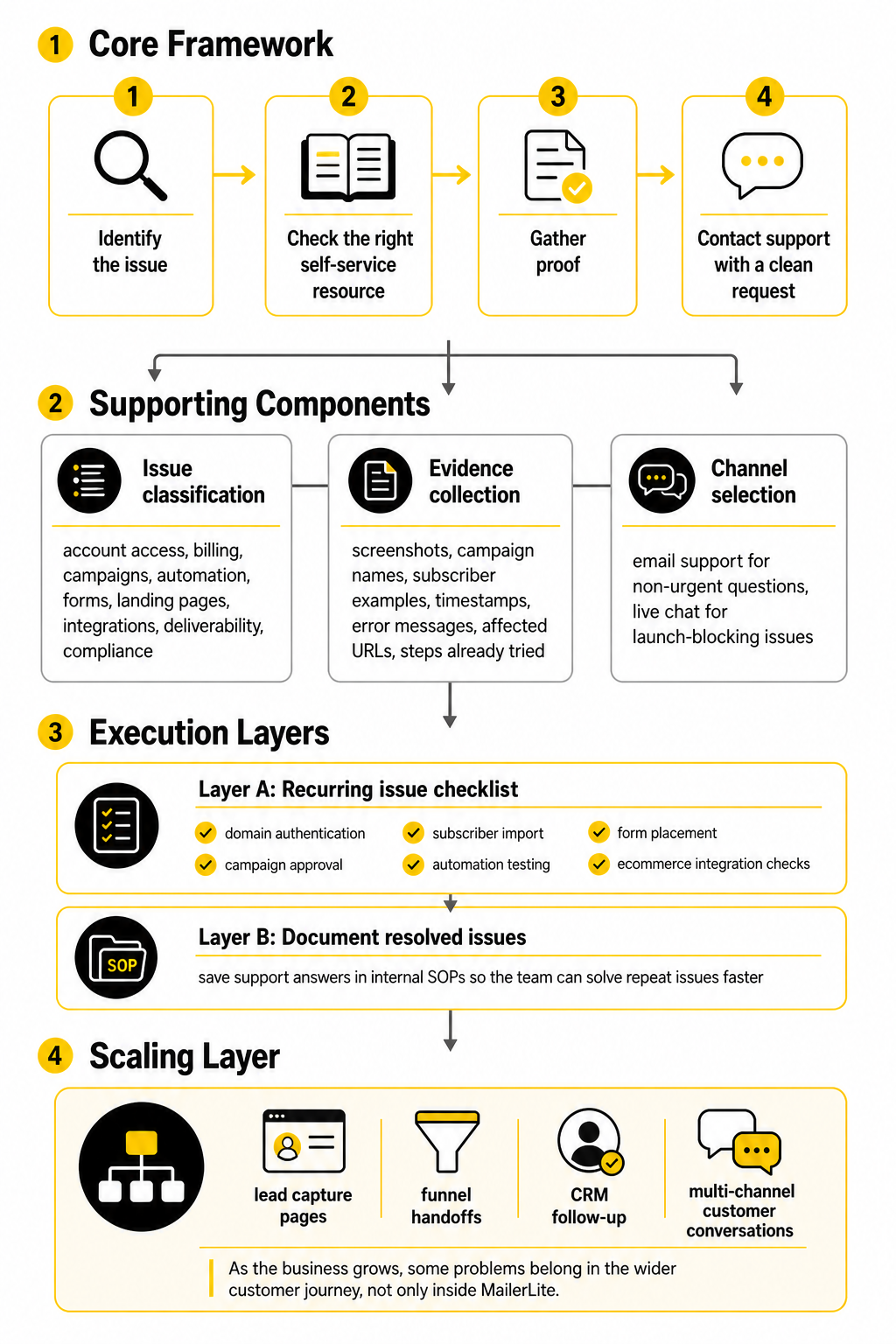
A practical MailerLite customer service framework has four steps: identify the issue, check the right self-service resource, gather proof, and contact support with a clean request. This sounds basic, but it prevents the most common support delay: sending a vague message like “my email is not working” without campaign names, screenshots, domain details, account context, or the exact error shown. Support teams can move faster when they do not have to ask three follow-up questions before they even understand the problem.
The framework also helps you decide when MailerLite is the right place to solve the issue and when the problem sits somewhere else. If your landing page form is embedded on a WordPress site, the issue may involve the site theme, a caching plugin, or the form embed code. If your emails land in spam, the answer may involve authentication, list quality, sending behavior, and content patterns rather than a single MailerLite setting.
Core Components Of A Better Support Workflow
The first component is issue classification. Before contacting MailerLite support, define whether the problem is related to account access, billing, campaign sending, automation, forms, landing pages, integrations, deliverability, or compliance. This one step makes your request sharper and reduces the chance of being routed through generic troubleshooting.
The second component is evidence collection. Save screenshots, campaign names, subscriber examples, timestamps, error messages, affected URLs, and the steps you already tried. A support request with details gives the agent something concrete to work with, while a vague request forces them to start from zero.
The third component is channel selection. MailerLite’s support availability depends on plan level, with its official pricing page showing email support across paid tiers and 24/7 live chat on higher support access such as Advanced and trial periods of paid features. For non-urgent questions, email support is usually fine; for launch-blocking issues, live chat access can be the difference between fixing the problem now and losing momentum.
Professional Implementation
If MailerLite is part of a professional marketing operation, support should not be handled randomly. Create a small internal checklist for recurring issues: domain authentication, campaign approval, subscriber import, automation testing, form placement, and ecommerce integration checks. This turns support from a panic button into a repeatable process.
Teams should also document resolved issues. If MailerLite support explains why an automation did not trigger or why an import was flagged, save that answer in your internal SOPs. The next time the same problem appears, your team can solve it in minutes instead of opening another ticket.
As your business grows, you may also need tools around MailerLite rather than inside it. For example, if the support issue is really about lead capture pages, funnel handoffs, CRM follow-up, or multi-channel customer conversations, you might eventually compare MailerLite with broader systems like GoHighLevel, Brevo, ManyChat, or Moosend. MailerLite can be a strong email marketing platform, but the smartest support decision is knowing whether the problem belongs in MailerLite or in the wider customer journey.
When MailerLite Support Is Enough And When Your Stack Needs More
At this point, the question is no longer just how to contact MailerLite customer service. The better question is whether MailerLite is the right place to solve the problem in the first place. Support can fix platform-specific confusion, explain account behavior, help with known issues, and point you toward the correct setup, but it cannot turn a weak customer journey into a strong one by itself.
This distinction matters as your business grows. Early on, most support needs are simple: how to authenticate a domain, how to send a campaign, how to build a form, how to create an automation, or how to understand a report. Later, the problems become more strategic: attribution is unclear, leads are not followed up properly, sales conversations are scattered, and customer data lives across too many tools.
MailerLite customer service is useful when the issue belongs inside MailerLite. It is not a replacement for a clean operating system, a strong offer, a documented sales process, or a team that understands email fundamentals. That is where advanced users need to be honest.
The Hidden Risk Of Treating Support Like Strategy
Support teams are there to help you use the product. They are not there to design your business model. If you ask MailerLite support why an automation did not trigger, that is a fair support question. If you ask why your funnel is not converting, that is a strategy question.
The risk is subtle but expensive. You can spend weeks opening tickets about symptoms while ignoring the real cause. Low clicks may come from a weak offer, not a broken email builder. Poor lead quality may come from a bad landing page promise, not a MailerLite form issue. Slow follow-up may come from your internal process, not the platform.
This is why advanced teams separate support questions from growth questions. Support questions ask, “Is the tool working as designed?” Growth questions ask, “Is our system producing the result we need?” Mixing those two creates frustration for you and for the support team.
Scaling Changes The Support Equation
A small newsletter can tolerate a little mess. A business with multiple lead magnets, paid traffic, ecommerce flows, webinars, client accounts, and sales follow-up cannot. As the number of campaigns, forms, automations, and integrations grows, small setup mistakes become harder to spot and more expensive to fix.
MailerLite’s pricing and support structure shows this reality clearly. Its Advanced plan includes more support access, while Enterprise includes deeper help such as onboarding consultation, deliverability consultation, account audits, and performance improvements through the MailerLite pricing comparison. That tells you something important: larger accounts do not just need more features; they need more guidance, review, and operational support.
Scaling also increases dependency risk. If one person understands all automations, all forms, all segments, and all support history, your email system is fragile. Professional implementation means documenting decisions, naming assets clearly, and making sure someone else can troubleshoot without starting from scratch.
Deliverability Becomes A Leadership Issue
Deliverability is not a small technical detail once email becomes a serious revenue channel. It affects launches, onboarding, renewals, ecommerce promotions, client communication, and audience trust. If your emails stop reaching inboxes, the damage can spread beyond one campaign.
Major mailbox providers have made sender discipline more important. Google’s sender guidance asks bulk senders to keep spam rates below 0.1% and avoid reaching 0.3% or higher, while the 2025 Validity benchmark report highlights that Gmail and Yahoo requirements pushed senders toward DMARC, one-click unsubscribe, and tighter complaint monitoring in the 2025 Email Deliverability Benchmark Report. These are not cosmetic details; they are the rules of getting delivered.
MailerLite customer service can help you understand authentication, account warnings, and platform-side deliverability guidance. But leadership has to own the larger behavior: list quality, consent, sending frequency, segmentation, expectations, and content relevance. Support can point to the fire alarm, but your business has to stop creating smoke.
The Stack Question: Simple Tool Or Central System?
MailerLite is strongest when the job is email marketing with clean landing pages, forms, newsletters, automations, and subscriber management. That is exactly why many creators and small businesses like it. It keeps the email side understandable without forcing a heavy CRM on users who do not need one.
But some businesses eventually need more than email. Agencies may need client sub-accounts, pipelines, call tracking, SMS, reputation management, appointment booking, and automated follow-up across channels. Service businesses may need one place to track leads from form submission to booked call to closed sale.
That is when a platform like GoHighLevel can make sense. It is not automatically “better” than MailerLite; it solves a different problem. MailerLite is usually simpler for email-first work, while a broader platform can be better when customer communication, CRM, funnels, and sales operations need to live together.
Avoid Tool Sprawl Before It Becomes Expensive
Tool sprawl usually starts innocently. You add one tool for forms, another for booking, another for landing pages, another for chat, another for CRM, another for reporting, and another for automation gaps. Each tool feels reasonable on its own, but the whole system becomes harder to manage.
The support problem gets worse too. When something breaks, every vendor can honestly say the issue may be somewhere else. MailerLite may show that the subscriber never arrived. The form tool may show the submission was captured. The automation connector may show a failed task. The CRM may show a missing field. Suddenly you are not solving marketing anymore; you are debugging plumbing.
This is why advanced teams review their stack before adding another tool. If the problem is design flexibility, a tool like Replo may be useful for landing pages. If the problem is funnel structure, ClickFunnels may fit. If the problem is multi-channel conversations, ManyChat may be relevant. But every added tool should have a clear job, owner, and support path.
Advanced Support Preparation For Teams
If more than one person touches MailerLite, you need support preparation, not just support access. That means creating internal rules for how campaigns are named, how groups and segments are used, who can import subscribers, who approves automations, and who contacts support. Without this, the account slowly becomes confusing.
A professional MailerLite support file should include:
This does not need to be fancy. A simple internal document is enough if people actually use it. The goal is to prevent the same questions from reaching support over and over again.
When To Upgrade Instead Of Troubleshoot
Sometimes the right move is not another support ticket. Sometimes the right move is upgrading because your current plan no longer matches the risk level of your business. If email drives revenue, waiting longer for support can cost more than the plan difference.
Upgrade consideration becomes more serious when you are running time-sensitive launches, managing client accounts, sending high-volume campaigns, relying on advanced automations, or troubleshooting under pressure. The value is not just extra features. It is faster help, more advanced options, and a bigger safety net when mistakes are more expensive.
But do not upgrade blindly. First, identify the constraint. If you need live chat, advanced reporting, more automation flexibility, or stronger team access, a higher MailerLite plan may help. If you need a CRM, pipeline, SMS, or sales workflow, upgrading MailerLite may not solve the real problem.
When To Migrate Away From MailerLite
Migrating away from MailerLite should not be emotional. Do not leave because of one annoying support interaction or one confusing setup moment. Every platform has limits, and every platform has support delays sometimes.
A migration starts to make sense when your core workflow no longer fits the product. If your business needs deep ecommerce segmentation, complex lifecycle marketing, advanced CRM logic, sales pipeline automation, or multi-brand client management, MailerLite may become only one piece of a bigger system. At that point, the friction is not really customer service; it is product fit.
Before migrating, document what MailerLite does well for you and what it cannot handle. Export key data carefully, preserve consent records, rebuild automations intentionally, and test deliverability before switching major campaigns. A rushed migration can create more damage than the original limitation.
The Real Expert Move: Reduce Support Dependency
The best MailerLite users do not need support constantly. They still use customer service when it matters, but they reduce avoidable tickets through better setup, cleaner documentation, and more carefully measurement. That is the standard to aim for.
Reduce dependency by keeping your list clean, authenticating domains properly, testing automations before launch, naming assets clearly, reviewing analytics weekly, and saving resolved support answers internally. None of this is glamorous. It just works.
MailerLite customer service should be part of a mature email operation, not the foundation of it. Use support for platform-specific help, use data to spot issues early, and use strategy to decide whether MailerLite still fits your business. That is how you avoid chaos as your email marketing gets more serious.
Build a stronger local presence with BAAM AI
Turn your website, Google profile, social channels, and AI visibility into one growth engine
Most businesses do not need more random marketing activity. They need a consistent presence system that helps the right people find them, trust them, and take action. BAAM AI brings strategy, local SEO, website updates, Google Maps visibility, social content, AI-search readiness, media production, and reporting into one practical monthly engine.
If you want your marketing to keep working after the campaign ends, start with a free BAAM AI presence audit. See how your business shows up today and where the fastest visibility wins are at BAAM AI.