
BAAM AI Blog
Mailchimp Training: A Practical Roadmap For Building Better Email Marketing Skills
Mailchimp training is not just about learning where the buttons are. The real goal is to understand how email strategy, audience data, automation, content, testing, and reporting work together inside one marketing...
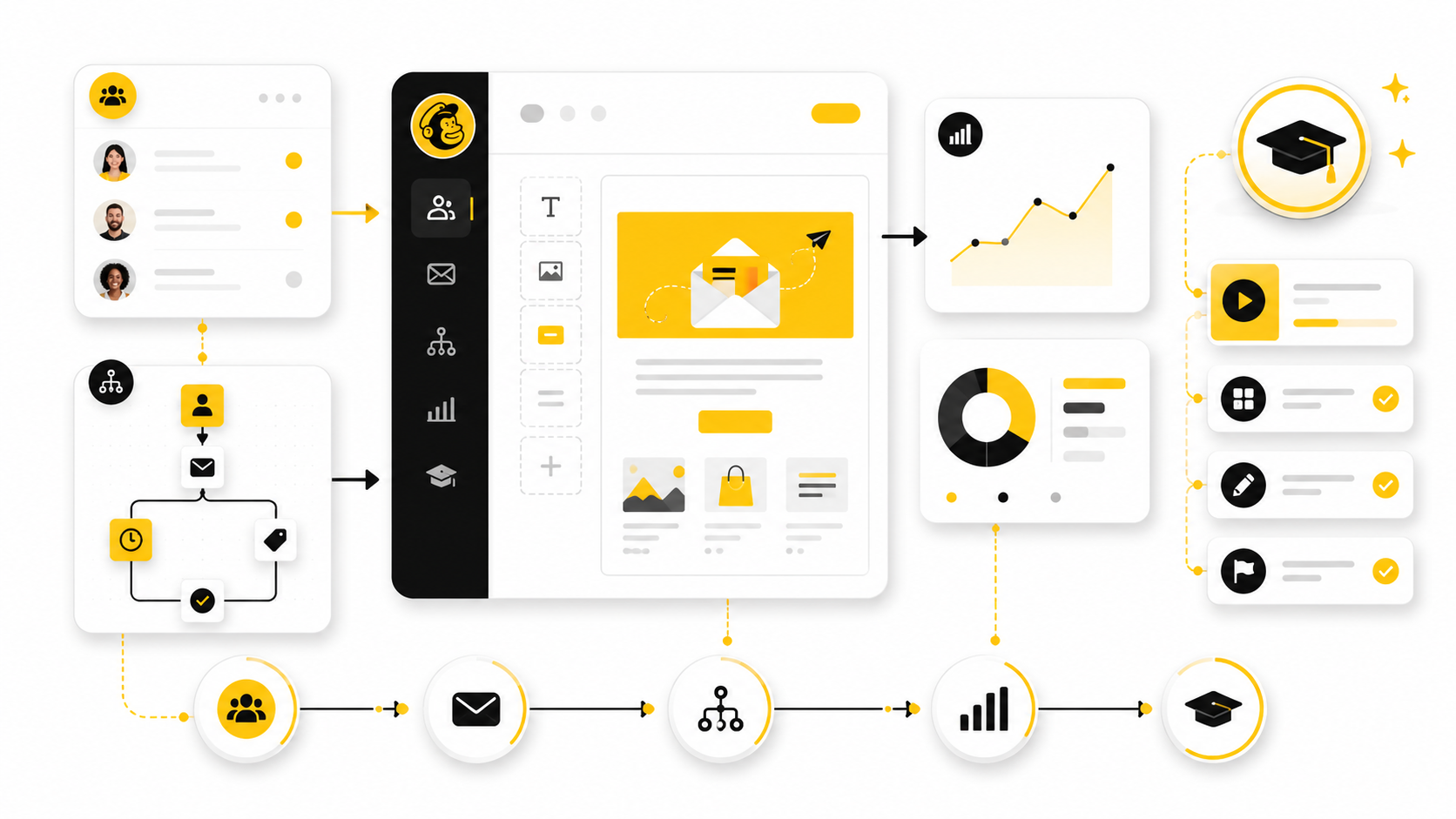
Mailchimp training is not just about learning where the buttons are. The real goal is to understand how email strategy, audience data, automation, content, testing, and reporting work together inside one marketing system. Once you see Mailchimp that way, the platform becomes much easier to use because every feature has a clear job.
This matters because most Mailchimp problems are not technical problems at first. They are usually structure problems. The audience is messy, tags are inconsistent, segments are too broad, automations are built without a clear customer journey, and reports are reviewed without knowing what decision should come next.
A good training path fixes that. It teaches you how to move from random campaigns to a repeatable email marketing process. You learn what to set up first, what to automate later, and how to judge whether your work is actually improving revenue, retention, or engagement.
Why Mailchimp Training Matters
Mailchimp looks simple on the surface, which is part of its appeal. You can create an account, import contacts, design an email, and send a campaign without needing a developer. That ease of use is helpful, but it can also create a false sense of confidence when a business starts sending emails before the foundation is clean.
The difference between casual use and professional use is planning. A trained Mailchimp user knows how to structure an audience, protect deliverability, use segments responsibly, and build automation flows that match real customer behavior. That matters because email performance depends heavily on relevance, timing, consent, and list quality.
Training also helps prevent expensive rework. When tags, groups, forms, automations, and reporting are built without a system, every future campaign becomes harder to manage. A practical Mailchimp training process gives you a shared operating model so the account can grow without turning into a confusing pile of lists, duplicated contacts, and disconnected campaigns.
The Mailchimp Training Framework
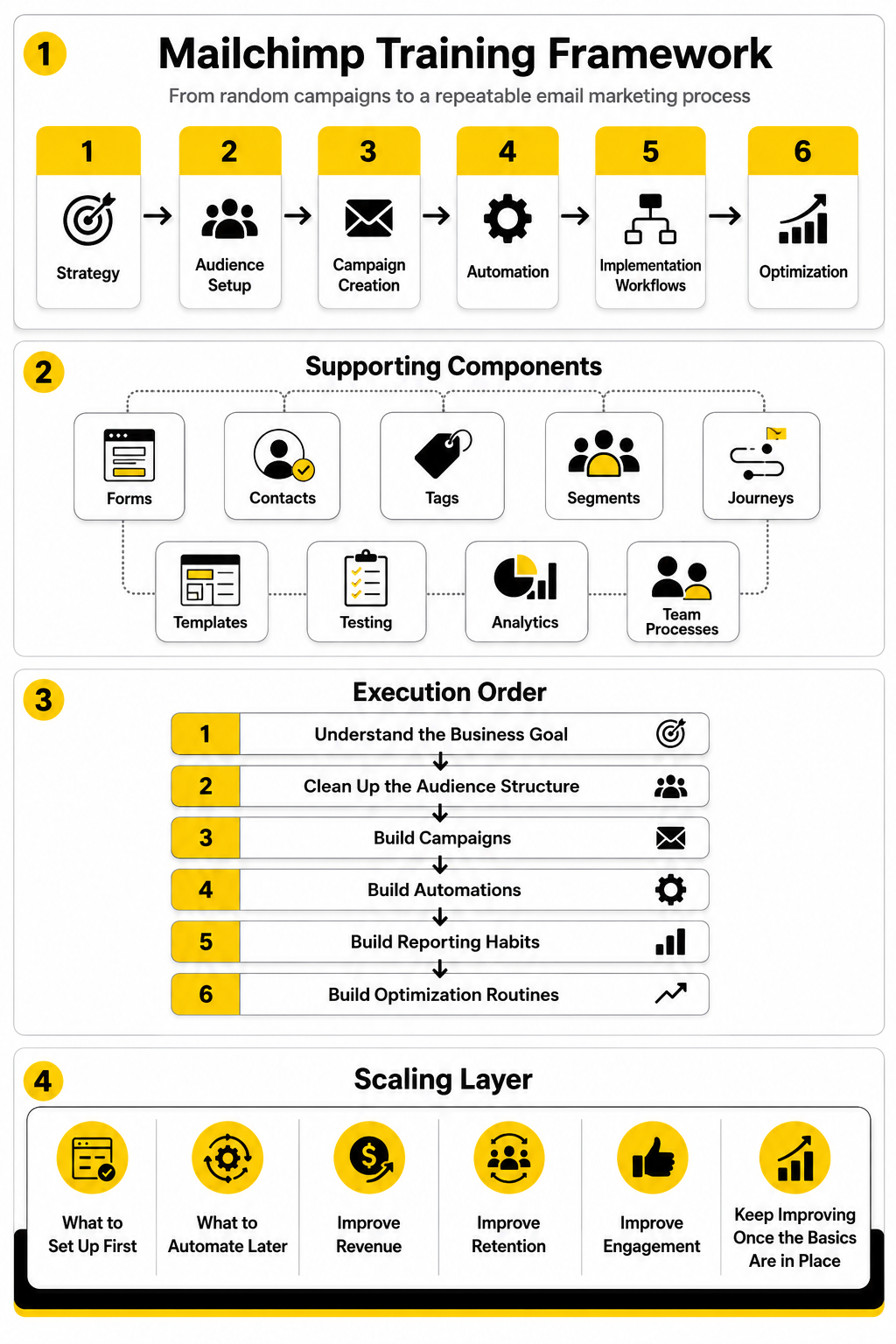
A strong Mailchimp training framework should move in the same order a professional implementation would move. First, you understand the business goal. Then you clean up the audience structure. After that, you build campaigns, automations, reporting habits, and optimization routines.
That order matters because each layer depends on the one before it. Automation is weak when the audience data is weak. Segmentation is unreliable when tags are inconsistent. Reporting is misleading when campaigns are not tied to a clear purpose.
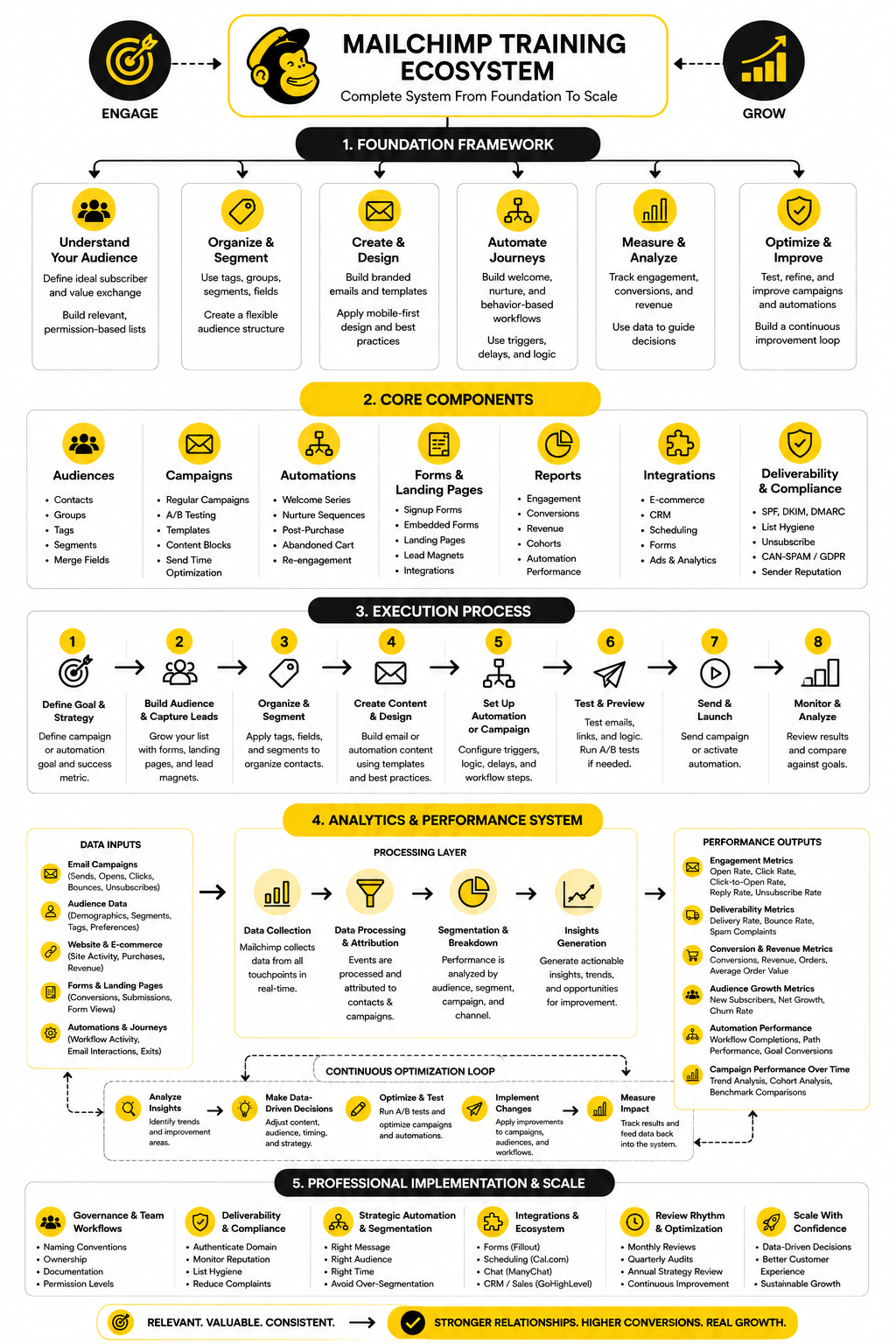
The framework used here is built around six practical stages: strategy, audience setup, campaign creation, automation, implementation workflows, and optimization. This keeps Mailchimp training focused on useful business outcomes instead of isolated feature tutorials.
What This Training Approach Will Help You Do
Mailchimp training should help you become more confident, but confidence alone is not enough. The bigger goal is competence. You should know why you are sending, who should receive each message, what action you want the reader to take, and how you will measure whether the campaign worked.
this guide will treat Mailchimp as a marketing system, not just an email editor. That means the focus will include forms, contacts, tags, segments, journeys, templates, testing, analytics, and team processes. Each part will build on the previous one so the full article feels like a complete roadmap rather than a scattered list of tips.
By the end, you should have a clear view of what to learn first, what to avoid, and how to keep improving once the basics are in place. That is the difference between watching a few tutorials and building a real Mailchimp operating system for your business.
Why Mailchimp Training Matters
Mailchimp training matters because email marketing gets messy faster than most people expect. At the beginning, one audience, one signup form, and one newsletter feel manageable. Then the business adds lead magnets, product updates, sales campaigns, ecommerce emails, webinar reminders, customer follow-ups, and suddenly nobody knows which contacts should receive what.
That is where training becomes practical, not theoretical. A trained user knows how to turn Mailchimp from a place where emails are sent into a system where contacts are organized, messages are targeted, and performance is reviewed with a purpose. The point is not to become obsessed with every feature. The point is to know which features matter for the business you are actually running.
This is especially important for small teams. When one person builds everything without a shared process, the account depends on that person’s memory. When the team has a clear Mailchimp training foundation, the account becomes easier to maintain, easier to hand off, and much safer to scale.
The Real Cost Of Learning Mailchimp Randomly
The most common mistake is learning Mailchimp only when something breaks. Someone needs a campaign sent by tomorrow, so they rush through the editor. Someone wants a welcome email, so they build a quick automation. Someone imports a spreadsheet, so they create another audience instead of checking whether those contacts already exist.
That kind of learning feels productive in the moment, but it creates hidden debt. The account fills up with duplicate logic, unclear tags, old templates, inactive automations, and reports nobody trusts. Later, when the business wants better segmentation or more advanced automation, the team has to clean up the foundation before it can move forward.
Good Mailchimp training prevents that by slowing the first setup down just enough to make future work faster. You define naming rules, contact rules, campaign rules, and reporting rules before the account becomes chaotic. That is not boring admin work. It is the difference between a marketing system and a digital junk drawer.
Why Strategy Comes Before Features
Mailchimp has plenty of tools, but tools do not create strategy by themselves. A campaign builder will not tell you what promise your email should make. A segment will not tell you which customer behavior actually matters. An automation flow will not fix a weak offer, a confusing funnel, or a list built from people who never really asked to hear from you.
This is why serious Mailchimp training starts with business intent. You need to know whether the main goal is lead nurturing, first purchases, repeat purchases, event attendance, customer education, reactivation, or retention. Each goal changes the structure of the audience, the content plan, and the automation logic.
Once the goal is clear, the platform becomes easier to understand. Tags are no longer random labels. Segments are no longer filters you click through without a plan. Campaigns become deliberate messages inside a larger customer journey.
The Training Mindset That Works Best
The best mindset is simple: learn Mailchimp in the order your customer experiences it. A contact joins your list, receives a first message, gets segmented based on what they do or tell you, moves through follow-up emails, and eventually takes a business action. That path should guide your training.
This keeps you from jumping straight into advanced tactics before the basics are reliable. You do not need complex branching automation if the signup source is unclear. You do not need a beautiful template library if the offer is vague. You do not need advanced reporting if nobody has defined what a successful campaign should prove.
Mailchimp training works best when each skill answers a practical question. Who is this contact? Why are they here? What should they receive next? What action do we want them to take? What will we change if the result is weak?
What Beginners Should Learn First
Beginners should start with audience structure, because almost everything else depends on it. This means understanding the difference between audiences, contacts, tags, groups, segments, merge fields, subscription status, and signup sources. These are not glamorous topics, but they control whether your campaigns stay relevant.
The next priority is campaign creation. A beginner should know how to set up the sender details, subject line, preview text, template, content blocks, links, tracking, test emails, and final checklist. This is where many mistakes happen because people focus on design and forget clarity, deliverability, and the reader’s next step.
After that, beginners can move into basic automation. A simple welcome sequence, lead magnet delivery email, post-purchase follow-up, or re-engagement path teaches the logic of triggers, delays, conditions, and actions. Once that logic makes sense, more advanced journeys feel much less intimidating.
What Intermediate Users Should Strengthen
Intermediate users usually know how to send campaigns, but they often need stronger systems. They should focus on cleaner segmentation, better naming conventions, stronger testing habits, and more consistent reporting. This is where Mailchimp training starts to affect performance, not just execution.
At this stage, the user should learn how to connect campaign planning with customer behavior. Instead of sending one message to everyone, they should ask which contacts are new, which are engaged, which have purchased, which have gone quiet, and which have shown interest in a specific topic. That shift makes email feel more personal without making the system unnecessarily complicated.
Intermediate users should also review automation quality. A flow can be technically active and still be strategically weak. The timing may be wrong, the message may not match the trigger, or the next step may be unclear. Training helps the user audit those details instead of assuming that an automation is good just because it is running.
What Advanced Users And Teams Should Master
Advanced Mailchimp users should focus on governance, integrations, testing discipline, and lifecycle strategy. This is where the work becomes less about individual emails and more about how email supports the whole marketing operation. The account needs rules that a team can follow without guessing.
That includes documentation. Every important automation should have a purpose, owner, trigger, audience rule, exclusion rule, success metric, and review schedule. Every major tag or segment should have a clear meaning. Every recurring campaign should have a reason to exist beyond “we always send this.”
Teams should also decide when Mailchimp is enough and when another tool should support the workflow. For example, a business that needs deeper pipeline tracking, sales follow-up, and multi-channel automation may compare Mailchimp with platforms like GoHighLevel. That decision should come from workflow needs, not software hype.
The Mailchimp Training Framework
The Mailchimp training framework should be practical enough for a beginner and structured enough for a team. The goal is to build skills in the same order that a healthy account is built. That means strategy first, audience structure second, campaigns third, automation fourth, implementation workflows fifth, and optimization sixth.
This order protects you from building too quickly on a weak foundation. If the audience is disorganized, automation becomes unreliable. If campaign goals are unclear, reporting becomes noise. If nobody owns the process, even a well-built account slowly decays.
A framework also makes training easier to repeat. Instead of telling every new user to “learn Mailchimp,” you can show them the exact layers they need to understand. That makes onboarding faster and keeps the account more consistent as more people touch it.
Stage One: Strategy And Use Case
The first stage is defining what Mailchimp is supposed to do for the business. This sounds obvious, but many accounts are built without a clear primary use case. One person sees Mailchimp as a newsletter tool, another sees it as an automation tool, and another sees it as a CRM substitute.
Those assumptions create friction. If the goal is a weekly content newsletter, the setup will look different from a product launch system. If the goal is ecommerce retention, the setup will look different from a B2B lead nurturing workflow. Clear strategy prevents people from building features that do not serve the same outcome.
A useful Mailchimp training exercise is to write one sentence for the account’s job. For example, the account may exist to turn new subscribers into qualified leads, bring past buyers back for repeat purchases, or keep customers educated after signup. That sentence becomes the filter for future decisions.
Stage Two: Audience And Contact Structure
The second stage is audience structure. This is where the account becomes either clean or painful. The goal is to organize contacts in a way that reflects consent, source, interests, lifecycle stage, and business relevance.
A good training process explains when to use one audience, when to use tags, when to use groups, and when to build segments. It also explains why random tagging is dangerous. Tags should describe meaningful facts or actions, not become a dumping ground for every idea someone had during a campaign.
This stage should also cover contact hygiene. People unsubscribe, change interests, stop engaging, or enter through old forms. A trained user knows that list quality affects everything downstream, from targeting to reporting to deliverability.
Stage Three: Campaign Planning And Creation
The third stage is campaign planning and creation. This is where strategy turns into actual emails. A campaign should never begin with the template. It should begin with the reader, the reason for sending, and the action you want them to take.
Once that is clear, the creative work becomes sharper. The subject line supports the promise. The preview text adds context. The email body removes friction. The call to action makes the next step obvious.
Mailchimp training should teach users to build campaigns from a checklist, not from habit. That checklist should include audience selection, exclusions, personalization, link testing, mobile review, inbox preview where available, tracking, compliance, and final approval. Simple, yes. But simple is what prevents embarrassing mistakes.
Stage Four: Automation And Customer Journeys
The fourth stage is automation. This is where Mailchimp becomes more powerful because the system can respond to behavior instead of waiting for manual sends. A contact can enter a journey after subscribing, clicking, purchasing, abandoning a cart, joining a group, or meeting another condition.
Training should make one thing clear: automation is not just a sequence of emails. It is a decision path. The trigger, delay, branch, condition, message, and exit rule all shape the customer experience.
The safest way to learn automation is to start with one high-value journey. A welcome journey is usually the best first build because it touches new subscribers when attention is highest. Once the team understands that structure, it can build more specific flows for education, sales follow-up, reactivation, and retention.
Stage Five: Professional Implementation
The fifth stage is professional implementation. This is where the account becomes stable enough for a real team, agency, or growing business. The focus shifts from “can we build it?” to “can we maintain it without confusion?”
Professional implementation includes naming conventions, folder organization, template rules, approval processes, role permissions, integration checks, and documentation. These details are easy to ignore when the account is small. They become essential when campaigns, automations, and audiences multiply.
This is also where adjacent tools may enter the system. A business might use Mailchimp for email while using Fillout for more flexible forms, Cal.com for booking flows, or Buffer for social scheduling. The key is to connect tools only when they make the workflow cleaner, not just because another integration sounds exciting.
Stage Six: Measurement And Optimization
The sixth stage is measurement and optimization. This is where Mailchimp training becomes a habit instead of a one-time setup. The team reviews what happened, decides what it means, and improves the next campaign or automation.
The mistake is staring at metrics without making decisions. Opens, clicks, unsubscribes, conversions, revenue, bounce behavior, and journey activity only matter when they lead to action. A weak click rate may point to a poor offer, unclear layout, wrong segment, or mismatch between subject line and content.
Optimization should be calm and consistent. You do not need to rebuild everything after one underperforming email. You need a rhythm for testing subject lines, offers, segments, timing, and calls to action. That rhythm is what turns Mailchimp training into better marketing over time.
Core Skills Every Mailchimp User Needs
Once the framework is clear, the next step is skill building. This is the part of Mailchimp training where the work becomes tangible because you are no longer talking about the account in theory. You are deciding how contacts enter the system, how they are labeled, how campaigns are created, and how automations should behave.
The core skills are not complicated, but they need to be learned in the right order. A clean audience makes segmentation easier. Good segmentation makes campaigns more relevant. Strong campaign habits make reporting more useful. Better reporting gives you a reason to improve the next send instead of guessing.
This is also where you stop treating Mailchimp as a blank canvas. A blank canvas sounds creative, but in email marketing it usually causes chaos. You want a repeatable process that makes each new campaign easier to plan, build, approve, send, and improve.
Skill One: Audience Setup
Audience setup is the first serious skill because it controls everything that follows. Mailchimp uses audiences, contacts, tags, groups, segments, signup forms, and audience fields to organize people. If those pieces are not understood early, the account becomes difficult to manage as soon as the list grows.
A simple rule works well: keep the audience structure as simple as possible while still giving the business enough information to send relevant messages. Tags can describe behavior, source, or internal status. Groups are useful when subscribers choose preferences or interests themselves. Segments pull those details together so you can send to the right people without rebuilding the logic every time.
This is why Mailchimp training should include a contact architecture exercise before anyone imports a spreadsheet. Decide what information you truly need, how it will be collected, and who is allowed to change it. Mailchimp’s own documentation on groups as preference-based audience organization and tags for contact segmentation and automations makes this distinction worth learning before your account gets crowded.
Skill Two: Signup And Consent Flow
A good signup flow does more than capture an email address. It sets expectations. It tells the subscriber what they are joining, why it is useful, and what kind of messages they can expect after they subscribe.
This matters because engagement starts before the first campaign is sent. A vague form attracts vague intent. A clear form attracts people who understand the value exchange, which makes your welcome emails, lead nurturing, and sales messages easier to write.
The practical process is simple. Match every form to a specific promise, connect that form to the right source tracking, and make sure the follow-up email delivers exactly what was promised. If you use a form tool such as Fillout alongside Mailchimp, the same rule applies: collect only the fields you will actually use, then pass that data into the account in a way your team can understand later.
Skill Three: Campaign Planning
Campaign planning is where many teams either become professional or stay reactive. A reactive team opens the editor and starts writing. A trained team starts with the reason for sending, the audience, the offer, the call to action, and the success metric.
That difference changes the quality of the email. The subject line becomes more specific because the promise is clear. The body becomes tighter because the action is clear. The layout becomes simpler because the reader does not need to process five competing ideas.
A useful campaign brief should answer five questions before anyone designs the email:
Skill Four: Template And Content Discipline
Templates are helpful only when they speed up good decisions. They should not lock the team into stale layouts or make every message look identical. The real value of a template is consistency: brand structure, readable spacing, mobile-friendly blocks, clear buttons, and predictable footer information.
Mailchimp training should teach users to think in reusable content patterns. A newsletter may need a lead story, supporting links, and one call to action. A launch email may need a problem, promise, proof, offer, and deadline. A customer education email may need a short explanation, one practical step, and a useful resource.
This keeps the team from redesigning every email from scratch. It also keeps campaigns focused. When every template has a job, the editor becomes a production tool instead of a place where strategy gets invented at the last minute.
Skill Five: Testing Before Sending
Testing is not optional. It is the safety net between a good campaign plan and a public mistake. Mailchimp includes preview and test options so users can review how an email appears before it reaches subscribers, including desktop and mobile views through its preview and test workflow.
A proper test is not just “does it look nice?” It checks the subject line, preview text, sender name, personalization, links, buttons, images, spelling, mobile layout, unsubscribe information, and tracking. It also checks whether the selected audience and exclusions are correct.
The best habit is to test against a checklist every time. Not because your team is careless, but because email has too many small failure points. A broken link, wrong segment, or missing personalization field can damage trust quickly.
Skill Six: Basic Reporting
Reporting is where Mailchimp training starts to become feedback-driven. A campaign should not end when it is sent. It ends when the team has reviewed the result and decided what to do next.
The most useful metrics depend on the goal. A content newsletter may care about clicks to articles and replies. A sales campaign may care about revenue, purchases, booked calls, or trial starts. A reactivation campaign may care about who clicked, who stayed inactive, and who should be suppressed from future sends.
This is also why open rate should not be treated as the whole truth. Privacy changes and inbox behavior can make opens less reliable than many beginners assume. Clicks, conversions, unsubscribes, bounces, and downstream behavior usually give a clearer picture of whether the message created real action.
Building Campaigns, Automations, And Customer Journeys
After the core skills are in place, Mailchimp training naturally moves into execution. This is where campaigns, automations, and customer journeys start working together. The goal is not to build more emails for the sake of it. The goal is to create a predictable path for subscribers and customers.
A campaign is usually time-based. You send it because something is happening now: a launch, update, newsletter, event, promotion, or announcement. An automation is behavior-based. It sends because the contact did something, reached a condition, or entered a journey.
Both matter. Campaigns help you stay timely. Automations help you stay consistent. A strong Mailchimp setup uses both without letting either one become noisy.
The Practical Execution Process
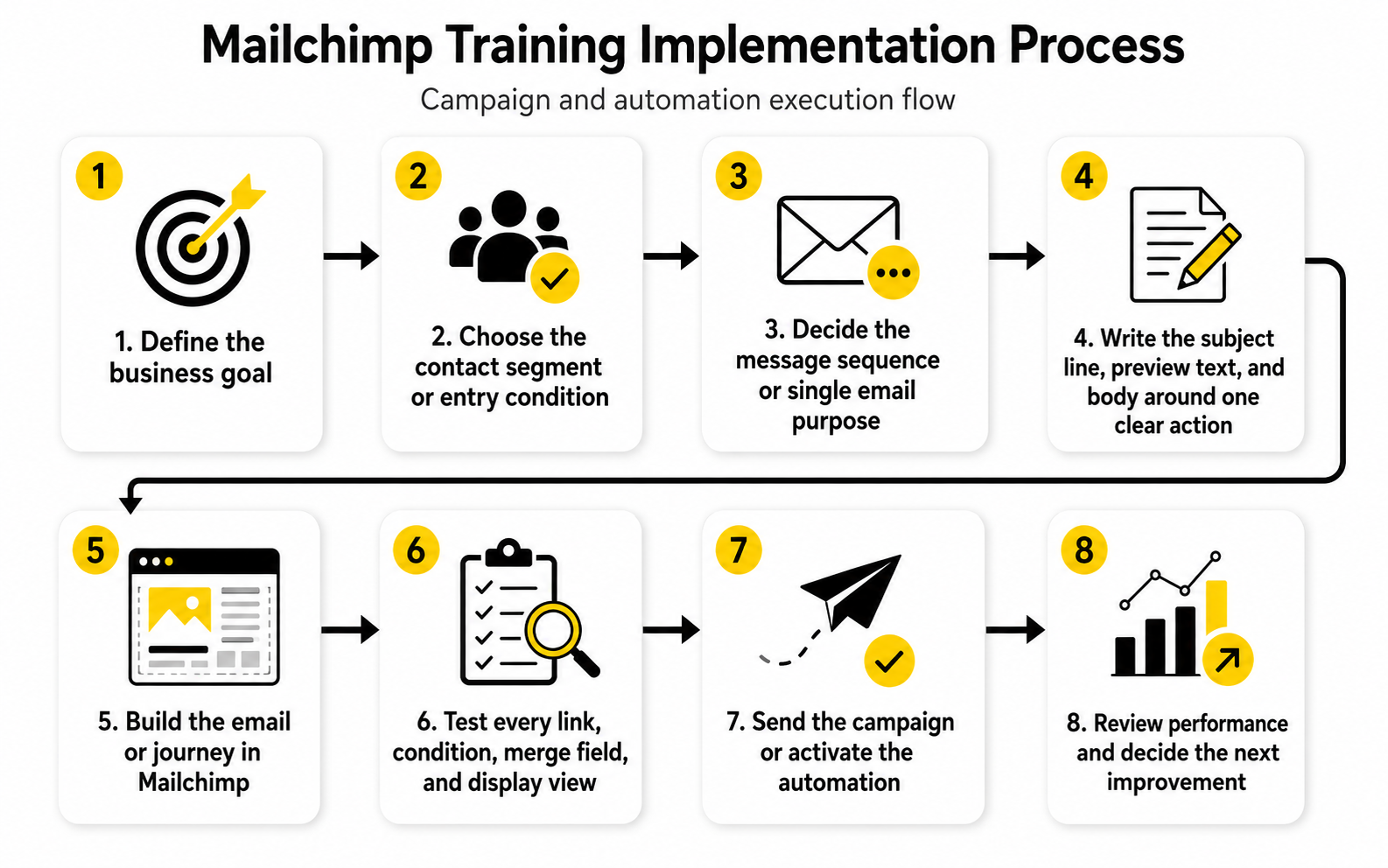
The easiest way to build inside Mailchimp is to follow the same process every time. This keeps the work clean, even when the message, audience, or automation changes. It also makes training easier because everyone follows the same path instead of inventing their own version.
Start with the goal, then define the audience, then write the message, then build the asset, then test, then send or activate, then review. That sequence sounds basic, but it prevents most mistakes. Problems usually happen when teams skip straight from idea to build.
Use this process for campaigns and automations:
Building A Campaign That Has A Job
Every campaign needs a job. If you cannot explain the job in one sentence, the email is probably not ready. A campaign might educate new leads, promote a product, drive event registration, announce a feature, reactivate quiet subscribers, or move customers toward a repeat purchase.
That job should shape the structure of the email. A product promotion needs more clarity around the offer and next step. A newsletter needs useful content and a reason to click. A customer update needs plain language, not marketing fluff.
A trained Mailchimp user does not ask, “What should we send this week?” They ask, “What does this audience need now, and what business outcome should this email support?” That question makes the campaign stronger before a single content block is added.
Building A Welcome Journey First
A welcome journey is usually the best first automation because it reaches people at the moment they are most aware of your brand. They just subscribed, downloaded something, bought something, or asked to hear from you. That is a high-intent moment, and wasting it is painful.
The first email should confirm the subscription and deliver the promised value. The next message can explain what to expect, introduce your best resources, or help the subscriber take a simple next step. Later emails can deepen trust, invite a reply, show a product path, or move the person toward a stronger commitment.
Mailchimp’s marketing automation flows support triggers, branches, and actions that help create more dynamic contact paths. That makes the welcome journey a useful training ground because it teaches the logic you will need for more advanced automations later.
Building Segments For Better Relevance
Segmentation turns one broad list into smaller groups that can receive more relevant messages. This can be based on profile data, signup source, purchase activity, engagement, tags, groups, or other conditions. The key is to segment for a reason, not because the feature exists.
For example, someone who clicked a pricing link should not always receive the same follow-up as someone who only downloaded a beginner guide. A recent buyer may need onboarding or education, while a long-inactive subscriber may need a re-engagement message or suppression decision. These distinctions make email feel more useful and less random.
Mailchimp supports sending to segments created from contact data and activity, and purchase-based segmentation can use order behavior such as what someone bought, when they bought, or how much they spent. That is powerful, but only when the team understands why the segment exists.
Building Automations Without Overbuilding
Automation can become a trap when teams try to build everything at once. They create too many branches, too many emails, and too many conditions before they have enough data to know what matters. The result looks sophisticated but becomes hard to maintain.
Start with one simple journey that has a clear trigger, clear exit condition, and clear success metric. Then improve it after real contacts move through it. This is more professional than building a massive flow based on guesses.
The best automations feel natural to the subscriber. They arrive at the right moment, make sense based on the previous action, and guide the person toward a useful next step. If the journey feels like the business is talking to itself, simplify it.
Connecting Mailchimp To The Rest Of The Funnel
Mailchimp rarely operates alone. A subscriber may come from a landing page, social post, checkout form, webinar, booking page, quiz, chatbot, or CRM process. Training should show how Mailchimp fits into that larger path.
This is where tool choices matter. A creator or small business might connect Mailchimp with Systeme.io for funnel pages, ClickFunnels for sales flows, or ManyChat for conversational lead capture. The important part is not the number of tools. The important part is whether each tool passes the right information forward.
Keep the funnel simple enough to audit. You should know where a contact came from, what they were promised, what tag or field was added, what journey they entered, and what action they took next. If you cannot trace that path, the system needs cleanup before it needs more automation.
Statistics And Data
Measurement is where Mailchimp training becomes real. You can have a clean audience, good templates, and polished automations, but the account is not mature until the team knows what the numbers mean. Data should not sit inside reports as decoration. It should tell you what to keep, what to fix, and what to stop doing.
The problem is that email metrics are easy to misread. A high open rate can look impressive while clicks stay weak. A campaign can get clicks but produce no sales or booked calls. An automation can run quietly in the background for months while nobody checks whether it is still helping the customer journey.
Good measurement connects the metric to the decision. Open rate helps you understand attention, but it is not proof of success. Clicks show stronger intent, but they still need context. Conversions, revenue, replies, booked calls, repeat purchases, and retention usually tell you more about business impact than surface-level engagement alone.
The Metrics That Actually Deserve Attention
Mailchimp training should teach users to start with a small set of metrics and understand them deeply. Trying to review everything at once usually creates confusion. A focused dashboard is better than a long report nobody acts on.
The first group is delivery and list health. This includes delivery rate, bounce rate, unsubscribe rate, spam complaint signals, and contact growth quality. If emails are not reaching people or the wrong people are joining the list, the rest of the report becomes less useful.
The second group is engagement. This includes opens, clicks, click-to-open rate, replies, and engagement by segment. These numbers help you understand whether the message matched the audience and whether the email gave people a strong enough reason to act.
The third group is business impact. This includes purchases, revenue, booked calls, trial starts, form submissions, webinar registrations, upgrades, renewals, or any other action tied to the campaign goal. This is where email stops being “content activity” and starts becoming measurable marketing.
Why Benchmarks Are Useful But Dangerous
Benchmarks can help you understand whether your results are in a normal range, but they should never become your main strategy. Mailchimp’s own email marketing benchmarks show that performance varies by industry, which means one universal “good open rate” is not a serious way to judge your account. A nonprofit newsletter, ecommerce promotion, local service campaign, and B2B nurture sequence can all have very different behavior.
Benchmarks become dangerous when teams use them as excuses or trophies. If your open rate is above an industry average but nobody clicks, the campaign still has a problem. If your click rate is below a benchmark but the campaign generated profitable sales from a narrow segment, the campaign may be doing its job.
Use benchmarks as a diagnostic tool, not a scoreboard. They can tell you where to investigate, but they cannot tell you what your audience values, why your offer worked, or what message should come next. Your own historical performance is usually the more useful comparison once you have enough consistent data.
How To Interpret Open Rates
Open rate is one of the most familiar email metrics, but it needs careful interpretation. Apple’s Mail Privacy Protection changed how some opens are reported, which means open rates can be inflated or less precise than they used to be. Mailchimp training should make this clear early so beginners do not treat opens as hard proof of human attention.
That does not mean open rate is useless. It can still help you compare subject lines, sender names, timing, and broad audience interest when reviewed carefully. The key is to treat it as a directional signal, not a final verdict.
If opens are weak, investigate the sender name, subject line, preview text, send time, list quality, and audience relevance. If opens are strong but clicks are weak, the problem is probably not the subject line. It may be the offer, email structure, message clarity, or call to action.
How To Interpret Clicks
Clicks are usually more meaningful than opens because they show action. A click means the subscriber saw something specific enough to make them leave the inbox and continue the journey. That makes click data one of the most practical parts of Mailchimp reporting.
Still, a click is not automatically a win. You need to ask what the person clicked and why. A high number of clicks on a secondary link may show that the main call to action was not compelling enough. A low number of clicks from a highly qualified segment may show that the offer, timing, or message was off.
Click-to-open rate can be useful because it compares clicks against people who likely opened the email. If opens are strong but click-to-open rate is weak, the body content did not convert attention into action. That is a content and offer problem, not just a deliverability problem.
How To Interpret Unsubscribes And Complaints
Unsubscribes are not always bad. Sometimes they clean the list and remove people who were never going to engage. A healthy email program should expect some unsubscribes, especially when sending more direct promotional campaigns.
The warning sign is not one unsubscribe. The warning sign is a pattern. If unsubscribes rise after certain topics, segments, send frequencies, or campaign types, the audience is giving you feedback. Ignore that feedback and you train people to disengage or complain.
Spam complaints are more serious because they can damage sender reputation. Mailchimp’s guidance on reducing unsubscribe rates emphasizes relevance, personalization, and audience segmentation for keeping subscribers engaged. In practical terms, that means you should not send every message to every contact just because the platform makes it easy.
How To Read Automation Data
Automation data needs a different mindset from campaign data. A campaign is tied to one send or one moment. An automation keeps running, which means you need to review its performance over time and by step.
Look at where people enter, where they drop off, which emails get clicks, and which actions happen after the journey. If the first email performs well but later emails collapse, the sequence may be too long, too repetitive, or too aggressive. If many contacts enter but few reach the intended action, the journey may need a stronger offer or a clearer transition.
This is where Mailchimp training should get very practical. Every automation should have a review schedule. Every review should end with a decision: keep it, improve it, pause it, simplify it, or rebuild it.
The Measurement System To Use Every Month
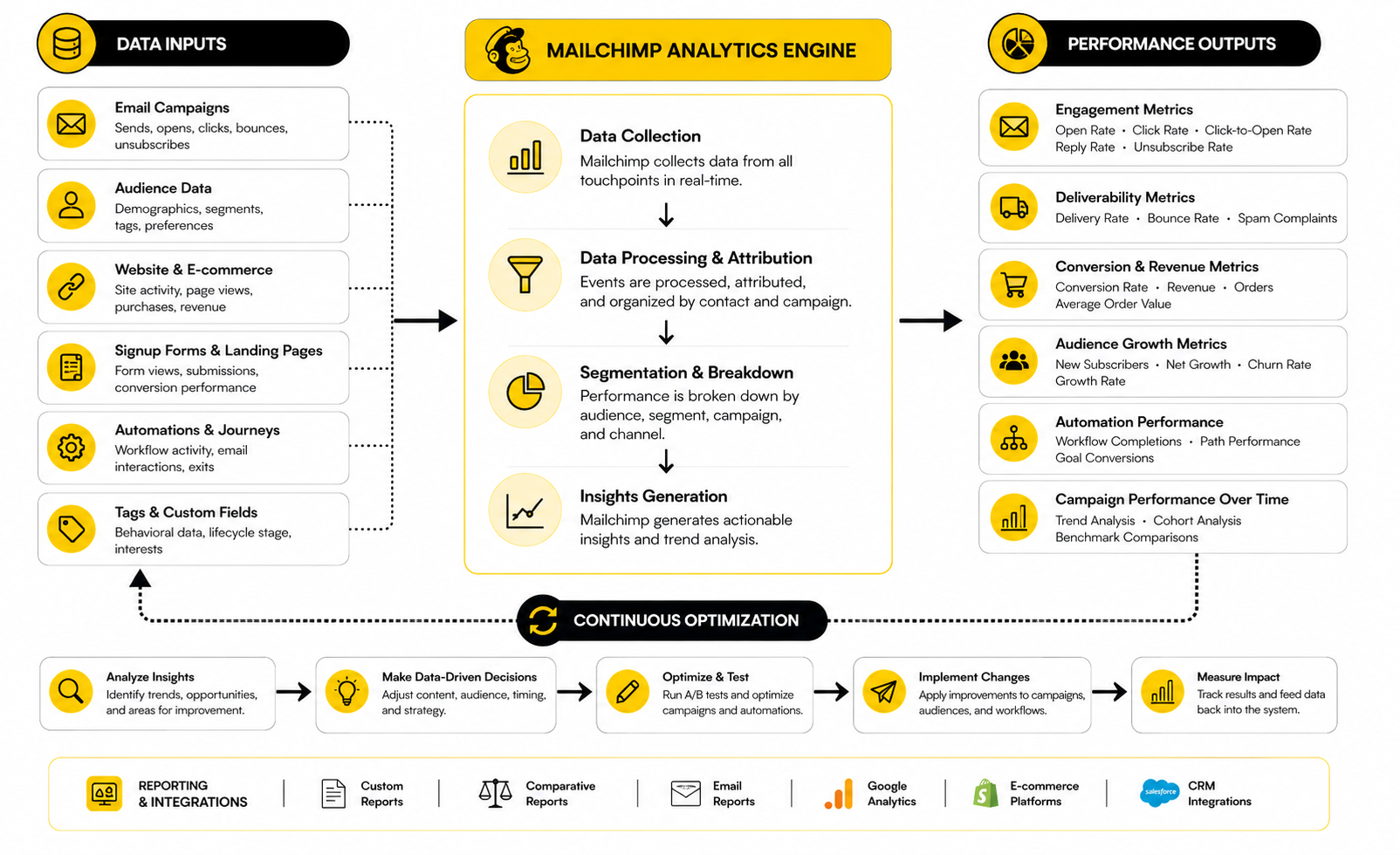
A monthly measurement system keeps reporting from becoming random. You do not need a massive analytics ritual. You need a consistent review that connects numbers to action.
Start with account health. Check list growth, unsubscribes, bounces, and engagement trends. If the list is growing but engagement is falling, the acquisition source may be bringing in weaker contacts or your content may not match the promise that attracted them.
Then review campaign performance. Compare recent campaigns against similar past campaigns, not just against broad industry averages. A product launch email should be compared with previous product launch emails. A newsletter should be compared with previous newsletters. This keeps the analysis fair.
Finally, review automations. Look at entry volume, email-level engagement, conversion actions, and any obvious drop-off points. The goal is not to obsess over tiny movements. The goal is to spot patterns early enough to improve them.
A Simple Reporting Checklist
A reporting checklist makes Mailchimp training easier because it gives users a repeatable way to think. Instead of opening a report and staring at numbers, the user follows a sequence. That sequence turns analytics into decisions.
Use this checklist after important campaigns and during monthly reviews:
This checklist is intentionally simple. Simple gets used. Complicated dashboards often look impressive and then quietly die because nobody has time to interpret them.
What Data Should Change In Your Next Campaign
The whole point of measurement is improvement. If the data does not change the next decision, it is not being used properly. This is one of the biggest gaps Mailchimp training can fix.
Weak opens should lead to testing the sender, subject line, preview text, timing, or audience selection. Weak clicks should lead to improving the offer, email layout, copy, call to action, or segmentation. Weak conversions after strong clicks should lead to reviewing the landing page, checkout flow, booking process, or sales page.
Strong results deserve analysis too. Do not only study failures. If one campaign outperforms the others, identify what made it work: the topic, segment, promise, timing, format, urgency, or offer. Then turn that insight into a reusable pattern.
When Mailchimp Data Is Not Enough
Mailchimp can show a lot, but it may not show the full customer journey by itself. A subscriber may click an email, visit a landing page, book a call, speak to sales, and convert later. If those steps live in separate tools, Mailchimp data alone will not tell the whole story.
This is why measurement needs clear tracking outside the inbox too. Landing pages, forms, booking tools, ecommerce platforms, and CRMs should pass enough information back into the marketing process to show what happened after the click. Without that, a campaign may look weak or strong for the wrong reason.
For teams that need deeper funnel tracking, a platform such as GoHighLevel can make sense when email, pipeline, booking, and follow-up need to live closer together. For lighter workflows, connecting Mailchimp with focused tools like Cal.com for scheduling or Fillout for form capture may be enough. The right choice depends on how much of the customer journey you need to measure beyond the email click.
The Difference Between Reporting And Optimization
Reporting tells you what happened. Optimization decides what to do about it. That difference matters because many teams report without improving anything.
Optimization should be controlled, not chaotic. Change one meaningful thing at a time when possible: the segment, offer, subject line, call to action, email structure, or send timing. If you change everything at once, you may improve performance, but you will not know why.
Mailchimp training should teach users to build a learning loop. Send, measure, interpret, adjust, and document the lesson. Over time, that loop becomes more valuable than any single campaign because it compounds. The account gets more carefully because the team gets more carefully.
Professional Implementation And Team Workflows
At this stage, Mailchimp training should move beyond individual skills and into operating discipline. A beginner can send a campaign. A trained professional can build a system that other people can understand, maintain, and improve without breaking what already works.
That shift matters because growth creates complexity. More campaigns means more templates. More lead sources means more tags and segments. More automations means more conditions, exclusions, and reporting questions. Without clear workflows, the account slowly becomes harder to trust.
Professional implementation is not about making Mailchimp complicated. It is about making the important parts visible. Everyone who works inside the account should know what exists, why it exists, who owns it, and when it should be reviewed.
Build Governance Before The Account Gets Busy
Governance sounds corporate, but it is really just decision-making hygiene. It tells the team how the Mailchimp account should be managed so people do not create random assets every time they have a new idea. This is especially important when freelancers, agencies, assistants, founders, marketers, and salespeople all touch the same system.
Start with naming conventions. Campaigns, templates, tags, segments, automations, forms, landing pages, and reports should follow a structure that makes them searchable later. A vague name like “Newsletter Final New Version” tells the team almost nothing. A name that includes the campaign type, audience, date, and purpose is much easier to review.
Then define ownership. Every recurring campaign should have an owner. Every automation should have an owner. Every integration should have an owner. If nobody owns it, nobody will maintain it.
Document The Customer Journey In Plain Language
Your Mailchimp account should not require detective work. If someone opens an automation, they should be able to understand why it exists without asking five people. That is why documentation belongs inside professional Mailchimp training.
Keep the documentation simple. For each important journey, write the trigger, audience, exclusions, email sequence, goal, review frequency, and success metric. This does not need to be a massive document. It just needs to be clear enough that another person can understand the logic.
Plain language wins here. Do not write documentation that sounds clever but helps nobody. Write it the way you would explain it to a capable teammate on their first day: “This journey starts when someone downloads the buyer guide, sends three education emails over seven days, and moves engaged contacts toward a consultation request.”
Control Permissions And Reduce Risk
As the account grows, access control becomes part of the training. Not everyone needs the ability to import contacts, edit automations, change integrations, or send campaigns. Giving everyone full access feels convenient until someone accidentally changes a live journey or sends to the wrong segment.
Mailchimp training should make permissions a normal conversation, not an afterthought. A designer may need template access. A copywriter may need campaign editing access. A manager may need approval and reporting access. An admin should handle billing, integrations, domains, and account-level settings.
This is not about mistrust. It is about protecting the system. The more valuable your email channel becomes, the more careful you should be with the settings that affect subscribers, revenue, and deliverability.
Protect Deliverability Like A Business Asset
Deliverability is not a technical detail you can ignore until emails land in spam. It is the foundation that allows email marketing to work. If inbox providers do not trust your domain, your best campaign may never get a fair chance.
Modern sender requirements have made this even more important. Google’s sender guidance says senders should keep spam rates below 0.1% and avoid reaching 0.3% or higher, while the broader email industry has moved toward stronger authentication, clearer unsubscribe paths, and better sender reputation management. That means professional Mailchimp training should include SPF, DKIM, DMARC, one-click unsubscribe expectations, bounce management, list hygiene, and complaint monitoring.
This is where lazy sending gets expensive. Buying lists, importing questionable contacts, sending too often, hiding unsubscribe links, or blasting irrelevant promotions can damage trust quickly. A strong email program protects permission because permission is the asset.
Decide What Should Be Automated And What Should Stay Manual
Automation is powerful, but not everything should be automated immediately. Some messages need human judgment, especially when the audience is small, the offer is sensitive, or the customer journey is still being tested. A professional implementation balances efficiency with control.
A good rule is to automate repeatable behavior with clear intent. Welcome sequences, lead magnet delivery, post-purchase education, abandoned cart follow-up, event reminders, and re-engagement flows are usually strong automation candidates. They happen often enough and follow a predictable enough pattern to justify systemization.
Manual campaigns still matter. Product announcements, timely updates, editorial newsletters, launches, and market-specific messages may need human timing and judgment. Mailchimp training should help teams choose the right mode instead of forcing everything into a journey just because automation feels advanced.
Avoid The Over-Segmentation Trap
Segmentation improves relevance, but over-segmentation creates operational drag. If every campaign requires ten micro-segments, three exclusion rules, and custom copy for tiny groups, the team may stop sending consistently. Complexity is only useful when it creates enough value to justify the extra work.
The best segmentation strategy starts broad and becomes more specific where behavior proves it matters. Segment by lifecycle stage, purchase behavior, engagement, interest, or source when those differences should change the message. Do not create segments just to feel sophisticated.
This is also where Mailchimp training should teach restraint. A business does not need a separate segment for every minor interaction. It needs a small number of useful segments that change what the subscriber receives and help the team make better decisions.
Know When Mailchimp Is The Right Tool
Mailchimp is strong for email marketing, audience management, templates, automations, and reporting. For many businesses, that is enough. The problems usually appear when the business expects Mailchimp to replace a full CRM, sales pipeline, booking system, support tool, ecommerce analytics platform, and multi-channel automation suite all at once.
This is a strategic tradeoff, not a criticism. A simple business should not buy a complex platform before it needs one. But a growing team should also be honest when the workflow has outgrown the original setup.
If sales pipeline visibility, appointment follow-up, SMS, call tracking, lead routing, and client management become central to the business, a platform like GoHighLevel may fit better around the whole revenue process. If the main need is funnel pages and checkout flows, ClickFunnels or Systeme.io may support the front end while Mailchimp handles email communication. The smart move is not choosing the trendiest tool. The smart move is matching the tool stack to the real workflow.
Plan For Integrations Before They Multiply
Integrations are useful until they become invisible. A form tool sends contacts into Mailchimp. A checkout tool adds purchase data. A booking tool captures calls. A webinar tool adds registrants. Each connection seems harmless until nobody remembers which tool creates which tag or why a contact entered a journey.
Professional Mailchimp training should include an integration map. This can be very simple: source tool, data passed, tag or field added, journey triggered, owner, and failure check. The goal is to know how contacts move through the system without guessing.
This is especially important when using multiple growth tools. ManyChat can support conversational lead capture, Cal.com can support booking flows, and Fillout can support richer form collection. Those tools can make the system stronger, but only when the data they send into Mailchimp is clean and intentional.
Create A Review Rhythm For The Whole Account
A Mailchimp account should have maintenance cycles. Not just campaign reviews. Full account reviews. This is where the team checks whether the system still reflects the business.
A monthly review can focus on campaign performance, list health, and active automations. A quarterly review can look at tags, segments, signup forms, templates, integrations, inactive contacts, and journey logic. A yearly review can challenge bigger assumptions: whether the email strategy still fits the offer, audience, and tool stack.
This rhythm prevents quiet decay. Old automations get paused. Dead tags get cleaned up. Weak templates get retired. Broken integrations get fixed before they create a bigger mess.
Train The Team To Think In Systems
The highest level of Mailchimp training is not memorizing features. It is learning to think in systems. Every campaign affects audience expectations. Every form affects data quality. Every automation affects the customer experience. Every report affects the next decision.
That mindset changes how people work. They stop asking only, “Can we send this?” and start asking, “Should this audience receive this message at this moment?” They stop building journeys just because they can and start building them because the customer path needs support.
This is where email marketing becomes more professional. The account is no longer a collection of campaigns. It becomes a structured communication system that can scale without losing clarity.
Measurement, Optimization, And Next Steps
The final layer of Mailchimp training is learning how to keep the system alive. A good setup is not something you build once and forget. Audiences change, offers change, inbox rules change, customer expectations change, and the account needs to evolve with them.
This is where many teams lose discipline. They build the first version, send a few campaigns, check a few numbers, and then drift back into reactive work. The better approach is to create a living email system with a clear owner, regular review cycles, simple documentation, and a small number of improvement priorities.
Think of Mailchimp as part of a larger marketing ecosystem. Contacts enter from forms, landing pages, purchases, chats, events, referrals, ads, social media, and sales conversations. Mailchimp should help organize that movement, continue the relationship, and send useful signals back to the business.
Build A Final Optimization Loop
The final optimization loop should be simple enough to use every month. First, review account health. Then review campaign performance. Then review automation performance. Then decide what to improve before the next cycle.
This keeps the system from becoming emotional. You do not panic after one weak campaign, and you do not get lazy after one strong campaign. You look for patterns, decide what they mean, and make controlled improvements.
A practical loop looks like this:
Make Training Part Of The Workflow
Mailchimp training should not be treated as a one-time course that someone completes and forgets. The platform changes, the business changes, and the team’s skill level should keep improving. Training works best when it becomes part of the way campaigns and automations are built.
For example, every campaign review can teach one lesson. Every automation audit can reveal one improvement. Every integration issue can become a short internal note that prevents the same mistake later.
That is how a team gets sharper without making training feel heavy. The learning happens inside real work. The result is a Mailchimp account that gets cleaner, more intentional, and more valuable over time.
Know What To Fix First
When everything feels messy, do not try to fix the whole account at once. That is how teams get stuck. Start with the problem that creates the most downstream confusion.
Usually, that means cleaning the audience structure first. If tags, groups, segments, and signup sources are unclear, campaigns and automations will keep inheriting the same problem. Once the audience is clean enough to trust, move to the most important active automations and then to the campaign production process.
This order keeps the work practical. You are not polishing old templates while the contact data is still broken. You are not building advanced journeys while nobody knows which subscribers should enter them.
Keep The System Human
The biggest mistake with advanced email marketing is forgetting that a real person receives the email. Automation, segmentation, reporting, and integrations should make communication more relevant, not colder. A trained Mailchimp user keeps the subscriber experience in focus.
That means writing clearly. It means sending for a reason. It means respecting frequency, consent, and expectations. It means giving people a useful next step instead of forcing them through a machine.
This is the standard to aim for: the system should feel organized to the team and natural to the subscriber. When both are true, Mailchimp becomes much more than an email tool. It becomes a reliable part of the customer relationship.
What Is Mailchimp Training?
Mailchimp training is the process of learning how to use Mailchimp as a complete email marketing system. It includes audience setup, contact organization, campaign creation, automation, reporting, deliverability, and team workflows. The goal is not just to learn features, but to build better marketing habits.
Who Needs Mailchimp Training?
Mailchimp training is useful for business owners, marketers, freelancers, ecommerce teams, agencies, nonprofits, and assistants who manage email campaigns. Beginners need it to avoid messy setup mistakes. Experienced users need it to improve segmentation, automation, reporting, and account governance.
Is Mailchimp Easy To Learn?
Mailchimp is easy to start using, but it takes training to use well. Sending a simple campaign is straightforward, but building a clean audience structure, useful automations, and reliable reporting takes more discipline. The platform becomes much easier once you understand the logic behind contacts, tags, segments, campaigns, and journeys.
What Should I Learn First In Mailchimp?
Start with audience structure. Learn how audiences, contacts, tags, groups, segments, merge fields, forms, and subscription status work. After that, learn campaign creation, testing, basic automation, and reporting.
How Long Does Mailchimp Training Take?
Basic Mailchimp training can be learned quickly if the goal is to send simple campaigns. A more complete training path takes longer because it includes strategy, segmentation, automation, analytics, integrations, and maintenance. The right timeline depends on the complexity of the business and how many people will manage the account.
What Is The Difference Between Tags And Segments In Mailchimp?
Tags are labels you apply to contacts. Segments are saved or temporary filters that group contacts based on conditions such as tags, fields, behavior, signup source, purchase activity, or engagement. In practice, tags help describe contacts, while segments help decide who should receive a specific message.
Should I Use One Audience Or Multiple Audiences In Mailchimp?
Many businesses are better off starting with one well-organized audience because it keeps reporting, segmentation, and contact management simpler. Multiple audiences can make sense when you manage truly separate brands, markets, or permission structures. The mistake is creating new audiences just because the current one is messy.
What Is The Best First Automation To Build?
A welcome automation is usually the best first automation. It reaches people when they have just subscribed, downloaded a resource, bought something, or shown interest. It also teaches the basic logic of triggers, delays, conditions, messages, and goals.
How Often Should I Review Mailchimp Reports?
Review important campaigns after they have had enough time to collect useful data, then run a broader account review monthly. Campaign reports help you improve individual sends. Monthly reviews help you spot trends in list health, engagement, automation performance, and business impact.
Which Mailchimp Metrics Matter Most?
The most useful metrics depend on the campaign goal. Delivery, bounces, unsubscribes, and complaints show list health. Opens and clicks show engagement. Purchases, booked calls, signups, replies, revenue, and retention show business impact.
Are Open Rates Still Reliable?
Open rates are still useful as directional signals, but they should not be treated as perfect proof of attention. Privacy features and inbox behavior can affect how opens are counted. Clicks, conversions, replies, and downstream actions usually give a stronger view of performance.
How Do I Improve Mailchimp Campaign Performance?
Improve one layer at a time. If opens are weak, work on sender name, subject line, preview text, timing, and audience relevance. If clicks are weak, improve the offer, copy, layout, call to action, and segment match. If conversions are weak after the click, review the landing page, form, checkout, booking flow, or sales process.
When Should I Move Beyond Mailchimp?
Move beyond Mailchimp when your workflow needs more than email marketing and light customer journey automation. If you need deeper sales pipeline tracking, SMS, call follow-up, appointment workflows, client management, or agency-level operations, a broader platform like GoHighLevel may make sense. If you mainly need stronger funnel pages or checkout flows, tools like ClickFunnels or Systeme.io may support the front end while Mailchimp handles email.
Can I Use Mailchimp With Other Marketing Tools?
Yes, but integrations should be planned carefully. Tools like Fillout, Cal.com, ManyChat, and Buffer can support forms, bookings, conversational lead capture, and social scheduling. The key is making sure each tool passes clean data into Mailchimp with clear tags, fields, and triggers.
What Is The Biggest Mailchimp Training Mistake?
The biggest mistake is learning features without building a system. People watch tutorials, send campaigns, and create automations, but they do not define audience rules, naming conventions, reporting habits, or ownership. That creates short-term movement and long-term confusion.
Build a stronger local presence with BAAM AI
Turn your website, Google profile, social channels, and AI visibility into one growth engine
Most businesses do not need more random marketing activity. They need a consistent presence system that helps the right people find them, trust them, and take action. BAAM AI brings strategy, local SEO, website updates, Google Maps visibility, social content, AI-search readiness, media production, and reporting into one practical monthly engine.
If you want your marketing to keep working after the campaign ends, start with a free BAAM AI presence audit. See how your business shows up today and where the fastest visibility wins are at BAAM AI.