
BAAM AI Blog
Mailchimp Sales: A Practical Revenue Framework for Turning Email Into Pipeline
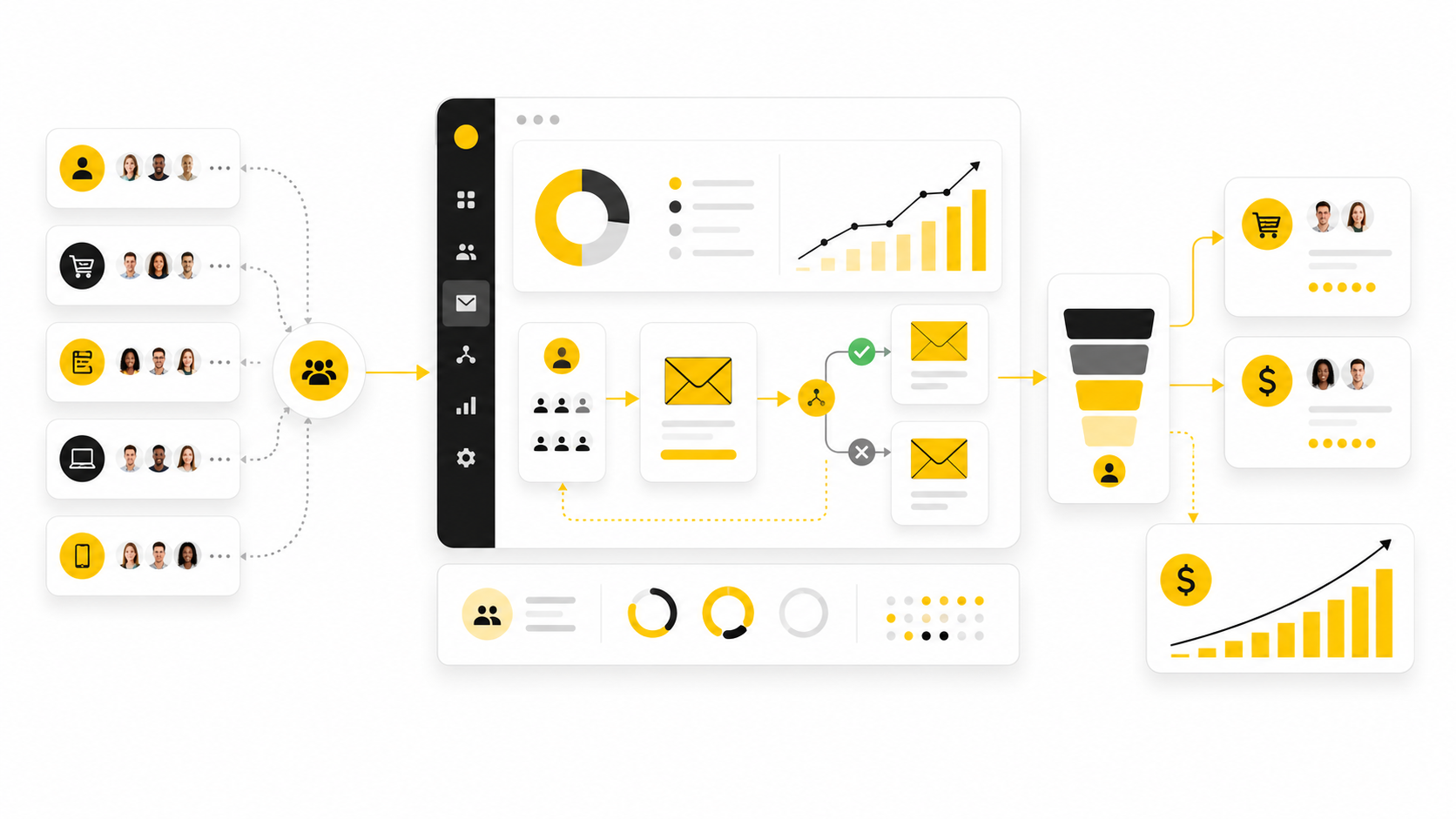
Mailchimp sales is not about blasting a list and hoping someone clicks. It is about using Mailchimp as a structured revenue system: capture demand, segment it, follow up automatically, and measure what actually turns...
Affiliate disclosure: this article may include compensated links. Recommendations should still be evaluated against your use case, budget, and current provider terms.
Should you choose this tool?
this tool is worth considering when the use case, budget, and implementation effort match what you actually need to do next.
teams that want a practical tool decision without reading another generic feature list
Check this toolMailchimp sales is not about blasting a list and hoping someone clicks. It is about using Mailchimp as a structured revenue system: capture demand, segment it, follow up automatically, and measure what actually turns into orders, bookings, demos, or repeat purchases.
That distinction matters because Mailchimp has moved far beyond simple newsletters. Intuit describes Mailchimp as part of its online offerings for “marketing automation and customer relationship” capabilities, while Mailchimp’s own automation documentation says flows can tag contacts, send targeted emails, and handle important follow-up actions automatically. That makes the real question less “Can Mailchimp send email?” and more “Can your business design a sales process that Mailchimp can execute consistently?” Intuit 2025 Form 10-K Mailchimp automation flows
For ecommerce brands, the upside is especially clear. Mailchimp states that paid-plan users with connected stores generated a 30x ROI from ecommerce revenue attributable to Mailchimp campaigns between August 2024 and August 2025, while its Customer Journey Builder materials say automations can generate up to 4x more orders than bulk emails alone. Those numbers do not mean every account gets the same result, but they do show why Mailchimp sales should be treated as a system, not a side task. Mailchimp ROI calculator Mailchimp marketing automation flows
Why Mailchimp Sales Matters
Mailchimp is often introduced into a business as “the email tool,” but that framing is too small. Email is the delivery channel, not the strategy. The sales value comes from what happens before and after the send: who gets added to the list, what they are interested in, what behavior they show, and what follow-up they receive next.
This is why the best Mailchimp sales systems start with buyer movement, not campaign volume. A subscriber who just joined from a discount popup, a lead who downloaded a guide, and a customer who abandoned a checkout are not the same person in a sales process. Mailchimp becomes more useful when each of those people enters a different path with a different message and a different conversion goal.
The pressure to get this right is rising because email teams are becoming faster and more operationally sophisticated. Litmus reported that by 2026, 76% of email teams deploy within three days, and advanced AI adopters are 75% more likely to achieve ROI above 45:1 when they use AI for segmentation, subject testing, and send-time optimization rather than only content creation. Speed helps, but only when the sales logic underneath the campaign is sound. Litmus State of Email
Framework Overview
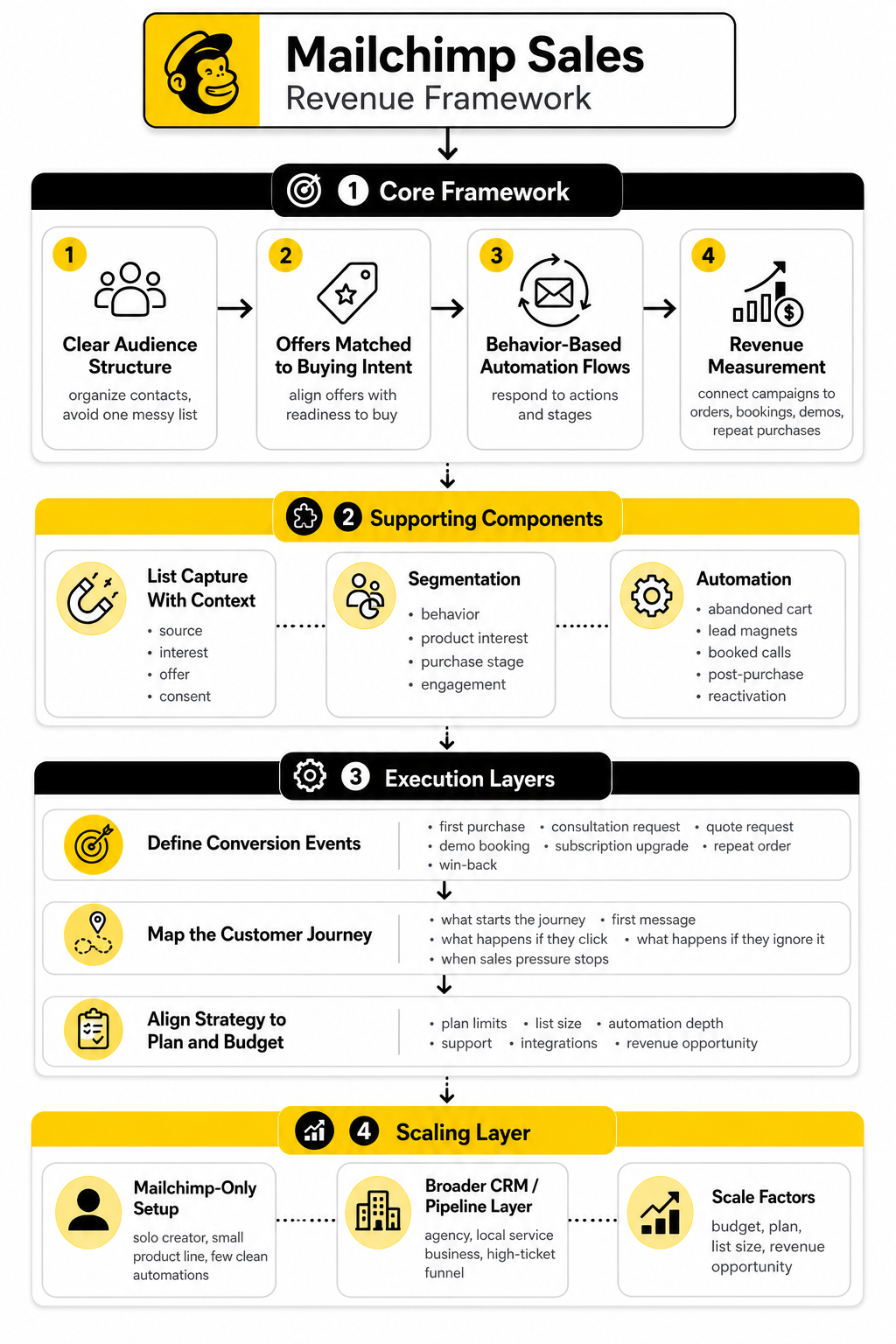
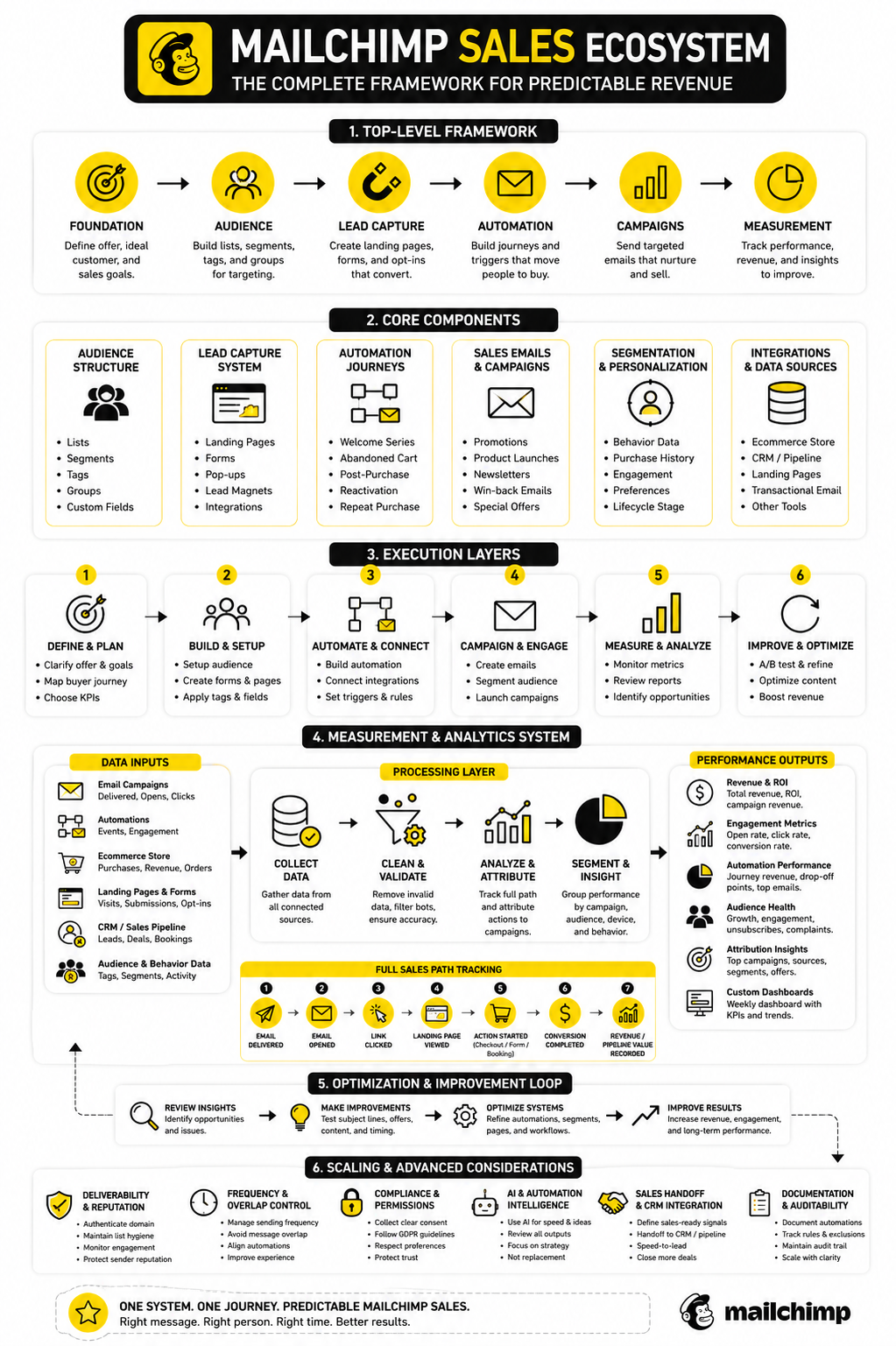
A practical Mailchimp sales framework has four layers. First, you need a clear audience structure so the account is not just one messy list. Second, you need offers that match buying intent instead of treating every subscriber as equally ready to purchase.
Third, you need automation flows that respond to behavior. Mailchimp defines a Customer Journey as a tool for visually mapping dynamic, automated paths across stages such as discovery, acquisition, and retention, which is exactly how a sales-focused account should be organized. Fourth, you need measurement that connects campaigns to revenue, not just opens and clicks. Mailchimp customer journey glossary
This framework also makes it easier to decide when Mailchimp is enough and when another system should sit beside it. A solo creator selling a small product line may only need Mailchimp, a connected store, and a few clean automations. An agency, local service business, or high-ticket funnel may need a broader CRM and pipeline layer, which is where tools like GoHighLevel can fit better than forcing Mailchimp to behave like a full sales operating system.
Core Components of a Mailchimp Sales System
The first component is list capture with context. A basic signup form is not enough if every new contact lands in the same bucket. The opt-in should capture the source, interest, offer, and consent clearly, because Mailchimp’s own opt-in research shows trust and form design affect whether people are willing to subscribe in the first place. Mailchimp Art of the Opt-In
The second component is segmentation. Mailchimp sales performance improves when subscribers are grouped by behavior, product interest, purchase stage, and engagement level. This keeps your strongest offers away from cold subscribers and gives warmer contacts a more direct path toward buying.
The third component is automation. Mailchimp’s abandoned cart flow documentation shows how a business can trigger email or SMS follow-up when a shopper leaves checkout without completing the purchase. That is a simple example, but the same logic applies to lead magnets, booked calls, post-purchase upsells, reactivation campaigns, and repeat customer sequences. Mailchimp abandoned cart automation
Professional Implementation
A professional Mailchimp sales setup starts with the business model, not the template gallery. Before building emails, you define the conversion events that matter: first purchase, consultation request, quote request, demo booking, subscription upgrade, repeat order, or win-back. Once those events are clear, the Mailchimp account can be organized around sales movement instead of random broadcasts.
The next step is to map the customer journey in plain language before building it inside Mailchimp. A good flow answers practical questions: what starts the journey, what message goes first, what happens if they click, what happens if they ignore it, and when should sales pressure stop? This prevents the most common mistake, which is creating automations that technically run but do not reflect how people actually decide to buy.
Finally, implementation has to respect Mailchimp’s current plan limits and feature access. Mailchimp’s pricing page lists the Free plan at 250 contacts and 500 sends per month, while paid tiers build more serious automation, support, audiences, integrations, and scaling capacity. That means Mailchimp sales planning is also a budget decision: the strategy has to match the plan, the list size, and the revenue opportunity. Mailchimp pricing
The Mailchimp Sales Foundation: Audience, Offer, and Buying Intent
Before you build automations, campaigns, or clever follow-up sequences, you need the foundation right. Mailchimp sales starts with a simple question: who is this person, and what would make buying the next logical step for them? If your audience data cannot answer that, every email becomes a guess.
This is where most businesses make Mailchimp harder than it needs to be. They import contacts, send newsletters, watch open rates, and wonder why sales feel random. The problem is not usually Mailchimp. The problem is that the account has no clear structure for separating casual subscribers, active prospects, first-time buyers, repeat customers, and people who need reactivation.
Start With One Primary Audience
Mailchimp gives you tools for audiences, tags, groups, segments, and fields, but that does not mean you should create a new audience for every product, funnel, or lead magnet. In most small and mid-sized accounts, one primary audience is easier to manage because contact history, engagement, consent, and purchase behavior stay in one place. That matters when your goal is sales, because fragmented data leads to fragmented follow-up.
Tags are best used as internal labels. Mailchimp describes tags as customizable labels that help organize contacts based on information you know about them, which makes them useful for lead sources, buyer status, campaign behavior, product interest, and sales readiness. A contact might carry tags such as “webinar lead,” “customer,” “VIP,” or “pricing page interest,” and those labels can later trigger or filter sales campaigns. Mailchimp tags
Groups are different because they are usually better for subscriber-facing preferences. A person can tell you they want ecommerce tips, agency growth content, product updates, or event invitations. That self-selected information is powerful because it gives you permission to send more relevant emails without pretending every subscriber has the same intent.
Build Around Buying Intent
A Mailchimp sales system should not treat every contact as equally ready to buy. Some people are only curious. Some are comparing options. Some are waiting for urgency, proof, a better offer, or a reason to trust you.
That is why buying intent matters more than list size. A smaller list with clear intent signals can outperform a larger list that receives generic broadcasts. Mailchimp’s benchmark data shows ecommerce averages of 29.81% open rate and 1.74% click rate, while all users average 35.63% open rate and 2.62% click rate, which is a useful reminder that clicks are scarce and relevance has to do real work. Mailchimp email marketing benchmarks
Intent can come from several places. A signup form can show what offer attracted the subscriber. A product page visit can show category interest. A purchase can show proven demand. A repeated click on pricing, booking, or comparison content can show that someone may be closer to a sales conversation than a person who only reads educational emails.
Match Offers to the Stage of the Relationship
The right offer depends on the relationship stage. A first-time visitor may need a low-friction reason to subscribe. A new subscriber may need education and proof. A returning customer may need a relevant cross-sell, replenishment reminder, or loyalty offer.
This is where Mailchimp sales becomes more disciplined. You are not simply asking, “What campaign should we send this week?” You are asking, “What does this person need next to move one step closer to revenue?” That shift changes the quality of your messaging immediately.
For an ecommerce store, that might mean separating welcome discounts from abandoned cart reminders, post-purchase education, product replenishment, and win-back campaigns. For a service business, it might mean separating lead magnet subscribers from consultation-ready prospects, past clients, and referral partners. For a creator or course business, it might mean separating free-content subscribers from buyers, waitlist members, and students who are ready for the next offer.
Capture Better Data at the Point of Signup
Good segmentation starts before the first email is sent. If your signup process captures only an email address, Mailchimp has very little context to work with. That may be fine for a simple newsletter, but it is thin data for a sales system.
You do not need a long form. In fact, long forms often create unnecessary friction. A better approach is to ask one or two useful questions that change what the subscriber receives next, such as product category, business type, goal, role, location, or preferred content topic.
Mailchimp’s dynamic content documentation shows how audience fields, tags, and groups can be used to vary email content for different segments, and that is where this data becomes commercially useful. If someone tells you what they care about during signup, you can use that information to change the offer, proof, examples, and call to action inside the emails they receive. Mailchimp dynamic content
Keep the Sales Path Simple
A clean Mailchimp sales foundation does not require dozens of segments on day one. Start with the few distinctions that actually affect revenue. If a label does not change what you send, what you offer, or how you measure performance, it may not need to exist yet.
A practical starting structure can be very simple:
This structure gives you enough control without turning the account into a mess. It also creates a natural bridge into automation, because each group can move through a different journey based on behavior rather than being pushed through the same sequence forever.
Decide Where Mailchimp Ends and Sales Follow-Up Begins
Mailchimp can handle a lot, but it should not be forced to do every job in the sales process. For many ecommerce brands, Mailchimp can manage the complete email revenue layer because the store, products, checkout behavior, and purchase history are connected. For service businesses, agencies, coaches, consultants, and local companies, the sales process often needs pipeline stages, appointment booking, missed-call follow-up, and manual deal tracking.
That is the point where the business needs to decide whether Mailchimp is the sales engine or the email layer inside a larger system. A broader CRM and pipeline platform like GoHighLevel can make sense when the sale depends on conversations, booked calls, proposals, reminders, and follow-up tasks. Mailchimp can still play a role, but it should support the pipeline instead of pretending the pipeline does not exist.
For funnel-heavy businesses, the same decision applies to landing pages and checkout flows. Mailchimp has landing page tools, but a dedicated funnel platform like ClickFunnels may fit better when the sales process depends on upsells, order bumps, webinar funnels, or more aggressive conversion testing. The smart move is not to collect tools. The smart move is to give each tool the job it is actually built to do.
The Automation Layer: Customer Journeys, Segments, and Triggers
Once the audience structure is clean, the next layer is automation. This is where Mailchimp sales becomes more predictable because the follow-up no longer depends on someone remembering to send the right campaign at the right time. The system reacts to behavior, timing, tags, purchases, and engagement signals.
Mailchimp’s automation flows are built for this kind of work. They can add tags, send targeted emails, and complete other workflow tasks for contacts, which means they can support the practical movement from subscriber to prospect to buyer. The important part is not building the biggest automation map. The important part is building the few journeys that actually move revenue. Mailchimp automation flow documentation
A good sales automation does three things well. It starts from a meaningful trigger, sends messages that match the contact’s situation, and stops or changes direction when the person takes action. That sounds basic, but it is exactly where many accounts break.
Choose Triggers That Show Real Intent
A trigger should mean something commercially. A new subscriber trigger is useful because it starts the trust-building process. An abandoned cart trigger is useful because it shows a shopper was close to buying. A purchase trigger is useful because it opens the door for onboarding, cross-sell, repeat purchase, or review generation.
Weak triggers create weak automation. If every small action starts a new sequence, subscribers get overlapping messages and the sales experience becomes noisy. That hurts trust because people can feel when a system is reacting blindly instead of helping them move forward.
Mailchimp’s ecommerce resources describe automated emails that can be triggered by behavior such as cart abandonment, while targeted messages can be based on purchase history or browsing activity. That is the right way to think about automation: behavior first, message second. Mailchimp ecommerce email marketing
Map the Journey Before You Build It
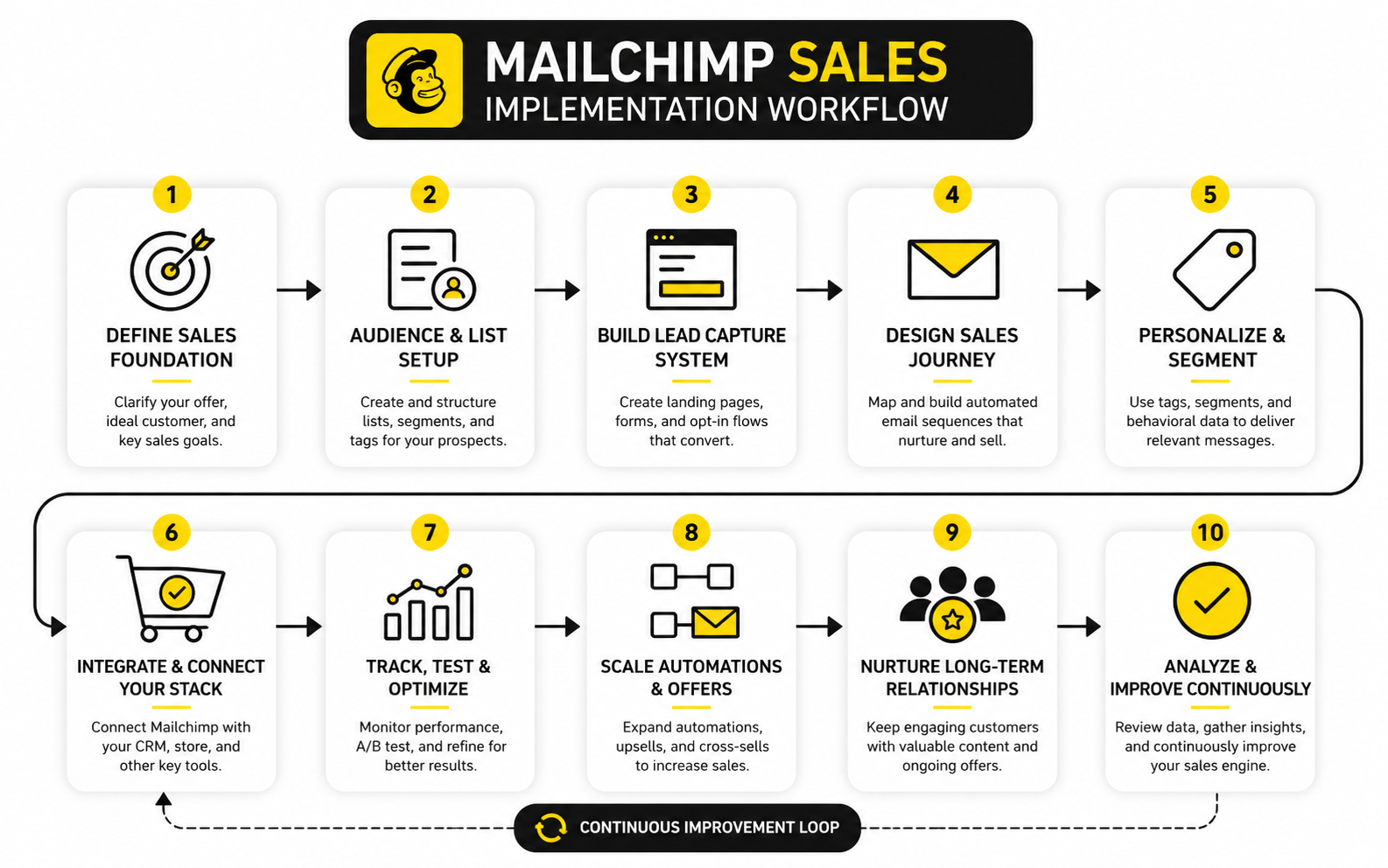
Do not start inside the automation builder. Start with the buyer path on paper. Write down what the contact did, what they probably need next, what action you want them to take, and what should happen if they ignore the message.
This simple planning step prevents messy workflows. It also exposes gaps in the offer. If you cannot explain why someone should receive email three, the issue is not the tool. The issue is that the journey does not have a clear purpose.
A practical Mailchimp sales journey should answer five questions:
Build the First Four Revenue Journeys
Most businesses do not need twenty automations to start. They need four strong ones that cover the main revenue moments. These journeys create the core sales engine before you add more advanced branches.
The first is the welcome journey. This should not be a polite “thanks for subscribing” and nothing else. It should orient the person, explain the value of the brand, deliver the promised resource or incentive, and point toward the next logical action.
The second is the abandoned cart or abandoned checkout journey. Mailchimp’s abandoned cart automation flow can send email or SMS follow-up to contacts who do not complete checkout, and additional steps can create a more personalized path. This is one of the clearest sales automations because the buying intent already exists. Mailchimp abandoned cart automation flow
The third is the post-purchase journey. This is where many brands leave money on the table. A customer who just bought should receive useful onboarding, product education, reassurance, and then a relevant next offer when the timing makes sense.
The fourth is the reactivation journey. Not every inactive subscriber should stay in your regular campaign pool forever. A reactivation flow gives them a fair chance to re-engage, then helps you suppress or reduce sends to people who no longer respond.
Use Segments to Keep the Message Relevant
Segments are where Mailchimp sales gets sharper. Mailchimp’s segmenting documentation explains that subscriber profile data, audience fields, ecommerce data, and integration data can all be used to target and filter contacts. That means your campaigns and automations can respond to what people have done, not just who they were when they subscribed. Mailchimp segmenting options
This matters because relevance is not a design preference. It is a sales requirement. A repeat buyer should not receive the same beginner pitch as someone who joined yesterday, and a cold subscriber should not receive the same urgent offer as someone who clicked a pricing link twice.
A useful segment is one that changes the message. If a segment does not affect the offer, timing, proof, or call to action, it may be noise. Keep the segmentation practical, especially in the early stages.
Add Branches Only When They Improve the Sale
Branches are powerful, but they can also turn a clean automation into spaghetti. Use them when the buyer’s behavior clearly calls for a different path. A click on a product category, a purchase, a non-click, or a tag change can justify a branch because each one changes what should happen next.
Do not branch for vanity complexity. A ten-path journey is not better than a three-path journey if the extra paths do not change revenue outcomes. The best Mailchimp sales automations feel simple because every split has a job.
A strong branch usually does one of three things. It accelerates a warm contact toward a direct offer. It slows down a cold contact and gives them more education. Or it removes a buyer from a prospect sequence so they do not receive irrelevant sales pressure.
Connect Transactional Moments Carefully
Transactional emails are different from promotional emails because they are tied to a specific action or account event. Mailchimp Transactional is designed for emails such as purchase receipts, shipping confirmations, and account change notifications. Those messages can support the customer experience, but they should not be treated like ordinary promotions. Mailchimp Transactional Email
This distinction matters for trust. A receipt should be clear first. A shipping confirmation should help the customer understand what happens next. If there is a sales opportunity, it should be secondary, relevant, and respectful.
Used properly, transactional moments can strengthen future sales because they reduce anxiety after the purchase. People are more likely to buy again when the first experience feels organized, timely, and professional. That is not flashy, but it is real revenue work.
Track Automation Performance From the Start
Automation is not “set it and forget it.” Mailchimp’s automation flow reports can track opens, clicks, social activity, purchases, and other engagement data from the start of a flow to the present. That reporting is what tells you whether the journey is actually helping people move. Mailchimp automation flow reports
Look at each journey as a sales asset. The welcome journey should create first actions. The abandoned cart journey should recover revenue. The post-purchase journey should support repeat buying or retention. The reactivation journey should protect list quality and reduce wasted sends.
The key is to review behavior by step, not just by total campaign performance. If email one gets attention but email two loses people, fix the transition. If clicks are strong but sales are weak, the landing page or offer may be the problem. If purchases happen after a specific reminder, that step deserves more attention, not less.
Statistics and Data
Mailchimp sales data should answer one practical question: what is helping people buy, and what is just making the dashboard look busy? That means you cannot treat every metric as equally important. Opens, clicks, conversion rate, revenue, unsubscribe rate, and list growth all matter, but they matter for different reasons.
Open rate tells you whether the subject line, sender name, timing, and inbox placement are doing enough to earn attention. Click rate tells you whether the email created enough interest for someone to take the next step. Revenue tells you whether that attention and interest turned into commercial action.
The mistake is reading those numbers in isolation. A high open rate with weak clicks usually means the email got curiosity but did not create movement. A lower open rate with strong revenue can still be a winning sales campaign. For mailchimp sales, the best metric is rarely the prettiest one. It is the one that shows profitable buyer behavior.
Use Benchmarks Without Worshiping Them
Benchmarks are useful because they give you a reality check. Mailchimp’s benchmark data shows average open rates around the mid-30% range across users, with ecommerce lower than some other categories and click rates often sitting in the low single digits. That is a healthy reminder that most subscribers will not click most emails, so your job is to make each click count. Mailchimp email marketing benchmarks
But benchmarks are not goals by themselves. A niche B2B list with a long buying cycle will behave differently from a fashion ecommerce list with frequent launches. A small list of warm buyers will behave differently from a large list built through giveaways, discounts, or paid traffic.
Use benchmarks to spot obvious problems, not to judge every campaign emotionally. If your open rate is far below your industry range, you may have a deliverability, subject line, or list-quality issue. If opens are fine but clicks are weak, the problem is more likely message-market fit, offer clarity, or email structure.
Measure the Full Sales Path
A Mailchimp report can show campaign performance, but the real sales story continues after the click. Someone may click an offer and fail to buy because the landing page is slow, the checkout is confusing, the product page lacks proof, or the offer does not match the email promise. Blaming the email alone would be lazy analysis.
This is why mailchimp sales measurement should follow the full path:
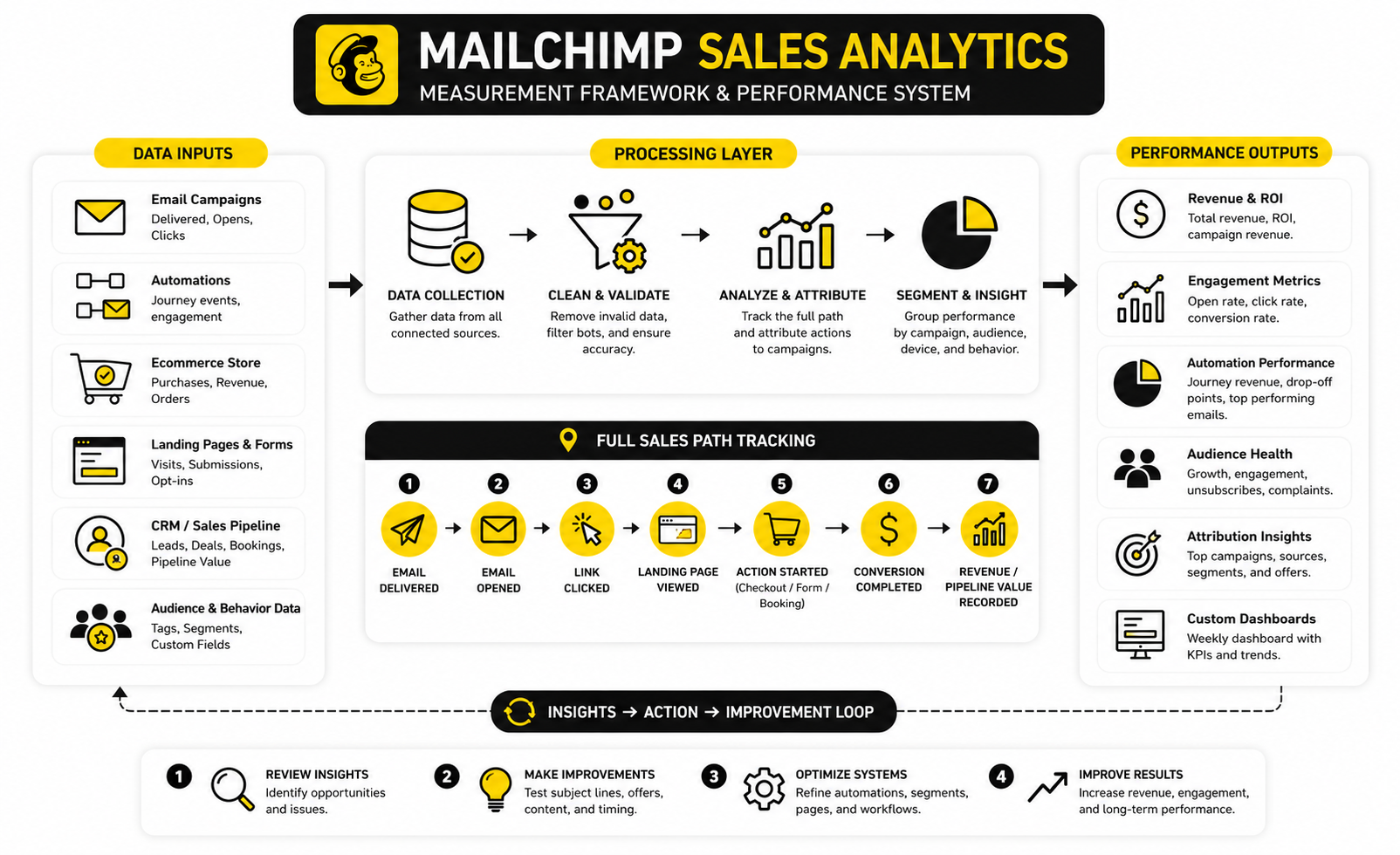
When you measure the whole path, you stop guessing. If delivery is weak, fix list hygiene and sender reputation. If opens are weak, improve sender trust and subject lines. If clicks are weak, improve the email angle and call to action. If clicks are strong but sales are weak, fix the offer page, checkout, booking flow, or follow-up sequence.
That is how analytics becomes useful. It turns a vague feeling like “email is not working” into a specific diagnosis.
Track Revenue, Not Just Engagement
Engagement is important, but revenue is the point. Mailchimp states that paid-plan users with connected ecommerce stores generated a 30x ROI from ecommerce revenue attributable to Mailchimp campaigns between August 2024 and August 2025. That figure depends on connected store data and will vary by business, but it shows why revenue attribution belongs inside the measurement setup from the beginning. Mailchimp email marketing ROI calculator
This does not mean every email needs to sell hard. Some emails build trust, educate buyers, reduce objections, or prepare people for a future offer. Still, the system should eventually connect those messages to commercial outcomes.
A simple way to do this is to separate emails by job. Welcome emails should move people toward first action. Sales campaigns should produce clicks and purchases. Post-purchase emails should reduce confusion and support repeat buying. Reactivation emails should either bring people back or help clean the list.
Read Automation Reports Like a Sales Manager
Automation reports are more valuable when you read them step by step. A journey may look successful overall, but one email inside it may be doing most of the work. Another email may be causing drop-off, unsubscribes, or dead clicks.
Mailchimp’s Customer Journey reporting can show activity such as opens, clicks, purchases, and other engagement inside automations, which makes it easier to inspect where people move or stall. That matters because a sales journey is not one asset. It is a chain of decisions. Mailchimp Customer Journey reports
Look for the weak link. If the first email performs well and the second email collapses, the transition may be wrong. If the cart reminder gets clicks but no orders, the issue may be price, shipping, urgency, product proof, or checkout friction. If the post-purchase sequence gets attention but no second purchase, the next offer may be too early, too broad, or not connected to what the customer just bought.
Watch List Quality Signals
A growing list is not automatically a healthier list. If growth comes from the wrong incentive, you may collect subscribers who wanted the free thing but have no serious buying intent. That can make the list look bigger while making the sales system weaker.
Watch the quality signals closely. Low engagement, rising unsubscribes, spam complaints, and weak revenue per subscriber usually mean the list is drifting away from the business model. At that point, sending more emails is not the fix.
List quality should influence your action. Engaged subscribers can receive more direct offers. Cold subscribers need reactivation or suppression. New subscribers need clearer expectations. Buyers need useful post-purchase communication instead of being thrown back into generic promotions.
Compare Campaigns by Purpose
Do not compare every campaign against every other campaign. A launch email, newsletter, cart recovery email, post-purchase email, and reactivation email have different jobs. Judging them with one generic standard creates bad decisions.
A newsletter may have strong engagement but low direct revenue because its job is relationship-building. A cart email may have lower opens but higher revenue because the people who do open it are close to buying. A reactivation email may create unsubscribes, but that can still be useful if it removes people who were never going to engage again.
This is where professional judgment matters. The number alone does not tell you what to do. The number plus the campaign purpose tells you what to improve.
Build a Simple Weekly Dashboard
You do not need a complicated reporting system to manage mailchimp sales well. You need a clear weekly view that shows whether the system is moving in the right direction. Keep it simple enough that you will actually use it.
A useful dashboard should track:
The goal is not to stare at numbers. The goal is to make better decisions faster. If a welcome journey produces strong first purchases, improve the signup path that feeds it. If a campaign gets clicks but no sales, work on the offer page. If a segment consistently buys more, build more campaigns for that segment.
Turn Data Into Action
Data is only useful when it changes behavior. If you review the same reports every week but keep sending the same emails, you do not have analytics. You have decoration.
A practical review rhythm is simple. Choose one campaign, one automation, and one segment to improve each week. Make one meaningful change, then measure the result. Over time, this creates better subject lines, sharper offers, cleaner segmentation, stronger landing pages, and more reliable revenue.
This is also where connected tools matter. If your business needs funnels, upsells, and checkout testing beyond Mailchimp’s native pages, a platform like ClickFunnels can make the post-click sales path easier to control. If your revenue depends on booked calls, pipeline stages, and human follow-up, GoHighLevel can help connect email performance to actual sales conversations.
The key is to avoid tool-hopping as a substitute for diagnosis. First, know where the sales path is leaking. Then choose the tool or process that fixes that specific leak.
Measurement, Optimization, and Professional Implementation
At this stage, the Mailchimp sales system has the right foundation, the right automation logic, and a measurement layer that shows where revenue is created or lost. The next challenge is scaling it without making it fragile. More campaigns, more segments, more automations, and more tools can increase revenue, but they can also create confusion if the system is not managed carefully.
Scaling email revenue is not just about sending more. It is about increasing precision while protecting trust. That means the advanced work is less glamorous than people expect: cleaner data, clearer rules, better permissions, stronger deliverability, more carefully handoffs, and fewer unnecessary messages.
This is where businesses usually separate themselves. Beginners chase new templates. Operators build a system that keeps working when the list grows, the offer library expands, and the sales team needs cleaner signals.
Protect Deliverability Before You Push Volume
Deliverability is the invisible ceiling on mailchimp sales. You can write the best offer in the market, but it does not matter if the email lands in spam, gets blocked, or reaches people who stopped caring months ago. Mailchimp’s deliverability guidance points to clean lists, clear opt-ins, domain authentication, and engaging content as core factors that help messages reach inboxes. Mailchimp deliverability guidance
This is why aggressive sending can backfire. If you increase frequency without improving relevance, complaints and unsubscribes can rise. If you keep sending to cold contacts because the list “looks bigger,” you may weaken the sender reputation that your best campaigns depend on.
Treat deliverability like revenue infrastructure. Authenticate the sending domain, avoid purchased lists, remove invalid addresses, suppress unresponsive contacts when needed, and keep the promise made at signup. Boring? Maybe. Important? Absolutely.
Control Frequency Across the Whole Account
One of the biggest scaling risks is message overlap. A subscriber can be in a welcome journey, receive a weekly campaign, get a product launch email, and trigger a cart reminder in the same short window. Each message may make sense alone, but together they can feel chaotic.
Mailchimp sales needs account-level frequency thinking, not just campaign-level planning. Before sending a major promotion, check what automations are already running. Before launching a new journey, decide which existing messages should pause, exclude, or adapt.
A simple rule helps: the warmer the intent, the more direct the message can be. A person who abandoned checkout can receive a focused reminder. A person who only joined a newsletter should not immediately be hit with every offer in the business. Frequency should follow intent, not internal excitement.
Create Exclusion Rules for Better Buyer Experience
Exclusion rules are underrated. They stop customers from receiving irrelevant sales pressure, prevent prospects from getting conflicting offers, and keep inactive contacts from dragging down engagement. They also make the brand feel more intelligent because subscribers receive fewer messages that obviously do not apply to them.
A customer who just bought should usually be excluded from first-purchase campaigns. A subscriber inside a reactivation flow may need to be excluded from regular promotions until they engage again. A high-value lead who has booked a sales call should not keep receiving emails that push them to book the same call.
This is not just tidy account management. It is buyer experience. When the system respects what someone already did, the follow-up feels more human.
Use Consent and Compliance as Sales Assets
Compliance should not be treated as a legal checkbox hidden at the bottom of the project. It affects trust, deliverability, and long-term revenue. Mailchimp’s GDPR forms documentation explains that businesses can collect marketing consent from new and existing contacts by setting up forms, creating segments, and sending consent emails where needed. Mailchimp GDPR forms
That matters because permission quality changes performance. A list built from clear consent, specific expectations, and relevant offers is usually easier to sell to than a list built from vague opt-ins and imported contacts. People who know why they are hearing from you are less likely to complain and more likely to respond.
For EU audiences, regulated industries, or businesses with multiple data sources, get proper legal guidance. Do not rely on generic marketing advice for compliance decisions. The practical marketing point is simple: clear permission supports cleaner data, better trust, and a healthier sales system.
Decide When AI Helps and When It Hurts
AI can speed up email production, but speed is not the same as strategy. Mailchimp has continued to position AI and automation as part of its product direction, and Intuit has described Mailchimp as part of its marketing automation and customer relationship offerings in its public filings. Intuit 2025 Form 10-K
Use AI for the parts where speed and variation help: subject line drafts, content angles, segment ideas, testing hypotheses, and summarizing performance patterns. Do not let AI invent your offer, customer proof, compliance language, or product claims without review. That is where sloppy automation can become expensive.
The best use of AI in mailchimp sales is not replacing judgment. It is reducing production drag so the team has more time for offer strategy, customer research, analytics review, and better segmentation. AI can help you move faster, but it should not decide what the buyer needs to believe before they purchase.
Plan for Tool Boundaries Before They Become Painful
Mailchimp can be excellent for email marketing, ecommerce messaging, automations, landing pages, segmentation, and reporting. But as the sales process becomes more complex, you may hit natural boundaries. That is not a failure. It is a sign that the business model has outgrown a single-tool workflow.
For ecommerce, the boundary often appears around merchandising, onsite personalization, advanced attribution, or lifecycle complexity. For service businesses, it usually appears around pipeline tracking, appointment follow-up, missed-call recovery, sales tasks, and deal ownership. For creators and funnel businesses, it may appear around checkout flows, upsells, order bumps, affiliate offers, and conversion testing.
When that happens, make the split clean. Let Mailchimp handle the email layer if it is still doing that job well. Let a CRM, funnel builder, booking tool, or helpdesk handle the parts it is better suited for. A tool stack works best when every platform has a clear job.
Build a Sales Handoff System
Some sales should stay automated. Others need a person. The advanced move is knowing the difference.
A subscriber who clicks a product link may not need manual follow-up. A lead who visits a pricing page several times, downloads a buyer guide, and books a consultation probably does. If your business sells high-ticket services, custom quotes, B2B products, or local appointments, the handoff from Mailchimp to a sales workflow can be where the real money is.
That handoff should be specific. Define which actions create a sales-ready signal, where the lead goes next, who owns the follow-up, and how quickly they should respond. If booked calls, pipeline stages, and reminders are central to the sale, a CRM-first platform like GoHighLevel may be a better operational layer than trying to manage everything inside email campaigns.
Keep the System Auditable
As the account grows, documentation becomes a revenue safeguard. You need to know what each automation does, what starts it, who is excluded, what it promotes, and what metric proves whether it works. Without that, every future edit becomes risky.
A simple audit document should include:
This is not bureaucracy. It is how you avoid breaking the sales machine when a new team member joins, an offer changes, or a campaign calendar gets busy. Mailchimp sales becomes much easier to scale when the logic is written down instead of trapped in someone’s head.
Optimize One Constraint at a Time
Advanced teams do not change ten things at once and pretend they learned something. They isolate constraints. If the issue is weak opens, they work on sender trust, list quality, subject lines, and timing. If the issue is weak clicks, they work on the angle, structure, offer, and call to action.
If the issue is strong clicks but weak sales, they stop rewriting emails and inspect the post-click experience. That may mean the landing page, checkout, product proof, pricing structure, booking process, or follow-up delay is the real problem. This is where funnel-specific tools like ClickFunnels can make sense when the email is doing its job but the conversion path needs tighter control.
The discipline is simple: fix the bottleneck you can prove. Do not redesign the whole system because one campaign underperformed. Do not buy another tool because the offer is unclear. Diagnose first, then act.
Know When Not to Send
The most mature mailchimp sales decision is sometimes choosing not to send. If the offer is weak, the audience is wrong, the list is tired, or the timing conflicts with a stronger journey, silence can protect performance. That is not passive. That is strategic restraint.
Every email spends attention. The more irrelevant emails you send, the more expensive the next relevant one becomes. Subscribers may not unsubscribe immediately, but they learn to ignore you.
Use email when it creates movement. Use automation when timing matters. Use segmentation when relevance changes the message. And when none of those are true, hold the send until you have something worth putting in front of the buyer.
Tool Choices, Scaling Decisions, and FAQ
The final decision is not whether Mailchimp is “good” or “bad.” That is too shallow. The real decision is whether Mailchimp is the right center of gravity for your sales process, or whether it should become one part of a wider revenue system.
For many ecommerce brands, Mailchimp can stay close to the center because email, automations, customer data, product recommendations, and connected store reporting all support the same buying path. For service businesses, agencies, consultants, local companies, and high-ticket sellers, Mailchimp often works better as the email layer while another tool handles pipeline, bookings, sales tasks, and direct follow-up. The point is not to overcomplicate the stack. The point is to stop forcing one platform to do jobs it was not designed to do.
A healthy mailchimp sales ecosystem usually has four connected pieces. Mailchimp manages audience communication. The website or funnel converts clicks into actions. The CRM or sales pipeline manages human follow-up. The analytics layer shows where the system is leaking and where the next improvement should happen.
Choose the Stack Around the Sale
If the sale happens directly on a store, your stack should make product discovery, abandoned cart recovery, repeat purchase, and post-purchase education smooth. Mailchimp can do a lot of that work when the store integration is clean and the account structure is disciplined. In that setup, the biggest risk is usually not tool choice; it is weak segmentation and lazy campaign planning.
If the sale happens through a form, call, quote, demo, or appointment, the stack needs stronger sales operations. That is where a CRM-first platform like GoHighLevel can make more sense because the sale depends on pipeline stages, reminders, conversations, and speed-to-lead. Mailchimp can still support nurture, education, and broadcast communication, but the closing process needs a place to live.
If the sale depends on pages, upsells, webinar flows, checkout paths, or offer testing, the post-click system matters just as much as the email. A funnel platform like ClickFunnels can be useful when the email is creating clicks but the sales path needs tighter conversion control. That is the strategic lens: keep Mailchimp where it is strong, and give the rest of the buyer journey the tools it deserves.
What is Mailchimp sales?
Mailchimp sales is the process of using Mailchimp to turn subscribers, leads, and customers into measurable revenue. It includes list capture, segmentation, automation, campaigns, reporting, and follow-up strategy. The goal is not just to send emails; the goal is to move people toward purchases, bookings, demos, repeat orders, or other sales outcomes.
Is Mailchimp good for sales?
Mailchimp can be good for sales when the business has a clear audience structure and a defined buying path. It works especially well when email is a major driver of ecommerce orders, repeat purchases, content-driven selling, or lead nurturing. It becomes weaker when a company expects it to replace a full CRM, proposal system, appointment workflow, or sales team process.
Can Mailchimp replace a CRM?
Mailchimp can manage contacts and support marketing automation, but it should not automatically be treated as a complete CRM replacement. A true sales CRM usually needs deal stages, task ownership, notes, sales rep activity, pipeline reporting, and direct follow-up workflows. If your revenue depends on calls, quotes, demos, proposals, or account management, a dedicated CRM layer is usually the cleaner choice.
What are the most important Mailchimp sales automations?
The most important Mailchimp sales automations are the ones tied to clear buying moments. A welcome journey helps new subscribers understand the brand and take the first meaningful action. Abandoned cart, post-purchase, repeat purchase, and reactivation journeys usually create more direct revenue impact than random one-off automations.
How many emails should a Mailchimp sales sequence include?
A sales sequence should be long enough to handle the buyer’s real objections, but not so long that it becomes noise. Many simple journeys can work with three to five emails if each message has a clear job. More complex offers may need a longer nurture path, but every email should earn its place by moving the buyer closer to a decision.
What metrics matter most for Mailchimp sales?
The most important metrics are revenue, conversion rate, click rate, revenue per recipient, automation revenue, unsubscribe rate, and list-quality trends. Opens are useful, but they should not be treated as the final measure of success. A campaign that creates fewer opens but more sales can be more valuable than one that gets attention without commercial action.
Why are my Mailchimp emails getting clicks but not sales?
Clicks without sales usually mean the email created interest but the next step failed. The problem may be the landing page, product page, checkout, offer, pricing, proof, page speed, or booking process. In that situation, rewriting the email may not fix the leak because the buyer is already leaving after the click.
Should I use tags, groups, or segments in Mailchimp?
Use tags for internal organization, groups for subscriber-facing preferences, and segments for targeting based on conditions. Tags can label lead source, buyer status, product interest, or campaign behavior. Segments then use that data to decide who should receive a campaign, enter an automation, or be excluded from a message.
How often should I send sales emails from Mailchimp?
Frequency should follow intent, not a fixed rule pulled from someone else’s business. Warm buyers, abandoned cart contacts, and active prospects can usually receive more direct follow-up than cold subscribers. The safest approach is to monitor engagement, revenue, unsubscribes, complaints, and overlap across automations before increasing volume.
When should I stop sending to inactive subscribers?
You should stop or reduce sends when inactive subscribers consistently ignore campaigns and show no buying signals. A reactivation sequence gives them a fair chance to stay on the list before suppression. Keeping completely cold contacts active just to make the list look larger can weaken reporting, waste sends, and hurt long-term performance.
Does Mailchimp work for service businesses?
Mailchimp can work for service businesses when it is used for lead nurturing, education, announcements, and follow-up content. It becomes more limited when the sales process depends on booking calls, assigning leads, tracking deal stages, and managing personal follow-up. In that case, Mailchimp is usually better as the marketing email layer inside a broader sales system.
What is the biggest Mailchimp sales mistake?
The biggest mistake is treating every subscriber the same. New leads, warm prospects, first-time buyers, repeat customers, and inactive contacts need different messages. When everyone gets the same campaign, the business loses relevance, and relevance is where the sales leverage comes from.
How do I know when Mailchimp is no longer enough?
Mailchimp may no longer be enough when your revenue process needs stronger pipeline visibility, deeper attribution, more advanced funnels, multi-step sales handoffs, or more controlled post-click conversion paths. That does not mean you must abandon Mailchimp. It means you should define its role clearly and add the missing operational layer where the sales process demands it.
Build a stronger local presence with BAAM AI
Turn your website, Google profile, social channels, and AI visibility into one growth engine
Most businesses do not need more random marketing activity. They need a consistent presence system that helps the right people find them, trust them, and take action. BAAM AI brings strategy, local SEO, website updates, Google Maps visibility, social content, AI-search readiness, media production, and reporting into one practical monthly engine.
If you want your marketing to keep working after the campaign ends, start with a free BAAM AI presence audit. See how your business shows up today and where the fastest visibility wins are at BAAM AI.