
BAAM AI Blog
Mailchimp Replicate Campaign: The Practical Guide To Reusing Emails Without Repeating Mistakes
Replicating a Mailchimp campaign sounds simple: copy an email, update the details, and send it again. In reality, it is one of those small workflow moves that can either save hours or quietly create messy lists...
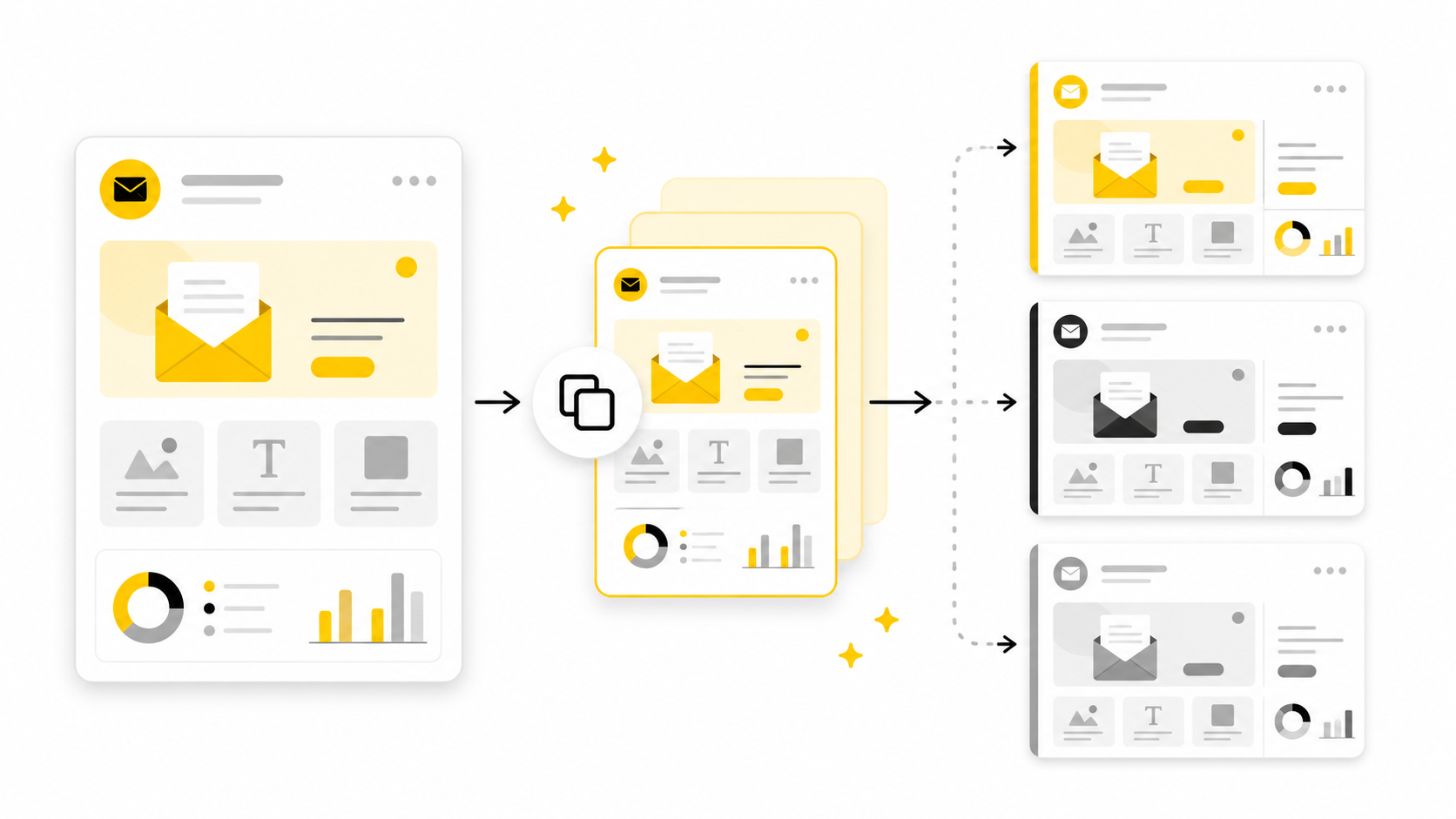
Replicating a Mailchimp campaign sounds simple: copy an email, update the details, and send it again. In reality, it is one of those small workflow moves that can either save hours or quietly create messy lists, outdated links, broken personalization, and weak reporting. That is why the real skill is not just knowing where the Replicate button is, but knowing when to use it and what to check before the new version goes live.
Mailchimp’s own help center explains that the replicate option duplicates both campaign content and settings, while also noting that a reusable template is often the better option when you only want to preserve design structure. That distinction matters because campaign replication copies more than the layout. It can also carry over audience choices, subject lines, tracking settings, content blocks, links, and assumptions from the original campaign.
Email is still worth taking seriously because it remains one of the most controllable marketing channels a business owns. Recent benchmark reports from MailerLite’s 2025 email benchmark study and Mailchimp’s email benchmark resources show that performance varies heavily by industry, which makes repeatable campaign workflows more valuable than one-off guessing. Replication helps you move faster, but only if every copied campaign gets reviewed like a fresh send.
Why Replicating A Mailchimp Campaign Matters
A copied campaign is useful because most email teams do not start from a blank page every time. They reuse proven structures: newsletter layouts, product launch formats, event reminders, seasonal offers, onboarding emails, and follow-up campaigns. When you use the Mailchimp replicate campaign workflow properly, you keep the parts that already work while creating room to update the message, timing, audience, and offer.
The danger is that speed can hide mistakes. A replicated campaign can preserve old links, expired discount codes, outdated footer language, incorrect segments, or a subject line that made sense for the previous send but not the new one. That is why campaign replication should be treated as a controlled shortcut, not a lazy copy-and-paste move.
This matters even more when you send emails regularly. A business that sends one campaign per quarter can manually check everything with little pressure, but a team sending weekly promotions, newsletters, and customer updates needs a repeatable process. The better workflow is simple: replicate for speed, review for accuracy, and document what changed.
The Mailchimp Replicate Campaign Framework
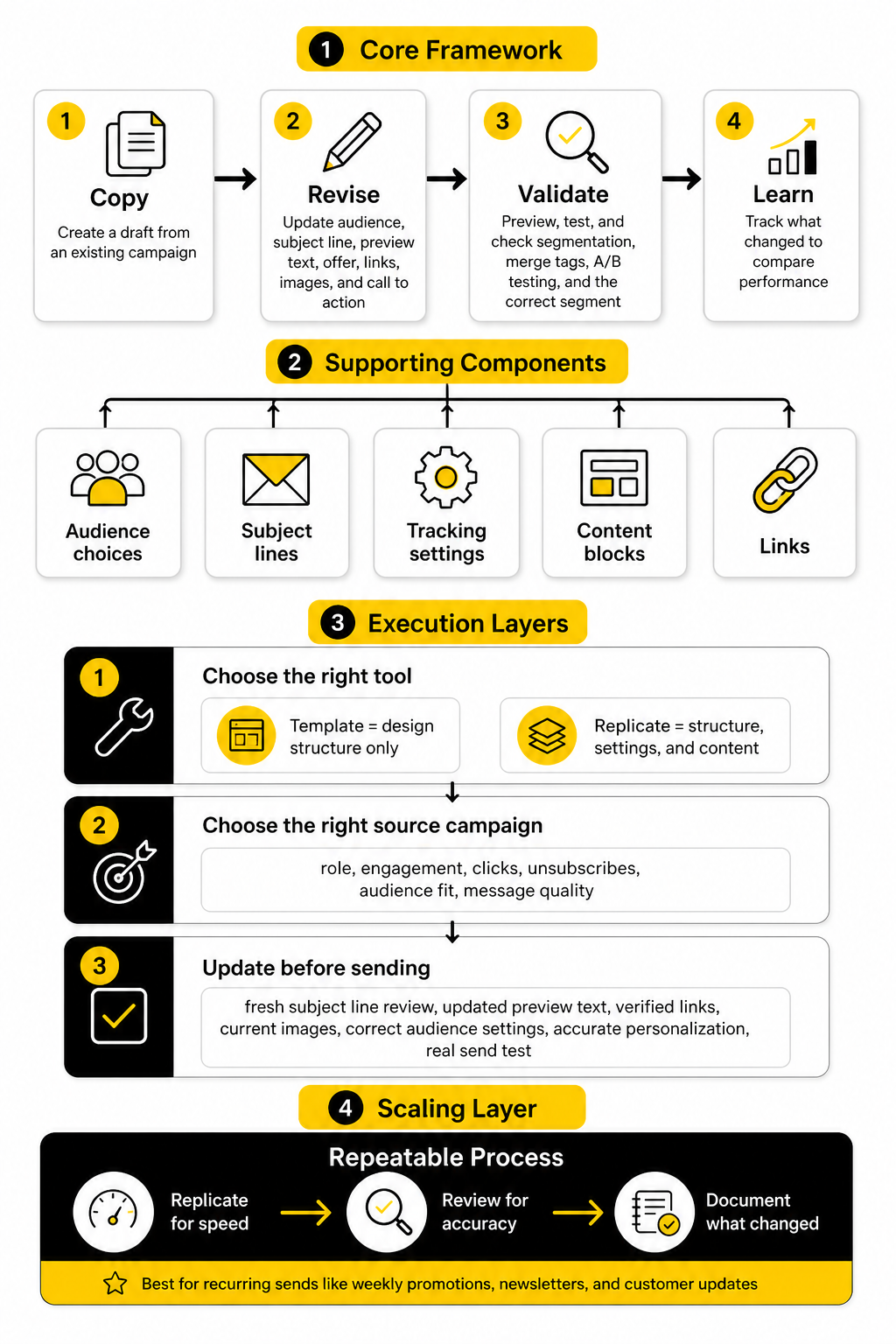
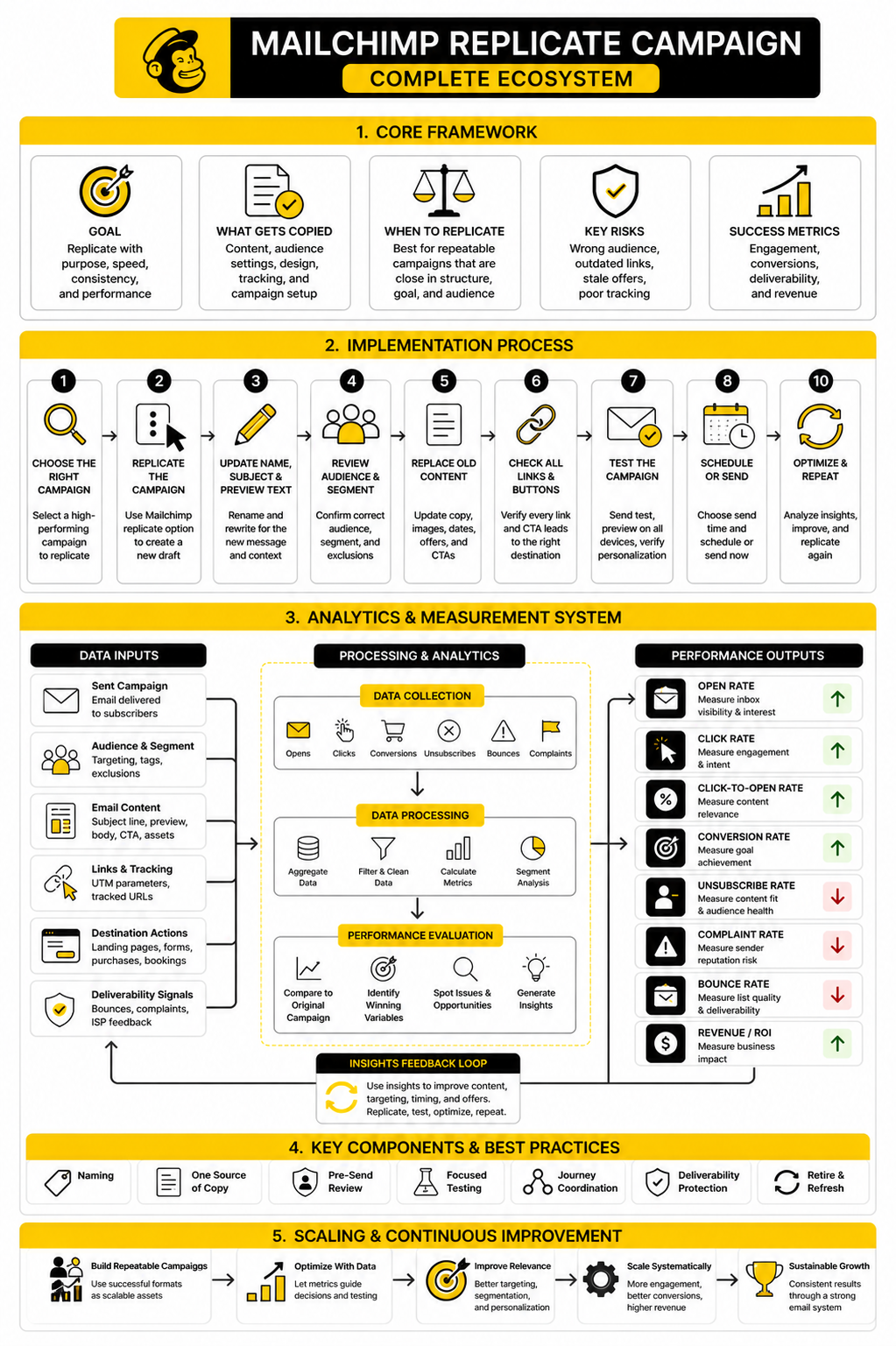
The best way to think about Mailchimp campaign replication is as a four-stage framework: copy, revise, validate, and learn. First, you copy the campaign so the structure, settings, and content are available without rebuilding from scratch. Then you revise every part that depends on the new send, including the audience, subject line, preview text, offer, links, images, and call to action.
Validation is the part many marketers rush, but it is the step that protects deliverability, credibility, and revenue. Mailchimp offers related features for segmentation, merge tags, and A/B testing, and each one can change how a replicated campaign behaves when it reaches real subscribers. A replicated email should be previewed, tested, and checked against the correct segment before scheduling.
The final step is learning from the campaign after it sends. Replication should help you compare versions, not create disconnected duplicates with no performance logic. When you reuse a structure, track what changed so you can understand whether performance moved because of the subject line, audience, offer, timing, creative, or call to action.
Professional Implementation Starts Before You Click Replicate
A professional workflow starts by deciding whether replication is actually the right tool. If you want to reuse the visual structure only, a saved template is usually cleaner because Mailchimp’s template tools are designed for reusable branded layouts. If you want to reuse a specific campaign’s structure, settings, and content as a base for a related send, replication makes more sense.
The second decision is whether the original campaign is worth copying. Do not replicate a weak campaign just because it is convenient. Look at the original campaign’s role, engagement, clicks, unsubscribes, audience fit, and message quality before turning it into the base for another send.
The third decision is what must change before the replicated version is safe to send. At minimum, the new campaign needs a fresh subject line review, updated preview text, verified links, current images, correct audience settings, accurate personalization, and a real send test. That is the difference between using Mailchimp replication as a productivity tool and using it as a shortcut that creates avoidable problems.
What Gets Copied When You Replicate A Campaign
When you replicate a Mailchimp campaign, you are not just duplicating the visible email design. You are creating a new campaign draft based on the original campaign’s content and setup, which means the copied version can bring over useful structure and risky leftovers at the same time. That is why the mailchimp replicate campaign workflow should always include a review step before you treat the new draft as ready.
In practical terms, replication is best for campaigns that share the same purpose, format, and audience logic. A weekly newsletter can often be replicated from last week’s newsletter because the structure is similar. A product announcement should not be blindly replicated from a holiday sale unless the offer, audience, urgency, and call to action still make sense.
Campaign Content
The most obvious copied piece is the email content itself. Your replicated campaign can carry over layout blocks, text sections, buttons, images, headers, footers, and calls to action from the original version. This is useful when the campaign already has a proven structure, but it also means every copied element needs to be checked.
Start with the headline, opening paragraph, button copy, and footer details. These are the areas where old campaign context usually hides. A button that says “Shop The Spring Sale” might look harmless in the editor, but it becomes a credibility problem if the campaign is now promoting a summer offer.
You also need to check personalization. Merge tags can make a copied campaign feel relevant when they are used correctly, but they can create awkward emails when the new audience does not have the same data fields. Before sending, confirm that every personalization field still matches the audience you plan to use.
Campaign Settings
Replication can also preserve campaign settings, which is where many mistakes happen. The copied draft may retain elements such as the original campaign name, subject line, preview text, audience, segment, tracking settings, and social sharing options. These settings are easy to overlook because they are not always visible while editing the email body.
The subject line and preview text deserve special attention. They are not decorative fields. They shape the first impression, and they should match the new message rather than the old campaign you copied.
Audience settings matter even more. If the replicated campaign keeps the wrong audience or segment, the email may reach people who should not receive it or miss the subscribers it was created for. That one mistake can damage performance, annoy subscribers, and make reporting less useful.
Links And Tracking
Copied links are one of the biggest risks in a replicated campaign. Old product links, expired discount URLs, outdated booking pages, and previous campaign landing pages can all survive the replication process. The design may look perfect while the actual click path is completely wrong.
Tracking also needs a clean review. If you use UTM parameters, campaign names, or analytics labels, the copied version may still contain the previous campaign’s tracking logic. That makes performance reports messy because clicks from the new campaign can be attributed to the old one.
This is especially important when the email points to a funnel, checkout page, webinar registration, or booking flow. If your campaign is sending traffic into a sales process built in a tool like GoHighLevel, ClickFunnels, or Systeme.io, the replicated email should be checked against the exact destination you want people to visit now, not the destination that made sense last time.
Design Structure
The design structure is usually the main reason people replicate campaigns in the first place. If a previous email had the right spacing, brand style, section order, and call-to-action flow, copying it saves real production time. You do not need to rebuild the same header, footer, product block, or newsletter format again and again.
Still, design reuse should not turn into design stagnation. A layout that worked for a short update may not work for a long educational email. A campaign built around one primary call to action may feel cluttered if you force five different offers into the same structure.
The better approach is to separate structure from substance. Keep the layout when it supports the new message, but change the hierarchy when the new campaign needs a different reading path. Good replication preserves consistency without making every email feel identical.
Audience Logic
Audience logic is the part that deserves the most caution because it affects who receives the email. A replicated campaign may appear ready, but the original audience, segment, or exclusion logic may no longer match the new goal. That is where fast work becomes expensive.
For example, a campaign copied from a customer-only announcement should not automatically become the base for a lead-nurture email. The message might reference purchases, account status, or customer expectations that do not apply to prospects. Even when the email content is edited, the audience logic can still be wrong.
Before sending, ask one simple question: should the exact same people receive this new campaign? If the answer is not clearly yes, review the audience settings manually. This is not optional if you care about relevance.
Reporting Context
Replication also affects how you think about reporting. The new campaign is its own send, but it may inherit naming habits, tracking labels, and structural choices from the previous one. If you do not rename and organize campaigns clearly, your reports become harder to understand later.
A clean naming system helps. Use names that include the campaign type, audience, offer, and date where useful. That makes it easier to compare campaigns without opening every draft or exported report.
This is where replication becomes more than a production shortcut. When your copied campaigns are named, tracked, and reviewed consistently, you can learn from each send. You start seeing which formats deserve to be reused and which ones should be retired.
How To Replicate A Mailchimp Campaign Step By Step
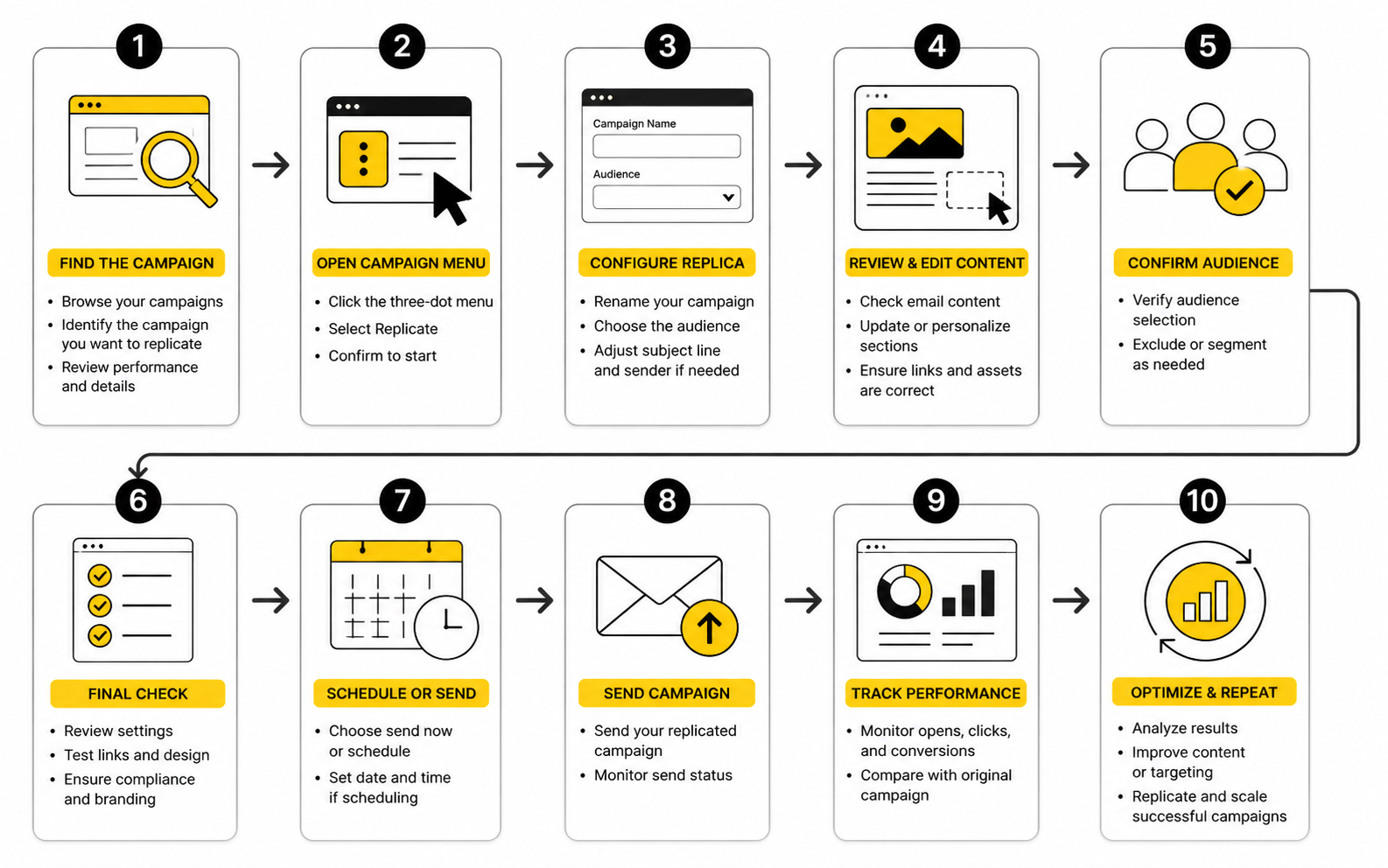
Once you understand what gets copied, the actual process becomes easier to manage. The goal is not to click through Mailchimp as quickly as possible. The goal is to create a clean new campaign draft, remove old context, update the send logic, and test it before anyone on your list sees it.
Mailchimp’s replicate option is designed to create a copy of an existing campaign, including its content and settings. That makes it useful for repeatable email formats, but it also means the copied draft deserves the same level of review as a campaign built from scratch. Treat the mailchimp replicate campaign process like a controlled production workflow, not a shortcut.
Step 1: Choose The Right Campaign To Replicate
Start by finding the original campaign that is closest to the email you want to send next. Do not choose a campaign only because it is recent. Choose it because the format, audience logic, tone, and call-to-action structure are genuinely useful for the new send.
A strong campaign to replicate usually has a clear layout, clean branding, and a message structure that can be adapted without forcing it. A weak campaign is one that needs heavy rewrites, has confusing sections, or was created for a completely different audience. If you have to change almost everything, you are probably better off starting from a saved template instead.
This is the first quality-control moment. Before you copy anything, ask whether the original campaign deserves to become the foundation for another email. Speed is useful, but copying the wrong base creates more work later.
Step 2: Replicate The Campaign In Mailchimp
In Mailchimp, go to your campaigns area and find the campaign you want to copy. Open the campaign options menu and choose the replicate option. Mailchimp will create a new editable draft based on that original campaign, which you can then rename, edit, test, and schedule.
The exact interface can vary slightly as Mailchimp updates its dashboard, but the logic stays the same. You are selecting a previous campaign and creating a duplicated draft from it. Once the draft appears, do not assume it is ready just because the design looks familiar.
Your first action after replication should be renaming the draft. A clear internal name prevents confusion when you later compare campaign reports, search old sends, or collaborate with someone else. Use a naming format that makes sense at a glance, such as campaign type, audience, offer, and date.
Step 3: Update The Campaign Name, Subject Line, And Preview Text
The campaign name is mainly for internal organization, but the subject line and preview text are customer-facing. They must be rewritten for the new campaign. Leaving the old subject line in place is one of the easiest ways to make a replicated campaign feel sloppy.
The subject line should match the current message, not the campaign you copied. If the new email promotes a different offer, shares different news, or speaks to a different segment, the subject line needs fresh thinking. It should set a clear expectation so the body of the email feels like a natural continuation.
Preview text deserves the same care. It is often visible next to or below the subject line in the inbox, so it can support the open decision. Use it to clarify the value of the email instead of repeating the subject line or leaving old filler text in place.
Step 4: Review The Audience, Segment, And Exclusions
Next, review who will receive the campaign. This step is non-negotiable because replication can preserve audience settings from the original send. The wrong audience setting can turn a good email into a bad experience for the people receiving it.
Check the selected audience, segment, tags, groups, and any exclusions. Confirm that the new campaign belongs in that context. If the email is meant for customers, do not let it go to cold leads. If it is meant for prospects, do not send it to people who already bought the thing you are promoting.
Segmentation is where a replicated campaign becomes either precise or lazy. The email body can be beautifully edited, but if the audience is wrong, the campaign is wrong. Relevance starts before the email is opened.
Step 5: Replace Old Content With Current Content
Now move into the email builder and edit the body of the campaign. Replace old dates, outdated offers, expired promotions, previous announcements, old product references, and any copy that only made sense in the original send. This is where most of the visible work happens.
Be especially careful with repeated blocks. Headers, footers, side notes, product cards, event details, and call-to-action sections often contain small pieces of old context. A copied email can look polished while still carrying one outdated sentence that damages trust.
Read the campaign from the subscriber’s point of view. They do not care that you replicated the email to save time. They only see whether the message feels current, relevant, and useful.
Step 6: Check Every Link And Button
Every link needs to be clicked and checked. Not skimmed. Not assumed. Clicked. A replicated campaign can easily preserve an old landing page, previous checkout link, expired event registration page, or outdated blog URL.
Buttons need extra attention because they usually drive the main action. Confirm that each button points to the correct destination and that the destination matches the promise in the email. If the email says “book a demo,” the link should not send people to a generic homepage unless that is genuinely the intended next step.
If your campaign sends people into a funnel, calendar, form, or checkout flow, test the full path. Tools like Fillout, Cal.com, and ClickFunnels can all work well as campaign destinations, but only when the email, link, and next page are aligned.
Step 7: Test The Campaign Before Sending
Testing is where you catch the mistakes that replication tends to hide. Send a test email, preview the design on desktop and mobile, and check how the content reads outside the editor. The campaign should look right, feel current, and send people to the correct places.
Mailchimp notes that contact-specific merge tags and dynamic content may not behave in a basic test email the same way they do for real recipients, so previewing with live merge tag information or sending to a small test segment can be a safer way to confirm personalization. This matters when your email uses first names, custom fields, conditional content, or audience-specific messaging. Do not rely on one casual test if the campaign uses dynamic data.
A good final check is simple: subject line, preview text, audience, content, links, tracking, personalization, mobile layout, and unsubscribe/footer details. If all of those pass, the replicated campaign is no longer just a copy. It is a properly prepared new send.
Statistics And Data That Actually Matter
The biggest mistake with replicated campaigns is measuring them like isolated emails. A replicated campaign is useful because it gives you a cleaner comparison point: similar structure, similar format, and a clearer view of what changed. If you copied last month’s newsletter and only changed the subject line, lead story, and call to action, the report becomes more useful than a random one-off campaign with a totally different layout.
That does not mean every number deserves equal attention. Open rate, click rate, click-to-open rate, unsubscribe rate, bounce rate, conversion rate, and revenue all answer different questions. The real job is to understand which question you are asking before you judge whether the campaign worked.
A mailchimp replicate campaign workflow should always connect the copied campaign to a measurement plan. Otherwise, you will keep duplicating emails without knowing whether the new version improved anything. That is how teams get busy without getting more carefully.
Benchmarks Are A Starting Point, Not The Goal
Benchmarks help you see whether your campaign is in a normal range, but they should not become the main target. A campaign with a lower open rate can still make more money if it attracts better clicks. A campaign with fewer clicks can still be successful if it reaches a smaller, more qualified segment.
Recent benchmark reports show why context matters. MailerLite’s 2025 benchmark report analyzed over 3.6 million campaigns from 181,000 approved accounts and breaks results down by industry, region, open rate, click rate, click-to-open rate, and unsubscribe rate. That kind of benchmark is useful because it shows range, not just one generic average.
Mailchimp’s own benchmark guidance also treats performance indicators like open rates, click-through rates, and conversion rates as comparison points for finding strengths and weaknesses, not as a universal scorecard. That is the right mindset. Use benchmarks to spot obvious underperformance, then use your own historical campaign data to decide what “good” means for your audience.
Open Rate Shows Attention, But It Is Not Clean Proof
Open rate still has value, but it is not as reliable as it used to be. Privacy features such as Apple Mail Privacy Protection can preload email images and make opens harder to interpret accurately. In simple terms, some opens may be recorded even when a real person did not actively read the email.
That does not make open rate useless. It still helps you compare subject lines, sender names, timing, and broad inbox appeal when you are looking at patterns over time. But it should not be the only number you use to judge a replicated campaign.
When you replicate a campaign, compare open rate against similar sends, not against every email you have ever sent. A product launch email, a weekly newsletter, and a transactional-style update all create different expectations. The fair comparison is the previous version of the same campaign type.
Click Rate Shows Intent
Click rate is usually more meaningful than open rate because it shows that someone took a visible action. They were interested enough to leave the email and move toward a page, offer, form, booking link, or piece of content. That makes click behavior one of the most important signals in any replicated campaign.
A copied campaign with a strong open rate but weak clicks usually points to a mismatch. The subject line may be attractive, but the email body may not deliver enough value. The call to action may be buried, unclear, too early, too late, or not compelling enough.
When reviewing a replicated campaign, do not only ask whether the click rate went up or down. Ask which links got clicked. If secondary links are stealing attention from the main button, the email may need a cleaner structure before you replicate it again.
Click-To-Open Rate Helps Diagnose The Message
Click-to-open rate can be useful because it focuses on people who opened and then clicked. It helps separate inbox performance from email content performance. A low open rate with a high click-to-open rate may mean the email content is strong, but the subject line or sender context needs work.
This is where replicated campaigns become powerful. If the layout stays mostly the same but the offer changes, click-to-open rate can show whether the new offer created stronger interest among readers. If the offer stays the same but the layout changes, the same metric can show whether the new structure made the action easier to understand.
Do not treat click-to-open rate as a magic number. It still depends on open tracking, so it can be affected by privacy changes. But when used carefully with click rate and conversion data, it helps you understand whether the issue is the inbox, the message, or the next step.
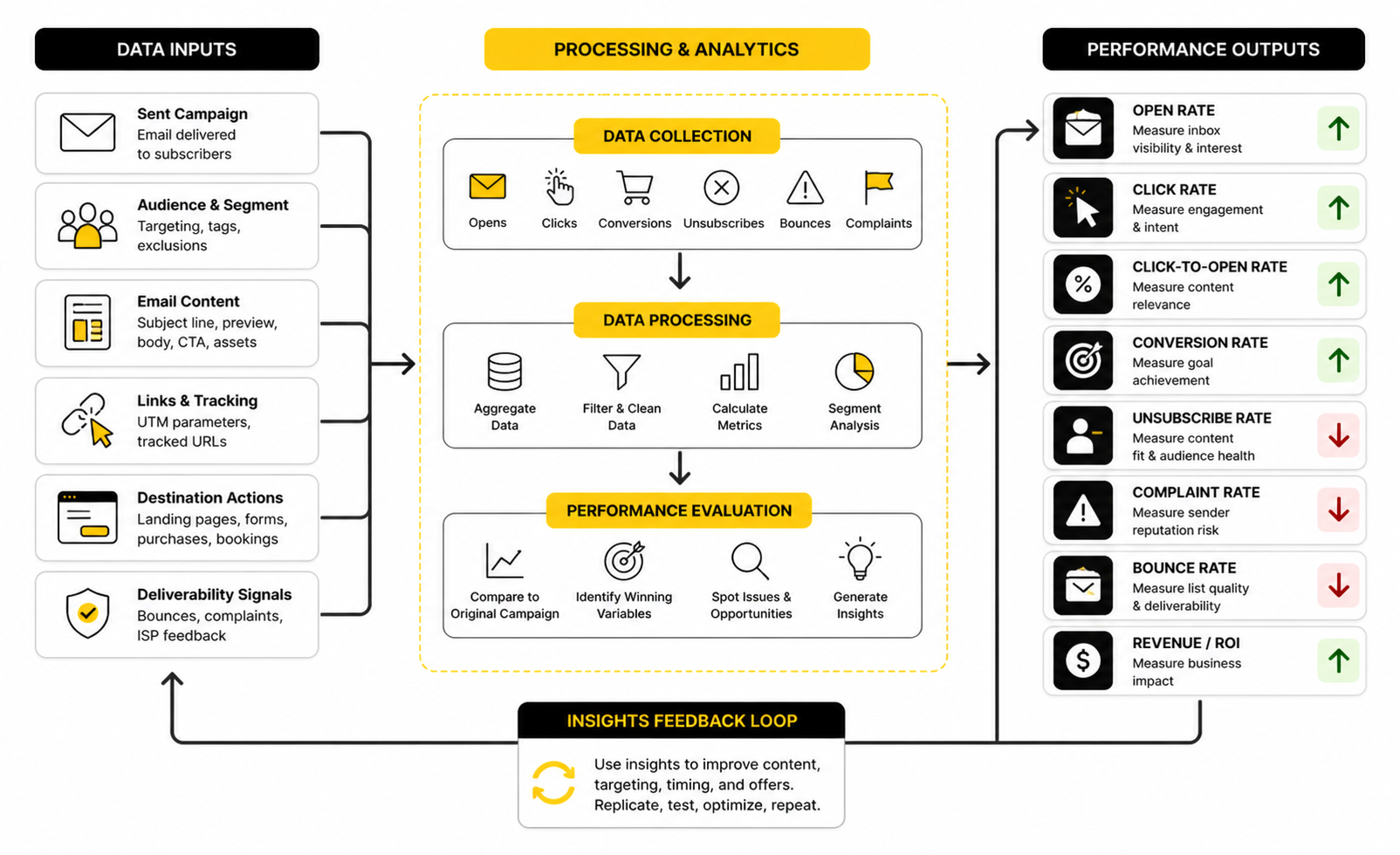
Conversion Rate Tells You Whether The Email Did Its Job
Clicks are not the finish line unless the campaign’s goal is simply traffic. Most campaigns exist to drive something beyond the click: sales, signups, bookings, replies, downloads, demo requests, survey completions, or product usage. That is why conversion rate matters.
A replicated email can get fewer clicks and still perform better if the clicks are more qualified. This is common when you make the call to action more specific. You may lose curiosity clicks, but gain people who actually want the offer.
To measure this properly, the destination page needs to be trackable. If you send traffic to a funnel, checkout page, form, or booking flow, make sure your campaign links carry clean tracking. A simple funnel setup in GoHighLevel, Systeme.io, or ClickFunnels only helps if the email report and destination data can be read together.
Unsubscribes And Complaints Reveal Fit
Unsubscribes are not always bad. Some people leave because they are no longer interested, and that can improve list quality over time. The problem is when unsubscribe rates rise because the replicated campaign reached the wrong audience or made a promise the email did not satisfy.
Complaints are more serious. They can signal that people did not expect the email, did not recognize the sender, or felt the message was irrelevant. If complaints rise after a replicated campaign, do not just tweak the subject line and move on.
Look at the audience logic first. A copied campaign may have carried over a segment that made sense before but does not make sense now. If the wrong people received the email, the data is not telling you the creative failed. It is telling you the targeting failed.
Bounce Rate Protects List Quality
Bounce rate is not the most exciting metric, but it matters because it points to list health. A high bounce rate can suggest old contacts, bad imports, weak data capture, or poor list maintenance. Replicating better campaigns will not fix a list that is decaying underneath the surface.
Hard bounces should be treated differently from soft bounces. A hard bounce usually means the address cannot be delivered to and should not remain part of your active sending strategy. A soft bounce may be temporary, but repeated issues still deserve attention.
Before you compare campaign performance, make sure deliverability is not distorting the results. If a replicated campaign reached fewer valid inboxes, the creative may not be the main issue. Measurement only works when the list is healthy enough to give you a fair read.
The Best Comparison Is Version Against Version
The cleanest way to measure a replicated campaign is to compare it with the campaign it came from. You already have a natural baseline. The structure is similar, so the differences in performance are easier to interpret.
Track the specific variables you changed. Did you change the subject line, offer, audience, send time, design order, button copy, landing page, or personalization? If you changed everything at once, you may still get a result, but you will not know what caused it.
This is why campaign notes matter. Add a short internal note for each replicated send so future reporting is not guesswork. The goal is not to produce more email reports. The goal is to make every copied campaign teach you what to improve next.
Professional Implementation Checklist
By this point, replication should feel less like a button and more like a system. That is exactly the point. A professional mailchimp replicate campaign workflow gives you speed without turning every send into a guessing game.
The checklist below is not meant to slow you down. It is meant to stop the same mistakes from showing up again and again: wrong audiences, old links, weak tracking, stale offers, messy reporting, and campaigns that look fine in the editor but fail in the real inbox. Use it before scheduling any copied campaign.
Decide Whether To Replicate Or Use A Template
Replication is best when the previous campaign’s content and settings are genuinely close to the new campaign. Mailchimp’s own help docs make the distinction clear: replicating a campaign duplicates content and settings, while reusing a template is usually better when you only want the design structure. That difference matters because a replicated campaign brings operational baggage with it.
Use a template when the design is the asset. Use replication when the whole campaign setup is useful. If the old audience, tracking setup, content structure, and campaign type are mostly irrelevant, replication is probably the wrong move.
This is where experienced marketers save time by not taking the fastest-looking path. The wrong starting point creates hidden cleanup work. A good template gives you consistency without dragging old campaign logic into the new send.
Create A Campaign Naming System
A naming system sounds boring until you have 80 copied campaigns called “Newsletter Copy,” “Promo Copy 2,” and “Final Final.” When every replicated campaign has a clear internal name, reporting becomes easier and collaboration gets cleaner. You can find old campaigns faster, compare versions faster, and avoid editing the wrong draft.
A simple naming format can include the campaign type, audience, offer, and date. For example, a structure like “Newsletter - Customers - May Product Update - 2026-05” is much more useful than “May Email.” The goal is not perfection. The goal is clarity.
This becomes more important as your email program scales. One person can survive messy campaign names for a while. A team cannot. If multiple people write, review, approve, and report on campaigns, naming discipline is not optional.
Keep One Source Of Truth For Reusable Copy
Replicated campaigns often become messy because teams use old emails as copy libraries. That works for a few sends, then it breaks. You end up with five versions of a product description, three outdated disclaimers, and no clear answer about which one is current.
Keep reusable copy in one place outside the campaign draft. This can include brand positioning, product descriptions, legal lines, offer language, guarantee language, speaker bios, event descriptions, and standard footer notes. Then use replicated campaigns as production drafts, not as the master source for your messaging.
This is especially useful when your emails send traffic into funnels, forms, booking pages, or sales pages. If your offer copy changes, update the source copy first and then update the campaign. Tools like GoHighLevel, ClickFunnels, and Systeme.io can help manage the destination side, but the email still needs message alignment.
Build A Pre-Send Review Role
The person who replicates and edits the campaign should not always be the only person who checks it. When you have stared at the same email for an hour, your brain starts filling in gaps. That is when old links, broken logic, and awkward personalization slip through.
A second reviewer does not need to rewrite the campaign. Their job is to verify the essentials: audience, subject line, preview text, links, merge tags, mobile layout, tracking, compliance details, and final call to action. This is a quality-control role, not a creative debate.
For solo operators, the same principle still applies. Step away from the draft before the final review, then come back and test it like a subscriber. The extra pass is worth it because one sloppy replicated campaign can create more damage than the time it saved.
Separate Creative Testing From Operational Reuse
Replication is great for operational reuse, but it can confuse creative testing if you change too many things at once. If you replicate a campaign and change the subject line, layout, offer, segment, send time, landing page, and button copy, the final numbers will not tell you much. You might win, but you will not know why.
When testing, isolate the variable as much as possible. Change one major thing at a time when the goal is learning. Keep the structure stable if you want to understand the offer, or keep the offer stable if you want to understand the structure.
This is the difference between sending more emails and building an email asset. A replicated campaign can become a learning loop if every version has a clear reason to exist. Without that discipline, it is just another duplicate in the archive.
Watch For Automation And Journey Conflicts
Campaign replication is usually discussed in the context of one-off emails, but the same thinking applies when campaigns interact with automated journeys. A copied campaign can overlap with lifecycle emails, onboarding messages, abandoned cart flows, reactivation campaigns, or sales follow-ups. If the message timing is wrong, subscribers may get too many emails with conflicting calls to action.
Before scheduling a replicated campaign, check what else the same audience may receive. This matters for customer experience and for performance. If someone receives three promotional emails in two days, a weak result may reflect email fatigue rather than a bad campaign.
This is where segmentation and suppression logic become strategic. You may need to exclude recent buyers, active trial users, event registrants, recent unsubscribers from a topic, or people already inside a specific funnel. The more your email program grows, the more important this coordination becomes.
Protect Deliverability While Scaling
Scaling replicated campaigns does not just mean sending more often. It means sending with enough consistency, relevance, and list hygiene that your email program stays healthy. Deliverability reports such as Validity’s 2025 benchmark research keep pointing back to the same practical idea: getting accepted by a mailbox provider is not the same as reliably reaching the inbox.
This matters because replication can encourage volume. Once a campaign is easy to copy, it is tempting to send more frequently without improving segmentation or content quality. That can hurt engagement over time if subscribers stop opening, clicking, or trusting your emails.
A healthy scaling strategy is simple. Send more only when you have a strong reason, a relevant audience, and a useful message. Replication should increase consistency, not pressure your list with more average emails.
Know When To Retire A Campaign Format
Not every reusable campaign deserves to live forever. Some formats stop working because the offer changes, the audience matures, the market gets bored, or the campaign structure no longer fits your positioning. A format that worked last year may now feel predictable.
Look for warning signs. If a replicated format keeps producing weaker clicks, lower conversions, higher unsubscribes, or less meaningful engagement, do not keep copying it out of habit. The data is telling you the format needs a reset.
Retiring a campaign format is not a failure. It is how you keep the email program sharp. Save what still works, remove what no longer earns attention, and build the next version with a clearer purpose.
Common Mistakes, Better Alternatives, And FAQs
A strong mailchimp replicate campaign workflow is not only about duplicating emails correctly. It is about knowing when to copy, when to rebuild, when to test, and when to retire a format completely. The best email teams do not replicate because they are lazy. They replicate because they have a system.
That system should include a reusable campaign structure, clear naming, clean segmentation, link testing, reporting discipline, and a realistic understanding of what each metric can and cannot prove. When those pieces work together, replication becomes a growth tool instead of a production shortcut.
What does it mean to replicate a campaign in Mailchimp?
Replicating a campaign in Mailchimp means creating a copy of an existing campaign in your account. Mailchimp explains that replication duplicates both the campaign’s content and its settings, which is why the copied version needs a careful review before sending. It is useful when you want to reuse a proven campaign structure, but it should never be treated as a finished campaign automatically.
Is replicating a Mailchimp campaign the same as using a template?
No, these are related but not the same. A template is mainly for reusing a design structure, while a replicated campaign can bring over the previous campaign’s content and settings. If you only want the layout, a template is usually cleaner; if you want to reuse a specific campaign setup, replication can be faster.
When should I use the Mailchimp replicate campaign feature?
Use the Mailchimp replicate campaign feature when the previous campaign is genuinely close to the new one. This works well for newsletters, recurring promotions, event reminders, product updates, and other repeatable formats. It is less useful when the new campaign has a different audience, offer, funnel, or message structure.
What should I check first after replicating a campaign?
Check the campaign name, subject line, preview text, audience, segment, and sending settings first. These areas are easy to overlook because they are not always inside the main email body. Then move into the email content and review every headline, paragraph, image, button, link, and personalization field.
Can a replicated campaign keep old links?
Yes, and that is one of the biggest risks. A copied campaign can preserve old product pages, expired offers, outdated booking links, or previous landing pages. Every link and button should be clicked and tested before the new campaign is scheduled.
Should I change the subject line when I replicate a campaign?
Yes, in most cases you should rewrite the subject line. The subject line should match the new campaign’s message, audience, and timing. Leaving the old one in place can confuse subscribers and make the copied campaign feel careless.
Does Mailchimp copy the audience when I replicate a campaign?
A replicated campaign can preserve settings from the original campaign, so you should always review the audience and segment before sending. This is especially important if the original campaign was sent to a customer list, event registrants, a specific tag, or a narrow segment. The copied content may look right while the audience logic is completely wrong.
Are test emails enough before sending a replicated campaign?
Test emails are useful, but they are not always enough. Mailchimp notes that contact-specific merge tags and dynamic content may not work in basic test emails the same way they work for real recipients. If the campaign uses personalization or conditional content, use live merge tag preview or send to a small test segment before the full send.
How do I measure whether a replicated campaign worked?
Compare it with the campaign it came from, not with every email you have ever sent. Look at open rate, click rate, click-to-open rate, conversions, unsubscribes, complaints, and bounce rate in context. The most useful question is not “Was this number good?” but “What changed, and what did that change do?”
Should I replicate a campaign that performed badly?
Usually, no. A weak campaign should not become your next starting point unless you clearly know what failed and what you plan to improve. If the format, audience, or offer was wrong, copying it will only carry the problem forward.
How often can I replicate the same campaign format?
You can reuse a format as long as it continues to serve the audience and support the goal. Watch for declining clicks, weaker conversions, higher unsubscribes, or lower engagement across repeated sends. Those signals usually mean the format needs to be refreshed or retired.
What is the biggest mistake people make with replicated campaigns?
The biggest mistake is assuming the copied campaign is almost done. It is not. Replication gives you a draft, and that draft still needs updated strategy, current content, correct audience logic, verified links, clean tracking, and a final test.
Can I use replicated campaigns for A/B testing?
Yes, but only if you are disciplined about what you change. If you replicate a campaign and change the subject line, offer, layout, audience, send time, and landing page all at once, you will not know what caused the result. Keep the test focused so the data teaches you something useful.
What tools can support a replicated Mailchimp campaign?
Mailchimp handles the email production side, but the campaign usually connects to a bigger marketing system. Your links may lead to funnels, forms, booking pages, surveys, sales pages, or CRM workflows. Tools like GoHighLevel, ClickFunnels, Systeme.io, Fillout, and Cal.com can support the destination side when the email needs to drive action beyond the inbox.
What is the best habit for improving replicated campaigns over time?
Write down what changed before each send. Note the audience, offer, subject line angle, layout changes, landing page, and primary call to action. That small habit turns campaign replication into a learning loop instead of a pile of disconnected duplicates.
Build a stronger local presence with BAAM AI
Turn your website, Google profile, social channels, and AI visibility into one growth engine
Most businesses do not need more random marketing activity. They need a consistent presence system that helps the right people find them, trust them, and take action. BAAM AI brings strategy, local SEO, website updates, Google Maps visibility, social content, AI-search readiness, media production, and reporting into one practical monthly engine.
If you want your marketing to keep working after the campaign ends, start with a free BAAM AI presence audit. See how your business shows up today and where the fastest visibility wins are at BAAM AI.