
BAAM AI Blog
Mailchimp Pricing Comparison: How To Choose The Right Email Marketing Platform Without Overpaying
Mailchimp is still one of the first names people check when they start comparing email marketing tools. That makes sense. It is familiar, beginner-friendly, and widely used by small businesses, ecommerce brands...
Mailchimp is still one of the first names people check when they start comparing email marketing tools. That makes sense. It is familiar, beginner-friendly, and widely used by small businesses, ecommerce brands, creators, agencies, and local service companies.
But a proper mailchimp pricing comparison cannot stop at the monthly price on the pricing page. That number is only the surface. The real cost depends on your contact count, email volume, automation needs, landing pages, support expectations, SMS plans, CRM requirements, and how quickly your list is likely to grow.
The trap is simple: a tool can look affordable at 500 contacts and become expensive once your list, team, or automation strategy grows. Another tool can look “basic” at first, but give you more practical value because it prices by email volume, includes automation earlier, or bundles CRM features that Mailchimp keeps behind higher tiers.
this guide breaks the comparison down in a practical way. Not as a generic list of tools. Not as a fanboy review. The goal is to help you understand when Mailchimp is worth paying for, when it becomes hard to justify, and which alternatives make more sense depending on your business model.
Why Mailchimp Pricing Deserves A Real Comparison
Mailchimp pricing matters because email marketing tools are not one-time purchases. They become part of your operating system. Once your forms, automations, segments, landing pages, templates, and customer journeys are built inside one platform, switching later takes time and usually creates friction.
That is why the cheapest beginner plan is not always the best deal. A small creator, a Shopify store, a course seller, and a service agency do not need the same feature set. One may care most about newsletters. Another may need abandoned cart emails, advanced segmentation, SMS, pipelines, booking flows, or a real CRM.
The clearest comparison starts with this question: are you paying for contacts, email volume, features, or business infrastructure? Mailchimp mainly scales around contacts and plan tiers. Tools like Brevo are often attractive when you want email and multi-channel messaging with a different pricing structure, while Moosend is usually part of the conversation for users who want email automation without jumping into a heavy all-in-one system too early.
The Pricing Framework: What You Should Compare Before Choosing
A good Mailchimp pricing comparison needs a framework, because “which one is cheaper?” is too shallow. The better question is which platform gives you the right features at the list size and sending frequency you actually expect. That includes today’s needs and the next stage of growth.
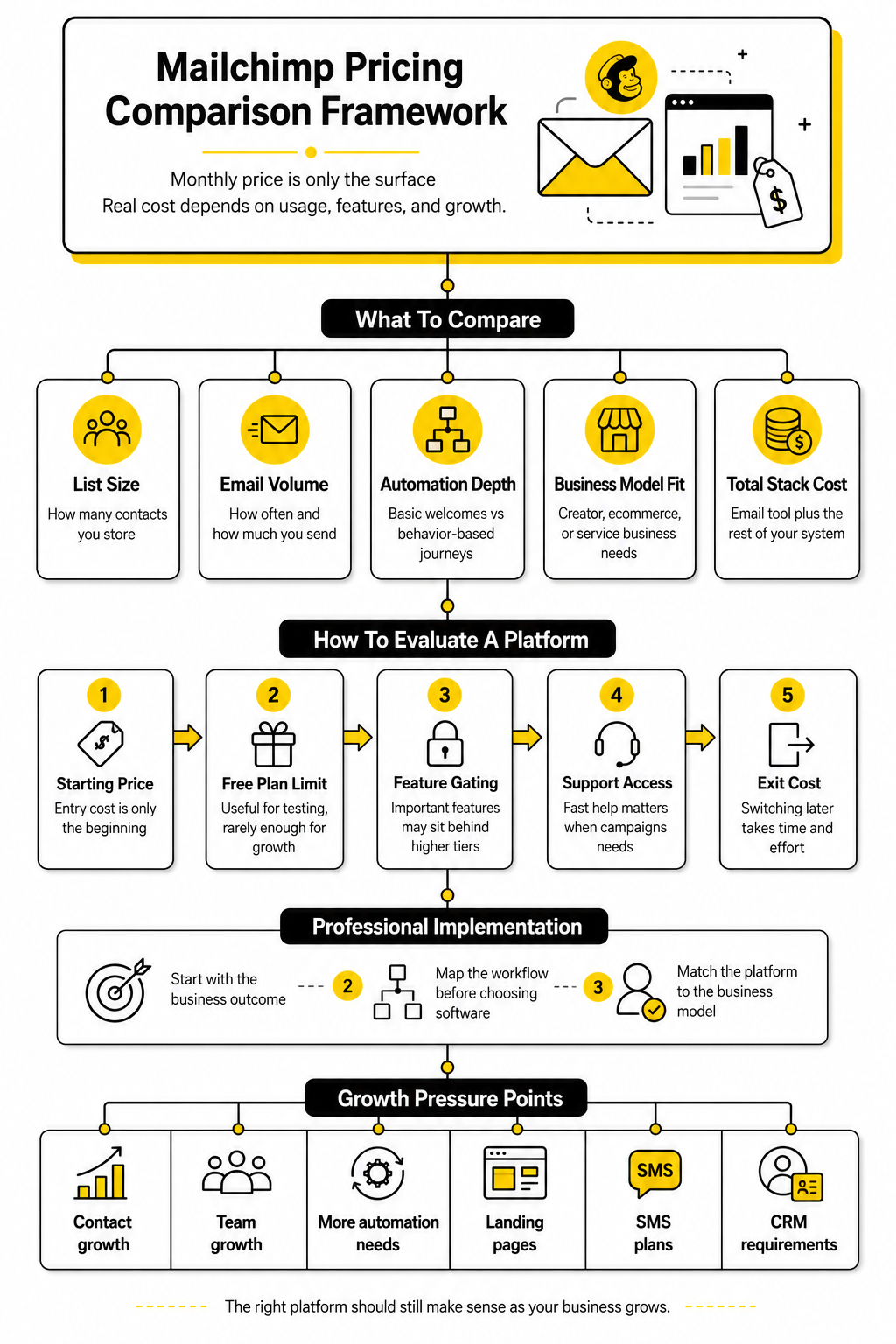
The first layer is list size. Contact-based pricing can be simple in the beginning, but it becomes more sensitive as your audience grows. If you collect leads aggressively, run giveaways, import offline contacts, or keep inactive subscribers around, your bill can rise even when revenue has not caught up yet.
The second layer is email volume. Some businesses send one newsletter per week. Others send daily campaigns, launch sequences, transactional messages, abandoned cart flows, reactivation campaigns, and customer education emails. The right platform depends heavily on whether you are growing a quiet audience or operating a serious revenue channel.
The third layer is automation depth. Basic welcome emails are not the same as behavior-based customer journeys. Once you need branching logic, segmentation, lead scoring, ecommerce triggers, sales follow-ups, or multi-step nurture flows, the comparison shifts from price to capability.
The fourth layer is business model fit. A creator may prefer simple publishing and product sales. An ecommerce brand may need deep store data and purchase behavior. A service business may need pipelines, appointment booking, SMS, and follow-up automation, which is where an all-in-one option like GoHighLevel can become relevant instead of using Mailchimp as a standalone email tool.
The fifth layer is total stack cost. Mailchimp might be only one part of the system. If you still need a funnel builder like ClickFunnels, a free-to-start funnel and email setup like Systeme.io, chatbot automation through ManyChat, or a dedicated landing page builder such as Replo, the “email platform price” is only one line item in a bigger decision. That is where many buyers get it wrong.
Core Components Of A Fair Mailchimp Pricing Comparison
The first component is the starting price, but it should not be treated as the final answer. Starting prices are designed to look approachable. What matters more is the price at 2,500 contacts, 5,000 contacts, 10,000 contacts, and the point where your required features move you into a higher plan.
The second component is the free plan limit. Free plans are useful for testing, but they are rarely where a serious business stays forever. A generous free plan can still become expensive later if the paid tiers do not match your growth pattern.
The third component is feature gating. This is one of the biggest reasons pricing comparisons become misleading. Two platforms can both say they offer automation, but one may include useful automations earlier while another keeps advanced journeys, segmentation, or testing behind higher tiers.
The fourth component is support access. This matters more than people admit. When forms break, automations misfire, imports fail, or deliverability drops, support speed can protect revenue. Saving a few dollars per month does not help much if you lose a launch day because you cannot get a useful answer.
The fifth component is exit cost. Every platform has a switching cost once you build inside it. You need to think about exports, template rebuilding, DNS records, forms, integrations, automation logic, landing pages, tags, and historical reporting. A platform that is merely “fine for now” can become expensive later if it blocks your next stage of growth.
Professional Implementation Starts Before You Pick A Tool
The professional move is to map your workflow before choosing software. Start with the business outcome, then pick the platform that supports it cleanly. For example, a newsletter-first creator does not need the same setup as a service agency running lead capture, booking, SMS reminders, missed-call text-back, pipeline tracking, and sales follow-up.
This is also where many Mailchimp comparisons become unfair. Mailchimp can be a strong fit when you want a polished email marketing platform with templates, campaigns, audience tools, and recognizable branding. It becomes less obvious when your real need is a full funnel, CRM, chatbot, store-focused landing pages, or sales automation system.
So the rest of this guide will compare Mailchimp in the right context. First, we will break down Mailchimp’s own pricing plans. Then we will compare it with alternatives based on real buying scenarios, not random feature checklists.
Mailchimp Pricing Plans Explained
Mailchimp’s pricing is built around two connected choices: the plan you choose and the number of contacts you want to store. That sounds simple, but it is the detail that makes a mailchimp pricing comparison more interesting than a basic “free vs paid” breakdown. The same plan can feel affordable at 500 contacts and much less attractive once your list moves into a higher contact tier.
The important part is that Mailchimp does not only count active subscribers. Its pricing tier is based on the contacts stored across your account, and subscribed, non-subscribed, and unsubscribed contacts can count toward your contact limit. That means list hygiene is not just a deliverability task. It is a billing task too.
Mailchimp also ties monthly email sends to your contact tier. The Free plan has a fixed monthly and daily cap, while paid plans use send multipliers based on your selected contact limit. This is why two businesses with the same list size can have very different outcomes if one sends occasional newsletters and the other runs frequent promotions, launches, automations, and follow-up sequences.
Free Plan
Mailchimp’s Free plan is best understood as a testing plan, not a long-term growth plan. It can work when you are validating a new project, collecting your first subscribers, or learning the platform before committing to a paid account. But it becomes restrictive quickly once email starts playing a real role in your business.
The current Free plan includes up to 250 contacts and 500 sends per month, with a daily send limit of 250. That is enough for basic experimentation, but it is tight if you want to send regular campaigns, grow a lead magnet, or run even a simple launch. A list of 250 contacts can be valuable, but the send cap limits how often you can communicate without upgrading.
The biggest practical issue is not just the contact limit. It is the combination of limited sending, limited seats, limited audience structure, and reduced automation access. If your goal is to build a serious email asset, the Free plan should be treated as a starting point, not the core of your marketing system.
Essentials Plan
Essentials is the first paid step and is mainly for businesses that need more sending power, basic support, and a more usable email marketing setup. It is the plan many beginners consider once they outgrow Free. In a mailchimp pricing comparison, Essentials looks attractive at first because it gives you more room without forcing you into Mailchimp’s more advanced marketing features.
Mailchimp states that Essentials starts with up to 500 contacts, can store up to 50,000 contacts, and gives you a monthly send limit equal to 10 times your contact limit. So if your selected contact tier is 500 contacts, your monthly send capacity is based on that tier. As your contact tier rises, the price rises too.
Essentials is fine for straightforward newsletters, simple campaigns, and smaller businesses that do not need complex automation. But the ceiling appears when you want deeper customer journeys, stronger personalization, or optimization tools that help improve performance over time. If you already know automation will matter, Essentials may become a temporary stop rather than the best long-term choice.
Standard Plan
Standard is the plan Mailchimp tends to position as the better growth option. It is where the platform starts to make more sense for businesses that want automation, personalization, and optimization beyond basic email sends. For many serious users, this is the first plan that feels like a real marketing platform instead of just a campaign sender.
Mailchimp’s Standard plan starts with 500 contacts, can store up to 100,000 contacts, and includes a monthly send limit equal to 12 times your contact limit. That higher send multiplier matters if you email regularly or use multi-step customer journeys. It gives more flexibility than Essentials, especially when campaigns and automations are running at the same time.
The reason Standard often becomes the realistic comparison point is feature access. Mailchimp’s plan comparison shows Standard includes up to 200 marketing automation flows, while Essentials is limited to fewer automation steps and Free does not include marketing automation flows in the same way. If you are comparing Mailchimp against platforms built around automation, Standard is usually the Mailchimp plan you should compare, not Free or Essentials.
Premium Plan
Premium is built for larger teams and more advanced marketing operations. It is not the plan most small businesses need on day one. It is for companies that need higher limits, more users, more audiences, priority support, and the most advanced feature access inside Mailchimp.
Mailchimp’s Premium plan starts at a higher contact base, with the base price including 10,000 contacts, and it can store up to 200,000 contacts before a custom plan is needed. Its monthly send limit is 15 times the contact limit. That makes it much more suitable for teams with bigger databases and more aggressive campaign calendars.
The tradeoff is obvious: Premium can be overkill if you only need normal email marketing. You should not pay for enterprise-style capacity just because the feature list looks impressive. Premium makes sense when the business has the list size, team structure, reporting needs, and campaign volume to justify it.
Overage Costs And Contact Blocks
Overages are one of the easiest parts of Mailchimp pricing to overlook. If your audience grows faster than expected or you send more than your plan allows, Mailchimp may charge for add-on contact blocks. This matters because growth spikes are common during launches, seasonal campaigns, viral giveaways, paid lead generation, and ecommerce promotions.
Mailchimp explains that if you exceed the contact or send limit for your tier, you can be charged for extra contact and email send blocks. If the overage is larger than one block covers, multiple blocks can apply. That makes forecasting important, especially if your list growth is uneven month to month.
This is where list management becomes part of your cost strategy. Archiving inactive contacts, cleaning duplicates, removing contacts that no longer need marketing emails, and watching import habits can all affect what you pay. It is not glamorous work, but it can keep your bill from creeping up for contacts that no longer create value.
The Real Cost Is Your Use Case
The real Mailchimp cost is not just the published monthly price. It is the price of the plan that includes the features you actually need at the contact tier you are likely to reach. That distinction matters because a business with 1,000 contacts and basic newsletters may be happy on Essentials, while another business with the same list size may need Standard because automation is central to revenue.
You should also look at how often you send. A weekly newsletter is very different from a full lifecycle email system with welcome flows, sales sequences, cart recovery, win-back campaigns, event reminders, and post-purchase education. The more your revenue depends on email behavior, the more dangerous it is to choose a plan only because it is cheaper today.
So before comparing Mailchimp with alternatives, separate your needs into three buckets: list size, sending frequency, and automation depth. That gives the rest of the comparison a clean foundation. Without that, every platform looks either too expensive or too limited depending on which single feature you focus on.
Mailchimp Pricing Compared With Popular Alternatives
Once you understand how Mailchimp prices contacts, send limits, and automation access, the comparison becomes much easier. You are not just asking whether Mailchimp is “good” or “bad.” You are asking whether its pricing model matches the way your business actually uses email.
This is where the mailchimp pricing comparison gets practical. Some alternatives are cheaper because they bundle more into lower plans. Others are not cheaper on paper, but they replace several tools at once. The right comparison depends on whether you need email marketing only, ecommerce automation, sales funnels, CRM, SMS, or a complete client acquisition system.
The mistake is comparing every platform as if they solve the same problem. They do not. Mailchimp is mainly an email marketing and audience platform, while some alternatives are email-first, funnel-first, CRM-first, or all-in-one business systems.
Mailchimp vs Brevo
Brevo is one of the most important alternatives to compare because its pricing logic is different. Instead of making contact count the main pricing driver, Brevo’s marketing platform is generally more focused on email volume, which can be useful if you have a larger list but do not email every contact constantly. That makes Brevo especially interesting for businesses that want contact flexibility without immediately being pushed into a higher contact-based tier.
The practical difference shows up when your database includes leads, customers, past buyers, webinar registrants, and people who should stay in your CRM but do not need frequent campaigns. With Mailchimp, stored contacts can affect your pricing tier. With Brevo, the comparison often shifts toward how many emails you send and which marketing features you need.
Brevo can also make sense if you want email, SMS, WhatsApp, transactional email, and CRM-style tools under one roof. It is not always the best landing page or funnel builder, but it can reduce stack complexity for teams that want multi-channel messaging. If your main pain is Mailchimp getting expensive as your contact database grows, Brevo deserves a serious look.
Mailchimp vs Moosend
Moosend is usually part of the conversation when users want email automation without paying for a heavier platform. It is more email-focused than an all-in-one funnel system, which makes the comparison cleaner. If your priority is campaigns, automations, landing pages, forms, and SMTP without adding unnecessary sales infrastructure, Moosend is a natural comparison point.
The main reason Moosend gets attention is that its paid plans are positioned around core email marketing features rather than forcing users to jump through too many plan levels. That can feel cleaner for small businesses that want practical automation but do not need enterprise analytics. It is especially relevant for newsletters, simple ecommerce follow-up, SaaS nurture, and small digital product businesses.
The tradeoff is ecosystem depth. Mailchimp has stronger brand recognition, a large integration ecosystem, and a familiar interface for many teams. Moosend can still be the better value when you know exactly what you need and do not want to pay extra for a brand name.
Mailchimp vs Systeme.io
Systeme.io belongs in this comparison because many people searching for Mailchimp pricing are not only buying email. They are trying to build a simple online business machine. They need opt-in pages, sales pages, checkout, email sequences, courses, and basic funnels without stitching five tools together.
That is where Systeme.io becomes interesting. Its pricing is often easier to understand for creators, coaches, and small digital product sellers because the platform is designed around funnels and online selling, not just campaigns. If your real need is “capture lead, nurture lead, sell product, deliver product,” it may be more relevant than comparing email tools feature by feature.
This does not mean Systeme.io is the best choice for every email marketer. Mailchimp can be better when email design, audience management, and polished campaign workflows matter more than funnel simplicity. But if you are paying Mailchimp plus a page builder plus a checkout tool plus course software, the total cost comparison can change fast.
Mailchimp vs GoHighLevel
GoHighLevel is not a direct Mailchimp clone, and that is exactly why it matters. It is built more for agencies, consultants, local businesses, and service providers that need CRM, pipelines, SMS, booking, automations, reputation tools, and client follow-up in one system. If your business depends on converting leads into appointments and deals, GoHighLevel can be a stronger operational fit than a standalone email platform.
The comparison should be based on workflow, not just email sends. Mailchimp can send campaigns and automations, but GoHighLevel is often used to manage the full journey from lead capture to sales conversation to booked appointment to follow-up. For service businesses, that difference is huge because the money is not only in sending emails; it is in not letting leads disappear.
The pricing question becomes different too. GoHighLevel may look more expensive if you compare it only against Mailchimp’s email plans. But if it replaces CRM software, SMS automation, funnel tools, appointment scheduling, reputation management, and client communication tools, the full-stack comparison can become much more favorable.
Mailchimp vs ClickFunnels
ClickFunnels is another case where the comparison depends on what you are actually trying to build. If you only need newsletters and basic email marketing, Mailchimp is the more obvious starting point. If you need sales funnels, landing pages, checkout flows, upsells, and conversion-focused pages, ClickFunnels enters the conversation.
This is where many businesses accidentally compare the wrong tools. Mailchimp can support marketing campaigns, but it is not primarily a funnel builder. ClickFunnels is built around turning traffic into leads and customers through structured pages and offers.
The practical choice is simple. Use Mailchimp when email marketing is the center of the job. Consider ClickFunnels when the bigger problem is building pages, offers, and conversion paths that turn traffic into revenue.
The Implementation Process: How To Run Your Own Comparison
A proper mailchimp pricing comparison should be done with your real numbers. Do not compare tools at a random starter tier if you already know your list will be larger in three months. Do not compare advanced automation features if you only send one newsletter a week.
The best process is to map your next 12 months, not just your current account. That means estimating contact growth, monthly email volume, automation needs, landing page requirements, integrations, team members, and support expectations. You do not need a complex spreadsheet, but you do need a clear buying process.
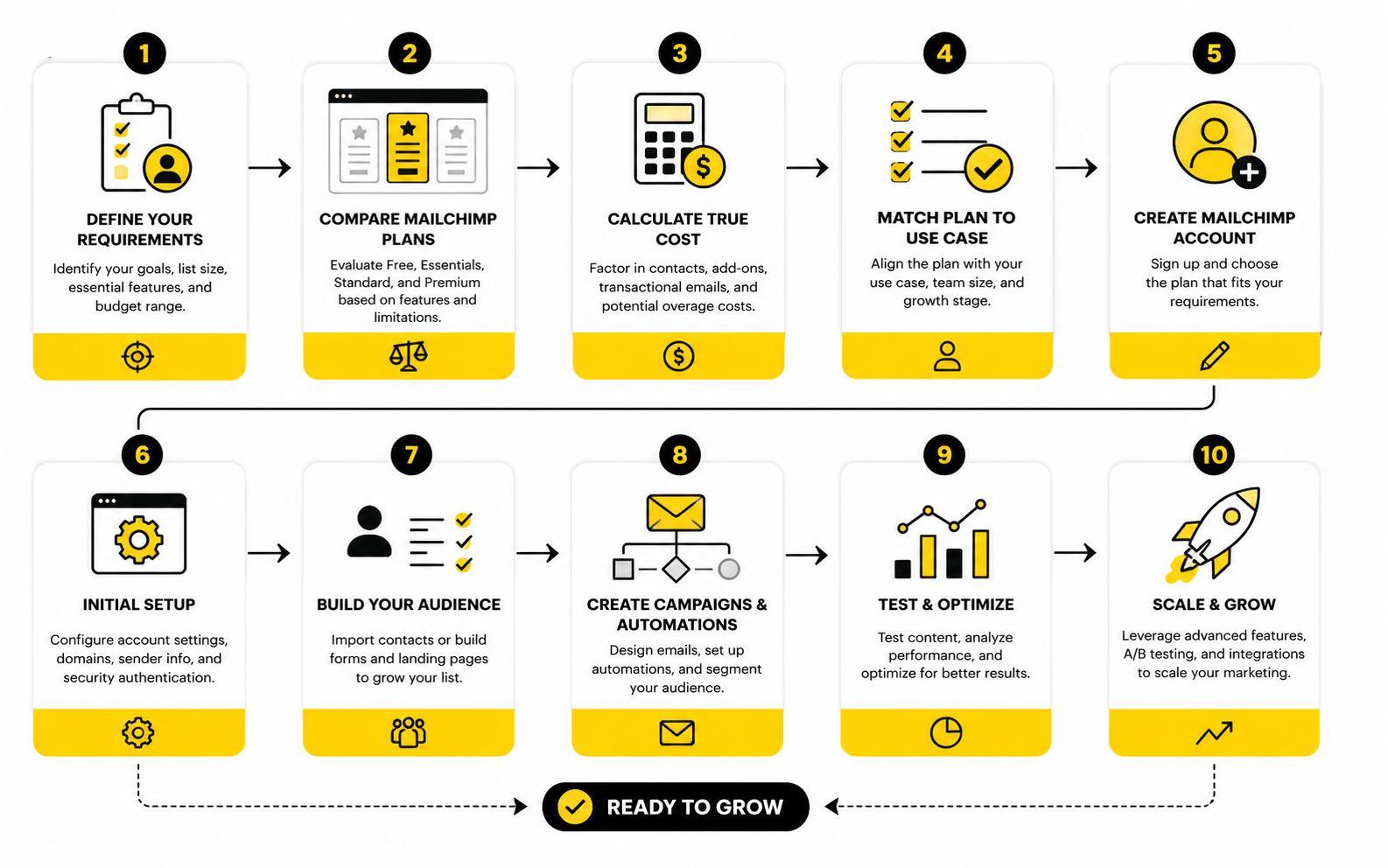
Step 1: Define Your Real Contact Count
Start with the number of contacts you need to store, not just the number of people who open emails. Include subscribers, customers, leads, trial users, webinar registrants, and imported prospects. If a platform charges based on stored contacts, this number matters immediately.
Then separate valuable contacts from dead weight. Inactive subscribers, old imports, duplicate records, and unsubscribed contacts can distort your cost picture. Before upgrading or switching, clean your list so you are comparing tools against a realistic database.
Finally, estimate growth. If you plan to run paid ads, lead magnets, giveaways, webinars, partner campaigns, or ecommerce promotions, your list may grow faster than your current monthly average. A platform that looks cheap today can become painful once your contact tier jumps.
Step 2: Estimate Monthly Email Volume
Next, count how many emails you expect to send in a normal month. Include newsletters, promotional campaigns, welcome sequences, cart recovery, event reminders, post-purchase emails, reactivation flows, and internal sales follow-ups. Most businesses underestimate this number because they only think about broadcasts.
This matters because some platforms price around contacts, while others focus more on send volume. A large but quiet list may benefit from a different model than a smaller list that receives frequent campaigns. That is why email volume should be calculated separately from contact count.
A useful shortcut is to map the customer journey. Count how many emails a new lead receives in the first 30 days, then add regular campaigns on top. That gives you a better view of real usage than guessing from your current newsletter schedule.
Step 3: List The Automations You Actually Need
Automation is where pricing comparisons become messy. Almost every platform says it offers automation, but the depth can vary dramatically. A welcome email is not the same thing as a behavior-based journey with branches, tags, goals, purchase triggers, and sales alerts.
Write down the automations you need now and the ones you are likely to need soon. For example, a creator may need a welcome sequence, product launch sequence, and customer onboarding flow. An ecommerce business may need abandoned cart, post-purchase, win-back, and VIP segmentation.
Then check which plan includes those automations without workarounds. This is where Mailchimp’s lower plans may look affordable but become less compelling if your workflow requires more advanced journeys. You should compare the plan that actually supports the system you want to build.
Step 4: Add The Missing Tools To The Price
This is the part most people skip, and it is the reason their software budget gets messy. If Mailchimp handles your email but you still need landing pages, checkout, CRM, SMS, booking, forms, surveys, or chat automation, those extra tools belong in the comparison. The “cheapest email tool” may not be the cheapest business setup.
For example, a simple newsletter business might only need email and forms. A service business may need a CRM, pipeline, appointment booking, SMS reminders, and follow-up tasks. An ecommerce brand may need better product pages, which could make a tool like Replo relevant alongside the email platform.
This is also where tools like ManyChat can change the buying decision. If Instagram, Messenger, or WhatsApp automation is part of your lead flow, email pricing alone is not enough. You need to price the whole acquisition and follow-up system.
Step 5: Compare The Upgrade Path
The best platform is not only the one that fits today. It is the one that still makes sense at the next level. Look at what happens when your list doubles, your send volume rises, your team grows, or your automation needs become more advanced.
This is where Mailchimp can be comfortable for businesses that want a familiar, polished email platform and are willing to pay more as they grow. It can also become less attractive when a business needs features that are included earlier or more naturally in another platform. The right answer depends on your growth path.
Before committing, compare three scenarios: your current usage, your expected usage in six months, and your aggressive growth case. That gives you a much clearer picture than comparing entry-level plans. It also protects you from choosing a tool that feels cheap now but expensive once it becomes important.
Statistics And Data
The data part of a mailchimp pricing comparison is not about collecting impressive numbers. It is about deciding what those numbers should make you do. Email marketing software is only worth paying for when it helps you grow revenue, protect deliverability, understand customer behavior, and reduce wasted manual work.
The problem is that many teams judge email tools by surface-level metrics. They look at open rates, click rates, and monthly software cost, then make a decision too quickly. A more carefully comparison connects pricing to performance, because the cheapest platform can still be expensive if it hides weak automation, poor attribution, or limited reporting.
Mailchimp gives you campaign reports, audience insights, ecommerce tracking, and plan-based analytics features, but the value depends on how disciplined you are with measurement. If you only send occasional broadcasts, basic reporting may be enough. If email is tied to launches, ecommerce revenue, appointment booking, lead nurturing, or client follow-up, analytics should become part of the buying decision, not something you check after the fact.
Benchmarks Are Starting Points, Not Targets
Benchmarks help you understand whether your numbers are obviously unhealthy, but they should not become your strategy. Mailchimp’s published benchmark data shows an all-user average open rate of 35.63%, an average click rate of 2.62%, and an average unsubscribe rate of 0.22% across its benchmark set. Those figures are useful context, but they do not automatically tell you whether your business is winning.
Industry context changes the interpretation. Mailchimp lists ecommerce at 29.81% average open rate and 1.74% average click rate, while nonprofits show 40.04% average open rate and 3.27% average click rate in the same benchmark table. That difference matters because a store selling physical products, a local charity, and a B2B consultant should not expect identical engagement patterns.
Brevo’s 2025 benchmark analysis, based on more than 44 billion emails, reports different averages because methodology, user base, region, and tracking approach vary by platform. That is exactly why you should treat benchmarks as directional. They can tell you when something deserves attention, but your best comparison is still against your own historical performance.
Open Rates Are Useful But Not Enough
Open rates used to be the headline metric for email marketing. They still matter, but they are less reliable than many people think. Privacy changes, inbox behavior, image loading, and automated opens can distort the number, which means open rate should be interpreted as a signal rather than proof.
That matters when comparing Mailchimp with alternatives because better-looking reports do not always mean better business outcomes. A campaign with a high open rate and weak revenue may be less valuable than a plain email that drives booked calls, purchases, or replies. The metric only becomes useful when it leads to a specific action.
Use open rate to diagnose the top of the email funnel. If opens are weak, look at sender reputation, list quality, subject lines, segmentation, sending cadence, and whether subscribers still expect your emails. Do not upgrade software just because open rates are low until you know whether the issue is strategy, deliverability, or platform limitation.
Click Rate Shows Intent More Clearly
Click rate is usually a stronger buying signal than open rate. When someone clicks, they are showing interest in the offer, product, article, booking page, or next step. That makes click behavior more useful when you are deciding whether a tool’s automation and segmentation features are worth the extra cost.
In a practical mailchimp pricing comparison, ask whether the platform helps you improve clicks through better targeting. Can you segment based on purchase history, engagement, form source, tags, browsing behavior, or lifecycle stage? If not, you may be paying for a sender instead of a growth system.
Low click rates usually point to one of three problems. The audience is wrong, the offer is weak, or the message does not create enough reason to act. Better software can help with segmentation and testing, but it cannot fix unclear positioning or an offer people do not want.
Revenue Per Subscriber Is The Metric That Changes The Decision
Revenue per subscriber is where the comparison gets serious. If a platform costs more but helps you generate more revenue per contact, the higher subscription price may be justified. If a platform is cheaper but does not support the automations that drive revenue, it may cost you more indirectly.
This is especially important for ecommerce brands, course sellers, agencies, and service businesses. A small improvement in conversion rate, repeat purchase rate, appointment show-up rate, or lead response speed can outweigh the monthly price difference between tools. That is why a standalone email price comparison can be misleading.
Track revenue per subscriber by source and segment whenever possible. A subscriber from a buyer list is not the same as a giveaway lead. A booked-call lead is not the same as someone who downloaded a broad checklist. Once you separate those groups, software pricing becomes easier to judge because you can see which contacts are worth nurturing more aggressively.
Build A Simple Analytics System Before You Choose
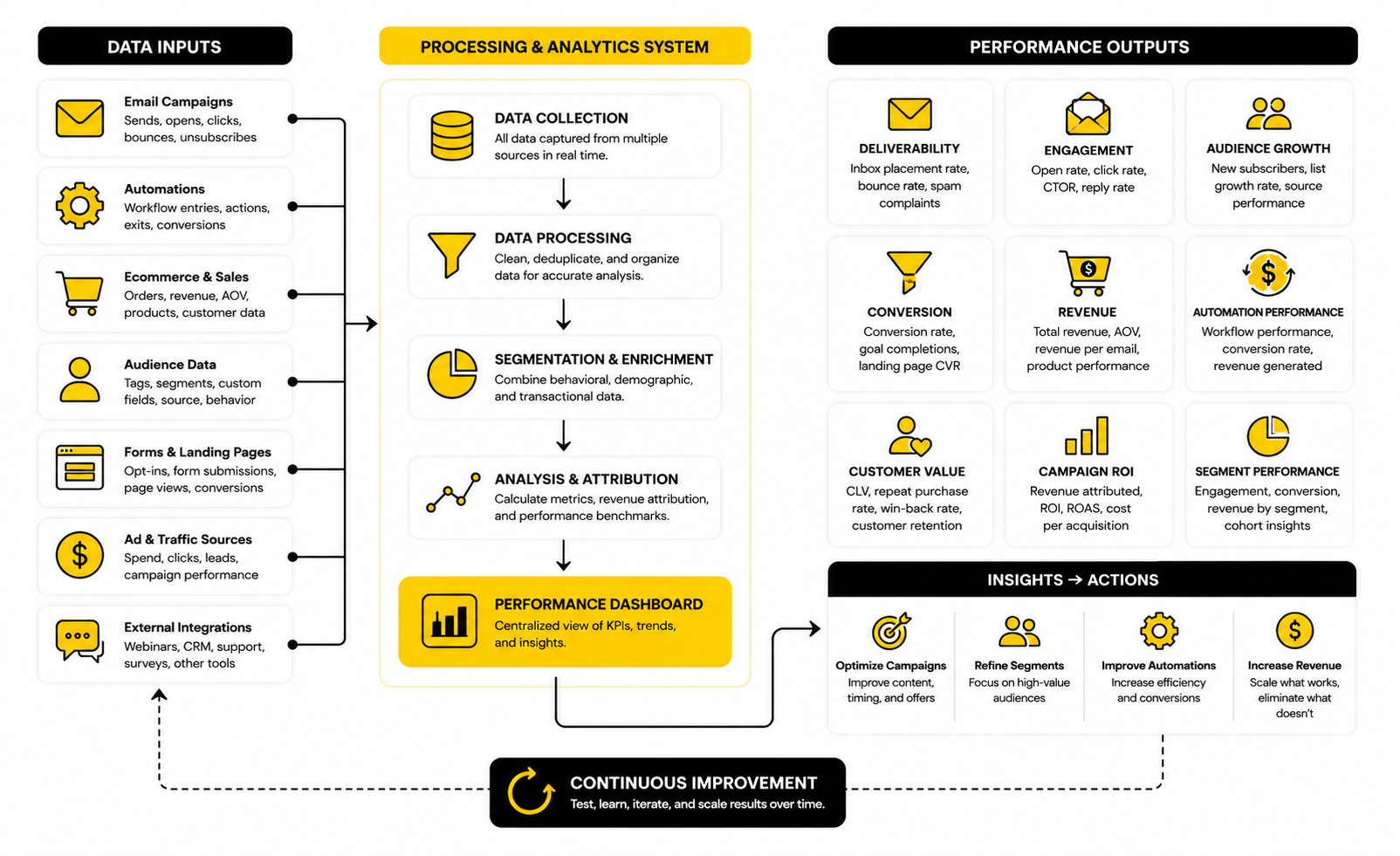
The best analytics system is not complicated. It should tell you where contacts come from, what they do, what they buy, and which emails influence the outcome. If your reporting cannot answer those questions, you are choosing software with incomplete information.
Start with five numbers. Track total contacts, active subscribers, monthly sends, click rate, and attributed revenue or qualified leads generated from email. These are enough to show whether your email program is growing, whether engagement is healthy, and whether your platform is supporting real business outcomes.
Then add context. Break performance down by campaign type, automation, traffic source, product, and customer stage. This is where better tools become useful because segmentation and reporting stop being “nice features” and start becoming decision-making infrastructure.
What Deliverability Data Should Make You Do
Deliverability is not glamorous, but it directly affects whether your email software is worth paying for. If emails do not reach the inbox, every other metric becomes weaker. You can have the best offer, the best copy, and the cleanest design, but poor deliverability will quietly erase the upside.
Track bounce rate, spam complaints, unsubscribes, inactive subscribers, and sudden drops in engagement. A rising unsubscribe rate is not always bad if you are cleaning a mismatched audience, but a pattern of poor engagement and complaints is a warning sign. It means your list quality, sending frequency, or message relevance needs attention.
This is also why list hygiene belongs in your pricing analysis. Since Mailchimp’s pricing is affected by stored contacts, keeping dead contacts can hurt twice. It can increase cost and weaken engagement signals at the same time.
How To Compare Reporting Features Across Platforms
Do not compare reporting dashboards by how impressive they look. Compare them by what decisions they help you make. A clean dashboard that shows revenue, segments, automations, and drop-off points is more valuable than a beautiful report full of vanity metrics.
For Mailchimp, the reporting conversation depends on the plan and connected integrations. If you connect ecommerce data, campaign reports become more useful because you can tie email activity to purchases. If you are running a service business, you may need CRM and pipeline reporting from a platform like GoHighLevel because the most important conversion may be a booked appointment or closed deal, not a direct checkout.
For funnel-driven businesses, email reporting should also connect to landing page and checkout performance. If the page is the bottleneck, switching email platforms will not fix the problem. That is where a funnel tool like ClickFunnels, an all-in-one option like Systeme.io, or a page builder like Replo may matter as much as the email platform itself.
The Cost-Per-Outcome Test
The cleanest way to compare pricing is to calculate cost per outcome. Do not stop at monthly software cost. Divide the total monthly cost of your email stack by the number of meaningful outcomes it produces.
For ecommerce, that outcome might be email-attributed orders or repeat purchases. For a consultant, it might be qualified calls booked. For a SaaS company, it might be trial activations, demo requests, or paid conversions from nurture sequences.
This simple test prevents bad decisions. A cheaper platform that produces fewer qualified outcomes is not actually cheaper. A more expensive platform that saves team time, improves conversion tracking, and increases revenue per subscriber may be the better deal.
What The Numbers Should Make You Change
If open rates are low, clean the list, improve subject lines, review sender authentication, and check whether your audience still expects your emails. Do not immediately blame the platform. Most open-rate problems start with list quality, relevance, or sending habits.
If click rates are low, improve segmentation, sharpen the offer, simplify the email, and make the next step more obvious. This is where advanced automation and tagging can justify a higher-tier plan. Better targeting often beats sending more emails.
If revenue is low despite healthy engagement, inspect the landing page, checkout, sales page, booking flow, and follow-up sequence. Email may be doing its job, but the destination may be leaking conversions. That is the point where your mailchimp pricing comparison should expand beyond Mailchimp and include the rest of the revenue system.
Which Platform Fits Your Business Model Best
At this stage, the mailchimp pricing comparison should move away from feature lists and into business fit. A platform can be objectively good and still be wrong for your model. That is why the smartest decision is not “which tool has the most features?” but “which tool matches the way this business gets leads, follows up, sells, and retains customers?”
Mailchimp is strongest when you need a polished email marketing platform with approachable campaign creation, recognizable templates, audience management, and a familiar workflow. It becomes less obvious when your business depends heavily on sales pipelines, SMS follow-up, funnel pages, client management, or complex multi-channel automation. In those cases, the platform decision has to include the whole revenue system.
This is also where pricing pages can mislead you. They show the cost of the software, not the cost of the workflow. A lower monthly fee is not a win if your team still needs three extra tools, manual workarounds, and disconnected reporting to get the job done.
Best Fit For Newsletter-First Businesses
If your business is built around newsletters, content updates, simple lead magnets, and occasional promotions, Mailchimp can still be a practical choice. The interface is beginner-friendly, the template system is familiar, and campaign creation is straightforward. For a solo creator or small brand that mainly wants to publish and stay in touch with an audience, that simplicity has value.
The key is to avoid paying for complexity you do not need. If you are not using advanced automation, deep segmentation, or ecommerce reporting, compare Mailchimp against simpler email-first tools at your actual contact tier. A small monthly difference may be worth it if Mailchimp saves time, but it is not worth paying extra for features that never get used.
The main risk for newsletter-first businesses is list growth without revenue growth. If your list grows from general lead magnets but does not convert well, contact-based pricing can start to feel heavy. In that case, list quality matters more than list size.
Best Fit For Ecommerce Brands
Ecommerce brands should be more demanding. Email is not just a newsletter channel for stores. It should support cart recovery, post-purchase education, repeat purchases, product recommendations, win-back campaigns, and customer segmentation based on behavior.
Mailchimp can work for ecommerce, especially when the store integration and campaign workflow fit the team. But ecommerce brands should compare it against tools that are built more deeply around purchase behavior, customer lifetime value, and product-triggered automations. The more revenue comes from repeat purchase and lifecycle flows, the more important automation depth becomes.
The advanced question is not whether Mailchimp can send ecommerce emails. It can. The question is whether it gives your team the best combination of segmentation, revenue attribution, automation flexibility, and cost at your order volume and contact count.
Best Fit For Coaches, Course Sellers, And Digital Product Creators
Coaches, course sellers, and digital product creators usually need more than email. They need opt-in pages, webinar registration, sales pages, checkout, upsells, onboarding emails, and sometimes course delivery. That is why a pure email comparison can miss the real buying decision.
Mailchimp may fit if your sales system already exists somewhere else and you only need email campaigns and automations. But if you are building the whole machine from scratch, Systeme.io can be more practical because it combines funnels, email, products, and course-style workflows in one place. That can reduce both cost and setup friction.
For creators selling higher-ticket offers, the follow-up system matters even more. If leads need nurturing before booking a call, you may need forms, calendar routing, CRM notes, reminders, and pipeline visibility. At that point, a broader system may create more leverage than a standalone email tool.
Best Fit For Agencies And Service Businesses
Agencies and service businesses should be careful with Mailchimp. It can handle newsletters and simple lead nurturing, but many service businesses do not lose money because they lack newsletters. They lose money because leads are not followed up with fast enough, appointments are missed, proposals go cold, and sales opportunities fall through the cracks.
That is why a CRM-first platform can make more sense. GoHighLevel is built around the service-business workflow: lead capture, pipelines, SMS, calendars, automation, reputation, and client communication. If you sell appointments, consultations, retainers, local services, or agency packages, that operating model is often more relevant than email design flexibility.
The tradeoff is that all-in-one systems require more setup discipline. You need clean pipelines, clear automation rules, and defined sales stages. But when implemented properly, the benefit is that your follow-up process stops living in scattered tools and starts working like one system.
Best Fit For Funnel-Driven Offers
If your business depends on ads, landing pages, sales pages, order bumps, upsells, and structured customer journeys, the mailchimp pricing comparison should include funnel software. Email is only one part of the conversion path. The page and checkout experience can matter just as much.
ClickFunnels is a better fit when the main job is building funnels that turn traffic into leads and buyers. Mailchimp can support the follow-up, but it is not primarily designed to build the whole funnel architecture. If your bottleneck is conversion pages, switching email platforms will not solve the real problem.
This is where stack design matters. A funnel tool can handle the sales path, while an email platform handles campaigns and lifecycle communication. Or you can choose an all-in-one system if you prefer fewer moving parts. The right answer depends on whether you value best-in-class tools or operational simplicity.
Best Fit For Social And Chat-Heavy Lead Generation
Some businesses do not capture most leads through static website forms. They generate leads through Instagram, Messenger, WhatsApp, comments, DMs, and social campaigns. In that environment, email is still useful, but it may not be the first touchpoint.
That is where ManyChat can become part of the stack. If your leads begin in social conversations, you need to think about how chat automation, email capture, SMS, and CRM follow-up work together. Mailchimp alone may not cover that full journey.
The strategic point is simple: buy around the lead source. A business driven by newsletters should prioritize email workflow. A business driven by social conversations should prioritize chat capture and fast follow-up. A business driven by paid ads should prioritize landing pages, tracking, and conversion rate.
Advanced Tradeoffs Before You Commit
Software choices become expensive when they are made too casually. The subscription price is only one part of the decision. The harder costs show up later through migrations, broken automations, poor tagging, team confusion, weak reporting, and stack bloat.
Before choosing Mailchimp or an alternative, think through the tradeoffs you are accepting. Every platform has them. The goal is not to find a perfect tool. The goal is to choose the limitations you can live with.
Contact-Based Pricing Can Punish Messy Lists
Contact-based pricing is easy to understand, but it creates one big risk: messy databases become expensive. If you import every lead, never archive inactive contacts, and keep unsubscribed records without thinking, you may pay for contacts that do not create value. That is not a Mailchimp-only issue, but it matters more when contact count drives pricing.
The fix is not complicated. Build a list hygiene routine before your list becomes large. Review inactive contacts, tag acquisition sources, remove duplicates, and separate customers from cold leads.
This is not just about saving money. Clean lists also make your reporting more honest. When dead contacts stay in the database, engagement rates look weaker and strategic decisions become fuzzier.
Automation Limits Become Painful Later
Basic automation feels enough when you are small. Then the business grows, the audience gets more diverse, and suddenly one welcome sequence is not enough. You need different journeys for buyers, non-buyers, webinar leads, abandoned carts, high-value customers, trial users, and inactive subscribers.
That is where plan limits and workflow depth matter. A platform that looks affordable at the broadcast level can become frustrating when your business needs behavior-based automation. You either upgrade, simplify your strategy, or create awkward workarounds.
The expert move is to choose based on the automation you will need soon, not the automation you need today. If lifecycle marketing will become important within the next year, compare platforms at the plan level where those automations are truly usable.
Integrations Can Decide The Winner
The best email platform on paper may lose if it does not connect cleanly with the rest of your stack. Ecommerce stores, checkout tools, CRMs, webinar platforms, form builders, analytics platforms, and ad tracking systems all affect the decision. A weak integration creates manual work, duplicate data, and unreliable reporting.
Mailchimp has a broad integration ecosystem, which is one of its strengths. But you still need to verify the exact integration quality for your business. A logo on an integrations page does not guarantee the data syncs the way you need.
Check what information moves between tools. Look for events, purchase data, tags, custom fields, source tracking, abandoned cart triggers, subscription status, and revenue attribution. If the integration only moves an email address, it may not be enough.
Migration Cost Is Real
Switching email platforms sounds simple until you do it. You need to export contacts, preserve consent data, rebuild forms, recreate automations, reconnect domains, redesign templates, test integrations, and make sure unsubscribes are handled correctly. A rushed migration can hurt deliverability and create customer experience problems.
That does not mean you should stay with the wrong platform forever. It means you should switch for a clear reason. Saving a small amount per month may not justify the work unless the new platform also improves capability, reporting, or long-term fit.
If you are already feeling trapped by pricing, feature limits, or workflow gaps, migration can be worth it. Just treat it like an implementation project, not a casual account change.
Compliance Should Not Be An Afterthought
Email platforms sit close to personal data, consent, unsubscribe behavior, and marketing permissions. That means compliance is part of the pricing decision, even if it does not show up as a line item. A cheaper tool is not a bargain if it makes consent management, suppression lists, or data handling harder.
You should confirm that the platform supports the basics you need for your region and audience. That may include unsubscribe handling, consent fields, data export, suppression management, and clear contact status controls. The more international your list is, the more important this becomes.
This is also where process matters more than software alone. The tool can support compliant workflows, but your team still has to collect permission properly, avoid shady imports, and respect subscriber preferences. No platform fixes bad list practices.
Scaling Issues That Change The Recommendation
The right recommendation at 500 contacts may be wrong at 50,000 contacts. That is why this guide keeps coming back to growth path. Pricing, support, analytics, and automation all behave differently as your list and revenue operations scale.
At a small size, simplicity wins. At a medium size, automation and segmentation become more important. At a larger size, reporting, permissions, support, deliverability, and operational control matter much more.
When Staying With Mailchimp Makes Sense
Staying with Mailchimp makes sense when your team likes the interface, your campaigns are performing, your integrations work, and your monthly cost is reasonable compared with the revenue email produces. Familiarity has value. A tool your team actually uses well can outperform a more advanced platform nobody implements properly.
It also makes sense if your email marketing needs are clear and contained. If you mainly send campaigns, manage audiences, run standard automations, and track results without needing a heavy CRM or funnel system, Mailchimp can remain a solid option. Not every business needs to turn its marketing stack into a complex machine.
The key is to review cost against outcomes regularly. If the platform is helping you generate revenue, save time, and communicate consistently, the price may be justified. If you are paying more every quarter while using the same basic features, it is time to compare alternatives seriously.
When Switching Makes Sense
Switching makes sense when the platform no longer matches the job. If your contact count is rising but revenue per subscriber is flat, you may need a pricing model that fits your list better. If your automations are getting complex, you may need a platform where those workflows are easier to build and manage.
It also makes sense when your business model has outgrown email-only thinking. A service company may need pipeline follow-up. A creator may need funnels and products. An ecommerce brand may need deeper purchase segmentation. A social-led brand may need chat automation before email even begins.
Do not switch because another tool looks trendy. Switch because the current tool creates a measurable bottleneck. That is the difference between strategic platform selection and software hopping.
The Decision Rule
Use this decision rule before you choose. If email campaigns are the core job and your workflow is simple, Mailchimp can be a reasonable choice. If contact-based pricing is the pain, compare Brevo and Moosend. If funnels and products are the pain, compare Systeme.io and ClickFunnels. If sales follow-up and client management are the pain, compare GoHighLevel.
That rule is not perfect, but it prevents the most common mistake: trying to force one platform to solve the wrong problem. Mailchimp is not automatically overpriced. Alternatives are not automatically better. The winner is the tool that supports your actual revenue process at a cost that still makes sense as you grow.
The final part will pull this together into a clear recommendation, then answer the questions buyers usually ask before committing.
Final Recommendation
The best Mailchimp pricing comparison is not the one with the longest feature table. It is the one that forces the right decision: what are you actually trying to build, and which platform supports that system without wasting money? That is the lens that keeps this whole decision practical.
Mailchimp is a strong option when you want a familiar email marketing platform, clean campaign creation, accessible templates, audience tools, and a workflow that most teams can understand quickly. It is less compelling when your real bottleneck is CRM follow-up, sales pipelines, funnel pages, social chat automation, or multi-channel client acquisition. In those cases, Mailchimp may still play a role, but it should not automatically become the center of the stack.
If your list is small and your needs are simple, Mailchimp can work well. If your list is growing and contact-based pricing is the issue, compare it closely with Brevo or Moosend. If your real need is funnels, offers, checkout, and selling digital products, look at Systeme.io or ClickFunnels. If your business depends on leads, appointments, pipelines, SMS, and client follow-up, GoHighLevel is usually the more relevant comparison.
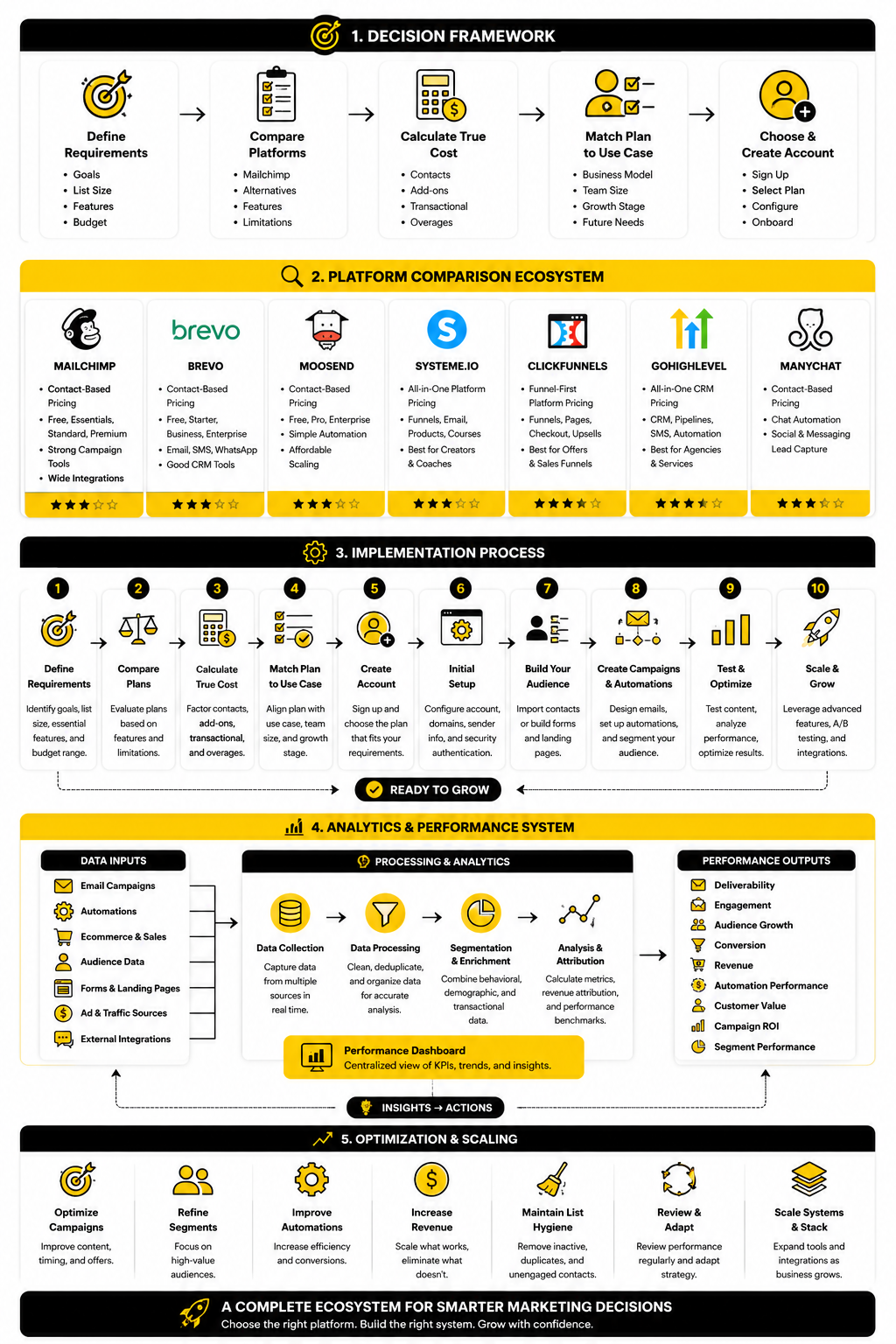
The simplest way to decide is to sketch your final system before choosing the tool. Map the journey from traffic source to lead capture, then from nurture to conversion, then from customer to repeat purchase or booked follow-up. Once you see that full ecosystem, the right platform becomes much easier to identify.
Do not buy software for the business you wish you had in five years. Also, do not buy software that blocks the business you are clearly building over the next year. Choose the plan and platform that fits your next realistic growth stage, then review the decision every quarter using actual costs, outcomes, and workflow friction.
Is Mailchimp still worth it in 2026?
Mailchimp can still be worth it if you want a polished email marketing platform with beginner-friendly campaign creation, strong templates, audience tools, and broad integrations. It is especially useful for businesses that mainly need newsletters, promotions, simple automations, and a familiar interface. The value becomes less obvious when your contact count grows quickly or when you need deeper sales, CRM, SMS, funnel, or multi-channel automation features.
What is the biggest issue with Mailchimp pricing?
The biggest issue is that Mailchimp pricing is strongly tied to contact count and plan level. That means your bill can rise as your database grows, even if some contacts are inactive or not producing revenue. A good mailchimp pricing comparison should always include list hygiene, contact growth, sending frequency, and the plan required for the features you actually need.
Does Mailchimp charge for unsubscribed contacts?
Mailchimp’s pricing tiers can count subscribed, non-subscribed, and unsubscribed contacts toward the contact limit in your account. That matters because old or inactive records can affect what you pay. Before upgrading or comparing alternatives, clean your list and make sure you are not paying for contacts that no longer support your business goals.
Which Mailchimp plan is best for small businesses?
For many small businesses, Essentials is enough if the goal is basic email campaigns, more sending capacity than Free, and access to support. Standard is usually the better fit when automation, customer journeys, personalization, and optimization matter more. The right choice depends less on company size and more on how important email is to revenue.
Is Mailchimp Free enough for a real business?
Mailchimp Free can be useful for testing, learning the interface, or starting a small project. It is usually not enough for a serious email marketing system because the contact and send limits are restrictive. Once email becomes part of lead generation, sales, ecommerce, or customer retention, most businesses will need a paid plan or a different platform.
What is the best cheaper alternative to Mailchimp?
The best cheaper alternative depends on why Mailchimp feels expensive. If contact-based pricing is the problem, Brevo is worth comparing because its pricing structure is often more flexible for larger contact databases. If you want a simple email automation platform with competitive pricing, Moosend also deserves a look.
Is Brevo better than Mailchimp?
Brevo can be better if you want email, SMS, WhatsApp, transactional email, and CRM-style tools with pricing that is less centered on stored contacts. Mailchimp can be better if you value polished campaign creation, familiar templates, and a large integration ecosystem. The better platform depends on whether your main constraint is cost structure, ease of use, multi-channel messaging, or email campaign workflow.
Is Moosend better than Mailchimp?
Moosend can be better for users who want email automation and campaign tools without paying for a larger brand ecosystem. Mailchimp can still be better for teams that want a familiar interface, broader recognition, and established integrations. The comparison should focus on your real contact tier, automation requirements, and whether you need a full marketing ecosystem or a focused email platform.
Should ecommerce brands use Mailchimp?
Ecommerce brands can use Mailchimp, especially if the store integration works cleanly and the team is comfortable with the platform. However, ecommerce brands should be stricter than newsletter-first businesses because they need cart recovery, purchase-based segmentation, repeat purchase flows, revenue attribution, and lifecycle automation. If those features become central to revenue, compare Mailchimp against ecommerce-focused email platforms and the total stack around your store.
Should agencies use Mailchimp?
Agencies can use Mailchimp for newsletters and simple client campaigns, but it may not be the best operational platform for lead management, pipelines, appointments, SMS, and client follow-up. Many agencies and service businesses need a system that manages the sales process, not just the email process. That is why GoHighLevel is often a stronger fit for agencies that want CRM, automation, calendars, pipelines, and client communication in one place.
Is ClickFunnels a replacement for Mailchimp?
ClickFunnels is not a direct Mailchimp replacement because it is primarily built around funnels, pages, offers, checkout flows, and conversion paths. Mailchimp is mainly an email marketing and audience platform. If your main problem is building sales funnels, ClickFunnels may be more relevant, but you still need to think through email follow-up and customer communication.
Is Systeme.io a good Mailchimp alternative?
Systeme.io can be a good alternative if you want email, funnels, products, checkout, and course-style workflows in one platform. It is especially relevant for creators, coaches, and digital product sellers who want a simple business system rather than a standalone email tool. Mailchimp may still be better if your priority is polished email campaign management and you already have the rest of your sales stack covered.
How should I compare Mailchimp pricing with other tools?
Compare Mailchimp using your real numbers, not starter-plan screenshots. Look at your current contacts, expected contact growth, monthly email volume, automations, support needs, integrations, and the extra tools required to complete your system. Then calculate total monthly stack cost and cost per meaningful outcome, such as purchases, booked calls, demo requests, or qualified leads.
When should I switch away from Mailchimp?
Switch when Mailchimp creates a clear bottleneck. That might be rising contact costs, limited automation, weak fit with your sales process, poor integration with your stack, or the need for CRM, SMS, funnels, or social automation. Do not switch just because another tool looks cheaper; switch when the new platform gives you a better operating system for the way your business actually grows.
What is the safest choice if I am unsure?
The safest choice is to start with the simplest platform that supports your next 6 to 12 months without forcing awkward workarounds. If your needs are basic, that may be Mailchimp or Moosend. If you already know you need funnels, CRM, SMS, or sales automation, start closer to the system you will actually need instead of rebuilding later.
Build a stronger local presence with BAAM AI
Turn your website, Google profile, social channels, and AI visibility into one growth engine
Most businesses do not need more random marketing activity. They need a consistent presence system that helps the right people find them, trust them, and take action. BAAM AI brings strategy, local SEO, website updates, Google Maps visibility, social content, AI-search readiness, media production, and reporting into one practical monthly engine.
If you want your marketing to keep working after the campaign ends, start with a free BAAM AI presence audit. See how your business shows up today and where the fastest visibility wins are at BAAM AI.