
BAAM AI Blog
Mailchimp For Business: A Practical Guide To Email Marketing That Actually Supports Growth
Mailchimp for business is not just about sending newsletters. Used well, it becomes the system that helps a company collect leads, welcome new subscribers, segment buyers, follow up automatically, measure engagement...
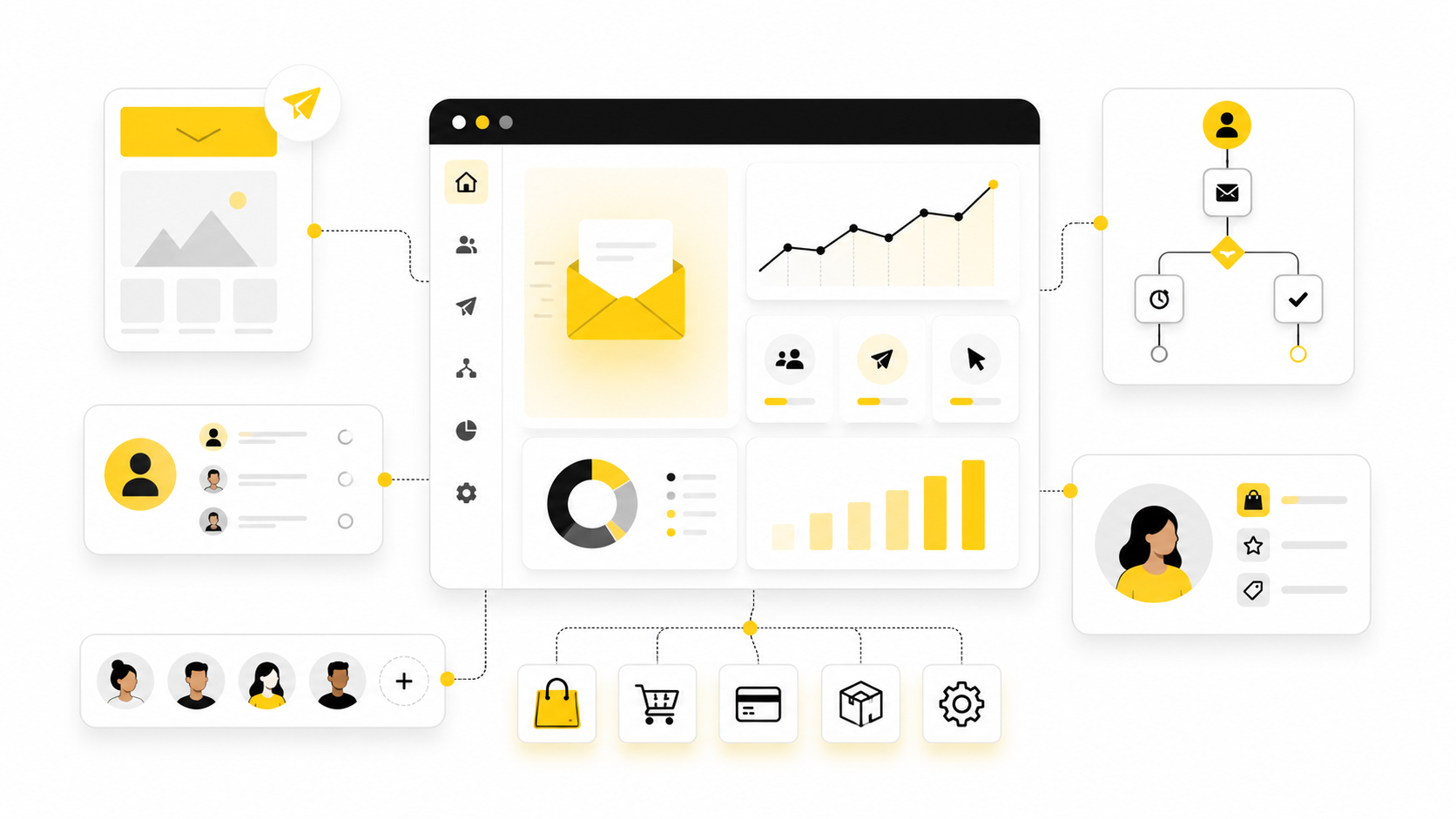
Mailchimp for business is not just about sending newsletters. Used well, it becomes the system that helps a company collect leads, welcome new subscribers, segment buyers, follow up automatically, measure engagement, and turn scattered customer data into repeatable marketing activity. That matters because most businesses do not have a traffic problem only; they have a follow-up problem.
The real value of Mailchimp is that it gives small teams a structured way to stay visible without manually chasing every prospect. Email still works because it reaches people in a channel they already use, but the businesses that win with it are not blasting the same message to everyone. They are building more carefully lists, sending relevant campaigns, and using automation to make every new lead or customer feel like they are moving through a thoughtful journey.
This guide breaks down Mailchimp from a business owner’s point of view. Not as a feature dump. Not as a fluffy “email marketing is important” overview. The goal is to show how Mailchimp fits into a real business system, where it helps, where it can become limiting, and how to implement it professionally so it supports revenue instead of becoming another tool nobody uses properly.
Why Mailchimp Matters For Business Growth
Mailchimp matters because most customer journeys are longer than one click. Someone may visit your website, download a lead magnet, abandon a cart, compare alternatives, ignore you for three weeks, and then finally buy after the right reminder lands at the right time. A business that only focuses on the first visit is leaving too much revenue to chance.
That is where email marketing becomes practical. Mailchimp’s own ecommerce ROI calculator references 30x ROI for ecommerce revenue attributed to paid Mailchimp campaigns from August 2024 to August 2025, which is not a promise for every business, but it does show why companies keep investing in owned audience channels instead of relying only on ads or social reach. Mailchimp’s ecommerce ROI benchmark is especially useful because it ties performance to connected store data rather than vague marketing theory.
For a business, the deeper point is control. Social platforms can change reach overnight, ad costs can rise without warning, and search rankings can fluctuate even when your content is strong. Your email list is not magic, but it is an asset you can nurture, segment, and improve over time.
Mailchimp also matters because it gives teams a practical middle ground. You do not need a giant enterprise marketing stack to start using segmentation, landing pages, signup forms, campaign reporting, and behavior-based automation. At the same time, you need a clear strategy, because simply opening a Mailchimp account will not fix weak offers, messy data, or inconsistent follow-up.
The Mailchimp Business Framework
A useful way to think about Mailchimp for business is as a growth loop. The loop starts when someone joins your audience, continues as you learn more about them, improves as you segment and personalize your messages, and compounds when automation keeps the relationship moving without constant manual work. This is why Mailchimp should be planned as a system, not treated as a place to “send an email when we remember.”
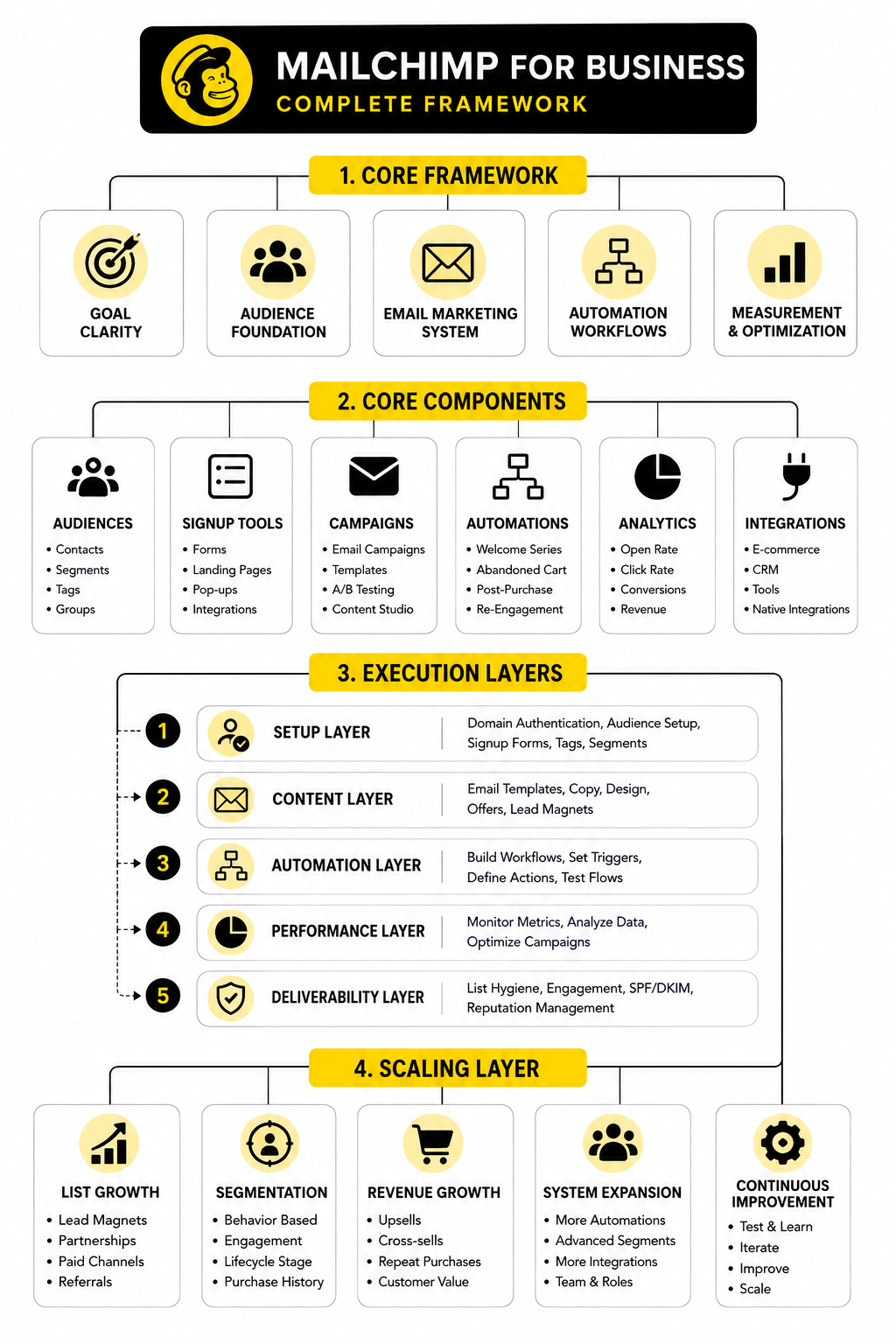
The framework has four practical layers. First, you need audience capture, which includes forms, landing pages, checkout opt-ins, lead magnets, and integrations with your website or store. Second, you need audience intelligence, where tags, groups, purchase activity, engagement data, and preferences help you understand who is on your list.
Third, you need communication, which includes newsletters, promotions, product education, onboarding, customer updates, and retention campaigns. Fourth, you need automation, where Mailchimp sends the right message based on behavior, timing, or customer status. Mailchimp says its Customer Journey Builder automations have generated on average 4x more orders than bulk emails alone for users, which is exactly why business email should move beyond one-off broadcasts. Mailchimp’s Customer Journey Builder shows how this automation layer is designed to work.
The key is not to automate everything immediately. The key is to automate the moments that already matter: new subscriber welcome, abandoned cart, post-purchase follow-up, re-engagement, lead nurturing, and customer education. Those are the places where consistency usually beats creativity.
Core Components Of A Mailchimp System
A strong Mailchimp for business setup has more than a list and a few templates. The useful version has clear audience structure, clean data, intentional campaigns, automation, reporting, and a simple operating rhythm. When those pieces work together, Mailchimp becomes easier to manage and much more valuable.
The mistake many businesses make is starting with design. They pick a template, write a newsletter, and hope the campaign performs. Design matters, but the foundation matters more because every email is only as good as the audience data, offer, timing, and follow-up behind it.
Audience And Contact Management
Your audience is the center of the Mailchimp account. This is where contacts, subscribers, unsubscribed users, customer records, tags, groups, segments, and profile data begin to shape how your business communicates. If this layer is messy, everything built on top of it becomes harder to trust.
For most businesses, the goal should be one clean main audience unless there is a strong operational reason to separate contacts. Multiple audiences can create duplicate records, disconnected reporting, and inconsistent customer history. A cleaner approach is usually to keep one audience and use tags, groups, segments, and merge fields to organize people properly.
Tags are best for internal labels. You might tag contacts by lead source, campaign, customer type, product interest, webinar attendance, or sales stage. Groups are better when the subscriber should be able to express or manage preferences, such as choosing topics they want to hear about.
Segmentation And Personalization
Segmentation is where Mailchimp starts becoming useful for serious business growth. Instead of sending every message to everyone, you can create smaller groups based on behavior, purchase history, engagement, location, signup source, tags, interests, or customer status. That lets your emails feel more relevant without pretending every subscriber is the same person.
A simple business could start with five practical segments. New subscribers need trust-building content. Active leads need education and proof. First-time buyers need onboarding. Repeat customers need retention and upsell communication. Cold subscribers need a re-engagement path or a clean removal process.
Personalization should not mean using someone’s first name in every subject line and calling it strategy. Real personalization means the message matches the person’s context. A buyer should not receive the same email as someone who only downloaded a checklist, and a long-time customer should not be treated like a brand-new lead.
Signup Forms And Lead Capture
Mailchimp can help collect contacts through embedded forms, pop-ups, landing pages, and integrations. This is important because email growth should not depend on random newsletter mentions at the bottom of a website. A business needs clear entry points that explain why someone should subscribe now.
Good lead capture starts with a specific promise. “Join our newsletter” is weak because it focuses on the business, not the reader. “Get weekly ecommerce retention tips” or “Download the buyer checklist” works better because the subscriber understands what they are getting.
Mailchimp can handle basic landing pages, but some businesses eventually need more flexible sales pages, product pages, or funnel flows. In that case, a dedicated funnel builder like ClickFunnels or an ecommerce landing page tool like Replo can make sense alongside Mailchimp. The point is not to add tools for fun; the point is to make the signup path clear, fast, and measurable.
Email Campaigns
Campaigns are the visible part of the system. These include newsletters, promotions, product launches, announcements, educational emails, event invites, seasonal campaigns, and customer updates. They are where strategy becomes actual communication.
A good campaign has one main purpose. It should not try to educate, sell, announce, survey, and nurture all in the same email. When one email has five jobs, the reader usually does nothing because the message feels unfocused.
For Mailchimp for business, the best campaign rhythm depends on the buying cycle. A local service business may only need a strong monthly email with occasional timely updates. An ecommerce brand may need weekly campaigns, promotional windows, product education, and segmented follow-ups tied to shopping behavior.
Automation Flows
Automation is where Mailchimp becomes less manual. Instead of relying on someone to remember every follow-up, automations can respond when a person subscribes, clicks, buys, abandons a cart, reaches a date, joins a segment, or becomes inactive. This makes the customer journey more consistent.
The first automation most businesses should build is a welcome sequence. A new subscriber is paying attention right now, so the first few emails should explain the brand, set expectations, deliver the promised resource, and guide the person toward the next logical step. Waiting weeks to follow up is a waste of attention.
After that, the next automations depend on the business model. Ecommerce stores usually need abandoned cart, post-purchase, product education, replenishment, review request, and win-back flows. Service businesses usually need lead nurture, consultation booking, onboarding, testimonial request, and reactivation flows.
Reporting And Decision Making
Reporting is not there to make dashboards look impressive. It is there to help you decide what to keep, what to stop, and what to improve. In Mailchimp, the most useful metrics usually include deliverability signals, open rate direction, click rate, conversions, unsubscribes, revenue attribution, list growth, and automation performance.
Open rates can still be directionally useful, but they should not be treated as the only measure of success. Privacy changes and inbox behavior can make opens less reliable than clicks, replies, purchases, form submissions, or booked calls. A business should care about engagement, but it should care even more about business outcomes.
This is why every campaign should have a clear next action. If the email promotes a product, track product clicks and revenue. If it promotes a consultation, track booked calls. If it educates, track the click or reply that shows the reader moved forward.
Integrations And The Wider Business Stack
Mailchimp becomes more powerful when it connects with the rest of the business. Ecommerce platforms, CRMs, booking tools, form builders, analytics platforms, social channels, and customer support tools can all improve the quality of your email marketing. Better inputs usually create better automation and segmentation.
A business that sells through a store should connect purchase data so customers can be segmented by product, order value, purchase frequency, or recency. A service business should connect form submissions, booked calls, or pipeline stages where possible. Without those signals, email campaigns stay too generic.
Some businesses eventually outgrow a pure email-first workflow and need a broader CRM, pipeline, SMS, reputation, and automation setup. That is where platforms like GoHighLevel can fit better for agencies, local businesses, and service-based teams. Mailchimp can still be useful, but the right stack depends on whether the business needs email marketing only or a full sales and operations system.
Professional Implementation And Setup
A professional Mailchimp for business setup starts before the first campaign is written. The real work is deciding what the account needs to do, what data it needs to collect, and how each subscriber should move from first contact to customer or repeat buyer. Without that plan, Mailchimp becomes a digital filing cabinet full of contacts instead of a growth system.
This stage is not glamorous, but it is where most results are won or lost. Clean structure makes every future campaign easier. Messy structure creates duplicate contacts, confusing segments, weak reporting, and automations that trigger at the wrong time.
Start With The Business Goal
Before building anything inside Mailchimp, define the business outcome. A retail brand may want more first-time purchases, repeat orders, abandoned cart recovery, or seasonal promotion revenue. A service business may want more booked calls, better lead nurturing, stronger onboarding, or reactivation of old prospects.
The goal determines the setup. If the goal is ecommerce revenue, purchase data, product categories, order timing, and customer value matter. If the goal is booked consultations, the setup should focus on lead source, service interest, qualification stage, and booking behavior.
This is also where the business should decide what Mailchimp should not do. Mailchimp can support email marketing, basic landing pages, forms, automations, and customer journeys, but it should not be forced to replace every sales, CRM, or operations tool if the business needs more than email. A clear boundary prevents the account from becoming bloated.
Map The Customer Journey
The next step is mapping the actual customer journey. This does not need to be complicated, but it does need to be honest. A business should know how people discover the offer, what they sign up for, what questions they usually have, what objections slow them down, and what action they should take next.
For many businesses, the journey can be mapped in five stages. A person becomes aware, joins the list, considers the offer, buys or books, and then either becomes a repeat customer or goes quiet. Mailchimp should support each stage with the right data and the right message.
This is where email marketing becomes much more than newsletters. A welcome email supports the signup moment. A nurture sequence supports consideration. A post-purchase flow supports the customer experience. A re-engagement campaign supports retention and list quality.
Build The Setup In The Right Order
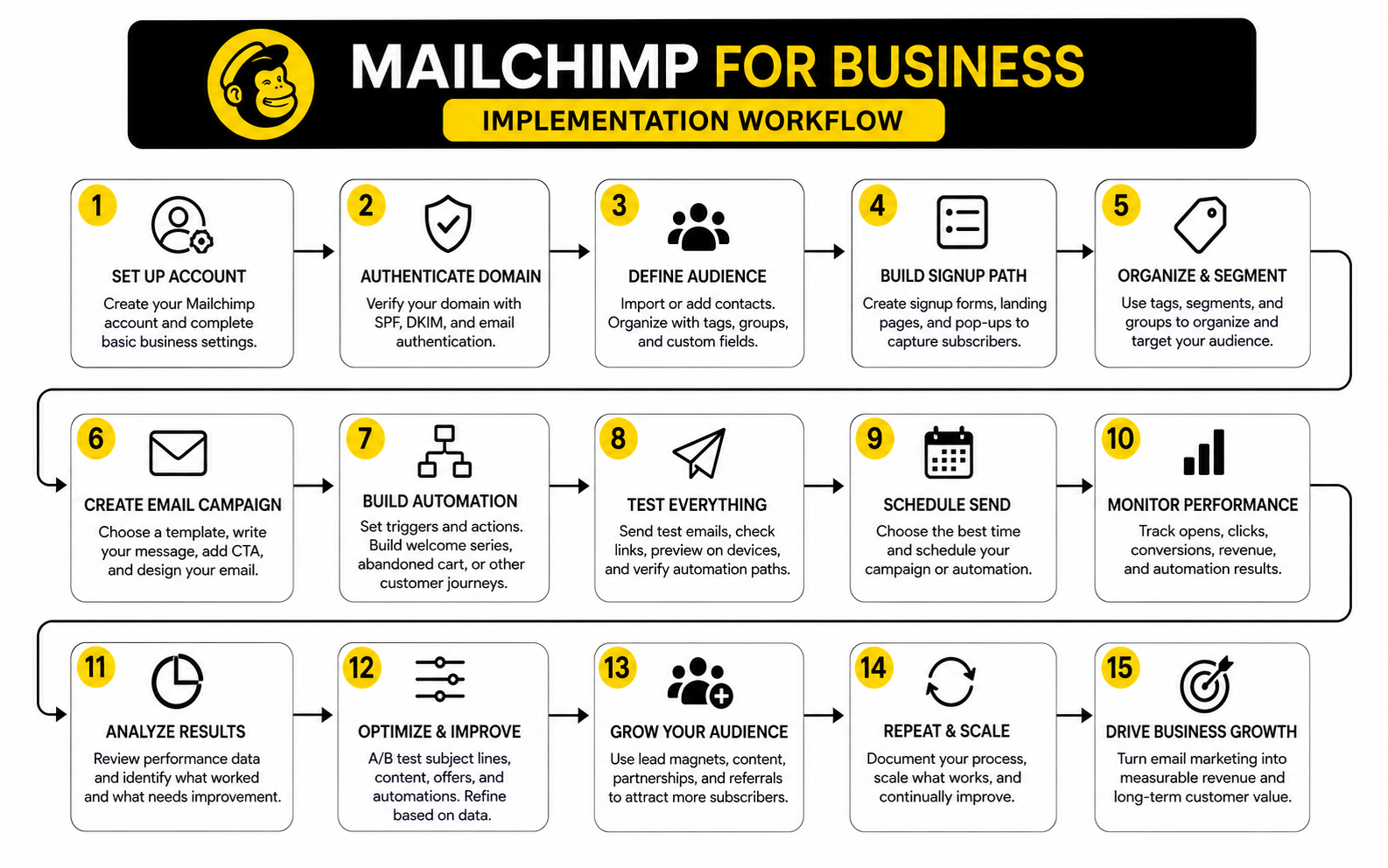
The safest way to implement Mailchimp is to build from the foundation upward. Do not start with a complex automation if the audience is messy, the domain is not authenticated, and the signup source is unclear. Fix the basics first, then layer in campaigns and automation.
A practical build order looks like this:
That order matters because each step depends on the one before it. Segmentation works better when the data is clean. Automation works better when the trigger is reliable. Reporting works better when the campaign has one clear purpose.
Clean The Contact Data
Contact cleanup is one of the most underrated parts of using Mailchimp for business. A big list is not automatically a good list. If the account is full of old imports, cold subscribers, fake addresses, duplicates, role-based inboxes, and people who never gave clear permission, campaign performance will suffer.
The first pass should remove obvious problems. That includes hard bounces, unsubscribed contacts you no longer need for reporting, contacts with no useful source information, and records that do not belong in marketing campaigns. The goal is not to shrink the list for fun; the goal is to protect deliverability and make the data trustworthy.
The second pass should organize the useful contacts. Add source tags where possible, separate customers from leads, identify active subscribers, and mark important categories such as product interest or service interest. This makes future communication sharper without requiring complicated personalization.
Set Up Email Authentication
Email authentication is not optional anymore if the business wants reliable delivery. Mailchimp’s domain authentication process uses DNS records to help prove that your business is allowed to send email from your domain. That matters because inbox providers are increasingly strict about sender identity, spam prevention, and domain reputation.
At minimum, the business should understand SPF, DKIM, and DMARC. SPF helps show which servers can send for the domain. DKIM adds a digital signature that helps verify the message has not been tampered with. DMARC tells receiving servers how to handle mail that fails authentication checks.
Mailchimp explains that domain authentication can improve delivery because it proves you are a legitimate sender and helps protect recipients from spam, forgery, and phishing. The setup usually involves adding CNAME and TXT records in the domain’s DNS settings, then verifying the result inside Mailchimp. Mailchimp’s domain authentication guide is the official starting point for this step.
Connect The Right Tools
Mailchimp should not sit alone if the business depends on data from other systems. An ecommerce store should pass order, product, and customer data into Mailchimp. A service business should connect form submissions, bookings, or CRM stages where those signals are needed for follow-up.
The right integrations make campaigns more relevant. For example, a customer who bought one product category can receive different education than a customer who bought another. A lead who booked a call should not keep receiving the same “book a call” email as someone who has not taken action yet.
For businesses that need stronger form logic before contacts enter Mailchimp, a form platform like Fillout can help collect better information at the point of signup. For businesses that need the email system to connect with pipelines, SMS, booking, and reputation management, GoHighLevel may be a better operational hub. The right choice depends on whether Mailchimp is the main system or one part of a larger customer journey.
Create A Simple Campaign Operating System
Once the foundation is clean, the business needs a repeatable way to run campaigns. This is where many teams lose momentum because they treat email as something to do only when inspiration appears. A better approach is to build a simple operating system.
The operating system should answer four questions. Who are we sending to? What is the one goal of this email? What action should the reader take? What metric will tell us whether it worked?
A practical monthly rhythm can include one educational email, one offer-focused email, one segment-specific follow-up, and one performance review. That is enough to create consistency without overwhelming a small team. As the list grows and the data improves, the campaign calendar can become more advanced.
Test Before Launch
Testing is the final step before anything goes live. Every signup form, tag, segment, automation trigger, email link, merge field, unsubscribe link, and confirmation message should be checked. This sounds basic, but basic mistakes are exactly what damage trust fastest.
A good test uses real internal contacts and walks through the subscriber experience from start to finish. Join the list, receive the confirmation, trigger the automation, click the links, check the tags, and verify the reporting. Do not assume the flow works just because it looks finished in the builder.
This is especially important for automations tied to purchases, bookings, or lead status. One broken trigger can mean new leads never get nurtured, customers receive the wrong message, or sales opportunities fall through the cracks. Professional implementation means the system is not just built; it is proven before real customers move through it.
Statistics And Data
Measurement is where Mailchimp for business becomes a management tool instead of a guessing game. The numbers are not there to decorate a report. They should tell you whether your audience is healthy, whether your message is relevant, whether your links are strong, and whether email is helping the business make money.
The biggest mistake is treating benchmarks like grades. A 35% open rate does not automatically mean the campaign was successful, and a lower open rate does not automatically mean the campaign failed. Benchmarks are useful because they give context, but the real question is always the same: what decision should this number help us make?
The Metrics That Actually Matter
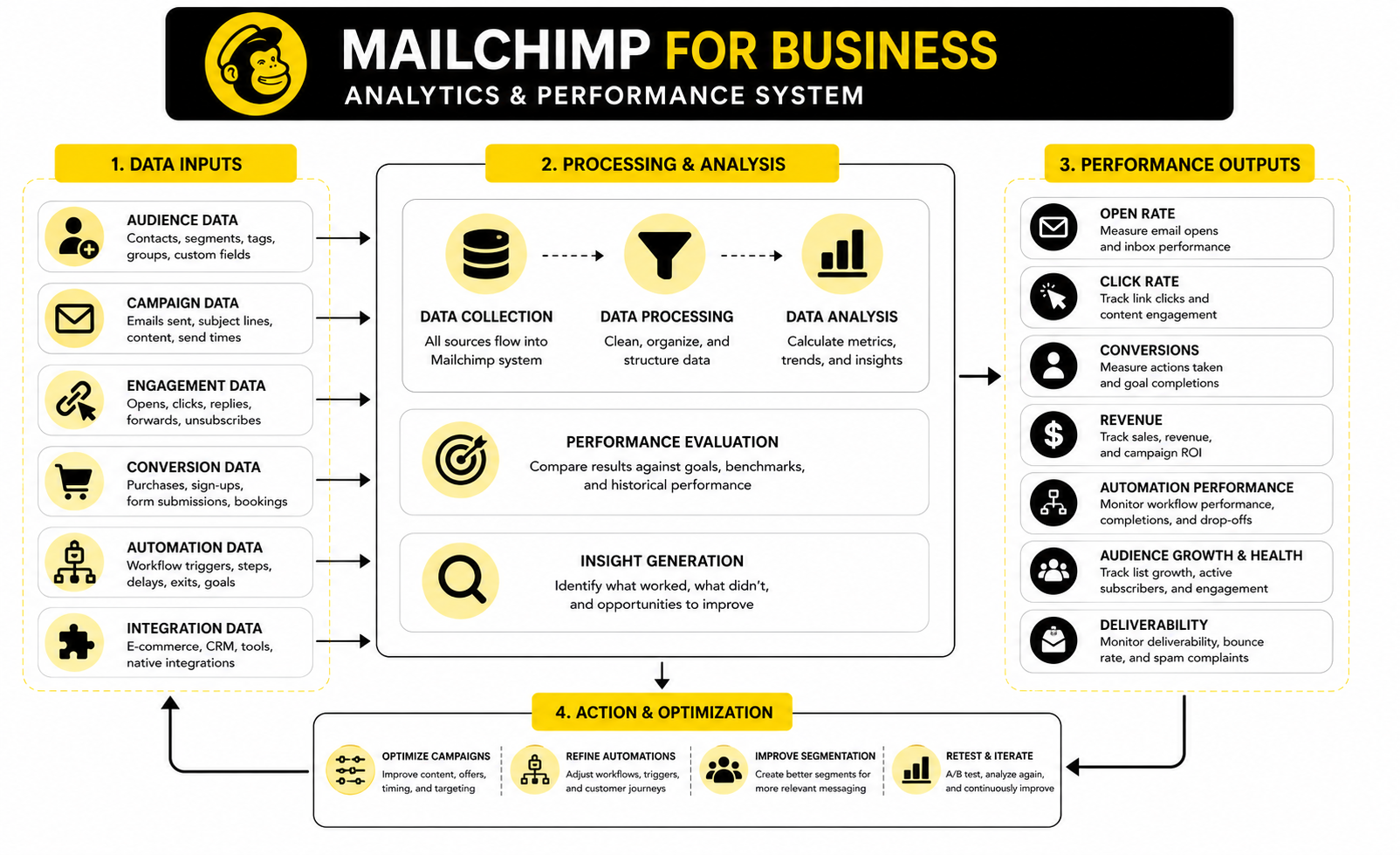
Mailchimp reports can show opens, clicks, bounces, unsubscribes, revenue, orders, audience growth, device data, link performance, and automation results. That is helpful, but it can also create noise if you do not know what each number is supposed to answer. A professional setup turns metrics into decisions.
Open rate helps you judge whether the sender name, subject line, timing, and audience relationship are strong enough to get attention. Click rate helps you judge whether the content, offer, and call to action created enough interest for someone to move forward. Conversion data tells you whether the click actually produced the business result you wanted.
Unsubscribes and spam complaints deserve special attention. A few unsubscribes are normal because not every subscriber will stay interested forever. A sudden spike is different because it usually means the audience, promise, frequency, or message was misaligned.
How To Read Open Rates Without Overreacting
Open rates are useful, but they are not perfect. Privacy features, image loading behavior, inbox filtering, and device settings can affect how opens are tracked. That means open rate should be read as a directional signal, not as absolute proof that every person did or did not read the email.
Mailchimp’s benchmark data, last updated in December 2023, shows industry open rates often sitting in the mid-30% range, with click rates usually much lower than opens. Mailchimp’s email marketing benchmarks are useful because they give broad context across industries, but they should not replace your own account history. Your best benchmark is usually your previous 90 days of performance, segmented by campaign type.
If open rates are declining, do not immediately rewrite everything. First check whether the list quality changed, whether the segment became broader, whether sending frequency changed, whether the subject line promised a clear benefit, and whether the domain has deliverability issues. The action should come from diagnosis, not panic.
Why Clicks Are Usually More Useful Than Opens
Clicks are usually a stronger signal than opens because they show active interest. A person had to notice the message, care enough to read or scan it, and then choose to take the next step. That makes click rate one of the cleanest ways to judge whether your email created movement.
A weak click rate can mean several things. The offer may not be compelling, the audience may not be the right fit, the email may have too many competing links, or the call to action may not be clear enough. It can also mean the campaign was educational and not designed to drive immediate clicks, which is why campaign intent matters.
For a business using Mailchimp, the fix is usually practical. Use one primary call to action, make the next step obvious, place the link where the reader naturally needs it, and segment the campaign so the offer matches the recipient. Better clicks usually come from better relevance, not louder design.
Revenue And Conversion Tracking
Revenue tracking is where email becomes easier to defend as a business channel. When Mailchimp is connected to an ecommerce store, campaigns and automations can be tied to orders, revenue, average order value, and customer behavior. That gives the business a much clearer view of what email is actually contributing.
This is important because email often influences revenue across multiple touches. A subscriber may click a product education email, ignore a promotion, open a reminder, and then purchase later. Looking only at one campaign can understate the role email played in the overall customer journey.
Mailchimp’s own ecommerce ROI material references 30x ROI for ecommerce revenue attributed to paid Mailchimp campaigns from August 2024 to August 2025, which is a useful reminder that email can still be a serious revenue channel when tracking is connected properly. Mailchimp’s ecommerce ROI calculator should be read as a benchmark tool, not as a guarantee. The action is to connect your store data, define attribution clearly, and compare campaign revenue against the cost of the platform, creative work, discounts, and time.
Automation Performance Signals
Automation should be measured differently from one-off campaigns. A newsletter may be judged by engagement that week, but an automation should be judged by how well it performs over time for people entering the same journey. This is especially important for welcome sequences, abandoned cart flows, post-purchase flows, and re-engagement campaigns.
Mailchimp states that Customer Journey Builder automations have generated on average 4x more orders than bulk emails alone for users. Mailchimp’s Customer Journey Builder page is relevant because it points to the business case for behavior-based follow-up instead of relying only on broadcast campaigns. The real takeaway is not “automation is always better”; it is that triggered messages usually match timing and intent more closely.
A good automation review should look at entry volume, email-by-email drop-off, clicks, conversions, unsubscribes, and time to action. If the first email performs well but the second email collapses, the sequence may lose relevance too quickly. If the clicks are strong but conversions are weak, the problem may be the landing page, offer, pricing, or checkout flow rather than the email itself.
Deliverability And List Health
Deliverability is the silent performance layer. If emails do not reach the inbox, every other metric becomes weaker. A business can have strong copy, beautiful design, and a good offer, but poor sender reputation will still drag results down.
List health is one of the first places to check. A clean list with engaged subscribers is usually more valuable than a huge list full of cold, unverified, or low-permission contacts. Bounces, spam complaints, low engagement, and sudden volume changes can all create problems over time.
This is why authentication, permission, and list hygiene are not technical side quests. They protect the channel. A business using Mailchimp should regularly remove or suppress contacts who never engage, avoid purchased lists, keep signup promises clear, and monitor campaign-level warning signs before they become account-level problems.
Benchmarks Should Lead To Action
The point of benchmarks is not to feel good or bad. The point is to decide what to test next. A benchmark without action is just trivia.
If open rates are below your normal range, test the sender name, subject line, preview text, segment quality, and timing. If clicks are weak, simplify the message, sharpen the offer, and reduce competing calls to action. If revenue is low despite strong clicks, examine the landing page, product page, checkout flow, pricing, and post-click experience.
This is where teams need discipline. Do not change ten variables at once and then pretend you know what worked. Change one meaningful thing, measure the result, and keep improving the system.
A Simple Mailchimp Scorecard
A business does not need a complicated dashboard to make better decisions. A simple scorecard reviewed weekly or monthly is enough for most teams. The scorecard should connect audience health, campaign performance, automation performance, and business outcomes.
Track these numbers consistently:
The value is in the trend, not the isolated number. One campaign can be unusual because of timing, audience size, seasonality, or offer type. Three months of consistent movement tells a much better story.
What The Data Means For Strategy
Data should make the Mailchimp strategy calmer, not more chaotic. If one segment consistently clicks, send that segment more relevant offers. If a lead magnet brings subscribers who never engage, improve or replace it. If an automation produces revenue every week, optimize it before building something new.
This is where mailchimp for business becomes a practical operating system. The platform gives you the signals, but the business still has to interpret them with context. Good marketers do not worship metrics; they use metrics to make better decisions.
The best measurement habit is simple: every campaign should teach you something. It should teach you which audience responds, which offer has traction, which message is clear, or which part of the journey needs work. When every send improves the next send, Mailchimp stops being a newsletter tool and starts becoming a growth engine.
Advanced Considerations For Scaling Mailchimp
Once the basic system is working, the next challenge is scaling without creating chaos. Mailchimp for business can support a serious marketing operation, but growth adds pressure to every part of the account. More contacts, more segments, more campaigns, more products, more team members, and more automations all increase the chance of mistakes.
This is where businesses need to move from “we send emails” to “we manage an email marketing system.” That shift matters because a system has rules. It has naming conventions, ownership, testing standards, cleanup routines, and a clear reason for every automation that exists.
The Tradeoff Between Simplicity And Control
Mailchimp is popular because it is approachable. A small team can create campaigns, manage contacts, build signup forms, and launch automations without needing a developer for every move. That ease of use is a real advantage, especially for businesses that need marketing execution more than technical complexity.
The tradeoff is that as the business becomes more advanced, simplicity can start to feel limiting. You may want more detailed lead scoring, deeper sales pipeline logic, custom reporting, complex conditional automations, or tighter CRM behavior than Mailchimp is designed to handle as a primary operating system. That does not make Mailchimp weak; it just means the tool has to match the job.
A smart business does not ask one platform to do everything forever. It decides what Mailchimp should own, what another tool should own, and where the handoff should happen. That decision is much cleaner than forcing Mailchimp to behave like a full sales CRM if the real business need has moved beyond email marketing.
When Mailchimp Is The Right Fit
Mailchimp is usually a strong fit when the business needs a reliable email marketing platform with audience management, campaign design, forms, segments, automations, and performance reporting. It works especially well when the marketing team wants something practical and accessible instead of a heavy enterprise tool. For many small businesses, that is enough to build a real retention and follow-up engine.
It is also a good fit when the customer journey is relatively straightforward. A person joins the list, receives a welcome sequence, gets segmented by interest or purchase behavior, and then receives relevant campaigns or automations. That model covers a lot of ecommerce brands, creators, local businesses, consultants, and content-driven companies.
The best sign that Mailchimp is working is not that the account has many features turned on. The best sign is that the team can explain exactly how new leads are captured, how contacts are segmented, what automations are running, which campaigns drive action, and what needs to improve next. Clarity beats complexity.
When Mailchimp Starts To Feel Limiting
Mailchimp can start to feel limiting when email is only one small part of a larger sales process. If the business needs pipeline management, task assignment, call tracking, SMS conversations, missed-call text back, reputation management, appointment workflows, and client subaccounts, then Mailchimp may become one piece of the stack rather than the center of it. That is especially common for agencies and service businesses.
This is where a platform like GoHighLevel can make more sense. It is built around CRM, automation, funnels, calendars, messaging, and agency-style operations, so it may be a better fit when the business needs to manage the full sales and follow-up process in one place. Mailchimp can still be useful for email campaigns, but it should not be forced to carry operational workflows it was not chosen to manage.
The same logic applies to funnel-heavy businesses. If the growth strategy depends on sales pages, checkout flows, upsells, webinars, order bumps, and funnel testing, a dedicated platform like ClickFunnels may be better for the front-end conversion path. Mailchimp can then handle follow-up, segmentation, and campaigns after the lead or customer enters the list.
The Risk Of Over-Automation
Automation is powerful, but too much automation can make the customer experience feel strange. A subscriber should not receive a welcome email, a promo email, an abandoned cart email, and a generic newsletter within the same short window unless that timing has been planned carefully. More automation does not automatically mean better marketing.
The risk is that each automation looks reasonable on its own, but the combined experience becomes noisy. One team member builds a welcome flow, another builds a sales sequence, another adds a product education flow, and nobody checks how they overlap. The subscriber experiences all of it as one brand, not as separate workflows.
The fix is to review automations as a customer journey, not as individual assets. Look at the first 30 days after signup, the first 30 days after purchase, and the first 30 days after inactivity. If the journey feels crowded, confusing, or repetitive, reduce the noise before adding anything new.
The Risk Of Poor Data Discipline
Data discipline becomes more important as the account grows. A business can survive a few messy tags when the list is small, but messy data becomes expensive at scale. Poor naming, inconsistent imports, vague segments, and old automations can make the account hard to trust.
Every tag should have a purpose. Every segment should answer a useful business question. Every automation trigger should be easy to understand six months later.
A simple naming system helps a lot. Use clear labels for source, status, interest, customer type, campaign, and lifecycle stage. Avoid clever internal shorthand that only one person understands, because eventually someone else will need to manage the account.
Compliance And Permission Are Strategy, Not Legal Footnotes
Permission is not just a compliance box. It affects trust, deliverability, engagement, and brand reputation. A subscriber who clearly asked to hear from you is much more valuable than someone added through a questionable import.
Businesses should be especially careful with purchased lists, scraped contacts, unclear consent, and old databases from years ago. These contacts may look like an opportunity, but they often create weak engagement and deliverability risk. The short-term temptation is rarely worth the long-term damage.
This becomes even more important when the business operates across regions with different privacy and marketing rules. GDPR, CAN-SPAM, CASL, and other regulations can affect how consent, unsubscribe links, sender identity, and data handling should work. A business does not need to become paranoid, but it does need to treat permission as part of the marketing system.
Scaling Content Without Lowering Quality
As email frequency increases, content quality can drop if there is no system behind it. Teams start sending because the calendar says they should, not because the message is useful. That is when subscribers start ignoring campaigns.
A better approach is to build repeatable content categories. For example, a business might rotate between education, proof, product guidance, customer objection handling, promotions, and retention content. This keeps the calendar structured without making every email feel the same.
The goal is not to sound clever every week. The goal is to be consistently useful and commercially clear. Readers should understand why the email matters and what they should do next.
Advanced Segmentation Without Making A Mess
Advanced segmentation should make campaigns more relevant, not more complicated for the sake of it. A business does not need 80 segments if only 8 of them are actually used. Unused segments are just clutter.
The best segments are tied to decisions. Send this offer to high-intent leads. Send this education to new buyers. Send this retention campaign to customers who have not purchased recently. Send this reactivation message to subscribers who have stopped engaging.
That is the standard to use. If a segment does not change the message, offer, timing, or follow-up, it may not need to exist. Segmentation should create better action, not just better-looking organization.
Tool Stack Decisions
At some point, the business has to decide whether Mailchimp remains the main marketing platform or becomes one part of a wider stack. This decision should be based on workflow, not hype. The right stack is the one the team can actually use consistently.
For ecommerce landing pages, Replo can support more flexible page building when the storefront experience needs more control. For forms and lead qualification, Fillout can help collect cleaner data before contacts enter the email system. For social scheduling around email campaigns, Buffer can help keep campaign promotion organized across channels.
The important thing is to avoid tool stacking without process clarity. A new tool should solve a specific bottleneck. If it does not improve capture, conversion, segmentation, follow-up, reporting, or execution speed, it may just add another login.
Team Workflow And Ownership
Mailchimp gets harder to manage when nobody owns it. One person writes campaigns, another imports contacts, another edits automations, and another checks reports. Without clear ownership, small mistakes compound.
A professional workflow should define who owns strategy, copy, design, approvals, list hygiene, automation testing, reporting, and integrations. Even if one person does most of the work, those responsibilities should still be clear. This prevents the account from becoming dependent on memory.
Approval also matters. A campaign should not go out without checking audience, subject line, links, preview text, mobile layout, sender name, unsubscribe visibility, and tracking. That may sound strict, but it is much easier than apologizing after a broken campaign reaches thousands of subscribers.
What To Optimize First
When the system is live, the temptation is to optimize everything at once. Do not do that. The fastest improvements usually come from fixing the highest-leverage bottleneck first.
Start with the signup promise if the list is not growing. Improve segmentation if engagement is uneven. Fix the welcome flow if new subscribers are not taking the next step. Improve the offer or landing page if clicks are strong but conversions are weak.
This is how Mailchimp for business becomes easier to scale. You do not need endless experiments. You need focused improvements in the part of the system that is currently holding back growth.
Choosing The Right Mailchimp Plan And Next Steps
Choosing the right Mailchimp plan is not about picking the plan with the longest feature list. It is about matching the plan to the business model, list size, campaign frequency, automation needs, reporting requirements, and team workflow. A small business that sends a monthly newsletter does not need the same setup as an ecommerce brand running segmented promotions and multi-step customer journeys.
Mailchimp currently structures its marketing plans around Free, Essentials, Standard, and Premium options, with pricing and limits changing by contact count, send volume, and features. The official Mailchimp pricing page is the place to verify exact costs before deciding, because plan details can change. The practical decision is simple: choose the lowest plan that supports the workflows you actually need now, then upgrade when the business case is clear.
Free can work for testing the platform, building a tiny list, or learning the basics. Essentials makes more sense when the business needs more sending capacity and basic email marketing tools. Standard is usually the more serious business tier because it supports stronger automation and optimization features. Premium is for larger teams, advanced segmentation needs, higher-volume operations, and businesses that need more support and control.
Build The Final System Around The Customer Journey
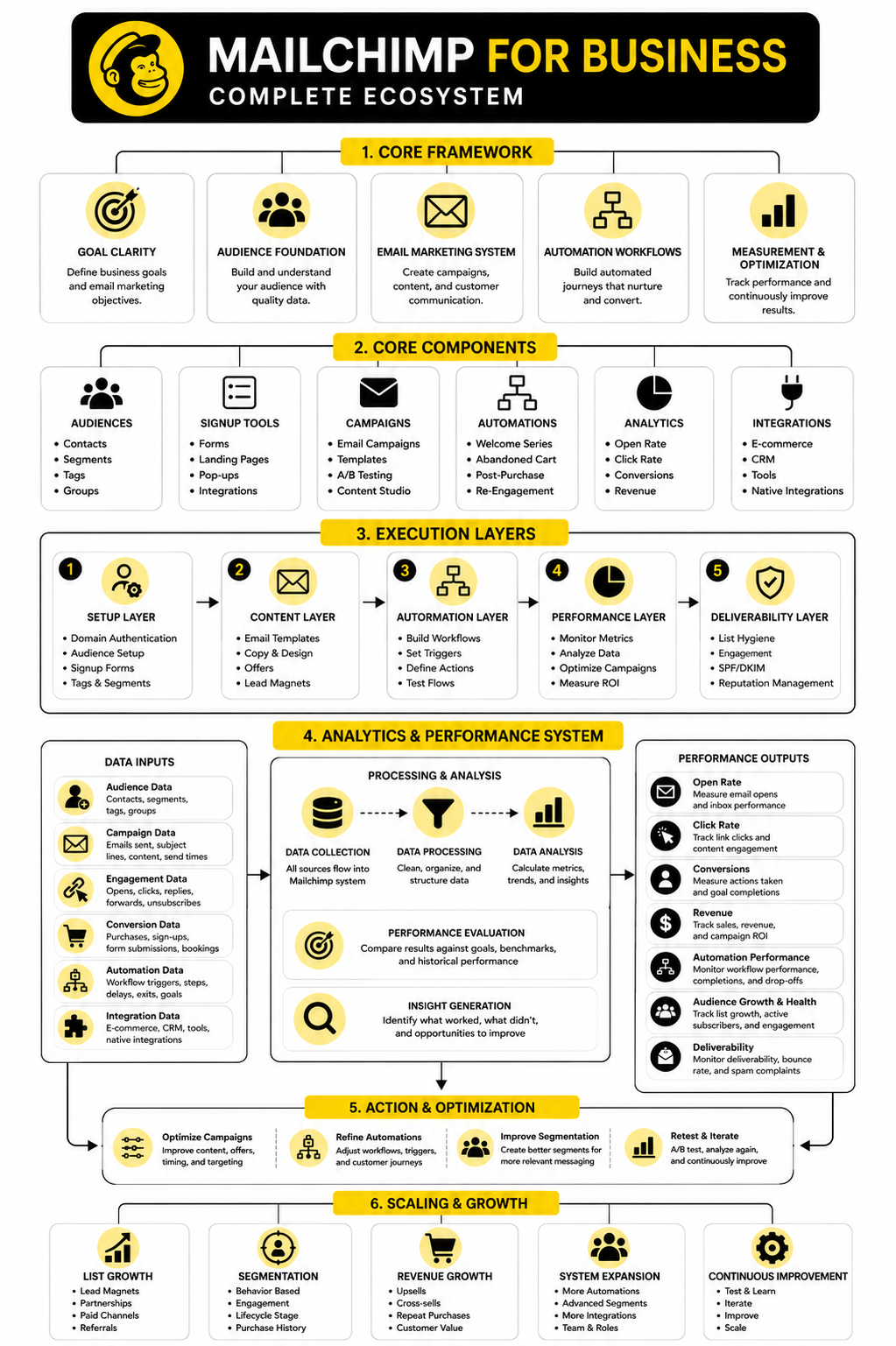
At this stage, the full system should feel connected. The signup form feeds the audience. The audience data supports segmentation. Segmentation improves campaigns. Campaigns and automations drive measurable action. Reporting tells the business what to improve next.
That is the real promise of Mailchimp for business. Not more emails. Better timing, better relevance, cleaner follow-up, and clearer decisions.
The final system should answer these questions without confusion:
If those answers are clear, Mailchimp becomes much easier to operate. If those answers are vague, the business should fix the system before adding more campaigns, more automations, or more tools.
Is Mailchimp Good For Business?
Yes, Mailchimp can be good for business when it is used as a structured email marketing and automation system. It helps companies collect subscribers, send campaigns, build customer journeys, segment contacts, and measure performance. It is especially useful for small and mid-sized businesses that want practical marketing tools without jumping straight into a complex enterprise platform.
The important condition is strategy. Mailchimp will not fix a weak offer, poor lead capture, or unclear customer journey by itself. It works best when the business has a clear audience, a useful reason for people to subscribe, and a consistent follow-up process.
What Is Mailchimp Used For In Business?
Mailchimp is used for email marketing, audience management, signup forms, landing pages, marketing automation, campaign reporting, and customer communication. Businesses use it to welcome new subscribers, promote products, nurture leads, recover abandoned carts, send newsletters, and re-engage inactive contacts. It can also connect with ecommerce stores and other tools so campaigns are based on real customer behavior.
The simplest way to think about it is this: Mailchimp helps a business stay in touch with people who have shown interest. That includes prospects, customers, repeat buyers, event attendees, content subscribers, and old leads. The value comes from sending more relevant messages instead of treating every contact the same.
Is Mailchimp Better For Ecommerce Or Service Businesses?
Mailchimp can work for both, but the setup should be different. Ecommerce businesses usually care about product interest, purchase history, abandoned carts, repeat orders, and customer lifetime value. Service businesses usually care more about lead source, qualification, booked calls, follow-up, onboarding, and reactivation.
For ecommerce, the most important step is connecting store data so campaigns can be tied to products, orders, and revenue. For service businesses, the most important step is connecting the lead journey so prospects do not get lost after filling out a form or booking a call. The tool is flexible, but the strategy should match how the business makes money.
What Mailchimp Plan Should A Business Choose?
A business should choose the plan that supports its current workflow without overbuying. Free is mainly for testing or very small lists. Essentials can work for basic campaigns. Standard is often the better fit for serious small business marketing because it includes stronger automation and optimization options.
Premium is usually only necessary when the business has a larger list, more advanced segmentation needs, multiple users, and a more complex marketing operation. The smartest move is to define the required workflows first, then compare plans against those needs. Do not upgrade just because a feature sounds interesting.
How Often Should A Business Send Emails With Mailchimp?
The right sending frequency depends on the audience, offer, industry, and relationship with subscribers. A business with strong content and frequent buying moments may send weekly or more. A service business with a longer buying cycle may do better with fewer but more thoughtful emails.
Consistency matters more than intensity. Sending once a month with a clear message is better than sending five random emails and then disappearing for three months. The best schedule is one the business can maintain while still giving subscribers a real reason to keep opening.
What Are The Most Important Mailchimp Automations?
The most important automations are the ones tied to moments that already matter in the customer journey. A welcome sequence is usually first because new subscribers are most attentive right after they join. After that, the best automations depend on the business model.
Ecommerce businesses usually benefit from abandoned cart, post-purchase, product education, review request, replenishment, and win-back flows. Service businesses usually benefit from lead nurture, consultation booking reminders, onboarding, no-show follow-up, testimonial requests, and reactivation flows. Start with the automation that protects the most revenue or fixes the biggest follow-up gap.
How Should A Business Segment Contacts In Mailchimp?
A business should segment contacts based on useful decisions, not random labels. Good segmentation helps decide what message to send, when to send it, and what offer should come next. Useful segment criteria include lead source, purchase behavior, customer status, engagement level, product interest, service interest, location, and lifecycle stage.
Avoid building segments just because the platform allows it. If a segment does not change the message, timing, offer, or follow-up, it may not be worth maintaining. Simple, active segments are better than a complicated account nobody understands.
What Metrics Should A Business Track In Mailchimp?
A business should track audience growth, active subscriber percentage, open rate direction, click rate, conversions, unsubscribes, spam complaints, bounce rate, automation performance, and revenue or booked calls attributed to email. The right metric depends on the campaign goal. A sales campaign should be judged differently from an educational email or a re-engagement campaign.
Clicks and conversions usually deserve more attention than opens. Opens can be affected by privacy features and inbox behavior, so they are better as a directional signal. The best reporting habit is to connect every campaign to one clear action.
Why Are My Mailchimp Emails Not Performing?
Poor performance usually comes from one of five problems. The audience may be too broad, the list may be low quality, the offer may not be relevant, the email may lack a clear call to action, or the post-click experience may be weak. Deliverability issues can also reduce results before subscribers even see the message.
The fix is to diagnose before changing everything. Check list quality, segment relevance, subject line clarity, click behavior, landing page performance, and unsubscribe trends. Then improve one bottleneck at a time instead of rewriting the whole system blindly.
Is Mailchimp Enough For A Full Marketing System?
Mailchimp can be enough for businesses that mainly need email marketing, forms, basic landing pages, segmentation, automation, and reporting. It may not be enough if the business needs a full CRM, sales pipeline, SMS conversations, call tracking, appointment workflows, client accounts, or complex funnel operations. In that case, Mailchimp may become one tool inside a larger stack.
For broader sales and automation workflows, GoHighLevel may be a better central platform. For funnel-heavy customer acquisition, ClickFunnels may be stronger on the front-end conversion path. The right answer depends on whether the business needs email marketing or a complete sales operating system.
How Do I Keep A Mailchimp Account Clean As It Grows?
Keep the account clean by using clear naming rules, limiting unnecessary tags, documenting automations, cleaning inactive contacts, and reviewing segments regularly. Every tag, field, segment, and automation should have a purpose. If nobody knows why something exists, it probably needs to be renamed, archived, or removed.
A monthly cleanup rhythm helps. Review new contact sources, check bounce and unsubscribe trends, remove dead segments, test important automations, and confirm that campaign reports still match the business goals. This is not busywork; it protects deliverability, reporting accuracy, and execution speed.
What Is The Best Way To Start With Mailchimp For Business?
The best way to start is to keep it simple and build the foundation properly. Define one main goal, clean the audience, authenticate the domain, create a clear signup path, build a welcome sequence, and send a focused first campaign. After that, review the data and improve the next step.
Do not start with ten automations and a complicated segmentation plan. Start with the parts that create immediate clarity and follow-up. Once the basics are working, scaling becomes much easier.
Build a stronger local presence with BAAM AI
Turn your website, Google profile, social channels, and AI visibility into one growth engine
Most businesses do not need more random marketing activity. They need a consistent presence system that helps the right people find them, trust them, and take action. BAAM AI brings strategy, local SEO, website updates, Google Maps visibility, social content, AI-search readiness, media production, and reporting into one practical monthly engine.
If you want your marketing to keep working after the campaign ends, start with a free BAAM AI presence audit. See how your business shows up today and where the fastest visibility wins are at BAAM AI.