
BAAM AI Blog
Mailchimp Essentials: The Practical Guide To Using Mailchimp’s Entry-Level Paid Plan Well
Mailchimp Essentials is the first paid Mailchimp marketing plan most small businesses consider when the free plan starts feeling too limited. It is built for teams that want more sending room, scheduled campaigns...
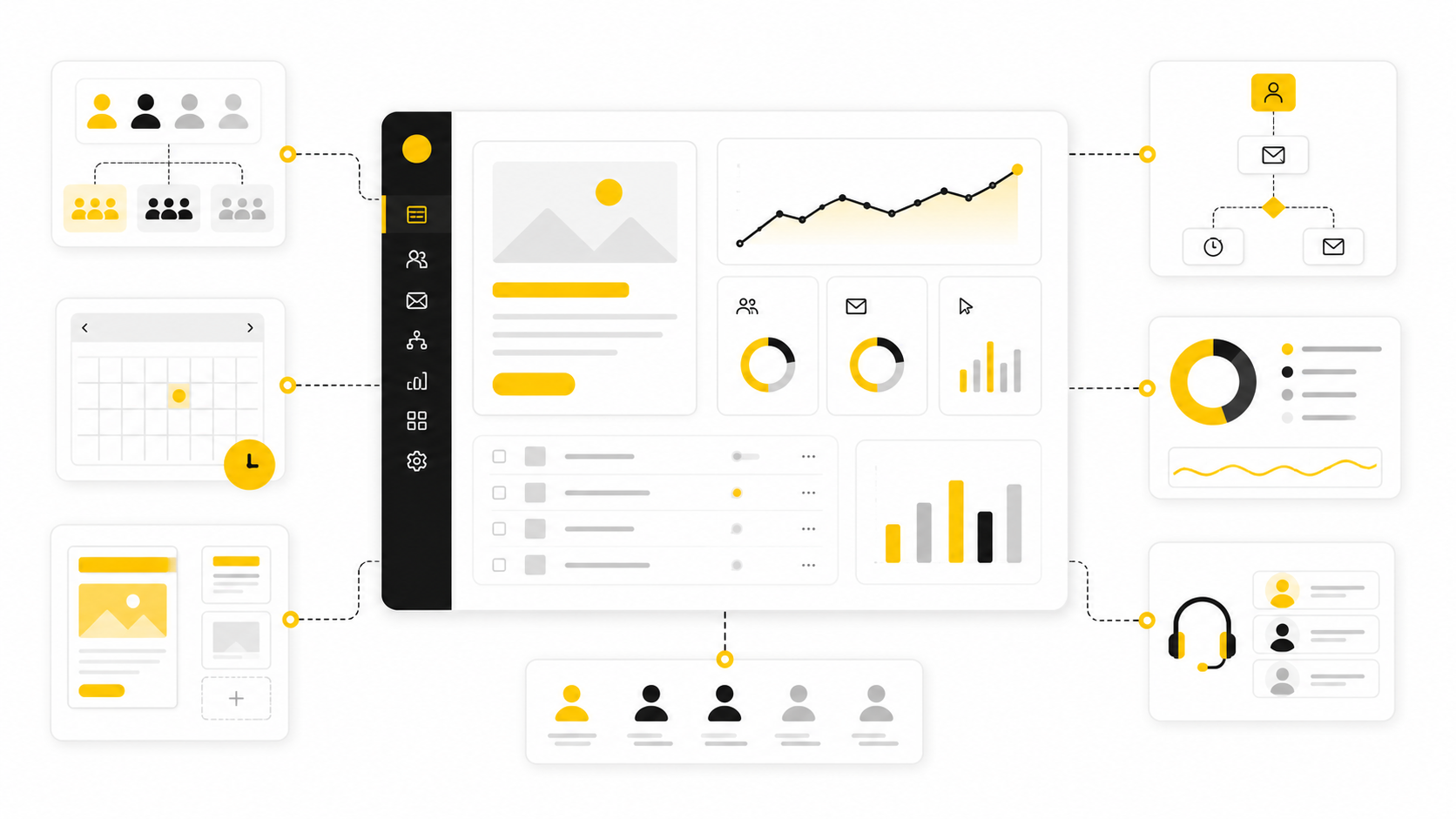
Mailchimp Essentials is the first paid Mailchimp marketing plan most small businesses consider when the free plan starts feeling too limited. It is built for teams that want more sending room, scheduled campaigns, A/B testing, all email templates, basic automation flows, and ongoing support without jumping straight into a more advanced automation platform.
That sounds simple, but the real question is not “Can Mailchimp Essentials send emails?” Of course it can. The better question is whether Mailchimp Essentials gives you enough structure to build a reliable email marketing system without paying for features you are not ready to use.
This guide breaks that down in a practical way. We will look at what the plan includes, where it fits, where it becomes limiting, how to set it up professionally, and when another tool may make more sense.
Why Mailchimp Essentials Matters
Mailchimp Essentials matters because email is still one of the few marketing channels where a business can own the audience relationship directly. Social platforms can change reach overnight, paid ads can become expensive fast, and search traffic can fluctuate with algorithm updates. A clean email list gives you a more stable way to reach people who already asked to hear from you.
The plan also matters because many businesses outgrow Mailchimp’s free tier before they have a full marketing team. Mailchimp’s free marketing plan is limited to 250 contacts and 500 monthly sends, while Mailchimp’s Essentials plan supports up to 50,000 contacts with a monthly send limit equal to 10 times the contact limit. That jump changes the role of the tool from “testing email” to “running email as a real channel.”
There is also a measurement angle here. Email only becomes valuable when you can see what is working, improve campaigns, and send more relevant messages over time. Mailchimp’s own benchmark data shows an average email open rate around 34.23% and an average click-through rate around 2.66%, which means small improvements in targeting, subject lines, offers, and timing can compound quickly.
For a small business, creator, consultant, ecommerce store, or local service provider, Mailchimp Essentials can be the middle ground between “too basic” and “too complicated.” It gives you enough room to send campaigns, test ideas, schedule emails, use better templates, and build simple automations. But it still requires discipline, because a paid plan does not automatically create a good email strategy.
The Mailchimp Essentials Framework
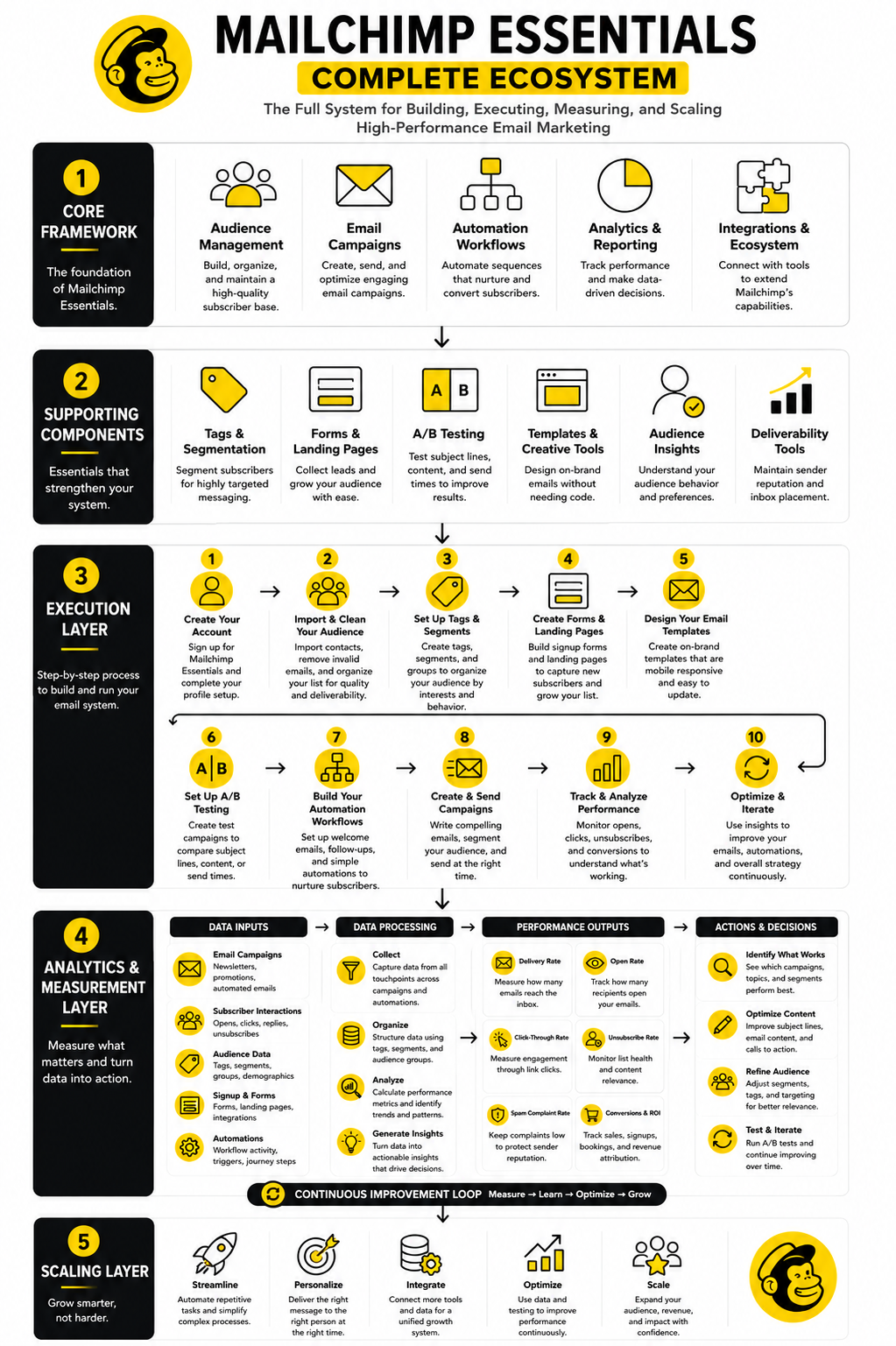
The easiest way to understand Mailchimp Essentials is to see it as a simple operating system for email marketing. It is not just a newsletter tool, and it is not a full advanced CRM. It sits between those two categories: strong enough for structured email marketing, but not designed to replace a complete sales pipeline or advanced multi-channel automation stack.
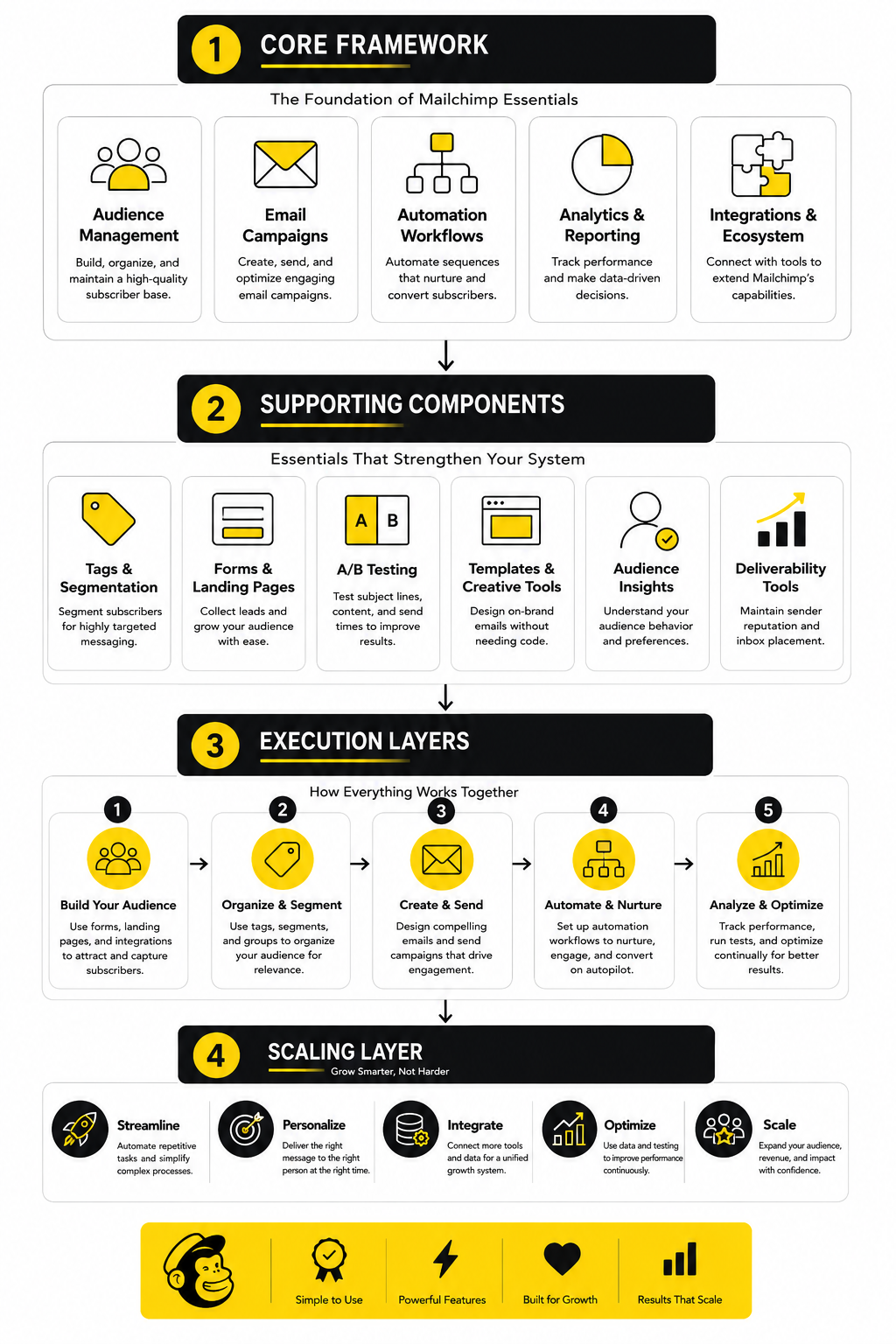
The framework has four practical layers. First, you need an audience structure that keeps contacts clean and usable. Second, you need campaign execution so emails are planned, designed, tested, scheduled, and reviewed properly.
Third, you need simple automation that handles obvious moments like welcomes, follow-ups, and basic nurture sequences. Mailchimp Essentials includes single email automations and automation flows with up to four steps, which is enough for lightweight customer journeys but not enough for highly complex lifecycle marketing. Fourth, you need reporting habits that turn every send into a learning loop instead of a one-off broadcast.
This matters because many teams use email tools backward. They start with templates, colors, and campaign ideas before they define who the email is for, what action they want, and how success will be measured. Mailchimp Essentials works best when you treat it as a repeatable system, not just a place to paste a promotion and hit send.
Core Components Of Mailchimp Essentials
Mailchimp Essentials includes the core features most entry-level paid email marketers need. The plan includes 3 audiences, 3 seats with Owner and Admin permissions, all Mailchimp email templates, scheduled emails, A/B testing, 24/7 email and chat support, and access to basic automation flows. For many small teams, those features cover the daily work of building, sending, and improving campaigns.
The most important component is not the template library. It is the combination of scheduled emails, A/B testing, and reporting. That combination lets you plan ahead, test subject lines or content variations, and use actual performance data instead of guessing what your audience wants.
The automation layer is useful, but it should be viewed realistically. Mailchimp Essentials can support simple journeys, especially welcome flows and short follow-up sequences. If your business needs deep branching logic, advanced segmentation, sales pipeline automation, or multi-channel follow-up across email, SMS, calls, and CRM tasks, a broader platform like GoHighLevel may be a better fit later.
Support is another practical component. The Essentials plan includes 24/7 email and chat support, which can matter when email is tied to launches, promotions, or client communication. When a campaign is time-sensitive, being stuck because of a list, template, or sending issue is not just annoying; it can cost revenue.
Professional Implementation Starts Before The First Campaign
A professional Mailchimp Essentials setup starts with list hygiene, not design. Before you send anything, you need to know where contacts came from, what they opted into, and what they expect to receive. Sending to a messy list can damage engagement, distort reporting, and make every campaign harder to interpret.
The second step is defining a simple email calendar. You do not need a complicated content machine, but you do need consistency. A business that sends three emails in one week and then disappears for two months usually trains the audience to ignore it.
The third step is deciding what each campaign is supposed to do. Some emails should educate, some should sell, some should reactivate, and some should build trust. When every email tries to do everything, the result usually feels vague and underperforms.
Finally, you need a basic review rhythm. After each send, look at delivery, opens, clicks, unsubscribes, and the actual business outcome behind the email. A recent email industry report summarized by TechRadar found that fewer than half of organizations can reliably track email ROI, even though 60% of companies that do measure email ROI report returns above $10 for every $1 spent. That gap is exactly why implementation matters more than simply choosing a plan.
How Mailchimp Essentials Fits Into Your Email Marketing Stack
Mailchimp Essentials fits best when email is important, but your marketing system is still fairly simple. You might have a signup form, a lead magnet, a newsletter, a few promotional campaigns, and maybe a welcome sequence. In that stage, the goal is not to build the most advanced automation machine possible; the goal is to send relevant emails consistently and learn from the response.
That is where Mailchimp Essentials can be useful. It gives you enough paid-plan functionality to move beyond the limitations of a free account without forcing you into a heavier platform before you need one. You can schedule campaigns, use Mailchimp’s full template library, run basic A/B tests, and build short automation flows while keeping the system understandable.
The mistake is expecting Mailchimp Essentials to behave like a full CRM, funnel builder, ecommerce personalization engine, and sales automation platform all at once. It is not built for that. If your business depends on multi-step sales pipelines, appointment follow-up, SMS, call tracking, and client management, a broader platform like GoHighLevel may eventually fit better.
The Right Business Stage For Mailchimp Essentials
Mailchimp Essentials is strongest when your business already has some audience activity but does not yet need enterprise-level segmentation or automation. That could mean a local business collecting leads from its website, a consultant nurturing prospects, a creator sending regular content, or an ecommerce brand that wants simple email campaigns without building a complex lifecycle program. The plan works well when the email strategy is clear enough to run, but still simple enough to manage without a specialist.
It is also a good fit when you need more professionalism than the free plan allows. The free plan can work for testing, but it becomes restrictive once your list grows, your sending frequency increases, or you need support. Mailchimp’s paid marketing plans are based on contact tiers, and subscribed, unsubscribed, and non-subscribed contacts can all count toward the contact limit, so list management becomes part of the cost equation.
That detail matters more than many people realize. A business can think it has a small active list, then discover that old, unsubscribed, or inactive contacts are still affecting its billing tier. Before upgrading to Mailchimp Essentials, it is worth cleaning your audience so you are paying for contacts with a real reason to be there.
What You Should Build First
The first thing to build inside Mailchimp Essentials is not a beautiful newsletter. It is a clean audience structure. If your contacts are disorganized, every campaign becomes harder to target, every report becomes harder to trust, and every automation becomes more fragile.
Start with a simple structure around source, intent, and status. Source tells you where the contact came from, such as a website form, purchase, event, consultation request, or imported list. Intent tells you why they joined, such as product updates, educational content, discounts, or service inquiries.
Status tells you whether the contact is new, active, inactive, customer, prospect, or no longer relevant. This does not need to be complicated. In fact, simple tagging is usually better at the beginning because the team can actually maintain it.
Campaign Planning Before Campaign Design
Once the audience structure is clean, the next layer is campaign planning. This is where many businesses skip ahead and lose momentum. They open the email builder, choose a template, write a subject line, and only then ask what the email is supposed to achieve.
A better process starts with the business goal. Are you trying to drive replies, book calls, sell a product, promote an event, educate leads, reactivate old subscribers, or build trust before a future offer? Each goal needs a different email, even if the visual design looks similar.
This is also where Mailchimp Essentials gives you a practical advantage over the free plan. Scheduled sending lets you plan campaigns ahead of time instead of rushing them out manually. A/B testing helps you compare ideas instead of guessing which subject line, send time, or content angle will work best.
How To Use A/B Testing Without Overcomplicating It
A/B testing inside Mailchimp Essentials should be simple at first. Test one meaningful variable at a time, then use the result to improve the next campaign. If you test too many things at once, you may get a winner, but you will not know why it won.
Subject lines are usually the easiest starting point. You can test a direct subject line against a curiosity-driven one, or a benefit-led subject line against a more specific one. The point is not to find a magic formula; it is to understand how your audience responds.
You can also test content angle, call-to-action wording, or campaign timing when your list is large enough to make the result useful. Smaller lists can still test, but you should treat the result as a signal, not a final truth. The more important habit is that testing becomes part of your process instead of something you only do when a campaign underperforms.
The Automation Role In Mailchimp Essentials
Automation in Mailchimp Essentials is best used for simple, predictable moments. A welcome email, a short onboarding sequence, a post-download follow-up, or a basic nurture flow can all make sense. These automations help you respond consistently when someone takes an important action.
The key is keeping the automation focused. A welcome flow should welcome, set expectations, and guide the next step. A lead magnet follow-up should connect the resource to the problem the subscriber wants to solve.
Mailchimp Essentials includes automation flows with up to four steps, which is enough for lightweight journeys but not for deep behavioral branching. If you need advanced paths based on purchases, lead score, pipeline stage, replies, appointments, or multiple channels, you are moving beyond what Essentials is designed to handle. At that stage, tools like Brevo or Moosend may be worth comparing depending on whether your priority is email volume, automation depth, or cost control.
The Reporting Habit That Makes The Plan Worth Paying For
Mailchimp Essentials becomes more valuable when you use reporting as a weekly habit, not a post-campaign afterthought. Opens can show directional interest, but they are not enough by themselves. Clicks, conversions, replies, unsubscribes, and list growth tell you much more about whether your emails are actually moving the business forward.
This matters because the broader email landscape is noisy. The DMA’s 2025 email benchmarking report reported a 98% delivery rate and a 2.3% unique click rate across its benchmark data, which shows how much the real battle happens after the email is delivered. Getting into the inbox is only the first step.
A practical reporting rhythm keeps the focus on decisions. If clicks are low, improve the offer or call to action. If unsubscribes rise, check frequency, relevance, and expectations. If opens are healthy but business outcomes are weak, the email may be interesting without being persuasive.
How To Set Up Mailchimp Essentials Professionally
A professional Mailchimp Essentials setup is less about clicking every feature and more about building the right order of operations. You want the account to support clean sending, clear reporting, and simple automation before you start pushing campaigns harder. If the foundation is messy, every email after that becomes harder to trust.
The setup process should move from account basics to audience structure, then from campaign templates to automation and reporting. That order matters because each layer depends on the one before it. A beautiful campaign sent to a poorly organized audience is still a weak campaign.
The goal is not perfection on day one. The goal is to create a system you can actually maintain. Mailchimp Essentials is most useful when the setup is simple enough to run consistently and structured enough to improve over time.
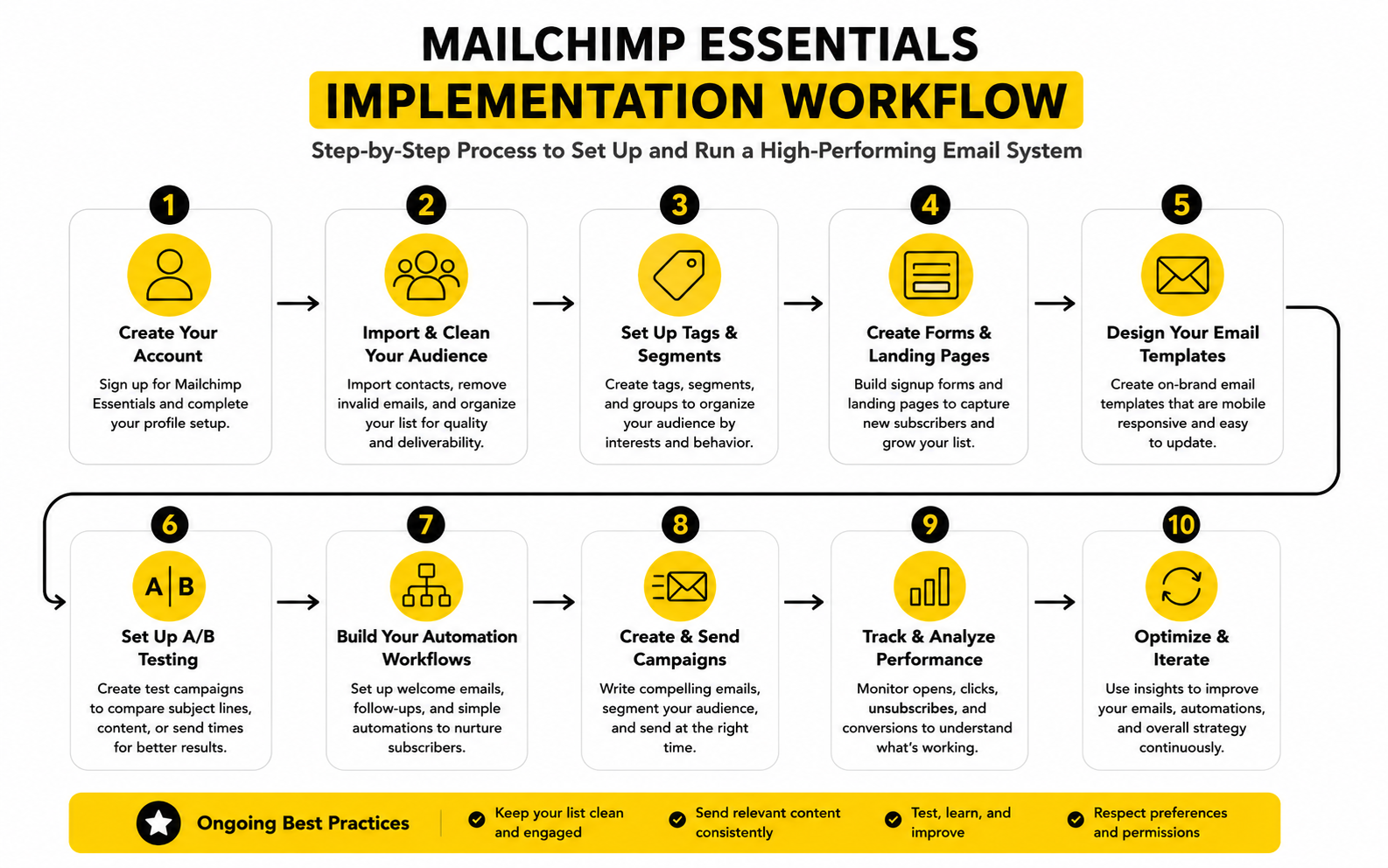
Step 1: Clean Your Audience Before You Upgrade
Before you rely on Mailchimp Essentials, clean the audience you already have. Remove obvious duplicates, outdated imports, role-based addresses that do not belong on your list, and contacts with no clear opt-in source. This is not busywork; it protects deliverability, reporting quality, and your monthly cost.
Mailchimp’s pricing model makes list hygiene especially important because different contact types can affect billing depending on how they are stored and counted. That means an inflated audience can make the plan look more expensive than it should be. A smaller, cleaner list is usually more valuable than a bloated list full of people who will never engage.
This is also the moment to check consent. You should know why each person is on the list and what they expected when they joined. If you cannot answer that clearly, do not build your email strategy on that segment.
Step 2: Set Up Your Sending Domain And Authentication
Your sending domain should be set up before you treat Mailchimp Essentials as a serious marketing channel. Authentication helps mailbox providers recognize that your emails are legitimately coming from your business. This is one of those technical steps that feels boring until deliverability becomes a problem.
The key pieces are SPF, DKIM, and DMARC. Google’s sender guidelines require bulk senders to authenticate mail and keep spam complaint rates low, with DMARC alignment required for messages to pass authentication. That does not mean every small sender needs an enterprise security setup, but it does mean authentication is no longer optional if email is part of your growth engine.
Do this before launch campaigns, seasonal promotions, or high-volume sends. If you wait until a campaign underperforms, you will not know whether the issue was the offer, the list, the copy, or the inbox placement. Good implementation removes those avoidable doubts early.
Step 3: Build One Primary Audience Structure
Mailchimp gives you audiences, tags, groups, and segments, but that does not mean you should create a complicated setup immediately. For most small businesses using Mailchimp Essentials, one primary audience with clear tags is easier to manage than multiple audiences with overlapping contacts. Multiple audiences can create confusion if the same person exists in more than one place.
Start by tagging contacts based on how they entered your world. Use simple labels for sources like website form, lead magnet, purchase, event, consultation request, referral, or manual import. These tags help you understand context without turning the account into a maze.
Then add tags that reflect intent or relationship. A prospect, customer, inactive subscriber, webinar attendee, or newsletter reader should not always receive the same message. The point is not to segment for the sake of segmentation; the point is to make future campaigns more relevant without creating admin chaos.
Step 4: Create A Reusable Campaign Template
Once the audience structure is in place, create a reusable campaign template. This should not be a design trophy. It should be a practical layout your team can use quickly without rebuilding every email from scratch.
A strong template usually has a clear header, one main message, readable body copy, one primary call to action, and a simple footer. You can still make it branded, but do not let branding overpower clarity. The reader should understand the email within a few seconds.
Mailchimp Essentials includes access to all email templates, which is useful, but the smartest move is to simplify. Pick one or two layouts for repeatable campaigns and improve them over time. Too many template options often slows teams down instead of helping them send better email.
Step 5: Write Your First Three Campaign Types
Before you build advanced ideas, define three campaign types you will actually send. A trust-building email can educate, share useful context, or answer a common objection. A conversion email can promote a product, consultation, event, offer, or next step.
A relationship email can keep the audience warm without asking for a sale every time. This matters because an email list should not become a constant stream of “buy now” messages. People stay subscribed when the value is clear even between promotions.
For each campaign type, define the goal, audience, message angle, call to action, and success metric. This gives you a repeatable workflow instead of starting from zero every time. It also makes Mailchimp Essentials easier to use because the tool becomes part of a process, not the place where strategy is invented at the last minute.
Step 6: Build A Simple Welcome Automation
A welcome automation is usually the first automation worth building in Mailchimp Essentials. It catches people at the moment they are most aware of your brand. That timing matters because a new subscriber is warmer on day one than they may be three weeks later.
Keep the sequence focused. The first email should confirm what they signed up for, set expectations, and deliver any promised resource. The next email can introduce your best content, your offer, or the problem your business helps solve.
Do not overload the welcome flow with every possible message. Mailchimp Essentials is better suited to short, clear automation than complicated branching journeys. If the subscriber needs a more advanced path based on behavior, purchase history, or sales stage, that is a sign you may eventually need a more advanced automation setup.
Step 7: Add Basic Forms And Landing Pages
Forms and landing pages should match the promise that brings someone onto your list. If the form says “weekly tips,” the emails should feel like weekly tips. If the form promotes a checklist, guide, discount, or event, the follow-up should connect directly to that reason.
Keep form fields minimal at the beginning. Every extra field can add friction, and most small teams do not need deep profile data on the first interaction. Name and email are often enough unless the business truly needs additional context to follow up properly.
This is also where your wider stack matters. If the landing page experience is the weak point, a page builder like ClickFunnels or Systeme.io may fit better for funnel-focused campaigns. Mailchimp Essentials can handle email execution, but the signup experience still needs to convert.
Step 8: Connect The Metrics To Business Outcomes
The last implementation step is deciding how you will judge performance. Opens can help you understand subject line and audience interest, but they should not be the only metric you care about. Clicks, replies, purchases, booked calls, form submissions, and unsubscribe patterns give you a more complete picture.
Set a simple review process for every campaign. Look at what was sent, who received it, what action was requested, and what happened after the click. This creates a practical feedback loop your team can use to improve the next send.
Mailchimp Essentials is not valuable because it gives you more buttons. It is valuable when those buttons support a real operating rhythm. Clean audience, authenticated sending, reusable templates, simple automation, and useful reporting are the difference between “we send emails sometimes” and “email is a channel we can actually manage.”
Statistics And Data That Actually Matter
The point of analytics is not to collect numbers. The point is to make better decisions. Mailchimp Essentials gives you enough reporting to understand whether your email system is improving, but only if you know what each number can and cannot tell you.
A campaign with a strong open rate and weak clicks is not a win. A campaign with fewer opens but more booked calls, purchases, or replies may be doing exactly what it should do. This is why performance should always be read in context: audience, offer, timing, message, and business goal.
Email benchmarks can help you spot whether something is unusually high or low, but they should not become your strategy. A benchmark is a reference point, not a commandment. Your own list, offer, relationship with subscribers, and sending history will matter more than any industry average.
The Measurement System To Use Inside Mailchimp Essentials
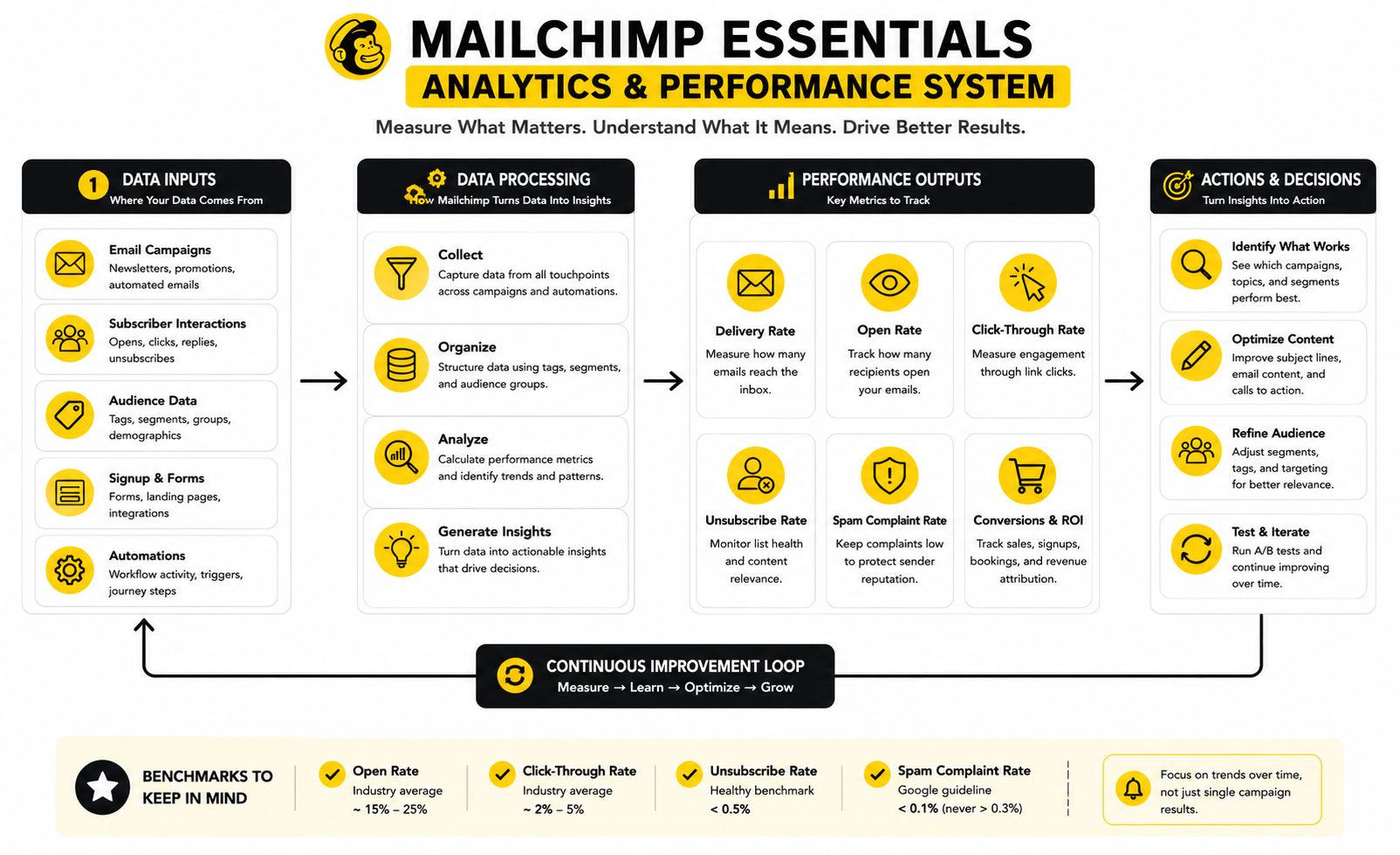
A simple measurement system works better than a dashboard full of numbers nobody acts on. For Mailchimp Essentials, track performance in four layers: delivery, attention, action, and outcome. Each layer answers a different question, and together they show where the real bottleneck is.
Delivery tells you whether the email is reaching people in the first place. Attention tells you whether the subject line, sender name, and audience relationship are strong enough to get the email opened. Action tells you whether the message and call to action were compelling enough to earn a click, reply, purchase, or booking.
Outcome is the layer most teams skip. This is where you connect the campaign to revenue, leads, appointments, sales conversations, product trials, repeat purchases, or whatever business result the email was supposed to create. Without this layer, Mailchimp Essentials becomes a reporting tool for vanity metrics instead of a decision tool for growth.
Delivery Rate Shows Whether The System Is Healthy
Delivery rate is the foundation metric because an email that does not reach the recipient cannot perform. It is affected by list quality, sending domain setup, spam complaints, authentication, bounce rates, and engagement patterns. If delivery is weak, improving subject lines or templates will not fix the real problem.
Recent benchmark data from the DMA reported that email delivery rates reached 98% in 2024, which gives you a useful reference point. If your delivery rate is far below that, start with list hygiene, authentication, and bounce management before blaming the campaign idea. Strong delivery does not guarantee revenue, but poor delivery quietly limits everything else.
This is also why authentication and complaint rates matter. Google’s sender guidelines warn that bulk senders become ineligible for mitigation when user-reported spam rates stay above 0.3%. That is a small number, and it makes relevance non-negotiable because a tiny group of annoyed recipients can damage your ability to reach the rest of the list.
Open Rate Measures Attention, Not Success
Open rate tells you whether people noticed the email enough to open it. It can reflect sender trust, subject line strength, timing, audience relevance, and list quality. It does not prove that the email made money, created trust, or moved the reader closer to buying.
The DMA’s 2025 benchmark data reported an open rate of 35.9%, while Mailchimp’s own benchmark data has shown average opens around 34.23%. Those numbers are useful as a sanity check, but they are not universal targets. A highly engaged niche list can beat them easily, while a colder promotional list may sit below them and still produce revenue.
Treat opens as a diagnostic signal. If opens are low, look at the sender name, subject line, preview text, audience quality, and send timing. If opens are high but clicks are weak, the problem is probably not attention; it is the message, offer, or call to action.
Click Rate Shows Whether The Email Created Action
Click rate is usually more useful than open rate because it shows that the reader did something. A click means the email created enough interest for the subscriber to leave the inbox and move to the next step. That next step could be a product page, booking page, article, checkout, application, or lead form.
Recent DMA benchmark data reported a unique click rate of 2.3%, and Mailchimp’s benchmark data has shown an average click-through rate around 2.66%. These are not huge numbers, which is exactly why list quality and offer clarity matter so much. Small improvements in click rate can produce meaningful revenue changes when the audience and offer are strong.
When clicks are low, do not automatically redesign the email. First check whether the offer is clear, the call to action is specific, and the audience actually has a reason to care. A clean plain-text-style email with one strong offer can outperform a polished template with five competing links.
Unsubscribes And Complaints Tell You When Trust Is Slipping
Unsubscribes are not always bad. Sometimes they clean the list and improve future engagement. The problem is when unsubscribes rise because your emails are misaligned with what people expected when they signed up.
Complaints are more serious. A complaint is not just a person leaving; it is a signal to mailbox providers that your email may be unwanted. This is why you should watch complaint patterns closely after promotional campaigns, list imports, aggressive reactivation attempts, or sudden frequency increases.
If unsubscribes or complaints rise, review the promise that brought people onto the list. Did the form promise education, but the emails became constant promotions? Did the audience expect occasional updates, but now receives several campaigns per week? The fix is usually expectation alignment, better segmentation, and a calmer sending rhythm.
Revenue And ROI Decide Whether Email Is Working
The final measurement layer is revenue or business impact. This is where Mailchimp Essentials users need to be honest. A campaign can look good inside the email dashboard and still fail commercially if it does not produce the intended outcome.
Recent reporting on Sinch Mailgun’s 2026 Email Impact Report highlighted that fewer than half of organizations can reliably track email ROI, while 60% of companies that do measure it report returns above $10 for every $1 spent. Litmus has also reported that 35% of companies see email ROI of 36:1 or more. The lesson is not that every business will hit those numbers; the lesson is that measurement discipline separates teams that guess from teams that improve.
For Mailchimp Essentials, keep ROI tracking simple. Use tagged campaign links, connect ecommerce or website analytics where possible, and record the business result of each major campaign. If a campaign drives five booked calls, three purchases, or ten qualified replies, that matters more than whether the open rate looked impressive.
How To Interpret Performance Without Overreacting
One campaign rarely proves anything by itself. A single weak send could be caused by timing, subject line, audience fatigue, offer mismatch, seasonality, or a landing page problem. A single strong send can also be misleading if it happened because of a one-time promotion or unusually warm audience segment.
Look for patterns across several campaigns. If opens are consistently falling, your audience relationship may be weakening. If clicks are stable but conversions are low, the landing page, offer, pricing, or sales process may need attention.
This is where Mailchimp Essentials becomes more strategic than it first appears. The tool gives you campaign-level feedback, but you have to connect that feedback to the wider customer journey. Email performance does not stop at the click.
The Weekly Scorecard For Mailchimp Essentials
A weekly scorecard keeps the analytics simple enough to use. You do not need a complicated spreadsheet with every possible metric. You need a short review that helps you decide what to change next.
Track these signals each week:
The final bullet is the most important. Reporting only matters when it changes behavior. If the data does not lead to a sharper subject line, cleaner segment, stronger offer, better landing page, or more carefully follow-up, it is just decoration.
Mailchimp Essentials Use Cases, Limits, And Alternatives
Mailchimp Essentials is a strong fit when your email strategy is important but still relatively focused. It can support regular newsletters, basic promotions, simple lead nurture, event updates, customer announcements, and lightweight onboarding. That makes it useful for businesses that need reliable email execution without buying a more complex platform too early.
The tradeoff is that Mailchimp Essentials is not the plan you choose when email becomes deeply tied to every part of your customer journey. If your follow-up depends on lead scoring, sales stages, appointment activity, complex branching, SMS, calls, or advanced behavioral automation, you will feel the ceiling sooner. That does not make Essentials bad; it just means the plan has a specific job.
The smartest way to evaluate it is simple: choose Mailchimp Essentials when your main need is better email marketing execution. Look elsewhere when your main need is a full revenue operating system. That distinction will save you money, frustration, and a lot of unnecessary platform switching.
When Mailchimp Essentials Makes The Most Sense
Mailchimp Essentials makes sense for teams that send consistently but do not need deep automation yet. A local service business can use it for monthly updates, seasonal offers, review requests, and simple lead follow-up. A creator can use it for newsletters, product announcements, and audience relationship building.
It also fits small ecommerce brands that want campaign sending and basic automations without building an advanced lifecycle program. You can use it for product announcements, promotional emails, and simple post-signup flows. Once you need more advanced personalization around purchase behavior, customer value, replenishment timing, or predictive segments, you may need a higher Mailchimp plan or a more ecommerce-focused tool.
The plan is especially useful when the team values ease of use. Mailchimp has stayed popular partly because non-technical users can build and send campaigns without feeling like they are operating a giant enterprise system. That simplicity is valuable, but only when it matches the actual complexity of your marketing.
Where Mailchimp Essentials Starts To Feel Limited
The first limit is automation depth. Mailchimp Essentials can support simple journeys, but it is not built for advanced branching logic across the entire customer lifecycle. If your strategy depends on different paths for dozens of behaviors, buyer stages, or lead types, you will run into the edges quickly.
The second limit is scale. Mailchimp’s Essentials plan can store up to 50,000 contacts, with a monthly send limit equal to 10 times the contact limit, but the pricing increases as your contact count grows. That means list quality becomes more important as you scale because inactive contacts can quietly inflate cost without improving revenue.
The third limit is role in the stack. Mailchimp Essentials can send and measure email campaigns, but it is not a complete replacement for a CRM, landing page system, checkout tool, help desk, sales pipeline, or appointment engine. You can connect tools around it, but every added tool creates another place where data can break, duplicate, or drift out of sync.
The Hidden Cost Of A Messy Stack
The most expensive problem is not always the monthly subscription. It is the time lost when your tools do not work together cleanly. If leads enter through one form, get tagged in another system, receive emails from Mailchimp, book calls somewhere else, and get tracked in a separate CRM, your team needs a clear process to keep everything aligned.
This is manageable at small scale. It becomes painful when volume increases, campaigns multiply, or multiple people start touching the same customer journey. The risk is not just inconvenience; it is missed follow-up, duplicated messages, broken attribution, and confused reporting.
This is where platform strategy matters. If email is one channel inside a broader sales and appointment workflow, GoHighLevel may be a more natural fit because it brings CRM, pipeline, automation, funnels, and follow-up into one ecosystem. If your main need is a dedicated email platform with simpler automation and campaign sending, Mailchimp Essentials can still be the cleaner choice.
When To Upgrade Inside Mailchimp
Upgrading from Mailchimp Essentials usually makes sense when you need more carefully automation, more advanced segmentation, or stronger optimization features. Essentials can help you get organized, but it is not designed to be the final stop for teams building highly personalized journeys. When your email program starts depending on behavior-based paths and deeper customer insights, the Standard plan may become more logical.
Do not upgrade just because a higher plan exists. Upgrade when you can name the exact feature that will improve performance or reduce workload. Paying for advanced features before your list, offer, and campaign rhythm are healthy usually just creates a more expensive version of the same problem.
A good upgrade trigger is operational friction. If your team keeps building manual workarounds, exporting lists, duplicating segments, or avoiding campaigns because the current plan cannot support the workflow, the plan may be holding you back. If you are simply not sending enough good emails, the tool is probably not the bottleneck yet.
When To Consider A Different Email Platform
A different platform may make sense when your business model does not match Mailchimp’s strengths. If you want lower-cost email volume, alternatives like Brevo or Moosend may be worth comparing. If you want funnel-first selling with landing pages and checkout flows, ClickFunnels or Systeme.io may fit the commercial workflow better.
If you rely heavily on social messaging, comments, Instagram DMs, or Messenger-based lead capture, ManyChat may play a role alongside email. That does not replace a strong email list, but it can help capture and qualify people in channels where the conversation already starts. The key is to avoid creating a Frankenstein stack where every tool is useful alone but chaotic together.
Switching platforms should be a business decision, not an emotional reaction to one annoying feature. Before you move, document your must-have workflows, current list size, sending frequency, automation needs, integrations, and reporting requirements. Then compare tools against the system you actually need, not the longest feature list.
The Scaling Problem Most Teams Miss
As your list grows, the biggest risk is not just cost. It is relevance. A small list can tolerate broad messaging because the audience is often closer to the founder, brand, or original offer. A larger list usually contains more intent levels, more customer types, more buying stages, and more reasons people joined.
That means your email strategy has to mature as the list grows. You may need better segmentation, clearer suppression rules, more specific campaign types, and stronger reactivation logic. Otherwise, growth creates dilution: more contacts, weaker average engagement, and noisier reporting.
Mailchimp Essentials can support the early version of this system, but it should not become an excuse to send the same message to everyone forever. The better your segmentation discipline, the longer Essentials can remain useful. The worse your segmentation discipline, the sooner even a better platform will feel disappointing.
Deliverability Risk Increases With Careless Growth
Deliverability risk usually grows when teams chase list size instead of list quality. Imported contacts, cold subscribers, old lists, unclear consent, and sudden frequency jumps can all create trouble. The problem is that damage can build quietly before it becomes obvious in campaign reports.
Mailbox providers are increasingly strict about sender behavior. Google’s sender guidance tells bulk senders to keep spam complaint rates below 0.3%, and its FAQ says senders should aim below 0.1% and avoid ever reaching 0.3% or higher. That makes aggressive, poorly segmented sending a real risk, not just a theoretical best practice issue.
The practical answer is simple: earn the send. Use clear opt-ins, send what people expected, suppress disengaged contacts when needed, and avoid blasting every campaign to everyone. Mailchimp Essentials gives you the tools to be responsible, but it will not save a careless strategy.
The Expert Rule: Keep The System As Simple As Possible
The expert move is not to make your Mailchimp Essentials account look advanced. The expert move is to make it easy to run, easy to measure, and hard to break. Most teams do not need more complexity; they need cleaner execution.
Use simple tags, clear campaign types, short automations, and a reporting rhythm that forces decisions. Keep your templates lean, your calls to action focused, and your audience promises honest. This sounds basic, but it is where most email programs either become profitable or become noise.
Mailchimp Essentials can be a smart paid plan when you treat it as a disciplined email system. It becomes frustrating when you expect it to solve strategy, data hygiene, offer clarity, attribution, and sales follow-up by itself. The tool can support the system, but it cannot replace the thinking behind it.
Mailchimp Essentials FAQ And Final Recommendation
Mailchimp Essentials is best understood as a practical email marketing plan for businesses that are ready to move beyond the free tier but are not ready for a heavy automation stack. It gives you the core tools to send more professionally, test campaigns, schedule ahead, support basic customer journeys, and measure what is happening. Used well, it can become a clean foundation for email growth.
The final decision comes down to fit. If your email system needs structure, templates, simple automations, A/B testing, and support, Mailchimp Essentials is a sensible step up. If your business needs deeper CRM workflows, advanced branching, multi-channel follow-up, or sales pipeline automation, you should compare broader systems before committing too deeply.
The right move is not choosing the most powerful tool. The right move is choosing the tool your team can execute consistently. Mailchimp Essentials works when it supports a simple, disciplined system: clean list, clear message, focused campaign, useful automation, honest measurement, and steady improvement.
What is Mailchimp Essentials?
Mailchimp Essentials is Mailchimp’s entry-level paid marketing plan. It is designed for users who have outgrown the free plan and need more practical email marketing features like scheduled emails, A/B testing, more templates, basic automation, and ongoing support. It is usually the first paid step for small businesses that want email to become a real channel instead of an occasional experiment.
The plan is not meant to be the most advanced version of Mailchimp. It sits between basic free email sending and more advanced plans that offer deeper automation and optimization tools. That makes it useful for teams that need professional execution without unnecessary complexity.
Is Mailchimp Essentials worth it?
Mailchimp Essentials is worth it if you will actually use the features that separate it from the free plan. Scheduled campaigns, A/B testing, support, and basic automation can make a real difference when email is part of your weekly marketing rhythm. If you only send one simple email every few months, the upgrade may not create enough value yet.
The value depends on list quality and execution. A clean list with clear campaign goals can make Essentials feel very practical. A messy list with no strategy will make any plan feel overpriced.
Who should use Mailchimp Essentials?
Mailchimp Essentials is a good fit for small businesses, creators, consultants, nonprofits, local service providers, and early ecommerce brands that need reliable email campaigns. It works best when the marketing system is still simple but no longer casual. You should have enough audience activity to justify better planning, testing, and support.
It is less ideal for teams that already need advanced customer journeys. If your follow-up depends on sales stages, appointments, SMS, lead scoring, or detailed CRM behavior, Essentials may feel too narrow. In that case, a broader platform like GoHighLevel may make more sense.
What are the main features of Mailchimp Essentials?
The main features include campaign sending, access to Mailchimp’s email templates, scheduled emails, A/B testing, basic automation, audience tools, and email and chat support. The exact limits can vary by contact tier and current pricing structure, so it is always worth checking the plan details before upgrading. The important point is that Essentials gives you the core execution layer that the free plan lacks.
The most useful features are usually the least flashy ones. Scheduling helps you plan campaigns instead of rushing. Testing helps you improve based on behavior, not guesses. Support helps when campaign timing matters and you cannot afford to be stuck.
Does Mailchimp Essentials include automation?
Yes, Mailchimp Essentials includes basic automation, but it is not designed for complex lifecycle marketing. It works well for simple welcome flows, short nurture sequences, basic follow-ups, and predictable subscriber moments. That is enough for many small businesses.
The limitation is depth. If you need advanced branching, behavioral paths, customer scoring, purchase-based journeys, or multi-channel automation, you will probably need a higher Mailchimp plan or a different platform. Essentials is best for simple automation that stays easy to manage.
How many contacts can Mailchimp Essentials handle?
Mailchimp Essentials can support businesses beyond the free-plan stage, but the exact contact tier affects pricing and sending limits. Mailchimp’s paid plans are structured around contact counts, so your monthly cost can rise as your audience grows. This is why list hygiene matters so much.
Do not treat contact capacity as the main goal. A smaller engaged list is often more valuable than a large inactive one. Before upgrading or increasing your tier, clean old contacts, remove irrelevant records, and make sure your audience still matches your marketing goals.
Is Mailchimp Essentials good for ecommerce?
Mailchimp Essentials can work for simple ecommerce email marketing. It can support product announcements, promotional campaigns, basic welcome emails, and simple customer communication. For small stores that are still early in email marketing, that may be enough.
It becomes limiting when ecommerce strategy gets more advanced. If you need complex post-purchase flows, replenishment logic, customer lifetime value segmentation, win-back paths, or deep personalization, you may need stronger automation. Essentials can start the process, but it may not be the final ecommerce email system.
What should I set up first in Mailchimp Essentials?
Start with audience cleanup and authentication. A clean audience protects cost, reporting, and deliverability. Authentication helps mailbox providers understand that your email is legitimate.
After that, create your core tags, one reusable campaign template, and a simple welcome automation. Then define your first few campaign types so you are not inventing the strategy from scratch every time you send. This order gives you a system instead of a collection of disconnected emails.
What metrics should I track in Mailchimp Essentials?
Track delivery, opens, clicks, unsubscribes, complaints, and business outcomes. Delivery tells you whether the system is healthy. Opens show attention, clicks show action, and unsubscribes or complaints show whether expectations are slipping.
The most important layer is the business outcome. If the campaign was meant to generate sales, booked calls, replies, or signups, measure that result directly. Email metrics are useful, but they should support decision-making, not replace it.
What is the biggest mistake people make with Mailchimp Essentials?
The biggest mistake is upgrading the plan without improving the strategy. Better features do not fix weak offers, messy lists, unclear positioning, or inconsistent sending. They only make execution easier when the underlying system is already sensible.
Another common mistake is overcomplicating the account too early. Too many tags, too many templates, too many audiences, and too many campaign types can slow everything down. Start simple, then add complexity only when the business case is obvious.
When should I upgrade from Mailchimp Essentials?
Upgrade when you can clearly name the feature you need and explain how it will improve performance or save time. Advanced segmentation, more sophisticated automations, deeper optimization, or stronger customer journey tools can justify moving up. Upgrading just because the next plan exists is not a strategy.
A good sign is repeated operational friction. If you keep building manual workarounds, exporting data, or avoiding campaigns because Essentials cannot support the workflow, the plan may be holding you back. If you are not sending consistently yet, fix that before paying for more features.
What are the best alternatives to Mailchimp Essentials?
The best alternative depends on what problem you are solving. For broader CRM, funnels, pipeline management, and multi-channel follow-up, GoHighLevel is worth comparing. For email-focused alternatives, Brevo and Moosend may fit teams that care about pricing structure, email volume, or automation style.
For funnel-first businesses, ClickFunnels or Systeme.io may fit better around landing pages, offers, and checkout flows. The key is to choose based on workflow, not hype. A simpler tool used consistently beats a powerful tool nobody operates properly.
Is Mailchimp Essentials enough for a serious business?
Mailchimp Essentials can be enough for a serious business when the email program is focused and manageable. A business does not need advanced automation to be professional. It needs clear consent, good deliverability habits, useful campaigns, simple follow-up, and measurement tied to business outcomes.
It stops being enough when the customer journey becomes too complex for the plan. That usually happens when multiple segments, offers, sales processes, and behavior-based paths need to work together. At that point, the issue is no longer whether Mailchimp Essentials is “good”; it is whether it still matches the operating model.
Build a stronger local presence with BAAM AI
Turn your website, Google profile, social channels, and AI visibility into one growth engine
Most businesses do not need more random marketing activity. They need a consistent presence system that helps the right people find them, trust them, and take action. BAAM AI brings strategy, local SEO, website updates, Google Maps visibility, social content, AI-search readiness, media production, and reporting into one practical monthly engine.
If you want your marketing to keep working after the campaign ends, start with a free BAAM AI presence audit. See how your business shows up today and where the fastest visibility wins are at BAAM AI.