
BAAM AI Blog
Mailchimp Enterprise: The Practical Guide For Larger Teams That Need More Than Basic Email Marketing
Mailchimp Enterprise is usually what growing teams mean when they are no longer looking for a simple newsletter tool. They need advanced segmentation, cleaner customer data, stronger automation, deeper reporting...
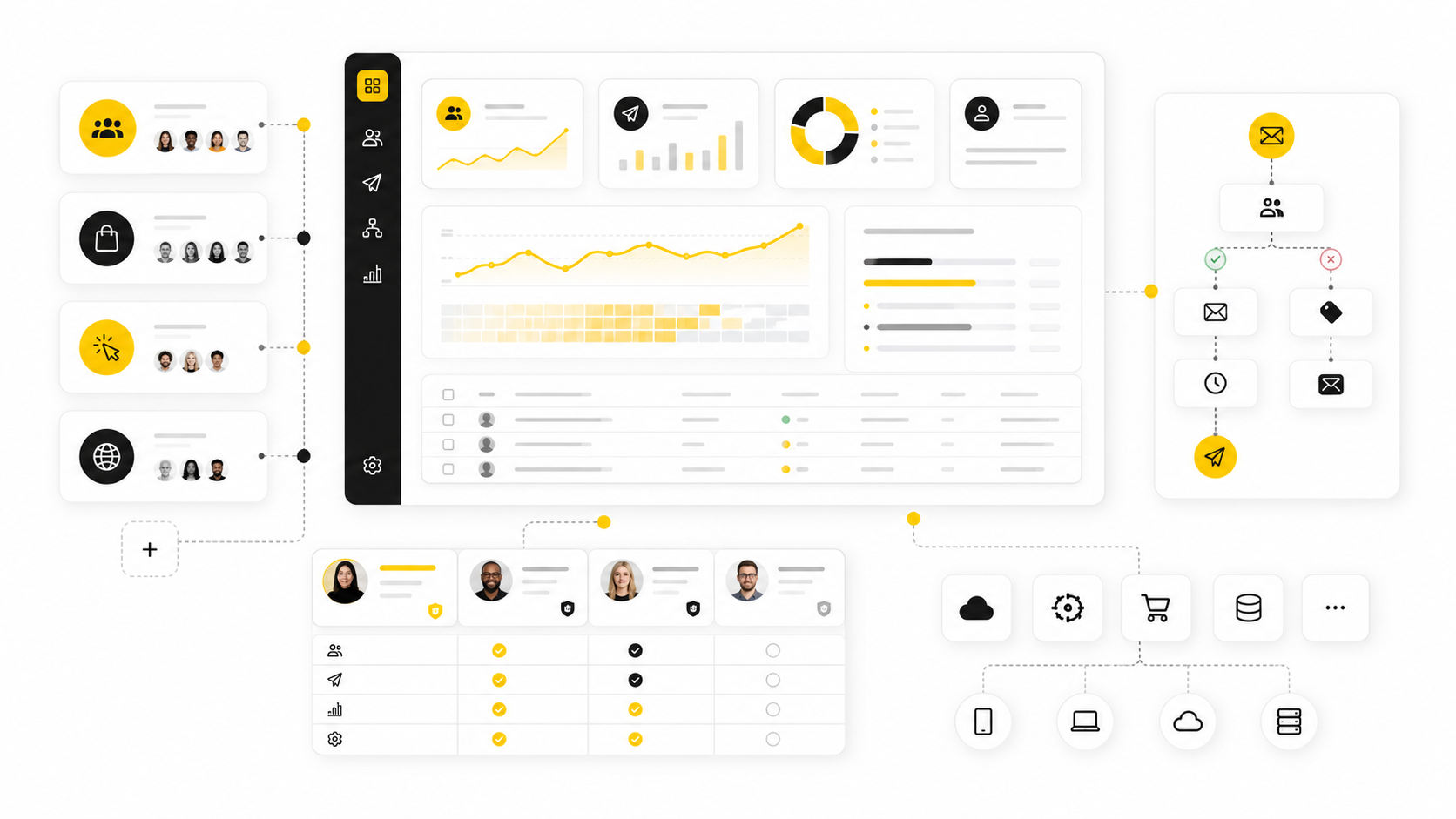
Mailchimp Enterprise is usually what growing teams mean when they are no longer looking for a simple newsletter tool. They need advanced segmentation, cleaner customer data, stronger automation, deeper reporting, more user permissions, better support, and a platform that can support real revenue workflows without turning every campaign into a technical project.
That distinction matters because Mailchimp does not position “Enterprise” as a simple one-size-fits-all plan in the same way some software companies do. In practice, most larger teams evaluate Mailchimp Enterprise through Mailchimp’s higher-tier capabilities, especially Premium features, large contact list support, advanced segmentation, enhanced automation flows, multivariate testing, priority support, and connected customer data. The real question is not whether Mailchimp can send emails at scale. It can. The better question is whether it fits the operating model, data structure, and growth stage of the business using it.
Email is still one of the few channels where a company owns the customer relationship directly. Paid ads get more expensive, social reach changes overnight, and search traffic can shift with every algorithm update. A strong email platform gives teams a controlled way to nurture leads, recover revenue, onboard customers, launch products, and turn customer behavior into measurable campaigns.
Mailchimp becomes interesting for enterprise-style teams because it sits between two worlds. It is easier to use than many heavyweight marketing clouds, but it has moved far beyond basic email blasts. Features like advanced segmentation, behavioral targeting, predictive segmentation, 300+ integrations, automation flows, multivariate testing, and support for large contact lists make it a serious option for companies that want more power without immediately buying into a complex enterprise suite.
Mailchimp Enterprise and Why It Matters
Mailchimp Enterprise matters because the email problem changes as a company grows. At the beginning, the job is simple: collect subscribers, send useful campaigns, and avoid looking unprofessional. Later, the job becomes more demanding: unify customer data, coordinate teams, protect deliverability, segment by behavior, prove revenue impact, and make campaigns repeatable across departments.
This is where many teams outgrow the “just send a newsletter” mindset. A larger ecommerce brand may need abandoned cart flows, post-purchase sequences, win-back campaigns, VIP segments, product recommendations, and transactional messaging that all work together. A B2B company may need lead nurturing, lifecycle automation, sales handoff logic, event follow-up, and reporting that leadership can actually trust.
The business case gets stronger when automation and segmentation are used properly. Mailchimp says automated emails built with its marketing automation flows have produced up to a 127% increase in click rates compared with bulk emails, while its segmentation materials point to 20% higher open rates from segmentation. Those numbers should not be treated as guaranteed outcomes, but they do show the basic direction: better targeting and better timing usually beat larger, less relevant sends.
The Framework Behind a Serious Mailchimp Setup
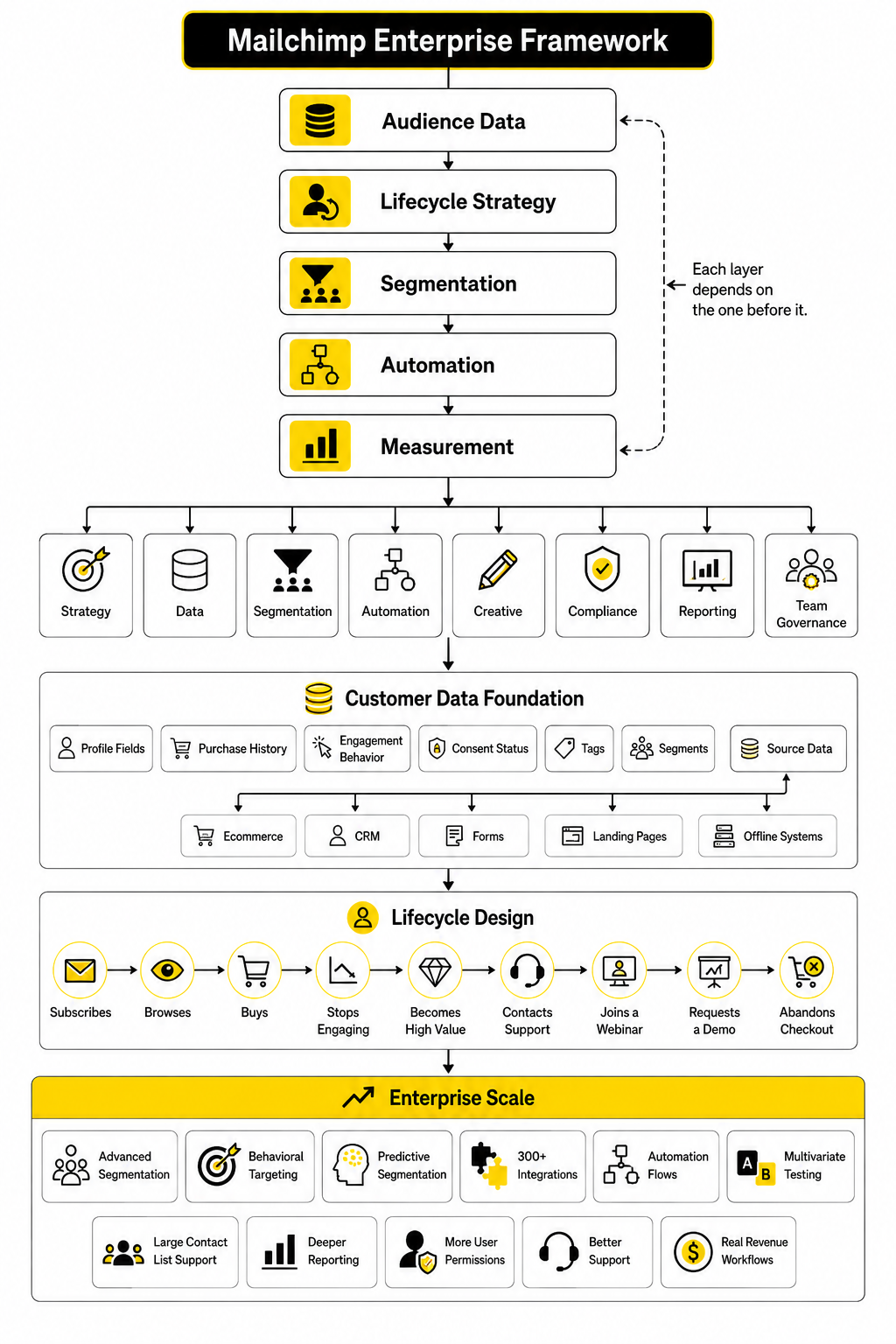
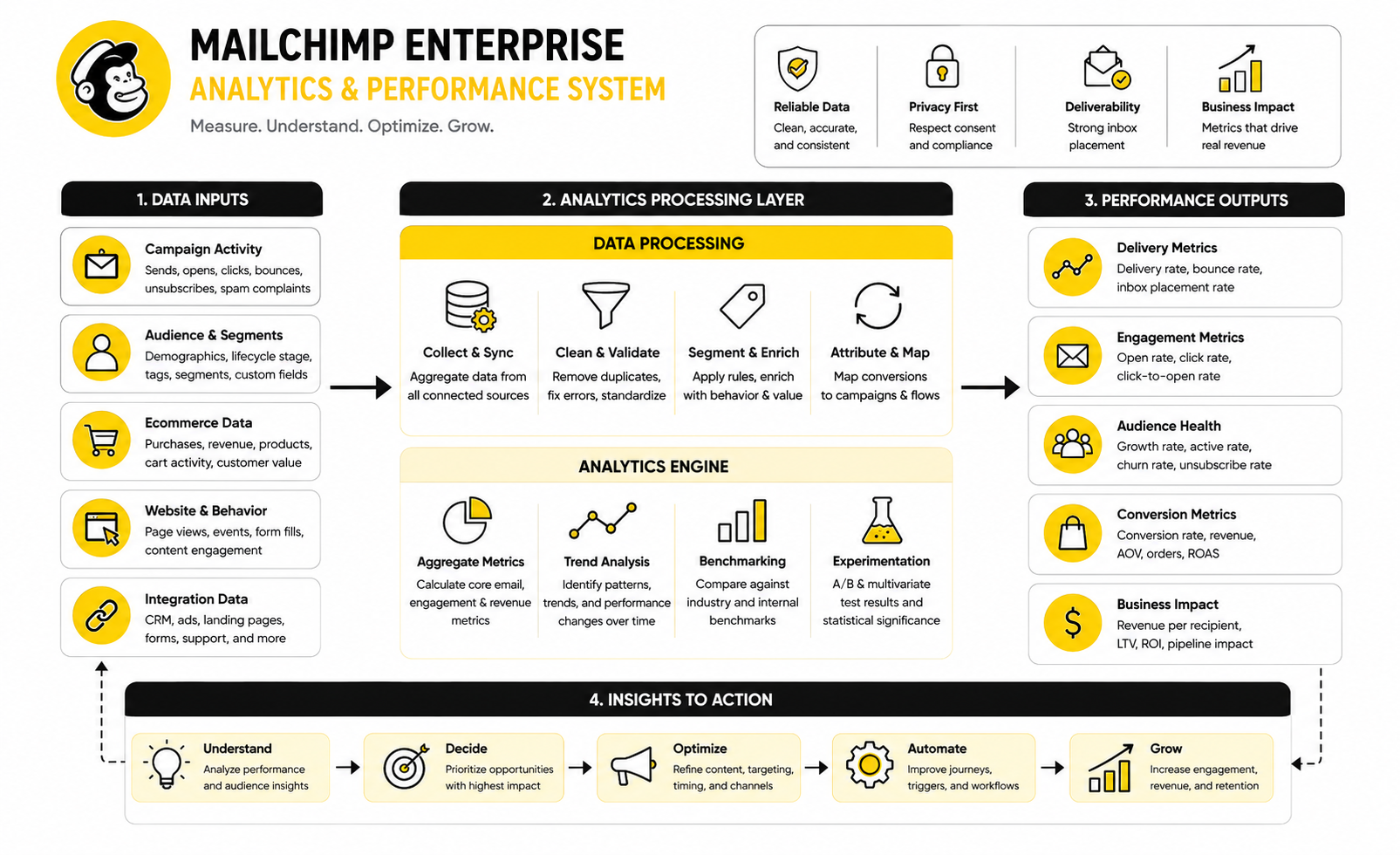
A serious Mailchimp Enterprise setup is not just a bigger account with more contacts. It is a system made of strategy, data, segmentation, automation, creative, compliance, reporting, and team governance. When one of those pieces is weak, the platform can look worse than it really is because campaigns are being built on messy foundations.
The framework starts with customer data because every advanced email program depends on what the platform knows about each contact. That includes profile fields, purchase history, engagement behavior, consent status, tags, segments, and source data from ecommerce, CRM, forms, landing pages, or offline systems. Without clean data, even the best automation builder becomes a guessing machine.
The next layer is lifecycle design. This means deciding what should happen when someone subscribes, browses, buys, stops engaging, becomes high value, contacts support, joins a webinar, requests a demo, or abandons checkout. Mailchimp can support many of these flows, but the business still has to define the logic, message, offer, timing, and success metric behind each one.
What The Rest Of This Guide Will Help You Decide
The rest of this guide will help you decide whether Mailchimp Enterprise is the right fit, how to structure it properly, and where it may fall short. That matters because Mailchimp can be excellent for teams that value usability, campaign speed, ecommerce-friendly automation, and a familiar interface. It can also become limiting for teams that need extremely deep CRM logic, custom attribution models, advanced account-based marketing, or highly complex multi-brand governance.
The goal is not to pretend Mailchimp is perfect. The goal is to show where it works, where it needs help, and how to evaluate it like a professional buyer instead of guessing from a pricing page. That means looking at the operating system behind the tool: who owns the data, who builds campaigns, who approves messages, who monitors deliverability, and who connects email performance to revenue.
By the end of the six-part guide, you should have a clear view of the Mailchimp Enterprise decision. You will know what to inspect before upgrading, what to fix before migration, what to automate first, what reporting to demand, and what alternatives to compare if Mailchimp is not the right long-term platform.
The Mailchimp Enterprise Framework
A strong Mailchimp Enterprise setup starts with one uncomfortable truth: the software will not fix a messy marketing system by itself. It can organize campaigns, trigger automations, segment audiences, and report performance, but only if the business gives it clean inputs and clear decisions. That is why the framework matters more than the feature list.
For larger teams, the framework has five working layers: audience data, lifecycle strategy, segmentation, automation, and measurement. Each layer depends on the one before it. If audience data is unreliable, segmentation becomes weak. If segmentation is weak, automation becomes generic. If automation is generic, reporting usually tells you activity happened, not that growth improved.
Mailchimp can support this kind of structure because its higher-tier plans include advanced segmentation, multivariate testing, comparative reporting, role-based access, and priority support through Premium. Mailchimp also states that Premium supports up to 200,000 contacts before custom plan discussions are needed, which is where the enterprise conversation becomes more serious. At that level, the question is no longer “Can we send campaigns?” It becomes “Can we run a controlled customer communication system without breaking our data, brand, or deliverability?”
Start With Audience Architecture
Audience architecture is the foundation of Mailchimp Enterprise because everything else sits on top of it. This is where you decide how contacts enter the system, what fields matter, how consent is stored, which tags are allowed, and how different customer groups should be separated. If this part is rushed, the account becomes noisy fast.
The biggest mistake is treating every tag, field, and list as harmless. At small scale, that might be manageable. At enterprise scale, random naming conventions and duplicate data create real problems because teams stop trusting the platform. Once people do not trust the data, they create workarounds, export spreadsheets, and rebuild the same segments over and over again.
A better setup starts with a clear data map. Define the core fields that actually drive campaigns, such as lifecycle stage, customer type, purchase status, lead source, product interest, geography, engagement level, and consent status. Then decide which data should come from integrations, which should come from forms, and which should be updated by automation.
Lists, Tags, Groups, and Segments Need Clear Jobs
Mailchimp gives teams several ways to organize contacts, but that flexibility can create confusion. Lists, tags, groups, and segments should not all be used for the same purpose. Each one needs a clear job, or the account will become harder to manage every month.
In most serious setups, the audience should stay as consolidated as possible unless there is a strong reason to separate contacts. Tags are better for internal labels, campaign source tracking, temporary states, or operational workflows. Groups are useful when subscribers should choose preferences themselves, while segments are best for dynamic targeting based on behavior, attributes, and engagement.
This matters because Mailchimp’s advanced segmentation is one of the main reasons larger teams consider the platform. Premium allows targeting with unlimited conditions through advanced segments, which is powerful when the data is clean. It is much less useful when teams are trying to segment around years of inconsistent tagging.
Build Around Lifecycle Stages
A Mailchimp Enterprise account should be built around the customer lifecycle, not around random campaign ideas. Campaign ideas change every week. Lifecycle stages stay relatively stable and give the team a better way to organize communication.
A practical lifecycle might include subscriber, new lead, qualified lead, first-time buyer, repeat buyer, high-value customer, inactive customer, churn risk, and reactivated customer. The exact stages depend on the business model, but the principle is the same. Every major contact should have a clear current state, and that state should influence what they receive next.
This is where Mailchimp becomes more than an email editor. Its automation features can respond to signup behavior, purchase activity, engagement, abandoned carts, date-based triggers, and other customer actions. Mailchimp’s own automation materials say automated flows can create up to a 127% increase in click rates compared with bulk emails, which reinforces a simple point: timing and relevance matter.
Do Not Automate Before You Understand The Journey
Automation should not be the first move. It should come after the team understands what customers are trying to do and where they usually get stuck. Otherwise, the business just creates more automated noise.
For example, a welcome sequence should not exist because every email platform can build one. It should exist because new subscribers need context, trust, education, and a next step. A win-back flow should not exist because inactivity looks bad in a dashboard. It should exist because the business has a thoughtful reason to re-engage people before suppressing them or changing how often they receive campaigns.
This is especially important for Mailchimp Enterprise users because bigger lists make mistakes bigger too. A poorly timed automation sent to 500 people is annoying. A poorly timed automation sent to 150,000 people can damage trust, inflate unsubscribes, and create support problems.
Use Segmentation As A Revenue Tool
Segmentation is not just a way to make campaigns look more sophisticated. It is how a business stops treating every customer the same. That becomes critical when the audience includes different buyer types, purchase histories, engagement levels, industries, regions, or sales stages.
Mailchimp’s segmentation resources highlight that segmented campaigns can produce higher engagement than non-segmented sends, and its platform supports targeting based on campaign engagement, purchase behavior, website activity, and other audience data. The practical takeaway is simple: the more relevant the message, the less pressure you need to put on volume. You do not always need to send more. Often, you need to send more carefully.
A strong segmentation model usually starts broad and becomes more precise over time. Start with segments that clearly affect the message, such as buyers versus non-buyers, active versus inactive subscribers, high-intent leads versus casual subscribers, and new customers versus repeat customers. Then refine from there based on performance.
Segment By Behavior, Not Just Identity
Demographic data can be useful, but behavior usually tells a better story. Someone who clicked three product emails, viewed a pricing page, or abandoned checkout is sending a clearer signal than someone who simply belongs to a broad category. Enterprise teams should build segments around those signals whenever the data is available.
This is where Mailchimp’s ecommerce and website behavior data can become valuable. Teams can create more relevant campaigns when they know what someone browsed, bought, ignored, clicked, or returned to. The message becomes less about guessing and more about responding.
That does not mean every campaign needs hyper-personalization. Over-segmentation can slow teams down and create tiny audiences that are hard to learn from. The goal is useful segmentation, not complicated segmentation.
Make Measurement Part Of The Framework
Measurement cannot be something the team checks after campaigns go out. It has to be built into the framework from the start. Otherwise, Mailchimp becomes a campaign archive instead of a decision-making system.
The basic metrics still matter: open rate, click rate, unsubscribe rate, bounce rate, conversion rate, revenue, and list growth. But enterprise teams need to be careful with open rates because privacy changes have made them less reliable as a pure engagement signal. Clicks, conversions, revenue, reply behavior, and downstream customer actions usually deserve more attention.
This is one reason reporting ownership matters. Someone needs to define what success means before the campaign is built. If the campaign goal is sales, then revenue and conversion quality matter more than opens. If the goal is education, then click depth and follow-up behavior may matter more. If the goal is retention, then repeat purchase, renewal, or reactivation should be part of the conversation.
Compare Campaigns Against Business Goals
Mailchimp’s higher-tier reporting can help teams compare campaigns, audiences, and performance patterns. That is useful, but only when the business knows what it is comparing. A product launch campaign should not be judged the same way as a reactivation campaign.
The cleanest reporting model connects each campaign to a specific business objective. That might be lead generation, first purchase, repeat purchase, upsell, event attendance, demo booking, customer education, or churn prevention. Once the goal is clear, the team can judge the campaign fairly.
This is also where many teams should consider whether Mailchimp is enough on its own or whether it needs support from other tools. A business using funnels, CRM workflows, or sales pipelines may need a stronger operational layer around email. For teams that want marketing automation tied more directly to pipeline, booking, and follow-up workflows, GoHighLevel can be worth comparing alongside Mailchimp rather than treating email as a standalone system.
Define Team Governance Early
Mailchimp Enterprise is not just about campaigns and contacts. It is also about people. Larger accounts usually involve marketers, designers, copywriters, analysts, ecommerce managers, agencies, freelancers, executives, and sometimes sales or customer success teams.
That is why governance matters early. The account needs clear rules for who can create campaigns, who can approve them, who can edit audiences, who can access reporting, and who can change integrations. Without that structure, the platform becomes vulnerable to accidental changes and inconsistent execution.
Mailchimp’s Premium plan includes role-based access, which helps teams control permissions more carefully. That does not replace internal process, but it supports it. The best setup combines platform permissions with a simple operating rhythm: campaign briefs, approval steps, naming conventions, testing checklists, and monthly performance reviews.
Approval Workflows Protect The Brand
Approval workflows are not bureaucracy when the list is large. They are protection. A single broken link, wrong segment, missing exclusion, or off-brand message can create expensive problems at enterprise scale.
The approval process should check the audience, offer, subject line, preview text, links, personalization, suppression rules, legal footer, tracking, and mobile rendering. It should also confirm whether the campaign conflicts with other scheduled sends. This is basic, but it is exactly the kind of basic that prevents embarrassing mistakes.
The goal is not to slow everyone down. The goal is to make good campaigns repeatable. When governance is clear, teams move faster because they are not reinventing the process every time.
Core Components of a Scalable Mailchimp Setup
Once the framework is clear, the next job is turning it into a working system. This is where Mailchimp Enterprise stops being a planning conversation and becomes an implementation project. The setup should be practical, documented, and easy for the team to operate without needing to decode the account every time they launch a campaign.
The core components are audience structure, data hygiene, integrations, templates, automations, deliverability, permissions, and reporting. None of these pieces should be treated as isolated tasks. They work together, and a weakness in one area usually creates friction somewhere else.
For example, automations depend on accurate triggers. Accurate triggers depend on clean data. Clean data depends on reliable integrations and disciplined contact management. That is why a scalable Mailchimp setup has to be built like an operating system, not like a collection of disconnected campaigns.
The Implementation Process
A proper implementation should move in a controlled sequence. Do not start by building campaigns. Start by making sure the account can support the campaigns you actually want to run.
The process below is simple, but it prevents most of the chaos that happens when teams jump straight into creative work. It gives marketing, operations, ecommerce, sales, and leadership a shared path. More importantly, it creates a setup that can be improved over time instead of rebuilt every quarter.
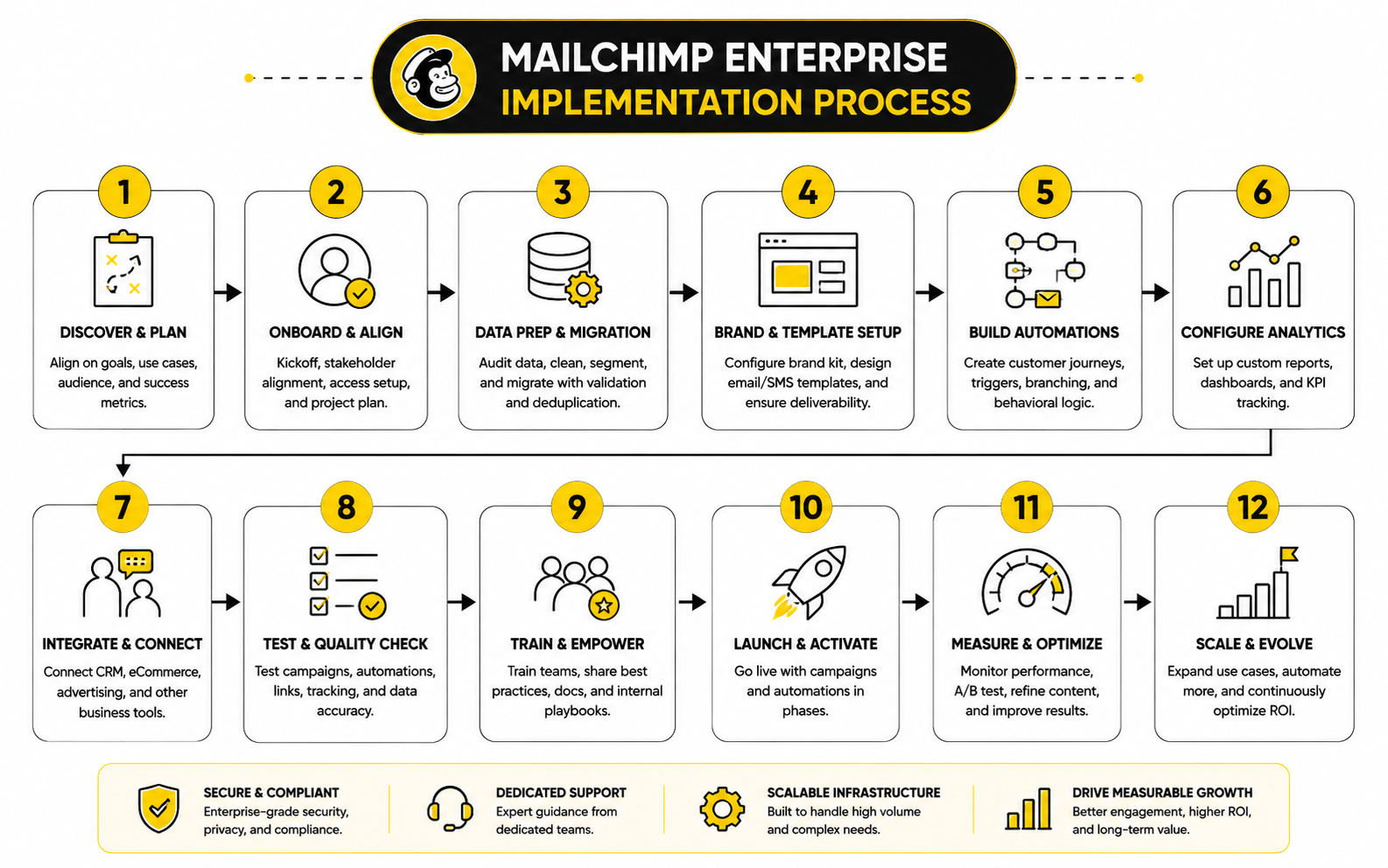
This order matters. A team that imports messy contacts before defining fields creates cleanup work. A team that builds automations before confirming integrations creates unreliable triggers. A team that launches campaigns before authentication and deliverability checks risks damaging inbox placement before the program has momentum.
Audit The Current Email Program First
The audit is where the team gets honest. Before upgrading, migrating, or rebuilding in Mailchimp Enterprise, you need to know what is working, what is broken, and what is being kept alive only because nobody has had time to question it. This includes campaigns, templates, automations, lists, tags, segments, forms, integrations, unsubscribe handling, and reporting.
A good audit looks at performance and structure. Performance shows which campaigns drive clicks, conversions, revenue, replies, or qualified actions. Structure shows whether the account is organized enough to keep improving without creating operational debt.
The audit should also identify risk. That includes inactive contacts, unclear consent, duplicate fields, outdated automations, broken links, missing exclusions, weak naming conventions, and disconnected tools. Mailchimp’s own audience guidance emphasizes that a healthy audience supports better return from marketing, and that principle becomes even more important as list size grows through audience maintenance best practices.
What To Review During The Audit
The audit should be specific enough to produce decisions, not just observations. A vague statement like “our tags are messy” does not help. A useful audit says which tags should be kept, merged, renamed, archived, or replaced by fields.
Review the contact sources first. Identify where subscribers come from, what consent language they saw, what fields were collected, and whether those fields still matter. Then review automations, because old automated emails often keep running long after the strategy has changed.
The final part is reporting. Look at which metrics leadership actually uses and which reports only exist because the platform provides them. If nobody acts on a metric, it should not dominate the dashboard.
Prepare The Contact Database
Contact preparation is one of the most important parts of a Mailchimp Enterprise implementation because the database controls everything downstream. Bad data makes good strategy look weak. Clean data makes campaigns easier to build, easier to measure, and easier to trust.
Start by removing obvious problems before importing or restructuring anything. That means handling duplicates, invalid addresses, unsubscribed contacts, stale records, role-based addresses where appropriate, and contacts with unclear permission. This step is not glamorous, but it protects deliverability and improves the quality of every segment that follows.
Next, standardize the fields that will power the program. Use simple field names that humans can understand, and avoid creating five versions of the same concept. If lifecycle stage, lead source, product interest, country, customer type, or purchase status matters to your strategy, define those fields clearly before campaigns depend on them.
Keep The Data Model Lean
A larger team does not need more fields by default. It needs better fields. Every field should have a reason to exist, an owner, a source, and a use case.
If a field does not change targeting, personalization, reporting, or compliance, it probably does not belong in the core data model. Extra fields create clutter and confusion. They also make onboarding harder when new team members need to understand how the account works.
This is especially important when Mailchimp is connected to ecommerce, CRM, forms, or landing page tools. If those systems send inconsistent values into Mailchimp, segmentation becomes unreliable. The solution is not to create more patches inside Mailchimp. The solution is to fix the data flow before it becomes campaign logic.
Connect The Right Integrations
Mailchimp Enterprise becomes more powerful when it is connected to the systems that already hold customer intent. That usually includes ecommerce platforms, CRM tools, form builders, landing pages, analytics tools, and sometimes booking or sales pipeline software. The goal is not to connect everything. The goal is to connect what improves targeting, automation, and measurement.
Mailchimp supports a broad integration ecosystem, and that is one of its strengths for teams that want email to connect with the rest of their stack. But integrations should be reviewed carefully before they are turned on. Each one should have a clear purpose, a data owner, and a fallback plan if syncing fails.
For ecommerce teams, store integrations are often the highest priority because purchase data can power product recommendations, post-purchase flows, abandoned cart emails, win-back campaigns, and customer value segments. Mailchimp’s product recommendation features are built around connected store data and can help teams surface personalized, best-selling, or new products through personalized product recommendations. That only works well when the product catalog, customer data, and purchase history are syncing properly.
Avoid Integration Sprawl
Integration sprawl happens when every department connects its favorite tool without considering the full system. At first, it feels productive. Later, nobody knows which tool owns the truth.
This creates real operational problems. A CRM may say someone is a qualified lead, while a form tool says they are a new subscriber, while ecommerce data says they are already a buyer. If Mailchimp receives conflicting data from multiple places, the customer experience becomes inconsistent.
The fix is to define source-of-truth rules. Decide which system owns each field, which system can update it, and what happens when data conflicts. This is not overthinking. It is basic infrastructure for a serious marketing program.
Build Core Templates Before Campaigns
Templates should be created before the team starts producing campaigns at scale. This protects brand consistency and saves time. It also reduces the chance that every campaign becomes a one-off design project.
A good template system should cover the most common campaign types. That might include newsletters, product launches, promotions, educational emails, event invites, lead nurture emails, customer onboarding, win-back messages, and internal announcement formats. Each template should have flexible sections, but the structure should still guide the team toward clean, readable emails.
The point is not to make every email look identical. The point is to create a reliable starting point. When the structure is already strong, the team can spend more energy on message, offer, audience, and timing.
Create Rules For Copy And Design
Enterprise email programs need creative rules, not just templates. Those rules should explain how subject lines are written, how preview text is used, how calls to action are formatted, how personalization is handled, and how legal or compliance language appears. This keeps the program consistent even when multiple people create campaigns.
Design rules should cover mobile readability, image weight, button placement, spacing, accessibility, and fallback text. A beautiful email that is hard to read on a phone is not a good email. A campaign that depends entirely on images can also create problems when images are blocked or slow to load.
Copy rules matter just as much. The best enterprise campaigns are usually clear, specific, and easy to act on. They do not sound like legal documents, and they do not sound like desperate promotions either.
Build Priority Automations
Automation is where Mailchimp Enterprise can start producing real leverage. But the priority should not be “build as many flows as possible.” The priority should be “build the flows that support the most important customer moments.”
Start with automations that are close to revenue or customer experience. These often include welcome sequences, abandoned cart flows, browse or product interest follow-ups, post-purchase education, review requests, replenishment reminders, reactivation campaigns, and lead nurture sequences. Mailchimp’s automation flow builder is designed to send targeted emails, apply tags, and move contacts through workflows based on conditions and actions through marketing automation flows.
Each automation should have one clear job. If a welcome sequence is trying to educate, sell, segment, survey, onboard, and reactivate all at once, it will probably become unfocused. Build smaller, cleaner automations that match the customer’s current moment.
Prioritize By Impact And Confidence
Not every automation deserves to be built first. Some sound impressive but have low immediate impact. Others are simple but extremely valuable.
A useful prioritization model scores each automation by impact, confidence, and effort. Impact asks how much the flow could improve revenue, retention, activation, or customer experience. Confidence asks whether the team has enough data and clarity to build it well. Effort asks how much time, integration work, creative work, and testing are required.
The best first automations usually have high impact, high confidence, and moderate effort. A clear welcome flow is often a better starting point than a complex predictive lifecycle system. Get the fundamentals working, then add sophistication.
Set Up Deliverability Before Scaling Volume
Deliverability should never be an afterthought. If emails do not reach the inbox, the strategy does not matter. For larger senders, authentication, list quality, engagement, and sending patterns are not technical details. They are business requirements.
Mailchimp’s deliverability resources note that SPF and DKIM authentication are required by Gmail and Yahoo for bulk senders, and DMARC has become part of the modern authentication conversation through email deliverability guidance. This matters because enterprise senders are exactly the kind of senders inbox providers watch closely. A sudden increase in volume from a poorly prepared domain can create filtering problems fast.
The implementation should include domain authentication, sender review, suppression logic, bounce monitoring, unsubscribe monitoring, and engagement-based sending rules. It should also include a plan for warming up volume when needed. Do not take a cold or inconsistent sender reputation and suddenly push aggressive campaigns to a large database.
Protect The List From Short-Term Thinking
A large list can tempt teams into lazy marketing. When revenue targets get uncomfortable, the easiest move is to send more. Sometimes that works in the short term, but it can damage engagement if the message is not relevant.
A more carefully approach is to protect engaged subscribers while creating different strategies for inactive contacts. Active buyers, recent clickers, and high-intent leads should not be treated the same as people who have ignored every email for a year. This is where segmentation, suppression, and reactivation logic work together.
The goal is not to be afraid of sending. The goal is to send with discipline. Enterprise email works best when the team sees the list as an asset, not a machine to squeeze whenever numbers are soft.
Create Permissions And Operating Standards
Implementation is not complete until the team knows how to use the system safely. Mailchimp Enterprise should have clear permissions, naming conventions, approval steps, and documentation. Without those standards, the account slowly becomes harder to manage.
Permissions should match responsibility. People who only need reporting should not have full audience editing rights. People creating campaigns may not need access to billing, compliance, or integration settings. Mailchimp’s Premium plan includes advanced access controls, which helps larger teams separate work without giving everyone the same level of control through Premium plan details.
Operating standards should be simple enough that people actually follow them. Use consistent names for campaigns, automations, audiences, segments, tags, and templates. Keep a shared implementation document that explains the data model, core segments, live automations, approval process, and reporting cadence.
Documentation Makes The Setup Scalable
Documentation is not busywork. It is what keeps the system from depending on one person’s memory. That matters when teams grow, agencies change, employees leave, or leadership asks why something was built a certain way.
The documentation should explain what exists, why it exists, and who owns it. It should also include a changelog for major account changes. When something breaks later, the team can trace what changed instead of guessing.
This is one of the simplest ways to make Mailchimp Enterprise feel more professional. A documented account is easier to audit, easier to train on, and easier to improve. It also makes future migrations less painful if the company eventually moves into a different marketing automation platform.
Statistics and Data
Data matters in Mailchimp Enterprise only when it changes what the team does next. A dashboard full of open rates, click rates, unsubscribes, revenue numbers, bounce rates, and audience growth charts can feel impressive, but it is not strategy. The real value comes from turning those numbers into decisions about targeting, creative, timing, deliverability, offer quality, and list health.
This is why enterprise measurement should be built around performance signals, not vanity metrics. Opens can help diagnose subject line and sender performance, but they should not be treated as the final truth. Clicks show stronger intent, conversions show business impact, revenue shows commercial value, and unsubscribe or complaint trends show whether the audience is pushing back.
Mailchimp Enterprise becomes more useful when each metric has an owner and a decision attached to it. If click rate drops, someone should know whether to review creative, offer relevance, segmentation, or deliverability. If revenue rises while engagement falls, someone should check whether the team is over-monetizing a smaller group of loyal buyers. If list growth looks strong but new contacts never convert, the acquisition source may be the problem.
Build The Analytics System Around Decisions
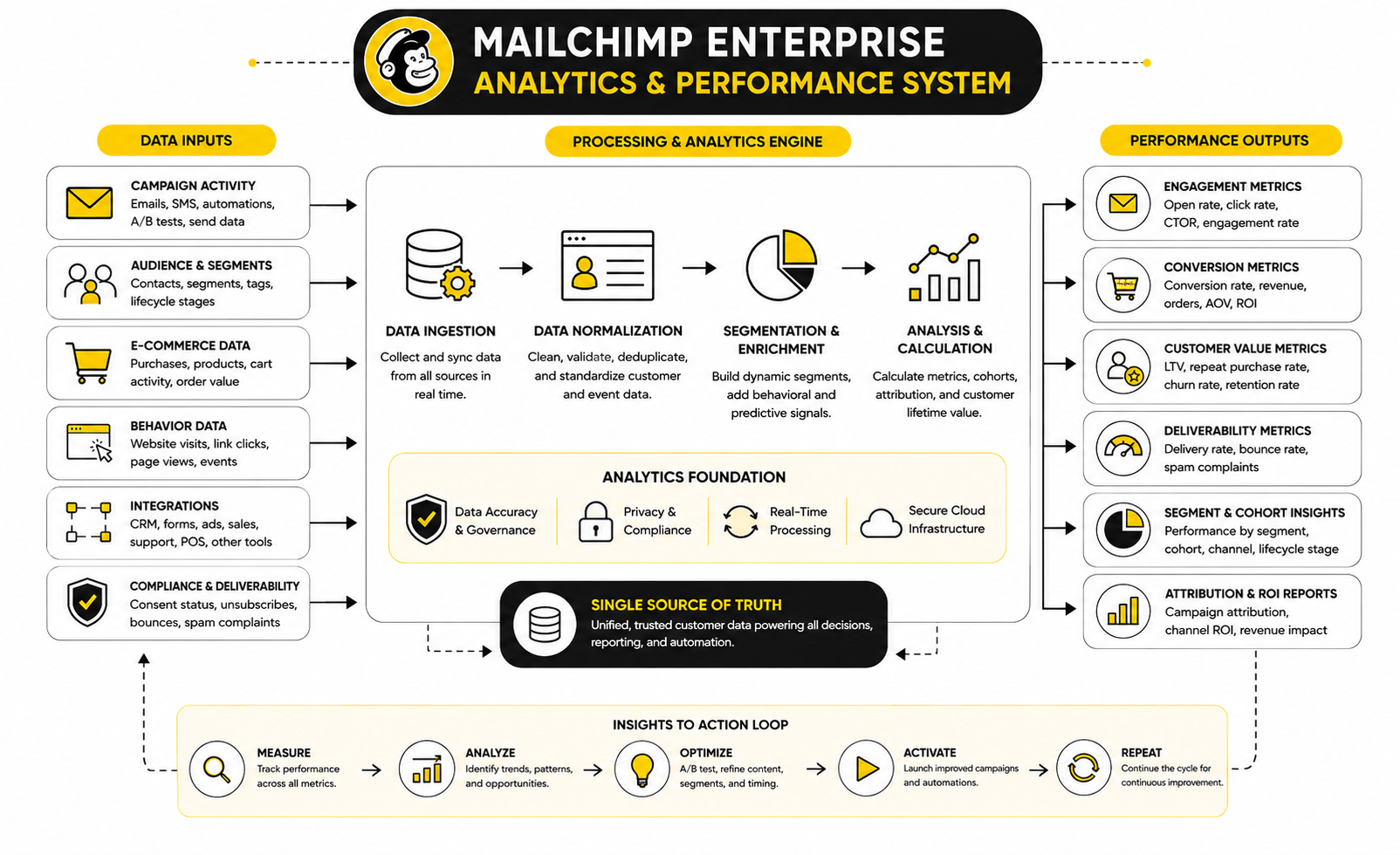
The cleanest analytics system has four layers: delivery, engagement, conversion, and business impact. Delivery tells you whether emails are reaching recipients. Engagement tells you whether recipients are reacting. Conversion tells you whether they are taking the intended action. Business impact tells you whether the program is contributing to revenue, retention, pipeline, or customer value.
This layered model prevents teams from overreacting to one metric. A campaign with a lower open rate but stronger revenue may still be a winner. A campaign with a high open rate and weak clicks may have a strong subject line but a weak message or offer. A campaign with high clicks and low conversions may have done its job, while the landing page, checkout flow, or sales process failed afterward.
Mailchimp reports can help teams understand campaign performance, audience behavior, and revenue sources through campaign and audience reporting. The important part is not just viewing the report. The important part is deciding what action the report should trigger.
The Metrics That Deserve The Most Attention
Every Mailchimp Enterprise dashboard should separate diagnostic metrics from outcome metrics. Diagnostic metrics help explain what happened. Outcome metrics help decide whether the campaign was worth running.
The core metrics usually include:
This does not mean every executive needs to see every number. Leadership usually needs the business layer: revenue, conversion, pipeline, customer value, retention, and trend direction. Operators need the diagnostic layer because they are responsible for fixing the campaign system.
Use Benchmarks Without Becoming A Slave To Them
Benchmarks are useful for context, not as absolute targets. They help a team understand whether performance is wildly out of range, but they do not replace internal trend analysis. Your own historical data is usually more useful than an industry average because it reflects your list quality, brand trust, offer strength, customer base, and sending habits.
Still, outside benchmarks can help frame the conversation. Mailchimp’s email benchmark data, last updated in December 2023, shows that its benchmarks are built from campaigns sent to at least 1,000 subscribers across a broad customer base, including small businesses and Fortune 500 companies through email marketing benchmarks. That makes the data useful for directional comparison, but it should not be treated as a guarantee for any specific account.
More recent industry data shows why the interpretation matters. The DMA’s 2025 Email Benchmarking Report reports that delivery rates rose to 98% in 2024, open rates reached 35.9%, and unique click rates reached 2.3%. Those numbers are useful because they create a sanity check, but they still need to be compared against your own business model, audience, and campaign type.
Benchmarks Should Trigger Questions
A benchmark should never end the conversation. It should start a better one. If your click rate is below the market average, the answer is not automatically “write better emails.” The problem might be weak segmentation, poor offer-message match, low trust, bad timing, poor mobile design, or a landing page that does not support the email promise.
The same logic applies when performance is above average. A strong campaign might be the result of a highly engaged segment, a timely offer, a seasonal buying window, or a smaller but more responsive audience. If the team does not understand why it worked, it cannot repeat the win with confidence.
This is where Mailchimp Enterprise teams should create internal benchmarks by campaign type. Compare newsletters to newsletters, promotions to promotions, abandoned cart flows to abandoned cart flows, and onboarding emails to onboarding emails. That is far more useful than judging every send against one blended number.
Read Opens Carefully
Open rates still have value, but they need to be handled carefully. Privacy changes, image loading behavior, bot activity, and inbox filtering can all distort open tracking. Mailchimp also notes that bot activity can falsely inflate open and click metrics in email campaign reports, which is why opens should not be the only measure of campaign success.
That does not mean open rates are useless. They can still help compare subject lines, sender names, send times, and broad engagement trends. But they should be paired with click behavior, conversions, unsubscribes, and revenue before the team makes major decisions.
The practical rule is simple: use opens as a directional signal, not a final verdict. If opens fall across every segment, investigate sender reputation, subject lines, audience fatigue, or inbox placement. If opens rise but clicks fall, the subject line may be doing more work than the email content can support.
Clicks Show Stronger Intent
Clicks usually deserve more attention because they require a clearer action from the recipient. A click means the email created enough interest for someone to move forward. That makes click behavior one of the best signals for content relevance and offer strength.
However, clicks still need context. A campaign with one clear call to action should be judged differently from a newsletter with ten links. A product launch email should be judged differently from a customer education email. A high click rate can also hide a weak conversion path if people click but do not complete the intended action.
For Mailchimp Enterprise users, click data becomes more valuable when it feeds segmentation. People who click pricing links, product categories, webinar invites, case studies, or upgrade offers are telling you what they care about. That behavior should shape future targeting instead of disappearing inside a campaign report.
Measure Revenue Without Oversimplifying Attribution
Revenue reporting is powerful, but it can also create false confidence if attribution is not understood. Mailchimp can show ecommerce revenue and campaign performance when the right integrations and tracking are in place, and its revenue attribution materials explain that Mailchimp reports can show net revenue excluding taxes and shipping through revenue attribution reporting. That is helpful, but attribution still needs common sense.
Email rarely works alone. A customer may first discover the brand through search, compare products through paid ads, join the list through a popup, receive three nurture emails, click a promotion, and buy after visiting the site directly. If the team gives all credit to the final email, it may undervalue the earlier steps that created trust.
The right move is to use attribution as a decision tool, not a perfect truth machine. Look for patterns across campaigns, segments, and lifecycle stages. If certain automations consistently assist revenue, keep improving them. If promotional campaigns generate revenue but increase unsubscribes, balance short-term return against long-term list health.
Revenue Per Recipient Is Often More Useful Than Total Revenue
Total revenue can be misleading because larger sends usually produce larger numbers. Revenue per recipient gives a cleaner view of audience quality and campaign efficiency. It helps answer whether the campaign worked because it was good or because it was sent to a huge group.
This metric is especially useful for comparing segments. A smaller VIP segment may produce less total revenue than the full list but far more revenue per recipient. That tells the team where relevance and buying intent are strongest.
Revenue per recipient also helps with frequency decisions. If repeated sends increase total revenue but reduce revenue per recipient, fatigue may be building. That does not mean stop sending. It means the team needs to adjust segmentation, message variety, timing, or suppression rules.
Watch Deliverability Like A Business Metric
Deliverability is not just an IT concern. It directly affects revenue, retention, and customer experience. A campaign that never reaches the inbox cannot persuade anyone, no matter how strong the offer is.
This became even more important after Gmail and Yahoo tightened bulk sender requirements. Google’s sender guidance says bulk senders should keep spam rates below 0.30% in Postmaster Tools, while its FAQ notes that senders above that level can become ineligible for mitigation until complaint rates remain below the threshold for seven consecutive days through bulk sender guidance. For enterprise senders, that is not a small technical note. It is a warning label.
Mailchimp Enterprise teams should monitor bounce rate, complaint rate, unsubscribes, domain authentication, engaged audience size, and sudden drops in clicks or conversions. A deliverability issue often shows up first as performance weakness. If the team only looks at revenue after the fact, it may miss the early signs.
Complaints Are More Serious Than Unsubscribes
Unsubscribes are not automatically bad. Sometimes they clean the list and reduce future friction. A clear unsubscribe is usually healthier than a frustrated recipient marking the email as spam.
Spam complaints are different. They tell inbox providers that recipients did not want the message, did not recognize the sender, or felt the email crossed a line. At enterprise volume, even a small complaint problem can become serious quickly.
The best prevention is relevance. Send to people who gave permission, segment by behavior, avoid misleading subject lines, make unsubscribing easy, and suppress chronically inactive contacts before they become a deliverability risk. This is not just compliance. It is smart list management.
Use Testing To Learn, Not To Guess Faster
Testing is one of the most underused parts of Mailchimp Enterprise. Many teams run A/B tests because the feature exists, but they do not build a learning system around it. That creates isolated wins that never become institutional knowledge.
Mailchimp supports A/B testing and multivariate testing, including testing subject lines, content, from names, send times, and multiple campaign variations through A/B and multivariate testing. Premium also supports multivariate testing for up to eight campaign variations through Premium plan details. That can be useful, but only when the test has a clear hypothesis.
A good test starts with a specific question. Will a benefit-led subject line outperform a curiosity-led subject line? Will a single product focus drive more revenue than a multi-product layout? Will a plain-text style email produce more qualified clicks than a designed template? The goal is not just to pick a winner. The goal is to learn something the next campaign can use.
Test One Meaningful Idea At A Time
Testing too many things at once creates confusion unless the audience is large enough and the test is designed properly. If the subject line, offer, layout, send time, and CTA all change, the team cannot know what caused the result. That makes the test interesting but not very useful.
For most teams, the best starting point is testing one meaningful idea at a time. Subject lines can improve opens. CTA language can improve clicks. Offer structure can improve conversions. Landing page alignment can improve revenue.
Enterprise teams with enough volume can use more advanced testing, but the discipline stays the same. Every test should have a hypothesis, a primary metric, a minimum sample size, and a decision rule. Without that, testing becomes decoration.
Turn Reports Into A Monthly Operating Rhythm
The final piece is cadence. Data should not be reviewed only when something goes wrong. A Mailchimp Enterprise program needs a monthly reporting rhythm that turns performance into action.
The monthly review should cover what changed, what worked, what underperformed, what was learned, and what will be changed next. It should also separate campaign performance from system health. A strong month of revenue can still hide poor list growth, weak deliverability, or declining engagement from new subscribers.
Keep the review practical. Identify the top campaigns, weakest campaigns, highest-value segments, fastest-growing segments, best automation steps, weakest automation steps, and any deliverability warnings. Then assign actions. Data without ownership is just noise.
Reporting, Optimization, Integrations, and Team Workflows
By this stage, Mailchimp Enterprise should no longer be treated as a campaign tool. It should be treated as part of the company’s operating system for customer communication. That means the next level of value comes from how well the platform connects to the rest of the business, how disciplined the team is with optimization, and how clearly the workflows support growth.
This is where many larger teams run into a strategic fork. One path is to keep Mailchimp focused on email and use other tools for CRM, sales, landing pages, booking, support, and analytics. The other path is to push Mailchimp deeper into the customer journey and rely on integrations to make it work as a central marketing hub. Neither path is automatically right. The best answer depends on the business model, team structure, data complexity, and how much control the company needs over the full customer journey.
Mailchimp Enterprise can work very well when the company wants a strong email marketing layer with accessible campaign building, useful automation, and solid audience tools. It becomes more challenging when the company expects it to behave like a fully customized enterprise CRM, attribution engine, sales pipeline, customer data platform, and marketing automation suite all at once. That is not a criticism. It is a boundary that serious buyers should understand before they commit.
The Strategic Tradeoff Between Simplicity And Control
One of Mailchimp’s biggest advantages is also one of its biggest tradeoffs. It is easier to use than many complex marketing platforms, which helps teams move faster. But the more complex the business becomes, the more it may need deeper control over data, logic, permissions, attribution, and customer journey orchestration.
Simplicity is valuable when marketers need to build campaigns without waiting on developers. It helps smaller teams execute faster and helps larger teams reduce training time. A clear interface, reusable templates, and visual automation tools can make the day-to-day work much easier than a heavy enterprise platform that requires specialist operators for every change.
Control becomes more important when the business has multiple brands, regions, product lines, legal requirements, customer types, or sales motions. At that point, teams may need more advanced data modeling, custom objects, multi-touch attribution, complex lead scoring, or deeper sales and service workflows. Mailchimp can support a lot, but it should not be forced into jobs better handled by a dedicated CRM, data warehouse, or customer data platform.
When Simplicity Wins
Simplicity wins when the team needs speed, clarity, and adoption. A platform that nobody wants to use is not powerful. It is expensive shelfware with a login screen.
Mailchimp Enterprise is often attractive for teams that want email marketing, lifecycle automation, ecommerce campaigns, landing pages, forms, segmentation, and reporting in a package that marketers can actually operate. That matters because execution speed is a real advantage. If a team can launch better campaigns every week instead of waiting weeks for technical support, the platform is already creating value.
Simplicity also helps with consistency. When templates, segments, and automations are easy to find and understand, the team is less likely to build duplicate work. That keeps the account cleaner and makes optimization easier over time.
When Control Wins
Control wins when the company’s customer journey is too complex for a lighter marketing system. This often happens in B2B sales-led businesses, marketplaces, multi-brand ecommerce groups, regulated industries, and companies with complicated lifecycle stages. In those environments, the email platform needs to follow business rules that may not fit neatly into standard automation paths.
A sales-led company may need contact scoring, deal-stage triggers, account-level segmentation, sales rep assignment logic, meeting booking, and pipeline reporting. A larger ecommerce company may need advanced product recommendations, predictive churn signals, loyalty tiers, regional rules, and strict suppression logic across different markets. These are not impossible to support, but they require careful architecture.
This is where the platform stack matters. Mailchimp may remain the email layer while other tools handle CRM, landing pages, pipeline automation, and deeper attribution. For teams that want CRM, booking, funnel, follow-up, and automation in one more operational platform, GoHighLevel is worth comparing because it is built around sales and client workflows rather than email alone.
Integration Strategy Becomes A Scaling Issue
Integrations are useful until they become a mess. At enterprise scale, the question is not “Can this connect?” The better question is “Should this system be allowed to change customer data, trigger campaigns, or influence reporting?”
A good integration strategy defines the role of each tool before anything is connected. The ecommerce platform may own purchase data. The CRM may own sales stage. The form tool may own lead capture. The analytics platform may own website behavior. Mailchimp may own campaign engagement and email automation. Once those roles are clear, the data can move with purpose instead of creating contradictions.
The danger is letting every tool push data into Mailchimp without rules. That creates conflicting fields, duplicate contacts, inconsistent tags, and automation triggers that fire for the wrong reason. The larger the list, the more expensive those mistakes become.
Build A Source-Of-Truth Map
A source-of-truth map is one of the most useful documents in a Mailchimp Enterprise implementation. It shows which system owns each important data point and how that data moves. It should be simple enough for marketers to understand and detailed enough for operations teams to trust.
The map should answer questions like:
This prevents the most common scaling problem: multiple systems claiming to know the customer better than each other. When that happens, teams stop trusting automation. Once trust breaks, people start exporting spreadsheets, creating manual segments, and bypassing the system that was supposed to make work easier.
Advanced Segmentation Should Stay Practical
Advanced segmentation is powerful, but it is easy to overdo. Just because Mailchimp Enterprise can support more complex targeting does not mean every campaign needs a hyper-specific audience. The goal is not to prove the team can build complicated segments. The goal is to send more relevant messages that produce better outcomes.
A practical segmentation strategy usually has three levels. The first level is broad lifecycle segmentation, such as leads, customers, repeat customers, inactive contacts, or high-value customers. The second level adds behavior, such as recent clicks, purchases, site visits, cart activity, or product interest. The third level adds strategic business context, such as region, sales stage, customer tier, or campaign source.
The mistake is jumping to level three before level one is reliable. If the core lifecycle segments are inaccurate, advanced targeting just becomes advanced confusion. Build the basics first, prove they work, then layer on more precision.
Use Suppression As Much As Targeting
Most teams think about segmentation as choosing who should receive a campaign. Enterprise teams also need to think about who should not receive it. Suppression is one of the most underrated parts of email strategy.
Suppression protects customer experience. It prevents recent buyers from receiving irrelevant acquisition offers, inactive contacts from getting too many aggressive sends, sales-qualified leads from receiving generic nurture emails, and customers with open support issues from getting tone-deaf promotions. This is where careful segmentation creates trust, not just performance.
A good suppression model also protects deliverability. Chronically inactive contacts, high-risk sources, and poorly engaged segments should not always receive the same volume as active subscribers. Sometimes the smartest campaign decision is not sending.
AI Can Help, But It Needs Guardrails
AI is becoming a bigger part of email marketing, and Mailchimp has continued adding AI-supported features through Intuit’s ecosystem. That can help with content ideas, subject lines, audience insights, product recommendations, campaign drafts, and optimization suggestions. Used well, AI can speed up production and help teams test more ideas.
But AI does not replace strategy. It can generate a subject line, but it does not automatically understand brand trust, customer fatigue, margin pressure, legal risk, or the emotional state of a buyer who just had a bad support experience. Enterprise teams need clear rules for where AI is allowed, where human approval is required, and what quality standards must be met before anything goes live.
The best use of AI is usually acceleration, not autopilot. Let it support research, drafting, variation generation, summarization, and analysis. Keep humans responsible for positioning, offer strategy, compliance, brand voice, segmentation logic, and final approval.
AI Output Should Be Tested Against Real Performance
AI-generated copy can sound good and still perform badly. It can also perform well in one segment and poorly in another. That is why performance data matters more than taste.
Teams should treat AI suggestions as testable inputs. If AI writes subject line options, test them against human-written options. If AI suggests campaign structure, compare the result against existing templates. If AI recommends segments, validate them against actual customer behavior before trusting them at scale.
This keeps the team from falling into the lazy version of AI adoption. The goal is not to make more content faster if that content is generic. The goal is to create better campaigns with less wasted effort.
Watch The Cost Of Complexity
Mailchimp Enterprise decisions should include the cost of complexity, not just the subscription cost. A cheaper platform can become expensive if it requires manual work, cleanup, outside consultants, duplicate tools, or constant operational fixes. A more expensive platform can be worth it if it reduces friction and improves revenue.
The real cost includes software, implementation, migration, training, integrations, creative production, reporting, deliverability management, and ongoing optimization. It also includes the opportunity cost of slow execution. If a team needs two weeks to launch a campaign that should take two days, the platform may be creating hidden drag.
Cost should be compared against business value. If Mailchimp helps the team build better retention, more efficient promotions, stronger lifecycle journeys, and cleaner reporting, the investment can make sense. If the company only uses it for basic newsletters, the enterprise-level setup may be more than the team needs.
Do Not Pay For Features The Team Will Not Use
This sounds obvious, but it happens constantly. Teams upgrade because they want access to advanced capabilities, then continue operating the same way they did before. That creates a gap between platform potential and actual usage.
Before committing to a higher-tier setup, list the specific features the team will use in the next 90 days. Then list the features that may matter in the next 12 months. If the immediate list is thin, the company may not need an enterprise-level configuration yet.
This does not mean avoiding investment. It means matching the investment to operational readiness. A team that has not cleaned its data, defined its lifecycle, or documented its workflows may get more value from implementation work than from a bigger feature set.
Scaling Requires A Clear Ownership Model
A Mailchimp Enterprise program needs owners. Not vague ownership. Real ownership. Someone should own audience data, someone should own campaign execution, someone should own automation, someone should own deliverability, someone should own reporting, and someone should own integrations.
Without ownership, problems sit between departments. Marketing blames the CRM. Sales blames the lead source. Ecommerce blames the email calendar. Operations blames messy data. Leadership gets dashboards that do not explain what to do next.
A clear ownership model turns the platform into a managed system. Each area has a person or team responsible for keeping it healthy. That does not make the process heavier. It makes execution cleaner.
Create A Decision Matrix
A decision matrix helps the team know who approves what. It prevents small changes from becoming political and large changes from happening without review. For enterprise email, this is not optional.
The matrix should define who can:
This is especially useful when agencies or freelancers support the account. External partners can move quickly, but they should not have unlimited control unless the business intentionally grants it. Access should match responsibility.
Know When Mailchimp Should Not Be The Center
Mailchimp Enterprise can be a strong choice, but it should not always be the center of the entire growth stack. Some companies need Mailchimp as the email engine. Others need a CRM-first system, an ecommerce-first system, or a data-first architecture.
If the company’s main challenge is email engagement, lifecycle automation, and campaign production, Mailchimp can be a strong fit. If the main challenge is pipeline management, multi-step sales follow-up, agency client management, or funnel-to-CRM operations, a platform like GoHighLevel may fit better. If the main challenge is landing page experimentation for ecommerce, Replo may support the conversion layer better than forcing every page workflow through the email platform.
For leaner businesses that want simpler all-in-one marketing pages, email, and funnels, Systeme.io can also be worth comparing. For funnel-heavy teams that care more about offer flow and conversion pages than deep email segmentation, ClickFunnels may be a more natural fit. The smart move is not choosing the most popular tool. It is choosing the tool that matches the system you are actually building.
The Best Stack Has Clear Boundaries
The best marketing stack is not the one with the most tools. It is the one where every tool has a clear job. When the boundaries are clear, Mailchimp does not have to do everything.
Mailchimp can own email campaigns, email automations, audience engagement, and lifecycle messaging. A CRM can own deals, contacts, sales stages, and rep activity. A landing page platform can own page testing and conversion design. An analytics platform can own cross-channel reporting. Each tool becomes stronger because it is not being stretched into the wrong role.
This is the mature way to think about Mailchimp Enterprise. Do not ask whether it can technically do something. Ask whether it should do it in your stack. That one question prevents a lot of expensive platform regret.
Risk Management For Larger Accounts
The bigger the account, the more risk management matters. Email mistakes scale quickly. A bad segment, wrong merge field, broken automation, or poorly timed campaign can reach a large audience before anyone realizes what happened.
Risk management starts with process. Campaign checklists, test sends, approval flows, suppression reviews, and post-send monitoring should be standard. For important campaigns, the team should also have a rollback plan or at least a response plan if something goes wrong.
The risk is not only reputational. There is also deliverability risk, compliance risk, data risk, and revenue risk. A campaign that violates consent expectations can create trust problems. An integration that overwrites fields can break automations. A broken revenue report can lead leadership to make bad decisions.
Build A Pre-Send Checklist That People Actually Use
A good pre-send checklist should be short enough to use and serious enough to matter. Long checklists get ignored. Vague checklists create false confidence.
The checklist should confirm the audience, exclusions, subject line, preview text, sender, reply-to address, links, tracking, personalization, mobile rendering, legal footer, unsubscribe path, and campaign goal. It should also confirm whether the email conflicts with any other scheduled campaign or automation.
This becomes even more important when multiple teams send from the same account. A single campaign may look fine in isolation but create fatigue when stacked on top of other sends. The calendar is part of the customer experience.
The Expert View: Mailchimp Enterprise Works Best With Discipline
Mailchimp Enterprise works best when the team combines platform capability with operational discipline. The tool gives you the ability to segment, automate, test, report, and scale. Discipline determines whether those abilities turn into better customer communication or just more complicated sending.
The strongest teams do not chase every feature. They build clean data, useful segments, dependable automations, clear reporting, and predictable workflows. Then they improve the system month by month.
That is the real standard. Not whether the account looks impressive. Not whether every advanced feature is switched on. The standard is whether the team can use Mailchimp to send more relevant messages, make better decisions, protect the list, and create measurable business value without creating chaos behind the scenes.
Mailchimp Enterprise Alternatives, Buying Checklist, and FAQ
The final decision is not really “Is Mailchimp Enterprise good?” That question is too vague. The better question is whether Mailchimp fits the way your business actually grows, sells, communicates, reports, and operates.
For many teams, Mailchimp is a strong fit because it gives marketers enough power without forcing every campaign through a technical department. For other teams, the limitations show up when customer data becomes more complex, attribution needs become stricter, or sales and marketing need a deeper shared operating system. That is why the buying decision should be made against real workflows, not feature-page excitement.
The right platform should make the team faster, cleaner, and more confident. If it adds complexity without improving execution, it is the wrong setup. If it helps the business send better messages, protect deliverability, connect customer data, and prove commercial value, then the investment has a real case.
How To Compare Mailchimp Enterprise Against Alternatives
Mailchimp Enterprise should be compared against alternatives based on operating fit. Do not compare platforms by counting features in a spreadsheet and picking the longest list. That is how companies buy tools they never fully use.
Start with the job the platform needs to do. If the main job is email campaigns, lifecycle messaging, segmentation, and accessible automation, Mailchimp can be a serious contender. If the main job is full CRM control, sales pipeline automation, multi-step agency workflows, or client account management, GoHighLevel may deserve a closer look.
If the main job is ecommerce email and SMS with deep product and purchase behavior, compare Mailchimp against tools built specifically for ecommerce retention. If the main job is simple funnels, pages, and email for a lean online business, Systeme.io may be easier to justify. If the main job is funnel building and offer flow, ClickFunnels may fit better than forcing Mailchimp to manage a funnel-first operation.
The Buying Checklist
A serious buying checklist should expose operational reality. It should make weaknesses visible before contracts, migration work, and stakeholder expectations are locked in. The goal is not to find a perfect platform. The goal is to avoid a bad match.
Use this checklist before committing to Mailchimp Enterprise or any serious alternative:
If several answers are weak, do not ignore that. Weaknesses do not magically disappear after implementation. They usually become more expensive.
When Mailchimp Enterprise Is A Good Fit
Mailchimp Enterprise is a good fit when the business wants a strong marketing platform that marketers can actually use. That sounds simple, but it matters. Many enterprise tools are technically powerful and operationally slow.
It is especially useful for teams that care about campaign production, segmentation, automation, ecommerce messaging, templates, reporting, and a familiar user experience. It can also work well for companies that want to upgrade from basic newsletters into a more structured lifecycle program without jumping straight into a heavier marketing cloud.
The fit is strongest when the team has clean data, a clear lifecycle, realistic reporting expectations, and disciplined execution. Mailchimp will not turn a vague strategy into a great program by itself. But if the strategy is clear, it can give the team a practical system for running it.
When Mailchimp Enterprise May Not Be Enough
Mailchimp Enterprise may not be enough when the business needs deep CRM customization, complex sales logic, advanced account-based marketing, highly customized attribution, or strict multi-brand governance. It may also feel limiting when teams want every customer interaction, sales touchpoint, booking, funnel, and follow-up workflow inside one operational platform.
This does not mean Mailchimp is weak. It means the business may need a different center of gravity. Some companies need an email-first platform. Others need a CRM-first, ecommerce-first, or data-first system.
The mistake is expecting one tool to solve every operational problem. Mailchimp can be a very good email and marketing automation layer. It should not automatically be treated as the entire growth infrastructure unless the company’s workflows genuinely fit that model.
Final Recommendation
Mailchimp Enterprise makes the most sense for teams that want more advanced email marketing without making the system painfully complex. It can support serious segmentation, automation, campaign management, reporting, team access, and ecommerce workflows when the account is built properly. The strongest results come from clean data, clear ownership, practical automation, and consistent optimization.
The decision gets risky when a company buys Mailchimp Enterprise hoping the upgrade itself will create strategy. It will not. The upgrade gives the team more capacity, but the team still needs to define the lifecycle, fix the data, create useful segments, build relevant automations, and measure what matters.
That is the real takeaway. Mailchimp Enterprise is not just a bigger version of basic email marketing. It is a system that rewards discipline. Use it with structure, and it can become a reliable growth channel. Use it casually at enterprise scale, and it will expose every weak part of the operation.
What is Mailchimp Enterprise?
Mailchimp Enterprise usually refers to using Mailchimp at a higher-tier, larger-team, larger-audience level, especially through Premium capabilities and custom pricing conversations when contact needs grow. It is not just a basic email newsletter setup. It is a more structured use of Mailchimp for segmentation, automation, reporting, permissions, integrations, and scalable customer communication.
Does Mailchimp have a true Enterprise plan?
Mailchimp’s public pricing is organized around Free, Essentials, Standard, and Premium plans, with custom pricing conversations available for larger or more specific needs through Mailchimp pricing. In practice, many teams evaluating “Mailchimp Enterprise” are looking at Premium, high-contact usage, advanced support needs, and custom commercial terms. The exact fit should be confirmed directly with Mailchimp because requirements can vary by contact volume, features, and support expectations.
Who is Mailchimp Enterprise best for?
Mailchimp Enterprise is best for growing teams that need stronger email marketing, better segmentation, more advanced automation, and more controlled team workflows. It fits companies that want marketers to move quickly without depending on developers for every campaign. It is especially useful when the business has enough list size, customer data, and lifecycle complexity to justify a more structured email system.
Is Mailchimp Enterprise good for ecommerce?
Mailchimp can be a strong ecommerce email platform when connected properly to store data. Ecommerce teams can use customer behavior, purchase activity, product data, abandoned cart messaging, post-purchase flows, and segmentation to create more relevant campaigns. The fit depends on how complex the store is, how important SMS is, how advanced product recommendations need to be, and whether the team wants a dedicated ecommerce retention platform instead.
Is Mailchimp Enterprise good for B2B?
Mailchimp can work for B2B if the team needs lead nurturing, newsletters, event follow-up, content campaigns, and basic lifecycle automation. It becomes less ideal when the business needs deep CRM logic, account-based marketing, complex lead scoring, sales rep routing, and pipeline automation. In those cases, Mailchimp may work better as the email layer while a CRM or platform like GoHighLevel handles sales and operational workflows.
How much does Mailchimp Enterprise cost?
Mailchimp pricing depends on plan, contact count, and feature requirements. Premium starts publicly from a higher monthly price than Standard and Essentials, and Mailchimp directs larger or more specific buyers to contact sales through Mailchimp pricing. The real cost should also include implementation, migration, creative production, integrations, data cleanup, deliverability work, and ongoing optimization.
What are the most important Mailchimp Enterprise features?
The most important features are advanced segmentation, automation flows, campaign reporting, multivariate testing, role-based access, integrations, templates, customer journey tools, and support options. The value of these features depends on whether the team uses them properly. A clean setup with fewer features used well usually beats a messy setup with every feature switched on.
What should be done before upgrading to Mailchimp Enterprise?
Before upgrading, audit the current account, clean the contact database, define lifecycle stages, document data sources, review deliverability, and map the automations that matter most. The team should also decide who owns campaigns, data, reporting, integrations, and approvals. Upgrading before this work is done can create a more expensive version of the same messy system.
How important is deliverability for Mailchimp Enterprise?
Deliverability is critical because enterprise senders operate at higher volume and have more to lose. Gmail’s sender guidelines require proper authentication and emphasize low spam complaint rates, while Yahoo’s sender requirements also push authentication, easy unsubscribing, and complaint control through Yahoo sender best practices. For larger teams, deliverability should be reviewed as a business metric, not just a technical setting.
What metrics should Mailchimp Enterprise teams track?
Mailchimp Enterprise teams should track delivery rate, bounce rate, spam complaints, unsubscribes, click rate, conversion rate, revenue per recipient, automation performance, engagement by segment, and customer value by source. Opens can still be useful, but they should be interpreted carefully because privacy and bot behavior can distort them. The best dashboards connect metrics to decisions, not just performance snapshots.
Is Mailchimp Enterprise better than GoHighLevel?
Mailchimp Enterprise and GoHighLevel solve different problems. Mailchimp is stronger when the main need is email marketing, segmentation, campaigns, and lifecycle messaging. GoHighLevel is more natural when the business needs CRM, funnels, appointment booking, pipeline follow-up, agency workflows, and client management in one place.
Is Mailchimp Enterprise better than ClickFunnels?
Mailchimp Enterprise is usually better for email marketing depth, audience management, and lifecycle communication. ClickFunnels is usually better when the main focus is building funnels, offers, landing pages, and conversion paths. Many teams could use both, with one tool managing the funnel experience and the other handling email communication.
Can Mailchimp Enterprise replace a CRM?
Mailchimp can manage contacts and marketing communication, but it should not automatically be treated as a full CRM replacement. A CRM usually needs to manage sales stages, deal ownership, rep activity, notes, tasks, pipeline forecasting, and account relationships. If those functions matter deeply, Mailchimp should likely connect to a CRM instead of replacing it.
How long does a Mailchimp Enterprise implementation take?
Implementation time depends on contact volume, data quality, number of integrations, automations, templates, approval workflows, and migration complexity. A simple upgrade can be quick, but a serious enterprise-style implementation should not be rushed. The work should include audit, cleanup, architecture, integration testing, template creation, automation setup, reporting, permissions, and documentation.
What is the biggest mistake teams make with Mailchimp Enterprise?
The biggest mistake is upgrading the tool without upgrading the operating system around it. Bigger plans do not fix unclear strategy, messy data, weak segmentation, poor offers, or inconsistent approvals. Mailchimp Enterprise works best when the team treats it as a managed growth system, not just a larger email account.
Build a stronger local presence with BAAM AI
Turn your website, Google profile, social channels, and AI visibility into one growth engine
Most businesses do not need more random marketing activity. They need a consistent presence system that helps the right people find them, trust them, and take action. BAAM AI brings strategy, local SEO, website updates, Google Maps visibility, social content, AI-search readiness, media production, and reporting into one practical monthly engine.
If you want your marketing to keep working after the campaign ends, start with a free BAAM AI presence audit. See how your business shows up today and where the fastest visibility wins are at BAAM AI.