
BAAM AI Blog
Mailchimp Email Blast: A Practical Framework For Campaigns That Actually Get Read
A Mailchimp email blast is not just a mass email sent to everyone on your list. Done well, it is a focused campaign sent to a clearly chosen audience with a specific promise, a clean message, and one next step. Done...
A Mailchimp email blast is not just a mass email sent to everyone on your list. Done well, it is a focused campaign sent to a clearly chosen audience with a specific promise, a clean message, and one next step. Done badly, it becomes noise, and inbox providers are getting less forgiving of noise every year.
That matters because email still sits close to revenue, retention, and customer relationships. Mailchimp’s own benchmark resources frame email performance around open rates, click rates, conversion rates, unsubscribes, and bounces because those numbers show whether your campaigns are building trust or slowly burning the list you worked hard to grow. Google’s sender rules also make it clear that bulk senders need authentication, easy unsubscribe, and low spam complaints if they want reliable inbox placement.
this guide breaks the full process into six parts. The goal is not to make a Mailchimp email blast feel complicated. The goal is to make it repeatable, measurable, and professional enough that every send has a reason to exist.
Mailchimp Email Blast Fundamentals
A Mailchimp email blast is a one-to-many campaign sent through Mailchimp to a selected audience, segment, or tag group. The word “blast” can sound careless, but the professional version is not careless at all. It is planned around who should receive the email, why they should care, and what action they should take after reading it.
The biggest mistake is treating a blast like a shortcut around strategy. A broad send can work when the message is broadly relevant, such as a company announcement, limited-time promotion, product launch, event reminder, or newsletter issue. But if the audience is mixed, the offer is vague, or the call to action is unclear, sending to more people usually just gives you more weak data.
Mailchimp gives you the mechanics: audience management, templates, personalization, scheduling, reporting, and integrations. The strategy still belongs to you. A strong campaign starts before you open the email editor, because the real work is deciding what deserves to be sent in the first place.
Why A Mailchimp Email Blast Still Matters
Email keeps earning attention because it is direct, measurable, and owned compared with social platforms where reach can change overnight. Industry research from Litmus on the state of email innovation continues to treat email as a central marketing channel, not a legacy tactic. That does not mean every email works; it means a disciplined email program still gives businesses a reliable way to reach people who already gave permission to hear from them.
A Mailchimp email blast matters most when speed and reach both matter. You might need to announce a new offer, move subscribers into a launch sequence, invite customers to an event, promote a seasonal sale, or keep a newsletter cadence alive. In those moments, email is useful because you can control the message, choose the audience, and measure the response in one place.
But the inbox has changed. Google’s bulk sender guidance says senders need to authenticate messages, support easy unsubscribe, and keep spam complaints under control, while Mailchimp’s guidance on SPF, DKIM, and DMARC explains why authentication is now part of basic deliverability hygiene. In plain English: the technical setup behind your Mailchimp email blast is no longer optional if you want consistent performance.
The Framework Behind A Better Mailchimp Email Blast
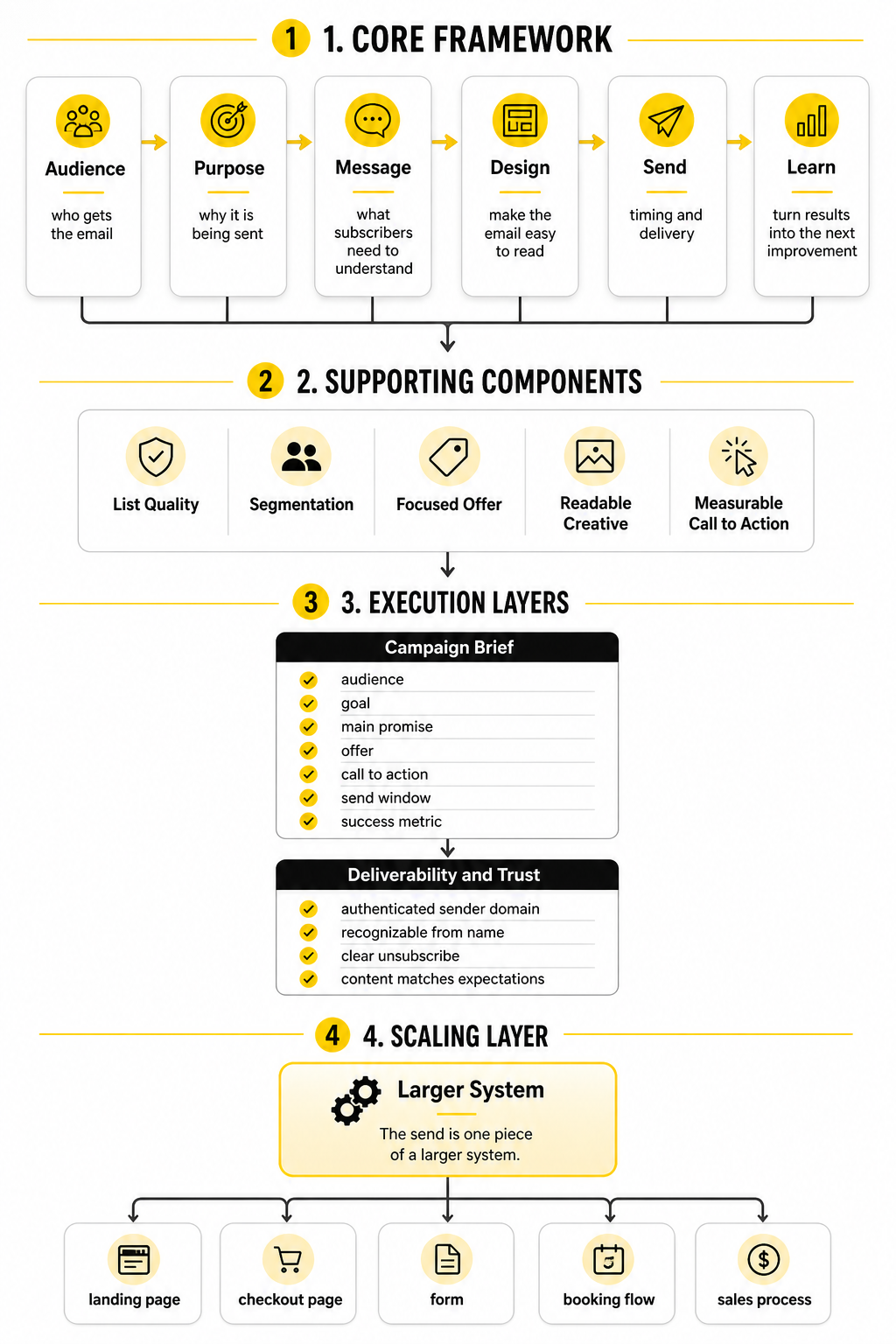
The best campaigns usually follow a simple framework: audience, purpose, message, design, send, and learn. Audience decides who gets the email. Purpose decides why it is being sent. Message decides what the subscriber needs to understand. Design makes the email easy to read. Sending controls timing and delivery. Learning turns the results into the next improvement.
This framework prevents the most common problem with email blasts: sending because the calendar says it is time, not because the subscriber has a clear reason to care. A campaign should pass a simple test before it goes out. Can you explain who it is for, what they get from it, and what you want them to do next?
Mailchimp can support each step, but it will not fix weak thinking automatically. Segments help only when your audience data is useful. Templates help only when the message is clear. Reports help only when you know what metric matters for the campaign’s goal.
Core Components Of A Professional Email Blast
A professional Mailchimp email blast has five core components: list quality, segmentation, a focused offer, readable creative, and a measurable call to action. List quality comes first because bad data damages everything after it. If your list includes people who did not ask to hear from you, your open rates, click rates, complaint rates, and deliverability can suffer.
Segmentation is the second component because relevance usually beats volume. Sending one generic campaign to every subscriber may be faster, but it often ignores where people are in the customer journey. A new lead, repeat customer, inactive subscriber, and high-intent buyer should not always receive the same message.
The offer and creative need to work together. The subject line earns the open, the opening line earns the next few seconds, and the body needs to make the next step feel obvious. If the campaign is promotional, the offer should be specific. If it is educational, the value should be immediate. If it is a newsletter, the reader should understand why this issue is worth their time.
Professional Implementation Starts Before You Hit Send
The professional way to build a Mailchimp email blast is to start with the campaign brief, not the template. Write down the audience, goal, main promise, offer, call to action, send window, and success metric. That small step removes a lot of guesswork once you start writing and designing.
Then check the parts that affect deliverability and trust. Your sender domain should be authenticated, your from name should be recognizable, your unsubscribe process should be clear, and your content should match what people expected when they subscribed. Google’s email sender guidelines FAQ makes the direction obvious: inbox providers want authenticated, wanted, easy-to-leave email.
Finally, treat the send as one piece of a larger system. A Mailchimp email blast can drive traffic, but the landing page, checkout page, form, booking flow, or sales process has to carry the momentum. For teams that need funnels around email campaigns, tools like ClickFunnels, systeme.io, or GoHighLevel can fit naturally when the campaign needs a complete path after the click.
Audience Strategy And List Preparation
The audience decision is where a Mailchimp email blast becomes either useful or annoying. Most weak campaigns fail before the subject line because they are sent to people who should not have received them in the first place. The cleaner your audience logic is, the easier everything else becomes: the offer, the copy, the design, the call to action, and the performance review.
Start by asking one blunt question: who genuinely needs this email right now? Not who could technically receive it. Not who might maybe click if the stars align. The right audience is the group with enough context, interest, or timing to make the message feel relevant when it lands.
Mailchimp gives you several ways to organize contacts, including audiences, tags, groups, and segments. The platform’s own guide to segmenting options in Mailchimp shows how campaign activity, contact details, signup source, purchase behavior, engagement, and other conditions can shape who receives a campaign. That flexibility is powerful, but it only helps when your list structure is simple enough to manage.
Keep Your Audience Structure Simple
A common Mailchimp mistake is creating too many audiences when one well-organized audience would be cleaner. Separate audiences can create duplicate contacts, scattered reporting, and messy unsubscribe management. For most businesses, one primary audience with smart tags, groups, and segments is easier to control.
Think of your audience as the database, tags as internal labels, groups as preference or category choices, and segments as dynamic filters. Tags can mark things like lead source, customer type, event attendance, content interest, or sales stage. Groups are useful when subscribers should be able to express preferences, such as which topics they want or how often they want to hear from you.
Segments are where the real campaign targeting happens. A segment can combine conditions, such as people who joined in the last 60 days, clicked a previous campaign, live in a certain region, or bought a specific product category. That is much better than sending every Mailchimp email blast to the full list and hoping relevance somehow takes care of itself.
Clean The List Before You Increase Volume
List growth feels good, but list quality pays better. A bigger list does not automatically mean a stronger email program. If the list includes inactive, invalid, unpermissioned, or poorly matched contacts, every new campaign carries more risk.
Mailchimp’s campaign benchmarking resources explain that performance is tracked through signals like opens, clicks, unsubscribes, and bounces across large volumes of campaign data. Those metrics are not just dashboard decoration. They tell you whether your audience still wants what you are sending.
Before sending a major Mailchimp email blast, review the health of the list. Look for hard bounces, repeated non-openers, contacts who never engage, old imports, and people added from sources that may no longer match your current offer. Removing or suppressing weak-fit contacts can feel painful, but protecting sender reputation is more important than clinging to a vanity number.
Use Permission As The Baseline
Permission is not a technical detail. It is the foundation of whether your email marketing deserves attention. If someone did not knowingly opt in, your campaign starts with a trust problem.
This matters even more because inbox providers now judge senders through engagement and complaint signals. Google’s email sender guidance says bulk senders should keep user-reported spam rates below 0.1% and avoid reaching 0.3% or higher, while also meeting requirements around authentication and one-click unsubscribe for applicable senders. That is a very low tolerance for campaigns people do not want.
A professional Mailchimp email blast should only go to people who have a clear relationship with your brand. That may include subscribers, customers, leads, event registrants, trial users, or people who requested a resource. It should not include scraped contacts, random purchased lists, or old spreadsheets where nobody remembers how the contacts were collected.
Build Segments Around Intent
The strongest segments are based on intent, not just demographics. Age, location, job title, and industry can matter, but they rarely tell the whole story. Behavior usually tells you more.
Someone who clicked a pricing link is different from someone who only opened a newsletter. Someone who downloaded a beginner guide is different from someone who attended a product demo. Someone who bought last week is different from someone who has been inactive for a year.
Useful Mailchimp segments can be built around signals like:
Each of these groups needs a different message. That is the point. A Mailchimp email blast does not have to mean one generic message to everyone; it can mean one timely campaign sent to the right slice of the list.
Match The Segment To The Campaign Goal
Every campaign goal implies a different audience. If the goal is revenue, you may want recent buyers, high-intent leads, or subscribers who clicked product content. If the goal is education, you may want newer subscribers or people tagged with a specific interest. If the goal is reactivation, you should isolate inactive contacts instead of mixing them into your most engaged audience.
This is where marketers often get too broad. They write one message for several different intentions, then wonder why the results are flat. A campaign built for awareness should not read like a last-chance sales push, and a campaign built for buyers should not waste space explaining basic context they already understand.
Before sending, write one sentence that connects the audience to the goal. For example: this campaign goes to engaged subscribers who clicked product-related emails in the last 90 days because the offer is designed for people already showing buying intent. If you cannot write that sentence clearly, the segment probably needs work.
Prepare The List For Better Personalization
Personalization is not just putting a first name in the subject line. Real personalization means the email reflects what you know about the subscriber’s context. That could be their interest, purchase history, lifecycle stage, location, signup source, or past engagement.
Mailchimp can use merge tags and segmentation data to personalize campaigns, but the output is only as good as the data behind it. If names are missing, tags are inconsistent, or old imports are messy, personalization can backfire. A broken first-name field is worse than no personalization because it makes the campaign feel automated in the bad way.
Clean data gives you more options. You can send different versions of a campaign to different groups, adjust the call to action by lifecycle stage, or exclude people who already took the desired action. That last point matters a lot. Nothing makes a brand look less organized than asking people to do something they already did.
Decide Who Should Not Receive The Campaign
Exclusions are just as important as inclusions. A smart Mailchimp email blast is not only defined by who gets it. It is also defined by who is intentionally left out.
You may need to exclude recent buyers from a discount campaign, current customers from a new-customer offer, inactive subscribers from a high-priority launch, or people who already registered for an event. These exclusions protect the customer experience and make your reporting cleaner. They also reduce unnecessary sends, which helps list health over time.
This is a simple habit with a big payoff. Before scheduling any campaign, review the audience and ask: who would be confused, annoyed, or irrelevant if they received this? Then remove them. That one step can prevent a lot of avoidable unsubscribes.
Set A Clear List Preparation Checklist
A repeatable checklist keeps the campaign process calm. You do not want to rebuild your quality control process every time you send. You want a simple pre-send routine that catches obvious problems before they become public.
Use this list before every important Mailchimp email blast:
This is not busywork. It is how you stop treating email as a one-off task and start treating it like a performance channel. The more disciplined your audience preparation is, the more confident you can be when the campaign finally goes out.
Message, Offer, And Campaign Structure
Once the audience is clear, the next job is to build the message. This is where a Mailchimp email blast stops being a “send” and becomes a campaign. The difference is simple: a send pushes information out, while a campaign moves a specific group of people toward a specific next step.
The message should come from the audience decision you already made. If the campaign goes to new subscribers, it should give context and build trust. If it goes to warm leads, it should reduce friction and make the next action obvious. If it goes to existing customers, it should respect what they already know and avoid explaining the basics again.
A strong message does not try to do five jobs at once. It has one main idea, one primary call to action, and one reason the reader should care now. That kind of focus is not boring. It is what makes the email easier to read, easier to click, and easier to measure.
Start With The Campaign Promise
Before writing the subject line, decide the campaign promise. The promise is the useful thing the reader gets from opening the email. It can be a discount, a new resource, a product update, an event invitation, a time-sensitive announcement, or a practical insight.
The promise should be specific enough that the email has a spine. “Check out our latest updates” is weak because it makes the reader do the work. “See what changed before your next campaign goes out” is stronger because it gives the reader a reason to keep reading.
For a Mailchimp email blast, the promise also needs to match the audience’s awareness level. Cold or newly subscribed contacts usually need more context. Engaged contacts can handle a more direct offer. Customers often need relevance more than persuasion because they already know the brand.
Choose One Primary Call To Action
Every email can contain multiple links, but it should not contain multiple competing decisions. The primary call to action is the action that defines success for the campaign. If the reader does only one thing, this is the thing you want them to do.
That action might be to shop a sale, book a call, register for a webinar, read a full guide, reply to the email, start a trial, or visit a landing page. The important part is that the CTA matches the campaign goal. If the goal is revenue, do not bury the purchase path under a long newsletter. If the goal is education, do not make the reader feel tricked into a sales page.
This is also where the post-click experience matters. A Mailchimp email blast can create interest, but the landing page has to convert that interest into action. If you need dedicated campaign pages, tools like ClickFunnels, systeme.io, or Replo can make sense when the email needs a focused page instead of sending traffic to a generic homepage.
Build The Email Around A Simple Flow
A professional campaign usually follows a simple flow: hook, context, value, proof, action. The hook earns attention. The context explains why the message is relevant. The value shows what the reader gets. The proof reduces doubt. The action tells them what to do next.
That structure works because it matches how people read email. They scan first, decide quickly, and only slow down if the message feels relevant. If the email makes them hunt for the point, the campaign is already losing.
Do not overcomplicate the structure. A short promotional email may only need a strong opening, a clear offer, and one button. A newsletter may need several sections, but it still needs a clear hierarchy. A launch email may need more persuasion, but it should still feel like one coherent argument.
Use A Practical Campaign Build Process
The easiest way to build a Mailchimp email blast is to separate strategy, writing, design, and testing. When you try to do all of it at once, you end up editing button colors before the offer is even clear. That is backwards.
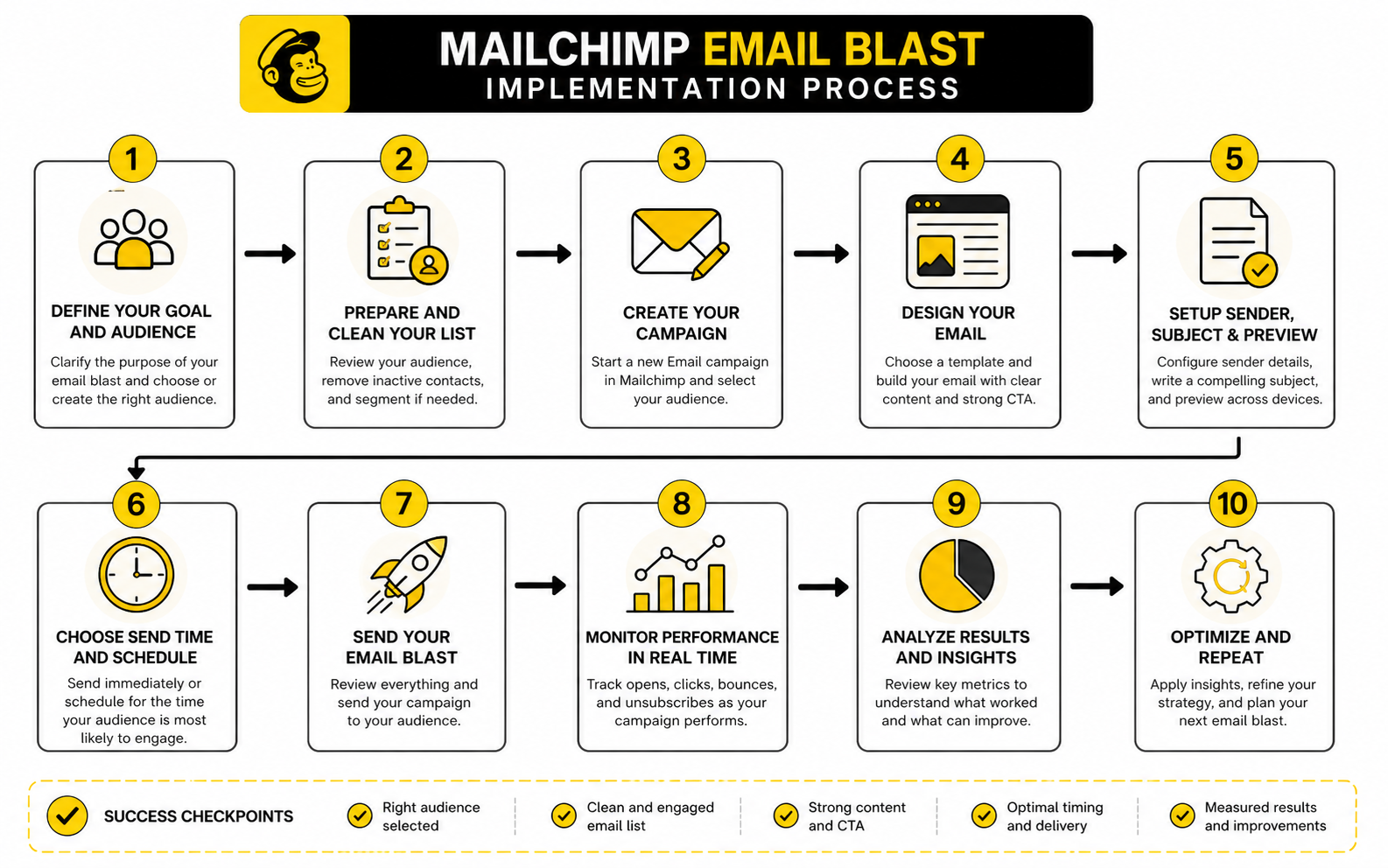
Use this process:
Mailchimp’s guide to creating and sending a regular email reflects the same basic sequence: choose the audience, set up campaign details, design the email, preview it, and send. The tool gives you the workflow. Your job is to make sure the decisions inside that workflow are sharp.
Write Subject Lines That Set The Right Expectation
The subject line should earn the open without misleading the reader. That sounds obvious, but a lot of campaigns still chase curiosity at the cost of trust. A subject line can be clever, direct, urgent, benefit-driven, or simple, but it should accurately represent the email.
Preview text matters because it works with the subject line. Mailchimp’s resource on preview text explains that it appears beside or below the subject line in many inboxes, which means it can support the open instead of repeating the same idea. Treat it as your second headline, not as leftover space.
For a Mailchimp email blast, write several subject line options before choosing one. One version can lead with the offer. Another can lead with urgency. Another can lead with the outcome. The best choice depends on the audience and the campaign goal, not on personal taste.
Make The Opening Line Do Real Work
The opening line should immediately confirm that the email is worth reading. It should connect the subject line to the body and make the reader feel like they are in the right place. If the first sentence is vague, the campaign loses momentum fast.
Avoid generic openings like “We’re excited to announce” unless the announcement is genuinely exciting for the reader. The reader does not care that the brand is excited. They care what changed, what is useful, what is available, or what they can do next.
A better opening gets to the point while still sounding human. For example, a launch email can start with what is now available. A sale email can start with the offer and deadline. An educational email can start with the problem the reader is trying to solve.
Keep The Body Focused And Skimmable
Most people do not read marketing emails like essays. They scan for relevance, value, and the next step. That means the body needs short paragraphs, clear transitions, and enough visual hierarchy to make the message easy to follow.
A good Mailchimp email blast usually avoids long blocks of text unless the audience expects a letter-style format. Even then, the message needs movement. Every paragraph should either clarify the offer, build desire, reduce friction, or move the reader toward the CTA.
Use bullets when the reader needs to compare benefits quickly. Use bold text only when it genuinely improves scanning. Use one main button when possible, supported by a text link if needed. The goal is not to decorate the email; the goal is to remove friction.
Connect The Offer To A Real Business Goal
An offer is not always a discount. It can be a webinar seat, a checklist, a product update, a consultation, a free trial, a content upgrade, early access, or a limited-time bundle. The offer is simply the reason the reader should act now.
The best offers sit at the intersection of business value and subscriber value. A discount may drive sales, but it can also train people to wait for discounts if overused. A content offer may build trust, but it may not move revenue unless it connects to a clear next step.
For service businesses, agencies, and local businesses, the offer often needs a conversation path. That is where a platform like GoHighLevel can fit when email campaigns need booking, CRM follow-up, pipelines, and automation connected behind the scenes. The email creates the click, but the system after the click turns that interest into a managed opportunity.
Use Testing Without Slowing Everything Down
Testing is useful when it answers a real question. Mailchimp’s A/B testing documentation says email tests can compare one variable such as subject line, From name, content, or send time, with winners selected by open rate, click rate, total revenue, or manual review depending on setup. That is helpful, but only if the test is designed around something you will actually use later.
Do not test tiny details just to feel scientific. Testing a button color on a small list usually teaches very little. Testing a clearer offer against a vague one can teach a lot. Testing a direct subject line against a curiosity-driven subject line can also be useful when the audience is large enough to produce meaningful results.
For many campaigns, especially smaller lists, the best “test” is still a disciplined review before sending. Read the email on mobile. Click every link. Check the merge tags. Confirm the CTA destination. Make sure the offer is understandable without extra explanation.
Prepare The Campaign For The Next Part Of The System
A Mailchimp email blast should not end at the send button. It should connect to the next step in the customer journey. That might mean tagging clickers, triggering a follow-up sequence, retargeting visitors, notifying sales, or moving engaged contacts into a more specific segment.
Mailchimp’s automation flow resources explain how automations can add tags, send targeted emails, and create workflows based on customer behavior. That matters because a single campaign becomes more valuable when it feeds better follow-up. Someone who clicks a high-intent link should not be treated the same as someone who ignored the campaign.
This is the point where email marketing starts to compound. The first send creates data. The data improves the next segment. The next segment improves the next message. That is how you move from random blasts to a real email system.
Statistics and Data
A Mailchimp email blast should never be judged by one number in isolation. Open rate, click rate, bounce rate, unsubscribe rate, spam complaints, conversion rate, and revenue all tell different parts of the story. The job is not to stare at the dashboard after every send; the job is to understand what the numbers are trying to tell you and what to change next.
Benchmarks help, but they are not the final score. Mailchimp’s email marketing benchmarks show that performance varies by industry, audience type, and campaign context, which means a “good” result for one business can be average for another. Use benchmarks as a reference point, then compare your campaigns against your own previous sends, because your list history is usually more useful than a generic industry average.
The most important thing is trend direction. One weak campaign is not a crisis if the audience, offer, or timing was unusual. But declining clicks, rising unsubscribes, increasing bounces, or weaker conversion across several campaigns is a signal that something in the system needs attention.
What Mailchimp Reports Actually Show
Mailchimp campaign reports give you the basic performance picture after a campaign goes out. The platform’s guide to email campaign reports covers metrics like opens, clicks, bounces, unsubscribes, successful deliveries, top links, social performance, and e-commerce results when tracking is connected. Those numbers matter because they show where the campaign gained or lost momentum.
Think of the report as a funnel. Delivery tells you whether the email reached inboxes. Opens suggest whether the sender name, subject line, preview text, and inbox placement created enough interest. Clicks show whether the message and offer earned action. Conversions show whether the post-click experience finished the job.
That sequence matters because it keeps you from fixing the wrong problem. If delivery is weak, rewriting the button text will not solve it. If opens are strong but clicks are poor, the subject line did its job but the email body or offer probably did not. If clicks are strong but conversions are weak, the problem may be the landing page, checkout flow, form, calendar page, or sales follow-up.
The Core Metrics To Track
Open rate is useful, but it is not as clean as it used to be. Apple’s Mail Privacy Protection changed how opens are tracked for many users, and Mailchimp explains in its open rate documentation that opens rely on a tiny invisible image loading in the email. That means open rate can still show directional interest, but it should not be treated as the most reliable measure of campaign success.
Click rate is often more useful because it shows active intent. A click means the reader saw enough value to take the next step. For a Mailchimp email blast built around sales, registrations, bookings, content consumption, or lead generation, clicks usually tell you more than opens.
Unsubscribes and spam complaints are trust signals. A few unsubscribes are normal because not every campaign will fit every subscriber forever. But if unsubscribes spike after a specific send, the audience, promise, frequency, or offer may have been misaligned. Spam complaints are more serious because inbox providers use them as negative feedback signals.
Build A Simple Analytics System
The analytics system does not need to be complicated. It needs to connect the email goal to the right metric. Before the campaign goes out, decide what success means, which number will prove it, and what action you will take based on the result.
For a revenue campaign, track clicks, conversion rate, orders, revenue, and revenue per recipient. For a content campaign, track clicks to the article, time on page if your analytics tool supports it, and follow-up engagement. For a webinar campaign, track registrations, show-up rate, and post-event action. For a re-engagement campaign, track clicks, replies, unsubscribes, and the number of contacts you can safely keep or suppress.
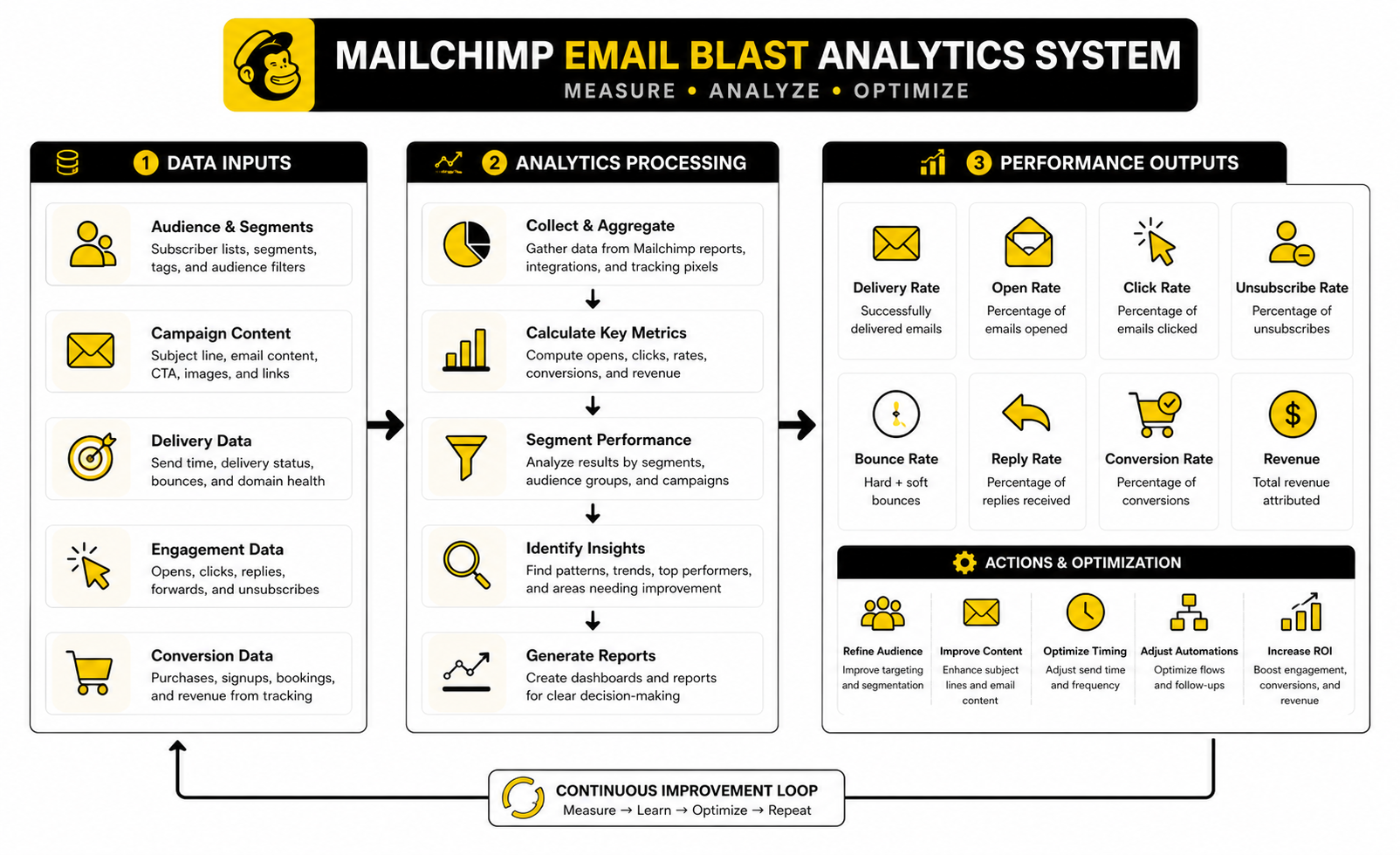
The point is to avoid random reporting. A Mailchimp email blast promoting a product should not be judged mainly by open rate. A campaign designed to clean inactive subscribers should not be judged mainly by revenue. Each campaign needs a primary metric, a few supporting metrics, and one clear lesson for the next send.
How To Interpret Open Rate
Open rate sits near the top of the email funnel, so it is mostly a signal of attention. It reflects the strength of your sender name, subject line, preview text, timing, audience familiarity, and deliverability. It does not prove that the campaign worked.
If open rate is low, first look at audience relevance. A weak subject line can hurt performance, but even a great subject line will struggle if the campaign is sent to the wrong people. Then review timing, sender identity, preview text, and whether recent campaigns have trained subscribers to expect value.
If open rate is high but clicks are low, do not celebrate too early. That pattern often means the email earned curiosity but failed to create action. The fix may be a clearer offer, better body copy, stronger CTA placement, or a tighter match between the subject line and the actual message.
How To Interpret Click Rate
Click rate is one of the cleanest signals of campaign intent. It tells you whether people moved from reading to acting. For many campaigns, this is where the real performance conversation starts.
If clicks are low, the problem may be the offer, the CTA, the email structure, or the segment. A reader might understand the message but feel no urgency. They might want the offer but not notice the button. They might click less because the email includes too many competing links.
Look at which links earned the most clicks, not just the overall click rate. If secondary links outperform the main CTA, your audience may be telling you that their interest is different from what you assumed. That is useful. Use it to adjust the next Mailchimp email blast instead of forcing the same angle again.
How To Interpret Bounce Rate
Bounce rate tells you whether the email could be delivered to the recipient’s address. Hard bounces usually mean the address is invalid or no longer exists. Soft bounces can happen for temporary issues, such as a full inbox or server problem.
A rising bounce rate is usually a list quality issue. It can come from old contacts, weak lead sources, poor import hygiene, typo-heavy signup forms, or unverified addresses. This is why list preparation from the earlier section matters before every major send.
Do not ignore bounces because they sit in the background. Poor list quality can damage deliverability over time. If a Mailchimp email blast produces more bounces than usual, review where those contacts came from, how old they are, and whether that acquisition source should be cleaned up or stopped.
How To Interpret Unsubscribes And Complaints
Unsubscribes are not always bad. Sometimes they improve list quality by removing people who no longer want the content. The problem starts when unsubscribes spike, especially after a campaign that was too broad, too aggressive, or disconnected from what people signed up to receive.
Spam complaints are different. They are a stronger negative signal because the subscriber is not just leaving; they are telling the inbox provider the message was unwanted. Google’s email sender guidelines FAQ makes it clear that senders should keep spam rates low, with 0.1% treated as a target threshold and 0.3% as a level to avoid.
When complaints rise, do not blame the audience first. Review permission, targeting, frequency, subject line accuracy, and whether the email made unsubscribing easy. A healthy list is built on consent and expectations, not tricks.
How To Measure Revenue And Conversions
For sales-focused campaigns, the final measurement should happen after the click. Clicks show interest, but conversions show business impact. A Mailchimp email blast that gets fewer clicks but higher revenue can outperform a campaign that gets lots of low-intent traffic.
Revenue tracking depends on your setup. If Mailchimp is connected to your store or analytics stack, you can measure purchases and order value more directly. If you are sending traffic to a funnel, checkout page, booking form, or lead form, you need tracking that connects the email campaign to the result.
This is where the post-click system becomes important again. A landing page builder like ClickFunnels, systeme.io, or Replo can be useful when the campaign needs a dedicated conversion path. The email creates demand, but the page has to turn that demand into action.
Compare Campaigns By Intent, Not Just Averages
Campaign averages can mislead you if you compare different campaign types as if they are the same. A newsletter, flash sale, product launch, reactivation campaign, and customer update all have different jobs. They should not be judged by one universal standard.
Compare campaigns inside the same category. Newsletter against newsletter. Promo against promo. Re-engagement against re-engagement. That gives you cleaner insight because the audience expectation and campaign intent are similar.
Also compare segments separately when possible. Your engaged subscribers may behave very differently from newer leads or inactive contacts. If you only look at the blended average, you may miss the fact that one segment is performing well while another is dragging down the campaign.
Turn The Data Into Action
Data is only useful when it changes what you do next. After every important Mailchimp email blast, write down the campaign goal, primary metric, result, likely reason, and next action. Keep it simple enough that you will actually maintain it.
For example, if opens were strong but clicks were weak, the next action might be to simplify the offer and move the CTA higher. If clicks were strong but conversions were weak, the next action might be to rebuild the landing page or shorten the form. If unsubscribes jumped, the next action might be to tighten segmentation or reduce frequency for that audience.
The point is not to chase perfection after one send. The point is to create a feedback loop. Each campaign should leave you with better audience knowledge, sharper messaging, and a clearer understanding of what your list actually responds to.
Sending, Testing, And Performance Tracking
By this stage, the campaign has a defined audience, a focused message, and a measurement plan. Now the question becomes operational: how do you send a Mailchimp email blast without creating avoidable risk? This is where advanced email marketing gets less glamorous but much more important.
The send itself is only one moment in a longer chain. Your domain setup, list history, content choices, timing, frequency, and post-click system all affect whether the campaign performs. The more you scale, the more those small details matter.
A beginner worries about getting the email out. A professional worries about whether the email should go to this audience, at this time, with this offer, under this sender identity, connected to this follow-up path. That is the standard.
Protect Deliverability Before You Scale
Deliverability is not just a Mailchimp setting. It is the combined result of permission, authentication, engagement, complaint rates, bounce rates, sending consistency, and content quality. Mailchimp’s email best practices make domain authentication and DMARC part of the workflow because inbox providers are stricter about proving that senders are legitimate.
This matters most when a campaign volume increases. A list of 800 engaged subscribers behaves differently from a list of 80,000 mixed-quality contacts. More volume means more inbox provider scrutiny, more chances for complaints, and more damage if the campaign is poorly targeted.
Do not scale a Mailchimp email blast by simply sending to more people. Scale it by improving list quality, segment accuracy, domain authentication, offer relevance, and reporting. Volume without control is not growth. It is risk with a bigger audience.
Understand The Tradeoff Between Reach And Relevance
Every broad campaign creates a tradeoff. Sending to more people can increase total clicks, revenue, and awareness. It can also reduce average engagement, increase unsubscribes, and make the campaign less useful to people on the edge of relevance.
That does not mean broad sends are always bad. Company-wide announcements, major product launches, annual sales, important policy updates, and flagship newsletters can justify a larger audience. The mistake is using a broad send because segmentation feels inconvenient.
A simple rule helps: use broad sends when the message is broadly relevant, and use segmented sends when context changes the value of the message. If different groups need different reasons to care, write different versions. It takes more work, but it usually creates cleaner performance and protects the list.
Watch Frequency Before Subscribers Watch It For You
Email frequency is not about what your team wants to send. It is about what your audience can tolerate while still feeling the relationship is valuable. When frequency climbs without enough relevance, subscribers will tell you through lower engagement, unsubscribes, complaints, or silence.
Mailchimp lets you schedule campaigns and build automations, but the calendar still needs human judgment. A subscriber might receive a newsletter, a promo, an onboarding email, an abandoned cart email, and a product update in the same week if your systems are not coordinated. Each email may be reasonable alone, but together they can feel excessive.
Create a simple sending calendar across campaigns and automations. Check what different segments are receiving before adding another Mailchimp email blast. The goal is not to send less for the sake of sending less. The goal is to send enough value that people keep opening by choice.
Separate Broadcasts From Automations
A broadcast campaign is usually time-based. An automation is usually behavior-based or lifecycle-based. Both are useful, but they should not be treated as the same thing.
A Mailchimp email blast works well for timely messages: launches, announcements, newsletters, seasonal offers, event reminders, and campaigns tied to a specific moment. Automations work better for predictable journeys: welcome sequences, lead nurture, post-purchase follow-up, abandoned cart recovery, re-engagement, and customer education.
The strategic risk is overlap. If a subscriber is already inside a high-priority automation, a broadcast campaign may interrupt the journey or create mixed messaging. Before sending an important blast, check whether key segments are also receiving automated emails and decide whether exclusions, delays, or suppression rules are needed.
Manage Compliance Like A System
Compliance is not just a footer line. It is a set of practices that protect the subscriber and the business. The FTC’s CAN-SPAM compliance guide explains that commercial emails need accurate header information, non-deceptive subject lines, clear identification when required, a valid physical postal address, and a clear way to opt out.
For audiences in or connected to Europe, privacy expectations can be stricter because consent and lawful basis matter under GDPR and related ePrivacy rules. The practical takeaway is simple: know why each person is on your list, respect what they agreed to receive, and make leaving easy. That is not just legal hygiene. It is good marketing.
A professional Mailchimp email blast should never depend on confusion. Do not hide the unsubscribe link. Do not use misleading subject lines. Do not send to people whose permission is unclear. Short-term reach is not worth long-term trust damage.
Handle AI Carefully In Email Campaigns
AI can speed up email production, but it can also make campaigns sound generic if nobody sharpens the output. A draft that is grammatically fine can still be strategically weak. It might miss the audience’s actual pain, overstate the offer, or create a tone that does not match the brand.
Use AI for first drafts, variations, summaries, repurposing, and subject line brainstorming. Then bring human judgment back into the process. Check the promise, relevance, specificity, compliance, and whether the email sounds like something your audience would actually want to read.
For teams already using CRM and funnel automation, platforms like GoHighLevel’s AI tools may help connect campaign work with follow-up workflows. Just do not confuse speed with strategy. Faster bad emails are still bad emails.
Build A Stronger Post-Click Experience
The email is not the destination. It is the bridge. The subscriber clicks because the campaign created enough interest, but the next page has to carry the same promise forward.
That means the landing page should match the email’s language, offer, urgency, and audience stage. If the email promises a simple booking path, the page should not bury the calendar under distractions. If the campaign promotes a specific product, the click should not land on a generic homepage. If the email invites people to a webinar, the registration page should be fast, clear, and mobile-friendly.
This is where dedicated tools can help. Replo can fit ecommerce teams that need campaign-specific landing pages, while ClickFunnels and systeme.io can fit creators, service businesses, and marketers who need pages, offers, and follow-up paths in one flow.
Know When Not To Send
One of the most underrated expert skills is deciding not to send. If the offer is weak, the audience is unclear, the list source is questionable, or the post-click experience is not ready, delaying the campaign can be the more carefully move. Sending just because a slot exists on the calendar is how email programs lose trust slowly.
There are also moments when suppression is better than exposure. Do not send a promotion to recent full-price buyers if it will create frustration. Do not send a beginner-level explainer to advanced customers if it makes the brand feel out of touch. Do not send a heavy sales message to people who only opted in for educational content unless the transition is clearly earned.
Restraint is not passivity. It is quality control. A Mailchimp email blast should feel intentional because the inbox is a relationship channel, not a dumping ground.
Prepare For Scaling Beyond One-Off Campaigns
At some point, one-off campaigns are not enough. The business needs a system where broadcasts, automations, segmentation, CRM notes, landing pages, and sales follow-up work together. That is where the email program starts behaving like an asset instead of a task list.
Scaling usually creates new problems. More campaigns mean more coordination. More segments mean more data hygiene. More automations mean more chances for overlap. More revenue attribution means more tracking complexity.
The solution is not to make everything complicated. The solution is to define ownership, naming conventions, campaign categories, suppression rules, and review rhythms. When your system is clear, a Mailchimp email blast can plug into a broader growth engine without creating chaos.
Create A Pre-Send Risk Review
Before a high-stakes campaign goes out, run a risk review. This is especially important for large launches, seasonal promotions, partner campaigns, major announcements, and revenue-critical sends. A 10-minute review can catch problems that would be painful to fix after the email lands.
Review these questions:
This is not overkill. This is how serious teams protect reputation, revenue, and customer experience. Once a campaign is sent, you do not get to pull it back from the inbox.
Optimization, Automation, Tools, And FAQ
The final layer is turning a Mailchimp email blast into part of a larger marketing system. One campaign can create a spike in attention, but a system creates continuity. It remembers who clicked, who bought, who ignored the message, who needs follow-up, and who should be excluded from future sends.
This is where automation becomes useful, not because it replaces strategy, but because it protects consistency. Mailchimp’s marketing automation flows can use triggers, branches, tags, targeted emails, and other actions to create more personalized paths for contacts. That means a campaign can feed the next step instead of ending as a one-time broadcast.
The smartest setup is simple: use email blasts for timely campaigns, use automations for predictable journeys, and use reporting to decide what deserves improvement. A Mailchimp email blast should create data that makes the next message sharper. That is how the system compounds.
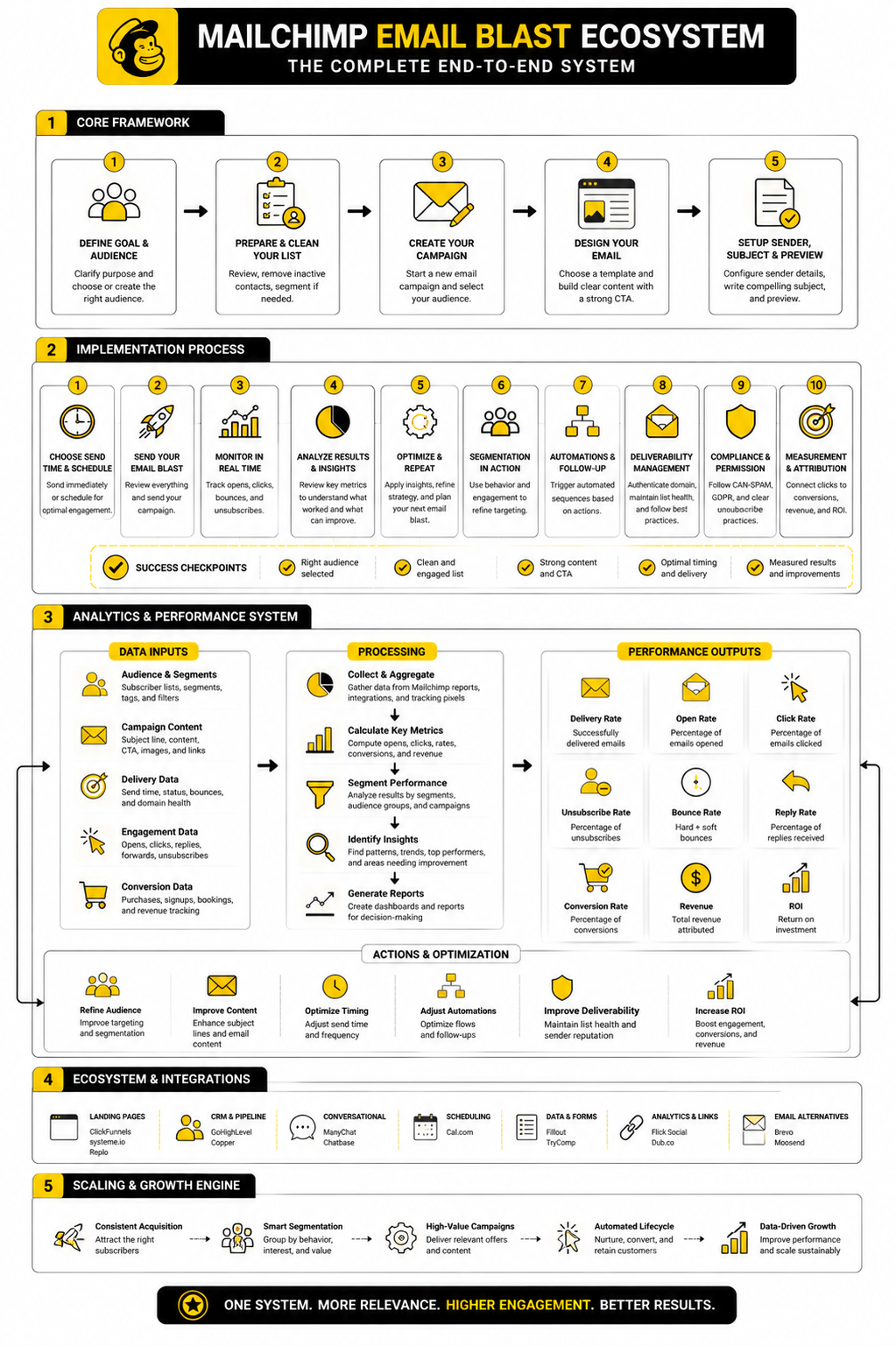
Build The Final Email Ecosystem
A mature email ecosystem has four parts: acquisition, segmentation, campaigns, and lifecycle automation. Acquisition brings the right people onto the list. Segmentation organizes them based on behavior, interest, and status. Campaigns deliver timely messages. Lifecycle automation keeps the relationship moving after the first click.
Mailchimp can handle much of this inside one platform, especially when tags, segments, forms, journeys, reports, and integrations are used cleanly. But the ecosystem may also include landing pages, calendars, CRMs, checkout tools, analytics platforms, and customer support workflows. The goal is not to collect tools. The goal is to make sure every tool has a job.
For example, a subscriber might join through a form, receive a welcome sequence, click a product-focused email, get tagged as high intent, receive a more specific offer, visit a landing page, book a call, and move into a sales pipeline. That entire chain can start with one Mailchimp email blast, but it only works when the system behind the email is organized.
Use Automation Without Losing The Human Touch
Automation should make the experience more relevant, not more robotic. The danger is building flows that keep sending because the software can, not because the subscriber needs another message. That is how brands create fatigue.
Mailchimp’s automation flow reports can track opens, clicks, purchases, and engagement patterns over time, which makes them useful for improving the journey instead of guessing. If a branch is not getting clicks, it may need a clearer offer. If a sequence creates unsubscribes, it may be too aggressive. If a follow-up performs well, it may deserve to become part of your standard system.
Good automation feels timely. Bad automation feels like a machine talking to a spreadsheet. Keep the language natural, keep the triggers meaningful, and review every active flow regularly.
Choose Tools Based On The Job
Mailchimp is strong for audience management, campaigns, email templates, segmentation, and automation. But many businesses need other tools around it because the email is only one part of the growth path. The right stack depends on what happens after the click.
If the next step is a landing page or funnel, ClickFunnels, systeme.io, or Replo can support the conversion layer. If the next step is sales follow-up, pipeline management, appointments, or agency-style client systems, GoHighLevel can make sense. If the campaign needs conversational follow-up across messaging channels, ManyChat may be useful.
The practical rule is simple. Do not add tools because they are popular. Add tools when they remove friction, improve tracking, or make follow-up more reliable. A lean stack that works is better than a crowded stack nobody maintains.
Keep Improving The System
Optimization is not a one-time cleanup project. It is a rhythm. After every important campaign, review the audience, message, offer, creative, delivery, click behavior, conversion path, and follow-up.
You are looking for patterns, not excuses. If a segment keeps clicking but not buying, the offer or landing page may be wrong. If a segment keeps ignoring emails, it may need a different content angle or a re-engagement path. If a campaign drives replies, that might be a signal that a conversation-based CTA works better than a button for that audience.
A Mailchimp email blast should leave behind more than a report. It should leave behind a lesson. Keep those lessons in a simple campaign log, and your email program will get sharper every month.
What is a Mailchimp email blast?
A Mailchimp email blast is a campaign sent through Mailchimp to a selected audience, segment, or tag group. It is usually used for newsletters, promotions, announcements, event reminders, product launches, or other time-sensitive messages. The professional version is not a random mass send; it is a targeted campaign with a clear purpose and measurable next step.
Is an email blast the same as spam?
No, not when it is permission-based, relevant, and easy to unsubscribe from. Spam is unwanted email, often sent without clear consent or with misleading intent. A Mailchimp email blast should go only to people who have a legitimate relationship with your brand and a reasonable expectation of receiving the message.
Should I send a Mailchimp email blast to my entire list?
Only when the message is genuinely relevant to almost everyone on the list. A major company announcement or flagship newsletter might justify a broad send. A specific promotion, product offer, or lifecycle message usually performs better when it is segmented.
How often should I send Mailchimp email blasts?
There is no universal frequency that works for every business. The right cadence depends on your audience, offer type, content quality, and how many automated emails subscribers already receive. Watch engagement, unsubscribes, complaints, and replies because those signals will tell you whether your frequency feels valuable or excessive.
What is a good open rate for a Mailchimp email blast?
A good open rate depends on the industry, audience quality, subject line, sender reputation, and campaign type. Mailchimp’s benchmark resources show that averages vary widely by industry, so your own historical performance is usually the better comparison. Also remember that open tracking is less reliable than it used to be because privacy features can distort the data.
What metric matters most?
The most important metric depends on the campaign goal. For a sales campaign, revenue, conversion rate, and revenue per recipient usually matter more than opens. For a content campaign, clicks and downstream engagement may matter more. For a re-engagement campaign, clicks, replies, unsubscribes, and suppression decisions may matter most.
Why did my open rate look good but clicks were low?
That usually means the subject line or sender name earned attention, but the email body did not create enough action. The offer may have been weak, the CTA may have been unclear, or the message may not have matched the expectation created by the subject line. It can also happen when the email has too many competing links.
Why did people unsubscribe after my campaign?
Some unsubscribes are normal because people’s needs change. A spike in unsubscribes is different and usually points to a mismatch. The campaign may have been too broad, too frequent, too sales-heavy, or different from what subscribers expected when they joined.
Do I need a landing page for every Mailchimp email blast?
Not always. A simple newsletter may link to articles, and an announcement may link to a product page or help resource. But if the campaign has a conversion goal, a dedicated landing page often works better because it keeps the promise, message, and CTA focused.
Can I use AI to write Mailchimp email blasts?
Yes, but use it carefully. AI is useful for drafting, brainstorming subject lines, summarizing offers, and creating variations. A human still needs to check the strategy, accuracy, tone, compliance, and whether the email feels specific enough for the audience.
What is the difference between a blast and an automation?
A blast is usually a one-time or scheduled campaign sent to a chosen audience. An automation is triggered by behavior, timing, or lifecycle rules, such as joining a list, clicking a link, buying a product, or becoming inactive. Both can work together when broadcasts create timely momentum and automations handle predictable follow-up.
How do I make a Mailchimp email blast feel less generic?
Start with a sharper segment. Then match the promise, subject line, opening, offer, and CTA to that segment’s situation. Generic emails usually happen when the audience is too broad or the campaign is trying to serve too many goals at once.
What should I check before sending?
Check the audience, exclusions, subject line, preview text, sender name, links, mobile layout, merge tags, unsubscribe details, tracking, landing page, and follow-up plan. Also confirm that the offer is still accurate and available. Once the campaign lands in inboxes, mistakes are much harder to fix.
How do I improve my next campaign?
Review the campaign by funnel stage. If delivery was weak, look at list quality and authentication. If opens were weak, look at relevance, sender identity, subject line, and preview text. If clicks were weak, look at the offer, copy, structure, and CTA. If conversions were weak, look at the landing page and post-click experience.
Build a stronger local presence with BAAM AI
Turn your website, Google profile, social channels, and AI visibility into one growth engine
Most businesses do not need more random marketing activity. They need a consistent presence system that helps the right people find them, trust them, and take action. BAAM AI brings strategy, local SEO, website updates, Google Maps visibility, social content, AI-search readiness, media production, and reporting into one practical monthly engine.
If you want your marketing to keep working after the campaign ends, start with a free BAAM AI presence audit. See how your business shows up today and where the fastest visibility wins are at BAAM AI.