
BAAM AI Blog
Mailchimp Design: A Practical Framework for Emails That Look Good, Read Clearly, and Convert
Mailchimp design is not about making emails “pretty.” It is about creating messages people can understand quickly, trust instantly, and act on without friction. A good campaign should feel branded, readable...
Mailchimp design is not about making emails “pretty.” It is about creating messages people can understand quickly, trust instantly, and act on without friction. A good campaign should feel branded, readable, mobile-friendly, accessible, and commercially focused at the same time.
That matters because email is still one of the few marketing channels where you control the audience relationship directly. Mailchimp’s own benchmark data shows that performance varies heavily by industry, which means design cannot be treated as decoration after the copy is written. The structure, hierarchy, layout, CTA placement, and testing process all influence whether a subscriber keeps reading or moves on.
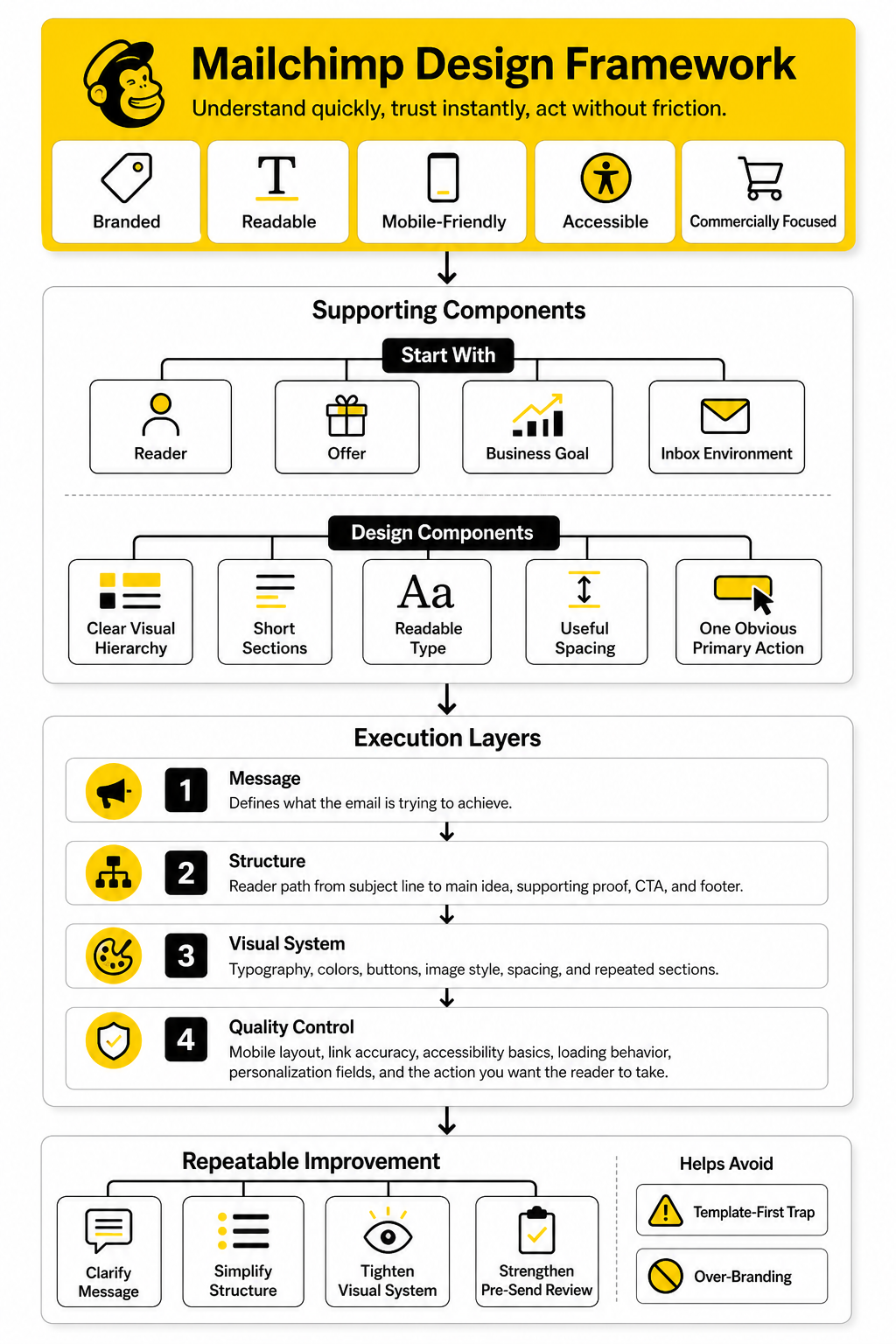
The mistake many teams make is starting with a template and then forcing the message into it. Professional Mailchimp design works the other way around. You start with the reader, the offer, the business goal, and the inbox environment, then build a layout that makes the next step obvious.
Why Mailchimp Design Matters
Mailchimp design matters because subscribers do not experience your email as a “campaign asset.” They experience it as one more message in a crowded inbox, usually while distracted, moving fast, or checking email on a phone. If the email looks cluttered, loads poorly, or hides the point, the reader does not patiently decode it.
The strongest email designs reduce effort. They use a clear visual hierarchy, short sections, readable type, useful spacing, and one obvious primary action. This is not just a design preference; accessibility guidance from Harvard’s Digital Accessibility Services emphasizes that accessible emails use practices that improve the likelihood a message will actually be read by more people.
Mailchimp also recommends testing email content before sending so teams can catch broken links, missing content, and rendering issues before a campaign reaches subscribers. That is a small workflow habit, but it changes the quality of the whole program. A polished Mailchimp email is usually not the result of one beautiful template; it is the result of a repeatable design and review system.
The Mailchimp Design Framework
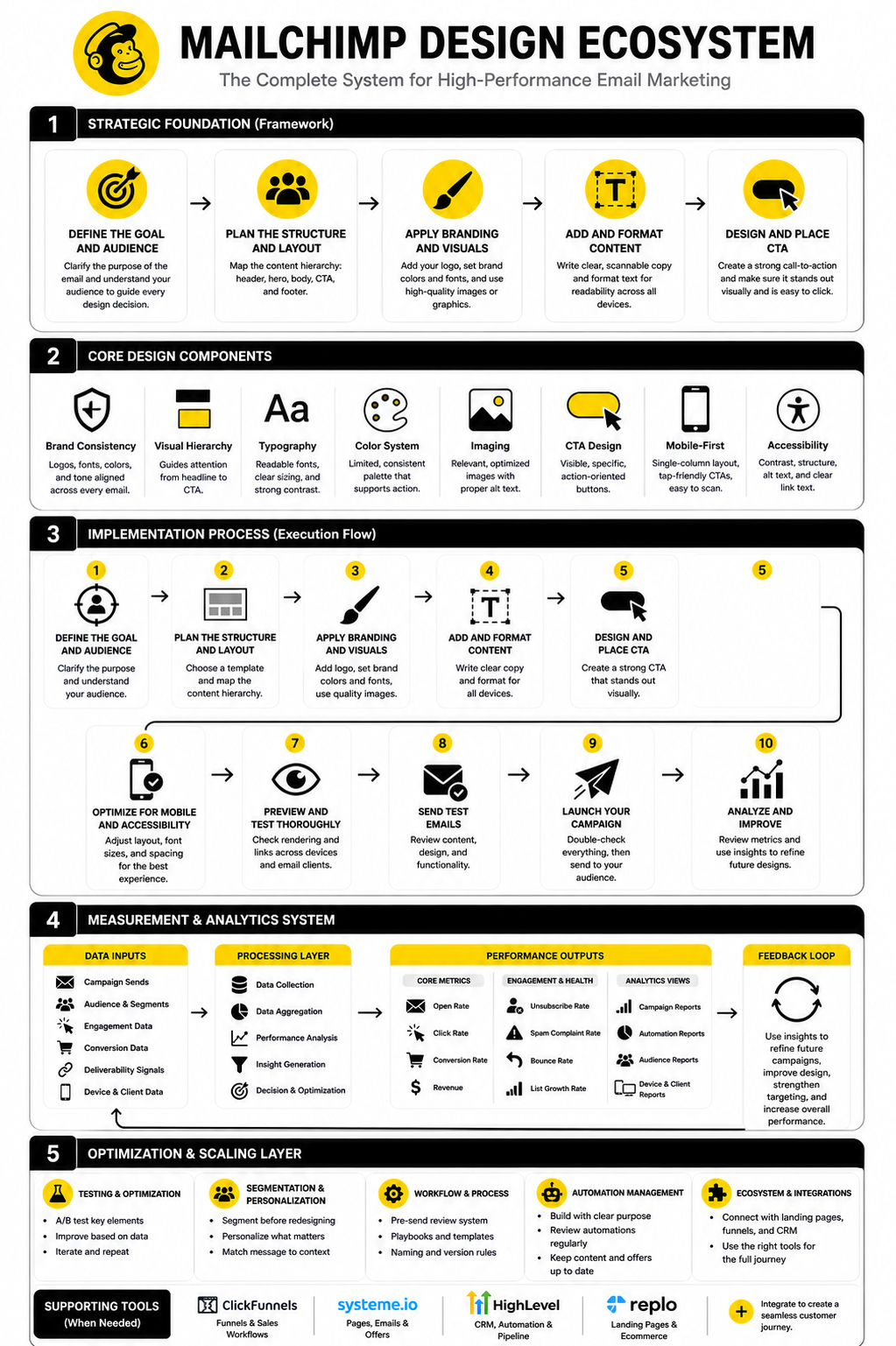
A practical Mailchimp design framework has four layers: message, structure, visual system, and quality control. The message defines what the email is trying to achieve. The structure decides how the reader moves from the subject line to the main idea, supporting proof, CTA, and footer.
The visual system makes the email feel like your brand without making it harder to read. This includes typography, colors, buttons, image style, spacing, and the way sections are repeated across newsletters, launches, automations, and lifecycle campaigns. Litmus’ email accessibility guidance is especially useful here because it pushes designers away from image-only emails and toward live text, clear hierarchy, readable font sizes, and strong contrast.
Quality control is the final layer, and it is where many good-looking emails fail. A design is not finished when it looks good in the builder. It is finished when it has been checked for mobile layout, link accuracy, accessibility basics, loading behavior, personalization fields, and the actual action you want the reader to take.
What This Framework Helps You Avoid
This framework helps you avoid the common Mailchimp design trap: choosing a template because it looks impressive, then wondering why engagement is weak. A complex layout can feel professional inside the editor but become confusing in the inbox. The reader does not care how many blocks you used; they care whether the message is relevant and easy to act on.
It also helps you avoid over-branding. Brand consistency is important, but email is a performance environment, not a brochure. If the design makes the CTA harder to find, the body harder to skim, or the mobile version harder to use, the design is working against the campaign.
Most importantly, the framework gives you a repeatable way to improve. Instead of redesigning from scratch every time, you can adjust one layer at a time: clarify the message, simplify the structure, tighten the visual system, or strengthen the pre-send review. That is how Mailchimp design becomes a business asset instead of a one-off creative task.
Core Components of a High-Performing Mailchimp Email
A strong Mailchimp design starts with the same question every time: what should the reader understand, feel, and do next? That question keeps the design grounded. Without it, the email becomes a collection of blocks instead of a guided experience.
The core components are not complicated, but they need to work together. Subject line, preview text, header, body structure, visuals, CTA, footer, and compliance details all shape the reader’s decision. When one of those pieces is weak, the whole campaign feels less trustworthy.
The best emails are simple on purpose. They do not try to say everything, show everything, or sell everything at once. They create a clean path from relevance to action.
Subject Line and Preview Text
The subject line earns the open, but the preview text often decides whether the open feels worth it. Mailchimp design technically begins before the email body because the inbox is part of the design environment. A beautiful email does not matter if the subject line and preview text create the wrong expectation.
The subject line should make the value clear without sounding desperate. Avoid vague phrases like “big news” unless the audience already has a strong reason to care. A useful subject line points to the benefit, the moment, the problem, or the outcome the email will address.
Preview text should support the subject line rather than repeat it. Treat it like a second line of persuasion. If the subject line creates curiosity, the preview text should add context so the reader knows the email is relevant.
Header and First Screen
The first screen has one job: make the reader feel oriented. On mobile, that usually means the logo, headline, opening sentence, and maybe the first CTA must work in a very tight space. Mailchimp’s own mobile guidance emphasizes that device behavior should influence design decisions, not just screen width.
Do not waste the first screen on a giant logo, decorative hero image, or vague welcome line. The reader should know what the email is about almost immediately. If they have to scroll before understanding the point, the design is already making the campaign work harder than it should.
A strong header uses restraint. Keep branding visible, but do not let branding dominate the message. The brand should support recognition, while the headline should carry the reason to keep reading.
Body Structure and Visual Hierarchy
The body of a Mailchimp email should be easy to scan before it is easy to read. That sounds harsh, but it is how people behave in the inbox. They glance, judge relevance, and then decide whether to slow down.
Visual hierarchy gives them that path. Use clear headings, short paragraphs, generous spacing, and section breaks that help the reader move through the email naturally. If every block has the same weight, nothing feels important.
This is where many Mailchimp design problems start. Teams add images, buttons, dividers, columns, and product blocks because the builder makes them available. Professional design means choosing only the elements that make the message easier to understand.
Images and Supporting Visuals
Images can make an email more engaging, but they should never carry the entire message. Many subscribers read with images blocked, use assistive technology, or skim before assets fully load. Litmus’ accessibility guidance strongly favors real HTML text over image-only email designs because live text is more readable, searchable, and accessible.
Use images when they add context, emotion, product clarity, or brand texture. Do not use them as filler. A product photo, simple diagram, customer result screenshot, or event visual can help, but only if the surrounding copy still works without it.
Every important image should have useful alt text. Not keyword-stuffed alt text. Useful alt text. Describe the purpose of the image so the email still makes sense when the image does not display.
Calls to Action
A CTA is not just a button. It is the moment where the email asks the reader to move from interest to action. That means the copy around the CTA matters as much as the button itself.
For most campaigns, one primary CTA is enough. You can include secondary links, but the design should make the main action obvious. If the reader has to choose between five competing buttons, the email is creating friction instead of momentum.
Button text should be specific. “Learn more” is acceptable when the context is obvious, but stronger CTA copy usually names the action or outcome. “See the collection,” “Book a demo,” “Download the guide,” or “Start the checklist” gives the reader a clearer reason to click.
Footer and Trust Signals
The footer is not glamorous, but it still affects trust. A clean footer shows that the sender is legitimate, compliant, and easy to understand. It should include the required business details, unsubscribe access, and any preference links that help subscribers manage the relationship.
Do not overload the footer with every social icon, legal line, award badge, and secondary navigation item you can find. The footer should close the email calmly. If it feels messy, the campaign ends with visual noise.
Trust also comes from consistency. When subscribers see the same sender identity, design system, footer structure, and preference options across campaigns, the brand feels more stable. That stability makes future emails easier to recognize and easier to trust.
Designing for Mobile First
Mobile-first Mailchimp design is not optional anymore. The exact split varies by list and industry, but major email client data consistently shows that Apple Mail, Gmail, and Outlook dominate observed email opens, which makes cross-client and mobile testing a practical requirement rather than a nice extra. The safest approach is to design for small screens first, then enhance the desktop experience.
Mobile-first design usually means a single-column layout, large enough text, tappable buttons, compressed images, and shorter sections. It also means avoiding clever desktop layouts that collapse badly on phones. If the mobile version feels cramped, the email is not finished.
This does not mean every email has to look plain. It means the email should feel effortless where people are most likely to read it. A simple mobile layout with a clear CTA will usually beat a complex design that only looks good on a large screen.
Readability on Small Screens
Readable mobile email design starts with font size, line height, and spacing. Tiny text makes the reader pinch, zoom, or leave. None of those outcomes help the campaign.
Use short paragraphs and break long ideas into sections. This is especially important for newsletters, launches, and educational campaigns where the reader needs to absorb more than one point. Good formatting makes longer emails feel lighter.
Spacing matters more than most people think. Crowded blocks make an email feel stressful, even when the copy is good. Give each section enough room to breathe so the reader can move through the email without feeling pushed.
Buttons Built for Thumbs
Mobile CTAs should be easy to tap without precision. A small text link may work on desktop, but it can be frustrating on a phone. Buttons should have enough padding, enough contrast, and enough separation from nearby links.
The CTA should also appear at the right moment. Placing a button too early can feel pushy if the reader does not yet understand the offer. Placing it too late can lose people who were ready to act sooner.
For important campaigns, use repeated CTAs carefully. The first CTA can appear after the main value is clear, and a second can appear near the close. That keeps the action accessible without turning the email into a wall of buttons.
Dark Mode and Rendering Differences
Dark mode can change how colors, backgrounds, logos, and buttons appear. Some email clients invert colors aggressively, while others preserve more of the original design. That means a Mailchimp email can look polished in the editor and still feel broken in the inbox.
Design with enough contrast from the start. Avoid relying on subtle color differences to communicate meaning. If a CTA only stands out because of a delicate brand shade, it may disappear in certain email clients.
Logos and transparent images deserve extra attention. A dark logo on a transparent background may vanish in dark mode. Use testing and fallback thinking so the email remains recognizable even when the client changes the visual environment.
Professional Implementation in Mailchimp
Once the design strategy is clear, implementation becomes much easier. Mailchimp design should not start with dragging random blocks into a campaign. It should start with a repeatable production process that turns the message, offer, audience, and brand system into a clean email people can actually use.
This is where the work becomes practical. You are not trying to create the most impressive email in the builder. You are trying to create an email that renders reliably, supports the campaign goal, and can be reused or improved without rebuilding everything from scratch.
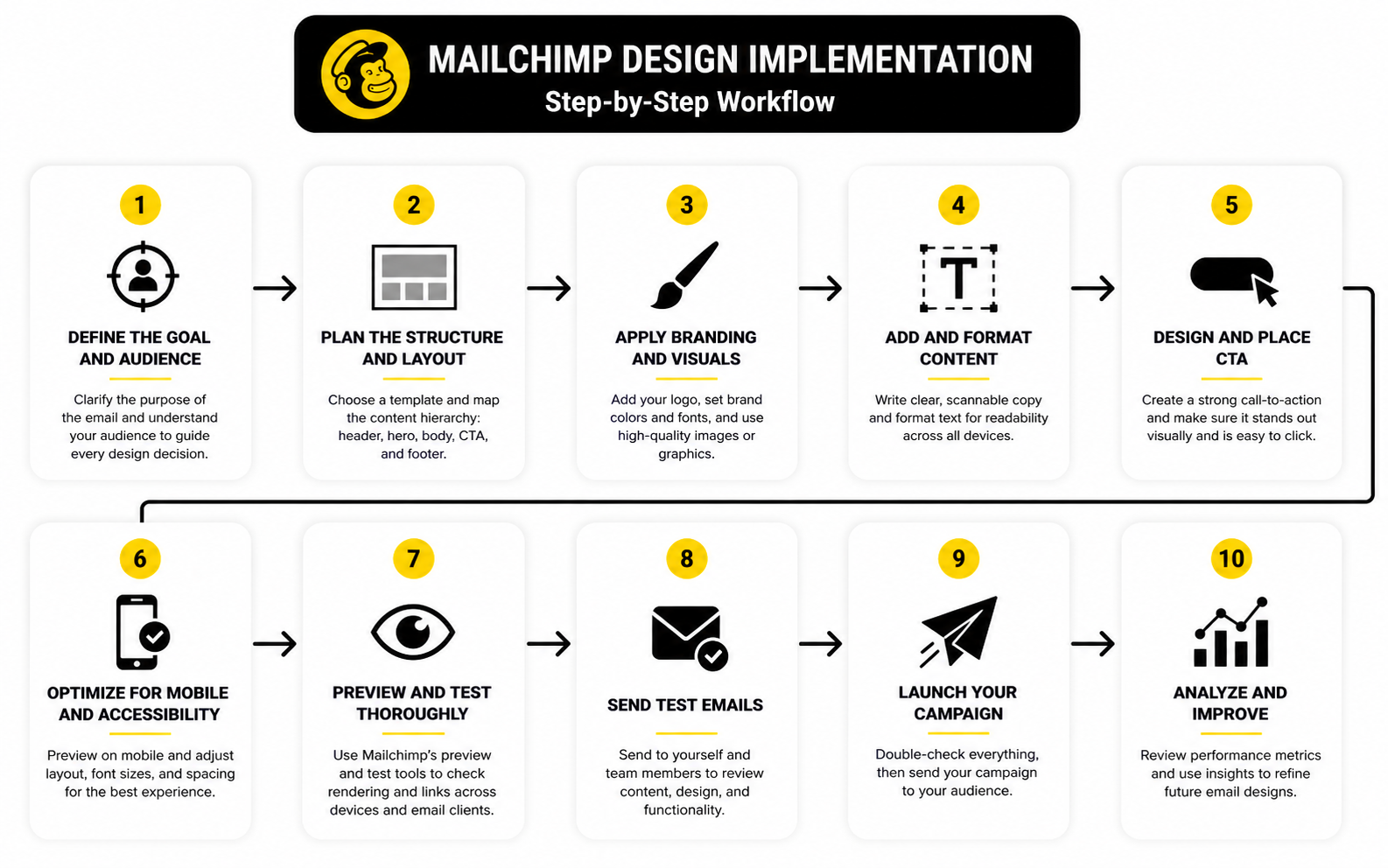
A professional Mailchimp workflow has five stages: plan the campaign, build the layout, apply the brand system, connect the action, and run quality control. Each stage protects the campaign from a different type of failure. Skip one, and the email may still send, but it will usually perform worse than it should.
Step 1: Plan the Campaign Before Opening the Builder
Before you open Mailchimp’s email builder, define the job of the campaign. Is the email supposed to sell, educate, invite, announce, recover, onboard, or re-engage? That single decision affects the layout more than any template choice.
A launch email needs urgency and a clear primary CTA. A newsletter needs scannable sections and a reason to keep reading. A lifecycle email needs relevance, timing, and a smooth path to the next step.
Write the campaign brief in plain language first. Define the audience segment, the main promise, the supporting points, the CTA, and the success metric. When those pieces are clear, the design has direction instead of becoming decoration.
Step 2: Choose the Right Layout for the Message
The layout should match the type of email you are sending. A simple announcement may only need a headline, short body, image, and button. A newsletter may need multiple content blocks, but each block should still have a clear role.
Mailchimp offers templates and content blocks, but the best choice is not always the most visually complex one. Mailchimp’s own email design guidance points toward clear calls to action, responsive layouts, and easy navigation as core design priorities. That is a useful reminder: the layout exists to move the reader, not to show off the tool.
For most campaigns, start with a single-column structure. It is easier to read on mobile, easier to scan, and less likely to break across email clients. Use columns only when they genuinely help comparison, categorization, or product browsing.
Step 3: Build a Reusable Brand System
A strong Mailchimp design system gives every campaign a familiar rhythm. The reader should recognize the sender before they reach the footer. That recognition comes from consistent use of logo placement, colors, typography, image style, button treatment, and section spacing.
Mailchimp’s guidance on email branding highlights consistency as a way to build recognition and trust. In practice, that means you should not redesign your emails from zero every week. You should create a flexible system that can handle different campaign types while still feeling like the same brand.
This does not mean every email should look identical. A product launch, customer update, and educational newsletter can have different structures. They should still share enough visual DNA that the subscriber instantly knows who is speaking.
Step 4: Create Campaign-Specific Content Blocks
Reusable templates save time, but campaign-specific content blocks make the email feel relevant. The mistake is treating every campaign like a clone of the last one. If the message changes, the structure may need to change too.
Create blocks around the reader’s decision process. Start with the main reason to care, then add the supporting context, then make the next step obvious. If a block does not help the reader understand, trust, or act, remove it.
This is especially important for ecommerce and service businesses. Product grids, testimonials, feature blocks, and event sections can all work well, but only when they support the campaign goal. More blocks do not automatically create more value.
Step 5: Keep Copy and Design in the Same Workflow
Copy and design should not be treated as separate stages that barely talk to each other. The copy decides what needs emphasis. The design decides how that emphasis appears on the screen.
When the two are disconnected, the email usually feels awkward. You get headlines that are too long for the layout, buttons that repeat weak language, or image sections that do not support the message. The result may look polished, but it does not read naturally.
A better process is to rough out the email in sections before finalizing either copy or design. Decide where the headline, body, proof, image, CTA, and footer will sit. Then refine the words and layout together until the email feels clear from top to bottom.
Setting Up Templates Without Locking Yourself In
Templates are useful, but they can also make teams lazy. The goal is not to create one template and force every campaign into it. The goal is to create a small set of reliable layouts that match the real campaign types your business sends.
A practical setup might include a newsletter template, a product announcement template, a promotional template, an onboarding template, and a simple plain-style update. Each one should have a specific purpose. That keeps the design system organized without turning every email into the same layout.
The key is flexibility. A template should give you structure, not trap you inside a format that no longer fits the message. If your Mailchimp design process cannot adapt, it will eventually make your emails feel stale.
Newsletter Templates
A newsletter template should make repeated reading easy. Subscribers need to recognize the format quickly and understand where to find the main story, secondary links, and closing CTA. Consistency helps here because readers learn the rhythm over time.
Keep the top section focused. Do not open with five competing links before the reader understands the main value of the issue. A strong newsletter usually has one lead item, then supporting sections that feel organized rather than dumped together.
Use clear section labels when the newsletter has multiple parts. Labels help the reader scan and choose what matters. They also make the email feel intentional, which is a small but important trust signal.
Promotional Templates
A promotional template should reduce hesitation. It needs a clear offer, a strong reason to act, and enough supporting detail to make the click feel worthwhile. This is where design discipline matters a lot.
Do not bury the offer under decorative content. The reader should understand what is being promoted, why it matters, and what to do next. If there are conditions, timelines, or limitations, make them visible without overwhelming the email.
Promotional emails also need strong landing page alignment. If the email promises one thing and the click leads to a page that feels disconnected, the design has failed at the handoff. The email and destination should feel like one continuous experience.
Automation Templates
Automation emails need a different mindset because they are usually triggered by behavior or lifecycle stage. A welcome email, abandoned cart email, renewal reminder, and re-engagement email should not feel like generic broadcasts. They should feel timely and useful.
The design should support that context. Keep the layout focused on the reason the email was triggered. Do not overload automated emails with unrelated announcements just because there is empty space.
Automation templates are also where small details matter. Personalization fields, fallback text, dynamic content, and timing all affect the experience. Before any automation goes live, test the full journey rather than only previewing one email in isolation.
Using Mailchimp’s Builder More Professionally
Mailchimp’s builder makes email creation accessible, but accessibility is not the same as strategy. The tool gives you blocks, styles, previews, and testing options. You still need judgment.
A professional workflow treats the builder as the production environment, not the planning environment. That means the campaign logic should already be clear before the build starts. The builder is where you assemble and refine, not where you figure out what the email is supposed to say.
Use saved sections when they protect consistency. Headers, footers, legal details, button styles, and common content patterns should not be recreated manually every time. The more repeatable your system is, the fewer mistakes your team will make under deadline pressure.
Content Blocks
Content blocks should be chosen based on function. A text block explains. An image block supports. A button block directs action. A divider creates separation, but it should not become a crutch for messy structure.
Avoid stacking too many block types just because they are available. Every new visual pattern asks the reader to adjust. If the email changes style every few inches, it feels less professional.
Create a small internal rule set for blocks. For example, define when to use a hero section, when to use a secondary CTA, and when to use product blocks. Simple rules make the design process faster and more consistent.
Brand Kit and Styles
A brand kit is useful because it reduces manual decisions. When colors, fonts, logos, and button styles are already defined, the team can focus on the message. That is how Mailchimp design becomes scalable.
Still, brand settings should be tested in real emails. A color that looks great on a website may not have enough contrast inside an email. A font choice that feels elegant in a brand deck may not be readable in a crowded inbox.
Treat the brand kit as a starting point, not a guarantee. Check how the design looks on mobile, in dark mode, and across major inbox environments. The goal is not only brand consistency; the goal is usable brand consistency.
Saved Sections and Repeatable Patterns
Saved sections are one of the easiest ways to improve production quality. They reduce the chance that someone rebuilds a footer incorrectly, changes button styling by accident, or forgets a standard preference link. That kind of consistency matters when campaigns are produced often.
Use saved sections for elements that should rarely change. Headers, footers, signature areas, disclaimer blocks, and standard CTA modules are good candidates. Campaign-specific content should stay flexible.
The best saved sections are simple. If a saved block is too complex, people will either misuse it or avoid it. Keep repeatable patterns clean enough that the team can apply them quickly without breaking the design.
Statistics and Data: What Mailchimp Metrics Actually Tell You
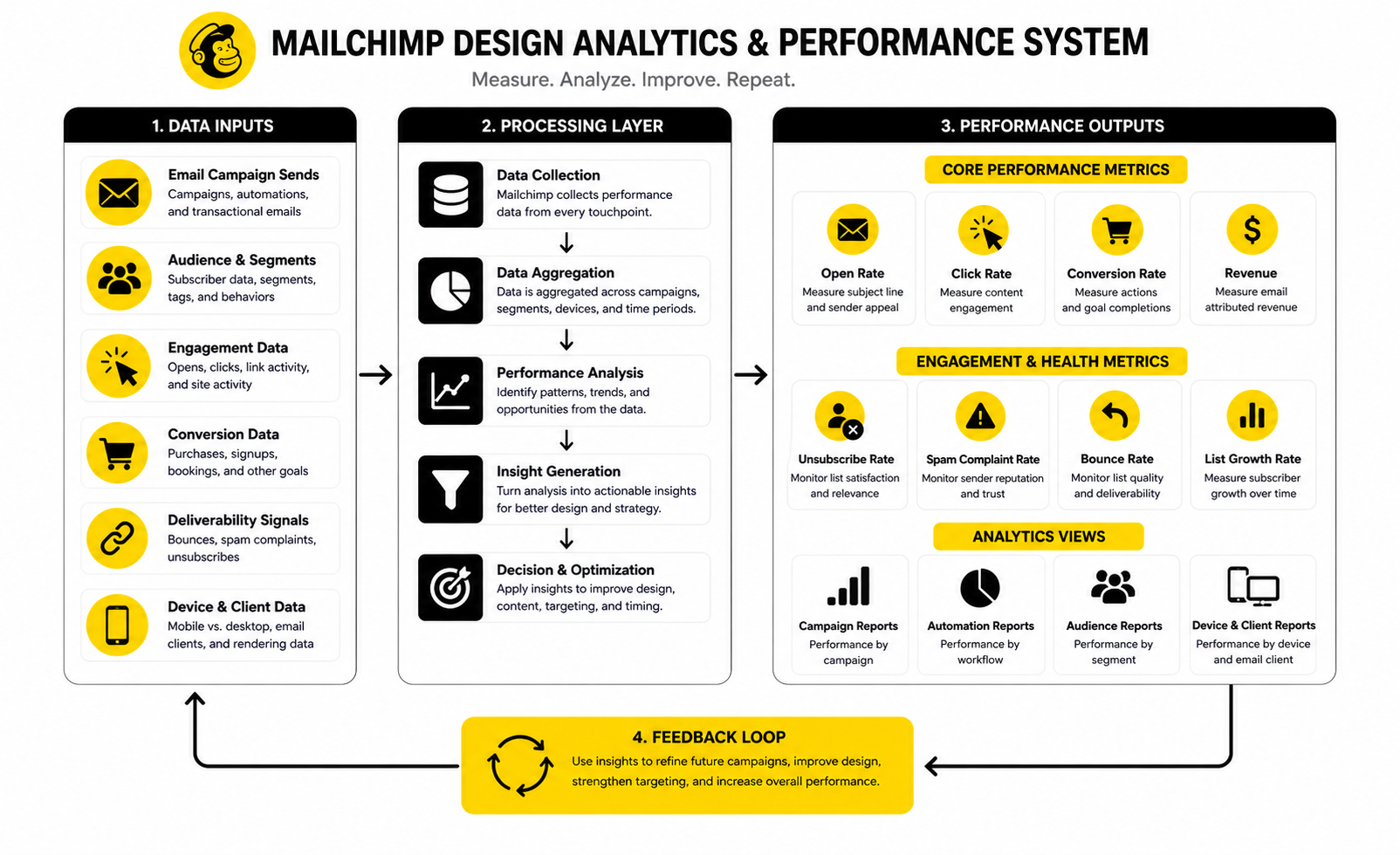
Mailchimp design should be judged by behavior, not opinions. A campaign can look beautiful in the builder and still fail if people do not open it, click it, buy from it, reply to it, or stay subscribed after receiving it. The numbers are not there to make the dashboard look important; they are there to show where the reader experience is breaking.
The first rule is simple: do not treat one metric as the whole truth. Open rate, click rate, click-to-open rate, bounce rate, unsubscribe rate, spam complaints, revenue, and downstream conversions each describe a different part of the email journey. When you read them together, you can tell whether the problem is the audience, the subject line, the design, the offer, the landing page, or the list quality.
Mailchimp’s benchmark data is useful because it is based on billions of emails sent through its platform, with averages broken down by industry for open rates, click rates, soft bounces, and hard bounces. That does not mean your campaign should blindly chase the average. It means you should use benchmarks as context, then compare each campaign against your own list history.
Open Rate Is a Signal, Not a Score
Open rate tells you whether the email earned enough attention to be viewed, but it is no longer a clean measurement of human interest. Apple’s Mail Privacy Protection changed the reliability of open tracking by allowing emails to be preloaded in ways that can inflate reported opens. That is why modern email analysis should treat opens as a directional signal, not a final verdict.
This matters for Mailchimp design because a high open rate does not prove the body of the email worked. It may only prove that the subject line, sender name, timing, or audience segment created enough curiosity. If people open but do not click, reply, buy, or continue through the funnel, the issue is likely inside the email or immediately after the click.
Open rate is still useful when you compare similar campaigns sent to similar audiences. It can help you spot subject line fatigue, weak segmentation, poor timing, or deliverability problems. Just do not celebrate opens without checking what happened next.
Click Rate Shows Whether the Email Created Action
Click rate is usually more useful than open rate when judging Mailchimp design. It tells you whether the email gave readers a reason to move forward. If the campaign has a clear CTA and the click rate is weak, the design may not be making the action obvious enough.
A low click rate can come from several issues. The offer may not be relevant, the CTA may be buried, the visual hierarchy may be weak, or the email may be asking for too many different actions. This is why click data should always be reviewed alongside the actual layout, not just inside a report.
Mailchimp explains that click rates vary by audience, industry, company size, and other factors, which is why comparing your campaign to your own previous sends is usually more practical than obsessing over a universal average. Use industry benchmarks to understand the range. Use your own trend line to decide what needs fixing.
Click-to-Open Rate Helps Diagnose the Design
Click-to-open rate is useful because it focuses on people who opened the email and then asks whether the content persuaded them to click. If open rate is strong but click-to-open rate is weak, the subject line may have done its job while the email body underdelivered. That is a design and messaging problem.
This is where Mailchimp design becomes very measurable. You can look at the first screen, headline, section order, button placement, copy clarity, and supporting visuals. If the email asks for action but the path to that action feels slow or confusing, the click-to-open rate will usually show it.
Do not use click-to-open rate in isolation either. Privacy changes can distort open-based calculations, so pair it with total clicks, unique clicks, conversion data, and revenue where possible. The goal is not a perfect metric; the goal is better decisions.
Bounce Rate Reveals List and Delivery Problems
Bounce rate is not mainly a design metric, but it affects the performance of every design choice. If emails are not reaching valid inboxes, your layout, CTA, and copy cannot do their job. Hard bounces usually point to invalid or non-existent addresses, while soft bounces often involve temporary delivery issues.
Mailchimp’s reporting separates delivery performance from engagement, which is helpful because these are different problems. A low-performing campaign is not always a creative failure. Sometimes the issue is list hygiene, old contacts, poor acquisition sources, or sending to people who should no longer be on the list.
Healthy email design starts before the email is built. Use clean signup forms, clear consent, realistic expectations, and regular list maintenance. If the list quality is poor, even the best Mailchimp design will be fighting uphill.
Unsubscribes and Spam Complaints Show Trust Pressure
Unsubscribes are not always bad. Sometimes they remove people who were never going to engage, which can improve the quality of the list over time. The problem is when unsubscribe rates rise after specific campaign types, design changes, frequency increases, or unclear promises.
Spam complaints are more serious because they show a stronger trust failure. The reader did not just lose interest; they felt the email did not belong in their inbox. That can damage deliverability and make future campaigns harder to place well.
When unsubscribes or complaints rise, do not only blame the offer. Check whether the design looked too aggressive, whether the subject line overpromised, whether the email frequency changed, or whether the campaign was sent to the wrong segment. Trust is part of design.
Revenue and Conversion Data Connect Design to Business Results
For ecommerce, SaaS, agencies, creators, and service businesses, email performance should eventually connect to business outcomes. Clicks matter, but clicks are not the finish line. The real question is whether the email helped create purchases, bookings, trials, demos, replies, applications, or qualified next steps.
Mailchimp’s marketing dashboard includes funnel-style reporting that tracks how campaign sends convert into actions such as opens, clicks, and orders. That kind of view is useful because it connects the email experience to what happens after the reader leaves the inbox. If the email gets clicks but the landing page does not convert, the design problem may be the handoff rather than the email itself.
This is where tools outside Mailchimp can support the workflow. If a campaign drives people into a funnel, the email and landing page need to feel like one connected experience. For funnel-heavy businesses, platforms like ClickFunnels, Systeme.io, or GoHighLevel can make sense when the goal is to connect email traffic to offers, pages, forms, calendars, and follow-up sequences.
How to Read Campaign Performance Without Fooling Yourself
The biggest mistake is judging every campaign by the same standard. A newsletter, sale email, webinar invitation, onboarding message, product launch, and re-engagement campaign should not be evaluated in exactly the same way. They have different jobs.
A newsletter may be judged by repeat engagement, clicks to content, replies, and long-term list health. A promotional campaign may be judged by revenue, conversion rate, average order value, and unsubscribe pressure. An onboarding email may be judged by product activation, account setup, or the next behavior you want the user to complete.
That is why every campaign should have one primary metric and a few guardrail metrics. The primary metric tells you whether the campaign did its job. The guardrails tell you whether it caused damage while doing it.
Match Metrics to Campaign Intent
If the campaign is designed to drive sales, revenue and conversion rate matter more than opens. If the campaign is designed to educate, clicks to the main resource and time-on-page may matter more. If the campaign is designed to reactivate subscribers, engagement from previously inactive contacts matters more than broad list averages.
This is practical because it stops teams from overreacting to the wrong number. A campaign can have a lower open rate but higher revenue if it reaches the right segment with a stronger offer. A newsletter can have a modest click rate but still be valuable if it keeps high-quality subscribers engaged over time.
Mailchimp design should be judged against the job of the email. That sounds obvious, but many teams skip it. They look at the dashboard first and the strategy second, which leads to bad decisions.
Look for Patterns, Not One-Off Spikes
One campaign rarely tells the whole story. A strong result might come from seasonality, timing, list segment, offer strength, or a subject line that happened to land well. A weak result might come from a holiday, inbox competition, deliverability issue, or audience mismatch.
Look for patterns across similar sends. Compare newsletters to newsletters, promos to promos, onboarding emails to onboarding emails, and abandoned cart emails to abandoned cart emails. This keeps the analysis honest.
When a pattern repeats, then you have something worth acting on. If CTAs near the top consistently get more clicks, adjust the structure. If image-heavy designs consistently underperform, simplify. If mobile users click less, review spacing, button size, and first-screen clarity.
Segment Data Before Changing the Design
Overall campaign averages can hide the most useful insights. New subscribers may behave differently from long-term subscribers. Buyers may respond differently from leads. Mobile readers may interact differently from desktop readers.
Before redesigning everything, break performance down by segment where Mailchimp data allows it. Look at engagement by audience group, purchase behavior, signup source, geography, or lifecycle stage. The design problem may not be universal.
This matters because broad redesigns can create new problems. If only one segment is underperforming, the fix may be a more relevant version of the email, not a new template. Better segmentation often improves design performance without changing the visual system much at all.
Turning Analytics Into Design Decisions
Data only helps if it changes what you do next. The dashboard should not become a reporting ritual where everyone nods at numbers and sends the next campaign the same way. Each useful metric should connect to a specific design decision.
If open rate is weak, review sender name, subject line, preview text, audience fit, and send timing. If click rate is weak, review message clarity, CTA placement, button copy, visual hierarchy, and offer relevance. If conversion rate is weak after strong clicks, review the landing page and the promise made in the email.
This is the simplest way to make Mailchimp design better over time. You do not need to redesign everything after every send. You need to identify the biggest friction point and improve that part first.
What to Change When Opens Are Weak
Weak opens usually point to the inbox layer. The subject line may be too vague, the preview text may be wasted, the sender name may not be recognizable, or the audience may not care about the topic. Design inside the email cannot solve a message that never earns attention.
Start by comparing the campaign against similar sends. If the same audience usually opens at a higher rate, check what changed. Was the topic weaker, the timing different, or the subject line less specific?
Then test one variable at a time. Do not change the subject line, sender name, preview text, and segment all at once unless the campaign is clearly broken. Controlled changes make the data easier to trust.
What to Change When Clicks Are Weak
Weak clicks usually mean the email did not create enough motivation or clarity. The CTA may be too generic, the offer may not be obvious, or the layout may spread attention across too many sections. This is where design has a direct impact.
Start with the first screen. The reader should understand the main value quickly. If the headline, opening copy, and first CTA do not work together, the email loses momentum early.
Then review the CTA path. Make sure the main button is visible, specific, and supported by the copy around it. If there are multiple CTAs, decide whether they help the reader choose or simply dilute attention.
What to Change When Conversions Are Weak
Weak conversions after strong clicks usually mean the issue is not only the email. The landing page may not match the promise, the offer may need more proof, the form may be too long, or the checkout flow may create friction. The email can drive intent, but the destination has to capture it.
Check message match first. The headline on the landing page should feel connected to the email CTA. If the reader clicks for one promise and lands on something broader, trust drops fast.
Then check the next action. If the email CTA says “Book a demo,” the page should make booking easy. If it says “Get the guide,” the form should not feel like a sales interrogation. Good Mailchimp design includes the click destination, not just the campaign body.
Testing, Optimization, and Workflow
At a higher level, Mailchimp design is really a system for making better decisions before and after each send. The visual design matters, but the workflow around the design matters just as much. A rushed campaign with no testing, weak segmentation, and unclear ownership can make even a strong template underperform.
This is where advanced teams separate themselves. They stop treating email as a one-time creative task and start treating it as a repeatable operating system. Every campaign becomes a chance to improve the template, the segmentation, the offer, the landing page, and the production process.
That does not mean making the workflow heavy. It means making the important checks unavoidable. The goal is to move faster without letting preventable mistakes reach the inbox.
Build a Pre-Send Review System
A pre-send review system protects the campaign from obvious errors and quiet performance leaks. Broken links, missing merge tags, weak preview text, low-contrast buttons, oversized images, and unclear CTAs are all fixable before the email goes out. The problem is that teams often notice them only after the send.
A good review system should include content, design, technical, and strategic checks. Content checks confirm that the message is clear and the offer is accurate. Design checks confirm that the hierarchy, spacing, images, mobile view, and CTA treatment support the goal.
Technical checks matter because email clients behave differently. Gmail, Apple Mail, Outlook, and mobile inboxes do not always render campaigns the same way. Professional Mailchimp design assumes variation and tests for it instead of pretending the builder preview is enough.
Use Segmentation Before Redesigning Everything
When a campaign underperforms, the first instinct is often to redesign the email. Sometimes that is the right move. More often, the sharper question is whether the right people received the right message.
Mailchimp offers segmentation options based on subscriber data, engagement, purchase behavior, campaign activity, location, signup source, and other audience signals. That matters because design cannot fix poor relevance. If the audience does not care about the message, a cleaner layout will only make the wrong message easier to ignore.
Segmentation also lets you make the same design work harder. A product announcement can have one structure but different lead angles for buyers, non-buyers, high-intent leads, and inactive subscribers. The layout stays consistent, while the message becomes more relevant.
Personalization Should Help, Not Perform
Personalization is powerful when it makes the email more useful. It is weak when it only drops a first name into the greeting and pretends that is relevance. Real personalization changes the content, timing, recommendation, CTA, or follow-up based on what the subscriber actually needs.
The design has to support this without becoming chaotic. Dynamic content blocks can be useful, but they need rules. If every subscriber sees a different mix of sections, the email still needs to feel coherent from top to bottom.
A practical approach is to personalize the parts that affect the reader’s decision most. That may be the opening angle, product recommendation, event location, use case, or CTA. Keep the surrounding brand structure stable so the email feels personal without feeling stitched together.
Protect Deliverability as Part of Design
Deliverability is not only a technical issue. It is also affected by trust, engagement, list quality, authentication, and how easy it is for people to leave when they are no longer interested. If subscribers ignore, delete, complain, or disengage over time, design performance will eventually suffer.
Google’s sender guidelines require practices such as authenticating email, making unsubscribe easy, and keeping unwanted mail low for senders reaching Gmail personal accounts. That should influence how marketers think about Mailchimp design. A clean unsubscribe path is not a weakness; it is part of maintaining a healthy sender relationship.
Do not hide the unsubscribe link, overuse misleading subject lines, or send campaigns to people who clearly stopped engaging. Those choices may look like growth in the short term, but they create long-term risk. Good email design respects the inbox because the inbox decides whether future campaigns get a fair chance.
Advanced Mailchimp Design Tradeoffs
Advanced Mailchimp design is full of tradeoffs. The right answer depends on the audience, campaign type, offer, frequency, and business model. A design choice that works for one brand can create friction for another.
The key is to avoid absolute rules. Minimal emails are not always better. Highly visual emails are not always worse. Long emails are not automatically bad, and short emails are not automatically clear.
What matters is whether the design supports the job of the campaign. If the email needs to explain a complex offer, it may need more structure and proof. If the email is a simple reminder, it may need fewer elements and a faster CTA.
Brand Polish vs. Speed
Polished design builds trust, but speed matters when campaigns are tied to market timing, launches, events, or time-sensitive offers. The challenge is finding a system that gives you both. You do not want every send trapped in a slow design review.
The answer is a flexible template library. Build reusable sections for common campaign types so the team can move quickly without improvising the basics every time. Headers, footers, CTA blocks, product sections, event modules, and simple announcement layouts should already exist.
Then reserve custom design work for campaigns that actually deserve it. A major launch, partner campaign, seasonal sale, or high-value automation may justify deeper creative work. A quick product update probably does not.
Simplicity vs. Revenue Density
Revenue-focused emails often face a tempting question: should you include more products, more offers, and more links? Sometimes that works, especially for ecommerce audiences who expect browsing. But more choice can also weaken the main action.
Simplicity gives the reader a cleaner path. Revenue density gives the reader more opportunities to find something relevant. Neither is automatically right.
The decision should come from campaign intent. If the email promotes one hero offer, keep the design focused. If the email functions like a curated catalog, use clear categories, strong product hierarchy, and a layout that helps people scan without feeling buried.
Automation vs. Human Control
Automation helps teams scale, but it can also make emails feel generic if the strategy is weak. A welcome sequence, abandoned cart flow, reactivation campaign, or post-purchase journey should feel timely and intentional. It should not feel like a machine is dumping content into the inbox.
Mailchimp automation becomes stronger when each email has one job. The first welcome email might confirm the promise and set expectations. The next might educate. Another might invite the subscriber to take a specific action.
The tradeoff is control. The more complex the automation, the more carefully it needs to be mapped, tested, and reviewed. If a workflow has outdated offers, broken logic, or poor timing, it can quietly damage the customer experience for months.
Visual Creativity vs. Accessibility
Creative email design can make a brand memorable. Accessibility makes sure more people can actually use the message. The best teams do not treat those as enemies.
Accessible design usually improves the experience for everyone. Clear contrast, readable text, meaningful headings, descriptive links, and usable buttons help people on phones, people in bright light, people using assistive technology, and people scanning quickly. That is not a niche concern; it is practical design.
The risk comes from over-designing. Image-only sections, tiny type, vague buttons, low-contrast color combinations, and visual order that does not match reading order can make an email harder to use. If the creative idea makes the message less usable, it is not a better design.
Scaling Mailchimp Design Across a Team
Scaling Mailchimp design is less about adding more templates and more about creating shared standards. When several people write, design, approve, and send campaigns, inconsistency creeps in fast. One person changes button copy, another changes spacing, another forgets the footer format, and soon the brand feels uneven.
A design system solves this by giving the team a common language. It defines how emails should look, how sections should be used, how CTAs should be written, and how campaigns should be checked before launch. This keeps quality high without forcing every decision through one person.
The system should be documented in a way real people will use. A 40-page brand guide that nobody opens is not a workflow. A practical email playbook with examples, templates, naming rules, QA steps, and campaign types is much more useful.
Create an Email Playbook
An email playbook should explain how your team uses Mailchimp in the real world. It should cover campaign types, template selection, tone, CTA rules, image guidelines, accessibility checks, segmentation basics, and approval steps. Keep it practical, not theoretical.
The playbook should also define what “done” means. A campaign is not done when the copy is pasted in. It is done when the segment is right, links are checked, mobile view is reviewed, images have alt text, preview text is written, and the CTA destination matches the promise.
This is especially important for growing teams. Without a playbook, quality depends on whoever happens to build the email that day. With a playbook, the system carries more of the quality burden.
Set Naming and Version Rules
Naming rules sound boring until the account becomes impossible to manage. Campaigns, templates, segments, automations, and saved sections need clear names. Otherwise, the team wastes time guessing which version is current.
Use names that include campaign type, audience, date, and purpose when relevant. A naming system should make sense six months later, not just on the day the campaign is created. This helps with reporting, reuse, and cleanup.
Version control matters too. If a template is updated, the team should know whether older automations need to be reviewed. A design improvement only helps if it reaches the campaigns that are still running.
Review Automations on a Schedule
Automations are easy to forget because they run quietly. That is exactly why they need scheduled reviews. A welcome sequence written two years ago may include outdated positioning, old offers, weak design, or links to pages that no longer match the business.
Review automations by journey stage. Check the trigger, timing, segment logic, email content, design, CTA, landing page, and performance data. Do not only look at the email in isolation.
This is where Mailchimp design becomes lifecycle design. The subscriber is not seeing one campaign; they are experiencing a sequence of touches over time. The design should feel coherent across that journey.
Know When Mailchimp Needs Support From Other Tools
Mailchimp can cover a lot, but not every business should force every workflow into one platform. Sometimes the email is only one part of a larger system involving forms, booking pages, funnels, SMS, CRM records, customer support, and sales follow-up. When that happens, the design question becomes bigger than the email.
For businesses that rely heavily on funnels and sales workflows, GoHighLevel can be useful when the priority is connecting email with CRM, pipeline, calendar, and follow-up automation. For simpler funnel builds, Systeme.io can make sense when the goal is to connect pages, emails, and offers without overcomplicating the stack. For landing-page-heavy ecommerce campaigns, Replo may fit when the email needs to drive into better product or campaign pages.
The point is not to add tools for the sake of it. The point is to protect the customer journey. If Mailchimp sends the email but another tool owns the page, form, booking, or sales process, the experience still needs to feel connected.
Final System for Better Mailchimp Design
At this stage, Mailchimp design should feel less like a creative guessing game and more like a working system. You have the strategy, the components, the implementation process, the measurement layer, and the scaling rules. The last step is putting those pieces together so every campaign has a clear reason to exist.
That system starts with intent. Every email should have a defined audience, a single main job, a readable structure, and a measurable next step. If those pieces are missing, the design will usually become decorative instead of useful.
It also needs discipline. Strong emails are not built by adding more blocks, more colors, more CTAs, or more urgency. They are built by removing friction until the message feels obvious, trustworthy, and easy to act on.
The Practical Mailchimp Design Checklist
Use this checklist before sending any important campaign. It is not meant to slow you down. It is meant to stop avoidable mistakes from damaging good work.
The checklist is simple, but that is the point. A complicated process gets ignored when deadlines get tight. A simple process becomes part of how the team works.
What Good Mailchimp Design Looks Like in Practice
Good Mailchimp design feels calm. The reader knows who sent the email, why it matters, and what they can do next. There is no need to decode the layout or hunt for the action.
It also feels intentional. The heading, body copy, visuals, CTA, and footer all serve the same campaign goal. Nothing feels like it was added just because there was space.
Most importantly, good design respects the subscriber. It does not trick them into opening, pressure them with fake urgency, or hide the unsubscribe link. It earns attention by being useful, clear, and consistent.
What is Mailchimp design?
Mailchimp design is the process of planning, structuring, styling, testing, and improving emails built in Mailchimp. It includes the visual layout, copy hierarchy, mobile experience, CTA placement, accessibility, brand consistency, and performance measurement. The goal is not just to make emails look good, but to make them easier to read and more likely to drive the right action.
Why does Mailchimp design matter?
Mailchimp design matters because subscribers make fast decisions in the inbox. If the email feels cluttered, unclear, or hard to read, people move on quickly. Strong design reduces friction and helps the message feel more trustworthy.
What makes a Mailchimp email look professional?
A professional Mailchimp email has a clear structure, consistent branding, readable typography, strong spacing, useful images, and one obvious primary CTA. It also works well on mobile and does not rely on images alone to communicate the message. Professional design feels organized, not overdesigned.
Should I use Mailchimp templates or custom designs?
Mailchimp templates are a good starting point when you need speed and consistency. Custom designs make sense when you have a strong brand system, a high-value campaign, or a specific layout that templates cannot support well. The best approach is usually a small library of flexible templates that can be adapted without starting from zero every time.
How many CTAs should a Mailchimp email have?
Most Mailchimp emails should have one primary CTA. Secondary links can work, especially in newsletters or product roundups, but they should not compete with the main action. If every button feels equally important, the reader has to do more work.
Is mobile-first design necessary for Mailchimp emails?
Yes, mobile-first design is necessary because many subscribers read email on phones and tablets. Mailchimp’s own mobile email design guidance emphasizes that device behavior should shape design choices. A campaign that only looks good on desktop is not finished.
How do I improve click rates in Mailchimp?
Improve click rates by making the offer clearer, tightening the first screen, using a stronger CTA, reducing competing links, and matching the email to the right audience segment. Click rate usually improves when the reader understands the value faster. Do not change everything at once, or you will not know what actually helped.
Are open rates still useful?
Open rates are useful as a directional signal, but they are less reliable than they used to be. Apple Mail Privacy Protection can preload emails in ways that affect open tracking, which makes open-based reporting less precise. Treat opens as one signal, then compare them with clicks, conversions, replies, revenue, unsubscribes, and list health.
What is the best layout for Mailchimp design?
The safest layout for most campaigns is a clean single-column structure. It works well on mobile, keeps the reading path simple, and reduces rendering issues across clients. More complex layouts can work, but they need a strong reason to exist.
How important is accessibility in Mailchimp design?
Accessibility is essential because it helps more subscribers read, understand, and interact with your emails. Mailchimp’s accessibility guidance focuses on making campaigns usable for all subscribers, including people using assistive technology. In practice, accessibility also improves clarity for everyone.
Should Mailchimp emails use lots of images?
Images can help when they add product clarity, brand emotion, or visual context. They become a problem when the email depends on them completely. Important information should still be available in live text because images may load slowly, be blocked, or be missed by assistive technology.
How often should I redesign my Mailchimp templates?
You should review templates regularly, but you do not need to redesign them constantly. Redesign when performance patterns show friction, when the brand changes, when mobile experience is weak, or when templates no longer match your campaign types. Small improvements often beat large redesigns that disrupt a working system.
What should I test in Mailchimp email design?
Test subject lines, preview text, CTA copy, CTA placement, email length, section order, audience segments, and landing page alignment. Testing should answer a clear question. Random testing creates noise, but focused testing improves future decisions.
How do I know if my Mailchimp design is working?
Your Mailchimp design is working when it supports the campaign goal without creating unnecessary friction. For a sales email, that may mean revenue and conversions. For a newsletter, it may mean repeat engagement, clicks, replies, and healthy unsubscribe levels.
What is the biggest Mailchimp design mistake?
The biggest mistake is designing around the template instead of the reader. A template can make an email look organized, but it cannot fix a weak message, poor offer, wrong segment, or confusing CTA. Start with the reader’s next step, then design the email around that.
Build a stronger local presence with BAAM AI
Turn your website, Google profile, social channels, and AI visibility into one growth engine
Most businesses do not need more random marketing activity. They need a consistent presence system that helps the right people find them, trust them, and take action. BAAM AI brings strategy, local SEO, website updates, Google Maps visibility, social content, AI-search readiness, media production, and reporting into one practical monthly engine.
If you want your marketing to keep working after the campaign ends, start with a free BAAM AI presence audit. See how your business shows up today and where the fastest visibility wins are at BAAM AI.