
BAAM AI Blog
Mailchimp Customer Journey: A Practical Guide To Building Smarter Email Automation
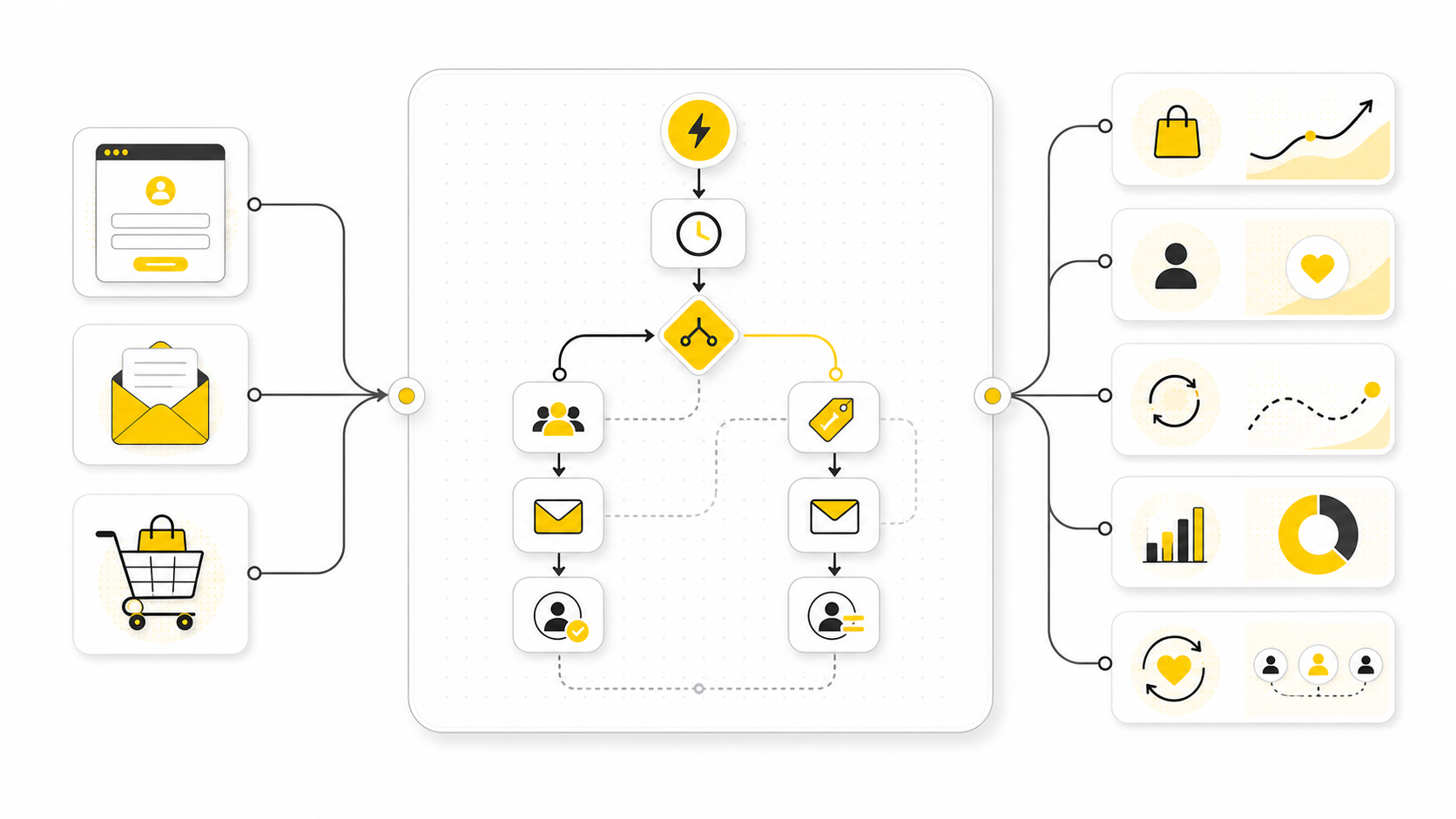
A Mailchimp customer journey is not just a prettier version of a drip campaign. It is a structured automation path that moves people through different messages, delays, rules, and actions based on what they do, who...
Affiliate disclosure: this article may include compensated links. Recommendations should still be evaluated against your use case, budget, and current provider terms.
Should you choose Drip?
Drip is worth considering when the use case, budget, and implementation effort match what you actually need to do next.
teams that want a practical tool decision without reading another generic feature list
Check DripA Mailchimp customer journey is not just a prettier version of a drip campaign. It is a structured automation path that moves people through different messages, delays, rules, and actions based on what they do, who they are, and where they are in the buying process. Used well, it helps you stop sending the same email to everyone and start building follow-up that actually matches the customer’s intent.
That matters because most email automation fails for a simple reason: it is built around the business, not the customer. Someone downloads a lead magnet, gets five generic emails, and then disappears. A better journey asks a different question: what should happen next based on this person’s behavior?
This guide will break down Mailchimp customer journeys in a practical way. We will look at the strategy first, then the moving parts, then the implementation process, then the mistakes that quietly hurt performance. By the end, you should be able to plan a journey before touching the builder, create cleaner automation logic, and know when Mailchimp is enough versus when a broader CRM or funnel platform such as GoHighLevel may make more sense.
Why Mailchimp Customer Journeys Matter
A Mailchimp customer journey matters because email automation is no longer only about saving time. The real value is relevance. When a subscriber receives a message that fits what they just did, the email feels helpful instead of automated.
This is where customer journeys become more useful than basic one-size-fits-all campaigns. A welcome sequence, abandoned cart flow, post-purchase follow-up, lead nurturing path, and re-engagement campaign all have different jobs. Treating them as separate strategic journeys makes your email marketing cleaner, easier to measure, and much easier to improve.
The practical benefit is control. Instead of manually remembering who needs a follow-up, Mailchimp can move contacts through a sequence based on triggers, delays, conditions, tags, and actions. That gives small teams a way to run more professional lifecycle marketing without manually managing every contact.
The Mailchimp Customer Journey Framework
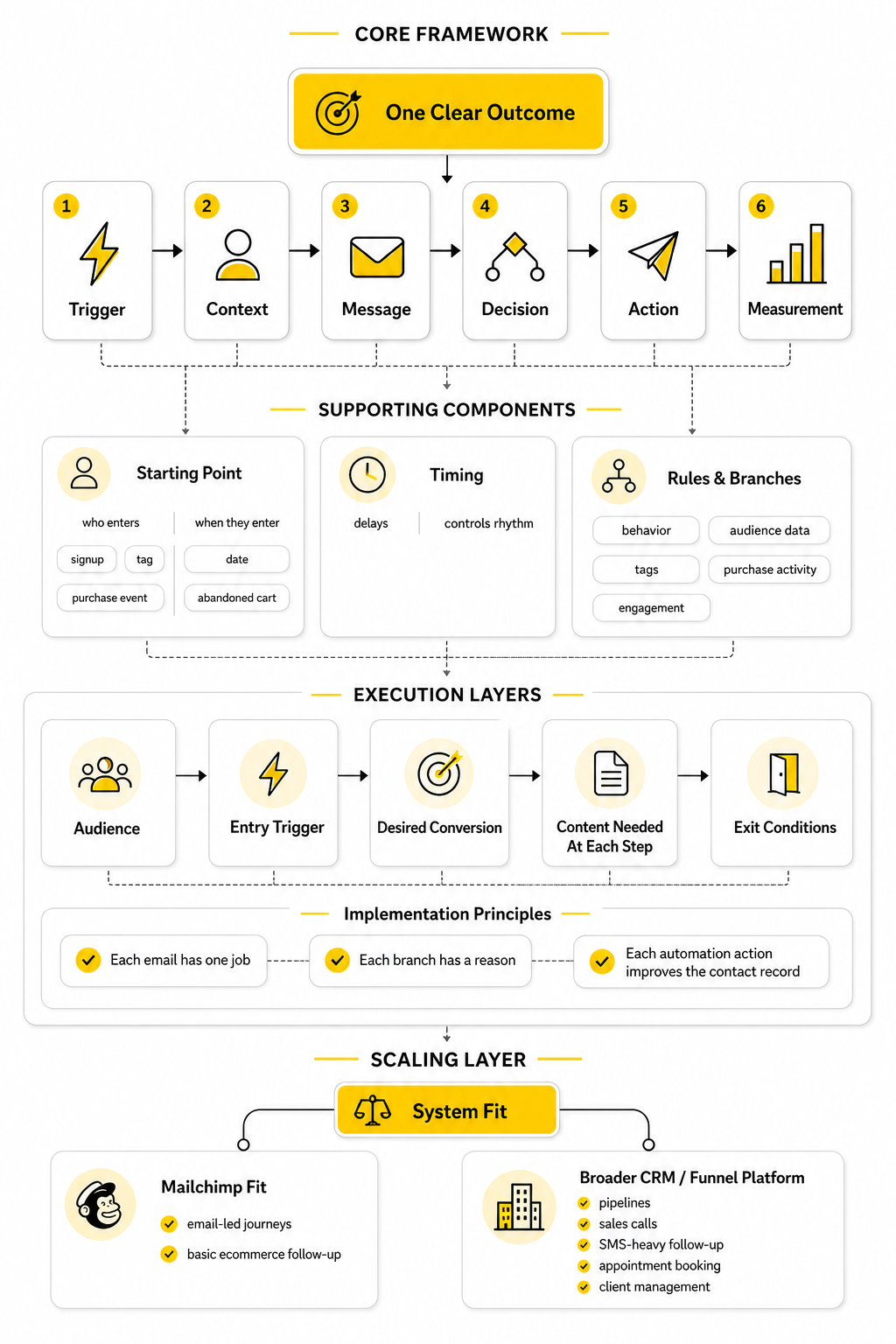
A strong Mailchimp customer journey starts with one clear outcome. That outcome might be getting a new subscriber to trust you, moving a lead toward a consultation, recovering a potential order, encouraging a second purchase, or waking up an inactive contact. Without that outcome, the journey becomes a random chain of emails instead of a focused system.
The simplest framework is: trigger, context, message, decision, action, and measurement. The trigger starts the journey, the context explains why the person entered, the message moves them forward, the decision checks what they did next, the action updates their profile or sends the next step, and measurement tells you whether the journey is working. This keeps the build grounded in customer behavior rather than internal guesswork.
The mistake is opening Mailchimp first and strategy second. That usually creates bloated automation with too many emails, unclear timing, and weak segmentation. A better approach is to sketch the journey on paper first, decide what each step is supposed to accomplish, and only then build the automation inside Mailchimp.
Core Components Of A Mailchimp Customer Journey
Every Mailchimp customer journey has a few core components that determine how useful it becomes. The starting point decides who enters the journey and when. This could be a signup, a tag being added, a purchase event, a date, an abandoned cart, or another behavior that signals intent.
The next layer is timing. Delays matter because they control the rhythm of the customer experience. Send too quickly and the journey feels aggressive; wait too long and the moment disappears. Good timing is not about filling space between emails, it is about matching the natural pace of the decision.
Rules and branches are where the journey becomes more intelligent. They let you separate people based on behavior, audience data, tags, purchase activity, or engagement. That is what allows one subscriber to receive a helpful next step while another exits the journey or moves into a different path.
Professional Implementation Starts Before The Builder
Professional implementation is mostly planning. Before building a Mailchimp customer journey, define the audience, the entry trigger, the desired conversion, the content needed at each step, and the exit conditions. If those pieces are unclear, the automation will probably be messy even if the design looks clean.
The best journeys are usually not the longest ones. They are the clearest ones. Each email should have one job, each branch should have a reason to exist, and each automation action should make the contact record more useful in the future.
This is also where you should decide whether Mailchimp is the right center of gravity for the workflow. If the journey is mainly email and basic ecommerce follow-up, Mailchimp can be a strong fit. If the journey needs pipelines, sales calls, SMS-heavy follow-up, appointment booking, and client management in one place, it may be worth comparing the setup with a broader system like GoHighLevel before you build too much around one tool.
Choosing The Right Journey For The Customer’s Stage
A Mailchimp customer journey should match where the person is right now, not where you wish they were. A brand-new subscriber needs orientation and trust. A returning buyer needs reinforcement, education, or a relevant next offer.
This is why one automation cannot do everything. A welcome journey, abandoned cart journey, lead nurture journey, post-purchase journey, and re-engagement journey all serve different moments. When those moments get blended together, the messaging usually becomes vague and the customer experience gets noisy.
The better move is to define the customer stage before you define the emails. Ask what the person already knows, what they probably need next, and what action would make sense from their point of view. That one decision makes the entire journey easier to build.
Welcome Journeys
A welcome journey is usually the first serious touchpoint after someone joins your list. The goal is not to sell as hard as possible in the first email. The goal is to confirm the value they expected, introduce the brand clearly, and create enough trust for the next step.
This journey works best when it feels immediate and useful. If someone signs up for a discount, send the discount and make the buying path obvious. If someone signs up for educational content, deliver the promised resource and then guide them toward the next useful topic.
Do not overload the first welcome sequence with every possible message. New subscribers do not need your full company history, every product category, and five unrelated calls to action at once. They need a clear reason to keep opening your emails.
Lead Nurture Journeys
A lead nurture journey is for people who showed interest but are not ready to buy yet. This is common for service businesses, agencies, consultants, software companies, and higher-consideration offers. The job of the journey is to reduce uncertainty one step at a time.
The content should answer the questions that naturally appear before someone converts. What problem does this solve? Why now? Why this solution instead of doing nothing? Why should they trust you?
A good nurture journey does not feel like a lecture. It feels like a guided conversation. Each email should move the reader from one level of awareness to the next, without pretending they are ready for a sales call before they actually are.
Abandoned Cart Journeys
An abandoned cart journey is built around urgency, friction, and intent. The person already showed buying behavior, so the message can be more direct than a general newsletter. The key is to remind them what they left behind and remove the reason they may have paused.
That pause could be price, timing, shipping, product uncertainty, distraction, or comparison shopping. Your journey should not assume every abandoned cart means the same thing. A simple reminder may be enough for some customers, while others may need social proof, product details, or support.
Mailchimp can be useful here when your store data is connected properly. The automation is only as good as the ecommerce signal behind it. If the cart event, product data, or customer identity is messy, the journey will feel unreliable no matter how good the copy is.
Post-Purchase Journeys
A post-purchase journey is one of the most underrated parts of email automation. Many businesses put all their energy into getting the first order and then go quiet after the customer buys. That is a wasted opportunity.
The first job is reassurance. The customer should feel like they made a good decision, understand what happens next, and know where to go if they need help. After that, the journey can shift toward product education, repeat purchase timing, reviews, referrals, or complementary offers.
This is where restraint matters. A customer who just bought does not always need another pitch immediately. Sometimes the smartest email is the one that helps them get more value from what they already purchased.
Re-Engagement Journeys
A re-engagement journey is for contacts who have gone quiet. The purpose is to find out whether they still want to hear from you and give them a reason to reconnect. It also protects your list quality by avoiding endless sends to people who no longer care.
This journey should be honest and simple. You can remind people what they originally signed up for, offer a useful update, or let them choose what kind of emails they want going forward. If they still do not engage, it may be better to reduce frequency or remove them from regular sends.
Do not treat re-engagement like a desperate final sale. The goal is not to squeeze one more click from a cold contact. The goal is to keep the list healthy and focus attention on people who still show genuine interest.
Matching Journey Logic To Real Customer Behavior
A strong Mailchimp customer journey is built around behavior, not assumptions. Someone who clicked a product link is showing a different signal from someone who opened a general newsletter. Someone who bought yesterday should not receive the same pitch as someone who has never purchased.
This is where tags, segments, groups, and ecommerce activity become important. They help Mailchimp understand the difference between contacts instead of treating the audience as one flat list. The more useful your contact data is, the more natural your journey logic can become.
That does not mean you need a complicated system from day one. Start with the few signals that actually matter for your business. In most cases, those are signup source, engagement, purchase behavior, interest category, and sales readiness.
Signup Source
Signup source tells you why someone entered your world. A person who joined from a lead magnet may need education. A person who joined from a product page may be closer to buying.
This should influence the first few emails they receive. If you ignore signup source, you risk sending generic welcome content to people who already had a specific intent. That creates friction because the automation does not match the moment.
In Mailchimp, signup source can be handled through forms, landing pages, tags, integrations, or audience fields depending on your setup. The important part is consistency. If every form labels people differently, your journeys become harder to control later.
Engagement Level
Engagement level helps you decide how aggressively to continue the conversation. Someone who opens, clicks, and visits key pages is showing interest. Someone who ignores every message may need a slower path or a different angle.
This matters because automation can create fatigue when it keeps pushing people who are not responding. More emails are not automatically better. Better timing, better segmentation, and cleaner exits usually beat longer sequences.
Use engagement as a signal, not as a personality test. A low-engagement contact is not always a bad lead. They may simply need a different topic, a stronger reason to act, or fewer emails.
Purchase Behavior
Purchase behavior changes the relationship immediately. Once someone buys, they should stop receiving messages that speak to them like a non-customer. This sounds obvious, but it is one of the most common automation mistakes.
A customer journey should recognize first purchases, repeat purchases, product categories, and timing when that data is available. A first-time buyer may need onboarding. A repeat buyer may be ready for loyalty messaging or a higher-value recommendation.
This is also where Mailchimp can start to feel limited for businesses with complex sales processes. If the customer journey needs to coordinate email, SMS, pipeline stages, bookings, tasks, and sales follow-up, a CRM-centered platform such as GoHighLevel may be more practical than forcing everything into email automation alone.
Interest Category
Interest category keeps your automation relevant. If someone only cares about one product line, service, or topic, sending them everything can weaken the relationship. Relevance is built by respecting what the person has already shown you.
This can be tracked through tags, groups, link clicks, form choices, or product behavior. The method matters less than the discipline of using it consistently. Once you know what people care about, your journey can send fewer but better messages.
Interest data is especially useful for content-heavy businesses. Instead of dumping every subscriber into the same newsletter path, you can guide people toward the topics that match their intent. That makes the Mailchimp customer journey feel more personal without needing overcomplicated personalization.
How To Plan Your Customer Journey Before Building It
The implementation process starts before you touch the Mailchimp builder. That is not theory. It is the difference between a journey that feels intentional and one that becomes a messy chain of emails, delays, and branches nobody wants to maintain later.
Start by writing the journey in plain English. Who enters, why do they enter, what should they receive first, what behavior matters next, and when should they leave? If you cannot explain the journey clearly without software, building it inside Mailchimp will not magically make it clearer.
This planning step also helps you avoid one of the biggest automation mistakes: adding complexity because the tool allows it. Mailchimp automation flows can use triggers, branches, actions, and rules to personalize the path for each contact, but the best setup is still the one that supports the customer’s next logical step. Simple and useful beats clever and confusing.
Define The Entry Point
The entry point is the moment a contact qualifies for the journey. In Mailchimp, that can come from a trigger such as a signup, tag, purchase behavior, date, audience field, or other condition. The key is to choose a trigger that reflects real intent, not just convenience.
For example, “joins audience” is broad. It may work for a general welcome journey, but it is too vague for a serious lead nurture path. A more useful trigger might be “tag added: pricing interest” or “form submitted: consultation request,” because those signals tell you what the person probably needs next.
Be careful with multiple entry points. Mailchimp allows automation flows to start from more than one trigger, but each trigger should represent a similar customer moment. If one journey includes newsletter subscribers, checkout abandoners, and booked-call leads, the message will almost certainly become watered down.
Decide The Primary Conversion
Every Mailchimp customer journey needs one primary conversion. That conversion does not always have to be a purchase. It could be a booked call, a product view, a reply, a completed profile, a second purchase, a review, or a preference update.
The important thing is choosing one main outcome before you write the emails. When the conversion is unclear, every message starts competing with every other message. The customer gets several calls to action, and the automation becomes harder to measure.
This also makes reporting more practical. Open rates and clicks can tell you whether people are engaging, but they do not automatically prove the journey is doing its job. The real question is whether the journey moves the right people toward the action it was built to create.
Map The Customer Questions
Before you build the flow, list the questions the customer needs answered. A new lead may wonder whether the solution is credible. A first-time buyer may wonder what happens next. An inactive subscriber may wonder why they should care again.
These questions become the backbone of your content. Each email should answer one meaningful question and move the person forward. That keeps the journey focused and prevents the classic mistake of writing emails just because there is a delay slot to fill.
This is also where you can decide what not to say. Not every product detail belongs in the first journey. Not every objection needs a separate email. The goal is to reduce friction without overwhelming the reader.
Choose The Exit Conditions
Exit conditions are just as important as entry conditions. A contact should not keep moving through a journey after the journey’s purpose has already been completed. If someone buys, books, replies, or stops qualifying, the automation needs a clean way to move them out.
This protects the customer experience. Nothing feels more careless than receiving a “still thinking it over?” email after you already purchased. It also protects your reporting because people who already converted will not keep distorting the performance of later steps.
In practice, exits can be handled with tags, segments, purchase events, conditional splits, or manual sales-process updates. The exact method depends on your account and integration setup. The principle is always the same: when the customer’s status changes, the journey should respond.
Professional Implementation In Mailchimp
Once the plan is clear, the build becomes much easier. You are no longer staring at a blank automation canvas trying to invent the strategy inside the tool. You are translating a customer path into Mailchimp’s triggers, delays, rules, emails, and actions.
The workflow should move in a controlled order. Build the structure first, then add the emails, then connect the logic, then test the full path. If you write and design everything before checking the logic, small strategic changes can force you to redo too much work.
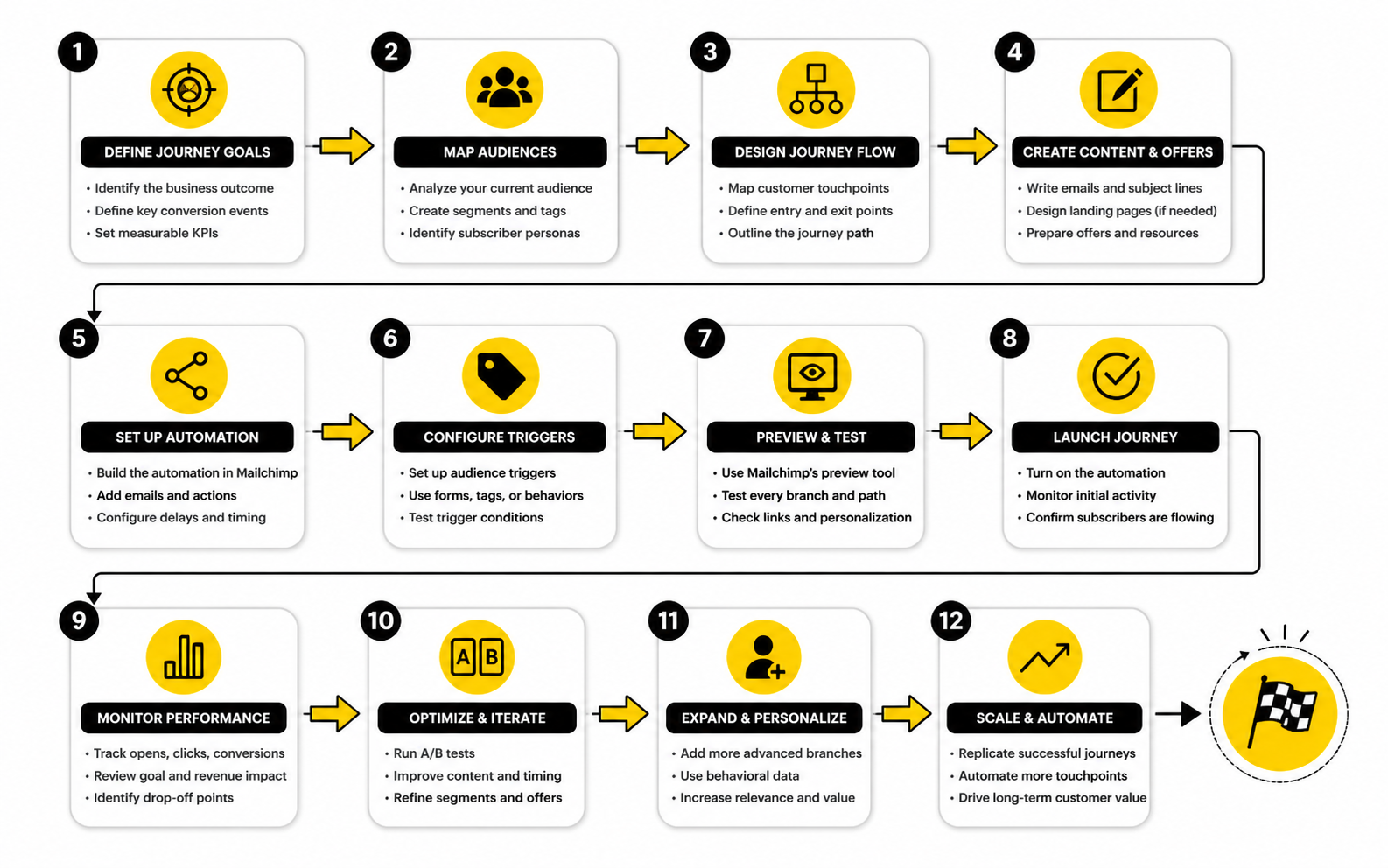
A professional implementation also means naming everything clearly. Use journey names, tags, segments, and email names that another person could understand later. You may remember what “Nurture 2B Final” means today, but you probably will not enjoy decoding it six months from now.
Step 1: Create The Automation Flow
Start by creating the automation flow that matches the journey type. Mailchimp offers templates for common paths, and those can be useful when the structure is close to what you already planned. Do not use a template as a substitute for strategy, though.
A template should be treated like scaffolding. Keep the parts that match your customer path and remove anything that does not serve the outcome. If the template has extra branches or messages you cannot justify, simplify it before adding content.
At this stage, focus on the skeleton. Add the starting point, rough sequence, major delays, and obvious decision points. The goal is to see the shape of the journey before you polish the details.
Step 2: Add Delays With A Real Reason
Delays control the pace of the experience. They should be based on the customer’s decision cycle, not on random spacing. A short delay can work after a high-intent action, while a longer delay may fit better when the customer needs time to read, compare, or use a product.
Think about what the person realistically needs before the next message. If they just downloaded a guide, they may need time to consume it. If they abandoned a cart, the reminder should usually come while the product is still fresh in their mind.
Avoid using delays as filler. A three-day gap does not automatically make an email sequence feel strategic. The delay should make the next message arrive at a more useful moment.
Step 3: Build Conditional Splits
Conditional splits are where the Mailchimp customer journey starts reacting to behavior. They let contacts follow different paths based on audience data, campaign activity, purchase activity, tags, or other conditions. This is where the automation becomes more than a straight line.
Use splits only when the next message should genuinely change. If both branches say almost the same thing, you probably do not need the branch. Every split adds maintenance, so each one should earn its place.
A practical split might check whether someone clicked a pricing link, purchased a product, booked a call, or engaged with the previous email. That behavior can determine whether they receive a stronger call to action, more education, a customer follow-up, or an exit from the journey.
Step 4: Add Actions That Keep The Contact Record Useful
Actions are easy to overlook because emails feel more visible. But actions are what keep the contact record clean. They can add tags, remove tags, update fields, move contacts into another process, or help future segmentation work better.
This matters because a journey should improve your system as it runs. If someone clicks a specific topic, the journey can tag that interest. If someone becomes a customer, the automation can remove them from lead-focused paths. If someone does not engage, they can be routed into a slower re-engagement or suppression process later.
Do not add tags randomly. Tagging should create future value. If a tag will never be used for segmentation, reporting, exclusion, or personalization, it is probably noise.
Statistics And Data
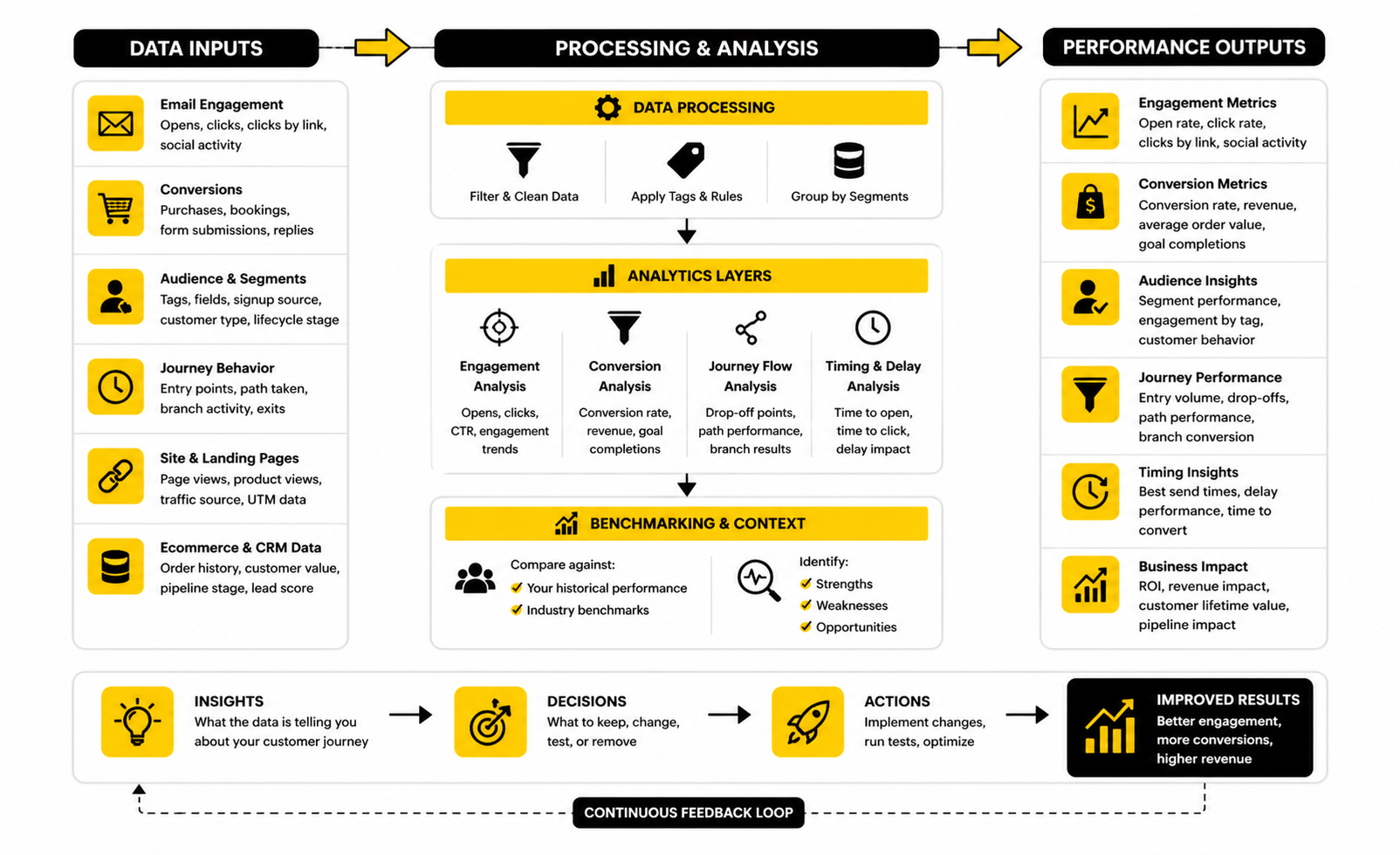
Measurement is where a Mailchimp customer journey stops being a nice-looking automation and starts becoming a business system. The point is not to collect every possible number. The point is to understand what each number says about customer intent, message relevance, and revenue movement.
A journey can have healthy open rates and still fail commercially. It can also have average-looking clicks but produce strong revenue because the right people are clicking at the right moment. That is why the data needs to be interpreted by journey stage, not judged as one flat campaign report.
Mailchimp’s own automation reporting focuses on signals like opens, clicks, social activity, purchases, and other tracked activity inside each flow, which makes the report useful for spotting patterns in how contacts engage over time through marketing automation flow reports. Those patterns matter more than a single impressive email metric. You are looking for where people move forward, where they stall, and where the journey creates a measurable action.
The Metrics That Actually Matter
Open rate is useful, but it is not the final truth. It can tell you whether the subject line, sender name, timing, and audience match were strong enough to earn attention. It cannot tell you whether the email created revenue, trust, or meaningful intent by itself.
Click rate is usually more useful because it shows active behavior. A click means the person did something beyond passively seeing the message. In a Mailchimp customer journey, clicks can help you decide whether a contact should receive more education, a direct offer, a sales follow-up, or a different path entirely.
Conversion rate is the metric that connects the journey to the business goal. That conversion could be a purchase, booking, reply, product view, review, or completed form. The specific conversion depends on the journey, but the rule stays the same: measure the action the automation was built to create.
Benchmarks Are Context, Not Goals
Benchmarks are helpful because they give you a reference point. They are dangerous when people treat them like universal targets. A welcome journey, abandoned cart journey, re-engagement journey, and post-purchase journey should not all be judged by the same expectations.
Industry benchmark reports can still help you sanity-check performance. For example, MailerLite’s 2025 benchmark report is based on more than 3.6 million campaigns from 181,000 approved accounts, which makes it useful for broad context. But your own list quality, offer, timing, industry, and customer stage will always shape what “good” actually means.
This is especially important with automated journeys because the audience is usually more specific than a newsletter audience. A pricing-page lead might click at a much higher rate than a cold subscriber. An inactive contact in a re-engagement path may perform far below your average campaign, and that does not automatically mean the journey is broken.
What Opens Really Tell You
Opens are best treated as an attention signal. If an email inside the journey has weak opens compared with the surrounding emails, the issue may be the subject line, sender identity, preview text, timing, or audience fit. It may also mean the previous step did not create enough reason to care.
Do not overreact to one weak open rate. Look for patterns across the journey. If every email after the first one drops sharply, the problem is probably not just subject lines; the journey may be losing relevance after the initial promise is delivered.
Open data is also less clean than many marketers assume. Privacy features, image loading behavior, and inbox differences can distort what gets counted. Use opens to diagnose attention, but do not use them as the main proof that a Mailchimp customer journey is working.
What Clicks Really Tell You
Clicks tell you what people are willing to act on. That makes them powerful because they reveal intent. If people open but do not click, the email may be interesting but not persuasive enough to move them forward.
Look at which links get clicked, not just how many clicks happened. A click to a pricing page means something different from a click to a general blog post. A click to support content after purchase may show healthy onboarding behavior, while a click to a discount link may show price sensitivity.
Click data should influence the journey logic. If someone clicks a high-intent link, they may deserve a more direct next step. If they click educational content but ignore offers, they may need more trust-building before the pitch becomes useful.
What Conversions Really Tell You
Conversions tell you whether the journey is doing its job. This is where many email programs get weak because they track engagement but do not connect that engagement to business outcomes. A journey with strong opens and clicks can still be underperforming if it does not create the action it was designed to create.
A recent email industry report covered by TechRadar found that fewer than half of organizations could reliably track email ROI, even though among those that did measure it, 60% reported returns above $10 for every $1 spent. That gap matters because automation can look busy without proving value. The businesses that win are not just sending journeys; they are measuring whether those journeys change behavior.
For Mailchimp, that means your conversion tracking should match the journey purpose. A lead nurture flow should be judged by sales readiness or booked calls. An ecommerce abandoned cart flow should be judged by recovered revenue. A post-purchase flow should be judged by product engagement, repeat purchase behavior, reviews, or retention signals.
Reading The Journey As A Funnel
The cleanest way to read journey data is to treat the automation like a funnel. Contacts enter at the top, receive messages and decisions in the middle, and either convert, exit, or go cold by the end. Each step should tell you whether the next step is earning attention and action.
This helps you find the real bottleneck. If many people enter but few open the first email, the problem may be the trigger, timing, sender, or promise. If people open but do not click, the message may not be compelling. If people click but do not convert, the landing page, offer, checkout, booking flow, or sales process may be the issue.
That last point matters. Not every journey problem is an email problem. Sometimes the Mailchimp customer journey is working, but the page it sends people to is weak, slow, confusing, or mismatched with the promise in the email.
Segmenting Performance By Audience
Average performance can hide the truth. A journey may look acceptable overall while performing badly for one audience segment and extremely well for another. That is why segmentation belongs in reporting, not only in sending.
Break down performance by signup source, customer type, product interest, purchase history, geography, or lead stage when those fields are available. You may discover that one lead magnet produces engaged contacts while another produces subscribers who rarely convert. That is not just an email insight; it is a customer acquisition insight.
This is where clean tags and fields pay off. If you implemented the journey with useful contact data, reporting becomes much easier. If your tags are inconsistent, your analytics will be harder to trust.
Measuring Timing And Delay Performance
Timing can make or break a journey. If an email arrives too soon, it can feel pushy. If it arrives too late, the customer’s intent may already be gone.
Look for drop-offs around delays. If engagement falls sharply after a long wait, test a shorter delay or a more relevant bridge message. If unsubscribes rise after a fast sequence, slow the pace or reduce the number of messages.
This is especially important for abandoned cart, lead follow-up, and event-based journeys. High-intent moments decay quickly. The data should help you find the window where the customer still remembers why they cared.
Turning Reports Into Decisions
Reports are only useful if they change what you do next. A good review should end with a decision: keep, improve, simplify, split, remove, or test. If the data does not lead to action, it is just dashboard decoration.
For each journey, review the same core questions:
This keeps optimization practical. You are not trying to fix everything at once. You are identifying the one part of the Mailchimp customer journey that most clearly limits the outcome, then improving that part before moving to the next.
Advanced Considerations Before You Scale
Once a Mailchimp customer journey is working, the next challenge is not adding more emails. The next challenge is keeping the system clean while the business grows. More audiences, more forms, more offers, more tags, and more customer types can quietly turn a useful automation setup into a confusing mess.
Scaling email automation is mostly about discipline. You need consistent naming, clear ownership, clean data, and a realistic limit on how many branches your team can maintain. A journey that nobody understands is not an asset, even if it technically works.
This is where advanced strategy becomes less glamorous but much more important. The goal is to build a system that can survive changes in campaigns, products, offers, and team members. If every update requires guessing how the automation works, the setup is already too fragile.
Avoid Building Too Many Journeys Too Quickly
It is tempting to create a separate journey for every idea. One for every lead magnet, every product, every audience segment, every sales angle, and every seasonal campaign. That feels organized at first, but it can create serious operational drag.
Too many journeys make it harder to know which automation a contact is in, which messages they are receiving, and whether different paths are overlapping. This can lead to duplicate emails, conflicting offers, and contacts being pulled in several directions at once. The customer does not care that the problem came from separate automations; they only feel the confusion.
A better approach is to build fewer journeys with clearer purposes. Start with the core lifecycle moments that actually affect revenue or retention. Then expand only when the data proves that a separate journey would create a better customer experience.
Use Segmentation Without Overcomplicating It
Segmentation is powerful, but it can become a trap. If you create too many tiny segments too early, you may end up with branches that barely have enough contacts to measure. That makes optimization slower and less reliable.
Good segmentation starts with meaningful differences. A customer and a non-customer should be treated differently. A high-intent lead and a passive newsletter subscriber should not receive the same follow-up. A buyer of one product category may need different education than a buyer of another.
The problem starts when segmentation becomes cosmetic. If two groups receive almost the same email with one sentence changed, the extra complexity may not be worth it. Use segmentation when it changes the message, timing, offer, or next action in a meaningful way.
Protect Deliverability As The Journey Grows
Deliverability is easy to ignore until performance drops. A Mailchimp customer journey can be strategically strong and still underperform if messages struggle to reach the inbox. That is why list quality, engagement, authentication, and sending behavior need to be treated as part of the automation strategy.
Avoid sending every journey to every possible contact. Inactive subscribers, old imported lists, and poorly qualified leads can drag down engagement over time. The automation should focus on people who have a clear reason to receive the message.
This is also why re-engagement and suppression rules matter. If someone consistently ignores your emails, sending more is not a strategy. At some point, the more carefully move is to reduce frequency, ask for preference updates, or stop sending regular promotional messages.
Keep Your Tagging System Clean
Tags can make a Mailchimp customer journey more carefully, but only if they are used with discipline. Random tags create random reporting. Overlapping tags create confusion about what a contact actually did.
A clean tagging system should have a purpose behind every tag. Some tags identify source, some identify interest, some identify lifecycle stage, and some trigger automation. Mixing all of those without a naming convention makes the account harder to manage over time.
Before adding a new tag, ask what it will be used for. If the answer is segmentation, reporting, exclusion, or automation logic, it may be useful. If the answer is “just in case,” it probably belongs in a note or does not need to exist at all.
Think Carefully About Sales Handoffs
Not every journey should stay fully automated. Some moments are better handled by a person, especially when the contact shows strong buying intent. If someone books a call, replies with a serious question, visits a high-intent page, or requests pricing, the journey may need to hand off to sales instead of continuing with generic nurture emails.
This is where the limits of a simple email-first setup can show up. Mailchimp can support useful marketing automation, but complex sales follow-up often needs clearer pipeline management, task assignment, appointment tracking, and multi-channel communication. For teams that need that broader workflow, a CRM-centered platform like GoHighLevel may be a better operational fit.
The key is not to force every process into one tool just because it is already open. Use Mailchimp when the journey is mainly email-led. Use a more complete sales and client management system when the customer path needs stronger coordination across pipeline stages, calls, SMS, forms, and follow-up tasks.
Do Not Automate What Should Be Personal
Automation should remove repetitive work, not remove judgment. A Mailchimp customer journey is useful when the next step is predictable. It becomes risky when the situation needs context, empathy, or a human decision.
For example, a standard onboarding sequence can be automated. A sensitive customer complaint should not be treated like a normal marketing path. A high-value lead asking a detailed question may need a personal response, not another scheduled nurture email.
The best systems leave room for human intervention. Use tags, notifications, and exits to pause or redirect contacts when the situation changes. Automation should support the relationship, not flatten every interaction into the same sequence.
Strategic Tradeoffs When Using Mailchimp Customer Journeys
Every platform has tradeoffs. Mailchimp customer journeys are approachable, visual, and useful for many small businesses, ecommerce stores, creators, and service providers. The tradeoff is that advanced lifecycle marketing can become harder as the business adds more sales stages, data sources, and customer paths.
That does not mean Mailchimp is the wrong choice. It means you should be honest about what you are building. A simple welcome flow and a post-purchase sequence are very different from a full revenue operations system.
The question is not “Can Mailchimp do this?” The better question is “Will this still be easy to manage when the business grows?” That question saves a lot of cleanup later.
Simplicity Versus Control
Mailchimp’s biggest advantage is simplicity. A marketer can build a useful automation without needing a technical team. For many businesses, that is exactly what they need.
The tradeoff is control. More advanced use cases may require deeper CRM logic, custom reporting, complex lead scoring, sales pipeline automation, or tighter coordination with other channels. At that point, the simple tool can start to feel restrictive.
This is not a failure of the platform. It is a sign that the business process has matured. When the journey becomes bigger than email, the system around it needs to mature too.
Templates Versus Custom Strategy
Templates can help you move faster. They are useful when you need a starting structure for a common journey such as welcome, abandoned cart, or post-purchase follow-up. They reduce the blank-page problem.
But templates cannot know your offer, customer psychology, sales cycle, margin structure, or brand positioning. If you use a template without adapting it, the journey may feel generic. That is especially risky in competitive markets where the customer is already comparing several options.
Use templates as a shortcut for structure, not as a substitute for strategy. Keep the parts that match the customer’s real situation. Rewrite or remove anything that does not support the journey’s main outcome.
Personalization Versus Privacy
Personalization can make a journey more relevant, but it needs to be handled responsibly. Customers are comfortable with helpful relevance. They are less comfortable when the message feels intrusive or overly specific.
The line is simple: use data to help the customer, not to show off how much you know. Product recommendations, preference-based content, and lifecycle-aware messages usually feel useful. Overly aggressive behavioral references can feel creepy.
This matters more as automation becomes more advanced. Just because you can personalize something does not mean you should. The strongest Mailchimp customer journey feels timely and relevant without making the reader feel watched.
Growth Versus Maintenance
Every automation you build creates a maintenance obligation. Links change, offers expire, products get updated, positioning evolves, and customer expectations shift. A journey that was accurate six months ago may quietly become outdated.
This is why every serious setup needs a review rhythm. Check the live journeys, test the links, inspect the emails, confirm the logic, and review the performance. Do not wait until something breaks publicly.
A simple quarterly review is often enough for smaller businesses. Higher-volume ecommerce or lead generation teams may need to review key journeys more often. The point is to treat automation as an active system, not a one-time project.
Common Risks That Hurt Mailchimp Customer Journeys
Most journey problems are not dramatic. They are small issues that compound over time. A weak trigger here, a stale email there, a duplicate tag somewhere else, and suddenly the customer experience feels disconnected.
The risk is that these problems are easy to miss from inside the account. The journey still sends emails. The reports still show activity. But the customer may be receiving messages that no longer match their situation.
The solution is not to panic and rebuild everything. The solution is to know the common failure points and check for them deliberately. That keeps the system healthier without turning every review into a full audit.
Contacts Enter The Wrong Journey
This usually happens when triggers are too broad or tags are applied inconsistently. A contact enters a lead nurture journey when they should be in a customer onboarding path. A subscriber enters a product-specific journey even though they only showed general interest.
The fix is to tighten the entry conditions. Make sure the trigger reflects a real customer moment. Then add exclusions so people who no longer qualify do not enter the wrong path.
This is especially important when multiple forms, integrations, or ecommerce events feed the same audience. If the data entering Mailchimp is messy, the journey logic will be messy too. Clean inputs create cleaner automation.
Customers Stay In The Journey Too Long
A journey should end when its purpose is complete. If someone buys, books, replies, or becomes disqualified, they should not keep receiving messages that assume they have not acted. This is one of the fastest ways to make automation feel careless.
Exit logic should be built into the journey from the beginning. Do not treat exits as a technical detail to handle later. They are part of the customer experience.
When exits are missing, reporting also becomes harder to trust. Converted contacts may keep moving through the flow and distort later engagement numbers. Clean exits make both the experience and the data better.
The Journey Has Too Many Calls To Action
A common mistake is asking the customer to do too much in one sequence. Read the blog, follow on social, book a call, buy the product, watch the video, download the guide, and reply with a question. That may feel useful internally, but it often creates decision fatigue.
Each journey should have one main direction. Supporting links are fine when they help the reader make progress, but they should not compete with the primary action. If the customer cannot tell what the next step is, the email has too many jobs.
This is where editing matters. Remove anything that does not support the journey’s goal. Strong automation is often the result of subtraction, not addition.
The Journey Is Not Connected To The Offer
A Mailchimp customer journey can have clean logic and polished copy but still fail because the offer is weak or unclear. Email automation cannot fix a confusing value proposition. It can only amplify what is already there.
If people click but do not convert, inspect the offer before rewriting every email. The landing page, pricing, checkout experience, booking process, or product promise may be the real bottleneck. The journey may be doing its job by sending qualified traffic to a page that does not finish the job.
This is why email optimization should not happen in isolation. Review the full path from trigger to conversion. The customer experiences the journey as one connected process, even if your team manages the pieces separately.
Optimization, Mistakes, And FAQs
At this stage, the Mailchimp customer journey should be treated as a living system. The structure is built, the reporting is active, and the risks are understood. Now the job is to keep improving the customer experience without turning the automation into a bloated machine.
The best journeys are reviewed, simplified, and adjusted over time. Customer behavior changes, offers change, deliverability conditions change, and the business itself changes. A journey that worked when the list was small may need cleaner segmentation, stronger exits, or a better handoff once volume grows.
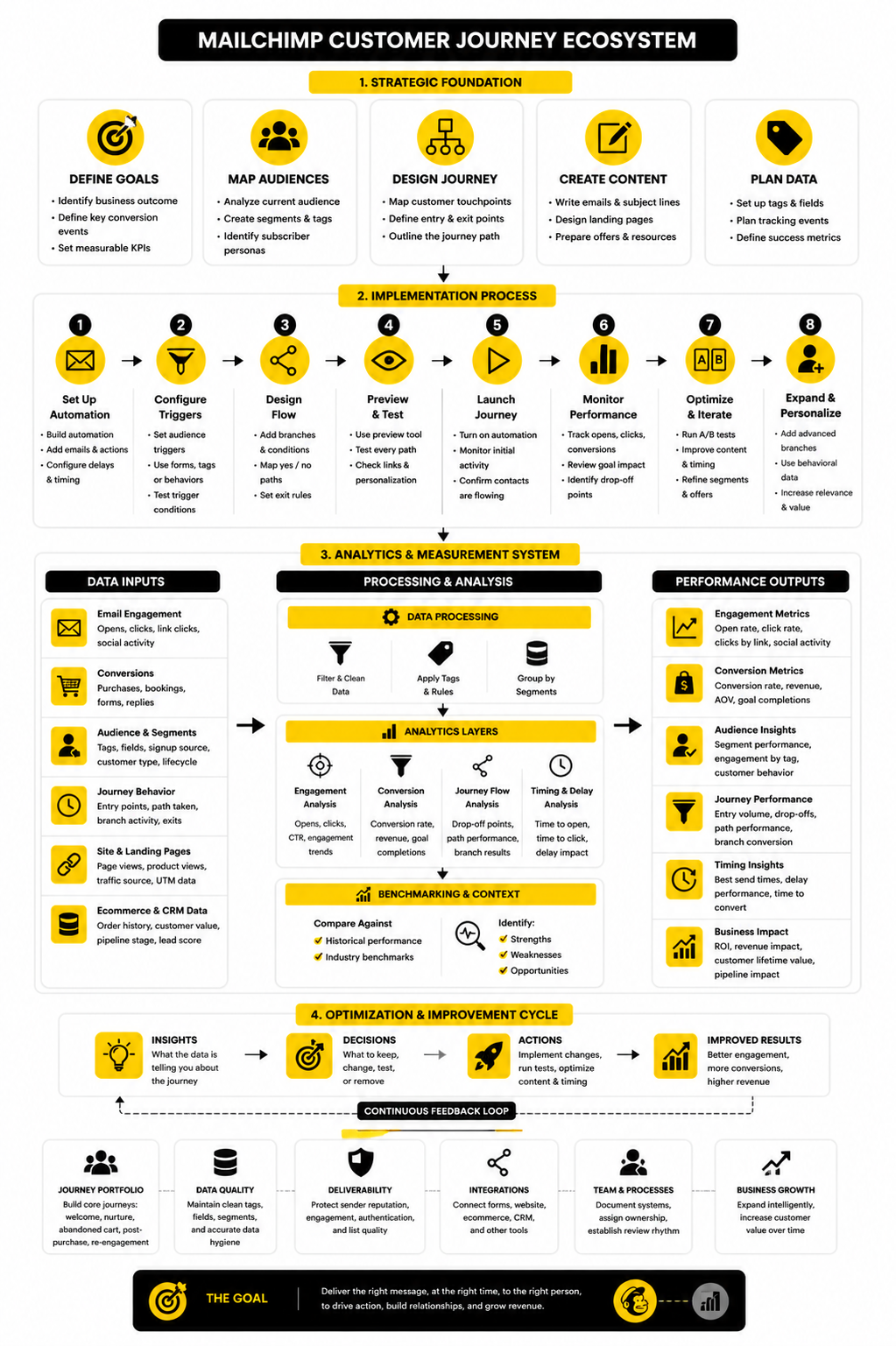
The full system should connect five things: customer intent, useful data, relevant messaging, clean automation logic, and a measurable business outcome. When those five pieces work together, Mailchimp becomes more than an email sender. It becomes a practical lifecycle engine for guiding contacts from first touch to repeat engagement.
Optimize One Constraint At A Time
Do not optimize a Mailchimp customer journey by changing everything at once. That makes the data almost useless because you will not know what caused the improvement or decline. Focus on one constraint at a time and make the smallest meaningful change.
If the first email has weak opens, test the subject line, sender name, preview text, or timing. If the email gets opens but few clicks, improve the offer, link placement, message clarity, or call to action. If clicks are healthy but conversions are weak, inspect the landing page, checkout, form, booking flow, or sales follow-up.
This is the practical way to improve automation. You do not need endless tests. You need clear diagnosis, focused changes, and enough patience to see what the data actually says.
Build A Review Rhythm
A journey should not be launched and forgotten. Even a simple automation needs regular checks to make sure the links still work, the offer still makes sense, the tags still apply correctly, and the reporting still reflects the business goal. This is basic maintenance, but it saves a lot of embarrassment.
Review your most important journeys more often than your low-volume journeys. Welcome, abandoned cart, lead nurture, and post-purchase flows usually deserve more attention because they touch valuable moments in the customer lifecycle. Lower-priority reactivation or educational flows can often be reviewed less frequently.
A strong review should end with action. Keep the journey as it is, remove weak steps, rewrite a message, tighten a trigger, adjust a delay, or change an exit rule. The point is not to admire the dashboard. The point is to make the customer path sharper.
Know When To Expand Beyond Mailchimp
Mailchimp can handle many email-led customer journeys well. It is a good fit when the main job is audience segmentation, automated email follow-up, ecommerce messaging, newsletters, and basic lifecycle communication. For many teams, that is enough.
The limitation appears when the journey becomes more operational than promotional. If you need advanced pipeline automation, sales tasks, appointment workflows, SMS follow-up, call tracking, or client management in the same system, an email-first platform may start to feel stretched. That is when a broader CRM and automation platform like GoHighLevel may be worth considering.
The decision is not emotional. Use the tool that matches the workflow. Mailchimp is useful for focused email automation; a full CRM becomes more useful when the customer journey needs sales, service, and operations connected in one place.
What Is A Mailchimp Customer Journey?
A Mailchimp customer journey is an automated path that sends contacts through messages, delays, rules, and actions based on specific triggers and behavior. It can be used for welcome sequences, abandoned cart follow-up, lead nurturing, post-purchase education, re-engagement, and other lifecycle moments. The goal is to send more relevant communication based on where the contact is in the relationship.
Is A Mailchimp Customer Journey The Same As An Email Sequence?
No, it is more flexible than a basic email sequence. A simple sequence sends emails in a fixed order, usually with delays between them. A Mailchimp customer journey can include branches, conditions, tags, exits, and different paths based on what each contact does.
What Should I Build First In Mailchimp?
Start with the journey that supports the most important customer moment. For many businesses, that is a welcome journey because every new subscriber experiences it. Ecommerce brands may prioritize abandoned cart or post-purchase journeys first because those are closer to revenue.
How Many Emails Should A Customer Journey Have?
There is no perfect number. A short journey with three useful emails can outperform a long journey with ten weak ones. The right number depends on the customer’s stage, the complexity of the offer, and the amount of information needed to help them take the next step.
How Long Should The Delays Be Between Emails?
Delays should match the customer’s intent and decision cycle. A high-intent cart reminder may need a shorter delay, while an educational lead nurture path may need more breathing room. The best timing is the one that helps the next message arrive when it is still useful.
What Is The Biggest Mistake In A Mailchimp Customer Journey?
The biggest mistake is building the automation before defining the strategy. When the trigger, outcome, audience, and exit conditions are unclear, the journey usually becomes messy. A clear plan makes the builder much easier to use.
How Do I Know If My Journey Is Working?
Look at the metric that matches the journey’s purpose. A welcome journey may be judged by engagement and first meaningful action. An abandoned cart journey should be judged by recovered purchases. A lead nurture journey should be judged by qualified replies, booked calls, or movement toward the sales process.
Should I Use Tags Or Segments In Mailchimp Customer Journeys?
Use both when they serve a clear purpose. Tags are useful for marking behavior, interests, lifecycle stages, and automation triggers. Segments are useful for grouping contacts based on shared conditions, such as purchase history, engagement, or signup source.
Can A Contact Be In Multiple Journeys At Once?
Yes, depending on your setup, a contact can qualify for more than one automation path. That is why exclusions and exit rules matter. Without them, contacts can receive overlapping emails that feel confusing or repetitive.
Should I Use Mailchimp Templates Or Build From Scratch?
Templates are useful for speed, especially for common journeys like welcome, abandoned cart, and post-purchase follow-up. But they should be adjusted to match your actual offer, audience, and customer stage. A template gives you structure; it does not replace strategy.
When Should I Remove Someone From A Journey?
Remove or exit someone when the journey’s purpose no longer applies. If they buy, book a call, reply, become inactive, or enter a more relevant lifecycle stage, they should not keep receiving messages written for their old status. Clean exits make the customer experience more professional.
What Is The Difference Between Mailchimp And A CRM For Customer Journeys?
Mailchimp is mainly built around marketing communication, especially email automation and audience management. A CRM is built around relationship management, pipeline visibility, sales follow-up, and operational coordination. If your journey is mostly email, Mailchimp may be enough; if it requires sales tasks, appointments, SMS, pipeline stages, and client follow-up, a CRM-centered system may fit better.
Can I Use Mailchimp For Service Businesses?
Yes, Mailchimp can work well for service businesses that need lead magnets, welcome journeys, nurture emails, consultation follow-up, and re-engagement. The key is to track lead source and intent clearly. Service businesses should also think carefully about when automation should hand off to a real person.
How Often Should I Review My Mailchimp Customer Journey?
Review key journeys at least quarterly, and review revenue-critical journeys more often if they drive a lot of sales or leads. Check the logic, links, copy, tags, exclusions, and performance data. Small maintenance habits prevent bigger automation problems later.
What Makes A Mailchimp Customer Journey Feel Personal?
A personal journey responds to context. It uses signup source, interest, engagement, purchase behavior, or lifecycle stage to make the next message more relevant. It does not need to be overly complex; it just needs to avoid treating every contact like the same person.
Build a stronger local presence with BAAM AI
Turn your website, Google profile, social channels, and AI visibility into one growth engine
Most businesses do not need more random marketing activity. They need a consistent presence system that helps the right people find them, trust them, and take action. BAAM AI brings strategy, local SEO, website updates, Google Maps visibility, social content, AI-search readiness, media production, and reporting into one practical monthly engine.
If you want your marketing to keep working after the campaign ends, start with a free BAAM AI presence audit. See how your business shows up today and where the fastest visibility wins are at BAAM AI.