
BAAM AI Blog
Mailchimp Autoresponder: The Practical Guide To Building Email Automation That Actually Converts
A Mailchimp autoresponder is not just a “set it and forget it” email sequence. Used well, it becomes the system that welcomes new subscribers, follows up after key actions, segments people based on behavior, and...
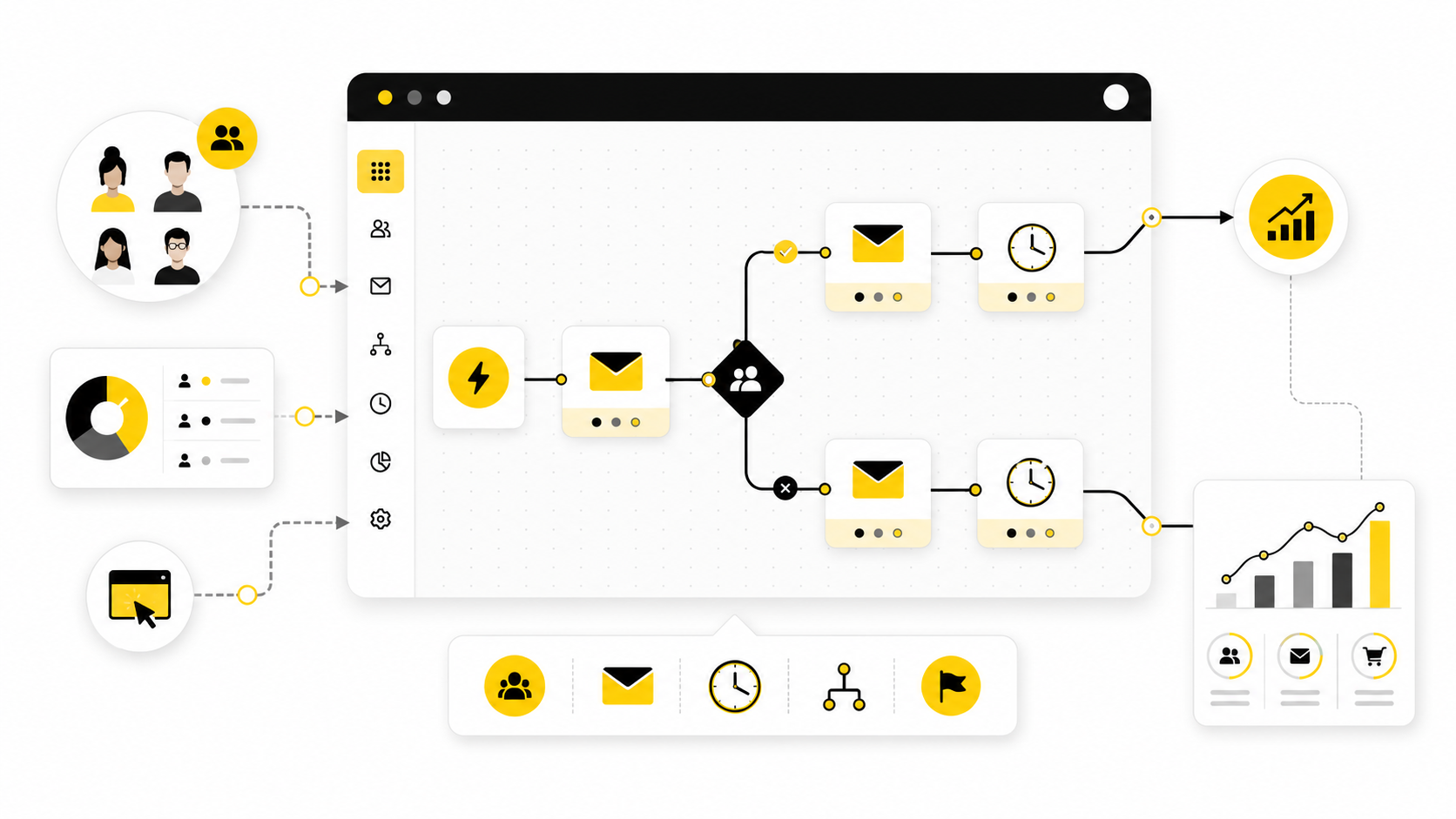
A Mailchimp autoresponder is not just a “set it and forget it” email sequence. Used well, it becomes the system that welcomes new subscribers, follows up after key actions, segments people based on behavior, and turns a cold signup into a warmer lead without forcing you to manually chase every contact.
That matters because email automation is still one of the highest-leverage parts of digital marketing. Mailchimp says its marketing automation flows can send targeted emails, apply tags, and create automated customer paths based on contact behavior, while its pricing page notes that users with connected stores generated up to 7x more orders from automation flows than from bulk emails during the measured period from January 2022 to July 2023 through Mailchimp marketing automation flows and Mailchimp pricing details. The big lesson is simple: an autoresponder is not valuable because it sends emails automatically; it is valuable because it sends the right message at the right moment.
This guide is written for people who want the practical version. Not theory. Not a random list of templates. The goal is to help you understand how a Mailchimp autoresponder works, when it makes sense, what to build first, and how to avoid the mistakes that make automated email feel robotic.
The full article is split into six parts so each stage can build naturally on the last. The structure follows the way a real autoresponder should be planned: first the business reason, then the framework, then the build, then the optimization work. Later sections will also cover when Mailchimp is enough and when another platform may make more sense.
Why A Mailchimp Autoresponder Still Matters
A basic newsletter depends on timing, memory, and manual effort. Someone joins your list today, but if your next campaign goes out three weeks from now, they may never receive the message they actually needed when they were most interested. A Mailchimp autoresponder fixes that by triggering communication around the subscriber’s timing instead of your publishing schedule.
This is where automation becomes more than convenience. Mailchimp describes Customer Journeys as a way to visually map dynamic, automated paths for contacts, which means you are not limited to one linear follow-up sequence through Mailchimp’s customer journey explanation. You can welcome a new subscriber, wait for engagement, branch based on clicks, tag people by interest, and send different follow-ups depending on what they do next.
The practical benefit is consistency. Every new subscriber gets the same strong first impression, every lead gets a logical next step, and every buyer can receive onboarding or post-purchase education without someone on your team remembering to send it. That is why autoresponders are often the first automation system a small business should build before getting distracted by more complex funnels.
The Mailchimp Autoresponder Framework
A strong Mailchimp autoresponder starts with one clear trigger. That trigger might be a form signup, a product purchase, a tag being added, a date-based event, or a contact entering a specific audience segment. If the trigger is vague, the rest of the sequence usually becomes vague too, which is why the first decision is not “what email should I write?” but “what meaningful action should start this journey?”
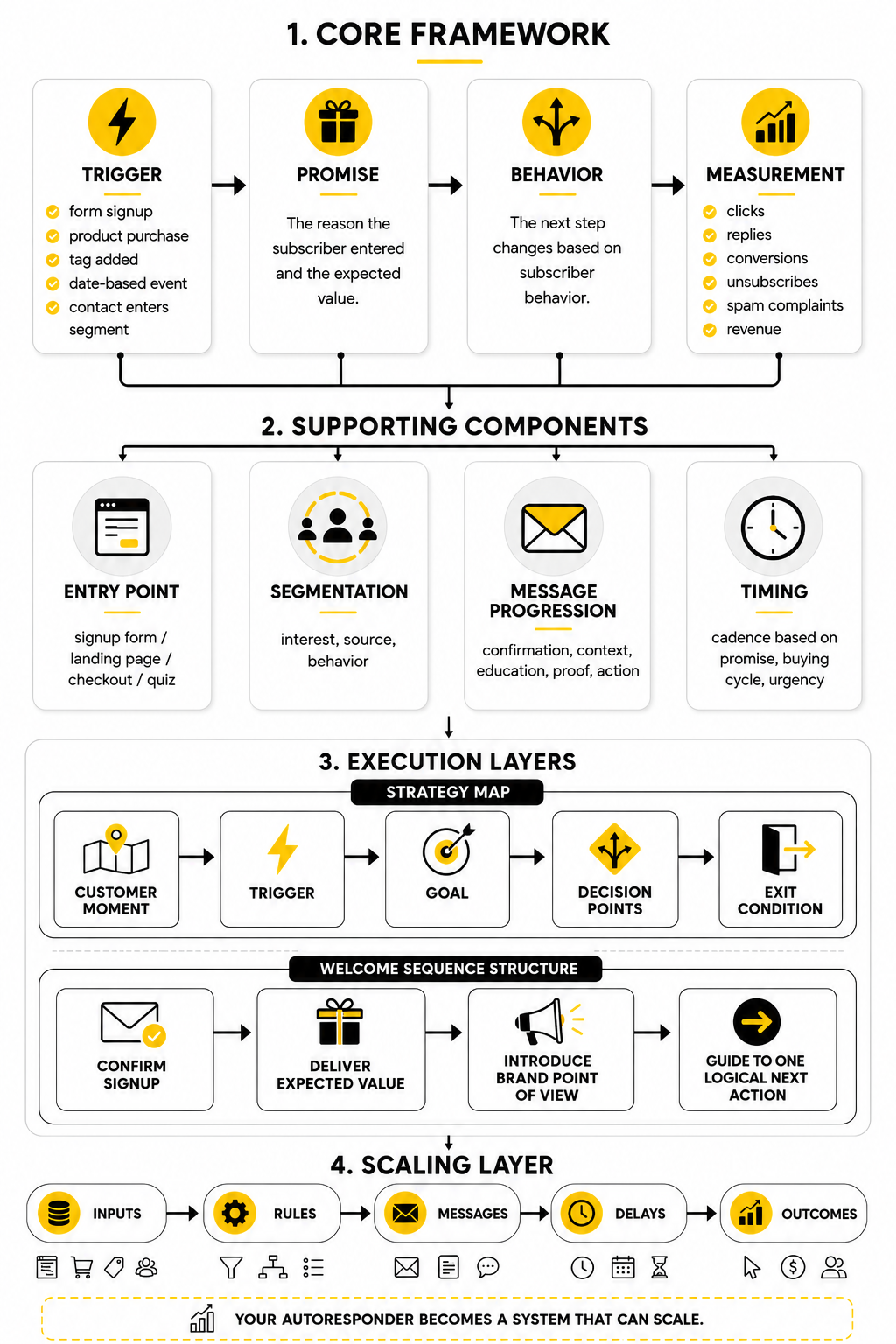
After the trigger, the framework needs a promise. This is the reason the subscriber entered the sequence in the first place, and it should shape the first few emails. A lead magnet sequence should deliver the resource and help the reader use it, while a product onboarding sequence should reduce confusion and help the customer reach value faster.
The third layer is behavior. A modern Mailchimp autoresponder should not treat every subscriber exactly the same once data starts coming in. If someone clicks a pricing link, visits a product page, or ignores the first few messages, the next step should reflect that behavior instead of pushing everyone through one generic sequence.
The final layer is measurement. Email marketing remains strong, but the best teams do not judge automation by open rate alone because privacy changes can distort opens. A better framework looks at clicks, replies, conversions, unsubscribes, spam complaints, revenue where relevant, and whether the sequence moves people toward the next business outcome.
Core Components Of A High-Converting Autoresponder
The first component is the entry point. Your signup form, landing page, checkout form, or quiz must make a clear promise before the autoresponder ever begins. If people join for one reason and the first email talks about something else, the sequence starts with friction.
The second component is segmentation. Even simple segmentation can make a Mailchimp autoresponder feel more personal because the subscriber’s interest, source, or behavior can shape what they receive next. This is also where some businesses eventually compare Mailchimp with broader tools like Brevo, Moosend, or GoHighLevel if they need stronger CRM, SMS, pipeline, or agency-style automation features.
The third component is message progression. A weak autoresponder sends five disconnected emails. A strong one moves from confirmation, to context, to education, to proof, to action, with each message earning the next click instead of demanding it.
The fourth component is timing. Sending too quickly can overwhelm people, but waiting too long can waste the moment of interest. The right cadence depends on the promise, the buying cycle, and how urgent the subscriber’s problem is.
Professional Implementation Starts Before You Build
The biggest mistake is opening Mailchimp and immediately creating emails. Professional implementation starts with a simple map of the customer moment, the trigger, the goal, the decision points, and the exit condition. When that map is clear, the actual Mailchimp build becomes much easier.
For example, a welcome autoresponder should not try to do everything. It should confirm the signup, deliver the expected value, introduce the brand’s point of view, and guide the reader toward one logical next action. That next action might be reading a guide, booking a call, browsing a product category, replying to the email, or joining a webinar.
A Mailchimp autoresponder becomes much more effective when it is treated as a small operating system instead of a pile of emails. The sequence needs inputs, rules, messages, delays, and outcomes. Once those pieces are in place, optimization becomes a process rather than guesswork.
The Mailchimp Autoresponder Framework
A Mailchimp autoresponder works best when you stop thinking in “emails” and start thinking in stages. The subscriber is not just joining a list; they are entering a relationship with a specific expectation. Your job is to guide that person from the first moment of interest to the next meaningful action without rushing, confusing, or overwhelming them.
The framework is simple: trigger, context, message, delay, behavior, and outcome. Mailchimp’s automation flows can add tags, send targeted emails, and move contacts through automated steps based on how you design the journey through Mailchimp’s marketing automation flow builder. That gives you enough structure to build a serious autoresponder, but only if the strategy underneath the automation is clear.
This is where most beginners go wrong. They build a sequence because they heard they “need email automation,” but they never define what the autoresponder is supposed to achieve. A welcome sequence, a lead nurturing sequence, an abandoned cart sequence, and a post-purchase onboarding sequence are not the same thing, even if they all use the same Mailchimp automation tools.
Start With One Clear Business Goal
Every Mailchimp autoresponder needs one primary business goal. That goal might be turning a new subscriber into a qualified lead, helping a customer use a product, recovering abandoned carts, promoting a webinar, or encouraging a second purchase. If the goal is too broad, the emails become scattered because every message starts competing for attention.
A good goal is specific enough to shape the sequence. “Nurture leads” is too vague. “Help new subscribers understand the problem, trust the brand, and book a consultation” is much stronger because it tells you what the emails must accomplish.
This also protects the reader. People can feel when an autoresponder is just a disguised sales blast. A clear goal lets you write with purpose instead of stuffing the sequence with random promotions, company updates, and filler content.
Match The Trigger To The Subscriber’s Intent
The trigger is the moment that starts the autoresponder. In Mailchimp, that could be a signup, a tag being added, a change in audience data, a purchase activity, or another automation condition depending on your plan and setup. The important part is not the technical trigger itself; it is what that trigger tells you about the subscriber’s intent.
Someone who downloads a beginner guide is probably not ready for the same message as someone who clicks a pricing page. Someone who buys a product needs a different sequence from someone who abandoned checkout. If you treat all of those people the same, the autoresponder becomes convenient for you but less relevant for them.
This is why tags and segments matter so much. Mailchimp explains tags as customizable labels for organizing contacts through Mailchimp’s guide to tags, while groups can store subscriber preferences and help filter people into targeted segments through Mailchimp’s guide to groups. In plain English, these tools help your Mailchimp autoresponder react to who someone is and what they care about.
Build The Sequence Around The Reader’s Next Question
The best autoresponders answer questions in the order the reader is likely to ask them. After someone joins your list, their first question is usually, “Did I get what I signed up for?” Then they want to know who you are, why they should listen, what problem you solve, and what they should do next. Your sequence should follow that mental path.
This is much stronger than writing five emails and hoping they fit together. The first email can confirm the promise and deliver the resource. The second can explain the problem in a sharper way. The third can show the reader what to evaluate before making a decision. The fourth can introduce your offer naturally because the groundwork has already been done.
That order matters. If you pitch too early, you break trust. If you educate forever without inviting action, you train people to consume but never move.
Use Delays To Create Momentum, Not Silence
Delays are not just empty waiting periods between emails. They shape the rhythm of the relationship. A tight sequence might send the first few emails within days because the subscriber’s intent is fresh, while a longer sales cycle may need more space between messages.
The mistake is using the same delay pattern for every autoresponder. A webinar reminder sequence needs a different rhythm from a post-purchase onboarding sequence. A cart recovery flow needs urgency, while an educational lead nurture sequence needs breathing room.
Mailchimp automation reports can track opens, clicks, purchases, and other engagement activity when tracking is enabled through Mailchimp’s automation reporting documentation. That data helps you see whether your timing supports momentum or creates drop-off. You do not need to guess forever, but you do need to start with a thoughtful cadence.
Add Branches Only When They Improve The Experience
Branching can make a Mailchimp autoresponder more carefully, but it can also make it messy. A branch should exist because the subscriber’s behavior changes what they should receive next. If the branch does not lead to a more relevant message, it is just complexity wearing a strategy costume.
For example, clicking a product comparison link could trigger a more sales-focused follow-up. Not clicking any email after several sends could move someone into a lighter re-engagement path. Buying the product should remove someone from a sales sequence and move them into onboarding.
This is also where some businesses outgrow a simple setup. If you need email, SMS, pipelines, appointment booking, and lead follow-up in one system, a broader automation platform like GoHighLevel may fit better than forcing every workflow into Mailchimp. If you mainly need email campaigns and approachable automation, Mailchimp can still be the cleaner choice.
Define The Exit Before You Write The First Email
Every autoresponder needs an exit condition. The subscriber should leave the sequence when they complete the goal, become irrelevant to the sequence, or move into a better next journey. Without an exit, people can keep receiving messages that no longer match their situation.
This is especially important for sales sequences. If someone buys, books, replies, or becomes a customer, the autoresponder should not keep talking to them like they are still undecided. That kind of mismatch makes automation feel careless.
A simple exit rule can be enough. Remove the contact when a purchase is made, when a tag is added, when a booking happens, or when the contact enters another journey. Clean exits keep your Mailchimp autoresponder relevant, respectful, and easier to manage.
Statistics And Data That Actually Matter
A Mailchimp autoresponder should not be judged by one shiny number. Open rate, click rate, conversion rate, unsubscribe rate, revenue, reply rate, and completion rate all tell you something different. The job is not to stare at the dashboard; the job is to understand what the numbers are telling you to fix next.
Mailchimp’s own benchmark data puts the average open rate around 34.23% across industries, but that number should be treated as a directional signal rather than a perfect truth. Open rates can help you spot obvious subject line or deliverability problems, but they are not enough to prove that your autoresponder is producing business results. A welcome email with a high open rate and no meaningful clicks may still be failing.
Click performance is usually more useful because it shows active intent. Mailchimp’s benchmark page also shows that click rates vary heavily by industry, which means comparing your autoresponder to a generic average can be misleading. The more carefully move is to compare each email against the rest of your own sequence and ask whether the reader is moving forward.
Read Open Rate As A Health Signal, Not A Victory
Open rate still has a place, but it should not be the headline metric for a serious Mailchimp autoresponder. Apple’s Mail Privacy Protection changed how reliable open tracking can be because email content may be preloaded in ways that make opens look higher than real human engagement, which is why many marketers now treat opens as a softer signal rather than the final answer through Apple’s Mail Privacy Protection explanation. That does not make open rate useless; it just means you need to interpret it carefully.
A low open rate can point to weak subject lines, poor sender recognition, bad timing, or deliverability issues. A sudden drop can also suggest that your audience quality changed, your sending frequency shifted, or your domain reputation needs attention. But a high open rate does not automatically mean the email persuaded anyone to act.
The practical action is simple. Use open rate to diagnose the top of the sequence, especially the subject line, preview text, sender name, and timing. Then use clicks, replies, purchases, bookings, or form submissions to judge whether the autoresponder is actually doing its job.
Click Rate Shows Whether The Message Created Intent
Click rate is the clearest early signal that your email created enough interest for someone to take action. A subscriber who clicks is no longer just passively receiving your content; they are choosing to continue the journey. That makes click rate one of the most important metrics in any Mailchimp autoresponder.
A low click rate does not always mean the offer is bad. It may mean the email has too many links, the call to action is buried, the copy does not build enough desire, or the next step feels disconnected from the reader’s original reason for joining. This is why you should look at the whole email, not just the button.
Click-to-open rate can also help when you want to isolate the strength of the email body. If many people open but few click, the subject line did its job but the message did not. If few people open but those who do open click strongly, the body may be working while the subject line or sender timing needs attention.
Conversion Rate Is Where The Truth Gets Uncomfortable
Conversion rate is where an autoresponder stops being “email marketing” and becomes a business system. A conversion might be a purchase, booked call, trial signup, demo request, webinar registration, reply, or completed form. The exact conversion depends on the goal you defined before building the sequence.
This number matters because it protects you from optimizing the wrong thing. You can improve open rates with curiosity-driven subject lines and still attract the wrong clicks. You can improve click rates with aggressive calls to action and still fail to convert because the landing page, offer, pricing, or follow-up process is weak.
For ecommerce, Mailchimp reports that users with connected stores generated up to 7x more orders from automation flows than from bulk emails during its measured period from January 2022 to July 2023. That is not a promise that every automation will perform that way. It is a reminder that behavior-based automation can outperform general broadcasts when the timing, offer, and audience match.
The Measurement System Should Follow The Customer Journey
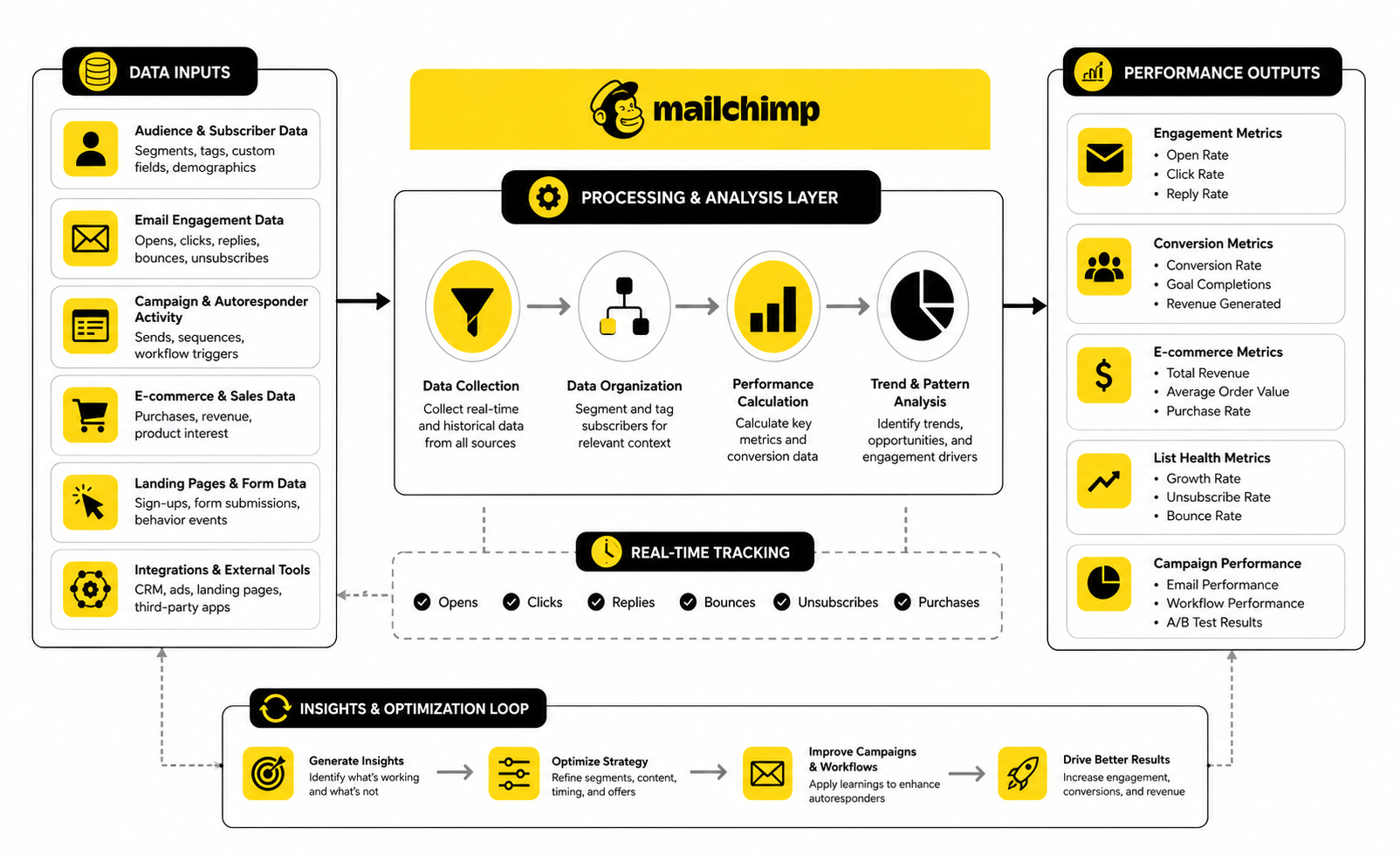
The cleanest way to measure a Mailchimp autoresponder is to track the journey in layers. First, measure whether people enter the sequence properly. Then measure whether they engage with the early emails. Then measure whether they click toward the intended next step. Finally, measure whether they convert and whether the outcome creates real value.
This prevents random optimization. If people are not entering the sequence, the problem is the form, trigger, integration, or traffic source. If they enter but do not open, the problem is likely the sender, subject, timing, or deliverability. If they open but do not click, the problem is probably the message, offer, CTA, or relevance.
Mailchimp automation flow reports can track opens, clicks, social activity, purchases, and other engagement data when tracking is enabled through Mailchimp’s automation reporting documentation. That report should become your sequence control panel. You are not looking for “good” or “bad” in isolation; you are looking for the first point where the journey breaks.
Benchmarks Are Useful Only When You Know Their Limits
Benchmarks give you a starting point, not a verdict. Brevo’s 2025 benchmark data shows an average email open rate of 21% and click-through rate of 3.96%, while Mailchimp’s benchmark data shows higher average opens across its dataset. The gap does not mean one number is “right” and the other is “wrong”; it means benchmark data depends on platform, audience mix, industry, geography, measurement method, and list quality.
That is why your first benchmark should be your own baseline. Measure the first 30 to 90 days of your Mailchimp autoresponder, then improve one part at a time. Your best-performing email becomes the internal standard, and your weakest step becomes the next optimization target.
External benchmarks are still helpful when your numbers are wildly outside the normal range. If your click rate is near zero, something is wrong. If your unsubscribe rate spikes after a specific email, the message likely violates expectations. If conversions are flat despite healthy clicks, the issue may sit outside Mailchimp on the landing page, checkout, calendar, or sales process.
Unsubscribes And Complaints Are Not Just Negative Metrics
Unsubscribes are not always bad. Some people should leave your list because they are not a fit, and keeping them only weakens your engagement over time. A healthy autoresponder filters as much as it persuades.
The warning sign is not one person unsubscribing. The warning sign is a pattern. If unsubscribes jump after a specific email, the message may be too aggressive, irrelevant, repetitive, or misaligned with the promise that got people onto the list.
Spam complaints are more serious because they can affect deliverability. If people mark your autoresponder as spam, it often means they did not recognize the sender, did not remember opting in, or felt the content was not what they expected. The fix is not just softer copy; it may require clearer signup language, better confirmation, cleaner list sources, and a stronger first email.
Revenue And Attribution Need A Clear Setup
Revenue tracking is powerful, but only when the technical setup is clean. If your store, checkout, CRM, or booking system is not connected properly, Mailchimp may not show the full picture. That can lead you to undervalue an autoresponder that is assisting conversions outside the email report.
Attribution also gets messy because subscribers rarely move in a straight line. Someone may read three emails, click a fourth, return through search, and buy two days later. The email helped, but a simple last-click report may not give it full credit.
This is why ecommerce teams should connect the store where possible, and service businesses should use tagged links, dedicated landing pages, booking forms, or CRM stages. If you need deeper pipeline attribution, missed-call text back, SMS follow-up, appointment workflows, and deal tracking, a broader system like GoHighLevel may be more practical. If your primary need is email performance and clean campaign reporting, Mailchimp can still be enough.
What To Fix First When The Numbers Look Bad
The data should tell you where to act. If signups are low, improve the offer and the form placement before touching the autoresponder. If opens are weak, test the sender name, subject line, preview text, and send timing before rewriting the whole sequence.
If clicks are weak, simplify the email. One clear idea and one clear next step usually beat a crowded email with five competing links. If conversions are weak after clicks, inspect the landing page, offer, checkout, calendar, or sales handoff because the email may not be the main problem.
The worst move is changing everything at once. You will never know what worked. Improve one bottleneck, measure the result, then move to the next. That is how a Mailchimp autoresponder becomes a compounding asset instead of another messy marketing experiment.
Optimization, Reporting, And Common Mistakes
Once the basic Mailchimp autoresponder is live, the real work begins. Most sequences do not fail because the tool is bad. They fail because the business keeps adding more emails, more branches, and more offers without protecting clarity.
Advanced optimization is not about making the automation look impressive. It is about making the subscriber’s path cleaner. Every improvement should either increase relevance, reduce friction, protect deliverability, improve conversion quality, or make the system easier to maintain.
Do Not Scale A Confusing Sequence
Scaling a weak autoresponder only makes the weakness louder. If the first version has unclear positioning, messy segmentation, or weak calls to action, sending more traffic into it will not fix the problem. It will simply expose more people to a journey that does not know what it wants them to do.
Before scaling traffic, review the sequence from the subscriber’s point of view. Ask whether the first email confirms the promise, whether each next step feels natural, and whether the final action makes sense based on what came before. If the answer is no, fix the message flow before you worry about more leads.
This matters because automation compounds both good and bad decisions. A clear Mailchimp autoresponder can multiply trust over time. A confusing one can quietly train your best prospects to ignore you.
Protect Deliverability Before You Chase Growth
Deliverability is not a technical side issue. It is the foundation that decides whether your emails even get a fair chance. Mailchimp emphasizes permission, list hygiene, authentication, and sender reputation in its deliverability guidance, and those basics become more important as your autoresponder grows.
If you are sending from a domain you control, authentication should not be treated as optional. SPF, DKIM, and DMARC help inbox providers verify that your messages are legitimate, and Mailchimp’s guidance on SPF, DKIM, and DMARC makes the point clearly: authentication opens the door, but reputation keeps you there. Clean sending behavior still matters after the DNS records are in place.
The practical rule is simple. Do not buy lists, do not import questionable contacts, do not hide unsubscribe links, and do not keep blasting people who never engage. A smaller list that wants your emails is more valuable than a large list that teaches inbox providers to distrust you.
Segment By Meaningful Behavior, Not Vanity Labels
Segmentation becomes powerful when it reflects real intent. A tag like “lead” is usually too generic to drive a useful autoresponder decision. A tag like “clicked pricing,” “downloaded ecommerce checklist,” “registered for webinar,” or “purchased starter plan” gives you much more useful context.
The danger is over-segmentation. If every tiny action creates a new branch, your Mailchimp account can become hard to understand and even harder to fix. You end up with overlapping tags, conflicting journeys, and subscribers entering paths they should have exited weeks ago.
A better approach is to segment around decision points. Create separate paths only when the subscriber’s behavior should genuinely change the next message. If the next email would be the same either way, you probably do not need another branch.
Build A Naming System Before The Account Gets Messy
This sounds boring, but it is huge. As your autoresponders multiply, messy naming becomes a real operational problem. You need to know which journey is active, what audience it serves, what trigger starts it, and what outcome it supports.
Use names that explain the function. “Welcome Journey - Lead Magnet - SEO Checklist - V1” is more useful than “New Automation 7.” The same principle applies to tags, segments, forms, landing pages, and campaigns.
Good naming makes optimization faster because you do not waste time decoding your own account. It also helps when a freelancer, team member, or future version of you needs to understand the system. The more your business depends on automation, the more important this becomes.
Separate Evergreen Nurture From Time-Sensitive Promotions
A Mailchimp autoresponder should not become a dumping ground for every campaign idea. Evergreen nurture and time-sensitive promotion have different jobs. The autoresponder should keep delivering relevant, durable messages, while campaigns can handle launches, seasonal offers, events, and limited-time updates.
Mixing the two creates problems. If you insert a temporary promotion into a permanent sequence and forget to remove it, new subscribers may receive outdated messaging months later. That makes the brand look careless.
A cleaner setup is to keep the core autoresponder evergreen and use tags or segments to invite subscribers into promotional campaigns when appropriate. This protects the long-term journey while still giving you room to sell.
Watch For Automation Collisions
Automation collisions happen when a subscriber enters multiple sequences that do not know about each other. One journey may be welcoming them as a new lead while another is pushing a sales offer and another is sending post-purchase content. Individually, each email may be fine, but together they feel chaotic.
This becomes more common as you add lead magnets, webinars, purchase flows, re-engagement campaigns, and segmented offers. The solution is not to avoid automation. The solution is to create clear entry and exit rules so subscribers do not get trapped in conflicting journeys.
Use tags, exclusions, and suppression logic carefully. If someone buys, remove them from the pre-purchase nurture path. If someone books a call, stop pushing them to book again. If someone enters onboarding, do not keep treating them like a cold lead.
Know When Mailchimp Is Enough
Mailchimp is a strong fit when your main need is email marketing, subscriber management, basic segmentation, ecommerce automations, landing pages, and clear reporting. For many small businesses, creators, ecommerce brands, and service providers, that is enough. The platform is approachable, widely supported, and practical for teams that want to move without building an overly complex tech stack.
The tradeoff appears when your autoresponder becomes part of a larger sales operation. If you need deeper CRM workflows, pipeline management, two-way SMS, sales team tasks, appointment booking, missed-call follow-up, and multi-channel automation in one place, you may start to feel the limits. At that point, forcing everything into Mailchimp can create more work than it saves.
That is where a platform like GoHighLevel may make more sense, especially for agencies, local service businesses, and teams that want email automation connected directly to sales pipelines and client follow-up. The decision is not about which tool is “best” in general. It is about which system matches the workflow you actually need.
Know When A Simpler Tool Is Better
The opposite problem is also common. Some businesses choose complex platforms before they have a clear offer, list, or follow-up strategy. Then they spend weeks building workflows when they should have been writing better emails and improving the signup promise.
If you only need a clean lead magnet sequence, a simple newsletter, and a few audience segments, keep the system simple. Mailchimp can handle that. So can other email-focused platforms like Brevo or Moosend, depending on your budget, interface preference, and automation needs.
Do not buy complexity to feel serious. A simple autoresponder that gets opened, clicked, and acted on beats an advanced maze that nobody understands.
Use Personalization Carefully
Personalization is powerful when it adds relevance. Using a first name, referencing a selected interest, or changing content based on a known preference can make a Mailchimp autoresponder feel more human. But personalization becomes awkward when it is based on weak data or forced into every sentence.
The best personalization is usually contextual, not gimmicky. Send different content based on what the subscriber requested, what they clicked, what they bought, or what stage they are in. That feels useful because it respects the reader’s situation.
Avoid pretending the automation is more personal than it is. Do not write like you personally reviewed someone’s business if you did not. Readers can smell fake intimacy, and it damages trust faster than a plain but honest email.
Keep Human Touchpoints In The System
Automation should remove repetitive manual work, not remove human judgment. A strong Mailchimp autoresponder can educate, qualify, and guide people, but some moments deserve a real person. Replies, high-intent clicks, demo requests, complaints, and unusual customer situations should not disappear into a dashboard.
This is especially true for service businesses and higher-ticket offers. If someone clicks a booking link three times but never books, that may be a signal for personal follow-up. If someone replies with a specific question, that is not a “lead score event”; it is a conversation.
The best systems combine automation with human attention. Let the autoresponder handle timing, consistency, and education. Let people handle nuance, trust, and decisions that require context.
Audit The Autoresponder On A Fixed Schedule
An autoresponder can quietly become outdated. Links break, offers change, screenshots age, pricing shifts, brand positioning evolves, and old assumptions stop being true. If nobody owns the review process, the sequence slowly drifts away from the current business.
Set a review rhythm. For active sequences, review performance and content at least quarterly. For high-value sequences like onboarding, abandoned cart, or lead-to-call nurture, review them more often because small improvements can affect revenue quickly.
The audit should cover more than metrics. Check every link, every offer, every tag, every exit rule, every delay, and every promise. Your Mailchimp autoresponder should feel current even if it was built months ago.
The Expert Move Is Restraint
The more automation options you have, the more tempting it becomes to use all of them. But expert-level email automation is not about maximum complexity. It is about the minimum structure needed to create the right experience.
Every extra branch, tag, delay, and condition adds maintenance cost. Every extra email asks for more attention from the subscriber. Every additional offer risks diluting the core action you want someone to take.
So be disciplined. Build only what supports the journey. Remove what does not. The strongest Mailchimp autoresponder is not the one with the most moving parts; it is the one that makes the next step feel obvious.
Mailchimp Autoresponder FAQs And Final Recommendations
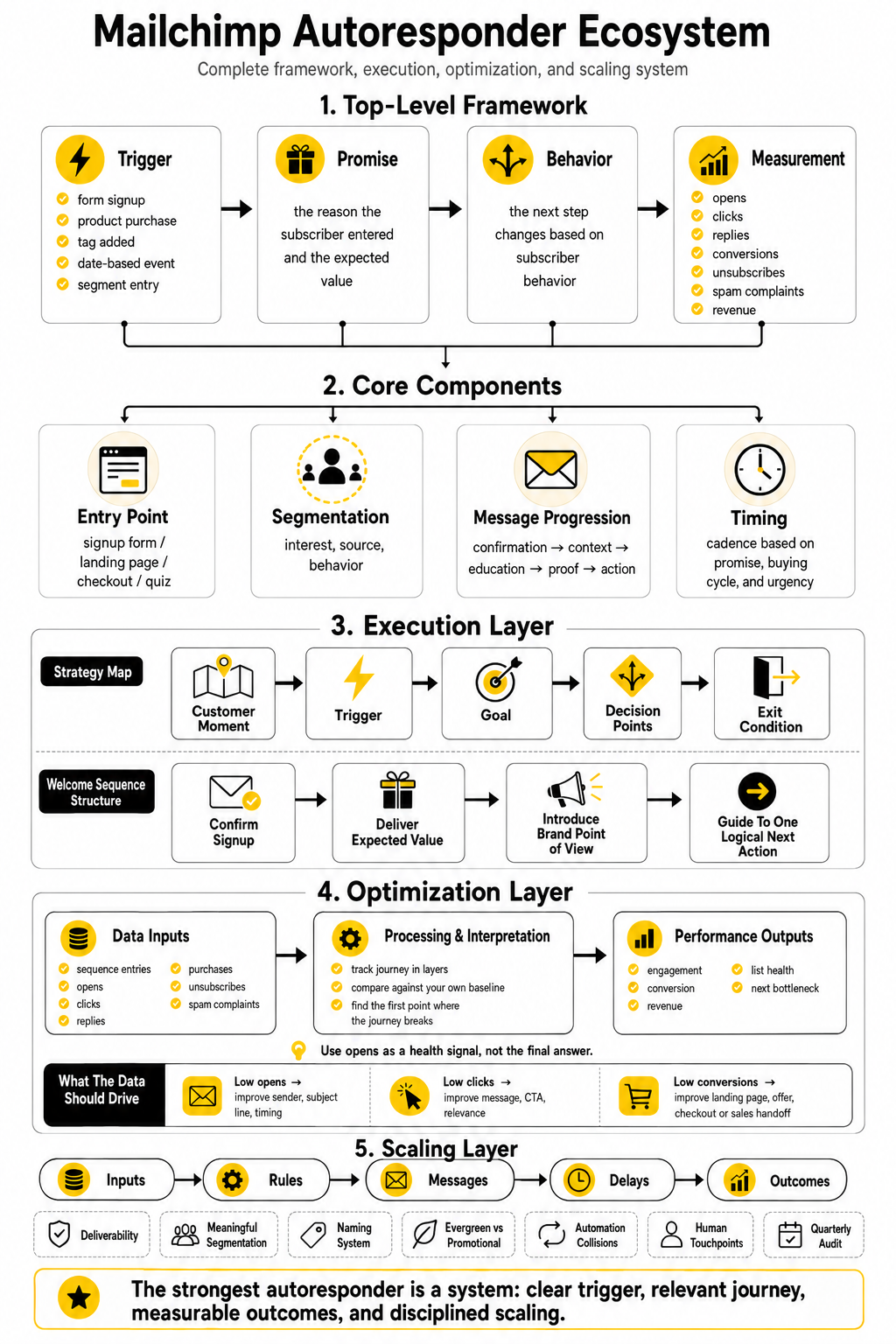
A Mailchimp autoresponder is strongest when it sits inside a complete marketing system. The form captures the right person, the trigger starts the right journey, the emails guide the reader, the data reveals the bottleneck, and the next step connects to sales, onboarding, or retention. When those pieces work together, automation stops feeling like a tool feature and starts behaving like a growth asset.
The final decision is not whether Mailchimp is “good” or “bad.” The better question is whether Mailchimp fits the stage, complexity, and workflow of your business. If your goal is clean email automation with approachable reporting, Mailchimp can be a smart choice. If your goal is deeper multi-channel follow-up across CRM, SMS, calls, pipelines, and appointments, you may need a broader system like GoHighLevel or a more specialized email platform depending on your business model.
What Is A Mailchimp Autoresponder?
A Mailchimp autoresponder is an automated email or sequence that sends after a subscriber takes a specific action. That action might be joining a list, downloading a resource, making a purchase, abandoning a cart, or being added to a tag or segment. Mailchimp describes autoresponders as emails triggered by specific lead or customer behavior through its email autoresponder guide.
The practical value is timing. Instead of sending the same newsletter to everyone at the same moment, you can send the right message based on when the person enters the journey. That makes the experience feel more relevant and usually makes the sequence easier to optimize.
Is A Mailchimp Autoresponder The Same As A Customer Journey?
Not exactly. A traditional autoresponder usually means a simple automated email sequence triggered by an action. A Customer Journey or automation flow can be broader because it can include branching paths, rules, tags, delays, and different outcomes.
In practice, many people use the terms loosely. If someone says “Mailchimp autoresponder,” they often mean any automated email sequence inside Mailchimp. But if you are building a more advanced system, it helps to think in terms of journeys because the subscriber may need different paths based on behavior.
Can I Use Mailchimp Autoresponders On The Free Plan?
Mailchimp plan features change over time, so you should always check the current plan limits before building around a free account. Recent reviews and Mailchimp plan pages have shown that more advanced automation features are typically tied to paid plans, while the free tier is limited compared with earlier versions. The safest move is to confirm the automation features you need on Mailchimp’s pricing page.
This matters because a serious autoresponder is not just one welcome email. You may need multiple steps, branching, reporting, customer journey features, ecommerce triggers, or more sending capacity. If the free plan blocks those features, the strategy may be right but the plan may not support the build.
How Many Emails Should A Mailchimp Autoresponder Have?
There is no perfect number. A short welcome sequence may only need three emails, while a longer lead nurture sequence may need seven or more. The number should come from the customer journey, not from a random template.
A simple structure is often enough at the start. Send one email to confirm and deliver the promise, one to create context, one to educate, one to handle hesitation, and one to invite action. If each email has a clear job, the sequence can stay lean and still perform well.
What Is The Best Trigger For A Mailchimp Autoresponder?
The best trigger is the one that reflects meaningful intent. A form signup is a good trigger for a welcome sequence, while a purchase is a good trigger for onboarding or post-purchase education. A pricing-page click, tag change, abandoned cart, or webinar registration can also be useful when it changes what the subscriber should receive next.
Do not create triggers just because the platform allows them. Create triggers because they help you send a more relevant message. If the next email would be the same either way, the extra trigger probably adds complexity without improving the experience.
What Metrics Should I Track First?
Start with the few numbers that reveal the health of the journey. Track entries into the sequence, open rate, click rate, conversion rate, unsubscribes, spam complaints, and revenue or qualified leads where relevant. Mailchimp’s automation reports can show engagement and purchase activity when tracking and integrations are set up through Mailchimp’s automation reporting documentation.
Do not optimize everything at once. If people are not entering the journey, fix the capture point or trigger. If people enter but do not engage, fix timing, sender identity, subject lines, and relevance. If people click but do not convert, look beyond the email and inspect the landing page, offer, booking flow, checkout, or sales handoff.
Are Open Rates Still Reliable?
Open rates are useful, but they are not fully reliable as a final performance measure. Apple’s Mail Privacy Protection can affect open tracking because email content may be loaded in ways that do not always reflect a deliberate human open through Apple’s Mail Privacy Protection documentation. That means open rate should be treated as a health signal, not the whole truth.
Use opens to spot obvious subject line, sender, or deliverability issues. Then use clicks, replies, purchases, bookings, and other conversion events to decide whether the autoresponder is actually working. The deeper the metric is in the customer journey, the closer it gets to business value.
How Often Should I Review A Mailchimp Autoresponder?
Review important autoresponders at least once per quarter. High-value sequences, such as abandoned cart, lead-to-call nurture, post-purchase onboarding, and trial conversion flows, may deserve more frequent review. Small improvements in these sequences can affect revenue, retention, and sales quality.
The review should cover both performance and content. Check every link, promise, offer, tag, delay, exit rule, and call to action. A sequence can look fine in the dashboard while quietly sending outdated information.
What Is The Biggest Mistake Beginners Make?
The biggest mistake is building emails before defining the journey. Beginners often open Mailchimp, start writing, and only later ask what the sequence is supposed to accomplish. That leads to scattered messages, weak transitions, and confusing calls to action.
Start with the trigger, reader intent, goal, steps, decision points, and exit condition. Then write the emails. Strategy first, automation second. Always.
Can A Mailchimp Autoresponder Replace A Salesperson?
No, and it should not try to. A Mailchimp autoresponder can educate leads, answer common questions, qualify interest, and move people toward a logical next step. It can also reduce repetitive follow-up and make sure no new subscriber is ignored.
But complex buying decisions still need trust, context, and human judgment. If someone replies with a question, clicks a high-intent link repeatedly, or requests help, that is a signal for a real person to engage. The best systems use automation to create better conversations, not to avoid conversations completely.
When Should I Use Mailchimp Instead Of GoHighLevel?
Use Mailchimp when your main need is email marketing, simple-to-moderate automation, subscriber management, newsletters, ecommerce email flows, and clear campaign reporting. It is especially useful when you want an approachable email-first platform without building a full sales operations system. For many creators, small businesses, and ecommerce brands, that is plenty.
Use GoHighLevel when email is only one part of a larger follow-up machine. If you need CRM pipelines, SMS, calls, appointment booking, missed-call follow-up, client accounts, and agency-style automation, a broader platform may be more efficient. The right choice depends on the workflow, not the brand name.
When Should I Consider Brevo Or Moosend Instead?
Consider Brevo if you want email marketing with additional communication options and a platform structure that may fit budget-conscious teams. Consider Moosend if you want an email-focused tool with automation features and a simpler feel. Both can make sense when you want alternatives to Mailchimp without jumping into a full CRM-heavy setup.
Do not switch tools just because another platform looks cheaper or newer. First define what your autoresponder must do, how many contacts you have, what integrations you need, and how much reporting matters. Then compare tools against that real workflow.
How Do I Know If My Mailchimp Autoresponder Is Too Complicated?
Your autoresponder is probably too complicated if you cannot explain it in one minute. It is also too complicated if subscribers can enter conflicting journeys, receive irrelevant offers after converting, or stay in old sequences after their status changes. Complexity that does not improve relevance is just operational debt.
A useful test is to map the sequence on one page. If the map looks like a maze, simplify it. Keep the branches that reflect meaningful behavior and remove the branches that only exist because you were trying to be clever.
What Should The First Email In A Mailchimp Autoresponder Say?
The first email should confirm the promise that got the subscriber to opt in. If they requested a guide, deliver the guide. If they joined a waitlist, confirm what happens next. If they bought a product, help them take the first successful step.
This is not the time to be vague. The first email sets the tone for the whole relationship. Be clear, useful, and direct before you ask for more attention.
Should I Include Sales Emails In The Autoresponder?
Yes, if the sales message is earned by the journey. A Mailchimp autoresponder can absolutely guide people toward a product, service, consultation, trial, or offer. The mistake is pitching before the reader understands the value.
A good sequence builds context first. It shows the problem, teaches the evaluation criteria, handles common hesitation, and then makes the next step obvious. Selling works better when it feels like the natural next move instead of an interruption.
What Is The Final Recommendation?
Build the simplest Mailchimp autoresponder that can move a real subscriber from intent to action. Start with one trigger, one promise, one sequence, and one measurable outcome. Then improve the bottleneck instead of rebuilding the entire system every time the numbers feel imperfect.
Mailchimp is more than enough for many businesses when the strategy is clear. But no tool will rescue a vague offer, weak list, confusing journey, or lazy follow-up. Get the fundamentals right first, then let automation multiply what already works.
Build a stronger local presence with BAAM AI
Turn your website, Google profile, social channels, and AI visibility into one growth engine
Most businesses do not need more random marketing activity. They need a consistent presence system that helps the right people find them, trust them, and take action. BAAM AI brings strategy, local SEO, website updates, Google Maps visibility, social content, AI-search readiness, media production, and reporting into one practical monthly engine.
If you want your marketing to keep working after the campaign ends, start with a free BAAM AI presence audit. See how your business shows up today and where the fastest visibility wins are at BAAM AI.