
BAAM AI Blog
Mailchimp Ad Campaign: A Practical Guide To Building Campaigns That Actually Convert
A Mailchimp ad campaign should not be treated like a random boost button. It works best when it is part of a connected system: a clear offer, a defined audience, a landing page or signup path, an email follow-up...
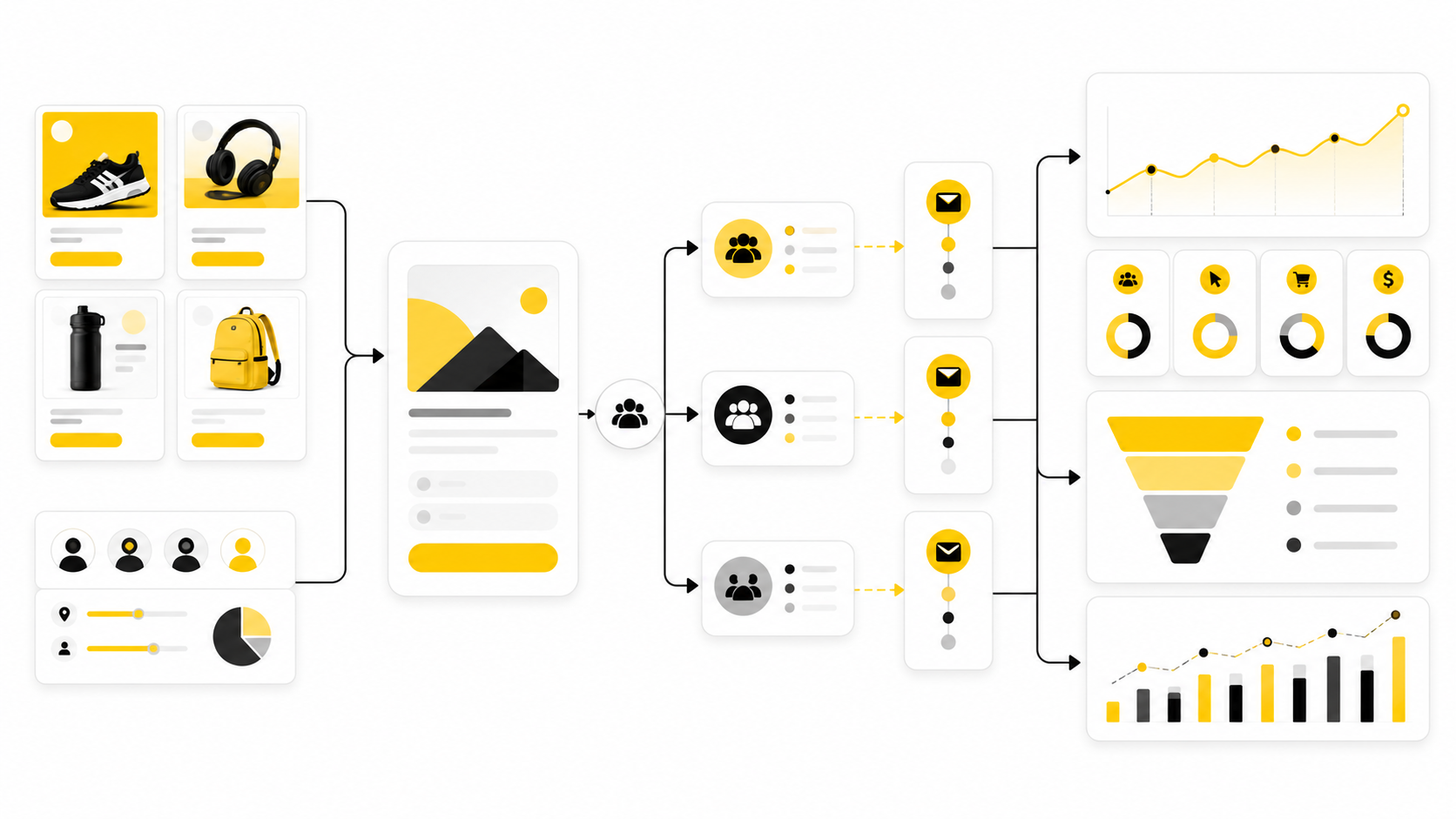
A Mailchimp ad campaign should not be treated like a random boost button. It works best when it is part of a connected system: a clear offer, a defined audience, a landing page or signup path, an email follow-up sequence, and reporting that tells you what to improve next.
That matters because most small businesses do not have unlimited budget, unlimited traffic, or unlimited creative resources. Mailchimp is useful here because it brings email campaigns, landing pages, segmentation, social posting, automation, and reporting into one marketing workspace, instead of forcing every campaign to live in a separate tool. Mailchimp’s own feature set now covers email, SMS, automation, social media, landing pages, analytics, and audience management, which makes it better suited for full-funnel campaign planning than for isolated email blasts alone: Mailchimp marketing features.
The big mistake is thinking a Mailchimp ad campaign starts with the ad. It starts with the customer path. The ad creates the click, but the landing page earns the signup, the email sequence builds trust, and the follow-up offer turns attention into revenue.
This guide breaks that system into six parts so you can build the campaign like a professional, not like someone guessing in the dashboard.
Why A Mailchimp Ad Campaign Needs A Full-Funnel Strategy
A Mailchimp ad campaign is not just an advertisement managed beside your email list. It is a campaign that uses paid attention to grow or activate an audience, then uses owned channels to keep the relationship going after the first click. That is the difference between renting traffic and building an asset.
This is especially important because email still plays a serious role in lifecycle marketing. Litmus reports that 58% of marketing teams send emails weekly or several times per week, and 35% of companies see email ROI of 36:1 or more, which is why the follow-up system behind the ad often matters more than the ad itself: Litmus State of Email reports. The paid campaign gets someone into the room; the email and automation strategy decides whether they stay.
Mailchimp also supports this full-funnel view through its landing page and automation tools. Its landing page documentation explains that landing pages can collect email and SMS contacts and sit alongside other campaign types inside Mailchimp: Mailchimp landing pages. That means the practical goal is not “run an ad.” The goal is to build a path where every click has a next step.
Framework Overview
The cleanest way to think about a Mailchimp ad campaign is simple: audience, offer, destination, follow-up, and measurement. Each piece has a different job. If one piece is weak, the whole campaign feels expensive even when the ad targeting is technically correct.
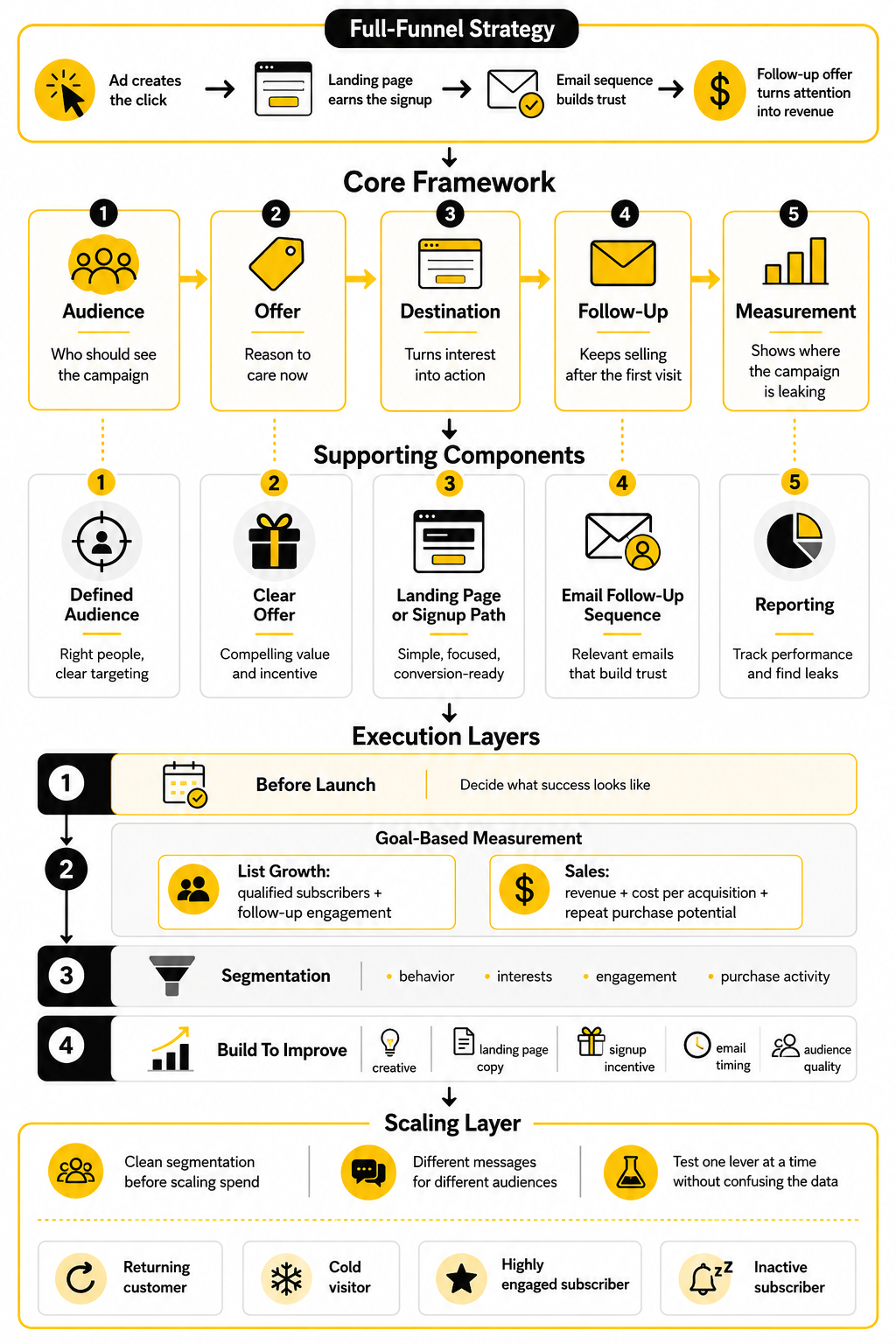
The audience defines who should see the campaign. The offer gives them a reason to care now. The destination turns interest into action, whether that action is a signup, consultation request, product click, or purchase. The follow-up sequence keeps selling after the first visit, and the measurement layer tells you where the campaign is leaking.
This framework also fits the way Mailchimp describes its own ecosystem. Mailchimp’s segmentation tools let marketers target people based on behavior, interests, engagement, and purchase activity: Mailchimp segmentation tools. Its automation tools can trigger follow-up based on customer behavior across email and SMS, including welcome flows, abandoned cart reminders, and retargeting-related journeys: Mailchimp marketing automation.
Core Components Of A Strong Mailchimp Ad Campaign
The first core component is the audience. You need to know whether you are targeting cold prospects, previous site visitors, existing subscribers, buyers, lapsed customers, or a lookalike-style audience built from your best contacts. Each audience has a different level of trust, so each one needs a different message.
The second component is the offer. A weak offer makes every platform look bad because people do not click, sign up, or buy without a strong reason. For a Mailchimp ad campaign, the offer could be a discount, lead magnet, product launch, webinar, consultation, waitlist, free trial, or content upgrade, but it must be specific enough that the landing page and follow-up emails can continue the same promise.
The third component is the conversion path. Mailchimp landing pages can be promoted through emails, ads, and social sharing, and Mailchimp notes that users can create automations for landing page subscribers or customers: Create a Mailchimp landing page. That is where the campaign starts becoming measurable instead of just visible.
Professional Implementation Starts Before The First Click
Professional implementation means you decide what success looks like before the campaign goes live. That sounds obvious, but it is where many campaigns fail. If the campaign goal is list growth, you judge it by qualified subscribers and follow-up engagement; if the goal is sales, you judge it by revenue, cost per acquisition, and repeat purchase potential.
You also need clean segmentation before you scale spend. Mailchimp allows segmentation using audience and contact information, with conditions that can be combined to target more specific groups: Mailchimp segmenting options. This matters because a returning customer should not always see the same message as a cold visitor, and a highly engaged subscriber should not be treated like someone who has ignored your last ten emails.
Finally, professional implementation means the campaign is built to improve. You are not looking for one perfect ad on day one. You are building a system where creative, landing page copy, signup incentive, email timing, and audience quality can all be tested one by one without confusing the data.
How To Plan The Audience, Offer, And Campaign Goal
Before you build anything inside Mailchimp, decide what the campaign is supposed to do. A Mailchimp ad campaign for list growth is not the same as a campaign for ecommerce sales, appointment bookings, webinar registrations, or reactivating past buyers. The platform can help you organize the moving parts, but it cannot fix a vague goal.
Start with one primary conversion. Not three. Not “awareness, leads, and sales” in the same first campaign. If the campaign is meant to collect leads, optimize the whole path around the signup. If it is meant to sell, make sure the offer, product page, cart, and follow-up emails all support that sale.
The goal also decides how you judge performance. A campaign that brings in cheap subscribers but no future engagement is not a win. A campaign with a higher cost per lead can still be profitable if those leads match the right buyer profile and move through the follow-up sequence.
Choose The Right Audience Before You Write The Ad
Audience planning is where most campaigns either become focused or become expensive. A cold audience needs a clear reason to stop scrolling. A warm audience needs a stronger reason to act now. An existing customer needs a message that respects what they already bought, clicked, or ignored.
Mailchimp’s segmentation options make this more practical because contacts can be filtered by profile data, email activity, SMS activity, ecommerce behavior, signup source, tags, groups, and other conditions: Mailchimp segmentation options. That matters because the best campaign message is usually not the broadest one. It is the one that feels specific enough for the person seeing it.
For a simple Mailchimp ad campaign, think in four audience layers:
Do not treat these groups the same. Cold prospects often need education, proof, or a low-friction lead magnet. Engaged subscribers may respond better to a direct offer. Customers may need timing, relevance, and a reason to come back without feeling like they are being shoved into a generic promo.
Use Segments To Match Message With Intent
Segments are useful because they let you stop speaking to the whole list as if everyone is in the same place. Someone who joined yesterday is not the same as someone who has been inactive for six months. Someone who bought once is not the same as someone who has clicked every product email but never purchased.
Mailchimp describes marketing automation flows as dynamic paths that can use triggers, branches, and actions to personalize each contact’s experience: Mailchimp automation flows. That gives you a better way to plan the campaign before the ad runs. You can decide what happens after a signup, after a click, after a purchase, or after no response.
This is where the campaign becomes more than a traffic source. The ad brings someone into the system, but segmentation decides what they see next. That is the practical advantage of building the campaign around audience behavior instead of one generic broadcast.
Build The Offer Around A Real Customer Problem
A good offer makes the next step obvious. It does not need to be clever, but it does need to connect with a real problem, desire, or moment of urgency. When the offer is weak, marketers usually blame the ad creative, the platform, or the audience, but the real issue is often that the offer gives people no strong reason to act.
For lead generation, the offer might be a checklist, calculator, template, consultation, discount, free trial, private training, or early access list. For ecommerce, it might be a bundle, limited launch, replenishment reminder, personalized recommendation, or first-order incentive. For service businesses, it might be an audit, estimate, strategy call, or local availability window.
The key is to make the offer specific enough that the landing page and email sequence can continue the same promise. “Join our newsletter” is usually weak because it asks for attention without giving a clear payoff. “Get the 7-step checklist before launching your first paid email campaign” is stronger because the reader immediately understands what they receive and why it matters.
Match The Offer To The Relationship Stage
Cold audiences usually need lower-friction offers because they have not built trust with you yet. Asking them to buy an expensive product immediately may work in rare cases, but it often makes the campaign harder than it needs to be. A useful lead magnet, quiz, webinar, trial, or sample can create a better first step.
Warm audiences can handle a more direct offer because they already have context. They may have read your emails, visited your site, downloaded something, or clicked a product link. For them, the campaign can focus more on timing, urgency, proof, and removing friction.
Existing customers need relevance more than volume. A customer who bought an entry-level product might be ready for an upgrade, refill, subscription, add-on, or complementary product. A customer who has not bought in a while might need a reactivation offer, but that offer should be framed around value, not desperation.
Set A Campaign Goal You Can Actually Measure
A campaign goal should be specific enough that you can tell whether the campaign worked. “Get more leads” is too loose. “Add qualified subscribers at a cost that allows profitable follow-up within 30 to 60 days” is more useful because it connects acquisition to the rest of the business.
Mailchimp’s customer journey builder is designed to show how people engage as they move through an automation workflow, which helps connect campaign planning with post-click behavior: Mailchimp customer journey builder. That is important because ad metrics alone rarely tell the whole truth. A low cost per click can still produce bad leads, and a higher cost per click can be profitable when the follow-up converts.
For most campaigns, track a small set of numbers:
Do not drown the campaign in metrics. Choose the few numbers that tell you whether the audience, offer, and follow-up are working together. The best reporting setup is the one you will actually review and use.
Decide What Happens After The First Conversion
The first conversion is not the end of the Mailchimp ad campaign. It is the handoff. Once someone signs up, books, clicks, or buys, the campaign should move them into the next logical step instead of leaving them sitting in the audience with no context.
For a lead generation campaign, that usually means a welcome sequence. The first email should deliver the promised asset or next step, but the sequence should not stop there. It should explain the problem, build trust, show proof, handle objections, and guide the reader toward the next conversion.
For businesses that want a more aggressive sales pipeline, Mailchimp can work for simple follow-up, but some teams may prefer a CRM-first platform such as GoHighLevel when they need pipelines, appointments, calls, SMS, and client follow-up in one place. That is not because every campaign needs a heavier system. It is because the follow-up model should match the sales process, not the other way around.
Keep The Campaign Simple Enough To Improve
The first version of a campaign should be focused enough that you can learn from it. If you test five audiences, four offers, three landing pages, and ten emails at the same time, you will have activity but not clarity. Complexity feels productive, but it often hides the real lesson.
A cleaner approach is to start with one audience, one primary offer, one landing page, and one follow-up path. Once the campaign has enough signal, improve the weakest part first. If the ad gets clicks but the page does not convert, fix the page. If the page converts but email engagement is weak, fix the follow-up. If leads engage but never buy, check the offer, sales path, and audience quality.
This is how a Mailchimp ad campaign becomes a repeatable growth system. You are not trying to win by guessing perfectly before launch. You are building a campaign that gives you clean feedback, then using that feedback to make the next version sharper.
How To Build The Landing Page, Signup Path, And Tracking Setup
Once the audience and offer are clear, the next job is implementation. This is where the Mailchimp ad campaign becomes a real customer path instead of a plan in a document. The goal is simple: make the click easy, make the signup obvious, and make the data clean enough that you can trust what you are seeing.
Mailchimp landing pages are built for this kind of campaign because they can collect new contacts around a specific marketing goal, including offers like free downloads or limited-time promotions: Mailchimp signup form options. That does not mean every landing page will perform well. It means you have the right place to build the first conversion point, and now the quality of the page matters.
A strong setup has four moving parts: the landing page, the signup form, the confirmation experience, and the tracking. Skip one of them and the campaign gets harder to improve. You might still get clicks, but you will not know clearly which part is helping or hurting the result.
Create The Landing Page Around One Action
The landing page should do one job. Not explain your whole brand history. Not promote five offers. Not ask the visitor to choose between a newsletter, product, webinar, and consultation at the same time. One page, one promise, one next step.
Mailchimp lets you create landing pages and then promote them through other campaigns, social channels, ads, or a custom URL: Mailchimp landing page creation. That makes the page a practical destination for paid traffic, but the structure still needs discipline. The headline should match the ad promise, the page should explain what the visitor gets, and the call to action should be visible without making people hunt for it.
For a Mailchimp ad campaign, the landing page should usually include:
Do not overload the page with generic trust badges, long paragraphs, or vague benefits. The visitor clicked because something in the ad created interest. The page should continue that exact thought and remove friction.
Keep The Message Match Tight
Message match means the ad and landing page feel like one continuous experience. If the ad promises a checklist, the landing page should lead with the checklist. If the ad promotes a product launch, the page should not suddenly push a broad newsletter signup. Every mismatch creates doubt.
This matters because the visitor is making a fast judgment. They are asking, “Is this what I clicked for?” If the answer is not obvious, many people leave before they even read the page properly.
The easiest way to keep message match tight is to copy the core promise from the ad into the landing page headline. You can improve the wording, but do not change the offer. A Mailchimp ad campaign works better when the click, page, form, and first email all feel like they belong to the same conversation.
Build The Signup Path With The Right Fields
A signup form should collect enough information to support the follow-up, but not so much that it scares people away. Email address is usually the minimum. First name can help personalize the first email. Extra fields should earn their place.
Mailchimp’s audience fields can store contact information from signup forms, imports, and profile updates, with different field types available depending on what you need to collect: Mailchimp audience fields. That is useful, but it also creates a temptation to ask for everything upfront. Resist that temptation unless the extra information directly improves the campaign.
For most lead generation campaigns, start with the fewest fields possible. If you need segmentation, use one intentional field such as business type, goal, interest, or product category. If you need sales qualification, ask only for information your team will actually use.
Use Tags And Fields With A Purpose
Tags and fields should make the follow-up more carefully. A tag can show where the contact came from, which offer they claimed, or which campaign introduced them. A field can store information the contact provided, such as role, location, company size, or interest area.
The key is to avoid messy audience data. If every campaign creates random tags with no naming system, reporting becomes painful later. Use clear labels like “Lead Magnet - Email Checklist” or “Campaign - Spring Promo” so the data still makes sense three months from now.
This is not admin work for the sake of admin work. It is how you keep the Mailchimp ad campaign measurable. Clean tags and fields let you segment later, compare campaign quality, and build automation paths that feel relevant instead of generic.
Set Up The Follow-Up Trigger Before The Campaign Goes Live
The follow-up should be ready before the ad starts sending traffic. Do not wait until leads begin arriving and then scramble to write the welcome email. That is how good attention gets wasted.
Mailchimp marketing automation flows can use triggers to add contacts to a flow based on actions or conditions, including signup-related behavior and other contact activity: Mailchimp automation triggers. This is where the landing page becomes part of a larger system. A new subscriber can enter a welcome flow, receive the promised resource, and continue through the next steps automatically.
For a simple campaign, the first automation can be straightforward:
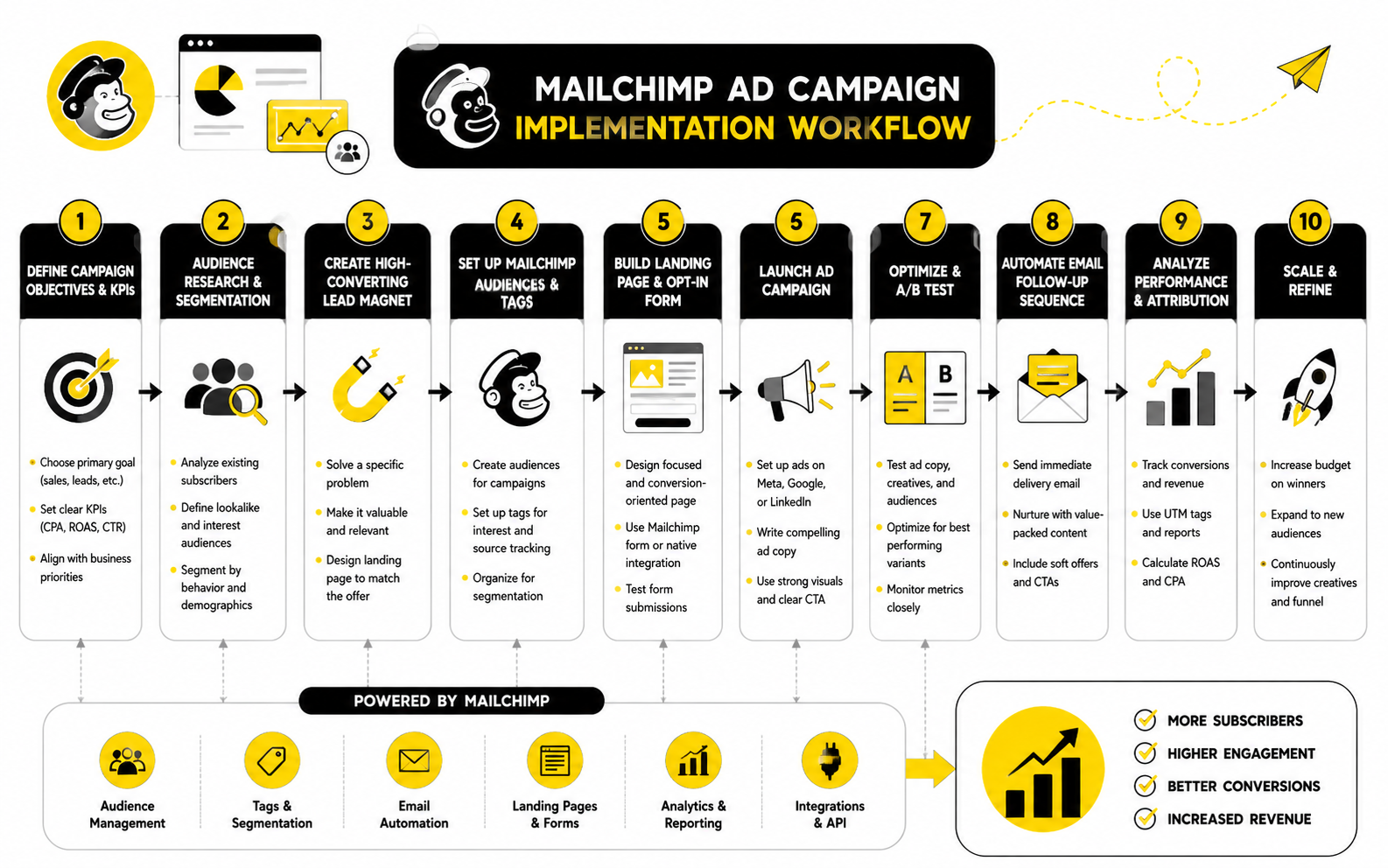
This is the point where the campaign becomes tangible. You are no longer just planning ads and emails. You are building a working path where a stranger can click, sign up, receive value, and move toward a business outcome without manual follow-up at every step.
Add Tracking Before You Spend Money
Tracking is not something to add after the campaign has already been running for a week. If you wait, you lose the cleanest learning window. Start with basic tracking before launch so your first clicks already tell you something useful.
Mailchimp can integrate with Google Analytics so marketers can follow users from campaigns to online purchases and use additional tracking options for deeper campaign insight: Mailchimp Google Analytics integration. For a Mailchimp ad campaign, this helps you connect email, landing page, and website behavior instead of relying only on platform-level numbers. You do not need a complicated analytics stack to start, but you do need consistent campaign naming.
Use UTM parameters for the traffic source, medium, campaign name, content, and offer when possible. Keep the names readable and consistent. A clean naming system is boring in the best possible way because it saves you from guessing later.
Track The Handful Of Events That Matter
You do not need to track every tiny interaction on day one. You need to track the moments that prove whether the campaign is working. For most campaigns, that means page visits, form submissions, email clicks, purchases, bookings, or qualified lead actions.
If your campaign sends people to a sales page after signup, track that click. If the goal is a booked call, track the booking. If the goal is ecommerce revenue, connect the campaign to purchase behavior wherever your setup allows it.
The point is not to create a perfect dashboard. The point is to answer practical questions. Did the ad bring the right people? Did the page convert them? Did the follow-up move them forward? Did the campaign produce a result worth repeating?
Test The Full Path Before Launch
Before spending money, run through the campaign like a real visitor. Click the destination link. Read the page on mobile. Submit the form with a test email. Check whether the right tag appears, the right automation starts, and the first email arrives with the correct promise.
This step catches the mistakes that make campaigns look worse than they are. Broken links, slow pages, confusing form fields, missing confirmation messages, and delayed emails can quietly destroy performance. None of those problems are strategic. They are execution issues, and they are preventable.
A basic pre-launch check should include:
This is not glamorous, but it is where professional campaigns separate themselves from rushed ones. A Mailchimp ad campaign does not need to be complicated to work. It needs a clean path, a clear offer, and no avoidable friction between the click and the conversion.
Statistics And Data
Measurement is where a Mailchimp ad campaign stops being a creative opinion and starts becoming a business decision. The point is not to collect random numbers because they look impressive in a dashboard. The point is to understand what each number says about the customer path and what you should change next.
Email benchmarks are useful, but only when you use them as context, not as a final verdict. Mailchimp frames benchmarks around key indicators like open rates, click-through rates, conversion rates, bounce rates, unsubscribe rates, and ROI because those numbers help marketers compare campaign health across industries: Mailchimp email marketing benchmarks. That comparison can show whether your campaign is unusually strong, unusually weak, or simply normal for your market.
Still, your own baseline matters more than a broad average. If your audience is cold, your click and conversion rates may look different from a campaign sent to loyal customers. If your offer is expensive or high-commitment, your conversion rate may be lower while the revenue per conversion is much higher.
What The Main Campaign Metrics Actually Mean
Open rate is a useful early signal, but it is not the whole story. Mailchimp explains that open and click rates help measure engagement with subject lines and email content, and they are a practical starting point for testing and improvement: Mailchimp open and click rates. In a Mailchimp ad campaign, open rate mostly tells you whether the follow-up email earned enough attention after the ad generated the signup.
Click rate is usually more actionable because it shows whether people moved from reading to doing. A strong open rate with a weak click rate often means the subject line worked, but the email body, offer, or call to action did not. A weaker open rate with a strong click rate can mean the message is highly relevant to the people who do open, but the subject line or send timing needs work.
Conversion rate is where the campaign becomes real. It tells you whether visitors, subscribers, or email readers completed the intended action. That action could be a form submission, booking, purchase, trial signup, consultation request, or product click, depending on the goal you set before launch.
Build A Simple Analytics System
A clean analytics system connects four layers: ad traffic, landing page behavior, email engagement, and business outcome. If you only measure the ad, you will know what people clicked. If you only measure email, you will know what subscribers did after they joined. When you connect the layers, you can see where the campaign actually wins or breaks.
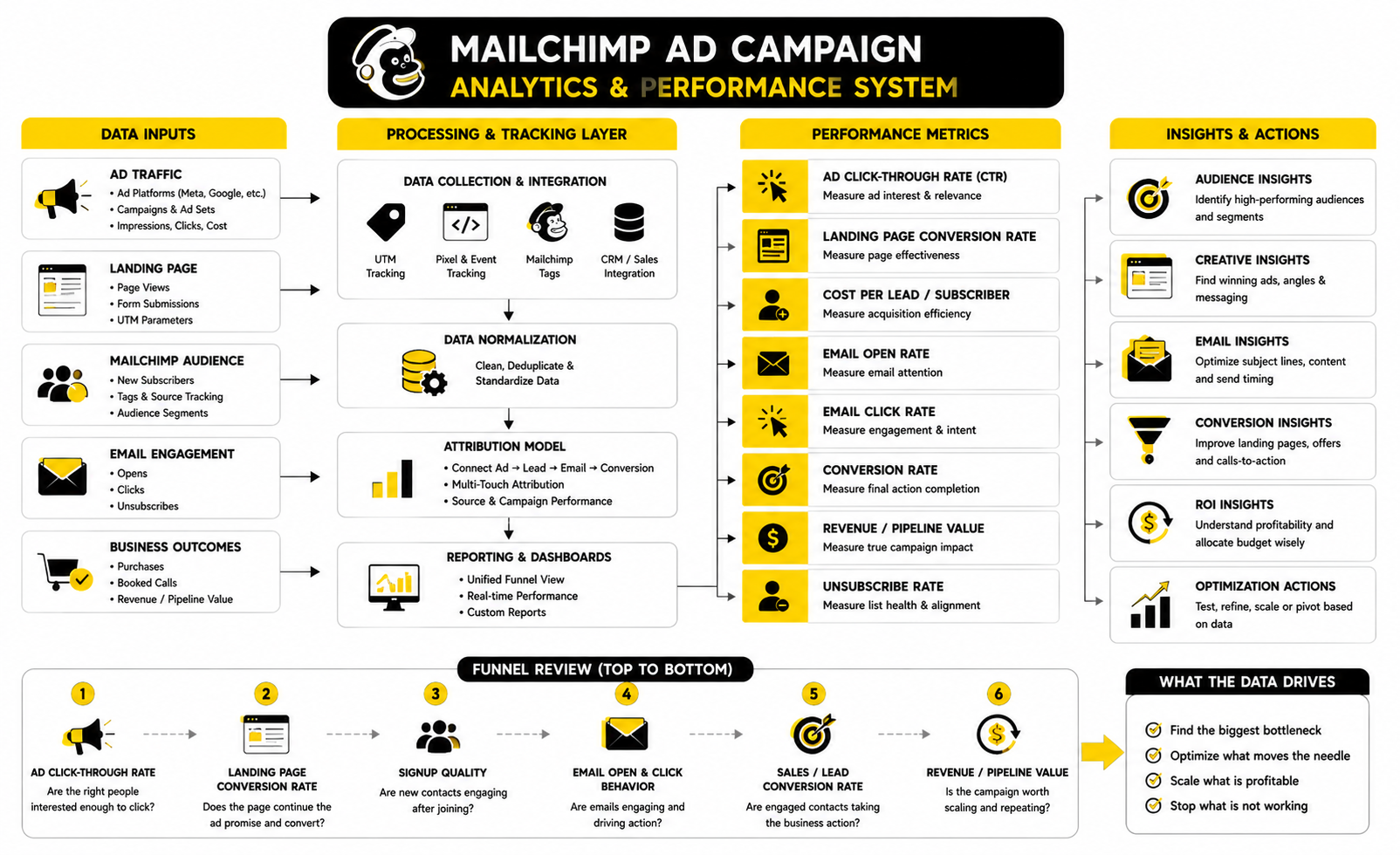
The simplest setup is enough for most campaigns. Use consistent UTM parameters on ad links, track landing page visits and form submissions, tag the new contact source in Mailchimp, and measure the email sequence that follows. Then connect the final action, such as revenue or booked calls, as closely as your tools allow.
This setup gives you a practical decision path. If ad clicks are expensive, review targeting and creative. If clicks are fine but signups are weak, review the landing page and offer. If signups are strong but follow-up engagement is weak, review the email sequence. If engagement is strong but sales are weak, review the sales page, pricing, trust signals, and conversion offer.
Use Benchmarks Without Becoming A Slave To Them
Benchmarks help you avoid flying blind. Litmus reports that 35% of companies see email ROI of 36:1 or more, which reinforces why the follow-up side of a Mailchimp ad campaign deserves serious attention: Litmus State of Email reports. If your campaign only measures ad clicks, you may miss the part of the system where the real return happens.
GetResponse also emphasizes that email performance varies heavily by location and industry, and its benchmark reporting points marketers toward click-through rate as a more useful engagement signal when open tracking becomes less reliable: GetResponse email marketing benchmarks. That is the right mindset. Opens can help you diagnose attention, but clicks and conversions show intent.
Benchmarks should drive questions, not panic. If your click rate is below your industry range, ask whether the email gives people one clear next step. If your unsubscribe rate rises, ask whether the audience source or offer expectation is wrong. If your conversions are low but engagement is strong, ask whether the next step feels too risky, too expensive, or too vague.
Read The Funnel From Top To Bottom
A Mailchimp ad campaign should be reviewed as a funnel, not as disconnected reports. The ad creates the visit. The landing page creates the signup or next action. The email sequence creates trust and momentum. The final offer creates revenue or pipeline.
Start at the top and move down in order. Do not rewrite the email sequence if the landing page is barely converting. Do not change the landing page if the ad is sending the wrong audience. Do not blame the offer if the tracking is broken and you cannot see what is really happening.
A practical funnel review looks like this:
Each layer changes the meaning of the next one. A low cost per lead means little if those leads never open or click. A high cost per lead may be acceptable if the leads convert into profitable customers. This is why the campaign must be judged by the full path, not one attractive metric.
Separate Vanity Metrics From Decision Metrics
Vanity metrics make you feel like something is happening. Decision metrics tell you what to do next. Impressions, reach, and raw traffic can be useful for context, but they are not enough to judge whether the campaign is working.
For a Mailchimp ad campaign, decision metrics are the numbers tied to movement. Cost per qualified subscriber, landing page conversion rate, email click rate, booked call rate, purchase conversion rate, revenue per subscriber, and unsubscribe rate all help you make real choices. They show whether the campaign is attracting the right people and moving them toward the right outcome.
This distinction matters because campaigns often look good in one place and weak in another. A campaign can have cheap clicks and terrible leads. It can have strong email engagement and poor sales. It can have a high unsubscribe rate because the ad promised something the follow-up did not deliver. The job is to find the real bottleneck, not celebrate the easiest number.
Know When To Optimize And When To Stop
Not every campaign deserves endless optimization. Some campaigns need a better headline, cleaner tracking, or a stronger email sequence. Others need a completely different offer or audience because the market is not responding.
A reasonable first pass is to look for the biggest leak. If the landing page conversion rate is weak, improve the offer clarity, headline, form, and mobile layout. If the first email gets opened but not clicked, rewrite the body around one action. If the campaign attracts subscribers who never engage, tighten the ad message and audience targeting.
Stop when the data shows the campaign is structurally wrong. If you have tested the audience, offer, page, and follow-up with clean tracking and the economics still do not work, do not keep feeding it budget because you already built it. Move the lesson into the next version and build sharper.
Turn Reports Into A Weekly Optimization Habit
Reporting only matters when it changes behavior. A weekly review is usually enough for most small campaigns, especially before there is enough volume to make daily changes meaningful. You are looking for patterns, not emotional reactions to every small movement.
Mailchimp’s reporting tools are designed to show performance across campaigns and ecommerce activity, which makes them useful for reviewing both engagement and business results: Mailchimp reports. Use those reports to compare campaign versions, not just individual sends. The best insight often comes from seeing how one audience, offer, or follow-up path performs against another over time.
Keep the review practical. Ask what improved, what got worse, what the biggest bottleneck is, and what single change should be tested next. That rhythm turns your Mailchimp ad campaign into a learning system, which is exactly what you want.
Advanced Strategy: Scaling Without Breaking The Campaign
Once a Mailchimp ad campaign starts producing clean results, the temptation is to increase the budget fast. That is understandable, but it can also break what made the campaign work in the first place. Scaling changes the audience mix, the cost structure, the creative fatigue curve, and the pressure on your follow-up system.
The more carefully move is to scale in layers. Increase budget gradually on the audience and offer that already works, then test new audiences beside it instead of replacing the original winner. This gives you a control version, which is important because you need something stable to compare against.
Scaling should also happen after the post-click system is ready. If your landing page converts but your email sequence is weak, more ad spend only creates more wasted leads. If your follow-up converts but your sales process is slow, more leads may overwhelm the team and lower close rates.
Protect Deliverability Before You Push Volume
Deliverability is one of the least glamorous parts of a Mailchimp ad campaign, but it matters a lot. If people do not receive the follow-up emails, your paid traffic loses value. You cannot optimize a sequence that never reaches the inbox.
Modern email sending requires stronger sender authentication than many marketers used to treat as optional. Mailchimp explains SPF, DKIM, and DMARC as key records for verifying sender identity and building trust with inbox providers: Mailchimp SPF, DKIM, and DMARC setup. Google’s sender guidelines also recommend SPF, DKIM, and DMARC for domains and include stricter expectations for bulk senders: Google email sender guidelines.
That means you should not wait until delivery drops before caring about authentication. Set up the sending domain properly, keep complaint rates low, avoid misleading subject lines, and make unsubscribing easy. These are not technical chores. They protect the value of every click you paid for.
Watch List Quality As Closely As List Size
A growing list looks good, but list quality is what determines whether the campaign has long-term value. If the ad attracts people who only want a freebie and never engage again, the list becomes heavier without becoming more profitable. Bigger is not automatically better.
Look at how new contacts behave after they join. Are they opening the first email? Are they clicking the next step? Are they buying, booking, replying, or showing any sign of intent? If not, the problem may be the audience, the offer, or the expectation created by the ad.
This is why segmentation matters more as the campaign grows. Mailchimp’s segmentation tools can use engagement and buying behavior, and its platform also references predictive options like lifetime value and demographic predictions: Mailchimp segmentation tools. Use that data to separate high-intent contacts from passive subscribers so your follow-up can become more specific over time.
Avoid The Common Scaling Trap
The common scaling trap is assuming that a campaign that works at a small budget will behave the same way at a larger budget. It often will not. As spend rises, ad platforms usually need to reach beyond the easiest-to-convert people, which can lower conversion quality.
That does not mean the campaign is failing. It means the math has changed. You may need stronger creative, sharper segmentation, a better landing page, or a higher-value backend offer to make the larger audience profitable.
The mistake is reacting too quickly to small fluctuations. Give each meaningful change enough data before judging it. At the same time, do not hide behind “it needs more time” when the funnel is clearly leaking. Scaling requires patience and honesty at the same time.
Use Automation Without Making The Experience Feel Robotic
Automation should make the campaign more relevant, not more mechanical. A good automation path sends the right message at the right moment. A bad one blasts everyone with the same sequence and calls it personalization.
Mailchimp automation flows can add tags, send targeted emails, and perform other workflow actions based on contact behavior: Create a Mailchimp automation flow. That gives you room to build more carefully paths, but the strategy still has to come from you. The tool can trigger the message, but it cannot decide what your customer actually needs to hear.
Use behavior to guide the next step. If someone clicks a product link, send product-specific follow-up. If someone ignores the first few emails, slow down or change the angle. If someone buys, stop selling the same thing and move them into onboarding, cross-sell, or retention content.
Build Branches Only When They Improve The Journey
Branching is powerful, but it can also create unnecessary complexity. Do not build five paths just because the tool allows it. Build branches when the contact’s behavior clearly changes what they should receive next.
A useful branch might separate people who clicked a pricing link from people who only downloaded a free guide. Another useful branch might separate buyers from non-buyers. A less useful branch might split people based on tiny behaviors that do not change the message in any meaningful way.
Keep the logic readable. If you cannot explain the automation path in plain language, it is probably too complicated. A Mailchimp ad campaign should feel personal to the subscriber, but it should still be simple enough for you to manage.
Decide When Mailchimp Is Enough And When You Need More
Mailchimp is a strong fit when the campaign depends on email marketing, landing pages, basic segmentation, automations, and reporting. It is especially practical for businesses that want a cleaner way to connect list growth with follow-up. For many campaigns, that is enough.
But some businesses eventually need a deeper funnel or CRM setup. If the campaign involves sales pipelines, appointment booking, multiple sales reps, client accounts, call tracking, SMS-heavy follow-up, and agency-style client management, a more sales-focused platform such as GoHighLevel may fit better. If the main bottleneck is building dedicated sales pages and offer funnels, a page-and-funnel platform like ClickFunnels may make more sense for that part of the stack.
The strategic question is not which tool has the longest feature list. The question is where the campaign is losing money or momentum. If the loss is in email follow-up and segmentation, improve the Mailchimp setup. If the loss is in sales pipeline management, appointment handling, or funnel depth, consider adding or switching tools.
Manage Risk Before It Becomes Expensive
Every paid campaign has risk. The offer may not resonate. Costs may rise. Tracking may underreport conversions. Deliverability may weaken. A landing page may convert well for one audience and fail for another.
Risk management means you do not bet the whole campaign on one assumption. Test one major variable at a time when possible. Keep a stable version running while testing new versions. Maintain clean naming conventions so you can compare performance without digging through messy reports.
You also need a plan for compliance and consent. Mailchimp’s signup form and audience tools can help collect and manage contacts, but you are still responsible for using them properly. Make sure your signup language is clear, your unsubscribe process works, and your follow-up matches what people expected when they joined.
Think In Customer Lifetime Value, Not Just First Conversion
The first conversion is important, but it is not always where the profit sits. A lead may buy weeks later. A customer may return after a replenishment reminder. A small first purchase may lead to a subscription, upgrade, referral, or higher-value service.
Mailchimp’s predicted analytics can help forecast behavior such as purchase likelihood and churn risk for eligible stores and audiences: Mailchimp predicted analytics. That kind of data is useful because it moves the campaign conversation beyond the first click. You can start asking which contacts are likely to become valuable, not just which ones were cheapest to acquire.
This is where better marketers separate themselves. They do not only ask, “What did this lead cost?” They ask, “What is this lead worth after the follow-up, the second purchase, and the retention path?” That is the mindset that turns a Mailchimp ad campaign from a short-term promotion into a growth system.
Build A Reusable Campaign Playbook
The best outcome is not just one successful campaign. The best outcome is a repeatable playbook you can use again. That playbook should include the audience logic, offer angle, landing page structure, automation path, tracking setup, reporting rhythm, and optimization decisions.
Document what worked and what did not. Save the winning subject lines, landing page angles, audience definitions, and follow-up steps. Also document the failed tests because they protect you from repeating the same mistakes later.
A reusable playbook makes every future campaign faster and more carefully. You are no longer starting from zero each time. You are building from evidence, and that is the whole point of treating the Mailchimp ad campaign as a system instead of a one-off marketing task.
Common Mistakes, Tool Options, And Mailchimp Ad Campaign FAQ
A Mailchimp ad campaign works best when the whole system is intentional. The ad, landing page, signup form, tags, automation, tracking, reporting, and follow-up offer all need to support the same goal. When those pieces line up, the campaign becomes easier to measure and easier to improve.
The final stage is about tightening the ecosystem. You want a campaign that can collect attention, convert it into owned audience growth, continue the conversation, and show you which actions are worth repeating. That is how the campaign becomes a reusable asset instead of a one-time traffic push.
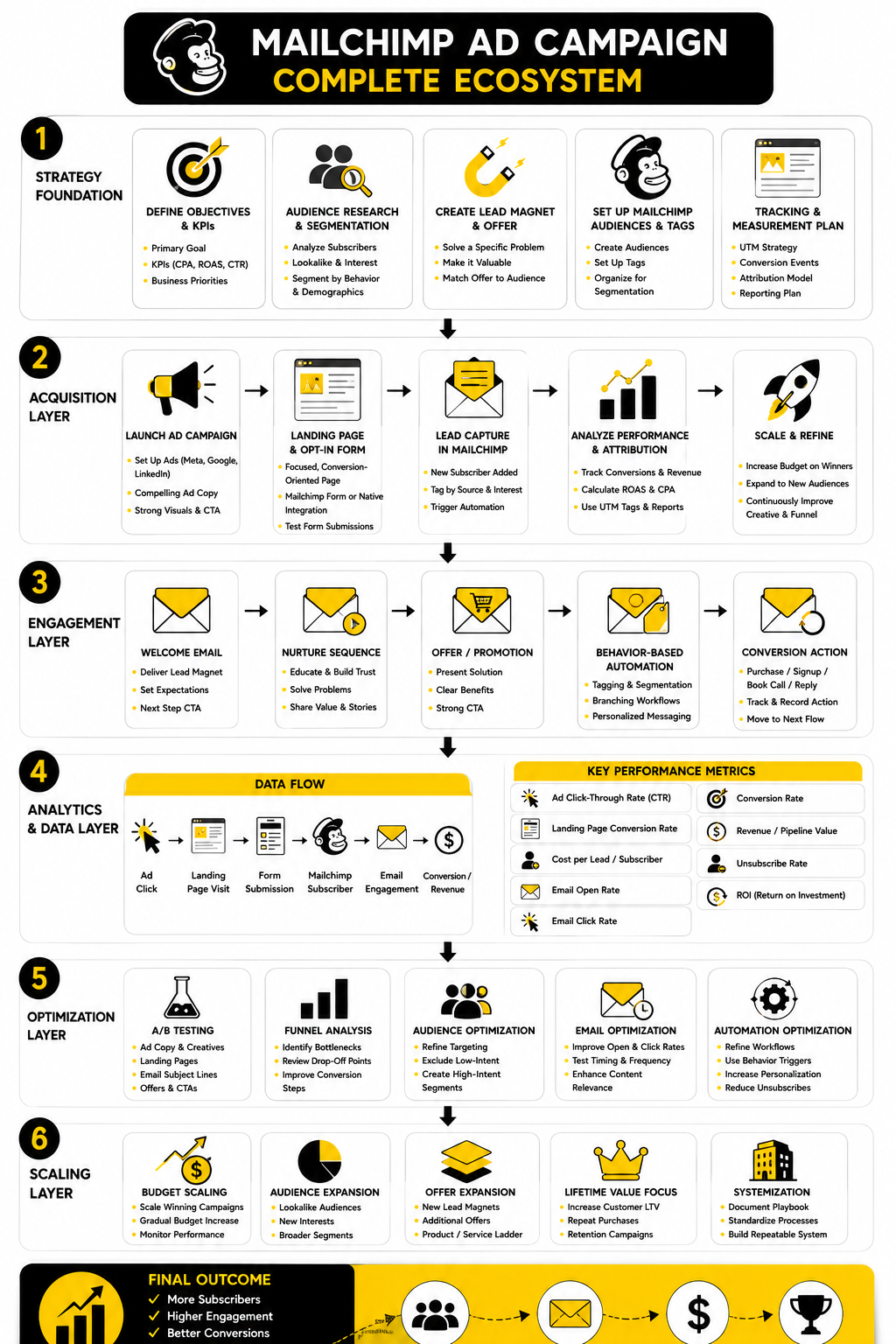
The biggest mistake is treating Mailchimp like a place to “send emails” after the real marketing happens somewhere else. In a proper campaign, Mailchimp is part of the conversion engine. The paid click starts the relationship, but the follow-up, segmentation, and reporting decide whether that relationship becomes valuable.
Common Mistakes To Avoid
The first mistake is launching before the follow-up is ready. If someone signs up and receives nothing useful, the campaign loses momentum immediately. The first email should deliver the promised asset, confirm the next step, and make the subscriber feel like signing up was a good decision.
The second mistake is using one message for every audience. Cold prospects, engaged subscribers, past buyers, and high-intent visitors do not need the same angle. When the campaign treats everyone the same, the copy becomes vague and the reporting becomes harder to read.
The third mistake is judging the campaign too early or from the wrong metric. Cheap clicks are not success if the leads never engage. A lower conversion rate is not automatically failure if the conversions are high-value and the follow-up produces revenue over time.
The fourth mistake is building too much complexity too soon. Advanced segmentation, branching logic, and multi-step automations are useful when they reflect real customer behavior. They become a problem when they make the campaign impossible to understand, maintain, or improve.
Tool Options Around Mailchimp
Mailchimp can handle the core email marketing side of the system, especially when you need landing pages, forms, audience management, automation flows, and campaign reporting in one workspace. Its current pricing page shows marketing automation flows, segmentation, landing pages, reporting, and AI-related features across different plan levels, so check the plan details before building a campaign that depends on advanced functionality: Mailchimp pricing. The practical point is simple: do not design a campaign around features your account does not include.
Some campaigns also need tools outside Mailchimp. For social scheduling and campaign distribution, Buffer can help keep organic promotion consistent around the paid campaign. For messenger-driven follow-up, ManyChat may fit campaigns where the conversation naturally happens in chat.
If the campaign depends heavily on sales funnels, checkout pages, and offer testing, ClickFunnels can be a better fit for that specific part of the system. If the campaign needs CRM pipelines, appointments, SMS, and sales team follow-up, GoHighLevel may be more appropriate. If you want a simpler email platform comparison, Brevo and Moosend are worth reviewing when budget, automation depth, or contact limits matter.
What is a Mailchimp ad campaign?
A Mailchimp ad campaign is a marketing campaign that uses paid or promoted traffic to drive people into a Mailchimp-managed path. That path can include a landing page, signup form, audience tag, automation flow, email sequence, and reporting. The strongest campaigns do not stop at the click because the follow-up is where trust and revenue are usually built.
Can Mailchimp run ads directly?
Mailchimp has supported ad-related campaign workflows and integrations, but the practical setup depends on the current tools available in your account and region. Many marketers use Mailchimp as the landing page, audience, and follow-up system while ads are managed through platforms like Meta, Google, or other paid traffic channels. Before launch, confirm the current feature availability inside your Mailchimp account and build the campaign around the tools you can actually use.
Is Mailchimp good for lead generation?
Mailchimp can work well for lead generation when the offer, landing page, form, and automation sequence are clear. It is especially useful when you want new subscribers to enter a tagged audience and receive follow-up emails automatically. The quality of the leads still depends on the audience, promise, and conversion path, not just the software.
What should I include on a Mailchimp campaign landing page?
A campaign landing page should include one clear promise, a short explanation of the offer, a simple form, and an obvious call to action. It should also explain what happens after signup so visitors know what to expect. Keep the page focused because every extra distraction can reduce the chance that the visitor completes the action.
How many emails should follow a Mailchimp ad campaign signup?
A simple follow-up sequence can start with three to five emails. The first email should deliver the promised asset or confirmation, while the next emails can educate, build trust, answer objections, and guide the reader toward the next step. The right length depends on the offer, buying cycle, and how much trust the audience needs before taking action.
What metrics matter most for a Mailchimp ad campaign?
The most useful metrics are cost per click, landing page conversion rate, cost per lead, email open rate, email click rate, final conversion rate, and revenue or pipeline value. Do not judge the campaign from one metric alone. A campaign with cheap leads can still fail if those leads do not engage or buy.
How do I know if my campaign is attracting the wrong audience?
You can usually tell from post-signup behavior. If people submit the form but ignore the first email, never click, unsubscribe quickly, or fail to take any meaningful next step, the audience or offer may be misaligned. The ad may be creating curiosity without attracting people who actually want the solution.
Should I use one Mailchimp audience or multiple audiences?
For most smaller setups, one well-organized audience with tags, groups, and segments is easier to manage than several disconnected audiences. Multiple audiences can create duplicated contacts, messy reporting, and inconsistent follow-up. Use separate audiences only when there is a clear business reason, not because every campaign feels like it deserves a new list.
How much should I spend on a Mailchimp ad campaign?
There is no universal budget because the right spend depends on the offer value, audience cost, conversion rate, and sales process. Start with enough budget to collect meaningful data, but not so much that one bad assumption becomes expensive. Once the funnel proves that leads engage and convert, increase spend gradually while watching lead quality.
Can I use Mailchimp for ecommerce ad campaigns?
Yes, Mailchimp can support ecommerce campaigns when your store integration, audience data, and automation flows are set up correctly. Ecommerce campaigns can use product recommendations, abandoned cart follow-up, purchase-based segmentation, and customer reactivation. The important part is connecting the ad campaign to purchase behavior so you can measure revenue, not just traffic.
What is the biggest mistake beginners make with Mailchimp ads?
The biggest mistake is launching traffic before the conversion path is ready. The ad may get clicks, but the landing page, signup form, first email, tagging, tracking, and next offer are what turn those clicks into value. Paid traffic exposes weak systems quickly.
When should I use another tool instead of Mailchimp?
Use another tool when the campaign needs a capability that Mailchimp does not handle well for your workflow. A sales-heavy business may need a CRM and pipeline tool. A funnel-heavy business may need deeper page, checkout, and offer testing features. Mailchimp can still remain useful for email and audience management, but the rest of the stack should match the sales process.
How often should I review campaign performance?
A weekly review is usually enough for most early campaigns because it gives the data time to settle. Review the funnel in order: ad clicks, landing page conversions, signup quality, email engagement, and final business outcome. Make one meaningful change at a time so you can understand what actually improved the campaign.
What makes a Mailchimp ad campaign profitable?
Profit comes from the full system, not the ad alone. You need a relevant audience, a strong offer, a landing page that converts, follow-up that builds trust, and a final action that produces enough value to cover acquisition cost. When those pieces work together, the campaign can become repeatable instead of random.
Build a stronger local presence with BAAM AI
Turn your website, Google profile, social channels, and AI visibility into one growth engine
Most businesses do not need more random marketing activity. They need a consistent presence system that helps the right people find them, trust them, and take action. BAAM AI brings strategy, local SEO, website updates, Google Maps visibility, social content, AI-search readiness, media production, and reporting into one practical monthly engine.
If you want your marketing to keep working after the campaign ends, start with a free BAAM AI presence audit. See how your business shows up today and where the fastest visibility wins are at BAAM AI.