
BAAM AI Blog
Lifecycle Emails: How to Build an Email System That Guides People From First Touch to Repeat Purchase
Most businesses do email backwards. They write a newsletter when they have something to announce, send a promo when sales feel slow, and hope the list somehow turns into revenue. That can work occasionally, but it is...
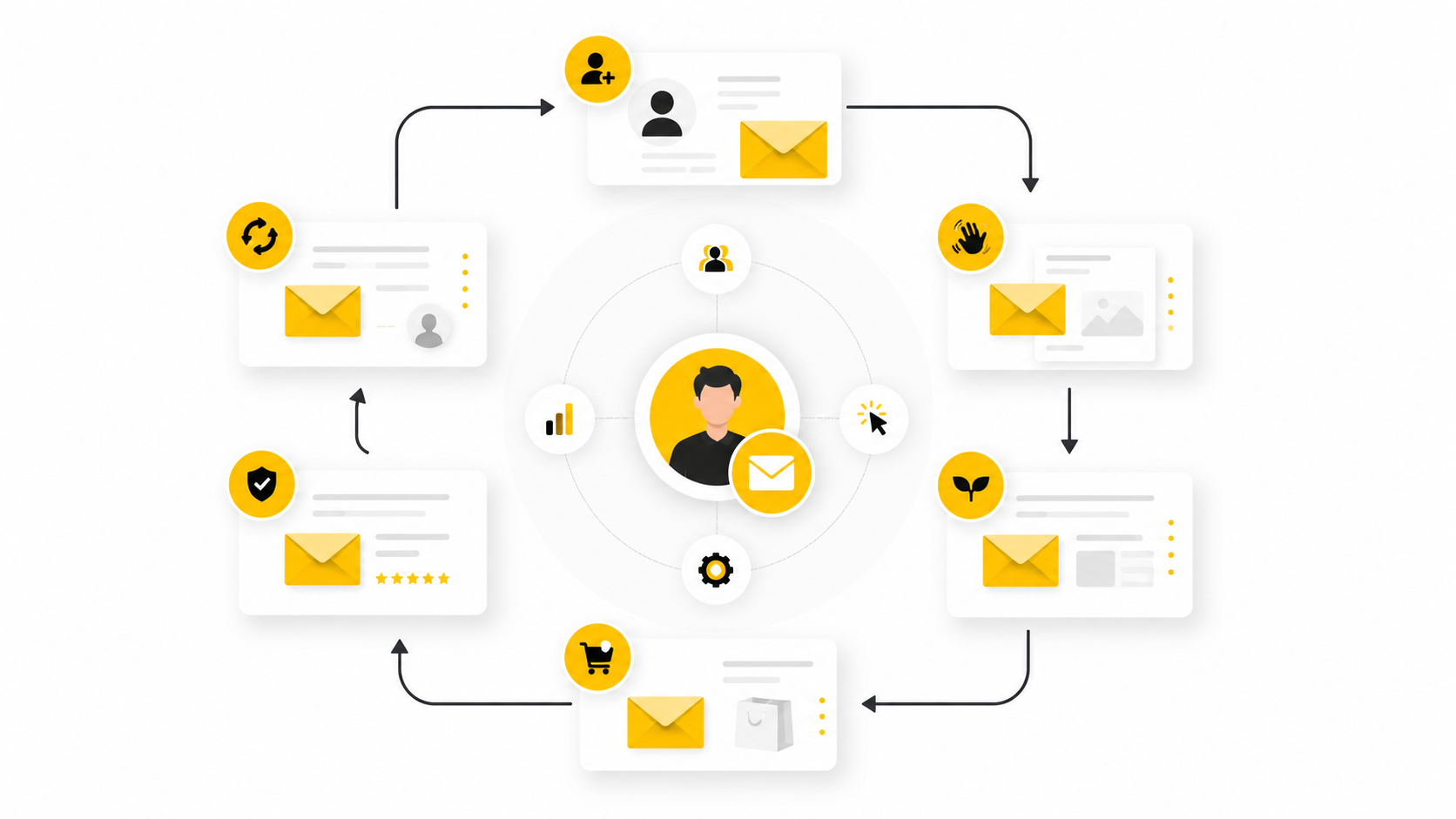
Most businesses do email backwards. They write a newsletter when they have something to announce, send a promo when sales feel slow, and hope the list somehow turns into revenue. That can work occasionally, but it is not a system.
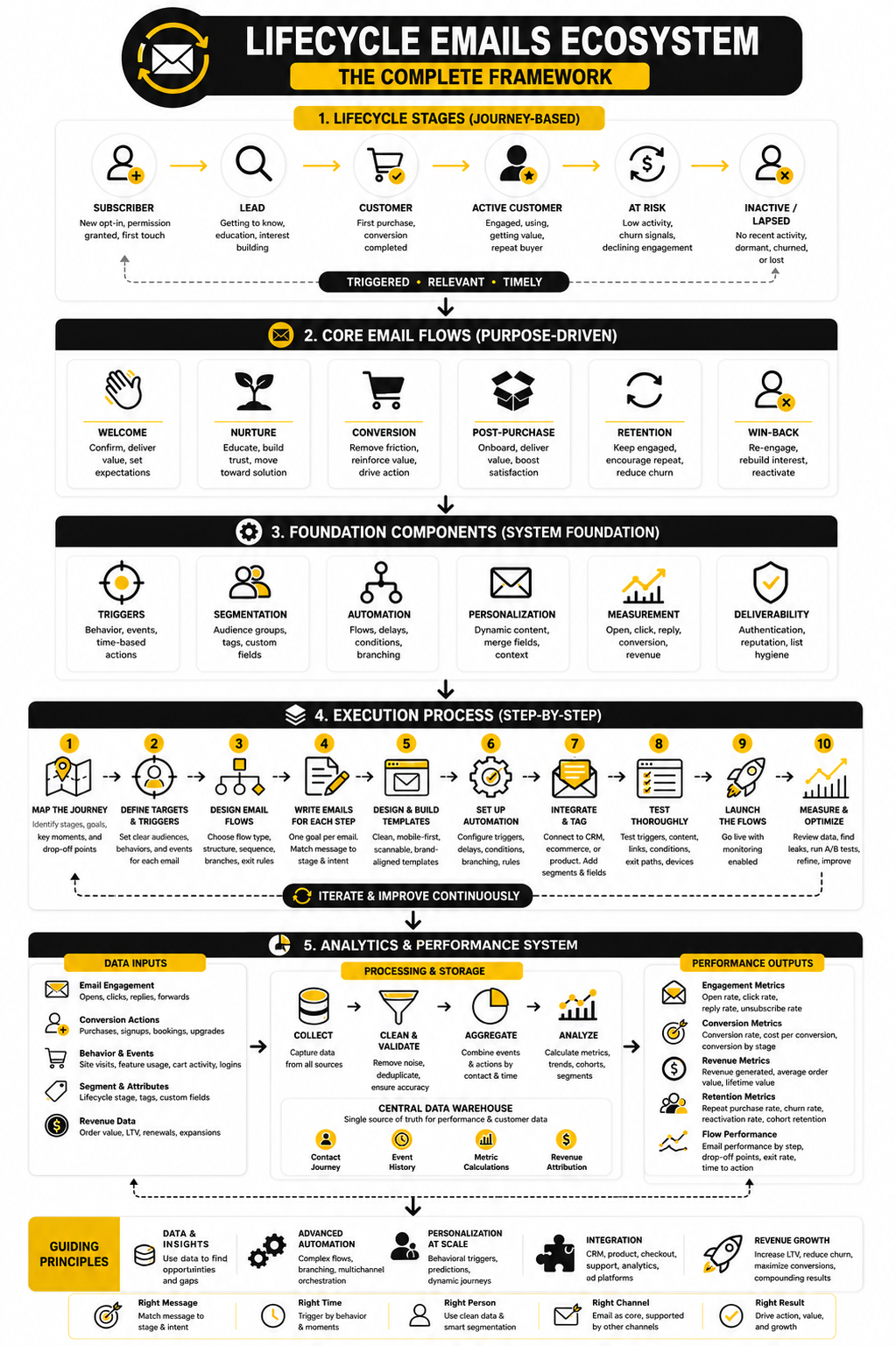
Lifecycle emails are different. They are planned messages tied to where someone is in the customer journey: new subscriber, new lead, active prospect, first-time buyer, repeat customer, inactive account, or lost opportunity. Instead of treating every contact the same, lifecycle emails respond to what people have done, what they need next, and what would make the next step feel obvious.
That matters because email is not just a broadcast channel. Used well, it becomes the quiet operating system behind acquisition, onboarding, conversion, retention, referrals, and win-back. The goal is not to send more email; the goal is to send the right email because the customer’s behavior has created a clear reason for it.
this guide is split into six parts so each stage of the lifecycle email system gets enough room. The structure starts with strategy, then moves into components, implementation, optimization, and long-term scaling. Each section builds on the previous one, so the full article works as one complete playbook rather than a list of disconnected email ideas.
Why Lifecycle Emails Matter
Lifecycle emails matter because timing changes the meaning of a message. A discount sent to a random subscriber can feel like noise, but a helpful reminder sent after someone abandons a checkout can feel useful. A product education email sent before someone understands the problem can feel premature, but the same email after a demo request can move the deal forward.
The biggest mistake companies make is separating email from customer behavior. They build campaigns around internal calendars instead of moments of intent. Lifecycle emails fix that by connecting messages to real signals: signup, page visit, form completion, cart activity, purchase, usage, inactivity, renewal risk, or support history.
This is why lifecycle email strategy is especially powerful for ecommerce, SaaS, agencies, consultants, creators, and service businesses. Every customer relationship has stages, even if the business has never named them. Once those stages are visible, email stops being a guessing game and becomes a guided path.
The Lifecycle Email Framework
A strong lifecycle email framework starts with one simple question: what does this person need next? Not what do we want to promote, not what campaign is on the calendar, and not what subject line sounds clever. The entire system works better when each email has a clear job in the relationship.
The framework usually begins with acquisition and activation. Someone joins a list, downloads a lead magnet, starts a trial, books a call, creates an account, or makes a first purchase. At this stage, the email’s job is to confirm the decision, reduce uncertainty, and move the person toward the first meaningful action.
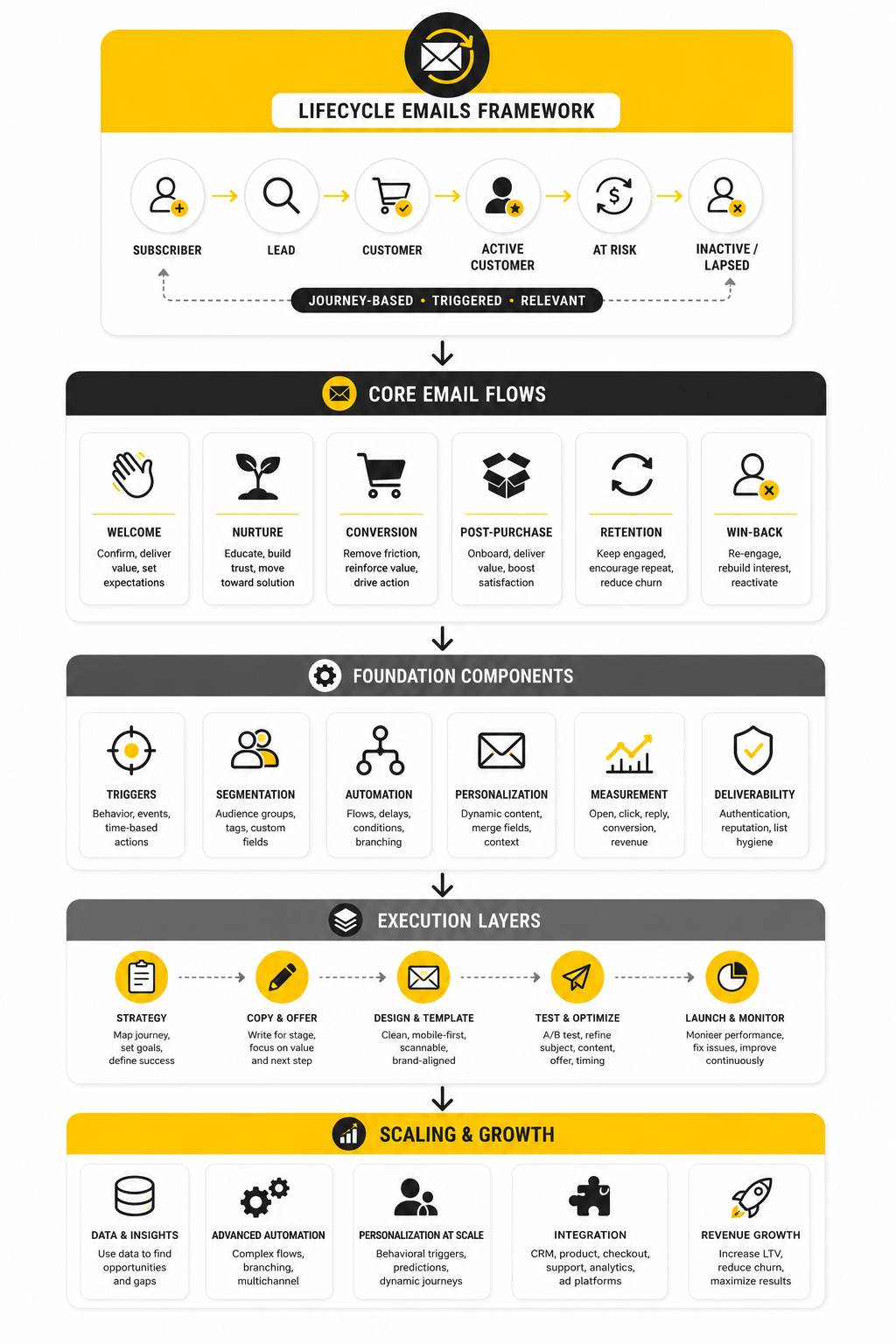
From there, the framework expands into conversion, retention, expansion, and reactivation. Conversion emails help people choose. Retention emails help customers get value. Expansion emails introduce the next relevant offer. Reactivation emails bring people back when the relationship has gone quiet.
Core Lifecycle Email Components
Every lifecycle email system needs a few core components before the copy matters. First, you need defined lifecycle stages. If you cannot tell the difference between a new lead, a qualified lead, a first-time buyer, and a dormant customer, your emails will naturally become generic.
Second, you need triggers. A trigger is the behavior, date, condition, or status change that causes an email or sequence to send. Common triggers include subscribing, clicking a key link, viewing a pricing page, abandoning checkout, completing a purchase, missing a usage milestone, approaching renewal, or going inactive.
Third, you need message intent. Each email should have one main purpose: welcome, educate, qualify, convert, onboard, reassure, upsell, recover, or reactivate. When one email tries to do five jobs, the reader feels it immediately.
Fourth, you need a platform that can handle segmentation, automation, tagging, and reporting without turning the setup into a mess. For businesses that want CRM, pipelines, automations, SMS, email, and lead follow-up in one place, GoHighLevel can fit naturally into a lifecycle email stack. For creators and small businesses that want simpler email automation, Systeme.io can also make sense.
Professional Implementation Starts With the Customer Journey
Professional implementation does not start inside an email editor. It starts by mapping the journey from the customer’s point of view. What happened before this person joined the list? What problem are they trying to solve? What would make them trust the next step?
Once the journey is mapped, the email system becomes much easier to design. You can see where people hesitate, where they need proof, where they need education, and where they need a direct offer. This prevents the common problem of building automations that look impressive technically but do not actually help people move forward.
The best lifecycle emails feel almost obvious to the recipient. They arrive at the right moment, speak to the current situation, and make the next step easy. That is the standard the rest of this guide will use: not clever automation for its own sake, but practical email systems that create momentum.
The Lifecycle Email Framework
The easiest way to understand lifecycle emails is to stop thinking in campaigns and start thinking in movement. Every subscriber, lead, or customer is either moving closer to value, standing still, or drifting away. Your email system should recognize that movement and respond with the next useful message.
A practical lifecycle framework has six stages: capture, welcome, nurture, convert, retain, and reactivate. These stages are not meant to be rigid boxes. They are a working map that helps you decide what to send, when to send it, and why the message should exist in the first place.
The point is not to build a huge automation maze. The point is to make sure every important customer moment has a clear follow-up. Once that is in place, lifecycle emails become easier to write, easier to measure, and much easier to improve.
Capture Emails
Capture emails begin the moment someone raises their hand. That might happen when they download a guide, join a waitlist, request a quote, start a free trial, use a calculator, enter a giveaway, or subscribe through a checkout form. At this stage, the person has shown interest, but they have not given you deep trust yet.
The job of a capture email is simple: confirm the action, deliver what was promised, and set expectations. If someone signed up for a resource, give them the resource quickly. If someone requested more information, tell them what happens next instead of leaving them guessing.
This is where many businesses get lazy. They collect the lead, send one generic confirmation, and then drop the person into a newsletter list with no context. That wastes the moment of intent, and lifecycle emails are built specifically to avoid that.
A strong capture email should answer three questions:
When those questions are answered clearly, the relationship starts clean. You are not trying to sell too hard too early. You are simply proving that subscribing, clicking, or requesting something was a good decision.
Welcome Emails
Welcome emails are often the first real impression after the signup. The person already knows the brand exists, but they may not understand the offer, the positioning, the process, or the next step. This is where you orient them.
A welcome email should not read like a corporate brochure. It should quickly explain who the brand helps, what problem it solves, and what the reader can expect next. If the business has a strong point of view, this is the right place to introduce it.
For ecommerce, the welcome stage might include brand story, bestsellers, product education, social proof, and a first-purchase incentive. For SaaS, it might include account setup, activation steps, feature guidance, and a prompt to reach the first success milestone. For service businesses, it might include credibility, process explanation, case proof, and a simple booking path.
The mistake is trying to cram all of that into one email. A welcome sequence usually works better when each message has one job. One email confirms the relationship, one explains the value, one removes friction, and one presents the next natural action.
If you are building this from scratch, start with three welcome emails:
That is enough to create momentum without overwhelming people. You can always expand later when the data shows where people need more help.
Nurture Emails
Nurture emails are for people who are interested but not ready. They may need more education, more proof, more urgency, or more clarity before they take action. This stage is where trust compounds.
Good nurture emails do not beg for attention. They help the reader make sense of the problem and understand the cost of staying where they are. That could mean explaining mistakes, comparing options, answering objections, showing use cases, or walking through decision criteria.
This is also where segmentation starts to matter more. Someone who clicked a pricing link should not receive the same nurture path as someone who only read a beginner guide. Their intent is different, so the follow-up should be different.
A practical nurture system can be built around intent levels:
This does not need to be complicated. Even a simple tag-based setup can make lifecycle emails feel much more relevant. Tools like Brevo or Moosend can support this kind of segmentation without forcing a small team into enterprise-level complexity.
Conversion Emails
Conversion emails are sent when the reader is close to taking action. They are not random promotions. They are timely messages connected to buying signals, such as visiting a pricing page, abandoning a cart, clicking a demo link, starting checkout, or reaching the end of a trial.
This stage needs directness. The reader already understands at least part of the value, so the email should focus on reducing hesitation. That might mean answering a final objection, making the offer clearer, showing what happens after purchase, or reminding them why they started.
For ecommerce, conversion emails often include cart recovery, browse abandonment, product recommendations, low-stock reminders, or limited-time incentives. For SaaS, they might include trial expiration reminders, activation nudges, plan comparison emails, and demo follow-ups. For agencies and consultants, they might include call booking reminders, proposal follow-ups, and proof-based objection handling.
A conversion email should never feel desperate. It should feel useful and specific. “You left something behind” is weaker than a message that reminds the person what they were considering, why it matters, and what to do next.
If the business relies on landing pages or funnels, the conversion stage also needs tight alignment between the email and the page. The promise in the email should match the page headline, the call to action should feel consistent, and the next step should be obvious. For funnel-heavy businesses, ClickFunnels can fit here because the email sequence and conversion path need to work together, not as separate pieces.
Retention Emails
Retention emails begin after the conversion. This is where many businesses go quiet, which is a serious mistake. The customer has taken action, but they still need reassurance, guidance, and reasons to stay engaged.
A good retention sequence helps the customer get value faster. That might mean onboarding instructions, product usage tips, order updates, implementation guidance, replenishment reminders, progress check-ins, or content that helps them succeed with what they bought. The purpose is not just to make another sale; it is to make the first decision feel even more carefully.
Retention emails are especially important because the customer’s experience after purchase shapes future revenue. If they feel ignored, confused, or unsupported, they are less likely to buy again. If they feel guided, they are more likely to trust the brand and continue the relationship.
This is where lifecycle emails become operational, not just promotional. They reduce support questions, improve product adoption, increase repeat purchase potential, and create better customer expectations. That is why retention should be planned from the beginning instead of being added after the business notices churn.
Reactivation Emails
Reactivation emails are for people who have stopped engaging. They may have stopped opening emails, stopped using the product, stopped buying, stopped booking calls, or stopped responding. The goal is to find out whether the relationship can be revived before you keep sending messages into silence.
A reactivation email should not pretend nothing happened. It should acknowledge the gap naturally and offer a relevant reason to return. That might be a new product, a better offer, a useful update, a reminder of unfinished progress, or a simple preference check.
This stage also protects list quality. Keeping disengaged people on the list forever can hurt performance and make reporting messy. A clean reactivation process helps you separate people who still care from people who should be suppressed, removed, or moved into a lower-frequency segment.
The best reactivation emails are honest and easy to act on. They do not guilt the reader. They give them a clear choice: come back, update preferences, or stop receiving messages. That clarity is good for the reader and good for the business.
How to Map Emails to the Customer Journey
Implementation starts with mapping the customer journey before touching the automation builder. This is not busywork. If the journey is unclear, the emails will be unclear too.
Start by writing down the major moments a person moves through before, during, and after becoming a customer. For a simple ecommerce brand, that might mean first visit, signup, product view, cart, purchase, delivery, repeat purchase, and inactivity. For a service business, it might mean lead magnet, inquiry, qualification, booked call, proposal, closed deal, onboarding, delivery, renewal, and referral.
The point is to see the full relationship, not just the sales moment. Lifecycle emails work because they connect those moments into a guided path. When the map is visible, it becomes much easier to spot missing follow-ups, weak transitions, and places where people are silently dropping off.
Step 1: Define the Main Lifecycle Stages
Do not start with twenty segments. Start with the few stages that actually matter to the business. Most companies can begin with subscriber, lead, qualified lead, first-time customer, active customer, repeat customer, inactive customer, and lost opportunity.
Each stage should have a clear entry rule. A subscriber joins the list but has not shown buying intent. A qualified lead has taken an action that suggests real interest. A first-time customer has purchased once but has not bought again.
This matters because vague stages create messy automations. If a person can sit in three stages at the same time, the system will eventually send conflicting messages. Clean lifecycle emails need clean definitions.
Step 2: Identify the Trigger for Each Email
A trigger is the reason an email sends. Without a trigger, you are just broadcasting. With a trigger, the message has context.
Triggers can be based on behavior, time, status, or data. A behavior trigger might be visiting a pricing page, abandoning checkout, clicking a comparison link, or booking a call. A time trigger might be seven days after signup, three days after delivery, or thirty days without activity.
The best triggers are tied to meaningful intent. A random page view may not deserve an email. A pricing page visit followed by no action probably does. Be selective here, because too many triggers can create an automation system that feels aggressive instead of helpful.
Step 3: Decide the Job of Each Message
Every email needs one job. Not three. Not five. One.
That job might be to welcome, educate, qualify, convert, onboard, retain, upsell, recover, or reactivate. Once you know the job, the copy becomes much easier because you are not trying to squeeze the entire business into one message.
This is where lifecycle emails become more strategic than normal campaigns. You are not writing “an email about the product.” You are writing an email that helps a specific person take a specific next step at a specific moment. That difference is huge.
Step 4: Build the First Version as a Minimum Viable System
The first version should be useful, not perfect. A lifecycle email system can always become more advanced later, but it needs a working foundation first. Start with the flows that protect the most obvious revenue and customer experience moments.
For most businesses, the first version should include:
That is enough to create structure without making the system unmanageable. Once these flows are running, you can add more advanced segmentation, scoring, personalization, and cross-channel follow-up.
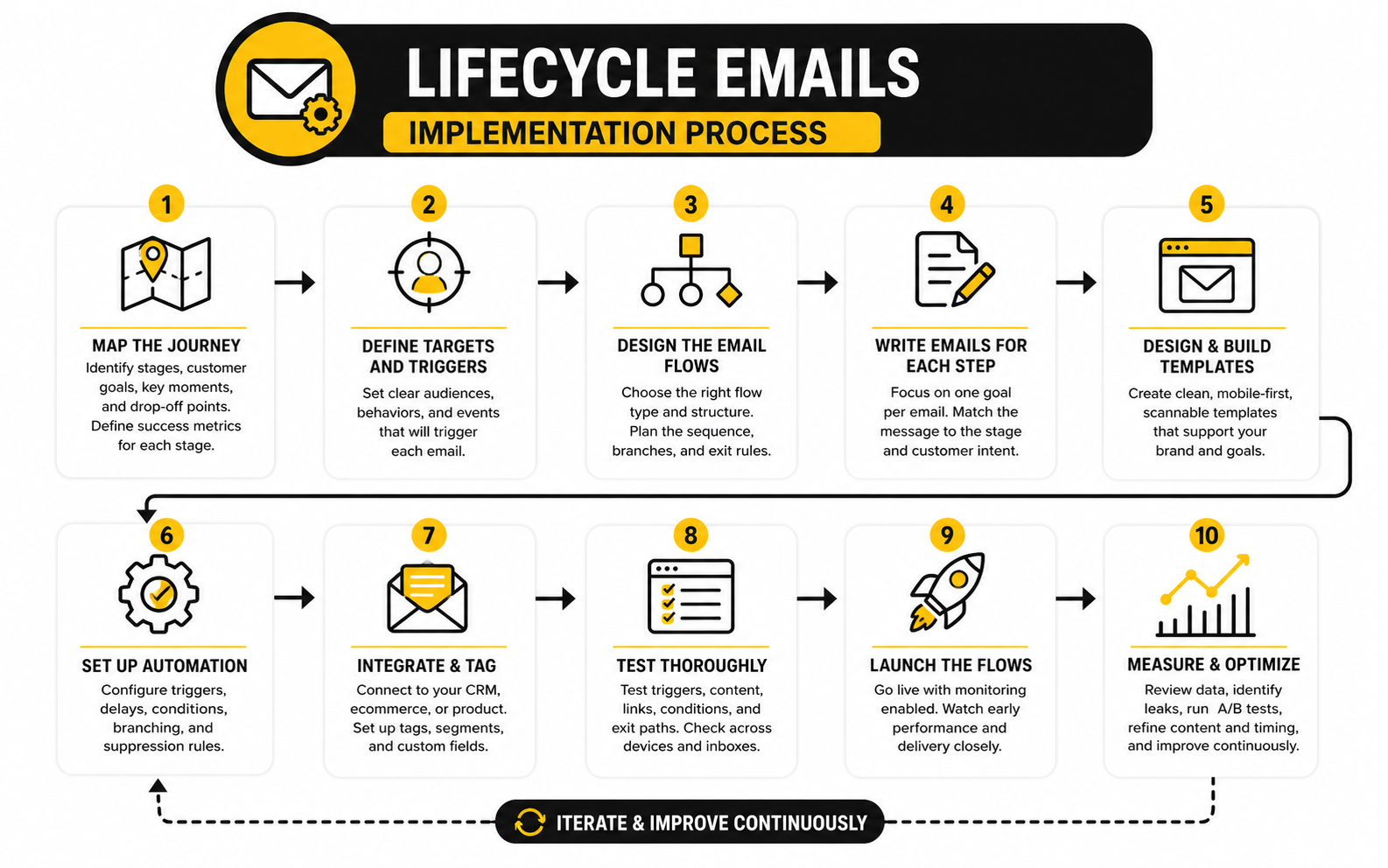
Step 5: Connect the Email System to the Right Data
Lifecycle emails depend on data quality. If the platform does not know what someone did, it cannot send the right message. That means forms, checkout pages, CRM stages, product events, tags, and purchase data need to be connected properly.
This does not mean every business needs a complicated tech stack. It means the essential events must be captured reliably. A lead source should be stored, a purchase should update the customer record, and a booked call should change the follow-up path.
For agencies and service businesses that need CRM stages, pipelines, automation, and client follow-up in one place, GoHighLevel can be useful because the sales process and email process can live closer together. For simple creator funnels or smaller digital products, Systeme.io can work well when the priority is speed and simplicity.
Step 6: Write Emails Around Decisions, Not Features
A common implementation mistake is writing lifecycle emails around product features. Features matter, but customers make decisions based on progress, trust, risk, urgency, and fit. The email should help them make a better decision, not just list what the product can do.
For example, a trial user does not only need to know that a feature exists. They need to understand why that feature matters, how to use it quickly, and what result it helps them reach. A cart abandoner does not only need a reminder. They may need reassurance about shipping, returns, quality, payment security, or whether the product is right for them.
This is why strong lifecycle emails often feel simple. They focus on the obstacle directly in front of the reader. The message is not trying to impress; it is trying to move the relationship forward.
Step 7: Add Suppression Rules Before Scaling
Suppression rules decide who should not receive a message. This is one of the most overlooked parts of implementation, and it matters a lot. Without suppression rules, people can receive irrelevant emails after they have already taken the action the sequence was designed to encourage.
A person who already bought should not keep receiving first-purchase urgency emails. A person who booked a call should not keep getting “book a call” reminders. A person who unsubscribed from a specific topic should not be pushed back into that topic through another automation.
Good lifecycle email systems are not just good at sending. They are good at stopping. That restraint is part of what makes the experience feel professional.
Step 8: Test the Flow Like a Customer
Before turning anything on fully, test the flow from the customer’s point of view. Sign up through the form. Click the links. Abandon the cart. Book the call. Make a test purchase if the system allows it.
The goal is to catch broken logic before real people experience it. Check whether tags apply correctly, delays make sense, links work, personalization fields populate, and people exit the right sequences after taking action. Small errors here can create a surprisingly bad customer experience.
This is also where the tone becomes obvious. Reading one email in isolation is different from receiving five messages across a week. The sequence should feel like a natural conversation, not a machine firing templates at someone.
Step 9: Launch Quietly, Then Improve With Data
Do not overcomplicate the launch. Turn on the core flows, monitor them closely, and improve based on behavior. The first version is supposed to teach you where people engage, hesitate, ignore, click, buy, reply, or unsubscribe.
Track the metrics that match the purpose of the email. A welcome email might be judged by click-through and next-step completion. A conversion email might be judged by recovered revenue, booked calls, or purchases. A retention email might be judged by activation, repeat purchase, product usage, or reduced support friction.
This is where lifecycle emails become a compounding asset. Each flow can be improved, each trigger can become sharper, and each stage can become more useful. Over time, the system gets better at helping people move instead of simply reminding them that the business exists.
Statistics and Data
Lifecycle emails should be measured differently from newsletters and one-off promotions. A newsletter is usually judged by broad engagement because it goes to a larger audience at the same time. A lifecycle email is judged by whether it helped a specific person move to the next stage.
That distinction matters because averages can lie. A welcome email, abandoned cart email, trial activation email, and win-back email are not trying to do the same job. If you measure all of them with the same scorecard, you will either overvalue weak emails or undervalue emails that are doing exactly what they were built to do.
The goal is not to stare at dashboards all day. The goal is to know what the numbers are telling you so you can make better decisions. Good measurement turns lifecycle emails from “set it and forget it” automations into a system that keeps getting sharper.
Benchmarks Are Starting Points, Not Targets
Benchmarks are useful because they give you context, but they are not the finish line. A lifecycle email can beat an industry average and still underperform if it is sent to the wrong segment or fails to create the next action. It can also have a lower open rate and still be valuable if it drives revenue, activation, bookings, or retention.
Recent email benchmark reports show why lifecycle emails deserve separate analysis. Omnisend’s ecommerce data found that automated emails made up only 2% of total email volume while driving 37% of email-driven sales, which is exactly why lifecycle performance should not be blended into normal campaign reporting. The volume is small, but the intent is much stronger.
That number matters because it changes the way you prioritize work. If automated lifecycle emails are producing a disproportionate share of results, improving them by even a small amount can be more valuable than sending another broad promotional campaign. This is where smart teams stop asking, “How do we send more?” and start asking, “Which moment in the journey deserves a better email?”
Open Rate Is a Weak Primary Metric
Open rate is still useful for spotting obvious problems, but it should not be the main performance metric for lifecycle emails. Privacy changes, inbox behavior, and image loading rules have made opens less reliable than they used to be. Apple Mail Privacy Protection, for example, can preload email images in a way that makes open tracking less precise, which is why platforms and email teams increasingly treat opens as a directional signal rather than a final truth.
This does not mean open rate is worthless. If a welcome email has a sudden drop in opens, the subject line, sender name, deliverability, or audience source may need attention. If a reactivation email has weak opens, the audience may be too cold or the promise may not be strong enough.
But opens do not prove that the email worked. A person can open and do nothing. A person can ignore one email and convert from the next one. For lifecycle emails, the deeper question is whether the message moved the person closer to the intended outcome.
The Metrics That Actually Matter
The right metric depends on the job of the email. That sounds obvious, but most reporting dashboards make everything look equal. They show opens, clicks, unsubscribes, and revenue in the same format, even though each lifecycle stage needs a different interpretation.
For welcome emails, look at first-click rate, account setup, preference selection, first purchase, or first meaningful action. For nurture emails, look at qualified clicks, reply rate, content progression, pricing-page visits, booked calls, or product exploration. For conversion emails, look at purchases, checkout recovery, demo bookings, trial upgrades, or proposal responses.
For retention emails, the important numbers may happen outside the inbox. Product usage, repeat purchase rate, renewal rate, support ticket reduction, review generation, and customer health can matter more than the click rate. This is why lifecycle emails should connect to CRM, ecommerce, product, or booking data whenever possible.
A Simple Lifecycle Email Scorecard
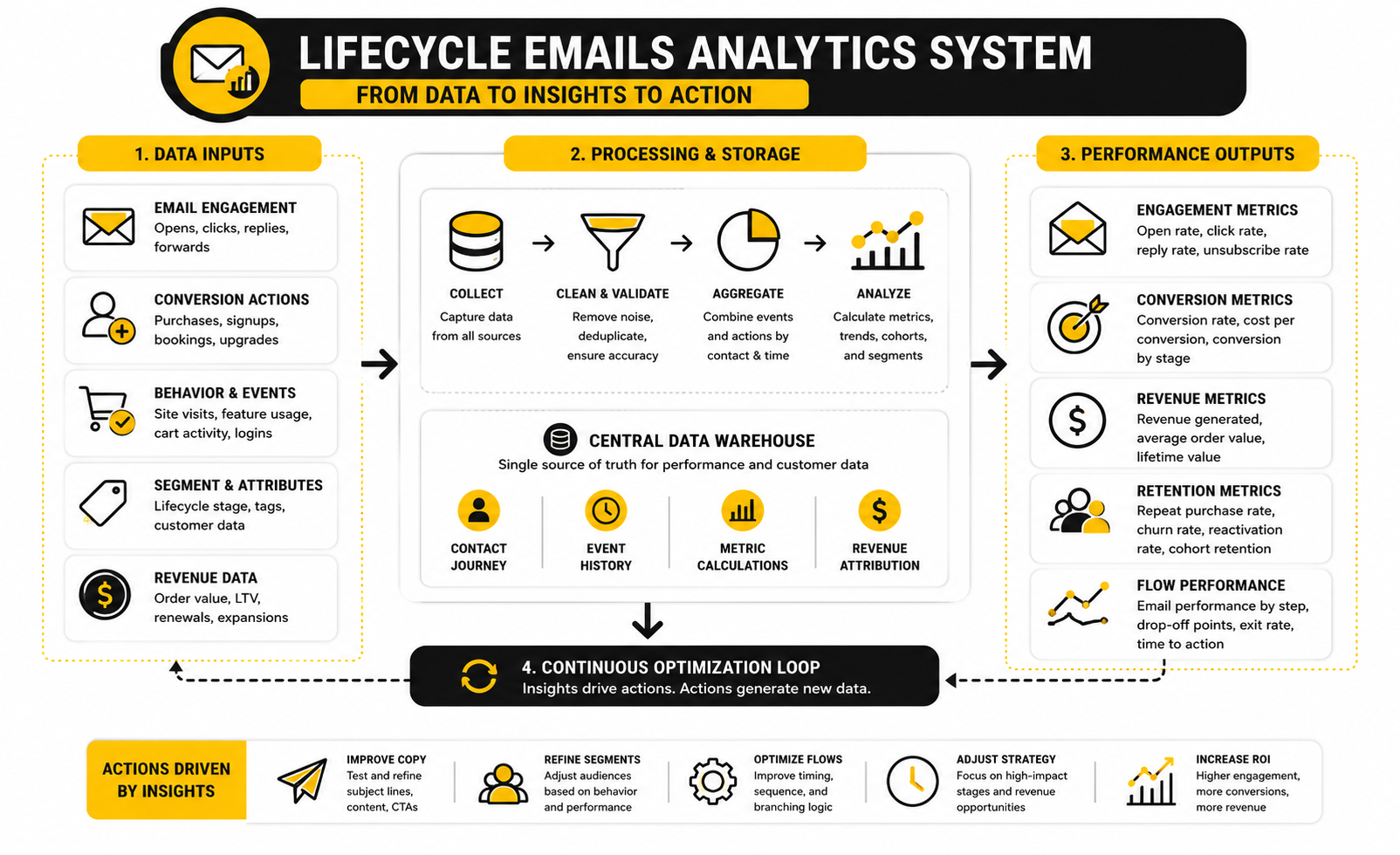
A good analytics system does not need to be complicated. It just needs to connect each email to its purpose. The scorecard should show whether the email was delivered, whether people engaged, whether they acted, and whether the action created business value.
A practical scorecard can use four layers:
The important part is sequence-level measurement. Do not only judge one email in isolation. A lifecycle sequence might have one email that educates, one that builds proof, and one that converts. If you only look at the final email, you may miss the messages that prepared the decision.
Revenue Per Recipient Shows Efficiency
Revenue per recipient is one of the most useful metrics for lifecycle emails because it shows efficiency. It tells you how much revenue a flow generates relative to the number of people who receive it. That makes it especially helpful when comparing automated flows against larger campaigns.
Klaviyo’s benchmark material emphasizes revenue per recipient for flows because automated emails often reach fewer people but carry stronger intent. That is the right way to think about it. A cart recovery flow does not need to reach the whole list to be valuable; it needs to recover a meaningful share of people who were already close to buying.
This metric also helps prevent bad decisions. A large campaign may produce more total revenue because it reached more people, but a lifecycle flow may produce more revenue per recipient because the timing is better. When you understand that difference, you stop judging every email by size and start judging it by leverage.
Spam Complaints Are a Business Metric
Spam complaints are not just a deliverability detail. They are a signal that the email experience is misaligned with what people expected. That can come from poor targeting, misleading opt-ins, too much frequency, weak content, or automations that keep sending after the person has moved on.
Google’s sender guidance says bulk senders should keep user-reported spam rates below 0.1% and avoid reaching 0.3% or higher. That threshold matters because lifecycle emails depend on inbox access. If your sender reputation gets damaged, even the best sequence will struggle to perform.
This is why suppression rules, clear unsubscribe options, and relevant segmentation are not optional. They protect the list, the brand, and the revenue engine. A lifecycle email system that ignores complaints may look fine in the short term, but it is quietly burning trust.
Unsubscribes Need Context
Unsubscribes are not always bad. Sometimes they remove people who were never going to buy, which can improve list quality. The problem is when unsubscribes spike around a specific lifecycle email or sequence.
A high unsubscribe rate after a welcome email may mean the signup promise was unclear. A spike after a nurture email may mean the content is too sales-heavy for that stage. A spike after a reactivation email may be acceptable if the goal is to clean the list, but it still needs to be watched.
The action is not always “send fewer emails.” Sometimes the answer is better segmentation. Sometimes it is clearer expectations. Sometimes it is changing the offer, timing, or tone. The metric points to the issue, but you still need to interpret the behavior behind it.
Clicks Show Intent, But Not Always Value
Clicks are stronger than opens because they show active interest. Still, not every click means the same thing. A click on a blog post, pricing page, booking link, product recommendation, and unsubscribe link all tell different stories.
For lifecycle emails, clicks should be grouped by intent. Educational clicks show curiosity. Pricing clicks show buying interest. Booking clicks show sales readiness. Support clicks may show confusion or friction.
This is where tagging and CRM updates become powerful. If someone clicks a pricing link twice but does not buy, they may need objection-handling or a direct follow-up. If someone clicks onboarding help three times, they may need support before they churn. Lifecycle emails become much more useful when clicks update the customer journey instead of sitting in a report.
Conversion Rate Needs the Right Denominator
Conversion rate can be misleading if you use the wrong denominator. A purchase rate based on total recipients tells one story. A purchase rate based on clickers tells another. A purchase rate based on qualified recipients tells another again.
For lifecycle emails, the cleanest approach is to define the conversion event before the email is built. If the email is designed to recover abandoned carts, the conversion event is recovered purchase. If the email is designed to activate trial users, the conversion event is product activation. If the email is designed to book calls, the conversion event is a scheduled call.
This keeps the reporting honest. You are not looking for any positive-looking number. You are checking whether the email did the job it was created to do.
Attribution Should Be Useful, Not Perfect
Email attribution will never be perfect. People see ads, read reviews, talk to friends, visit the site, leave, return, click emails, and buy later. Trying to make attribution flawless can waste more time than it saves.
For lifecycle emails, the better question is whether the email clearly influenced movement. Did the abandoned cart flow recover orders that would otherwise be lost? Did the onboarding sequence increase activation? Did the renewal sequence reduce avoidable churn? Did the lead nurture sequence create more qualified sales conversations?
Use attribution windows carefully. A short window may undercount long-consideration purchases. A long window may overcredit email for decisions influenced by other channels. The best approach is to combine platform reporting with CRM, ecommerce, or product data so the numbers stay grounded.
What to Improve First
When the data starts coming in, do not optimize randomly. Start with the lifecycle emails closest to revenue or retention. These usually include cart recovery, trial activation, proposal follow-up, onboarding, renewal, repeat purchase, and win-back sequences.
Then look for the biggest leak. If delivery is weak, fix authentication, list quality, and sender reputation. If opens are weak, improve the sender name, subject line, audience match, and timing. If clicks are weak, improve the offer, copy, layout, and call to action. If clicks are strong but conversions are weak, the issue may be the landing page, checkout, pricing, sales process, or product experience.
For businesses that need email performance tied to pipelines, tasks, call booking, and customer stages, GoHighLevel can make measurement more practical because the email activity can sit closer to the sales journey. For simpler email-first businesses, a focused platform can still work as long as the reporting shows more than opens and clicks.
The real win is not having prettier dashboards. The real win is knowing what to change next. Lifecycle emails perform best when every number leads to a decision.
Professional Implementation and Optimization
Once the core lifecycle emails are running and the reporting is clean, the next challenge is scale. This is where the work becomes less about writing another sequence and more about managing complexity. A small system can be handled with common sense; a larger system needs rules.
Scaling lifecycle emails means more segments, more triggers, more products, more entry points, and more possible conflicts. That can create better personalization, but it can also create confusion if the system is not controlled. The goal is to make the experience feel more relevant without turning the backend into a machine nobody understands.
This is where mature teams separate strategy from decoration. More personalization fields, more dynamic blocks, and more automations do not automatically mean better lifecycle marketing. Better lifecycle marketing means the right customer gets the right message, with the right level of urgency, at the right point in the relationship.
Personalization Has to Earn Its Place
Personalization is powerful when it reflects something meaningful. Using a first name is not strategy. Changing the message based on product interest, lifecycle stage, purchase history, usage behavior, company type, or sales readiness is much more useful.
Recent personalization research shows that 89% of business leaders see personalization as important to business success, but that does not mean every email needs to feel hyper-customized. Bad personalization is worse than no personalization because it reminds the reader that the brand is guessing. If the data is weak, the message should stay simple.
The best rule is practical: only personalize when the data is reliable and the change improves the reader’s next step. If someone viewed a specific product category three times, relevant recommendations make sense. If someone gave you a vague job title two years ago, building an entire sequence around it is risky.
Segmentation Should Reduce Friction
Segmentation should make lifecycle emails clearer, not just more complicated. The most useful segments are usually based on behavior and intent rather than vanity attributes. Someone who visited a pricing page, abandoned a cart, or stopped using a product is telling you more than someone who simply belongs to a broad demographic group.
A strong segmentation model usually starts with a few high-impact splits. New leads should not receive the same emails as repeat customers. Trial users who activated should not receive the same sequence as trial users who never started. Customers who bought once should not receive the same follow-up as customers who buy every month.
The danger is over-segmentation. If every tiny behavior creates a separate path, the system becomes hard to maintain and harder to test. Keep segments meaningful enough to change the message, not just interesting enough to label.
Frequency Management Protects the Relationship
Lifecycle emails can overlap. A customer might be in a welcome sequence, receive a promotional campaign, trigger a browse reminder, and get a post-purchase email within the same week. Individually, each message may make sense. Together, they can feel like too much.
That is why frequency management matters. You need rules for how many marketing emails someone can receive in a day or week, which messages take priority, and which sequences pause when a higher-intent event happens. Without those rules, the most engaged people often get punished with the most email.
This is not just about politeness. It affects deliverability, engagement, and trust. Google’s bulk sender guidance tells senders to keep reported spam rates below 0.1% and avoid reaching 0.3% or higher, so relevance and restraint are not soft concerns. They directly affect whether future emails reach the inbox.
Priority Rules Prevent Automation Collisions
Automation collisions happen when two or more sequences try to guide the same person in different directions. One email says “finish your purchase,” another says “book a demo,” and another introduces beginner education. The reader sees chaos, even if the backend logic looked reasonable when each flow was built.
Priority rules solve this. High-intent and transactional moments usually come first. A checkout recovery email should take priority over a general newsletter. A booked call confirmation should override a lead nurture prompt. A post-purchase onboarding email should stop first-purchase conversion emails immediately.
This is where suppression logic becomes a strategic asset. It is not just a technical cleanup task. It is how you make the customer experience feel coherent as the email system grows.
Lifecycle Emails Need a Clear Ownership Model
As the system grows, someone has to own it. Not just the copy. Not just the software. The actual customer journey.
Without ownership, lifecycle emails become a patchwork. Sales asks for one sequence, marketing adds another, support requests a follow-up, product wants onboarding messages, and nobody checks whether the full experience still makes sense. That is how a smart system slowly turns into clutter.
A clear ownership model defines who can create new automations, who approves triggers, who manages suppression rules, who reviews performance, and who retires old emails. This does not need to be bureaucratic. It just needs to prevent random additions from weakening the whole system.
Compliance Is Part of the Strategy
Compliance is not the exciting part of lifecycle email, but ignoring it is reckless. Sender authentication, unsubscribe handling, consent records, suppression lists, and privacy expectations all affect whether the system can keep operating safely. If the backend is sloppy, the front-end strategy eventually suffers.
For bulk senders, modern inbox requirements have become stricter around authentication, spam complaints, and unsubscribe behavior. Google’s guidance highlights authentication and one-click unsubscribe expectations for bulk senders, and these requirements are not just technical details. They shape how email programs need to be built from the start.
This is especially important when scaling across regions, brands, domains, or business units. Consent rules and customer expectations can vary by market. A lifecycle system should be built so contacts can be suppressed, unsubscribed, segmented, or removed cleanly without manual workarounds.
AI Can Help, But It Should Not Run the Strategy
AI can speed up lifecycle email work. It can help draft variants, summarize customer research, create subject line options, analyze objections, and turn messy notes into cleaner email briefs. Used well, it saves time and gives the team more angles to test.
But AI should not decide the journey on its own. It does not know your margins, support load, sales process, refund risk, product truth, or brand boundaries unless you feed it that context carefully. If you let AI generate lifecycle emails without strategy, you will usually get polished average copy.
The best use is controlled. Give AI a defined lifecycle stage, customer problem, trigger, offer, objection, proof point, and call to action. Then edit like a human who understands the customer. That combination is far stronger than asking a tool to “write a welcome sequence” from scratch.
Channel Expansion Should Follow Intent
Email is often the backbone of lifecycle communication, but it does not have to work alone. SMS, chat, retargeting, in-app messages, direct mail, sales calls, and messenger automation can all support the same journey. The key is matching the channel to the urgency and permission level of the moment.
A shipping update, appointment reminder, or urgent cart message may justify a faster channel. A deeper education message usually belongs in email. A sales-qualified lead may need a personal follow-up instead of another automated message.
This is where tools can matter. ManyChat can make sense when the lifecycle includes social or messenger-based conversations, while Cal.com can support service businesses where booked calls are a key conversion point. The tool is not the strategy, but the right tool can make the strategy easier to execute.
Scaling Requires Pruning
The hidden cost of lifecycle emails is maintenance. Old offers expire. Product positioning changes. Pricing changes. Features change. Customer objections change. A sequence that worked eighteen months ago may now be outdated, inaccurate, or misaligned.
This is why pruning matters. At least once per quarter, review the active flows and ask which emails should be improved, merged, paused, or removed. Do not keep automations alive just because they once performed well.
The strongest lifecycle systems are not the biggest. They are the cleanest. Every email has a reason to exist, every sequence has a measurable job, and every automation still matches the current business.
The Biggest Risk Is Losing the Human Thread
Advanced lifecycle email systems can become too mechanical. The business starts thinking in tags, branches, triggers, and conversion events, while the customer is simply trying to solve a problem. That gap is dangerous.
The human thread is the reason the system exists. The person on the other side wants clarity, confidence, speed, reassurance, proof, or help. If the email does not serve one of those needs, the automation is just noise with better timing.
So the final expert-level rule is simple: read the sequence like a customer. Not like a marketer. Not like an operator. Like someone who is busy, skeptical, distracted, and trying to make a good decision. If the lifecycle emails still feel useful from that perspective, the system is probably on the right track.
Lifecycle Email Examples, Metrics, and FAQ
At this point, the full system should be clear. Lifecycle emails are not just a few automated messages attached to a list. They are the communication layer that connects intent, timing, customer data, sales motion, product experience, and retention.
The strongest systems usually feel simple from the outside. A person signs up and receives a useful welcome. They show interest and receive helpful guidance. They hesitate and receive reassurance. They buy and receive support. They go quiet and receive a relevant reason to come back.
That simplicity takes work behind the scenes. It requires clean stages, smart triggers, good suppression rules, practical reporting, and copy that respects where the customer is right now. When those pieces work together, lifecycle emails stop feeling like automation and start feeling like a better customer experience.
What are lifecycle emails?
Lifecycle emails are automated or semi-automated emails sent based on where someone is in the customer journey. They can support subscribers, leads, trial users, buyers, active customers, inactive customers, and lost opportunities. The key difference is context: the message is tied to a stage, behavior, or need instead of being sent randomly to the whole list.
How are lifecycle emails different from email newsletters?
A newsletter is usually a broadcast sent to a broad audience at a scheduled time. Lifecycle emails are triggered by behavior, timing, or customer status. Newsletters are useful for staying visible, but lifecycle emails are better for guiding people through specific moments like signup, onboarding, checkout, renewal, and reactivation.
What is the main goal of lifecycle emails?
The main goal is to help the right person take the next right step. That step might be confirming an opt-in, reading a useful resource, finishing checkout, booking a call, using a product feature, buying again, renewing, or returning after inactivity. Good lifecycle emails make progress easier for the customer and more predictable for the business.
Which lifecycle email should I build first?
Start with the moment closest to your biggest leak. If new subscribers do not turn into leads, build a welcome and nurture sequence. If people abandon checkout, build a cart recovery flow. If customers buy once and disappear, build a post-purchase and repeat-purchase sequence.
How many emails should be in a lifecycle sequence?
There is no perfect number. A simple sequence might have three emails, while a more complex onboarding or nurture sequence might have seven or more. The better question is whether each email has a clear job and whether the sequence stops when the person takes the desired action.
How often should lifecycle emails be sent?
Frequency depends on urgency and context. A checkout recovery sequence may send several emails within a few days because the intent is fresh. A long-term nurture sequence might spread emails over weeks because the decision takes longer. The important thing is to manage overlap so one person does not get hit by too many automations at once.
What metrics should I track for lifecycle emails?
Track metrics that match the job of the email. For welcome emails, look at first clicks and next-step completion. For conversion emails, look at recovered revenue, purchases, booked calls, or upgrades. For retention emails, look at repeat purchases, activation, usage, renewal, customer health, and reduced friction.
Are open rates still useful?
Open rates are useful as a directional signal, but they should not be treated as the main truth. Privacy changes have made open tracking less reliable, especially for audiences using Apple Mail. Clicks, replies, purchases, bookings, activation events, and retention signals usually tell you more about whether lifecycle emails are working.
Do lifecycle emails work for service businesses?
Yes, and they can be extremely useful. Service businesses can use lifecycle emails for inquiry follow-up, qualification, booked-call reminders, proposal follow-up, onboarding, project updates, testimonial requests, renewal prompts, and referral campaigns. The system should support the sales conversation rather than replace it.
Do lifecycle emails work for ecommerce?
Yes. Ecommerce brands commonly use lifecycle emails for welcome offers, browse abandonment, cart recovery, post-purchase education, shipping updates, replenishment, product recommendations, review requests, loyalty, and win-back. The key is to connect emails to customer behavior instead of sending the same promotions to everyone.
Do lifecycle emails work for SaaS?
Yes. SaaS companies can use lifecycle emails to support trial activation, onboarding, feature adoption, usage milestones, failed payment recovery, expansion, renewal, and churn prevention. These emails work best when they are connected to product behavior, not just signup dates.
What is the biggest mistake with lifecycle emails?
The biggest mistake is building automations before mapping the customer journey. That usually creates generic sequences that send at the wrong time, overlap with other messages, or ignore what the customer already did. Strategy first, automation second. Always.
Should lifecycle emails include discounts?
Sometimes, but discounts should not be the default. Many lifecycle emails perform better when they reduce uncertainty, explain value, answer objections, or make the next step easier. Discounts can help in cart recovery or win-back campaigns, but relying on them too heavily can train customers to wait.
What tools are best for lifecycle emails?
The best tool depends on the business model. A service business may need CRM, pipelines, booking, and follow-up automation in one place, which can make GoHighLevel a strong fit. A simpler creator, course, or small digital product business may prefer Systeme.io, while ecommerce and email-first businesses may choose platforms built around segmentation, flows, and revenue reporting.
How do I know when a lifecycle email should be removed?
Remove or rewrite an email when it no longer matches the offer, the customer stage, the product, or the current buying process. Also review emails that cause unusual unsubscribes, complaints, confusion, or low conversion after strong clicks. A clean lifecycle system is usually more valuable than a bloated one.
Can AI write lifecycle emails?
AI can help draft, organize, and test lifecycle emails, but it should not replace strategy. The tool needs clear inputs: stage, trigger, audience, objection, offer, proof, tone, and desired action. Without that context, AI usually produces polished but generic copy that does not reflect the real customer journey.
What makes lifecycle emails feel human?
They feel human when they respond to a real situation. A good lifecycle email acknowledges what just happened, explains what matters next, and gives the reader a simple path forward. It does not over-personalize, over-sell, or pretend the relationship is deeper than it is.
Build a stronger local presence with BAAM AI
Turn your website, Google profile, social channels, and AI visibility into one growth engine
Most businesses do not need more random marketing activity. They need a consistent presence system that helps the right people find them, trust them, and take action. BAAM AI brings strategy, local SEO, website updates, Google Maps visibility, social content, AI-search readiness, media production, and reporting into one practical monthly engine.
If you want your marketing to keep working after the campaign ends, start with a free BAAM AI presence audit. See how your business shows up today and where the fastest visibility wins are at BAAM AI.