
BAAM AI Blog
Klaviyo Support Email: How to Reach Customer Support Efficiently
Klaviyo doesn’t publish a direct, standalone support email address for general inquiries. Instead, the platform centralizes customer support through its in‑app support portal at klaviyo.com/support and request forms...
What You Need to Know About Klaviyo Support
Klaviyo doesn’t publish a direct, standalone support email address for general inquiries. Instead, the platform centralizes customer support through its in‑app support portal at klaviyo.com/support and request forms once you’re logged in. That’s how most email or assistance tickets are initiated today.
This central support hub is where customers can submit help tickets - including email‑style support requests - without needing a separate email address floating around online.
For specific contact purposes, Klaviyo does provide other official email addresses for sales, partnerships, press, and security, but not a universal support@klaviyo.com that will directly open a ticket on its own.
Klavyio’s official avenues look like this:
These addresses exist for specialized contact reasons, and they’re real addresses that Klaviyo uses in their official contact directories.
Why It Matters to Use the Official Support Process
EMAIL support via the official portal is available 24/7 for paid plans and for 60‑day trial users looking for email help. Free accounts outside that trial can lean on additional help resources.
This process matters because:
If you simply email one of the addresses above requesting help with an account issue, there’s a chance it won’t reach the right team unless it’s directly routed through the portal.
Understanding Klaviyo’s Support Framework
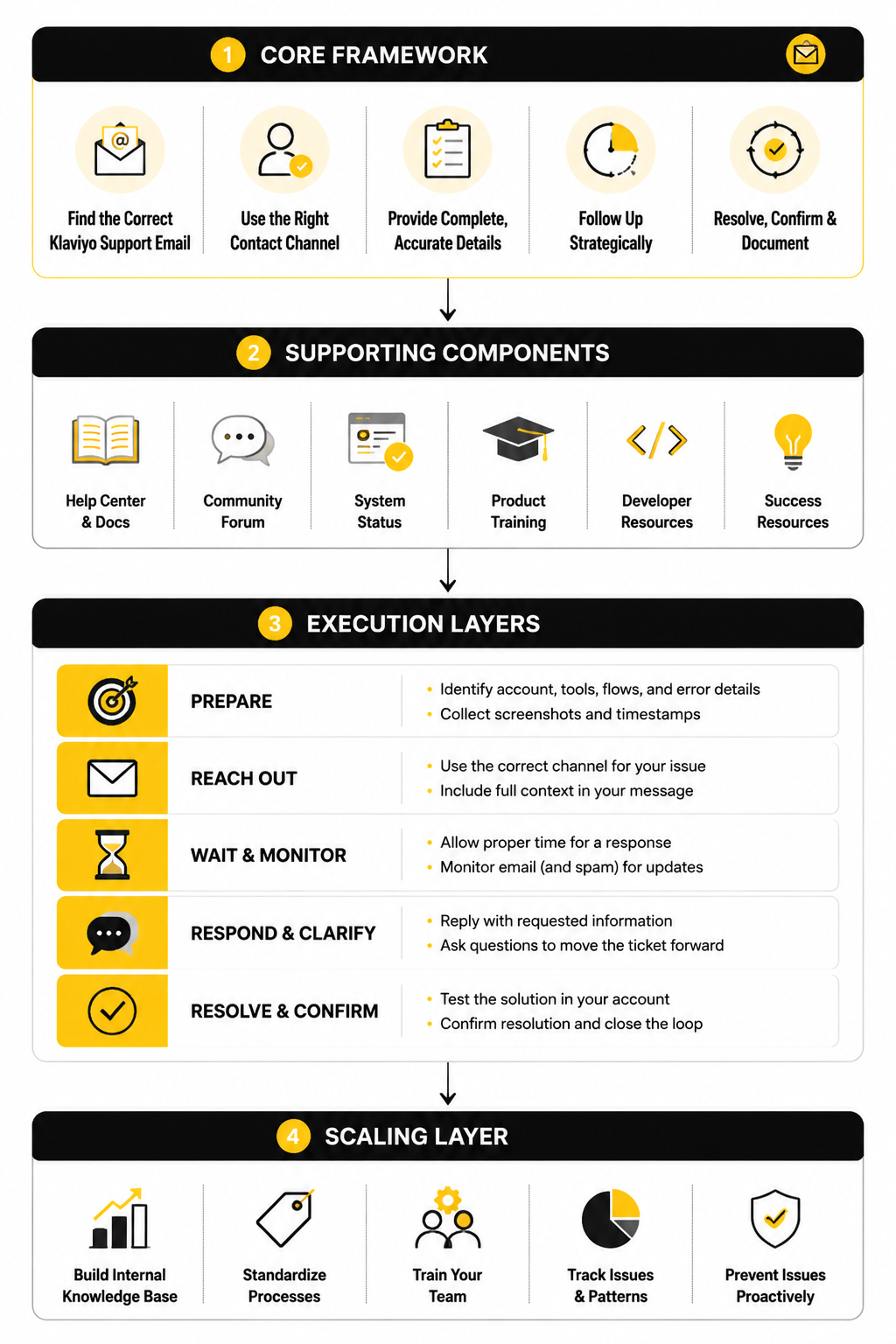
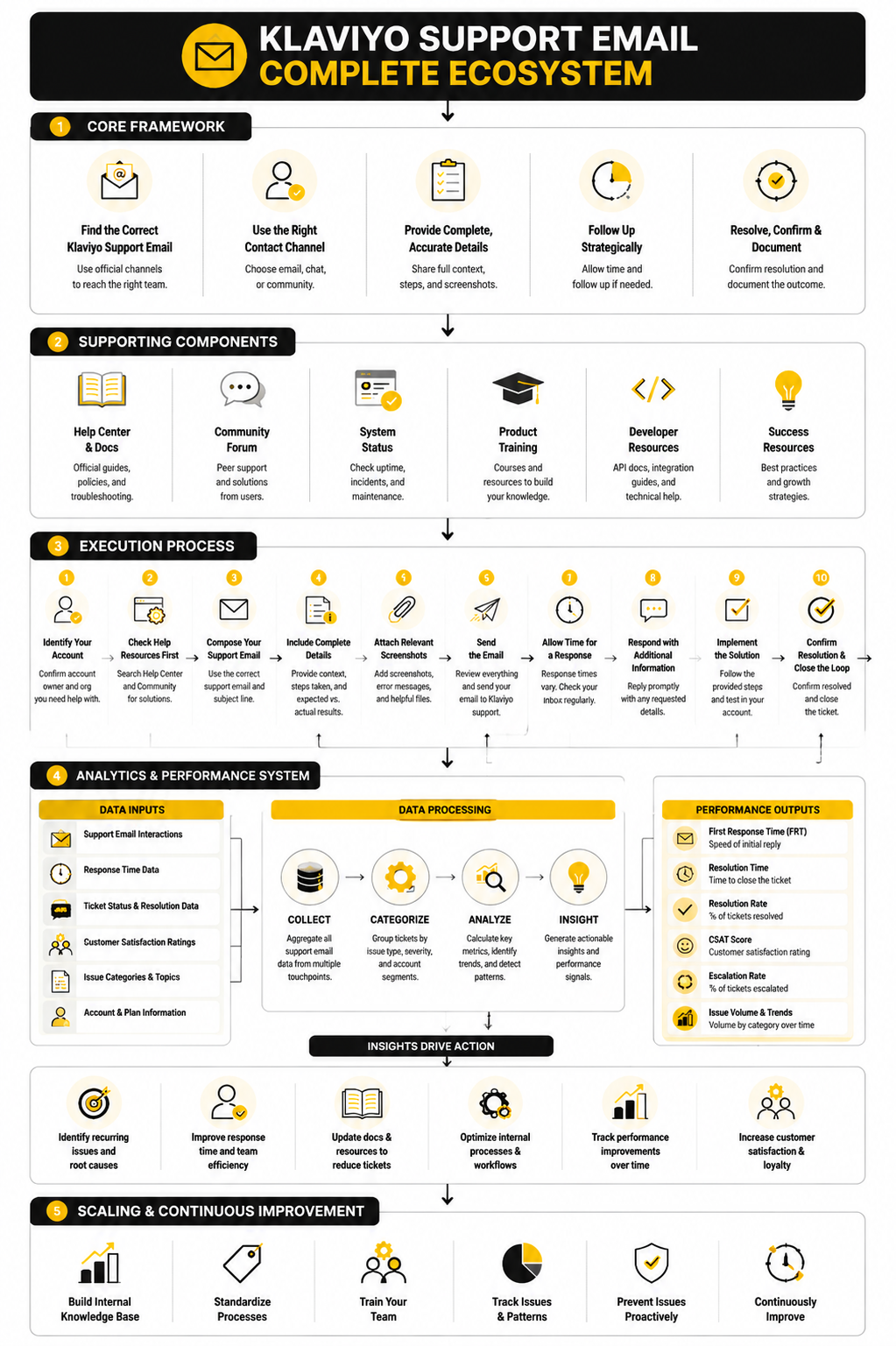
Klaviyo’s support system is structured to give priority and context to each request. Here’s how it’s typically organized:
Core Components of Contacting Support
Using the Support Portal
To start a support email conversation, log in at klaviyo.com/support, choose “Email support,” and complete the request form showing your issue context. This ensures your inquiry enters Klaviyo’s tracking system rather than landing in a general inbox.
What If You Can’t Access the Portal?
If you are locked out of your Klaviyo account or cannot access the portal, Klaviyo provides a special account access request form (linked directly from its support pages) so you can submit a ticket even without logging in.
Specialty Contact Emails
Certain matters work well by direct email:
Tips for Effective Support Communication
When you contact Klaviyo support - whether through the portal or via one of the specialized emails - make sure you:
These steps increase your chances of faster and accurate help.
When To Use Alternatives Beyond Email
Sometimes email support isn’t the fastest path:
Using the right channel for your type of request ensures you’re not waiting months for a reply.
What To Do If You Still Can’t Get Help
If your ticket isn’t getting traction:
Every path leads back to Klaviyo’s official systems - and using their structured support gives you the best chance of a timely resolution.
Professional Implementation of Klaviyo Support Email
Handling support requests professionally can make all the difference in how quickly and effectively your issue gets resolved. Using the official Klaviyo support pathways ensures that your requests are prioritized and documented properly. When you submit a support email through the portal, the system automatically tags your account, categorizes the issue, and routes it to the appropriate support specialist. This is why bypassing the official channels often leads to delays.
Organizing Your Request
Before sending your support email or ticket, gather the essential information that will help the support team respond efficiently:
Being organized reduces back-and-forth emails and speeds up resolution.
Timing and Follow-Up
Professional implementation also means being strategic about when and how you follow up:
These small steps signal professionalism and respect for the support team’s workflow, increasing the likelihood of faster assistance.
Leveraging Additional Resources
Even when you use Klaviyo support email professionally, you can accelerate problem-solving by using complementary resources:
Combining email support with these tools ensures you’re not solely dependent on a single channel and can often resolve your problem faster.
Real-World Example of Professional Implementation
A small e-commerce business once struggled with abandoned cart flows not triggering correctly. They initially emailed a generic support contact and received no meaningful response for several days. After switching to the official Klaviyo support portal, submitting detailed screenshots, and specifying account and flow IDs, the support team quickly identified a misconfigured API connection. Within 48 hours, the issue was resolved, restoring automated flows and saving the business thousands in potential lost sales. This demonstrates how structured, professional use of Klaviyo support email can turn a frustrating problem into a smooth resolution.
By applying these strategies, you not only increase the efficiency of your support requests but also ensure your interactions with Klaviyo are documented, trackable, and productive.
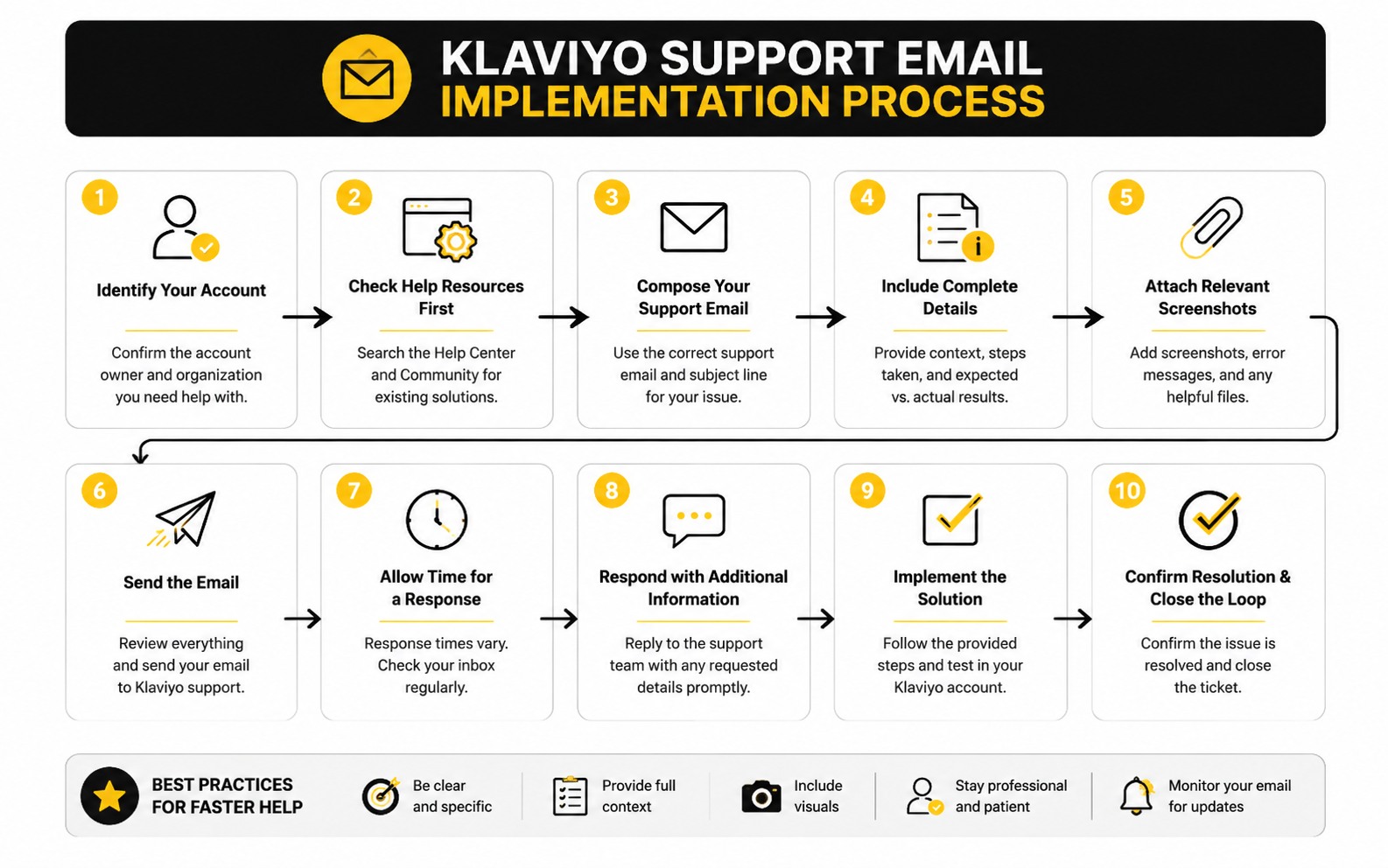
Step-by-Step Process for Using Klaviyo Support Email
Effectively implementing Klaviyo support email is more than just sending a message; it’s about following a structured process that ensures your issue gets the attention it deserves. Knowing the right steps not only speeds up resolution but also prevents repeated misunderstandings.
Step 1: Access the Support Portal
Begin by logging into your account at Klaviyo Support. The portal is the gateway for submitting requests that are automatically routed to the correct department. Attempting to send a generic email outside this portal may result in delays or no response at all.
Step 2: Fill Out the Request Form
Once inside the portal, select “Email Support” and complete the form carefully:
The more complete and organized your request, the faster support can provide an accurate solution.
Step 3: Attach Relevant Files
If your issue involves technical glitches, automation errors, or integrations, attach logs, screenshots, or exports that demonstrate the problem. These attachments act as a visual guide for the support team, reducing the need for multiple back-and-forth emails.
Step 4: Submit and Track Your Ticket
After submitting, you’ll receive a ticket ID via email. Keep this ID handy for any follow-ups. Monitoring your email ensures you see replies promptly and can respond quickly if the support team needs clarification.
Step 5: Follow Up Strategically
If your issue isn’t resolved within the expected timeframe:
Following this process ensures that your interactions with Klaviyo support email are professional, efficient, and effective, leading to faster problem resolution.
This structured approach has helped countless businesses maintain smooth email automation, minimizing downtime and protecting revenue streams.
Statistics and Data on Klaviyo Support Email Effectiveness
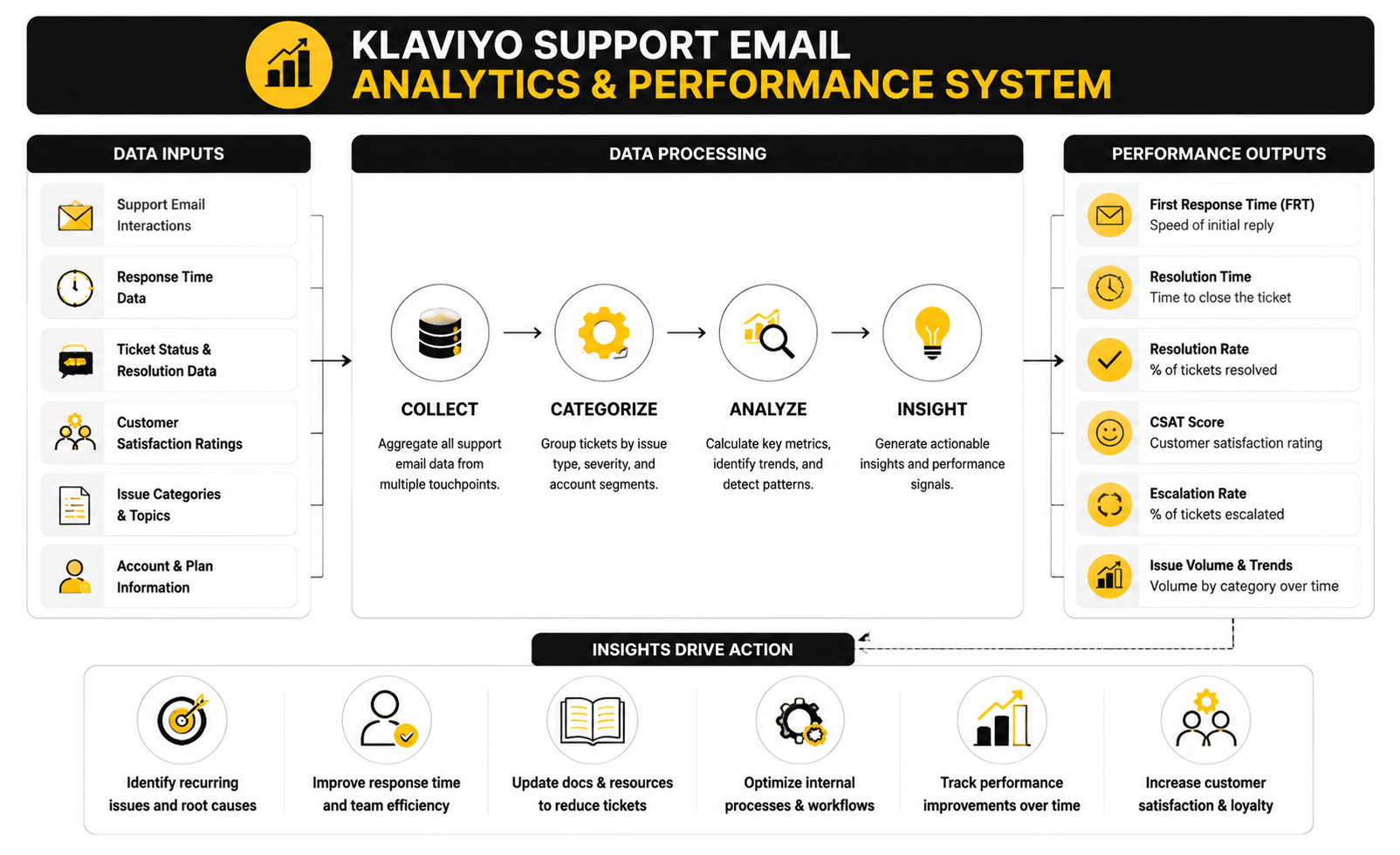
Measuring the performance of your interactions with Klaviyo support email can provide insights into how efficiently your issues are resolved and whether your communication style is effective. Metrics aren’t just numbers—they indicate patterns, bottlenecks, and opportunities for improvement.
Key Performance Indicators
When analyzing your support email experience, focus on metrics that show responsiveness and resolution quality:
Tracking these KPIs allows you to benchmark your own support interactions and identify areas to improve your requests or follow-ups.
Interpreting the Data
Raw numbers only matter if you understand what they signify. For example:
These insights can inform how you structure future support emails, what detail to include, and whether to leverage additional resources like in-app chat or the help center.
Actionable Insights from Analytics
By reviewing this data regularly, you can:
Understanding the analytics behind Klaviyo support email ensures that each interaction is strategic rather than reactive, allowing businesses to resolve issues efficiently and maintain uninterrupted email marketing operations.
Advanced Considerations for Klaviyo Support Email
As your use of Klaviyo grows, support needs become more complex, and understanding the strategic tradeoffs of how you use the support email system can make a real difference. Efficiently managing tickets at scale, prioritizing urgent issues, and anticipating potential pitfalls are critical for teams that rely heavily on email marketing automation.
Scaling Support Interactions
When multiple team members are submitting tickets, it’s essential to centralize communications:
Scaling support interactions in this way ensures clarity and reduces the risk of miscommunication or lost information.
Strategic Tradeoffs and Risks
Using support email exclusively has tradeoffs:
Understanding these tradeoffs helps teams decide when to rely on email versus alternative channels like in-app chat, partner success managers, or dedicated account support.
Expert-Level Guidance
For advanced users, consider these tactics:
A well-planned approach to Klaviyo support email transforms it from a reactive tool into a proactive operational advantage, allowing teams to maintain smooth marketing flows and reduce downtime caused by technical issues.
Investing in these strategies ensures that your use of support email scales with your business needs, avoids bottlenecks, and keeps your marketing operations running efficiently.
1. Does Klaviyo have a direct support email?
Klaviyo primarily uses its support portal for handling email requests. There isn’t a universal support@klaviyo.com for general inquiries; portal submissions ensure your request is tracked and prioritized.
2. Can I email Klaviyo for urgent issues?
Yes, but the fastest route is via the in-app chat if available or submitting a ticket through the support portal with “priority” indicated.
3. What details should I include in a support email?
Include account email, plan type, clear problem description, steps already taken, and relevant screenshots or logs. This improves resolution speed.
4. Are there specialized support emails?
Yes, for sales (sales@klaviyo.com), partnerships (partners@klaviyo.com), press (press@klaviyo.com), and security concerns (security@klaviyo.com). These should be used only for their designated purposes.
5. How quickly does Klaviyo typically respond?
Response times vary by plan level, but most paid accounts see a first reply within 24 hours. Free plan users may experience longer wait times.
6. Can I track my support ticket?
Yes, the portal provides a ticket ID and status updates via email, so you can follow progress and respond if further information is requested.
7. What if my issue isn’t resolved?
Follow up politely referencing your ticket ID, and consider escalating through partner or customer success teams if necessary.
8. Should I combine multiple issues in one email?
Yes, batching related issues into a single ticket can streamline resolution and reduce back-and-forth exchanges.
9. How do I interpret response quality metrics?
Track average response time, resolution time, ticket reopen rate, and satisfaction scores to identify patterns and optimize how you submit requests.
10. Are there alternative resources besides email?
Yes, the Klaviyo Help Center, community forums, and in-app chat provide additional guidance and often faster solutions for common problems.
11. Can multiple team members submit tickets?
Yes, but designate a point person to centralize communications, prevent duplicate tickets, and maintain documentation for team visibility.
12. How do I ensure urgent tickets get attention?
Clearly flag priority issues in the subject line or portal options, and include comprehensive details to reduce the need for follow-ups.
Build a stronger local presence with BAAM AI
Turn your website, Google profile, social channels, and AI visibility into one growth engine
Most businesses do not need more random marketing activity. They need a consistent presence system that helps the right people find them, trust them, and take action. BAAM AI brings strategy, local SEO, website updates, Google Maps visibility, social content, AI-search readiness, media production, and reporting into one practical monthly engine.
If you want your marketing to keep working after the campaign ends, start with a free BAAM AI presence audit. See how your business shows up today and where the fastest visibility wins are at BAAM AI.