
BAAM AI Blog
Klaviyo Skipped Emails: Why Messages Do Not Send And How To Fix The Real Cause
A Klaviyo skipped message is not always a problem. Sometimes it means Klaviyo protected your sender reputation, respected consent, avoided duplicate sends, or prevented a broken email from reaching a customer. The...
A Klaviyo skipped message is not always a problem. Sometimes it means Klaviyo protected your sender reputation, respected consent, avoided duplicate sends, or prevented a broken email from reaching a customer. The mistake is treating every skipped email like lost revenue before you understand why it was skipped.
That said, skipped messages can absolutely expose broken flow logic, bad segmentation, invalid profile data, incorrect catalog setup, Smart Sending conflicts, consent issues, or deliverability risk. This is why the real goal is not to “stop Klaviyo from skipping.” The goal is to separate healthy skips from revenue-blocking skips, then fix the part of the system that caused the wrong people to be excluded.
What Klaviyo Skipped Means
When you see Klaviyo skipped in a flow or campaign report, it means a profile qualified for a message at some point, but Klaviyo did not send that specific message. The profile may have entered a flow, matched a campaign audience, or reached a message step, but another rule, status, condition, or safety check blocked delivery. That skipped status is Klaviyo’s way of telling you the send was intentionally prevented, not randomly lost.
This distinction matters because skipped is different from bounced, failed, opened, clicked, or unsubscribed. A bounce usually means the message was sent and then rejected by the receiving mailbox provider. A skipped message usually means Klaviyo decided not to send it in the first place.
The frustrating part is that the word “skipped” sounds simple, but the causes are not all equal. One skipped email might be a suppressed profile, which is normal and healthy. Another might be a broken product recommendation block, an invalid email address, an aggressive Smart Sending window, or a flow filter that quietly blocks high-intent buyers.
Why Skipped Emails Matter
Skipped emails matter because they sit directly between your strategy and your actual sends. You can build a beautiful welcome series, abandoned cart flow, browse abandonment flow, post-purchase sequence, or winback campaign, but the revenue only happens when the right message reaches the right person. If too many qualified profiles are skipped for the wrong reason, your automation looks active while silently leaking opportunities.
They also matter because not every skipped message should be “fixed.” If someone unsubscribed, hard bounced, or is suppressed, skipping them is the correct outcome. Pushing around those protections would not make your email marketing better; it would increase risk and damage the quality of your list.
The professional move is to read skipped activity as a diagnostic signal. High skipped volume is not automatically bad, and low skipped volume is not automatically good. What matters is whether the skip reason matches your intent for that flow or campaign.
The Framework For Understanding Klaviyo Skipped Messages
The easiest way to understand Klaviyo skipped emails is to group them into four buckets: eligibility, consent, configuration, and protection. Eligibility covers whether the profile should still receive the message based on flow filters, trigger filters, conditional splits, list membership, and timing. Consent covers whether Klaviyo is allowed to send to that profile based on subscription status, suppression, unsubscribes, invalid addresses, or other compliance-related blocks.
Configuration covers the technical setup of the message itself. This can include missing catalog items, unavailable dynamic content, product feed issues, invalid email syntax, or flow logic that does not match the customer journey. These are the skips that often feel mysterious because the profile looks qualified, but something inside the build prevents the message from going out.
Protection covers safeguards like Smart Sending and deliverability-related decisions. These skips can be healthy when they prevent over-messaging, but they can become expensive when they block time-sensitive flows like abandoned cart, checkout abandonment, or price-drop messages. The key is not to disable protection everywhere, but to decide where it belongs.
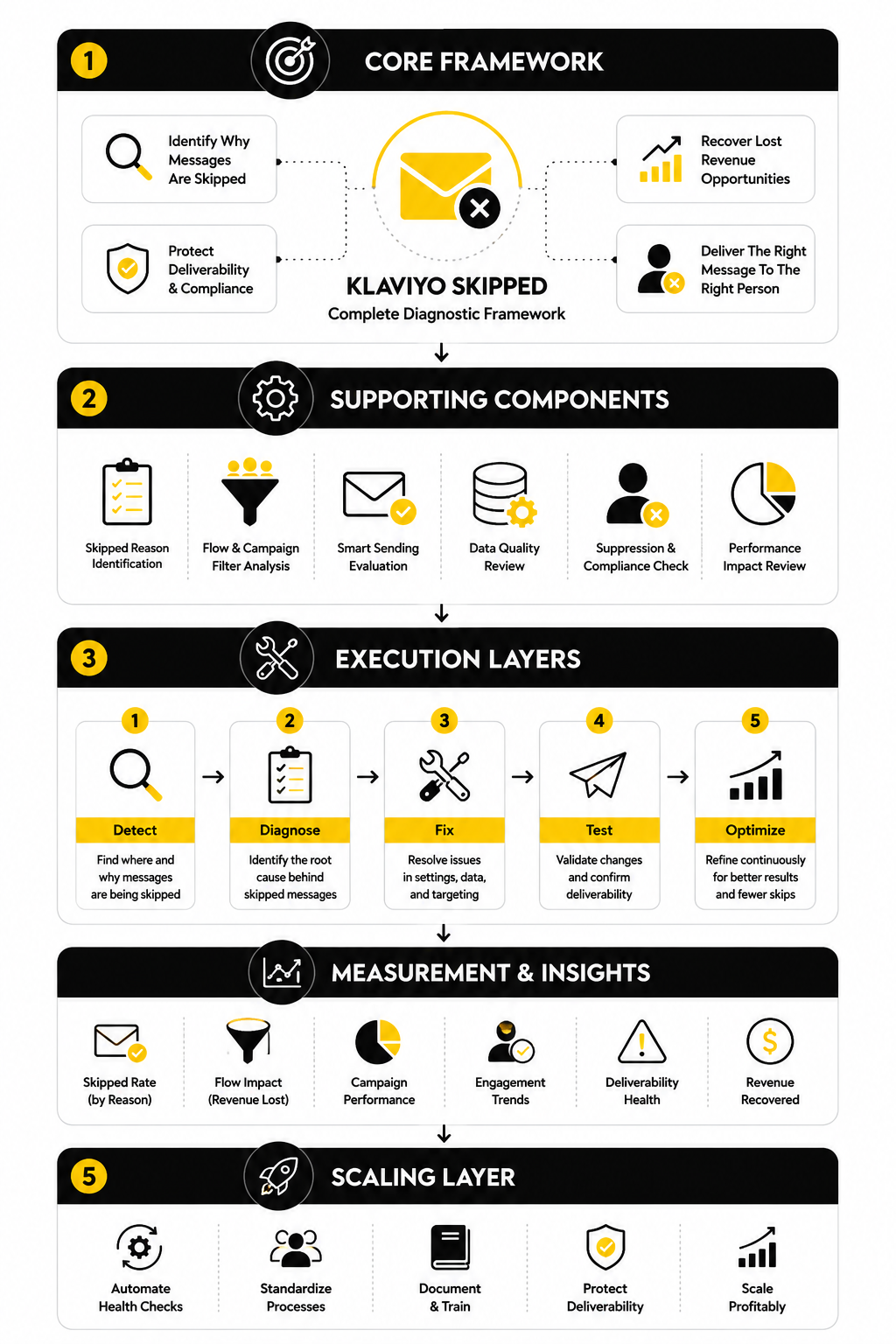
Core Components Of A Skipped Email Diagnosis
A proper diagnosis starts with the message, not the whole account. You need to look at the specific campaign or flow email that was skipped, then inspect the skipped recipient activity for that message. Account-wide assumptions usually waste time because different messages can be skipped for completely different reasons.
Next, you need to separate expected skips from unexpected skips. Expected skips include unsubscribed profiles, suppressed profiles, invalid addresses, and people who should not receive another message because of your sending rules. Unexpected skips include high-intent profiles blocked by a filter mistake, a flow message skipped because of product data, or a campaign audience reduced by a setting nobody reviewed.
Finally, you need to connect the skip reason to the business context. A Smart Sending skip on a weekly newsletter may be fine. A Smart Sending skip on an abandoned cart email might cost revenue if that message is supposed to be urgent. Same feature, different context, completely different decision.
Professional Implementation Starts With Restraint
The amateur fix is to turn things off until the skipped number drops. That usually creates a new problem. You might reduce skipped messages, but you can also over-message subscribers, send to people who should not receive marketing, or weaken your sender reputation.
A professional implementation treats skipped messages as a control system. Some controls should stay strict, some should be adjusted, and some reveal broken setup that needs to be repaired. The decision should come from the skip reason, the flow purpose, the customer’s intent level, and the risk of sending too much.
In the next part, we will break down the main reasons Klaviyo skips emails and what each one actually means. That is where the diagnosis becomes practical, because once you can identify the skip category, the fix becomes much clearer.
The Main Reasons Klaviyo Skips Emails
Once you understand what a skipped message is, the next step is knowing why it happened. Klaviyo skipped emails usually fall into a few practical categories: sending frequency, consent and suppression, profile eligibility, message-specific filters, invalid contact data, and campaign setup. The label may look technical inside Klaviyo, but the underlying question is simple: was this person safe, eligible, and intended to receive this message at that exact moment?
This is where a lot of people go wrong. They see a high skipped count and immediately assume the platform is broken. In reality, Klaviyo’s own flow troubleshooting guidance says a high number of skips can be normal in some automations, especially abandoned cart flows where people should be skipped after placing an order before the next email sends: Klaviyo flow skipped reason guide.
The practical move is to read the skip reason before changing anything. Do not disable Smart Sending, remove filters, or unsuppress profiles just because the skipped number looks high. First, find the reason, then decide whether Klaviyo protected the account or blocked revenue by mistake.
Smart Sending Skips
Smart Sending is one of the most common reasons a Klaviyo skipped message appears. It means the profile recently received another message from the same channel, and Klaviyo skipped the new one because Smart Sending was enabled. The point is to prevent subscribers from getting too many emails too close together.
This is not automatically bad. For newsletters, sale reminders, and general campaigns, Smart Sending can protect engagement and reduce fatigue. Klaviyo’s Smart Sending documentation explains that the default email Smart Sending window is 16 hours, and that messages skipped because of Smart Sending are not automatically rescheduled: Klaviyo Smart Sending guide.
Where it gets tricky is with high-intent flows. If someone abandons checkout and your cart recovery email is skipped because they received a campaign earlier that day, you may have blocked one of the most valuable messages in the account. That does not mean Smart Sending should be turned off everywhere. It means you should decide message by message, especially for abandoned cart, checkout abandonment, price drop, back-in-stock, and other intent-heavy automations.
Suppressed Profile Skips
Suppression is another major reason Klaviyo skips emails. A suppressed email profile cannot receive marketing messages, even if that person still exists on a list or previously gave consent. Klaviyo explains that suppression can happen after hard bounces, repeated soft bounces, spam complaints, unsubscribes, or manual suppression: Klaviyo suppressed profile guide.
This is one of the clearest examples of a healthy skip. If a profile is suppressed because they unsubscribed, complained, or repeatedly bounced, skipping them protects your deliverability. Trying to force sends to those people is not a growth tactic; it is how you create inbox placement problems.
There is one nuance that matters. A suppressed person may still appear inside a list, which can confuse people when campaign send counts look smaller than list size. Klaviyo’s campaign troubleshooting documentation gives the exact pattern: the list can contain suppressed profiles, but Klaviyo will automatically skip them during the send: Klaviyo campaign skipped profile guide.
Unsubscribed, Spam Complaint, And Bounce Skips
Some skipped reasons are not really “fixable” in the normal sense. If someone unsubscribed, marked an email as spam, or hard bounced, Klaviyo is doing what it should do by preventing future marketing emails. These skips are signals that the profile is no longer reachable or no longer wants marketing from you.
This matters because marketers sometimes treat every skipped email as a deliverability leak. That is backwards. Sending to people who have already opted out, complained, or shown permanent delivery failure is far more dangerous than accepting the skip.
You should still monitor the pattern. A small number of these skips is normal in any active email program. A sudden spike can point to list quality problems, poor acquisition sources, misleading opt-in forms, imported contacts that should not have been added, or campaigns that are attracting complaints.
Invalid Email And Suspicious Email Skips
Invalid email skips happen when the profile’s email address is not usable for delivery. This can be caused by formatting issues, fake addresses, misspellings, role-based addresses, or other address quality problems. Klaviyo’s campaign skipped profile documentation also notes that missing or invalid email addresses can cause campaign recipients to be skipped: Klaviyo campaign skipped profile guide.
Suspicious email skips are related, but they are not always identical. Klaviyo describes suspicious emails as addresses that have historically led to bounces and are suspected to be fake or inactive. That is a deliverability protection mechanism, not a random platform failure.
The fix here is usually upstream. Better form validation, cleaner signup sources, tighter lead capture, and regular list hygiene will do more than manually reacting to individual skipped profiles. If your list quality is weak, Klaviyo skipped emails are just the visible symptom.
Flow Filter Skips
Flow filter skips are usually more strategic than technical. A profile entered the flow, but when it reached the message, it no longer met the flow filter criteria. This is common in flows where you intentionally exclude people after they take an action.
The abandoned cart example is the easiest one to understand. Someone starts checkout, enters the flow, then places an order before the next reminder email. If the flow filter says the person must have placed order zero times since starting the flow, Klaviyo should skip them. That skip prevents an awkward “you left something behind” email after the customer already bought.
The danger comes from poorly built filters. If your flow filter is too broad, too strict, or based on the wrong event, good recipients can be skipped. This is why flow filter skips should always be judged against the purpose of the flow, not against a generic target of “fewer skips.”
Additional Filter Skips
Additional filters are message-level rules. A person can pass the overall flow filters but still fail the extra conditions attached to a specific email or SMS. That makes them useful, but also easy to misuse.
For example, you might have a flow email that only sends to people interested in a certain collection, region, product type, or customer segment. If the condition is accurate, a skipped message is correct because the email was not relevant to that person. If the condition uses the wrong profile property or event field, you can accidentally block the exact people you wanted to reach.
This is why additional filters deserve special attention during troubleshooting. They are often added later, after the flow is already live, and nobody remembers they exist. When a Klaviyo skipped reason points to additional filters, inspect the exact message step instead of only reviewing the flow trigger.
Person No Longer In List Or Segment
This skip reason means the profile was no longer in the trigger list or segment when Klaviyo checked eligibility. It often appears in list-triggered or segment-triggered flows. The person qualified earlier, but by the time the message was ready to send, they no longer matched the entry source.
This can be completely normal. If someone leaves a segment because their behavior changed, skipping them may preserve the logic of the automation. For example, if a winback flow is based on inactivity and the customer becomes active again, continuing to send winback emails may not make sense.
It can also reveal unstable segmentation. If your segment criteria are too sensitive, profiles may enter and exit too easily. That creates inconsistent flow behavior, especially when multiple conditions rely on recent engagement, predictive properties, or synced data from another platform.
Campaign Audience Snapshot Skips
Campaign skips can happen because the audience at send time is not the same as the audience you expected when you scheduled the campaign. Klaviyo explains that scheduled campaigns can use a snapshot of the selected list or segment from the time the campaign was scheduled, unless you choose to determine recipients at send time: Klaviyo campaign skipped profile guide. This matters when lists or segments grow, shrink, or change between scheduling and sending.
This is especially important for larger campaigns planned days or weeks ahead. If your target segment updates after scheduling, the final send may not match what you see when you check the segment later. That can make skipped counts look confusing unless you know how the recipient list was determined.
For campaign troubleshooting, always check whether the issue is really a skipped-message problem or an audience timing problem. Those are not the same. One is about Klaviyo refusing to send to certain profiles; the other is about which profiles were included in the campaign audience when the send was prepared.
Manual Exclusions And Send Settings
Manual exclusions are easy to forget because they are often added during campaign setup. You might exclude a list, segment, or group of profiles to avoid overlap with another promotion. Later, when the campaign report shows skipped recipients, the exclusion looks like a mystery.
This is not a platform problem. It is a setup visibility problem. If someone manually excluded a segment, Klaviyo is simply respecting that decision.
The professional habit is to document campaign exclusions before sending. Write down who is included, who is excluded, whether Smart Sending is on, and whether the audience is calculated at send time. That small habit makes skipped campaign analysis dramatically easier later.
Deleted Profile And Account-Level Skips
Some skip reasons are rare but still important. If a person was deleted, Klaviyo cannot send the message to that profile. If the account has sending limits, billing issues, or channel-specific restrictions, messages may also fail to send as expected.
These are not the first places to look when diagnosing normal skipped activity. Start with Smart Sending, suppression, filters, invalid emails, and campaign audience rules. Those explain most situations.
Still, if a large volume of messages is skipped suddenly and the usual reasons do not explain it, widen the investigation. Look at account status, sending limits, flow alerts, recent integration changes, and whether any profile cleanup or import happened shortly before the issue appeared. The cause is usually visible once you stop treating “skipped” as one problem and start treating it as a set of specific system decisions.
How To Diagnose Skipped Flow Emails
Flow skips need a different workflow than campaign skips because flows are not one-time sends. A campaign has one audience decision and one send window. A flow has entry rules, timing delays, flow filters, conditional splits, message filters, Smart Sending settings, consent checks, and profile-level history that can change between every step.
That is why the first question is not “why did Klaviyo skipped happen?” The first question is “which exact flow message skipped the profile, and what changed before that message was supposed to send?” Once you look at the individual message instead of the whole automation, the problem usually becomes much easier to read.
Klaviyo’s own flow troubleshooting documentation points users toward the same basic idea: inspect the flow, the message, and the recipient activity instead of guessing from the surface metric. The skipped reason is the fastest path to understanding whether the flow is working correctly, whether the message has a setup issue, or whether the wrong people are being blocked: Klaviyo flow skipped reason guide.
Start With The Exact Message That Skipped
Do not diagnose a skipped flow from the flow dashboard alone. The dashboard can tell you that a message has skips, but it will not give you the full context you need. You need to open the specific email or SMS step, then review its analytics and recipient activity.
Inside recipient activity, focus on the skipped tab and group the results by skip reason. This stops you from treating different problems as one problem. Ten people skipped because they purchased is not the same issue as ten people skipped because of Smart Sending, invalid email syntax, or a failed additional filter.
This is also where you protect yourself from overcorrecting. If most skipped profiles failed the flow filter because they already purchased, that is probably healthy. If most skipped profiles failed because an additional filter references the wrong profile property, that is a build problem and should be fixed before the flow keeps leaking qualified recipients.
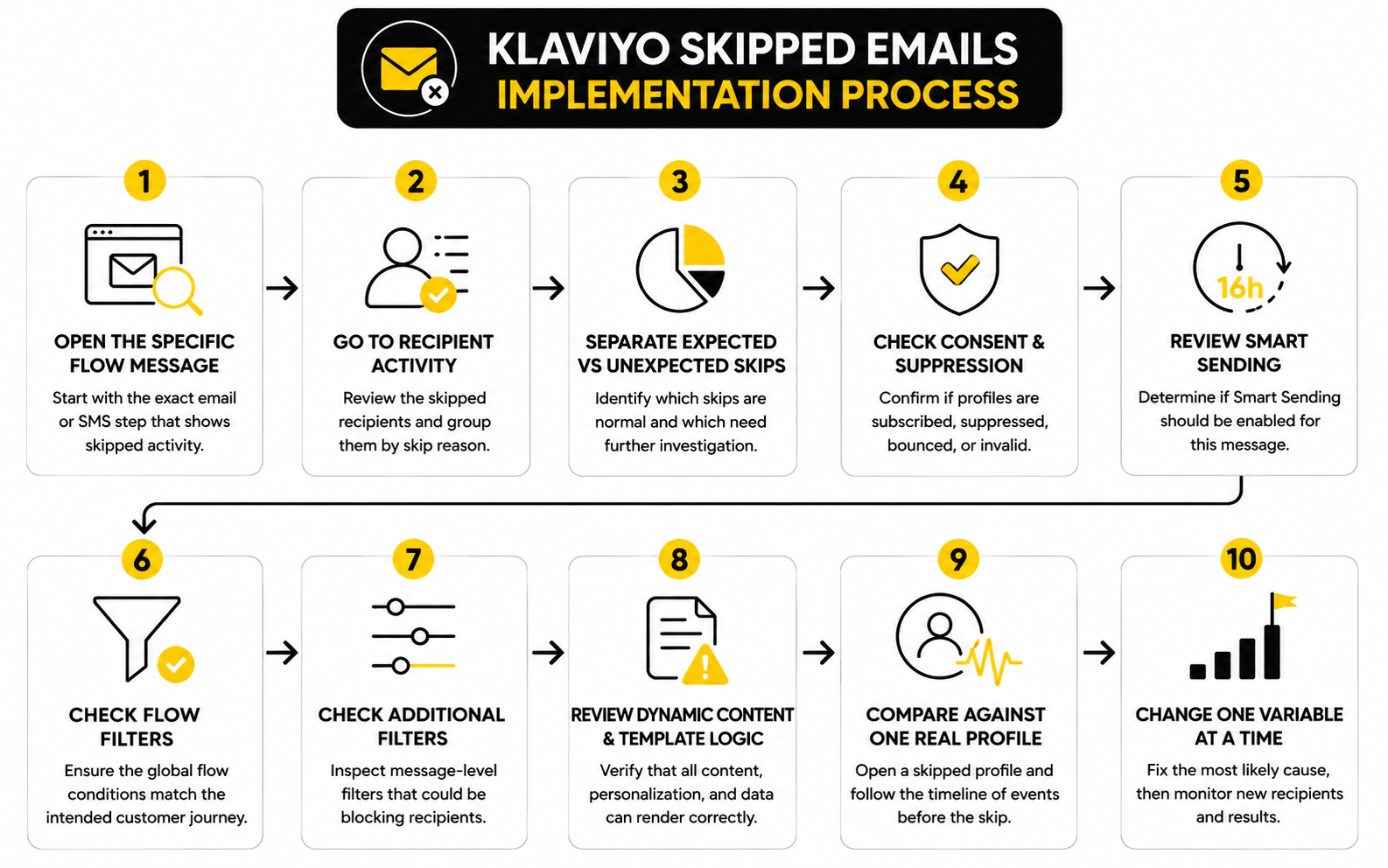
Use A Simple Flow Diagnosis Process
A clean diagnosis should move from the outside of the system inward. First, confirm whether the profile should have been allowed to receive marketing at all. Then confirm whether the profile still qualified for the flow. Then inspect the exact message settings that could block the send.
Use this process when a flow email has a suspicious skipped count:
This process is deliberately boring. That is the point. Random fixes create messy automations, but a repeated diagnosis process lets you find the real bottleneck without breaking what was already working.
Check Whether The Skip Was Actually Correct
The most important diagnostic skill is knowing when not to fix something. In an abandoned cart flow, a person who places an order before the next reminder should normally be skipped. In a winback flow, a customer who buys again should stop receiving winback messaging. In a list-triggered welcome flow, someone who is no longer in the trigger list may no longer belong in the sequence.
This is where context matters more than the skipped count. A high skipped number in a cart flow can mean the flow is doing its job if many people return and purchase before later reminders. A high skipped number in a welcome flow’s first email is more concerning because that message is usually supposed to reach most eligible new subscribers.
So before you change filters, ask what the skip protected. Did it prevent an irrelevant message? Did it prevent over-messaging? Did it respect consent? If the answer is yes, leave the system alone and document why the skip is expected.
Inspect Flow Filters Before Message Filters
Flow filters apply across the entire flow, so they can affect every message after a profile enters. These filters often include conditions like “has placed order zero times since starting this flow” or “is not in a suppressed segment.” They are powerful because they keep the journey clean, but one bad condition can block a lot of good recipients.
When reviewing flow filters, read each condition in plain English. Do not just scan the logic. Say what it actually means for the customer: “This person can continue only if they have not bought since entering,” or “This person can continue only if they still belongs to this segment.”
Then compare that rule to the purpose of the flow. If the flow is abandoned checkout, purchase exclusion makes sense. If the flow is post-purchase education, excluding recent purchasers may be backwards. The fastest way to find mistakes is to translate filters into customer behavior and see whether the logic still sounds reasonable.
Review Additional Filters At The Message Level
Additional filters are often where hidden Klaviyo skipped problems live. They are easy to add during a quick optimization, and they are easy to forget later. Because they live on the individual message, the rest of the flow can look correct while one email quietly skips the wrong people.
Open the message settings and check whether the email has extra recipient conditions. Look for filters based on product category, profile property, location, order count, subscription status, engagement, predicted gender, predicted lifetime value, or any custom field synced from another tool. These conditions can be useful, but only if the data is reliable and the logic matches the message.
Be especially careful with custom properties. If a property is missing, misspelled, synced inconsistently, or stored in a different format than the filter expects, the message can skip profiles that look qualified from a marketing perspective. That is not a Klaviyo problem; that is a data structure problem showing up as a skipped email.
Test One Skipped Profile Manually
After you understand the broad skip reason, open one skipped profile and trace the timeline. Look at when the person entered the flow, what event triggered entry, what messages they received before the skip, whether they received another email recently, whether they purchased, and whether any consent or suppression status changed. You are looking for the moment where the profile stopped matching the path you expected.
This single-profile review is one of the most useful habits in Klaviyo. Aggregate reports tell you the category of the issue. A real profile timeline shows you the sequence of events that caused it.
Do not test only clean, ideal profiles. Pick a skipped profile that represents the biggest skip reason you saw in recipient activity. If the largest group was skipped because of Smart Sending, inspect their recent messages. If the largest group failed flow filters, inspect their events and properties around the time the message was scheduled to send.
Check Template And Dynamic Content Issues
Some skipped flow emails are caused by message content rather than audience logic. This can happen when an email depends on event data, catalog data, product recommendations, conditional blocks, or personalization that is not available for a profile. The flow trigger may be correct, but the email still cannot render properly for that recipient.
This is common in flows that rely heavily on dynamic product information. If an abandoned cart, browse abandonment, price-drop, or back-in-stock email pulls product data from an event or catalog feed, missing or malformed data can create problems. Klaviyo’s broader flow troubleshooting guidance recommends checking message setup, trigger configuration, and flow alerts when behavior differs from what you expect: Klaviyo flow troubleshooting guide.
The fix is not to remove personalization blindly. The fix is to make sure the template uses the right event variables, fallback content, valid product blocks, and conditions that match the trigger data. Dynamic content is powerful, but only when the data path is stable.
Decide Whether Smart Sending Belongs On That Flow Message
Smart Sending should be a strategic choice, not a default habit. For low-urgency educational messages, it can protect subscribers from feeling overwhelmed. For high-intent recovery messages, it can block the exact email that should have priority.
Review the message’s purpose before changing the setting. A first abandoned checkout email usually has a stronger argument for bypassing Smart Sending than a general brand story email. A post-purchase instruction email may also deserve priority because it improves the customer experience, while a promotional cross-sell email may not.
Klaviyo lets you review flow email settings such as Smart Sending at the message level, which means you can make this decision precisely instead of changing the whole account: Klaviyo flow email settings guide. That is the professional approach. You keep protection where it helps and remove friction where the customer intent is too valuable to interrupt.
Document The Fix Before You Change The Flow
Before you edit the flow, write down the current skipped reason, the suspected cause, the message affected, and the change you plan to make. This sounds unnecessary until three people touch the same account and nobody remembers why Smart Sending was turned off, why a filter was removed, or why a message-level condition exists. Good documentation prevents the same Klaviyo skipped issue from being “fixed” five different ways.
Keep the documentation short. You only need enough context for a future operator to understand the decision. For example: “Email 2 in abandoned cart flow had high Smart Sending skips from same-day campaign sends. Smart Sending disabled for this message only because checkout recovery has higher priority than newsletter frequency protection.”
Then monitor new recipients after the change. Do not judge the fix by old skipped profiles because many skips are historical events. Watch what happens to fresh flow entrants, compare skipped reasons again, and confirm that the change reduced the bad skips without creating a new over-sending problem.
Statistics And Data: What Skipped Emails Actually Tell You
Skipped email data is useful only when you connect it to the rest of your performance numbers. A skipped count by itself does not tell you whether your Klaviyo account is healthy, broken, cautious, or over-filtered. It only tells you that a group of profiles did not receive a message after Klaviyo evaluated them against its sending rules.
The better question is what happened around the skipped count. Did the campaign still generate strong revenue per recipient? Did the flow still recover purchases? Did unsubscribe, bounce, or complaint rates stay healthy? Did the skip reason protect the sender reputation, or did it block high-intent customers from receiving a message they clearly should have received?
Klaviyo’s reporting tools are built around that broader view. Campaign analytics help you review recipient activity, conversions, revenue, and engagement after a message sends: Klaviyo campaign analytics guide. Flow skipped reasons help you understand whether the right people are receiving the right automation content: Klaviyo flow skipped reason guide.
Start With The Skipped Rate, Not Just The Skipped Count
A raw skipped count can be misleading. If 500 people were skipped from a campaign sent to 200,000 profiles, that is a very different situation from 500 people skipped from a campaign meant for 700 profiles. The first may be normal list hygiene; the second could mean your campaign setup blocked most of the intended audience.
Use this simple formula when reviewing any Klaviyo skipped issue:
Skipped rate = skipped recipients divided by total intended recipients
That rate gives you context. A low skipped rate usually means the issue is isolated to normal exclusions, suppressed profiles, invalid addresses, or Smart Sending. A high skipped rate means you should inspect audience setup, Smart Sending, manual exclusions, list or segment logic, and message-level filters before you trust the campaign result.
Break Skipped Data Into Reasons
The skipped total is the least useful number in the report. The reason breakdown is where the diagnosis happens. You want to know whether the majority of skips came from suppression, Smart Sending, flow filters, additional filters, invalid emails, missing consent, or campaign audience rules.
Each reason points to a different action. Suppression and unsubscribe skips usually tell you the system is protecting consent and deliverability. Smart Sending skips tell you that message frequency is affecting delivery. Filter skips tell you that your automation logic is either correctly excluding people or accidentally blocking them.
This is why skipped analysis should never end at “we had 1,000 skipped emails.” A useful report says something more specific, like “most skips came from Smart Sending on the first abandoned checkout email after a same-day campaign.” That tells you where to look, what decision caused the skip, and whether the setting belongs on that message.
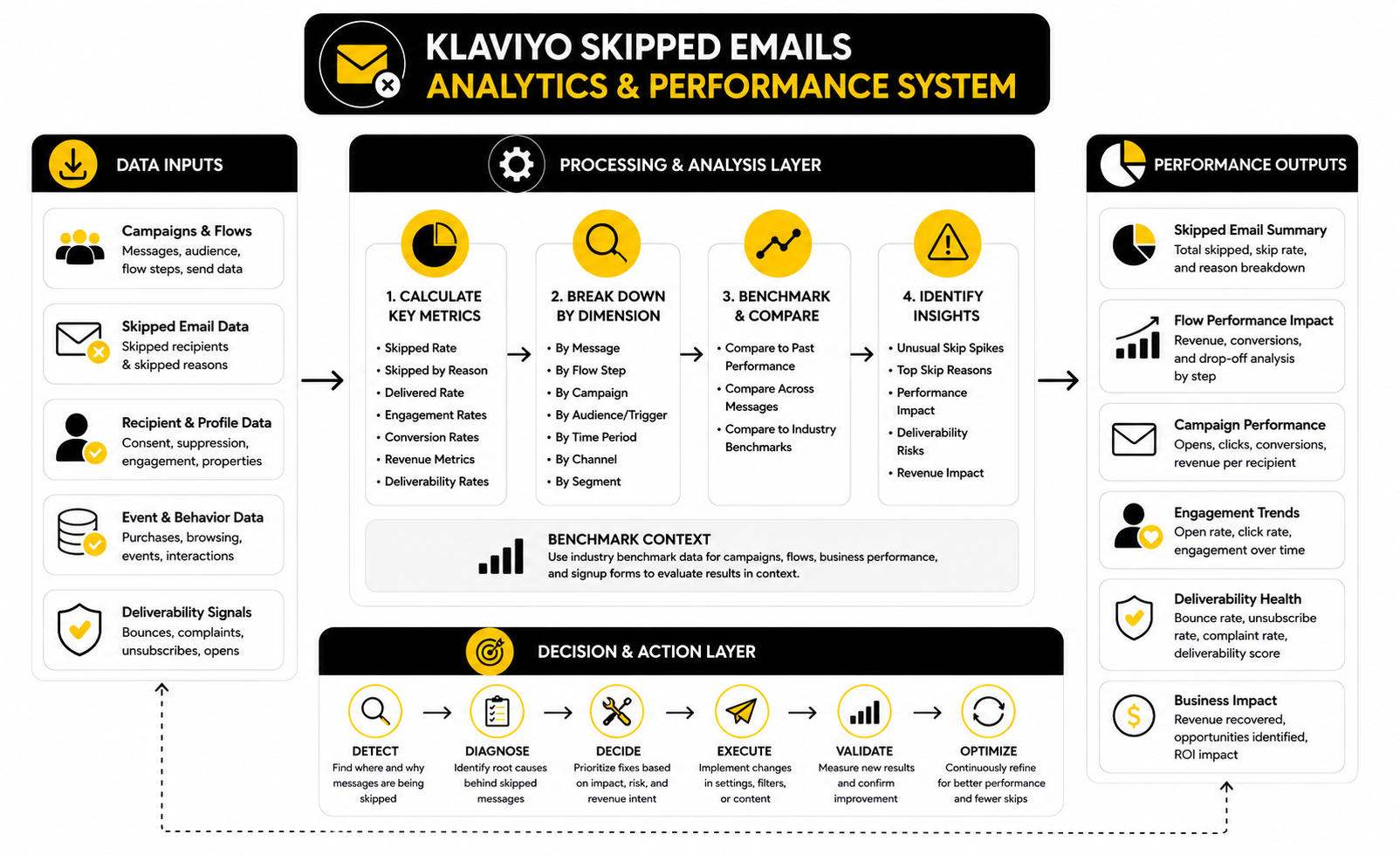
Build A Skipped Email Measurement System
A good measurement system does not need to be complicated. You only need a repeatable way to capture the message, the audience, the skipped rate, the skipped reasons, and the business outcome. Once you do that consistently, patterns become obvious.
Track these fields for important campaigns and core flows:
This gives you enough information to make decisions without drowning in dashboards. If a skipped rate spikes but revenue per recipient and deliverability metrics are strong, the skip may be acceptable. If a skipped rate spikes and revenue drops on a high-intent automation, you likely have a real problem to fix.
Compare Skips Against Deliverability Signals
Skipped emails should be interpreted alongside deliverability metrics because some skips are there to protect your reputation. Klaviyo’s deliverability hub uses a score from 0 to 100 and highlights open rate, click rate, bounce rate, unsubscribe rate, and spam complaint rate as key health signals: Klaviyo deliverability hub guide. Those numbers help you understand whether your account is becoming healthier or riskier after you change skip-related settings.
This matters most when someone wants to disable Smart Sending or loosen filters. If engagement is already weak, complaints are rising, or unsubscribe rate is climbing, sending more email may make the account worse. In that case, skipped emails may be doing useful defensive work.
On the other hand, if deliverability is healthy and the skipped reason is blocking urgent lifecycle messages, you can be more aggressive. For example, you may keep Smart Sending on for broad campaigns but turn it off for a first abandoned checkout email. That is a measured decision, not a panic move.
Use Benchmarks As Context, Not As A Diagnosis
Benchmarks are helpful, but they do not diagnose skipped emails by themselves. Klaviyo’s benchmark reports compare performance against similar businesses and include areas such as campaigns, flows, business performance, and signup forms: Klaviyo benchmarks report guide. Klaviyo also notes that benchmark data refreshes monthly, which makes it useful for trend monitoring rather than one-time guessing: Klaviyo benchmark feature overview.
The mistake is using benchmarks as a shortcut. If your click rate is below benchmark, that does not automatically mean skipped emails caused the problem. The issue could be audience quality, offer strength, subject line, creative, deliverability, list fatigue, or weak segmentation.
Use benchmarks to ask better questions. If your flow revenue is below peers and your skipped rate is unusually high on key revenue messages, investigate the skip reasons. If your campaign performance is below peers and most skips come from suppressed or invalid profiles, the real issue may be list acquisition and hygiene rather than campaign content.
Watch Revenue Per Recipient After Changes
Revenue per recipient is one of the cleanest metrics for judging whether a skipped-email fix actually helped. If you reduce skips but revenue per recipient falls, you may have reached more people with less relevant messaging. If you reduce harmful skips and revenue per recipient rises, the fix probably removed friction from a valuable message.
This is especially useful for campaign analysis. Klaviyo’s ecommerce benchmark material emphasizes that campaigns sent to narrower, more relevant slices of a store’s contacts often outperform broad sends on open rate, click-through rate, and revenue per recipient: Klaviyo ecommerce benchmark report. That point matters because the goal is not to send to the biggest possible audience; the goal is to send to the right audience.
So when you review Klaviyo skipped data, do not celebrate a lower skipped count too quickly. Look at revenue per recipient, order rate, click rate, and unsubscribe rate after the change. More sends are only better when the additional recipients produce healthy outcomes.
Measure Flow Skips By Step
Flow-level averages hide problems. A welcome series might look fine overall while the first email is healthy, the second email is blocked by Smart Sending, and the third email has an additional filter issue. If you only review the flow total, you miss the specific step that needs attention.
Measure skipped rate by each message in the flow. Then compare that skipped rate with the purpose of that step. A later abandoned cart reminder may naturally skip people who already purchased. A first welcome email skipping a large share of new subscribers is much more suspicious.
The step-level view also helps you avoid unnecessary edits. If only one message has a high skipped rate, do not rewrite the whole automation. Open that message, inspect the skipped reason, review its filters, check Smart Sending, and fix the specific bottleneck.
Measure Campaign Skips Before And After Scheduling
Campaign analytics need timing context. If you schedule a campaign in advance, the final audience may be affected by whether recipients are determined at scheduling time or send time. Klaviyo’s campaign troubleshooting guide explains that skipped profiles can be caused by suppressed contacts, unsubscribes, invalid emails, Smart Sending, exclusions, and recipient-list timing: Klaviyo skipped campaign guide.
That means you should capture two numbers when the campaign matters: the expected audience before scheduling and the actual sent, skipped, and delivered counts after sending. If the difference is large, inspect whether the audience changed, exclusions were applied, Smart Sending was enabled, or suppressed profiles made up more of the list than expected.
This is especially important for promotions, launches, holiday campaigns, and deadline-driven offers. A skipped spike discovered after the campaign ends is still useful for diagnosis, but it is too late to protect that send. For high-value campaigns, check the audience and settings before launch, not only after the report is ugly.
Create Thresholds For Action
You do not need to investigate every skipped email with the same intensity. That creates busywork. Instead, create thresholds that tell you when to ignore, review, or urgently fix the issue.
A practical system can look like this:
These thresholds keep the team focused. You do not waste time “fixing” healthy suppression skips. You also do not ignore a Klaviyo skipped pattern that is quietly blocking checkout recovery, welcome emails, or launch campaigns.
Read The Data Like An Operator
The operator mindset is simple: every metric should lead to a decision. A skipped rate tells you whether the issue is large enough to inspect. A skipped reason tells you where to inspect. Revenue and engagement tell you whether the skip is hurting performance or protecting the account.
This is why skipped data should live beside your normal email reporting, not in a separate troubleshooting corner. Review it with open rate, click rate, conversion rate, revenue per recipient, bounce rate, unsubscribe rate, and spam complaint rate. Klaviyo’s deliverability guidance specifically recommends monitoring engagement and negative signals together so you can identify deliverability issues early: Klaviyo deliverability best practices.
Once you read the numbers together, the action becomes clearer. You keep the skips that protect consent, relevance, and deliverability. You fix the skips that block qualified buyers, new subscribers, and high-intent customers from getting the messages they should receive.
How To Fix Skipped Messages Without Hurting Deliverability
The dangerous way to fix Klaviyo skipped emails is to remove anything that blocks a send. That might make the skipped number look better, but it can also create a worse business outcome. More sending is not automatically better when the extra sends go to unengaged, invalid, suppressed, or poorly matched profiles.
The safer way is to fix skipped messages by priority. Consent and deliverability protections should remain strict. Broken data, bad filters, template issues, and unnecessary friction on high-intent messages should be cleaned up. The goal is not to eliminate skips; the goal is to eliminate the wrong skips.
This matters because inbox providers are less forgiving than they used to be. Klaviyo’s deliverability guidance recommends keeping bounce rates below 1%, unsubscribe rates under 0.3%, and spam complaint rates below 0.01% to maintain healthier sending performance: Klaviyo deliverability guidance. If your skipped-email fix increases negative engagement, you did not fix the account. You just moved the problem somewhere more expensive.
Prioritize Fixes By Revenue Intent
Not every skipped message deserves the same attention. A skipped brand newsletter is not the same as a skipped first abandoned checkout email. One is a general communication; the other is tied to active purchase intent.
Start with the messages closest to revenue and customer experience. In most ecommerce accounts, that means welcome emails, abandoned checkout, abandoned cart, browse abandonment, back-in-stock, price drop, post-purchase education, review requests, and replenishment flows. If Klaviyo skipped a large share of recipients in those messages for an unexpected reason, fix that before worrying about lower-priority campaigns.
This does not mean you ignore campaigns. It means you rank the work. When time is limited, fix the automation steps where a missing email creates the clearest business loss or customer confusion.
Keep Consent And Suppression Rules Strict
Suppression, unsubscribe, spam complaint, and hard bounce skips should almost never be treated as problems to override. These are the guardrails that protect the account from sending to people who should not receive marketing. Removing or working around those protections can damage trust, deliverability, and compliance.
If suppressed profiles make up a large share of skipped recipients, the fix is not to push them back into sends. The fix is to understand why the list contains so many suppressed or unreachable profiles. That usually points to acquisition quality, old imports, weak list hygiene, confusing opt-in practices, or campaigns that trained people to disengage.
This is especially important after the 2024 Google and Yahoo sender requirement changes. Klaviyo’s own guidance around those requirements emphasizes authentication, compliant sending practices, and protecting sender reputation: Klaviyo Google and Yahoo sender requirements. In plain English: the mailbox ecosystem rewards clean, wanted email. Do not fight the skips that help prove your mail is wanted.
Be Selective With Smart Sending
Smart Sending is one of the easiest settings to change and one of the easiest settings to abuse. Turning it off everywhere can quickly increase frequency pressure on your list. Keeping it on everywhere can block urgent lifecycle messages that deserve priority.
Use message intent as the deciding factor. A general campaign, content newsletter, non-urgent sale reminder, or low-intent nurture email usually benefits from frequency protection. A first abandoned checkout email, transactional-adjacent post-purchase instruction, back-in-stock alert, or time-sensitive customer experience message may deserve an exception.
The best setup is usually mixed. Keep Smart Sending active where it prevents fatigue, and disable it only where the customer’s behavior clearly shows immediate intent. Klaviyo allows Smart Sending decisions at the flow message level, so you do not need to make one blunt account-wide decision: Klaviyo Smart Sending guide.
Tighten Filters Instead Of Removing Them
When flow filters or additional filters cause skips, the instinct is often to remove them. That can work in the short term, but it can also make the automation less relevant. A better first move is to tighten the logic so it excludes the wrong people without blocking the right people.
For example, a purchase exclusion in an abandoned cart flow is usually necessary. Removing it could send cart reminders to buyers after they already ordered. The more carefully fix is to confirm the filter references the correct event, timeframe, and flow trigger so it stops post-purchase sends without blocking valid abandoners.
The same applies to message-level filters. If an email is meant only for people interested in a certain product category, do not remove the category logic just because some profiles skipped. Check whether the property is reliable, whether the event data is present, and whether the condition is written in the same format your data actually uses.
Fix Data Quality Upstream
Many skipped-email problems are really data problems. Invalid addresses, missing properties, inconsistent custom fields, broken catalog data, and unreliable events can all surface as Klaviyo skipped activity. If you only patch the flow, the same issue will show up again somewhere else.
Start with signup quality. Use clear opt-in language, avoid misleading lead magnets, validate email fields where possible, and stop importing questionable contacts. A smaller clean list will usually outperform a larger messy list because email performance depends on engagement and trust, not database size.
Then review the systems feeding Klaviyo. Ecommerce platforms, forms, quizzes, landing pages, CRM tools, and custom integrations should pass consistent data. If a property sometimes says “Women,” sometimes says “womens,” and sometimes is empty, any filter built on that property will behave unpredictably.
Protect High-Intent Flows From Campaign Collisions
One advanced issue is campaign-flow collision. A subscriber receives a campaign, then shortly after takes a high-intent action that triggers a flow. If Smart Sending is enabled on the flow message, Klaviyo may skip the flow email because the person recently received the campaign.
This is not always wrong. Sometimes the campaign and flow are similar enough that skipping is fine. But if the flow email responds to a clear action, such as starting checkout or requesting a back-in-stock alert, the flow often deserves priority.
The fix is not simply “send more.” The fix is to define a message hierarchy. High-intent lifecycle messages should usually outrank broad promotional sends, while low-intent nurture messages can respect Smart Sending more aggressively. That hierarchy keeps the account controlled while making sure the most valuable messages are not blocked by routine campaigns.
Use Segmentation To Reduce Bad Skips And Bad Sends
Strong segmentation reduces both skipped-message confusion and poor sending outcomes. If campaigns are aimed at a cleaner, more relevant audience, fewer people will be skipped because of suppression, low engagement, or exclusions. More importantly, the people who do receive the message are more likely to respond well.
This is where operators separate themselves from button-clickers. They do not blast the largest possible list and then blame Klaviyo when the report gets messy. They build segments around intent, engagement, purchase history, product interest, geography, lifecycle stage, and consent status.
For teams that need a broader automation stack around lead capture, CRM, pipelines, SMS, booking, and follow-up, GoHighLevel can make sense outside the core ecommerce email layer. But inside Klaviyo, segmentation still needs to stay disciplined. Better tools do not fix sloppy audience logic.
Audit Skipped Reasons Before Major Promotions
Skipped-message issues hurt most when they appear during big moments. Product launches, Black Friday, Cyber Monday, holiday campaigns, anniversary sales, and deadline-driven offers leave less room for recovery. If the campaign audience was wrong or a core flow was blocked, you may not notice until the money is already gone.
Before a major promotion, audit the flows and campaign settings that will matter most. Check the first abandoned checkout email, first cart reminder, browse abandonment message, back-in-stock flow, active popup welcome flow, and any campaign audience exclusions. Then review Smart Sending settings and expected skipped reasons before traffic spikes.
This is not busywork. It is risk control. The more revenue pressure sits on a promotion, the less you should rely on assumptions from last month’s setup.
Do Not Chase A Zero-Skip Account
A zero-skip Klaviyo account is not the goal. In fact, it would usually be suspicious. Healthy accounts skip people because some profiles are suppressed, some have unsubscribed, some no longer qualify, some recently received another message, and some should not receive a specific email anymore.
The right target is controlled skipping. You want expected skips to remain expected, and unexpected skips to shrink. That is a more mature goal than trying to force every profile through every message.
This mindset also helps teams avoid bad incentives. If someone is measured only on reducing skipped counts, they may remove safeguards that protect the account. If they are measured on revenue quality, engagement, deliverability, and correct skip reasons, they will make better decisions.
Scale With A Governance System
As an account grows, skipped-email management becomes less about one person troubleshooting and more about governance. More campaigns, more flows, more segments, more offers, and more team members create more opportunities for hidden settings to conflict. Without a system, every Klaviyo skipped issue becomes a new detective story.
Create a simple change log for important flows. Record when filters change, when Smart Sending is turned on or off, when an exclusion is added, when a dynamic block is updated, and why the change was made. This makes future diagnosis faster because you can connect a skipped spike to a real account change.
Also define ownership. Someone should be responsible for campaign setup QA, someone should review lifecycle flow health, and someone should monitor deliverability signals. In a small business, that may be one person wearing three hats. In a bigger team, it should not be “everyone,” because “everyone” usually means nobody.
Know When To Leave The Skip Alone
The expert move is sometimes doing nothing. If the skip reason is expected, the message still performs well, deliverability is healthy, and the customer experience is protected, leave it alone. Not every metric needs to be optimized into the ground.
This is especially true for flows that intentionally stop irrelevant messages. A post-purchase buyer should not keep getting cart reminders. A suppressed profile should not receive marketing. A customer who no longer matches a segment should not be forced through a sequence designed for a different lifecycle stage.
Fixing Klaviyo skipped emails is not about forcing volume. It is about making the system more carefully. Keep the skips that protect the brand, remove the skips that block real opportunity, and make every change with enough discipline that the next report is easier to understand.
Ještě poslední úprava…
Build a stronger local presence with BAAM AI
Turn your website, Google profile, social channels, and AI visibility into one growth engine
Most businesses do not need more random marketing activity. They need a consistent presence system that helps the right people find them, trust them, and take action. BAAM AI brings strategy, local SEO, website updates, Google Maps visibility, social content, AI-search readiness, media production, and reporting into one practical monthly engine.
If you want your marketing to keep working after the campaign ends, start with a free BAAM AI presence audit. See how your business shows up today and where the fastest visibility wins are at BAAM AI.