
BAAM AI Blog
Klaviyo HubSpot Integration: A Practical Framework For Cleaner Customer Data And Better Lifecycle Marketing
A Klaviyo HubSpot integration sounds simple until the first real sync decision shows up. One system is usually closer to ecommerce behavior, email engagement, SMS consent, predictive customer insights, and lifecycle...
Affiliate disclosure: this article may include compensated links. Recommendations should still be evaluated against your use case, budget, and current provider terms.
Should you choose HubSpot?
HubSpot is worth considering when the use case, budget, and implementation effort match what you actually need to do next.
teams that want a practical tool decision without reading another generic feature list
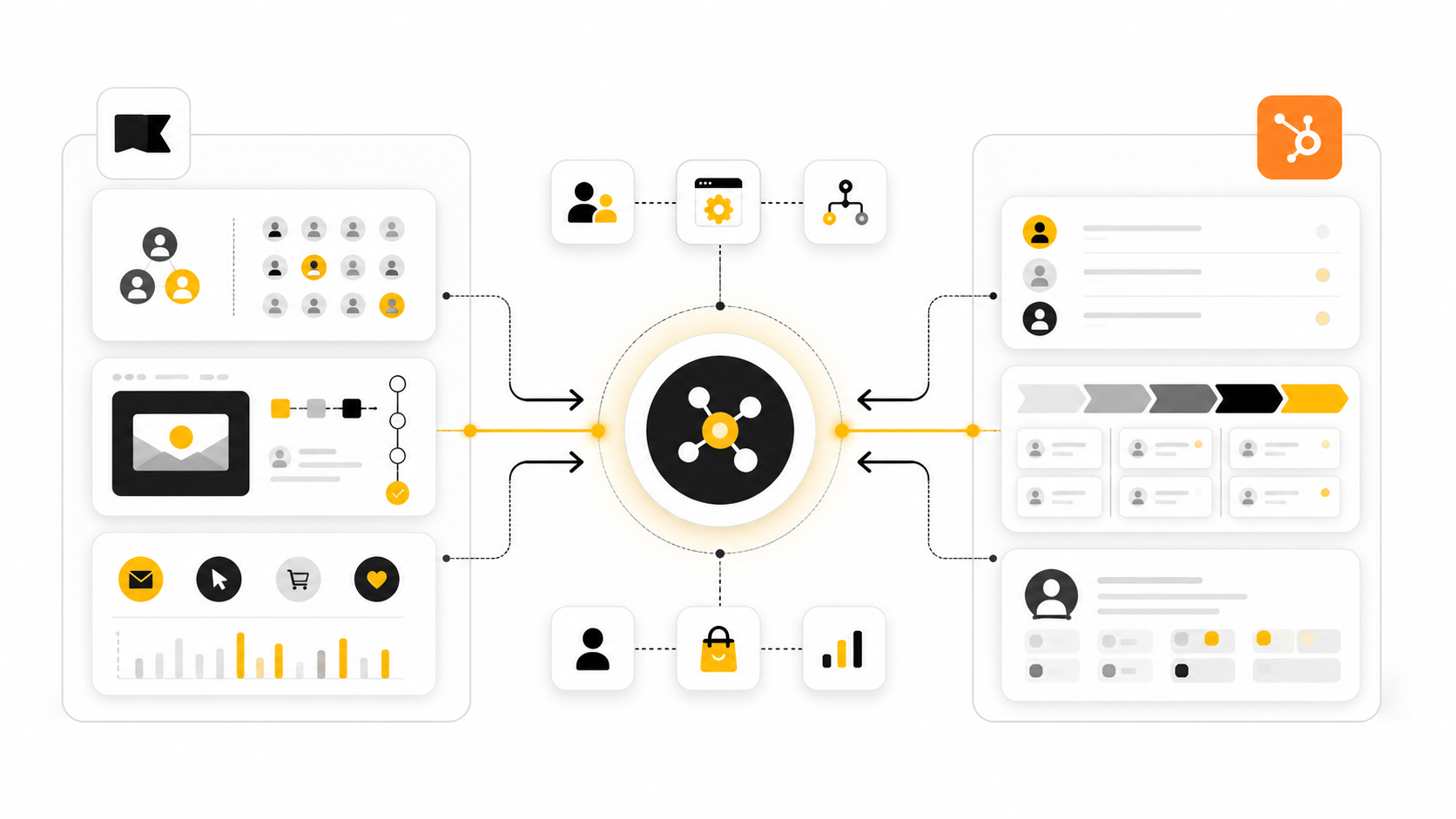
Check HubSpotA Klaviyo HubSpot integration sounds simple until the first real sync decision shows up. One system is usually closer to ecommerce behavior, email engagement, SMS consent, predictive customer insights, and lifecycle automation. The other is usually closer to CRM records, sales activity, lead ownership, deal stages, service context, and pipeline reporting.
That split is exactly why the integration matters. When Klaviyo and HubSpot stay disconnected, marketing sees campaign behavior without the full sales context, while sales sees CRM records without the full lifecycle engagement picture. The result is not just messy data; it is slower follow-up, weaker segmentation, duplicated contacts, and reporting that people quietly stop trusting.
There is also an important reality to understand upfront: this is not always a one-click native setup. Klaviyo’s own migration guidance notes that Klaviyo does not have a built-in HubSpot integration and recommends exporting HubSpot data when moving from HubSpot into Klaviyo, while marketplace options such as Outfunnel position themselves around two-way contact sync and activity syncing between Klaviyo and HubSpot. That means the right approach depends on whether you need a light contact sync, a full sales-and-marketing handoff, or a more controlled data architecture using APIs, middleware, and governance.
This guide treats the Klaviyo HubSpot integration as an operating system, not a checkbox. The goal is to help you decide what should sync, which platform should own each field, how consent should be handled, and where automation should actually run. Get those decisions right, and the integration becomes a growth asset instead of another fragile tool connection.
The full article is split into six connected parts so each decision builds on the last one. Part 1 sets the context and maps the structure, while the following parts move from strategy into practical implementation. The section names below are the real sections the article will continue using.
Why A Klaviyo HubSpot Integration Matters
The reason this integration matters is not because every business needs more software connected. It matters because customer journeys are already connected in the buyer’s mind, even when your tools are not. A person can click a Klaviyo campaign, browse products, talk to sales, open a support ticket, and return through an abandoned cart flow, all before your team has a clean view of what actually happened.
HubSpot is strong when you need CRM structure, deal context, contact ownership, lifecycle stages, and sales follow-up. Klaviyo is strong when you need behavior-led segmentation, ecommerce lifecycle messaging, and customer-level activation across channels like email and SMS. A thoughtful integration lets each platform do what it is best at instead of forcing one tool to pretend it is the whole customer operating system.
This is where many teams get it wrong. They start by asking, “How do we connect Klaviyo and HubSpot?” A better first question is, “What decisions should become easier once these systems share data?”
The Integration Framework: What Should Sync And Why
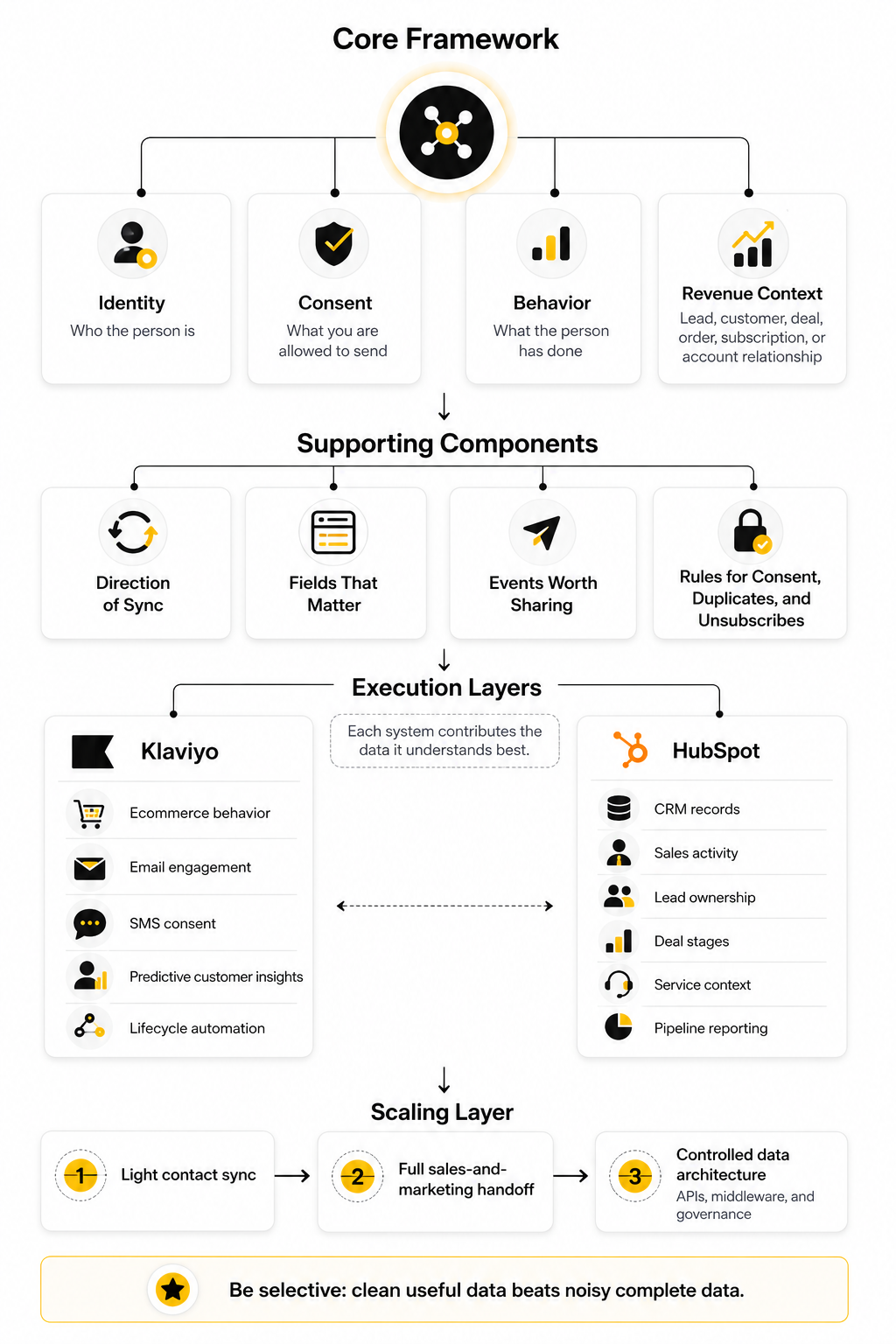
A useful Klaviyo HubSpot integration starts with a framework, not a connector. At minimum, you need to define the direction of sync, the fields that matter, the events worth sharing, and the rules for consent, duplicates, and unsubscribes. Without those decisions, even a technically successful sync can create business confusion.
The framework should separate four layers: identity, consent, behavior, and revenue context. Identity tells both systems who the person is. Consent tells both systems what you are allowed to send. Behavior shows what the person has done. Revenue context shows whether that behavior is tied to a lead, customer, deal, order, subscription, or account relationship.
This structure also prevents over-syncing. Not every Klaviyo event needs to become a HubSpot property, and not every HubSpot field needs to live in Klaviyo. The best integrations are selective, because clean useful data beats noisy complete data every time.
The Integration Framework: What Should Sync And Why
The cleanest Klaviyo HubSpot integration starts by deciding what each platform is allowed to own. That sounds obvious, but it is where most bad integrations begin. When both systems are allowed to overwrite the same fields without rules, you eventually get duplicate contacts, broken lifecycle stages, inaccurate suppression status, and automation that fires for the wrong reason.
The right framework is simple: sync the data that improves decisions, not every field you can technically move. Klaviyo should usually stay closest to marketing engagement, ecommerce behavior, list membership, customer segments, consent status, and campaign performance. HubSpot should usually stay closest to CRM ownership, lifecycle stage, deal movement, sales activity, company context, and pipeline reporting.
That split does not mean the systems stay isolated. It means each system contributes the data it understands best. A good integration gives marketing enough CRM context to personalize campaigns and gives sales enough behavioral context to prioritize follow-up without turning either platform into a dumping ground.
Start With The Business Question
Before touching a connector, ask what the integration is supposed to improve. Are you trying to help sales see Klaviyo email clicks inside HubSpot? Are you trying to move HubSpot lifecycle stages into Klaviyo for better nurture flows? Are you trying to suppress customers from promotional campaigns when they enter an active sales pipeline?
Each goal creates a different sync design. A simple newsletter handoff might only need contacts, email consent, and a few segmentation fields. A sales-assisted ecommerce model might need contact ownership, lifecycle stage, deal stage, recent campaign engagement, product interest, and purchase events.
This is why a Klaviyo HubSpot integration should not be planned as a generic “sync everything” project. The better move is to write down the decisions your team wants to make faster. Then sync only the fields and events that help those decisions become clearer.
Define The System Of Record
Every important data point needs a system of record. This is the platform trusted as the source when the same value exists in both places. Without this rule, one update from HubSpot can quietly undo a newer update in Klaviyo, or the reverse can happen without anyone noticing.
For example, HubSpot is usually the better system of record for lifecycle stage because its lifecycle tools are built around contacts, companies, deals, and sales process movement. HubSpot’s lifecycle stage documentation explains how stages are used to track contacts and companies through the marketing and sales process, which makes HubSpot the logical owner for that CRM-facing field. Klaviyo can still receive lifecycle stage as a profile property, but it should usually consume that field rather than redefine it.
Klaviyo is usually the better system of record for email and SMS marketing behavior because its profile and event model is built around customer engagement. Klaviyo’s developer documentation describes events as actions taken by profiles, with a metric and timestamp attached to each event. That structure makes Klaviyo the better home for campaign clicks, flow engagement, onsite behavior, purchase activity, and messaging-triggered segmentation.
Map Identity Before You Map Fields
Identity is the foundation of the whole integration. If HubSpot and Klaviyo cannot reliably agree on who the person is, every later sync rule becomes risky. Email is usually the main identifier, but teams also need to think about phone number, customer ID, Shopify customer ID, company association, and duplicate handling.
This gets especially important when B2B and ecommerce motions overlap. HubSpot may treat a person as a contact associated with a company and deal. Klaviyo may treat that same person as an individual profile with marketing consent, purchase behavior, and engagement history.
Do not rush this step. Decide how new contacts are created, what happens when an email address already exists, whether phone-only profiles should sync, and how duplicates will be reviewed. A boring identity map is much better than a flashy automation that creates records nobody trusts.
Separate Properties From Events
One of the biggest integration mistakes is treating every behavior like a permanent field. Properties and events are not the same thing. A property describes the current state of a person, while an event describes something that happened at a specific moment.
A HubSpot lifecycle stage, lead source, owner, company name, or customer type can work well as a synced property. A Klaviyo email click, viewed product, started checkout, placed order, or SMS interaction is usually better treated as an event or activity. This distinction matters because events are historical and time-based, while properties are current and overwriteable.
For practical implementation, use properties when your team needs a stable value for filtering, ownership, or segmentation. Use events when your team needs timing, recency, frequency, or behavior triggers. That one decision prevents a lot of bloated CRM fields later.
Decide Which Engagement Data Sales Actually Needs
Sales teams do not need every marketing signal. They need the signals that change what they do next. If every open, click, list join, and flow message floods the HubSpot activity feed, the important signals become invisible.
Start with high-intent behavior. A pricing-page click, product comparison click, repeat campaign engagement, abandoned checkout, demo-related form submission, or recent purchase may deserve visibility in HubSpot. A generic newsletter open usually does not deserve the same weight, especially because open tracking can be noisy and less useful than clicks or direct actions.
This is where third-party sync tools can be useful if they let you choose what gets recorded. Outfunnel’s Klaviyo marketplace listing, for example, describes contact sync, email engagement sync, ecommerce event sync, and sync status monitoring for CRM connections. The point is not that every team needs that exact setup; the point is that selective engagement sync is much healthier than dumping all marketing activity into the CRM.
Keep Consent Rules Explicit
Consent is not just another field. It controls whether you are allowed to message someone, what channel you can use, and how your team should handle unsubscribes and suppressions. Klaviyo’s own consent guidance stresses that email and SMS consent work differently, which means your integration logic should not treat them as one generic “subscribed” status.
At minimum, define how email consent, SMS consent, unsubscribe status, suppression status, and source of consent should move between systems. If HubSpot captures a form submission, decide whether that creates marketing consent in Klaviyo or simply creates a CRM contact. If Klaviyo captures an unsubscribe, decide how HubSpot should reflect that status so sales and marketing do not continue messaging blindly.
This part is not glamorous, but it matters. A Klaviyo HubSpot integration that mishandles consent can create customer frustration, compliance risk, and internal confusion very quickly. Treat consent as a protected data category, not a casual sync field.
Build Around Lifecycle Moments
The best integrations are designed around moments in the customer journey. A new lead enters HubSpot and gets added to the right Klaviyo nurture segment. A prospect becomes sales-qualified and stops receiving broad promotional campaigns. A customer places an order and HubSpot gets enough context for account follow-up.
These lifecycle moments are where the integration starts producing real value. Instead of syncing data for the sake of syncing data, you are moving context at the exact point where a team, message, or workflow needs it. That is the difference between an integration that looks good in a diagram and one that actually helps revenue.
A practical lifecycle map might include:
Each lifecycle moment should have a clear owner, trigger, destination, and outcome. If no one can explain what should happen after the sync, the sync probably does not need to exist yet. Keep the framework tight, and the implementation becomes much easier.
Core Components Of A Reliable Klaviyo HubSpot Integration
Once the framework is clear, the next step is turning it into a system that can survive real customer behavior. This is where the Klaviyo HubSpot integration moves from theory into execution. The goal is not to create the most complex setup; the goal is to create a predictable sync that your marketing, sales, and operations teams can trust.
A reliable integration usually has five core components: contact sync, field mapping, consent handling, event or activity sync, and automation logic. Each piece needs its own rules because each piece can break in a different way. If contact sync is messy, records duplicate; if consent handling is vague, messaging risk increases; if automation logic is too broad, people enter the wrong flows or workflows.
The best implementation starts narrow and expands only after the first sync is stable. Do not connect every object, property, and event on day one. Build the minimum useful version, test it with real records, then add more complexity only when there is a clear business reason.
Contact Sync
Contact sync is the foundation because every other part of the integration depends on matching the right person in both systems. In most setups, email is the primary matching key, but that does not mean email alone solves everything. You still need rules for missing email addresses, duplicate records, updated phone numbers, merged contacts, and contacts that exist in one platform but not the other.
A practical contact sync should define when a record is created, when it is updated, and when it should not move at all. For example, a HubSpot sales contact may not need to enter Klaviyo unless they have valid marketing consent or belong to a specific lifecycle stage. A Klaviyo subscriber may not need a full HubSpot record unless they meet a lead qualification rule, submit a form, start a sales conversation, or reach a meaningful engagement threshold.
This is where discipline matters. Just because Klaviyo can hold profile properties and HubSpot can hold contact properties does not mean both should mirror each other completely. Keep the shared contact layer lean so the integration stays fast, readable, and easier to troubleshoot.
Field Mapping
Field mapping decides which values move between Klaviyo and HubSpot, what they are called, and which system wins when there is a conflict. This is usually where teams discover how inconsistent their data really is. One platform may use “Customer Type,” another may use “Segment,” and a spreadsheet import from two years ago may have created a third version nobody remembers.
Start with fields that directly affect segmentation, sales handoff, or reporting. Common examples include lifecycle stage, lead source, country, company name, customer type, owner, product interest, last purchase date, total order value, and preferred channel. Keep internal-only fields out of the sync unless they are genuinely useful in the other platform.
The naming convention should be boring and obvious. If a field came from HubSpot, make that clear in Klaviyo. If a field came from Klaviyo, make that clear in HubSpot. Future you will thank you when something breaks and you need to understand where the value came from.
Consent And Suppression Handling
Consent handling deserves its own implementation layer because it affects what you are allowed to send, not just what you want to send. Email consent, SMS consent, unsubscribe status, and suppression status should never be treated as casual profile enrichment. These fields control whether your communication is respectful, compliant, and operationally safe.
In a Klaviyo HubSpot integration, you need to decide how unsubscribe actions are reflected across systems. If someone unsubscribes from Klaviyo email, HubSpot should not keep treating that person as a clean marketing contact without context. If someone submits a HubSpot form with marketing consent, Klaviyo should receive the right consent signal only when the form language and legal basis actually support it.
Do not hide this logic inside one vague automation. Document it clearly, test it with sample contacts, and make sure sales understands what the status means. A clean consent sync prevents awkward follow-up, protects deliverability, and keeps your team from sending messages that should never go out.
Event And Activity Sync
Events and activities are where the integration becomes useful for timing. A profile property can tell you who someone is right now, but an event tells you what happened and when it happened. That difference matters because recency often changes the next best action.
Klaviyo events such as placed order, started checkout, viewed product, clicked campaign, or submitted a form can help HubSpot users understand recent intent. HubSpot activities such as deal creation, lifecycle stage movement, meeting booked, or sales qualification can help Klaviyo decide whether someone should enter, pause, or exit a marketing flow. The trick is choosing the events that change behavior, not the events that merely create noise.
For most teams, the CRM does not need every marketing touch. It needs the signals that help sales prioritize, personalize, or avoid unnecessary outreach. Start with high-intent events, then add lower-intent activity only if people actually use it.
Professional Implementation: Field Mapping, Consent, And Automation Logic
Professional implementation is mostly about sequencing. You do not start by building workflows; you start by defining data rules. Then you test the sync layer. Only after that should you connect automation, reporting, and handoff logic.
This sequence protects you from the classic integration trap: automating bad data faster. If lifecycle stages are inconsistent, automation will amplify the inconsistency. If consent is unclear, automation will scale the risk. If duplicate contacts exist, automation will send different messages to different versions of the same person.
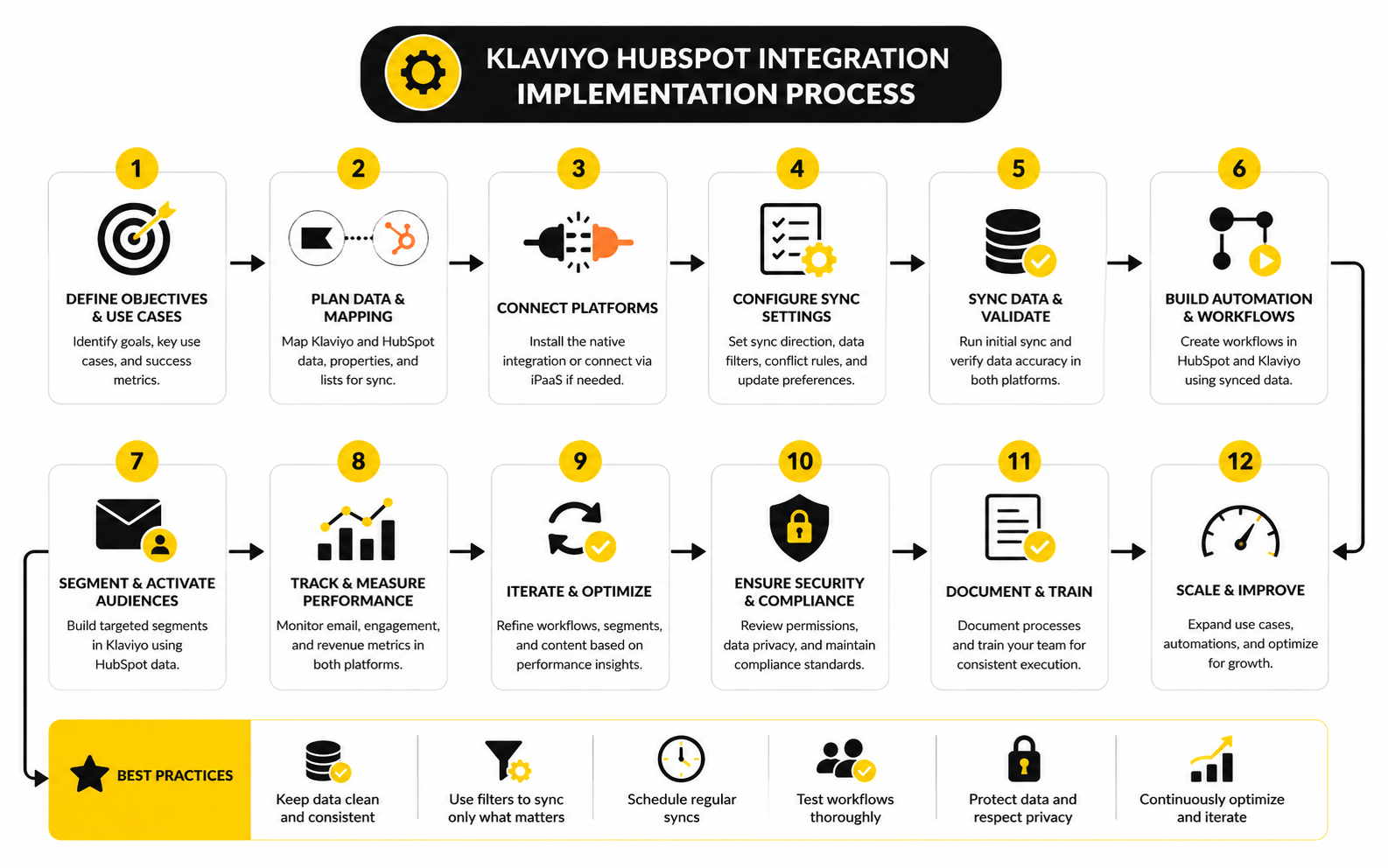
A clean implementation process should feel almost boring. That is a good thing. The more predictable the process is, the less drama your team will face later.
Step 1: Audit The Current Data
Start by reviewing the real data already sitting in both systems. Look for duplicate emails, missing phone numbers, inconsistent lifecycle stages, outdated owners, unclear consent fields, and properties that nobody uses anymore. This audit tells you what must be cleaned before anything starts syncing.
Do not skip this because the integration tool looks easy. Easy setup does not fix messy inputs. If HubSpot has stale lifecycle stages or Klaviyo has old imported profiles with unclear consent, the integration will carry that mess into your new operating system.
Create a short list of fields that are safe to sync immediately and fields that need cleanup first. The safe list becomes your first implementation scope. The cleanup list becomes a separate operations task, not something you quietly ignore.
Step 2: Choose The Integration Method
There are three main ways to connect Klaviyo and HubSpot: a third-party connector, a no-code automation platform, or a custom API build. Each option has a place. The wrong choice usually happens when a team picks based on convenience instead of data complexity.
A third-party connector is often the fastest path when you need contact sync, field mapping, and selected engagement activity without building everything yourself. A no-code platform can work well for specific triggers, simple one-way updates, or lightweight operational workflows. A custom API build makes sense when you need deeper control, special objects, strict governance, or high-volume sync behavior that generic tools cannot handle cleanly.
Do not overbuild if your needs are simple. Do not underbuild if your revenue process depends on accurate two-way data. The right integration method is the one your team can maintain confidently after the launch excitement is gone.
Step 3: Build The First Sync Scope
The first sync scope should be intentionally small. Pick the essential contact fields, one or two lifecycle fields, consent status, and the highest-value activity signals. Then test those with a controlled set of records before expanding.
This approach gives you a clean baseline. You can see whether records match correctly, whether field values land in the right format, whether consent behaves as expected, and whether the activity timeline is useful. If something breaks, you know where to look because the scope is still manageable.
A strong first sync scope might include:
This is enough to make the integration useful without turning it into a data swamp. You can always add more fields later. Removing unnecessary fields after people build reports around them is much harder.
Step 4: Test With Realistic Records
Testing should include more than one perfect contact. Use records that represent the messy reality of your business. Test a new subscriber, an existing customer, a sales-qualified lead, an unsubscribed contact, a duplicate-prone record, and a contact with missing optional fields.
For each test record, check what happened in both systems. Did the contact match correctly? Did the right fields update? Did old data overwrite newer data? Did consent move the way you expected? Did the record enter or avoid the right automation?
This is the point where you catch problems before customers feel them. A few hours of careful testing can prevent weeks of cleanup later. Be strict here, because integrations rarely fail in the demo; they fail when edge cases hit production.
Step 5: Add Automation Logic
Only after the sync behaves correctly should you connect automation. In Klaviyo, this might mean using HubSpot lifecycle stage or deal status to personalize flows, exclude sales-active leads, or create different nurture paths. In HubSpot, this might mean using Klaviyo engagement or purchase behavior to trigger sales tasks, update lead scoring, or change follow-up priority.
Automation should have clear entry, exit, and suppression rules. If someone becomes an opportunity in HubSpot, should they leave a promotional nurture flow in Klaviyo? If someone places an order through an ecommerce store, should HubSpot create a task, update a deal, or simply enrich the contact record?
Never leave these answers implied. Write them down before building. Good automation is not clever; it is clear.
Step 6: Monitor The Sync After Launch
The launch is not the finish line. After the Klaviyo HubSpot integration goes live, monitor sync errors, duplicate creation, unexpected field overwrites, consent changes, and automation volume. The first two weeks usually reveal the edge cases your planning did not catch.
Assign ownership to one person or team. If everyone owns the integration, nobody owns it when something breaks. The owner should review sync health, investigate failures, and approve new fields or workflow changes before they are added.
This is also where documentation becomes valuable. Keep a simple sync map that shows each field, source system, destination system, update direction, and business purpose. When your team changes, your integration knowledge should not disappear with the person who built it.
Statistics And Data: Turning Sync Into Decisions
The numbers behind a Klaviyo HubSpot integration only matter when they change what your team does next. A dashboard full of open rates, click rates, deal stages, and revenue attribution can look impressive, but it is useless if nobody knows which action each metric should trigger. Measurement has to connect marketing behavior in Klaviyo with CRM context in HubSpot, otherwise you are just looking at two separate scoreboards.
This is especially important because email and CRM metrics can tell very different stories. Klaviyo may show that a segment is highly engaged, while HubSpot may show that the same people are stuck before sales qualification. HubSpot may show strong pipeline volume, while Klaviyo may reveal that those contacts have stopped clicking, stopped browsing, or stopped responding to lifecycle campaigns.
The point is not to chase one perfect metric. The point is to build a measurement system that shows how marketing engagement, sales readiness, and customer value move together. That is where the integration becomes more than a data sync.
Start With Revenue Signals, Not Vanity Metrics
Open rate is useful for directional email health, but it should not be the main success metric for the integration. Opens can be affected by privacy changes, bots, inbox behavior, and tracking limitations. Clicks, conversions, revenue per recipient, qualified pipeline, and customer retention are harder to fake and much more useful for decision-making.
Klaviyo’s own benchmark content puts the focus where it belongs: campaign performance, automated flow performance, conversion, and revenue per recipient. Its 2026 benchmark data shows that email campaigns drive most send volume, while automated flows generate a major share of email revenue from a much smaller share of sends, which is exactly why lifecycle automation deserves close measurement. That matters because a Klaviyo HubSpot integration should help you understand not just whether people engage, but which engagement creates revenue or sales momentum.
This changes how you read the data. A segment with a lower open rate but a higher revenue per recipient may be more valuable than a broad segment with high opens and weak buying intent. A HubSpot lifecycle stage with fewer contacts but higher Klaviyo purchase behavior may deserve more focused sales attention than a larger, colder stage.
Measure The Whole Journey
A clean analytics model should follow the customer from first capture to revenue. That means tracking the path from subscriber, lead, qualified lead, opportunity, customer, repeat customer, and inactive customer. If Klaviyo and HubSpot only report their own slice of that journey, the team never sees the handoff points clearly.
The practical measurement system should include both marketing and CRM signals. In Klaviyo, watch list growth, consent rate, segment performance, campaign click rate, flow revenue, revenue per recipient, unsubscribe rate, spam complaint rate, and purchase-triggered behavior. In HubSpot, watch lifecycle stage conversion, deal creation rate, sales activity, meeting booked rate, opportunity conversion, deal velocity, close rate, and customer source.
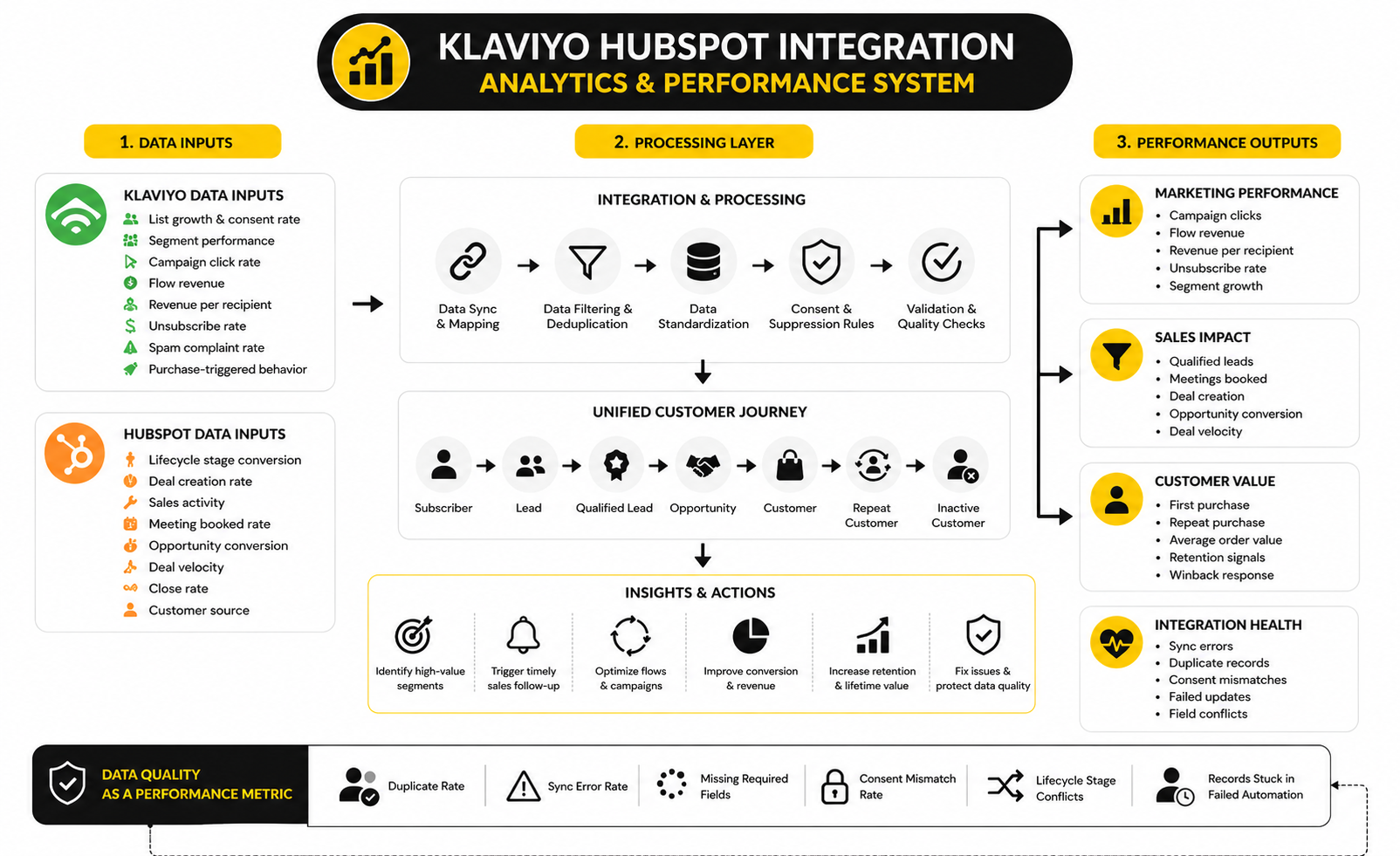
This is where the integration earns its keep. If a Klaviyo nurture segment produces strong clicks but weak HubSpot opportunity creation, the problem may be offer fit, sales routing, lead qualification, or timing. If HubSpot opportunities close well after certain Klaviyo behaviors, those behaviors can become lead scoring signals, sales alerts, or segmentation triggers.
Use Benchmarks As Direction, Not Judgment
Benchmarks are useful, but they are not your strategy. Klaviyo’s ecommerce benchmarks show clear differences between campaigns, flows, industries, and customer behaviors, while broader email research from Litmus shows a shift away from engagement-only reporting toward ROI, lifecycle value, and multi-channel attribution. Those numbers are helpful because they show what good measurement is becoming, not because every business should copy the same target.
Your internal baseline matters more than a generic industry average. If your abandoned cart flow currently produces meaningful revenue but your sales-qualified nurture flow does not, that is a more useful insight than knowing the average click rate across a category. If your HubSpot deals close faster when contacts clicked a pricing email in Klaviyo within the last 14 days, that is your benchmark.
Use outside data to spot gaps and set realistic expectations. Use your own integrated data to decide what to fix first. That is the difference between benchmarking and guessing.
Watch Automated Flows Closely
Automated flows deserve special attention because they often create outsized impact relative to send volume. Omnisend’s 2025 ecommerce marketing report found that automated emails drove a large share of sales from a small share of total email volume, with abandoned cart, welcome, and browse abandonment messages producing much of the automated order activity. The exact numbers will vary by platform, audience, and industry, but the pattern is consistent enough to take seriously.
For a Klaviyo HubSpot integration, that means flows should not be treated as background automation. They should be measured like revenue assets. Welcome flows can influence early lifecycle movement, abandoned cart flows can reveal buying intent, winback flows can signal churn risk, and post-purchase flows can support retention and upsell timing.
The action is simple: connect flow performance to CRM outcomes. If a contact completes a high-intent Klaviyo flow and then creates a HubSpot deal, that journey should be visible. If a customer ignores every reactivation message and has no open service conversation, that should trigger a different retention or suppression decision.
Track Data Quality As A Performance Metric
Most teams measure campaign performance but ignore data quality until something breaks. That is a mistake. Data quality is not an operations detail; it directly affects segmentation, personalization, lead routing, attribution, and automation accuracy.
Fragmented customer data has become a measurable business problem. HubSpot research covered by TechRadar reported that many companies struggle with scattered customer information, weak reporting confidence, and revenue loss tied to disorganized data. You do not need to quote that in every meeting, but you should treat it as a warning: if the underlying data is unreliable, your marketing and sales metrics become unreliable too.
Track integration health the same way you track campaign health. Watch duplicate rate, sync error rate, missing required fields, consent mismatch rate, lifecycle stage conflicts, owner assignment gaps, and records stuck in failed automation. These metrics are boring until they save you from a very expensive cleanup.
Build A Practical Reporting Dashboard
A useful dashboard should answer a few sharp questions, not display every metric available. The first question is whether the integration is working technically. The second is whether the synced data is improving segmentation, sales follow-up, and revenue visibility. The third is whether the team can spot problems before customers notice them.
A practical dashboard can group metrics into four areas:
Do not make the dashboard too clever. If the numbers do not lead to a decision, remove them or move them to a deeper reporting view. The main dashboard should help the team see what needs attention this week.
Interpret Performance Signals Correctly
A high click rate is not automatically good. It might mean the audience is interested, but it might also mean the campaign attracted curiosity without purchase intent. A low unsubscribe rate is not automatically good either, especially if the list is disengaged and quietly dragging down deliverability.
This is why the Klaviyo HubSpot integration should combine signals. A campaign click from a cold lead means one thing. A campaign click from an active opportunity means something else. A product view from a repeat customer is not the same as a product view from a first-time subscriber with no consent history.
Interpretation depends on context. The same behavior can trigger different actions depending on lifecycle stage, deal status, purchase history, consent, and engagement recency. That is exactly why integrating CRM and marketing data is valuable.
Turn Measurement Into Action
Measurement should create operational decisions. If a lifecycle stage has strong Klaviyo engagement but weak sales conversion, review the handoff and offer. If a segment has strong revenue per recipient, build more precise campaigns around that behavior. If a flow generates sales-ready activity, push that context into HubSpot so the sales team can act while intent is still fresh.
The best teams review integration data on a regular cadence. They do not wait for a quarterly reporting deck to discover that consent is mismatched, segments are stale, or sales is ignoring the highest-intent signals. They look at the numbers, decide what needs to change, and make one controlled improvement at a time.
That is the real value of analytics here. Not prettier charts. Better decisions, faster fixes, and less wasted motion across marketing and sales.
Common Integration Mistakes And How To Avoid Them
A Klaviyo HubSpot integration becomes fragile when teams treat it like a one-time setup instead of a living data system. The first version may work perfectly during testing, but real usage adds new forms, new fields, new campaigns, new sales processes, new privacy requirements, and new edge cases. If nobody owns those changes, the integration slowly drifts away from the business it was built to support.
The advanced work is not about adding more complexity. It is about knowing where complexity belongs and where it does not. Some teams need a simple contact and consent sync, while others need controlled API logic, warehouse reporting, custom lifecycle rules, and strict field governance.
The mistake is pretending those needs are the same. A small ecommerce team with light sales follow-up should not build like an enterprise revenue organization. A high-volume company with multiple regions, sales teams, and compliance requirements should not rely on a fragile one-way automation that nobody monitors.
Mistake 1: Syncing Too Much Too Soon
The fastest way to weaken the integration is to sync every available field because it feels safer. It is not safer. More synced fields create more conflict points, more reporting confusion, and more chances for old values to overwrite useful current data.
A better approach is to sync fields in stages. Start with the fields that support segmentation, consent, lifecycle movement, and sales follow-up. Then add more fields only when there is a clear owner, a clear source system, and a clear action attached to that data.
This is especially important when working with profile properties and CRM properties. Klaviyo can store rich customer attributes, and HubSpot can store detailed CRM attributes, but that does not mean both systems should become mirrors. Clean asymmetry is usually better than messy symmetry.
Mistake 2: Treating Consent As A Normal Property
Consent is not just a profile detail. It is a permission layer. If your integration treats email consent, SMS consent, suppression status, and unsubscribe status like ordinary fields, your automation can create serious customer experience and compliance problems.
Klaviyo’s suppression guidance makes the distinction clear: a suppressed email profile cannot receive marketing messages even if that person previously provided consent. That matters because consent and reachability are related, but they are not identical. A contact can exist in both systems and still be unavailable for marketing on a specific channel.
The practical fix is to give consent its own rules, its own testing process, and its own monitoring. Do not bury it inside a general field sync. Make sure the team understands what each consent status means before those statuses start controlling campaigns, workflows, and sales outreach.
Mistake 3: Ignoring API And Volume Limits
Volume problems usually appear after the integration is already live. A small test batch works, then a large import, campaign spike, or workflow update pushes the system harder than expected. Suddenly records lag, updates fail, or sync errors pile up faster than the team can review them.
Klaviyo’s developer documentation explains that its APIs use rate limits to manage burst traffic, and its bulk event endpoint supports up to 1,000 events in a single request with a maximum payload size of 5MB. HubSpot’s developer documentation also defines usage limits for API calls, and those limits vary by account setup and request type. These details matter when you move from simple syncing into high-volume automation.
The fix is not to avoid APIs. The fix is to design for throttling, retries, batching, and failure handling. If your integration is business-critical, assume that some sync attempts will fail and build a process for what happens next.
Mistake 4: Letting Automation Fight Sales Process
Marketing automation should support the sales process, not compete with it. If Klaviyo keeps sending broad promotional messages to contacts who are deep in an active HubSpot deal, the customer experience can feel disconnected. If HubSpot sales tasks trigger from every minor email interaction, the sales team will stop trusting the alerts.
The integration should respect lifecycle context. A sales-qualified lead, open opportunity, new customer, repeat buyer, and churn-risk customer should not all receive the same automation logic. This is where HubSpot stages and Klaviyo segments need to work together instead of firing independently.
A clean rule is simple: when the sales process becomes more personal, marketing should become more selective. That does not mean marketing stops. It means campaigns, flows, and sales alerts should adapt to the relationship stage.
Mistake 5: Building Without A Rollback Plan
Most teams plan the launch. Fewer plan the rollback. That is risky because integrations can create records, update fields, trigger workflows, change consent visibility, and push contacts into automations very quickly.
Before any major sync change, define what you will do if the result is wrong. Know which fields were updated, which workflows were affected, which records were included, and how you can pause the process. If you are using a connector or middleware tool, understand whether it supports logs, replay, field-level history, and error exports.
This is not pessimistic. It is professional. A rollback plan gives you the confidence to move faster because you are not gambling with live customer data.
Mistake 6: Forgetting Regional And Channel Differences
Email, SMS, WhatsApp, and sales outreach do not operate under one universal rule. Consent expectations, sender requirements, opt-out behavior, and regional privacy obligations can differ by market and channel. A Klaviyo HubSpot integration that works for one country or channel may need extra rules before it is safe somewhere else.
This becomes more important as teams expand. A U.S.-focused email setup may not be enough for SMS programs, branded sender IDs, European audiences, or multi-brand accounts. Klaviyo’s SMS compliance and opt-out resources show how channel-specific the details can become, including explicit opt-in procedures and default opt-out mechanisms.
The practical answer is segmentation by region and channel. Do not use one global messaging rule unless your legal, compliance, and operations teams have confirmed it works everywhere you send. Integration logic should be specific enough to protect the customer experience in each market.
Mistake 7: Using Lead Scoring Without Explaining The Score
Lead scoring sounds attractive because it turns behavior into a number. The problem is that a number without context can mislead sales. A contact who clicked five educational emails may not be more sales-ready than a contact who clicked one pricing link and visited a comparison page.
If you use Klaviyo behavior inside HubSpot scoring, weight actions based on intent, recency, and lifecycle stage. A recent high-intent click should usually matter more than old low-intent engagement. A purchase event may mean a different thing for a first-time customer than it does for a repeat buyer or an enterprise account contact.
The score should be explainable in plain English. Sales should know why a person is being surfaced and what action to take next. If the score cannot guide a conversation, it is just another dashboard decoration.
Mistake 8: Not Defining Ownership
A Klaviyo HubSpot integration touches marketing, sales, revenue operations, ecommerce, analytics, and sometimes legal. That makes ownership tricky. It also makes ownership non-negotiable.
One person or team should own the sync map, approve new fields, monitor errors, and review automation changes before they go live. Marketing can own campaign logic, sales can own pipeline rules, and operations can own data governance, but somebody must own the integration as a system. Otherwise, every department makes small changes that eventually collide.
Ownership should also include a review cadence. Monthly is enough for simpler setups, while high-volume teams may need weekly checks. The goal is not bureaucracy; the goal is preventing quiet decay.
Scaling The Integration Without Breaking It
Scaling does not mean adding every advanced feature. It means improving reliability as the business gets more complex. More customers, more forms, more regions, more channels, more sales reps, and more campaigns all increase the pressure on the integration.
At a certain point, teams may need middleware, a customer data platform, a data warehouse, or a custom API layer. That does not make the earlier setup wrong. It simply means the business has outgrown a lightweight connection and now needs stronger control over identity, event history, attribution, and governance.
A good scaling path usually looks like this:
This keeps the Klaviyo HubSpot integration useful without letting it become chaotic. Every stage adds capability, but only after the previous layer is stable.
When To Use A Different Stack Instead
Sometimes the best integration decision is realizing you do not actually need this exact stack. If your business is mostly ecommerce retention with minimal sales involvement, Klaviyo plus your ecommerce platform may be enough. If your business is mostly sales-led B2B with light newsletter activity, HubSpot may already cover most of what you need.
If you want an all-in-one CRM, automation, funnels, and pipeline system rather than a separate Klaviyo and HubSpot setup, GoHighLevel may be worth comparing. If your bigger issue is funnel creation and offer testing, ClickFunnels may fit that part of the stack better than forcing the CRM integration to solve landing page problems. If your priority is simpler email marketing and automation rather than a heavier CRM connection, Moosend or Brevo may be easier to operate.
That does not mean Klaviyo and HubSpot are the wrong pairing. It means the stack should match the motion. Use a Klaviyo HubSpot integration when the business genuinely needs ecommerce-grade lifecycle marketing and CRM-grade sales context working together.
The Expert Rule: Keep The Integration Boring
The best integration is not the one with the most workflows. It is the one your team can understand, maintain, and improve without fear. Boring is good when customer data is involved.
That means clear field ownership, selective sync, documented consent rules, monitored errors, and simple automation logic. It means fewer mystery fields and fewer clever shortcuts. It means every synced value has a reason to exist.
If the integration makes the customer journey clearer, keep it. If it creates noise, remove it. That discipline is what separates a useful Klaviyo HubSpot integration from a technical project that slowly becomes a liability.
Klaviyo HubSpot Integration FAQ And Final Recommendations
At this stage, the Klaviyo HubSpot integration should no longer feel like a vague software connection. It should feel like a complete customer data system with clear ownership, controlled sync rules, useful analytics, and practical automation. The final step is making sure the most common questions are answered before the setup becomes part of daily operations.
The main takeaway is simple: do not integrate Klaviyo and HubSpot just because both tools are important. Integrate them because your customer journey needs both marketing behavior and CRM context in the same operating rhythm. When the setup is selective, documented, and monitored, the integration becomes much easier to trust.
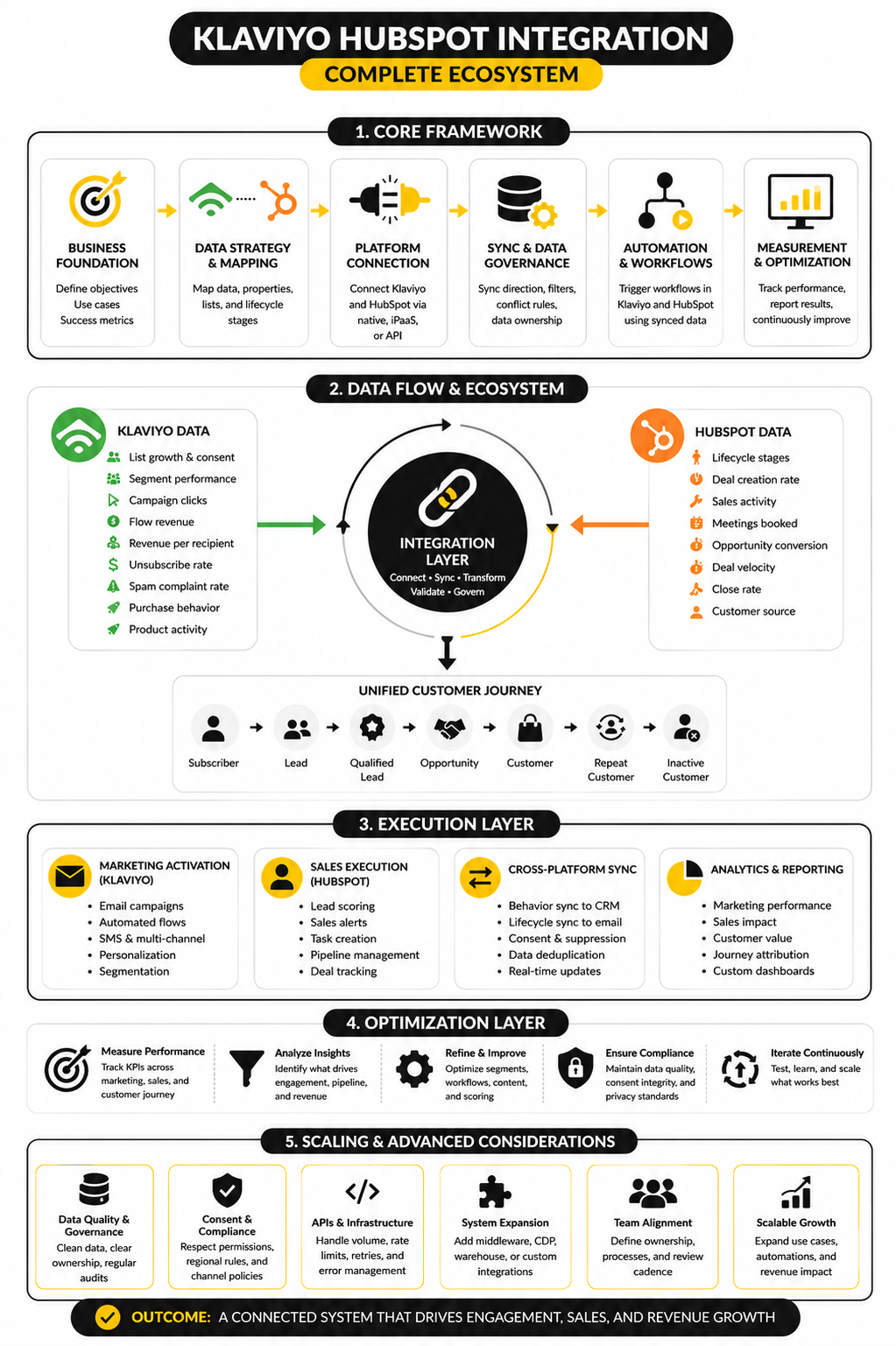
The strongest setups usually have a clear final shape. Klaviyo handles activation, segmentation, email, SMS, ecommerce behavior, and lifecycle messaging. HubSpot handles CRM structure, sales ownership, pipeline movement, company context, and revenue process visibility. The integration layer keeps those systems aligned without forcing either one to become something it is not.
Final Recommendation
Use a Klaviyo HubSpot integration when your business needs both ecommerce-style lifecycle marketing and CRM-led sales execution. If marketing needs to know where someone sits in the pipeline, HubSpot context should inform Klaviyo segmentation. If sales needs to know which contacts are showing buying intent, Klaviyo behavior should inform HubSpot prioritization.
Keep the first version focused. Sync identity, consent, lifecycle status, ownership, and a few high-intent engagement signals before adding anything more advanced. Once the core setup is stable, then build reporting, scoring, segmentation, and workflow logic around proven data.
The rule is simple and it stays true at every scale: the integration should make the next best action clearer. If a synced field does not improve targeting, follow-up, compliance, reporting, or customer experience, it probably does not belong in the first version.
What Is A Klaviyo HubSpot Integration?
A Klaviyo HubSpot integration connects customer, marketing, and CRM data between Klaviyo and HubSpot. In practical terms, it helps marketing see CRM context and helps sales see meaningful engagement or purchase behavior. The goal is not just to move data, but to make segmentation, follow-up, reporting, and lifecycle automation more accurate.
Does Klaviyo Have A Native HubSpot Integration?
Klaviyo and HubSpot do not always work together through a simple native integration in the way some teams expect. Many businesses use third-party connectors, automation tools, middleware, or custom API work to connect the two systems. The right method depends on whether you need a simple contact sync, selected activity sync, or a controlled two-way revenue operations setup.
What Data Should Sync Between Klaviyo And HubSpot?
The best starting point is identity, consent, lifecycle stage, contact owner, customer status, and selected high-intent behavior. You may also sync purchase activity, recent campaign engagement, product interest, or deal status when those fields support real decisions. Avoid syncing everything just because it is technically possible.
Should HubSpot Or Klaviyo Be The System Of Record?
HubSpot should usually own CRM fields such as lifecycle stage, deal stage, sales owner, company association, and pipeline context. Klaviyo should usually own marketing engagement, ecommerce events, campaign behavior, SMS and email activation data, and customer profile behavior used for segmentation. The important thing is to define ownership field by field so the systems do not overwrite each other unpredictably.
Can I Use Klaviyo Data For HubSpot Lead Scoring?
Yes, but only if the scoring model is easy to explain. High-intent Klaviyo behaviors such as pricing clicks, repeated product interest, abandoned checkout, strong flow engagement, or recent purchases can help HubSpot prioritize follow-up. Do not give too much weight to weak signals like old email opens or low-intent newsletter clicks.
Can HubSpot Lifecycle Stages Trigger Klaviyo Flows?
Yes, HubSpot lifecycle stages can be useful triggers or filters for Klaviyo flows when synced correctly. For example, a marketing-qualified lead might enter a nurture flow, while an active sales opportunity might be excluded from broad promotional campaigns. The key is to build clear entry, exit, and suppression rules before launching automation.
How Should Unsubscribes Work Between Klaviyo And HubSpot?
Unsubscribes should be treated as protected consent data, not a casual profile update. If someone unsubscribes or becomes suppressed in Klaviyo, HubSpot should reflect that status clearly enough that marketing and sales understand the communication limits. If HubSpot collects consent through a form, Klaviyo should only receive usable consent when the form language and permission rules support it.
What Is The Biggest Risk With A Klaviyo HubSpot Integration?
The biggest risk is syncing messy or unclear data into both systems. Bad lifecycle stages, duplicate contacts, outdated consent fields, and vague ownership rules become much harder to fix after automation starts using them. Clean the critical fields first, test with real records, and launch with a narrow sync scope.
Should Every Klaviyo Event Appear In HubSpot?
No. Sending every Klaviyo event into HubSpot usually creates noise and makes the important signals harder to see. HubSpot should receive activity that helps sales prioritize, personalize, or avoid the wrong outreach. Focus on high-intent clicks, checkout behavior, purchase activity, form submissions, and lifecycle moments that change the next action.
How Often Should The Integration Be Reviewed?
A simple setup should be reviewed at least monthly. A high-volume setup with multiple campaigns, regions, sales teams, or automation layers may need weekly checks. The review should cover sync errors, duplicate records, consent mismatches, field conflicts, automation volume, and whether the synced data is still being used.
Do I Need A Developer For The Integration?
Not always. A basic setup can often be handled with a reliable connector or no-code automation tool if your data model is simple. You may need a developer or revenue operations specialist when you require custom API logic, high-volume event syncing, advanced deduplication, special objects, middleware, or strict compliance controls.
Is A Two-Way Sync Always Better?
No. Two-way sync sounds powerful, but it also creates more conflict risk. One-way sync is often better for fields with a clear source of truth, such as HubSpot lifecycle stage moving into Klaviyo or Klaviyo engagement data moving into HubSpot. Use two-way sync only when both systems genuinely need to update the same data and the conflict rules are clear.
How Do I Know If The Integration Is Working?
The integration is working when teams make better decisions because of the shared data. Marketing should be able to segment based on CRM context, and sales should be able to act on meaningful engagement or purchase signals. Technically, you should also see low sync error rates, fewer duplicates, reliable consent handling, and automation that fires only when it should.
What Should I Build First?
Build the smallest useful version first. Start with contact identity, consent status, lifecycle stage, contact owner, and one or two high-intent behavior signals. Once that works reliably, expand into reporting, lead scoring, journey analytics, and more advanced automation.
When Should I Not Integrate Klaviyo And HubSpot?
You may not need the integration if one platform already covers the real workflow. A pure ecommerce retention business may be fine with Klaviyo and its ecommerce platform data. A mostly sales-led B2B business with light email needs may be fine operating mainly from HubSpot.
What Makes A Klaviyo HubSpot Integration Successful?
Success comes from clarity, not complexity. The integration should have clean field ownership, explicit consent rules, selective activity sync, monitored errors, and clear reporting. Most importantly, every synced data point should support a real business decision.
Build a stronger local presence with BAAM AI
Turn your website, Google profile, social channels, and AI visibility into one growth engine
Most businesses do not need more random marketing activity. They need a consistent presence system that helps the right people find them, trust them, and take action. BAAM AI brings strategy, local SEO, website updates, Google Maps visibility, social content, AI-search readiness, media production, and reporting into one practical monthly engine.
If you want your marketing to keep working after the campaign ends, start with a free BAAM AI presence audit. See how your business shows up today and where the fastest visibility wins are at BAAM AI.