
BAAM AI Blog
Klaviyo Confirm Your Subscription: What It Means And How To Set It Up Properly
The phrase klaviyo confirm your subscription usually shows up when someone is dealing with double opt-in in Klaviyo. A visitor enters their email, Klaviyo sends a confirmation message, and the person must click that...
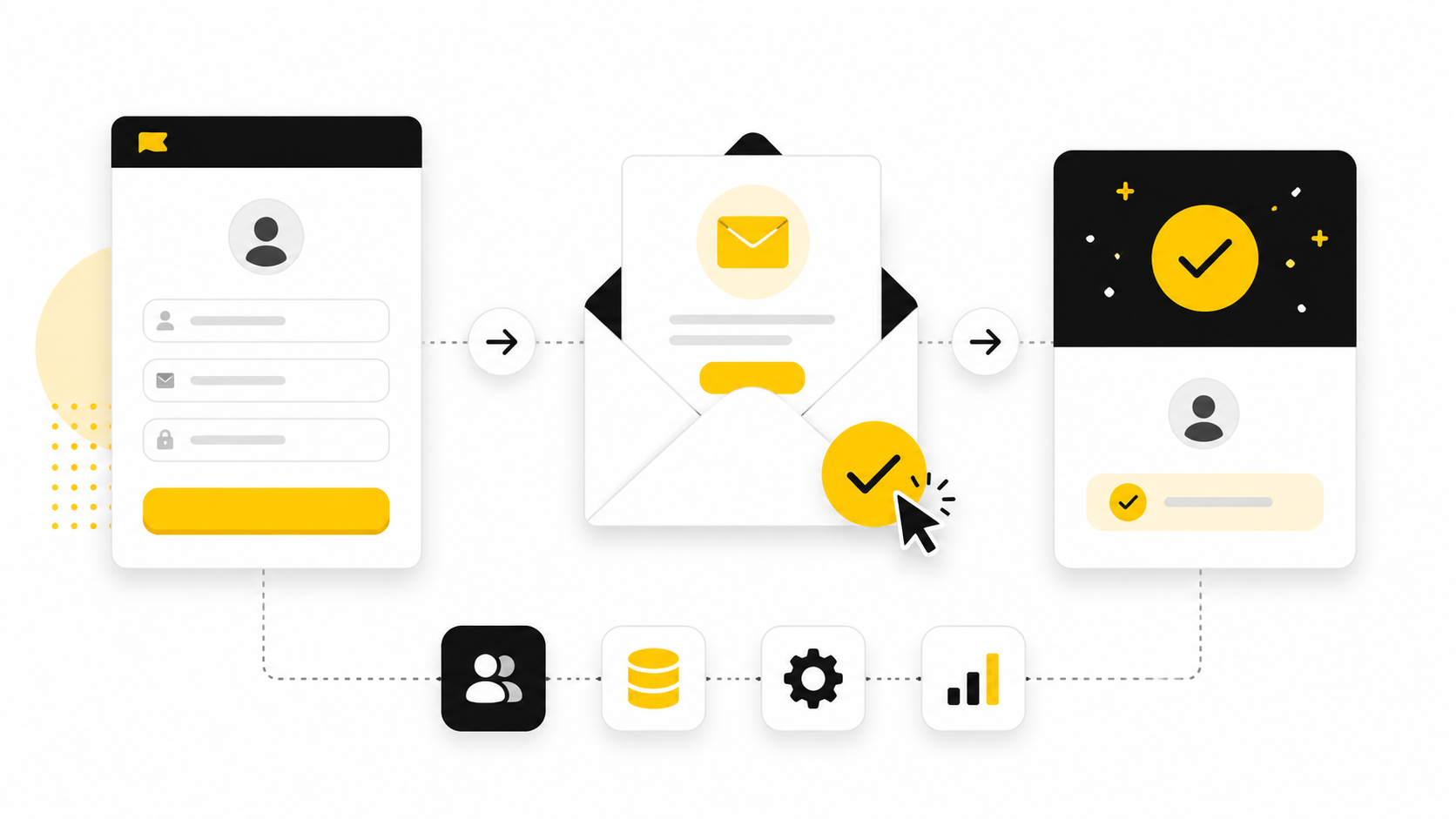
The phrase klaviyo confirm your subscription usually shows up when someone is dealing with double opt-in in Klaviyo. A visitor enters their email, Klaviyo sends a confirmation message, and the person must click that message before they are fully added to the list. Simple on the surface. Easy to ignore. But it matters more than most brands think.
That confirmation step sits between interest and permission. If it is confusing, off-brand, delayed, or poorly explained, some people will never finish subscribing. If it is clear and trustworthy, it protects your list quality while giving new subscribers a smooth first impression.
this guide breaks the topic into six parts so the full setup feels practical, not technical for the sake of being technical. We will cover what the confirmation email does, where it fits inside Klaviyo, how to think about single opt-in versus double opt-in, what to customize, and how to avoid the small mistakes that quietly cost subscribers.
What “Confirm Your Subscription” Means In Klaviyo
In Klaviyo, the “confirm your subscription” step is part of the double opt-in process. Someone submits a signup form or subscribe page, then receives an email asking them to confirm that they really want to join the list. Until they click that confirmation link, they are not treated the same as a fully subscribed contact for that list.
This is not the same as a welcome email. A welcome email is marketing communication after someone has joined. The confirmation email is the permission checkpoint before that relationship fully starts. That distinction matters because brands often try to solve confirmation problems inside flows, when the issue actually lives in list settings, consent pages, signup forms, or the confirmation email itself.
It also explains why this keyword is so specific. People searching for klaviyo confirm your subscription are usually not looking for theory. They want to know what the message is, why it appears, whether they can edit it, whether they can remove it, and how to make the subscription path feel less clunky.
Why This Topic Matters
Your subscription confirmation experience is one of the first trust moments between your brand and a new subscriber. The person has just shown intent. They are close to joining your list. Then you ask them to complete one more step, so that step needs to feel obvious, fast, and credible.
Double opt-in can help reduce fake signups, typo-based addresses, bots, and low-intent subscribers. That is valuable because a smaller but cleaner list is often healthier than a larger list full of people who never really meant to subscribe. Better list quality can support stronger engagement signals, cleaner segmentation, and a more reliable foundation for campaigns and automations.
But there is a tradeoff. Any extra step creates friction. The job is not to blindly celebrate double opt-in or automatically turn it off. The job is to understand what the confirmation email does, then decide how to design the experience so subscribers know exactly what to do next.
The Big Picture Before You Change Anything
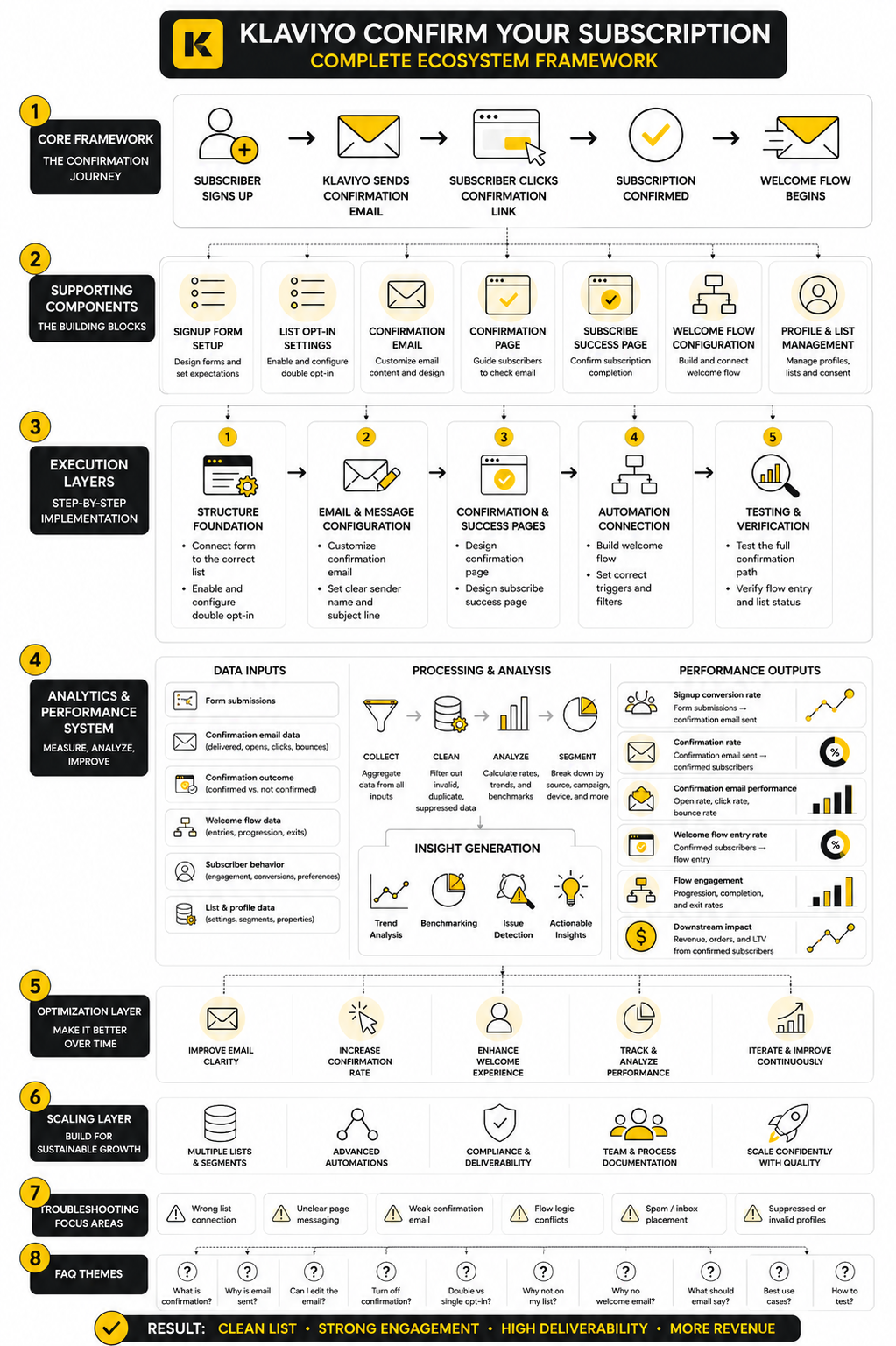
Before editing settings, it helps to see the whole path. A subscriber does not experience Klaviyo as a list setting or backend configuration. They experience a sequence of moments: form, message, inbox, confirmation click, success page, and then the first real brand email.
That sequence is where most problems happen. The form may promise a discount, but the confirmation email may sound generic. The confirmation page may tell people to check their inbox, but the next step may not be clear. The success page may feel like a dead end instead of a smooth handoff into the customer journey.
this guide will treat the confirmation process as a complete subscriber experience, not just a checkbox in Klaviyo. That is the only useful way to approach it. The technical setup matters, but the real goal is simple: help the right people confirm their subscription without confusion.
Why The Confirmation Step Matters For List Quality And Deliverability
The confirmation step is not just an annoying extra click. It is a filter. When someone completes the klaviyo confirm your subscription process, they prove two things at once: the email address works, and the person behind it has enough intent to join your list deliberately.
That matters because email marketing is not rewarded for having the biggest list. It is rewarded for having a list that opens, clicks, buys, and rarely complains. A list full of mistyped addresses, fake signups, bots, and low-intent contacts can make your numbers look bigger while quietly weakening the health of the entire account.
This is where a lot of brands get the tradeoff wrong. They look at double opt-in and only see fewer subscribers entering the list. They do not always see the upside: cleaner data, better consent quality, fewer bad addresses, and a stronger foundation for every campaign and flow that comes later.
A Bigger List Is Not Always A Better List
Single opt-in is attractive because it adds people immediately. Someone submits a form, and they are on the list. That can be useful when speed and low friction matter most, especially for short promotional windows or highly controlled traffic sources.
But the weakness is obvious. Any submitted address can enter the list, even if it is mistyped, fake, entered by a bot, or added by someone who did not fully understand what they were signing up for. Once those contacts are inside Klaviyo, they can affect performance metrics, segmentation quality, and the reliability of your future testing.
Double opt-in slows the process down, but it adds a quality gate. The person has to open the confirmation email and click the confirmation link before they become a full subscriber. That extra action is exactly why the Klaviyo confirm your subscription step deserves attention instead of being treated as a default system message.
Deliverability Starts Before The First Campaign
Deliverability does not begin when you press send on a campaign. It starts when people enter your list. If the wrong people, broken addresses, or low-quality signups enter at the beginning, your later campaigns have to carry that damage.
Mailbox providers look at signals like engagement, spam complaints, bounces, authentication, and sending consistency. The confirmation step cannot fix everything, but it can reduce the amount of junk entering the system. That gives your campaigns a better chance of being judged by real subscriber behavior instead of polluted list data.
This is especially important for ecommerce brands that send frequently. If you are sending welcome flows, abandoned cart emails, post-purchase emails, product launches, seasonal campaigns, and winback emails, your list quality compounds over time. A weak intake process creates a bigger problem every month.
The Consent Problem Most Brands Ignore
Consent is not just a legal checkbox. It is also a trust signal. If someone does not remember signing up, does not recognize your brand, or feels surprised by your emails, they are more likely to ignore, unsubscribe, or mark the message as spam.
The confirmation step gives the subscriber a clear moment to say yes. That makes the relationship cleaner from the beginning. It also gives your brand a more defensible consent path because the person took a deliberate second action after submitting the form.
This does not mean every brand must use double opt-in forever. It means you should understand what you are gaining or giving up before changing the setting. Turning off confirmation may increase list growth, but it can also increase the risk of weaker consent, lower engagement, and more list cleanup later.
Why Confirmation Friction Can Still Be Worth It
Friction is not always bad. Bad friction confuses people, slows them down, or makes them abandon something they already wanted. Good friction protects quality and makes the next step feel intentional.
The Klaviyo confirm your subscription email is good friction when it is clear, fast, and aligned with the signup promise. If someone joins for a discount, the confirmation step should make it obvious that confirming is how they finish joining. If someone joins for content, early access, or product updates, the message should reinforce that value without trying to do too much.
The mistake is letting the default experience carry all the weight. A generic confirmation email can feel disconnected from the signup form that triggered it. A better experience keeps the subscriber oriented: you asked for this, you are almost done, click here to confirm, and then we will deliver what we promised.
How Confirmation Protects Your Email Economics
Bad list quality costs money in ways that are easy to miss. You may pay for contacts who never should have entered the list. You may send campaigns to addresses that bounce, suppress, or never engage. You may make decisions based on distorted performance data.
Cleaner confirmation creates cleaner inputs. That helps segmentation work better because you are building audiences from people who actually completed the signup process. It also helps testing because your open rates, click rates, and conversion rates are less likely to be dragged down by accidental or invalid contacts.
The economics become especially clear as your list scales. A small percentage of bad signups may not feel painful at the beginning. But as traffic, forms, and paid acquisition grow, weak consent capture can become a silent tax on the entire email program.
The Practical Decision: Double Opt-In Or Single Opt-In
The right choice depends on the brand, traffic source, market, and risk tolerance. Double opt-in usually makes more sense when list quality, compliance confidence, and long-term deliverability matter more than raw subscriber volume. Single opt-in may make sense when the signup source is highly trusted and the brand has strong monitoring, suppression, and list hygiene practices in place.
For most brands, the better question is not “Which one is best?” The better question is “What kind of subscribers are we letting into Klaviyo, and what happens after they enter?” That question forces you to think beyond the setting itself and look at the entire subscriber path.
In the next section, the article moves from why confirmation matters into the actual framework. Once you understand the tradeoff, the setup becomes easier to judge. You are not just editing a confirmation email. You are designing the first permission-based step of the customer relationship.
The Klaviyo Double Opt-In Framework
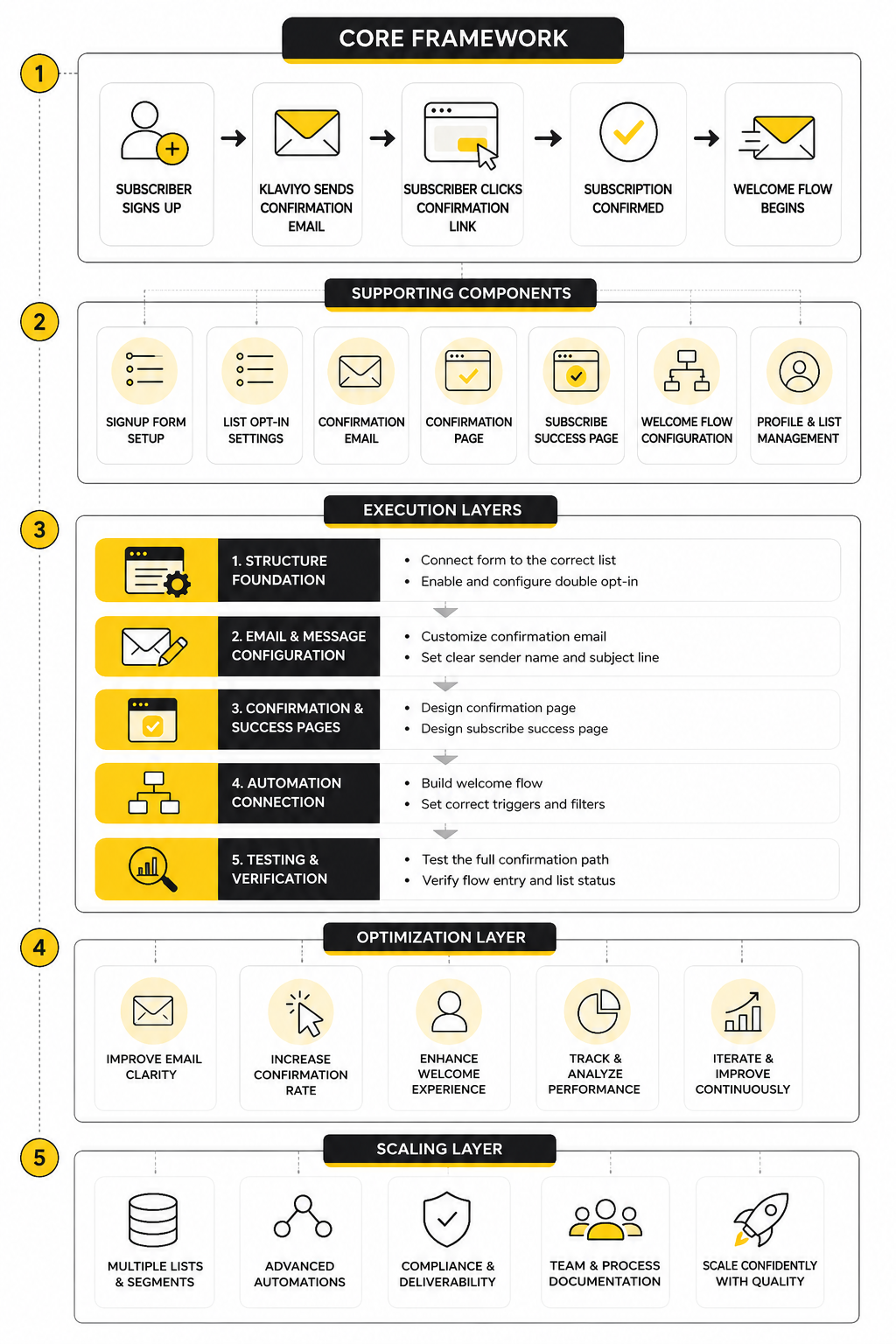
The Klaviyo confirmation process works best when you stop thinking about it as one email and start thinking about it as a short sequence. A subscriber enters through a form or subscribe page. Klaviyo shows the next-step message. The subscriber receives the confirmation email. They click the confirmation button. Then they land on the success page and can finally move into the normal subscriber journey.
That sequence is the framework. It gives you five places to reduce confusion without weakening the purpose of double opt-in. Each step should answer one practical question for the subscriber: what just happened, what do I need to do next, why should I do it, what happens after I click, and how do I know I am finished?
The mistake is only editing the email subject line and calling the setup done. The email matters, but it is not the whole experience. If the form, confirmation page, email, and success page do not feel connected, the subscriber feels like they have been passed between disconnected systems instead of guided through one clean signup path.
Step 1: Start With The List That Controls Consent
In Klaviyo, opt-in behavior is tied to the list someone is joining. That means the first implementation decision is not the email design. It is the list. If your signup form adds people to your newsletter list, that newsletter list’s consent settings determine whether the person goes through single opt-in or double opt-in.
This is why brands sometimes get confused when one form sends a confirmation email and another does not. The forms may look similar, but they can point to different lists with different opt-in settings. Before you rewrite anything, check which list the form submits to and whether that list is configured for the subscriber path you actually want.
A clean setup usually starts with one primary marketing list, clear naming, and a documented reason for the opt-in choice. Do not scatter subscribers across random lists just because it was convenient during setup. That makes troubleshooting the Klaviyo confirm your subscription process harder later.
Step 2: Match The Signup Promise To The Confirmation Message
The confirmation email should feel like a direct continuation of the signup moment. If the form says “Get 10% off your first order,” the confirmation step should make it clear that the subscriber needs to confirm before the brand can complete that signup experience. If the form promises product drops, early access, or newsletter content, the email should reinforce that promise in plain language.
This is not the place for a long brand manifesto. The subscriber has one job: click to confirm. Your copy should support that job, not distract from it.
A strong confirmation message usually includes:
Step 3: Make The Process Tangible Before You Edit
Before changing the live experience, map the current process from the subscriber’s point of view. Submit the form with a test email address. Watch what happens on the page. Check the inbox. Click the confirmation link. Review the page that appears after confirmation.
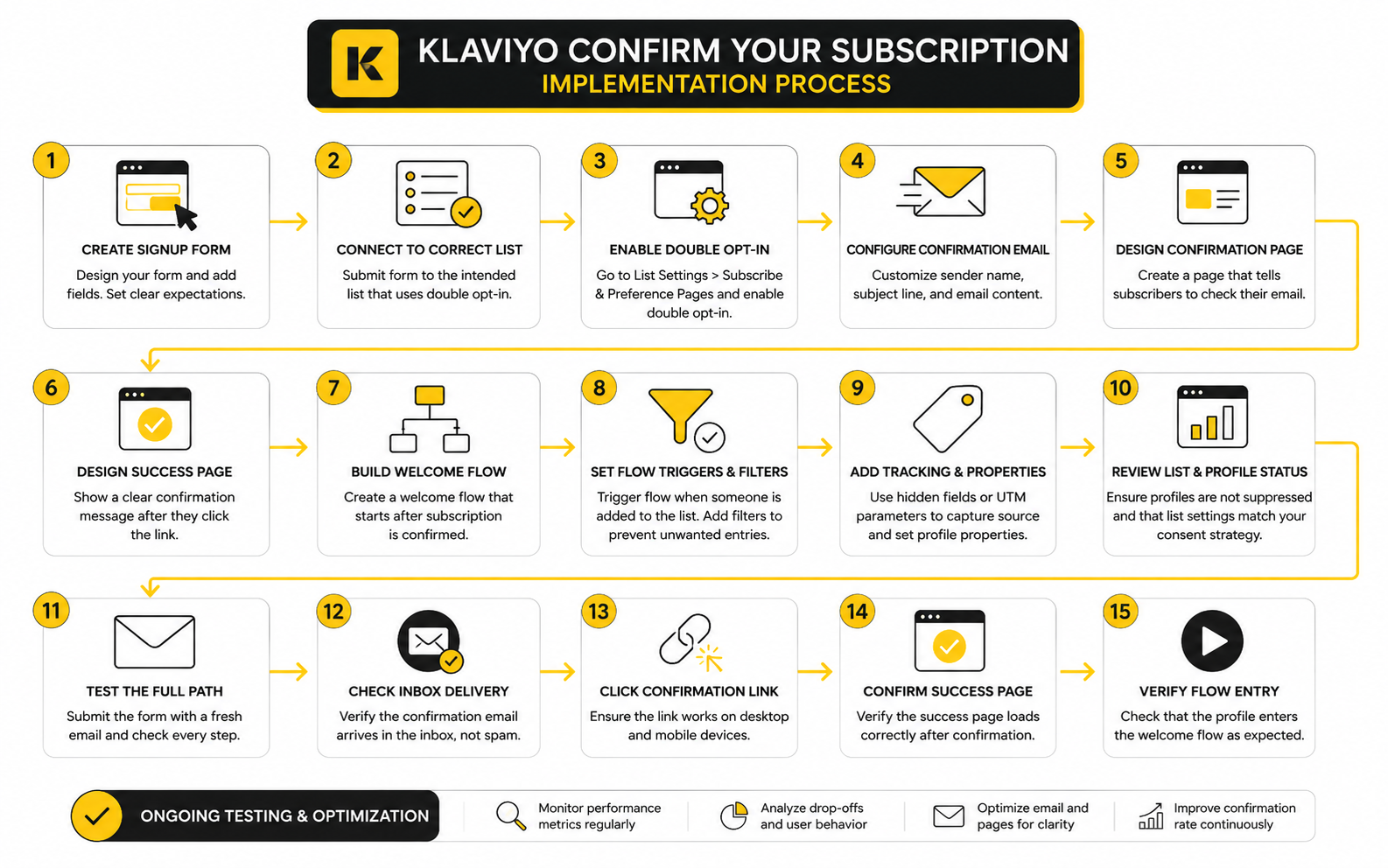
That test tells you more than a settings screen ever will. You will see whether the instructions are clear, whether the email arrives quickly, whether the brand name is recognizable, and whether the final page confirms completion. You may also catch small problems like mismatched wording, outdated design, or a success page that does not explain what happens next.
Use a fresh test address when possible so you are seeing the experience like a new subscriber. Existing profiles, previous consent states, and list membership can make testing misleading. If the test does not match what a real new subscriber would see, the conclusions will be weak.
Step 4: Review The Confirmation Page
The confirmation page is the screen someone sees after submitting a subscribe page or form when double opt-in is enabled. Its job is simple: tell the person to check their inbox and confirm their subscription. It should not feel like an error, a dead end, or a generic system notice.
This page needs to be clear because it explains the gap between signup and completion. Without it, a person may think they are already subscribed and then never go to their inbox. That is how good subscribers leak out of the process.
Keep the message direct. Tell them the confirmation email is on the way, ask them to check promotions or spam if needed, and remind them what they will receive after confirming. The page should reduce uncertainty, not add more steps.
Step 5: Review The Email Confirmation Message
The email confirmation message is the center of the Klaviyo confirm your subscription experience. It is the action point. Everything before it creates context, and everything after it confirms completion.
The best version is short, branded, and impossible to misunderstand. The button copy should say something like “Confirm My Subscription” or “Yes, Subscribe Me.” Avoid vague calls to action like “Click Here” because they do not tell the subscriber what the click actually does.
Also check the sender name. If the subscriber joined from your store, the email should come from a sender identity they recognize. A clear sender name can make the difference between “this is the email I was expecting” and “why did I receive this?”
Step 6: Review The Subscribe Success Page
After someone confirms, the success page should close the loop. This is where you tell them they are subscribed, what happens next, and where they can go now. It is not just a confirmation screen; it is the first moment after permission has been completed.
For ecommerce, this page can gently guide people back to the store, explain when the promised incentive will arrive, or set expectations for future emails. For content brands, it can point people toward the best starting article, resource, or newsletter archive. Keep it useful, but do not overload it.
The key is momentum. The subscriber has just completed the extra confirmation step, so the page should make them feel that the action worked. A weak success page makes the experience feel unfinished.
Step 7: Connect Confirmation To The Welcome Flow
Once the subscriber confirms and joins the list, the welcome flow can begin. This is where the real relationship starts. The confirmation step gets permission; the welcome flow delivers value.
Make sure your welcome flow logic matches your opt-in setup. If a flow is triggered by list membership, a double opt-in subscriber may not enter until after they confirm. That is usually what you want, but it must be intentional.
This matters most when you are offering an incentive. If the discount, guide, or promised next step sits inside the welcome flow, the subscriber may not receive it until they complete confirmation. That can work well, but only if the form and confirmation message make the sequence clear.
Step 8: Test The Full Path Like A Customer
The final implementation step is not saving the setting. It is testing the whole path from signup to welcome email. Use a real inbox, not just a preview, because previews do not show timing, inbox placement, or the emotional flow of the experience.
Run the test on desktop and mobile. Many subscribers will confirm from a phone, so the button must be easy to see and tap. The confirmation page, email, and success page should all feel consistent even on a smaller screen.
Then document what you changed. Note the list, opt-in setting, form, confirmation page, confirmation email, success page, and welcome flow trigger. This gives you a reliable reference when someone later asks why the Klaviyo confirm your subscription email is appearing, missing, or behaving differently across forms.
Statistics And Data
The Klaviyo confirm your subscription process should be measured like a small funnel, not like a single email. The point is not only whether the confirmation email was sent. The point is whether the right people moved from signup intent to confirmed consent without getting lost.
That means the data needs context. A low confirmation rate does not automatically mean double opt-in is bad. It may mean the form promise is unclear, the confirmation page is weak, the email is landing in promotions, the sender name is not recognizable, or the subscriber expected the incentive immediately.
The goal is to understand where people drop off and why. Once you know that, the fix becomes much more precise. You stop guessing and start improving the exact step that is creating friction.
The Confirmation Funnel You Should Track
The confirmation funnel starts before the confirmation email. It begins when someone sees the signup form, continues when they submit their email, and finishes when they confirm and enter the welcome experience. If you only look at the final number of confirmed subscribers, you miss the real story.
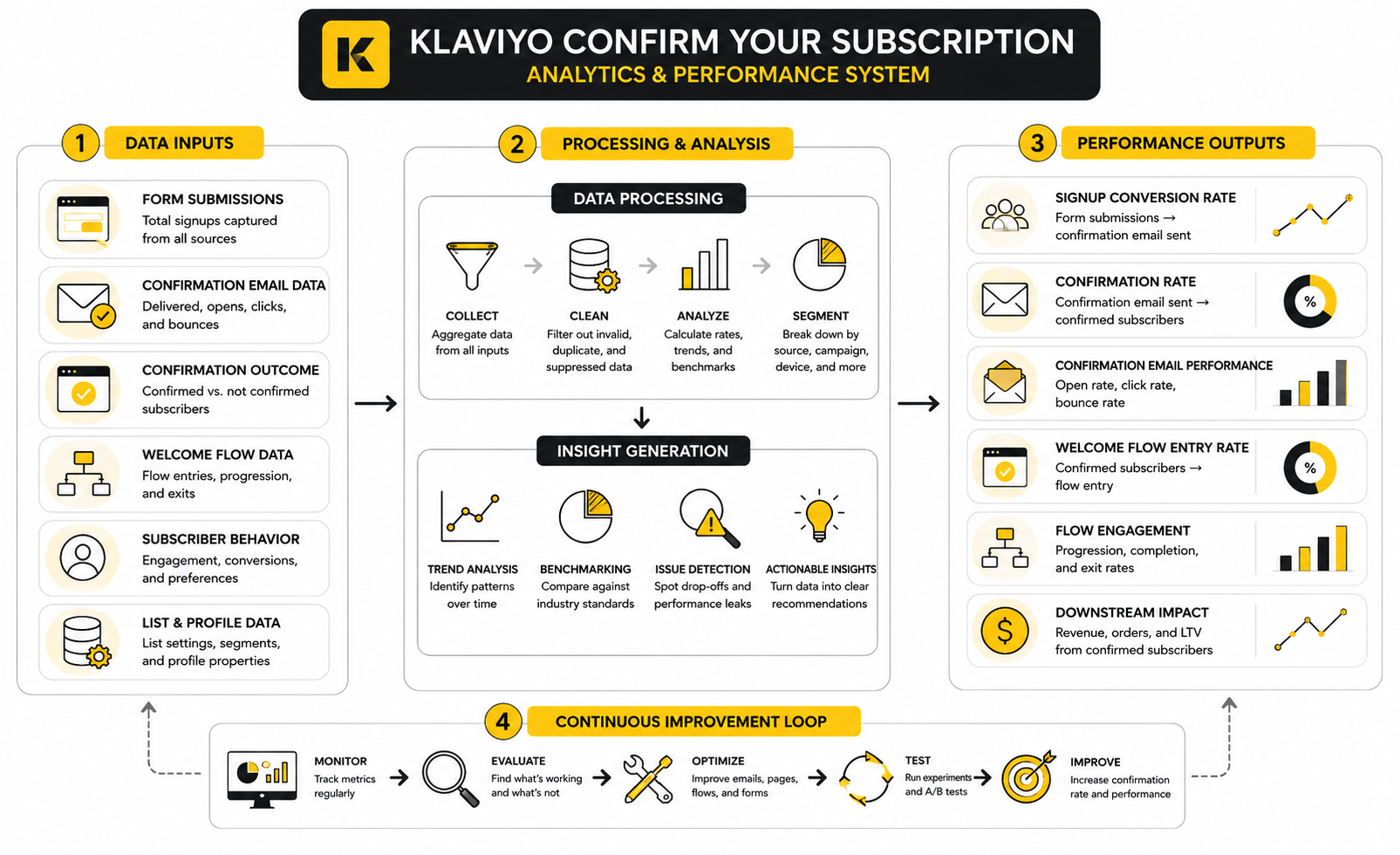
A practical measurement path looks like this:
Each step tells you something different. Form submissions show initial intent. Confirmation clicks show completed permission. Welcome flow entries show whether the subscriber actually moved into the normal email journey. Revenue or downstream conversion shows whether the confirmed subscriber was worth acquiring in the first place.
What The Numbers Actually Mean
A high signup form submission rate with a weak confirmation rate usually means the promise was strong enough to get the email address, but the follow-through was not strong enough to complete the process. That is not a list-growth problem. That is a continuity problem.
A strong confirmation email open rate with a weak click rate usually points to the email itself. People are seeing the message, but the call to action may not be obvious, the copy may not explain the benefit, or the email may look generic enough to create doubt. In that case, rewriting the confirmation email is more useful than changing the whole opt-in strategy.
A weak open rate is different. That often points to sender recognition, inbox placement, timing, or subject line clarity. If subscribers cannot find or identify the confirmation email, they cannot confirm, even if they genuinely wanted to join.
Benchmarks Are Useful, But They Are Not The Target
Benchmarks help you understand whether your email program is wildly outside normal performance ranges. They are useful for open rates, click rates, bounce rates, unsubscribe rates, conversion rates, and revenue per recipient. But they are not a substitute for your own baseline.
The Klaviyo confirm your subscription path has its own context. A brand offering a high-value discount may see different confirmation behavior than a brand offering a newsletter. A warm audience from organic content may behave differently from cold paid traffic. A returning customer signing up for back-in-stock alerts may confirm at a different rate than a first-time visitor joining a general popup.
So use benchmarks as a sanity check, not as a scoreboard. Your best benchmark is your own trend over time. If confirmation rate improves while list quality, engagement, and revenue stay healthy, the experience is moving in the right direction.
The Metrics That Matter Most
The most useful metric is the confirmation completion rate. This compares people who start the opt-in process with people who actually confirm. It tells you how much subscriber intent is surviving the extra step.
The second useful metric is the time to confirmation. If most people confirm within a few minutes, the process is probably clear and immediate. If confirmation drags out over hours or days, the email may be delayed, overlooked, or not compelling enough to act on quickly.
The third useful metric is downstream engagement from confirmed subscribers. Do they open the welcome email? Do they click? Do they buy, book, reply, or take the next expected action? A lower subscriber count can still be a win if the confirmed subscribers are clearly more engaged and more valuable.
Watch The Gap Between Form Submissions And List Growth
One of the easiest mistakes is comparing form submissions to list growth without understanding double opt-in. When double opt-in is enabled, a submitted form does not always equal a new subscribed profile on the list. The person still has to confirm.
That gap is not automatically bad. Some gap is expected because the confirmation step is filtering out people who do not complete the process. The problem starts when the gap becomes larger than expected and there is no clear explanation.
When that happens, check the experience in order. Review the form confirmation message, the confirmation email subject line, the sender name, the button copy, the success page, and the welcome flow trigger. Do not jump straight to turning off double opt-in before you know where the leak is.
Segment The Data By Signup Source
Not all subscribers arrive with the same level of intent. Someone who joins from a checkout checkbox, a footer form, a giveaway page, a blog content upgrade, and an exit-intent popup may behave very differently. If you group them all together, the average can hide the problem.
Segment confirmation performance by form, landing page, traffic source, campaign, and country when possible. This makes the data useful. You may find that one popup is generating lots of submissions but very few confirmed subscribers, while a quieter footer form produces fewer signups but better completion and stronger engagement.
That insight changes the action. You would not rewrite the entire Klaviyo setup because one acquisition source is weak. You would improve or replace the source that is creating low-quality opt-ins.
Read Engagement Quality After Confirmation
The best argument for double opt-in is not the confirmation rate by itself. It is what happens after confirmation. If confirmed subscribers open more, click more, complain less, and buy more often, the extra step is doing its job.
Look at the first 30 days after subscription. That window usually shows whether the subscriber relationship started well. Compare confirmed subscribers from different forms and sources, then look at welcome flow engagement, campaign engagement, unsubscribe behavior, and revenue per recipient.
Do not obsess over one metric in isolation. A form that creates many subscribers but weak engagement may be less valuable than a form that creates fewer subscribers with stronger buying intent. Email is a performance channel, not a vanity list-building contest.
Use The Data To Choose The Right Fix
Different data patterns need different actions. If people submit the form but do not open the confirmation email, improve sender recognition, subject clarity, and the post-submit instructions. If they open but do not click, improve the message, button placement, and value reminder.
If people confirm but do not enter the welcome flow, review the list trigger and flow filters. If they enter the welcome flow but do not engage, the issue is no longer the confirmation step. The problem is the welcome experience, offer, timing, or message-market fit.
This is the practical way to use analytics. You are not collecting numbers to decorate a report. You are using them to decide what to fix next, without breaking the parts of the subscriber journey that are already working.
When The Data Suggests Testing Single Opt-In
There are cases where the data may justify testing single opt-in. If your traffic is trusted, your spam complaint rate is low, your bounce rate is controlled, and the confirmation step is clearly blocking valuable subscribers, a controlled test may be worth considering. The important word is controlled.
Do not switch everything at once without a plan. Test by list, form, source, or market where appropriate, then compare list growth, engagement, complaint behavior, unsubscribe behavior, and revenue quality. The question is not whether single opt-in adds more people. It almost always can. The question is whether those additional people improve the business.
If the extra subscribers do not engage, do not buy, or create more cleanup work, the apparent growth is fake progress. If they perform well and list health stays strong, the brand may have a real reason to adjust the opt-in strategy. The data should make that decision calmer, not louder.
Professional Implementation In Klaviyo
Professional implementation is where the Klaviyo confirm your subscription setup stops being a default setting and becomes part of the operating system of the business. At this stage, the question is not only “Does the confirmation email work?” The better question is “Can this process stay clean as forms, offers, markets, and customer journeys get more complex?”
That matters because most brands do not break their subscription experience in one dramatic mistake. They break it slowly. One popup is added for a sale, one landing page is built for a campaign, one list is created for a partner promotion, and suddenly nobody knows which subscribers are being confirmed, which flows are firing, or why different people are seeing different messages.
The solution is not more complexity. The solution is clearer ownership, cleaner architecture, and fewer random exceptions. If the confirmation process is tied to revenue, consent, and deliverability, it deserves the same discipline as any other growth system.
Keep Your List Architecture Simple
A clean Klaviyo account usually does not need a separate list for every form, offer, or campaign. Lists should represent major consent destinations. Segments should handle behavior, source, preference, and engagement logic.
This matters because double opt-in settings are easier to manage when the list structure is simple. If every popup sends people to a different list, the Klaviyo confirm your subscription experience becomes harder to audit. One list may use double opt-in, another may use single opt-in, and a third may have been created years ago with settings nobody remembers.
A better approach is to keep one primary email marketing list when possible, then use properties and segments to understand where subscribers came from. Source tracking can still tell you whether someone joined from a footer form, discount popup, quiz, giveaway, or landing page. You get cleaner reporting without turning list management into a mess.
Separate Consent From Interest
Consent and interest are not the same thing. Consent means the person has permissioned you to contact them. Interest describes what they care about, what they clicked, what they bought, or why they joined.
This distinction matters when you scale. A subscriber may join because of a discount, then later become interested in product launches, loyalty updates, or educational content. If you treat every interest as a separate list, you create unnecessary complexity around confirmation and unsubscribe behavior.
Use the subscription confirmation process to establish consent. Then use profile properties, tags, segments, and behavior to personalize the experience after that. This keeps the foundation clean while still giving you room to build advanced targeting later.
Think Carefully Before Using Different Opt-In Rules By Source
Some brands want double opt-in for one form and single opt-in for another. That can be reasonable, but it should not happen accidentally. Different opt-in rules create different subscriber expectations, different reporting patterns, and different troubleshooting paths.
For example, a brand may choose double opt-in for a public giveaway because the risk of fake or low-intent entries is higher. The same brand may use single opt-in for a checkout-based subscription option because the customer has already entered a commercial relationship with the store. That logic can make sense, but only if it is documented and monitored.
The risk appears when the team forgets these differences exist. Someone compares list growth across sources and thinks one form is underperforming, when the real reason is that one path requires confirmation and the other does not. If you use mixed opt-in rules, make sure your reporting labels the paths clearly.
Align Incentives With Confirmation Timing
Incentives make the confirmation step more sensitive. If someone signs up for a discount, they expect a fast path to that discount. If the process feels slow or unclear, they may abandon the signup, use another email, contact support, or simply leave.
This does not mean you should skip confirmation for every discount popup. It means the promise must match the sequence. If confirmation is required before the discount is delivered, say that clearly at the form stage and again on the confirmation page.
The welcome flow should also respect the timing. If the discount email is triggered only after the subscriber confirms, make the confirmation email direct and the success page reassuring. The subscriber should never wonder whether the offer disappeared.
Protect The Experience During Campaign Spikes
Major campaigns expose weak subscription systems. A Black Friday popup, product launch, influencer promotion, or giveaway can send a sudden wave of people into the confirmation path. If the message is unclear, the leak gets bigger fast.
Before large campaigns, test the whole path again. Submit the form, check the confirmation page, open the confirmation email, click the button, review the success page, and confirm that the welcome flow fires correctly. Do this on mobile too because high-volume campaign traffic often includes a lot of mobile visitors.
Also check whether the campaign promise appears in the right places. A seasonal offer should not send people into a generic confirmation path that feels unrelated to the campaign they just joined. The confirmation process should still be simple, but it should not feel disconnected.
Avoid Over-Customizing The Confirmation Email
Branding matters, but the confirmation email is not a sales letter. Its job is to get one clear action. Over-designing it can create friction because the subscriber has to scan through unnecessary content before finding the confirmation link.
Keep the hierarchy obvious. The subscriber should see who the email is from, why they received it, and what button they need to click. Everything else is secondary.
This is especially important because confirmation emails are functional messages. They support consent and access to the list. If you turn them into heavy promotional emails, you risk making the message less clear and less trustworthy at the exact moment where clarity matters most.
Watch For Flow Logic Conflicts
Advanced Klaviyo accounts often use multiple flows that respond to list membership, form submissions, profile properties, checkout behavior, and purchase activity. That is powerful, but it also creates room for logic conflicts. A subscriber may confirm properly, but still miss the intended welcome experience because filters, triggers, or exclusions are too aggressive.
Review the welcome flow trigger first. If the flow is triggered by joining a list, double opt-in usually means the person enters only after confirmation. That is often the cleanest setup because it prevents unconfirmed people from receiving the welcome sequence.
Then review flow filters. Filters that exclude people based on old tags, previous list membership, or past behavior can accidentally block valid subscribers. If someone completes the Klaviyo confirm your subscription step but does not receive the expected follow-up, the issue may be in the flow logic rather than the opt-in setting.
Build A Troubleshooting Checklist For The Team
A professional setup should be easy for someone else to diagnose. If only one person understands how the confirmation path works, the system is fragile. Documentation is not glamorous, but it prevents expensive confusion.
Your internal checklist should cover:
This does not need to be a 40-page operating manual. It just needs to be clear enough that a marketer, developer, support person, or founder can follow the path without guessing.
Plan For International And Compliance Differences
Consent expectations can vary by market, traffic source, and business model. A brand selling in multiple regions may need a more careful approach than a brand operating in one local market. This is where professional implementation requires judgment, not copy-paste settings.
Do not treat double opt-in as a magic compliance shield. It can support a stronger consent trail, but it does not replace proper legal review, clear consent language, accurate privacy information, or responsible data handling. It is one part of a bigger permission system.
At the same time, do not treat single opt-in as reckless by default. Some brands use it responsibly with strong form language, good authentication, active list hygiene, and careful monitoring. The strategic question is which setup gives your business the best balance of growth, trust, and risk control.
Make Confirmation Part Of The Brand Experience
The confirmation step is small, but it sends a signal. A polished confirmation experience tells subscribers that your brand is organized, trustworthy, and easy to understand. A confusing one tells them the opposite before they have even received the first real email.
This is why the best setup is not just technically correct. It is emotionally clear. The person knows what they asked for, knows what to click, knows what happens after clicking, and feels confident that the email is actually from your brand.
That is the standard. Not fancy. Not overbuilt. Just clear, consistent, and intentional from the first form submission to the first welcome email.
Advanced Setup Should Still Feel Simple
The more sophisticated your Klaviyo account becomes, the more important simplicity becomes for the subscriber. Internally, you may have source tracking, dynamic segments, conditional splits, campaign-specific properties, suppression logic, and multiple performance reports. Externally, the subscriber should experience one clean path.
That is the mark of a strong system. Complexity stays behind the scenes. The subscriber sees a clear promise, a clear confirmation step, and a clear next email.
If the Klaviyo confirm your subscription process feels complicated to the customer, the implementation has failed. If it feels simple to the customer and measurable to the team, it is doing its job.
Troubleshooting, Optimization, And FAQ
The final step is making the whole system easier to maintain. By this point, the Klaviyo confirm your subscription process should not feel mysterious. It should feel like a clear subscriber journey with a few moving parts that can be tested, measured, and improved.
Most problems come from one of four places: the wrong list, unclear page messaging, a weak confirmation email, or flow logic that does not match the consent setup. When you troubleshoot in that order, you avoid breaking the entire account just to fix one leak. That is the difference between a professional email system and a pile of disconnected settings.
The best version is simple for subscribers and visible for the team. A person signs up, confirms, lands in the right place, and receives the correct follow-up. Your team can see where that happened, which source created the subscriber, and what the next email should be.
Common Issues And How To Fix Them
If people say they never received the confirmation email, start with the basics. Check that the form is submitting to the intended list, that the list uses double opt-in, and that the person is testing with a fresh email address. Then check the sender name, subject line, spam folder, promotions tab, and whether the profile was already subscribed or suppressed.
If people receive the confirmation email but do not click, the problem is usually clarity. The button may be too low, the copy may be too generic, or the subscriber may not understand that the confirmation click is required before they receive the promised emails. Make the action obvious and keep the message short.
If people confirm but do not receive the welcome email, the issue is usually not the confirmation email itself. Review the welcome flow trigger, flow filters, list membership, profile properties, and suppression status. A person can complete the Klaviyo confirm your subscription step correctly and still miss a flow if the automation logic blocks them.
Final Optimization Checklist
Use this checklist before launching a new form, campaign, or list growth push. It keeps the confirmation system stable without turning every small change into a full rebuild. Run through it again before major seasonal campaigns, especially when traffic volume is expected to spike.
This checklist is intentionally practical. You do not need a complicated audit every time. You need a repeatable process that catches the most common mistakes before real subscribers experience them.
What does “confirm your subscription” mean in Klaviyo?
It means the person has signed up but still needs to click a confirmation link before they are fully subscribed to the list. This is part of Klaviyo’s double opt-in process. The subscriber submits a form, receives a confirmation email, clicks the link, and then becomes confirmed for that list.
Why is Klaviyo sending a confirm your subscription email?
Klaviyo sends the confirmation email when double opt-in is enabled for the list connected to the signup form. The email exists to verify that the subscriber really wants to join and that the email address works. If you did not expect this email to send, check the opt-in setting for the exact list the form is using.
Can I edit the Klaviyo confirm your subscription email?
Yes, you can edit parts of the confirmation email from the list’s subscribe and preference page settings. The editable areas may be more limited than a normal campaign or flow email because the message is tied to consent collection. Keep the email simple, branded, and focused on the confirmation action.
Can I turn off the confirmation email in Klaviyo?
You can use single opt-in instead of double opt-in if that option is available for the list and appropriate for your business. Turning it off means subscribers can be added without clicking a confirmation email. That can reduce friction, but it also means you lose the extra verification step.
Is double opt-in better than single opt-in?
Double opt-in is usually better for list quality, consent confidence, and reducing junk signups. Single opt-in is usually better for lower-friction list growth. The better choice depends on your traffic quality, compliance needs, offer type, and how closely you monitor deliverability.
Why are people submitting my form but not appearing on my Klaviyo list?
If double opt-in is enabled, a form submission does not always mean the person is fully subscribed yet. They may need to click the confirmation email first. Also check whether the person already exists as a profile, is suppressed, used an invalid email address, or submitted to a different list than expected.
Why is my welcome flow not sending after someone signs up?
If your welcome flow is triggered by list membership, double opt-in subscribers may not enter the flow until after they confirm. That is normal when the system is set up that way. If they confirmed and still did not enter, review the trigger, filters, exclusions, profile status, and whether they previously entered the same flow.
What should the confirmation email say?
It should clearly remind the person why they are receiving the email and tell them to confirm their subscription. Do not bury the action under long copy. A simple message with a recognizable sender name, clear subject line, and obvious confirmation button usually works best.
What should the confirmation page say?
The confirmation page should tell people to check their inbox and click the confirmation link. It should also remind them what they signed up for, especially if the form promised a discount, guide, early access, or product updates. The goal is to prevent the subscriber from thinking the process is already finished.
What should the subscribe success page say?
The success page should confirm that the subscription is complete. It can also tell the subscriber what happens next, such as when to expect the welcome email or how to access the promised offer. Keep it useful, short, and aligned with the signup promise.
Should I use double opt-in for discount popups?
Double opt-in can work for discount popups if the sequence is clear. The form and confirmation page should explain that the subscriber needs to confirm before receiving the offer. If the subscriber expects the discount instantly and the process is vague, confirmation friction can hurt performance.
Should I use double opt-in for giveaways?
Giveaways often attract low-intent signups, duplicate entries, fake emails, and people who only want the prize. Double opt-in can be useful because it filters for people willing to confirm. It does not guarantee high-quality subscribers, but it can reduce some of the worst list pollution.
Can different Klaviyo forms use different opt-in settings?
They can if they submit to lists with different opt-in settings. That setup can be useful in specific cases, but it can also make reporting and troubleshooting harder. If you use different opt-in rules, document the reason and label your sources clearly.
Why does the confirmation email look different from my normal emails?
The confirmation email is part of the consent process, so it may not behave like a normal campaign or flow email. Some areas may be restricted or structured differently. You can still make it feel on-brand by improving the sender identity, subject line, logo, short copy, and button clarity.
How do I know if the confirmation process is hurting growth?
Look at the gap between form submissions and confirmed subscribers. Then compare that with downstream quality, including welcome flow engagement, campaign engagement, unsubscribe behavior, complaint behavior, and revenue. If confirmation blocks strong subscribers and does not improve list quality, testing single opt-in may be worth considering.
How often should I test the confirmation path?
Test it whenever you launch a new form, change list settings, update the confirmation email, edit consent pages, or run a major campaign. Also test it periodically with a fresh email address. The process is short, and catching one broken step can save a lot of lost subscribers.
Build a stronger local presence with BAAM AI
Turn your website, Google profile, social channels, and AI visibility into one growth engine
Most businesses do not need more random marketing activity. They need a consistent presence system that helps the right people find them, trust them, and take action. BAAM AI brings strategy, local SEO, website updates, Google Maps visibility, social content, AI-search readiness, media production, and reporting into one practical monthly engine.
If you want your marketing to keep working after the campaign ends, start with a free BAAM AI presence audit. See how your business shows up today and where the fastest visibility wins are at BAAM AI.