
BAAM AI Blog
Keap Email Marketing: The Practical Guide to Turning Follow-Up Into Revenue
Keap email marketing is not just about sending newsletters. It is about connecting email, CRM data, sales follow-up, appointments, invoices, and automation so a lead does not disappear the moment they leave your...
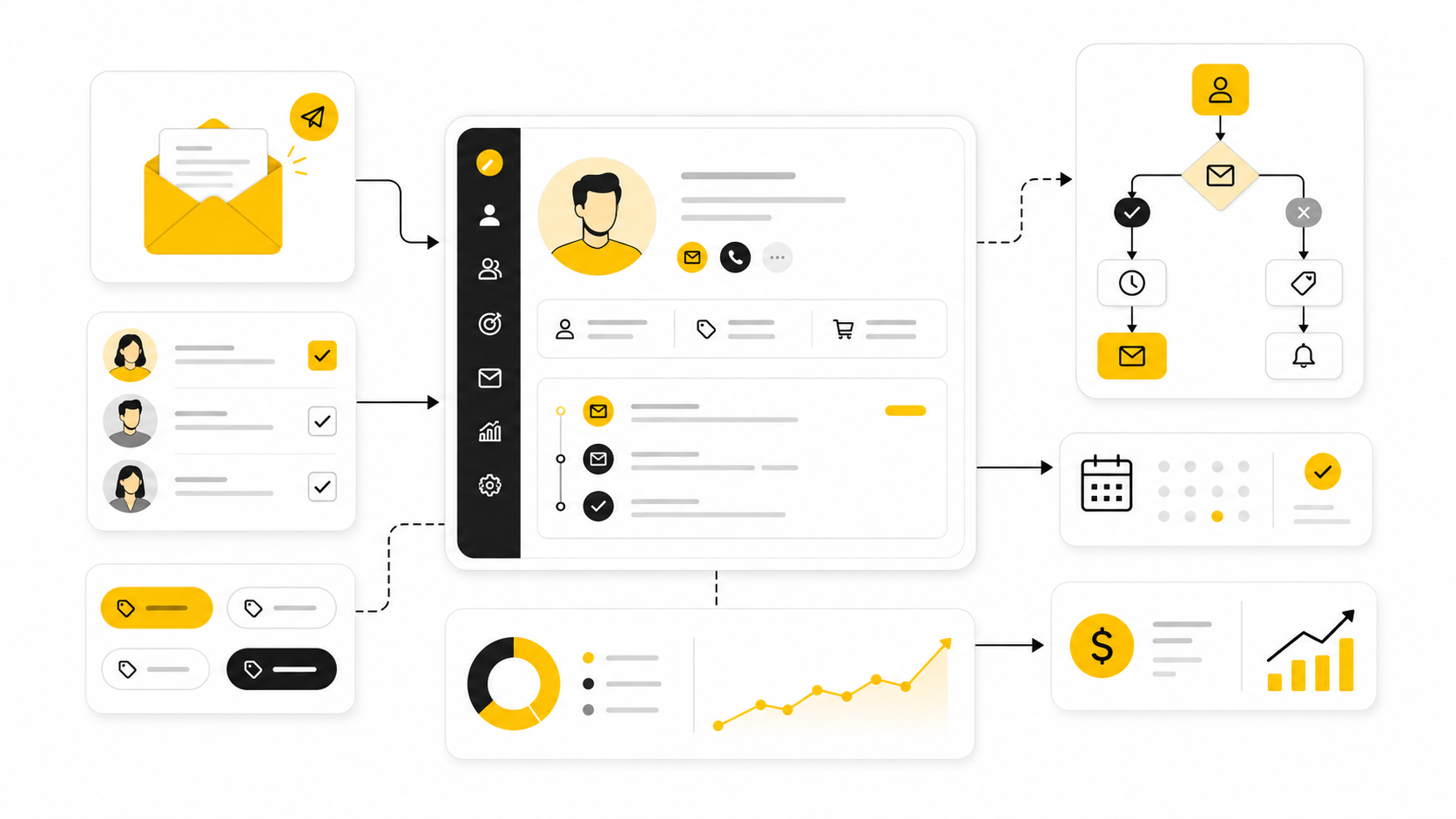
Keap email marketing is not just about sending newsletters. It is about connecting email, CRM data, sales follow-up, appointments, invoices, and automation so a lead does not disappear the moment they leave your website or ignore your first message.
That distinction matters because most small businesses do not lose leads from a lack of effort. They lose them from inconsistent follow-up, scattered tools, weak segmentation, and campaigns that treat every contact the same. Email still has strong commercial value, with many companies reporting email marketing ROI between $10 and $36 for every $1 spent, but that return usually comes from systems, not random broadcasts.
Keap sits in that middle ground between a basic email platform and a full sales CRM. It is built for small businesses that need more than a simple newsletter tool, especially service businesses, consultants, coaches, agencies, local businesses, and sales-led teams that depend on timely follow-up. The real question is not whether Keap can send emails. The real question is whether its CRM-driven automation model fits the way your business sells.
Why Keap Email Marketing Matters
Keap email marketing matters because follow-up is where a lot of revenue is either created or wasted. A lead may fill out a form, book a call, download a guide, request pricing, or abandon a decision halfway through, but the business still needs a reliable way to respond based on that behavior. When that response depends on memory, spreadsheets, or manual inbox work, opportunities leak out quietly.
This is where Keap is different from a basic email newsletter tool. Its email marketing is tied to contact records, tags, pipelines, appointments, tasks, payments, and automation triggers. That makes it useful for businesses where an email is not the whole journey, but one step inside a larger sales process.
The strongest use case is not “send a weekly email.” The stronger use case is “send the right follow-up because this person took a specific action.” That could mean a new inquiry gets a welcome sequence, a missed appointment gets a reminder, a warm lead gets a sales task, or a paid customer gets onboarding emails. The practical value is in making the next step happen without waiting for someone on the team to remember it.
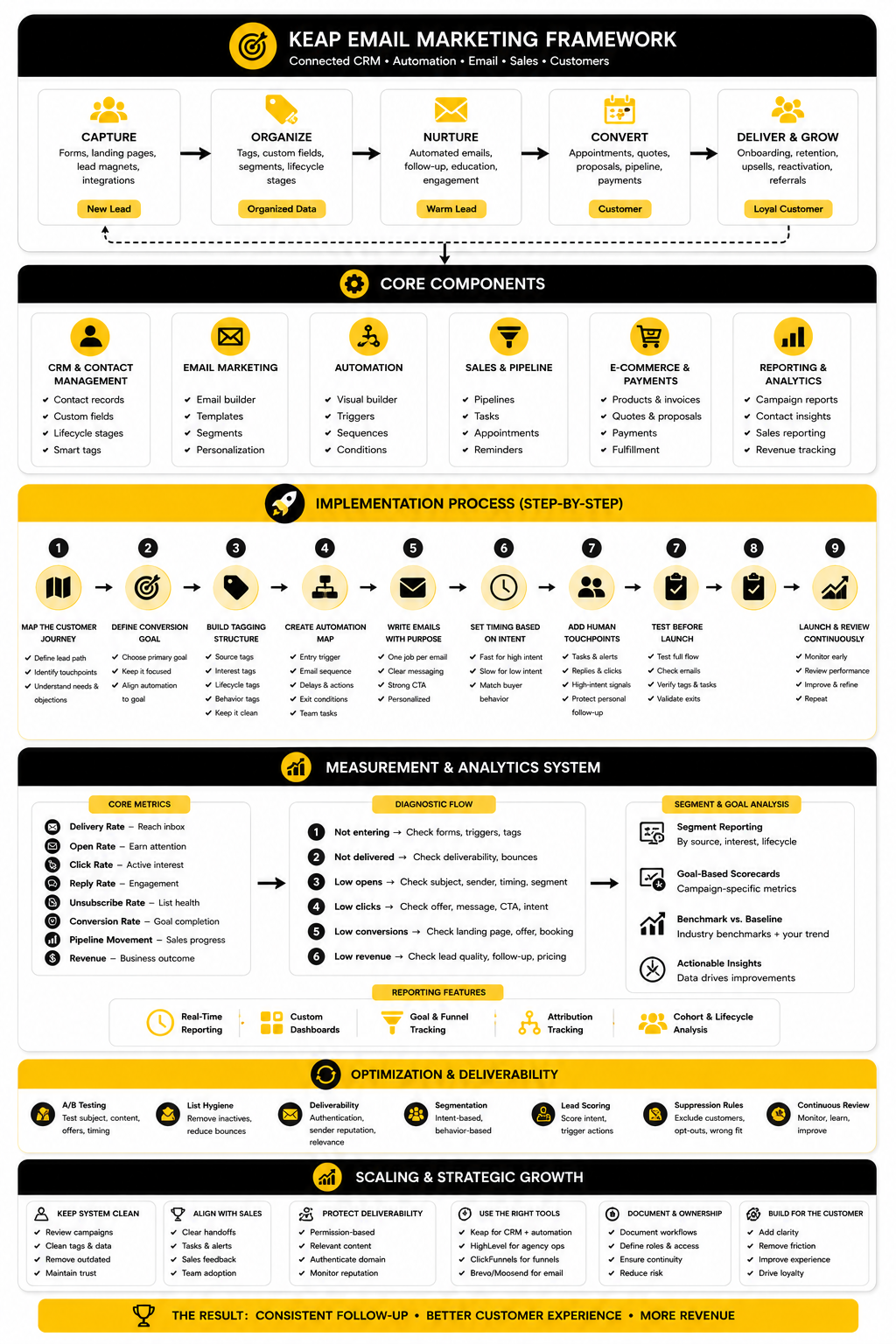
The Keap Email Marketing Framework
A good Keap email marketing system starts with one simple idea: every contact should have a clear next step. That next step depends on who they are, what they did, what they need, and how close they are to buying. Without that logic, automation becomes noise.
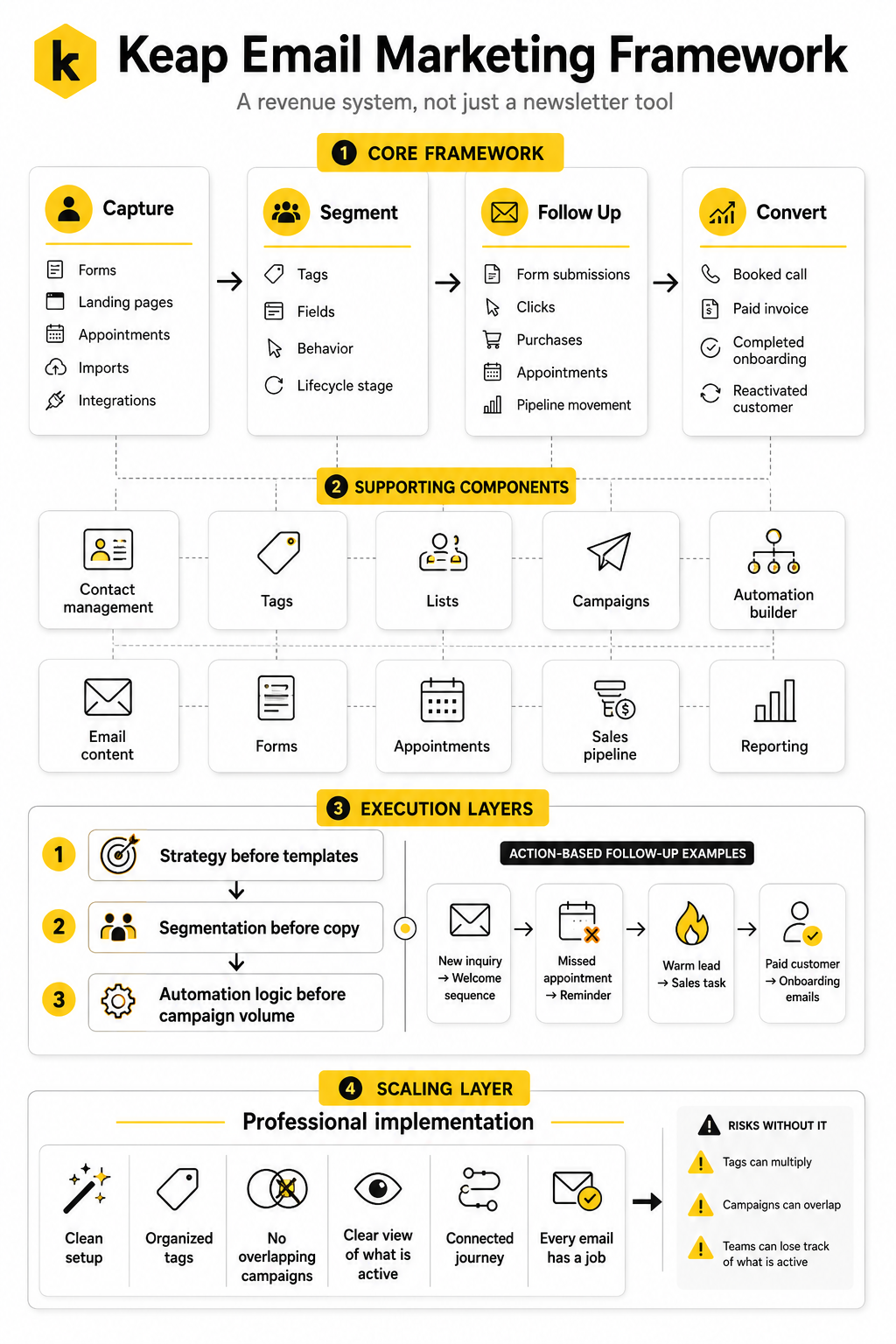
The framework is built around four layers: capture, segment, follow up, and convert. Capture brings people into Keap through forms, landing pages, appointments, imports, or integrations. Segmenting organizes those contacts with tags, fields, behavior, and lifecycle stage so the message can match the moment.
Follow-up is where Keap becomes more powerful than a standard email tool. Instead of sending the same campaign to everyone, you can create automated paths based on actions like form submissions, clicks, purchases, appointments, or pipeline movement. Conversion then connects the email journey to sales outcomes, whether that means a booked call, a paid invoice, a completed onboarding step, or a reactivated customer.
How This Guide Will Approach Keap Email Marketing
This guide will treat Keap as a revenue system, not just an email sender. That means we will look at strategy before templates, segmentation before copy, and automation logic before campaign volume. Sending more emails is rarely the fix when the underlying follow-up system is unclear.
The next sections will break down the core components that make Keap work: contact management, tags, lists, campaigns, automation builder, email content, forms, appointments, sales pipeline, and reporting. Each piece matters, but none of them should exist in isolation. The goal is to create a connected journey where every email has a job.
We will also cover professional implementation because Keap can become messy if it is built without structure. Tags can multiply, campaigns can overlap, and teams can lose track of what is active. A clean Keap setup should make your business easier to run, not harder to understand.
Core Components of a Keap Email System
A strong Keap email marketing setup is not built from one campaign. It is built from a few connected parts that work together: contacts, segmentation, forms, emails, automations, appointments, sales pipeline activity, and reporting. When these pieces are planned properly, Keap becomes a system for managing relationships instead of a place where contacts sit until the next broadcast.
The biggest mistake is treating Keap like a simple email blast tool. That usually leads to messy tags, duplicated lists, unclear automations, and emails that feel disconnected from the sales process. Keap works best when every component has a clear job and every campaign supports a real business outcome.
Contact Records
The contact record is the center of Keap. Every email, tag, note, task, appointment, invoice, purchase, and automation history should connect back to the person you are trying to move forward. This matters because email performance is not only about opens and clicks; it is about what you know about the contact when you decide what to send next.
A clean contact record helps you avoid generic follow-up. You can see whether someone is a new lead, a past buyer, an active client, a no-show, a proposal recipient, or a reactivation opportunity. That context changes the message completely.
For Keap email marketing, contact quality matters more than list size. A smaller list with accurate data will usually outperform a bigger list full of duplicates, cold imports, and people with no clear source. Before building advanced automations, make sure your contact records are organized enough to support them.
Tags and Segmentation
Tags are one of the most important parts of Keap, but they can also become the messiest. A tag should describe something useful about a contact, such as where they came from, what they requested, what they bought, what stage they are in, or what action they took. A tag should not exist just because someone thought of a new label during a rushed campaign build.
Good segmentation lets you send emails that match intent. A person who requested a consultation should not receive the same follow-up as someone who downloaded a beginner checklist. A current client should not receive the same sales push as someone who has never spoken to your team.
The practical move is to create tag categories before campaigns multiply. Use simple groups like lead source, interest, lifecycle stage, customer status, event behavior, and suppression. This makes the system easier to audit later and prevents the classic Keap problem: hundreds of tags with no one on the team fully sure what they do.
Forms and Lead Capture
Forms are where the email marketing journey usually begins. A form can capture a newsletter signup, consultation request, lead magnet download, event registration, quote request, or support inquiry. The form itself is simple, but what happens after submission is where the strategy lives.
A good form should collect only the information needed for the next step. Asking for too much too early can reduce conversions, while asking for too little can make follow-up weaker. The balance depends on the offer, the buying intent, and how much context your sales process needs.
Once a form is submitted, Keap can apply tags, trigger an email sequence, create a task, notify a team member, or move the contact into a pipeline. This is why form planning should happen before copywriting. The form is not just a data collection point; it is the trigger that decides what kind of relationship starts.
Email Broadcasts
Broadcasts are one-time emails sent to a selected group of contacts. They are useful for newsletters, announcements, promotions, event reminders, product updates, and timely messages that do not need a long automation path. In Keap email marketing, broadcasts still matter, but they should be used with intention.
The key is to avoid sending every broadcast to everyone. Even a simple update can perform better when it is sent to the right segment. A service reminder for past buyers, a webinar invite for warm leads, or a limited offer for inactive customers will usually feel more relevant than a broad message to the whole database.
Broadcasts also help you learn what your audience responds to. Over time, clicks and replies can reveal interest patterns that deserve their own segments or automations. Used this way, broadcasts are not random campaigns; they become a feedback loop for more carefully follow-up.
Automated Sequences
Automated sequences are where Keap becomes much more valuable than a standard email tool. A sequence can welcome new leads, educate prospects, recover stalled opportunities, remind people about appointments, onboard new customers, or re-engage inactive contacts. The point is not to automate everything; the point is to automate the moments that are too important to leave to chance.
A strong sequence has a clear purpose. It should answer one question: what should happen after this person takes this action? If the answer is vague, the sequence will probably become a pile of disconnected emails.
The best sequences feel helpful, not mechanical. They explain the next step, remove friction, handle common objections, and make it easy for the reader to act. That is where Keap email marketing can become genuinely powerful: the system follows up consistently, while the message still feels like it came from a business that understands the customer.
Sales Pipeline Integration
Keap becomes more useful when email activity is connected to pipeline movement. A lead can fill out a form, receive follow-up emails, book a call, get assigned to a sales stage, and trigger tasks for the team. This keeps marketing and sales from operating in separate worlds.
For service businesses, this connection is especially important. A sales opportunity may need a proposal, a reminder, a personal call, a payment link, or a post-call nurture sequence. If email is disconnected from the pipeline, the business can easily over-message cold leads while under-following up with people who are ready to buy.
Pipeline integration also gives the team better visibility. Instead of asking, “Did we follow up with that lead?” you can build the process so the answer is visible in the contact record and pipeline stage. That removes guesswork, which is one of the quiet benefits of a properly built Keap system.
Appointments and Reminders
Appointments are a major part of many Keap use cases because a booked call often sits between marketing and revenue. The email sequence before and after that call can make a big difference. A confirmation email, reminder, preparation message, no-show follow-up, and post-call recap can all support the sales process.
This is not about sending more reminders for the sake of it. It is about reducing friction and keeping the prospect engaged while their intent is still fresh. Someone who booked a call yesterday is in a very different mental state from someone who downloaded a free resource six months ago.
When appointment follow-up is automated, the team can focus on the conversation instead of administrative chasing. That is the kind of practical automation small businesses actually feel. It saves time, protects revenue opportunities, and gives prospects a more professional experience.
Payments, Invoices, and Customer Follow-Up
Keap can also support customer communication after the sale. That matters because email marketing should not stop when someone buys. The post-purchase experience often decides whether a customer stays, refers, upgrades, or disappears.
Payment and invoice activity can trigger useful follow-up. A new customer can receive onboarding instructions, a paid invoice can start a fulfillment sequence, and a missed payment can trigger a polite reminder. These messages are not flashy, but they protect the customer experience.
This is where many businesses underuse Keap. They focus heavily on lead generation but ignore customer lifecycle automation. A better approach is to build email follow-up around the whole relationship: first touch, sales process, purchase, onboarding, retention, and reactivation.
Reporting and Email Performance
Reporting keeps the system honest. Open rates, click rates, unsubscribes, replies, conversions, booked calls, payments, and pipeline movement all tell part of the story. Looking at only one metric can lead to bad decisions.
For example, a high open rate does not mean much if nobody clicks, replies, books, or buys. A lower open rate can still be acceptable if the email reaches a more qualified segment and creates revenue. Keap email marketing should be judged by movement through the customer journey, not vanity metrics alone.
The best reporting rhythm is simple. Review what was sent, who received it, what action they took, and whether the next step happened. Then adjust the segment, offer, timing, or message based on evidence instead of guessing.
Professional Implementation: Building Campaigns That Convert
Professional Keap email marketing starts before you touch the automation builder. The real work is deciding what journey the contact should experience, what data the system needs, and what action each email should drive. If you skip that thinking, you end up with a busy-looking setup that still fails to move leads forward.
The goal is not to build the most complex automation possible. The goal is to build the simplest reliable system that captures intent, follows up at the right moment, and gives the team visibility when human action is needed. That is how Keap becomes a sales asset instead of another software subscription.
Start With the Customer Journey
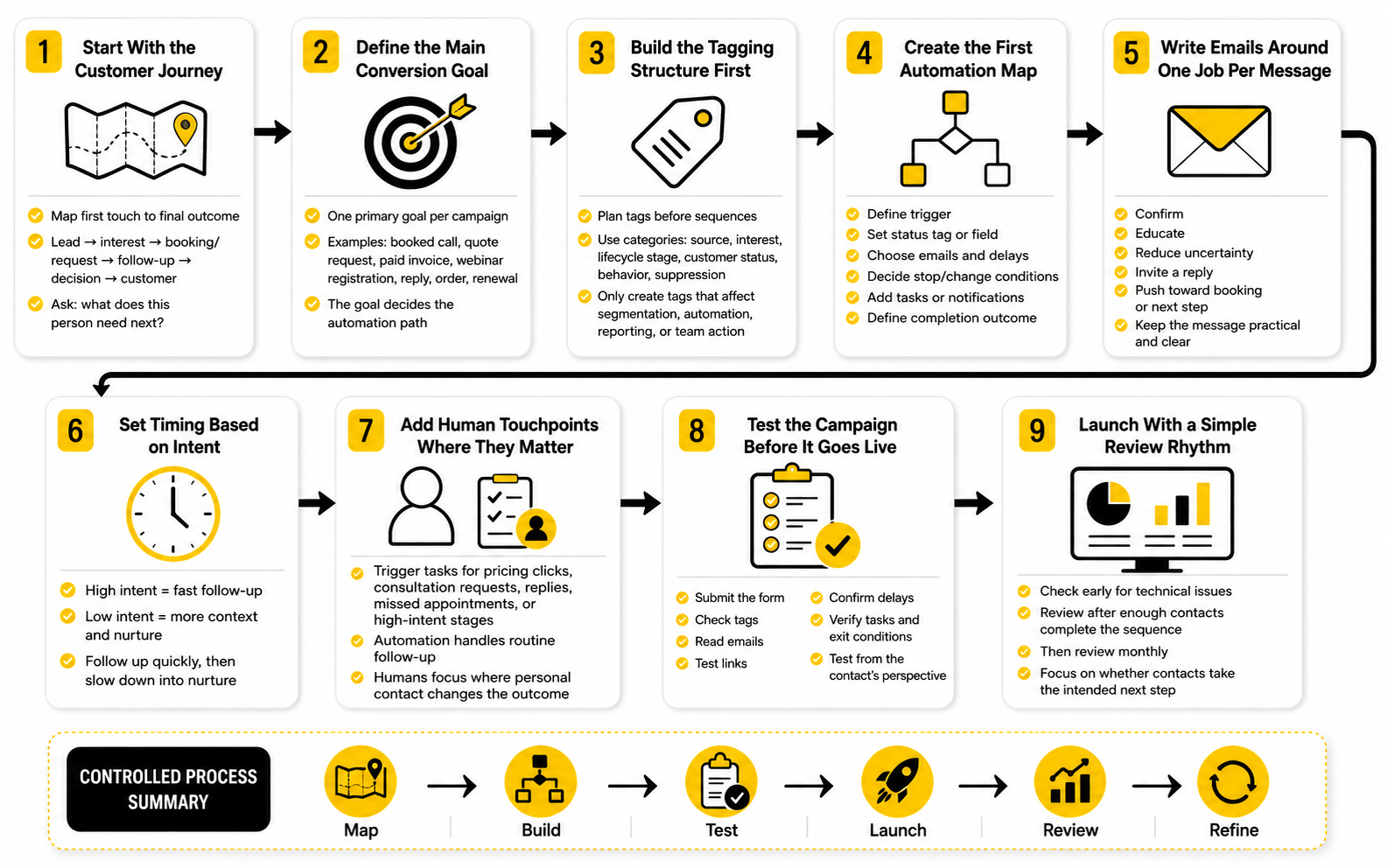
Before building anything, map the path a contact takes from first touch to final outcome. This does not need to be fancy. Write down how someone discovers the business, what they opt into, what they need to understand, what objection usually slows them down, and what action proves they are ready for the next step.
For most businesses, the journey has a few obvious stages. A person becomes a lead, shows interest, books or requests something, receives follow-up, makes a decision, becomes a customer, and then needs onboarding or retention communication. Keap email marketing works best when those stages are clear enough to automate around.
This step prevents random campaigns. Instead of asking, “What email should we send?” you ask, “What does this person need next?” That one shift makes the whole system more useful.
Define the Main Conversion Goal
Every campaign should have one primary conversion goal. That goal could be a booked call, completed quote request, paid invoice, webinar registration, replied email, consultation form, order, or renewal. If the goal is unclear, the emails will usually feel unclear too.
A common mistake is trying to make one sequence do everything. One email teaches, another sells, another promotes an event, another asks for a reply, and the contact is left wondering what the actual next step is. Keep the campaign focused so the reader knows exactly what to do.
For Keap, the conversion goal also affects the technical build. A booked appointment may trigger reminders and sales tasks, while a purchase may trigger onboarding and fulfillment. The goal decides the automation path, not the other way around.
Build the Tagging Structure First
Tags should be planned before sequences are built. This keeps the system clean and prevents duplicate tags from being created every time a new campaign is launched. A simple naming structure makes it much easier for the team to understand what is happening inside the account.
A practical tag structure can include source, interest, lifecycle stage, customer status, behavior, and suppression. For example, a contact might have a source tag from a form, an interest tag based on the offer they requested, and a lifecycle tag showing whether they are a new lead or active opportunity. Each tag should answer a useful question.
Do not over-tag for no reason. If a tag will not change segmentation, automation, reporting, or team action, it probably does not need to exist. Clean tags make Keap email marketing easier to scale.
Create the First Automation Map
Once the journey, goal, and tags are clear, sketch the automation before building it. Show where the contact enters, what condition starts the campaign, which emails go out, what delays happen, and what action changes the path. This keeps the build logical instead of improvised.
A basic automation map should answer these questions:
This is where the execution becomes tangible. You are no longer thinking in abstract marketing ideas. You are turning the customer journey into a process the system can actually run.
Write Emails Around One Job Per Message
Each email should have one job. That job might be to confirm the request, educate the reader, reduce uncertainty, invite a reply, push the contact toward booking, or explain what happens after purchase. When one email tries to do five things, it usually does none of them well.
For Keap email marketing, this matters because automation already adds structure. The email copy should support that structure instead of overwhelming it. A short, clear email at the right moment can outperform a long, clever email sent without context.
Use practical language. Tell the reader why they are receiving the email, what matters now, and what they should do next. That sounds simple, but it is where a lot of campaigns win.
Set Timing Based on Intent
Timing should match the contact’s level of intent. A high-intent lead who requested a consultation needs fast follow-up, not a slow educational drip. A low-intent lead who downloaded a general resource may need more context before being asked to book a call.
This is why one universal sequence rarely works. Different entry points deserve different pacing. Someone who filled out a pricing form is not in the same position as someone who joined a general newsletter.
A practical timing model is to follow up quickly when the action signals buying intent, then slow down as the sequence moves into education or nurture. Keap makes this manageable because delays, tags, and campaign goals can control the path. The system should feel responsive, not aggressive.
Add Human Touchpoints Where They Matter
Automation should not remove the human element from the sales process. It should protect it. The best Keap builds use automation to handle repetitive follow-up while triggering personal action when the contact shows real intent.
That could mean creating a task when someone clicks a pricing link, submits a consultation request, replies to an email, misses an appointment, or reaches a certain pipeline stage. These moments deserve attention because they often signal that a decision is close. Let automation surface them instead of burying them.
This is where many businesses get the most value. The system keeps the routine steps consistent, and the team spends time where personal contact can actually change the outcome. That is the practical balance.
Test the Campaign Before It Goes Live
Never launch a Keap campaign without testing it from the contact’s point of view. Submit the form, check the tags, read the emails, test the links, confirm the delays, verify the tasks, and make sure the exit conditions work. Small mistakes can create awkward customer experiences fast.
Testing should include both the technical flow and the message flow. The technical question is whether the automation works. The message question is whether the sequence makes sense to a real person receiving it.
Use a test contact and walk through every major path. If a lead books a call, they should stop receiving emails that push them to book. If a customer pays, they should move into customer communication instead of staying in prospect nurture. These details matter.
Launch With a Simple Review Rhythm
After launch, do not ignore the campaign for months. Check early performance, but do not panic over tiny sample sizes. Look for obvious problems first: low delivery, broken links, confusing replies, unexpected unsubscribes, duplicate emails, or contacts entering the wrong path.
A simple review rhythm is enough at the start. Review the campaign after the first few days, again after enough contacts have gone through it, and then monthly once it is stable. Focus on whether contacts are taking the intended next step.
Professional implementation is not a one-time build. It is a controlled process: map, build, test, launch, review, and refine. That is how Keap email marketing becomes dependable instead of chaotic.
Optimization, Reporting, and Common Mistakes
Measurement is where Keap email marketing becomes easier to manage and harder to fake. A campaign can look polished, use good copy, and have a beautiful automation map, but the numbers will show whether people are actually moving forward. That is the point of analytics: not to decorate a report, but to tell you what to fix next.
The mistake is looking at email metrics as isolated scores. Open rate, click rate, unsubscribe rate, replies, booked calls, purchases, and pipeline movement all mean different things depending on the campaign goal. A welcome sequence, sales follow-up, newsletter, reactivation campaign, and customer onboarding sequence should not be judged the same way.
Statistics and Data That Actually Matter
Email marketing still earns attention because the channel can produce strong returns, but the useful lesson is not “email works.” The useful lesson is that email works when measurement connects activity to revenue. Many companies report email marketing returns in the range of $10 to $36 for every $1 spent, but that range is wide because strategy, list quality, segmentation, offer strength, and tracking discipline all change the outcome.
Benchmarks can help, but they should not become the target by themselves. Recent industry benchmarks show average open rates often sitting around the low 40% range, while average click rates are much lower, often near the 2% range depending on industry and list type. That gap matters because opens show potential attention, while clicks show active interest.
This is especially important now because open rates are less reliable than they used to be. Privacy features, image loading behavior, spam filtering, and inbox scanning can distort whether a human actually opened the message. Treat opens as a directional signal, not proof that your campaign is working.
The Metrics to Watch First
For Keap email marketing, the best reporting starts with a small set of practical metrics. Too many dashboards create noise, especially for small teams that need decisions more than data theater. Start with the numbers that tell you whether the campaign is reaching people, earning action, and creating movement.
The core metrics are:
These metrics should be read together. A campaign with a decent click rate but poor conversion may have a landing page, offer, or booking problem. A campaign with strong opens but weak clicks may have a message-to-offer mismatch. A campaign with low opens but high conversion from the people who do engage may need better subject lines, not a total rebuild.
How to Read Open Rates Without Overreacting
Open rate is useful, but it is easy to overvalue. It tells you whether the email had enough recognition, relevance, or curiosity to get attention. It does not tell you whether the reader trusted the offer, understood the next step, or moved closer to buying.
A weak open rate can point to several problems. The subject line may be vague, the sender name may be unfamiliar, the list may be cold, the segment may be wrong, or the email may be landing poorly in the inbox. Do not rewrite the whole campaign until you know which problem you are solving.
A strong open rate can also be misleading. If people open but do not click, reply, book, or buy, the campaign still has a performance issue. In Keap, the more useful question is not “Did they open?” but “What happened after they opened?”
Why Clicks Are Usually More Useful Than Opens
Clicks are more meaningful because they show active behavior. Someone chose to visit a booking page, read an offer, view pricing, download a resource, watch a video, or continue the journey. That action gives you better segmentation and better follow-up options.
Click data also helps you find intent. A contact who clicks a pricing link, service page, or booking link is usually more valuable than someone who only opens a newsletter. Keap can use that behavior to apply tags, trigger tasks, or move a contact into a more relevant follow-up path.
This is where reporting becomes operational. A click should not only be a number in a report. It can be a signal that changes what the system does next.
Connecting Email Metrics to the Customer Journey
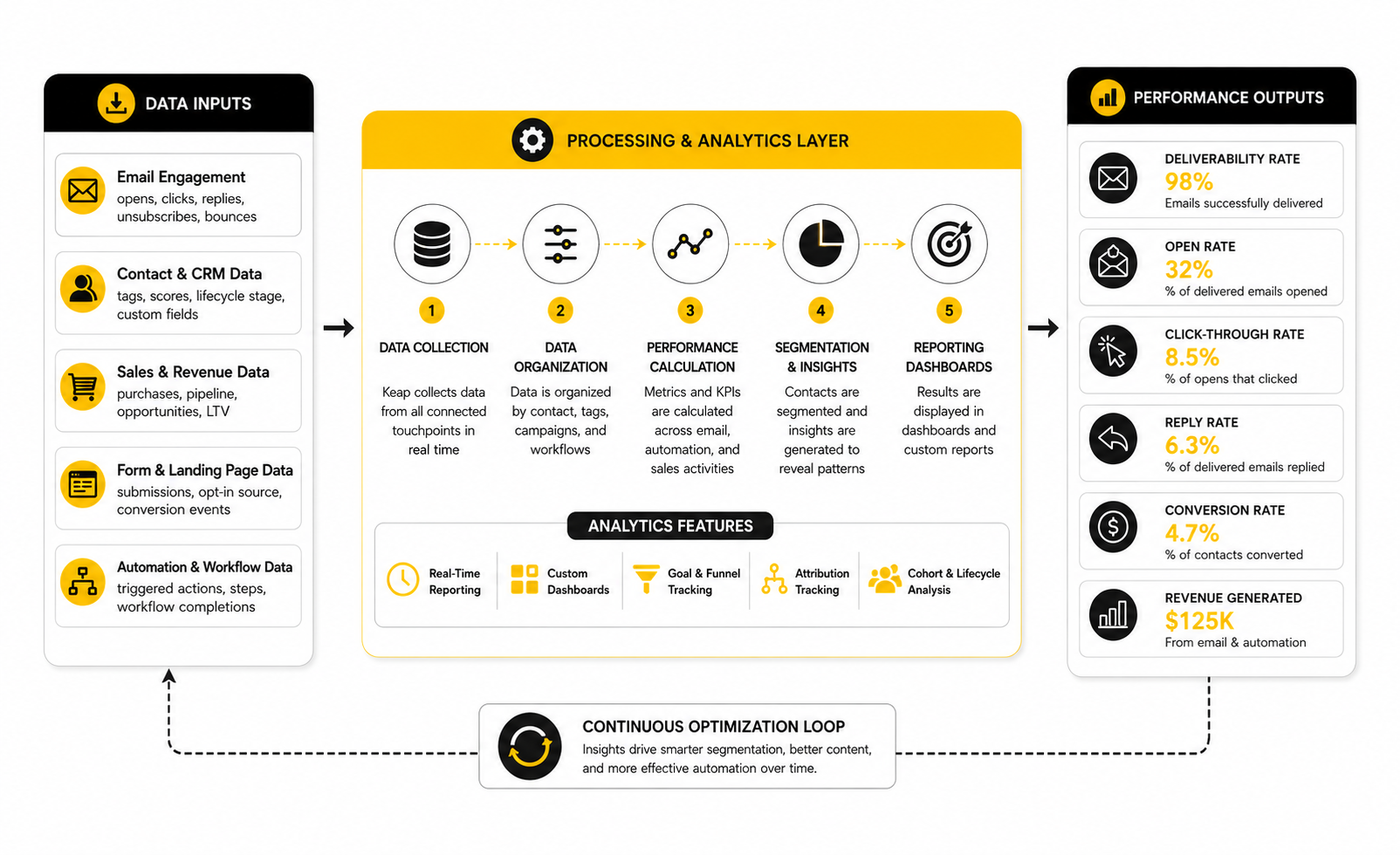
The cleanest analytics system follows the same journey you built in the campaign. First, measure whether the contact entered the right automation. Then measure whether they engaged with the email. Then measure whether they took the next step. Finally, measure whether that step created pipeline movement, payment, retention, or reactivation.
This prevents random optimization. You are not changing subject lines just because open rates dipped once. You are looking at the journey and finding the actual bottleneck.
A simple diagnostic flow works well:
That is how you turn data into action. Each metric points to a different layer of the system. When you know which layer is weak, you can fix the right thing.
Benchmarks Are Reference Points, Not Rules
Benchmarks are helpful because they stop you from guessing what “good” looks like. They also help you spot obvious problems, like a click rate far below your industry norm or an unsubscribe rate that jumps after a campaign change. But benchmarks should never replace your own trend data.
Your own baseline is usually more valuable than a broad industry average. A small local service business with a warm list may see very different engagement from a national ecommerce brand, a B2B agency, or a course creator. Even inside the same industry, list source and offer intent can completely change performance.
Use benchmarks to ask better questions, not to judge every campaign blindly. If your welcome sequence is improving month over month and creating booked calls, it may be healthy even if one vanity metric looks average. If your numbers beat a public benchmark but do not produce sales, the campaign still needs work.
What Unsubscribes and Complaints Are Telling You
Unsubscribes are not always bad. Some people are simply not a fit, and letting them leave can improve list quality. The problem starts when unsubscribes spike after a certain type of message, segment, or frequency change.
A rising unsubscribe rate usually means one of three things. The audience did not expect the email, the message does not match their interest, or the send frequency feels too aggressive. Keap email marketing gives you enough segmentation control to fix those issues instead of blaming the channel.
Complaints are more serious because they can damage deliverability. If people mark your emails as spam, that is a trust problem. Clean consent, clear expectations, relevant content, and easy unsubscribe options are not optional details; they protect the entire system.
Reporting by Segment
Segment-level reporting is more useful than account-level reporting. A campaign sent to new leads may perform differently from one sent to old prospects, active customers, lost opportunities, or past buyers. If you blend all of those contacts into one report, the averages hide what is really happening.
Keap’s strength is that segmentation can connect to contact behavior and lifecycle stage. That means you can compare performance by source, interest, customer type, campaign entry point, or pipeline status. This gives you a better view of which groups are worth more attention.
The practical action is simple. Review performance by meaningful segments before rewriting copy. Sometimes the campaign is not weak; it is being sent to the wrong people.
Reporting by Campaign Goal
Every campaign should have its own scorecard. A reactivation campaign should not be measured like a sales consultation sequence. A customer onboarding campaign should not be judged only by clicks if the real goal is reducing confusion and improving completion.
For a lead nurture campaign, the scorecard may include clicks, replies, booking rate, and pipeline movement. For an appointment sequence, it may include show rate, reschedule rate, and post-call conversion. For onboarding, it may include task completion, support reduction, renewal behavior, or upsell readiness.
This is the part most businesses skip. They look at generic email stats, then wonder why the data does not help. Measure the action the campaign was built to create.
The Common Mistakes That Distort the Data
Bad data usually comes from a messy system, not from the reporting tool itself. If tags are inconsistent, forms trigger the wrong campaigns, contacts stay in old sequences, or customers keep receiving prospect emails, your reporting will be unreliable. The numbers may look precise, but the setup behind them is flawed.
The most common mistakes are:
Fixing these issues usually improves both performance and confidence. You can make better decisions when the system is clean enough to trust.
How Often to Review Performance
Do not check every metric every day unless you have enough volume to make that useful. Small lists can swing dramatically from one send to the next, and reacting too quickly creates unnecessary changes. Review frequently enough to catch problems, but not so often that you start optimizing noise.
For most small businesses, a practical rhythm works best. Check new campaigns shortly after launch to catch technical issues. Review performance after enough contacts have completed the sequence. Then review monthly to identify trends, bottlenecks, and improvement opportunities.
The key is consistency. Keap email marketing gets better when reporting becomes part of the operating rhythm, not an occasional panic session after results drop. Data should make the system calmer, clearer, and more profitable.
Advanced Considerations Before You Scale
Once the basics are working, Keap email marketing becomes less about building more campaigns and more about controlling complexity. This is where many businesses get themselves into trouble. The first few automations feel useful, so they keep adding more without improving the structure underneath.
Scaling does not mean adding a new sequence for every idea. It means making sure your segments, triggers, tags, reporting, and sales handoffs can handle more leads without creating confusion. A simple system that the team trusts will beat a clever system nobody fully understands.
Keep the System Clean as Campaigns Multiply
The biggest scaling risk in Keap is clutter. Tags pile up, old campaigns stay active, duplicate forms keep collecting leads, and contacts end up moving through journeys that no longer match the business. This does not happen all at once. It happens slowly, which is why it is so dangerous.
A clean system needs a maintenance rhythm. Review active campaigns, unused tags, outdated email copy, old offers, broken links, and contacts sitting in the wrong lifecycle stage. This is not glamorous work, but it protects the entire revenue engine.
Treat Keap like an operating system for your follow-up. If the system becomes messy, the team stops trusting it. Once trust is gone, people go back to manual workarounds, spreadsheets, inbox reminders, and duplicated effort.
Decide What Keap Should Own
Keap can handle a lot, but that does not mean it should own every part of the business. The strategic question is which jobs belong inside Keap and which jobs are better handled by dedicated tools. This decision matters because every integration adds both power and potential friction.
Keap is strongest when it owns CRM-driven follow-up, contact segmentation, email automation, appointments, pipeline communication, and small business sales workflows. If your business needs advanced ecommerce merchandising, complex ad attribution, large-scale content publishing, or deep enterprise analytics, those may belong somewhere else. The goal is not to force Keap to be everything.
This is also where alternatives can make sense. Businesses that want an agency-style CRM and automation stack may compare Keap with GoHighLevel, while businesses focused more on funnels and direct response selling may look at ClickFunnels. The right choice depends on how your business sells, not which platform has the loudest marketing.
Watch the Cost of Complexity
Automation has a hidden cost: every workflow needs to be understood, maintained, tested, and improved. A campaign that nobody reviews can quietly become outdated. A rule that made sense six months ago can create problems after the offer, pricing, team, or sales process changes.
This is why advanced Keap email marketing should be built in layers. Start with the highest-value journeys first: new lead follow-up, appointment reminders, sales nurture, customer onboarding, and reactivation. Then expand only when the existing system is working and measurable.
The question should always be practical: will this automation save time, improve follow-up, increase conversion, reduce mistakes, or create a better customer experience? If the answer is not clear, do not build it yet. Complexity without a business reason is just expensive decoration.
Protect Deliverability Before It Becomes a Problem
Deliverability is one of those things people ignore until it hurts. If your emails stop reaching the inbox, every clever subject line, automation, and offer becomes less useful. This is why deliverability should be treated as a system health issue, not a technical afterthought.
Good deliverability starts with permission, relevance, and list hygiene. Do not import random cold lists and expect strong results. Do not keep sending to contacts who never engage. Do not bury the unsubscribe option or send messages that people did not reasonably expect.
Authentication also matters. Your sending domain, SPF, DKIM, and DMARC setup should be handled properly before you scale volume. This is not exciting, but it is foundational. The better your sending reputation, the more reliable your Keap email marketing becomes.
Segment by Buying Intent, Not Just Interest
Interest and intent are not the same thing. Someone may be interested in your topic but not ready to buy. Someone else may click a pricing page, book a call, or request a quote and show much stronger buying intent.
Advanced segmentation should separate these groups. Educational content can work well for low-intent leads, while direct follow-up makes more sense for high-intent prospects. Treating both groups the same usually creates weak performance and awkward messaging.
Buying intent can come from actions like consultation requests, proposal views, appointment bookings, pricing clicks, repeat visits, form submissions, and replies. Keap becomes more powerful when those actions change the follow-up path. The system should respond to what the contact actually does.
Use Lead Scoring Carefully
Lead scoring can be useful, but only when the score reflects real sales behavior. If every open, click, download, and page visit adds points without context, the score can become misleading. A person who clicks three beginner resources is not automatically more sales-ready than someone who clicks once on a high-intent booking link.
The best lead scoring models are simple at first. Give more weight to actions that show intent and less weight to passive engagement. A reply, appointment request, quote form, or pricing click should usually matter more than a generic open.
Lead scoring should also trigger action only when the team knows what to do next. A score is not valuable by itself. It becomes valuable when it helps sales prioritize, personalize, and follow up faster.
Build Suppression Rules Into the System
Suppression is one of the most underrated parts of email automation. It decides who should not receive a message. Without suppression rules, customers can receive prospect emails, booked leads can keep getting booking prompts, and inactive contacts can be pushed too aggressively.
Every serious Keap setup should have suppression logic. Customers, unsubscribed contacts, active opportunities, recent buyers, no-contact groups, and people already inside another key sequence may need to be excluded from certain campaigns. This keeps the customer experience clean.
Suppression also protects reporting. If the wrong people receive a campaign, the data becomes harder to interpret. Clean exclusions make the message more relevant and the results more trustworthy.
Align Keap With the Sales Team
Keap email marketing will not perform well if sales does not trust the system. The team needs to understand what tags mean, when tasks are created, what pipeline stages represent, and which emails prospects have already received. Otherwise, automation and sales activity start working against each other.
The handoff points are especially important. When a lead books a call, requests pricing, replies with interest, or reaches a high-intent stage, the system should make the next human action obvious. A good automation does not just send emails; it helps the team know where to focus.
Sales feedback should also shape the campaigns. If prospects keep asking the same question, answer it earlier in the sequence. If leads are confused by the offer, clarify the message. If booked calls are weak, improve the qualification path before the appointment.
Know When to Use Broadcasts Instead of Automation
Not everything needs an automated sequence. Some messages are timely, campaign-specific, seasonal, or based on a short-term promotion. In those cases, a broadcast can be cleaner than building another workflow.
The key is to choose the format based on the job. Use automation for predictable journeys that happen repeatedly. Use broadcasts for timely communication that does not need a long-term trigger path.
This distinction keeps the system lighter. If every idea becomes an automation, the account gets harder to manage. If every message is a broadcast, follow-up becomes inconsistent. The best setup uses both with discipline.
Plan for Team Ownership
A Keap account should never depend entirely on one person’s memory. If only one team member understands the campaigns, tags, forms, and reporting logic, the business is exposed. People leave, roles change, agencies rotate, and old decisions get forgotten.
Document the essentials. Keep a simple record of active campaigns, core tags, form triggers, pipeline stages, suppression rules, and campaign goals. This does not need to be a massive manual. It needs to be clear enough that someone else can understand the system without reverse-engineering everything.
Ownership also means deciding who can create tags, edit campaigns, approve broadcasts, update forms, and review performance. Without clear ownership, small changes can create big problems. With clear ownership, Keap stays useful as the business grows.
Compare Tools by Workflow Fit
The best platform is the one that matches your workflow. Keap is a strong fit when CRM, email follow-up, appointments, invoices, and sales automation need to work together. It is less ideal if you only need a lightweight newsletter sender or if your business has highly specialized enterprise requirements.
For businesses that want simpler email marketing without a heavy CRM layer, tools like Brevo or Moosend may feel easier. For businesses where SMS, funnels, pipelines, and agency-style client management are central, GoHighLevel may deserve a closer look.
Do not choose software based only on feature lists. Choose based on the daily workflow your team actually needs to run. A tool with fewer features but better fit will usually create more revenue than a powerful platform used poorly.
Build for the Customer, Not the Automation Map
Advanced automation can become dangerously self-centered. The business starts thinking about tags, branches, triggers, and campaign goals, while the customer simply wants clarity. They want to know what happens next, why it matters, and how to move forward.
That is the final strategic filter. Every automation should make the experience easier for the customer. If it adds confusion, pressure, or irrelevant messages, it is not a good automation.
Keap email marketing works best when the system feels invisible. The customer receives timely, useful communication. The team sees clear next steps. The business gets more consistent follow-up. That is the standard worth building toward.
Keap Email Marketing FAQ and Final Recommendations
Keap email marketing makes the most sense when email is part of a larger sales and customer journey. If all you need is a simple newsletter, Keap may feel heavier than necessary. If you need CRM, automation, sales follow-up, appointments, invoices, and customer communication in one connected system, it becomes much more compelling.
The final decision should come down to workflow fit. Keap is strongest for businesses that depend on timely follow-up, organized contact records, and repeatable sales processes. It is not magic, and it will not fix weak offers or poor list quality, but it can make a solid business far more consistent.
Is Keap good for email marketing?
Yes, Keap is good for email marketing when you need email connected to CRM and automation. It is especially useful for businesses that want to send follow-up based on forms, tags, appointments, purchases, pipeline stages, and customer behavior. That makes it more strategic than a basic newsletter sender.
The tradeoff is that Keap requires more setup discipline. If you only want to send occasional newsletters, simpler tools may be easier. If email is tied to sales conversations and customer follow-up, Keap’s structure becomes a real advantage.
Who should use Keap email marketing?
Keap email marketing is a strong fit for coaches, consultants, agencies, local service businesses, professional services, online educators, and small sales teams. These businesses usually need more than one-off campaigns because leads often require multiple touches before they buy. Keap helps manage that process without relying entirely on manual follow-up.
It is also useful for businesses where appointments, invoices, quotes, and onboarding matter. When those actions connect to email automation, the customer journey becomes smoother. The best users are teams that want a system, not just another place to send emails.
Who should not use Keap?
Keap may not be the best fit if your business only needs a basic newsletter tool. It can also feel too expensive or too complex for very early-stage businesses with no clear sales process yet. In those cases, a simpler platform may be the better starting point.
It may also be less ideal for companies with very specialized enterprise requirements. Large teams may need deeper analytics, custom data infrastructure, or advanced ecommerce workflows outside Keap. The key is to choose based on operational fit, not just feature count.
How is Keap different from a normal email marketing platform?
A normal email marketing platform usually focuses on lists, campaigns, templates, and basic automations. Keap connects email to CRM records, tags, appointments, tasks, invoices, sales pipelines, and customer activity. That changes how follow-up works.
Instead of only asking who should receive an email, you can ask what should happen next in the relationship. A contact can move from form submission to nurture, from nurture to booked call, from booked call to opportunity, and from customer to onboarding. That connected workflow is the main difference.
What should I build first in Keap?
Start with the journey that has the clearest revenue impact. For many businesses, that means new lead follow-up, consultation booking, appointment reminders, proposal follow-up, customer onboarding, or reactivation. Do not start by building ten campaigns at once.
The first build should be simple enough to test and improve. Capture the lead, apply the right tags, send useful follow-up, trigger human action when needed, and measure the next step. Once that works, expand the system carefully.
How many emails should be in a Keap automation?
There is no perfect number. The right number depends on the offer, the buying cycle, the lead source, and the action you want the contact to take. A high-intent consultation request may need a short, fast sequence, while a low-intent educational lead may need a longer nurture path.
A practical rule is to use enough emails to create clarity, reduce friction, and drive the next step. Do not add emails just to make the automation look complete. Every message should have a job.
What metrics should I track in Keap?
Track delivery, opens, clicks, replies, unsubscribes, conversions, pipeline movement, and revenue outcomes. Opens can help you understand attention, but they should not be treated as the final verdict. Clicks, replies, bookings, payments, and sales movement usually tell you more.
The best metric depends on the campaign goal. A booking sequence should be judged by appointments and show rate. A sales sequence should be judged by qualified opportunities and revenue. A customer onboarding sequence should be judged by customer progress and reduced confusion.
How often should I email my Keap contacts?
Email frequency should match the relationship and the reason for the message. A new lead who just requested help may expect fast follow-up. A long-term subscriber may need a slower rhythm that stays useful without becoming intrusive.
The danger is sending too often without relevance. Frequency is less of a problem when the message is expected, timely, and useful. It becomes a problem when contacts receive generic promotions that do not match their intent.
Can Keap replace a CRM?
For many small businesses, yes. Keap is built to combine CRM, automation, email, appointments, sales pipeline activity, and payment-related communication. That makes it a practical all-in-one system for teams that want fewer disconnected tools.
That said, it should only replace your CRM if it supports your actual sales process. If your team has complex enterprise pipeline requirements or deep custom reporting needs, you may need a more specialized CRM. The decision should be based on workflow reality.
Can Keap help with lead nurturing?
Yes, lead nurturing is one of the strongest use cases for Keap email marketing. You can create sequences that educate leads, answer common objections, invite replies, encourage bookings, and move contacts toward the next step. The CRM context makes that nurture more targeted.
The important part is segmentation. A lead who requested pricing should not receive the same nurture as someone who downloaded a broad educational resource. Keap works best when nurturing reflects intent.
Can Keap be used for customer onboarding?
Yes, Keap can be used for customer onboarding, and this is often where it becomes especially valuable. After someone buys, the system can send welcome emails, next-step instructions, reminders, fulfillment details, and follow-up messages. This reduces confusion and makes the customer experience feel more professional.
Customer onboarding should not be treated as an afterthought. A buyer is not finished just because they paid. The right post-purchase emails can improve activation, reduce support questions, and create stronger retention.
What are the biggest Keap mistakes to avoid?
The biggest mistakes are building without a plan, creating too many tags, sending broad campaigns to everyone, ignoring deliverability, and failing to connect email activity to sales outcomes. These mistakes make the account harder to manage and the reporting harder to trust. They also create a worse experience for contacts.
Another mistake is over-automation. Not every situation needs a complex workflow. The best Keap setup combines automation with human touchpoints at the moments where personal follow-up matters most.
Is Keap worth it for small businesses?
Keap can be worth it for small businesses that already have leads, a sales process, and a need for consistent follow-up. If missed follow-up costs you real revenue, a connected CRM and automation system can pay for itself. The value is strongest when it replaces scattered tools and manual work.
It may not be worth it if the business has no clear offer, no lead flow, or no follow-up process to improve. Software cannot create strategy on its own. Keap works best when there is already a real business process to organize and scale.
What is the best alternative to Keap?
The best alternative depends on what you need. If you want a CRM and automation platform with strong agency-style workflows, GoHighLevel is worth comparing. If you care more about funnels, checkout flows, and direct response pages, ClickFunnels may fit better.
If you want simpler email marketing, Brevo or Moosend may be easier to manage. The best choice is the one that matches your sales motion, your team, and your customer journey.
How should a business start with Keap email marketing?
Start by choosing one high-value journey and building it properly. Map the entry point, the tags, the email sequence, the sales handoff, the conversion goal, and the reporting view. Then test it from the contact’s perspective before sending real traffic through it.
Once that first system works, build the next one. This is how Keap becomes manageable. You scale by stacking clear, useful workflows instead of dumping every idea into automation at once.
Final Recommendation
Keap email marketing is best viewed as a follow-up system for businesses that sell through relationships. It is not just about newsletters, and it is not just about automation. It is about making sure the right person receives the right message at the right moment, with the right next step attached.
Use Keap if your business needs connected CRM data, email follow-up, appointments, pipeline visibility, and customer communication in one place. Keep the structure clean, measure the outcomes that matter, and avoid building complexity just because the tool allows it. Done well, Keap becomes less like software and more like a reliable operating layer for revenue.
Build a stronger local presence with BAAM AI
Turn your website, Google profile, social channels, and AI visibility into one growth engine
Most businesses do not need more random marketing activity. They need a consistent presence system that helps the right people find them, trust them, and take action. BAAM AI brings strategy, local SEO, website updates, Google Maps visibility, social content, AI-search readiness, media production, and reporting into one practical monthly engine.
If you want your marketing to keep working after the campaign ends, start with a free BAAM AI presence audit. See how your business shows up today and where the fastest visibility wins are at BAAM AI.