
BAAM AI Blog
Intuit Acquires Mailchimp: What The Deal Really Changed For Small Business Marketing
When Intuit acquires Mailchimp, it is not just another software-company headline. It is a signal that small business software has moved beyond separate tools for accounting, email, landing pages, customer records...
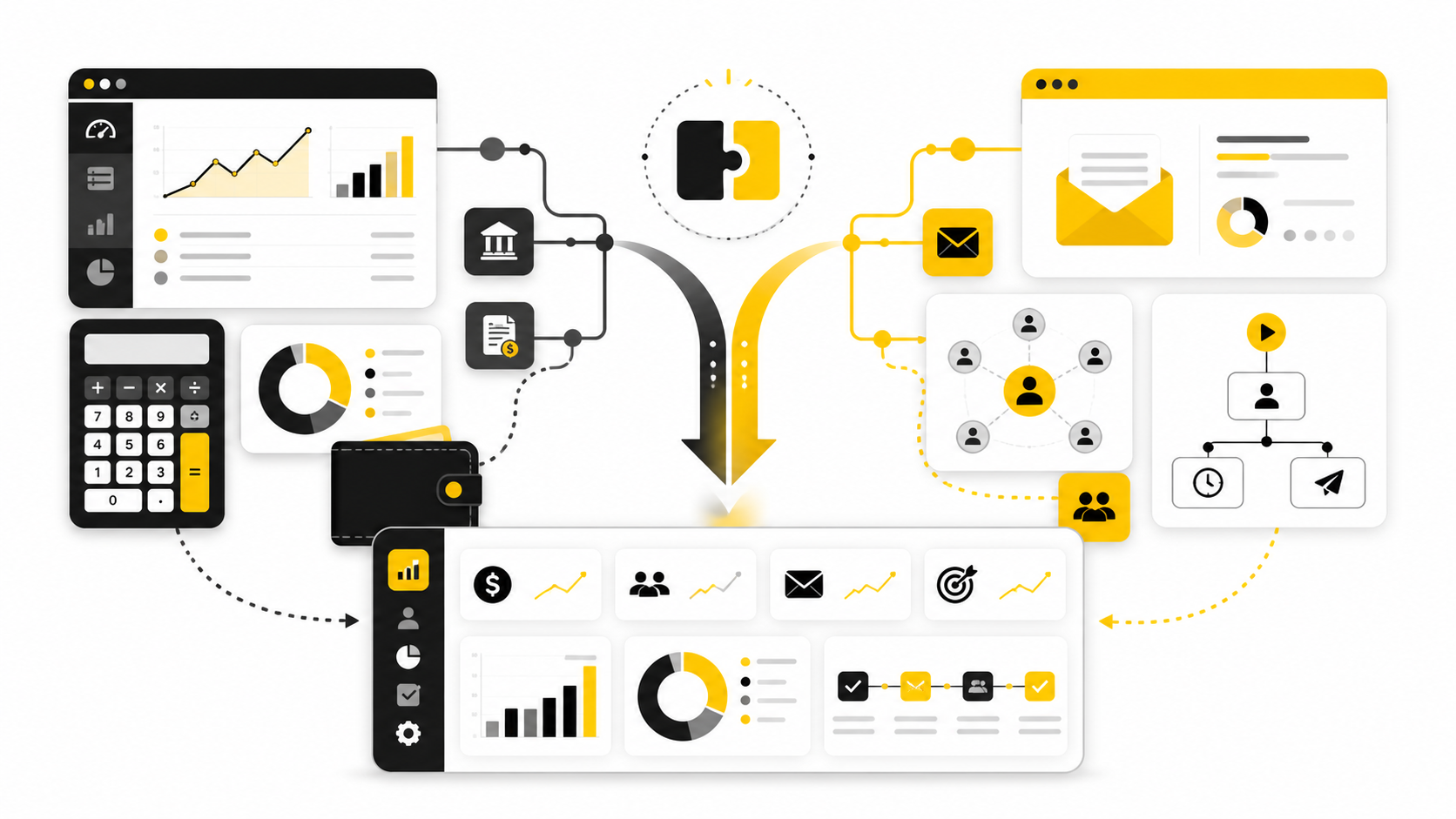
When Intuit acquires Mailchimp, it is not just another software-company headline. It is a signal that small business software has moved beyond separate tools for accounting, email, landing pages, customer records, and reporting. The bigger play is control of the operating system that helps a business find customers, understand them, sell to them, and keep them.
The deal closed in November 2021, after Intuit agreed to buy Mailchimp for approximately $12 billion in cash and stock. That number got the attention, but the more important detail was the logic behind it. Intuit already owned QuickBooks, one of the most important financial systems for small businesses, while Mailchimp brought marketing automation, email, audience data, landing pages, and customer engagement into the same strategic orbit.
This matters because most small businesses do not fail from a lack of software. They struggle because their tools do not talk to each other, their customer data is scattered, and their marketing decisions are disconnected from actual revenue. Intuit’s stated plan was to connect QuickBooks and Mailchimp so businesses could sync customer purchase data, segment audiences, and receive more tailored marketing recommendations inside a broader growth platform.
Why Intuit Acquired Mailchimp
The simplest explanation is that Intuit wanted to move closer to revenue generation. QuickBooks helps businesses manage money after activity happens, but Mailchimp helps create and influence that activity before it shows up in the books. Put together, the two products create a stronger loop between customer acquisition, customer retention, sales activity, and financial visibility.
Mailchimp also gave Intuit a deeper position in the small and mid-market business stack. Mailchimp described itself as an all-in-one marketing platform used for email, social media, landing pages, ads, websites, and audience management, which made it much more than a basic newsletter tool by the time the deal happened. Intuit framed the acquisition around helping small and mid-market businesses solve one of their biggest challenges: reaching and retaining customers.
The timing also mattered. Digital commerce had accelerated, customer acquisition was getting more expensive, and business owners needed clearer answers about which marketing activities actually produced revenue. A combined QuickBooks and Mailchimp platform gave Intuit a credible path toward that answer because financial data and customer engagement data could finally sit closer together.
The Strategic Fit Between QuickBooks And Mailchimp
The strategic fit starts with data. QuickBooks knows what customers buy, when they pay, how revenue moves, and how the business performs financially. Mailchimp knows how audiences respond to campaigns, offers, messages, segments, and customer journeys.
That combination is powerful because most small businesses do not need more dashboards. They need practical answers like which customers are most valuable, which campaigns bring repeat buyers, and which segments deserve more attention. Intuit and Mailchimp had already tested a QuickBooks Online and Mailchimp integration before the deal closed, and Mailchimp reported that QuickBooks customers had imported more than 400,000 customer contacts into Mailchimp accounts during the early integration period.
This is why the acquisition was not only about email marketing. It was about building a connected system where customer behavior and financial outcomes could support more carefully business decisions. For a business owner, that is the difference between sending another campaign and understanding which campaign is actually worth repeating.
The Framework Behind The Deal
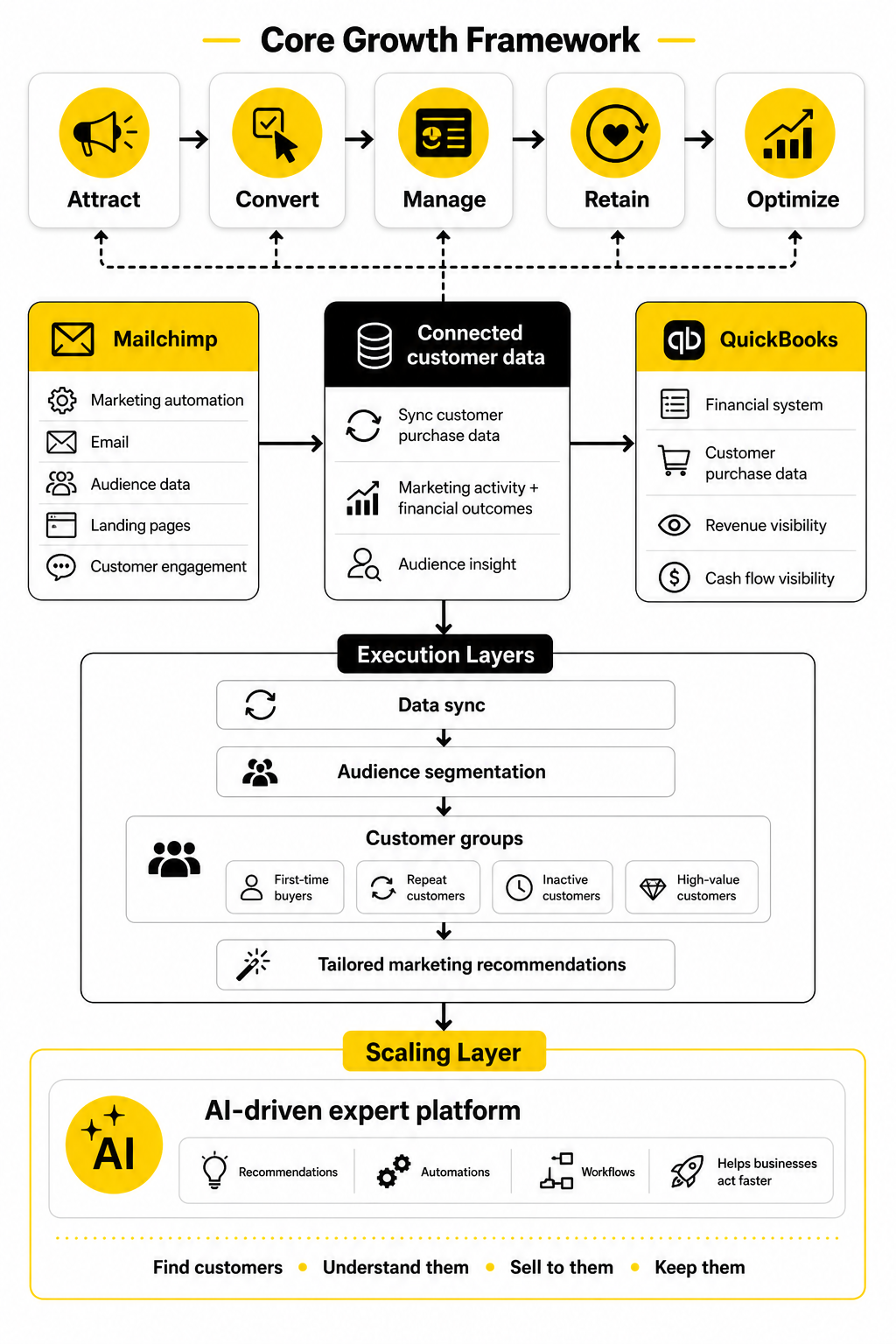
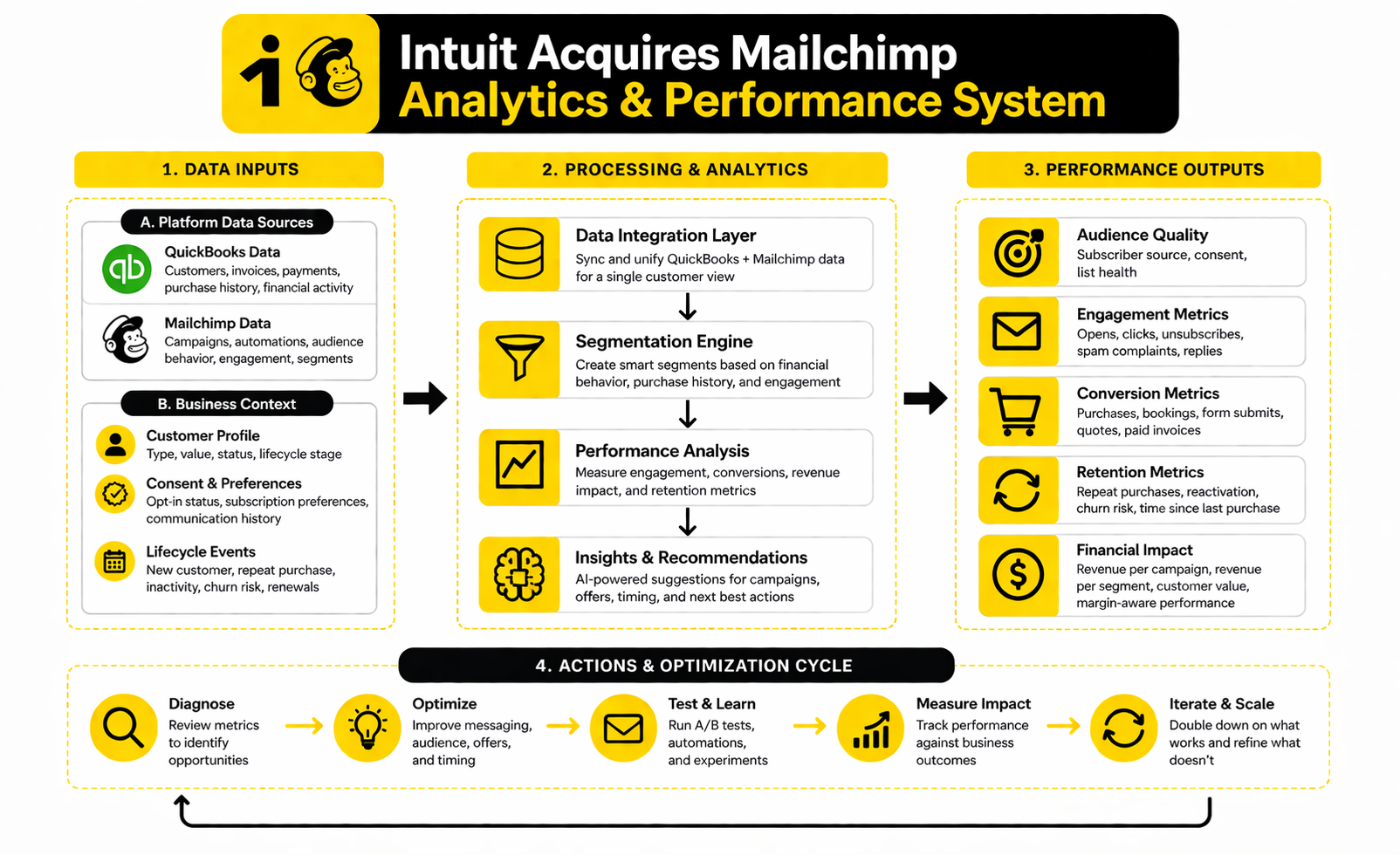
The useful way to understand the Intuit acquires Mailchimp story is through a simple operating framework: attract, convert, manage, retain, and optimize. Mailchimp strengthens the attract and retain layers. QuickBooks strengthens the manage and optimize layers.
The middle is where the real value sits. When marketing activity connects to purchase history, businesses can stop treating every subscriber the same. They can identify first-time buyers, repeat customers, inactive customers, high-value customers, and people who need a different offer before they disappear.
That framework also explains why Intuit called the combined direction an AI-driven expert platform. The long-term goal is not just to store data in one place. It is to turn that data into recommendations, automations, and workflows that help small businesses act faster without needing a full marketing, finance, and analytics team.
What The Deal Changed For Small Business Marketing
The biggest change was not that Mailchimp suddenly became part of a larger company. The bigger shift was that marketing started moving closer to financial operations. That matters because small businesses usually make marketing decisions with incomplete feedback, especially when campaign performance is measured separately from invoices, repeat purchases, cash flow, and customer value.
Before the deal, Mailchimp was already a major email and marketing automation platform. But inside Intuit, it became part of a broader business system that also includes QuickBooks, payments, payroll, tax, and business financing products. That changed the strategic role of Mailchimp from a marketing tool into a potential customer-growth layer inside Intuit’s small business platform.
This is the point many surface-level takes miss when they talk about why Intuit acquires Mailchimp. The deal was not only about buying email users. It was about connecting marketing activity to business outcomes in a way that solo operators, local service businesses, ecommerce brands, agencies, and growing SMBs can actually use.
Marketing Became More Financially Accountable
Most small business marketing has a measurement problem. Opens, clicks, subscriber growth, and campaign engagement are useful, but they do not tell the full story. A campaign can look successful in Mailchimp and still fail to create profitable customers.
When campaign data gets closer to accounting data, the conversation changes. A business can start asking better questions: Which campaigns lead to paid invoices? Which customer segments buy again? Which offers create one-time bargain hunters versus long-term customers?
That shift is practical, not theoretical. Intuit’s own acquisition announcement positioned the deal around helping small businesses “get and retain customers,” while also improving cash flow and compliance inside one platform. That is the real reason the acquisition fit Intuit’s strategy to become an AI-driven expert platform.
Segmentation Became More Useful
Segmentation is where the acquisition starts to feel concrete. A normal email platform can segment by behavior inside the email tool: who opened, clicked, subscribed, unsubscribed, or visited a landing page. That is useful, but it is still limited.
A business connected to QuickBooks can think in more valuable segments. New customers, repeat customers, high-value customers, inactive customers, late-paying customers, and seasonal buyers are all more useful than a generic list of subscribers. When those segments can support campaigns, the business gets closer to sending the right message to the right person at the right moment.
This is also why the early QuickBooks and Mailchimp integration mattered. During the one-way integration test, QuickBooks customers imported more than 400,000 customer contacts into Mailchimp for segmentation and marketing. That was an early signal that the combined platform could reduce the manual work businesses normally face when trying to turn customer records into campaigns.
The Customer Journey Became Less Fragmented
A small business rarely has a clean customer journey. Someone discovers the business through social media, joins an email list, books a consultation, buys something, receives an invoice, comes back six months later, and maybe refers a friend. In most businesses, that journey is split across too many tools.
Mailchimp helps with the front and middle of that journey. QuickBooks helps with the financial and operational layer behind it. The acquisition created a path for Intuit to connect those moments more tightly, even if the full promise depends on execution, product integration, and data quality.
This is where operators should pay attention. The winner is not always the tool with the longest feature list. The winner is often the tool that reduces friction between important steps, because a business owner does not have unlimited time to manually connect every campaign, customer record, and revenue report.
The Framework Behind Intuit’s Growth Platform
The clean way to think about the Intuit-Mailchimp ecosystem is as a growth loop. The business attracts leads, converts them into customers, manages the financial relationship, learns from the data, and then sends better campaigns. That loop gets stronger when each step feeds the next one.
This is not unique to Intuit, but Intuit has a strong advantage because QuickBooks already sits close to the money. Many marketing platforms can show engagement. Fewer can naturally connect that engagement to accounting records, payment behavior, invoices, and revenue patterns.
That is why the acquisition was strategically aggressive. Intuit was not just expanding sideways into another software category. It was trying to own more of the operating layer that small businesses use to grow, not just report what already happened.
Step 1: Capture Demand
Mailchimp’s role starts with capturing attention. That can include signup forms, landing pages, email campaigns, automations, and audience-building tools. For many small businesses, this is the first structured layer between a casual visitor and a paying customer.
This layer matters because demand capture is where most businesses leak opportunity. They get traffic, referrals, event interest, social engagement, or store visitors, but they do not always turn that attention into owned audience data. Email remains valuable because it gives the business a direct channel instead of depending entirely on paid ads or algorithmic reach.
A connected platform makes this cleaner. The customer who fills out a form should not live forever as a disconnected contact. The goal is to move that person through a measurable journey that eventually connects to revenue, service delivery, repeat purchases, and retention.
Step 2: Convert With Context
Conversion improves when the message reflects what the business already knows. A first-time buyer should not receive the same sequence as a loyal repeat customer. A client who has not booked in a year needs a different message from someone who just paid an invoice last week.
This is where financial and marketing data become more useful together. Purchase history, customer value, and payment behavior can give campaigns more context than email engagement alone. That does not mean every business needs complex automation on day one, but it does mean better data can support better timing and more relevant offers.
For teams that need a more sales-focused funnel layer outside the Intuit ecosystem, tools like ClickFunnels or GoHighLevel can still make sense. The practical point is not that one platform must do everything. The point is that your funnel, CRM, email, and revenue data should not fight each other.
Step 3: Manage The Relationship
Once a customer buys, the relationship becomes operational. The business has to deliver, invoice, collect payment, support the customer, and ideally create a reason for them to come back. This is where QuickBooks gives Intuit a position that most marketing-only platforms do not have.
A marketing system that stops at the sale misses the most valuable part of the customer lifecycle. Repeat purchases, referrals, renewal reminders, win-back campaigns, and seasonal reactivation can all be more profitable than constantly chasing brand-new leads. But those campaigns work better when they are based on real customer status, not guesswork.
This is why the Intuit-Mailchimp deal should be viewed as a retention play as much as an acquisition play. Businesses do not just need help getting customers. They need help keeping the right customers, increasing lifetime value, and spotting revenue opportunities already sitting inside their existing customer base.
Core Components Of The Intuit-Mailchimp Ecosystem
Once you understand the growth loop, the next step is execution. The acquisition only becomes useful when a business turns connected data into practical workflows. That means the operator has to decide what information matters, where it should live, and how it should trigger marketing action.
This is where many businesses overcomplicate things. They see automation and immediately try to build a giant machine. A better approach is to start with a few core components that make the customer journey easier to understand and easier to act on.
The point is not to automate everything. The point is to automate the moments where better timing, better segmentation, and better follow-up can produce measurable revenue. That is the practical lesson behind why Intuit acquires Mailchimp and keeps pushing the QuickBooks-Mailchimp connection deeper into the small business workflow.
Customer Data
Customer data is the foundation. Without clean customer data, every automation becomes weaker, every report becomes more questionable, and every segment becomes less useful. QuickBooks can hold customer and transaction context, while Mailchimp can turn that context into audiences, tags, segments, and campaigns.
The current QuickBooks and Mailchimp connection is built around importing customer information from QuickBooks Online into Mailchimp, with Intuit’s help documentation noting that one QuickBooks Online account can connect to one Mailchimp account through the integration. That creates a basic but important bridge between operational records and marketing execution. Once that bridge exists, the business can stop relying only on manual exports, messy spreadsheets, or disconnected contact lists.
Data quality still matters. Duplicate contacts, outdated email addresses, missing consent, unclear customer names, and inconsistent tagging will make even the best platform feel clumsy. Before building automations, the operator should clean the source data and decide which fields actually deserve to influence marketing.
Segments And Tags
Segments and tags are where the business turns raw customer information into usable marketing logic. A tag can mark a customer as a buyer, lead, service client, ecommerce customer, high spender, dormant contact, or post-purchase follow-up candidate. A segment can then group people dynamically based on behavior, profile data, or business rules.
Mailchimp’s own QuickBooks integration materials position QuickBooks data as a way to target groups such as top spenders and customers who have not engaged recently, with Mailchimp stating that customers using the QuickBooks integration generate 63% higher average click-through rates than customers using Mailchimp alone. That stat should not be treated as a guarantee for every business, but it does show why better segmentation is the obvious implementation priority. Better customer context usually gives campaigns a better chance.
Start simple. Create segments that match real business decisions, not vanity labels. A segment is useful when it changes what you send, when you send it, or what offer you make.
Campaigns And Automations
Campaigns are the visible part of the system, but they should not be the first thing you design. The right order is data, segments, message, then automation. When a business starts with the campaign first, it usually ends up sending generic promotions to everyone because the underlying structure is weak.
Mailchimp has continued pushing more advanced automation tools, including Marketing Automation Flows, which replaced the older Customer Journey Builder naming in newer product updates. That matters because small businesses increasingly need event-based campaigns, not just one-off broadcasts. A customer buys, books, cancels, lapses, returns, or crosses a value threshold, and the system should know what happens next.
For operators who need a separate automation layer across more channels, GoHighLevel can fit when the business wants CRM, pipeline, messaging, and agency-style client management in one place. Mailchimp still makes sense when email marketing, audience segmentation, and content-led nurture are the center of the workflow. The important thing is to choose the execution system based on the customer journey, not because a tool has a louder feature list.
Professional Implementation Lessons For Operators
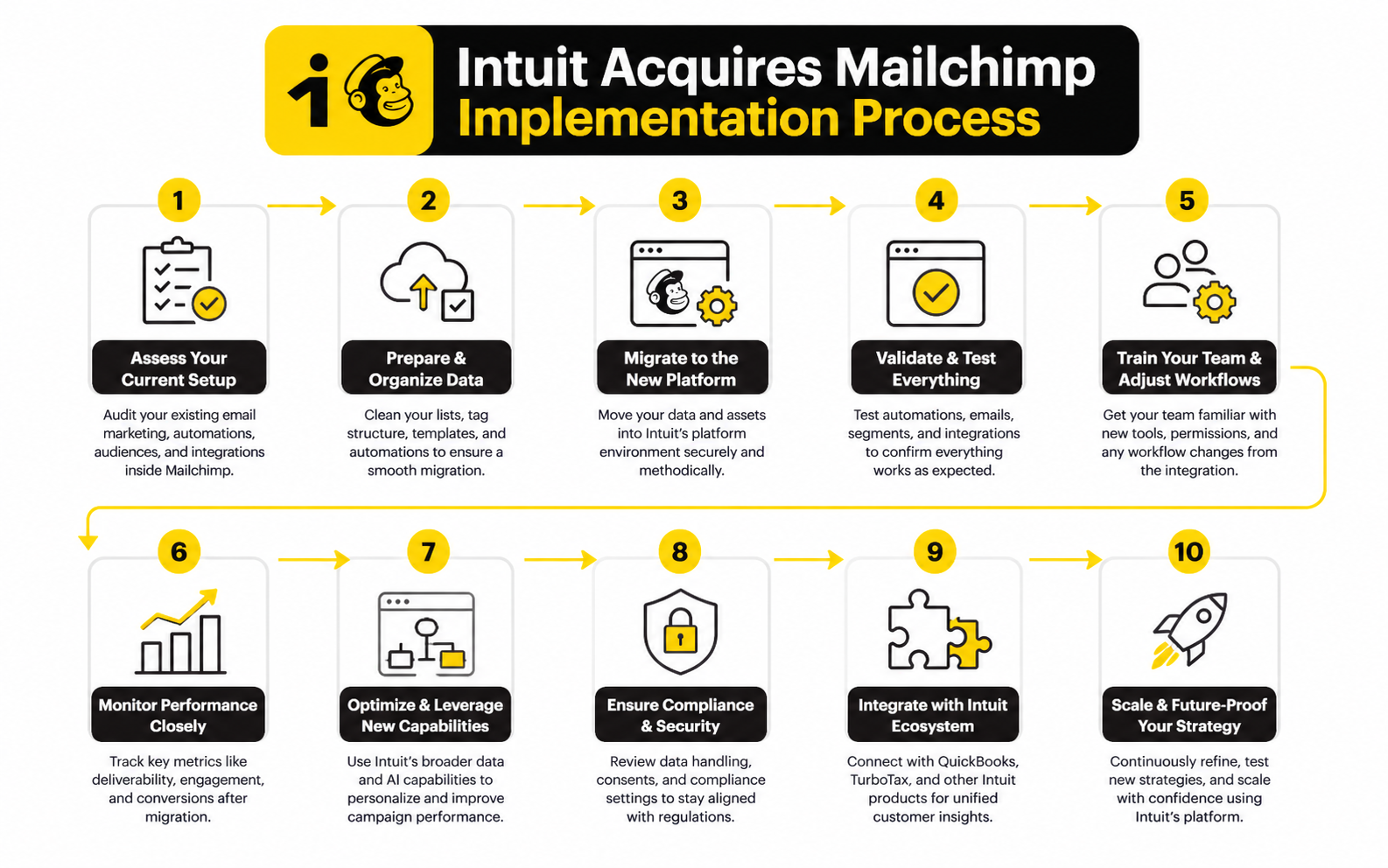
A professional implementation does not start with software setup. It starts with the business model. The operator has to understand how leads become customers, how customers become repeat buyers, and where follow-up currently breaks.
This is the difference between buying tools and building a system. When Intuit acquires Mailchimp, the strategic promise is integration. For a small business, the practical promise is less manual work and more carefully marketing decisions. But that only happens when the implementation reflects how the business actually sells.
The best process is boring in the right way. Define the customer lifecycle, clean the data, build a few high-value segments, create the first automations, measure revenue impact, and improve from there. That sequence beats random automation every time.
Step 1: Map The Customer Lifecycle
Start by writing down the real path a customer takes. Not the ideal path from a slide deck. The real one. How does someone first hear about the business, what makes them raise their hand, what has to happen before they buy, and what brings them back?
This map should include every major customer state. Lead, first-time buyer, repeat buyer, inactive customer, high-value customer, referral source, and churn risk are common starting points. A service business may also need consultation booked, proposal sent, invoice paid, job completed, review requested, and reactivation needed.
Once the lifecycle is clear, the marketing system has a job. It should move people from one state to the next with fewer dropped balls. That is where connected QuickBooks and Mailchimp data becomes useful because the system can reflect what customers have actually done, not just what they clicked.
Step 2: Decide Which Data Should Trigger Action
Not every piece of data deserves an automation. Some data is useful for reporting, some is useful for segmentation, and some should trigger a specific customer message. The operator’s job is to separate those categories before the system gets messy.
Useful triggers often come from meaningful customer events. A first purchase can trigger onboarding. A completed service can trigger a review request. A long gap since the last purchase can trigger a win-back campaign. A high lifetime value threshold can trigger a loyalty or referral offer.
Mailchimp’s QuickBooks guidance highlights automatically added tags and contact profiles that can help businesses review invoices, individual customer revenue, service payments, emails sent, and related customer activity. That is exactly the kind of information that can support practical marketing decisions when it is used with restraint. The goal is not to build a trigger for everything. The goal is to build triggers for moments that actually matter.
Step 3: Build The First Three Automations
The first three automations should usually cover welcome, post-purchase, and reactivation. These are simple enough to implement but important enough to create real leverage. They also teach the business how its data, messaging, and timing work together.
A welcome automation should introduce the business, set expectations, and guide the person toward the next action. A post-purchase automation should confirm the decision, help the customer get value, and open the door to reviews, referrals, or a next purchase. A reactivation automation should identify people who have gone quiet and give them a relevant reason to come back.
This is where many teams should resist the urge to get clever. Simple workflows with strong timing and clear offers usually outperform complicated flows that nobody maintains. Once the first three automations are working, the business can add more specific journeys for high-value customers, seasonal buyers, abandoned consultations, or product-specific follow-ups.
Step 4: Measure Revenue, Not Just Engagement
Engagement metrics are helpful, but they are not the finish line. Opens and clicks can show whether the message is getting attention. Revenue, repeat purchases, booked calls, paid invoices, and customer retention show whether the system is creating business value.
This is why the Intuit-Mailchimp connection is strategically important. If marketing data and financial data stay separate, the operator has to guess what worked. If they move closer together, the operator can make better decisions about what to send, who to target, and where to spend time.
The reporting should stay focused. Track the campaigns and automations that influence meaningful business outcomes, then compare them against the segment they targeted. If a reactivation campaign brings back dormant customers, keep improving it. If a newsletter gets clicks but creates no measurable action, treat it as a content asset, not a growth engine.
Statistics And Data That Actually Matter
The data behind the Intuit-Mailchimp deal should not be read like a random collection of impressive numbers. The real question is what each number tells an operator to do differently. If a metric does not change a decision, it is decoration.
The first major number is the acquisition price. Intuit completed the Mailchimp acquisition for approximately $12 billion in cash and stock, which showed how valuable customer engagement data had become to a company already sitting close to small business finances. That price only makes strategic sense if Mailchimp helps Intuit expand beyond accounting into growth, retention, and customer intelligence.
The second number is the early integration signal. QuickBooks customers imported more than 400,000 customer contacts into Mailchimp during the initial one-way integration test. That matters because it shows the problem was not imaginary. Businesses already had customer data inside QuickBooks, and they wanted to use that data for marketing instead of letting it sit unused in financial records.
The 63% Click-Through Signal
One of the most useful performance signals comes from the QuickBooks integration page, where Mailchimp states that customers using the QuickBooks integration generate 63% higher average click-through rates than customers using Mailchimp alone. That number is important, but it needs to be interpreted properly. It does not mean every business will instantly increase clicks by 63% just because it connects two platforms.
The more useful takeaway is that better customer context can improve campaign relevance. If a business can target top spenders, recent buyers, inactive customers, or people tied to specific purchase behavior, the campaign has a better chance of feeling relevant. Relevance is what drives action, not the integration itself.
This is why the number should lead to a practical action. Operators should not simply connect QuickBooks and Mailchimp and assume the work is done. They should build campaigns around segments where financial behavior changes the message, timing, or offer.
Open Rates Are Directional, Not Final
Open rates still matter, but they are not as clean as they used to be. Apple’s Mail Privacy Protection and similar privacy changes can inflate or distort open tracking, which means an open rate should be treated as a directional signal rather than a precise measure of human attention. This is especially important for small businesses that might otherwise make campaign decisions based on a metric that looks stronger than it really is.
Mailchimp’s own benchmark guidance frames email benchmarks as a way to compare open rates, click-through rates, and conversion rates against broader performance patterns, not as a final judgment of campaign quality. That is the right mindset. Benchmarks help you spot outliers, but they do not replace business-specific measurement.
The better move is to use open rates as an early diagnostic. If opens are weak, test subject lines, sender name, audience fit, and send timing. If opens are strong but clicks are weak, the problem is probably the offer, message clarity, or call to action.
Clicks Reveal Intent
Clicks are usually more useful than opens because they show active interest. A person who clicks has done more than passively load an email. They have shown enough intent to inspect an offer, read a page, book a call, view a product, or learn more.
That makes click-through rate a strong middle-of-funnel metric. It does not prove revenue, but it shows whether the campaign can move attention into action. In the context of the Intuit-Mailchimp ecosystem, clicks become even more useful when they can be compared against customer type, purchase history, invoice activity, and repeat behavior.
The mistake is treating click-through rate as the end goal. A campaign with fewer clicks can still outperform a high-click campaign if those clicks come from better customers and produce more revenue. This is where the Intuit acquires Mailchimp story becomes practical: marketing analytics should move closer to financial outcomes, not stop at engagement.
Revenue Is The Real Scoreboard
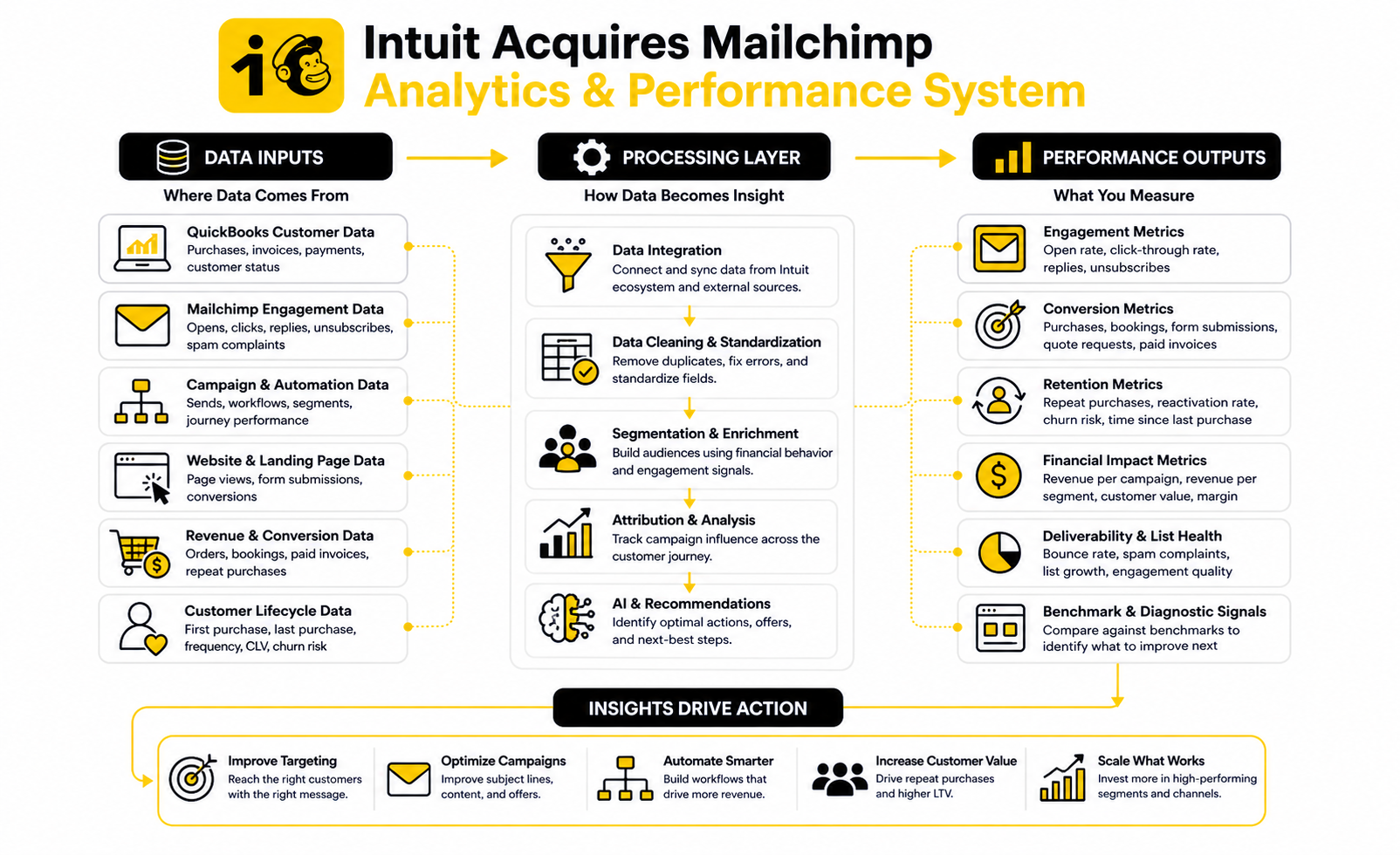
Revenue measurement is where the system either proves itself or gets exposed. If an automation creates opens and clicks but does not influence purchases, bookings, renewals, invoice payments, or repeat activity, it is not a growth system yet. It is just communication.
For ecommerce, the revenue path may be direct: campaign sent, product clicked, order placed. For service businesses, the path may be less immediate: campaign sent, consultation booked, proposal accepted, invoice paid. Both paths still need measurement because both reveal whether marketing is creating business value.
The key is attribution with humility. Not every sale can be perfectly credited to one email, one landing page, or one automation. But a business can still measure campaign-influenced revenue, repeat purchase behavior, inactive customer reactivation, and segment-level performance well enough to make better decisions.
Customer Lifetime Value Changes The Campaign Strategy
Customer lifetime value is one of the most important numbers in this entire conversation. If a customer buys once and disappears, the business needs a different strategy than it needs for a customer who buys repeatedly over months or years. The acquisition becomes more interesting when Mailchimp campaigns can be informed by the financial history stored closer to QuickBooks.
This matters because some campaigns should not be judged only by immediate sales. A post-purchase education sequence may reduce refunds, increase satisfaction, or prepare the customer for a second purchase later. A retention campaign may look quiet in the first week but still protect future revenue.
The practical action is to separate acquisition campaigns from retention campaigns. Acquisition campaigns should be measured by lead quality, conversion rate, and cost efficiency. Retention campaigns should be measured by repeat purchase rate, time between purchases, customer value, and win-back performance.
Benchmarks Should Guide Diagnosis, Not Ego
Benchmarks are useful when they help you ask better questions. They are dangerous when they become a scoreboard for ego. A business with a smaller, high-intent customer list can outperform a larger list with stronger-looking vanity metrics.
The right benchmark question is not, “Are we above average?” The right question is, “What does this metric tell us to fix next?” If open rates lag, improve the hook and audience match. If clicks lag, improve the offer and call to action. If revenue lags, inspect the landing page, sales process, product fit, pricing, and follow-up.
This is the measurement discipline operators need. The Intuit-Mailchimp combination is valuable only when the business uses data to make sharper decisions. More data without better decisions is just noise with a nicer dashboard.
The Measurement Stack To Use
A simple measurement stack is enough for most small businesses. You do not need an enterprise analytics department to get value from connected marketing and financial data. You need clear campaign goals, clean segments, consistent tracking, and a monthly review rhythm.
Start with these measurement layers:
This stack keeps the business focused. It connects the marketing layer to the money layer without turning analytics into a full-time job. That is exactly where the acquisition logic becomes useful for real operators: better segmentation, better follow-up, and better decisions based on outcomes that actually matter.
Risks, Trade-Offs, And What Businesses Should Watch
The fact that Intuit acquires Mailchimp does not automatically make the combined ecosystem the best choice for every business. It makes the ecosystem more strategically interesting, but operators still need to think clearly. Integration can create leverage, but it can also create dependency.
The biggest mistake is treating platform consolidation as a shortcut for strategy. A connected stack helps only when the business already understands its customer journey, data needs, and marketing priorities. If those pieces are unclear, the business can end up with more connected confusion instead of a cleaner growth system.
This is where expert operators slow down. They do not ask, “Can this platform do it?” They ask, “Should this platform own this part of the business?” That question matters because marketing, financial data, customer records, and automation logic become harder to untangle once they are deeply connected.
Platform Dependency
Platform dependency is the obvious trade-off. When a business runs customer data, financial workflows, audience segmentation, and campaign execution through one ecosystem, daily operations can become smoother. But switching costs also rise.
This is not automatically bad. A local service business, ecommerce brand, or consultant may happily accept that trade-off if QuickBooks and Mailchimp reduce manual work and make follow-up easier. The risk appears when the business has no export discipline, no backup reporting, and no clear ownership of its data structure.
The practical move is simple. Keep the platform, but do not become blind inside it. Export important reports, document your segment definitions, maintain a clean customer database, and make sure your team understands the logic behind the automations instead of treating them like magic.
Data Quality And Consent
Data quality is not a technical detail. It is the difference between relevant marketing and annoying marketing. If QuickBooks data contains messy names, duplicate contacts, outdated purchase records, or unclear customer status, Mailchimp campaigns built from that data will inherit the mess.
Consent matters just as much. A person appearing in a financial system does not automatically mean they should receive every marketing campaign. Businesses still need to respect opt-in rules, unsubscribe behavior, local privacy requirements, and the difference between transactional communication and promotional messaging.
This is especially important because the combined value of QuickBooks and Mailchimp comes from richer customer context. Richer context creates better marketing, but it also raises the standard for responsible use. The business should be able to explain why a contact received a message, where the data came from, and how that person can control their preferences.
Integration Limits
Every integration has limits. QuickBooks and Mailchimp can reduce manual work, but no integration removes the need for good operational judgment. Some fields may not sync the way a business expects, some workflows may still require manual checks, and some reporting questions may need additional analysis outside the default dashboards.
Intuit’s QuickBooks support materials describe the integration as a way to use QuickBooks data to segment audiences in Mailchimp and create custom messaging for new or existing customers. That is useful, but it should not be confused with a fully custom data warehouse or enterprise-grade attribution system. Small businesses should use it for practical growth workflows, not pretend it solves every analytics problem.
The healthy mindset is to design around confirmed capabilities. Build the first automations using fields and events that reliably sync. Then expand only after the team has tested the workflow, checked the reporting, and confirmed that the data is clean enough to support decisions.
Mailchimp’s Growth Pressure Inside Intuit
There is also a strategic risk on Intuit’s side. Mailchimp is no longer an independent company optimizing only for its own product roadmap. It now sits inside a much larger financial technology company with broader priorities around QuickBooks, AI, mid-market expansion, and platform consolidation.
That can be good for customers if it leads to stronger integrations and more useful automation. It can also create tension if product decisions increasingly favor Intuit’s ecosystem over flexible standalone marketing workflows. Public market coverage has also flagged Mailchimp performance as a pressure point in Intuit’s growth story, with fiscal 2026 guidance commentary noting weaker Mailchimp results compared with stronger areas of the business.
Operators should not overreact to that. Mailchimp remains a major marketing platform with a huge installed base. But they should watch roadmap direction, pricing changes, deliverability support, integration depth, and whether the product continues serving standalone marketing teams as well as QuickBooks-centered businesses.
Pricing And Stack Creep
Pricing becomes more important as the stack expands. A business might start with a basic Mailchimp account, then add more contacts, higher-tier automation, QuickBooks, payments, payroll, apps, landing page tools, CRM software, reporting tools, and funnel builders. Individually, each tool can feel reasonable. Together, the monthly stack can become bloated.
This is why every tool should have a job. If Mailchimp handles email and lifecycle marketing, do not pay for another email platform unless there is a clear reason. If QuickBooks is the financial source of truth, do not create messy duplicate customer records in five other places. If a funnel builder is needed, use it for funnel execution instead of letting it become another half-maintained CRM.
For businesses that want a broader sales and marketing stack in one place, GoHighLevel can be worth comparing against a QuickBooks-plus-Mailchimp setup. For creators or small teams that want simpler funnel and email infrastructure, Systeme.io may fit better. The right choice depends on the operating model, not on which tool sounds more impressive.
What The Acquisition Means For The Future Of SMB Software
The broader lesson is clear: small business software is moving toward connected operating systems. Accounting, marketing, payments, payroll, CRM, analytics, and AI assistance are no longer separate conversations. They are becoming parts of the same business workflow.
That is why the Intuit-Mailchimp deal still matters years after the announcement. It showed that customer growth data and financial data belong closer together. The business owner does not care whether a workflow is technically “marketing” or “finance.” They care whether it helps them get paid, retain customers, and make better decisions.
This trend will not stop with Intuit. More platforms will try to own the relationship between customer acquisition, transaction data, automation, and business advice. The winners will be the tools that make the operator’s life simpler without hiding the truth behind vague dashboards.
AI Will Raise The Value Of Clean Data
AI makes the data problem more important, not less. If the underlying customer records are messy, AI recommendations will be weaker. If the segmentation logic is poor, AI-generated campaigns will still target the wrong people with the wrong message.
Intuit has repeatedly framed its strategy around an AI-driven expert platform, and Mailchimp gives that strategy more customer engagement data to work with. The opportunity is obvious: suggest campaigns, identify customer groups, predict churn risk, recommend offers, and help small businesses act faster. But AI only becomes useful when it is grounded in trustworthy business data.
This gives operators a very practical assignment. Clean the data now. Standardize fields, define segments, remove junk contacts, preserve consent, and track outcomes properly. The businesses that do this early will get more value from whatever AI features arrive next.
The Best Stack Will Still Be Intentional
The future is not “use one platform for everything.” That is too simplistic. The future is intentional integration, where every tool has a role and the most important data moves cleanly between systems.
For some businesses, Intuit plus Mailchimp will be enough. For others, it will sit beside a dedicated ecommerce platform, CRM, funnel builder, booking tool, or support desk. A landing-page-heavy brand may still want Replo, while a business building conversational lead capture may add ManyChat when messaging automation is central to the customer journey.
The rule is simple. Add a tool only when it strengthens the system. If it creates another disconnected database, another reporting layer nobody checks, or another automation path nobody owns, it is not helping.
Operators Need Ownership, Not Just Access
Access to data is not the same as ownership of the growth system. A business can have QuickBooks, Mailchimp, automations, reports, and AI suggestions and still be unclear about what is actually working. Ownership means someone understands the customer journey, the segments, the offers, the automations, and the numbers.
That role does not always need to be full-time. In a small business, it might be the founder, operations manager, marketer, bookkeeper, or agency partner. But someone has to own the system because software does not make strategic trade-offs by itself.
This is the real takeaway as the article moves toward the close. The Intuit-Mailchimp acquisition is important because it points to where small business software is going. But the business still wins through clear thinking, clean execution, and disciplined measurement.
The Final System: What Operators Should Take From The Deal
The practical takeaway is not that every business should copy Intuit’s stack. The takeaway is that marketing, customer data, and financial data now belong in the same strategic conversation. When those pieces stay disconnected, the business keeps guessing.
When they work together, the operator can see which audiences are worth nurturing, which customers should be reactivated, which campaigns influence real revenue, and which offers deserve more attention. That is the real system behind the Intuit acquires Mailchimp story. It is not about software trivia. It is about building a business that learns from its own customer behavior.
The best operators will use this shift carefully. They will connect the tools where connection creates leverage, keep ownership of their data, and measure results by business outcomes instead of dashboard vanity. That is how a small business turns a platform acquisition into a practical lesson for its own growth system.
Why did Intuit acquire Mailchimp?
Intuit acquired Mailchimp to expand beyond accounting and financial management into customer growth, marketing automation, and retention. QuickBooks already gave Intuit a strong position inside small business finance, while Mailchimp brought audience data, email marketing, automation, landing pages, and customer engagement. The acquisition created a path for Intuit to help businesses not only manage money, but also generate more of it.
How much did Intuit pay for Mailchimp?
Intuit completed the Mailchimp acquisition for approximately $12 billion in cash and stock. The size of the deal showed how valuable small business customer engagement data had become. It also signaled that marketing platforms were becoming strategic infrastructure, not just campaign tools.
When did Intuit acquire Mailchimp?
Intuit announced the agreement to acquire Mailchimp in September 2021 and completed the acquisition in November 2021. The timing mattered because small businesses were rapidly moving more sales, marketing, and customer communication online. Intuit used the deal to strengthen its position in the digital operating system small businesses rely on every day.
What changed after Intuit acquired Mailchimp?
The biggest change was strategic positioning. Mailchimp moved from being primarily a standalone marketing platform into Intuit’s broader small business ecosystem. That made it more closely connected to QuickBooks, customer records, transaction history, and financial workflows.
How does Mailchimp connect with QuickBooks?
The QuickBooks and Mailchimp integration allows businesses to bring QuickBooks customer data into Mailchimp and use that data for audience segmentation and campaigns. Intuit’s support materials describe workflows where businesses can connect QuickBooks Online, use imported contacts in Mailchimp, and create campaigns or suggested segments from QuickBooks Home. That gives operators a more direct way to turn customer records into marketing action.
Why does the QuickBooks-Mailchimp integration matter?
The integration matters because customer data becomes more useful when it can drive action. A business can use purchase history, customer value, and engagement patterns to create more relevant campaigns. Mailchimp states that customers using the QuickBooks integration generate 63% higher average click-through rates than customers using Mailchimp alone, which reinforces the value of better segmentation.
Does the acquisition mean Mailchimp is only for QuickBooks users now?
No. Mailchimp still serves businesses outside QuickBooks, and many users continue to use it as a standalone marketing platform. The acquisition does mean Intuit has a strong incentive to make Mailchimp more valuable inside the QuickBooks ecosystem. Operators should watch the product roadmap and decide whether the integration benefits their specific workflow.
Is Mailchimp still good for email marketing after the acquisition?
Mailchimp can still be a strong option for email marketing, especially for businesses that want audience management, campaigns, automations, forms, and basic customer journeys in one platform. Its value increases when the business has clean data and a clear lifecycle strategy. Like any platform, it works best when the operator knows what segments, offers, and follow-up sequences actually matter.
What are the main risks of using QuickBooks and Mailchimp together?
The main risks are platform dependency, messy data, unclear consent, and overbuilt automation. A connected ecosystem can reduce manual work, but it can also make switching harder if everything depends on one platform. Businesses should document their segments, keep clean exports, respect consent rules, and avoid building automations nobody understands.
What should businesses measure after connecting QuickBooks and Mailchimp?
Businesses should measure more than opens and clicks. Useful metrics include revenue per campaign, repeat purchase rate, reactivation performance, customer lifetime value, unsubscribes, spam complaints, booked calls, paid invoices, and segment-level performance. Engagement is useful, but revenue and retention tell the stronger story.
Is the Intuit-Mailchimp deal mainly about AI?
AI is part of the long-term logic, but it is not the whole story. Intuit has positioned itself as an AI-driven expert platform, and Mailchimp gives it more customer engagement data to support recommendations, automation, and more carefully workflows. Still, AI only becomes useful when the underlying business data is accurate, structured, and connected to real outcomes.
What does the acquisition mean for agencies and marketers?
For agencies and marketers, the deal shows that clients increasingly expect marketing to connect with revenue, operations, and financial reporting. It is no longer enough to send campaigns and report clicks. Skilled marketers need to understand segmentation, customer lifecycle strategy, retention, attribution, and the business model behind the campaign.
Should a small business use Mailchimp, GoHighLevel, or ClickFunnels?
The right choice depends on the business model. Mailchimp fits well when email marketing, audience segmentation, and content-led customer journeys are central. GoHighLevel can make sense for agencies, service businesses, pipelines, CRM workflows, and multi-channel follow-up. ClickFunnels can fit when funnel pages, offers, and conversion flows are the main focus.
What is the biggest lesson from the Intuit acquires Mailchimp story?
The biggest lesson is that growth systems are becoming connected. Marketing cannot stay separate from customer data, sales activity, and financial outcomes. Businesses that connect those pieces carefully will make better decisions, waste less effort, and build stronger customer relationships.
Build a stronger local presence with BAAM AI
Turn your website, Google profile, social channels, and AI visibility into one growth engine
Most businesses do not need more random marketing activity. They need a consistent presence system that helps the right people find them, trust them, and take action. BAAM AI brings strategy, local SEO, website updates, Google Maps visibility, social content, AI-search readiness, media production, and reporting into one practical monthly engine.
If you want your marketing to keep working after the campaign ends, start with a free BAAM AI presence audit. See how your business shows up today and where the fastest visibility wins are at BAAM AI.