
BAAM AI Blog
Interspire Com: A Practical Guide To Understanding, Planning, And Implementing Interspire Email Marketer
Interspire com usually comes up when someone is researching Interspire Email Marketer, the self-hosted email marketing platform built for businesses that want more control over campaigns, lists, automation, and...
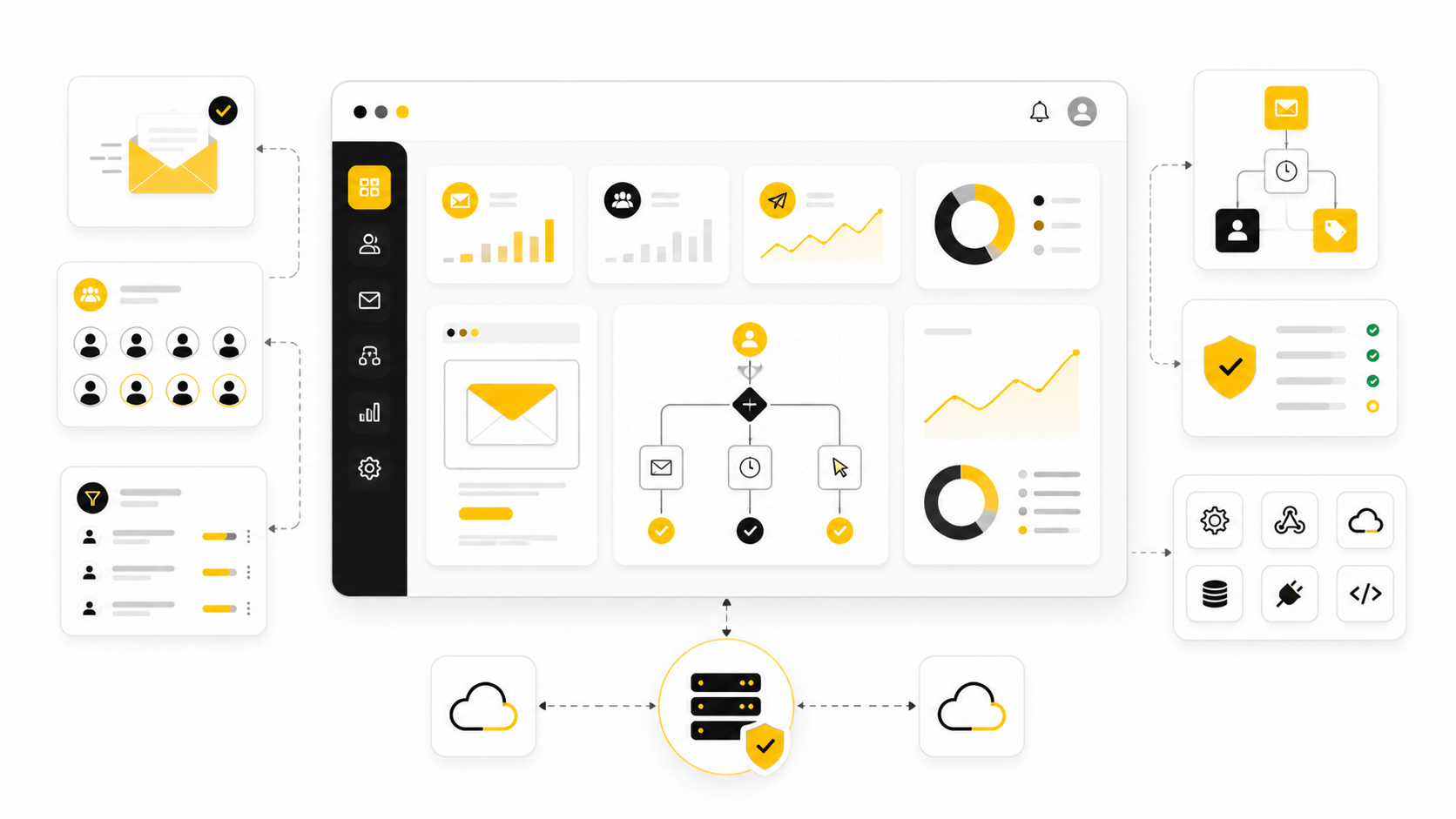
Interspire com usually comes up when someone is researching Interspire Email Marketer, the self-hosted email marketing platform built for businesses that want more control over campaigns, lists, automation, and sending infrastructure. That control is the main reason people still look at Interspire instead of jumping straight into a fully hosted email platform. You are not just choosing an email tool; you are deciding how much responsibility you want over hosting, deliverability, maintenance, integrations, and long-term campaign operations.
That tradeoff matters. A hosted email platform can feel easier on day one because the vendor handles most of the technical layer. Interspire is different because it gives you more ownership, which can be powerful for agencies, technical teams, publishers, and businesses with specific sending workflows, but only if the setup is handled professionally.
This guide will treat Interspire com as a business decision, not just a software search. We will look at what the platform is, why people consider it, where it fits, what can go wrong, and how to build a clean implementation plan before you commit. The goal is simple: help you decide whether Interspire Email Marketer makes sense for your situation and, if it does, how to approach it without creating a deliverability mess.
Interspire Com And The Self-Hosted Email Marketing Decision
Interspire com sits in a category that many marketers misunderstand at first: self-hosted email marketing software. That means the platform can help you create campaigns, manage subscribers, segment lists, build autoresponders, and track performance, but the responsibility for the environment around it is much heavier than with a typical SaaS email tool. Hosting, sending infrastructure, authentication, bounce handling, security, backups, and ongoing maintenance all become part of the real decision.
This is why the question is not simply, “Is Interspire good?” A better question is, “Do we have the right use case, technical capacity, and deliverability discipline to make a self-hosted platform work?” When the answer is yes, the model can give a team flexibility and ownership that hosted platforms often restrict.
When the answer is no, Interspire can become frustrating quickly. A poorly configured installation can lead to low inbox placement, messy lists, unreliable tracking, and operational headaches that cancel out the original cost advantage. The software is only one part of the system.
Why Interspire Still Matters
Interspire still matters because some businesses do not want their entire email operation locked inside a hosted platform with usage limits, list-based pricing, and policy restrictions that may not fit their workflow. Agencies, publishers, ecommerce operators, B2B teams, and technical marketers often want more control over data, templates, sending logic, and infrastructure. That is where the appeal of Interspire com usually begins.
But control is not the same thing as simplicity. A self-hosted platform gives you more room to customize, but it also gives you more room to break things. That is why Interspire is usually a better fit for teams that think operationally, not for people looking for the fastest possible beginner tool.
The real value is not “cheap email marketing.” That framing leads to bad decisions. The real value is controlled email infrastructure for teams that know what they are doing or are willing to set it up properly.
Framework Overview
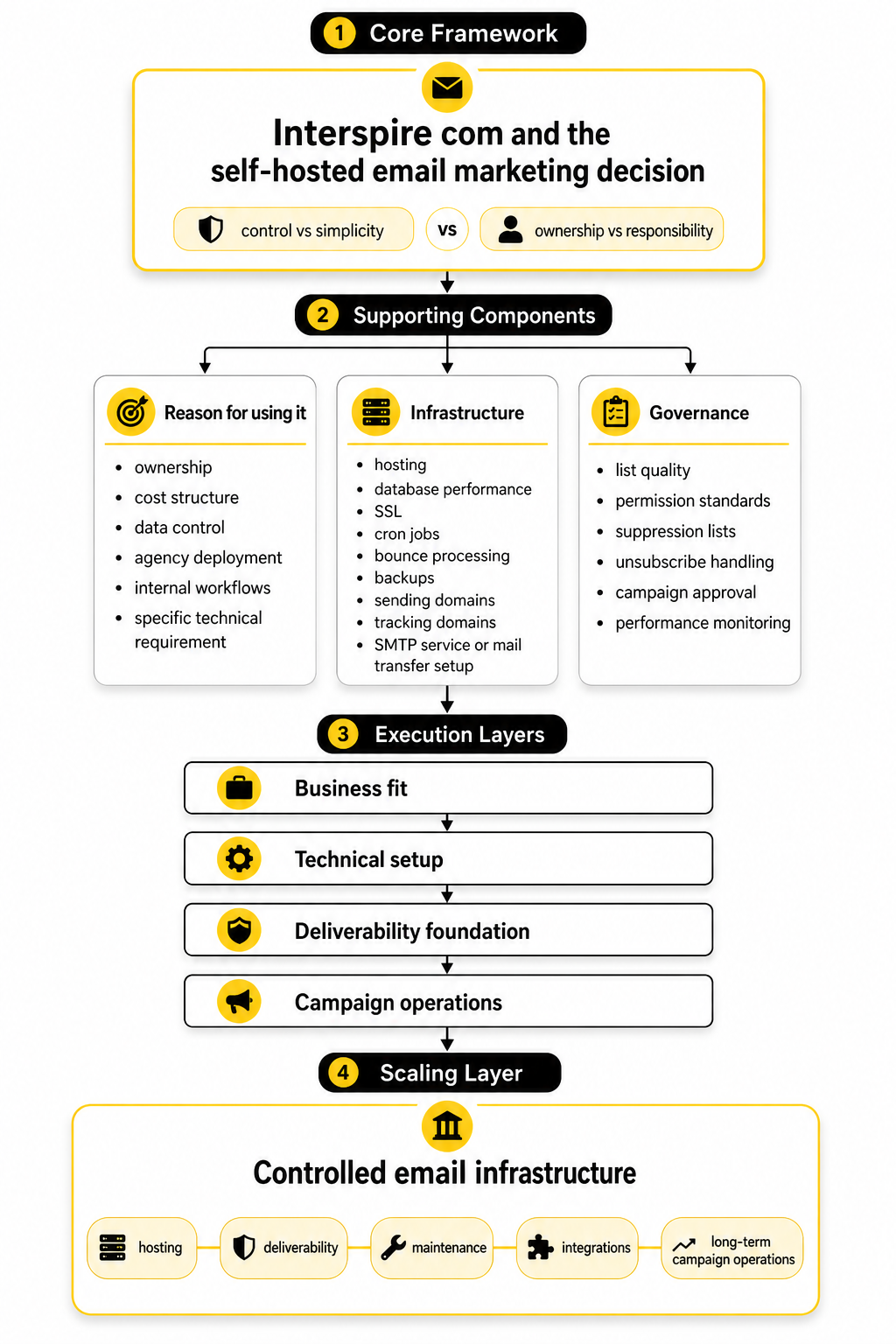
A smart Interspire decision has four layers: business fit, technical setup, deliverability foundation, and campaign operations. Business fit answers whether Interspire matches your goals, budget, team skill, and sending model. Technical setup answers whether the platform can be installed, secured, maintained, and connected to the right sending services.
Deliverability foundation is the part most people underestimate. Email marketing is no longer just about uploading a list and pressing send; mailbox providers expect proper authentication, responsible sending behavior, clean unsubscribe handling, and low complaint rates. If those foundations are weak, the platform you use will not save the campaign.
Campaign operations are where the system becomes useful. This includes segmentation, automation, testing, reporting, list hygiene, and the daily discipline of sending relevant emails to people who actually want them. Interspire can support that workflow, but it will not create the strategy for you.
Core Components Of A Professional Interspire Plan
A professional Interspire plan starts with a clean reason for using it. You should know whether the platform is being considered for ownership, cost structure, data control, agency deployment, internal workflows, or a specific technical requirement. Without that reason, it is too easy to compare Interspire against modern hosted platforms on the wrong criteria.
The second component is infrastructure. That includes hosting, database performance, SSL, cron jobs, bounce processing, backups, sending domains, tracking domains, and integration with an SMTP service or mail transfer setup. These details are not glamorous, but they decide whether the system feels stable or fragile.
The third component is governance. Someone needs to own list quality, permission standards, suppression lists, unsubscribe handling, campaign approval, and performance monitoring. Interspire com can be part of a serious email stack, but only when the operational rules around it are serious too.
What Interspire Email Marketer Does And Who It Fits
Interspire Email Marketer is built for teams that want to run email marketing from their own environment instead of renting every part of the workflow from a hosted platform. The official product positioning is clear: it is a self-hosted email marketing automation platform for creating campaigns, managing lists, personalizing messages, processing bounces, using autoresponders, and tracking results. That makes Interspire com different from tools where the vendor controls nearly everything behind the scenes.
The practical meaning is simple. You get a campaign management system, but you still need to think like an operator. Interspire can help you build the email program, but hosting, sending configuration, list discipline, and maintenance still need real attention.
That is why this section matters. Before comparing features, you need to know whether Interspire fits the way your team actually works. A powerful self-hosted platform in the wrong hands becomes expensive in hidden ways, even if the software itself looks cost-efficient.
The Main Jobs Interspire Handles
Interspire handles the core jobs most email marketing teams expect from a serious email platform. You can create and send campaigns, organize subscribers into lists, use custom fields for personalization, build signup forms, segment audiences, set up autoresponders, and review campaign performance. Those are the visible features people usually notice first when researching Interspire com.
The deeper value is in how those features connect. A clean list can feed segmented campaigns, segmented campaigns can feed better reporting, and reporting can guide future sends. That loop is what turns email software into an actual marketing system instead of a place where newsletters are manually pushed out.
Interspire also supports operational features that matter more as a list grows. Its documentation covers bounce processing, scheduled jobs, server requirements, and configuration details that a hosted beginner tool usually hides. These are not minor technical notes; they are part of what makes the platform suitable for teams that want control.
Where Interspire Fits Best
Interspire fits best when a business has a real reason to own more of its email setup. That reason might be data control, agency client management, internal infrastructure rules, custom integrations, or a preference for a one-time software model instead of contact-based SaaS pricing. In those cases, Interspire com can make sense because the team is not simply buying convenience; it is buying flexibility.
It is especially relevant for technical marketers, agencies, publishers, B2B teams, and operators who already understand that email success depends on process. These teams are usually comfortable working with developers, server admins, SMTP providers, DNS records, and deliverability checks. They do not expect the software to remove every technical responsibility.
That is the key distinction. Interspire is not only for “advanced” users in the sense of complicated features. It is for teams that accept operational ownership and want the benefits that come with it.
Where Interspire Is Usually The Wrong Fit
Interspire is usually the wrong fit for someone who wants the fastest possible way to send a small newsletter without touching infrastructure. If you do not want to think about hosting, cron jobs, bounce mailboxes, authentication, backups, or technical support, a hosted platform will usually feel better. That is not a weakness of Interspire; it is just the nature of self-hosted software.
Small teams with no technical help should be honest about this. A simpler hosted tool such as Brevo or Moosend may be a better starting point if the priority is speed, templates, managed sending, and fewer moving parts. The best tool is the one your team can operate consistently.
Interspire can also be a poor fit if the plan is to use it as a shortcut around permission-based email marketing. That mindset is dangerous. No platform can turn weak consent, purchased lists, or sloppy targeting into a healthy email program.
The Self-Hosted Advantage
The biggest advantage of Interspire is control. You can decide where the application runs, how the database is managed, what sending service supports delivery, how data is stored, and how the system connects with other tools. For some businesses, that control is the whole point of researching Interspire com in the first place.
Control also helps when a team needs a workflow that does not fit neatly inside a standard SaaS plan. Agencies may want repeatable setups for clients. Publishers may want deeper list segmentation and custom campaign operations. Technical teams may want API access, custom fields, and infrastructure-level ownership.
But control only becomes an advantage when it is paired with discipline. If the server is neglected, the database grows messy, or bounce handling is ignored, the same freedom becomes a liability. Interspire rewards teams that treat email like infrastructure, not just marketing decoration.
The Hosted Platform Advantage
Hosted platforms win when convenience matters more than ownership. They usually give you faster onboarding, managed updates, simpler support, built-in templates, and fewer decisions about infrastructure. That can be the more carefully choice for a founder, creator, or small team that wants to focus on content and offers instead of configuration.
This is also where broader marketing suites can make sense. If your email workflow needs pipelines, SMS, booking, landing pages, and client management in one place, GoHighLevel may fit better than a standalone self-hosted email platform. If the main job is funnel building with email attached, ClickFunnels may be more aligned with the business model.
That does not make those tools “better” than Interspire. It means they solve a different problem. Interspire is strongest when you want email marketing ownership; hosted platforms are strongest when you want managed convenience.
The Real Buyer Profile
The best Interspire buyer is not just someone looking for software. It is someone who already understands the email program they want to build. They know their lists, their sending frequency, their segmentation needs, their compliance obligations, and the level of technical support they can access.
This buyer also thinks beyond the first campaign. They care about what happens after 50 campaigns, after the database grows, after automations become more complex, and after deliverability needs active monitoring. That long-term thinking is where Interspire com can make sense as part of a serious stack.
A weak buyer profile looks very different. It starts with “I want unlimited sending for less money” and avoids the harder questions. That is where problems usually begin, because unlimited software capacity does not mean unlimited inbox trust.
Questions To Ask Before Choosing Interspire
Before choosing Interspire, ask practical questions instead of feature-only questions. The answers will tell you whether the platform fits your business or whether you are trying to force it into the wrong role. This step saves time, money, and frustration later.
These questions are not meant to scare you away from Interspire. They are meant to make the decision sharper. If you can answer them clearly, you are already thinking like the kind of operator who can make a self-hosted email platform work.
How To Think About Interspire In The Stack
Interspire should not be viewed as the entire marketing stack. It is the email marketing layer. Around it, you may still need landing pages, forms, CRM workflows, analytics, sales pipelines, scheduling, support tools, and sometimes external automation.
That is why stack planning matters. A business using Interspire com should define what Interspire owns and what other tools own. For example, Interspire might manage email campaigns and subscriber data, while another system handles lead capture, sales calls, or customer records.
This keeps the setup clean. When every tool has a clear job, the system is easier to maintain and troubleshoot. When every tool is expected to do everything, the stack gets messy fast.
The Bottom Line On Fit
Interspire Email Marketer is best for people who want control and are willing to operate the system properly. It can be a strong choice for teams that value self-hosting, flexible infrastructure, list ownership, and deeper technical control. It is not the best choice for everyone, and that is exactly why the fit question matters.
If you want a simple hosted newsletter tool, Interspire may be more responsibility than you need. If you want a controlled email marketing system and you have the technical resources to support it, Interspire com becomes much more interesting. The decision is not about chasing the longest feature list.
The decision is about matching the platform to the reality of your business. Once that fit is clear, the next step is understanding the core components of a professional Interspire setup.
The Core Components Of A Professional Interspire Setup
Once Interspire makes sense strategically, the next question is execution. This is where the conversation moves from “Should we use it?” to “Can we install, configure, secure, and operate it properly?” That shift matters because Interspire com is not just a login screen; it is a working email system that depends on the environment around it.
A professional setup has five core components: the application environment, the sending layer, the database and subscriber structure, automation jobs, and operational monitoring. If one of those pieces is weak, the whole system becomes harder to trust. That is why the best implementation plan is simple, documented, and tested before any serious campaign goes live.
The mistake is trying to rush straight into importing contacts and sending emails. Do not do that. Build the foundation first, because email systems punish shortcuts.
Start With The Server Environment
The server is the base layer of the Interspire setup. Interspire Email Marketer is a web-based application, so the hosting environment needs to support the right web server, PHP version, database, file permissions, and extensions before the software can run properly. This is not the place to guess or use the cheapest possible hosting plan just because the monthly cost looks attractive.
A serious implementation starts by confirming the requirements before installation. Interspire’s current documentation lists Linux, Nginx or Apache, PHP 8.2 or 8.3, and MySQL or MariaDB as part of the modern server stack. It also notes that cron is needed for autoresponders and triggers, while PHP IMAP access is needed for bounce processing.
That gives you the first practical filter. If your server cannot support scheduled tasks, secure mail handling, database performance, and routine maintenance, it is not ready for Interspire. The platform can only be as reliable as the environment it runs on.
Plan The Installation Before Uploading Anything
A clean installation plan prevents small technical choices from becoming future problems. Before uploading files, decide where Interspire will live, who will manage the admin account, what database will be used, how backups will run, and what domain or subdomain will host the application. These decisions look small at the beginning, but they affect security, tracking, maintenance, and migrations later.
The installation itself is not the hard part. Interspire’s setup process asks for details like the license information, application URL, database credentials, administrator email, username, and password. Once those details are submitted, the system creates the required database tables and saves the configuration.
The hard part is discipline around the installation. Use strong credentials, restrict unnecessary access, document the setup, and avoid installing the system in a random folder that nobody will remember six months later. A professional Interspire com setup should be boring in the best possible way: predictable, secure, and easy to maintain.
Follow A Practical Implementation Sequence
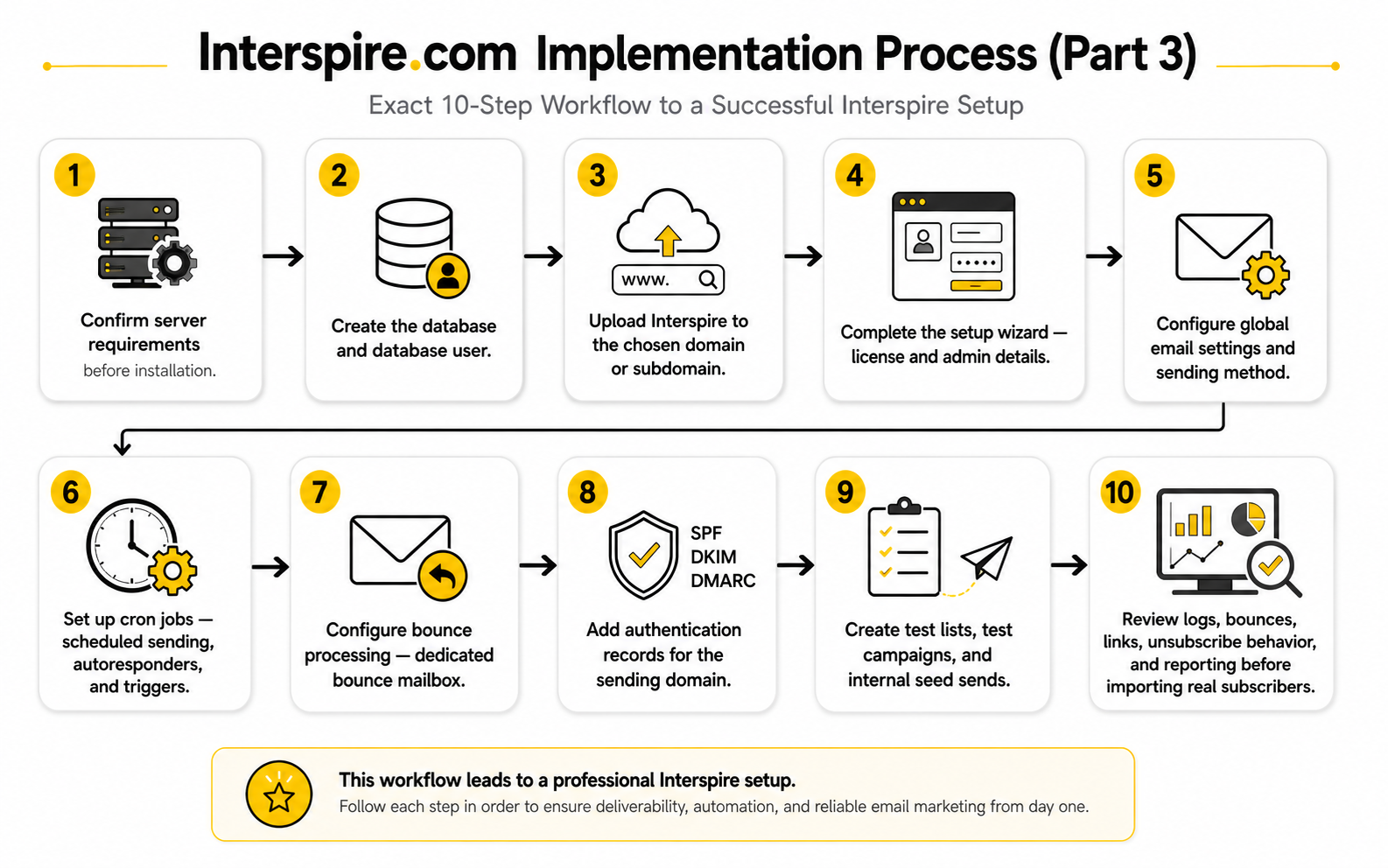
The safest way to implement Interspire is to follow a sequence instead of configuring everything randomly. This keeps the project organized and makes troubleshooting easier because each layer can be tested before the next one depends on it. Think of the setup as a chain, not a pile of features.
This process is not complicated, but it needs to be followed carefully. The goal is to prove that the system works before you put business-critical email through it. That is how you avoid turning setup day into damage control.
Configure The Sending Layer Carefully
The sending layer is where many Interspire projects succeed or fail. Interspire can manage campaigns, but the actual delivery depends on how outgoing mail is configured. That usually means connecting Interspire to an SMTP provider, a transactional email service, or a properly managed sending infrastructure.
This part needs more care than people expect. You need the SMTP hostname, port, authentication method, username, password, encryption settings, and sending limits. You also need to send test emails and confirm that messages are leaving the system correctly before any real campaign is scheduled.
Do not treat the SMTP setup as a checkbox. Sending volume, throttling, domain reputation, bounce handling, and authentication all connect here. If you want a simpler managed route, a hosted tool such as Brevo or Moosend may remove some of that operational work, but with Interspire you need to own the configuration.
Set Up Cron Jobs Before Relying On Automation
Cron jobs are what make scheduled and automated processes run without someone manually clicking around the admin panel. In an Interspire setup, cron supports functions like scheduled campaigns, autoresponders, triggers, and other recurring tasks. Without cron, the platform may look configured while important automation quietly fails.
This is one of those boring technical details that matters a lot. If a welcome email is supposed to send after signup, the system needs a reliable scheduled process to check and trigger it. If a campaign is scheduled for a specific time, the server needs to run the correct task at the correct interval.
The practical rule is simple: configure cron before building automation. Then test it with a small internal workflow. If the test does not fire reliably, fix the scheduling layer before adding more complexity.
Build Lists And Custom Fields With A Long-Term View
Subscriber structure affects everything that happens later. If lists, custom fields, and segments are thrown together casually, reporting gets messy and campaigns become harder to target. Interspire com can manage subscriber data, but it cannot rescue a bad data model.
Start with the minimum structure needed to run clean campaigns. Define the main lists, decide which custom fields are truly useful, and avoid creating dozens of fields nobody will maintain. Every extra field should have a purpose, such as personalization, segmentation, compliance, lifecycle tracking, or source attribution.
This is also the moment to decide how new subscribers enter the system. Forms, imports, API connections, and manual uploads should all follow the same naming and permission logic. A clean list structure is not exciting, but it makes the entire system more profitable and easier to manage.
Configure Bounce Processing Early
Bounce processing should be configured before real sending begins. Interspire supports bounce handling through mailbox processing, and that requires the right mailbox details, PHP IMAP access, and rules for how bounced messages are handled. This is not optional if you care about list quality.
Hard bounces and repeated failures need to be removed or suppressed so the system does not keep sending to addresses that will never receive the message. That protects the list and helps the team see cleaner performance data. If bounce processing is ignored, the database can look larger while the real reachable audience gets weaker.
Use a dedicated bounce mailbox rather than mixing bounce messages into a human inbox. Then test it with controlled sends and verify that bounces are detected properly. A professional setup proves the feedback loop before volume increases.
Secure The Admin Area And Access Rules
Security matters because an email platform has subscriber data, sending capability, templates, links, and brand reputation inside it. If the admin area is poorly protected, the risk is not just a website issue; it can become a deliverability, privacy, and business continuity issue. Treat Interspire access like access to revenue infrastructure.
Start with strong passwords, limited administrator accounts, and a clear rule for who can create campaigns, import contacts, change settings, and access reports. If multiple people need access, give them roles based on what they actually need to do. Do not share one admin login across a whole team.
You should also keep the installation updated and remove unnecessary files or old test folders. Older software installations can become risky when they are forgotten. A clean Interspire com setup includes maintenance, not just launch.
Test With Internal Campaigns First
Testing is where the setup becomes real. Before importing a full list, create internal test subscribers, send test campaigns, check personalization, click every link, review unsubscribe behavior, and confirm that tracking records the right activity. This catches problems while the audience is still small.
The first test should not be about design perfection. It should confirm that the infrastructure works. Does the email send? Does it arrive? Are the sender details correct? Do links redirect properly? Does the unsubscribe link work? Are bounces processed? Are reports recording opens and clicks as expected?
Only after those basics are proven should you move into campaign polish. This is the difference between a professional launch and a hopeful launch. Hope is not a setup strategy.
Document The Operating Process
Documentation sounds slow, but it saves time every time something needs to be changed, fixed, or handed over. A good Interspire process document should explain where the system is hosted, who has access, how sending is configured, where backups live, how bounce processing works, and what the normal campaign workflow looks like. It does not need to be fancy; it needs to be useful.
This also helps when the team grows. New people should not have to reverse-engineer the system from old Slack messages or random login notes. They should be able to understand how Interspire com fits into the broader marketing stack and what rules they need to follow.
The best documentation is short, practical, and updated when the system changes. Treat it like part of the implementation, not an optional admin chore. When something breaks, you will be glad it exists.
Know When To Use Other Tools Around Interspire
Interspire can manage the email marketing layer, but it may not be the best tool for every adjacent job. Landing pages, funnels, appointment booking, CRM pipelines, chat automation, and form logic may be better handled elsewhere. A good implementation does not force Interspire to become the whole business system.
For funnel-heavy campaigns, ClickFunnels can be useful when the priority is building the conversion path around the email follow-up. For agencies that need CRM, automation, pipelines, and client management together, GoHighLevel may handle more of the surrounding workflow. For form collection, Fillout can make sense when the lead capture experience needs to be more flexible.
The point is not to collect tools. The point is to give each tool a clear job. Interspire should own the email tasks it is best suited for, while the rest of the stack handles the pieces around it.
The Implementation Standard That Matters
A strong Interspire setup is not measured by how quickly the first email is sent. It is measured by whether the system can run campaigns repeatedly without confusion, data loss, deliverability damage, or manual chaos. That is the standard that matters.
If the server is ready, the sending layer is tested, cron jobs are working, bounces are processed, lists are structured, and access is controlled, Interspire com becomes a practical email marketing system. If those pieces are missing, the same software becomes a fragile setup that needs constant rescue.
Implementation is where the decision becomes real. Once the system is built properly, the next challenge is protecting inbox placement, staying compliant, and keeping the list healthy over time.
Deliverability, Compliance, And List Health
At this stage, Interspire is no longer just installed software. It is now part of your reputation system. Every campaign sent through an Interspire com setup creates signals that mailbox providers, subscribers, and your own reporting layer can use to decide whether the program is healthy.
This is where many teams get the wrong idea about analytics. They look at opens, clicks, and unsubscribes as isolated numbers, then make random changes when one metric moves. That is not measurement; that is guessing with dashboards.
A better approach is to treat analytics as a control system. The numbers should tell you whether people want the email, whether mailbox providers trust the sending domain, whether the list is clean, and whether the campaign is moving the business forward. If a metric does not help you make a decision, it is noise.
Statistics And Data That Actually Matter
Email benchmarks are useful only when they are interpreted with context. A benchmark can tell you whether your performance is roughly in range, but it cannot tell you whether your audience, offer, list source, or sending frequency is healthy. That is why Interspire com reporting should be read alongside list quality, traffic source, signup intent, and campaign purpose.
Recent benchmark data shows that email performance varies heavily by industry. MailerLite’s 2025 benchmark report is based on over 3.6 million campaigns from 181,000 approved accounts, which is useful because it shows how wide the range can be across different markets. HubSpot’s benchmark summary also shows that industries can differ meaningfully in open rate, click-through rate, bounce rate, and unsubscribe rate, so copying one “average” number across every business is lazy analysis.
The most useful way to use benchmark data is to set a reference point, not a verdict. If your click rate is below the industry range, do not immediately rewrite every email. First check whether the audience is properly segmented, whether the offer matches the list source, whether the call to action is clear, and whether the email is even reaching the inbox.
Why Open Rate Is A Weak Primary Metric
Open rate used to be the first number many marketers checked. Today, it is still visible, but it is weaker as a primary decision metric because privacy features and image-loading behavior can distort what an “open” means. Apple’s Mail Privacy Protection made this especially important because it can preload tracking pixels in ways that make some opens less reliable as proof of human attention.
That does not mean open rate is useless. It can still show directional movement inside the same list, same sending setup, and same audience type. If a welcome email normally gets strong engagement and suddenly drops, something may have changed in the subject line, sender identity, inbox placement, or list source.
But do not let open rate become the boss. In a serious Interspire com setup, open rate is a supporting signal. The stronger signals are clicks, replies, conversions, spam complaints, unsubscribes, bounces, and downstream revenue or pipeline activity.
The Metrics You Should Watch First
A professional analytics view should focus on metrics that lead to action. If the metric moves, the team should know what to inspect next. That is the difference between a dashboard that looks nice and a dashboard that helps the business.
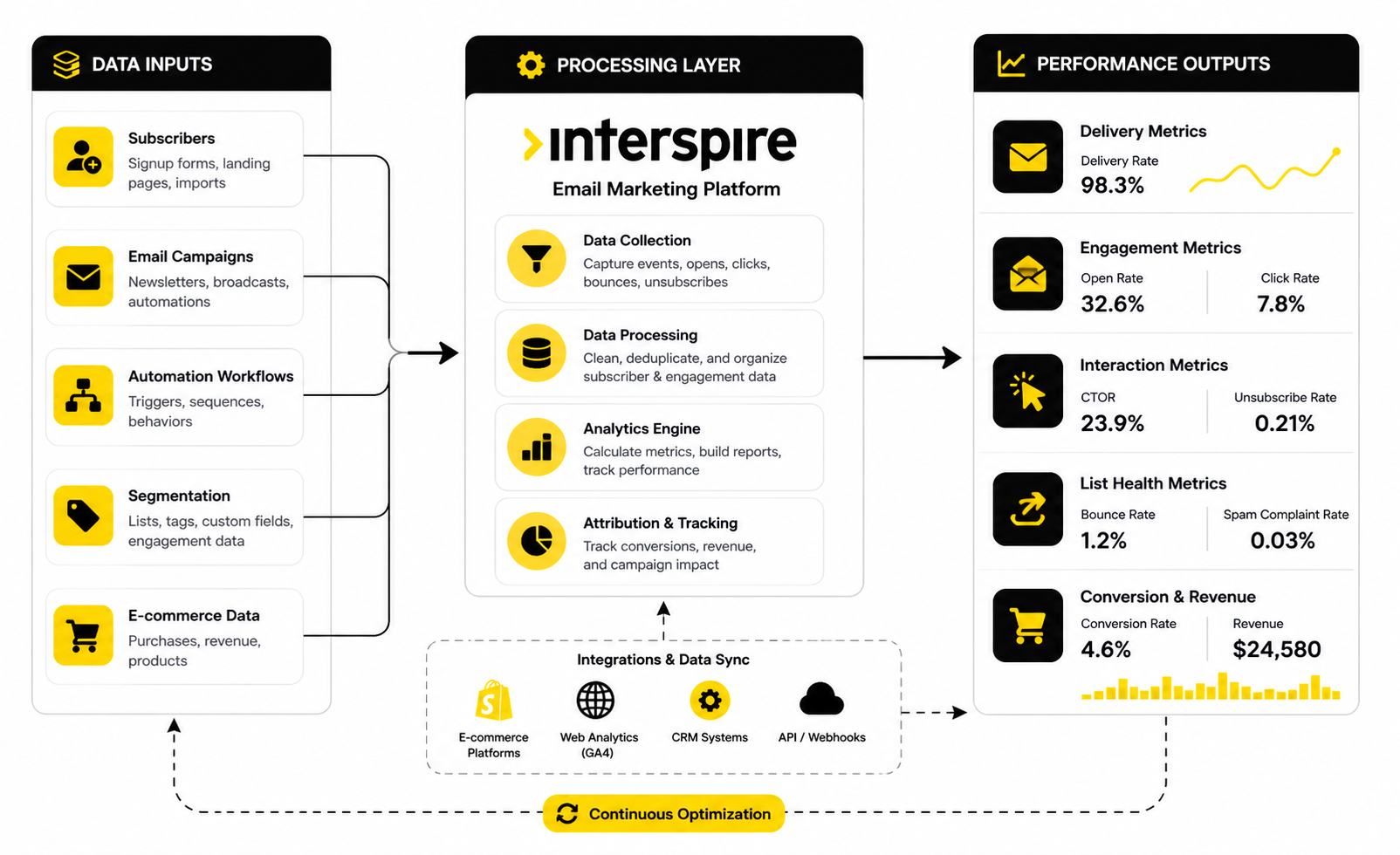
The main numbers to watch are:
Each number tells a different story. A high open rate with a weak click rate usually points to a promise-message mismatch. A normal click rate with low conversions points to the landing page, offer, checkout, booking flow, or sales follow-up.
Build A Measurement System, Not Just Reports
Interspire reporting can help you see campaign activity, but the measurement system should extend beyond the email dashboard. Email is only one step in the customer journey. If someone clicks from an email to a funnel, booking page, form, or checkout, the final result may live outside Interspire.
That means you need a clear tracking plan. Campaign links should use consistent UTM parameters, offers should have dedicated landing pages when possible, and sales or lead systems should preserve the source of the contact. If you use a funnel builder like ClickFunnels, the email click is only the beginning; the real question is whether that click became a lead, booking, sale, or repeat purchase.
For agencies and service businesses, a CRM can make the measurement clearer. A platform like GoHighLevel may be useful when email engagement needs to connect with pipelines, appointments, SMS, and client follow-up. Interspire com can own the campaign layer, while the surrounding stack tracks what happens after the click.
How To Interpret Bounce Rate
Bounce rate is one of the clearest health signals because it points directly to list quality and sending hygiene. A hard bounce means the address cannot receive the message, often because it is invalid, closed, or nonexistent. If those addresses keep receiving campaigns, they weaken performance and make the sender look careless.
A rising bounce rate usually means one of three things. The list source is poor, the list has not been cleaned recently, or old subscribers are being reactivated too aggressively. The right action is not to write a better subject line; the right action is to fix the list.
Interspire bounce processing should be configured before serious volume begins. Once bounces are being captured, suppress invalid addresses quickly and review sources that create bad addresses. Clean data is not glamorous, but it protects the rest of the program.
How To Interpret Spam Complaints
Spam complaints are more serious than unsubscribes because they tell mailbox providers that recipients did not just lose interest; they actively rejected the message. Google’s sender guidance warns that senders who fail to meet authentication, low spam-rate, and one-click unsubscribe requirements may have mail rejected or delivered to spam. Yahoo also emphasizes authentication, complaint feedback loops, and prompt removal of invalid recipients in its sender best practices.
For a self-hosted system, this matters even more. If Interspire com is connected to a sending domain with weak list quality, complaint problems can damage reputation beyond one campaign. The issue can follow the domain, the sender identity, and sometimes the broader infrastructure.
The action is straightforward. Make consent clear, set expectations at signup, send relevant content, avoid misleading subject lines, and make unsubscribing easy. If someone no longer wants your emails, letting them leave cleanly is far better than pushing them toward the spam button.
How To Interpret Unsubscribes
Unsubscribes are not always bad. A small number of unsubscribes after a campaign can be a normal sign that the list is self-cleaning. The danger is when unsubscribe rate spikes after a specific offer, frequency change, list import, or content shift.
When unsubscribes rise, look at expectation mismatch first. Did the subscriber sign up for one thing and receive something else? Did the email arrive too often? Did the tone change from helpful to pushy? These questions are more useful than simply trying to hide the unsubscribe link.
In an Interspire com setup, unsubscribes should be treated as a compliance function and a trust function. The process must work every time. A broken unsubscribe process is not a small technical bug; it is a business risk.
How To Interpret Clicks And Conversions
Clicks show intent, but they do not automatically prove success. A click means the email created enough interest for someone to take the next step. The business still needs the landing page, form, offer, booking flow, or checkout to do its job.
If clicks are low, inspect the email. The call to action may be buried, the message may be too broad, the audience may be poorly segmented, or the offer may not match the subscriber’s current stage. If clicks are strong but conversions are weak, inspect what happens after the click.
This is where tracking discipline pays off. Tools like Fillout can help when the conversion goal is a form submission, application, quiz, or intake flow. The cleaner the post-click path, the easier it becomes to know whether the email or the destination needs work.
Benchmarks Should Lead To Better Decisions
Benchmarks are useful when they create better questions. If the average for your category suggests a stronger click rate than you are seeing, ask what your subscribers expected when they joined. If your unsubscribe rate is higher than similar senders, check list source, frequency, and content relevance before blaming the software.
The same applies to open rates. If your open rate looks high but revenue is flat, you may be measuring attention that does not create action. If your open rate looks low but replies and conversions are strong, the campaign may be healthier than the dashboard suggests.
This is why Interspire com analytics should never be read in isolation. Numbers need context. A campaign sent to recent opt-ins should not be judged the same way as a campaign sent to a cold segment that has not heard from you in months.
Segment Performance Before Changing Strategy
One of the fastest ways to misread email data is to look only at total campaign averages. Averages hide the parts of the list that are working and the parts that are dragging performance down. Segment-level reporting gives you a much clearer picture.
Break performance down by source, signup date, engagement level, customer status, interest, geography, or lifecycle stage when those fields are available. A webinar lead may behave differently from a buyer. A recent subscriber may behave differently from someone who joined two years ago.
This is where a clean Interspire data model becomes valuable. If custom fields and list structure were planned properly during implementation, segmentation becomes easier. If the data was imported casually, analysis becomes guesswork.
Use A Simple Campaign Review Process
A campaign review process keeps analytics from becoming emotional. After each meaningful campaign, review the same set of questions. This creates consistency and makes trends easier to see over time.
This process does not need to be complicated. It just needs to be consistent. The point is to learn from every send instead of treating every campaign like a fresh guess.
What Good Performance Looks Like Over Time
Good performance is not one amazing campaign. Good performance is a pattern of stable delivery, low bounces, low complaints, healthy engagement, and clear business outcomes. That is the standard that matters for an Interspire com setup.
Over time, the best email programs become more selective. They send better messages to better-defined audiences with cleaner data and clearer goals. They do not chase volume for the sake of volume.
That is the practical lesson of measurement. Data should make the email program calmer, not more chaotic. Once the numbers are being interpreted correctly, the next step is using automation, integrations, and reporting to scale the system without losing control.
Automation, Reporting, Integrations, And Scaling
Once the basics are stable, Interspire becomes less about setup and more about control. This is the stage where teams start asking better questions: what should be automated, what should stay manual, which integrations are worth building, and how much scale the system can handle without becoming fragile. That is where Interspire com becomes a strategic operations decision, not just an email software decision.
Scaling email is not only about sending more campaigns. It is about sending more relevant messages without losing list quality, deliverability discipline, or reporting clarity. If volume grows but control gets weaker, the system is not scaling; it is just getting louder.
The best approach is to scale in layers. First make the core campaign process reliable. Then add automation. Then connect supporting tools. Then increase volume only when the data shows the list and infrastructure can handle it.
Build Automation Around Intent
Automation works best when it responds to subscriber intent. A new subscriber, a recent buyer, a cold lead, and a long-time customer should not all receive the same sequence just because the software makes it easy to send one. Interspire can support autoresponders and triggered workflows, but the strategy has to come from how people actually move through the business.
Start with simple flows that match clear moments. A welcome sequence after signup, an onboarding sequence after purchase, a re-engagement sequence for inactive subscribers, and a follow-up sequence after a form submission are all easier to manage than a huge automation map built on assumptions. Simple automation is easier to test, easier to improve, and less likely to confuse the audience.
This matters because automation can quietly damage a list if nobody reviews it. A bad one-time campaign is visible. A bad automated sequence can keep sending the wrong message every day until someone notices the numbers are getting worse.
Keep Human Judgment In The System
The goal is not to automate everything. The goal is to automate the repeatable parts while keeping human judgment close to messaging, segmentation, offers, and timing. Interspire com can help execute the workflow, but it should not replace thinking.
Human review is especially important when campaigns involve sensitive topics, major offers, old segments, or high-frequency sending. Someone should ask whether the message is still relevant, whether the segment is appropriate, and whether the timing makes sense. This is basic, but it prevents a lot of avoidable mistakes.
A good rule is to automate delivery mechanics, not strategic judgment. Let the system handle scheduled sends and sequence timing. Let humans decide what deserves to be sent and who should receive it.
Use Integrations Only When They Reduce Friction
Integrations should make the system cleaner, not more complicated. If an integration creates duplicate data, unclear ownership, or manual cleanup, it is not really helping. The question is not “Can we connect this?” The question is “Will this connection make the business easier to operate?”
Interspire can sit beside landing page builders, form tools, CRMs, analytics systems, ecommerce platforms, and automation tools. That can be powerful when each system has a clear job. For example, a form tool can collect the lead, Interspire can handle the email sequence, and a CRM can track the sales outcome.
The danger is building a stack where nobody knows which tool is the source of truth. Subscriber status, consent, tags, custom fields, and unsubscribe state need clear rules. If two systems disagree, the process must define which one wins.
Decide What Interspire Should Own
A strong stack has clear boundaries. Interspire should own the campaign and subscriber communication layer when that is why it was chosen. It may not need to own landing pages, CRM records, calendars, sales pipelines, social scheduling, or support conversations.
For a funnel-first business, ClickFunnels may handle the offer path while Interspire manages follow-up emails. For agencies and service businesses, GoHighLevel can be useful when pipelines, client communication, appointments, and automation need to live closer together. For businesses that want a simpler hosted email route instead of self-hosting, Brevo or Moosend may be more practical.
This is not about tool loyalty. It is about operational fit. Interspire com makes the most sense when the email layer needs ownership and control, while the rest of the stack supports that role instead of fighting it.
Watch The Scaling Pressure Points
Scaling exposes weak setup decisions. A small list can hide messy fields, slow reporting, weak segmentation, and inconsistent sending rules. A larger list makes those problems obvious because every mistake affects more people and more data.
The first pressure point is database performance. As subscriber records, campaign logs, click data, and bounce history grow, the system needs enough server resources and maintenance discipline to stay responsive. Backups also become more important because the database is no longer just a test environment; it is a business asset.
The second pressure point is sending volume. Higher volume means authentication, throttling, bounce handling, complaint monitoring, and list hygiene become more important. Google’s bulk sender guidance makes clear that senders who fail authentication, spam-rate, and one-click unsubscribe expectations may see messages rejected or routed to spam, so scale must be earned through clean sending behavior.
Do Not Confuse Volume With Growth
One of the biggest mistakes with self-hosted email is treating higher volume as the win. More emails sent does not automatically mean more revenue, more trust, or more demand. It can just mean more inbox fatigue.
Growth should be measured by useful outcomes. More replies, more qualified leads, more sales conversations, more purchases, better retention, and stronger customer education matter more than raw send count. If the campaign volume goes up but complaints, unsubscribes, and inactive subscribers rise with it, the system is telling you something.
Interspire com gives teams the ability to control larger campaigns, but control should not become an excuse to over-send. The right question is not “How many emails can we send?” The right question is “How much useful communication can the audience actually absorb?”
Manage Inactive Subscribers Deliberately
Inactive subscribers are not all the same. Some people are temporarily distracted, some are no longer interested, some changed roles, and some addresses may no longer be useful at all. Treating every inactive contact as equal creates bad decisions.
A clean approach is to define inactivity based on the business model. For a daily publisher, inactivity may show up quickly. For a B2B company with a long sales cycle, a subscriber may go quiet for months and still become valuable later. The definition needs to match the relationship.
Once the definition is clear, build a re-engagement process. Send a focused sequence, ask for a clear action, and then suppress or reduce sending to people who do not respond. Keeping inactive subscribers forever just because the list looks bigger is vanity, not strategy.
Use Segmentation To Protect Relevance
Segmentation is not only a performance tactic. It is also a risk control. The more relevant the message is to the recipient, the less pressure you put on unsubscribes, complaints, and deliverability.
Interspire can use subscriber data and list structure to create more targeted campaigns, but segmentation only works when the underlying data is reliable. If source, status, interests, and lifecycle stage are inconsistent, the segment logic becomes weak. This is why the earlier implementation work matters.
Start with practical segments before getting clever. Separate recent subscribers from old subscribers, buyers from non-buyers, engaged readers from inactive contacts, and high-intent leads from general newsletter readers. These simple segments often create clearer wins than complex rules nobody maintains.
Create A Reporting Rhythm
Reporting should happen on a rhythm, not only when something goes wrong. Weekly or monthly reviews help spot trends before they become problems. This is especially important in an Interspire com setup because the team owns more of the operating environment.
A useful reporting rhythm should cover campaign performance, list growth, bounces, complaints, unsubscribes, engagement by segment, conversion outcomes, and any technical issues. The goal is not to create a giant report nobody reads. The goal is to know whether the system is getting healthier or weaker.
The best teams also keep a short change log. If open rates, clicks, or complaints change, the team should know what changed around the same time. New sending domain, new offer, new list source, new template, new frequency, new segment logic: these details matter when troubleshooting.
Plan For Maintenance Before Something Breaks
Maintenance is part of the product when you use self-hosted software. That includes updates, backups, server monitoring, database cleanup, access reviews, and periodic tests of critical email functions. If nobody owns maintenance, the system slowly becomes risky.
Backups should be tested, not just assumed. Admin access should be reviewed when people leave the team or change roles. Cron jobs, bounce processing, and tracking links should be checked periodically because they can fail quietly.
This is where hosted platforms have an obvious advantage: they remove more of this burden. But if you choose Interspire com because control matters, maintenance is the cost of that control. Ignore it and the advantage disappears.
Think About Compliance Before Expansion
Compliance becomes more important as volume, geography, and business complexity increase. Consent, unsubscribe handling, sender identity, data retention, and privacy obligations should be defined before a campaign reaches a larger audience. This is not legal decoration; it affects trust and deliverability.
The safest practical stance is to only email people where there is a clear permission basis and a clear reason for the message. Keep source data whenever possible so the team knows where a subscriber came from and what they expected. Make unsubscribing easy and process it reliably.
For Interspire users, this needs to be operationalized inside the workflow. Imports should be reviewed. Suppression lists should be protected. Forms should set expectations clearly. Compliance should be built into the system, not remembered after a complaint.
Avoid The Common Advanced Mistakes
Most advanced Interspire mistakes are not caused by one huge failure. They come from small operational shortcuts that compound. A rushed import, an unclear segment, an untested automation, a neglected bounce mailbox, or a missing backup can all create problems later.
The most common mistakes are:
These are preventable. The solution is not more complexity. The solution is better operating habits.
Scaling Should Make The System Clearer
Good scaling makes the system easier to understand. Bad scaling makes every campaign feel like a rescue mission. If Interspire com is being used well, growth should come with clearer segments, cleaner reporting, stronger processes, and fewer surprises.
That is the standard to aim for. More contacts, more campaigns, and more automation should not mean more chaos. They should mean the email program is becoming more mature.
By this point, the shape of the decision is clear. Interspire can be powerful when ownership matters, but it asks more from the team than a hosted beginner tool. The final step is comparing alternatives, using a buying checklist, and answering the questions that usually come up before someone commits.
Interspire Alternatives, Buying Checklist, And FAQ
The final decision around Interspire should be practical. If you need control, self-hosting, flexible campaign management, and ownership of the environment, Interspire com can make sense. If you need the fastest managed route with fewer technical responsibilities, a hosted platform may be the more carefully move.
This is not about choosing the tool with the loudest marketing page. It is about choosing the operating model your team can actually support. A self-hosted system can be powerful, but only when the people, process, infrastructure, and compliance habits are strong enough to match it.
The best buying decision looks beyond features. It asks what happens after launch, after the list grows, after campaigns become more complex, and after the first deliverability issue appears. That is where the real fit becomes obvious.
When Interspire Is The Stronger Choice
Interspire is the stronger choice when ownership matters. If your team wants to run email marketing on its own infrastructure, control subscriber data, customize the setup, and avoid contact-based SaaS pricing, Interspire com deserves serious consideration. The platform’s own positioning focuses on self-hosted email marketing, API access, embeddable forms, bounce processing, segmentation, autoresponders, triggers, A/B testing, and real-time reporting through Interspire Email Marketer.
It is also a good fit when your team already has technical support. That does not mean every marketer needs to become a server admin. It does mean someone reliable should understand hosting, database backups, cron jobs, authentication, bounce mailboxes, and basic troubleshooting.
The strongest use case is usually a team that wants email ownership and knows how to operate responsibly. In that situation, Interspire is not just an email tool. It becomes a controlled campaign system inside a broader marketing infrastructure.
When A Hosted Platform Is The Better Move
A hosted platform is usually better when speed and simplicity matter more than infrastructure control. If you want to start sending newsletters, lead magnets, product updates, or basic automations without managing servers, databases, and cron jobs, self-hosting may be unnecessary friction. The easier tool may be the more profitable tool because your team will actually use it consistently.
A hosted email tool such as Brevo or Moosend may be more practical when you want managed sending, smoother onboarding, and fewer technical decisions. A funnel-focused business may prefer ClickFunnels if the main job is building pages, offers, and sales flows around the email follow-up. An agency or service business may prefer GoHighLevel when CRM, appointments, SMS, pipelines, and client workflows need to work together.
That does not make Interspire the wrong tool. It means the business problem may be different. Choose based on the workflow, not the category label.
The Buying Checklist
Before committing to Interspire, walk through the checklist slowly. If too many answers are unclear, pause before buying or installing anything. The wrong setup can cost more in recovery than a careful evaluation would have cost upfront.
This checklist is not there to slow you down for no reason. It protects the business from buying software when the real missing piece is process. If the checklist feels uncomfortable, that is useful information.
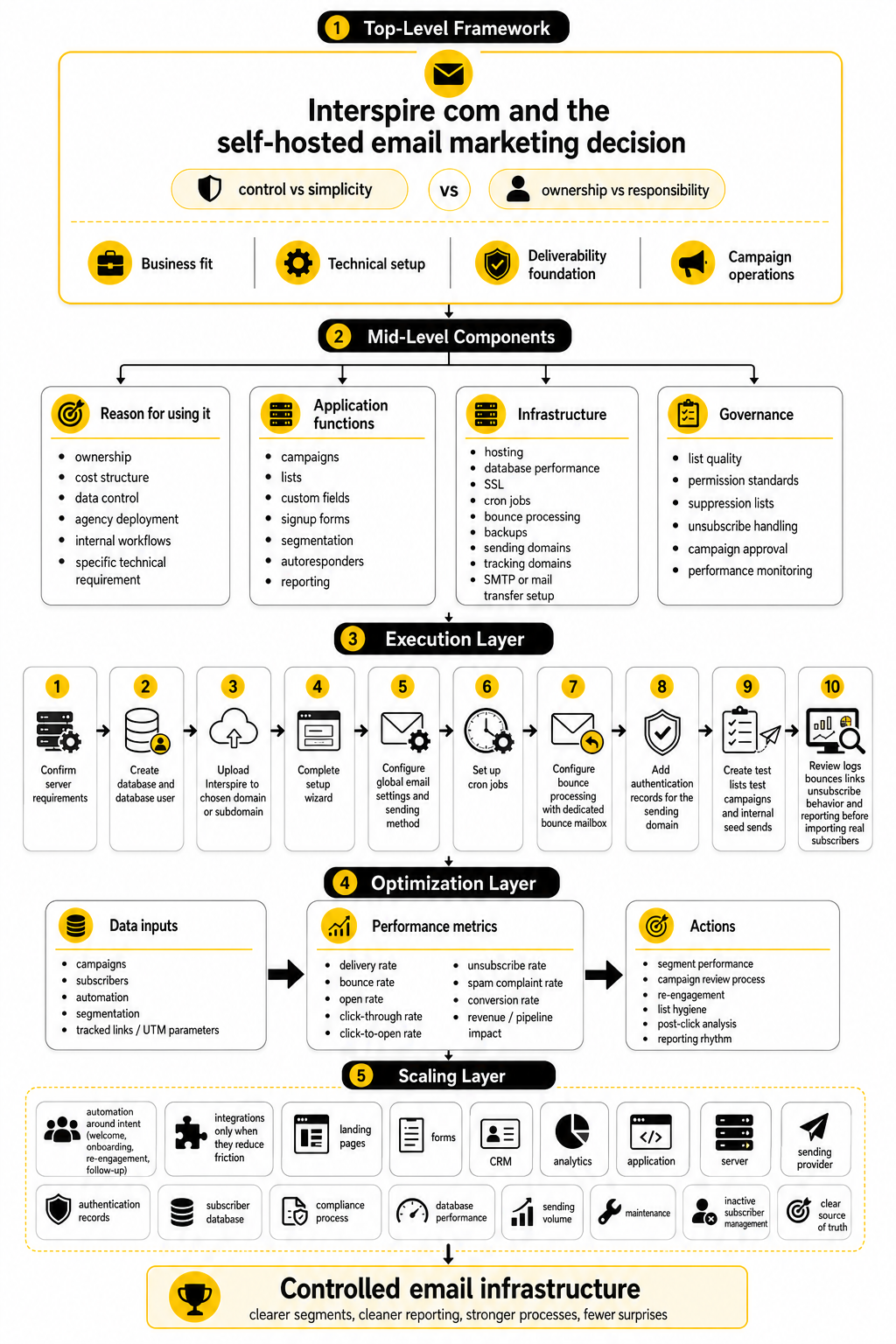
Final System View
A mature Interspire setup is not just campaigns inside a dashboard. It is an ecosystem. The application, server, sending provider, authentication records, subscriber database, forms, automations, analytics, landing pages, CRM, and compliance process all need to work together.
That is the final point most people miss when they search Interspire com. They are not only choosing a platform; they are choosing a way to operate email marketing. The more control you take, the more responsibility you accept.
Done well, that control can be worth it. Done casually, it becomes technical debt with a send button. Be honest about which side your team is on before you move forward.
What is Interspire com?
Interspire com usually refers to the official Interspire website and, in this context, Interspire Email Marketer. It is a self-hosted email marketing platform used for campaigns, subscriber management, segmentation, autoresponders, triggers, bounce processing, and reporting. The key difference from many hosted tools is that the business has more control over the environment and more responsibility for operating it correctly.
Is Interspire Email Marketer still relevant?
Yes, Interspire Email Marketer is still relevant for teams that specifically want self-hosted email marketing control. It is not the obvious choice for everyone, especially if the team wants a fully managed SaaS experience. It becomes more relevant when ownership, infrastructure flexibility, data control, and custom workflows matter.
Who should use Interspire?
Interspire is best for technical marketers, agencies, publishers, B2B teams, and businesses that understand the operational side of email marketing. It fits teams that can manage hosting, backups, sending configuration, bounce handling, and deliverability standards. It is less suitable for beginners who want a simple hosted newsletter tool with minimal setup.
Is Interspire better than Mailchimp or other hosted tools?
Interspire is not automatically better or worse than hosted platforms. It solves a different problem. Hosted tools focus on convenience, managed infrastructure, and faster onboarding, while Interspire focuses on self-hosted control and flexibility.
Does Interspire send emails by itself?
Interspire manages the campaign workflow, but the actual sending depends on how outgoing mail is configured. Most professional setups connect Interspire to an SMTP provider or managed sending infrastructure. This sending layer needs careful configuration because it affects delivery, throttling, authentication, bounces, and reputation.
What technical requirements does Interspire need?
Interspire’s current documentation lists a Linux server, Nginx or Apache, PHP 8.2 or 8.3, and MySQL or MariaDB as part of the server environment for Interspire Email Marketer. It also requires cron for autoresponders and triggers, and PHP IMAP access for bounce processing through the documented Interspire server requirements. These requirements should be checked before installation, not after something breaks.
Why are cron jobs important in Interspire?
Cron jobs run scheduled and automated tasks in the background. In an Interspire setup, they support scheduled campaigns, autoresponders, triggers, and recurring processes. If cron is not configured properly, automation may appear to be set up but fail quietly.
Why does bounce processing matter?
Bounce processing keeps the list healthy by identifying emails that could not be delivered. Hard bounces should be removed or suppressed so the system does not keep sending to invalid addresses. Without bounce processing, a list can look bigger while its actual quality gets worse.
Is Interspire good for automation?
Interspire can support autoresponders and trigger-based automation, which makes it useful for welcome sequences, follow-ups, re-engagement flows, and subscriber-based messaging. The platform can execute the workflow, but the strategy still needs human planning. Automation should be based on subscriber intent, not just the fact that the software can send more emails.
Is Interspire good for agencies?
Interspire can be useful for agencies that want more control over email infrastructure and repeatable campaign systems. The fit is strongest when the agency has technical support and a clear operating process. If the agency needs built-in CRM, pipelines, client communication, and appointment workflows, a broader platform like GoHighLevel may be easier to manage.
What are the biggest risks of using Interspire?
The biggest risks are poor setup, weak list quality, neglected maintenance, bad sending configuration, and unclear ownership. Self-hosting gives more control, but it also removes some of the safety rails that hosted platforms provide. The platform should be treated as business infrastructure, not just campaign software.
Can Interspire hurt deliverability?
Any email platform can hurt deliverability if it is used with poor list hygiene, weak consent, bad authentication, high complaints, or inconsistent sending behavior. Interspire itself is not the issue; the setup and operating habits are. Google’s email sender guidelines and Yahoo’s sender best practices make clear that authentication, complaint control, unsubscribe handling, and list quality all matter.
Does Interspire include analytics?
Interspire includes reporting for campaign performance, but email analytics should not stop inside the email platform. Clicks, conversions, revenue, leads, bookings, and pipeline activity often happen in other tools. A serious setup connects Interspire campaign data with landing pages, forms, CRM records, and sales outcomes.
What should I compare before buying Interspire?
Compare the total operating model, not just the feature list. Look at hosting, technical support, sending infrastructure, maintenance, deliverability responsibility, list management, reporting needs, integrations, and long-term ownership. A cheaper license can become expensive if the team is not ready to operate the system.
What is the best alternative to Interspire?
There is no single best alternative because the right tool depends on the job. For managed email marketing, Brevo and Moosend may be simpler. For funnels, ClickFunnels may be more aligned, while GoHighLevel may fit agencies and service businesses that need more than email.
Should beginners use Interspire?
Most beginners should be careful with Interspire unless they have technical help. The platform can be powerful, but self-hosted email marketing requires more setup and responsibility than a hosted beginner tool. If the beginner is willing to learn the infrastructure side or work with someone who understands it, Interspire can still be considered.
What is the simplest way to decide?
The simplest way to decide is to ask one question: do you want ownership badly enough to manage the responsibility that comes with it? If yes, Interspire com may be a serious option. If no, choose a hosted platform and focus on the marketing instead of the infrastructure.
Build a stronger local presence with BAAM AI
Turn your website, Google profile, social channels, and AI visibility into one growth engine
Most businesses do not need more random marketing activity. They need a consistent presence system that helps the right people find them, trust them, and take action. BAAM AI brings strategy, local SEO, website updates, Google Maps visibility, social content, AI-search readiness, media production, and reporting into one practical monthly engine.
If you want your marketing to keep working after the campaign ends, start with a free BAAM AI presence audit. See how your business shows up today and where the fastest visibility wins are at BAAM AI.