
BAAM AI Blog
HubSpot Marketing Email: A Practical Framework For Campaigns That Actually Convert
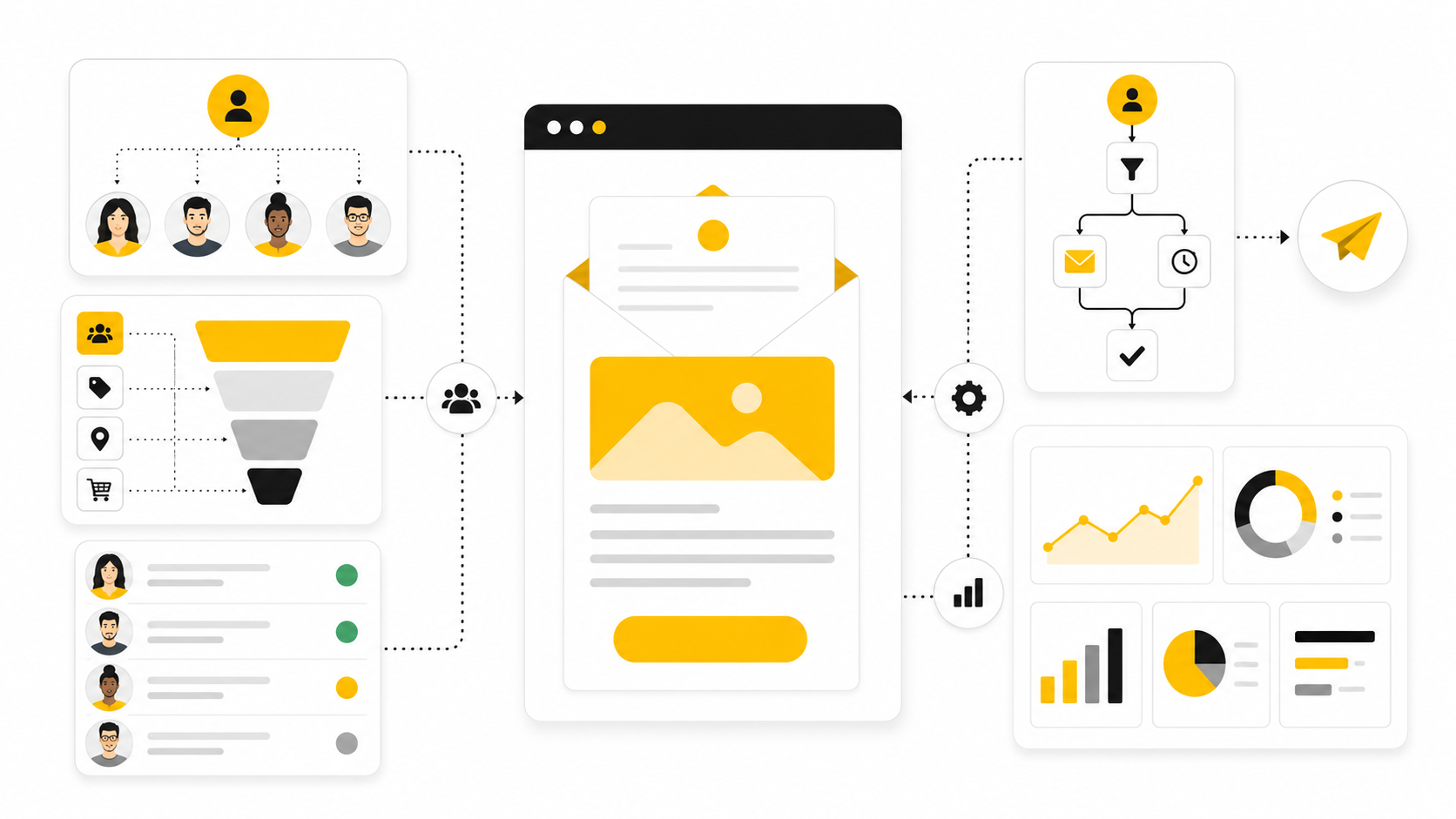
A good HubSpot marketing email is not just a designed message sent to a list. It is the visible part of a bigger system: CRM data, segmentation, consent, deliverability, automation, testing, reporting, and follow-up...
Affiliate disclosure: this article may include compensated links. Recommendations should still be evaluated against your use case, budget, and current provider terms.
Should you choose HubSpot?
HubSpot is worth considering when the use case, budget, and implementation effort match what you actually need to do next.
teams that want a practical tool decision without reading another generic feature list
Check HubSpotA good HubSpot marketing email is not just a designed message sent to a list. It is the visible part of a bigger system: CRM data, segmentation, consent, deliverability, automation, testing, reporting, and follow-up. When those pieces work together, email becomes less of a broadcast channel and more of a revenue engine.
That matters because email is still one of the few marketing channels where you can build a direct relationship with contacts you already know. Benchmarks move by industry, list quality, and offer, but recent email marketing data shows ROI commonly ranging from 10:1 to 36:1, which is exactly why teams keep investing in better segmentation, cleaner data, and more carefully automation. The catch is simple: the channel rewards relevance and punishes lazy sending.
HubSpot is especially useful because marketing email sits inside the same platform as contacts, lifecycle stages, forms, landing pages, workflows, deals, and reporting. Its email tools include a drag-and-drop editor, templates, CRM-based personalization, automation options, A/B testing, and performance tracking through Marketing Hub and related features. That does not mean every HubSpot email program is automatically good. The tool gives you leverage, but the strategy still has to be built properly.
this guide is split into six parts so each layer of HubSpot marketing email can build on the previous one. The goal is not to dump features into a checklist. The goal is to create a working system you can actually use when planning, launching, improving, or auditing campaigns.
Why HubSpot Marketing Email Matters
HubSpot marketing email matters because most teams do not have an email problem in isolation. They have a data problem, a segmentation problem, a lifecycle problem, a deliverability problem, or a follow-up problem. Email exposes those weaknesses fast because every send creates measurable feedback through opens, clicks, unsubscribes, spam complaints, bounces, conversions, and revenue influence.
This is where HubSpot has a real advantage over basic newsletter tools. A marketing email can be built around CRM properties, active segments, lifecycle stages, form submissions, page views, previous engagement, and deal context. HubSpot’s own documentation explains that active segments can automatically manage changing groups of contacts, including newsletter audiences and behavior-based groups for unique marketing emails.
The bigger shift is that inbox providers now expect better sender behavior. Gmail’s sender guidelines require bulk senders to authenticate messages, make unsubscribing easy, and keep spam complaints low, while Yahoo’s sender requirements also emphasize authentication, easy unsubscribe, and complaint control. That means the old “send more and hope” mindset is not just ineffective. It can actively damage your ability to reach the inbox.
The Real Job Of A HubSpot Marketing Email
The real job of a HubSpot marketing email is to move the right contact to the right next step. Sometimes that step is reading a guide, booking a demo, starting a trial, registering for a webinar, returning to an abandoned process, or simply staying engaged until the timing is right. The point is that a good email has a job, and that job should be obvious before anyone writes a subject line.
That is why the best HubSpot email programs start with the customer journey, not the email editor. You define who the email is for, what they already know, what they need next, and what signal will tell HubSpot to send or suppress the message. Then the email becomes part of a larger flow instead of a one-off blast.
This matters even more when automation enters the picture. HubSpot allows teams to create and send marketing emails directly or use them in automation, and A/B emails can also be saved for workflows on eligible plans. Used well, that turns HubSpot marketing email into a controlled system for nurture, conversion, reactivation, onboarding, and retention.
Framework Overview
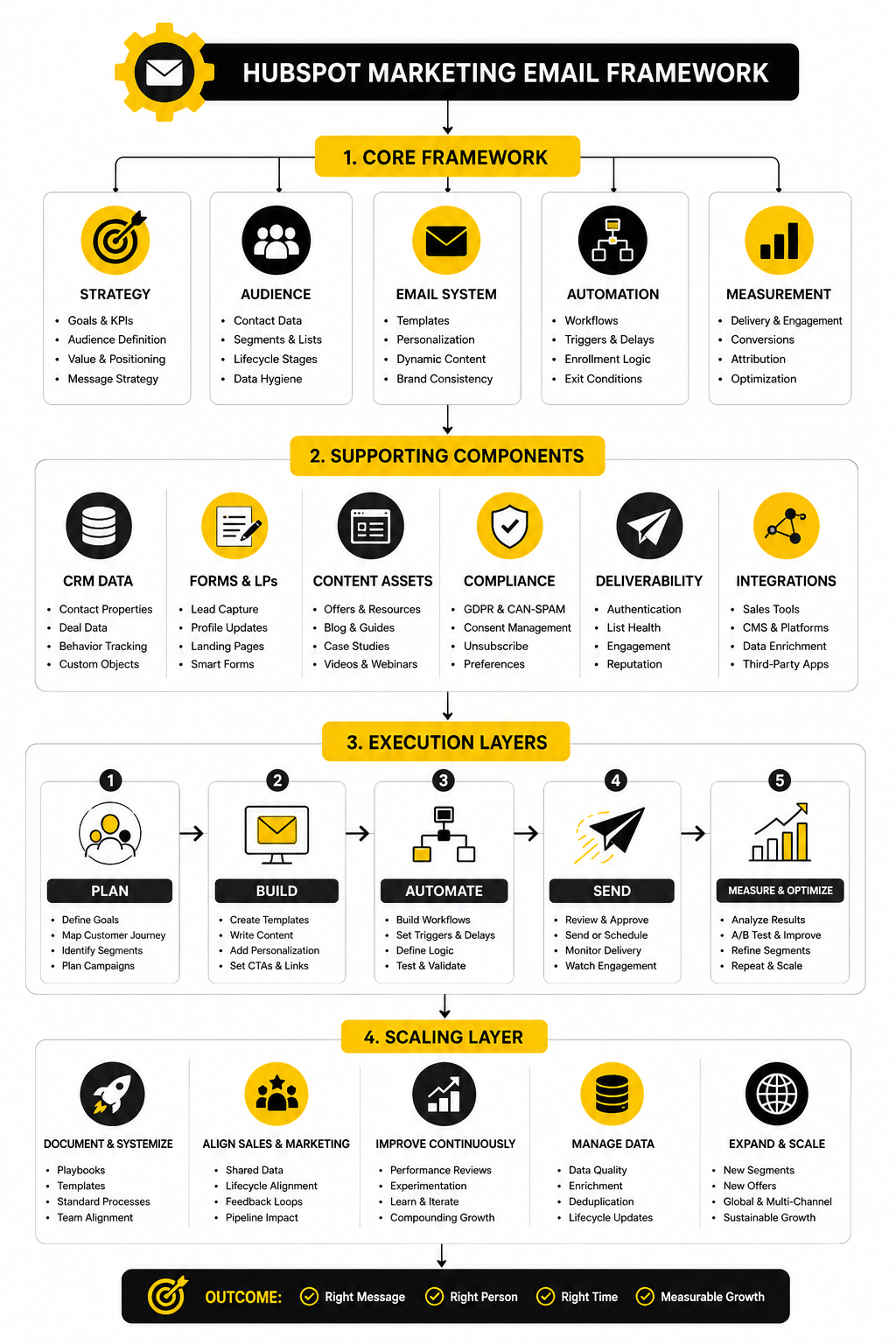
A strong HubSpot marketing email framework has four layers: strategy, data, execution, and optimization. Strategy defines the audience, promise, timing, and conversion path. Data makes the message relevant by using CRM properties, segments, consent status, engagement history, and lifecycle context.
Execution is where the email itself gets built. That includes the offer, subject line, preview text, layout, copy, personalization, CTA, mobile experience, compliance details, and workflow logic. HubSpot’s drag-and-drop marketing email editor makes the building process accessible, but the underlying structure still decides whether the campaign feels useful or generic.
Optimization closes the loop. HubSpot’s Email Health tool can review current and historical sending reputation signals such as open rate, click rate, bounce rate, unsubscribe rate, and spam reports. The professional move is to treat those signals as instructions, not trivia, because they tell you whether your audience wants more of what you are sending or whether your program needs to slow down, clean up, and get sharper.
Core Components Covered here
The rest of this guide will break the system into practical components you can use. We will cover strategy, segmentation, templates, personalization, workflows, deliverability, testing, reporting, and optimization. Each piece has a different job, and skipping one usually creates problems somewhere else.
Segmentation and personalization will get special attention because they are where HubSpot’s CRM connection becomes valuable. A contact’s industry, lifecycle stage, product interest, lead source, content history, or sales activity can change what they should receive. That is the difference between “send a campaign” and “send the next useful message.”
Deliverability will also be treated as a core operating discipline, not a technical afterthought. HubSpot recommends authenticating sending domains with DKIM, SPF, and DMARC before sending marketing emails from your own domain, and its deliverability guidance stresses gradual volume increases, engaged contacts, and regular reputation monitoring. In practical terms, your best email is useless if the inbox does not trust you enough to show it.
Professional Implementation Starts Before The First Send
Professional implementation starts before the first HubSpot marketing email is ever scheduled. You need naming conventions, clean properties, reliable segments, clear subscription types, suppression rules, consent handling, campaign structure, and reporting expectations. Without that foundation, every future campaign becomes harder to manage.
A serious setup also requires discipline around what not to send. Not every contact belongs in every campaign, and not every short-term promotion is worth risking long-term sender reputation. The best teams protect their engaged audience because that audience is the asset.
That is the mindset this guide will use from here. HubSpot marketing email is not about pressing send more often. It is about building a system where every send has a reason, every audience has a definition, every result teaches you something, and every improvement compounds into better performance over time.
Why HubSpot Marketing Email Matters
HubSpot marketing email matters because email is one of the few channels where your CRM data can directly shape the message someone receives. A paid ad can target broadly, a social post can reach whoever the algorithm allows, and a sales call depends on timing. Email sits closer to the relationship because it uses what you already know about the contact.
That is the real advantage. When HubSpot is set up properly, your email program can respond to lifecycle stage, form submissions, lead source, list membership, content interest, deal status, and engagement history. Instead of sending the same message to everyone, you can send messages that match where people actually are.
This is also where many teams get it wrong. They buy HubSpot, import a list, build a nice-looking email, and assume the platform will carry the strategy. It will not. HubSpot gives you the tools, but your results still depend on relevance, timing, data quality, consent, and follow-through.
Email Is Not Just A Newsletter Channel
A newsletter can be useful, but HubSpot marketing email is much bigger than a recurring update. It can support lead nurturing, sales enablement, onboarding, webinar promotion, product education, reactivation, customer retention, and account-based campaigns. That makes it a system, not a single content format.
The difference is intent. A newsletter usually starts with, “What should we send this week?” A serious HubSpot email program starts with, “What does this contact need next?” That question changes the whole campaign because it forces you to connect the email to a business outcome.
This is why HubSpot works best when email is connected to forms, landing pages, workflows, CRM records, and sales activity. A contact who downloaded a pricing guide should not always receive the same email as someone who only read a top-of-funnel blog post. The more specific the context, the more useful the email can become.
The Business Case For Better Email
The business case is simple: better email turns existing attention into measurable pipeline, revenue, and retention. Most companies already have contacts sitting in their CRM, but many of those contacts are underused because the follow-up is inconsistent or too generic. HubSpot marketing email gives you a structured way to keep those relationships moving.
That does not mean every contact should be pushed toward a sale immediately. Some people need education, some need comparison content, some need proof, and some need a simple reminder to take the next step. A good email program respects that difference instead of treating the whole database like one giant audience.
This is where the money is usually hiding. Not in sending more emails, but in sending sharper emails to better-defined groups. A smaller segment with a clear message will often outperform a huge list that barely recognizes itself in the copy.
Why CRM Context Changes Everything
The strongest reason to use HubSpot marketing email is the CRM context behind it. A standalone email tool can send campaigns, but it often needs extra work to understand the full customer journey. HubSpot already has the contact record, activity history, lifecycle information, and sales context in one place.
That means your email can be based on real signals instead of guesses. You can build campaigns for new leads, marketing-qualified leads, sales-qualified leads, open opportunities, inactive customers, event registrants, or contacts who engaged with a specific topic. That makes the email feel less random because it is tied to behavior.
The important part is not personalization for its own sake. Adding a first name is not a strategy. Real personalization means the message, offer, timing, and call to action are shaped by what the contact has done and what they are likely trying to solve.
Relevance Protects Deliverability
Relevance is not just a conversion issue. It is also a deliverability issue. When people ignore, delete, unsubscribe from, or complain about your emails, inbox providers receive negative signals that can make future sends harder to place well.
This is why HubSpot marketing email should never be managed only by looking at opens and clicks after the fact. You need to think about engagement before the send. That means suppressing poor-fit contacts, avoiding stale lists, respecting subscription preferences, and sending to people who have a clear reason to hear from you.
Deliverability is not a technical checkbox you handle once and forget. Authentication, domain reputation, list quality, unsubscribe behavior, and complaint rates all affect whether your emails keep reaching the inbox. The smartest teams treat deliverability like an asset because once it weakens, every future campaign becomes harder.
The Problem With Generic Broadcasts
Generic broadcasts are tempting because they are easy. One email, one list, one send, one report. The problem is that they rarely match the real complexity of your audience.
A founder, a marketing manager, a sales leader, and an existing customer may all be in your HubSpot database, but they probably do not care about the same message in the same way. If they all receive the same campaign, the copy has to become broad enough to include everyone. Broad usually becomes bland.
That blandness is expensive. It lowers engagement, weakens trust, and trains people to ignore future emails. A better approach is to make fewer assumptions and let HubSpot’s segmentation do more of the work.
Segmentation Makes The Message Useful
Segmentation is where HubSpot marketing email starts to become genuinely useful. Instead of asking one email to do too much, you define smaller groups based on shared traits or behaviors. Then the message can become more specific without becoming pushy.
For example, a segment can be based on lifecycle stage, recent form submissions, product interest, country, job role, industry, deal stage, subscription type, or engagement level. Each of those details can change what the contact needs to hear. A lead who just entered your database needs a different level of context than a warm opportunity already talking to sales.
This is also where HubSpot’s active lists become valuable. When contacts automatically enter or leave segments based on their properties and behavior, your email program becomes easier to maintain. You are no longer rebuilding the audience manually every time you want to send a relevant campaign.
Automation Turns Follow-Up Into A System
Automation is one of the biggest reasons teams invest in HubSpot marketing email. Manual follow-up breaks when the team gets busy, campaigns overlap, or leads arrive from multiple sources at the same time. Workflows make the follow-up more consistent.
That consistency matters because timing changes intent. A person who just downloaded a guide, booked a demo, abandoned a form, or attended a webinar is giving you a signal. If the follow-up arrives too late, the moment cools down.
The goal is not to automate everything until the experience feels robotic. The goal is to automate the predictable parts so your team can focus on the parts that need judgment. A strong workflow should feel like a helpful next step, not a machine chasing someone around the internet.
HubSpot Email Supports Sales, Not Just Marketing
A good HubSpot marketing email program also makes sales easier. When marketing emails are connected to CRM activity, sales teams can see what contacts are engaging with before they reach out. That gives sales more context and makes the conversation less cold.
This is especially useful for nurture campaigns. A lead may not be ready to talk today, but their engagement with product pages, case studies, comparison content, or event invites can show when interest is increasing. Marketing email becomes a signal layer for sales prioritization.
That only works when the team agrees on what matters. Opens alone are not enough. Clicks, conversions, page visits, form submissions, meeting bookings, lifecycle changes, and deal movement are stronger signals because they show deeper intent.
Better Email Requires Better Data
HubSpot marketing email is only as strong as the data behind it. If contact properties are messy, lifecycle stages are unclear, subscription types are ignored, and lists are poorly maintained, the campaign will inherit those problems. The email editor cannot fix a broken database.
Clean data makes segmentation, personalization, automation, and reporting easier. It also reduces embarrassing mistakes, like sending beginner education to existing customers or pushing a demo CTA to someone already in an active deal. Those details may seem small, but they shape trust.
This is why implementation matters so much. Before scaling campaigns, you need to know which properties are reliable, which segments are meaningful, and which contacts should be suppressed. The cleaner the foundation, the more confidently you can use HubSpot marketing email at scale.
The Strategic Role Of HubSpot In The Stack
HubSpot often becomes the central system for companies that want marketing, sales, and customer data to work together. That is its strength. Email is not isolated from the rest of the funnel; it is connected to the journey.
For some businesses, especially agencies and service providers that want a broader CRM and automation setup, tools like GoHighLevel may also fit the operational model. For teams that mainly need email marketing and customer communication tools, Brevo can be a practical option. The point is not that one platform is perfect for everyone; the point is that your email tool should match your funnel, data, and follow-up process.
If you are using HubSpot, the opportunity is to make email part of the full revenue system. That means campaigns should not live in isolation. They should connect to how leads are captured, qualified, nurtured, handed to sales, converted, and retained.
The HubSpot Marketing Email Framework
A strong HubSpot marketing email program needs a framework before it needs more campaigns. Without a framework, every send becomes a separate decision, and that creates inconsistency fast. With a framework, your team knows who the email is for, why it exists, what data it depends on, and how success will be measured.
The framework should be simple enough to use every week but strict enough to prevent lazy sending. That balance matters because HubSpot gives you a lot of options: lists, properties, workflows, templates, personalization tokens, A/B testing, campaign reporting, suppression rules, and email health tools. The job is to turn those options into a repeatable process.
Think of the framework as five connected steps: audience, objective, message, automation, and measurement. Each step should be clear before the email is built. If one step is vague, the campaign usually becomes vague too.
Step 1: Define The Audience Before The Message
The first question is not “What should we write?” It is “Who exactly should receive this?” That one shift prevents most generic HubSpot marketing email campaigns before they happen.
Start with the contact group that has the clearest shared context. That might be new leads from a form, existing customers using a specific product, inactive subscribers, event registrants, open opportunities, or contacts who viewed high-intent pages. The more precise the audience, the easier it becomes to write something useful.
This is also where suppression matters. A good audience is not only defined by who should receive the email, but also by who should not. Exclude unsubscribed contacts, irrelevant lifecycle stages, recent buyers when the offer no longer applies, unengaged contacts when reputation is at risk, and anyone who would receive a confusing or redundant message.
Step 2: Choose One Primary Objective
Every HubSpot marketing email should have one primary objective. Not three. Not a soft mix of awareness, clicks, bookings, social engagement, and “general nurture.” One main job.
The objective can be simple: get the contact to read a resource, register for a webinar, book a meeting, start a trial, reply to a question, complete onboarding, view a pricing page, or re-engage with the brand. Once that objective is chosen, the subject line, body copy, CTA, landing page, and workflow logic should all support it.
This is where many campaigns quietly fail. The email looks polished, but the next step is unclear. If the reader has to work out what to do next, the campaign is not finished.
Step 3: Map The Contact’s Current Context
HubSpot becomes powerful when you use contact context properly. Before writing the email, look at what the contact already knows, what they recently did, and what they likely need next. That context should shape the angle.
A first-time lead may need clarity and trust. A sales-qualified lead may need proof and urgency. A customer may need education, adoption support, or expansion value. Sending all three people the same email wastes the data HubSpot already has.
This is also where lifecycle stage becomes more than a CRM field. It should influence the level of detail, the offer, the CTA, and the tone. A top-of-funnel email can teach and guide, while a bottom-of-funnel email should reduce friction and make the decision easier.
Step 4: Build The Email Around The Next Action
Once the audience, objective, and context are clear, the email itself becomes easier to build. The subject line earns attention, the preview text adds context, the opening proves relevance, the body explains the value, and the CTA points to one logical next action. Nothing should feel decorative.
A practical HubSpot marketing email structure looks like this:
This process keeps execution grounded. It stops the email from becoming a collection of nice sections and forces every part to serve the campaign. That is the difference between a professional send and a rushed broadcast.
Step 5: Decide Whether The Email Is One-Off Or Automated
Not every email belongs in a workflow. Some emails are timely announcements, event promotions, product updates, or campaign-specific sends. Others should be automated because they respond to predictable behavior.
A workflow makes sense when the trigger is repeatable. Form submissions, list joins, lifecycle changes, demo requests, content downloads, webinar registrations, trial starts, and inactivity are all examples of moments where automated follow-up can create consistency. The value is not just speed; it is reliability.
Still, automation needs restraint. A contact should not feel trapped in a machine. Use delays, suppression rules, goal criteria, and exit conditions so people stop receiving messages once they have taken the intended action or moved into a different stage.
Step 6: Connect The Email To The Destination
The email is only one part of the experience. If the CTA sends people to a weak landing page, confusing form, slow page, or irrelevant offer, the campaign will underperform even if the email copy is strong. HubSpot marketing email works best when the full path is aligned.
This means the landing page should continue the same promise made in the email. The form should ask only for information that makes sense at that stage. The thank-you page or follow-up should confirm the action and guide the next step.
For funnel-heavy campaigns, the destination may sit outside HubSpot. A team using dedicated funnel builders may prefer something like ClickFunnels for offer pages, while a lean creator or small business may use Systeme.io for simple email and funnel flows. The key is not the tool itself. The key is that the email promise and the page experience match.
Step 7: Protect Consent And Subscription Preferences
Consent is part of the framework, not a legal detail to check at the end. Before a HubSpot marketing email is sent, you need to know whether the contact has the right subscription status and whether the message matches what they signed up to receive. That protects both trust and deliverability.
Subscription types are useful because they let contacts manage different categories of communication. Someone may want product updates but not event invitations. Someone else may want educational emails but not promotional campaigns.
The mistake is treating consent as a one-time gate. Preferences change, inbox tolerance changes, and engagement changes. A professional email system respects that by making unsubscribing easy, honoring preferences, and avoiding pressure tactics that turn a subscriber into a complaint.
Step 8: Use Personalization Only When It Adds Value
Personalization can make a HubSpot marketing email feel more relevant, but only when it is meaningful. A first-name token does not rescue a weak message. A company name token does not create strategy by itself.
Useful personalization changes the message based on something real. That could be industry, lifecycle stage, product interest, event attendance, content history, region, or customer status. The best version makes the reader feel understood without making the email feel creepy.
Be careful with personalization tokens when data quality is uneven. A broken token, wrong company name, or irrelevant dynamic section can do more damage than a plain email. When in doubt, keep the copy clean and use segmentation to create relevance before relying on advanced personalization.
Step 9: Build Testing Into The Campaign
Testing should not be random. A/B testing only helps when you know what you are trying to learn. Testing two completely different emails may show a winner, but it often gives you little insight into why it won.
Start with focused tests. Subject line angle, CTA language, offer framing, send time, layout, or opening hook can each be tested when the audience size supports it. HubSpot’s A/B testing tools are useful here because they let you compare versions and review performance inside the same campaign environment.
The point is not to test for the sake of testing. The point is to build a learning loop. Each campaign should make the next campaign more carefully.
Step 10: Measure The Outcome That Matches The Goal
The final step is measurement, and it should connect back to the original objective. If the goal was webinar registration, the key metric is not just click rate. If the goal was pipeline influence, the email needs to be evaluated against CRM movement and conversion signals.
Opens can help diagnose subject line performance, but they should not be treated as the whole story. Clicks, form submissions, meetings booked, purchases, deal progression, unsubscribe rate, bounce rate, and spam complaints all tell you something different. Looking at them together gives a more honest picture.
This is where HubSpot’s reporting becomes valuable. Because the email is connected to contacts and CRM activity, you can look beyond surface-level engagement. That is how HubSpot marketing email becomes a business system instead of a reporting screenshot.
Statistics And Data
Measurement is where HubSpot marketing email becomes honest. Strategy can sound smart, the design can look clean, and the copy can feel strong, but the data shows how the audience actually responded. That is why analytics should not be treated as a report you check after the campaign is over.
The mistake is looking at email metrics as isolated numbers. A 35% open rate sounds good until you realize almost nobody clicked. A low unsubscribe rate sounds safe until you notice the list is disengaged and slowly hurting sender reputation. A high click rate looks exciting until the landing page fails to convert.
Good measurement connects the full path: send, delivery, open, click, conversion, unsubscribe, complaint, bounce, and CRM impact. HubSpot marketing email gives you access to those signals, but you still need to interpret them properly. The goal is not to collect more data. The goal is to know what action the data should trigger.
The Metrics That Actually Matter
The first metric to watch is delivery rate because nothing else matters if the email does not reach recipients. A strong delivery rate usually means your list quality, authentication, and sender reputation are in a workable place. If delivery drops, the priority is not a better subject line; the priority is finding out whether bounces, spam complaints, or authentication issues are damaging reach.
Open rate is useful, but it needs context. Privacy changes and image-loading behavior mean opens are no longer a perfect measure of human attention. Treat open rate as a directional signal for sender recognition, subject line strength, timing, and list engagement, not as the final proof of campaign success.
Click rate is usually more actionable because it shows that someone moved beyond the inbox and engaged with the offer. A weak click rate can mean the offer is not compelling, the CTA is unclear, the audience is wrong, or the email promised something the body did not deliver. This is where a HubSpot marketing email audit should get practical fast.
Benchmarks Are Reference Points, Not Targets
Benchmarks help you understand the market, but they should not become your ceiling. Recent industry benchmark reports show how much performance can vary by audience, region, business model, and campaign type. The UK DMA’s 2025 benchmarking report, for example, reported 35.9% average open rates and 2.3% unique click rates, while other benchmark datasets show different averages because their audiences and methodologies are different.
That variation is the point. If you compare a B2B nurture email to a retail promotion, you may reach the wrong conclusion. If you compare a small, highly engaged customer segment to a cold reactivation campaign, the numbers will not tell the same story.
Use benchmarks as a sanity check, not a strategy. Your real benchmark is your own performance over time across similar audience types and campaign goals. A welcome workflow should be compared against previous welcome workflow performance, not against a random industry average.
How To Read Open Rate Without Overreacting
Open rate can still help, but it is easy to misuse. If opens are low across multiple sends to the same audience, the issue may be sender trust, list fatigue, poor timing, weak subject lines, or low relevance. If one email underperforms, the cause may simply be the topic or the angle.
The practical move is to look at open rate together with click rate, unsubscribe rate, and spam reports. Low opens with low complaints may mean the audience is not interested enough. Low opens with high complaints are much more serious because they suggest the message was not expected or wanted.
For HubSpot marketing email, open rate should guide testing, not panic. Test subject line angles, sender names, preview text, segmentation, and send timing. Do not rewrite your entire email strategy because one campaign opened below average.
How To Read Click Rate And Click-To-Open Rate
Click rate tells you how many delivered recipients clicked. Click-to-open rate tells you how many openers clicked. Both are useful, but they answer different questions.
If open rate is healthy but click rate is weak, the email may have earned attention but failed to create action. That usually points to offer clarity, CTA placement, copy strength, or audience-message fit. If click-to-open rate is strong but total click rate is low, the message may work for the people who open it, but the subject line or sender trust may need improvement.
This is where HubSpot reporting is valuable because you can inspect link performance, segment performance, and contact activity. Do not just ask whether people clicked. Ask which people clicked, what they clicked, and what happened next.
The Analytics System Inside HubSpot
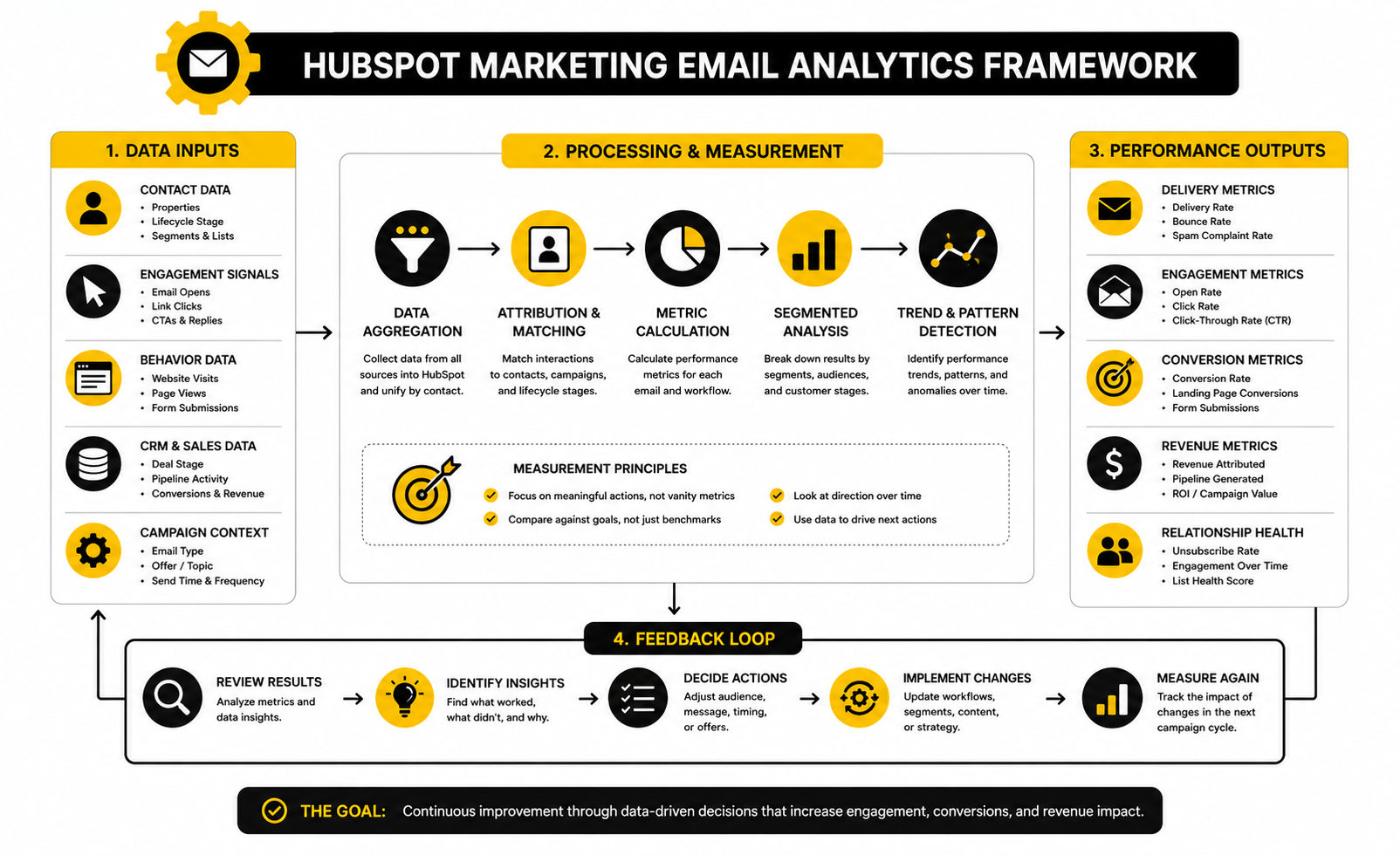
A clean analytics system starts before the email is sent. Every HubSpot marketing email should have a campaign association, a clear audience, a defined goal, consistent naming, and tracking that connects the email to the destination page. Without that structure, reporting becomes messy later.
Inside HubSpot, you can review sent email performance, compare engagement by segment, inspect recipients, analyze clicks, and connect email activity to broader campaign performance. HubSpot’s email performance reporting defines metrics such as opens, clicks, bounces, unsubscribes, spam reports, and delivery outcomes inside the marketing email analytics view. HubSpot’s Email Health tool also tracks reputation signals like open rate, click-through rate, hard bounce rate, unsubscribe rate, and spam reports so you can see whether performance problems are isolated or systemic.
The most useful setup is simple: campaign-level reporting for the big picture, email-level reporting for message performance, segment-level reporting for audience quality, and contact-level reporting for sales context. That gives marketing and sales a shared view of what is happening. It also stops teams from arguing based on opinions when the data is already available.
Deliverability Signals Need Immediate Attention
Deliverability metrics are not vanity numbers. They are warning lights. If bounces, spam complaints, or unsubscribes rise, the campaign may be telling you that the list is stale, the audience is wrong, or the message was not expected.
Gmail’s sender guidance says bulk senders should keep spam rates below 0.1% and avoid reaching 0.3% or higher, which is a useful reminder that complaint rate is not something to casually ignore. HubSpot’s own sending suspension guidance lists thresholds including a 5% hard bounce rate, 0.1% spam report rate, and 3% unsubscribe rate as signals that can create serious sending problems. Those numbers are not goals. They are danger zones.
The practical action is clear. If complaints rise, tighten targeting and check whether the email matched the contact’s expectations. If hard bounces rise, clean the list and review acquisition sources. If unsubscribes rise, check frequency, relevance, and whether the campaign is being pushed to contacts who no longer fit.
Conversion Data Beats Engagement Data
Engagement metrics matter, but conversion metrics matter more. A HubSpot marketing email should ultimately be judged by the action it was designed to create. That might be a form submission, demo booking, trial start, product usage action, purchase, renewal signal, or sales conversation.
This is why click rate alone can mislead you. An email can generate many clicks to a landing page that does not convert. Another email can generate fewer clicks but attract higher-intent people who actually book meetings or move deals forward.
The best reporting connects the email to the next business event. Look at email-influenced form submissions, meeting bookings, lifecycle stage changes, deal creation, revenue influence, and customer activation. That is how you move from “people clicked” to “this campaign helped the business.”
Segment Performance Shows Where The Real Opportunity Is
Segment-level analysis is one of the most useful parts of HubSpot marketing email reporting. A campaign may look average overall while one audience performs extremely well and another drags down the result. If you only look at the blended number, you miss the lesson.
For example, customers may click a product education email heavily while cold leads ignore it. Recent webinar attendees may convert well while old newsletter subscribers barely engage. That does not mean the email is good or bad in general. It means the fit varies by audience.
The action is to split learning by segment. Keep the winning message for the group that responds. Rewrite or suppress the message for the group that does not. This is how your email program gets sharper instead of simply sending more.
Frequency Data Protects The Relationship
Frequency is one of the most underused analytics questions. Teams often ask whether one email performed well, but they do not ask whether the contact has received too many emails recently. HubSpot can help you see contact activity and manage suppression logic so campaigns do not collide.
Too much email can make even good content feel annoying. If someone receives a newsletter, webinar invite, sales nurture email, product update, and promotion in the same short window, the issue may not be any single message. The issue is the total experience.
Track performance by send frequency and engagement level. If highly engaged contacts keep clicking, they may tolerate more frequent communication. If marginal contacts start unsubscribing or ignoring sends, reduce frequency and use stronger qualification rules.
Data Should Create Decisions
The whole point of measurement is decision-making. If the data does not change what you do next, you are just watching numbers move. Every HubSpot marketing email report should lead to at least one decision.
A simple decision model works well:
This is the professional way to use analytics. You are not chasing perfect numbers. You are building a feedback loop where every send improves the next one.
What Good Performance Looks Like Over Time
Good performance is not one lucky campaign. It is a stable pattern: healthy delivery, controlled complaints, useful clicks, clean unsubscribes, improving conversions, and better audience segmentation over time. That is what you want from a HubSpot marketing email system.
The strongest programs usually become more selective as they mature. They send fewer irrelevant emails, build better segments, personalize based on real context, and measure outcomes beyond the inbox. That discipline compounds.
So do not treat reporting as the final step. Treat it as the start of the next campaign. The data tells you what your audience is rewarding, what they are ignoring, and what they are warning you to stop doing.
Professional Implementation In HubSpot
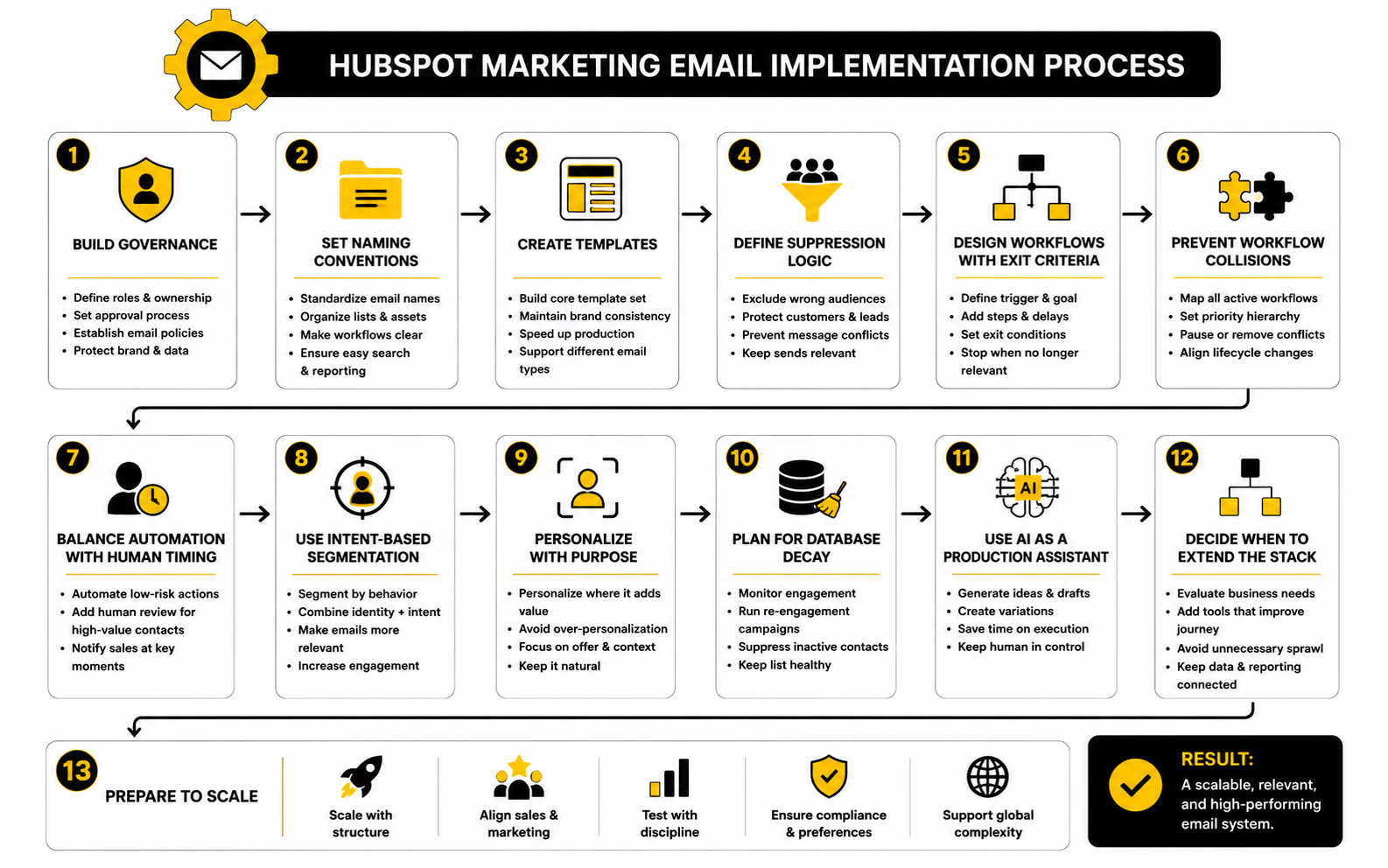
Professional implementation is where HubSpot marketing email starts to separate serious operators from casual senders. The basics are important, but scaling email inside a CRM brings new tradeoffs: governance, permissions, naming conventions, workflow collisions, database quality, suppression logic, and sales alignment. These are not glamorous topics, but they decide whether your email system stays clean or slowly becomes chaos.
The key shift is moving from campaign thinking to operating-system thinking. A campaign is one send. An operating system is the structure that makes every send easier, safer, and more useful. If you build that structure early, HubSpot becomes much easier to manage as your list, team, and automation grow.
This part is not about adding complexity for the sake of it. It is about reducing avoidable mistakes. The bigger your database becomes, the more expensive messy email operations get.
Build Governance Before You Scale
Governance sounds boring until two teams send overlapping emails to the same audience on the same day. It also becomes very real when someone edits a live workflow without understanding the downstream effects. HubSpot marketing email needs clear ownership so campaigns do not compete with each other or damage the contact experience.
At minimum, define who can create emails, who can approve sends, who owns subscription types, who manages templates, who controls workflows, and who reviews deliverability. This does not have to become corporate theater. It just needs to be clear enough that everyone knows where decisions live.
A simple approval process is usually enough for most teams. Before a campaign goes live, someone should check the audience, suppression list, subscription type, sender, links, tracking, mobile layout, personalization tokens, and workflow logic. That final review catches the mistakes people usually notice five minutes after sending.
Use Naming Conventions That Humans Can Understand
Naming conventions are not just for neat folders. They make reporting, troubleshooting, and handoffs easier. When email names are vague, every future audit becomes slower.
A useful naming structure should tell you the campaign type, audience, offer, date, and version without opening the email. For example, a nurture email, webinar invite, customer update, reactivation campaign, and sales-assisted follow-up should not all look the same in the dashboard. Good naming turns HubSpot into a searchable system instead of a pile of assets.
The same principle applies to lists, workflows, forms, landing pages, and campaigns. If the email is part of a larger flow, the naming should make that relationship obvious. This is especially important when multiple people work inside the same HubSpot portal.
Treat Templates As Brand Infrastructure
Templates are not just design shortcuts. They are brand infrastructure. A strong template system keeps emails consistent, speeds up production, and prevents every campaign from becoming a custom build.
Start with a small set of practical templates. You may need one for newsletters, one for nurture emails, one for event promotion, one for product updates, one for customer education, and one plain-text-style template for direct-feeling messages. Each template should have a clear purpose instead of trying to support every possible campaign.
Do not overdesign every HubSpot marketing email. Sometimes a simple, clean layout will feel more personal and perform better than a heavily designed email. The template should support the message, not become the message.
Create Suppression Logic That Prevents Bad Sends
Suppression logic is one of the most underrated parts of professional email implementation. Most teams think carefully about who should receive a campaign, but not enough about who should be excluded. That is where bad sends happen.
Suppression rules should protect current customers from irrelevant acquisition offers, active sales opportunities from conflicting marketing messages, recent converters from redundant promotions, unengaged contacts from excessive volume, and contacts with poor-fit criteria from campaigns that do not apply. This keeps the experience cleaner and protects sender reputation.
The goal is not to suppress aggressively until nobody receives anything. The goal is to prevent obvious mismatches. A good HubSpot marketing email should feel timely and relevant because the wrong people were filtered out before the right people ever received it.
Design Workflows With Exit Criteria
Workflows are powerful, but they can become dangerous when they lack exit criteria. A contact should not keep receiving nurture emails after they have booked a meeting, become a customer, entered an opportunity, or shown that the sequence no longer applies. Without exits, automation keeps pushing even after the context has changed.
Every automated email path should have a clear start, goal, and stop condition. The trigger defines why the contact entered. The goal defines what success looks like. The exit criteria define when continuing would be unnecessary or harmful.
This is where professional HubSpot marketing email implementation becomes more strategic. You are not just asking, “What should happen next?” You are also asking, “When should this stop?” That second question protects the relationship.
Avoid Workflow Collisions
Workflow collisions happen when multiple automations touch the same contact at the same time. One workflow may nurture a lead after a guide download, another may promote a webinar, another may alert sales, and another may update lifecycle stage. Each workflow may make sense alone, but together they can create a confusing experience.
The fix is not always fewer workflows. The fix is better hierarchy. Decide which workflows are higher priority, which campaigns should pause others, and which lifecycle changes should remove a contact from earlier paths.
For example, a demo request should usually override a general nurture flow. A new customer onboarding workflow should override acquisition campaigns. A sales opportunity stage change should influence marketing suppression. HubSpot can support this logic, but the strategy has to come first.
Balance Automation With Human Timing
Automation is useful because it creates consistency, but not every moment should be automated. Some contacts deserve human review before receiving another marketing message. This is especially true for high-value accounts, active opportunities, enterprise deals, and contacts already in conversation with sales.
The tradeoff is speed versus judgment. Fully automated follow-up is faster. Human-assisted follow-up is often more appropriate when the relationship is valuable or sensitive. A mature HubSpot marketing email system knows when to use each one.
A practical model is to automate low-risk education and operational follow-up, then notify sales or customer success when a contact shows high intent. That keeps the system efficient without making important relationships feel mass-managed.
Watch The Risk Of Over-Personalization
Personalization can improve relevance, but over-personalization can make an email feel invasive. Just because HubSpot has data does not mean every data point should appear in the copy. The reader should feel understood, not monitored.
Use personalization when it improves the message. Referencing a broad interest, lifecycle stage, downloaded resource, or customer status can be useful. Referencing too many behavioral details can feel uncomfortable, especially if the contact does not remember giving that signal.
The safest approach is to personalize the offer and context more than the sentence itself. A segmented email that quietly sends the right resource often feels better than an email that loudly announces every tracked behavior. Relevance should feel natural.
Segment By Intent, Not Just Identity
Basic segmentation often uses identity data such as job title, company size, industry, or region. Those fields are helpful, but they do not always reveal what someone wants right now. Intent data is usually more useful for deciding the next email.
Intent can come from content downloads, pricing page visits, repeat engagement, event attendance, form submissions, product usage signals, or sales activity. These behaviors show what the contact is doing, not just who they are. That makes the next message easier to choose.
The best HubSpot marketing email programs combine both. Identity tells you how to frame the message. Intent tells you when and why to send it.
Keep Sales And Marketing Definitions Tight
HubSpot sits between marketing and sales, so unclear definitions create problems quickly. If marketing defines a qualified lead one way and sales interprets it another way, email follow-up will feel disconnected. Contacts may receive nurture emails that do not match the sales conversation.
Define lifecycle stages, lead statuses, handoff rules, and re-engagement paths clearly. Decide what happens when someone becomes an MQL, SQL, opportunity, customer, or evangelist. Then make sure email workflows respect those definitions.
This is not just an internal operations issue. The contact feels the result. When definitions are clean, the experience feels coordinated. When definitions are loose, the experience feels random.
Plan For Database Decay
Every database decays. People change jobs, abandon inboxes, switch companies, lose interest, or no longer fit your offer. If you ignore that reality, your HubSpot marketing email performance will slowly decline even if your copy improves.
Build a re-engagement process before the list becomes a problem. Identify contacts who have not opened, clicked, converted, or visited meaningful pages in a defined period. Then decide whether to reduce frequency, send a focused re-engagement campaign, or suppress them from regular campaigns.
This is one of the hardest tradeoffs in email marketing because list size feels valuable. But a large unengaged list is not an asset if it weakens performance and reputation. Clean reach beats inflated reach.
Use AI Carefully Inside The Email Process
AI can speed up email production, but it should not replace strategy. It can help draft subject lines, summarize audience pain points, generate copy variants, create testing ideas, and adapt messaging for different segments. That is useful when the human operator still controls the goal, audience, and final judgment.
The risk is that AI makes it easier to produce more average emails faster. More output is not automatically better. If the segmentation, offer, and timing are weak, AI just helps you scale weak messaging.
Use AI as a production assistant, not a decision-maker. Let it help you create options, then use HubSpot data, customer context, and human judgment to choose what should actually be sent.
Know When HubSpot Is Enough And When To Extend The Stack
HubSpot can handle a lot, especially when email, CRM, forms, workflows, landing pages, and reporting live together. For many teams, keeping the system inside HubSpot reduces tool sprawl and makes attribution easier. That simplicity has real value.
But some businesses need specialized tools around HubSpot. A team focused on social scheduling may connect a tool like Buffer for campaign distribution. A business that relies heavily on conversational marketing may use ManyChat alongside email to continue conversations in other channels.
The strategic question is not “Can we add another tool?” The question is “Will this make the customer journey clearer or messier?” If an extra tool creates better data, better timing, or better follow-up, it may be worth it. If it creates disconnected reporting and more manual work, keep the stack tighter.
Advanced Testing Requires Discipline
Advanced testing is not about testing everything at once. It is about isolating meaningful variables and learning from them. If you change the audience, subject line, offer, CTA, layout, and timing in the same test, you may get a winner without understanding why it won.
A stronger approach is to test one strategic question at a time. Does urgency outperform education for this segment? Does a product-led CTA beat a consultation CTA? Does a plain-text-style email outperform a branded template for high-intent leads? These questions create learning you can reuse.
HubSpot marketing email testing works best when results are documented outside the single campaign report. Build a simple testing log with the hypothesis, audience, variable, result, and next action. That turns individual tests into institutional knowledge.
Prepare For International And Compliance Complexity
As your audience expands, email compliance becomes more complex. Consent expectations, privacy rules, language preferences, and regional norms can vary by market. A campaign that is acceptable for one audience may be inappropriate for another.
This is where subscription types, consent records, region-based segmentation, and clear preference management become important. Do not rely on memory or informal rules. Build the requirements into the HubSpot system so the correct audience logic is applied every time.
This matters even if your team is small. Compliance mistakes do not only create legal risk. They also damage trust, and trust is much harder to rebuild than a workflow.
Scaling Means Saying No More Often
The more advanced your HubSpot marketing email program becomes, the more often you need to say no. No to irrelevant sends. No to vague audiences. No to last-minute campaigns with unclear goals. No to sending to the whole database because a stakeholder wants more reach.
That discipline is not negativity. It is protection. You are protecting inbox placement, subscriber trust, sales alignment, reporting quality, and future campaign performance.
The best email teams do not win because they send the most. They win because they make better decisions before sending. That is what turns HubSpot from an email tool into a serious growth system.
Measurement, Optimization, And FAQs
By this point, the message should be clear: HubSpot marketing email works best when it is treated as a connected system. The strategy defines why the email exists. The CRM data defines who should receive it. The workflow defines when it should happen. The reporting defines what you should improve next.
That final loop is where most teams either compound results or slowly drift into average performance. If every campaign teaches you something, your email program becomes sharper over time. If every campaign is treated as a one-off, you keep relearning the same lessons.
The best HubSpot marketing email systems are not built around volume. They are built around judgment. They use data, segmentation, automation, and reporting to make better decisions before and after every send.
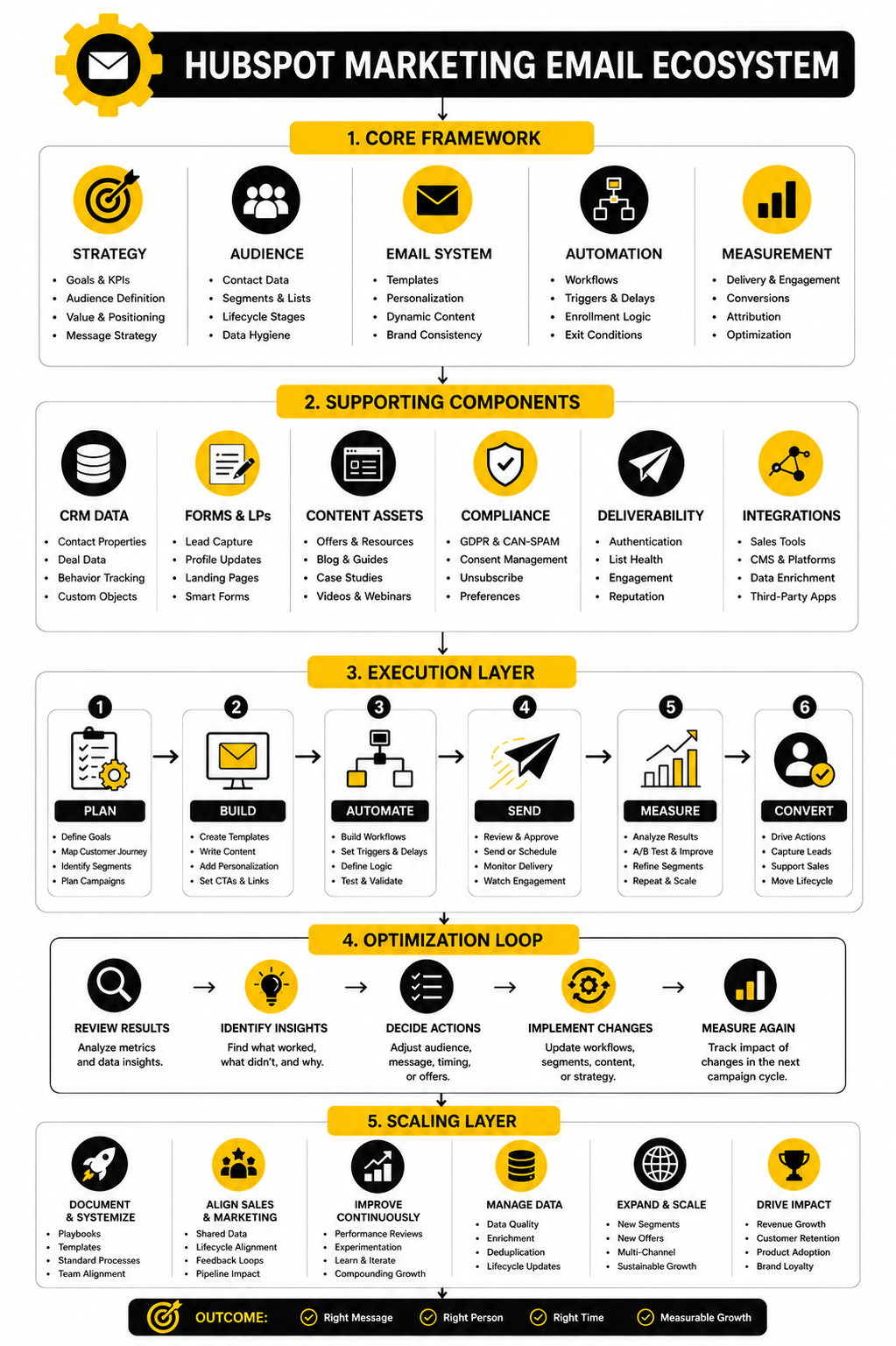
The Final System View
A complete HubSpot marketing email system has five connected layers: audience, message, workflow, destination, and measurement. If one layer is weak, the whole experience suffers. That is why professional email performance is rarely about one magic subject line or one clever template.
The audience layer decides who receives the campaign and who gets excluded. The message layer turns the audience’s context into a useful email. The workflow layer controls timing, enrollment, suppression, exits, and follow-up.
The destination layer turns interest into action. That might be a landing page, demo form, checkout page, resource, webinar registration, customer education page, or sales handoff. The measurement layer then shows whether the campaign moved people toward the intended outcome or simply created surface-level engagement.
How To Keep Improving After Launch
Optimization should start with the biggest constraint, not the easiest metric. If deliverability is weak, fix that before rewriting copy. If clicks are strong but conversions are weak, the landing page or offer probably needs attention. If conversions are strong for one segment and weak for another, the campaign needs better segmentation.
Use a simple review rhythm after every meaningful HubSpot marketing email campaign. Look at delivery, opens, clicks, conversions, unsubscribes, complaints, bounces, and CRM impact. Then decide what should change in the next send.
Do not optimize randomly. One campaign might need a clearer CTA. Another might need a smaller audience. Another might need a different offer entirely. The data should point to a decision, not just fill a dashboard.
What Is A HubSpot Marketing Email?
A HubSpot marketing email is an email created and sent through HubSpot’s marketing email tools to communicate with contacts at scale. It can be used for newsletters, nurture campaigns, product updates, event promotions, customer education, reactivation, and automated workflow messages. The real value is that the email can be connected to HubSpot CRM data, lists, workflows, subscription preferences, and reporting.
Is HubSpot Good For Email Marketing?
HubSpot is strong for email marketing when you want email connected to CRM data, automation, segmentation, landing pages, forms, and sales activity. It is especially useful for teams that care about the full customer journey rather than just sending newsletters. If your only need is very basic email sending, HubSpot may be more platform than you need, but for CRM-driven growth it can be a serious advantage.
What Makes HubSpot Marketing Email Different From A Basic Newsletter Tool?
The biggest difference is context. A basic newsletter tool can send emails to a list, but HubSpot can use contact properties, lifecycle stages, form submissions, website activity, list membership, and deal information to shape who receives what. That makes the email program more connected to sales, nurturing, and customer relationships.
How Often Should You Send HubSpot Marketing Emails?
There is no universal sending frequency that works for every database. A weekly newsletter may be fine for an engaged audience, while a high-intent nurture sequence may need several emails over a shorter period. The practical rule is to watch engagement, unsubscribes, complaints, and conversions by segment instead of choosing frequency based on guesswork.
What Metrics Should I Track First?
Start with delivery rate, bounce rate, spam complaints, unsubscribe rate, open rate, click rate, and conversion rate. Delivery and complaint signals protect your ability to reach the inbox. Clicks and conversions show whether the email created meaningful action.
Are Open Rates Still Reliable?
Open rates are useful, but they should not be treated as perfect proof of human attention. Privacy changes, image loading, and inbox behavior can affect open tracking. Use open rate as a directional signal, then judge real performance through clicks, conversions, replies, form submissions, meetings, and CRM movement.
How Do I Improve Click Rates In HubSpot Marketing Email?
Improve click rates by tightening the audience, making the offer more specific, writing a clearer CTA, and matching the email promise to the reader’s current context. A weak click rate usually means the email did not create enough reason to act. Do not only change button text; check whether the whole campaign is aimed at the right people.
What Is A Good HubSpot Email Workflow?
A good workflow has a clear trigger, a clear goal, useful delays, suppression rules, and exit criteria. It should stop when the contact takes the intended action or moves into a stage where the workflow no longer makes sense. The best workflows feel like timely help, not automated pressure.
Should Every HubSpot Marketing Email Be Automated?
No. Some emails should be one-off campaigns because they are time-sensitive, seasonal, or tied to a specific announcement. Automation is best for repeatable moments such as form submissions, webinar registrations, lead nurture, onboarding, reactivation, and lifecycle-stage changes.
How Important Is Segmentation?
Segmentation is one of the most important parts of HubSpot marketing email. It decides whether the message feels relevant or generic. Strong segments can be based on lifecycle stage, product interest, engagement level, form history, customer status, region, industry, deal stage, or other CRM properties that actually affect the message.
What Is The Biggest Mistake Teams Make With HubSpot Marketing Email?
The biggest mistake is treating HubSpot like a prettier email sender instead of a CRM-connected marketing system. Teams often jump straight into design and copy before defining the audience, goal, suppression rules, workflow logic, and measurement plan. That creates polished emails that still underperform because the strategy was weak.
How Do I Protect Deliverability In HubSpot?
Protect deliverability by authenticating your sending domain, sending to engaged contacts, keeping lists clean, honoring subscription preferences, avoiding sudden volume spikes, and monitoring bounces, unsubscribes, and spam complaints. Deliverability is not a one-time setup task. It is an ongoing operating discipline.
Should I Use A Dedicated IP For HubSpot Marketing Email?
A dedicated IP can make sense for high-volume senders with consistent sending patterns and the ability to manage reputation carefully. Smaller or inconsistent senders may be better served by HubSpot’s shared infrastructure, depending on the account setup and sending behavior. The decision should be based on volume, consistency, reputation needs, and technical readiness.
How Can Sales Use HubSpot Marketing Email Data?
Sales can use email engagement data to understand which contacts are interacting with specific topics, offers, product pages, events, or nurture campaigns. A click does not automatically mean someone is ready to buy, but repeated meaningful engagement can help sales prioritize outreach. The best setup combines email signals with lifecycle stage, page activity, form submissions, and deal context.
Can HubSpot Marketing Email Replace Sales Outreach?
No, and it should not try to. Marketing email can educate, warm up, qualify, and reactivate contacts, but human sales conversations still matter when the decision is complex or high value. The strongest systems use marketing email to support sales timing, not replace sales judgment.
How Do I Know If My HubSpot Email Strategy Is Working?
Your strategy is working if deliverability stays healthy, engagement is stable or improving, conversions match the campaign goals, and email activity supports pipeline, revenue, retention, or product adoption. The exact numbers depend on your audience and business model. The better question is whether the system is improving over time and creating useful next actions.
Build a stronger local presence with BAAM AI
Turn your website, Google profile, social channels, and AI visibility into one growth engine
Most businesses do not need more random marketing activity. They need a consistent presence system that helps the right people find them, trust them, and take action. BAAM AI brings strategy, local SEO, website updates, Google Maps visibility, social content, AI-search readiness, media production, and reporting into one practical monthly engine.
If you want your marketing to keep working after the campaign ends, start with a free BAAM AI presence audit. See how your business shows up today and where the fastest visibility wins are at BAAM AI.