
BAAM AI Blog
HubSpot Email Hosting: What It Does, What It Does Not Do, And How To Set It Up Properly
HubSpot email hosting is one of those phrases that sounds simple until you actually try to set it up.
Affiliate disclosure: this article may include compensated links. Recommendations should still be evaluated against your use case, budget, and current provider terms.
Should you choose HubSpot?
HubSpot is worth considering when the use case, budget, and implementation effort match what you actually need to do next.
teams that want a practical tool decision without reading another generic feature list
Check HubSpotHubSpot email hosting is one of those phrases that sounds simple until you actually try to set it up.
Most people search for it expecting HubSpot to work like Google Workspace, Microsoft 365, Zoho Mail, or another traditional mailbox provider. That is not really what HubSpot does. HubSpot can connect to your existing inbox, send CRM emails, log conversations, power shared inboxes, and send marketing emails, but your actual mailbox is usually still hosted by Gmail, Outlook, Exchange, or another email provider.
That distinction matters because the wrong setup can create real problems. Sales emails may fail to log. Support replies may land in the wrong place. Marketing emails may look suspicious if authentication is not configured correctly. HubSpot’s own documentation separates connected inboxes, CRM email sending, conversations inboxes, and marketing email sending, which is exactly why “HubSpot email hosting” needs a clearer explanation before anyone starts changing DNS records or connecting team inboxes.
A connected personal inbox lets users send one-to-one emails from HubSpot, log replies to the CRM, send sequences, and use HubSpot Sales tools inside Gmail or Office 365, as shown in HubSpot’s guide to connecting a personal email account. For one-to-one emails, HubSpot explains that your existing provider’s sending network still completes the send when your inbox is connected, which is why Gmail, Outlook, or IMAP configuration still matters even when HubSpot is the system your team works from day to day in the CRM email sending documentation.
For marketing email, the picture changes. HubSpot can send marketing emails through its platform, but your domain still needs proper authentication with DKIM, SPF, and DMARC so mailbox providers can verify that HubSpot has permission to send on your behalf. HubSpot’s own deliverability guidance is very clear on this point: authentication, list quality, engagement, and sender reputation all affect whether your emails reach the inbox or get filtered away in the background email deliverability overview.
this guide is structured as a practical six-part guide, not a generic feature tour. The goal is to separate mailbox hosting, CRM email connection, shared inbox management, marketing email infrastructure, and deliverability so you can make better setup decisions. Each part builds on the previous one, so the full article reads like one clear implementation path.
What HubSpot Email Hosting Really Means
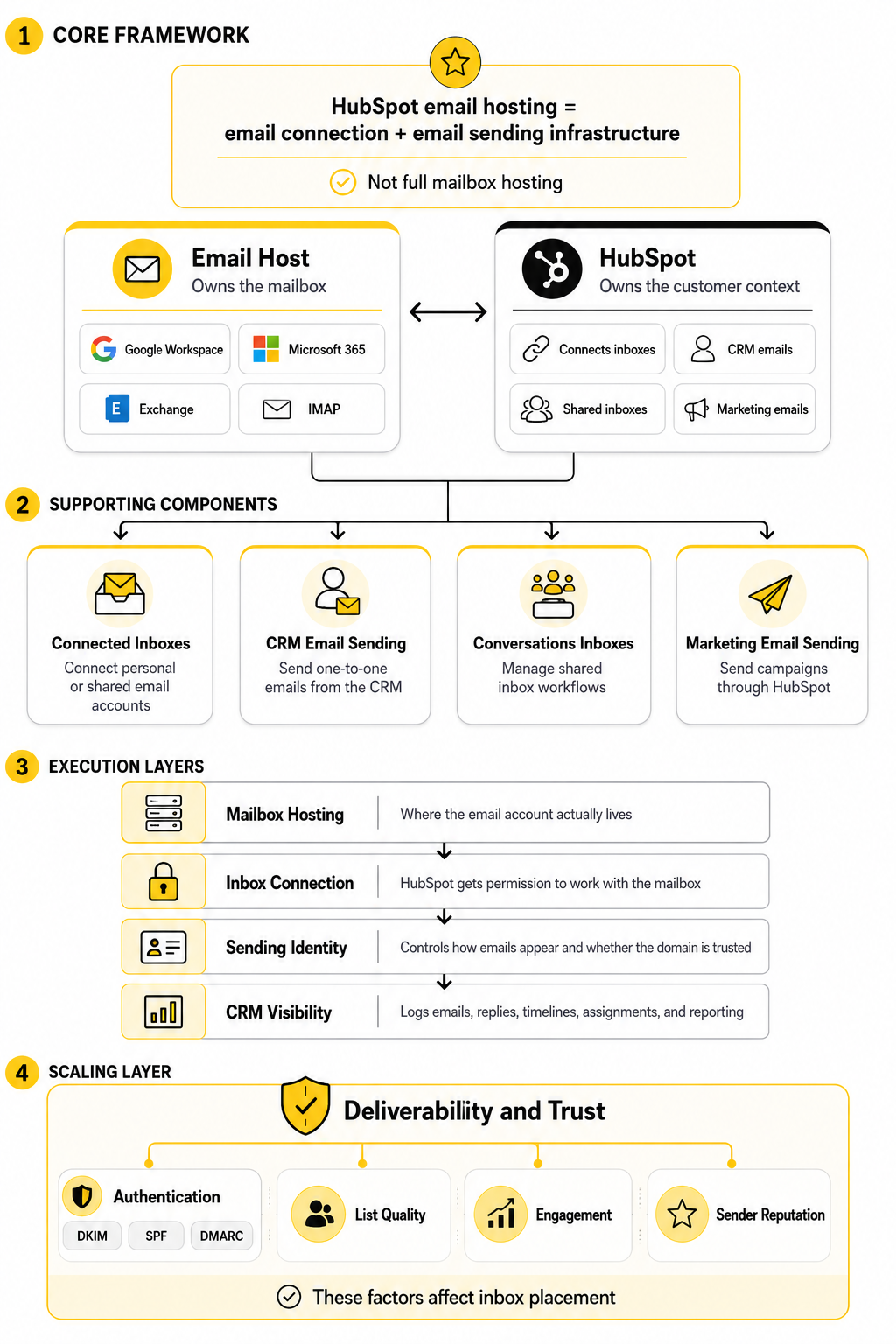
HubSpot email hosting is best understood as email connection and email sending infrastructure, not full mailbox hosting. In most setups, HubSpot does not replace Gmail or Microsoft 365 as the place where your actual mailbox lives. Instead, HubSpot connects to that mailbox so your team can send, track, log, automate, and organize email activity inside the CRM.
This is why a business can use Google Workspace for the mailbox, HubSpot for CRM and marketing automation, and still have everything feel connected to the user. Google Workspace provides business email with a custom domain through Gmail, while HubSpot provides CRM logging, sales sequences, shared conversations, and marketing email tools on top of that mailbox layer Google Workspace business email. Microsoft 365 works in a similar role when a company uses Outlook or Exchange Online as the mailbox provider and HubSpot as the customer platform.
The easiest way to think about it is this: your email host owns the mailbox, while HubSpot owns the customer context. The mailbox provider handles receiving mail, mailbox storage, user access, and core sending infrastructure for personal emails. HubSpot adds CRM records, contact history, automation, templates, tracking, team workflows, and marketing email tools.
Why Email Hosting Matters Inside HubSpot
Email is still one of the highest-leverage channels in a business, but it is also one of the easiest to damage with sloppy setup. A sales rep can connect the wrong inbox, a founder can send marketing campaigns without domain authentication, or a support team can route shared inbox replies through personal accounts instead of a team-managed address. None of those mistakes are dramatic on day one, but they create messy CRM data, weak reporting, and avoidable deliverability issues later.
The reason this matters is that email is not just communication anymore. In HubSpot, email becomes part of your sales process, customer service record, lifecycle tracking, automation logic, and marketing performance data. When the email layer is configured properly, your team can see the relationship history instead of hunting through personal inboxes and Slack messages.
It also matters because mailbox providers are stricter than they used to be. HubSpot’s marketing email guidance highlights authentication with DKIM, SPF, and DMARC, and warns that unauthenticated sending can make emails look suspicious to recipient systems HubSpot email sending authentication. That is not a small technical detail. It is the difference between a scalable email system and a setup that quietly leaks revenue because important emails never make it to the inbox.
The HubSpot Email Framework
A clean HubSpot email setup has four layers: mailbox hosting, inbox connection, sending identity, and CRM visibility. Mailbox hosting is where your email account actually lives, usually Google Workspace, Microsoft 365, Exchange, or another IMAP-compatible provider. Inbox connection is where HubSpot gets permission to work with that mailbox for CRM email activity.
The sending identity layer decides how your emails appear to recipients and whether your domain is trusted. For one-to-one sales emails, your connected provider usually completes the send. For marketing emails, HubSpot’s sending system and your authenticated sending domain become much more important, especially if you send at meaningful volume or need tighter control over reputation.
CRM visibility is the layer most teams actually care about day to day. It determines whether emails log to contact records, whether replies appear in the right timeline, whether support conversations are assigned properly, and whether reporting reflects what really happened. HubSpot’s connected inbox FAQ makes this practical: a connected inbox is required to send emails through the CRM and use certain Sales Hub and Service Hub features HubSpot connected inboxes FAQ.
Where HubSpot Stops And Your Email Host Starts
The cleanest way to understand HubSpot email hosting is to draw a hard line between mailbox ownership and CRM execution. Your email host is responsible for the actual mailbox: the inbox, sent folder, storage, user account, password rules, and core mail server connection. HubSpot sits beside that system and gives your team a customer-facing workflow layer around it.
That means HubSpot can be the place where your sales team sends emails, tracks replies, uses templates, enrolls contacts in sequences, and reviews communication history. But the mailbox itself still depends on the provider connected behind the scenes. If that provider is Google Workspace, Microsoft 365, Exchange, or IMAP, HubSpot is not replacing it; HubSpot is using that connection to make email activity useful inside the CRM.
This matters because many setup mistakes come from treating HubSpot like the mailbox provider. A team may assume that adding a user to HubSpot automatically creates a business email address. It does not. You still need the email account created and managed in your email hosting platform before HubSpot can connect to it properly.
Personal Inbox Connection Versus Team Inbox Connection
A personal inbox is for one person’s business email account. This is the setup a sales rep, account manager, founder, or customer success manager would use when they want emails sent from their own address to appear in HubSpot. It supports normal one-to-one communication, and it keeps the sender identity personal.
A team inbox is different because it represents a shared business channel. Addresses like support, sales, info, billing, or partnerships usually need shared ownership, routing, assignment, and visibility. In HubSpot, that belongs closer to the conversations inbox or help desk workflow than a personal sales inbox.
The difference sounds small, but it changes how the system should be managed. A personal inbox should not become the company’s support queue. A shared inbox should not depend on one employee’s login. When those boundaries are clear, the CRM stays cleaner, the customer experience feels more consistent, and your team avoids the classic problem where important replies disappear into one person’s private mailbox.
Marketing Email Sending Is A Separate Layer
Marketing email should not be treated like normal inbox email. A one-to-one sales message and a newsletter campaign may both look like “email” to the recipient, but the infrastructure, compliance expectations, and sender reputation dynamics are different. HubSpot email hosting questions often get messy because people mix these two use cases together.
When a team sends marketing emails through HubSpot, the sending domain, DNS authentication, unsubscribe handling, contact permissions, and engagement quality all become central. This is not the same as connecting a Gmail or Outlook inbox and sending a quick follow-up to a prospect. Marketing email is a broadcast or automation channel, so mailbox providers judge it with stricter expectations.
That is why a business should separate its operational thinking into two lanes. Personal and team inboxes are about communication workflows. Marketing email is about permission, domain trust, deliverability, and list health. If you blur those lanes, you end up troubleshooting the wrong thing when replies fail to log, campaigns underperform, or a domain starts building a weaker sender reputation.
The Business Risk Of A Messy Email Setup
A messy email setup does not usually break all at once. It creates small problems that quietly compound. Emails get sent from the wrong address, replies do not attach to the right contact record, automations trigger from incomplete data, and leadership starts making decisions from reporting that looks cleaner than the reality underneath.
The bigger risk is that customers feel the mess before the team fully sees it. A prospect may get a sales email from one person, a follow-up from another, and a support reply from an address that nobody monitors properly. That kind of experience makes the company look less organized than it might actually be.
This is especially important for teams using HubSpot as their main customer platform. If the CRM is supposed to be the source of truth, email activity needs to flow into it consistently. Otherwise, HubSpot becomes a partial record of the customer relationship instead of the operating system for it.
When HubSpot Email Hosting Is The Right Fit
HubSpot is the right fit when you want email connected to customer context. Sales teams benefit when emails, calls, notes, deals, meetings, and contact records live in one place. Service teams benefit when shared inbox conversations can be assigned, tracked, and handled without depending on scattered personal inboxes.
It also makes sense when marketing and sales need to work from the same relationship history. A contact may enter through a form, receive nurture emails, reply to a sales rep, book a meeting, and later open a support conversation. HubSpot is valuable because it can connect those moments into one timeline instead of leaving them spread across disconnected tools.
HubSpot email hosting is not the right phrase if what you need is simply a place to create mailboxes. For that, you still need a real email hosting provider. But if what you need is a connected email system that supports CRM visibility, automation, team workflows, and marketing execution, then HubSpot becomes a serious part of the email stack.
When You Still Need A Dedicated Email Host
You still need a dedicated email host when your company needs business mailboxes, inbox storage, mailbox-level security, user access controls, and the everyday experience of receiving and managing email. HubSpot does not remove that need. It depends on that layer being set up correctly.
For most businesses, this means choosing a reliable mailbox provider first and then connecting that provider to HubSpot. The mailbox provider handles the foundation. HubSpot then adds the CRM and customer engagement layer on top.
This order matters. Do not start by asking, “Can HubSpot host my email?” Start by asking, “Where should our company mailboxes live, and how should HubSpot connect to them?” That question leads to a cleaner architecture, fewer setup mistakes, and a system your team can actually scale.
The HubSpot Email Framework
A practical HubSpot email hosting setup starts with one decision: what kind of email activity are you trying to run through HubSpot? Do not jump straight into DNS records, connected inboxes, or automation settings. First separate the work into personal selling, shared team communication, and marketing email.
That framework keeps the system simple. Personal inboxes are for individual communication. Team inboxes are for shared channels. Marketing email is for campaigns, newsletters, and automation that go to opted-in contacts at scale.
Once those lanes are clear, implementation becomes much easier. You are not trying to make one email setup do everything. You are building the right route for each type of communication, then letting HubSpot connect those routes to the CRM.
Step 1: Confirm Where Your Mailboxes Live
Before touching HubSpot, confirm where your company email accounts are actually hosted. For most businesses, that will be Google Workspace, Microsoft 365, Exchange, or another business email provider. This matters because HubSpot does not magically create a working company mailbox when you add a HubSpot user.
Check the basics first. Make sure each user has a real business email address, can sign in to the mailbox, can send and receive normally, and has permission to connect third-party apps if your organization restricts integrations. If the mailbox itself is broken, HubSpot will only expose the problem faster.
This is also the right moment to clean up old aliases, unused shared addresses, and messy naming conventions. A setup with five different “sales” addresses and no clear owner will not become cleaner just because HubSpot is connected. Fix the mailbox layer first, then connect it to the CRM.
Step 2: Connect Personal Inboxes For One-To-One Email
Personal inboxes should be connected for users who send direct emails from HubSpot records. This usually includes sales reps, founders, account managers, recruiters, customer success managers, and anyone else who needs their own email activity logged against contacts and companies. HubSpot’s personal inbox connection is designed for exactly this kind of one-to-one CRM email workflow.
The goal is not just sending from inside HubSpot. The real value is continuity. A rep can open a contact record, see the relationship history, send a relevant follow-up, and keep the communication trail attached to the CRM instead of scattered across a private inbox.
This is where teams should be strict about user behavior. If email logging matters, users need to send from the connected inbox and follow the company’s logging rules. Otherwise, leadership will think the CRM is incomplete when the real issue is inconsistent execution.
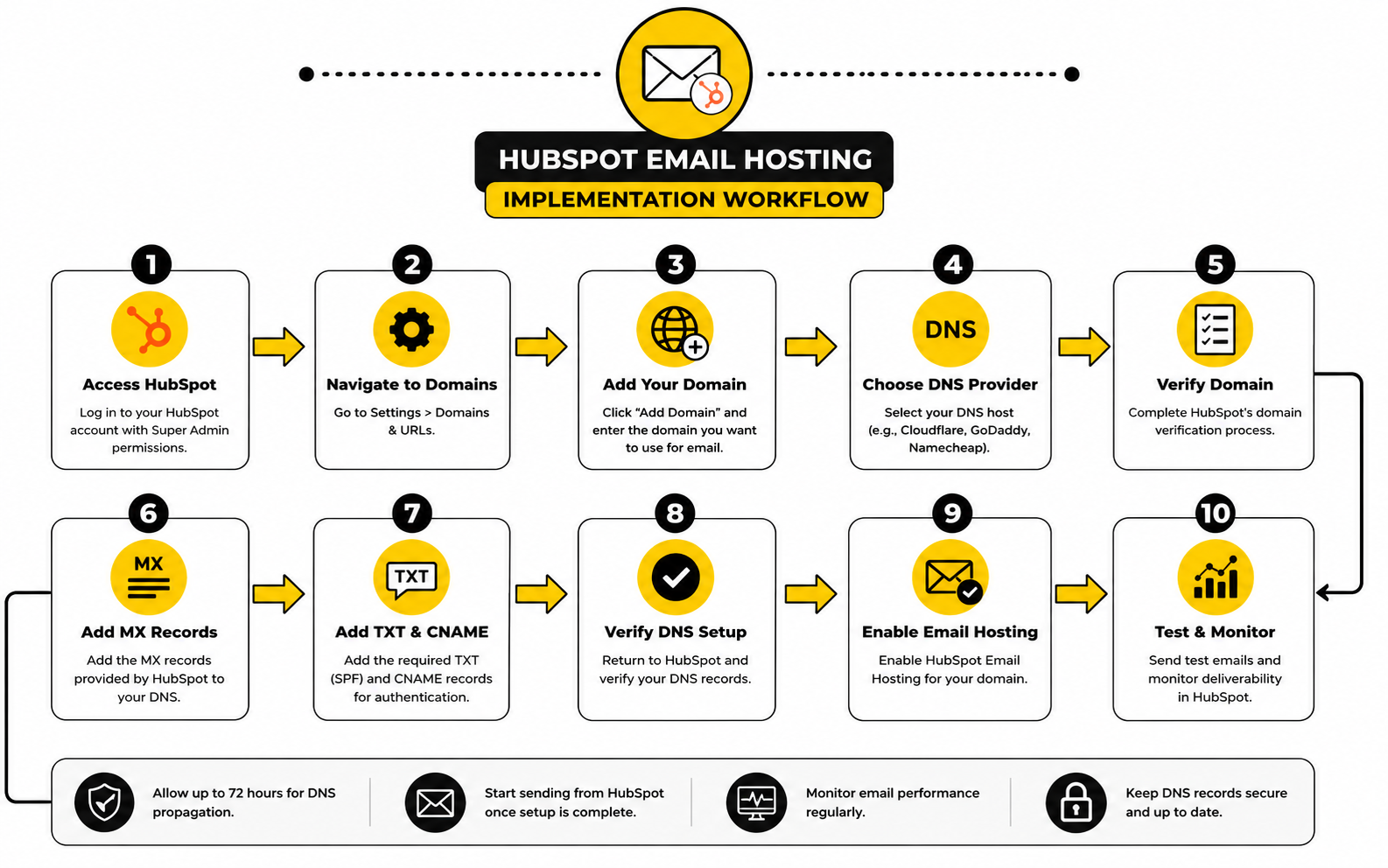
Step 3: Connect Team Inboxes For Shared Communication
Team inboxes are for addresses that represent a function rather than a person. Support, sales, info, billing, partnerships, and success are common examples. These addresses need shared visibility because customers do not care who happens to be online; they care that someone responds clearly and consistently.
Inside HubSpot, a team email channel lets the team view, manage, and reply to emails sent to a shared address from the conversations inbox. That is different from giving everyone access to one shared Gmail login, which is messy, insecure, and hard to report on. A proper team inbox gives the company a controlled workflow instead of a shared password habit.
The important implementation choice is ownership. Every shared inbox needs routing rules, assignment expectations, and a clear response process. Without that, a shared inbox becomes a shared liability.
Step 4: Set Up Marketing Email Sending Separately
Marketing email needs its own setup because it uses different rules than personal CRM email. A newsletter, nurture sequence, event invite, or product announcement is not the same as a rep replying to one prospect. It needs permission-based lists, unsubscribe management, authenticated sending, and careful monitoring.
This is where many HubSpot email hosting setups go wrong. Teams connect personal inboxes and assume marketing email is automatically ready. It is not. Marketing email should be configured intentionally, especially if the business plans to send from its own domain.
Start by choosing the sending domain you want recipients to see. Then authenticate it inside HubSpot with the DNS records HubSpot provides. This typically involves DKIM, SPF, and DMARC, which help mailbox providers verify that HubSpot is allowed to send email for your domain.
Step 5: Decide What Should Log To The CRM
Not every email needs to be logged, but the important ones absolutely should be. Sales conversations, customer success discussions, renewal threads, onboarding communication, and serious support issues usually belong in the CRM. Internal chatter, sensitive HR messages, legal discussions, and private finance conversations often do not.
That means your team needs a logging policy, not just a technical connection. Decide which users should log by default, which emails should be excluded, and which domains should never be stored in HubSpot. This protects the quality of your CRM while avoiding unnecessary clutter.
A good rule is simple: log customer-facing communication that helps the next person understand the relationship. Do not log noise just because the system can technically capture it. More data is not automatically better if the timeline becomes impossible to read.
Step 6: Test The Whole Flow Before Scaling
A HubSpot email hosting setup should be tested before the whole company depends on it. Start with a small group of users and a small set of real workflows. Send a one-to-one email, reply from the recipient side, confirm the activity logs correctly, and check whether the contact timeline makes sense.
Then test the team inbox. Send a message to the shared address, assign it, reply from HubSpot, and confirm that the conversation remains visible to the right team members. If routing or permissions feel confusing during the test, fix them before rolling the inbox out to everyone.
Finally, test marketing email with a controlled internal or small-segment send. Check the sender name, reply-to address, unsubscribe link, authentication status, and contact record activity. This is not overkill. This is how you avoid turning a configuration mistake into a public-facing email problem.
Step 7: Document The Operating Rules
The final implementation step is documentation. Not a 40-page internal manual that nobody opens. A simple operating guide that explains which inboxes exist, who owns them, when to use each one, what gets logged, and who is responsible for troubleshooting.
This guide should include the difference between personal inboxes, team inboxes, and marketing email. It should also explain what users should do when an email does not log, when a shared inbox conversation is assigned incorrectly, or when a campaign reply needs human follow-up. Clear rules prevent tool confusion from becoming customer confusion.
This is where HubSpot moves from software to system. The setup only works when the process is obvious enough for the team to follow on a busy day. That is the real test.
Statistics And Data
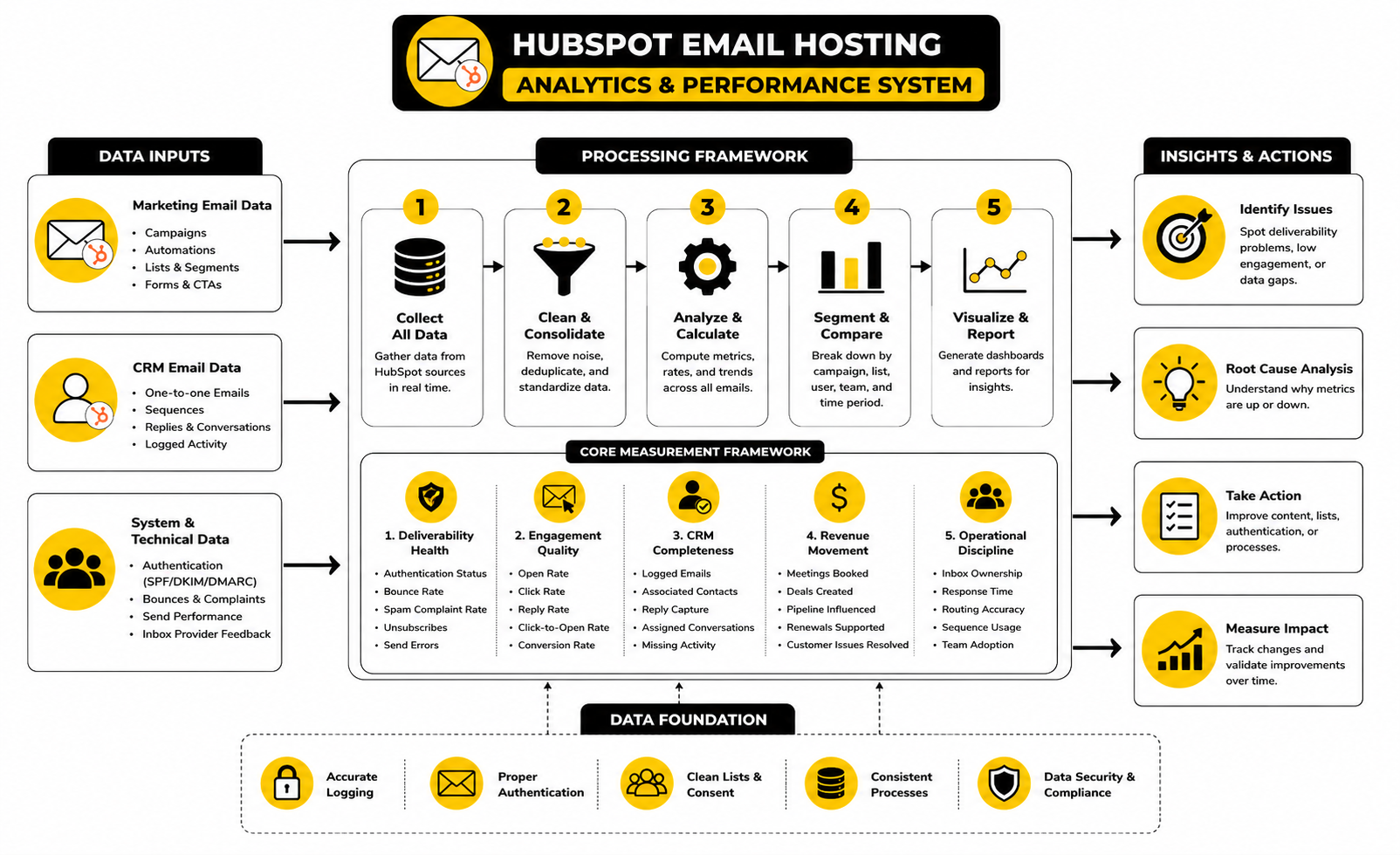
Measurement is where a HubSpot email hosting setup becomes real. The setup can look perfect on paper, but the numbers will tell you whether emails are reaching people, whether contacts are engaging, whether reps are following the process, and whether the CRM is capturing enough activity to be useful. This is the part most teams skip, and it is usually the reason they keep guessing instead of improving.
The mistake is treating email analytics like a scoreboard instead of a diagnostic system. Open rate, click rate, reply rate, bounce rate, unsubscribe rate, spam complaint rate, and CRM logging coverage all point to different problems. If you read them together, they show you whether your issue is infrastructure, audience quality, message relevance, sales execution, or reporting discipline.
HubSpot email hosting should therefore be measured in two layers. The first layer is deliverability and engagement: are emails getting delivered, opened, clicked, replied to, and accepted by mailbox providers? The second layer is CRM usefulness: are the right conversations being captured, assigned, attributed, and used by the team?
The Metrics That Actually Matter
Open rate is useful, but it is not the whole truth. Apple’s Mail Privacy Protection and other privacy changes have made opens less precise as a pure human-attention signal, so open rate should be treated as a directional indicator rather than a final verdict. If open rate drops sharply across a consistent audience, that may still point to subject line fatigue, list quality issues, sender reputation problems, or weaker inbox placement.
Click rate is more useful when the email has a clear action. If a marketing email gets opens but almost no clicks, the subject line may be doing its job while the offer, content, layout, or call to action is not. If clicks are healthy but conversions are weak, the issue may sit outside HubSpot entirely, such as the landing page, form, offer, pricing, or sales follow-up speed.
Reply rate matters most for sales and customer-facing email. A connected personal inbox should not be judged the same way as a newsletter campaign. For one-to-one outreach, replies, meetings booked, deals influenced, and logged activity are more meaningful than a vanity open rate.
Deliverability Signals You Should Watch Closely
Deliverability is the foundation because every other metric depends on the email arriving somewhere useful. A campaign with brilliant copy still fails if it lands in spam, gets blocked, or reaches a dead list. That is why bounce rate, spam complaint rate, authentication status, and engagement trends deserve serious attention.
Google’s sender requirements make this especially important for bulk senders. Gmail requires authentication with SPF or DKIM for all senders, while bulk senders need SPF, DKIM, and DMARC, and Google’s FAQ says bulk senders remain ineligible for mitigation when the user-reported spam rate is above 0.3%. That number is not a performance benchmark to aim for. It is a danger line.
Yahoo’s sender guidance points in the same direction by requiring bulk senders to use SPF and DKIM, publish a valid DMARC policy, align the visible From domain, and support easy unsubscribe handling through its sender best practices. The practical takeaway is simple: authentication is no longer a nice technical upgrade. It is part of the cost of sending serious business email.
How To Read Email Benchmarks Without Fooling Yourself
Benchmarks are helpful only when they are used carefully. A broad average open rate does not tell you whether your exact audience, offer, list source, send frequency, or lifecycle stage is performing well. A small customer onboarding list should behave differently from a large cold newsletter list, and a renewal reminder should behave differently from a top-of-funnel promotion.
HubSpot’s published benchmark data places the average email open rate across industries at 42.35% in 2025, but that number should not become your only target. A lower open rate may still produce better revenue if the audience is high intent and the offer is strong. A higher open rate may mean very little if nobody clicks, replies, books, buys, or moves forward.
The better move is to benchmark against yourself first. Compare campaign type against campaign type, list segment against list segment, and sales sequence against sales sequence. Once your own baseline is clear, outside benchmarks become context rather than a distraction.
CRM Email Data Is Different From Marketing Email Data
Marketing email analytics tell you how a list responded to a campaign or automation. CRM email data tells you how real customer conversations are moving through the business. Both matter, but they should not be blended into one vague “email performance” bucket.
For CRM-connected inboxes, the most important signals are activity logging consistency, reply capture, meeting conversion, sequence performance, deal influence, and response time. If the team sends a lot of email but little activity appears on contact records, the issue is not marketing performance. It is CRM adoption and process discipline.
This is where HubSpot can become very powerful. When email activity is connected to contacts, companies, deals, tickets, and lifecycle stages, you can see how communication affects revenue and retention. Without that connection, email stays trapped as individual activity instead of becoming business intelligence.
What Good Measurement Should Trigger
The point of tracking email performance is action. If bounce rates rise, clean the list, check imports, review validation practices, and stop sending to questionable addresses. If spam complaints rise, reduce frequency, tighten consent, improve relevance, and check whether expectations were clear when contacts joined the list.
If click rates are weak, improve the offer and simplify the call to action. If replies are weak in sales emails, review targeting, timing, message quality, and whether reps are leaning too heavily on automation. If CRM logging is inconsistent, retrain the team and tighten the inbox connection rules.
This is the mindset shift that matters. Numbers are not there to make dashboards look impressive. They are there to tell you what to fix next.
A Simple HubSpot Email Measurement System
A practical measurement system does not need to be complicated. It needs to be consistent. Start with a small set of metrics that map directly to business decisions, then review them on a predictable schedule.
Use this structure:
This gives you a clean view of the whole system. You can see whether the infrastructure is healthy, whether the audience cares, whether the CRM is useful, and whether email is helping the business move forward. That is the real job of analytics in a HubSpot email hosting setup.
Why ROI Tracking Cannot Be An Afterthought
Email can be a strong revenue channel, but only when the tracking is built into the system. Litmus reports that 35% of companies see email ROI of 36:1 or more, which explains why teams keep investing in email even as inbox competition gets harder. But strong ROI does not appear just because a platform is installed.
The dangerous version is sending more email without knowing which emails create pipeline, revenue, retention, or support efficiency. That is how teams inflate activity while missing the actual outcome. More campaigns, more sequences, and more automated messages do not automatically mean more growth.
A better HubSpot setup connects email activity to lifecycle stages, deals, tickets, forms, meetings, and revenue reporting. That way, the team can see which emails create movement and which ones are just noise. Practical measurement beats optimistic guessing every time.
Professional Implementation: Setup, Deliverability, Governance, And Scaling
Once the basic HubSpot email hosting setup works, the next question is whether it can survive growth. A five-person team can get away with informal rules for a while. A larger sales, marketing, and service team cannot, because every disconnected inbox, unclear owner, and poorly authenticated domain becomes harder to unwind later.
Professional implementation is about making the system reliable before it becomes busy. That means separating sending purposes, protecting sender reputation, defining permissions, and keeping email data useful inside the CRM. The goal is not to make HubSpot complicated. The goal is to stop email from becoming invisible operational debt.
Separate Domains By Risk And Purpose
Not every email should come from the same sending setup. Your main company domain is valuable, and it should not be used carelessly for every experiment, cold outreach motion, newsletter test, or automation idea. If the domain earns a poor reputation, the damage can affect more than one campaign.
For many teams, the safer approach is to separate core business email, marketing email, and higher-risk outbound activity. Core business email should stay stable and trusted. Marketing email should use properly authenticated sending through HubSpot. Cold or experimental outbound should be treated carefully, and in many cases it should not run through the same domain used for important customer communication.
This is not paranoia. It is basic risk management. When one sending stream performs badly, you do not want it dragging down every other email your company sends.
Treat Authentication As A System, Not A Checkbox
Authentication is not something to “finish” once and forget forever. DNS records change, domains get added, vendors get replaced, and teams start sending from new tools without telling anyone. If nobody owns authentication, the setup slowly drifts away from the original plan.
At minimum, your HubSpot email hosting process should include a regular check of DKIM, SPF, and DMARC for the domains used in marketing email. HubSpot’s authentication process is built around those three DNS record types, and HubSpot also warns that unauthenticated sending can cause HubSpot to use a variable email domain in a way that may look suspicious to recipient systems through its email sending guidance. That is a practical reason to keep authentication healthy, not a theoretical technical detail.
The same discipline matters outside HubSpot too. Gmail’s sender guidelines require SPF or DKIM for all senders, while bulk senders need SPF, DKIM, and DMARC through the official Google sender requirements. Yahoo’s best practices also require SPF, DKIM, valid DMARC, From-domain alignment, and easy unsubscribe support through its sender guidance. The direction is obvious: mailbox providers expect senders to prove who they are.
Build Governance Before The Team Gets Large
Governance sounds boring until the first serious CRM mess happens. Then everyone suddenly cares who connected what, which inbox is logging emails, why a support reply appears on the wrong contact, or why a campaign went out from the wrong sender. The fix is to set ownership before the pain shows up.
A strong governance model defines who can connect inboxes, who can create sending domains, who can approve campaign senders, and who can change shared inbox routing. It also defines who reviews email health and who owns deliverability problems when they appear. Without those owners, every issue becomes a cross-functional argument.
The key is to keep governance lightweight but real. One person should not need to approve every small email task. But critical settings, domain authentication, bulk sending, and shared inbox ownership should never be left to guesswork.
Protect The CRM From Email Clutter
More logged email does not automatically mean a better CRM. If every low-value thread, automated notification, internal forward, and irrelevant reply lands on contact timelines, the useful history gets buried. A noisy CRM is almost as bad as an empty one.
The better approach is intentional logging. Customer-facing emails that explain the relationship, the deal, the support issue, or the account history should usually be captured. Sensitive internal emails, private employee conversations, and irrelevant automated messages should stay out of HubSpot unless there is a clear business reason.
This is where allowlists, blocklists, user training, and clear logging behavior matter. HubSpot email hosting works best when the CRM timeline tells the next person what they need to know. It should not become a dumping ground for every message that touched an inbox.
Plan For Team Changes And Employee Turnover
Email systems often break quietly when people leave. A rep exits the company, but their inbox was tied to important workflows. A manager owned a shared address, but nobody knows how it was configured. A former user’s email history matters for active deals, but access and logging rules were never documented.
This is why professional setup includes offboarding. When someone leaves, the team should know whether to disconnect the inbox, preserve CRM activity, reassign records, reroute replies, and update shared inbox ownership. That process should be written down before it is needed.
Onboarding matters just as much. New users should not guess how to connect inboxes, log emails, use sequences, or handle shared conversations. A short internal checklist can prevent weeks of messy data.
Know When HubSpot Is Enough And When You Need Another Tool
HubSpot can handle a lot of email-related work, especially when the goal is CRM-connected sales, marketing, service, and customer communication. But it is not always the only tool in the stack. Some teams need a dedicated mailbox provider, a transactional email service, a sales engagement platform, a deliverability monitoring tool, or a separate outbound system.
This is where tradeoffs matter. If you want an all-in-one CRM and marketing platform, HubSpot can be a strong fit. If your business is agency-led and needs client subaccounts, white-label SaaS workflows, and broader funnel operations, GoHighLevel may fit that operating model better. If you want simpler funnel building tied to lead capture and sales pages, ClickFunnels is a more focused alternative.
The point is not that one tool is universally better. The point is that HubSpot email hosting should be judged against the workflow you actually need. A CRM-centered team needs one kind of system. A funnel-first business, agency, or high-volume outbound operation may need a different stack around the email layer.
Scale Slowly When Sender Reputation Matters
The worst time to learn about sender reputation is after a large send performs badly. If a domain, list, or sending process is new, scale carefully. Sudden spikes in volume, weak engagement, old contacts, and unclear consent can make mailbox providers less willing to trust your email.
A safer approach is gradual growth. Start with engaged contacts, monitor bounces and complaints, watch replies and clicks, and expand only when the signals look healthy. This matters even more when moving from another platform into HubSpot, because the technical setup may be new even if the audience is not.
Scaling slowly does not mean being timid. It means protecting the channel that your sales, marketing, and customer teams depend on. Once trust is damaged, rebuilding it is slower than setting things up correctly in the first place.
Make Email Ownership Cross-Functional
Email is not just a marketing function. Sales uses it to create pipeline. Service uses it to resolve customer issues. Operations depends on it for clean data. Leadership depends on it for reporting. That means one department should not make every decision in isolation.
A strong HubSpot email hosting setup usually has shared ownership. Marketing owns campaign quality and consent. Sales owns one-to-one execution and sequence discipline. Service owns shared inbox response quality. Operations owns CRM structure, permissions, reporting, and data hygiene.
When those roles are clear, the system improves faster. When they are unclear, every email problem gets blamed on the platform. Most of the time, the platform is only exposing a process that was already vague.
Final Recommendations Before You Choose Your Setup
The strongest HubSpot email hosting setup is the one that matches how your business actually communicates. If your team needs clean sales follow-up, connected contact records, shared support visibility, and permission-based marketing campaigns, HubSpot can become the email operating layer around your CRM. If your only need is mailbox creation, storage, and basic business email access, you still need a dedicated email host first.
The practical answer is usually not HubSpot or an email host. It is HubSpot plus a proper email host. Your mailbox provider gives you the foundation, while HubSpot gives you the customer intelligence, automation, analytics, and workflow layer that makes email useful across sales, marketing, and service.
Do not overcomplicate this. Choose the mailbox provider, connect the right inboxes, authenticate the sending domain, document the rules, and review the numbers. That is the clean path.
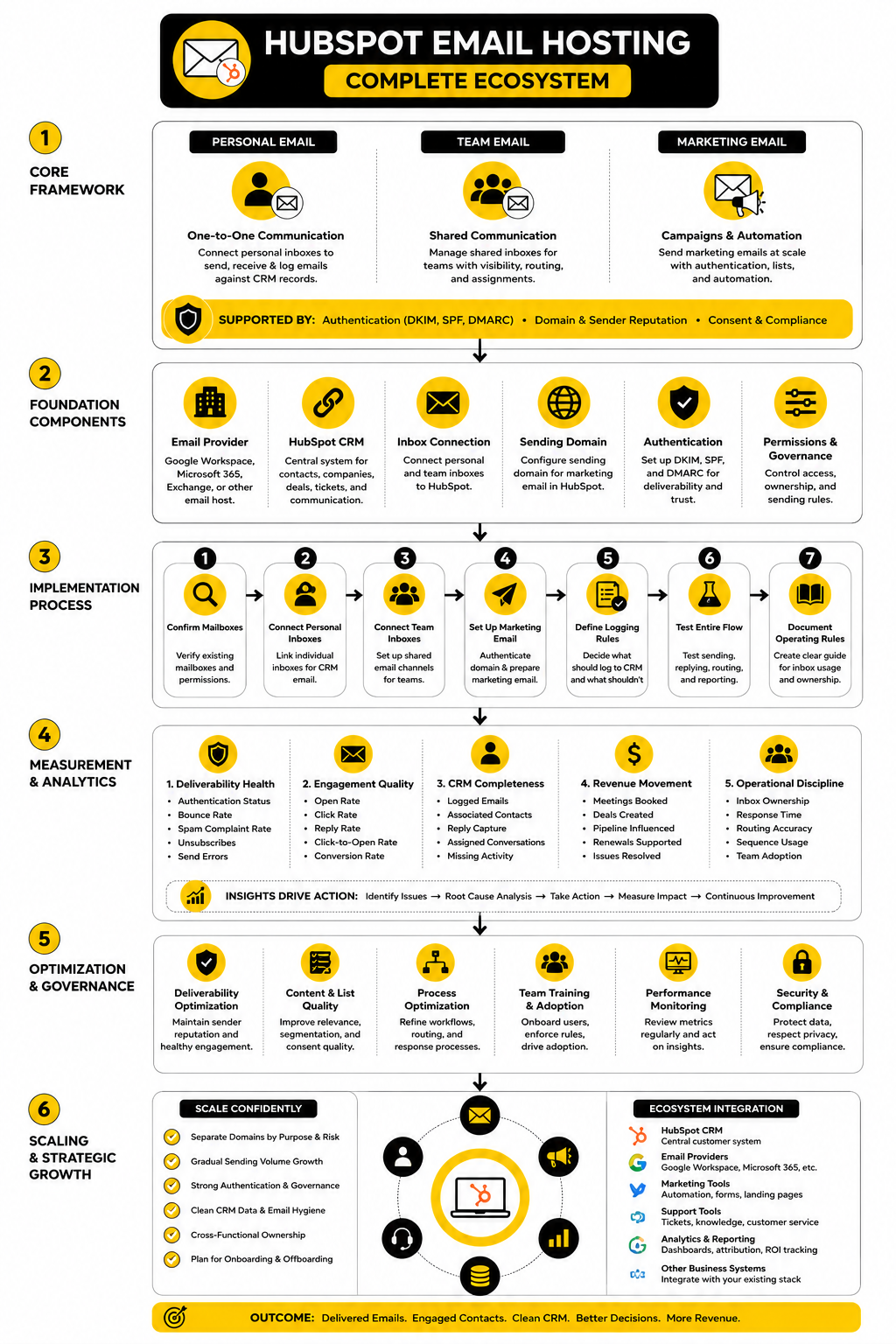
Does HubSpot Host Email Accounts?
HubSpot does not function like a traditional mailbox host for normal business inboxes. It does not replace the role of Google Workspace, Microsoft 365, Exchange, or another email provider that creates and stores your company mailboxes. HubSpot connects to those inboxes and adds CRM, automation, tracking, conversations, and marketing email capabilities around them.
This is why the phrase hubspot email hosting can be misleading. HubSpot can support email workflows, but the mailbox itself usually lives somewhere else. Think of HubSpot as the customer engagement layer, not the mailbox storage layer.
Can I Use HubSpot Without Gmail Or Outlook?
Yes, but your options depend on what you are trying to do. HubSpot supports common email connections such as Google, Microsoft, and IMAP-based inboxes, although the exact features available can vary by provider and account setup. For marketing email, HubSpot can send through its own marketing email system once your sending domain and authentication are configured properly.
The better question is whether your current email provider supports the workflow your team needs. If it connects cleanly, logs reliably, and supports your security requirements, it may be enough. If it creates friction, switching mailbox providers may be more carefully before scaling HubSpot email activity.
Is HubSpot Good For Business Email?
HubSpot is strong for business email when the goal is CRM-connected communication. It helps teams send emails from contact records, log conversations, manage shared inboxes, use templates, run sequences, send marketing emails, and measure engagement. That is valuable because business email becomes part of the customer record instead of staying trapped in private inboxes.
It is not the right tool if you simply want to create employee mailboxes. For that, use a dedicated business email provider. Then connect that provider to HubSpot so the communication becomes useful inside the CRM.
What Is The Difference Between A Personal Inbox And A Team Inbox In HubSpot?
A personal inbox belongs to one user and is best for direct one-to-one communication. Sales reps, founders, account managers, and customer success managers usually connect personal inboxes so their customer emails can be sent and logged from HubSpot. This keeps personal sender identity intact while still giving the CRM a communication trail.
A team inbox is built for shared addresses such as support, sales, billing, or info. It lets multiple users view, manage, assign, and reply to conversations sent to a shared email channel. Use personal inboxes for individual ownership and team inboxes for shared responsibility.
Do I Need To Authenticate My Domain For HubSpot?
Yes, if you want a professional and reliable marketing email setup, domain authentication should be treated as mandatory. HubSpot’s email authentication process uses DKIM, SPF, and DMARC so recipient systems can verify that HubSpot has permission to send email on behalf of your domain. Without proper authentication, messages can look less trustworthy to mailbox providers and recipients.
This matters even more because major mailbox providers have become stricter about sender identity. Google and Yahoo both expect authentication, domain alignment, and easy unsubscribe handling for higher-volume senders. If you plan to send serious marketing email, authentication is not optional in practice.
Can HubSpot Improve Email Deliverability?
HubSpot can help with deliverability, but it cannot magically fix a bad sending strategy. The platform gives you tools for authentication, list segmentation, subscription management, performance tracking, and engagement monitoring. Those tools are useful only if your team sends relevant emails to people who actually want them.
Deliverability depends on infrastructure and behavior. Clean lists, clear consent, useful content, consistent engagement, low complaints, and healthy authentication all matter. HubSpot gives you the system, but your sending habits determine the reputation.
Should Sales Emails And Marketing Emails Use The Same Setup?
They can live in the same HubSpot account, but they should not be treated as the same type of email. Sales emails are usually personal, one-to-one, and tied to a relationship or deal. Marketing emails are usually sent to segments, lists, or automated workflows and need stronger attention to consent, unsubscribe rules, domain authentication, and engagement quality.
Separate the strategy even if the platform is shared. Sales should focus on relevance, timing, personalization, and CRM logging. Marketing should focus on permission, segmentation, deliverability, and conversion.
Can I Send Cold Email Through HubSpot?
HubSpot can technically support one-to-one sales email workflows, but cold email must be handled carefully. You need to respect applicable laws, platform policies, recipient expectations, and sender reputation risk. Poorly targeted cold outreach can damage trust quickly, especially if it uses the same domain your company depends on for customer communication.
For cold outbound, be conservative. Keep volume controlled, personalize heavily, avoid questionable lists, monitor replies and complaints, and do not use your most important domain for risky experiments. If cold outreach is a major channel, you may need a more specialized outbound setup alongside HubSpot.
What Metrics Should I Track First?
Start with the metrics that explain whether the system is healthy. For marketing email, watch authentication status, bounce rate, spam complaints, unsubscribes, opens, clicks, replies, and conversion. For CRM email, watch logged activity, reply capture, meetings booked, deals influenced, and shared inbox response time.
Do not drown the team in dashboards. A small set of reliable metrics reviewed consistently is more useful than a huge dashboard nobody acts on. The best metrics tell you what to fix next.
How Do I Know If My HubSpot Email Setup Is Working?
Your setup is working when email activity is reliable, visible, and actionable. Personal emails should send correctly, replies should appear on the right records, shared inbox conversations should be assigned clearly, and marketing emails should show healthy deliverability and engagement signals. The team should also understand which inbox to use and when.
You should not need detective work to understand a customer relationship. If the next person can open HubSpot and quickly see what happened, who replied, what was promised, and what should happen next, the system is doing its job. That is the real benchmark.
What Is The Biggest Mistake Businesses Make With HubSpot Email Hosting?
The biggest mistake is assuming the tool will create the process. HubSpot can connect inboxes, send emails, log activity, and report performance, but it cannot decide your ownership rules, routing logic, sender strategy, or logging standards for you. If those choices are vague, the system becomes messy fast.
The second mistake is ignoring deliverability until performance drops. Authentication, list quality, consent, sending volume, and engagement should be handled early. Waiting until emails land in spam is the expensive way to learn.
Is HubSpot Enough For A Growing Team?
HubSpot can be enough for many growing teams, especially when the company wants one CRM-connected system for sales, marketing, and service. It becomes more valuable as the team needs shared visibility, lifecycle reporting, automation, and customer history. The more important customer context becomes, the more useful HubSpot’s email layer gets.
But growing teams still need strong operations around it. You need permission rules, onboarding, offboarding, domain governance, list hygiene, and regular reporting. Scaling HubSpot email hosting is less about adding more features and more about protecting the system from chaos.
When Should I Consider Another Platform Instead?
Consider another platform if your main workflow is not CRM-centered. If you are building funnels first, running agency client accounts, managing white-label SaaS, or prioritizing outbound infrastructure over customer relationship history, another tool may fit better. GoHighLevel can make sense for agencies and funnel-driven service businesses, while ClickFunnels can make sense when the main job is building sales funnels quickly.
HubSpot is strongest when the CRM is central. If sales, marketing, service, and customer data need to work together, it is a serious option. If your business model needs a different operating center, choose the tool that matches the workflow instead of forcing HubSpot to behave like something else.
Build a stronger local presence with BAAM AI
Turn your website, Google profile, social channels, and AI visibility into one growth engine
Most businesses do not need more random marketing activity. They need a consistent presence system that helps the right people find them, trust them, and take action. BAAM AI brings strategy, local SEO, website updates, Google Maps visibility, social content, AI-search readiness, media production, and reporting into one practical monthly engine.
If you want your marketing to keep working after the campaign ends, start with a free BAAM AI presence audit. See how your business shows up today and where the fastest visibility wins are at BAAM AI.