
BAAM AI Blog
HubSpot Email Analytics: How to Track Performance and Drive Growth
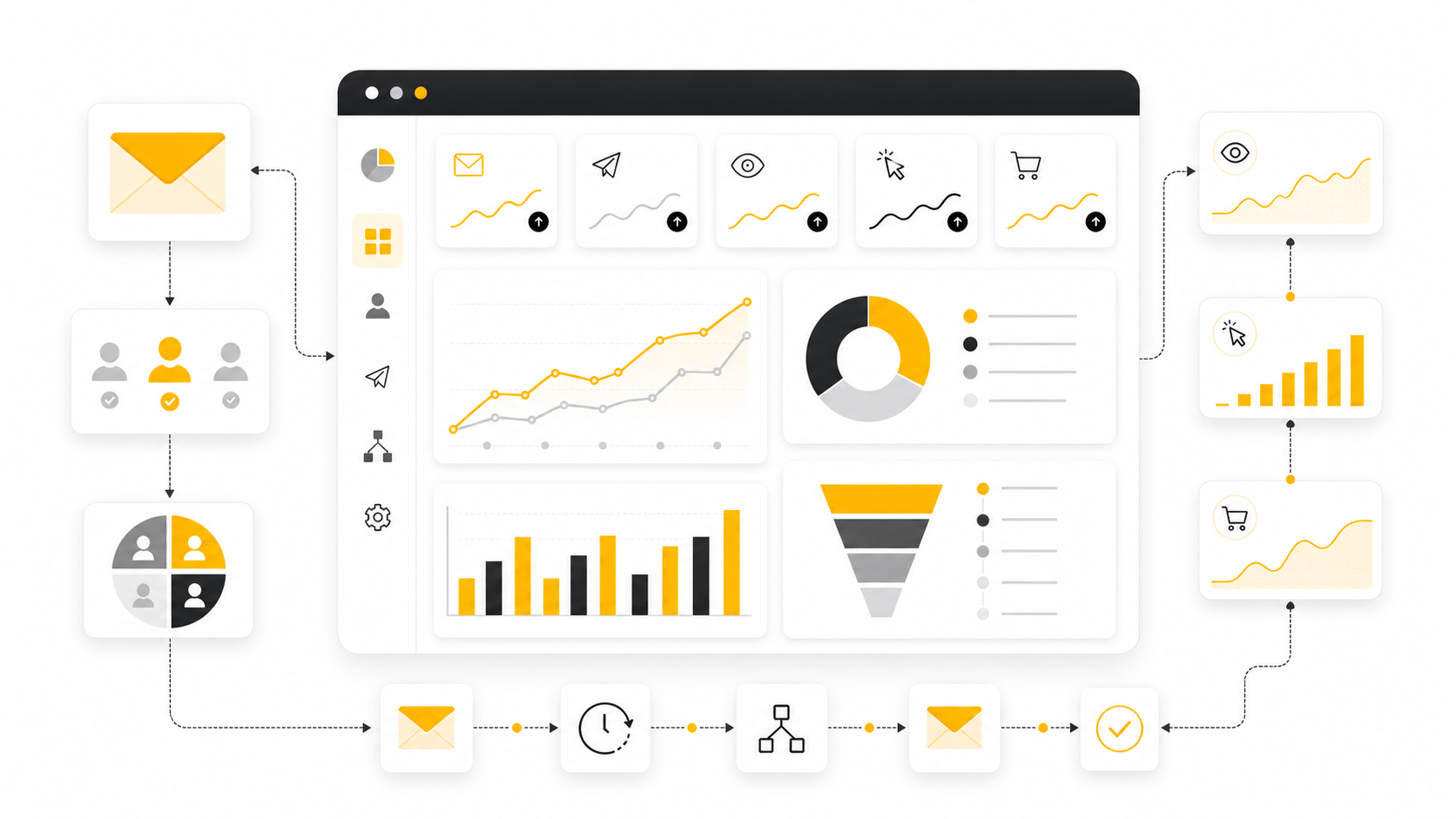
Understanding how your email campaigns perform in HubSpot isn’t optional anymore - it’s central to improving engagement, conversions, and revenue. Email analytics gives you the data you need to evaluate opens...
Affiliate disclosure: this article may include compensated links. Recommendations should still be evaluated against your use case, budget, and current provider terms.
Should you choose HubSpot?
HubSpot is worth considering when the use case, budget, and implementation effort match what you actually need to do next.
teams that want a practical tool decision without reading another generic feature list
Check HubSpotEMAIL 1
Understanding how your email campaigns perform in HubSpot isn’t optional anymore - it’s central to improving engagement, conversions, and revenue. Email analytics gives you the data you need to evaluate opens, clicks, deliverability, and audience behavior so you can refine every send and prove ROI. With the right approach, HubSpot’s email analytics tools help you answer critical questions like: Are my emails reaching inboxes?, Is my audience engaging?, and Is email driving measurable business outcomes?
EMAIL 2
Why Email Analytics Matters
HubSpot email analytics isn’t just a collection of numbers, it’s the backbone of understanding campaign performance and audience engagement. Without tracking the right metrics, your email sends are essentially blind; you won’t know what’s working, what’s not, or how email contributes to larger business goals. Today’s advanced reporting tools even connect email interactions to pipeline growth and revenue, giving marketers visibility into full-funnel impact.
Effective analytics help you answer vital questions like how many subscribers actually see your messages, which links generate clicks, and how list health is changing over time. Knowing these answers helps you optimize subject lines, content, segmentation, and send timing - all key levers that improve performance and engagement over time.
For teams and leaders, email analytics also provides accountability. Metrics like click-through rates and conversion performance allow you to justify strategy decisions and investments by demonstrating measurable improvements over time. This kind of data-driven clarity is what separates guesswork from intentional, repeatable success.
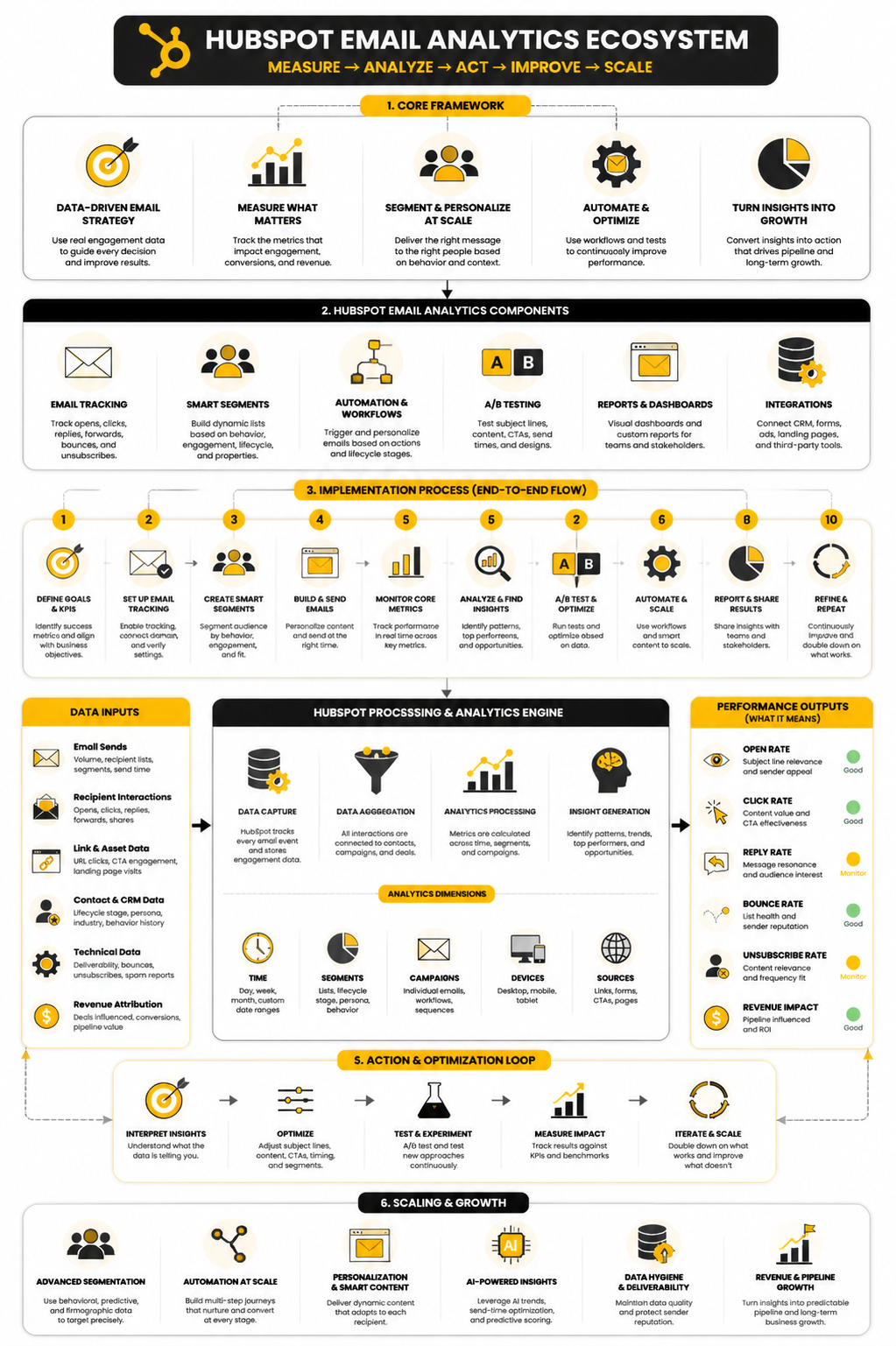
Core Components of HubSpot Email Analytics
When you look at HubSpot’s email analytics dashboard, you’re looking at a set of core performance indicators that together paint a picture of health and engagement for your email programs. These include:
These components aren’t just data points - they’re tools that tell you what’s happening at every stage of the email journey, from deliverability to bottom‑line impact.
Analytics Framework for Actionable Insights
A strategic framework helps you take raw numbers and turn them into decisions that improve performance:
This framework helps you treat analytics not just as reporting, but as a continuous improvement engine.
Best Practices for Implementing Email Analytics
Implementing HubSpot email analytics effectively requires discipline and consistency:
Following these best practices ensures your analytics reflect reality and drive decisions rather than confusion.
Interpreting and Reporting Results
Raw metrics tell only part of the story - interpretation makes them actionable:
Quality reporting builds trust and moves conversations from “what happened?” to “what should we do?”.
Tying Email Analytics to Business Outcomes
The final step in any analytics strategy is linking performance to real business value. Advanced email analytics not only shows what users did inside your emails, but also how those interactions influenced the buyer journey and revenue creation. Multi-touch attribution models in HubSpot help you assign credit to email interactions across the customer lifecycle, giving you a complete view of how email contributes to closed deals and pipeline velocity.
When your analytics strategy connects metrics to outcomes that matter - like lead generation, conversions, and revenue - you can confidently scale your email efforts and justify investments in automation, segmentation, and creative optimization.
From measuring opens and clicks to proving ROI, HubSpot email analytics offers a powerful toolkit for marketers who want to lead with data. With the right structure and execution, email becomes not just a channel, but a growth engine.
Best Practices for Implementing Email Analytics
Successfully implementing HubSpot email analytics involves a blend of strategic planning, consistency, and the right tools. If you want your analytics to drive meaningful insights, here are some best practices to ensure you're getting the most out of your email campaigns:
Before you look at HubSpot's analytics tools, it's crucial to define what you want to track. Are you looking to understand deliverability, measure engagement, or connect email performance to actual sales? Setting clear objectives will ensure you're not overwhelmed by data and can focus on metrics that matter most for your business.
HubSpot offers custom reporting features that allow you to create detailed and tailored reports. Instead of relying solely on standard metrics, build reports that capture specific actions such as form submissions or specific product purchases linked to email campaigns. This helps connect email interactions directly to bottom-line business outcomes.
Email list health is often overlooked, but it plays a crucial role in the effectiveness of your email campaigns. Regularly cleaning your lists to remove inactive or unsubscribed contacts not only improves your deliverability but also enhances the accuracy of your analytics. Clean data means better decision-making.
HubSpot allows you to segment your email list into specific groups based on criteria like behavior, location, or past purchases. Segmenting your audience ensures that you're sending relevant content to the right people, and it gives you deeper insights into what types of audiences engage best with your emails.
Automation is key to efficiency. Set up automated email analytics dashboards in HubSpot for key stakeholders in your organization. These dashboards can provide real-time insights on campaign performance, eliminating the need for manual report creation every time you want to review your data. Automation saves time and makes it easier for teams to stay informed.
One of the most powerful features of HubSpot’s email tools is its ability to run A/B tests. Testing different elements of your emails - like subject lines, CTAs, or even the email content - allows you to identify what resonates most with your audience. Use A/B testing to continuously refine your strategy and optimize email performance over time.
By implementing these best practices, you’ll not only capture critical email performance data but also improve the accuracy and usefulness of your insights. Consistency is key to making email analytics a cornerstone of your overall marketing strategy.
Interpreting and Reporting Results
Understanding the data you receive from your HubSpot email campaigns is just as important as collecting it. Here are some key guidelines for interpreting and reporting the results:
Metrics like open rates may seem impressive, but they don't tell the full story. To truly understand email success, look at more actionable metrics like click-through rates, conversions, and the number of leads generated. These metrics directly tie your email campaigns to business objectives, helping you assess the real impact of your emails.
The value of your analytics lies in how it compares to benchmarks - both historical and industry-wide. HubSpot allows you to benchmark your performance against similar companies, giving you context for your results. If your open rates are lower than industry standards, it may signal a need to adjust your subject lines or timing.
A visual representation of data can often reveal trends that raw numbers cannot. HubSpot's tools allow you to create charts and graphs that make it easier to see how your campaigns are performing over time. Regularly review these visual reports to identify patterns and adjust your strategies accordingly.
Don’t just report numbers; interpret them. For example, if your email campaign shows a high open rate but low conversion rate, you may want to look into your CTA or the landing page it links to. By asking "Why?" and "What does this mean for our next steps?", you’ll be able to identify areas for optimization.
When you report your email performance to key stakeholders, keep the focus on outcomes. Rather than overwhelming them with every metric, distill the results into clear insights that link back to business objectives. This approach not only enhances the effectiveness of your report but also helps guide future decisions.
Effective interpretation and reporting turn raw analytics into powerful tools for decision-making. By focusing on the right metrics and providing actionable insights, you ensure that your email strategy continually evolves toward higher engagement and greater results.
Tying Email Analytics to Business Outcomes
The ultimate value of email analytics is its ability to show how your efforts are impacting broader business outcomes. HubSpot’s analytics tools offer several ways to link email performance directly to revenue and growth:
HubSpot offers multi-touch attribution reporting, which allows you to see how email interactions influence the buyer journey across touchpoints. Whether a customer first clicked on an email or made a purchase after multiple email exchanges, attribution modeling helps you understand the exact role email played in the conversion process. This lets you accurately measure email’s contribution to your pipeline.
By tying specific campaign objectives (like generating leads or promoting an event) to email metrics, you can measure how successful your emails are in achieving revenue-generating goals. Whether you’re looking at direct conversions or longer-term customer journeys, aligning these metrics ensures that your email program supports the business’s bottom line.
HubSpot’s real-time analytics allow you to monitor the ROI of each email campaign as it happens. By tracking conversions and revenue generated through emails, you can immediately see if your efforts are paying off. This transparency helps you quickly adjust tactics and allocate resources to the most successful campaigns.
While individual campaigns may show immediate results, the long-term value lies in how your email program fits into a larger strategy. Continuous data tracking and analysis let you refine your tactics over time, ensuring that email remains a key driver of growth and revenue for your business.
By tying email analytics directly to business outcomes, you can better understand the long-term value of your email marketing efforts and justify the investments you make in automation, segmentation, and creative optimization.
Professional Implementation of HubSpot Email Analytics
Implementing HubSpot email analytics effectively within your organization requires a strategic approach. It’s not just about pulling data; it’s about using that data to drive decisions and improvements that align with business objectives. Below is a step-by-step process to get your email analytics set up and running smoothly.
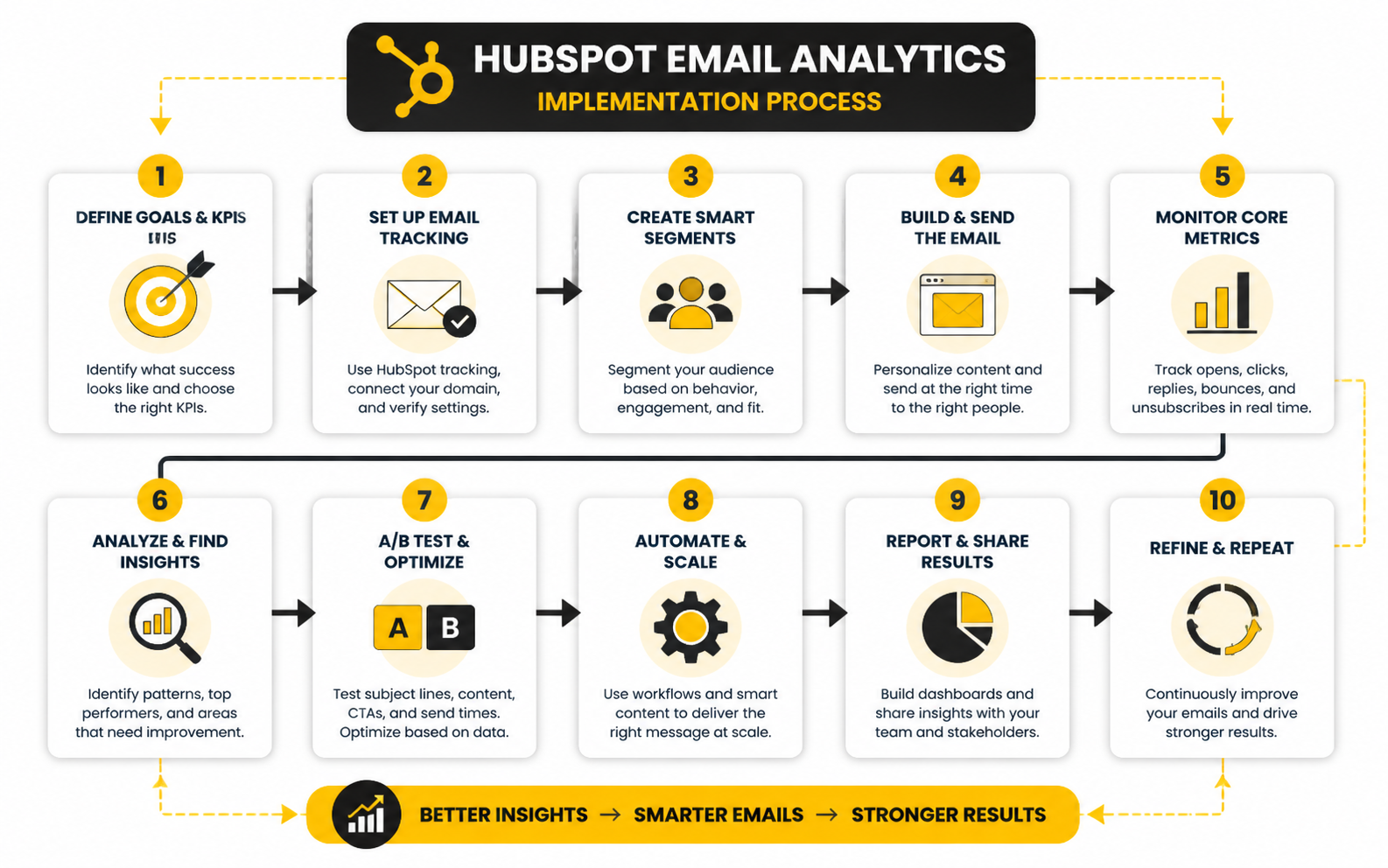
Step 1: Define Your Goals and Key Metrics
Before diving into HubSpot’s powerful email analytics tools, it’s crucial to define what success looks like for your business. Are you measuring brand awareness, lead generation, or sales conversions? Each goal requires different metrics to track and interpret. For instance, if you’re focused on increasing sales, then metrics like conversion rates, revenue attribution, and click-through rates should be your primary focus.
Once your goals are clear, identify which HubSpot email metrics align with them. The core metrics to consider include:
Step 2: Set Up HubSpot Tracking and Custom Reports
Now that you’ve established your goals and metrics, it’s time to set up HubSpot’s tracking features. HubSpot automatically tracks key metrics, but setting up custom reports can help you gather more detailed insights.
Custom reports give you the flexibility to go beyond general email metrics and track deeper actions that connect directly to your business goals.
Step 3: Segment Your Email List for Better Insights
Segmentation allows you to target different audience groups with personalized email content. But it’s also key to gathering actionable insights from your analytics.
In HubSpot, segment your audience based on factors like:
By breaking down email performance by segment, you can identify which groups are most responsive to your campaigns, helping you optimize future sends.
Step 4: Implement A/B Testing
A/B testing is one of the most effective ways to optimize your email campaigns. HubSpot makes it easy to run A/B tests on elements like subject lines, email content, CTAs, and send times.
Here’s how to implement A/B testing:
With enough data, A/B tests help you fine-tune your email marketing efforts to improve engagement and conversion rates.
Step 5: Automate Reports and Dashboards
Once your HubSpot email analytics is in place, automation is the next logical step. Automating reports and dashboards streamlines your process, giving you up-to-date performance insights without having to manually compile data.
Automating reporting saves time and ensures everyone in your team has access to the insights they need to make data-driven decisions.
Step 6: Review and Optimize Regularly
HubSpot email analytics isn’t a set-it-and-forget-it tool. To continuously improve, you need to regularly review your results, adapt strategies, and optimize your campaigns.
Professional implementation of HubSpot email analytics isn’t just about collecting data - it’s about creating a feedback loop where data drives decisions and improvements at every stage of the email marketing process.
Understanding HubSpot Email Analytics: Interpreting Data and Benchmarks
When using HubSpot's email analytics tools, it's essential to move beyond raw numbers and truly understand what those figures mean. Effective email campaigns are driven by data that not only measures performance but also informs decisions. Let’s take a look at key metrics, how to interpret them, and how this data should guide your actions.
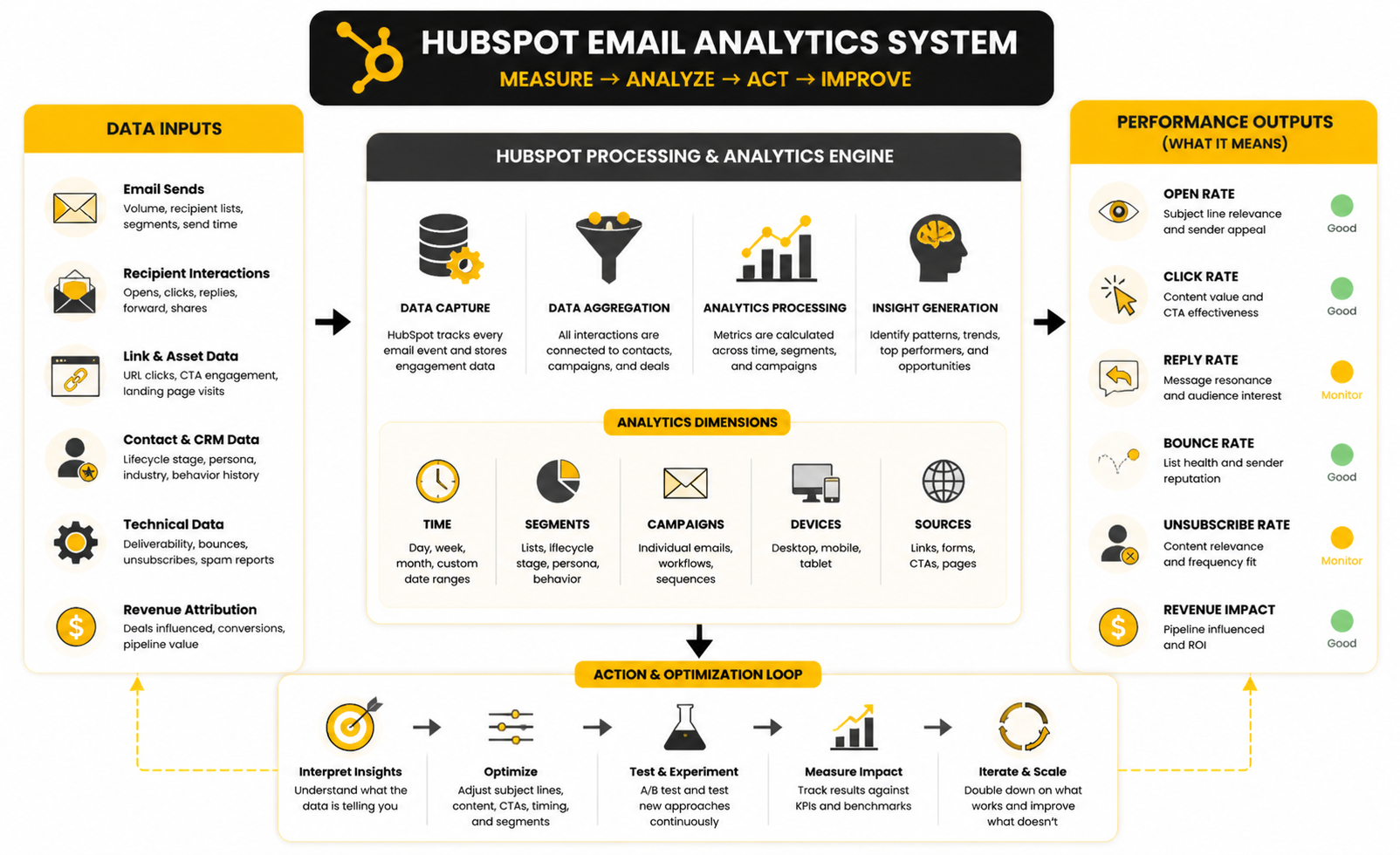
Key Email Analytics Metrics
Here are the core metrics you’ll encounter in HubSpot's email analytics dashboard, and how to interpret them:
Open rates indicate how many recipients opened your email. While open rates can be a useful measure of subject line effectiveness and initial interest, they should not be viewed in isolation. If your open rate is high, that’s great, but to measure deeper engagement, you need to look at click-through rates (CTR) and conversions. A high open rate with a low CTR may indicate that the subject line piqued interest, but the email content itself wasn’t compelling enough.
CTR tells you how many recipients clicked on links within your email, giving insight into how engaging your content is. A high CTR means your email is compelling and relevant, and the calls to action (CTAs) are clear and appealing. If your CTR is low, you may need to test different CTAs, design elements, or content to better engage your audience.
Bounce rates show the percentage of emails that were not successfully delivered. These could be "hard bounces" (permanent issues like a non-existent email address) or "soft bounces" (temporary issues like a full inbox). A high bounce rate signals potential issues with your email list hygiene or deliverability. To mitigate this, regularly clean your email lists and ensure you’re using the correct email validation protocols.
An unsubscribed contact is someone who no longer wants to receive your emails. While it's normal for some people to unsubscribe over time, a sudden increase in the unsubscribe rate could indicate that your content is irrelevant or too frequent. If this happens, evaluate the frequency of your emails, revisit your audience segmentation, or refine your content strategy to better meet subscriber expectations.
This metric tracks how many recipients completed a desired action, such as filling out a form, making a purchase, or downloading a resource. Conversion rates are directly tied to your business objectives and are one of the most valuable metrics. A high conversion rate indicates your email’s call-to-action (CTA) is resonating with the audience and driving results. Low conversion rates may point to issues with your CTA, landing page, or the offer itself.
Benchmarks: What’s Good and What’s Average?
Knowing how your performance stacks up against industry standards can provide important context to your metrics. Here are some typical email marketing benchmarks, but keep in mind these numbers can vary depending on your industry, audience, and email strategy:
The average open rate for email marketing campaigns is around 20-25%. However, this varies by industry. B2B industries may see higher open rates, while B2C campaigns may have slightly lower rates.
The average CTR is generally between 2-5%. If you’re consistently hitting these numbers or higher, your email content and CTAs are effective.
A bounce rate under 2% is ideal, but anything above 5% should raise a red flag. Consistently high bounce rates can indicate problems with your email list (e.g., old or invalid contacts).
An unsubscribe rate of less than 0.5% is typically considered normal. If your unsubscribe rate rises significantly, it’s time to revisit your segmentation strategy, email frequency, or content.
Conversion rates can vary greatly depending on the nature of the offer, the stage of the funnel, and the audience. An average conversion rate from email campaigns can range from 1-5%. Anything higher would be considered highly effective.
What Does the Data Really Mean?
Data alone doesn’t tell the whole story. You need to interpret what’s happening and determine what actions to take. Let’s go through a few practical examples of how to use the data:
If your open rates are high but your CTR is low, it could suggest that while your subject line is strong, the email content isn’t resonating with your audience. This could be an indication that your email’s value proposition needs more work. You might also consider changing your CTA placement, content format, or even your landing pages.
If users are clicking through to your landing page but not converting, the problem may lie on the post-click experience. This could be an issue with your landing page design, the offer itself, or the CTA on the landing page. Use HubSpot's analytics to assess how visitors are interacting with the page, and consider A/B testing your page for optimization.
High bounce rates can often point to problems with your list quality. If you’re seeing a significant number of hard bounces, it’s time to clean your list and make sure your emails are only going to valid and active addresses. Soft bounces might indicate temporary deliverability issues, which can be addressed by checking your sender reputation or server issues.
A surge in unsubscribes after a particular email campaign might suggest that the content or frequency wasn’t well-received. This could be a great time to segment your list further, making sure that only highly engaged recipients receive your most frequent emails, and considering introducing a preference center where subscribers can control how often they hear from you.
Taking Action Based on Data
The key to using analytics effectively is ensuring that every metric leads to action. Whether it’s refining your email list, improving content, tweaking CTAs, or adjusting frequency, the goal is to use data to make informed decisions that improve future campaigns.
HubSpot email analytics gives you the power to track key metrics, benchmark your performance, and adjust your strategies in real time. The more you understand what each metric is telling you, the better positioned you’ll be to optimize your email marketing efforts and drive real results.
Advanced Strategies for Scaling HubSpot Email Analytics
As you begin to scale your email campaigns and leverage HubSpot’s email analytics, it’s important to consider advanced strategies and tactical trade-offs that come with increasing complexity. These strategies not only help optimize performance but also ensure that your email analytics evolve as your business grows.
Scaling Your Email Campaigns with Segmentation
Segmentation is a powerful tool for optimizing email performance, especially when scaling your email list. At the outset, you may target broad audience groups, but as your list grows, segmentation becomes critical to personalization and performance.
Scaling this kind of segmentation means you need a sophisticated process for managing and updating these lists over time, ensuring that they remain accurate and reflective of each recipient's current stage.
Strategic Trade-Offs: Frequency vs. Engagement
One of the most significant trade-offs you’ll face when scaling email campaigns is the balance between email frequency and audience engagement. While sending more emails may lead to higher engagement with some segments, it can also lead to fatigue, unsubscribes, or even spam complaints with others.
To manage this, use HubSpot's automation and workflow features to create personalized email schedules based on engagement behavior. For example:
By aligning frequency with engagement, you minimize the risk of annoying your audience while maximizing the relevance of your content.
Managing Risks: Data Overload and Misinterpretation
As you scale your email marketing, one of the primary risks is data overload. HubSpot’s analytics tools provide a wealth of information, but it can be easy to become overwhelmed by all the data points. Misinterpreting data or focusing too much on vanity metrics (like high open rates) rather than meaningful actions (such as conversions) can derail your strategy.
To mitigate this, consider implementing the following:
Optimizing for Mobile and Cross-Device Performance
As mobile usage continues to grow, optimizing your email campaigns for mobile devices becomes increasingly important. HubSpot's email analytics can show you how emails perform across devices, but ensuring that your emails are designed to look great on mobile is key to maintaining engagement.
Advanced A/B Testing: Beyond the Basics
While A/B testing subject lines and CTAs is a great starting point, more advanced testing strategies become crucial as your campaigns grow:
Long-Term Growth and Continuous Optimization
Scaling email analytics is not a one-time task—it’s an ongoing process. As your email list grows and your business evolves, regularly reassess your email strategy based on the data you're collecting. Use the insights to refine your segmentation, optimize content, and test new strategies.
Conclusion: Navigating the Scaling Journey
Scaling HubSpot email analytics and campaigns requires careful planning and execution. By using segmentation, optimizing frequency, managing risks, and leveraging advanced features, you’ll be in a position to continuously improve your email marketing performance. As with any growing business, the key is adaptability and constant learning from your data to ensure long-term success.
FAQ - HubSpot Email Analytics
Here’s a collection of frequently asked questions to deepen your understanding of HubSpot email analytics and help you make the most of its capabilities.
1. What metrics should I focus on in HubSpot email analytics?
The key metrics to focus on are open rates, click-through rates (CTR), conversion rates, bounce rates, and unsubscribe rates. These provide insights into the effectiveness of your subject lines, email content, and CTAs, as well as the quality of your email list.
2. How can I improve my email open rates?
Improving open rates begins with crafting compelling subject lines. Test different subject lines using A/B testing and focus on personalization. Timing also matters, so experiment with sending emails at different times to find when your audience is most likely to engage.
3. Why is my email bounce rate high?
A high bounce rate often indicates issues with your email list hygiene, such as invalid or non-existent email addresses. Regularly cleaning your list and using double opt-ins can help reduce bounce rates. It’s also important to monitor your sender reputation.
4. How do I analyze email performance across different devices?
HubSpot provides device-specific metrics, so monitor how your emails perform on both desktop and mobile. Mobile optimization is critical, so ensure your emails are responsive and user-friendly across all devices.
5. What is the best way to segment my email list in HubSpot?
Segment your list by behavior (opens, clicks, purchases), lifecycle stage, demographics, or past interactions. HubSpot allows you to create dynamic lists that update automatically based on specific criteria, helping you deliver more personalized content.
6. How do I measure email conversion rates?
Track conversion rates by linking your email campaigns to specific calls to action, such as filling out a form, purchasing a product, or signing up for a webinar. You can create custom reports in HubSpot to directly tie these conversions back to your email efforts.
7. Should I use A/B testing for every email campaign?
A/B testing is essential for refining your email strategy, but you don’t need to test everything. Start with the most critical elements like subject lines, CTAs, and send times. As your strategy matures, you can test more granular elements like content placement and email design.
8. What can I do if my click-through rates are low?
Low CTRs might indicate that your content is not engaging enough or that your CTA is not clear. Try experimenting with different types of content, redesigning your emails, and placing CTAs in more prominent positions. Testing your landing pages is also key, as a poor post-click experience can hurt conversion rates.
9. How often should I check my HubSpot email analytics?
Review your email analytics regularly—at least weekly for active campaigns. This allows you to adjust strategies based on current performance and fine-tune your email marketing to improve results.
10. What’s the best way to track ROI in HubSpot email analytics?
To track ROI, make sure you’re linking your email campaigns directly to sales or conversion goals. Use HubSpot’s revenue attribution tools to connect email interactions with the sales pipeline. This helps you understand the financial impact of your email campaigns.
Build a stronger local presence with BAAM AI
Turn your website, Google profile, social channels, and AI visibility into one growth engine
Most businesses do not need more random marketing activity. They need a consistent presence system that helps the right people find them, trust them, and take action. BAAM AI brings strategy, local SEO, website updates, Google Maps visibility, social content, AI-search readiness, media production, and reporting into one practical monthly engine.
If you want your marketing to keep working after the campaign ends, start with a free BAAM AI presence audit. See how your business shows up today and where the fastest visibility wins are at BAAM AI.