
BAAM AI Blog
How GetResponse SMS Fits Into The Customer Journey
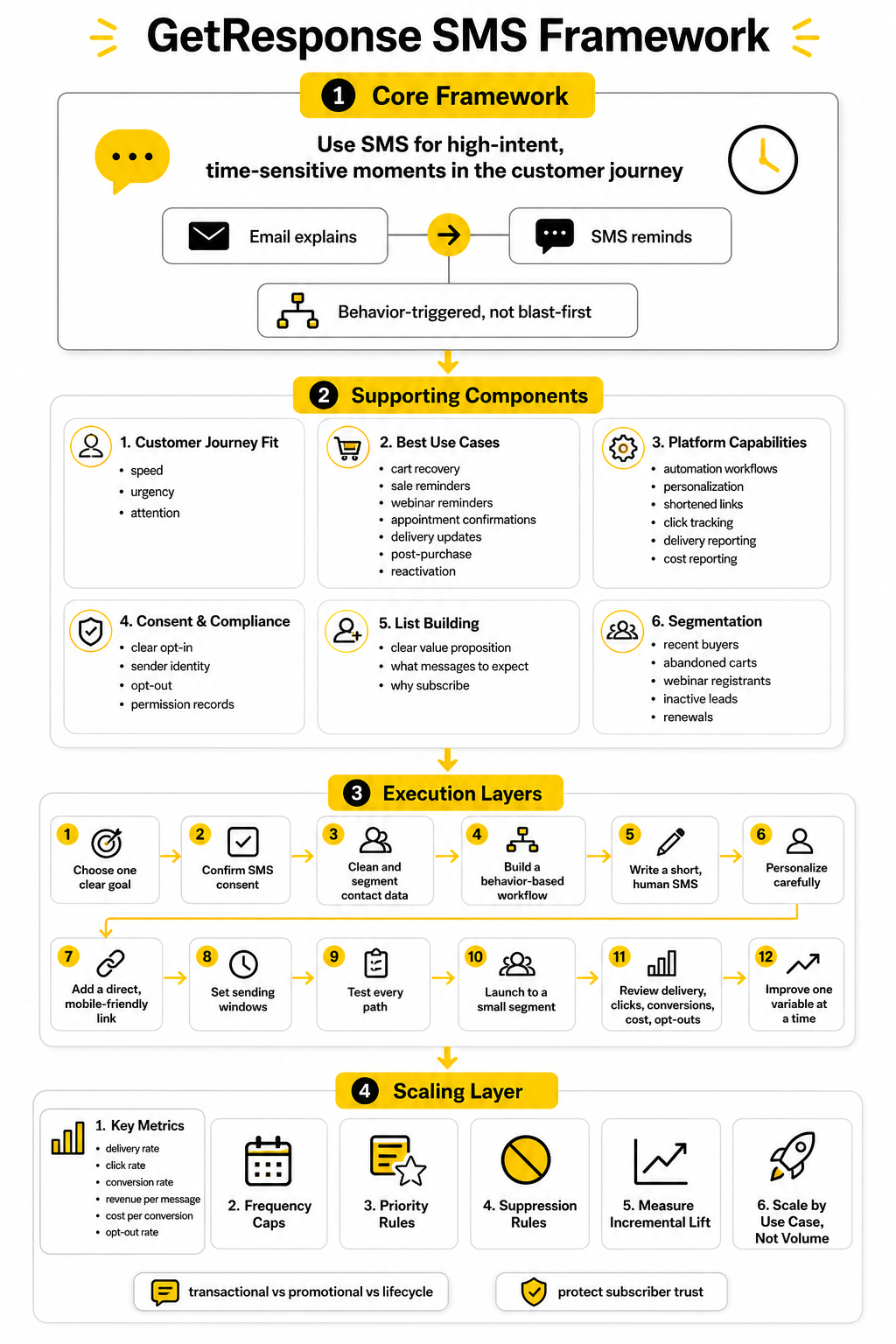
GetResponse SMS is not meant to replace email. That is the wrong way to think about it. The smart move is to use SMS for moments where speed, urgency, and attention matter more than detail.
How GetResponse SMS Fits Into The Customer Journey
GetResponse SMS is not meant to replace email. That is the wrong way to think about it. The smart move is to use SMS for moments where speed, urgency, and attention matter more than detail.
Email is better when you need space to explain an offer, show product images, tell a story, or educate a lead. SMS is better when the subscriber already understands the context and only needs a timely nudge. That is why GetResponse positions SMS around automation triggers, contact behavior, selected conditions, imported phone lists, link tracking, and delivery reporting inside GetResponse MAX.
This matters because most businesses do not need “more messages.” They need better-timed messages. A GetResponse SMS campaign should feel like a helpful prompt at the right moment, not another blast fighting for attention.
The Best Use Cases For GetResponse SMS
The strongest GetResponse SMS campaigns usually sit close to revenue or customer action. These are not long newsletters squeezed into 160 characters. They are short, direct messages that help someone finish what they already showed interest in doing.
Good SMS use cases include:
The common thread is intent. SMS works best when the customer has already taken an action, joined a list, started a checkout, booked a time, clicked a link, or shown clear interest. Klaviyo’s 2026 benchmark data makes the same point from another angle: automated SMS flows can represent a small share of total sends while driving a much larger share of SMS revenue, because behavior-triggered messages tend to match the customer’s moment better than broad campaigns.
For ecommerce, this is especially important. A customer who abandoned checkout does not need a five-paragraph explanation of your brand. They need a clear reason to come back, a clean link, and confidence that the message is actually from you.
Where SMS Should Sit Next To Email
The cleanest structure is simple: email explains, SMS reminds. Email can carry the full offer, product details, proof, objections, and creative. SMS should compress the next step into one clear action.
For example, an email can announce a 48-hour sale with product categories, discount details, and shipping information. A GetResponse SMS can follow up later with a short reminder that the offer ends tonight. That second message should not repeat the entire email; it should move the person from awareness to action.
A practical sequence might look like this:
This is also where restraint becomes a competitive advantage. SimpleTexting’s 2025 survey found that consumers cite too many messages as the fastest way to lose SMS subscribers, while 82% of consumers check text notifications within five minutes. That combination is powerful but unforgiving: people notice your texts quickly, and they also punish irrelevant frequency quickly.
What You Can Actually Do With GetResponse SMS
GetResponse SMS is built around automation rather than disconnected texting. Inside GetResponse MAX, SMS can be added to marketing automation workflows, which means a message can be triggered by behavior, contact data, or selected conditions. That is more useful than simply uploading a phone list and blasting everyone at once.
The platform also supports practical campaign controls such as sender name personalization, SMS content personalization, shortened links, unsubscribe links, sent and delivered message reporting, click tracking, and cost reporting. These are not exciting features on paper, but they matter in real campaigns. Without them, you cannot tell whether SMS is producing profit or just adding cost.
The reporting side is especially important because SMS can get expensive when it is used lazily. You want to know which messages were sent, delivered, clicked, and worth repeating. If a message does not produce enough action to justify the send cost, it should be rewritten, narrowed to a tighter segment, or removed entirely.
Compliance Comes Before Clever Copy
SMS is permission-based. That is not a minor detail. If someone did not clearly agree to receive marketing texts from your business, you should not treat their phone number like an email address with better open rates.
For U.S. campaigns, marketers need to be careful with consent, disclosure, sender identity, opt-out handling, and message relevance. The Federal Register has published FCC rules around robotext consent and clear disclosures, and the FCC also notes that CAN-SPAM rules apply to commercial email and some text messages sent to wireless devices. This is one of those areas where you do not want to “growth hack” your way into legal trouble.
At a practical level, your SMS program should have:
GetResponse helps by offering an unsubscribe link option for SMS and compliance-focused features such as GDPR-friendly opt-out handling. That does not remove your responsibility. It just gives you better tools to manage it.
The Right Way To Build A GetResponse SMS List
A good SMS list is not built by hiding a checkbox under a form. It is built by giving people a clear reason to subscribe and being honest about what they will receive. That means the offer, frequency, and message type should be obvious before the phone number is submitted.
For ecommerce, the incentive might be early sale access, shipping updates, restock alerts, or VIP discounts. For service businesses, it might be appointment reminders, quote follow-ups, event reminders, or important account updates. For creators and educators, it might be deadline reminders, live session alerts, or launch notifications.
The key is to avoid vague promises like “get updates.” That attracts low-intent subscribers and creates weak campaigns later. A stronger opt-in says what the person gets, why it matters, and what kind of messages they should expect.
Segmentation Makes SMS Feel Less Intrusive
SMS feels personal because it lands in the same place as messages from friends, family, banks, delivery drivers, and appointment reminders. That is why segmentation is not optional. If you send the same text to everyone, you are using one of your most direct channels in the least intelligent way.
Useful SMS segments include:
This is where GetResponse SMS becomes more useful as part of a broader automation system. If your email clicks, list fields, purchases, tags, and form submissions can inform who receives a text, the SMS feels more relevant. That relevance is what protects your list from fatigue.
When GetResponse SMS May Not Be Enough
GetResponse SMS makes the most sense when you already want GetResponse as your central email and automation platform. If you are using GetResponse MAX and want SMS inside the same automation environment, it can be a clean solution. You avoid stitching together separate tools for basic behavior-triggered texting.
But there are cases where you may want a more specialized SMS or conversational messaging setup. If your strategy depends heavily on two-way conversations, Instagram or Messenger automation, comment-to-DM flows, or social commerce journeys, ManyChat may fit better. If you want email, SMS, CRM, pipelines, booking, and agency-style automation in one broader business platform, GoHighLevel may be worth comparing.
That does not make GetResponse SMS weak. It just means the right tool depends on the job. For many businesses, the best setup is not the tool with the longest feature list; it is the one that matches the way customers already move through the funnel.
How To Set Up GetResponse SMS Without Making A Mess
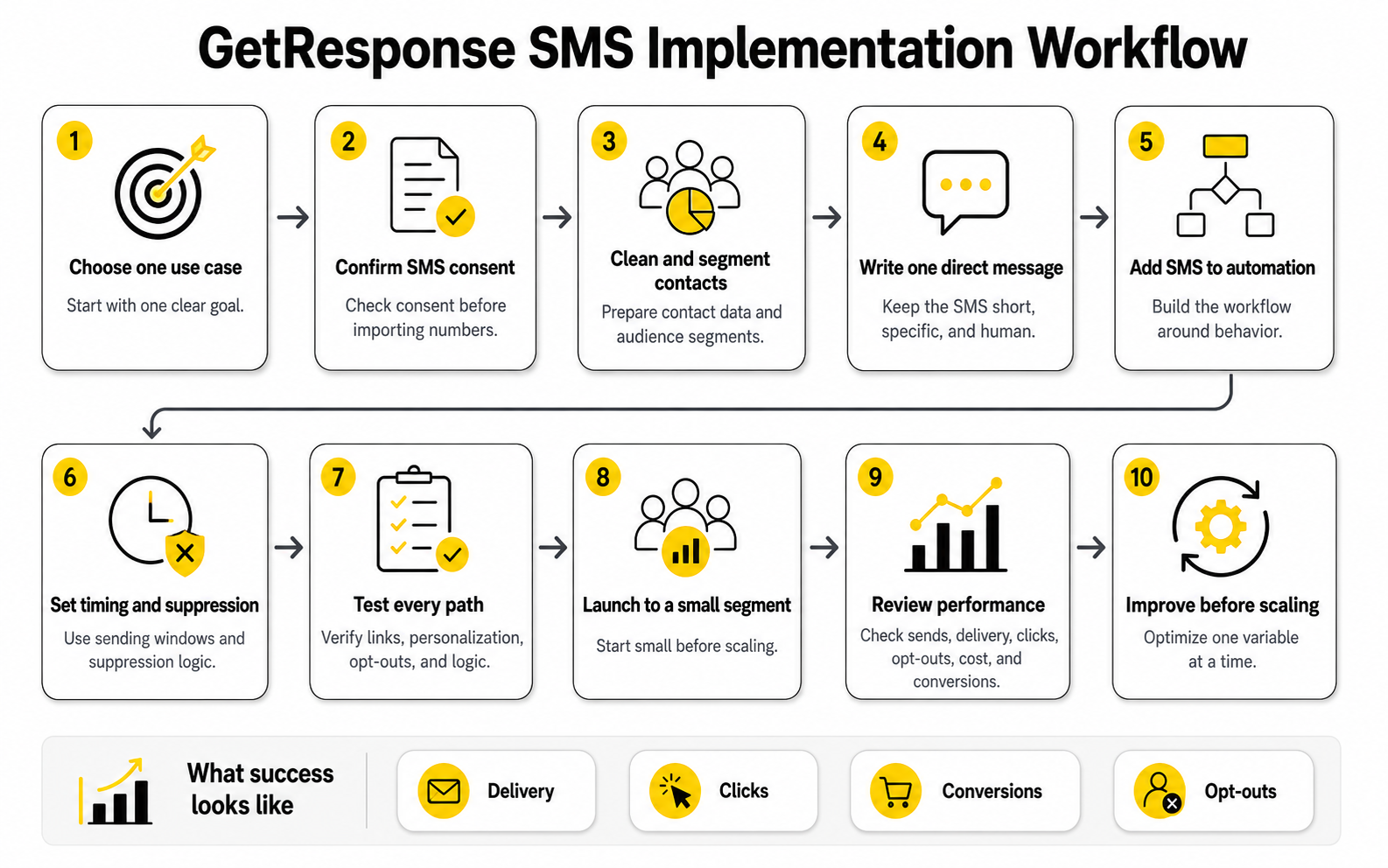
Before you write a single text message, map the job of the campaign. A GetResponse SMS workflow should not start with “what can we send?” It should start with “what moment needs a faster follow-up than email can reliably provide?”
That one decision keeps the whole setup cleaner. If the moment is urgent, personal, and tied to a clear next step, SMS may belong there. If the moment needs explanation, education, or trust-building, use email first and let SMS support it later.
Start With One Clear Goal
Pick one business outcome for the workflow. Do not build your first GetResponse SMS automation around five different goals, because that makes the message vague and the reporting useless. Start with a single action such as recovering carts, reminding people about a webinar, confirming an appointment, or reactivating warm leads.
A simple goal also protects the subscriber experience. When someone receives a text, they should understand why they got it and what to do next within a few seconds. If the message needs too much context, the workflow is probably not ready for SMS yet.
Good first goals include:
The point is not to text everyone. The point is to text the right people when the timing actually matters.
Check Your Consent Before You Import Numbers
This step is not exciting, but it is the step that saves you from problems later. Before importing phone numbers or connecting SMS to an automation, make sure those contacts gave clear permission to receive marketing texts. A phone number in your CRM is not the same thing as SMS marketing consent.
Your opt-in language should explain what kind of messages people will receive. It should also make the unsubscribe path obvious. If the subscriber only agreed to appointment reminders, do not quietly turn that into promotional texts every weekend.
You should also separate SMS consent from email consent in your records. Someone can want your emails but not your texts. Treating those permissions as separate signals makes your GetResponse SMS setup more accurate, more respectful, and easier to manage if someone opts out.
Prepare The Contact Data
Once consent is clear, clean the data before it touches the campaign. Make sure phone numbers are formatted correctly, country codes are handled properly, and duplicate contacts are not creating messy sends. Bad data makes SMS more expensive because every unnecessary send has a direct cost.
You also want the right fields available for personalization and segmentation. First name, country, lifecycle stage, product interest, last purchase date, cart status, booking date, and list source can all help you decide who should receive a message. You do not need every field in the world, but you do need enough context to avoid sending generic blasts.
At this stage, create or confirm the segments you will use in the automation. For example, an abandoned checkout workflow might only include contacts who have SMS consent, added a product to cart, did not complete purchase, and have not already received the same reminder recently. That is the difference between a helpful reminder and a lazy broadcast.
Build The Workflow Around Behavior
The strongest implementation is usually behavior-based. In GetResponse SMS, that means placing the text message inside a broader automation flow instead of treating it as a standalone campaign. The workflow should react to what the contact did, not what you feel like sending that day.
A basic abandoned checkout flow could work like this:
That final suppression step matters. Nobody wants to receive a “finish your order” text after they already paid. Small logic checks like this are what make automation feel professional instead of clumsy.
Write The SMS Like A Human
SMS copy should be short, specific, and useful. Do not try to cram an entire email campaign into a text message. The reader should instantly understand who the message is from, why they are receiving it, and what action to take.
A practical SMS structure is:
For example, a deadline reminder does not need a long pitch. It needs the deadline, the benefit, and the link. If you are using GetResponse SMS as part of an automation, the surrounding workflow already provides context, so the text itself can stay clean.
Avoid fake urgency. If the offer does not end tonight, do not say it ends tonight. SMS is too personal for that kind of trick, and once people stop trusting your texts, performance drops fast.
Use Personalization Carefully
Personalization can help, but only when it makes the message feel more relevant. Using a first name is fine if your data is clean. Mentioning a product category, appointment time, webinar topic, or loyalty status is often more useful than forcing the person’s name into every text.
The danger is broken personalization. A message that says “Hey , your order is waiting” looks worse than a generic message. Before launching, test the workflow with contacts that have complete data, missing data, and edge-case data so you know what the message looks like in real life.
A safer approach is to personalize around context instead of overdoing it. “Your consultation starts in 2 hours” is more useful than “Hey John!!!” The best SMS feels timely, not gimmicky.
Add Links Only When They Serve The Action
Most marketing SMS messages need a link, but the link should not be random. Send people directly to the action you want them to take. If the text is about an abandoned cart, send them back to the cart. If it is about a webinar, send them to the join page. If it is about a booking, send them to the appointment or rescheduling page.
Shortened links and tracking matter because SMS gives you limited space and you need performance data. Click tracking helps you understand whether the message is actually driving movement. Cost reporting then helps you decide whether the workflow is worth scaling.
Do not send people to your homepage unless the homepage is genuinely the next best step. A vague link creates friction. SMS should reduce friction.
Set Sending Windows
Timing can make or break a GetResponse SMS campaign. Even a good message feels intrusive if it arrives too early, too late, or at a moment when the subscriber cannot act. Use sending windows so automated texts go out during reasonable hours for the recipient’s market.
For local service businesses, this is even more important. Appointment reminders, quote follow-ups, and booking prompts should match the customer’s local expectations. A reminder at 10 a.m. can feel useful; the same message at 11:47 p.m. can feel careless.
Sending windows also help you protect your brand. SMS is not just another notification channel. It interrupts people, so timing deserves more respect than email timing.
Test The Workflow Before Launch
Do not launch a GetResponse SMS automation just because the workflow looks right on the screen. Test it like a customer would experience it. Subscribe, trigger the action, wait through the delays, click the link, unsubscribe, and check whether the contact record updates correctly.
Your test should confirm:
This is where many campaigns fail. The strategy sounds smart, but the execution has one broken link, one missing condition, or one bad delay. Testing catches those problems before subscribers do.
A Simple GetResponse SMS Launch Process
Once the foundation is ready, keep the first launch small. You do not need a giant campaign to prove SMS works. You need a controlled workflow with a clear audience, a measurable action, and enough volume to learn from.
A practical launch process looks like this:
This process is boring in the best possible way. It reduces risk, keeps the subscriber experience clean, and gives you numbers you can actually trust. That is what you want before you put more budget behind SMS.
What To Measure After Launch
Open rates are not the main metric to obsess over here. SMS is naturally visible, so the better question is whether the message creates profitable action. That means your reporting should connect SMS activity to clicks, purchases, bookings, registrations, or replies where relevant.
The core metrics to watch are:
The unsubscribe rate deserves special attention. A campaign can drive sales and still damage the list if too many people opt out. If unsubscribes spike, the issue is usually frequency, targeting, timing, or message relevance.
Improve Before You Scale
After the first launch, resist the urge to immediately add SMS everywhere. Look at what actually happened. If the workflow produced strong clicks but weak conversions, the landing page or offer may be the problem. If delivery was fine but clicks were weak, the message or audience may need work.
Improve one variable at a time. Change the timing, the segment, the CTA, or the message angle, but do not change everything at once. You want to know what caused the improvement, not just hope the next version performs better.
Once the numbers are healthy, then scale carefully. Add another segment, another use case, or another workflow. That is how GetResponse SMS becomes a reliable revenue layer instead of another noisy channel.
Statistics and Data
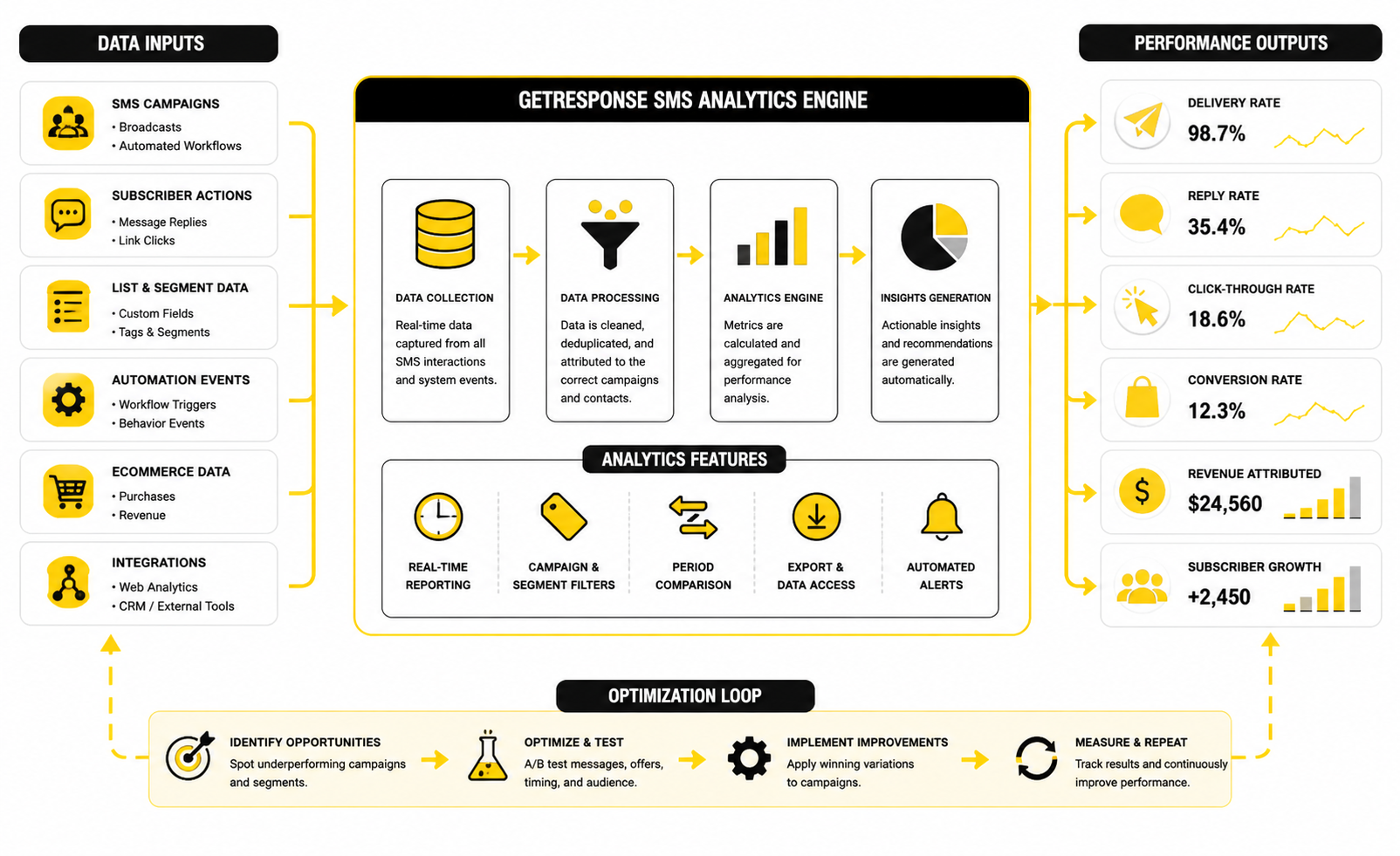
The goal with GetResponse SMS reporting is not to collect pretty numbers. The goal is to decide whether a text message should be kept, improved, narrowed, or killed. SMS is too direct and too expensive to run on vibes.
A good SMS report should answer four practical questions. Did the message reach people? Did the right people click? Did those clicks turn into money, bookings, registrations, or replies? Did the campaign create too much list fatigue while doing it?
That is the real measurement system. You are not looking for one magic benchmark. You are looking for a clean read on attention, action, cost, and subscriber trust.
Start With The Delivery Layer
Delivery is the first layer because nothing else matters if the message does not reach the phone. In GetResponse SMS, the platform lets you monitor sent and delivered messages, link clicks, and campaign costs inside the SMS reporting flow through GetResponse MAX SMS automation. That gives you the base numbers you need before judging performance.
Sent messages only tell you how many texts the system attempted to send. Delivered messages tell you how many made it through. Failed or undelivered messages are where you look for phone number quality, country restrictions, formatting problems, carrier issues, or list hygiene problems.
This is why a low delivery rate should not trigger a copywriting discussion first. It should trigger a data and compliance review. Clean the phone numbers, confirm country rules, check consent quality, and make sure the list was not built from weak opt-in sources.
Clicks Matter More Than Opens
SMS open rates are often used as a selling point, but they are not the most useful number for optimization. People see texts quickly because SMS lives in a high-attention inbox. That does not mean the message created business value.
A stronger metric is click rate. SimpleTexting’s 2025 SMS research found that most businesses report SMS click-through rates between 21% and 35%, but that range should be treated as a directional benchmark, not a guarantee. Your real click rate depends on the audience, offer, timing, consent quality, message type, and how direct the link destination is.
For GetResponse SMS campaigns, a weak click rate usually points to one of four problems. The segment was too broad, the timing was wrong, the offer lacked urgency, or the CTA was not clear enough. Fix those before assuming SMS “does not work.”
Conversion Rate Tells The Truth
Clicks show interest. Conversions show whether the campaign did its job. That is why SMS should be tied to a specific outcome before launch, not measured after the fact with whatever number looks best.
For ecommerce, that outcome might be an order, recovered cart, repeat purchase, or revenue per recipient. For service businesses, it might be a booked call, confirmed appointment, paid invoice, or completed form. For webinars, it might be attendance, replay views, or post-event sales conversations.
Do not judge every SMS campaign against the same conversion rate. A cart recovery text will usually behave differently from a reactivation message to cold leads. A deadline reminder to warm buyers will behave differently from a first-touch promotional blast. Context is everything.
Revenue Per Message Keeps You Honest
Revenue per message is one of the cleanest SMS metrics because it connects performance to cost. If you send 1,000 messages and the campaign generates $2,000, that looks different from sending 10,000 messages to generate the same $2,000. Volume can hide weak targeting.
This is where GetResponse SMS cost reporting becomes useful. The platform’s SMS feature page highlights campaign cost visibility, which matters because SMS has a more obvious marginal cost than email. Each unnecessary send eats into profit.
A practical way to judge performance is to compare:
If revenue per message rises when you narrow the audience, that is usually a good sign. It means segmentation is improving the economics. If revenue only rises because you send more texts to more people, be careful.
Automated Flows Usually Beat One-Off Blasts
This is the most important data lesson in SMS marketing. Automated messages often perform better because they are connected to behavior. The customer did something, and the text responds to that moment.
Klaviyo’s SMS benchmark data for 2026 focuses heavily on click rates, order rates, revenue per recipient, and unsubscribe rates by industry, giving marketers a way to compare campaign performance against similar brands through SMS benchmarks by industry. The practical takeaway is simple: compare like with like. Do not compare an abandoned cart flow against a broad holiday blast and pretend the benchmark is fair.
For GetResponse SMS, this supports the approach from the implementation section. Build SMS into workflows where the user’s behavior creates the reason for the message. Then benchmark abandoned cart against abandoned cart, event reminders against event reminders, and reactivation against reactivation.
Unsubscribes Are A Performance Metric, Not Just A Compliance Detail
A campaign that makes money but burns the list can still be a bad campaign. SMS opt-outs are a direct signal that your timing, targeting, frequency, or message value is off. Ignore that signal and the channel gets weaker every month.
GetResponse lets you add an SMS opt-out link, and its help documentation explains that once a recipient confirms the opt-out, the contact is placed on an SMS opt-out list for that subaccount and excluded from future SMS sending from that subaccount through SMS opt-out handling. That is useful operationally, but the bigger lesson is strategic. Every opt-out is feedback.
Watch unsubscribes by campaign type, not only in total. If one campaign creates far more opt-outs than others, inspect the audience and message. If all campaigns are trending upward in opt-outs, reduce frequency and tighten segmentation before scaling anything else.
Benchmarks Should Guide Decisions, Not Replace Judgment
Benchmarks are helpful when they give you a rough performance range. They are dangerous when they become excuses. A 25% click rate can be great for one campaign and disappointing for another.
For example, a last-hour reminder to warm buyers should probably outperform a general product announcement. A customer support update may get high visibility but low clicks because the message itself resolves the issue. A webinar reminder may not need a high click rate if the main goal is attendance from people who already have the event link.
Use benchmarks to ask better questions:
That last question matters. SMS is powerful, but it is not always the right channel.
The Metrics Dashboard You Actually Need
You do not need a massive dashboard to manage GetResponse SMS well. You need a simple view that separates delivery, engagement, conversion, cost, and list health. If those categories are mixed together, the numbers become harder to act on.
A useful SMS dashboard should include:
This structure makes the next move obvious. Low delivery means data quality or compliance work. Low clicks mean message, offer, timing, or targeting work. Low conversions after strong clicks mean the landing page or checkout path needs attention. High opt-outs mean the audience is annoyed, even if the campaign made money.
How To Read The Numbers After A Campaign
After a campaign runs, do not start by asking whether the SMS was “good.” Start by walking through the funnel in order. Delivery comes first, then clicks, then conversions, then cost, then opt-outs.
If delivery is strong but clicks are weak, the message did not create enough action. Rewrite the opening line, make the CTA clearer, or send to a more relevant segment. If clicks are strong but conversions are weak, do not keep rewriting the SMS; inspect the landing page, offer, mobile experience, checkout, or booking flow.
If conversions are strong but opt-outs are high, you may have a profitable campaign that needs tighter targeting. If revenue per message is strong and opt-outs are low, you likely have a workflow worth scaling. That is the kind of SMS data that should guide decisions.
The Best GetResponse SMS Reports Lead To Fewer, Better Messages
The point of analytics is not to send more texts. It is to send fewer bad texts and more useful ones. That mindset protects your budget and your relationship with subscribers.
When you review GetResponse SMS performance, look for the campaigns that create clear action without creating list damage. Those are the workflows you improve and scale. Everything else should be rewritten, delayed, narrowed, moved to email, or removed.
Good SMS marketing feels simple on the customer side. Behind the scenes, it works because the data is disciplined. That is where the advantage is.
Advanced GetResponse SMS Strategy
Once the basic workflows are working, the question changes. You are no longer asking, “Can GetResponse SMS send a text?” You are asking, “Where does SMS create enough incremental value to justify the cost, attention, and compliance responsibility?”
That is the right question. Advanced SMS marketing is not about adding texts to every automation because the feature exists. It is about protecting the channel so it keeps working when you really need it.
Treat SMS Like A Scarce Asset
Email can tolerate more experimentation because the marginal cost is lower and the inbox is built for volume. SMS is different. A text message interrupts the customer in a more personal space, so every send should earn its place.
This is why the best GetResponse SMS strategy often sends fewer messages than the team originally planned. You do not need five texts in a launch sequence if two well-timed messages do the job. You do not need a general broadcast if a smaller segment already shows higher buying intent.
A useful filter is simple: would this message still be worth sending if each text cost noticeably more? If the answer is no, it probably belongs in email, push, retargeting, or not in the campaign at all.
Decide What SMS Should Not Do
A mature strategy includes exclusion rules, not just trigger rules. GetResponse SMS can support lifecycle automation, but the system needs guardrails so it does not accidentally over-message the same person from multiple workflows. Without those rules, every team thinks their campaign is important, and the subscriber gets the combined noise.
Start by defining where SMS should not be used. Do not use it for low-urgency newsletters, vague product updates, generic content promotion, or messages that need several paragraphs of explanation. Do not use it as a backup for weak email strategy either.
SMS should not carry the whole marketing strategy. It should sharpen the moments where speed and action matter.
Build A Frequency Cap Before You Scale
Frequency caps protect the list from your own enthusiasm. They stop a subscriber from receiving too many texts across abandoned cart flows, sale reminders, event reminders, and reactivation campaigns. This matters more as your automations become more complex.
A practical cap might limit promotional SMS to one or two messages per week, with exceptions for transactional or time-sensitive service updates. The exact number depends on the business model, customer expectations, and message value. A flash-sale ecommerce brand can justify a different cadence than a financial service, clinic, or B2B consultant.
The important part is that the cap exists before the problem shows up. If you only add frequency rules after opt-outs spike, you are already repairing damage.
Use Priority Rules For Overlapping Campaigns
Overlapping campaigns are one of the hidden scaling problems in SMS. A customer might abandon a cart, qualify for a loyalty offer, register for an event, and sit inside a seasonal promotion segment at the same time. If every workflow fires independently, the experience becomes messy fast.
Priority rules solve this. A purchase-related reminder should usually outrank a broad promotional message. An appointment reminder should outrank a general offer. A service update should outrank almost everything because it affects the customer’s current experience.
Think of SMS priority like a traffic system:
This makes the customer journey feel intentional. It also makes reporting cleaner because campaigns are not constantly interfering with each other.
Separate Transactional, Promotional, And Lifecycle Messages
Not all texts have the same purpose. A delivery update, a cart reminder, and a win-back offer may all use SMS, but they should not be judged or governed the same way. Mixing them together creates confusion in reporting and risk in compliance.
Transactional messages are usually tied to a customer action or account event. Promotional messages are designed to drive a sale. Lifecycle messages sit between the two and help move someone through a journey, such as onboarding, renewal, or reactivation.
Keep those categories separate in your planning. Each one needs different consent handling, different copy, different timing, and different success metrics. This is also where legal review matters, especially if you operate in regulated markets or across multiple countries.
Watch The Incremental Lift, Not Just Total Revenue
A GetResponse SMS campaign can look good on paper while adding less value than you think. For example, a text sent right after a strong email may get credited for revenue that email already created. That does not mean SMS failed, but it does mean you need to measure incremental lift more carefully.
One way to test this is to hold back a small group from receiving the SMS while the rest of the segment receives it. Then compare conversion rate, revenue per recipient, and opt-out behavior between the two groups. If the SMS group meaningfully outperforms the holdout group, the message is doing real work.
This is more useful than celebrating total campaign revenue. Total revenue tells you what happened. Incremental lift tells you whether the SMS was actually necessary.
Know When To Use Another Tool
GetResponse SMS makes sense when your strategy is built around email automation, landing pages, webinars, and lifecycle workflows inside the GetResponse ecosystem. If that is your center of gravity, keeping SMS in the same automation environment can reduce operational friction. You are not jumping between disconnected tools just to send basic behavior-triggered texts.
But there are situations where another platform may fit better. If the business needs heavy two-way messaging, social DM automation, comment-to-message flows, and conversational commerce, ManyChat may be the more natural fit. If the business needs CRM, pipelines, booking, reputation management, email, SMS, and client subaccounts in one agency-style setup, GoHighLevel may be worth comparing.
The strategic mistake is choosing tools by feature count alone. Choose based on the operating model. A lean ecommerce team, a coaching business, a local service business, and an agency do not need the same SMS setup.
Do Not Let Automation Hide Bad Offers
Automation can make a good offer more timely. It cannot turn a weak offer into a strong one. If your GetResponse SMS campaign is getting clicks but not conversions, the problem may not be the text.
Look at the destination. Is the checkout mobile-friendly? Is the discount obvious? Does the booking page load fast? Is the webinar join link easy to use? Is the product page answering the objections that matter?
This is where SMS reveals funnel problems quickly. Because the channel can drive fast attention, a weak landing page gets exposed fast too. Do not keep rewriting the text if the real leak is after the click.
Prepare For Carrier Filtering And Deliverability Issues
SMS deliverability is not only about whether the number exists. Carriers and messaging ecosystems also care about unwanted traffic, unclear sender identity, suspicious links, high complaint rates, and weak opt-in practices. The CTIA Messaging Principles and Best Practices are built around preserving trust in messaging and reducing unwanted messages.
That means your strategy should look legitimate from every angle. Use clear brand identification. Avoid spammy language. Keep opt-out instructions clear. Do not rotate links or sender details in a way that looks evasive.
This is boring until it matters. Then it becomes the difference between a reliable channel and campaigns that get filtered, blocked, or ignored.
Keep Compliance Operational, Not Theoretical
Compliance should not live in a forgotten document. It should be built into the process. Consent capture, message approval, opt-out handling, suppression lists, and record-keeping should be part of the workflow, not something someone checks manually after the campaign is already scheduled.
Recent TCPA-related updates have made opt-out handling more important, with businesses expected to respect revocation requests through reasonable methods and process opt-outs within required timelines, as explained in legal summaries of the 2025 TCPA opt-out rule changes. That should push teams toward cleaner systems, not clever workarounds.
For GetResponse SMS, the practical move is to make opt-out logic part of the automation and reporting review. If people unsubscribe, respect it immediately. If a campaign creates more opt-outs than expected, treat that as a strategic warning, not just a legal checkbox.
Scale By Use Case, Not By Volume
The worst way to scale SMS is to simply send to bigger lists. That often increases revenue for a short period while weakening the channel over time. The better way is to scale by adding proven use cases one at a time.
Start with one workflow that has clear intent. Improve it until the economics are healthy. Then add another workflow with a different purpose, such as webinar reminders, appointment confirmations, or post-purchase loyalty prompts.
This keeps the SMS program controlled. Each workflow has a reason to exist, a defined audience, a measurable outcome, and a clear place in the customer journey.
Build A Suppression Strategy For Better Customer Experience
Suppression rules are not just for compliance. They are one of the simplest ways to make automation feel intelligent. If someone already bought, booked, replied, unsubscribed, complained, or entered a higher-priority journey, suppress the lower-priority SMS.
Common suppression rules include:
This is where advanced SMS starts to feel premium. The customer does not see the rules, but they feel the difference. They receive fewer irrelevant messages, and the messages they do receive make more sense.
Use SMS To Strengthen Trust, Not Just Push Urgency
Urgency is useful, but it is not the only reason to use SMS. Some of the best texts strengthen trust because they reduce uncertainty. A reminder before a call, a confirmation after a booking, or a clear update about an important change can make the customer feel taken care of.
That kind of SMS may not always produce immediate revenue in the dashboard. But it can reduce no-shows, support questions, confusion, and buyer anxiety. Those outcomes matter even when they do not look like a flashy campaign win.
A strong GetResponse SMS strategy balances revenue messages with helpful lifecycle communication. If every text asks for money, subscribers learn to ignore you. If texts consistently help them act at the right moment, the channel stays valuable.
The Advanced Rule: Earn The Interruption
This is the expert-level mindset. SMS is an interruption, so the message has to earn that interruption. It should be timely, relevant, expected, and easy to act on.
Before sending any advanced campaign, ask:
If the answer is weak, do not send it yet. Fix the strategy first. GetResponse SMS is most powerful when it is used with discipline, not when it is used because another automation slot is available.
Final System Check Before You Commit To GetResponse SMS
At this point, the decision is not just whether GetResponse SMS can send messages. It can. The better question is whether your business has the consent, segmentation, workflows, reporting, and operational discipline to use SMS without annoying the people you worked hard to attract.
That is the full system. GetResponse SMS works best when it is connected to a real customer journey, not bolted on as a last-minute promo tool. If your email strategy, contact data, conversion tracking, and offer structure are weak, SMS will expose those weaknesses quickly.
Before you scale, check the whole ecosystem:
If you cannot answer yes to most of those, do not rush. Fix the system first. SMS is powerful precisely because it is direct, and direct channels punish sloppy execution.
What Is GetResponse SMS?
GetResponse SMS is the text messaging feature available inside GetResponse MAX, built for sending SMS campaigns through marketing automation workflows. It lets businesses send messages based on contact behavior, selected conditions, contact information, or imported phone lists. The main value is that SMS can sit inside the same broader automation strategy as email, landing pages, webinars, and other customer journey tools.
Is GetResponse SMS Available On Every Plan?
No, GetResponse SMS is tied to GetResponse MAX rather than the lower self-serve plans. That matters because businesses searching for getresponse sms may expect it to be available on every standard account, but the feature is positioned as an advanced solution. If SMS is a must-have, confirm plan access before building your campaign strategy around it.
Can GetResponse SMS Be Used For Automation?
Yes, automation is one of the main reasons to use it. GetResponse SMS can be triggered by activity, inactivity, selected conditions, and contact information inside marketing automation workflows. That makes it more useful than basic one-off texting because messages can respond to what the subscriber actually did.
What Are The Best Use Cases For GetResponse SMS?
The best use cases are moments where timing matters. Cart recovery, webinar reminders, appointment confirmations, deadline reminders, loyalty prompts, post-purchase follow-ups, and reactivation campaigns are all strong candidates. The weaker use cases are vague newsletters, general updates, or long promotional explanations that belong in email.
Should SMS Replace Email?
No. SMS should support email, not replace it. Email is better for education, storytelling, detailed offers, product explanations, and long-form nurturing. SMS is better for short, timely nudges where the subscriber already understands the context and needs a simple next step.
How Often Should A Business Send SMS Campaigns?
There is no universal number because frequency depends on the business model, subscriber expectations, and message value. A local service business should usually text far less often than an ecommerce brand running time-sensitive promotions. The more carefully rule is to use frequency caps, monitor opt-outs, and only send when the message earns the interruption.
What Metrics Matter Most For GetResponse SMS?
The most useful metrics are delivery rate, click rate, conversion rate, revenue per delivered message, cost per conversion, and opt-out rate. Sent messages alone do not prove performance. A campaign is only healthy if it reaches people, drives action, creates value, and protects list trust.
Can GetResponse SMS Track Clicks?
Yes, GetResponse SMS supports shortened links and link click tracking. This matters because clicks show whether the message created enough interest to move someone forward. For proper analysis, click tracking should be paired with conversion tracking so you can see whether the text produced actual revenue, bookings, registrations, or replies.
Does GetResponse SMS Support Opt-Outs?
Yes, GetResponse supports SMS opt-out links, and opt-out handling should be treated as a core part of the system. Every marketing SMS program needs a clear unsubscribe path because permission is what keeps the channel healthy. If people opt out, that feedback should influence your targeting, timing, and message frequency.
Is GetResponse SMS Good For Ecommerce?
Yes, it can work well for ecommerce when it is used around high-intent moments. Abandoned cart reminders, sale deadline reminders, back-in-stock alerts, loyalty offers, and post-purchase flows are practical examples. The key is to avoid generic blasting and focus on behavior-triggered workflows that connect directly to purchase intent.
Is GetResponse SMS Good For Service Businesses?
Yes, especially for appointment reminders, booking confirmations, consultation follow-ups, event reminders, quote follow-ups, and renewal prompts. Service businesses often benefit from SMS because a missed call, missed appointment, or forgotten booking has a direct cost. The message should still be short, relevant, and tied to a clear action.
What Is The Biggest Mistake With GetResponse SMS?
The biggest mistake is treating SMS like email with fewer characters. SMS is more personal, more immediate, and more intrusive. If you send too often, use weak segments, or push irrelevant offers, people unsubscribe quickly and the channel loses power.
Should You Use GetResponse SMS Or Another SMS Tool?
Use GetResponse SMS if your marketing system already runs through GetResponse MAX and you want SMS inside the same automation environment. Consider a different tool if your strategy depends heavily on two-way conversations, social messaging, advanced CRM pipelines, or agency-style client account management. For conversational social automation, ManyChat may be a better fit, while GoHighLevel may make more sense for agencies and service businesses that want CRM, pipelines, booking, email, and SMS in one system.
How Should A Beginner Start With GetResponse SMS?
Start with one workflow and one measurable goal. Do not launch five campaigns at once. Pick a high-intent use case, confirm consent, write one clear message, test every path, measure the results, and improve before scaling.
What Makes A GetResponse SMS Campaign Worth Scaling?
A campaign is worth scaling when it has strong delivery, meaningful clicks, profitable conversions, manageable costs, and low opt-outs. It should also create incremental value beyond email or other channels. If SMS only shifts attribution without increasing total results, tighten the strategy before sending more.
The Final Take On GetResponse SMS
GetResponse SMS is valuable when it is used with restraint. The winning play is not sending more texts. The winning play is sending the right text at the right moment to the right person with a clear reason to act.
That means SMS should be connected to real behavior, supported by clean data, protected by consent, and judged by business outcomes. When you treat it that way, it becomes a serious revenue and retention channel. When you treat it like another blast tool, it becomes expensive noise.
For most businesses, the best path is simple. Build the email and automation foundation first. Add GetResponse SMS where timing matters. Measure what happens. Keep the workflows that create action without damaging trust, and remove everything else.
Build a stronger local presence with BAAM AI
Turn your website, Google profile, social channels, and AI visibility into one growth engine
Most businesses do not need more random marketing activity. They need a consistent presence system that helps the right people find them, trust them, and take action. BAAM AI brings strategy, local SEO, website updates, Google Maps visibility, social content, AI-search readiness, media production, and reporting into one practical monthly engine.
If you want your marketing to keep working after the campaign ends, start with a free BAAM AI presence audit. See how your business shows up today and where the fastest visibility wins are at BAAM AI.