
BAAM AI Blog
Free Email Collection Tools: A Practical Framework for Building a List Without Wasting Traffic
Free email collection tools look simple from the outside. You add a form, offer something useful, and wait for subscribers to arrive. But in practice, the tool is only one piece of the system, and that is where many...
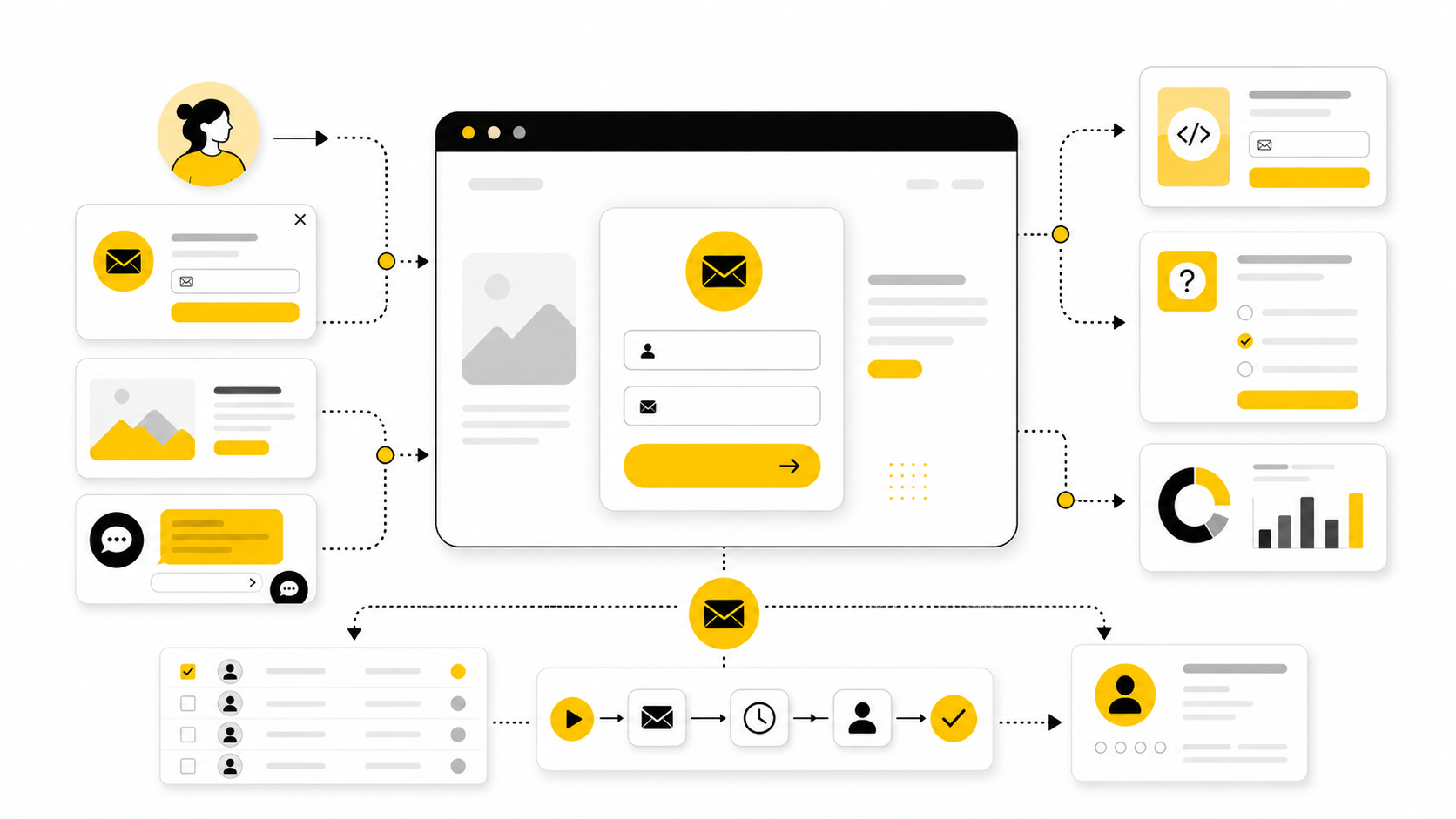
Free email collection tools look simple from the outside. You add a form, offer something useful, and wait for subscribers to arrive. But in practice, the tool is only one piece of the system, and that is where many businesses lose momentum.
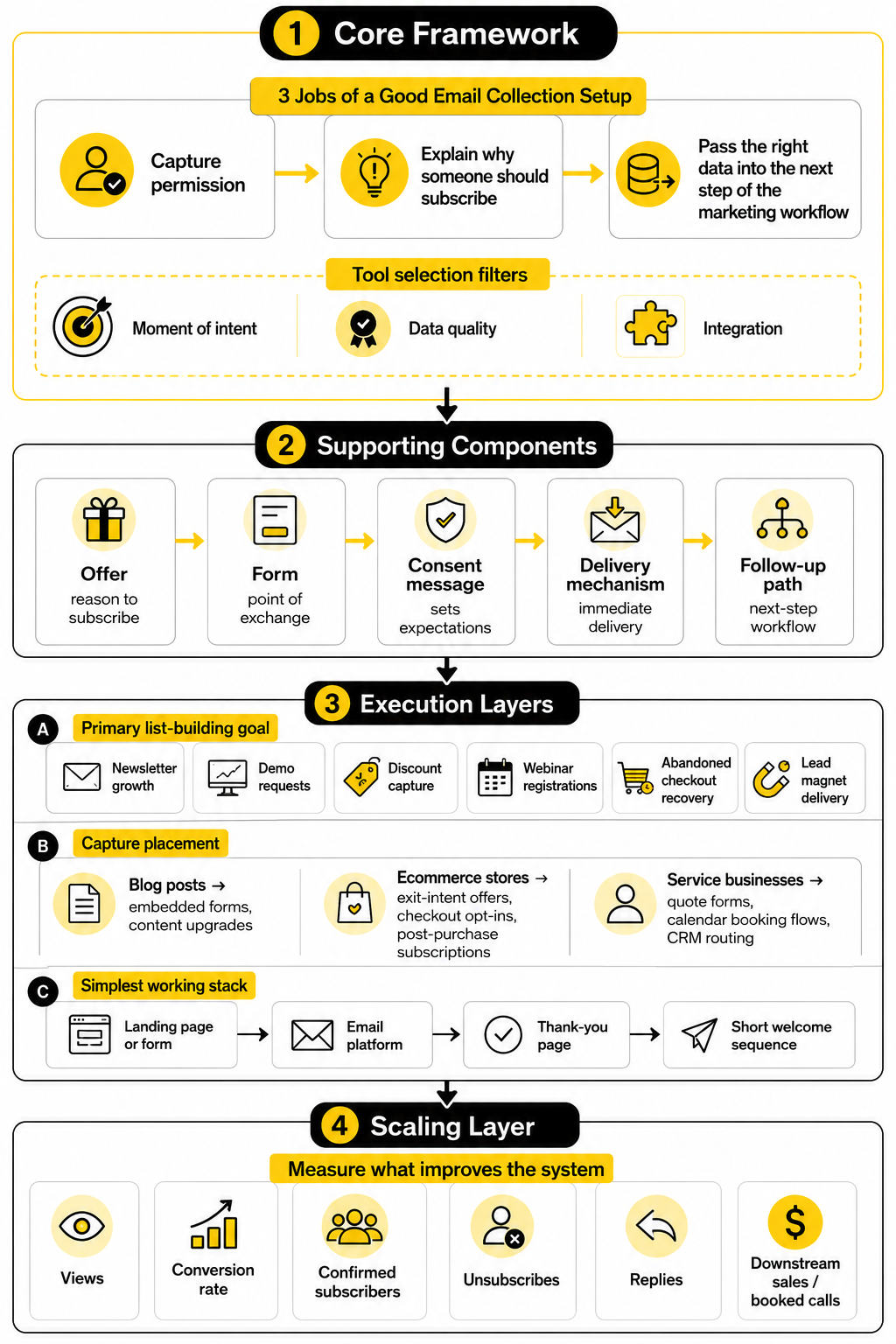
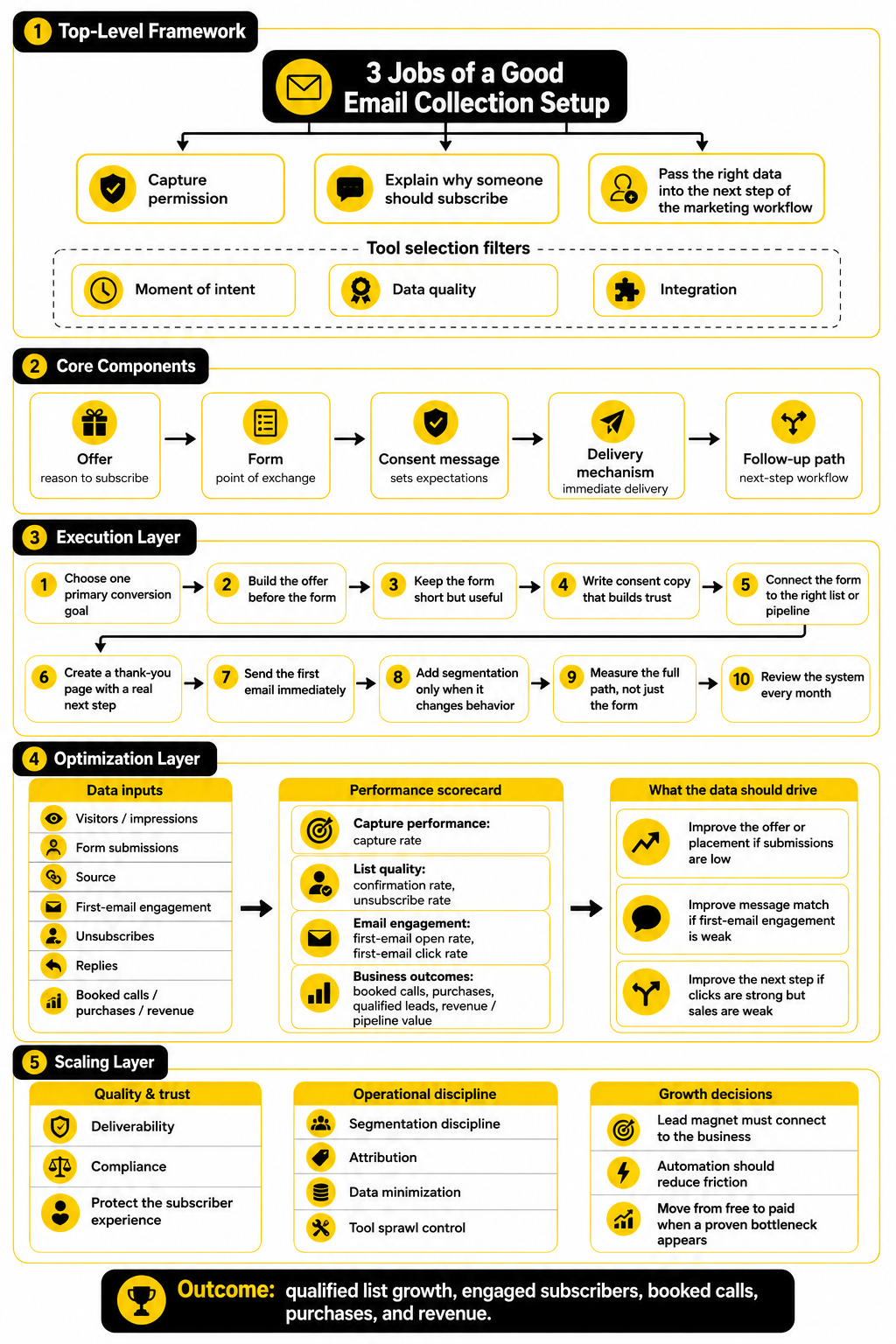
A good email collection setup does three jobs at the same time. It captures permission, explains why someone should subscribe, and passes the right data into the next step of your marketing workflow. That matters because email is still one of the few owned channels where you are not fully dependent on search rankings, ad auctions, or social platform changes.
The goal is not to collect as many addresses as possible. The goal is to collect the right addresses, with clear consent, from people who understand what they are signing up for. That distinction matters for trust, deliverability, and compliance. The FTC’s CAN-SPAM guidance makes it clear that commercial email needs honest sender information, accurate subject lines, a physical address, and a working opt-out process through its business compliance guidance.
Free tools can absolutely work, especially for creators, local businesses, consultants, ecommerce stores, and early-stage SaaS teams. But they work best when you choose them based on the collection moment, not based on the longest feature list. A popup, quiz, embedded form, checkout opt-in, chatbot, calendar booking form, and landing page all collect emails in different contexts.
Why Free Email Collection Tools Matter
Email collection matters because attention is rented in most digital channels. A visitor can find you through Google, Instagram, YouTube, TikTok, LinkedIn, or paid ads, but the platform controls how often you get another chance to reach that person. An email list gives you a more durable path back to people who already showed interest.
That does not mean email is magic. A weak offer, vague form, or messy follow-up sequence will still underperform, even with a popular tool. The advantage of free email collection tools is that they lower the barrier to testing your message, offer, and funnel before you commit to a larger software stack.
The best free tools also help you learn faster. You can test which lead magnet people want, which page converts, which traffic source brings better subscribers, and which follow-up emails create replies or sales. That feedback loop is usually more valuable than the tool itself.
Compliance is part of the reason this topic deserves more care. The UK Information Commissioner’s Office states that marketing emails to individuals generally require specific consent, with a limited exception for existing customers under certain conditions, in its electronic mail marketing guidance. So the real question is not just “Which tool collects emails for free?” It is “Which tool helps me collect emails clearly, legally, and in a way people actually welcome?”
The Framework for Choosing the Right Tool
A useful framework starts with the moment of intent. Someone reading a blog post is in a different mindset than someone comparing pricing, joining a webinar, downloading a checklist, or asking a question in chat. The right tool should match that moment instead of interrupting it.
For example, an embedded form works well when the offer is directly tied to the page content. A landing page works better when you need a focused campaign destination. A chatbot can work well when the visitor has a question and the email capture feels like a natural next step, which is where tools like ManyChat may fit a conversational funnel.
The second filter is data quality. A free email collection tool should let you capture the minimum information needed to personalize follow-up without creating friction. For most businesses, that means email address first, then one useful segmentation field such as business type, goal, product interest, or urgency.
The third filter is integration. If the tool captures emails but leaves them trapped in a spreadsheet you never use, it is not really helping. A simple form connected to an email platform can outperform a flashy standalone widget because it moves the subscriber into a follow-up system immediately.
Core Components of a High-Converting Email Capture System
Every strong email capture system has an offer, a form, a consent message, a delivery mechanism, and a follow-up path. Miss one of those pieces and performance usually drops. The tool matters, but the structure around the tool matters more.
The offer is the reason someone subscribes. It can be a discount, checklist, calculator, template, webinar, quiz result, private newsletter, waitlist, free consultation, or product guide. What matters is that the offer solves a specific problem the visitor already cares about.
The form is the point of exchange. It should be short, clear, and easy to complete on mobile. If you need a more flexible form builder for surveys, lead magnets, and intake flows, Fillout can fit that role when a basic embedded form is too limited.
The consent message is not just legal decoration. It sets expectations about what people will receive and helps reduce low-quality signups. The ICO’s consent guidance emphasizes clear, freely given, specific, informed consent and warns against practices like pre-ticked opt-in boxes in its direct marketing and data protection guidance.
The delivery mechanism is what happens immediately after signup. If someone asks for a template, send the template. If they join a waitlist, confirm the waitlist. If they request a quote, route the lead quickly. This is where email platforms such as Brevo or broader funnel platforms such as systeme.io can become useful once the list starts growing.
Professional Implementation Without Overcomplicating the Stack
Professional implementation does not mean buying ten tools. It means building a clean path from visitor to subscriber to next action. The simplest working stack is often a landing page or form, an email platform, a thank-you page, and a short welcome sequence.
A practical setup starts with one primary list-building goal. That could be newsletter growth, demo requests, discount capture, webinar registrations, abandoned checkout recovery, or lead magnet delivery. When the goal is clear, it becomes much easier to choose the right free email collection tools and ignore features you do not need yet.
The next step is to decide where the email capture should appear. Blog posts may need embedded forms and content upgrades. Ecommerce stores may need exit-intent offers, checkout opt-ins, and post-purchase subscriptions. Service businesses may need quote forms, calendar booking flows, and CRM routing.
The final step is measurement. Track views, conversion rate, confirmed subscribers, unsubscribes, replies, and downstream sales or booked calls. Brevo’s benchmark reporting shows how email performance varies by region and industry, with its 2025 benchmark article listing average figures such as a 21% open rate and 3.96% click-through rate in its email marketing benchmarks. Those numbers should not become your ceiling, but they are useful reference points when you start evaluating whether your own capture and follow-up system is improving.
Tool Categories, Use Cases, and Selection Criteria
Free email collection tools are easier to choose when you stop comparing them as one giant category. A popup tool, form builder, landing page builder, chatbot, CRM form, quiz tool, and checkout opt-in do not solve the same problem. They all collect email addresses, but they create very different subscriber experiences.
The practical way to choose is to start with the page, the visitor’s intent, and the action you want after signup. Someone reading a tutorial may respond well to a checklist or template. Someone looking at pricing may need a demo, consultation, trial, or quote request instead.
This is why the best setup is usually not “one tool everywhere.” It is a small collection of tools that each handles one capture moment well. Free email collection tools become much more powerful when each one has a clear job.
Embedded Forms
Embedded forms are the simplest email capture format. They sit inside a page, blog post, footer, sidebar, resource hub, or product page. Because they do not interrupt the visitor, they work best when the offer is directly connected to the content around it.
A newsletter form at the bottom of a blog post can work, but it needs a strong reason to subscribe. “Join our newsletter” is usually too vague unless the brand already has strong trust. A better form promises a specific benefit, such as weekly growth tactics, product updates, founder notes, or a practical resource that matches the article topic.
Embedded forms are also useful because they are easy to maintain. You can add them across multiple pages without rebuilding your entire funnel. Tools like Brevo fit this use case when you want the form, contact list, and email follow-up to live close together instead of being spread across disconnected apps.
Landing Pages
Landing pages are better when you want focus. Instead of asking visitors to browse a website, you send them to one page with one offer and one primary action. That makes landing pages useful for lead magnets, webinars, waitlists, challenges, free consultations, product launches, and paid ad campaigns.
A landing page should answer four questions quickly. What is the offer, who is it for, why should the visitor care now, and what happens after they submit the form? If the page cannot answer those questions without making the reader work, the tool will not save it.
This is where free email collection tools can help you move fast. A simple page built with systeme.io can be enough for a creator, consultant, or small business testing a new offer. More advanced funnel builders like ClickFunnels can make sense when the email capture is part of a bigger sales path with upsells, checkout steps, or webinar funnels.
Popups and Slide-Ins
Popups are not bad by default. Bad popups are bad. The difference is timing, relevance, and whether the visitor feels interrupted or helped.
A popup that appears instantly before someone has read anything usually feels desperate. A popup triggered after scroll depth, time on page, exit intent, or product interest can feel much more natural. The offer still has to be worth the interruption, though.
For ecommerce, popups often focus on discount capture, product guides, quizzes, back-in-stock alerts, or early access. For content sites, they usually work better when tied to the page topic instead of using one generic message everywhere. The rule is simple: interrupt only when the value is obvious.
Quiz and Survey Forms
Quiz and survey forms collect more than an email address. They help you learn what the person wants, what problem they are trying to solve, and which segment they belong in. That makes them useful when one generic follow-up sequence would feel too broad.
A quiz can work well for product recommendations, service fit, coaching offers, skincare routines, software selection, financial education, or any buying journey where the right next step depends on the person’s situation. A short survey can also improve lead quality because people who answer a few relevant questions are usually more intentional than people who only enter an email for a generic download.
The risk is friction. Every extra question creates more work for the visitor, so each field needs to earn its place. If you need flexible forms for lead qualification, intake, surveys, or resource delivery, Fillout is a practical option when a basic email box is not enough.
Chat-Based Email Capture
Chat-based capture works when the visitor needs a conversation before they are ready to subscribe, book, or buy. It can collect an email after answering a question, recommending a resource, qualifying a lead, or routing someone to the right next step. This is especially useful when the visitor’s intent is active but not fully clear.
The advantage is context. A chat flow can ask one question at a time and make the opt-in feel like part of the help experience. That is very different from forcing every visitor into the same static form.
Tools like ManyChat can fit social and messaging-heavy funnels where the email address is only one part of the relationship. For website-based support or lead qualification, Chatbase can make sense when a visitor needs answers before they are ready to hand over contact details. The key is to collect the email at the moment it helps the visitor continue, not as a random gate.
Booking and Consultation Forms
Booking flows are email collection tools in disguise. When someone schedules a call, requests a consultation, or books a demo, they give you contact details with much stronger intent than a typical newsletter signup. That makes booking forms especially valuable for service businesses, agencies, consultants, coaches, and B2B sales teams.
The form should not ask for everything. It should collect enough information to prepare for the call and qualify the opportunity. If the form becomes a full interrogation, good leads may abandon it before booking.
A tool like Cal.com fits when the next step after email capture is a scheduled meeting. The important part is what happens after the booking: confirmation, reminders, a short prep email, and clear expectations. That follow-up can be the difference between a booked lead and a no-show.
CRM and Pipeline Forms
CRM forms matter when collecting the email is only the beginning of a sales process. A contact may need to be assigned to a pipeline, tagged by interest, routed to a team member, or followed up with based on deal stage. This is where simple list-building starts to overlap with sales operations.
For local businesses, agencies, and service teams, a CRM-connected form can prevent leads from falling through the cracks. The form can trigger a notification, create a contact record, start a workflow, and move the lead into a pipeline. That is more useful than having a spreadsheet full of emails nobody follows up with.
Platforms like GoHighLevel fit this category when email capture needs to connect with CRM, automation, booking, SMS, and pipeline management. It is not the lightest option if you only need a basic newsletter form. But for businesses where speed-to-lead matters, having collection and follow-up in one system can be a serious advantage.
Checkout and Purchase Opt-Ins
Checkout opt-ins are powerful because they happen at the highest-intent moment. The person is already buying, registering, or creating an account. That means the email address is connected to real behavior, not just casual curiosity.
The mistake is treating buyers and subscribers the same way. A buyer should not receive the same welcome sequence as someone who downloaded a free checklist. Their relationship with the business is already different, so the follow-up should reflect that.
For ecommerce and digital products, checkout email capture can support receipts, onboarding, product education, replenishment reminders, loyalty campaigns, review requests, and cross-sells. The free tool matters less than the connection between the purchase event and the email system. If that data does not move cleanly, personalization becomes guesswork.
How to Choose the Right Free Tool for Your Situation
The right choice depends on what you are trying to learn. If you are still testing your offer, pick the tool that lets you launch the fastest. If you already have traffic, pick the tool that gives you better placement, segmentation, and reporting.
Do not start with automation complexity. Start with one capture point and one follow-up promise. Once that works, expand into more forms, segments, pages, and workflows.
A useful selection process looks like this:
This keeps the decision practical. You are not looking for the most impressive free plan on paper. You are looking for the tool that helps the right visitor take the right next step with the least confusion.
Choose Based on Traffic Source
Traffic source changes the tool choice. Search traffic often works well with embedded forms and content upgrades because the visitor is already looking for information. Paid ad traffic usually needs dedicated landing pages because the message has to match the ad tightly.
Social traffic can behave differently. Visitors from Instagram, TikTok, LinkedIn, or YouTube may need a simpler page, faster context, and a clearer reason to subscribe. A link-in-bio style destination can help organize multiple offers, especially when you do not want to send every visitor to the same homepage.
That is where tools like Anything.com can be useful for creators or lean teams that need one clean destination for links, offers, and capture paths. The goal is not to create a prettier link page. The goal is to reduce the number of decisions between curiosity and signup.
Choose Based on Lead Intent
Low-intent visitors need education before they give you their email. Medium-intent visitors may respond to a checklist, quiz, comparison guide, webinar, or newsletter. High-intent visitors need a quote form, booking flow, demo request, free trial, or checkout path.
This is where many businesses get email collection wrong. They show the same newsletter popup to everyone, including people who are ready to buy. That creates friction instead of momentum.
Map your capture tool to the visitor’s stage. Use educational offers for early-stage visitors. Use comparison, consultation, and booking offers for people closer to a decision. Use product-specific opt-ins when the visitor is clearly exploring a purchase.
Choose Based on Follow-Up Needs
Some email collection tools are enough on their own because the follow-up is simple. A newsletter signup may only need a confirmation email and a welcome message. A lead magnet may need delivery plus a short educational sequence.
Other situations need more structure. A consultation request may need CRM routing, calendar scheduling, reminders, deal tracking, and sales notifications. A product quiz may need segmentation and different recommendations based on answers.
This is why “free” should not be the only filter. A free tool that creates manual work can become expensive in time. A tool is a good fit when it makes the next step easier for both the subscriber and the business.
Professional Implementation Without Overcomplicating the Stack
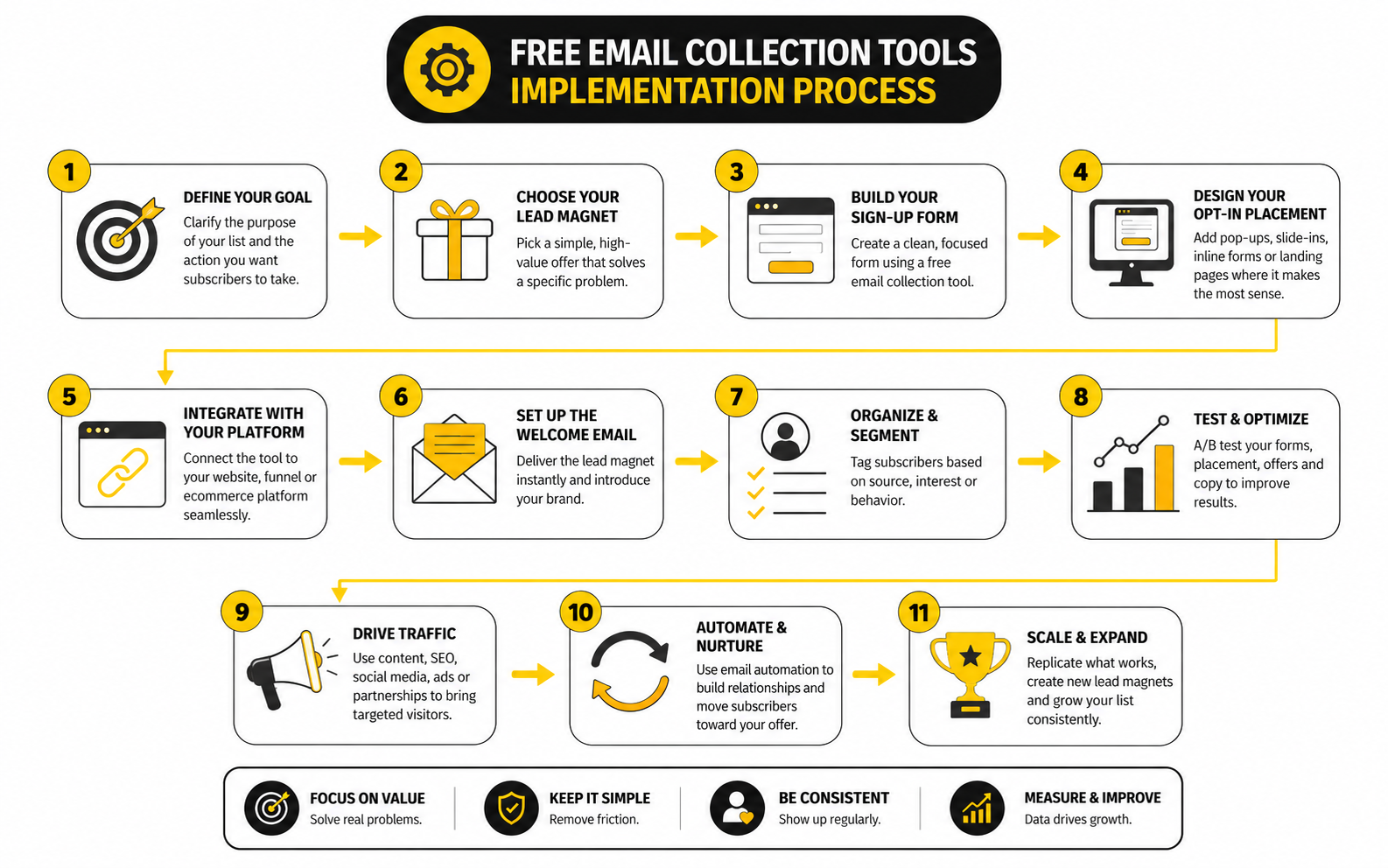
The implementation process starts after you choose the right capture moments. This is where free email collection tools stop being abstract and become part of a real workflow. The goal is not to build a massive automation machine on day one. The goal is to create a clean, measurable path from visitor interest to useful follow-up.
A professional setup has five layers: offer, capture, confirmation, segmentation, and follow-up. Each layer should be simple enough to maintain but clear enough to avoid confusion. When those layers connect smoothly, even a free stack can feel polished.
Step 1: Choose One Primary Conversion Goal
Start with one goal, not five. A page that asks visitors to join a newsletter, download a guide, book a call, follow on social, try a demo, and read another article will usually dilute attention. Pick the action that best matches the page intent.
For a blog post, the primary goal may be a resource download or newsletter signup. For a service page, it may be a consultation request. For a product page, it may be a discount, product guide, back-in-stock alert, or checkout opt-in.
This decision shapes the rest of the setup. It determines what the form says, what fields you ask for, what tool you use, and what the first follow-up email needs to do. Without that decision, every tool starts to look useful, which is exactly how stacks get messy.
Step 2: Build the Offer Before the Form
The offer does the heavy lifting. The form only makes the exchange possible. If the offer is weak, no free email collection tool will fix the problem.
A strong offer is specific, immediate, and relevant to the page where it appears. “Get updates” is vague. “Get the product launch checklist” is clearer because the reader understands what they receive and why it matters.
For service businesses, the offer might be a diagnostic call, quote request, audit, calculator, or decision guide. For creators, it might be a private newsletter, template, mini-course, or resource library. For ecommerce, it might be early access, a buying guide, a first-order incentive, or a reminder tied to a product action.
Step 3: Keep the Form Short but Useful
The default form should be short. Email address is enough for many newsletter and lead magnet offers. First name can help with personalization, but it is not always necessary.
Add more fields only when they change the follow-up. If you ask for company size, product interest, budget, or goal, that data should drive segmentation, routing, or email content. Otherwise, you are creating friction without improving the experience.
The best forms feel easy because every field has a reason. A consultation form can justify more questions than a newsletter box because the visitor expects a more personalized response. A free download usually cannot.
Step 4: Write Consent Copy That Builds Trust
Consent copy should be plain and direct. Tell people what they are signing up for, who is sending it, and whether they can unsubscribe. This is not just a legal box to tick. It is part of the trust-building process.
The FTC’s CAN-SPAM guidance requires commercial email senders to avoid deceptive subject lines, include a valid physical postal address, and provide a clear way to opt out through its business compliance guide. The ICO’s electronic mail guidance also says marketing emails to individuals generally require specific consent, with a limited exception for certain existing customer relationships through its direct marketing guidance.
This affects the way you implement even simple forms. Avoid pre-ticked boxes, vague promises, and buried consent language. Clear expectations reduce complaints, unsubscribes, and low-quality signups.
Step 5: Connect the Form to the Right List or Pipeline
A form that collects emails but does not send them anywhere useful creates hidden work. The subscriber should land in the right list, segment, tag, pipeline, or workflow immediately. Manual exports are fine for a tiny test, but they become a problem fast.
For a simple newsletter or lead magnet, an email platform such as Brevo can keep capture and follow-up close together. For a funnel where the subscriber moves through opt-in, sales page, checkout, and onboarding, systeme.io can be useful because the page and automation can live in one place.
For sales-led businesses, the email should create or update a contact record in a CRM. A platform like GoHighLevel makes more sense when the form needs to trigger follow-up tasks, pipeline movement, appointment reminders, or sales notifications. That is the difference between collecting leads and actually working them.
Step 6: Create a Thank-You Page With a Real Next Step
The thank-you page is often wasted. Many businesses use it to say “thanks” and then end the conversation. That is a missed opportunity because the visitor is still paying attention.
A good thank-you page confirms what happens next. It can tell the subscriber to check their inbox, download the resource, book a call, watch a short video, whitelist your email address, or choose a relevant next step. The action should match the original promise.
Do not overload this page either. One clear next step is better than a cluttered menu. If someone downloaded a buying guide, the next step might be a product comparison. If someone requested a consultation, the next step might be scheduling or preparing for the call.
Step 7: Send the First Email Immediately
The first email should arrive right away. This matters because the subscriber’s intent is highest at the moment they opt in. Waiting too long weakens the connection and makes the email feel less relevant.
The first email should deliver the promise, remind the subscriber why they signed up, and set expectations for what comes next. It does not need to be long. It needs to be useful, clear, and recognizable.
This is also where deliverability habits begin. Use a sender name people recognize, avoid bait-and-switch subject lines, and make the unsubscribe path easy to find. The FTC makes clear that people who subscribe or become members still retain the right to opt out of marketing messages in its CAN-SPAM compliance guidance.
Step 8: Add Segmentation Only When It Changes Behavior
Segmentation is valuable, but only when it changes what you do next. Tagging everyone with ten labels that never affect messaging is not strategy. It is clutter.
Start with simple segments tied to intent. Examples include newsletter subscriber, lead magnet download, demo request, quiz result, product interest, customer, abandoned checkout, and consultation request. These segments are useful because they help you send different follow-up messages.
Free email collection tools often include basic tagging, hidden fields, source tracking, or form-specific lists. Use those features carefully. The goal is to know why someone joined, not to create a data mess you will never clean.
Step 9: Measure the Full Path, Not Just the Form
A high form conversion rate can still produce bad leads. A lower conversion rate can produce better buyers. That is why you need to measure beyond the opt-in.
Track page views, form submissions, confirmation rate if you use double opt-in, first-email opens, clicks, replies, unsubscribes, booked calls, purchases, and revenue when possible. Recent benchmark data from MailerLite reported a 2025 average email open rate of 43.46%, click rate of 2.09%, and unsubscribe rate of 0.22% in its email benchmark analysis. Those are reference points, not universal targets.
The most important comparison is against your own baseline. If a new offer brings fewer subscribers but more booked calls, it may be the better offer. If a popup adds subscribers but increases unsubscribes and complaints, it is not really winning.
Step 10: Review the System Every Month
Email capture is not a one-time setup. Traffic sources change, offers get stale, pages age, and subscriber expectations shift. A monthly review keeps the system honest.
Look at which forms are producing subscribers, which subscribers are engaging, and which follow-up paths are creating real outcomes. Remove forms that no longer match the page. Update offers that no longer feel compelling.
This is where simple beats complicated. A small system you review every month will outperform a complex funnel nobody wants to touch. Free email collection tools are most useful when they help you learn, adjust, and improve without adding unnecessary drag.
Statistics and Data That Actually Matter
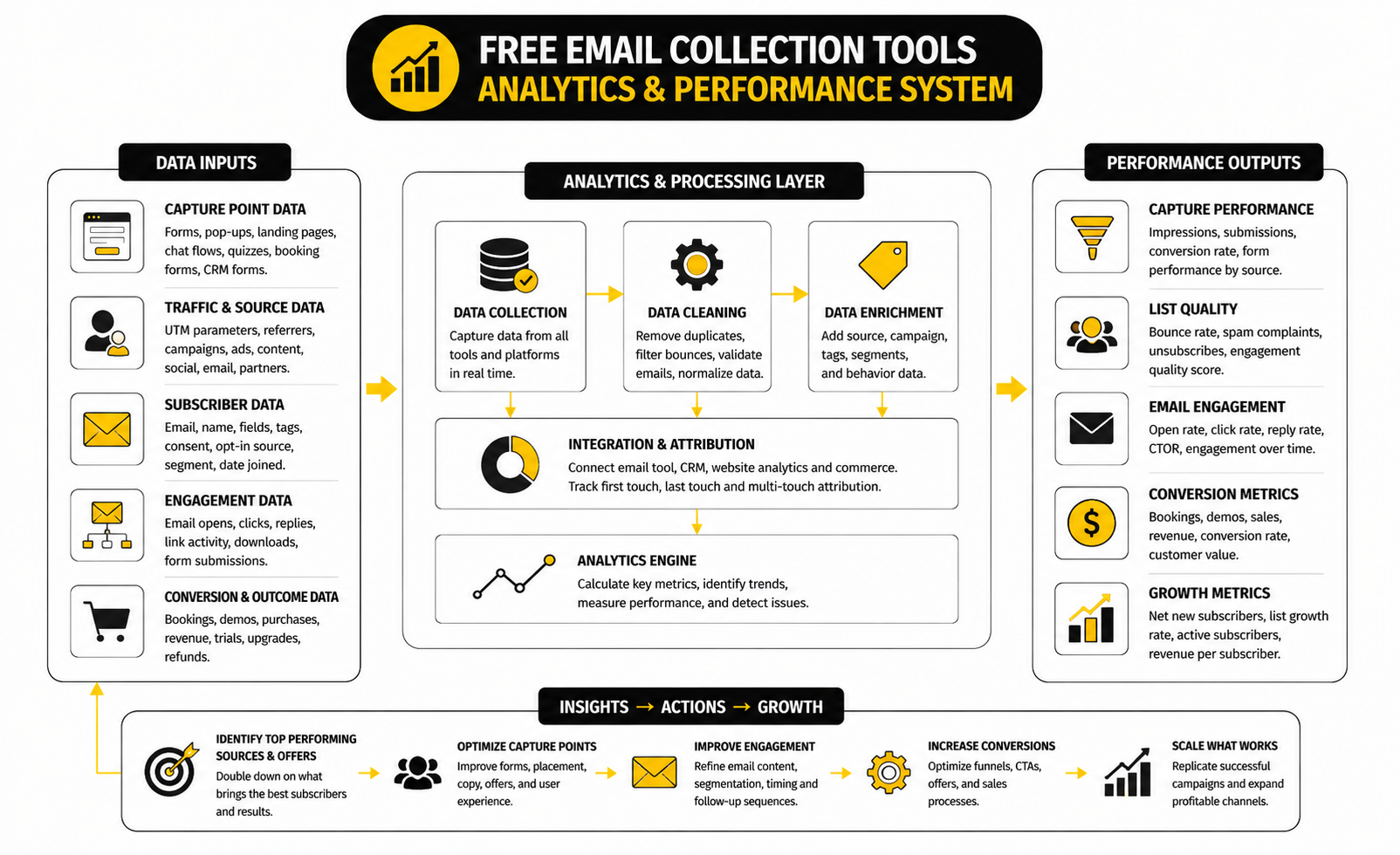
Data should make your email capture system easier to improve, not harder to understand. The mistake is treating every number as equally important. A dashboard full of metrics can look professional while still hiding the one thing you actually need to know: whether your free email collection tools are attracting people who become engaged subscribers, qualified leads, or customers.
The measurement system should follow the same path as the subscriber. First, measure whether people see the offer. Then measure whether they submit the form. After that, measure whether they engage with the first email, take the next step, and eventually create business value.
This is where many teams get distracted. Open rate, click rate, conversion rate, unsubscribe rate, and revenue all matter in different ways. But none of them tells the full story alone.
Start With the Capture Rate
Capture rate tells you how many visitors become subscribers. It is usually calculated as form submissions divided by visitors or impressions. For example, if 1,000 people see a form and 30 subscribe, the capture rate is 3%.
This number matters because it shows whether the offer and placement are working. A low capture rate can mean the offer is weak, the form appears too early, the page intent does not match the opt-in, or the traffic is not right for the page. It does not automatically mean the tool is bad.
For popups specifically, Omnisend’s 2026 analysis of 2025 popup performance reported an average email popup conversion rate of 2.1%, with rates below 1.5% treated as underperforming and 5% or higher treated as excellent in its email popup benchmark report. That gives you a practical starting point, but do not use it blindly. A niche B2B consultation form and an ecommerce discount popup should not be judged by the same standard.
Measure Submission Quality, Not Just Volume
A tool can collect more emails and still hurt the business. This happens when the offer attracts people who only want a freebie, a discount, or a one-time download with no real interest in what comes next. More subscribers are not automatically better subscribers.
Quality shows up after the form submission. Look at confirmation rate, first-email engagement, replies, booked calls, purchases, and unsubscribes. If one form generates fewer signups but stronger downstream behavior, that form may be doing a better job.
This is why the data needs to be tied back to the source. A subscriber from a pricing page, a quiz, a blog post, a giveaway, and a checkout opt-in may behave very differently. Keep source tracking simple, but do not skip it.
Use Email Benchmarks as Context, Not Targets
Benchmarks help you spot obvious problems, but they are not your strategy. MailerLite’s 2026 benchmark report reported a 2025 average open rate of 43.46%, click rate of 2.09%, click-to-open rate of 6.81%, and unsubscribe rate of 0.22% in its email marketing benchmark analysis. Brevo’s 2025 benchmark article listed an average open rate of 21%, click-through rate of 3.96%, and unsubscribe rate of 0.15% in its email marketing benchmarks.
Those differences are exactly why benchmarks need interpretation. Different platforms measure different senders, regions, industries, list types, and campaign behavior. Open rates also became less clean after privacy changes affected tracking, so you should not treat them as a perfect measure of real attention.
The better move is to use benchmarks as warning lights. If your click rate is near zero, something is wrong with the message, offer, audience, or deliverability. If unsubscribes spike after a specific form or campaign, the signup promise and follow-up content may not match.
Watch the First Email Closely
The first email is one of the clearest signals in the entire system. The subscriber just opted in, so their attention should be relatively fresh. If the first email performs poorly, the issue is often message match, deliverability, sender recognition, or a weak subject line.
For a lead magnet, the first email should deliver the promised asset quickly. For a consultation request, it should confirm the request and explain the next step. For a newsletter signup, it should make the value of staying subscribed obvious.
This is where free email collection tools need to connect cleanly with your email platform. If delivery is delayed, the email lands in spam, or the sender name looks unfamiliar, you lose momentum. That is not a small technical detail. It directly affects whether the new subscriber recognizes and trusts you.
Separate Engagement Metrics From Business Metrics
Engagement metrics show whether people interact with your emails. Business metrics show whether that interaction creates an outcome. You need both, but they answer different questions.
Open rate, click rate, click-to-open rate, reply rate, unsubscribe rate, spam complaint rate, and bounce rate help you diagnose the health of the list. Revenue, booked calls, trial starts, quote requests, demo requests, repeat purchases, and pipeline value show whether the list is producing results.
This distinction matters because a campaign can look good at the engagement level and still fail commercially. A clever subject line can create opens without sales. A popular free resource can create clicks without qualified leads. Do not let vanity metrics make the system look healthier than it is.
Track Unsubscribes Without Panicking
Unsubscribes are not automatically bad. Some people should leave your list because they are not a fit, no longer need the topic, or only wanted one resource. A healthy unsubscribe process protects deliverability and keeps your list cleaner.
The problem is a sudden spike. If a specific capture form creates high unsubscribes, the offer may be attracting the wrong people. If unsubscribes rise after the first promotional email, the welcome promise may not have prepared people for what you actually send.
ActiveCampaign’s benchmark guidance treats unsubscribe rates below 0.5% as good and below 0.2% as excellent in its email marketing benchmark overview. Use that kind of range as a diagnostic, not as an excuse to ignore context. A small list, a cold segment, or a sudden campaign shift can distort the number.
Measure List Growth Against List Health
List growth is easy to celebrate. List health is harder, but more important. A list that grows quickly while engagement drops may be collecting the wrong people or sending the wrong follow-up.
Look at net subscriber growth, not just new signups. Net growth accounts for unsubscribes, bounces, and inactive contacts. It gives you a more honest view of whether your email collection system is building an asset or just inflating a number.
This is especially important when using giveaways, discounts, or broad lead magnets. They can grow the list fast, but they may also bring people with weak buying intent. The offer should still connect to the business model.
Build a Simple Measurement Scorecard
You do not need a complex dashboard to start. A simple weekly or monthly scorecard is enough for most small teams. The goal is to see the full path without drowning in reports.
Track these numbers for each main capture source:
This scorecard shows where the leak is happening. If visitors are high and submissions are low, improve the offer or placement. If submissions are strong but first-email clicks are weak, improve message match. If clicks are strong but sales are weak, improve the next step after the click.
Understand the Role of ROI
ROI is where email collection becomes serious. The point of free email collection tools is not just to avoid software costs. The point is to create a channel that can produce more value than it costs to build, manage, and improve.
Sinch Mailgun’s 2026 Email Impact Report, covered by TechRadar, found that fewer than half of organizations could reliably track email ROI, even though 60% of companies that did measure ROI reported returns above $10 for every $1 spent, with more than one in ten reaching up to 40x returns in the article on email ROI tracking gaps. The lesson is not that every business will hit those numbers. The lesson is that many teams still under-measure the channel they claim is important.
For a small business, ROI can be simple. If a free form and welcome sequence produce five booked calls and one customer, compare that customer value to the time and tools required to create the system. If a discount popup grows the list but reduces margin and attracts one-time buyers, the true ROI may be weaker than the signup count suggests.
Turn Data Into Action
Data only matters when it changes what you do next. If a form is underperforming, test the offer before changing the tool. If a landing page gets subscribers but they do not engage, rewrite the promise and first email so they match more closely.
If one traffic source produces better subscribers, send more traffic there. If one lead magnet creates weak follow-up behavior, replace it with something closer to the buying decision. If unsubscribes cluster after a specific email, examine whether the content broke the expectation set at signup.
This is the practical rhythm: measure, diagnose, adjust, and repeat. Free email collection tools give you the starting point, but the data tells you whether the system is becoming an actual growth asset. Keep the dashboard small, keep the decisions clear, and improve one bottleneck at a time.
Advanced Tradeoffs Before You Scale
Once the basic system works, the next challenge is not adding more free email collection tools. The next challenge is deciding what to scale, what to simplify, and what to protect. Growth makes the weak parts of your setup louder.
A small list can survive messy tagging, vague consent copy, and manual follow-up for a while. A larger list cannot. As volume increases, deliverability, list quality, compliance, segmentation, and operational clarity become more important than the form design itself.
This is where you need to think like an operator, not just a marketer. A free tool is useful when it helps you test and learn. It becomes risky when it hides problems you should have fixed before scaling traffic.
Free Plans Are Great for Testing, Not Always for Operating
Free plans are perfect for proving demand. You can test an offer, validate a landing page, compare form placements, and see whether people actually want what you are giving away. That is the right use of free email collection tools.
But free plans often come with limits. Those limits may include branding, subscriber caps, monthly send limits, fewer automation features, weaker reporting, fewer integrations, or limited support. None of that matters much during a test, but it can matter a lot once the system starts producing leads.
The smart move is to define your upgrade trigger before you need it. For example, you may upgrade when manual exports cost too much time, when segmentation becomes necessary, when revenue attribution matters, or when the free plan blocks a workflow that is already proven. Do not upgrade because a tool looks exciting. Upgrade because a bottleneck is costing you money or clarity.
Deliverability Becomes a Growth Constraint
Email collection and email delivery are connected. If your forms attract low-quality subscribers, your emails get ignored, deleted, marked as spam, or bounced. That behavior can hurt sender reputation and reduce inbox placement over time.
Google’s sender guidelines tell senders to keep spam rates below 0.1% and avoid ever reaching 0.3% or higher in its email sender guidelines FAQ. That matters because aggressive list growth can create deliverability problems before you notice them in revenue reports. A big list is not an asset if the inbox providers stop trusting you.
This is why permission and expectation-setting are not soft details. They are deliverability strategy. The more clearly people understand why they are subscribing, the less likely they are to ignore, complain, or unsubscribe immediately.
Compliance Should Be Built Into the Capture Point
Compliance is easier when it is designed into the form instead of patched later. The capture point should make the value exchange clear, explain what the subscriber will receive, and avoid misleading consent patterns. That protects the reader and the business.
For U.S. commercial email, the FTC’s CAN-SPAM guide requires accurate header information, non-deceptive subject lines, a valid physical postal address, and a clear opt-out process through its business compliance guide. For UK individual subscribers, PECR rules say direct marketing by electronic mail generally needs consent unless all soft opt-in requirements are met through the ICO’s electronic mail marketing guidance.
The practical takeaway is simple. Do not copy a random popup you saw from another website. Your consent language, checkbox behavior, unsubscribe handling, and follow-up expectations need to match your market and audience.
Segmentation Can Help or Hurt
Segmentation is powerful when it changes the subscriber experience. It helps you send better emails, route leads properly, personalize offers, and avoid blasting irrelevant messages to everyone. But segmentation becomes a liability when it turns into a pile of tags nobody understands.
The most useful segments are based on behavior and intent. A person who requested a demo, downloaded a beginner guide, completed a quiz, bought a product, or joined a waitlist should not receive identical follow-up. Their actions tell you what they likely need next.
Keep the structure readable. Use consistent naming, document what each tag means, and remove segments that no longer affect messaging. Otherwise, the system gets slower every time you add another form.
Lead Magnets Need a Business Connection
A lead magnet should not just be attractive. It should attract the right person for the thing you eventually sell. This is where many list-building campaigns quietly fail.
A broad giveaway may collect emails quickly, but it can also fill the list with people who only wanted the prize. A generic template may get downloads, but if it does not connect to your product, service, or expertise, the follow-up becomes awkward. The subscriber thinks they joined for one thing, and then you start talking about something else.
The best lead magnets create a clean bridge. They help the reader solve a real problem while naturally leading toward the next step. That next step might be a product, audit, consultation, webinar, trial, paid template, course, or service inquiry.
Automation Should Reduce Friction, Not Add Noise
Automation is useful when it makes the experience faster, clearer, or more relevant. It should deliver the promised asset, confirm a booking, route a lead, send reminders, or personalize the next message. It should not create a complicated maze of emails because the tool allows it.
A simple three-email sequence can outperform a bloated twelve-email sequence if the message is sharper. The first email delivers the promise. The second adds context or solves the next problem. The third points to the logical next step.
For businesses that need pages, forms, automation, and simple funnels in one place, systeme.io can keep the stack lean. For teams that need CRM workflows, pipelines, appointments, and multi-step follow-up, GoHighLevel may be a better fit. The tool choice should follow the workflow, not the other way around.
Attribution Gets Messier as You Add Capture Points
The more forms, pages, popups, quizzes, and booking flows you add, the harder attribution becomes. A person may discover you through a blog post, join through a popup, click a welcome email, return through search, and later buy from a sales page. Giving all credit to the last click would miss most of the journey.
You do not need perfect attribution to make good decisions. You need enough signal to see which capture sources produce engaged subscribers and real outcomes. That means tracking the original source, form name, offer name, and follow-up path wherever possible.
Use practical naming. “Homepage footer newsletter” is more useful than “Form 3.” “Pricing page demo request” is more useful than “Lead form.” Clear naming makes analysis faster and prevents messy reports later.
Data Minimization Is a Strategic Advantage
It is tempting to collect more information because you might use it someday. That mindset creates friction for the visitor and clutter for the business. More fields should mean better follow-up, not just more data.
Ask for the least information needed to move the relationship forward. A newsletter form probably does not need a phone number. A quote request may need project details. A demo request may need company size or use case.
This discipline makes free email collection tools work better because it improves completion rates and keeps your data cleaner. It also forces you to think carefully about the first conversation you want to have with the subscriber. That clarity usually improves the copy too.
The Hidden Cost of Tool Sprawl
Tool sprawl sneaks in quietly. One form builder for quizzes, another for popups, another for landing pages, another for booking, another for CRM, and another for email. At first, each tool seems reasonable. Later, nobody knows which system owns the contact record.
The risk is not just cost. It is duplicated contacts, broken automations, inconsistent consent records, poor reporting, and slow troubleshooting. When something breaks, you spend more time finding the issue than fixing it.
Before adding another tool, ask whether the current stack can solve the problem well enough. If not, choose the new tool because it closes a real gap. Do not add software just because a feature looks clever.
When to Move From Free to Paid
Moving from free to paid makes sense when the system has proven value and the limitation is now operational. That could mean your list has outgrown the subscriber limit, your automations need more logic, your reporting needs attribution, or your sales team needs CRM visibility. At that point, paying for the right tool is not a cost problem. It is a leverage decision.
The wrong time to upgrade is before you know the offer works. Paid software will not fix unclear positioning, weak traffic, poor follow-up, or a lead magnet nobody wants. Validate the core first.
A good upgrade decision should answer three questions:
If you cannot answer those questions, stay lean. Free email collection tools are enough until the system proves it deserves more infrastructure.
Protect the Subscriber Experience as You Scale
Scaling should not make the subscriber feel less respected. More forms, more traffic, and more automation should still lead to a clear, useful experience. The person on the other side does not care how clever your stack is.
Protect the basics. Make the promise clear. Deliver quickly. Send relevant follow-up. Make unsubscribing easy. Keep the data clean. Review performance regularly.
This is the part that matters most. Email collection is not about extracting contact details from visitors. It is about earning permission to continue the conversation. When you treat that permission seriously, the tools become much easier to choose and much more valuable to use.
Common Mistakes, Best Practices, and FAQ
The final version of your email collection system should feel simple from the outside. A visitor sees a useful offer, understands what they get, submits the form, receives the promised follow-up, and knows what to do next. Behind the scenes, the system can still use segmentation, routing, analytics, and automation, but the subscriber should never feel the complexity.
This is the clean end state: the capture point matches the page intent, the consent language sets expectations, the first email arrives quickly, and the next step is obvious. That is what separates a random form from a real list-building system. Free email collection tools can get you there, but only if the strategy stays tighter than the software stack.
Mistake 1: Asking for the Email Too Early
The fastest way to damage trust is to ask before giving the visitor any reason to care. A popup that appears the second someone lands on the page often feels like a demand, not an invitation. Timing matters because the visitor needs at least a small amount of context before the offer makes sense.
A better approach is to match the ask to the visitor’s behavior. Use scroll depth, exit intent, product interest, or content relevance to trigger the capture moment. When the offer appears after the visitor has shown intent, it feels more useful and less intrusive.
Mistake 2: Using One Generic Offer Everywhere
A generic offer is easy to manage, but it rarely performs as well as a relevant one. Someone reading a beginner guide, comparing tools, browsing pricing, and checking product details should not always see the same signup message. Their intent is different, so the offer should be different too.
You do not need dozens of lead magnets. Start with a few strong offers tied to the main intent categories on your site. That keeps the system manageable while still making the signup feel connected to what the visitor actually wants.
Mistake 3: Collecting Data You Never Use
Extra form fields feel harmless until they reduce conversions and clutter your contact records. If a field does not change segmentation, routing, personalization, or sales follow-up, it probably does not belong on the form. Data should earn its place.
This is especially important when using free email collection tools with limited reporting or automation. Clean data is easier to act on than large amounts of messy data. Ask for less, then collect more later when the relationship justifies it.
Mistake 4: Treating Compliance as an Afterthought
Compliance should be built into the capture experience from the start. The FTC’s CAN-SPAM guidance requires commercial emails to include accurate sender information, non-deceptive subject lines, a valid physical postal address, and a clear opt-out method through its business compliance guide. That affects your emails, but it also affects the expectations you set before someone joins.
For UK individual subscribers, PECR rules generally require consent for direct marketing by electronic mail unless the soft opt-in applies, as explained in the ICO’s electronic mail marketing guidance. This is not something to guess your way through. Make the signup promise clear, avoid deceptive consent patterns, and make unsubscribing easy.
Mistake 5: Optimizing for Subscribers Instead of Outcomes
More subscribers can feel like progress, but the real question is what those subscribers do next. Do they open, click, reply, book, buy, or return? If not, the list may be growing without becoming more valuable.
The better goal is qualified list growth. That means the right people join for the right reason and receive follow-up that matches the original promise. When that happens, list growth and business growth start moving in the same direction.
What are free email collection tools?
Free email collection tools are forms, popups, landing pages, chat flows, quiz builders, booking forms, or CRM forms that let you collect email addresses without paying upfront. Some are fully free, while others offer a free plan with limits on contacts, submissions, automations, branding, or monthly sends. The right choice depends on where the visitor is subscribing and what should happen after the signup.
Are free email collection tools good enough for a real business?
Yes, they can be good enough when the system is still simple. A small business, creator, consultant, or early-stage ecommerce store can often test offers, collect subscribers, and send basic follow-up with a free plan. The limitation appears when you need deeper automation, better reporting, more integrations, or higher sending volume.
What is the best free email collection tool?
There is no single best option for everyone. A newsletter signup, sales consultation form, ecommerce popup, webinar page, chatbot, and booking flow all need different features. The best tool is the one that matches the capture moment, connects to your follow-up system, and gives you enough data to improve.
What should I offer in exchange for an email address?
Offer something specific enough to feel worth the signup. That could be a checklist, template, discount, product guide, quiz result, webinar, private newsletter, free consultation, calculator, waitlist, or buying guide. The offer should connect naturally to what you eventually sell, or the follow-up will feel disconnected.
How many fields should an email capture form have?
Use as few fields as possible while still collecting what you need for the next step. A newsletter or simple download may only need an email address. A consultation request may need name, email, business type, project details, and preferred time because the follow-up is more personal.
Should I use single opt-in or double opt-in?
Single opt-in usually creates less friction because the subscriber is added immediately after submitting the form. Double opt-in can improve list quality because people must confirm their email before receiving future messages. The better choice depends on your market, compliance needs, list quality, and tolerance for fake or low-intent signups.
Do popups still work for collecting emails?
Popups can work when they are relevant, well-timed, and tied to a useful offer. They perform poorly when they interrupt too early, ask for too much, or show the same generic message to every visitor. A popup should feel like a helpful next step, not a roadblock.
How do I know if my email collection tool is working?
Look beyond form submissions. Track capture rate, first-email engagement, clicks, unsubscribes, replies, booked calls, purchases, and revenue when possible. A tool is working when it attracts subscribers who continue engaging and move toward a meaningful business outcome.
What capture rate should I expect?
It depends on traffic quality, page intent, offer strength, placement, and format. A highly relevant content upgrade may outperform a generic newsletter box, while a high-intent booking form may have lower volume but better lead quality. Use benchmarks as context, but judge your system against its own baseline.
Can I use multiple free email collection tools at the same time?
Yes, but be careful. Multiple tools can help you cover different capture moments, such as blog forms, landing pages, booking pages, and chat flows. The risk is tool sprawl, duplicated contacts, inconsistent consent records, and confusing reporting, so make sure each tool has a clear role.
What is the biggest mistake beginners make with email collection?
The biggest mistake is thinking the tool is the strategy. The form only captures the email. The offer, consent message, first email, segmentation, and follow-up path determine whether that email becomes useful.
When should I upgrade from a free plan?
Upgrade when the free plan blocks a workflow that is already proven to matter. That might mean you need more contacts, higher send limits, advanced automations, better analytics, CRM routing, or cleaner integrations. Do not upgrade because you are hoping the paid tool will fix a weak offer.
What tools fit different email collection needs?
For simple email marketing and forms, Brevo can be a practical fit. For lean funnels and landing pages, systeme.io is useful when you want pages and email automation close together. For CRM-heavy lead capture, GoHighLevel fits teams that need pipelines, booking, workflows, and follow-up in one place.
Can chatbots collect emails effectively?
Yes, especially when the visitor needs help choosing the right next step. A chatbot can ask one question at a time, qualify the visitor, recommend a resource, and collect the email when it feels useful. Tools like ManyChat can work well for conversational funnels, while Chatbase can support website-based question answering and lead capture.
How do I keep my list clean?
Use clear signup promises, avoid misleading offers, remove hard bounces, monitor unsubscribes, and stop sending to people who never engage. Google’s sender guidance says senders should keep spam rates below 0.1% and avoid reaching 0.3% or higher in its email sender guidelines FAQ. List quality is not a vanity metric. It affects whether future subscribers actually see your emails.
What is the simplest setup for a beginner?
Start with one relevant offer, one form or landing page, one thank-you page, and one welcome email. Connect the form to your email platform, test the signup path on mobile, and track whether subscribers engage with the first message. Once that works, add segmentation, more capture points, and deeper automation.
How often should I review my email collection system?
Review it at least once a month if the list is active. Check which forms are producing subscribers, which sources produce engaged people, and where subscribers drop off. Small monthly improvements are usually better than rebuilding the entire system every time performance dips.
Do free email collection tools hurt deliverability?
The tool itself usually does not hurt deliverability. Poor permission, misleading offers, low-quality traffic, fake addresses, and irrelevant follow-up are the real problems. Choose tools that make consent clear, pass source data cleanly, and connect quickly to a reliable email platform.
What should I do after someone subscribes?
Deliver the promise immediately, remind them why they signed up, and give them one logical next step. That next step may be reading a guide, booking a call, watching a video, completing a profile, using a coupon, or replying with a question. The first follow-up should make the subscriber feel like signing up was a good decision.
Build a stronger local presence with BAAM AI
Turn your website, Google profile, social channels, and AI visibility into one growth engine
Most businesses do not need more random marketing activity. They need a consistent presence system that helps the right people find them, trust them, and take action. BAAM AI brings strategy, local SEO, website updates, Google Maps visibility, social content, AI-search readiness, media production, and reporting into one practical monthly engine.
If you want your marketing to keep working after the campaign ends, start with a free BAAM AI presence audit. See how your business shows up today and where the fastest visibility wins are at BAAM AI.