
BAAM AI Blog
Email Marketing With ActiveCampaign: A Practical Framework For Smarter Automation
Email marketing ActiveCampaign is not just about sending newsletters from another email platform. The real value is using email, automation, segmentation, CRM data, behavioral triggers, and reporting together so...
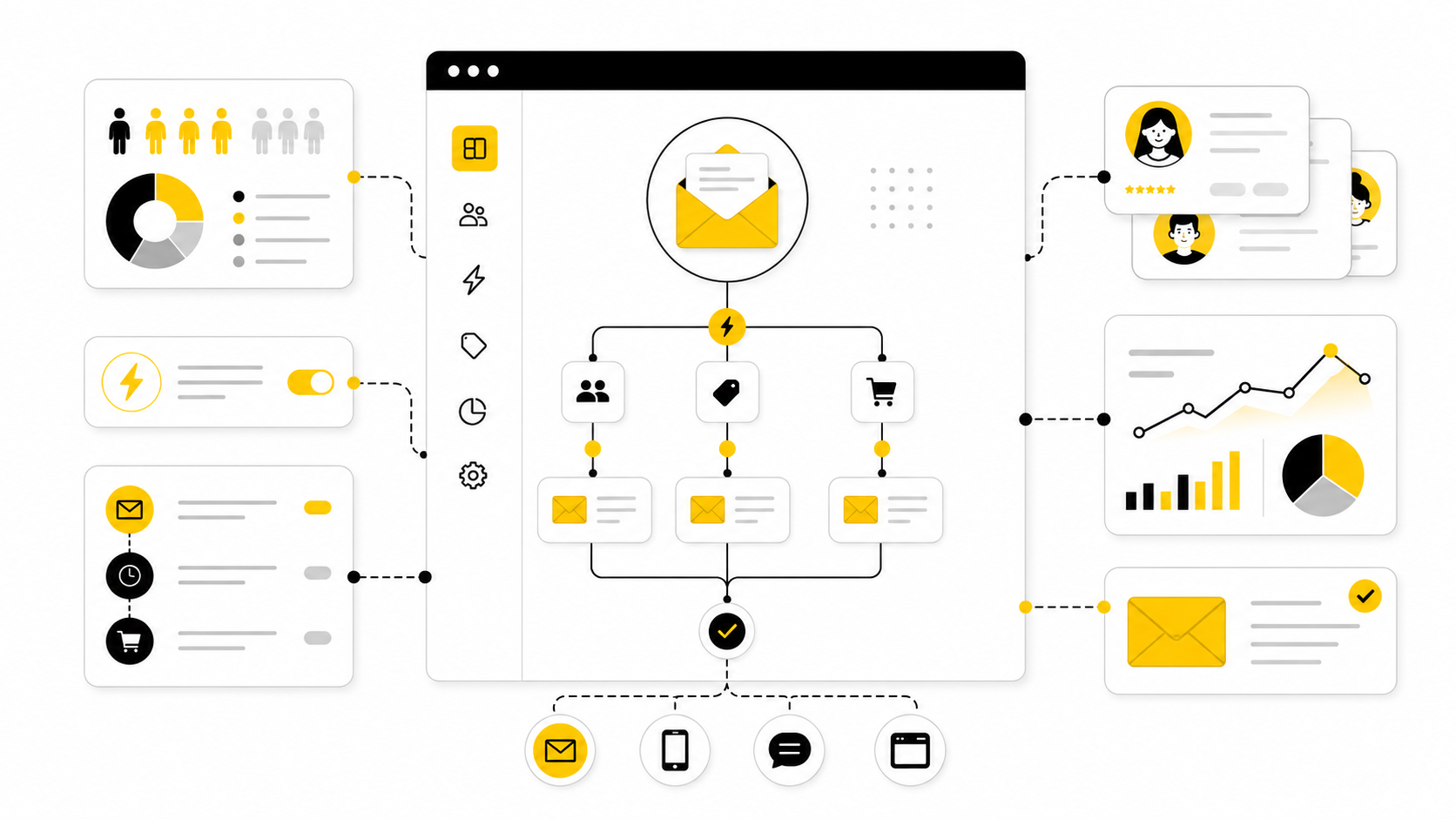
Email marketing ActiveCampaign is not just about sending newsletters from another email platform. The real value is using email, automation, segmentation, CRM data, behavioral triggers, and reporting together so every contact gets a more relevant path instead of the same generic broadcast.
That matters because email is still one of the few marketing channels where you can build a direct relationship with your audience without renting attention from an algorithm. Recent benchmark data shows email remains resilient even while marketing budgets stay tight, with Gartner reporting that email marketing accounted for 7.4% of total digital marketing spend in 2025 and continued to grow slightly while many owned and earned channels declined. The bigger problem is not whether email works; it is whether your system is organized enough to capture the value.
ActiveCampaign is built for that organized system. Its platform combines email marketing, marketing automation, segmentation, landing pages, ecommerce and CRM integrations, attribution, predictive content, and AI-assisted campaign tools in one place, depending on the plan and setup you choose. That makes it powerful, but it also means you need a clear framework before you start building automations just because the tool allows it.
Why Email Marketing With ActiveCampaign Matters
Email marketing with ActiveCampaign matters because most businesses do not need more random campaigns. They need a system that understands who a contact is, what they did, what they care about, and what should happen next. ActiveCampaign’s own platform positioning focuses on personalized email marketing, automation across channels, SMS, WhatsApp, and integrations, which makes it more of a customer journey engine than a basic newsletter sender.
The timing also matters. The DMA Email Benchmarking Report 2025 reported a 98% delivery rate in 2024, a 35.9% open rate, and a 2.3% unique click rate, which shows that email still performs when lists are managed properly. At the same time, the Sinch Mailgun 2026 Email Impact Report found that many senders still struggle with ROI tracking and inbox placement, which means the upside is real but not automatic.
This is where ActiveCampaign becomes useful for serious operators. A simple email tool can send a discount, a launch message, or a weekly update. A well-built ActiveCampaign setup can separate new leads from loyal buyers, trigger follow-ups based on behavior, score interest, route sales-ready contacts, and keep long-term nurture sequences running without manual chasing.
The ActiveCampaign Framework
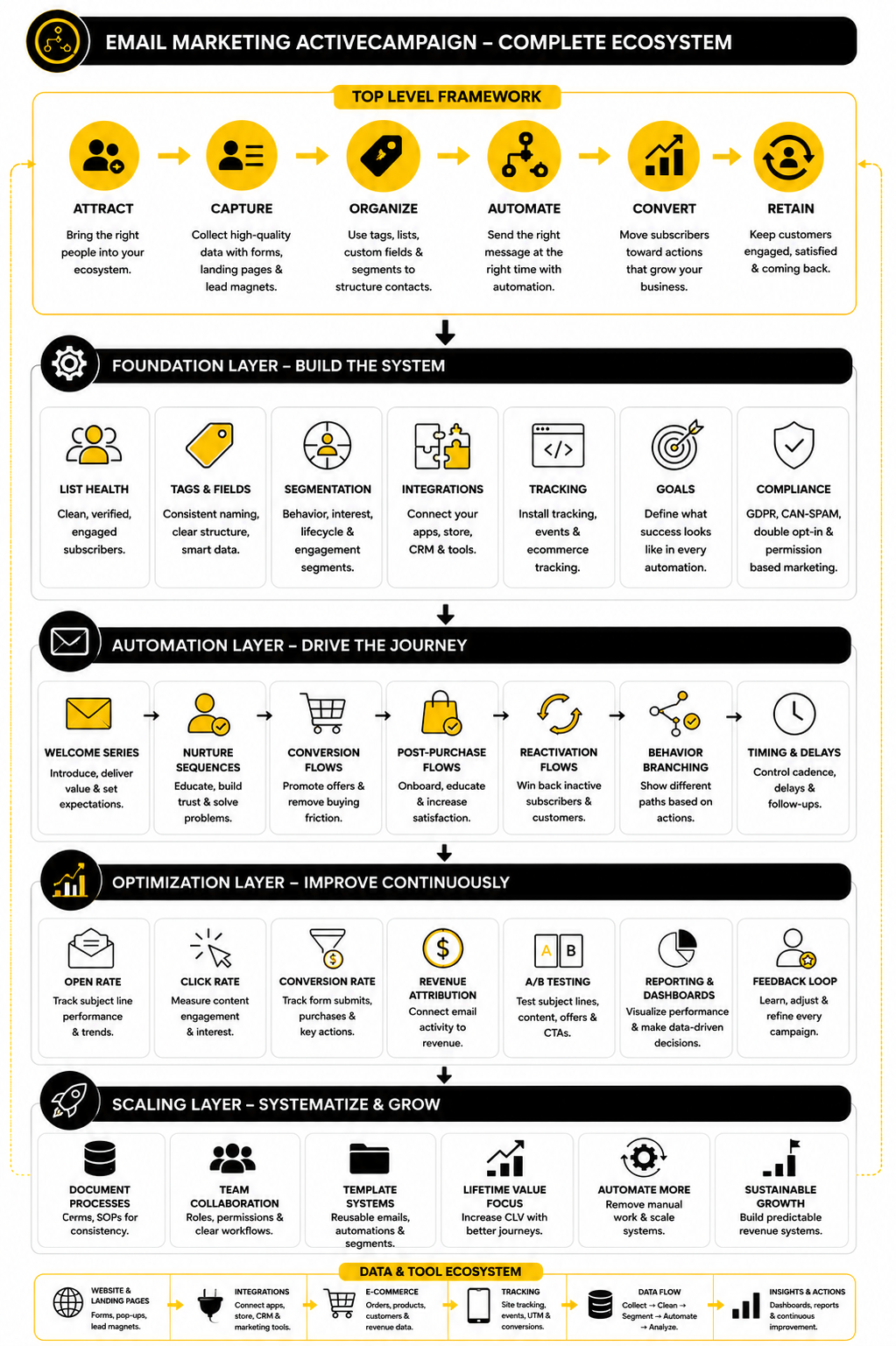
The simplest way to think about ActiveCampaign is as a loop: capture data, organize contacts, trigger the right automation, personalize the message, measure the outcome, and improve the system. Each step supports the next one. If your data is messy, your segments will be weak; if your segments are weak, your automations will feel generic; if your automations are generic, your reporting will not tell you much beyond basic opens and clicks.
ActiveCampaign’s help documentation defines automation triggers as the conditions that start automations, and those triggers can be built around contact behavior, dates, form submissions, tags, field changes, and other conditions. Its segmentation documentation also explains that segments can be based on actions, website visits, field values, and contact tags. That gives you the foundation for a practical framework: do not build campaigns first; build decision points first.
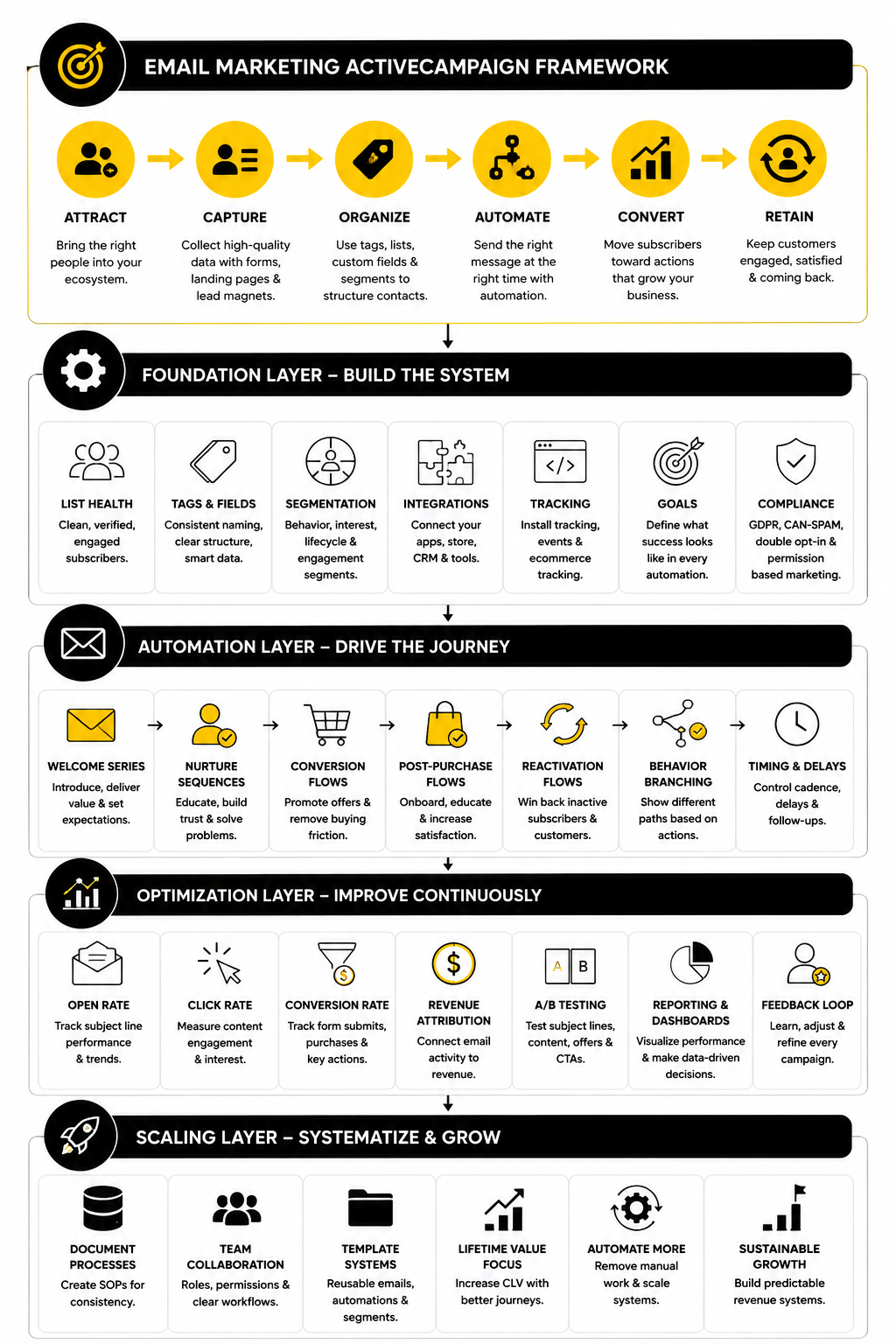
A clean framework also helps you avoid the classic automation trap. Many businesses build welcome sequences, abandoned cart flows, reactivation campaigns, and sales follow-ups as isolated assets. The better approach is to make them part of one connected customer journey, where each automation has a clear job and no contact receives conflicting messages.
Core Components Of A High-Performing Setup
A strong ActiveCampaign setup starts with contact structure. Tags are useful for behavior, interests, lifecycle events, and campaign history, while custom fields are better for stable information such as names, phone numbers, birthdays, preferences, and other contact-level data. ActiveCampaign’s own guidance on custom fields and tags makes this distinction important because poor data structure creates confusing segments later.
The second component is behavioral tracking. ActiveCampaign’s site tracking setup allows businesses to connect website behavior with contact records, which is what makes behavior-based email marketing possible. A contact who visits a pricing page, reads three product pages, or returns to a checkout page should not be treated the same as someone who only downloaded a beginner guide.
The third component is automation logic. ActiveCampaign’s automation builder supports triggers, actions, and conditions that let you build workflows around real behavior instead of fixed assumptions. This is where email marketing ActiveCampaign becomes different from basic email blasting: the system reacts to what people actually do.
Professional Implementation
Professional implementation starts with restraint. The goal is not to build the most complex automation map possible. The goal is to build the few automations that create the most business leverage: welcome, lead nurture, sales follow-up, abandoned checkout, onboarding, post-purchase, review request, win-back, and re-engagement.
This is also where tool fit matters. ActiveCampaign is a strong choice when you need deeper automation, segmentation, CRM-style workflows, and behavior-based journeys, but some businesses may prefer simpler or more budget-friendly tools like Brevo or Moosend if they mainly need newsletters and basic automation. Agencies or service businesses that want CRM, pipelines, SMS, and client management in one broader system may also compare it with GoHighLevel, especially when the business model depends on managing multiple client funnels.
The practical implementation order is simple. First, clean the list and define lifecycle stages. Then set up forms, tracking, tags, fields, and segments before writing long sequences. Only after the structure is stable should you build the automations, because automation without structure turns into noise very quickly.
The ActiveCampaign Framework
The best ActiveCampaign setup starts before you write a single email. It starts with the customer journey. You need to know where a contact enters, what they need next, what behavior shows interest, and when the conversation should shift from education to conversion.
This is why email marketing ActiveCampaign works best as a framework, not a pile of disconnected automations. A welcome sequence, sales follow-up, webinar reminder, abandoned checkout email, and reactivation campaign should not compete with each other. They should behave like one system that moves people forward based on timing, intent, and fit.
Think of the framework in four layers:
That order matters. Most weak email systems fail because they start with messages first. The business writes a sequence, loads it into the platform, and only later realizes the same emails are going to beginners, buyers, cold leads, warm leads, and people who already booked a call.
Start With The Journey, Not The Campaign
A campaign is temporary. A journey is the bigger system your contacts move through over time. ActiveCampaign becomes much easier to use when you stop asking, “What email should we send?” and start asking, “What does this person need to happen next?”
A new subscriber usually needs orientation. A returning website visitor may need proof. A lead who clicks a pricing page may need a sales conversation. A customer who just purchased may need onboarding, reassurance, and a clear next step.
This is the practical shift. You are not building emails for your business calendar. You are building movement for the contact.
For most businesses, the core journey looks like this:
This keeps the system clean. You can still send broadcasts when needed, but the backbone of the business is no longer random campaigns. It becomes a structured email marketing ActiveCampaign machine that reacts to real contact behavior.
Define Lifecycle Stages Clearly
Lifecycle stages tell you where someone is in the relationship with your business. Without them, your automations will eventually overlap. Someone can become a customer and still keep receiving early-stage lead nurture emails, which feels sloppy and damages trust.
You do not need a complicated lifecycle model at the start. A simple version is usually enough:
These stages help you decide what to send and what not to send. That second part is huge. Good automation is not just about triggering emails; it is also about preventing the wrong emails from going out.
ActiveCampaign can support this with tags, custom fields, automations, goals, and integrations. The exact setup depends on your business model. Ecommerce brands may use purchase behavior and product interest, while agencies and service businesses may rely more on forms, pipeline stages, call bookings, and lead scores.
Build Segments Around Intent
Segmentation is where ActiveCampaign starts to feel powerful. You are no longer treating the list as one big audience. You are creating smaller groups of people who deserve different timing, messaging, or offers.
The most useful segments are based on intent. Demographics can help, but behavior usually tells you more. Someone who visited a pricing page three times in a week is giving you a stronger signal than someone who only matches your ideal customer profile on paper.
Useful segment types include:
This is where many businesses overcomplicate things. You do not need twenty segments on day one. You need the few segments that actually change what you will send.
A segment is only useful if it affects action. If two groups receive the same emails, same offer, same timing, and same follow-up, they probably do not need to be separate yet. Keep the system lean until the data proves you need more complexity.
Use Tags And Custom Fields With Discipline
Tags and custom fields are not interchangeable. Tags are best for flexible labels, actions, temporary states, and behavior. Custom fields are better for structured data that belongs to the contact profile.
For example, a tag might show that someone downloaded a specific checklist, clicked a product link, attended a webinar, or entered a reactivation sequence. A custom field might store company size, preferred service, birthday, customer type, or current plan. Both are useful, but they serve different jobs.
The danger is tag chaos. If every form, link, automation, and campaign creates random tags without a naming system, your account becomes hard to manage fast. You will forget what tags mean, duplicate similar labels, and build automations around messy data.
A simple naming system can prevent that. Use patterns like:
The exact wording is less important than consistency. When your naming system is clean, anyone on the team can understand the account. When it is messy, even the person who built it will struggle six months later.
Map Automations To Business Outcomes
Every automation should have a job. Not a vague job like “nurture leads.” A real job. Welcome new subscribers, qualify leads, recover abandoned carts, move booked calls into a sales path, onboard new customers, collect reviews, or win back inactive contacts.
This is the difference between automation and noise. If an automation does not support a clear outcome, it will probably become clutter. And clutter makes email marketing harder to measure, harder to improve, and harder to trust.
A practical ActiveCampaign automation map might include:
You do not need all of these immediately. Start with the automations closest to revenue or retention. Then expand once the foundation is working.
Keep The Message Layer Human
Automation does not excuse robotic writing. In fact, automation makes human writing more important because the message is sent at scale. If the email feels cold, generic, or overly engineered, the contact will feel like they are inside a machine.
The message should match the moment. A new subscriber needs clarity and reassurance. A high-intent lead needs proof and a direct next step. A customer needs help getting the result they paid for. An inactive contact needs a reason to care again, not another generic newsletter.
This is where personalization should be practical. Use first names carefully. Reference interests when they are reliable. Change content based on lifecycle stage when it improves relevance. But do not fake intimacy or pretend the system knows more than it does.
Strong email marketing ActiveCampaign implementation is not about showing off automation tricks. It is about making the next email feel obvious, useful, and well-timed. When the system does that, contacts do not think about the automation at all. They just feel understood.
Core Components Of A High-Performing Setup
The framework only becomes useful when it turns into a working system. This is where a lot of businesses slow down. They understand the strategy, but the actual ActiveCampaign account still has messy lists, unclear tags, half-finished automations, missing tracking, and emails that were never connected to a measurable outcome.
A strong implementation fixes that by building the account in the right order. You do not start by writing ten emails. You start by making sure the data, tracking, segments, automations, and reporting can actually support the emails you want to send.
ActiveCampaign’s automation builder supports triggers, actions, waits, conditions, goals, and branching logic, which means you can create very flexible customer journeys. That flexibility is powerful, but it can also create chaos if you build without a process. The goal is not to use every feature. The goal is to make the next step obvious for each contact.
Step 1: Audit The Existing List
Before building anything new, look at the list you already have. Check where contacts came from, how they were added, whether they gave proper permission, and how recently they engaged. This protects deliverability and keeps your automations from sending to people who should not be receiving aggressive follow-up.
The audit should separate active contacts from cold contacts. People who recently opened, clicked, bought, replied, booked, or visited important pages deserve a different path than people who have ignored everything for months. This is especially important because inbox placement is not guaranteed, and poor engagement signals can make the rest of your email marketing ActiveCampaign setup perform worse.
A simple audit should answer these questions:
Do not skip this. A clean list makes every later decision easier. A dirty list makes even good automations look bad.
Step 2: Set Up Contact Fields And Tags
Once the list is clean enough to work with, define the data structure. This is where custom fields and tags need discipline. ActiveCampaign’s guidance explains that both tags and custom fields can be used in segments, advanced searches, if and else branches, goals, and automation triggers, which is exactly why your structure needs to be intentional.
Use custom fields for information that belongs as a stable profile detail. Use tags for behavior, history, temporary states, and workflow movement. This keeps your account readable and prevents every contact record from becoming a random pile of labels.
A practical setup might include custom fields for:
Then use tags for actions such as:
This gives your automations something solid to work with. When a contact enters the system, ActiveCampaign can route them based on who they are, what they did, and what stage they are in. That is the difference between useful automation and random email timing.
Step 3: Install Tracking And Connect Key Tools
Tracking is where the system starts to see behavior beyond the inbox. ActiveCampaign site tracking can record visits from identified contacts and use that activity for segmentation, automation triggers, personalization, and lead scoring. Event tracking can go deeper by capturing defined actions such as button clicks, video views, logins, orders, or in-app behavior.
This matters because email clicks only show part of the picture. A contact may not click every email, but they might keep returning to a pricing page, product page, booking page, or checkout. Without tracking, that intent stays invisible.
For ecommerce, connect the store before building purchase-based automations. ActiveCampaign’s Shopify integration syncs order, product, customer, and abandoned cart data, and its WooCommerce integration can support abandoned cart timing and purchase-based workflows. This gives your email marketing ActiveCampaign system the context it needs to send cart recovery, post-purchase, cross-sell, and win-back messages with better timing.
For service businesses, connect the tools that show intent. That may include a form tool, calendar booking tool, CRM pipeline, payment processor, webinar platform, or sales page builder. If your funnel depends on landing pages and checkout flows, tools like ClickFunnels, Systeme.io, or Fillout can support the capture side of the journey before ActiveCampaign takes over the follow-up.
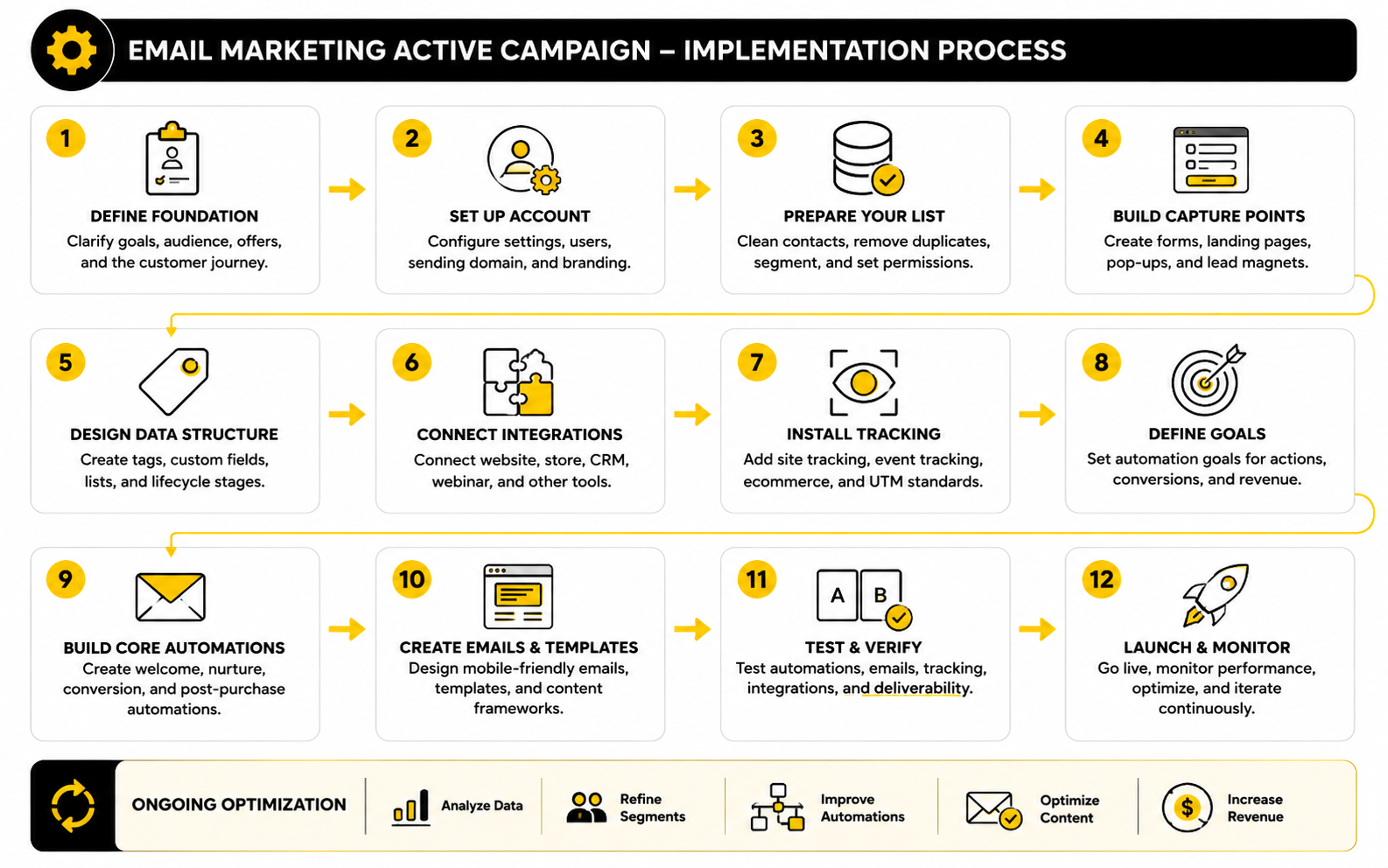
Step 4: Build The First Automation Map
Now the process becomes tangible. Before building inside ActiveCampaign, map the automations on paper or in a simple document. You want to see the full customer journey before turning it into triggers, waits, branches, and emails.
Start with the most important business outcome. If your revenue depends on booked calls, build the lead capture, qualification, booking, no-show, follow-up, and sales handoff path first. If your revenue depends on ecommerce, build the welcome, abandoned cart, first purchase, post-purchase, repeat purchase, and win-back paths first.
A clean automation map should include:
This keeps every automation accountable. If you cannot define the trigger, audience, action, exit, and success metric, the automation is not ready to build yet. It may be a good idea, but it is not a system.
Step 5: Write Emails Around One Job Each
Every email should do one job. Not three. Not five. One clear job. It should educate, qualify, remind, recover, confirm, onboard, sell, ask, or reactivate.
This is especially important in automated sequences because contacts receive messages in a specific context. A welcome email should not try to explain your entire business, sell every offer, and ask for a reply all at once. A cart recovery email should not turn into a full brand manifesto. A sales follow-up email should not bury the call to action under ten paragraphs of background.
A useful email structure is simple:
The writing should feel human. ActiveCampaign can personalize and automate delivery, but the email itself still needs to sound like a person wrote it. The best automation disappears in the background because the message feels timely and relevant.
Step 6: Add Branches Only When They Improve The Experience
Branches are useful when they change the contact’s experience in a meaningful way. They are not useful when they make the automation look impressive but do not affect the outcome. This is where simple beats clever most of the time.
Good branches are based on real differences in behavior or status. A customer should leave a lead nurture sequence. A contact who booked a call should stop receiving booking reminders. A person who clicked a pricing link may deserve a more direct sales follow-up than someone who only opened a newsletter.
Common branches include:
The rule is simple. Add a branch when the next message should genuinely change. If the same email goes to both paths, do not branch yet.
Step 7: Test Before You Turn Everything On
Testing is not optional. You need to test forms, tags, custom fields, site tracking, integrations, triggers, wait steps, goals, unsubscribe links, email rendering, and exit conditions. One broken trigger can quietly block an entire workflow.
Run test contacts through each path before real contacts enter. Use different test scenarios, such as a new lead, an existing customer, a pricing-page visitor, an abandoned cart contact, and an inactive subscriber. This helps you catch conflicts before they reach the list.
Check the basics every time:
This step feels slow, but it saves pain later. A broken automation can damage trust faster than no automation at all.
Step 8: Launch In Phases
Do not launch every automation at the same time unless the account is already mature and tested. Launch in phases so you can see what is working and what needs fixing. Start with the highest-impact path, monitor it, improve it, and then move to the next one.
A good launch order for many businesses is:
This phased approach makes the system easier to manage. It also helps you avoid the classic mistake of building a huge machine before proving the simple version works. ActiveCampaign can handle advanced automation, but the business still needs a controlled rollout.
Step 9: Connect Sales And Marketing Handoff
If the business has a sales process, the handoff needs to be clear. ActiveCampaign can support CRM pipelines, deal automation, lead scoring, and sales notifications, which helps marketing activity turn into follow-up instead of sitting inside reports. This is where automation becomes operational, not just promotional.
Define what makes a lead sales-ready. It might be a form submission, a booked call, a score threshold, a pricing page visit, a reply, or a combination of actions. Then decide what happens next: create a deal, assign an owner, notify a rep, send a task, or move the contact to a different automation.
The handoff should be boringly clear. Sales should know why the lead is being routed to them. Marketing should know when the lead leaves nurture. The contact should not feel the internal handoff at all; they should simply get a smoother experience.
Step 10: Document The System
Documentation is the part everyone avoids until something breaks. Do it anyway. A simple document explaining tags, fields, automations, goals, integrations, and naming conventions can save hours of confusion later.
Document what each automation does, who enters it, how they exit, and what metric defines success. Add notes for important tags and custom fields so future edits do not create duplicates or conflicts. Keep a short changelog when you update major workflows.
This turns your email marketing ActiveCampaign setup into an asset instead of a mystery. You can improve it, hand it to a team member, audit it later, or rebuild parts without guessing what past decisions meant. That is what professional implementation looks like.
Optimization, Reporting, And Scaling
Once the core system is live, the work changes. You are no longer asking whether the automation exists. You are asking whether it performs, where people drop off, which signals matter, and what should be improved next.
This is where email marketing ActiveCampaign becomes a real operating system. The platform can show campaign performance, automation performance, attribution, contact trends, ecommerce activity, and goal movement, but the numbers only help if you know what each one is supposed to tell you. Random reporting creates more confusion than clarity.
Good measurement is not about staring at dashboards every day. It is about connecting the right metric to the right decision. Opens, clicks, replies, conversions, unsubscribes, spam complaints, revenue, and automation exits all tell different parts of the story.
Statistics And Data
Benchmarks are useful, but only when you use them correctly. The DMA Email Benchmarking Report 2025 reported a 98% delivery rate, 35.9% open rate, and 2.3% unique click rate for 2024 email activity. The GDMA International Email Benchmark 2025 reported a 32.40% confirmed open rate, 7.62% click-to-open rate, and 2.91% click-through rate, which shows how much numbers can shift depending on data source, region, methodology, and audience mix.
That is the key point. A benchmark is not a target you blindly chase. It is a reference point that helps you ask better questions about your own list.
For example, a low open rate may mean weak subject lines, poor sender reputation, bad timing, irrelevant segmentation, or a cold list. A low click rate may mean the email opened curiosity but failed to create action. A high unsubscribe rate may mean the audience is wrong, the promise at opt-in was unclear, or the sequence is too aggressive.
The real question is always: what decision should this number drive?
What Each Metric Actually Means
Open rate is a visibility signal, not a revenue signal. It can help you compare subject lines, sender names, timing, and list freshness, but privacy features and image-loading behavior make it less reliable than many marketers want it to be. Treat it as a directional metric, not the final truth.
Click rate is stronger because it shows action. If people click, the message created enough interest to move them somewhere else. In ActiveCampaign, clicks can also become behavioral signals that trigger tags, segments, automations, lead scores, or sales follow-up.
Click-to-open rate helps you judge the email content after the open. If many people open but few click, the subject line may be doing its job while the body, offer, proof, or call to action is weak. That is a different problem than poor deliverability or a bad subject line.
Conversion rate is where the business case becomes clear. A conversion may be a purchase, booking, reply, form submission, demo request, trial start, upgrade, or renewal. This is the metric that tells you whether the automation is creating business movement, not just inbox engagement.
Unsubscribe rate is not automatically bad. Some unsubscribes are healthy because they remove people who no longer fit. But a sudden spike after one campaign is a warning sign that the message, offer, frequency, or audience selection was off.
Spam complaint rate is different. This one matters immediately because it can hurt sender reputation and inbox placement. If complaints rise, pause the pressure, review consent, check list sources, and look hard at whether the email matched what people expected when they subscribed.
Build A Simple Analytics System
The analytics system should match the journey you built earlier. Do not measure every automation the same way. A welcome sequence, abandoned checkout flow, lead nurture sequence, sales follow-up, and reactivation campaign each have different jobs.
A practical reporting structure looks like this:
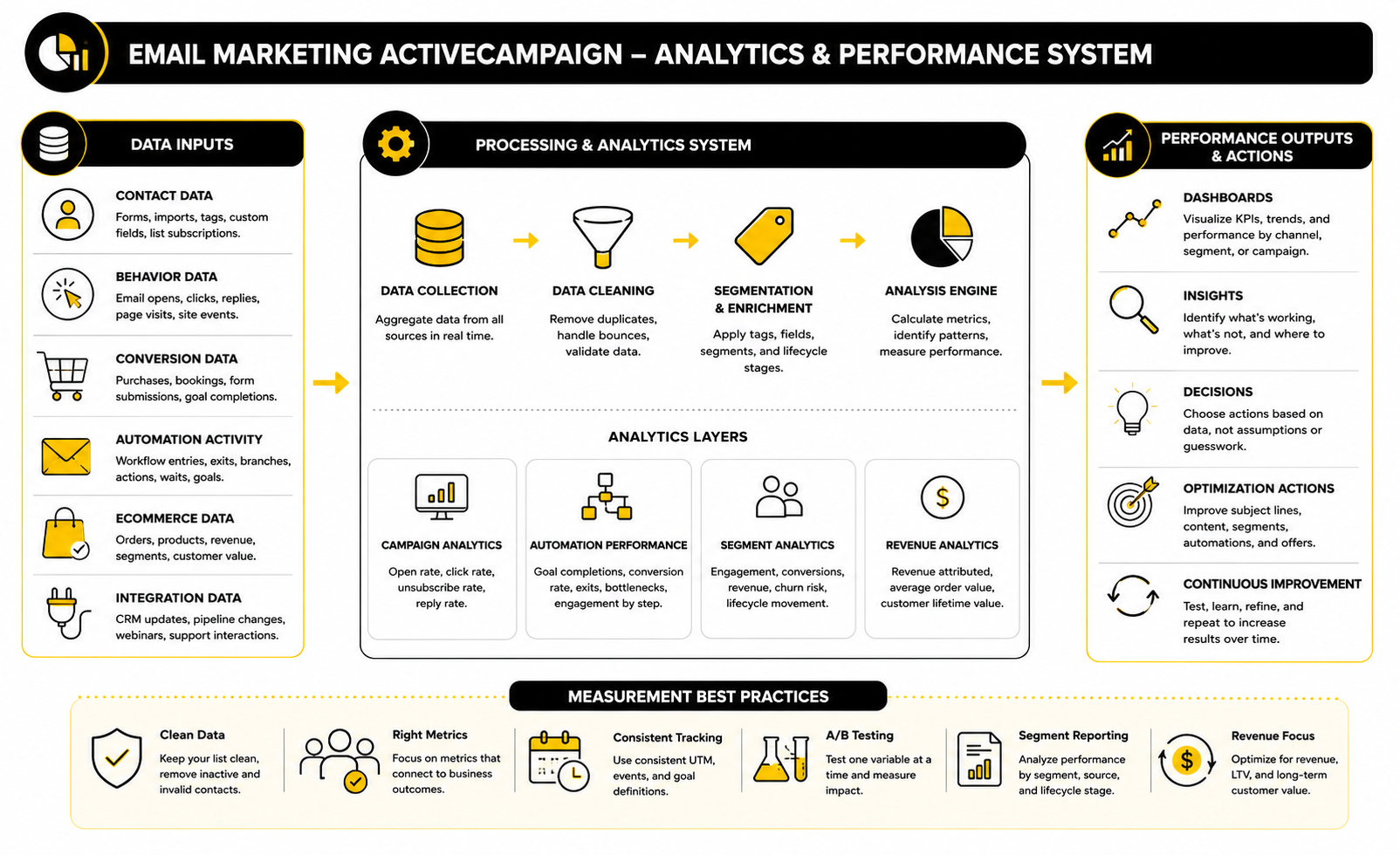
This structure keeps reporting practical. You are not looking at numbers because dashboards exist. You are looking at numbers because they tell you where the system is leaking.
If deliverability is weak, fix list quality and sending reputation before rewriting every email. If clicks are weak, improve the offer, message, and call to action. If clicks are strong but conversions are weak, the landing page, checkout, booking page, pricing, or follow-up process may be the real problem.
Measure Automations By Their Job
Every automation needs one primary success metric. Secondary metrics are helpful, but one metric should decide whether the automation is working. Without that, teams argue over vanity numbers while the actual business outcome stays unclear.
A welcome automation should usually be judged by early engagement and movement into the next stage. A lead nurture automation should be judged by qualified actions, not just opens. An abandoned checkout automation should be judged by recovered revenue. A customer onboarding automation should be judged by activation, usage, retention, or reduced support friction.
This is why ActiveCampaign’s automation reporting matters. It lets you see how contacts enter workflows and how automation campaigns perform, which helps you identify weak points in the journey. But the report is only useful when the automation was built with a clear outcome in the first place.
Here is the practical way to read automation performance:
Data should simplify decisions. If it makes the system more confusing, the tracking plan is probably too broad or the automation goal is unclear.
Use Benchmarks Without Becoming Average
Benchmarks are useful for diagnosing problems, not for defining ambition. If your open rate is far below comparable sources, investigate deliverability, list source, sender reputation, subject lines, and audience fit. If your click rate is below market norms, look at message relevance, segmentation, and whether the call to action is actually compelling.
But do not stop at being average. A small, well-segmented list can outperform a huge cold list. A buyer-only segment can beat a general newsletter. A high-intent automation can produce lower opens but much higher revenue because the audience is smaller and closer to the decision.
This is especially important with email marketing ActiveCampaign because the platform gives you more ways to segment and trigger behavior. Comparing your entire list to an industry average can hide the truth. Compare welcome emails to welcome emails, cart recovery to cart recovery, customers to customers, and cold reactivation to cold reactivation.
The best benchmark is your own trend line. Are your engaged segments improving? Are your automations moving more contacts to the next step? Is revenue per subscriber growing? Is the list getting healthier over time?
Watch The Signals That Predict Revenue
Revenue usually shows up after earlier signals. If you wait until sales are down to investigate, you are already late. The more carefully move is to watch the signals that predict revenue before the decline becomes obvious.
Useful predictive signals include:
These signals tell you where to act. You may need a stronger lead magnet, cleaner forms, better qualification, tighter segmentation, more relevant offers, better landing pages, or clearer sales follow-up. The email is not always the problem, but email data often reveals the problem first.
For creators, consultants, SaaS companies, agencies, and ecommerce brands, this is where the channel becomes strategic. ActiveCampaign is not just sending messages. It is showing where attention turns into action and where action stops.
Clean Reporting Beats More Reporting
More reports do not automatically create better decisions. A simple weekly view often beats a complicated dashboard nobody uses. The goal is to create a reporting habit that leads to action.
A practical weekly review can be short:
That last question matters most. Reporting should create the next optimization step. If the team leaves a review with no decision, the dashboard did not do its job.
For larger teams, reporting can become more advanced with revenue attribution, cohort analysis, source-level performance, lifecycle movement, and sales pipeline influence. But the principle stays the same. Measure the numbers that change decisions, ignore the numbers that only make the dashboard look busy.
Turn Data Into Better Segments
The best use of analytics is better segmentation. Your data should reveal which contacts behave differently enough to deserve a different message. That is where the next wave of performance comes from.
For example, people who click educational content but never visit sales pages may need proof, comparison content, or a softer bridge to the offer. People who visit pricing but do not book may need objection handling, urgency, or a simpler next step. Customers who buy once but never return may need onboarding, product education, or a better post-purchase path.
This is also where tools outside ActiveCampaign can support the journey. If people click but fail to book, a smoother scheduling flow through Cal.com can remove friction. If form completion is weak, a better form experience through Fillout may help capture cleaner data before contacts enter ActiveCampaign.
The point is not to add more tools for the sake of it. The point is to fix the bottleneck the data reveals. Sometimes that bottleneck is the email. Sometimes it is the page, form, offer, booking flow, or sales process after the click.
Scale What Is Already Working
Scaling email marketing ActiveCampaign does not mean adding endless automations. It means finding the workflows that already create movement and making them more reliable, more personalized, and more connected to revenue.
If a welcome sequence creates strong engagement, test better next-step offers. If a lead nurture path creates booked calls, build stronger segmentation around source and intent. If abandoned checkout emails recover revenue, test timing, proof, incentives, and product-specific messaging. If post-purchase emails increase repeat purchases, expand the customer journey with education, replenishment, referrals, or upgrades.
Scale should be controlled. Keep the structure clean, document changes, and avoid adding branches unless the data proves they are needed. Complexity should be earned, not assumed.
The best systems feel simple from the outside. Contacts get the right message at the right time. The business gets clearer reporting. The team knows what to improve next. That is the point of measurement: not more numbers, but better decisions.
Advanced Strategy, Tradeoffs, And Scaling Risks
By this stage, the basics are no longer the bottleneck. The account has a structure, automations are mapped, reporting is connected to decisions, and the team can see what is working. The next challenge is making the system more valuable without making it fragile.
This is where email marketing ActiveCampaign becomes more strategic. Advanced setups are not advanced because they have more branches, more tags, or more emails. They are advanced because they handle tradeoffs better: personalization without creepiness, automation without confusion, segmentation without chaos, and growth without destroying deliverability.
The platform gives you enough flexibility to build almost anything. That is useful, but it also means you need rules. Without rules, every new campaign adds complexity, every new offer creates another exception, and every new segment makes the account harder to manage.
Do Not Personalize More Than The Data Can Support
Personalization works when the data is reliable. It fails when the system guesses too much. A contact who clicked one article about automation should not immediately be treated like they are ready to buy advanced consulting, and a contact who once visited a pricing page should not be chased forever as if they are still actively shopping.
Use personalization in layers. Start with lifecycle stage, source, recent behavior, and purchase history because those signals are usually easier to trust. Then add deeper interest-based personalization only when enough behavior supports it.
Practical personalization rules look like this:
This keeps the experience natural. The contact should feel like the emails are relevant, not like the brand is watching every tiny action and overreacting to it.
Lead Scoring Should Support Decisions, Not Impress The Team
Lead scoring can be helpful when sales teams need prioritization. It can also become one of the most overbuilt parts of an ActiveCampaign account. A score that goes up forever, never decays, and does not trigger a clear action is just decoration.
A useful score answers one question: should this contact receive a different next step? That next step might be a sales notification, a deal creation, a shorter booking path, a higher-intent email, or exclusion from beginner nurture. If the score does not change the action, it does not need to exist yet.
A simple scoring model is usually enough:
The strongest signal is not one action. It is a pattern of actions close together. Someone who opens one email is mildly engaged. Someone who clicks a product link, visits pricing, returns two days later, and submits a form is showing much stronger intent.
Deliverability Becomes A Scaling Constraint
As the list grows, deliverability becomes less forgiving. A small list can sometimes survive messy habits. A larger list cannot. Gmail and Yahoo began enforcing stronger sender requirements in 2024, and ActiveCampaign’s own deliverability guidance states that DKIM and DMARC authentication are required for those providers and strongly recommended for all senders.
This is not technical housekeeping. It directly affects whether people see your emails. If your domain is not authenticated, your list is full of cold contacts, and your campaigns create weak engagement, the system may look fine inside ActiveCampaign while performance quietly drops in the inbox.
Scaling safely means treating deliverability as part of the strategy:
This is where discipline pays. You do not protect deliverability by sending less forever. You protect it by sending the right emails to the right people with clean technical foundations and clear permission.
Compliance Is Part Of The System
Email compliance should not be treated as a legal footnote at the end of a campaign. It belongs inside the system from the beginning. Consent source, subscription status, unsubscribe handling, physical address requirements, and data rights all affect how your ActiveCampaign setup should behave.
The FTC’s CAN-SPAM compliance guidance requires accurate header information, non-deceptive subject lines, a valid physical postal address, and a clear way to opt out of future emails. For contacts in stricter jurisdictions, consent and data processing rules can be more demanding, so businesses should design opt-in forms and records carefully instead of assuming every contact can receive every campaign.
This becomes even more important when you connect multiple tools. A form builder, checkout platform, webinar tool, CRM, and ActiveCampaign account may all store pieces of the customer record. If one system says a contact opted out and another keeps pushing them into promotions, the automation is not just annoying. It is risky.
A clean compliance setup should track:
This is not glamorous work, but it protects the business. More importantly, it protects trust.
AI Can Speed Up Production, But It Should Not Own Strategy
ActiveCampaign has been adding AI-assisted tools for campaign creation, automation support, content generation, and performance workflows. That can save time, especially when building drafts, testing angles, or summarizing campaign ideas. But AI should not decide your customer journey for you.
The risk is speed without judgment. If AI helps you produce more emails faster, but the strategy is weak, you only scale the weakness. More content does not fix unclear positioning, poor segmentation, weak offers, or a broken post-click experience.
Use AI for assistance, not authority. It can help draft subject line variations, turn a campaign brief into a first draft, summarize performance patterns, or create rough automation copy. The strategic decisions should still come from your knowledge of the customer, offer, buying process, and data.
The best setup is human-led and AI-assisted. You define the journey. You define the offer. You define the segment. Then AI helps you move faster without replacing the thinking that makes the campaign work.
When ActiveCampaign Is The Right Fit
ActiveCampaign is strongest when the business needs behavior-based automation, meaningful segmentation, lifecycle journeys, CRM-style follow-up, ecommerce triggers, or a mix of marketing and sales workflows. It is especially useful when you want the system to respond differently based on what contacts do. That is the core reason to choose it over a basic newsletter tool.
It may be more platform than you need if you only send one monthly newsletter to a small list. In that case, a simpler tool may be easier to manage. Tools like Brevo or Moosend can make sense when the priority is straightforward email sending with lighter automation.
It may also be worth comparing broader sales and agency platforms if your business model needs funnels, pipelines, client accounts, SMS, call tracking, reputation management, and sales operations in one place. In that case, GoHighLevel is a natural comparison because it is built around a wider agency and CRM operating model. The better choice depends on what needs to be central: email automation depth, sales operations, ecommerce behavior, or client management.
The wrong move is choosing based only on feature lists. Choose based on the system you actually need to run.
Watch The Cost Of Complexity
ActiveCampaign pricing and plan details can change, but the strategic issue stays the same: complexity has a cost. There is the software cost, the contact count, possible add-ons, implementation time, maintenance, testing, reporting, and the cost of mistakes when automations conflict. A cheap setup that nobody maintains can become expensive fast.
This is why the account should stay as simple as possible for as long as possible. Add segments when they change the message. Add branches when they change the experience. Add automations when they support a real outcome. Add integrations when they improve data quality or reduce manual work.
A good question to ask before adding anything is: will this make the system easier to act on or harder to manage?
Sometimes the advanced move is deletion. Remove old tags, retire unused automations, suppress inactive contacts, simplify bloated workflows, and merge duplicate segments. Clean systems scale better than clever systems.
Build A Governance Rhythm
Governance sounds corporate, but the idea is simple. Someone needs to own the system. If everyone can create tags, edit automations, change forms, update fields, and launch campaigns without standards, the account will eventually become unreliable.
A practical governance rhythm can be lightweight:
This keeps the ActiveCampaign account from drifting away from reality. Businesses change offers, audiences, pricing, funnels, and sales processes. Your automation system needs to change with them, but carefully.
Balance Automation With Real Human Contact
The more advanced the system becomes, the easier it is to forget that email is still a relationship channel. Automation should remove repetitive work, not remove human judgment. Some contacts should receive an automated email. Others should receive a personal reply, sales call, onboarding message, or support follow-up.
This matters most near high-intent moments. A lead who replies with a serious question should not be treated like a passive subscriber. A customer who shows frustration should not just continue through a cheerful onboarding sequence. A large opportunity should not be left to a generic nurture path if a human conversation would close the gap faster.
Use automation to create better timing for human action. Let ActiveCampaign surface the signal, update the record, route the contact, and send the right reminders. Then let the team step in when the moment deserves it.
That is the mature version of email marketing ActiveCampaign. Not fully automated for the sake of it. Automated where it creates leverage, human where it creates trust.
Final Recommendations For A Complete ActiveCampaign System
A mature ActiveCampaign setup is not just a collection of email campaigns. It is an ecosystem where capture, data, segmentation, automation, sales handoff, reporting, compliance, and optimization all support the same customer journey. When those pieces work together, email becomes less reactive and much more predictable.
The best way to close the system is to make every tool and process earn its place. Your forms should collect useful data without adding friction. Your automations should move contacts forward without creating confusion. Your reports should tell you what to improve instead of drowning the team in numbers.
This is the final lens to use: email marketing ActiveCampaign should make the business easier to run. If it creates more manual work, more confusion, or more disconnected data, the setup needs simplification. If it creates cleaner journeys, better timing, stronger follow-up, and clearer decisions, you are building the right way.
What is ActiveCampaign used for in email marketing?
ActiveCampaign is used to send emails, build automated customer journeys, segment contacts, track behavior, manage leads, and connect email activity with sales or ecommerce outcomes. It is stronger than a basic newsletter tool because it can react to contact behavior and move people through different paths based on what they do. That makes it useful for lead nurturing, sales follow-up, onboarding, abandoned cart recovery, retention, and reactivation.
Is ActiveCampaign good for beginners?
ActiveCampaign can work for beginners, but it is not the simplest platform if all you need is a basic newsletter. The automation, segmentation, tagging, CRM, tracking, and reporting features are powerful, but they also require structure. Beginners can use it well if they start with a small number of automations and avoid building an overly complex account too early.
What makes email marketing ActiveCampaign different from regular email software?
The difference is the depth of automation and behavior-based segmentation. Regular email software usually focuses on campaigns, templates, and list sends. ActiveCampaign lets you build workflows that respond to form submissions, tags, page visits, purchases, lifecycle stages, lead scores, and other signals.
What should I build first in ActiveCampaign?
Start with the foundation before building advanced automations. Clean your list, define lifecycle stages, set up tags and custom fields, connect your key tools, install tracking, and build one core welcome or conversion automation. Once that first path works, expand into nurture, sales follow-up, post-purchase, and reactivation flows.
How many automations do I need?
You need fewer automations than you think at the beginning. Most businesses should start with a welcome sequence, a main nurture sequence, a conversion follow-up, and a customer onboarding or post-purchase path. Add more only when the business case is clear and the new automation will create a different experience for the contact.
How should I use tags in ActiveCampaign?
Use tags for flexible labels, behavior, sources, interests, temporary states, and automation movement. For example, a tag can show that someone downloaded a lead magnet, clicked a pricing link, attended a webinar, or entered a reactivation sequence. Keep your naming system consistent so the account stays readable as it grows.
When should I use custom fields instead of tags?
Use custom fields for structured contact information that should live on the profile. This includes data such as business type, lifecycle stage, preferred product, country, sales owner, company size, or customer category. Tags are better for actions and labels, while custom fields are better for stable data that you may want to personalize, filter, or report on later.
What are the most important ActiveCampaign metrics to watch?
The most important metrics depend on the automation’s job. For general health, watch delivery rate, bounce rate, spam complaints, unsubscribes, opens, clicks, conversions, revenue, and inactive contacts. For automation performance, focus on goal completions, exits, branch performance, and whether contacts are moving to the next meaningful stage.
Are open rates still reliable?
Open rates are useful as a directional signal, but they should not be treated as perfect truth. Privacy changes, image loading, inbox filtering, and device behavior can affect open tracking. Use open rates to spot trends, but judge real performance through clicks, replies, conversions, purchases, bookings, and lifecycle movement.
How does ActiveCampaign help with sales follow-up?
ActiveCampaign can support sales follow-up through lead scoring, CRM pipelines, deal creation, task assignment, notifications, and behavior-based automations. A lead who visits a pricing page, submits a form, books a call, or reaches a score threshold can be routed to a sales process automatically. This helps sales teams focus on contacts showing stronger intent.
Can ActiveCampaign replace a CRM?
ActiveCampaign can replace a CRM for some small businesses, especially when the sales process is simple and closely tied to email automation. For more complex sales teams, it may work better as a marketing automation platform connected to a dedicated CRM. The right answer depends on pipeline complexity, reporting needs, team size, and how many sales workflows must be managed.
Is ActiveCampaign good for ecommerce?
ActiveCampaign can be strong for ecommerce when it is connected properly to store data. It can support abandoned cart emails, product-based segmentation, post-purchase flows, repeat purchase campaigns, customer win-back sequences, and personalized offers. The quality of the ecommerce setup depends heavily on clean product, order, and customer data.
How often should I email my list?
Email frequency should depend on consent, audience expectations, engagement, lifecycle stage, and offer type. A warm customer segment may tolerate more frequent emails than a cold subscriber segment. The safer approach is to monitor engagement, unsubscribes, complaints, and conversions by segment instead of choosing one universal frequency for everyone.
What is the biggest mistake businesses make with ActiveCampaign?
The biggest mistake is building automation before building structure. If tags, fields, segments, lifecycle stages, tracking, and goals are unclear, the automations will eventually become messy. Start with the system, then write the emails.
How do I know if ActiveCampaign is too advanced for my business?
ActiveCampaign may be more than you need if you only send occasional newsletters and do not plan to use automation, segmentation, tracking, or sales follow-up. It becomes a better fit when different contacts need different journeys based on behavior, source, interest, purchase history, or sales readiness. If your business depends on timely follow-up and personalized nurturing, the extra capability can be worth it.
What tools pair well with ActiveCampaign?
The best tools depend on the bottleneck in your customer journey. A funnel builder like ClickFunnels can help with landing pages and sales flows, while Systeme.io may fit simpler funnel and email setups. For service businesses, Cal.com can support booking workflows, and Fillout can help collect cleaner form data before contacts enter ActiveCampaign.
Build a stronger local presence with BAAM AI
Turn your website, Google profile, social channels, and AI visibility into one growth engine
Most businesses do not need more random marketing activity. They need a consistent presence system that helps the right people find them, trust them, and take action. BAAM AI brings strategy, local SEO, website updates, Google Maps visibility, social content, AI-search readiness, media production, and reporting into one practical monthly engine.
If you want your marketing to keep working after the campaign ends, start with a free BAAM AI presence audit. See how your business shows up today and where the fastest visibility wins are at BAAM AI.