
BAAM AI Blog
Email Marketing Tips And Tricks That Actually Improve Results
Email marketing is still one of the few channels where you can speak directly to people who asked to hear from you. That sounds simple, but it is exactly why most email marketing tips and tricks fail when they focus...
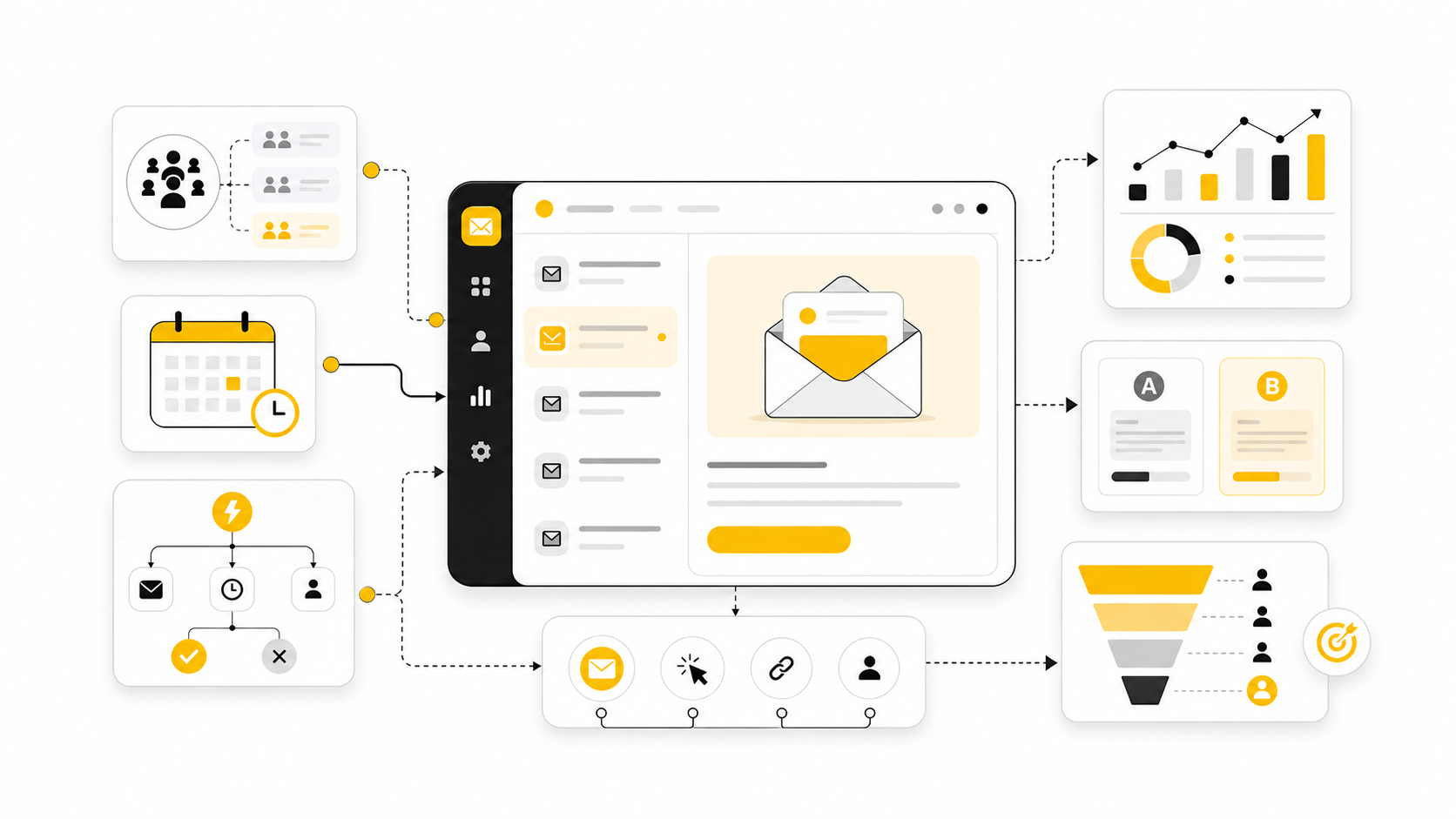
Email marketing is still one of the few channels where you can speak directly to people who asked to hear from you. That sounds simple, but it is exactly why most email marketing tips and tricks fail when they focus only on subject line hacks, send-time guesses, or design trends. The real win comes from building a system that consistently sends the right message to the right segment with a clear reason to click.
The channel is also less forgiving than it used to be. Gmail’s sender guidelines now make authentication, low spam complaints, and easy unsubscribes part of the basic standard for reaching personal Gmail inboxes, not advanced deliverability work for big companies only. If your list quality is poor or your campaigns feel irrelevant, your emails do not just underperform; they can quietly stop reaching the inbox at all, which is why Google’s sender requirements matter before you write a single promotional email.
At the same time, email is not dead, tired, or outdated. Litmus reports that 35% of companies see email ROI of 36:1 or more, while MailerLite’s 2025 benchmark report analyzed over 3.6 million campaigns from 181,000 approved accounts and still treats open rate, click rate, click-to-open rate, and unsubscribe rate as core performance signals for serious senders. Those numbers do not mean every email campaign works; they mean email rewards companies that treat it like a disciplined revenue channel instead of a random newsletter habit.
this guide is built as a practical six-part guide to better email marketing. It will not give you fake “secret tricks” or pretend one subject line formula fixes a weak offer. Instead, it breaks email marketing into the parts that actually control performance: strategy, list quality, segmentation, copy, automation, testing, deliverability, and measurement.
Why Email Marketing Still Matters
Email matters because it gives you control that social platforms do not. Algorithms can throttle reach, paid ads can get expensive overnight, and search rankings can move after an update, but a healthy email list gives you a direct line to people who already know your brand. That does not make email automatic revenue, but it does make it one of the most valuable assets a business can build.
The best email programs also compound. A welcome sequence keeps working after it is built, a strong segmentation model improves every campaign after it is cleaned up, and a better offer structure can lift revenue without adding more subscribers. That is why email marketing tips and tricks should be judged by whether they improve the system, not whether they sound clever in isolation.
There is also a trust factor that gets overlooked. People may tolerate a mediocre social post because it disappears quickly, but a bad email lands in a personal space and asks for attention. If you waste that attention with generic blasts, weak offers, or misleading subject lines, the damage shows up in lower clicks, more unsubscribes, and worse deliverability.
The Practical Framework For Better Email Marketing
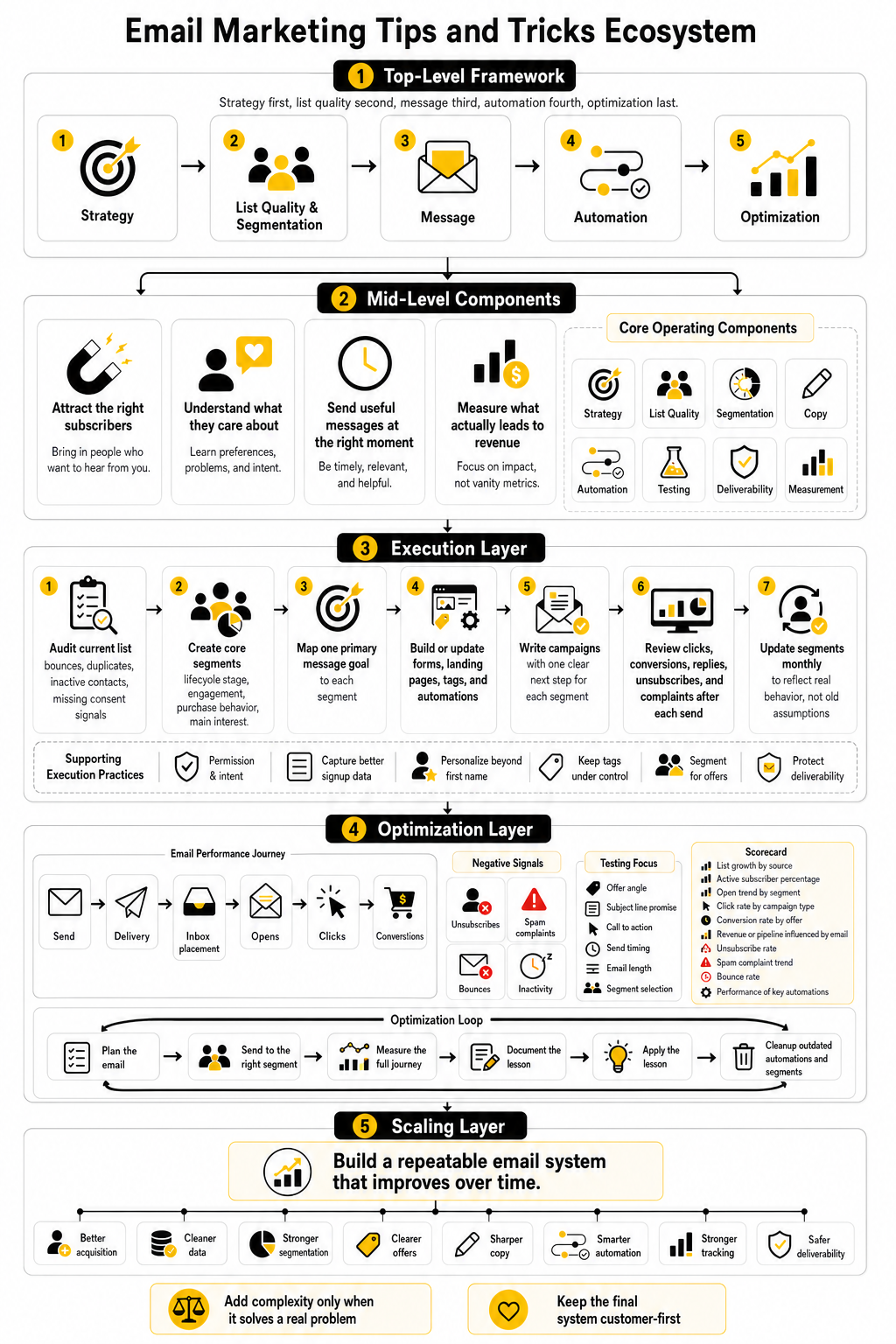
Good email marketing has four jobs: attract the right subscribers, understand what they care about, send useful messages at the right moment, and measure what actually leads to revenue. When those jobs are handled in order, email becomes much easier to improve. When they are handled randomly, teams end up changing button colors while ignoring the real reason people are not buying.
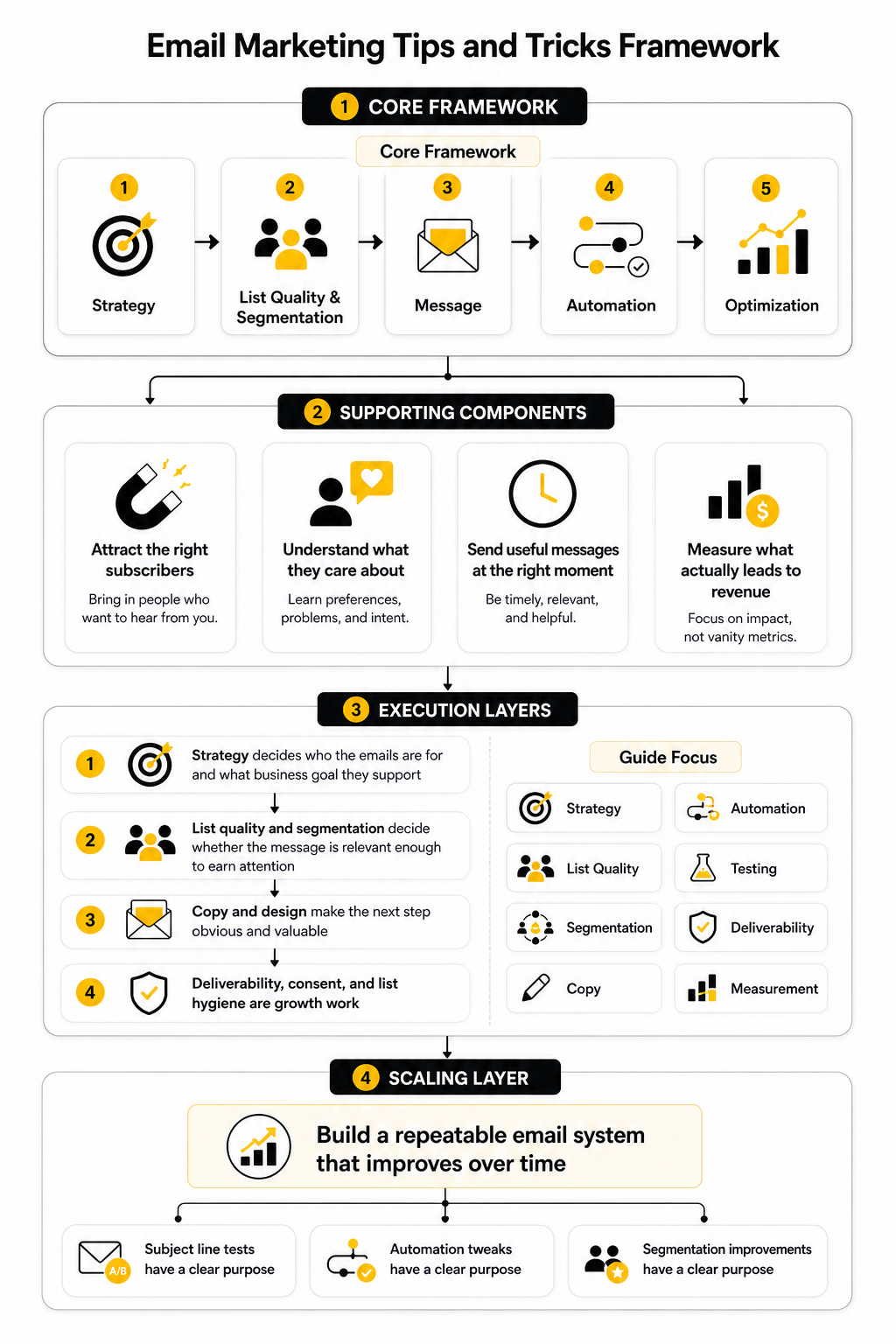
The framework for this guide is simple: strategy first, list quality second, message third, automation fourth, optimization last. Strategy decides who the emails are for and what business goal they support. List quality and segmentation decide whether the message is relevant enough to earn attention before the copy even starts working.
From there, the job of copy and design is not to impress other marketers. The job is to make the next step obvious and valuable. Tools can help here, whether you are using an email platform like Brevo, a broader CRM and automation setup like GoHighLevel, or a simpler campaign tool like Moosend, but the tool only helps when the underlying strategy is clear.
What This Guide Will Focus On
This guide focuses on practical improvements that can be applied by creators, service businesses, ecommerce brands, agencies, SaaS companies, and small teams that need email to produce real outcomes. That means fewer vague best practices and more focus on decisions: what to send, who should receive it, when to send it, what to measure, and what to fix first. It also means treating deliverability, consent, and list hygiene as growth work, not technical chores.
The article will use benchmarks carefully. Industry averages can help you understand whether your performance is unusually weak or reasonably healthy, but they should not become your main goal. A campaign with a lower open rate can still be more profitable than a campaign with a higher open rate if it reaches the right segment with a stronger offer.
Most importantly, the goal is not to collect more email marketing tips and tricks. The goal is to build a repeatable email system that improves over time. Once that system is in place, every subject line test, automation tweak, and segmentation improvement has a clear purpose instead of becoming another random marketing task.
Build The Email Strategy Before You Write The Campaign
The biggest mistake in email marketing is starting with the email. That sounds backwards, but it is true. If you open a blank campaign and start writing before you know the audience, promise, offer, and next step, you are not doing strategy; you are guessing with formatting.
Strong email marketing starts with a business goal. Sometimes the goal is direct revenue, like selling a product, booking a consultation, or recovering abandoned carts. Other times the goal is trust-building, education, activation, retention, or re-engagement, and those emails need a different rhythm than a flash sale or launch campaign.
This is where most lists become messy. A company sends one newsletter to everyone, one promotion to everyone, and one reminder to everyone, then wonders why engagement drops. The more carefully move is to decide what each email is supposed to accomplish before touching the subject line, because the subject line cannot save a campaign with no clear purpose.
Start With The Reader’s Situation
Every useful email begins with one question: what is happening in the reader’s world right now? Not what you want to announce. Not what feature you want to promote. What problem, desire, objection, deadline, or buying trigger makes this message relevant today?
For a new subscriber, the situation might be curiosity mixed with low trust. They joined because something looked useful, but they do not know yet whether your emails are worth opening. For a warm lead, the situation might be comparison, hesitation, or the need to justify a purchase to someone else.
This is why one of the most practical email marketing tips and tricks is to write from the reader’s current stage instead of your internal campaign calendar. A welcome email should not sound like a random newsletter. A cart recovery email should not sound like a company update. A re-engagement email should not pretend the reader has been paying close attention for the last six months.
Define The One Job Of Each Email
An email with five jobs usually does none of them well. It tries to educate, sell, announce, remind, survey, and cross-promote in the same message. The result feels busy, and busy emails are easy to ignore.
Each email should have one primary job. That job can be to earn a click, get a reply, move someone to a sales page, prepare them for a launch, help them use a product, or bring them back after inactivity. Once the job is clear, every part of the email has a reason to exist.
This also makes editing much easier. If a paragraph does not help the reader take the next logical step, cut it. If a link distracts from the main action, remove it. If the call to action does not match the reader’s readiness, rewrite it before blaming the design.
Match The Offer To The Relationship
Email works best when the offer fits the level of trust. A cold or brand-new subscriber may need a useful guide, checklist, demo, quiz, or low-friction next step before they are ready for a bigger decision. A buyer who already trusts you may be ready for an upgrade, renewal, referral request, or stronger promotion.
This is where funnels can help, but only if they are built around real buyer intent. A simple lead magnet funnel built with a tool like ClickFunnels can work well when the follow-up emails educate, qualify, and move the reader toward a specific outcome. The funnel fails when it collects emails with a vague freebie and then immediately pushes an unrelated offer.
For service businesses and agencies, the offer might be a consultation, audit, workshop, or reply-based conversation. A CRM and automation platform like GoHighLevel can be useful when email has to connect with pipeline stages, appointment booking, SMS follow-up, and client nurture. The key is not the software itself; the key is matching the message to the stage of the relationship.
Choose The Right Campaign Type
Not every email belongs in a newsletter. Some messages should be automated because they are triggered by behavior. Some should be broadcast because they are timely. Some should be part of a sequence because the reader needs a few steps before the decision feels obvious.
A welcome sequence is usually one of the first systems to build because it sets expectations while attention is still fresh. A nurture sequence helps readers understand the problem, trust your approach, and see why your solution is different. A sales sequence creates urgency and clarity around a specific offer without relying on one desperate “last chance” email.
Automated emails can be especially powerful because they respond to intent instead of waiting for a batch send. Omnisend’s 2025 ecommerce report found that automated messages made up only 2% of total email volume but generated 37% of email-driven sales, which is exactly why triggered emails deserve more attention than another random broadcast. The practical lesson is simple: when someone takes a meaningful action, your follow-up should not depend on whether you remember to send a campaign next Tuesday.
Build A Simple Email Calendar
An email calendar should protect consistency, not create noise. You do not need to email daily just because another brand does. You need a realistic sending rhythm that your audience can tolerate, your team can maintain, and your business can use without training subscribers to ignore you.
A good calendar includes campaign type, audience segment, main goal, offer, deadline, and success metric. That sounds basic, but it prevents the common problem of sending too many emails to the same people for unrelated reasons. It also helps you spot gaps, like promoting constantly without educating, or educating endlessly without ever making a clear offer.
Keep the calendar simple enough to use. If the system is too complicated, nobody will maintain it. A small team is better off with one clean weekly campaign, one strong welcome flow, and one sales sequence than a sophisticated plan that falls apart after two weeks.
Decide What Success Means Before Sending
Open rate matters, but it does not tell the whole story. Privacy changes, inbox behavior, and automated opens can distort the number, so it should be treated as a directional signal rather than the final truth. Clicks, replies, conversions, revenue, booked calls, retention, and unsubscribe behavior usually tell you more about whether the email did its job.
Benchmarks can help you avoid flying blind. MailerLite’s 2025 benchmark report notes that opens, clicks, and unsubscribe rates all moved up, partly because Gmail made unsubscribing easier inside the inbox. That means a higher unsubscribe rate is not always a disaster; it can also be a sign that weak-fit subscribers are leaving faster, which may improve list quality over time.
The cleaner way to measure is to connect each email to its purpose. A product launch email should be judged by sales and qualified clicks, not just opens. A customer onboarding email should be judged by activation or usage. A re-engagement campaign should be judged by who becomes active again and who should be removed from future sends.
Create A Strategy Brief Before The Email
Before writing the campaign, create a short strategy brief. It does not need to be fancy. It only needs to force clear thinking before the copy starts.
A useful brief answers:
This step removes a lot of confusion. The writer knows what to say, the designer knows what to emphasize, and the person reviewing the email has a standard beyond personal taste. That alone can improve email performance because the team stops arguing about tiny preferences and starts judging the campaign by strategy.
Keep The Strategy Human
Strategy does not mean making emails stiff. The best email strategy actually makes emails more human because it forces you to care about relevance. You stop sending generic updates and start sending messages that respect where the reader is.
This matters even more as AI-generated content becomes easier to produce. Faster writing is useful, but faster generic writing is still generic. If the audience, offer, timing, and intent are unclear, AI can help you create more emails that people still do not want.
So before collecting more email marketing tips and tricks, fix the strategic layer. Know who you are talking to, why now is the right time, what action makes sense, and how the email supports the bigger customer journey. Once that is clear, the next step is improving the quality of the list itself, because even the best strategy struggles when it is sent to the wrong people.
Improve List Quality, Segmentation, And Personalization
Once the strategy is clear, the next job is making sure the right people receive the right emails. This is where email marketing starts to become more profitable, because performance is rarely just a copy problem. A strong email sent to the wrong audience is still the wrong email.
List quality matters because every campaign teaches inbox providers and subscribers how to treat your future emails. If people ignore, delete, unsubscribe, or mark your emails as spam, that behavior can affect more than one campaign. It can weaken the reputation of your sending domain, which is why list building and deliverability should be treated as connected work.
Segmentation and personalization are the practical bridge between strategy and execution. You are not trying to create a complicated data machine on day one. You are trying to stop treating every subscriber like the same person, because they are not.
Start With Permission And Intent
A good list starts with clear permission. People should understand what they are signing up for, why it is useful, and what kind of emails they can expect. If the opt-in promise is vague or misleading, the relationship begins with confusion, and confused subscribers rarely become engaged buyers.
Intent is just as important as permission. Someone who downloads a beginner guide is not showing the same intent as someone who requests a demo, abandons checkout, clicks a pricing page, or replies to a sales email. Those actions should shape how you follow up.
This is why bought lists are such a bad shortcut. They may look like growth on a spreadsheet, but they usually bring low intent, weak engagement, and higher complaint risk. Real growth comes from attracting people with a reason to hear from you, then sending emails that respect that reason.
Clean The List Before You Scale
Before adding more subscribers, clean up the list you already have. Remove hard bounces, suppress repeated non-engagers, fix obvious duplicate records, and separate active subscribers from people who have not opened, clicked, bought, or replied in a long time. This is not glamorous work, but it directly affects how much value the list can produce.
A clean list also gives you cleaner data. If your campaigns are being sent to thousands of inactive contacts, your engagement metrics become harder to interpret. You may think your subject lines are weak when the real issue is that half the list no longer cares.
Do not panic and delete everyone after one quiet campaign. Use a sensible re-engagement process first, especially for subscribers who once clicked, bought, or replied. If they still do not respond after a clear win-back attempt, stop sending regular campaigns to them and protect the health of the people who are still engaged.
Build Useful Segments First
Segmentation does not need to start with twenty audience groups. In fact, too many segments too early can slow everything down. Start with the groups that clearly change what you should say.
The most useful early segments are usually based on lifecycle stage, purchase behavior, engagement, interest, and lead source. A new subscriber needs orientation. A repeat buyer needs a different conversation. A cold lead may need proof and education, while a hot lead may need a direct offer or booking link.
You can also segment by behavior inside your emails. People who click a specific topic, product category, webinar invite, or comparison page are telling you something. That signal is more useful than guessing based only on demographics.
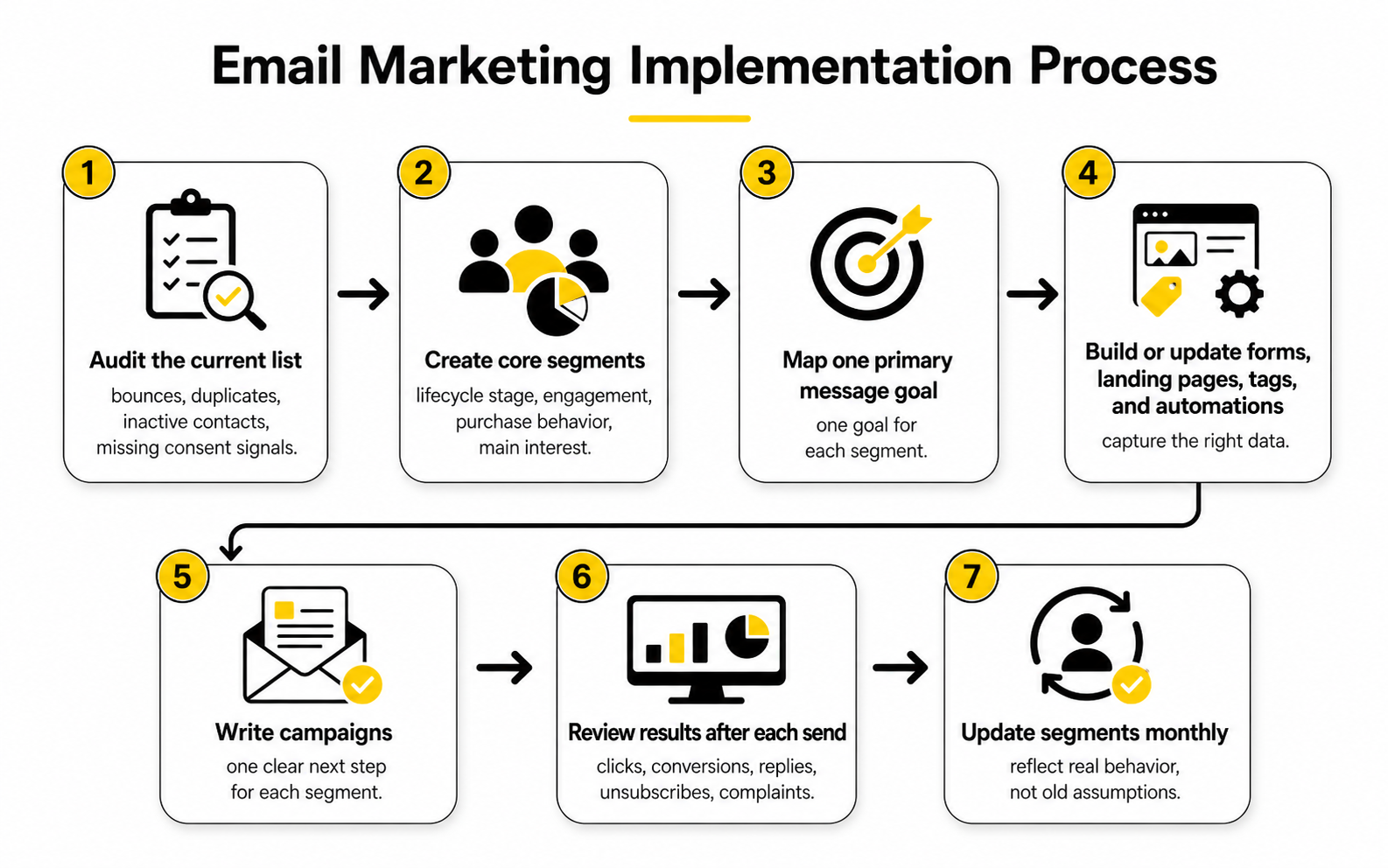
Use A Simple Implementation Process
The process should be simple enough that you can actually run it every week. Most teams do not fail because they lack advanced tactics. They fail because nobody owns the list, nobody checks the data, and every campaign starts from scratch.
Use this process as the practical baseline:
This process keeps implementation grounded. It also makes personalization easier because the data has a job. You are not collecting fields to look sophisticated; you are collecting only what helps you send a better email.
Capture Better Data At The Point Of Signup
The signup moment is one of the easiest places to improve future email performance. Ask for too much and fewer people join. Ask for nothing useful and every subscriber enters the same generic sequence.
The balance is to collect the minimum data that improves the next email. For a B2B list, that might be role, company type, or biggest challenge. For an ecommerce brand, it might be product interest, skin type, style preference, or shopping goal. For a creator or service provider, it might be experience level or desired outcome.
Tools like Fillout can help when you need more thoughtful forms, quizzes, or intake flows before sending people into your email system. The point is not to make the opt-in complicated. The point is to capture enough context so the first few emails feel specific instead of generic.
Personalize Beyond The First Name
Using someone’s first name is not real personalization. It can be fine, but it is the lowest level. Real personalization changes the message based on what the subscriber wants, did, bought, ignored, or needs next.
For example, a subscriber who clicked on automation tips should not receive the same follow-up as someone who clicked on copywriting advice. A customer who bought a beginner product should not be treated like someone who bought the advanced plan. A lead who booked a call should not keep getting emails asking them to book a call.
This is one of the most useful email marketing tips and tricks because it sounds obvious but is often ignored. Personalization should reduce friction. It should help the reader feel, “This is for me,” without making the email feel creepy, over-engineered, or fake.
Keep Tags And Fields Under Control
Tags can make email marketing more carefully, but they can also become a mess fast. If every campaign creates new tags with unclear names, your system becomes harder to manage every month. Eventually, nobody knows which tags matter, which automations still run, or which segments are safe to use.
Create naming rules before the system gets crowded. Use simple labels for lifecycle stage, source, product interest, purchase status, and engagement level. Avoid vague tags like “interested” unless everyone knows exactly what action creates that tag.
This is where a CRM can be useful if email is part of a bigger sales process. Platforms like Copper can help teams connect contact records, relationship history, pipeline stages, and follow-up tasks. That matters when the email list is not just a newsletter audience but also a source of sales conversations.
Segment For Offers, Not Just Organization
A segment is only valuable if it changes the offer, message, timing, or next step. Otherwise, it is just organization for its own sake. Before creating a segment, ask what you will do differently for that group.
For example, engaged non-buyers may need proof, urgency, or a lower-friction offer. First-time buyers may need onboarding and confidence. Repeat buyers may need loyalty, cross-sell, or upgrade messaging. Inactive subscribers may need a sharp re-engagement email, not another regular newsletter.
This is how segmentation turns into revenue. You stop sending one message to everyone and start matching the ask to the relationship. That is the moment email begins to feel less like broadcasting and more like a guided customer journey.
Protect Deliverability While You Grow
Deliverability is not only a technical setup. It is the result of your sending practices, list quality, content, authentication, engagement, and complaint rates working together. If you grow the list aggressively but attract the wrong people, your email program can get weaker while your subscriber count gets bigger.
Gmail’s bulk sender rules made this more obvious by requiring authentication, low spam complaints, and easy unsubscribe for high-volume senders. Even smaller senders should treat those standards as the baseline because inbox providers reward trusted behavior. If your emails are wanted, clear, and easy to leave, the whole system becomes healthier.
So do not chase list size blindly. A smaller list of people who open, click, reply, and buy is more valuable than a large list that barely responds. The next part builds on that foundation by focusing on the message itself: how to write emails people actually want to open, read, and click.
Write Emails People Want To Open, Read, And Click
Once your list is clean and segmented, the next job is message quality. This is the part most people think of first when they search for email marketing tips and tricks, but it only works after the audience and strategy are clear. A clever subject line cannot fix a weak offer, and a beautiful template cannot fix a message that does not matter to the reader.
Good email copy has a simple job: earn attention, make the value clear, and move the reader toward one logical next step. That does not mean every email has to be short, casual, or sales-heavy. It means every sentence should help the reader understand why the message matters now.
The best emails feel specific. They speak to one situation, one need, one objection, or one useful outcome. When you try to write for everyone at once, the email becomes vague, and vague emails are easy to ignore.
Statistics And Data
Email benchmarks are useful, but only when you use them as context rather than commandments. A campaign can beat the industry average and still fail commercially if the clicks do not lead to sales, replies, bookings, or product usage. A campaign can also look weak on open rate and still perform well if it reaches a smaller, higher-intent segment.
MailerLite’s 2025 benchmark data shows wide differences by industry, with ecommerce sitting around 32.67% average open rate while consulting is listed around 45.96% and nonprofit around 52.38%. That spread matters because it proves one universal “good open rate” is a lazy target. Your benchmark should be your industry, your audience, your list age, your sending frequency, and your own historical trend.
ROI data needs the same careful reading. Litmus reports that email ROI usually falls between 10:1 and 36:1 for most companies, with some companies reporting even higher returns. That does not mean every extra email creates profit. It means mature email programs can generate serious returns when the list, offer, measurement, and follow-up system are working together.
Measure The Full Email Journey
The useful way to measure email is to follow the journey from send to outcome. Delivery tells you whether the message was accepted by the receiving server. Inbox placement tells you whether people are likely to see it. Opens suggest attention, clicks show action, and conversions prove whether the action had business value.
Each metric answers a different question. If delivery is poor, you may have authentication, bounce, or reputation problems. If opens drop, the issue could be subject line relevance, sender trust, timing, list fatigue, or inbox placement. If clicks are weak while opens are healthy, the body copy, offer, audience match, or call to action probably needs work.
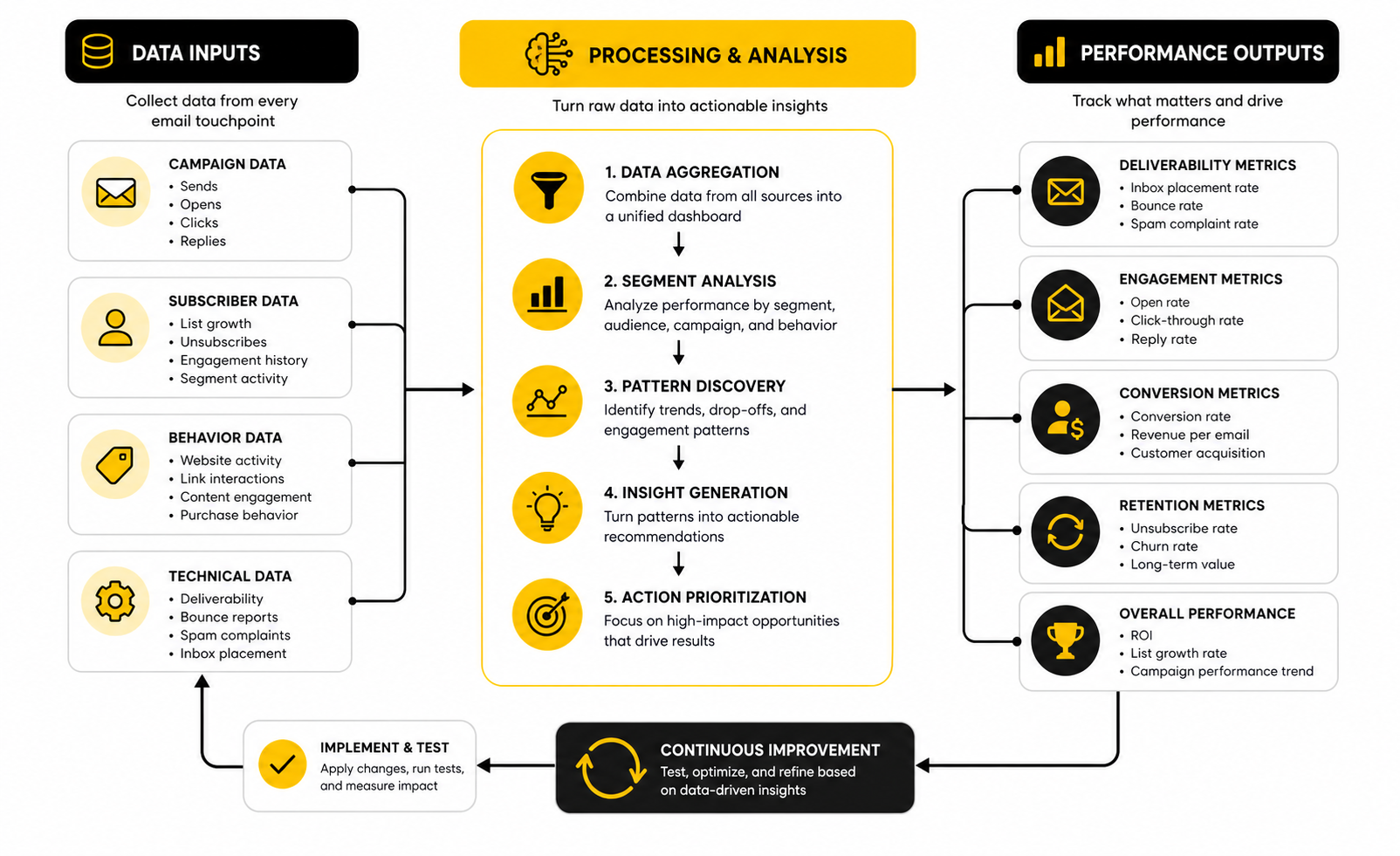
This is why measurement should not live only inside the email platform. Email metrics show part of the story, but the real business outcome often happens on a landing page, checkout page, calendar page, demo form, or product screen. If you use a landing page or funnel builder like ClickFunnels, make sure the email campaign and destination page are tracked together, not judged separately.
Know What Each Metric Actually Means
Open rate is a signal, not the truth. Privacy features, image loading behavior, and mailbox differences can distort opens, so do not treat them as a perfect measure of human attention. Use open rate to spot directional changes, especially when comparing similar campaigns to similar segments.
Click-through rate is usually more useful because it shows that the reader did something. Still, a click is not automatically success. A high click rate with poor conversion may mean the email created curiosity but the landing page, offer, pricing, or next step failed to finish the job.
Conversion rate is closer to the business outcome, but even that needs context. A purchase conversion matters differently from a booked call, trial signup, reply, upgrade, renewal, or webinar registration. Before you judge a campaign, define the conversion that matches the email’s job.
Watch Negative Signals Closely
Positive metrics are exciting, but negative signals protect the whole program. Unsubscribes, spam complaints, bounces, and inactivity tell you when the list is pushing back. Ignore those signals and you can damage deliverability, even if short-term revenue looks fine.
Gmail’s bulk sender guidance makes this especially important because senders are expected to keep spam complaints low, with the published threshold below 0.3% for bulk senders. That number should not be treated as a goal to approach. A healthier mindset is to stay comfortably below it by sending wanted emails, using clear consent, and making unsubscribe easy.
Unsubscribes are not always bad. If the wrong-fit people leave, your list can become cleaner and easier to interpret. Spam complaints are different because they tell inbox providers that your message was not just unwanted, but unwanted enough for someone to report it.
Compare Segments Before Comparing Campaigns
Averages hide problems. If one segment clicks at 6% and another clicks at 0.4%, the blended number may look acceptable while one part of the list is clearly misaligned. This is why segment-level reporting matters.
Compare new subscribers, active buyers, inactive leads, repeat customers, high-intent prospects, and different acquisition sources separately. A webinar lead may behave differently from a discount opt-in. A customer who joined after purchase may behave differently from a cold lead who downloaded a checklist.
This is where practical analytics beats vanity reporting. You are not measuring segments just to make a dashboard look more carefully. You are looking for action: who needs a stronger offer, who needs more education, who should receive fewer emails, and who is ready for a more direct sales message.
Use Benchmarks To Diagnose, Not To Brag
Benchmarks should help you decide what to investigate next. If your open rate is far below similar senders, look at subject lines, sender reputation, list source, deliverability, and relevance. If your click rate is low, look at the promise, offer, email body, button clarity, and whether the segment actually wants the next step.
If your unsubscribe rate jumps, check whether the campaign broke expectations. Did you email too often? Did the topic drift away from the opt-in promise? Did a sales campaign hit people who were not ready for it? The number is only useful when it leads to a better decision.
This is one of the most important email marketing tips and tricks because it stops you from chasing random improvements. Data should tell you where the leak is. Then the strategy, copy, offer, or segment can be fixed with purpose.
Build A Simple Testing System
Testing does not mean changing five things and hoping the winner teaches you something. Test one meaningful variable at a time when the audience size is large enough to make the result useful. For smaller lists, use testing more as structured learning than scientific proof.
Start with variables that can change behavior in a meaningful way. Test the offer angle, subject line promise, call to action, send timing, email length, or segment selection. Button color is rarely the first problem.
Keep a testing log so lessons are not lost after each campaign. Note the audience, goal, variable tested, result, and decision made. Over time, this becomes more valuable than generic advice because it reflects your list, your market, and your offers.
Connect Email Metrics To Revenue
The final layer is revenue tracking. Email should not be judged only by opens and clicks if the business goal is sales, pipeline, retention, or repeat purchase. You need to know which campaigns and automations create measurable value.
That can be simple at first. Use UTM parameters, track campaign links, connect email platforms to checkout or CRM data, and review revenue by campaign type. A platform like Brevo can help teams connect campaigns, automation, and reporting without making the setup overly complicated.
For service businesses, revenue tracking may mean booked calls, qualified opportunities, closed deals, or retained clients rather than instant checkout revenue. For ecommerce, it may mean first purchase, repeat purchase, average order value, and recovery revenue. The point is to measure the outcome that actually pays the business, because the prettiest email report is useless if it does not connect to decisions.
Turn The Data Into Better Emails
Data only matters when it changes what you do next. If a segment opens but does not click, sharpen the offer and call to action. If people click but do not convert, improve the destination page, pricing clarity, proof, or checkout flow. If inactive subscribers never respond, re-engage them once and then suppress them from regular sends.
Do not make every result dramatic. One campaign does not define your entire strategy. Look for patterns across similar sends, similar segments, and similar offers before making big changes.
The goal is a steady improvement loop. Send with a clear hypothesis, measure the right signals, learn what happened, and apply that lesson to the next campaign. That is how email becomes a system instead of a guessing game, and it sets up the next stage: using automation, funnels, and timing without making the whole experience feel robotic.
Use Automation, Funnels, And Timing Without Sounding Robotic
Automation is where email marketing gets leverage. A good automation sends the message when the reader’s behavior makes it relevant, not when your team happens to remember. That is powerful, but it also creates a risk: if the automation is poorly planned, you can scale awkward, repetitive, tone-deaf emails faster than ever.
This is why advanced email marketing is not about building the most complicated workflow. It is about building the fewest automations that create the most useful customer experience. When the trigger, timing, message, and exit rules are clear, automation feels helpful. When they are not, it feels like a machine pretending to care.
The goal is simple: use automation to make follow-up more relevant, not more aggressive. That difference matters. People can tell when a brand is guiding them toward a useful next step versus squeezing every possible click out of them.
Prioritize The Automations That Match Intent
Not every automation deserves to be built first. Start with the moments where the subscriber has already shown intent. Welcome sequences, abandoned cart emails, browse abandonment messages, lead magnet follow-ups, demo reminders, onboarding emails, renewal reminders, and win-back campaigns usually matter more than clever edge-case workflows.
This is because timing changes the meaning of the message. An email sent right after someone downloads a guide can feel useful. The same email sent three months later with no context can feel random. The message itself may be fine, but the timing decides whether it feels relevant.
Omnisend’s 2025 ecommerce report found that automated emails generated 37% of email-driven sales from only 2% of email volume, which is a strong reminder that triggered messages often outperform blanket campaigns because they respond to behavior. That does not mean every business should copy ecommerce automation exactly. It means you should look for the moments where intent is visible and build around those first.
Design The Flow Before Writing The Emails
Before writing an automation, map the journey. What starts the flow? What should the subscriber know, believe, or do before leaving it? What actions should remove them from the sequence so they do not receive irrelevant emails?
This is where many automations go wrong. A lead books a call and still receives three more emails asking them to book. A customer buys the product and still receives a discount for the same product. A subscriber shows no engagement, but the system keeps pushing harder instead of changing the approach.
A simple flow map solves most of this. Define the trigger, goal, email sequence, wait times, split conditions, suppression rules, and exit criteria. If you cannot explain the flow in plain language, it is probably too messy to build.
Use Funnels Without Overbuilding Them
Funnels are useful when they create a clear path from attention to action. They become a problem when every subscriber is forced through the same rigid sequence regardless of what they need. A funnel should guide the reader, not trap them.
For a simple offer, the funnel might only need an opt-in page, a thank-you page, a welcome sequence, and a sales page. For a higher-ticket service, it may need education, proof, objection handling, application questions, appointment scheduling, and sales follow-up. The structure should match the buying decision.
If you need a lightweight all-in-one funnel setup, Systeme.io can work well for simple funnels, email sequences, and digital product flows without adding unnecessary complexity. If the funnel depends on landing page testing, checkout paths, upsells, and conversion-focused pages, ClickFunnels may fit better. The smart move is choosing the tool that matches the funnel’s actual job, not the one with the longest feature list.
Balance Automation With Human Touchpoints
The more valuable the sale, the more human the experience usually needs to feel. A $19 digital product may not need personal follow-up. A high-ticket service, agency package, SaaS demo, or consulting offer often benefits from a real conversation at the right moment.
Automation can support that conversation by qualifying leads, reminding them of the next step, collecting context, and sending useful pre-call material. It should not replace judgment where judgment matters. If someone replies with a detailed question, that is not just a data point; it is a chance to create trust.
This is one of the most overlooked email marketing tips and tricks for service businesses. Do not automate away the moments where a personal response would increase confidence. Use automation to create space for better human follow-up.
Control Frequency Before It Becomes A Problem
Frequency is not only about how often you send campaigns. It is about how many total emails a subscriber receives across broadcasts, automations, sales sequences, reminders, onboarding, and transactional messages. A person can feel overwhelmed even if each individual workflow looks reasonable on its own.
This becomes a scaling problem fast. The marketing team launches a promotion, the product team sends onboarding, the sales team runs follow-up, and automation keeps firing in the background. Nobody intended to over-email the subscriber, but the experience still feels chaotic.
Use frequency caps, exclusions, and priority rules. If someone is in a launch sequence, maybe they should not receive the regular newsletter that week. If someone is in onboarding, maybe they should not receive a win-back campaign. The bigger the email program gets, the more important these rules become.
Manage Deliverability Like A Growth Asset
Deliverability becomes more fragile as volume grows. More emails mean more chances for spam complaints, bounces, inactive subscribers, poor engagement, and technical mistakes. You cannot scale email safely if deliverability is treated as an afterthought.
At minimum, senders need proper authentication, clean suppression rules, clear unsubscribe options, and regular monitoring of complaints and bounces. Gmail’s bulk sender requirements make authentication, low spam rates, and easy unsubscribe part of the standard for high-volume senders, but smaller brands should treat the same practices as basic hygiene. Waiting until deliverability breaks is expensive because reputation is easier to protect than repair.
If you are sending larger volumes or cold outreach alongside marketing email, keep those systems separated carefully. Do not risk your main customer newsletter domain by mixing it with risky outbound practices. A tool like ScaledMail may fit teams that need infrastructure for scaled outreach, but that should be handled with strict compliance, clean targeting, and separate domain strategy.
Avoid The Personalization Trap
Personalization is powerful when it helps the reader. It becomes creepy when it shows off how much data you have. Just because you can mention every behavior does not mean you should.
The best personalization feels natural. It references the subscriber’s interest, stage, purchase, or goal in a way that makes the email more useful. The worst personalization feels like surveillance, especially when the wording is too specific or the data is wrong.
Use personalization to reduce friction, not to impress yourself. Recommend the next useful resource, skip irrelevant offers, adjust the call to action, or change the timing based on behavior. That is enough.
Use AI Carefully In Email Workflows
AI can help with brainstorming, rewriting, summarizing customer research, creating subject line variations, grouping objections, and speeding up first drafts. Used well, it makes the email process faster without removing strategic judgment. Used badly, it floods the list with polished messages that all sound the same.
The danger is not that AI writes badly. The danger is that AI writes confidently without understanding your audience, offer, positioning, or customer history unless you provide that context. A generic prompt produces generic email, and generic email is exactly what subscribers are learning to ignore.
Tools that support AI inside broader systems can be useful when the workflow is controlled. GoHighLevel AI can make sense for teams already managing CRM, conversations, and automation in one place. The rule is still the same: AI should support the strategy, not replace it.
Build Escalation Rules For Sales And Support
As email becomes more automated, you need clear rules for when a person should step in. A reply with buying intent should not sit unnoticed. A frustrated customer should not keep receiving promotional emails like nothing happened. A lead who visits a key page multiple times may deserve a different follow-up than someone casually reading a newsletter.
Escalation rules make the system feel more carefully. They can notify sales, create a task, change a lifecycle stage, pause a sequence, or move someone into a more relevant flow. This is how email becomes part of the customer journey instead of a separate marketing channel.
For appointment-driven businesses, linking email behavior to scheduling can be especially useful. A tool like Cal.com can help when the next step is a booked conversation rather than a checkout. The smoother that handoff feels, the less effort the reader needs to take action.
Scale The System In Layers
Scaling email does not mean adding more emails first. It means improving the system layer by layer: better acquisition, cleaner data, stronger segmentation, clearer offers, sharper copy, more carefully automation, stronger tracking, and safer deliverability. More volume only helps when the foundation can handle it.
The best scaling move is often boring. Remove inactive subscribers. Split one broad segment into two useful groups. Rewrite an onboarding sequence. Add suppression rules. Fix tracking. Improve the sales page. These changes rarely look exciting, but they make every future campaign perform better.
That is the expert-level shift. Beginners ask, “What should I send next?” Strong operators ask, “What part of the system is limiting results right now?” Once you think that way, email marketing becomes much easier to improve, and the final step is turning everything into a repeatable optimization process.
Measure, Optimize, And Scale Your Email Marketing System
At this stage, email should no longer feel like a collection of random campaigns. You have the strategy, the list structure, the message quality, the measurement layer, and the automation logic. Now the job is to turn those pieces into a system that keeps improving without becoming bloated.
The simplest way to scale is to make every campaign teach you something. One email can tell you whether a topic earns attention. Another can show whether an offer is clear. A sequence can reveal where people lose momentum, and a segment report can show which audience deserves more focus.
This is where strong operators separate themselves from busy marketers. They do not chase every new tactic. They look at the system, find the constraint, fix it, and then move to the next bottleneck.
Build Your Optimization Loop
A useful optimization loop starts before the email is sent. You decide what the campaign is supposed to prove, which segment will receive it, what action matters, and what you will do if the result is strong or weak. Without that discipline, reporting becomes a post-campaign ritual instead of a decision-making tool.
Use a simple rhythm. Plan the email, send it to the right segment, measure the full journey, document the lesson, and apply that lesson to the next campaign or automation. That sounds basic, but most teams skip the documentation step and keep relearning the same lessons every quarter.
The loop should also include cleanup. If an automation is outdated, rewrite it. If a segment no longer behaves differently, merge it. If a campaign type keeps underperforming, stop defending it and diagnose the real issue.
Create A Practical Email Scorecard
A scorecard helps you avoid emotional reactions to one campaign. Instead of asking whether an email “felt good,” you judge whether it performed its job. The scorecard does not need to be complicated, but it does need to be consistent.
Track the metrics that match your business model. For ecommerce, that may include revenue per recipient, recovered revenue, repeat purchase rate, and average order value. For services, it may include replies, booked calls, qualified leads, show-up rate, and closed revenue.
A practical scorecard can include:
The point is not to stare at dashboards all day. The point is to know what is healthy, what is slipping, and what deserves action. When the scorecard is clear, your email marketing tips and tricks become decisions instead of guesses.
Know When To Add More Complexity
More complexity is only useful when it solves a real problem. Extra segments, extra automations, extra campaigns, and extra personalization rules can all help, but they also create maintenance work. If your team cannot explain the system, the system is already too complicated.
Add complexity when you can clearly name the upside. A new segment makes sense if it changes the offer, timing, or message. A new automation makes sense if it responds to a meaningful behavior. A new tool makes sense if it removes friction or improves visibility, not because it looks impressive.
This matters because email systems decay. Offers change, products change, customer expectations change, and old automations quietly become less relevant. Scaling safely means improving the system without turning it into a machine nobody wants to own.
Keep The Final System Customer-First
The best email system is not the one with the most workflows. It is the one that makes the customer journey easier. Every email should help the reader understand, decide, act, or succeed.
That is why the final system needs both discipline and restraint. Send enough to stay relevant, but not so much that people tune out. Personalize enough to be useful, but not so much that it feels invasive.
If you remember one thing from this guide, make it this: email marketing works when it respects attention. The businesses that win are not just the ones with the biggest lists or the fanciest tools. They are the ones that consistently send useful, timely, clear emails to people who actually want them.
What are the best email marketing tips and tricks for beginners?
Start with strategy, not templates. Define who the email is for, what action you want, and why the message matters right now. Once that is clear, focus on list quality, segmentation, one strong call to action, and simple performance tracking.
How often should I send marketing emails?
The right frequency depends on your audience, offer, and relationship with subscribers. A daily email can work for a creator with strong reader trust, while a service business may perform better with one useful email per week. Watch engagement, unsubscribes, replies, and complaints to find the rhythm your list can actually support.
What is a good email open rate?
A good open rate depends heavily on industry, list source, audience quality, and campaign type. Benchmarks are useful for context, but your own historical trend is more important. If opens drop across similar campaigns and segments, investigate subject relevance, sender trust, timing, list fatigue, and deliverability.
Are open rates still reliable?
Open rates are helpful, but they are not perfect. Privacy features and image loading behavior can distort them, so they should be treated as directional signals. Clicks, replies, conversions, and revenue usually tell you more about whether the email worked.
What is the most important email marketing metric?
The most important metric is the one tied to the email’s job. If the goal is sales, revenue and conversion rate matter most. If the goal is engagement, clicks and replies may matter more, while onboarding emails should be judged by activation or product usage.
How do I improve email click-through rates?
Improve the match between the segment, promise, offer, and call to action. Make the email focused on one clear next step, remove distracting links, and explain why clicking is useful now. If opens are healthy but clicks are weak, the problem is usually relevance, clarity, offer strength, or body copy.
Should I use email automation?
Yes, but only where automation improves timing and relevance. Welcome sequences, abandoned cart flows, onboarding emails, re-engagement campaigns, and lead follow-up sequences are usually good starting points. Avoid building complicated workflows before you understand the customer journey and the exit rules.
How do I avoid sounding robotic in automated emails?
Write automations around real customer moments instead of generic delays. Mention the context naturally, keep the tone human, and make sure the next step fits what the subscriber just did. Also remove people from sequences when their behavior changes, especially after they buy, book, reply, or become inactive.
Is segmentation really necessary?
Segmentation is necessary if different subscribers need different messages. You do not need dozens of segments at the start, but you should separate obvious groups like new subscribers, buyers, non-buyers, inactive contacts, and high-intent leads. Good segmentation makes emails feel more relevant without making the system overwhelming.
How do I grow an email list without hurting quality?
Use opt-in offers that attract the right people, not just the most people. Make the signup promise clear, capture only useful data, and avoid shortcuts like bought lists. A smaller engaged list is usually more valuable than a large list full of people who never open, click, reply, or buy.
What should I test first in email marketing?
Test the parts that can actually change behavior. Start with offer angle, subject line promise, audience segment, call to action, email length, and send timing. Do not waste early testing energy on tiny design changes when the bigger issue may be the offer or audience match.
What tools do I need for email marketing?
You need a platform that can manage subscribers, send campaigns, build automations, track performance, and keep your list organized. A tool like Brevo can fit teams that want campaign and automation features in one place, while GoHighLevel can fit businesses that need CRM, follow-up, and pipeline management together. Choose the tool based on your process, not on the longest feature list.
How do I know when my email strategy is working?
Your strategy is working when the list is growing with the right people, engagement is stable or improving, negative signals stay controlled, and email contributes to measurable business outcomes. You should also see clearer patterns over time, such as which segments respond, which offers convert, and which automations create value. If every campaign feels like a fresh guess, the system still needs work.
Build a stronger local presence with BAAM AI
Turn your website, Google profile, social channels, and AI visibility into one growth engine
Most businesses do not need more random marketing activity. They need a consistent presence system that helps the right people find them, trust them, and take action. BAAM AI brings strategy, local SEO, website updates, Google Maps visibility, social content, AI-search readiness, media production, and reporting into one practical monthly engine.
If you want your marketing to keep working after the campaign ends, start with a free BAAM AI presence audit. See how your business shows up today and where the fastest visibility wins are at BAAM AI.