
BAAM AI Blog
Email Marketing Squarespace: The Practical Guide For Turning Your Website Into A Revenue Channel
Email marketing Squarespace users often start with the same simple question: should you use Squarespace Email Campaigns, or should you connect a separate email platform? The honest answer is that Squarespace can be a...

Email marketing Squarespace users often start with the same simple question: should you use Squarespace Email Campaigns, or should you connect a separate email platform? The honest answer is that Squarespace can be a very practical email marketing setup when your website, store, blog, appointments, and subscriber forms already live inside Squarespace. It keeps the moving parts low, which matters more than people admit when you are trying to publish consistently.
The bigger point is this: email is not just a newsletter tool. It is the part of your Squarespace site that lets you keep talking to visitors after they leave, bring buyers back after a purchase, announce offers without relying on social algorithms, and build a direct audience you actually own. Squarespace describes Email Campaigns as a way to build mailing lists, send blast or automated marketing emails, and track engagement with built-in analytics through its own Email Campaigns help documentation.
That makes Squarespace email marketing especially useful for creators, service businesses, local brands, consultants, restaurants, course sellers, ecommerce shops, and portfolio-based businesses that want fewer tools, cleaner design, and faster execution. It is not always the most advanced email system on the market, but it can be the right system when your priority is turning your existing Squarespace website into a simple, consistent marketing engine.
This guide is split into six parts so the strategy builds in the right order. Part 1 sets the context and framework. The later parts go deeper into setup, list growth, campaigns, automations, optimization, and the final decision between staying native or adding outside tools.
Why Email Marketing Matters For Squarespace Websites
Squarespace is usually where the brand looks polished first. The homepage is clean, the templates are visual, the product pages are organized, and the business finally feels real online. But a good-looking website does not automatically create repeat attention, and that is where email becomes important.
Most visitors will not buy, book, or inquire during their first visit. They may compare options, get distracted, wait for payday, or simply need more trust before they act. Email gives you a way to continue the conversation after that first visit, instead of hoping the same person remembers your domain later.
This is why email marketing Squarespace strategy should not be treated as an afterthought. Current industry data still shows email as a durable marketing channel: Litmus reports that 35% of companies see email ROI of 36:1 or more, while MailerLite’s 2025 benchmark data shows average email open rates around 43.46% across its dataset. Open rates are imperfect because of privacy changes, but the broader point holds: an engaged email list can give a small business reliable reach that social platforms rarely guarantee.
The Squarespace Email Marketing Framework
The best way to think about Squarespace email marketing is not “send a newsletter.” That is too narrow. A better framework is: capture the right people, send the right message, trigger useful follow-ups, and measure what leads to action.
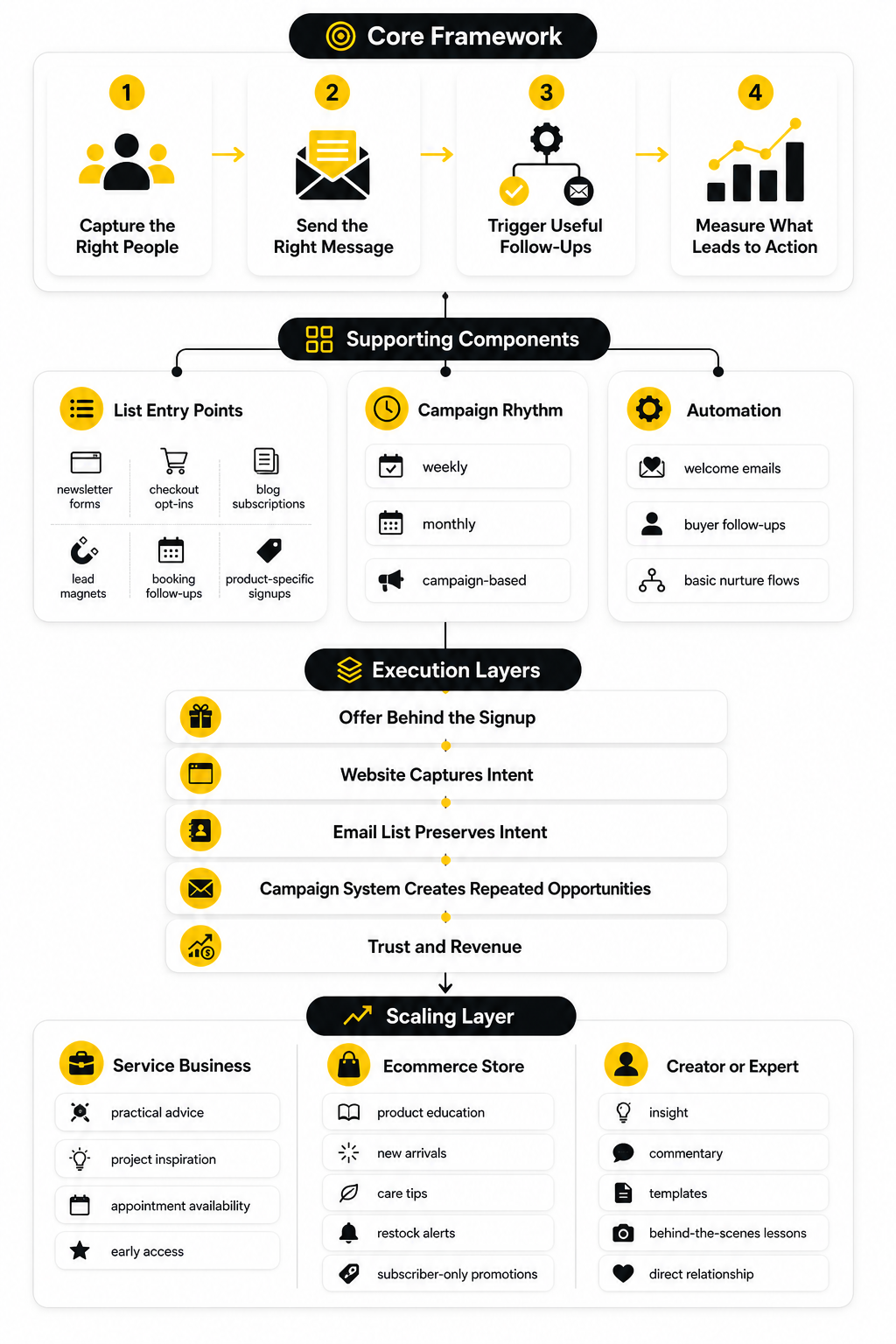
That framework keeps the strategy grounded. You are not collecting subscribers just to watch a number grow. You are building a direct audience that can support sales, bookings, launches, content distribution, customer education, and long-term loyalty.
Squarespace fits naturally into this framework because the website and email layer can share the same visual language. Squarespace’s own email marketing page highlights that users can pull site designs and products into email templates, which is useful when brand consistency matters and you do not want to rebuild every campaign from scratch in a separate tool like Squarespace Email Marketing. That design continuity is one of the main reasons people choose the native system instead of jumping immediately into a more complex platform.
Core Components Of A Strong Squarespace Email System
A strong Squarespace email system starts with clear list entry points. That usually means newsletter forms, checkout opt-ins, blog subscription prompts, lead magnets, booking-related follow-ups, or product-specific signup forms. The goal is not to interrupt every visitor, but to give the right visitor a good reason to stay connected.
The second component is campaign rhythm. A business that emails randomly usually trains its audience to ignore it, while a business that emails with a useful pattern becomes easier to trust. That rhythm might be weekly for a content-led brand, monthly for a service business, or campaign-based for an ecommerce shop with seasonal drops.
The third component is automation. Squarespace supports automated campaigns that send after a person takes a specific action, such as subscribing to a list or purchasing a product, as explained in its guide to sending automated campaigns. This matters because automation lets you welcome subscribers, follow up with buyers, and create basic nurture flows without manually sending every message.
Where Squarespace Is Strong
Squarespace is strongest when email needs to stay simple, visual, and close to the website. If your main problem is that you are not emailing at all, the native system can remove friction quickly. You can design emails, connect them to your site, send campaigns, and review engagement without learning a separate marketing platform.
It is also strong for brand consistency. Many small businesses lose time trying to make third-party emails look like their website, especially when they are not comfortable with code or advanced template editors. Squarespace reduces that gap because its email templates are built around the same polished design expectations as the website builder.
The platform also works well for businesses that need basic email marketing rather than complex lifecycle marketing. If you need a newsletter, product announcements, simple automations, and clean analytics, Squarespace can cover a lot. If you need advanced behavioral segmentation, multi-branch automation, lead scoring, sales pipeline automation, or heavy CRM workflows, you may eventually need a dedicated system such as GoHighLevel, Brevo, or Moosend.
Where You Need To Be Careful
The biggest mistake is assuming the tool will create the strategy for you. Squarespace can help you send beautiful emails, but it cannot decide your offer, your audience promise, your list-building angle, or your follow-up logic. Those decisions still need to come from the business.
The second mistake is judging email performance only by opens. Opens can help you understand subject line appeal, but clicks, replies, purchases, bookings, form submissions, and unsubscribe patterns tell you much more about whether the email actually worked. That is why later parts of this guide will focus on practical campaign structure and measurable actions, not vanity metrics.
The third mistake is waiting until everything is perfect. You do not need a huge list, advanced automation map, or complete content calendar to start. You need a clear reason for people to subscribe, a first welcome email, and a realistic sending rhythm you can maintain.
Professional Implementation Starts With The Offer
Professional email marketing on Squarespace starts before the first campaign is written. It starts with the offer behind the signup. People do not subscribe because a form exists; they subscribe because the promise feels useful, timely, or valuable enough to trade their email address for it.
For a service business, that promise might be practical advice, project inspiration, appointment availability, or early access to limited slots. For an ecommerce store, it might be product education, new arrivals, care tips, restock alerts, or subscriber-only promotions. For a creator or expert, it might be insight, commentary, templates, behind-the-scenes lessons, or a more direct relationship than social media allows.
This is where Squarespace email marketing becomes more than a design feature. The website captures intent, the email list preserves that intent, and the campaign system turns it into repeated opportunities for trust and revenue. The rest of this guide will build from that foundation, starting next with how Squarespace Email Campaigns actually works and where it fits inside the broader Squarespace ecosystem.
How Squarespace Email Campaigns Works
Squarespace Email Campaigns is the native email marketing tool inside Squarespace. Instead of building your site in one place and your emails somewhere else, you can manage mailing lists, design campaigns, send emails, create basic automations, and review performance from the same ecosystem. That is the main appeal: fewer tabs, fewer integrations, and less technical friction.
The tool is built around two main email types: blast campaigns and automated campaigns. A blast campaign is a one-time email you send to a selected list, such as a newsletter, launch announcement, seasonal update, product drop, event reminder, or content roundup. An automated campaign sends after a defined trigger, which makes it useful for welcome emails, subscriber follow-ups, and simple customer journeys.
This matters because most Squarespace users are not trying to build an enterprise marketing department. They want a clean way to communicate with the people who already care about their work. Squarespace Email Campaigns is designed for that kind of practical use, especially when your email marketing Squarespace setup needs to stay close to your website content, store, and brand design.
The Email Campaigns Dashboard
The Email Campaigns dashboard is where the system starts to feel manageable. You can create campaigns, view drafts, check sent emails, manage automations, and review performance without leaving Squarespace. That may sound basic, but it removes one of the biggest reasons small businesses avoid email: the setup feels too scattered.
Squarespace’s own guide to getting started with Email Campaigns explains the core workflow clearly: build mailing lists, send blast or automated marketing emails, and track audience engagement with built-in analytics. In practice, that means you can move from website visitor to subscriber to email recipient without stitching together too many separate systems. For a solo business owner or small team, that simplicity has real value.
The dashboard also helps you avoid treating email like a random side task. When campaigns, lists, and analytics live in one place, it is easier to build a repeatable habit. You can see what you sent, who received it, how people responded, and what needs improvement next time.
Mailing Lists Inside Squarespace
Mailing lists are the foundation of Squarespace email marketing. A mailing list is simply a group of subscribers who have given you permission to email them. You can use one general list at the beginning, but as your business grows, separate lists become more useful.
For example, a service business might keep one list for general updates and another for people interested in a specific offer. A store might separate customers, newsletter subscribers, and people who signed up for a discount or product update. A creator might separate readers by topic interest, content format, or paid versus free audience.
Squarespace supports list growth through built-in forms, newsletter blocks, promotional pop-ups, checkout options, and other site-based signup points. Its help guide on growing mailing lists with a Squarespace website confirms that Squarespace sites can collect new subscribers directly and store Email Campaigns mailing lists within the site. That is useful because your website is usually where intent is highest.
Campaign Design And Templates
The design side is one of Squarespace’s biggest advantages. If you chose Squarespace because you care about visual presentation, your emails should not feel like they came from a completely different brand. Squarespace Email Campaigns helps with that by making it easier to create emails that match the look and feel of your site.
You can use email layouts, add text and images, include buttons, feature products, and keep the brand experience consistent. This is especially helpful for businesses where aesthetics influence trust, such as design studios, photographers, boutiques, restaurants, wellness brands, consultants, and creative professionals. A polished email does not save a weak message, but it can make a strong message feel more credible.
The practical rule is simple: design should support the action, not bury it. A campaign should have one clear job. That job might be getting a click, booking a session, reading a new article, viewing a product, replying to the email, or joining an event. If the email has too many competing sections, even a beautiful template becomes noise.
Blast Campaigns
Blast campaigns are best for timely communication. They are the emails you send when there is something specific to say right now. That could be a new blog post, a product launch, a workshop announcement, a client update, a sale, a portfolio refresh, or a monthly letter to your audience.
The key is to avoid sending blast campaigns only when you want something. If every email is a pitch, your list will learn to ignore you. A better rhythm mixes useful content, trust-building updates, proof, education, and clear offers when the timing makes sense.
Squarespace’s guide to sending email campaigns notes that the dashboard can show how many subscribers received, opened, and clicked a link in a campaign. That is enough feedback to improve your next send if you use it properly. Do not obsess over one campaign, but do watch patterns over time.
Automated Campaigns
Automated campaigns are where email starts working even when you are not actively sending something manually. A welcome email after someone subscribes is the simplest example. It confirms the relationship, sets expectations, and gives the new subscriber a next step while their interest is still fresh.
Squarespace’s documentation on sending automated campaigns explains that automated emails can be sent after specific subscriber or customer actions. That makes them useful for basic nurture flows, post-purchase follow-ups, and onboarding sequences. You do not need a complicated automation map to benefit from this.
The most important automation is usually the first one. When someone joins your list, they should not be met with silence. A strong welcome email can remind them why they subscribed, introduce your best content or offer, and invite them to take one meaningful next action.
Analytics And Performance Tracking
Squarespace Email Campaigns includes analytics so you can see how campaigns perform. The platform’s guide to tracking email campaign analytics highlights performance indicators such as clicks and subscribes inside the Email Campaigns and automations dashboards. This gives you a basic read on whether your emails are getting attention and driving action.
You should treat analytics as decision support, not a scoreboard for your ego. A high open rate with no clicks may mean the subject line worked but the content or offer did not. A lower open rate with strong sales may be completely acceptable if the email reached the right segment with the right intent.
For most Squarespace businesses, the useful metrics are simple. Watch delivery, opens, clicks, unsubscribes, replies, sales, bookings, and form submissions. Then ask one practical question after every meaningful campaign: what did this email teach us about what our audience actually wants?
Pricing And Plan Limits
Squarespace Email Campaigns is available from inside Squarespace, but full sending access depends on the Email Campaigns plan you choose. Squarespace’s Email Campaigns pricing and billing documentation explains that plans vary by monthly send limits, mailing list details, and available features. The public Squarespace Email Marketing page also notes that some features are free, including building mailing lists, creating draft campaigns, and sending a limited number of trial blast campaigns.
This is important because the cheapest setup is not always the best setup. If you plan to email regularly, use automation, or grow a serious list, you need to check the limits before committing. A plan that looks inexpensive can become restrictive if your list grows or your campaign rhythm becomes more consistent.
The clean way to decide is to estimate your realistic monthly sending volume. Multiply your expected subscriber count by the number of campaigns you want to send each month, then leave room for growth. That gives you a more honest view of which plan fits your business.
When Native Squarespace Email Is Enough
Native Squarespace email is usually enough when your needs are straightforward. If you want to collect subscribers from your site, send attractive newsletters, announce offers, run basic automated follow-ups, and keep everything visually consistent, it can be a very good fit. It is especially useful when execution speed matters more than advanced customization.
It is also enough when your list is still small and your main goal is consistency. Many businesses do not need more software; they need to send better emails more often. Starting inside Squarespace can help you build that habit before adding more complexity.
The native system also makes sense when your website is already doing most of the selling. If your pages explain the offer well and your email mainly brings people back to those pages, Squarespace can support that workflow cleanly. In that setup, email does not need to do everything; it needs to create the return visit.
When You May Need A Separate Email Platform
A separate email platform starts to make sense when your strategy outgrows the native tool. That usually happens when you need deeper segmentation, more advanced automation, CRM-style contact records, sales pipeline tracking, SMS, lead scoring, advanced tagging, or multi-step funnels. At that point, the email system is no longer just a newsletter tool; it becomes part of your revenue operations.
For agencies, consultants, and service businesses that need CRM, funnels, appointment workflows, and automation in one place, GoHighLevel can be a stronger fit than keeping everything inside Squarespace. For businesses that want email marketing with broader campaign tools and more advanced contact management, Brevo is worth comparing. For creators and small businesses that want a dedicated email platform with automation options, Moosend can also make sense.
The decision is not about which tool sounds more impressive. It is about operational fit. If Squarespace helps you send consistently and profitably, use it. If the limits are blocking your strategy, connect a platform that can handle the next stage.
The Setup Order That Makes Sense
The best setup order is simple and practical. First, create the mailing list. Second, place signup points on the site. Third, write the welcome email. Fourth, send one useful campaign. Fifth, review the data and improve from there.
That order works because it avoids the trap of building a complex system before you know what your audience responds to. You do not need ten automations on day one. You need one clean path from visitor to subscriber to meaningful follow-up.
Once that basic path is working, you can improve each piece. You can test better signup copy, create more relevant lists, write stronger campaigns, add automations, and connect outside tools if needed. That is how email marketing Squarespace implementation becomes professional without becoming overwhelming.
Building A List From Your Squarespace Website
Now the work becomes more concrete. A Squarespace email marketing system only works when the website gives visitors a clear, natural way to join the list. That does not mean plastering signup boxes everywhere. It means placing the right invitation in the parts of the site where attention and intent already exist.
Start by thinking about why someone is on the page. A visitor reading a blog post may want more ideas like the one they just found. A visitor viewing a service page may want a practical checklist, pricing guidance, or a reason to book a call. A customer at checkout may want updates, product tips, or early access to future offers.
That context matters because generic signup copy is weak. “Join our newsletter” is technically clear, but it rarely creates urgency or desire. A better signup promise tells the visitor what they will get, why it is useful, and how often they should expect to hear from you.
Choose One Primary List Goal First
Before adding forms, decide what the list is supposed to do. The goal may be selling products, booking consultations, promoting content, filling events, nurturing leads, announcing launches, or bringing past customers back. If the goal is vague, the signup message will be vague too.
For most Squarespace sites, one primary list goal is enough at the beginning. A photographer might focus on inquiry nurturing. A boutique might focus on product drops and repeat purchases. A consultant might focus on trust-building content that leads to booked calls.
This decision keeps the entire setup cleaner. You can always add more lists and segments later, but the first version should be easy to understand. A clear list with a clear promise will beat a complicated setup that nobody maintains.
Create The Mailing List In Squarespace
Squarespace lets you create mailing lists from the Lists & Segments area in Contacts. Its guide to building mailing lists explains that you can create a mailing list, rename it, remove contacts from a list, and copy or move contacts between lists. That is enough structure for a clean first implementation.
Name the list based on the subscriber’s intent, not your internal filing system. “Newsletter” is fine if the promise is general updates, but “Workshop Interest,” “New Product Alerts,” “Client Education,” or “Subscriber Offers” may be clearer for future organization. The name should make sense when you come back later and need to choose who receives a campaign.
Do not create five lists just because the option exists. More lists can help when they represent real differences in intent. More lists become a problem when they create confusion, duplicate subscribers, and inconsistent sending.
Place Signup Points Where They Fit Naturally
Squarespace supports several practical ways to collect subscribers directly from your site. The platform’s guide to growing mailing lists with a Squarespace website lists form and newsletter blocks, promotional pop-ups, and checkout signup as list-building options. That gives you enough flexibility to build a list without turning the site into a messy funnel.
The easiest starting point is a newsletter block in a high-visibility area. Squarespace’s guide to newsletter blocks notes that these blocks let visitors subscribe to a newsletter and can store submissions in an Email Campaigns mailing list, Mailchimp audience, Google Drive, or Zapier integration. A footer signup works well because it appears across the site, but it should not be the only opt-in if email is important to your business.
You can also place signup blocks inside content where the context is stronger. A blog post can invite readers to get future articles. A service page can invite prospects to receive a practical guide before contacting you. A product education page can invite shoppers to get care tips, restock alerts, or launch updates.
Use Pop-Ups Carefully
Promotional pop-ups can grow a list, but they need discipline. Squarespace’s guide to creating a promotional pop-up explains that pop-ups can appear when visitors land on your site or on specific pages, with options for display timing and placement. That power is useful, but it can also annoy people when used badly.
A good pop-up feels like a relevant offer, not a demand for attention. If someone lands on a product page, a subscriber-only first-purchase incentive may make sense. If someone lands on a blog post, a content-based opt-in may feel more natural. If someone is trying to read, buy, or book, a badly timed pop-up can interrupt the exact action you wanted.
Use pop-ups when the value is obvious and the timing is respectful. Avoid stacking multiple interruptions on the same visit. The goal is to capture interested people, not pressure everyone into joining a list they will ignore later.
Add Checkout Signup For Ecommerce
For Squarespace Commerce stores, checkout signup can be one of the cleanest list-building points. The customer is already in a buying context, so the invitation feels relevant when it is positioned around useful follow-up. That might include product tips, restock updates, early access, care instructions, or future offers.
This is different from asking random visitors to subscribe before they understand the brand. A buyer has already shown trust. That makes checkout signup valuable for retention, especially if your products have repeat-purchase potential or seasonal buying patterns.
Be direct about what people are joining. Do not make the signup sound like a required part of the transaction if it is optional. Clear permission protects trust, and trust is more valuable than a slightly bigger list.
Connect Form Storage Correctly
Every signup form needs a storage destination. Squarespace’s documentation on managing form and newsletter storage explains that Squarespace mailing list storage is available for newsletter blocks, checkout newsletter signup, promotional pop-ups, and cover page newsletter signup on older version 7.0 sites. That means you can send many subscriber sources into a Squarespace mailing list without needing a separate platform.
This is one of the parts where you should slow down and check your work. A signup form that looks good but stores subscribers in the wrong place creates silent damage. You may think your list is growing, then later discover the contacts went into a spreadsheet, a disconnected audience, or nowhere useful for Email Campaigns.
After connecting storage, test the form yourself. Use a real email address, submit the form, confirm the contact appears in the right list, and check the subscriber experience. This sounds basic because it is basic, and that is exactly why people skip it.
The Practical Implementation Process
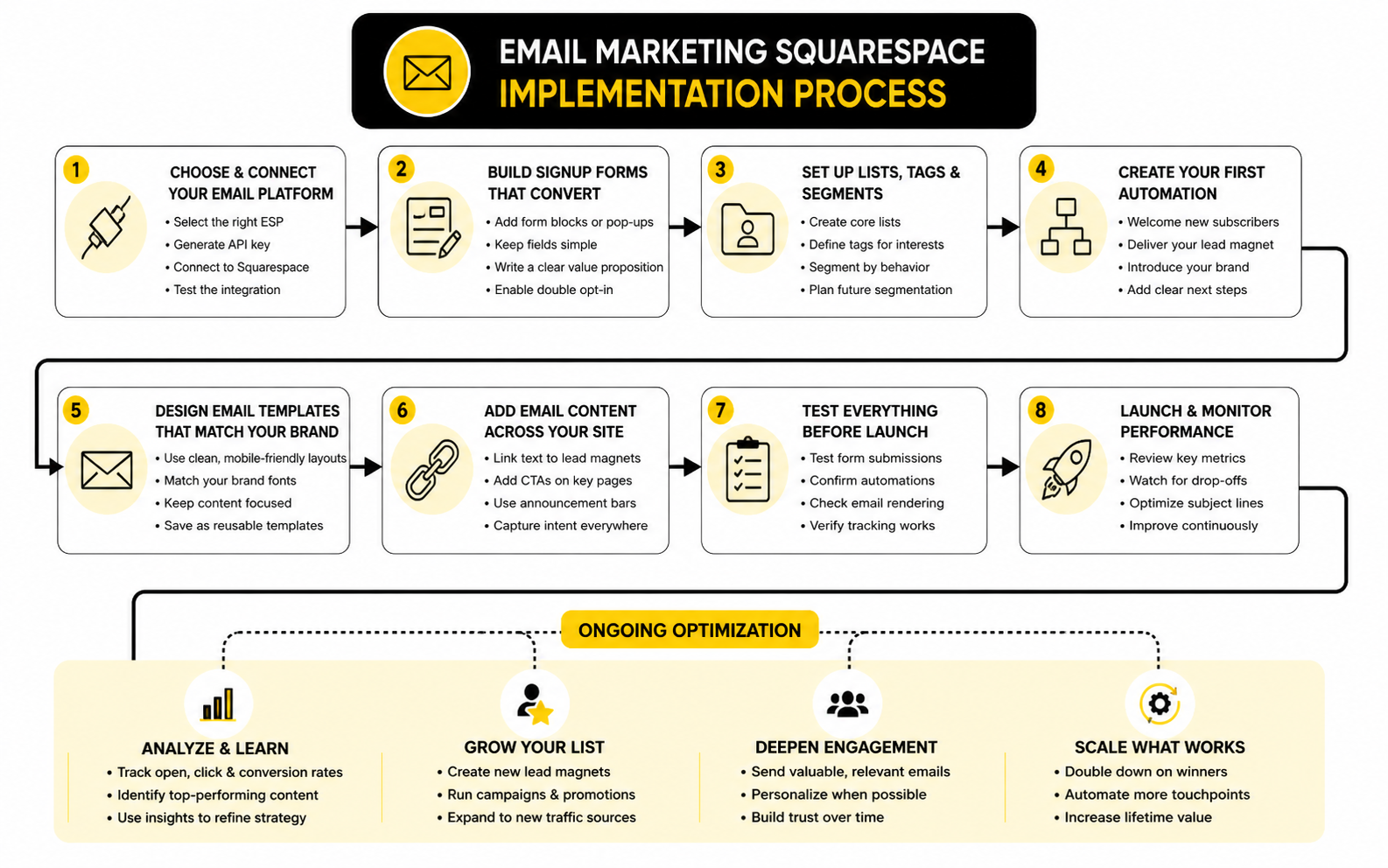
The fastest way to implement email marketing Squarespace correctly is to build one complete path before adding complexity. That path should move from signup promise to form placement to list storage to welcome email to first campaign. When that path works, you have a functioning system.
Use this process as the first implementation pass:
This process works because it forces execution. You are not building a theoretical marketing machine. You are creating a real path that a real visitor can take today.
Write Signup Copy That Sets Expectations
Signup copy should answer three questions quickly. What will the subscriber receive? Why should they care? How often will you email them? If those answers are missing, the visitor has to guess, and guessing lowers conversions.
For a service business, the copy might promise practical guidance and occasional availability updates. For an ecommerce brand, it might promise product drops, care tips, and subscriber offers. For a content-led business, it might promise weekly ideas around a specific topic, not vague “updates.”
Do not overpromise. If you say you will send weekly advice, send weekly advice. If you say subscribers get early access, give them early access. Your signup copy is the first trust contract in the relationship.
Build A Welcome Email Before You Grow The List
The welcome email should exist before you drive serious traffic to the signup form. When someone subscribes, their interest is highest right after the signup. Silence at that moment wastes momentum.
A strong welcome email does three jobs. It confirms what they signed up for, introduces the value of staying subscribed, and gives them one next step. That next step might be reading a guide, viewing a product category, booking a consultation, replying with a question, or following a specific resource.
Keep the welcome email focused. Do not dump your entire brand story, every service, and five links into the first message. Give the subscriber a clean start and make the next action obvious.
Keep Permission And Verification Clean
Email marketing only works when permission is clear. Squarespace’s guide to Email Campaigns subscriber verification explains that newsletter blocks and promotional pop-up subscriptions may require verification through Google reCAPTCHA or email when using Squarespace for storage. That protects list quality and reduces the chance of unwanted signups creating deliverability problems.
This is not just a compliance checkbox. A smaller list of people who actually want your emails is more valuable than a bloated list of people who joined by accident, forgot why they subscribed, or never confirm interest. Poor list quality eventually shows up through low engagement, unsubscribes, spam complaints, and weak campaign results.
Make the permission language simple. Tell people what they are signing up for. Let them unsubscribe easily. Respect the inbox, and your list will become an asset instead of a liability.
Use Integrations Only When They Solve A Real Problem
Squarespace gives you native list-building options, but you can connect other tools when your workflow needs them. Newsletter blocks can store submissions in Squarespace, Mailchimp, Google Drive, or through Zapier, as described in Squarespace’s newsletter block documentation. Squarespace also explains that Zapier can connect form blocks, newsletter blocks, or cover pages to outside actions through its guide to adding form integrations with Zapier.
Use integrations when there is a clear reason. If you need a CRM, pipeline automation, SMS follow-up, and deeper lead management, GoHighLevel may make sense. If you want a dedicated email platform beyond the native Squarespace system, Brevo or Moosend can be practical alternatives.
Do not add tools because they sound more advanced. A simple native setup that gets used every week beats a complex stack nobody understands. Add complexity only when the current system is clearly blocking growth, measurement, or follow-up.
Check The Subscriber Path Like A Customer
Before publishing the final setup, walk through the subscriber path like a customer. Visit the page, read the signup promise, submit the form, check the confirmation experience, look for the welcome email, and click the next step. This reveals gaps that are invisible when you only look at the admin dashboard.
Pay attention to small friction points. Is the form easy to find? Does the button copy make sense? Does the confirmation message reassure the subscriber? Does the welcome email arrive with a subject line that matches the signup promise?
This review turns implementation into a real customer experience. That is the difference between “we added email marketing” and “we built a working email path.” The first sounds nice. The second can actually grow the business.
Statistics And Data That Actually Matter
Data is useful only when it changes what you do next. In email marketing Squarespace workflows, the goal is not to collect impressive-looking numbers. The goal is to understand whether your subscribers are receiving, opening, clicking, replying, buying, booking, or quietly drifting away.
That means you need to separate vanity metrics from decision metrics. Opens can tell you something about subject lines and sender trust, but they are no longer clean proof of human attention because privacy features can affect tracking. Clicks, conversions, replies, unsubscribes, bounces, and revenue signals usually give you a clearer view of whether the email did its job.
Current benchmark data is useful as a reference point, not a final grade. MailerLite’s 2025 benchmark report shows an average email open rate of 43.46% and an average click rate of 2.09%. Those numbers can help you spot obvious problems, but your own list quality, offer, industry, audience relationship, and sending rhythm matter more than a global average.
How To Read Squarespace Email Analytics
Squarespace gives you a practical analytics layer inside Email Campaigns. Its documentation on tracking email campaign analytics explains that the Email Campaigns dashboard and automations dashboard show performance indicators such as clicks and subscribes. For most small businesses, that is enough to start making more carefully decisions.
The important thing is to read the numbers in context. A product launch email should be judged differently from a monthly content email. A welcome email should be judged differently from a last-minute event reminder. Every campaign needs a clear purpose before the analytics can mean anything.
If the email was meant to drive traffic, clicks matter most. If it was meant to sell, revenue or orders matter most. If it was meant to build trust, replies, forwards, consultation requests, or returning site visits may tell the better story.
The Measurement System
A clean measurement system starts with one question: what action was this email supposed to create? Once you answer that, the rest of the data becomes easier to interpret. You stop asking whether the email was “good” in a vague way and start asking whether it moved the reader toward the next step.
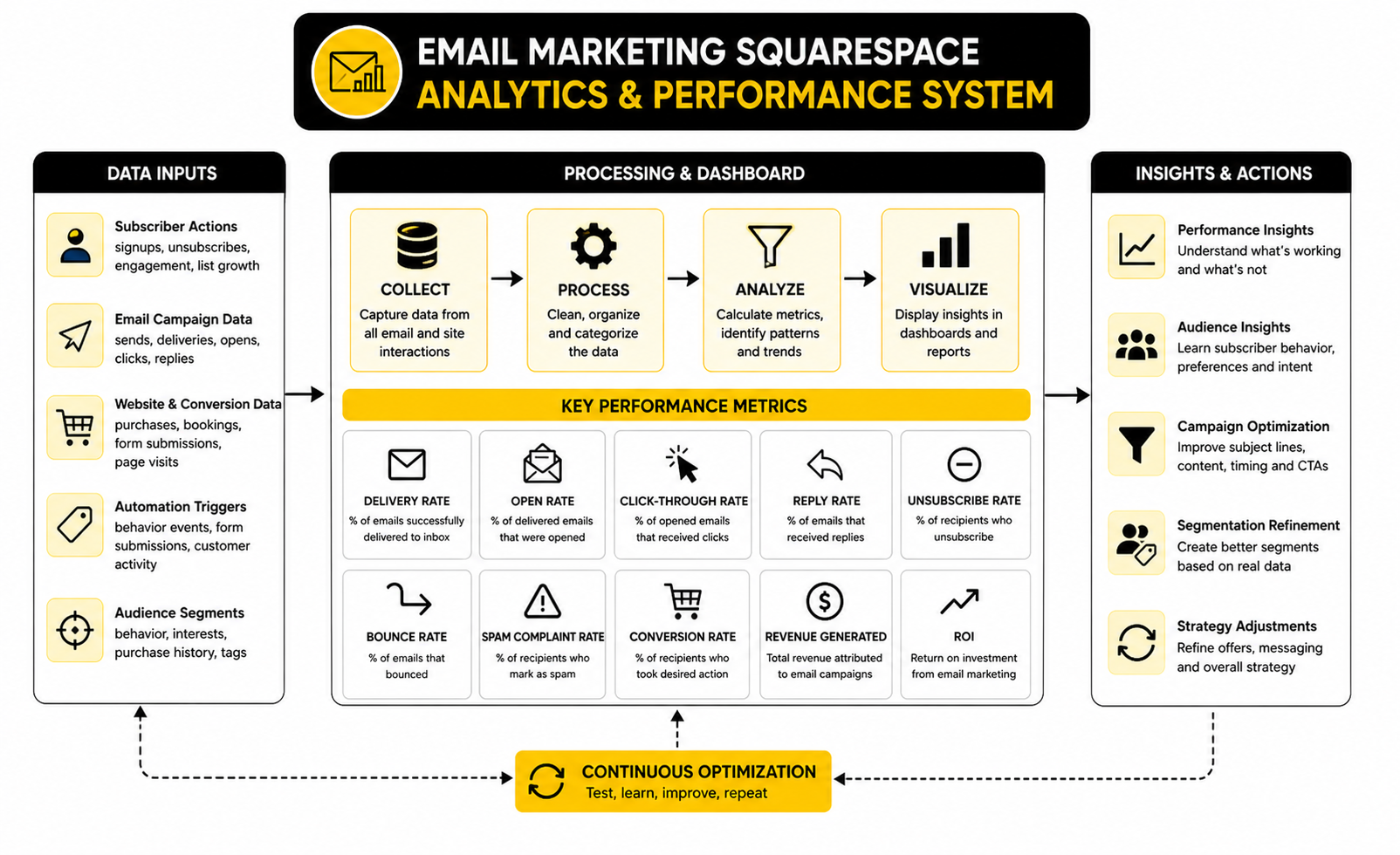
Use this simple measurement flow for every meaningful campaign:
This sequence matters because each metric explains a different part of the journey. Low delivery points to list quality or deliverability problems. Low opens point to weak subject lines, poor timing, or fading trust. Low clicks point to unclear content, weak offer alignment, or too many competing calls to action.
Open Rate: Useful, But Not Sacred
Open rate is still worth watching, but it should not control your strategy. It tells you whether your sender name, subject line, preview text, timing, and audience relationship are creating enough curiosity for someone to open. That is useful information, especially when you compare similar emails sent to similar audiences.
The problem is that open tracking is not as reliable as it used to be. GetResponse’s benchmark analysis notes that open rates became less reliable after Apple introduced Mail Privacy Protection, while click-through behavior remains more useful for understanding engagement in many cases. That means you should treat opens as a directional signal, not a perfect truth.
For a Squarespace user, the action is simple. If open rates are weak across several campaigns, improve the sender identity, make the subject line more specific, and send content that matches the signup promise. Do not rewrite your entire strategy because one email underperformed.
Click Rate: The Cleaner Engagement Signal
Click rate is usually more useful than open rate because it shows active intent. Someone saw the email, understood the offer or idea, and chose to take the next step. That step may be reading a blog post, viewing a product, booking a call, registering for an event, or visiting a landing page.
A low click rate does not always mean the audience is bad. It may mean the email had too many links, the main offer was buried, the button copy was vague, or the campaign was sent to people who were not ready for that message. This is where email marketing Squarespace performance becomes practical: you look at the email, look at the page it sent people to, and remove friction.
Make the click path obvious. One primary call to action is usually stronger than five competing ones. If the email is about a new service, send people to the service page. If it is about a product drop, send people directly to the relevant product or collection.
Conversion Rate: The Metric That Connects Email To Business
Conversion rate is where email stops being “content” and starts becoming business infrastructure. A conversion can be a purchase, booking, inquiry, download, registration, reply, or any other action that supports the goal of the campaign. This is the number that tells you whether attention turned into movement.
A campaign can have a modest click rate and still perform well if the clicks are highly qualified. A small, warm list can outperform a large, cold list because the relationship is stronger and the offer is more relevant. That is why chasing list size without tracking conversions is a trap.
For Squarespace sites, conversion tracking should be tied to the destination page. If an email gets clicks but no purchases or inquiries, the problem may not be the email. The page may need stronger copy, clearer pricing, better proof, a simpler booking path, or a more obvious next step.
Unsubscribes And Bounces Are Not Always Bad News
Unsubscribes feel personal, but they are part of healthy email marketing. MailerLite’s 2025 benchmark data shows an average unsubscribe rate of 0.22%, which gives you a rough reference point for normal list movement. A few unsubscribes after a campaign do not mean the email failed.
What matters is the pattern. If unsubscribes spike after a specific campaign, the message may have been too aggressive, irrelevant, misleading, or far away from the reason people subscribed. If unsubscribes rise slowly over time, your sending frequency, content quality, or audience targeting may need work.
Bounces are different because they affect deliverability. Squarespace explains in its guide to email campaign unsubscribes and cleaned addresses that hard-bounced addresses are automatically removed because no inbox exists for that address. That cleanup is useful because sending to bad addresses can weaken future campaign performance.
Revenue And ROI Need A Clear Attribution Habit
Email has a strong reputation for ROI, but that does not help you unless you track your own results. Litmus reported in 2025 that many marketers saw email returns ranging from 10:1 to 36:1, while a separate Litmus ROI breakdown found that some marketing leaders reported even higher return ranges from email programs. The lesson is not that every Squarespace user should expect the same number. The lesson is that email can be extremely valuable when measurement is tied to real outcomes.
Start simple. For each campaign, record the send date, list, subject line, main offer, clicks, orders, bookings, inquiries, or revenue that followed. You do not need a complicated dashboard at the beginning. You need a habit of connecting campaigns to outcomes.
This is especially important for service businesses because the sale may not happen instantly. An email might lead to a consultation request, then a proposal, then a client two weeks later. If you only measure immediate clicks, you may undervalue the campaigns that actually create trust.
Benchmarks Are A Map, Not A Verdict
Benchmarks help you see whether your results are wildly outside the normal range. They are useful when you need a reality check. They are dangerous when you treat them like universal rules.
A local service business with a small list of past clients might see very high opens and replies because the relationship is personal. A ecommerce store with a larger discount-driven list might see lower opens but stronger direct revenue during launches. A content-led brand may care more about repeat clicks and replies than immediate sales.
Use benchmarks to diagnose, not to panic. If your open rate is far below relevant averages for several campaigns, look at subject lines and list quality. If your clicks are weak, fix the message and call to action. If conversions are weak, fix the landing page, offer, checkout, booking path, or follow-up.
Campaign Patterns To Watch Over Time
One campaign rarely tells the full story. The better approach is to watch trends across several sends. That gives you enough data to separate a bad email from a deeper issue.
Look for patterns like these:
These patterns tell you what to change. If educational emails get clicks but promotional emails do not, the offer may need more context before the pitch. If product emails get clicks but no sales, the product page may need stronger proof or better checkout flow. If welcome emails perform well but later campaigns fade, your ongoing content may not be matching the promise that got people to subscribe.
What To Do With The Data
The data should lead to small, focused improvements. Do not change the subject line, offer, design, send time, audience, and landing page all at once. If you change everything, you will not know what made the difference.
Use a simple improvement rhythm after each campaign. Keep what worked. Fix the weakest point. Test one meaningful change in the next email. That is how performance improves without turning email marketing into a guessing game.
For example, if opens are fine but clicks are low, rewrite the email around one clearer call to action. If clicks are strong but conversions are low, improve the Squarespace page people land on. If unsubscribes spike, check whether the email broke the expectation you created when people joined the list.
When Analytics Show You Need Better Tools
Squarespace analytics are enough for many businesses, but some teams eventually need deeper tracking. If you need attribution across long sales cycles, pipeline reporting, advanced automation, SMS follow-up, or sales team visibility, the native dashboard may become too limited. That is usually when a dedicated CRM or marketing automation platform becomes worth considering.
For service businesses, agencies, and teams that want email, CRM, funnels, booking workflows, and automation in one place, GoHighLevel is a practical upgrade path. For businesses that want a broader email and customer communication platform, Brevo can be a strong option. For smaller teams that mainly want dedicated email marketing and automation beyond Squarespace, Moosend is worth comparing.
The point is not to abandon Squarespace too early. The point is to know when the data you need is more advanced than the tool you are using. When measurement becomes a bottleneck, upgrading the stack can be a smart business decision.
The Practical Analytics Habit
The best analytics habit is boring in the best possible way. After each campaign, write down what you sent, who received it, what action you wanted, what happened, and what you will change next time. That single habit can improve your email marketing faster than chasing random tactics.
You can do this in a spreadsheet, a project management tool, or a simple internal note. The format does not matter as much as the consistency. Over time, you will see which topics attract attention, which offers drive revenue, which pages convert, and which subscriber groups are most engaged.
That is where email marketing Squarespace becomes a serious channel. Not because every email is perfect. Because every email teaches you something useful, and the next one gets sharper.
Automations, Segmentation, And Professional Implementation
Once the basic system is working, the next level is not “send more emails.” The next level is sending more relevant emails. That is where automation, segmentation, and professional implementation start to matter.
Email marketing Squarespace users often stay too long in broadcast mode. Every subscriber receives the same update, the same offer, and the same follow-up, even when their behavior shows different intent. That is fine at the very beginning, but it becomes limiting once the list includes buyers, prospects, readers, event leads, abandoned inquiries, and long-term customers.
The goal is not to make the system complicated for the sake of it. The goal is to make each subscriber’s experience feel more connected to what they actually did on your website. When your emails reflect real behavior, they become more useful and less intrusive.
Start With Behavior Before Demographics
Segmentation gets overcomplicated fast. People start building segments around broad labels like age, location, or industry before they have enough useful data to act on. For most Squarespace businesses, behavior is the better starting point.
Behavioral segments come from actions people take. Someone subscribed from a blog post. Someone bought a product. Someone joined through a service page. Someone clicked a launch email. Someone attended an event or downloaded a resource.
Those actions tell you more than a generic profile ever could. A person who clicked three emails about a specific service is showing interest. A customer who bought once and still opens product education emails may be ready for a second purchase. A subscriber who has not opened or clicked for months may need a re-engagement email or should be removed later to protect list quality.
Build Segments Around Intent
The best segments represent different levels of intent. That keeps your email strategy tied to real business movement instead of abstract organization. You are not segmenting because marketers say segmentation is good. You are segmenting because different people need different next steps.
For a service business, useful segments might include general subscribers, consultation leads, past clients, and people interested in a specific offer. For ecommerce, useful segments might include first-time buyers, repeat buyers, product category interest, seasonal shoppers, and subscribers who have never purchased. For a content-led brand, useful segments might include topic interests, free subscribers, paid customers, event attendees, and inactive readers.
The practical test is simple. If you cannot imagine sending a meaningfully different email to a segment, you probably do not need that segment yet. A segment should change the message, timing, offer, or call to action.
Use Automations To Handle Repeated Moments
Automation is best for moments that happen again and again. A new subscriber joins. A customer buys. A prospect fills out a form. Someone registers interest in an event. A client completes a project. Those moments deserve timely follow-up, and manually remembering each one is not a scalable system.
Squarespace has been expanding automation guidance around drip campaigns, and its 2026 guide to building automated email campaigns frames drip marketing as a way to send a sequence of emails over time after a trigger or subscription event. That matters because one welcome email is useful, but a short sequence can build understanding before asking for a bigger action. The sequence should still stay lean, focused, and respectful.
A good automation does not feel robotic. It feels like a business paying attention. The message arrives at a logical moment, answers the next obvious question, and gives the reader one useful next step.
The First Automations Worth Building
Do not begin with a giant automation map. Begin with the highest-leverage moments in the customer journey. These are the automations most Squarespace businesses should consider first.
Each automation should have a clear purpose. Do not write five emails when two would do the job. The point is not to fill inboxes; the point is to move people through the relationship with less manual effort.
Keep The Welcome Sequence Tight
The welcome sequence is usually the safest place to start. The subscriber has just raised their hand, so timing is on your side. You do not need to sell aggressively in the first email, but you do need to create momentum.
A simple welcome sequence can work like this. Email one confirms the promise and gives the subscriber the thing they expected. Email two shares your best practical guidance or explains how to think about the problem you solve. Email three gives a clear next step, such as viewing a product category, booking a consultation, reading a deeper guide, or replying with a question.
The sequence should sound like a human conversation. Avoid bloated brand manifestos, generic founder stories, and fake urgency. Tell the subscriber what matters, why it matters, and what to do next.
Use Lead Nurture For Higher-Consideration Offers
Service businesses, consultants, coaches, designers, agencies, and premium ecommerce brands usually need more trust before someone buys. A single email is rarely enough when the offer requires money, time, risk, or a meaningful decision. That is where lead nurture becomes important.
Lead nurture should reduce uncertainty. It can explain the process, answer common objections, show what happens after inquiry, clarify who the offer is for, and help the subscriber feel more prepared before booking or buying. The job is not to pressure people; it is to remove confusion.
This is where more advanced tools can become useful if Squarespace alone feels too limited. If your sales process involves forms, calendars, CRM stages, SMS reminders, pipeline follow-up, and multi-step automation, GoHighLevel may fit better than a purely native setup. If you mainly need dedicated email automation and contact management while keeping Squarespace as the website, Brevo or Moosend can be cleaner upgrade paths.
Watch Deliverability As You Scale
Deliverability becomes more important as your list grows. At a small scale, people often ignore it because emails seem to send fine. At a larger scale, weak list quality, low engagement, spam complaints, and bad imports can quietly reduce inbox placement.
Squarespace’s email campaign best practices warn against collecting addresses through giveaways that require an email address for entry because those recipients may not recognize the sender and may mark campaigns as spam. The same guidance also recommends importing only active, engaged subscribers and removing unsubscribed, culled, or cleaned addresses before bringing a list into Email Campaigns through Squarespace email campaign best practices. That is not a minor technical detail. It is the difference between growing a real audience and dragging around dead weight.
List hygiene is not glamorous, but it protects the channel. Remove obvious bad addresses. Respect unsubscribes. Do not keep emailing people who never engage just because the list number looks better. The inbox rewards relevance more than ego.
Avoid The Common Scaling Trap
The common scaling trap is believing that more subscribers automatically means more revenue. It might, but only if the subscriber quality stays high and the email system stays relevant. A large list with poor intent can be expensive, noisy, and hard to revive.
The better goal is qualified growth. You want subscribers who understand why they joined, recognize your brand, and have a real reason to hear from you again. That requires better signup promises, cleaner forms, more intentional traffic sources, and campaigns that match the expectation you created.
This is why buying lists, scraping contacts, or overusing generic giveaways is a bad long-term move. It may inflate the database quickly, but it weakens trust and can damage deliverability. A smaller list that clicks, replies, buys, and books is far more valuable than a massive list that barely knows who you are.
Match Email Frequency To Audience Trust
There is no universal sending frequency that works for every Squarespace business. The right frequency depends on the promise, the offer, the audience, and the quality of what you send. A daily email can work for a high-value content brand. A monthly email can work for a boutique service business. A seasonal rhythm can work for product launches or events.
The danger is inconsistency without intention. If you disappear for six months and then send five sales emails in one week, the audience has not been warmed up for that ask. If you email constantly without enough value, people start tuning out.
Choose a rhythm you can sustain. Then train the audience to expect that rhythm. Consistency builds recognition, and recognition makes every later offer easier.
Use Personalization Without Being Creepy
Personalization should make the email more useful, not more uncomfortable. Using someone’s name can be fine, but it is not a strategy by itself. Real personalization comes from relevance: what they signed up for, what they clicked, what they bought, what they asked about, or where they are in the buying journey.
For example, a subscriber who joined through a service guide should not immediately receive generic product announcements. A customer who bought a specific product may appreciate care instructions, related items, or timing-based replenishment reminders. A lead who clicked several emails about one offer may be ready for a direct invitation.
Keep it respectful. Do not overstate what you know about the subscriber. Do not make the email feel like surveillance. The best personalization feels helpful, not invasive.
Create A Simple Content System
Email gets easier when it has a content system behind it. Without one, every campaign feels like starting from zero. That is why many businesses send a few emails, get busy, and disappear.
A simple content system can include four recurring email types:
This structure keeps the list warm without making every email a hard sell. It also gives you a practical rhythm when you do not know what to send. You are not guessing from scratch; you are choosing the next useful conversation.
Plan For Compliance Before It Becomes A Problem
Email compliance is not optional. You need permission, accurate sender information, honest subject lines, and a clear unsubscribe path. These are basic trust requirements, not legal decorations.
Squarespace already includes unsubscribe handling in campaign footers, and its mailing list documentation explains that when someone unsubscribes from a campaign footer, their name and email address are removed from all mailing lists. That is helpful, but you still need to be careful with how addresses enter the system in the first place. Permission at signup is the part you control.
If your audience includes people in regions with stricter privacy rules, be extra careful with consent language and data handling. Do not assume that a form submission gives you permission to send every type of marketing email forever. Be clear, keep records where possible, and make unsubscribing easy.
Know When To Stay Native And When To Upgrade
The smartest move is not always upgrading. Native Squarespace email is a good fit when you need clean campaigns, basic automations, site-connected signup forms, and simple performance tracking. If that setup helps you send consistently and make money, there is no need to complicate it.
Upgrade when the limits are obvious. You may need more advanced automation logic, deeper segmentation, better sales attribution, pipeline management, SMS follow-up, multi-channel campaigns, or more detailed customer records. At that point, the tool is not just sending emails; it is managing the relationship between marketing and sales.
This is the strategic tradeoff. Squarespace keeps things simple and close to the website. Dedicated platforms give you more control and complexity. The right choice depends on whether complexity will create more revenue or just more admin.
Build The System Around The Business Model
The final expert-level point is simple: your email system should match how the business actually makes money. An ecommerce store needs repeat purchase, product education, launch, and retention flows. A service business needs inquiry nurturing, proof, objection handling, and appointment follow-up. A creator needs audience trust, content distribution, product launches, and community depth.
When the email system matches the business model, every campaign has a reason to exist. The signup promise is clearer. The automations are easier to design. The metrics become easier to interpret because you know which behavior matters.
That is what separates professional email marketing from random newsletters. You are not just sending updates from a Squarespace site. You are building a repeatable communication system that supports the way the business grows.
Optimization, Tool Choices, And The Final System
By this point, the system should be clear. Your Squarespace site captures attention, your forms turn that attention into permission, your campaigns create movement, your automations handle repeated moments, and your analytics show what to improve. That is the complete email marketing Squarespace loop.
The final stage is deciding how much sophistication your business actually needs. Some businesses should stay native because Squarespace Email Campaigns is simple, branded, and close to the site. Others should connect a dedicated platform because the business has moved beyond basic newsletters and simple automations.
Do not make that decision based on software hype. Make it based on operational pressure. If your current setup helps you grow the list, send consistently, track outcomes, and create revenue, it is working. If the system is blocking segmentation, follow-up, attribution, or sales process visibility, it is time to upgrade.
The Squarespace Email Marketing Ecosystem
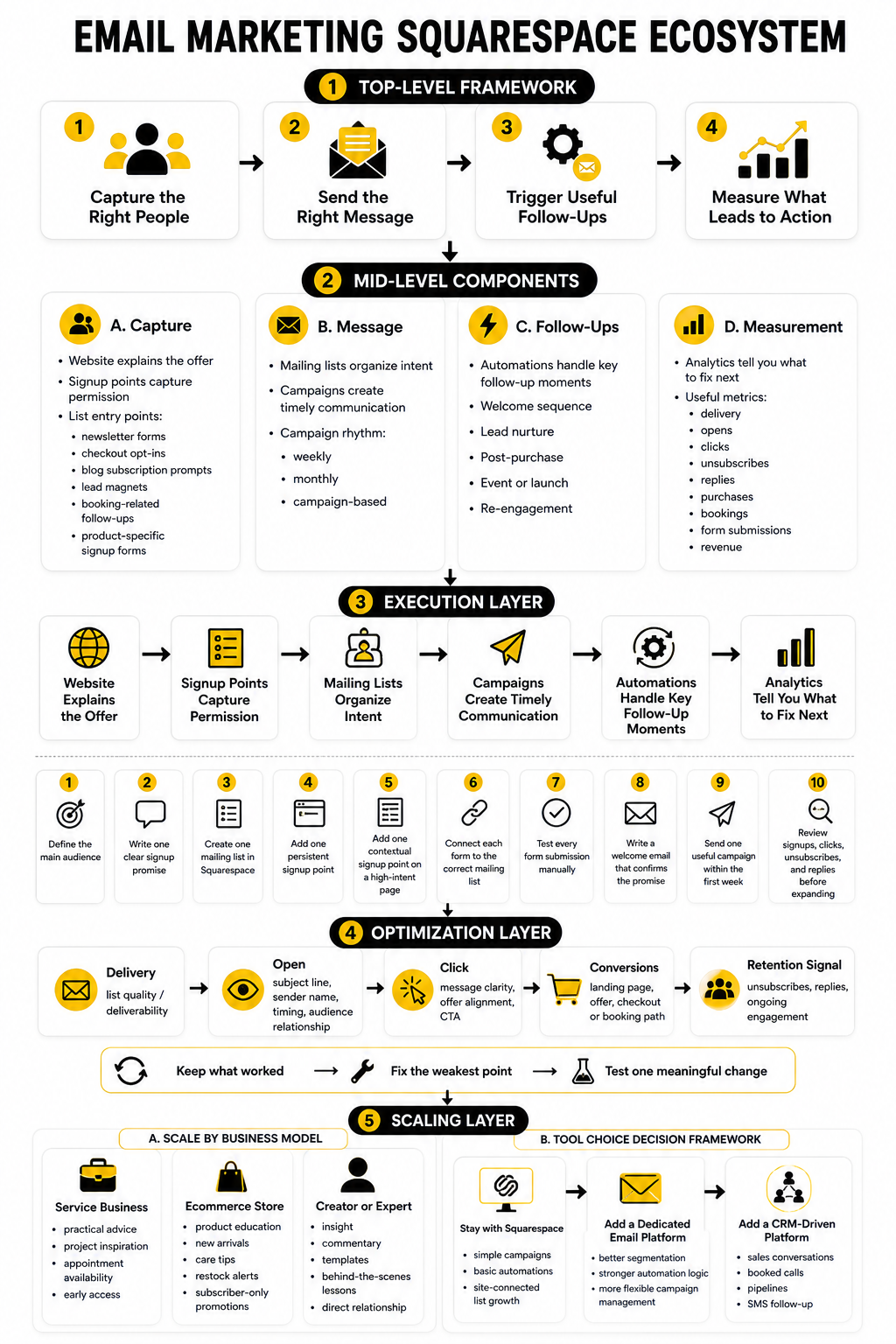
A mature Squarespace email system has several parts working together. The website explains the offer. The signup points capture permission. The mailing lists organize intent. The campaigns create timely communication. The automations handle key follow-up moments. The analytics tell you what to fix next.
That ecosystem should feel simple from the outside and intentional from the inside. Visitors should see clear signup invitations, useful emails, and logical next steps. You should see a manageable system that supports your business model without becoming a full-time admin project.
Squarespace’s own Email Campaigns FAQ describes Email Campaigns as a built-in newsletter and marketing email feature for branded campaigns, while its pricing documentation explains that plans vary by monthly send limits and available features. That is the practical frame: Squarespace gives you the native layer, but your strategy decides whether that layer is enough.
When To Keep Everything Inside Squarespace
Keep email inside Squarespace when the business needs clean execution more than advanced control. This is common for portfolio sites, local businesses, restaurants, small ecommerce shops, creators, coaches, consultants, and service providers who want to send useful campaigns without managing a large marketing stack. In that situation, simplicity is not a weakness. It is an advantage.
Native Squarespace Email Campaigns is especially practical when your main email needs are newsletters, announcements, basic automations, site-connected signup forms, and simple analytics. You can build mailing lists, create draft campaigns, and send a limited number of trial blast campaigns before choosing a paid plan through Squarespace Email Marketing. That makes it easier to test whether the workflow fits before turning email into a larger investment.
The native route also makes sense when visual consistency matters. If your brand depends on clean presentation, matching your emails to the look and feel of your website can make every campaign feel more polished. That polish will not fix a weak offer, but it does help reinforce trust.
When To Add A Dedicated Email Or CRM Platform
Add another platform when the email system needs to do more than Squarespace is built to handle. This usually happens when you need deeper segmentation, multi-step customer journeys, CRM records, pipeline tracking, lead scoring, SMS, sales team follow-up, or attribution across a longer buying process. At that point, email is part of a larger revenue system.
For service businesses, agencies, and local companies that need CRM, appointments, automations, funnels, and follow-up in one place, GoHighLevel is one of the more practical upgrade paths. For businesses that want broader email marketing and customer communication without building a heavy sales pipeline, Brevo can make sense. For teams that mainly want dedicated email automation and campaign management beyond the native Squarespace layer, Moosend is worth comparing.
The upgrade should solve a specific problem. Do not migrate because a feature list looks impressive. Migrate because you can clearly explain what the new system will do better, how it will connect to Squarespace, and how it will improve revenue, retention, or execution speed.
The Final Decision Framework
The easiest way to make the tool decision is to match the platform to the stage of the business. Early-stage businesses need consistency, a clear list promise, and a simple sending rhythm. Growing businesses need segmentation, automations, and stronger measurement. More advanced businesses need integrated CRM data, lifecycle journeys, and tighter attribution.
Use this decision framework:
This framework keeps you from overspending too early and underbuilding too late. Both mistakes are common. The professional move is to match the system to the job it needs to perform now, while leaving room for the next stage.
Is Squarespace good for email marketing?
Yes, Squarespace can be good for email marketing when your needs are straightforward and your website already runs on Squarespace. It is strongest for branded newsletters, announcements, basic automations, list growth from website forms, and simple performance tracking. It is not always the best fit for advanced segmentation, complex lifecycle automation, or deep CRM workflows.
What is Squarespace Email Campaigns?
Squarespace Email Campaigns is the built-in email marketing tool inside Squarespace. It lets you create mailing lists, design branded emails, send campaigns, build some automations, and review campaign performance. The main benefit is that your website and email marketing can work inside the same ecosystem.
Can I use Squarespace for newsletters?
Yes, you can use Squarespace for newsletters. Newsletter blocks, forms, promotional pop-ups, and other signup points can help collect subscribers from your site. Once subscribers are on a mailing list, you can send them branded campaigns through Squarespace Email Campaigns.
Does Squarespace have email automation?
Yes, Squarespace supports automated email campaigns. These can be used for moments like welcoming new subscribers, following up after customer activity, or sending drip-style sequences depending on the available features in your plan. For simple automation, this can be enough, but complex branching journeys may require a dedicated platform.
Is Squarespace Email Campaigns free?
Squarespace offers some free Email Campaigns features, including building mailing lists, creating draft campaigns, and sending a limited number of trial blast campaigns. For regular sending and broader access, you need an Email Campaigns plan. The plan determines your sending limits and available features.
How do I grow an email list on Squarespace?
You grow an email list on Squarespace by placing relevant signup opportunities where visitor intent is already strong. Good placements include the footer, blog posts, service pages, product pages, checkout flows, and carefully timed pop-ups. The signup copy should explain what people will receive and why it is worth joining.
What should my first Squarespace email automation be?
Your first automation should usually be a welcome email or short welcome sequence. This confirms the subscriber’s decision, sets expectations, and gives them one useful next step. It is simple, high-impact, and easier to maintain than a large automation system.
What metrics should I track in Squarespace Email Campaigns?
Track delivery, opens, clicks, unsubscribes, bounces, replies, purchases, bookings, form submissions, and revenue where possible. Opens are useful as a directional signal, but clicks and conversions usually tell you more about real engagement. The best metric depends on the purpose of the campaign.
What is a good open rate for Squarespace email marketing?
A good open rate depends on the audience, industry, list quality, and relationship with subscribers. MailerLite’s 2025 benchmark data reported an average open rate of 43.46%, but you should treat that as a reference point rather than a universal target. Your own trend over time matters more than one benchmark.
What is a good click rate for email marketing?
A good click rate depends on the offer, message, audience, and call to action. MailerLite’s 2025 benchmark data reported an average email click rate of 2.09%, but a smaller qualified list can perform far above or below that depending on intent. Click quality matters as much as click volume.
Should I use Squarespace Email Campaigns or Mailchimp?
Use Squarespace Email Campaigns if you want simplicity, native website integration, branded templates, and basic automation. Use a dedicated email platform if you need more advanced segmentation, reporting, or automation control. The right choice depends less on brand name and more on how complicated your customer journey really is.
Can I connect Squarespace to other email marketing tools?
Yes, Squarespace can connect to other tools through supported integrations and form storage options. Newsletter blocks can connect to options such as Squarespace mailing lists, Mailchimp, Google Drive, or Zapier depending on the setup. This is useful when you want Squarespace as the website but prefer a separate email or CRM platform for follow-up.
When should I stop using native Squarespace email?
You should consider moving beyond native Squarespace email when you need deeper segmentation, more advanced automations, stronger attribution, CRM visibility, sales pipelines, SMS follow-up, or team-based lead management. If your marketing process has become more complex than basic campaigns and simple automations, a dedicated platform may be worth the switch. If Squarespace is still helping you send consistently and profitably, there is no reason to rush away from it.
How often should I email my Squarespace subscribers?
Email as often as you can be useful and consistent. Weekly can work for content-led brands, monthly can work for service businesses, and campaign-based sending can work for seasonal ecommerce or event-driven brands. The real rule is simple: match the frequency to the promise you made when people subscribed.
What is the biggest mistake with email marketing Squarespace users make?
The biggest mistake is treating email as a design task instead of a relationship system. A beautiful email is not enough if the signup promise is weak, the list is unfocused, the offer is unclear, or the follow-up is inconsistent. Start with the audience, the promise, and the next action, then use Squarespace to execute that strategy cleanly.
Build a stronger local presence with BAAM AI
Turn your website, Google profile, social channels, and AI visibility into one growth engine
Most businesses do not need more random marketing activity. They need a consistent presence system that helps the right people find them, trust them, and take action. BAAM AI brings strategy, local SEO, website updates, Google Maps visibility, social content, AI-search readiness, media production, and reporting into one practical monthly engine.
If you want your marketing to keep working after the campaign ends, start with a free BAAM AI presence audit. See how your business shows up today and where the fastest visibility wins are at BAAM AI.