
BAAM AI Blog
Email Marketing Server: The Practical Guide To Infrastructure, Deliverability, And Growth
An email marketing server is not just the place where campaigns get sent. It is the technical foundation that decides whether your messages are authenticated, trusted, accepted, filtered, delayed, or rejected before...
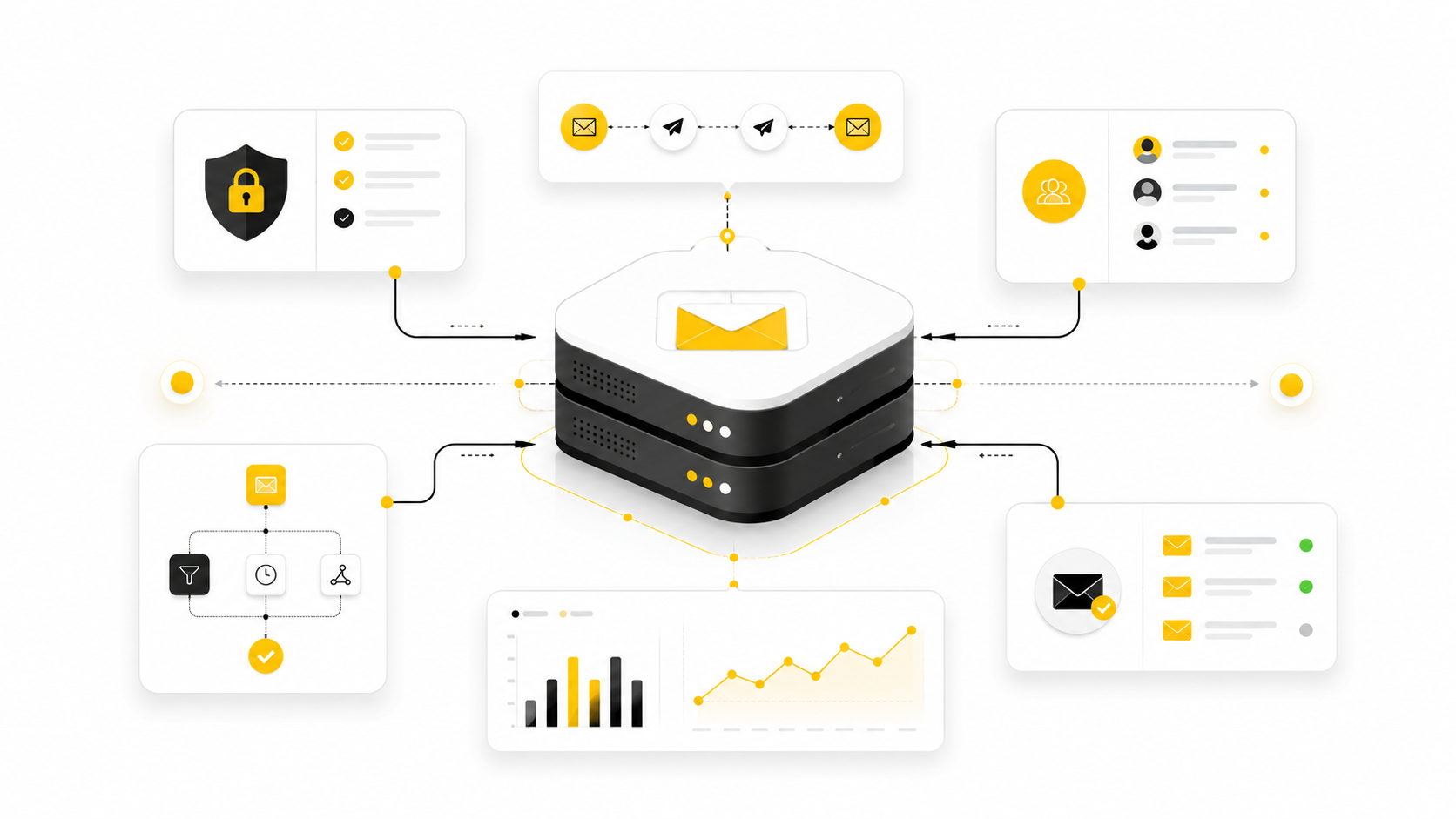
An email marketing server is not just the place where campaigns get sent. It is the technical foundation that decides whether your messages are authenticated, trusted, accepted, filtered, delayed, or rejected before a subscriber ever sees them. That makes it one of the least glamorous parts of email marketing and one of the most important.
For years, many businesses treated email like a simple software choice. Pick an email platform, upload a list, write a campaign, and press send. That approach is getting riskier because inbox providers now judge senders more aggressively on authentication, complaint rates, unsubscribe handling, list quality, and domain reputation.
The shift is obvious in the current sender rules from Gmail, Yahoo, and Microsoft. Gmail requires bulk senders to authenticate mail, support one-click unsubscribe for marketing messages, and keep spam complaints under its published threshold in Google’s email sender guidelines. Yahoo’s sender requirements also emphasize SPF, DKIM, DMARC, domain alignment, and easy unsubscribe in its sender best practices. Microsoft added similar high-volume sender requirements for Outlook.com domains in 2025 through its Defender for Office 365 guidance.
That is why this guide takes the phrase email marketing server seriously. We are not only talking about SMTP settings or dedicated IPs. We are talking about the complete sending system behind a modern email program: the server, the domain, the DNS records, the sending platform, the list hygiene process, the monitoring stack, and the operating rules that keep campaigns profitable.
Why Your Email Marketing Server Matters More Than Ever
A strong email marketing server protects the business outcome behind every campaign. Email can still produce exceptional returns, but those returns only exist when messages actually reach the inbox, get opened by real people, and lead to measurable action. Litmus reports that many companies still see strong email ROI, including a meaningful share of teams generating at least 36:1 returns in its State of Email data, but that upside depends on infrastructure that does not quietly sabotage delivery.
The risk is that deliverability problems often look like marketing problems at first. A campaign underperforms, so the team rewrites the subject line, changes the offer, or sends more emails. But if the server reputation is weak, authentication is broken, the list is decaying, or complaints are rising, better copy will not fix the real issue.
This is where many businesses get stuck. They think they need “better email marketing,” when they actually need a better sending system. The email marketing server is the operational layer that connects strategy to inbox placement.
List quality makes this even more important. ZeroBounce’s recent list decay research shows that email databases can degrade heavily over time, with its 2026 report showing list decay reached 23% in 2025 after 28% in 2024 in the Email List Decay Report. When bad, inactive, fake, or abandoned addresses stay in your database, your server keeps sending signals that inbox providers can interpret as low-quality behavior.
That does not mean every business needs to build its own server from scratch. In most cases, the more carefully move is to use a reputable email service provider, configure authentication correctly, and treat the sending environment like infrastructure rather than a casual marketing tool. Platforms such as Brevo, Moosend, and GoHighLevel can be useful when the goal is to manage campaigns, automation, contacts, and sending workflows without maintaining raw mail infrastructure yourself.
The Email Marketing Server Framework
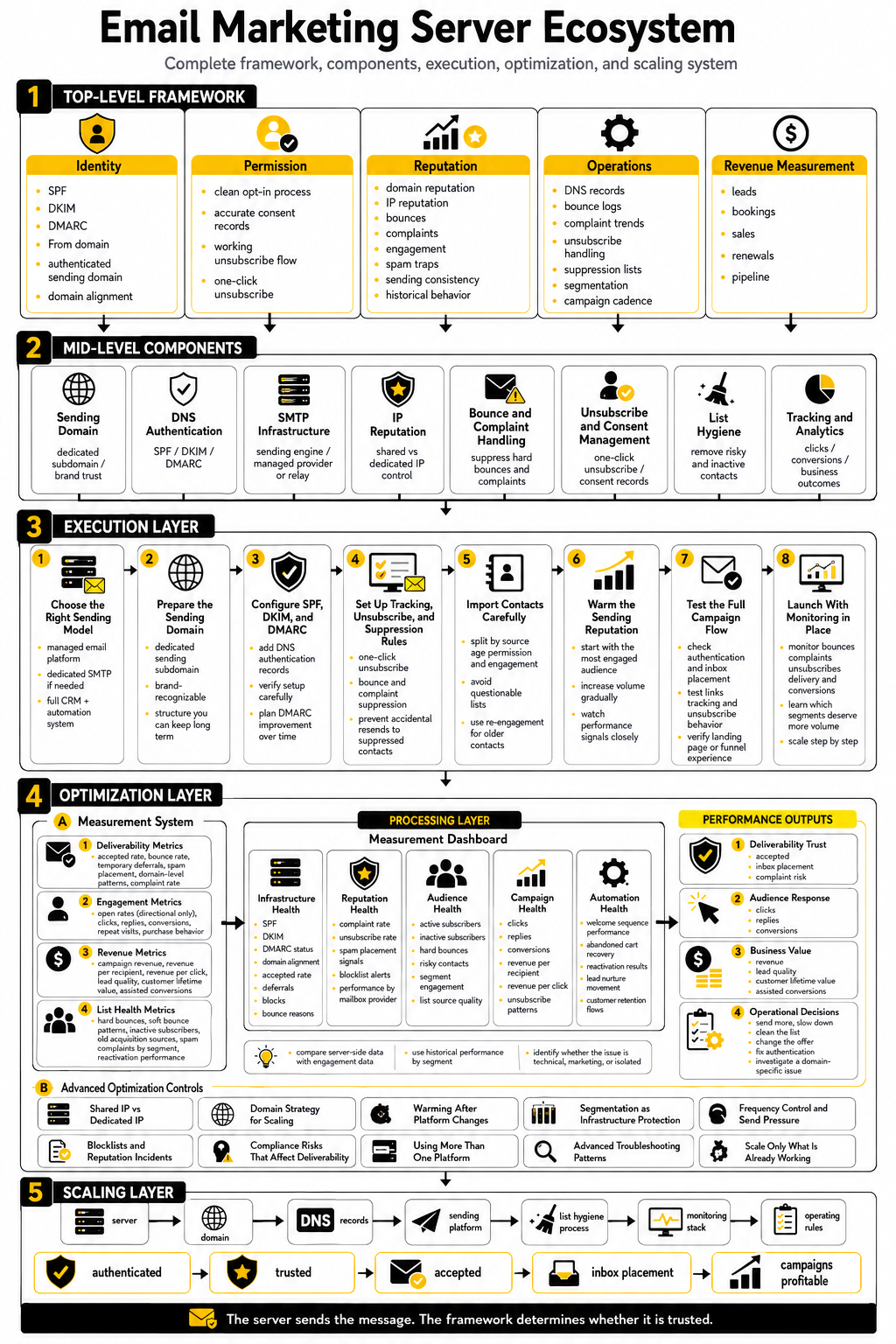
A modern email marketing server should be viewed as a framework, not a single machine. The server sends the message, but the framework determines whether the message is trusted. That framework includes identity, permission, reputation, routing, compliance, content, and measurement.
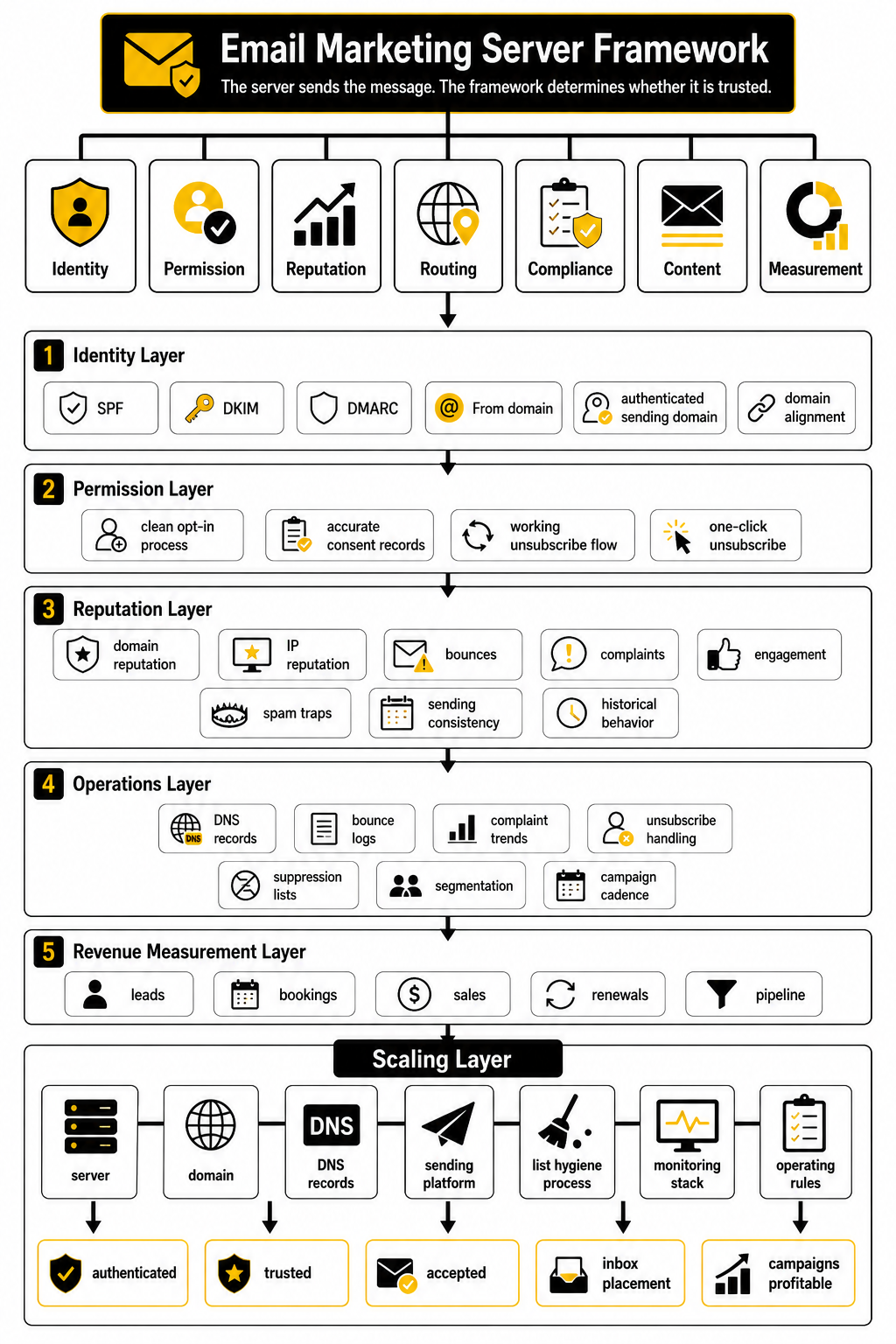
The first layer is identity. Inbox providers want to know whether the sender is who they claim to be, which is why SPF, DKIM, and DMARC are now basic requirements rather than optional technical polish. DMARC alignment matters because it connects the visible “From” domain to the authenticated sending domain, reducing spoofing risk and helping mailbox providers evaluate legitimacy.
The second layer is permission. A clean opt-in process, accurate consent records, and a working unsubscribe flow tell inbox providers that people actually asked to receive your messages. One-click unsubscribe is not just a nice user experience anymore; it is part of the compliance and trust layer for bulk marketing senders, and the underlying standard is defined in RFC 8058.
The third layer is reputation. Your domain reputation and IP reputation are shaped by bounces, complaints, engagement, spam traps, sending consistency, and historical behavior. This is why a new email marketing server cannot simply blast a huge list on day one and expect strong inbox placement.
The fourth layer is operations. Someone has to monitor DNS records, bounce logs, complaint trends, unsubscribe handling, suppression lists, segmentation, and campaign cadence. Without that operating discipline, even a technically correct setup can decline over time.
The final layer is revenue measurement. Email infrastructure should support business goals, not just message delivery. If your team cannot connect campaigns to leads, bookings, sales, renewals, or pipeline, then the server may be working technically while the program remains commercially unclear.
Core Components Of A Reliable Sending System
A reliable email marketing server is built from several parts working together. None of them are impressive in isolation. The value comes from how cleanly they connect, because inbox providers judge the whole sending pattern rather than one isolated setting.
The mistake is thinking that the server is only about sending capacity. Capacity matters, but trust matters more. A server that can send 500,000 emails per hour is useless if Gmail, Yahoo, Outlook, and corporate mail gateways do not trust the mail enough to place it properly.
Sending Domain
Your sending domain is the identity layer of your email marketing server. It is the domain subscribers see in the “from” address, the domain mailbox providers evaluate, and the domain that slowly earns or loses reputation over time. For most brands, this should be a dedicated subdomain such as mail.example.com or newsletter.example.com rather than the exact same domain used for everyday employee email.
That separation matters because marketing behavior and internal business communication create different reputation signals. A newsletter can produce unsubscribes, complaints, bounces, and engagement swings that you do not want mixed directly with invoices, support replies, password resets, or sales conversations. Keeping marketing mail on a dedicated subdomain gives you cleaner monitoring and safer troubleshooting.
The domain still has to feel like the brand. Do not use random, disposable-looking domains just because they are easier to warm up. That may look clever for a few weeks, but it creates trust problems with subscribers and mailbox providers.
DNS Authentication
DNS authentication is where your email marketing server proves that it is allowed to send on behalf of your domain. SPF tells receiving servers which systems are authorized to send mail for the domain. DKIM adds a cryptographic signature so the receiving server can verify that the message was not altered in transit.
DMARC then ties the visible sender identity to authentication results and gives domain owners a policy for handling mail that fails. The official DMARC specification describes it as a domain-level mechanism for message validation, disposition, and reporting in RFC 7489. In plain English, DMARC helps the mailbox provider decide whether a message claiming to be from your domain should be trusted, quarantined, or rejected.
This is no longer technical decoration. Gmail’s sender guidelines recommend SPF, DKIM, and DMARC for domains and require stronger authentication behavior for bulk senders in Google’s published sender rules. Yahoo’s sender guidance also pushes senders toward authenticated, aligned, permission-based mail in its sender best practices.
SMTP Infrastructure
SMTP is the sending engine behind the email marketing server. It handles the actual handoff from your sending system to receiving mail servers. That may happen through your own mail transfer agent, a cloud SMTP relay, or a full email service provider that hides most of the server complexity behind a campaign interface.
For most marketers and agencies, using a managed provider is the practical choice. Running raw mail infrastructure means dealing with queue management, retry logic, bounce processing, IP reputation, abuse monitoring, blocklists, TLS, and feedback loops. That is a real operations job, not a casual marketing task.
This is where tools can make sense if they match the business model. A business that wants email campaigns and automation may look at Brevo or Moosend. An agency that wants CRM, pipelines, automation, forms, and client account management in one system may prefer GoHighLevel.
IP Reputation
IP reputation is still important, but it is not the whole game anymore. A dedicated IP gives you more control, but it also gives you more responsibility. If your list quality is weak or your sending spikes are erratic, a dedicated IP can expose the problem faster because there is no shared pool absorbing the pattern.
Shared IPs can be perfectly fine for smaller or moderate-volume senders when the provider manages abuse well. The tradeoff is that your reputation is partly influenced by the provider’s pool management. Good providers actively remove abusive senders, enforce bounce limits, and monitor complaints because the health of the pool affects everyone.
Dedicated IPs make more sense when volume is consistent, the brand has strong permission practices, and the team can warm up the infrastructure properly. They are not magic deliverability upgrades. They are control upgrades, and control only helps when the operation behind it is disciplined.
Bounce And Complaint Handling
Bounce and complaint handling is where your email marketing server shows whether it is listening. A hard bounce means the address should usually be suppressed because continuing to send to it damages your reputation. A soft bounce needs more context because the issue may be temporary, such as a full inbox, rate limit, or receiving-server delay.
Complaints are even more serious. When a subscriber marks a message as spam, that signal tells the mailbox provider the message was unwanted. Gmail’s bulk sender guidance tells senders to keep spam rates below 0.10% and avoid reaching 0.30% or higher in its sender requirements.
This is why suppression logic matters. Your server should not keep mailing people who bounced, complained, unsubscribed, or became risky through repeated delivery failures. If it does, you are teaching inbox providers not to trust you.
Unsubscribe And Consent Management
A healthy email marketing server needs clean unsubscribe handling because consent is not a one-time event. People change jobs, lose interest, buy from a competitor, finish a project, or simply no longer need what you send. Making unsubscribe difficult does not save revenue; it increases complaints.
One-click unsubscribe is now part of the modern sender expectation for promotional mail. The technical standard behind that behavior is documented in RFC 8058, and major mailbox providers have made easy opt-out handling a practical requirement for bulk senders. This is one of those details that seems small until it becomes a deliverability problem.
Consent also needs to be traceable. You should know where the subscriber came from, what they opted into, when they joined, and what type of messages they expected. Without that context, segmentation becomes guesswork and complaints become harder to diagnose.
List Hygiene
List hygiene protects the server from bad inputs. Even a perfectly configured email marketing server will struggle if the list is full of abandoned addresses, role accounts, invalid contacts, spam traps, or people who never asked to hear from you. Infrastructure cannot compensate for poor permission.
The practical rule is simple: remove risk before the send. Validate new leads when needed, suppress inactive subscribers after a defined period, and avoid uploading old lists without checking them first. Bigger lists are not automatically better lists.
This matters even more when a business is scaling. Early campaigns often perform well because the list is smaller and warmer. As volume grows, weak acquisition sources and old segments can quietly drag down the entire sending reputation.
Tracking And Analytics
Tracking is not only about open rates and clicks. It helps you see whether the email marketing server is producing healthy delivery patterns over time. You want to monitor bounces, complaints, unsubscribes, deferrals, domain-level performance, device behavior, click quality, and conversion outcomes.
Open tracking has become less reliable because privacy features can inflate or obscure open data. Apple’s Mail Privacy Protection changed how many marketers interpret opens, and Apple describes the privacy behavior in its Mail Privacy Protection overview. That does not make opens useless, but it means you should not treat them as the only proof of engagement.
Clicks, replies, conversions, purchases, booked calls, and downstream revenue are more useful signals. If your platform connects campaigns to CRM stages or sales outcomes, the email marketing server becomes part of a measurable growth system instead of a black box. Tools like GoHighLevel, ClickFunnels, and Systeme.io can fit here when the goal is to connect email with funnels, forms, appointments, and customer journeys.
Professional Implementation And Setup
Implementation is where an email marketing server stops being an idea and becomes a working growth asset. The goal is not to make the setup complicated. The goal is to make it controlled, testable, and hard to accidentally damage.
A professional setup follows a sequence. You choose the right sending model, prepare the domain, authenticate the server, connect the platform, warm the reputation, test the full flow, and only then scale volume. Skipping that order is how teams create deliverability problems before their first real campaign has a chance to work.
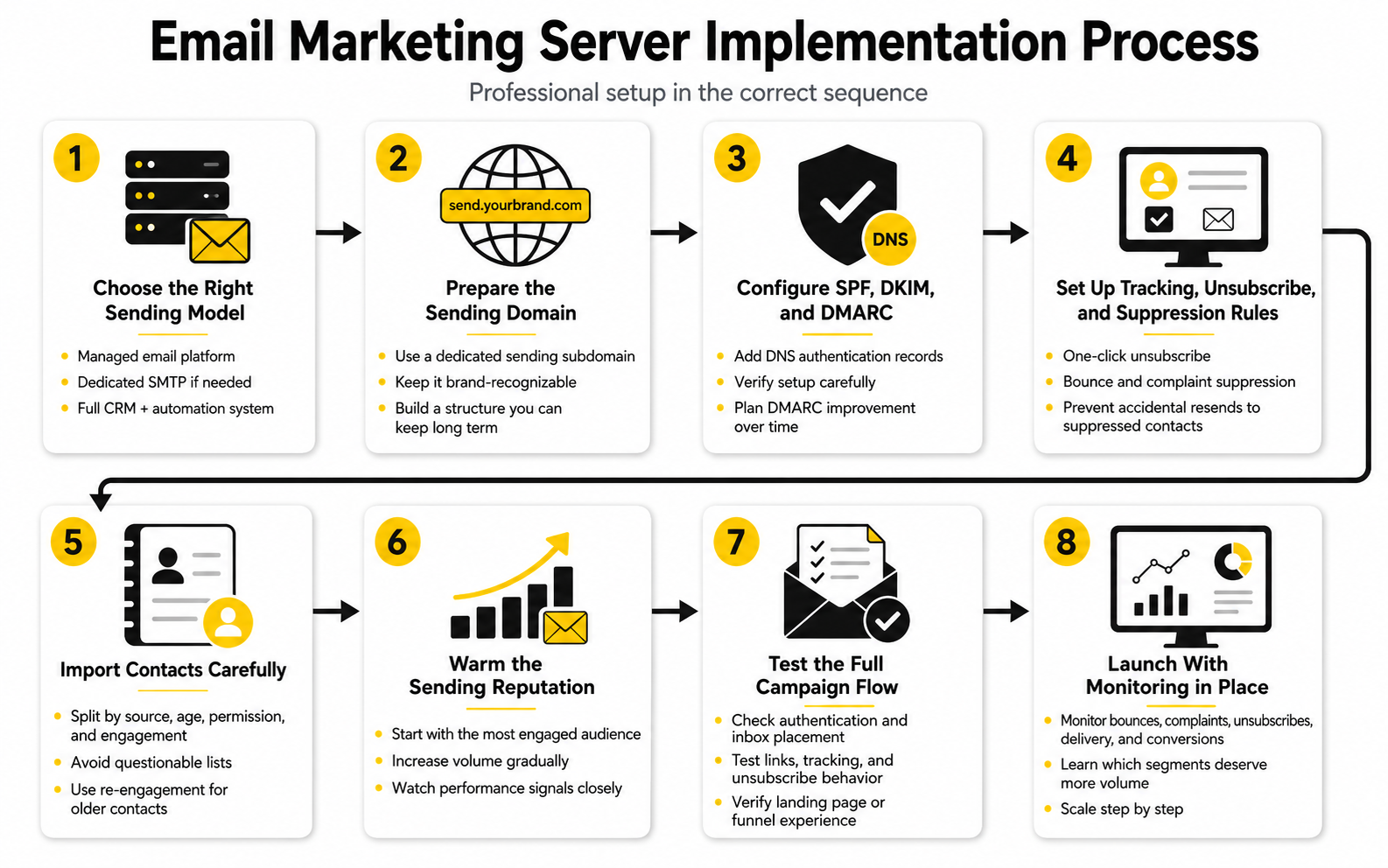
Step 1: Choose The Right Sending Model
Start by deciding whether you need a managed email platform, a dedicated SMTP provider, or a full CRM and automation system with email built in. A managed email platform is usually best for newsletters, lifecycle campaigns, ecommerce flows, and normal promotional sends. A dedicated SMTP setup can make sense for technical teams that already understand mail queues, suppression handling, logging, and server monitoring.
Most businesses should not run a raw email marketing server unless they have a clear reason and someone responsible for maintaining it. The server may look cheaper at first, but the hidden cost is operational attention. You have to manage retries, bounces, blocklist issues, authentication, complaint loops, and reputation recovery yourself.
If you want a practical marketing system rather than a technical infrastructure project, a platform is usually the better call. Brevo and Moosend fit teams focused on email campaigns and automations, while GoHighLevel fits agencies and service businesses that want email connected to CRM, pipelines, appointments, funnels, and follow-up workflows.
Step 2: Prepare The Sending Domain
Before you send anything, decide which domain or subdomain will carry your marketing reputation. This should be deliberate. A dedicated sending subdomain gives you room to build reputation without putting everyday business email at unnecessary risk.
Use a name that looks legitimate and recognizable. Something like newsletter.brand.com, mail.brand.com, or updates.brand.com is usually clearer than a random domain that has no relationship to the company. Trust starts before the recipient opens the message.
Do not treat domain setup as a throwaway technical step. Once a domain starts sending, it begins creating a record with mailbox providers. That history can help you or hurt you, so start with a structure you can keep using long term.
Step 3: Configure SPF, DKIM, And DMARC
Authentication is the first real technical checkpoint in the implementation process. SPF authorizes the sending service, DKIM signs the message, and DMARC tells receiving servers how to evaluate alignment and handle failures. Gmail, Yahoo, and Microsoft have all pushed bulk senders toward stronger authentication, so this is now baseline infrastructure rather than advanced deliverability work.
Start with the DNS records your email provider gives you. Add them carefully, then verify them inside the platform and with an external checker before sending campaigns. Small mistakes matter here because a missing character, duplicated SPF record, or wrong selector can create failures that are invisible to a marketer looking only at campaign reports.
DMARC should not be ignored just because the initial policy is often relaxed. Many senders begin with monitoring, then move toward stricter policies once they understand legitimate mail sources. The important point is that the domain should have a valid DMARC record and a plan for improving it over time.
Step 4: Set Up Tracking, Unsubscribe, And Suppression Rules
A professional email marketing server needs tracking and suppression rules before volume begins. That means unsubscribes must work, complaint data must be respected, and bounced addresses must stop receiving future campaigns. This is not admin work you postpone until later.
One-click unsubscribe is especially important for marketing messages. Gmail’s sender guidance tells senders to include the required List-Unsubscribe headers for one-click unsubscribe in its setup instructions. The practical takeaway is simple: make opting out clean, fast, and reliable.
Suppression rules should cover unsubscribes, hard bounces, spam complaints, and risky imported contacts. If your system allows unsubscribed contacts to re-enter campaigns through imports, automations, or CRM updates, fix that before scaling. Otherwise, your own workflows can accidentally create reputation damage.
Step 5: Import Contacts Carefully
Contact import is where a lot of email marketing server problems begin. A team uploads an old CRM export, sends a campaign, sees weak engagement, and then wonders why deliverability drops. The server did what it was told; the input was the problem.
Before importing, split contacts by source, age, permission level, and recent engagement. New opt-ins, recent buyers, webinar registrants, old leads, scraped contacts, and purchased lists are not the same asset. Treating them the same is lazy, and inbox providers punish lazy sending behavior.
Only import contacts you have a legitimate reason to email. For older contacts, consider a smaller re-engagement sequence rather than a full promotional blast. For questionable sources, the better decision is often not to send at all.
Step 6: Warm The Sending Reputation
Warming means building trust gradually instead of forcing full volume through a new setup immediately. If the domain, IP, or platform is new, mailbox providers need time to observe normal sending behavior. Sudden spikes from an unknown sender can look risky even when the business is legitimate.
A good warm-up starts with the most engaged audience first. Send to recent buyers, active subscribers, recent form submissions, or people who have clearly interacted with the brand. That gives the email marketing server a better chance of generating positive engagement signals early.
Increase volume only when the core metrics stay healthy. Litmus describes IP warming as a gradual increase in sending volume that helps establish trust when using a new IP or scaling volume in its 2025 deliverability guide. Adobe’s deliverability guidance makes the same practical point: slowing down a warm-up is better than repairing a damaged reputation later in its IP warmup guide.
Step 7: Test The Full Campaign Flow
Testing should cover more than whether the email “sends.” You need to test authentication, rendering, links, tracking, unsubscribe behavior, suppression logic, mobile display, and the final conversion path. A broken link or failed unsubscribe can create real damage even when the message technically delivers.
Send test messages to different mailbox providers, including Gmail, Outlook, Yahoo, and business domains when possible. Check whether the message lands where expected, whether the sender name looks clean, and whether the reply-to address makes sense. This step is simple, but it catches mistakes that dashboards often miss.
Also test the post-click experience. If the campaign sends people to a funnel, form, calendar, checkout, or landing page, that page must load quickly and match the promise of the email. Tools like ClickFunnels, Systeme.io, and Replo can be useful when the email program needs dedicated pages that support the campaign instead of sending traffic to a generic homepage.
Step 8: Launch With Monitoring In Place
The first real campaigns should be watched closely. Look at bounce rates, complaint rates, unsubscribe rates, delivery delays, domain-level performance, and conversion behavior. Do not wait for a major drop before checking whether the email marketing server is healthy.
Gmail’s sender FAQ says bulk senders can remain ineligible for mitigation while user-reported spam rates are above 0.3%, with spam data calculated in Postmaster Tools in its sender guidelines FAQ. That makes complaint monitoring a business issue, not just a deliverability issue. Once reputation is damaged, recovery takes longer than prevention.
The first launch should also teach you which segments deserve more volume. If recent buyers engage well and old leads complain, the answer is not to push harder on old leads. The answer is to protect the server, prioritize high-quality segments, and earn scale step by step.
Statistics And Data
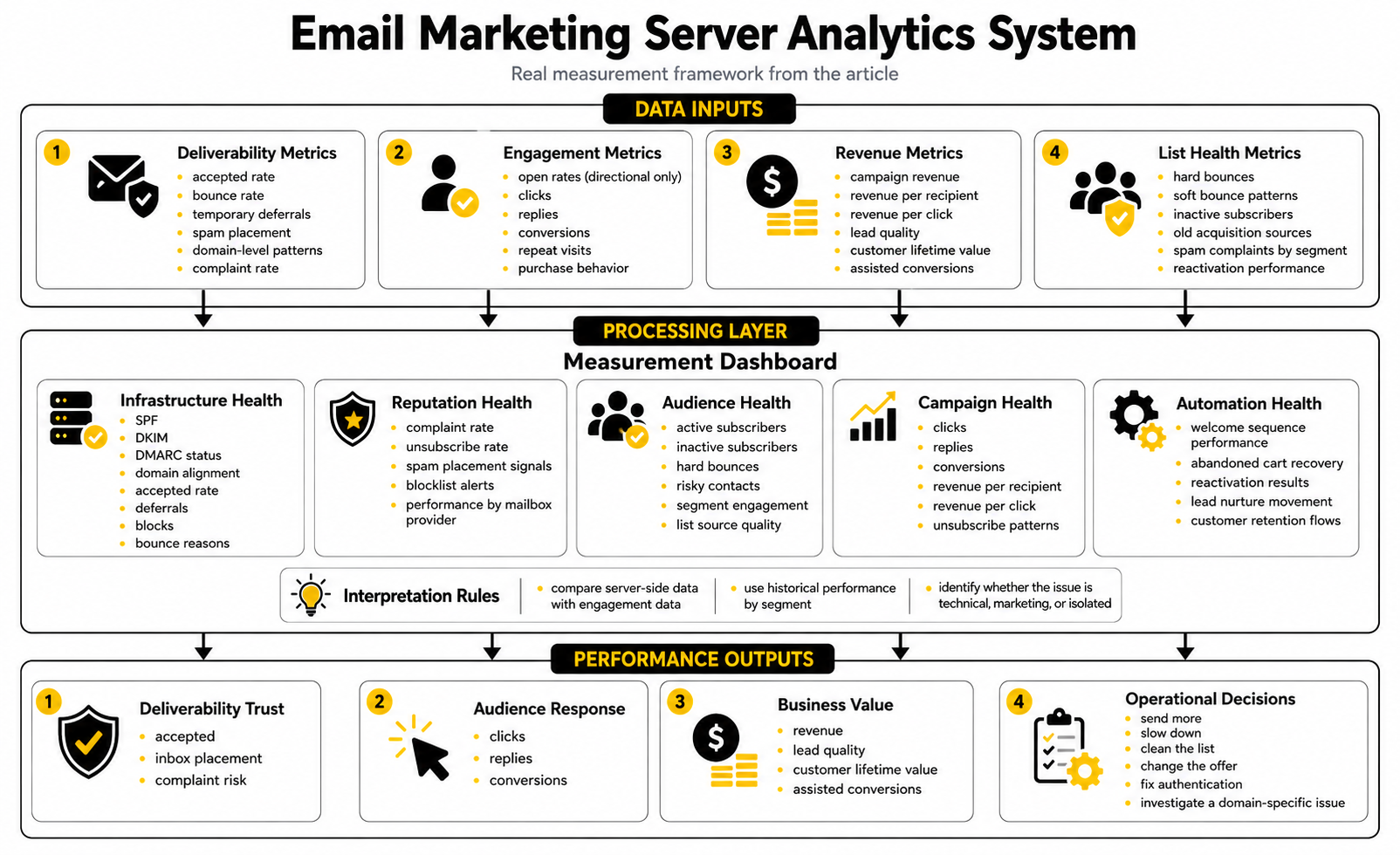
The numbers around an email marketing server only matter when they help you make better decisions. Random benchmarks can make a dashboard look smart while the actual program stays weak. Good measurement tells you whether your infrastructure is trusted, whether your audience wants the messages, and whether the email program is producing revenue instead of just activity.
The key is to separate vanity metrics from control metrics. Open rates, click rates, and unsubscribe rates can be useful, but they do not tell the full story by themselves. Server health depends on deeper signals like bounce quality, complaint rate, authentication pass rate, domain-level performance, deferrals, suppression behavior, and conversion impact.
Deliverability Metrics Show Whether The Server Is Trusted
Deliverability is not the same as delivery. Delivery only means the receiving system accepted the message. Deliverability is about whether that message reached a useful place, such as the primary inbox, promotions tab, updates tab, or spam folder.
For an email marketing server, the first metrics to watch are accepted rate, bounce rate, temporary deferrals, spam placement, and domain-level patterns. A campaign can show a high delivered rate while still performing badly because too many messages land in low-visibility folders. That is why server-side data and engagement data need to be read together.
Complaint rate is one of the most important warning signals. Gmail tells senders to keep spam rates below 0.10% and avoid ever reaching 0.30% or higher in its sender FAQ. In practice, this means one angry segment can hurt the reputation of the whole sending setup if you keep pushing volume after complaints rise.
Engagement Metrics Show Whether The Audience Still Cares
Engagement metrics help you understand whether subscribers are responding to what the email marketing server is sending. Clicks, replies, conversions, repeat visits, and purchase behavior are stronger signals than opens alone. Open rates still have directional value, but they are less clean than they used to be.
Apple’s Mail Privacy Protection changed the way many marketers interpret opens because some email activity can be affected by privacy-related loading behavior, which Apple explains in its Mail Privacy Protection overview. This is why a rising open rate without rising clicks, replies, or revenue should be treated carefully. It may be a real improvement, but it may also be measurement noise.
Clicks are more useful because they show active intent. Still, even clicks need context because bots, scanners, and security systems can trigger link activity before a human sees the message. The best analytics setup connects email clicks to real downstream actions such as form submissions, booked calls, cart events, purchases, and pipeline movement.
Revenue Metrics Show Whether Email Is Worth Scaling
A technically healthy email marketing server is not enough. The business still needs to know whether email is creating revenue, retaining customers, or reducing acquisition costs. That means tracking campaign revenue, revenue per recipient, revenue per click, lead quality, customer lifetime value, and assisted conversions.
Email can be a high-return channel when it is measured properly. Litmus reports that 35% of companies see email ROI of 36:1 or more in its State of Email data. That number is useful because it reminds you what is possible, but it should not become a lazy promise for every business.
The better question is not “what is the average ROI?” The better question is “which segments, offers, and automations produce profitable behavior after the send?” Once you can answer that, your email marketing server becomes a controlled growth system instead of a broadcast tool.
List Health Metrics Explain Hidden Performance Drops
List health is where many email programs quietly lose momentum. The campaign creative may look fine, the offer may be strong, and the server may be authenticated, but the list can still drag everything down. Old, inactive, mistyped, role-based, disposable, or risky addresses send negative signals over time.
ZeroBounce found that at least 23% of emails it checked in 2025 were invalid or risky in its Email List Decay Report. That does not mean every list loses exactly that amount each year, but it does show why list hygiene cannot be treated as a once-a-year cleanup task. People leave jobs, abandon inboxes, mistype addresses, and stop caring.
The action is simple: measure list health before deliverability breaks. Track hard bounces, soft bounce patterns, inactive subscribers, old acquisition sources, spam complaints by segment, and reactivation performance. If a segment repeatedly hurts the email marketing server, stop treating it like an asset.
Benchmarks Are Useful Only When You Compare The Right Things
Benchmarks can help you spot obvious problems, but they can also mislead you. A B2B newsletter, ecommerce abandoned cart email, webinar reminder, SaaS onboarding sequence, and agency nurture campaign should not be judged by the same numbers. Different intent creates different behavior.
Open-rate benchmarks are especially tricky because privacy tools, inbox category placement, brand familiarity, and send frequency can all distort comparison. A campaign with a lower open rate but stronger revenue per recipient may be healthier than a campaign that gets attention but produces no action. This is why the most useful benchmark is often your own historical performance by segment.
Use external benchmarks as guardrails, not as goals. If your bounce rate spikes, complaint rate rises, clicks collapse, or revenue per recipient falls, investigate. If your numbers are below an industry average but improving steadily with clean list practices and profitable outcomes, you may be in a healthier position than the benchmark suggests.
The Metrics Dashboard That Actually Helps
A practical dashboard should show the full journey from server acceptance to business result. It should not be stuffed with every number available. It should give you enough signal to decide whether to send more, slow down, clean the list, change the offer, fix authentication, or investigate a domain-specific issue.
At minimum, track these groups:
A platform like GoHighLevel can make sense when you want email performance connected to CRM stages, appointments, pipelines, and client reporting. Brevo and Moosend are more focused fits when the core need is campaign sending, automation, segmentation, and email analytics without building raw server infrastructure.
How To Interpret The Data Without Overreacting
One bad campaign does not always mean the email marketing server is broken. A weak subject line, poor offer fit, holiday timing, messy segmentation, or unattractive landing page can all hurt performance without indicating an infrastructure failure. Look for patterns before making big changes.
A server issue usually appears across multiple campaigns, domains, or segments. You may see unusual deferrals, sudden mailbox-provider-specific drops, authentication failures, bounce spikes, or complaint patterns tied to a specific source. Those signals deserve technical investigation.
A marketing issue usually appears in the response layer. The message is accepted, bounces are normal, complaints are controlled, but clicks and conversions are weak. In that case, do not blame the email marketing server too quickly. Fix the offer, audience match, copy, timing, landing page, or follow-up sequence first.
Deliverability, Scaling, And Troubleshooting
Once the email marketing server is live, the real work shifts from setup to control. Scaling is not just sending more. Scaling is sending more without damaging trust, exhausting the list, or creating patterns that mailbox providers interpret as risky.
This is where advanced operators separate themselves from casual senders. They do not chase volume for its own sake. They increase volume only when the server, the audience, and the commercial results all support it.
Shared IP Versus Dedicated IP
The shared IP versus dedicated IP decision is really a control decision. A shared IP can work well when your volume is moderate and your provider manages the pool aggressively. You benefit from existing infrastructure and do not have to carry the full reputation burden alone.
A dedicated IP gives you more ownership, but it also removes the safety net. If your email marketing server sends to weak lists, spikes unpredictably, or generates complaints, the damage lands directly on your reputation. Dedicated IPs are best for senders with steady volume, strong permission practices, and a team that knows how to monitor deliverability.
Do not buy a dedicated IP because it sounds more professional. Buy it because your sending profile justifies it. If your list is small, inconsistent, or still being cleaned, a dedicated IP may create more work than value.
Domain Strategy For Scaling
As the program grows, domain strategy becomes more important. You may need separate subdomains for newsletters, lifecycle emails, product updates, transactional notices, and sales outreach. This gives each stream a cleaner reputation profile and makes troubleshooting faster.
The key is not to create dozens of domains to hide bad behavior. That is a short-term trick, and mailbox providers are very good at connecting patterns across infrastructure. The better strategy is to separate legitimate mail streams so one problem does not contaminate every other part of the business.
For example, a promotional newsletter and a password reset email should not depend on the same exact reputation path. The newsletter may naturally create unsubscribes and lower engagement from some readers. The password reset email is high-intent and should be protected from marketing volatility.
Warming After Platform Changes
Changing platforms, IPs, domains, or sending configurations can reset part of the trust equation. Even if your brand is established, the new email marketing server still needs to prove itself through consistent behavior. This is especially true when a company migrates from one email provider to another and immediately tries to send at the old volume.
The safest approach is to warm the new setup using the most engaged subscribers first. Recent clickers, buyers, active users, and fresh opt-ins should receive the early sends. Old leads, dormant subscribers, and risky segments should wait until the new system has stable signals.
Microsoft’s 2025 high-volume sender requirements for Outlook.com domains show how seriously major inbox providers now treat authentication and sender behavior at scale, with SPF, DKIM, and DMARC compliance becoming part of the baseline for senders above 5,000 messages per day in its high-volume sender announcement. That matters because migrations are not just software changes anymore. They are reputation events.
Segmentation As Infrastructure Protection
Segmentation is usually described as a marketing tactic, but it also protects the email marketing server. When you send the same message to everyone, the weakest part of the list defines the risk. When you segment properly, you control who receives what based on consent, recency, interest, and behavior.
The first segmentation layer should separate active from inactive contacts. Active subscribers can receive more frequent campaigns because they have shown interest. Inactive subscribers should receive lower-frequency reactivation messages or be suppressed after a defined period.
The second layer should separate acquisition sources. A buyer list, webinar list, lead magnet list, referral list, and imported CRM list will not behave the same way. If one source creates complaints or bounces, you want to identify it quickly instead of blaming the whole server.
Frequency Control And Send Pressure
Send frequency is not only a content decision. It is a reputation decision. Sending too rarely can make people forget they subscribed, while sending too often can push them toward unsubscribes or spam complaints.
The right frequency depends on expectation and value. A daily deals list can handle more volume if subscribers knowingly signed up for daily offers. A B2B consulting newsletter may perform better with fewer, more useful sends.
Watch behavior by segment rather than choosing a universal rule. If engagement drops and complaints rise after frequency increases, the list is telling you something. Respect that signal before the inbox providers force the lesson.
Blocklists And Reputation Incidents
Blocklists are not all equal. Some are highly influential, some are niche, and some create more anxiety than actual delivery impact. The important thing is to understand why the listing happened instead of panicking at the alert.
A listing can be triggered by spam traps, compromised systems, poor list sources, sudden spikes, or repeated complaints. Removing the listing without fixing the root cause does not solve the problem. It only resets the clock until the issue happens again.
If your email marketing server hits a serious reputation incident, pause risky sends immediately. Review recent imports, complaint-heavy campaigns, bounce logs, authentication results, and sending volume changes. Then resume gradually with clean, engaged segments once the cause is under control.
Compliance Risks That Affect Deliverability
Compliance and deliverability are now connected. If unsubscribe handling is broken, consent is unclear, or headers are misleading, mailbox providers may treat the sender as less trustworthy. Legal exposure and inbox placement problems can come from the same operational weakness.
Yahoo tells bulk senders to support one-click unsubscribe, keep complaint rates low, authenticate mail, and honor unsubscribes within two days in its sender best practices. Gmail also requires easy unsubscribe, authentication, and low spam complaints for bulk senders in its email sender guidelines. These are not abstract rules; they are practical operating standards.
The safest move is to build compliance into the email marketing server workflow. Every campaign should have clear sender identity, accurate subject lines, valid unsubscribe handling, and suppression logic that cannot be bypassed accidentally. That is how you protect both reputation and trust.
When To Use More Than One Platform
Some teams eventually need more than one system. They may use one platform for marketing campaigns, another for transactional messages, another for CRM automation, and another for sales follow-up. That can work well, but only if the sending architecture is deliberate.
The danger is fragmentation. If every tool sends from the same domain without coordination, your DNS records, suppression rules, unsubscribe handling, and reputation signals can become messy. A subscriber might unsubscribe in one system and still receive mail from another.
Use multiple platforms only when each one has a clear role. GoHighLevel can be strong for agencies and service businesses that want CRM-driven automation, follow-up, and pipeline visibility. Brevo or Moosend may fit better when the core requirement is email campaign management and automation. ClickFunnels or Systeme.io can make sense when the email program is tightly connected to funnels, offers, and checkout flows.
Advanced Troubleshooting Patterns
When performance drops, troubleshoot in layers. Do not immediately rewrite every email or move platforms. Start by isolating where the failure happens.
First, check whether the email marketing server is accepted by mailbox providers. Look at bounces, deferrals, blocks, and authentication failures. If acceptance is weak, the problem is likely technical or reputation-related.
Second, check whether accepted mail is getting engagement. If delivery looks normal but clicks, replies, and conversions fall, the issue may be message-market fit, offer strength, timing, or list fatigue. That is a marketing problem, not necessarily a server problem.
Third, check whether the problem is isolated. A Gmail-specific decline suggests a different issue than a universal decline across all mailbox providers. A drop from one acquisition source suggests a different issue than a drop across every segment.
The Scaling Rule That Saves You
Scale only what is already working. This sounds obvious, but many teams do the opposite. They use email to force growth from cold, stale, or low-intent lists because sending more feels easier than earning better attention.
A healthy email marketing server rewards patience. Start with clean segments, prove engagement, measure revenue, and expand carefully. When a segment shows weak performance, fix the source or reduce pressure instead of pushing harder.
This is the part that matters most: the inbox is not your property. It is borrowed attention inside someone else’s environment. Treat it with respect, and your server becomes an asset. Abuse it, and the infrastructure eventually pushes back.
Tools, Buying Criteria, And Final FAQ
The right email marketing server setup depends on what you are actually trying to run. A newsletter business, ecommerce store, SaaS company, local agency, coaching funnel, and B2B sales team all need different workflows. The mistake is buying the tool that looks most powerful instead of choosing the system that matches your sending volume, compliance needs, automation logic, and reporting requirements.
Think of the final ecosystem as four layers. The sending layer gets mail accepted. The reputation layer keeps the domain trusted. The automation layer turns behavior into follow-up. The measurement layer shows whether the whole machine is creating business value.
What To Look For In An Email Marketing Server Platform
A good platform should make the technical setup visible without forcing you to become a full-time mail administrator. You should be able to verify SPF, DKIM, and DMARC, manage sender domains, track bounces, process unsubscribes, suppress risky contacts, segment lists, and review campaign performance without guessing. If the platform hides too much, troubleshooting becomes painful when performance drops.
You also want clean automation logic. The best email marketing server setup is not only about broadcasts. It should support welcome sequences, lead nurture, abandoned cart flows, reactivation campaigns, customer onboarding, review requests, renewal reminders, and sales follow-up without creating duplicate sends or consent conflicts.
Reporting matters as much as sending. If your platform only shows opens and clicks, you will miss the real business picture. Look for systems that connect email to forms, funnels, appointments, purchases, CRM stages, or revenue events, depending on how your business sells.
Matching Tools To Business Models
If your main need is email campaigns and automation, choose a platform that keeps list management and deliverability operations simple. Brevo and Moosend are practical options when you want a focused email system without maintaining your own raw SMTP infrastructure. They are especially useful when your core requirement is sending campaigns, building automations, managing contacts, and tracking performance.
If your business runs through sales pipelines, appointments, follow-up, and client accounts, a broader system may fit better. GoHighLevel is more relevant when email is part of a larger CRM and agency workflow rather than a standalone channel. That can be valuable when the same contact needs emails, SMS, forms, calendars, pipeline updates, and reporting in one operating system.
If your email program is tied directly to offers and landing pages, the page builder also matters. ClickFunnels, Systeme.io, and Replo can help when email traffic needs a dedicated conversion path instead of a generic website page.
Red Flags Before You Commit
Be careful with any provider that promises guaranteed inbox placement. No legitimate email marketing server can guarantee that because mailbox providers make final placement decisions based on reputation, user behavior, authentication, content, and recipient-level signals. Strong providers can improve your odds, but they cannot control every inbox.
Also be careful with platforms that make it easy to upload questionable lists without review. That may feel convenient on day one, but it can destroy performance later. A provider that enforces list quality, bounce limits, and complaint controls is protecting the infrastructure you depend on.
The biggest red flag is poor visibility. If you cannot see bounce reasons, authentication status, unsubscribes, complaint trends, or domain-level performance, you are operating blind. A cheap platform becomes expensive when it hides the signals you need to protect revenue.
What Is An Email Marketing Server?
An email marketing server is the sending infrastructure used to deliver marketing emails to subscribers. It may be a dedicated SMTP server, a managed sending platform, or part of a larger CRM and automation system. The important point is that it controls how your campaigns are authenticated, routed, monitored, and judged by mailbox providers.
A modern email marketing server is not only about volume. It also includes DNS authentication, bounce handling, unsubscribe processing, suppression rules, sender reputation, and reporting. If those pieces are weak, your campaigns can underperform even when the content is good.
Do I Need My Own Email Marketing Server?
Most businesses do not need to run their own raw server. A managed email platform is usually safer because it handles many technical tasks such as delivery infrastructure, bounce processing, compliance features, and sending reputation controls. Running your own server only makes sense if you have technical expertise and a clear operational reason.
The hidden workload is the problem. You would need to monitor queues, retries, authentication, blocks, complaints, DNS issues, and reputation incidents. For most marketers, that time is better spent improving offers, segmentation, automation, and revenue tracking.
Is An SMTP Server The Same As An Email Marketing Server?
Not exactly. SMTP is the protocol and sending engine used to transmit email. An email marketing server setup usually includes SMTP, but it also includes list management, authentication, tracking, unsubscribe handling, bounce processing, and campaign reporting.
Think of SMTP as the delivery mechanism. The email marketing server ecosystem is the full operating system around it. You need both reliable sending and responsible management if you want long-term inbox performance.
What DNS Records Do I Need For Email Marketing?
At minimum, you need SPF, DKIM, and DMARC configured correctly for your sending domain. SPF authorizes the systems that can send mail for your domain. DKIM signs your messages so receiving servers can verify they were not altered.
DMARC connects authentication to the visible sender domain and gives receiving servers instructions for handling mail that fails checks. Gmail, Yahoo, and Microsoft have all strengthened expectations around sender authentication, especially for bulk senders. That makes these records essential for any serious email marketing server.
Should I Use A Dedicated IP For Email Marketing?
A dedicated IP can be useful when you have consistent volume, clean permission practices, and enough sending activity to build a stable reputation. It gives you more control over your sending identity. It also gives you more responsibility because poor performance is no longer diluted across a shared pool.
A shared IP is often better for smaller or inconsistent senders. If the provider manages the pool well, you can benefit from established infrastructure while you focus on list quality and campaign strategy. The right choice depends on volume, consistency, risk tolerance, and operational maturity.
How Long Does It Take To Warm Up An Email Marketing Server?
There is no universal warm-up timeline because volume, domain history, list quality, engagement, and mailbox-provider response all matter. A new setup should start with small sends to the most engaged contacts and increase only when performance stays healthy. Rushing the process can create reputation damage that takes longer to repair than the warm-up would have taken.
The practical rule is to let the data decide the pace. If bounces, complaints, or deferrals rise, slow down. If engagement is strong and technical signals look clean, increase volume gradually.
What Is A Good Spam Complaint Rate?
Lower is always better, but Gmail tells senders to keep spam rates below 0.10% and avoid reaching 0.30% or higher in its email sender FAQ. That means even a small number of complaints can matter when the sending volume is large. It is one of the clearest warning signals for an email marketing server.
Do not treat complaints as normal friction. A complaint means the recipient considered the message unwanted enough to report it as spam. If one segment creates a higher complaint rate, reduce pressure, review the source, and fix the expectation mismatch.
Why Are My Emails Delivered But Not Getting Opens Or Clicks?
Delivered does not always mean visible or valuable. The message may be landing in a low-attention tab, being ignored by inactive subscribers, or reaching people who no longer care about the offer. It may also be accepted by the receiving server but filtered in ways that reduce engagement.
Start by checking whether the problem is technical or strategic. If bounces, deferrals, and authentication look healthy, the issue may be audience quality, offer relevance, subject line, send timing, or list fatigue. If one mailbox provider drops harder than others, investigate reputation and placement more deeply.
Can I Use Multiple Email Platforms At The Same Time?
Yes, but only with a clear architecture. Multiple platforms can work when each system has a defined role, such as transactional email, newsletters, CRM follow-up, or funnel automation. The danger is sending from several tools without shared suppression rules, consistent authentication, or clear domain separation.
If a subscriber unsubscribes in one system but keeps receiving messages from another, trust breaks quickly. Before using multiple platforms, map the domains, contact flows, consent rules, and suppression logic. Complexity is fine only when it is controlled.
How Often Should I Clean My Email List?
List cleaning should be continuous, not occasional. Hard bounces, unsubscribes, complaints, and obvious invalid addresses should be suppressed automatically. Inactive subscribers should be reviewed on a regular schedule based on your sales cycle and sending frequency.
Do not wait until deliverability falls before cleaning the list. Old and low-quality contacts can quietly weaken the email marketing server over time. Healthy list management protects future campaigns before problems become obvious.
What Is The Biggest Email Marketing Server Mistake?
The biggest mistake is treating infrastructure as separate from marketing quality. A technically perfect setup cannot save a bad list, unclear consent, weak segmentation, or irrelevant campaigns. At the same time, great copy cannot fully overcome broken authentication, poor bounce handling, or high complaints.
The winning approach is integrated. Build the server correctly, send to people who actually asked to hear from you, monitor the right signals, and scale only what works. That is how email becomes a durable channel instead of a short-term blast machine.
Which Email Marketing Server Setup Is Best For Agencies?
Agencies usually need more than basic email sending. They often need CRM records, client accounts, automations, forms, calendars, pipelines, reporting, and follow-up workflows. In that case, GoHighLevel can be a strong fit because email can sit inside a broader client operating system.
For agencies that only manage newsletters or campaign sends, a focused email platform may be enough. Brevo or Moosend may be cleaner if the main job is campaign creation, automation, segmentation, and reporting. The best choice depends on whether the agency sells email as a standalone service or as part of a larger growth system.
Can AI Help Manage Email Marketing Infrastructure?
AI can help with segmentation ideas, subject line testing, content drafts, lead scoring, and workflow planning. It can also help teams interpret performance patterns faster when the underlying data is clean. But AI does not replace authentication, consent, list hygiene, or reputation management.
Use AI as an assistant, not as a license to send more careless emails. If you want AI inside a broader marketing and CRM workflow, GoHighLevel AI may be relevant for agencies and service businesses. The server still needs disciplined setup and monitoring.
Build a stronger local presence with BAAM AI
Turn your website, Google profile, social channels, and AI visibility into one growth engine
Most businesses do not need more random marketing activity. They need a consistent presence system that helps the right people find them, trust them, and take action. BAAM AI brings strategy, local SEO, website updates, Google Maps visibility, social content, AI-search readiness, media production, and reporting into one practical monthly engine.
If you want your marketing to keep working after the campaign ends, start with a free BAAM AI presence audit. See how your business shows up today and where the fastest visibility wins are at BAAM AI.